Doing More with Less Time: Project Management for Office Workflow
Meridith Wentz, DirectorUniversity of Wisconsin-Stout
Susan Greene, Associate Institutional Planner
University of Wisconsin-Stout
Meridith Wentz, Director
Budget, Planning & Analysis University of Wisconsin-Stout POB 790 Menomonie, WI 54751-0790 (715)232-5312 [email protected]
Abstract
In higher education today, everyone is being asked to do more with less. As resources become scarcer and the need for accountability increases, institutions must adapt or they fall behind. One way that the Budget, Planning and Analysis (BPA) office at the University of Wisconsin-Stout has successfully adapted is through the use of interactive job logs for project management.
The BPA office has 10 staff members, 6 graduate student workers and 1 undergraduate student worker. At any one time, BPA is working on over 200 projects, with a total of over 1,500 requests per year. The techniques outlined here can be applied to any office that has more than one person working on projects.
Although job logs are standard practice in many work settings, there are several things that make the job logs in the BPA office unique:
• Logs organized by function. Separate logs are established for different BPA functions. That is, the log is tied to the function, not to an individual person. Because more than one person has the skills to complete tasks in these functional areas, projects can be assigned (and reassigned) to different people.
• Logs ensure accountability through due dates and responsible persons. Each item on the log includes the person responsible for the project, the date it was entered onto the log, and the due date for the project.
• Logs ensure equity in project assignment. A “student” log is used to assign projects to students. Any staff member who has a project for the students enters the project into the log. The BPA director then prioritizes all projects based on the due date for the project and the date entered into the log.
• Logs save students time. Students do not need to check in with anyone to determine their assignments for the day. They simply open the log and start working on the highest priority project that is assigned to them.
• Logs are fluid documents. The logs are reviewed regularly at team meetings. Individuals bring questions and concerns to these meetings. Timelines are adjusted, persons
responsible are adjusted, and priorities are reassigned as needed.
• Logs are continually evaluated and adjusted. Formal feedback is solicited on the logs regularly. Adjustments and improvements are made based on this feedback.
The changes we implemented helped us to maximize efficiency and accuracy of task completion. The success of these techniques is evidenced in the ability of the institutional research staff to complete 75% more regular projects and reports in fiscal year 2009 as compared with fiscal year 2007. In 2008-09, after implementing the logs for 2-3 years, UW-Stout achieved cost savings of approximately $73,000 through implementing two of the job logs.
Introduction of the Organization
UW-Stout is a comprehensive, career-focused polytechnic university where students, faculty and staff use applied learning, scientific theory and research to solve real-world
problems, grow the state’s economy and serve society. UW-Stout has a long and rich history of providing a distinctive array of programs that produce graduates who are prized in the
marketplace. Year in and year out, well over 90 percent of our students are employed a year after graduation, and most of them work in their field of study.
Many students come for a particular program that isn’t available anywhere else in the UW System. More than half of the current programs at UW-Stout are only offered here. We have developed world-class programs in many areas and are attracting topnotch professors to teach in those areas. When an undergraduate steps on campus, s/he is provided a laptop computer, which is replaced after two years. The laptop is a key component in our student’s educational
experience.
In 2009, enrollment at UW-Stout exceeded 9,000 students, the highest in our history. We will admit a little over 1,500 freshmen for the fall of 2010 and over 600 transfer students. We have 1,262 employees, with a student/faculty ratio of 20:1. Last year, 95.9 percent of our graduates found employment.
The annual budget for UW-Stout is approximately $140 million; which is 3.0% of the UW System budget. Twenty-six percent of our budget is from state appropriations.
The Office of Budget, Planning & Analysis guides UW-Stout’s financial and facilities planning processes, develops the operational and capital budgets, manages institutional studies and statistical information, facilitates organizational assessment and improvement, coordinates university policies and procedures, assists faculty and students with their research, and performs
scanning of evaluations and tests. The BPA office staff consists of the Director, Campus Planner, Budget Analysts, Office Manager, Institutional Research (IR) team, Applied Research Center (ARC) staff, and student workers (graduate and undergraduate).
The IR team in the BPA office at UW-Stout is responsible for designing and preparing research studies; preparing forecasts and analyses to support institutional planning and decision-making; examining future trends and the impact to the university; preparing and coordinate the reporting of institutional research information for external agencies and internal offices;
coordinating the design, implementation and analysis of major institutional surveys; supporting enrollment management; consulting with university personnel to assist their research on
university related issues; assisting faculty, staff and students with their research; and performing scanning of evaluations and tests.
Statement (Restatement) of the Problem/Initiative
It’s a fact: with restricted budgets we have to find ways to do more with less. The IR department at UW-Stout needed to come up with a solution to fewer resources and become more efficient with staff time while maintaining accuracy and timeliness in reports. The solution we found didn’t cost us a cent, and involved sitting down as a group and streamlining our processes. Our Project Management Work Flow provides examples of workflow processes used in an IR office that allows for minimal time loss while maximizing efficiency and accuracy of task completion. It’s given us a simplified way of doing business that frees up our staff to
concentrate on what it is most important and become more responsive to our audiences. It also provided our graduate students with essential skills when they go out into the workplace. The process was so effective, we almost doubled the amount of projects we did as compared to 2007.
Increase in Number of IR and Graduate Student Projects
One of the best parts of the Project Management Work Flow process is that it’s easy to duplicate for work with other projects. Our Greenhouse Gas Group project – An inventory of UW-Stout’s greenhouse gas emissions dating back to 1990 – was completed using a variation of the process. It’s a process that other institutions could utilize in a variety of departments.
The changes we implemented helped us to maximize efficiency and accuracy of task completion. The success of these techniques is evidenced in the ability of the institutional research staff to complete 75% more regular projects and reports in fiscal year 2009 as compared with fiscal year 2007. In 2008-09, after implementing the logs for 2-3 years, UW-Stout achieved cost savings of approximately $73,000 through implementing two of the job logs. This savings was achieved by reducing the staff/student cost per standard project from
$460/project to $266/project. As a percentage of the personnel budget spent on institutional research, $73,000 represents 36.5% of the total.
For a hypothetical office that has a total personnel budget of $500,000, they could expect to save $182,500 by implementing job logs as described in this proposal.
Design
Job logs were developed to address the need for improved organization of time and labor within the BPA office due to increased workload and the increased complexity of tasks. The job logs facilitate timely and accurate completion of projects by detailing who is responsible for a project/task, when it is due, project priority, task status, and when a project/task is completed. The basic job log template was established and then adapted to specific areas of need. The original core job logs were developed for Institutional Research Projects, Graduate Student Thesis Assistance Projects, and the BPA Student Job log. Due to the success of these original logs, the basic log structure was customized to organize special Institutional Research Projects, and was implemented as the project management tool for the Applied Research Center (ARC). The logs are fluid documents, with daily updates made by the BPA director, Institutional Research (IR) team, and student workers. The logs are discussed and revised at bi-weekly IR team meetings and student worker feedback is formally solicited twice every semester.
The basic job log structure was created in an Excel spreadsheet that was stored in the secure office network drive used by all the staff and student workers at the BPA. The basic log format and process for implementation was created through discussions between the BPA office staff and the BPA director. The discussions revealed the areas where the existing process broke down, and brainstormed methods for improvement. The office director and staff decided on the necessary components that would improve organizing staff and student worker time to promote accuracy and efficiency of work. The components were incorporated into the electronic job log, and included: who requested the project, staff person assigned to the project, student worker assigned to complete the project, when the project was due, priority of the project (i.e. how
urgent it needs to be completed), project information, project progress, and a project completion date.
The BPA director and staff discussions also led to a process for using the job logs. This process is discussed with student workers when they begin work at the BPA, and is included at the bottom of each log for easy reference. A detailed explanation of the process is in the implementation section. Following the continuous improvement model, discussions between BPA staff and student workers informed changes to the structure and job log process throughout the design and implementation phases.
The initial construction of the logs did not require any additional personnel or electronic additions within the BPA office. The Microsoft Excel software used for the logs is standard for every computer in the BPA office. A secure open network drive was also in place prior to creating the log.
There was minimal need for solicitation while planning and designing the logs. The creation of the logs was done by the BPA director and staff. Solicitation was used after the initial creation to inform and educate the staff and student workers on the new log policy. The log policy outlines requirements for using and updating the project logs in the BPA office, and is listed at the bottom of each log for easy access.
One of the Graduate students had this to say about the logs: “As a graduate student the logs allow me to prioritize the tasks that I am given to complete in the office. The logs reduce any ambiguity or confusion as to what project I should be working on. The prioritized format allows me to address the most important tasks. Additionally, the staff member column makes it clear as to who I need to talk to while working on a specific project. Overall, the logs decrease the time I spend inquiring about what I am assigned to do.”
Implementation
The process of receiving a job request all the way to the final completion of a job has many steps. Through the entire process the tasks required to finish a job are all organized and assigned within logs.
Step 1 – New Project Request
When a new request comes into the BPA office it is entered into the IR log by the person who receives the request. If the first contact is an IR team member, they notify the BPA director of the new project request. The BPA director then assigns the project management to an IR team member, and shares the project details. The IR project manager determines the tasks that are necessary for the completion of a project, as well as which tasks are suitable for student workers. The student worker tasks are placed onto the student job log with the necessary information to complete the task provided. The project manager informs the BPA director that new task(s) have been added to the student project log. If the project does not require student help, the project manager completes the task and tracks the progress in the appropriate IR log (see step 3). Step 2 – Student Worker Task Assignment
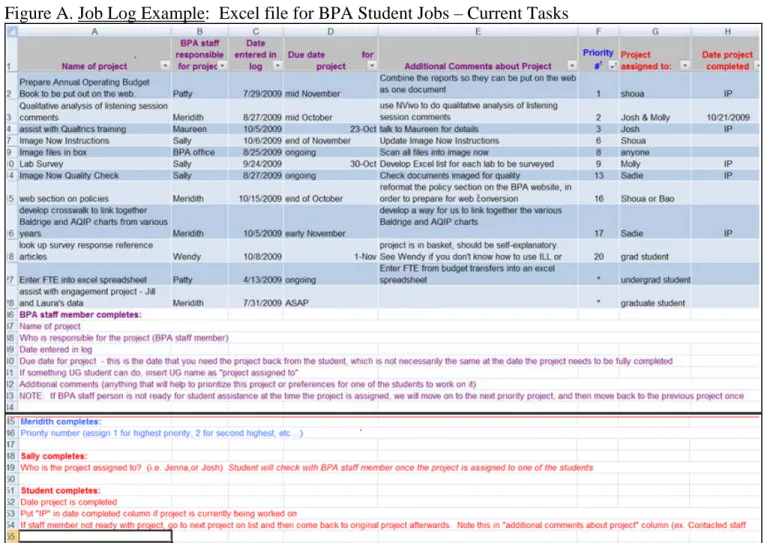
In the BPA student job log, the BPA director assigns the task priority and the BPA student supervisor assigns the task to a particular student worker. Priority is based on the date that a project is due; the sooner the due date, the higher the priority on the project log. Once the priority of a job is established, the tasks required for a job are assigned based on the level of expertise needed. If a task can be completed by an undergraduate assistant the task is given to them. For more complex tasks, graduate assistants are assigned based on their level of expertise. If the project manager is not yet ready for the student to begin working on the task, a “*” is
entered into the job priority (see Figure A). The BPA director updates the log every morning, and resorts the tasks based on priority so that high priority tasks show up at the top of the job log. Step 3 – Project Progress
Student Workers: The process of accessing and using the logs for a student worker is slightly different than the experience of a BPA staff member. The student workers are not in charge of organizing or prioritizing the tasks on the job logs. The logs are used by the BPA student workers as a tool that informs them of their tasks and when the tasks must be completed. The logs are also useful for the staff to see when student workers have finished an assigned project. When a student worker arrives at the BPA, the first thing they are required to do is to check the student job log. The log informs the student worker what tasks they have to complete and how long they have to complete the tasks. Once a student worker establishes the task they should start based on the assigned priority, the student meets with the appropriate BPA project manager. The project manager provides the necessary information and directions for the completion of the assigned tasks. When the student portion of the project is completed, the student worker notifies the project manager and marks the task as complete on the student job log. After the task is marked as complete on the job log, the BPA director files the task in a job completion tab on the log. See student job log example in Figure A.
Figure A. Job Log Example: Excel file for BPA Student Jobs – Current Tasks
BPA Project Manager: The project manager accesses and completes the appropriate IR job log as needed. The IR job log is similar in structure to the student job log in Figure A, with the exception that IR team project priorities are based only on due date. After a project is completed, the project manager moves it into the appropriate completed projects tab. Step 4: Updating Product and Process.
The project logs are fluid documents, updated daily or as needed. The BPA director and IR staff meet bi-weekly to discuss the current job load – both staff and student – and make the needed adjustments to the logs. These meetings are also used to discuss process improvements. Student input into the log tasks and the log process are solicited informally when students and
project managers meet to discuss the projects, and are formally solicited at meetings held twice a semester with the student supervisor and at an end-of-the-year meeting held with the BPA director.
Step 5: Tracking Job Load
The completed tasks are saved in separate worksheet tabs and used to catalog and analyze the amount of projects the BPA processes each fiscal year. For logs created using other software, similar tracking methods are used to tabulate the number of requested and completed projects.
Benefits
There have been clear benefits to the BPA department as a whole, the permanent staff as well as for the students involved. They include:
• In Fiscal Year 2007 the BPA department completed 217 projects. From 2007 to 2009 after instigating the interactive job logs, 376 projects were completed; with a 75% increase of work accomplished.
• In addition to learning essential job skills, Grad students were able to take more responsibility and work independently, thanks to the fluidity of the job logs.
• With fewer oversight responsibilities for students, permanent staff was able to focus efforts on other tasks. One staff member reported: “I have a tendency to internalize tasks and processes, especially those that have become routine in nature. Using the job logs for the students has taught me to sit down with a project at its beginning and methodically work my way through the project task by task with a definite timeline, determining what tasks I can complete and what tasks can be passed along to the students. This has resulted in better workflow for me, enabling me to complete more projects on time with less stress. The work that I put in on the front end to plan the project in detail and write out directions in detail definitely pays off for me throughout the project. I feel far more confident about being away from the office because the tasks are set up to continue in my absence.”
• The job logs help create an atmosphere of transparency: they are accessible by anyone in the office so that the entire office knows where projects are and what else needs to be done and can adjust the flow as needed.
• The job logs cost the department no money: no tech support, no software, and no extra personnel. In fact, we saved approximately $73,000.
Retrospect
When duplicating this best practice, consider these potential pitfalls before embarking on your project:
• Have a process in place to inform the staff about logs and log policy. The logs only work if individuals use them correctly and update them in a timely manner.
• Have the logs in location where they are accessible for everyone in the office, such as a shared network drive.
• Understand that the logs are an iterative process. Improvements and changes are to be expected as the most useful logs are developed through suggestions and meetings within the organization. Have a process in place to regularly solicit feedback from all levels of users.
• Different individuals have their own interpretations for assigning due dates. For example, while some believe that posting October for a due date means the project is due October 1st, others construe that as meaning due by the end of October. For logs to be successful, standardization of log structure and practices, as well as staff and student work