Free Download
Download the latest issue of CW Europe - September 2013 Is your house in order?
Download Email Address
By submitting you agree to receive email from TechTarget and its partners. If you reside outside of the United States, you consent to having your personal data transferred to and processed in the United States. Privacy
You are logged in as: George Pluimakers
Edit your Profile Logout
RSS
Part of the TechTarget network SearchConsumerization.com
News
Latest Headlines
Notebooks or tablets: Which to choose for mobile workers
IT admins prepared for Apple's new iPhone 5 deluge Microsoft, Nokia update tablets but IT mobile device plans exclude both View All News Premium
Editorial
E-Books
Setting cloud service usage policies for employees Corporate data in the consumer cloud
Data loss prevention strategies in the cloud era View all E-Books
E-Zines
Modern Infrastructure View All E-Zines
E-Handbooks
Getting control of cloud-based applications State of the art endpoint management Solving the challenges of BYOD View All E-Handbooks
Consumerization Topics
Topics
Enterprise mobility management
Mobile desktop virtualization, Mobile device management, Managing Windows desktops, Software licensing,
Managing Windows mobile devices, Mobile apps and MAM
Cloud and social software
Cloud apps, Cloud storage, Social collaboration
Securing mobile devices and data
Mobile client security, Data protection and authentication, Mobile policy enforcement, Network Access Control, Network Security
Smartphone and tablet hardware
iPad and iPhone, Android devices, Windows mobile devices , Mobile service providers , BlackBerry , Mobile phone reviews , Mobile device comparisons, Tablet reviews
Mobile device OSes and apps
iOS, Emerging consumer technology, Android and Chrome OS, Windows and Windows Phone, Mobile application development, BlackBerry OS, email and management
Hot Topics
Consumerization Strategies for the CIO iPad and iPhone
Mobile device management Data protection and authentication Tutorials
Advice & Tutorials
Consumer cloud storage and collaboration guide Securing data: An Apple and Android security guide
Consumerization and the cloud: How mobile cloud apps are changing IT
BlackBerry World 2012 conference coverage Consumerization Nation podcast archive Guide to mobile device management software How to get a BYOPC program up and running Guide to enterprise mobile management FAQs Enterprise mobile device management software guide
Mastering the BYOD trend: The ultimate guide Enterprise mobile application management guide Cloud file sharing and business services guide Guide to consumer mobile operating system features
A guide to VMware's end-user computing products
Desktop virtualization challenges in the BYOD era
Emerging tech trends and enterprise IT’s future A guide to mobile software licensing issues How mobile device policies make IT's job easier Comparing tablets, smartphones and mobile OSes Guide to consumer and enterprise mobile apps An IT manager's guide to BYOD benefits and risks
Protecting data: An IT guide
BlackBerry Live 2013 conference coverage Guide to Samsung devices, products and services
Technology Dictionary
Find definitions and links to technical resources Powered by WhatIs.com
Expert Advice
Tips
Pros and cons of mobile desktop virtualization Are MDM tools as secure as you think? A technical deep dive on iOS app distribution
Ask a Question
Get help from our technical community Powered By ITKnowledgeExchange.com Vendor
Content
Research Library
White Papers Business Webcasts Downloads Powered by Bitpipe.com Blogs
Blogs
Taking Back IT ConsumerizeIT Brighthand Bytes Powered By
ITKnowledgeExchange.com Product
Reviews
Product Reviews
Smartphone reviews
Tablet PC reviews Virtualization
Events
BriForum
Seminars
Desktop Virtualization Consumerization of IT
Search this site SEARCH Search
Home Topics
Enterprise mobility management strategy Enterprise mobile device management
Fitting MDM products into your existing infrastructure Tip
Fitting MDM products into your existing infrastructure
Lisa Phifer E-Mail Print A AA AAA LinkedIn Facebook Twitter Share This RSS Reprints
As IT managers consider purchasing MDM technology, the choice should depend on workforce needs. Ultimately, these technologies must be deployed at the appropriate place within the corporate network to work with other systems that play critical roles in mobility.
Furthermore, IT processes must be adapted to administer mobile device management (MDM) and integrate with existing workflows. And for a successful integration, MDM should consider corporate policies.
Fitting MDM into your network
Part of the integration question hinges on how you choose to integrate MDM technologies with your environment. MDM software can be deployed in-house, on private or public cloud servers, or on multi-tenant servers operated by a Software as a Service (SaaS) provider. The method of deployment directly affects how MDM technology integrates into a corporate network.
MDM products deployed in-house are usually installed on an IT-managed server inside a so-called demilitarized zone (DMZ). This approach lets the enterprise firewall protect the MDM server from Internet-borne attacks. It also enables IT to narrowly define external access to specified services such as the self-help portals for registering devices or changing passwords.
Furthermore, DMZ deployment makes it easy for the MDM server to have tightly controlled and monitored access to necessary enterprise infrastructure, including directory services, certificate services, email services and more.
You can protect these inside-the-firewall services from Internet-based threats by giving the MDM server privileged access through carefully crafted firewall rules.
But when MDM products are deployed outside the corporate network, either hosted on cloud servers or operated by SaaS providers, you need to take a different approach to network integration.
For cloud-hosted servers, an authenticated, encrypted virtual private network (VPN) tunnel can give the externally hosted MDM product a virtual presence on the enterprise DMZ.
For SaaS-based MDM products, integration details vary for each product, but most boil down to deploying an integration ShareShare
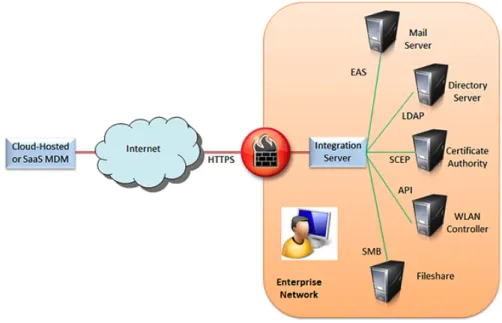
server inside the corporate network (see Figure 1).
Figure 1: This is how SaaS-based MAM software integrates with a corporate network.
For example, provider-supplied MDM integration software may connect via HTTPS to a SaaS-based MDM. With this approach, no enterprise firewall changes are required to permit inbound tunnels or MDM sessions, and IT has control over the integration server's security and integrity.
Integrating MDM with IT infrastructure
Figure 1 also illustrates several infrastructure services that MDM products may tap to manage mobile devices more effectively or to enable mobile worker access to enterprise applications and data.
In small deployments, infrastructure integration is often omitted for rapid activation and operational simplicity. However, as a deployment grows in user breadth and functional depth, infrastructure integration becomes increasingly important for scalability, efficiency and visibility.
For example, administrators can manually add individual usernames, passwords and permitted devices to an MDM product’s own database. For scalability, many MDM technologies can also add users and devices via batch file import.
But employee changes can easily create configuration challenges. Administrators must still make individual MDM configuration updates when users change positions, leave the company, or lose or purchase devices. Over time, this account maintenance grows expensive and error-prone.
But integration with an enterprise directory service can reduce IT costs while creating a more seamless mobile user experience. For example, an MDM product that has been integrated with your enterprise Active Directory (AD) service may simply check newly enrolled users against existing domain usernames and stored credentials.
With MDM-AD integration, users can enroll mobile devices by providing their usual login and password information. The MDM software can also make provisioning decisions based on AD attributes such as group affiliation.
If a user moves to a new organization, MDM software can auto-detect AD group changes, triggering device re-provisioning. If the user is deactivated in AD, this may automatically trigger MDM deactivation of all previously provisioned devices belonging to that user.
Directory service is just one common infrastructure service integration. In addition, enterprises should consider directory integration when selecting MDM products, looking for standard protocols such as Lightweight Directory Access Protocol and
Remote Authentication Dial-In User Service that enable off-the-shelf integration.
When evaluating integration capabilities, scrutinize how a given MDM product uses directory accounts and attributes. An MDM technology that performs one-time username and password import from Active Directory offers far less integration than one that tracks AD updates and applies them to policies.
Integrating MDM tools with enterprise data and applications
Other IT infrastructure services that can often be integrated with MDM products include the following.
Certificate authority. Many MDM offerings can issue digital certificates to newly enrolled devices or provision
VPN/wireless LAN (WLAN) settings that use trusted certificates. But enterprises with their own public-key infrastructure
should look for a system that lets a separate certificate authority sign and maintain trusted certificates.
Network management. Some MDM products deliver device alerts or attributes to third-party network management systems such as IBM Tivoli or HP OpenView. This integration can help IT gain a more holistic view of network-connected devices. MDM combined with network management can, for example, enable correlation of mobile alerts with equipment or application server root-cause failures.
Trouble ticketing. A small but growing number of MDM products have been integrated with third-party trouble-ticketing products such as Remedy. This integration can make it easier to diagnose and resolve problems.
Reporting. Many MDM products can generate on-demand or scheduled canned and custom reports. In addition, report data can be exported for use by third-party business intelligence systems such as Crystal Reports.
Homogeneous MDM. Some heterogeneous MDM products provide "cut through" integration with platform-specific offerings. This kind of integration helps IT manage all mobile devices through a single view.
In addition to off-the-shelf integration, enterprise MDM products have started to offer proprietary application programming interfaces (APIs) that customers can use to share data and events with any third-party or custom business system.
For example, some WLAN and network access control products use APIs to interact with MDM and provision newly connected mobile devices under bring-your-own-device programs.
More News and Tutorials Articles
Advanced mobile device management software capabilities to consider Master Data Management (MDM) Platform Product Directory Basic features and capabilities to look for in MDM tools
Identity access management boldly goes where Active Directory has not Will cloud computing applications become the golden record for customer data?
What is System Center Mobile Device Manager? Shore up your organisation’s fleet with the right MDM Integrating MDM tools with enterprise data and applications MDM brings SOA and BPM closer together
Data management guides & tutorials: Basics and beyond
Related glossary terms
Terms for Whatis.com - the technology online dictionary Android Factory Reset
Tweet
Tweet 4 ShareShare 0 0 2
Samsung for Enterprise (SAFE) AT&T Toggle
BlackBerry Balance endpoint device
configuration profile (CP) bring your own network (BYON) Google Apps for Business
dual persona (mobile device management) battery life
This was first published in July 2013 Join the conversationComment
Share
Comments
There are currently no responses.
Be the first to tell us what you think.
1.
Results
Contribute to the conversation
All fields are required. Comments will appear at the bottom of the article.
Comment: 1.
2. Submit
Disclaimer: Our Tips Exchange is a forum for you to share technical advice and expertise with your peers and to learn from other enterprise IT professionals. TechTarget provides the infrastructure to facilitate this sharing of information. However, we cannot guarantee the accuracy or validity of the material submitted. You agree that your use of the Ask The Expert services and your reliance on any questions, answers, information or other materials received through this Web site is at your own risk.
Back to top
You May Also Be Interested In... More Background
What can you use Microsoft Exchange ActiveSync for? IT pros to makers of EMM tools: Time to pony up
More Details
Are MDM tools as secure as you think?
Integrating MDM tools with enterprise data and applications Like 1
News
Latest Headlines
Notebooks or tablets: Which to choose for mobile workers
IT admins prepared for Apple's new iPhone 5 deluge Microsoft, Nokia update tablets but IT mobile device plans exclude both View All News Premium
Editorial
E-Books
Setting cloud service usage policies for employees Corporate data in the consumer cloud
Data loss prevention strategies in the cloud era View all E-Books
E-Zines
Modern Infrastructure View All E-Zines
E-Handbooks
Getting control of cloud-based applications State of the art endpoint management Solving the challenges of BYOD View All E-Handbooks
Consumerization Topics
Topics
Enterprise mobility management
Mobile desktop virtualization, Mobile device management, Managing Windows desktops, Software licensing,
Managing Windows mobile devices, Mobile apps and MAM
Cloud and social software
Cloud apps, Cloud storage, Social collaboration
Securing mobile devices and data
Mobile client security, Data protection and authentication, Mobile policy enforcement, Network Access Control, Network Security
Smartphone and tablet hardware
iPad and iPhone, Android devices, Windows mobile devices , Mobile service providers , BlackBerry , Mobile phone reviews , Mobile device comparisons, Tablet reviews
Mobile device OSes and apps
iOS, Emerging consumer technology, Android and Chrome OS, Windows and Windows Phone, Mobile application development, BlackBerry OS, email and management
Hot Topics
Consumerization Strategies for the CIO iPad and iPhone
Mobile device management Data protection and authentication Tutorials
Advice & Tutorials
Consumer cloud storage and collaboration guide Securing data: An Apple and Android security guide
Consumerization and the cloud: How mobile cloud apps are changing IT
BlackBerry World 2012 conference coverage Consumerization Nation podcast archive Guide to mobile device management software How to get a BYOPC program up and running Guide to enterprise mobile management FAQs Enterprise mobile device management software guide
Mastering the BYOD trend: The ultimate guide Enterprise mobile application management guide Cloud file sharing and business services guide Guide to consumer mobile operating system features
A guide to VMware's end-user computing products
Desktop virtualization challenges in the BYOD era
Emerging tech trends and enterprise IT’s future A guide to mobile software licensing issues How mobile device policies make IT's job easier Comparing tablets, smartphones and mobile OSes Guide to consumer and enterprise mobile apps An IT manager's guide to BYOD benefits and risks
Protecting data: An IT guide
BlackBerry Live 2013 conference coverage Guide to Samsung devices, products and services
Technology Dictionary
Find definitions and links to technical resources Powered by WhatIs.com
Expert Advice
Tips
Pros and cons of mobile desktop virtualization Are MDM tools as secure as you think? A technical deep dive on iOS app distribution
Ask a Question
Powered By ITKnowledgeExchange.com Vendor
Content
Research Library
White Papers Business Webcasts Downloads Powered by Bitpipe.com Blogs
Blogs
Taking Back IT ConsumerizeIT Brighthand Bytes Powered By
ITKnowledgeExchange.com Product
Reviews
Product Reviews
Smartphone reviews
Tablet PC reviews Virtualization
Events
Conferences
BriForum
Seminars
Desktop Virtualization Consumerization of IT
Search this site SEARCH Search
More from Related TechTarget Sites
Enterprise Desktop CIO
Virtual Desktop Networking VMware Security CRM
Security as a Service poses risks when outsourcing desktop protection
Outsourcing desktop security can save money and rely on centralized expertise, but Security as a Service carries its own risks.
Top 10 reasons why the enterprise desktop isn't dead yet
While the PC sales decline is matched by rising mobile device usage, it's too soon to claim that the enterprise desktop is dead, says our columnist.
No touchscreen, no problem -- using a keyboard for Windows 8 interface
The Windows 8 interface may seem daunting to those without touchscreens. However, it's possible to work around gestures using some keyboard commands.
CIO
Equifax data guru on making real-time data analysis a reality
Equifax data expert Michael Koukounas explains how real-time data turns into real dollars and how he takes the complexity out of complex analysis.
CIOs get some love from Cupertino with Apple iOS 7
In this week's Searchlight: For CIOs, Apple iOS 7 was the important news out of Cupertino. Plus Google's new encryption, leadership tips and more.
As a virtualization plan expands, competitive advantages multiply
In part two of this SearchCIO Q&A with VMware User Group President Mariano Maluf, he discusses 100% virtualization and how it enables innovation.
Virtual Desktop
When virtualizing applications is a good idea -- and when it's not
Virtualizing applications can bring a lot of benefits, but take a step back and assess your environment and delivery options before going for it.
Usability and speed top VDI users' concerns
The most common question from VDI users to the help desk is: Why isn't my desktop running as fast as I want?
Using Parallels Access to get Mac remote desktops on iOS
The Parallels Access tool for accessing remote desktops on iOS devices may be perfect for some use cases, but watch out for employees' admin rights.
Networking
Networking blogs: Dell takes a stab at PC security software
In this week's networking blogs, learn about Dell's PC security software and whether it has a chance of being competitive in the market.
$180 million Extreme-Enterasys merger combines complementary vendors
Extreme Networks' acquisition of Enterasys Networks combines an end-to-end vendor with data center and campus-networking assets.
Cisco services business adds a security practice
The Cisco services business created a Services Security Practice and installed former Boeing security executive Bryan Palma to lead the venture.
VMware
Going virtual with business-critical applications on VMware vSphere
The decision to virtualize business-critical applications has gotten easier now that vSphere is equipped with more features to facilitate the process.
MicroStrategy credits vCloud Suite with putting its PaaS on the map
Business intelligence provider MicroStrategy was able to reduce its physical server footprint by more than 30 racks using the vCloud Suite.
Ways to handle optical disks through vSphere client settings
Connecting an optical disk to a virtual machine in order to access an installation image requires adjustments via the vSphere client settings.
Security
A decade later: SOX program management best practices
After 11 years of Sarbanes-Oxley and other mandates, enterprises have finally embraced holistic compliance program management as a best practice.
Using a next-gen firewall to determine application access policies
Learn how next-gen firewalls offer improved application awareness and granularity to manage or block particular application features.
Patch Tuesday September 2013: Critical bulletins for Office, SharePoint, IE
The September 2013 Patch Tuesday releases included 13 bulletins from Microsoft, four deemed critical.
CRM
Potential pitfalls of small business CRM software
When a small business decides it needs CRM software, what are the potential pitfalls?
The secrets of social media for business, revealed
Many companies want to use social media in business but don't know how where to start. Here are some keys to getting on the right path.
Help yourself: Self-service CRM questions answered
Is self-service CRM the opposite of customer service? Read this Q&A with Amanda Kleha to learn why some think it gets a bad rap.
All Rights Reserved,Copyright 2011 - 2013, TechTarget
About Us Contact Us Site Index Privacy policy Advertisers Business partners Events
Media kit
TechTarget Corporate site Reprints
Archive Site map