
PKZIP
®
/SecureZIP
®
for z/OS
®
System Administrator’s Guide
SZZSA- V111R0002
PKWARE, Inc.
648 N Plankinton Avenue, Suite 220 Milwaukee, WI 53203
Main office: 888-4PKWARE (888-475-9273)
Sales: 937-847-2374 (888-4PKWARE / 888-475-9273) Sales - E-Mail: [email protected]
Support: 937-847-2687
Support - http://www.pkware.com/support/mainframe
Web Si
11.1 Edition (2009)
SecureZIP for z/OS, PKZIP for z/OS, SecureZIP for i5/OS®, PKZIP for i5/OS, SecureZIP for UNIX, and SecureZIP for Windows are just a few of the members of the PKWARE product family. PKWARE Inc. would like to thank all the individuals and companies—including our customers, resellers, distributors, and technology partners—who have helped make PKZIP the industry standard for trusted ZIP solutions. SecureZIP enables our customers to efficiently and securely transmit and store information across systems of all sizes, ranging from desktops to mainframes.
This edition applies to the following PKWARE Inc. licensed programs:
PKZIP for z/OS (Version 11, Release 1, 2009) SecureZIP for z/OS (Version 11, Release 1, 2009)
SecureZIP Partner for z/OS (Version 11, Release 1, 2009)
PKWARE, PKZIP, and SecureZIP are registered trademarks of PKWARE, Inc. z/OS, i5/OS, zSeries, and iSeries are registered trademarks of IBM Corporation. Other product names mentioned in this manual may be trademarks or registered trademarks of their respective companies and are hereby
acknowledged.
Any reference to licensed programs or other material, belonging to any company, is not intended to state or imply that such programs or material are available or may be used. The copyright in this work is owned by PKWARE Inc., and the document is issued in confidence for the purpose only for which it is supplied. It must not be reproduced in whole or in part or used for tendering purposes except under an agreement or with the consent in writing of PKWARE Inc., and then only on condition that this notice is included in any such reproduction. No information as to the contents or subject matter of this document or any part thereof either directly or indirectly arising there from shall be given or communicated in any manner whatsoever to a third party being an individual firm or company or any employee thereof without the prior consent in writing of PKWARE Inc.
Copyright © 1989 - 2010 PKWARE Inc. All rights reserved. MVS/QuickRef Copyright © 1989-2010, Chicago-Soft, Ltd.
Contents
PREFACE... 1
Notices ...1
About This Manual...1
Conventions Used in This Manual ...1
Related Publications ...2
Related Information on the Internet...4
User Help and Contact Information ...4
1 SYSTEM PLANNING AND ADMINISTRATION... 5
Planning for Administration Activities ...5
System Requirements ...7
Operating System ...7
Region Size and Storage ...8
Static Disk Space ...9
Tape Device Considerations...9
UserID OMVS Segment ...10
SecureZIP ICSF Operations ...10
z/OS UNIX File System (HFS) ...15
Migration Considerations ...17
Release History and Setting Changes ...19
Distinctive Features of PKZIP and SecureZIP for z/OS ...20
Distinctive Features of SecureZIP for z/OS...21
PKWARE PartnerLink: SecureZIP Partner for z/OS ...21
Encryption ...22
Authentication...22
Data Integrity...22
Digital Signature Validation...23
Digital Signature Source Validation ...23
Public-Key Infrastructure (PKI) ...24
x.509 ...24
Digital Certificates ...25
Certificate Authority (CA) ...25
Private Key...25
Public Key ...25
Certificate Authority and Root Certificates ...26
Setting Up Stores for Digital Certificates on z/OS ...26
Setting Up the Certificate Stores...26
Updating the Certificate Stores ...28
Types of Encryption Algorithms ...28
Standard...28
FIPS 46-3, Data Encryption Standard (DES)...29
Triple DES Algorithm (3DES)...29
Advanced Encryption Standard (AES)...29
Comparison of the 3DES and AES Algorithms...29
RC4 ...30
Key Management ...31
Passwords and PINS ...31
Recipient Based Encryption ...31
Random Number Generation...32
Integrity of Public and Private Keys ...32
Data Encryption ...32
2 INSTALLATION, LICENSING, AND CONFIGURATION ... 34
Installation Overview...34
Type of Media Distribution for Installation...34
Installation from Downloaded File or CD ...35
Non-SMP/E Installation ...35
SMP/E Installation...37
Installing from Tape...41
Tailoring Site-Specific Changes to the Defaults Module...42
Tailoring Site-Locking Commands ...43
Protecting Files with the SAFETYEX Module ...43
Tailoring for Filename and Data Character Set Conversions ...44
SMS Dataclass Considerations...44
Note for users of PKZIP for MVS and PKZIP for zSeries 5.6...45
Considerations when Exporting Private Keys using RACDCERT ...45
Evaluation Activity Log ...45
Activity Log Setup and Configuration...46
Licensing Requirements ...48
Licensed Types ...49
Evaluation Period ...53
Release-Dependent Licensing...53
Current Use License ...53
Show System Information ...55
Conditional Use...56
Initializing the License ...56
PKZIP and Full-Featured SecureZIP License Activation ...57
SecureZIP Partner License Activation ...57
Reporting the PKZIP/SecureZIP for z/OS License ...58
PKZIP/SecureZIP for z/OS Grace Period ...59
Running a Disaster Recovery Test ...59
Activating the ISPF Interface ...60
ISPF Main Menu ...61
Running PKZIP/SecureZIP with Library Lookaside (LLA and LNKLST) ...61
Verifying the Installation ...62
Run-time Performance Considerations...62
Main Tuning Ingredients ...63
Initialization – JOBLIB/STEPLIB Elimination, LLA, VLF and/or LPA ...64
Initialization – SYSIN Command Records via Partitioned Members ...66
Initialization – PARMLIB Commands via Partitioned Members ...67
Enable SMF Recording...67
SMF Activation ...68
Install and Activate the PKWSVC Module ...68
Select a Unique SMF Record Type ...71
Activate SVC and SMF Settings in the SecureZIP Defaults Module ...72
Default Module Settings Affecting SMF Recording...74
3 SECURITY ADMINISTRATION OVERVIEW ... 77
Accessing Certificates ...77
Public Key Certificate ...77
Private Key Certificates...78
Certificate Authority and Root Certificates ...78
Configuration Profile ...78
Contents of the Configuration Profile ...78
Data Base (DB) Profile (Local Certificate Store)...79
LDAP Profile (Networked Certificate Store) ...79
Recipient Searches ...80
Local Certificate Stores...81
Access x.509 Public and Private Key Certificates ...81
Authentication and Certificate Validation Policies...82
Other Profile Commands ...86
Passphrase Registration...87
Accessing the Passphrase Registration Dialogs ...87
4 CERTIFICATE STORE MANAGEMENT... 89
SecureZIP Certificate Store Administration and Configuration...89
Local Certificate Store Administration ...90
SecureZIP Local Certificate Store...91
Create a New Local Certificate Store DB ...92
Certificate Validation Options...93
Generated JCL to Build the Initial Certificate Store ...94
View Data Base Certificate Entries ...95
List Certificate Entries ...100
Add a Certificate to the Local Store ...102
Add a New Certificate to the CA Store...104
Add a New Trusted Root Certificate to the Root Store ...104
Add a New Certificate via Batch Processing ...106
Register Security Server Certificates in the Key Store Index ...106
Delete a Certificate from the Local Store ...109
Synchronize the Index for the Local Certificate Store...111
Generated JCL for Synchronization...113
CA, Root, and CRL Verification ...113
Report DB Statistics ...114
Edit Active DB Profile ...116
Backup and Restore Process ...120
Directory Certificate Store Configuration - LDAP ...122
Create/Test LDAP Profile Statements ...123
Edit existing LDAP profile ...123
Create/Test LDAP Link ...123
Create New LDAP Profile Settings ...124
Load Existing LDAP Profile...125
Testing the LDAP Connection...125
Runtime Configuration...128
Zip/Unzip Runtime Configuration Panel...128
SecureZIP Runtime Configuration Panel ...129
SecureZIP Runtime Configuration Panel Undefined ...129
SecureZIP Runtime Configuration Panel with DB Profile Defined...130
SecureZIP Runtime Configuration Panel with Private Certificate Location ...130
x.509 Certificate Utilities ...131
The Options...131
Certificate Revocation Lists ...137
Filename Encryption ...141
How SecureZIP for z/OS Encrypts File Names ...141
When SecureZIP for z/OS Encrypts File Names ...141
Encrypting File Names When You Update an Archive ...141
Opening and Viewing an Archive that Has Encrypted File Names...142
Input required to View Recipients in a Filename Encrypted Archive ...142
View of Recipients in a Filename Encrypted Archive ...142
View Detail of an Archive that Has Encrypted File Names ...143
Decrypting a Filename Encrypted Archive...144
5 SECURITY QUESTIONS AND SOLUTIONS ... 146
Which encryption settings should be chosen?...146
How is ICSF hardware acceleration activated? ...147
What is the difference between an Encryption Method and an algorithm? ...147
How many recipients can be specified? ...147
What virtual storage is required for certificate-based encryption? ...148
How does ENCRYPTION_METHOD affect certificate-based encryption? ...148
How does SecureZIP activate MASTER_RECIPIENT contingency keys? ...148
How does MASTER_RECIPIENT affect activation? ...149
How do I copy a local certificate store? ...149
How do I remove a local certificate store?...150
How can the contents of an x.509 certificate file be determined? ...150
6 PKWARE PARTNERLINK: SECUREZIP PARTNER ... 152
About SecureZIP Partner for z/OS ...152
If You Are a Sponsor: Sign the Central Directory ...153
Terms and Acronyms Used in This Chapter...153
PKWARE PartnerLink Program: Overview...153
Decrypting and Extracting Sponsor Data (Read Mode)...154
Creating an Archive for a Sponsor...154
Getting Started ...154
Co-existence with Other PKWARE Products...155
Recommendations ...155
PartnerLink Certificate Store Administration and Configuration ...156
Choosing a Configuration Model...156
Installing a Sponsor Distribution Package ...158
Updating a Sponsor Distribution Package ...160
Removing a Sponsor Distribution Package ...160
Providing a Sponsor Configuration for Execution ...160
7 CRYPTOGRAPHIC FACILITY UTILITY - PKCRYUTL ... 163
Cryptographic Facility Categories ...163
Assessing a System’s Cryptographic Capabilities with PKCRYUTL...163
PKCRYUTL Execution ...164
PKCRYUTL Reporting ...164
PKCRYUTL Sample Report...164
PKCRYUTL Interpretation...165
8 SMF RECORD FORMATS ... 173
GLOSSARY... 187
Preface
SecureZIP for z/OS, like PKZIP for z/OS, is a member of the PKWAREfamily of products providing high-performance data compression and data protection across multiple operating systems and platforms.
PKZIP for z/OS provides powerful, easy-to-use data compression on the mainframe. PKZIP for z/OS Enterprise Edition additionally includes support for password-based decryption of
encrypted files, powered by trusted RSA® BSAFE. Files created by PKZIP for z/OS use the
widely-adopted ZIP format and can be accessed on all major platforms throughout the enterprise—from mainframe to PC.
SecureZIP for z/OS provides powerful, easy-to-use data compression and data protection on
the mainframe. SecureZIP for z/OS protects data with digital signatures and several encryption choices. Both trusted RSA BSAFE encryption or IBM ICSF are offered, either password- or certificate-based, and with key lengths of up to 256 bits. Like PKZIP for z/OS,
SecureZIP for z/OS uses the widely-adopted ZIP format and creates files that can be
accessed on all major platforms throughout the enterprise.
Notices
Licensing requirements have changed for this release. See chapter 2 for current information.
About This Manual
This manual provides information to help a system administrator install and use PKZIP for
z/OS or SecureZIP for z/OS in an operational environment on supported IBM releases of
z/OS. It is assumed that anyone using this manual has a good understanding of JCL and dataset processing.
Conventions Used in This Manual
Throughout this manual, the following conventions are used:
SecureZIPz (bold-italicized) is used as a shorthand to refer to both SecureZIP for
z/OS and PKZIP for z/OS. Statements made about SecureZIPz apply to both
products. Information given specifically for SecureZIP for z/OS or PKZIP for z/OS applies specifically to that product.
The terms ZIP and UNZIP are used to refer to the respective overall processes of operating on an archive.
The term PKZIP is often used generically to refer to any of the underlying executable programs that process archives in PKZIP for z/OS and SecureZIP for z/OS. These include programs PKZIP and SECZIP, to ZIP archives, and programs PKUNZIP and SECUNZIP, to UNZIP them. PKZIP is also more narrowly used to refer to either the PKZIP or SECZIP program, and PKUNZIP is often used to refer to either the PKUNZIP or SECUNZIP program.
The use of the Courier font indicates text that may be found in job control language
(JCL), parameter controls, or printed output.
The use of italics in a command line indicates a value that must be substituted by the user, for example, a data set name. Italics are also used in body text to quote
command names and so forth or to indicate the title of a manual or other publication.
The use of <angle brackets> in a command definition indicates a mandatory parameter.
The use of [square brackets] in a command definition indicates an optional parameter.
A vertical bar (|) in a command definition is used to separate mutually exclusive parameter options or modifiers.
When sample JCL is shown, or references to the SecureZIPz libraries are made, the high-level
qualifier PKWARE.MVS may be used generically. The high-level qualifier specifically for the packaged product SecureZIP for z/OS is SECZIP.MVS. The high-level qualifier specifically for the packaged product PKZIP for z/OS is PKZIP.MVS. Note that the actual high-level
qualifiers installed on your system may be different.
Program examples may show either SecureZIP for z/OS or PKZIP for z/OS constructs, for backward compatibility. In general, examples apply to both programs unless the examples appear in sections of the manual that relate exclusively to SecureZIP features. Such sections are marked like this:
SecureZIP only
Related Publications
IBM Manuals relating to the SecureZIPz products include:
System Codes - Documents the completion codes issued by the operating system
when it terminates a task or an address space. Describes the wait state codes placed in the program status word (PSW) when the system begins a wait state. Describes the causes of loops.
System Messages - Documents the messages issued by the z/OS operating system.
The descriptions explain why the component issued the message, give the actions of the operating system, and suggest responses by the applications programmer, system programmer, and/or operator.
JES2 Messages - Documents the messages issued by the JES2 subsystem. The
operating system, and suggest responses by the applications programmer, system programmer, and/or operator.
JCL User's Guide - Describes the job control tasks needed to enter jobs into the
operating system, control the system's processing of jobs, and request the resources needed to run jobs. To perform the tasks, programmers code job control statements. The user's guide assists in deciding how to perform job control tasks.
JCL Reference - Describes the job control tasks needed to enter jobs into the
operating system, control the system's processing of jobs, and request the resources needed to run jobs. To perform the tasks, programmers code job control statements. The reference guide; is designed to be used while coding the statements.
Access Methods Services - Documents the functions that are available with Virtual
Storage Access Method (VSAM) and describes the IDCAMS commands that can be issued to control VSAM datasets.
DFSMS Using Data Sets – Reference materials regarding z/OS file systems and their
usage.
DFSMS Macro Instructions for Data Sets – Reference material regarding I/O
handling and diagnostics.
ICSF Application Programmers Guide – Describes how to use the callable services
provided by the Integrated Cryptographic Service facility.
ICSF Administrators Guide – Describes how to manage cryptographic keys by using
the z/OS Integrated Cryptographic Service facility.
ICSF Overview – Contains overview and planning information for the z/OS Integrated
Cryptographic Service facility.
ISPF bookshelf – Reference materials regarding run-time environments supporting,
and used by SecureZIPz.
Language Environment bookshelf – Reference materials regarding run-time
environments supporting, and used by SecureZIPz.
TSO/E Command Reference - Documents the functions of the TRANSMIT and
RECEIVE Command Facility used for the distribution and allocation of SecureZIPz
installation libraries.
TSO/E Rexx Reference – Reference materials regarding run-time environments
supporting, and used by SecureZIPz.
z/OS XL C/C++ bookshelf – Reference materials regarding run-time environments
supporting, and used by SecureZIPz.
z/OS Unix System Services User’s Guide – Provides information that is
fundamental to working with UNIX File Systems (also known as the hierarchical file
system).
MVS/QuickRef 6.3 (Chicago-Soft, Ltd.) - Includes both messages and command
Related Information on the Internet
PKWARE, Inc.
FTP site
Product manuals -
Product downloads -
o PKZIP for z/OS -
o SecureZIP for z/OS -
o SecureZIP Partner for z/OS -
National Institutes of Standards and Technology
Computer Security Resource Center -
Information on the AES development
Information on Key Management -
RSA BSAFE® Content Library –
User Help and Contact Information
For licensing, please contact Sales at 937-847-2374 (888-4PKWARE / 888-475-9273) or email
.
For technical assistance, contact Technical Support at 937-847-2687 or visit the support web
1
System Planning and Administration
SecureZIPz contains two main programs: PKZIP (or SECZIP in SecureZIP) and PKUNZIP (or
SECUNZIP in SecureZIP). The ZIP program is used to compress or store files into a ZIP format archive, while the UNZIP program is used to extract data compressed into ZIP-compatible archives. Processing control is available through the use of customized option modules, shared command lists, and individual job inputs. In addition to file selection, features such as
compression levels and performance selections can be specified.
To guarantee data integrity, a 32-bit cyclic redundancy check (CRC) is a standard feature. A ZIP archive is platform-independent; therefore, data compressed (zipped) on one platform, such as UNIX or Windows, can be decompressed (unzipped) on another platform, such as z/OS, by using a compatible version of the UNZIP program.
With its advanced password and certificate-based security features, SecureZIP for z/OS offers multiple methods of encryption and is an excellent choice for securing data and data transfers. However, it is important that system administrators carefully plan in advance the design, development, and testing tasks required to successfully integrate SecureZIP for
z/OS as a secure solution into a production environment.
The following sections chart the production and pre-production planning activities for
administration and discuss SecureZIPz model environments and important concepts for the
systems administrator. They also describe encryption, types of algorithms in use, information about specific mandates requiring the use of secure data, and how SecureZIPz will secure
that data.
Planning for Administration Activities
The SecureZIPz software is often installed and maintained by a single party within an
installation’s system programming staff. However, there are several system interface
components that may require attention from other departments relating to the administration of SecureZIP operation.
Use the following installation and feature configuration checklist to help plan out the installation and operational use of SecureZIPz.
Feature or Activity Resources
Base software installation; includes: Licensing
Tailoring of the installation defaults module Translate table selection
SAFETYEX module tailoring Migration Considerations Activating the TSO ISPF Interface Initial Tuning
Optional LLA, VLF and LPA
Ref. chapter 2
Required: System Programmer
Optional: Data transfer architect for Translate Tables Optional: Storage administrator for related defaults module settings
Optional: Security policy manager for related defaults module settings.
Required: Security Administrator to define data set protection for supporting software libraries. Configure Cryptographic Services for data Encryption,
Digital Signing and Authentication with SecureZIP for z/OS
Use of ICSF Cryptographic Facilities CLASS(CSFSERV) service profiles
Ref. chapter 1, “SecureZIP ICSF Operations”
Ref. SecureZIP Security Administrator’s Guide; “ICSF Service Controls”
Required: ICSF Administrator, Security Server Administrator
Define the SecureZIP for z/OS Key Store Index and Certificate Store
Ref. chapter 1, “Setting Up Stores for Digital Certificates on z/OS”
Administer Digital Certificates to the SecureZIP for z/OS
Key Store for use in RECIPIENT, SIGN_FILES, SIGN_ARCHIVE or AUTHCHK processing.
DATASET update access to SecureZIP Key Store components
Ref. chapter 1, “Public-Key Infrastructure and Digital Certificates”
Ref. chapter 4 Administer Digital Certificates to the Security Server for
use in RECIPIENT, SIGN_FILES, SIGN_ARCHIVE or AUTHCHK processing with SecureZIP for z/OS.
Certificate and Key Ring controls
Required: Security Server Administrator, SecureZIP Key Administrator
Ref. SecureZIP Security Administrator’s Guide
Ref. IBM z/OS Security Server RACF Administration Ref. IBM z/OS Security Server RACF Command
Reference (RACDCERT)
Ref. IBM z/OS Security Server Callable Services
(R_datalib) Administer Passphrase Registration to the ICSF CKDS for
use with SecureZIP for z/OS.
CLASS(CSFSERV,CSFKEYS) service profiles
Required: Security Server Administrator, SecureZIP Key Administrator, ICSF CKDS Administrator
Ref. SecureZIP for z/OS Security Administrator’s Guide,
chapter 5 (“SAF-protected Passphrase Feature”) Enable and Administer SecureZIP for z/OS Policy
Lockdown features
Required: Security Server Administrator
Ref. SecureZIP for z/OS Security Administrator’s Guide,
Feature or Activity Resources
Enable and Administer Contingency Keys for use with
SecureZIP for z/OS
Generate and install certificates Define Contingency Key Ring(s)
Administer Key Rings and PROFILEs (by JOB)
Required: Security Server Administrator, Operations JOB Planner
Ref. SecureZIP for z/OS Security Administrator’s Guide, chapter 2, section “Contingency Key Enforcement” Enable and tailor the SMF recording feature used with
SecureZIP for z/OS
Required: z/OS System Programmer
Use SMF data for audit controls Required: SMF Administrator, SMF Data Reduction Programmer, Security Auditor
Ref. SecureZIP for z/OS Security Administrator’s Guide,
“Security Auditor’s Guide” chapter Configuring jobs for operational use of the z/OS UNIX File
Systems
Archives and/or files in the UNIX File System Application Integration with FIFO Special File
(named pipes)
Ref. chapter 1, “HFS Operational Knowledge
Configuring for operations as a PartnerLink Sponsor or Partner
Sponsor Distribution Packages
Ref. PKWARE PartnerLink
System Requirements
This section describes the system requirements for SecureZIPz.
Operating System
The minimum operating system levels supported are:
A release of z/OS supported by IBM
For installations intending to use digital certificates residing in the RACF Security
Server, maintenance associated with APAR OA26639 is recommended to avoid spurious ICH408I messages.
To extract files greater than 2 gigabytes or to create archives greater than 2 gigabytes in a PDSE, operating system maintenance associated with APAR BW57702 is required.
z/OS installations intending to use ICSF cryptographic services should ensure that RACF maintenance associated with APAR OA11874 is installed.
System requirements for ICSF apply to facility settings of IBMHARDWARE and IBMSOFTWARE associated with ENCRYPTDATA, HASH, and RANDOM.
Installations intending to use AES 128-bit ICSF hardware-based encryption/decryption on a System-z9 (2094 or 2096) with ICSF FMID HCR7730 should ensure that PTF UA22474 is applied. (Reference PKWARE HIPER TT3686 and IBM APAR OA13766).
Installations intending to use SHA-256 ICSF hardware-based hashing in support of digital signature creation will require a minimum ICSF level of HCR7730 while operating on a System z9-109, z9, or z10.
Language Environment release-dependent runtime options modules are supplied with the product and are dynamically selected for use at the release levels shown in the following table. If higher levels of Language Environment are encountered,
informational system messages may be issued (CEE3611I, CEE3615I, CEE3627I). These have no functional impact on product operations.
Operating System Release Language Environment FMID Language Environment Options Release
OS/390 2.10 HLE7703 1.3 z/OS 1/1 HLE7703 1.3 z/OS 1.2 HLE7704 1.5 z/OS 1.3 HLE7705 1.5 z/OS 1.4 HLE7706 1.5 z/OS 1.5 HLE7708 1.5 z/OS 1.6 HLE7709 1.6 z/OS 1.7 HLE7720 1.6 z/OS 1.8 HLE7730 1.7 z/OS 1.9 HLE7740 1.8 z/OS 1.10 HLE7750 1.9
For installations using Security Server RACF and requiring RSA public or private keys to be stored in the ICSF PKDS, the PTF associated with APAR OA13030 must be installed.
Region Size and Storage
See the section “Region Size and Storage” in chapter 3 of the PKZIP/SecureZIP for z/OS
Static Disk Space
Product data set allocations are approximately as follows:
Tracks %Used XT Device CEXEC 90 87 1 3390 HELP 60 93 2 3390 INSTLIB 75 81 1 3390 INSTLIB2 30 70 1 3390 LICENSE 1 100 1 3390 LOAD 555 99 1 3390 MACLIB 15 80 1 3390 SPKZCLIB 90 96 1 3390 SPKZMLIB 15 13 1 3390 SPKZPLIB 45 100 1 3390 SPKZSLIB 15 20 1 3390 SPKZTLIB 15 50 6 3390
SecureZIP certificate store data set allocations are approximately as follows:
Tracks %Used XT Device CERTSTOR.DBX.DATA 150 ? 1 3390 CERTSTOR.DBX.INDEX 1 ? 1 3390 CERTSTOR.DBXCN.DATA 15 ? 1 3390 CERTSTOR.DBXCN.INDEX 1 ? 1 3390 CERTSTOR.DBXEM.DATA 15 ? 1 3390 CERTSTOR.DBXEM.INDEX 1 ? 1 3390 CERTSTOR.DBXPUBK.DATA 15 ? 1 3390 CERTSTOR.DBXPUBK.INDEX 1 ? 1 3390 CERTSTOR.PRIVATE 150 6 1 3390 CERTSTOR.PUBLIC 150 6 1 3390 CERTSTOR.P7CA 150 1 1 3390 CERTSTOR.P7CRL 150 1 1 3390 CERTSTOR.P7ROOT 150 1 1 3390 CERTSTOR.SPONSOR.AUTH 15 6 1 3390 CERTSTOR.SPONSOR.INFO 15 6 1 3390 CERTSTOR.SPONSOR.RECIP 15 6 1 3390
Tape Device Considerations
The following notes apply when ZIP archives may be directed to a tape or cartridge device.
Do not use DCB option TRTCH=COMP when specifying a non-STORE form of ZIP compression.
If Large Block Interface (LBI) tape processing is to be used (ARCHIVE_ZIPFORMAT= FULL_LBI or XTAPE_LBI) and there is any restriction on maximum block size for tape cartridges, review the setting for SMS Dataclass “Block Size Limit”, or
PARMLIB(DEVSUPxx) TAPEBLKSZLIM, and set the ZIP defaults (or pre-defined command sets) for ARCHIVE_BLKSIZE accordingly.
IECIOSxx parmlib parameter MIH:
If your site does not specify an IOS= member in the IEASYSxx member, then a default value of 3:00 minutes for 3490 missing tape device interrupts is used. This value is too low for PKZIP tape processing. IBM 3490 Planning and Migration Guide recommends a value of 20 minutes for missing interrupts associated with 3490E tape drives. Set a temporary increase to the MIH values for tape by using the following MVS console
command:
SETIOS MIH,TAPE=20:00
To change parmlib, place the following in member IECIOSxx:
MIH TIME=20:20,DEV=nnnn
where nnnn is the device address.
For devices configured as 3590s, the control unit controls both the primary and
secondary MIH values. The primary MIH governs most commands, and the second MIH governs a small group of long-running commands, such as LOCATE and FORWARD SPACE FILE.
UserID OMVS Segment
The following features of SecureZIP require the executing UserID to have a valid OMVS segment:
SecureZIP for z/OS Certificate Store administration and digital certificate usage Unix File System operations
SecureZIP ICSF Operations
This section pertains to system-supplied cryptographic facilities that are supplemental to inherent SecureZIP cryptographic services. An appropriate SecureZIP license is required to access these facilities.
The system-supplied cryptographic facilities available for SecureZIP for z/OS to use depend on the hardware configuration and controlling system software. ICSF callable services are utilized by SecureZIP to facilitate access to system-supplied cryptographic facilities for
selected system configurations. For planning purposes, the following checklist may be used to ensure that the operating environment is activated appropriately to support the desired cryptographic feature through SecureZIP:
Refer to the “ICSF Feature/Facility Requirements Table” later in this section to identify the desired cryptographic feature and associated facility requirements
Ensure that the correct hardware feature codes are installed for the target platform
Ensure that the ICSF Program Product is installed at the proper release level
Use the TSO/ISPF ICSF dialog to determine if ICSF is active and the necessary components are operative. Select option 1 and press Enter. If ICSF is not available, you will receive the message shown in the upper right portion of the screen below.
HCR7730 --- Integrated Cryptographic Serv ICSF IS NOT ACTIVE OPTION ===>
Enter the number of the desired option.
1 COPROCESSOR MGMT - Management of Cryptographic Coprocessors 2 MASTER KEY - Master key set or change, CKDS/PKDS Processing 3 OPSTAT - Installation options
4 ADMINCNTL - Administrative Control Functions 5 UTILITY - ICSF Utilities
7 TKE - TKE Master and Operational Key processing 8 KGUP - Key Generator Utility processes
9 UDX MGMT - Management of User Defined Extensions
Licensed Materials - Property of IBM
5694-A01 (C) Copyright IBM Corp. 1989, 2004. All rights reserved. US Government Users Restricted Rights - Use, duplication or disclosure restricted by GSA ADP Schedule Contract with IBM Corp.
Press ENTER to go to the selected option. Press END to exit to the previous menu.
If ICSF is active, you will see screens like the following. These may or may not identify
coprocessors, but they can be used by SecureZIP for z/OS. The coprocessor status is based on the hardware configuration of your environment.
System with no coprocessors available
--- ICSF Coprocessor Management --- COMMAND ===> SCROLL ===> PAGE
Select the coprocessors to be processed and press ENTER.
Action characters are: A, D, E, K, R and S. See the help panel for details.
COPROCESSOR SERIAL NUMBER STATUS --- --- ---
******************************* Bottom of data ********************************
System with coprocessors available
--- ICSF Coprocessor Management --- Row 1 of 4 COMMAND ===> SCROLL ===> PAGE
Select the coprocessors to be processed and press ENTER.
Action characters are: A, D, E, R, and S. See the help panel for details.
COPROCESSOR MODULE ID/SERIAL NUMBER STATUS --- --- --- . C0 04100000000043FD 04100000000043FD ACTIVE . C1 04100000000041A2 04100000000041A2 ACTIVE . P00 94E04777 ACTIVE . P01 94E04781 ACTIVE
System with coprocessors online but not initialized for use
--- ICSF Coprocessor Management --- Row 1 to 1 of 1 COMMAND ===> SCROLL ===> PAGE
Select the coprocessors to be processed and press ENTER.
Action characters are: A, D, E, K, R and S. See the help panel for details.
COPROCESSOR SERIAL NUMBER STATUS --- --- --- . E01 95000276 ONLINE
If necessary, perform some or all of the following system configuration activities in accordance with the z/OS ICSF Administrators Guide and the z/OS Cryptographic
Services System Programmer’s Guide:
o Ensure that the system (or LPAR) is configured for the hardware cryptographic
facility
o Perform Hardware Management Console (HMC) activities to enable cryptographic
usage through ICSF
o Perform Power On Reset to activate HMC settings
o Prepare ICSF run-time environment (e.g. allocation of control data sets) o Start ICSF in update mode to establish passphrases
Ensure that ICSF is started with production run-time parameters
Conditionally update RACF (or equivalent security product) to permit access to the following CSFSERV Resource classes (if CSFSERV is desired to be an active class) for READ access:
o CSFCKM o CSFIQF o CSFOWH o CSFRNG o CSFRNGL
Consult the SecureZIP Security Administrator’s Guide to identify additional Security Server rules that may require definition or adjustments.
The following tables show the levels of system hardware and operating software required by various cryptographic features.
ICSF Feature/Facility Requirements Table
SecureZIP only
This table provides an overview of system facilities required to access a specific cryptographic feature. For each supported Service within a platform configuration, three pieces of
information are shown.
The minimum Hardware facility required
The Software callable service used
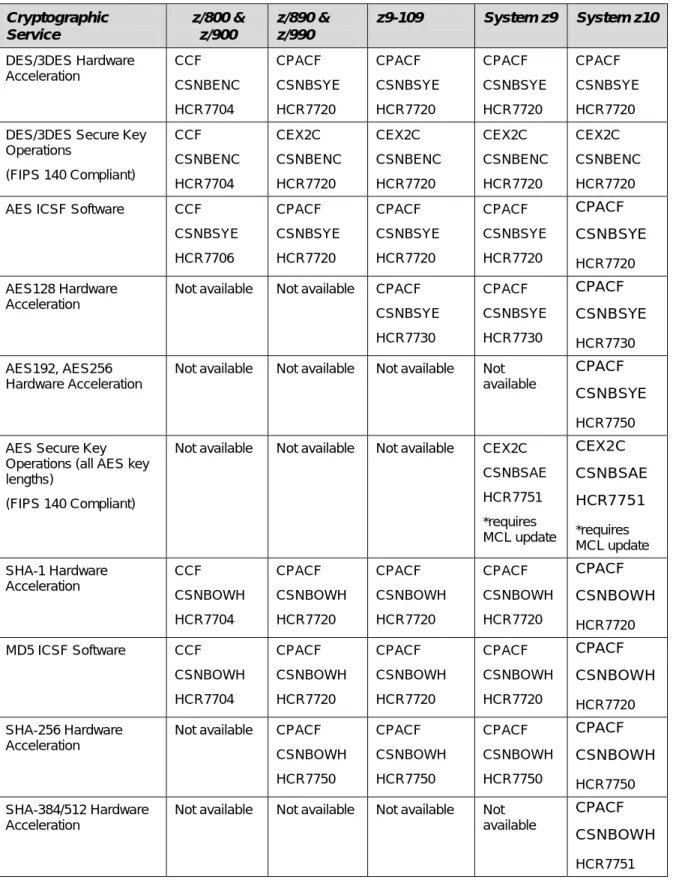
Table 1: ICSF feature/facility requirements Cryptographic Service z/800 & z/900 z/890 & z/990
z9-109 System z9 System z10
DES/3DES Hardware Acceleration CCF CSNBENC HCR7704 CPACF CSNBSYE HCR7720 CPACF CSNBSYE HCR7720 CPACF CSNBSYE HCR7720 CPACF CSNBSYE HCR7720 DES/3DES Secure Key
Operations
(FIPS 140 Compliant)
CCF CSNBENC HCR7704 CEX2C CSNBENC HCR7720 CEX2C CSNBENC HCR7720 CEX2C CSNBENC HCR7720 CEX2C CSNBENC HCR7720 AES ICSF Software CCF
CSNBSYE HCR7706 CPACF CSNBSYE HCR7720 CPACF CSNBSYE HCR7720 CPACF CSNBSYE HCR7720 CPACF CSNBSYE HCR7720 AES128 Hardware Acceleration
Not available Not available CPACF CSNBSYE HCR7730 CPACF CSNBSYE HCR7730 CPACF CSNBSYE HCR7730 AES192, AES256 Hardware Acceleration
Not available Not available Not available Not available
CPACF CSNBSYE
HCR7750 AES Secure Key
Operations (all AES key lengths)
(FIPS 140 Compliant)
Not available Not available Not available CEX2C CSNBSAE HCR7751 *requires MCL update CEX2C CSNBSAE HCR7751 *requires MCL update SHA-1 Hardware Acceleration CCF CSNBOWH HCR7704 CPACF CSNBOWH HCR7720 CPACF CSNBOWH HCR7720 CPACF CSNBOWH HCR7720 CPACF CSNBOWH HCR7720 MD5 ICSF Software CCF
CSNBOWH HCR7704 CPACF CSNBOWH HCR7720 CPACF CSNBOWH HCR7720 CPACF CSNBOWH HCR7720 CPACF CSNBOWH HCR7720 SHA-256 Hardware Acceleration
Not available CPACF CSNBOWH HCR7750 CPACF CSNBOWH HCR7750 CPACF CSNBOWH HCR7750 CPACF CSNBOWH HCR7750 SHA-384/512 Hardware Acceleration
Not available Not available Not available Not available
CPACF CSNBOWH
Cryptographic Service
z/800 & z/900
z/890 & z/990
z9-109 System z9 System z10
Pseudo Random Data Generation
CCF CSNBRNG HCR7704
CPACF CSNBRNG HCR7720
CPACF CSNBRNG HCR7720
CPACF CSNBRNG HCR7720
CPACF CSNBRNG HCR7720
Pseudo Random Data Generation-Long
CCF CSNBRNGL HCR7750
PCIXCC/ CEX2C CSNBRNGL HCR7750
CEX2C CSNBRNGL HCR7750
CEX2C CSNBRNGL HCR7750
CEX2C CSNBRNGL HCR7750
Notes:
ICSF is assumed to be running in non-PCF mode, and FMIDs are listed at the minimum supported level. SMP/E and ICSF settings should be checked to verify the ICSF
operating level and configuration. (Note that HCRP220 and prior FMIDs were for PCF.)
Some ICSF levels may be required to be at a higher level than those shown due to IBM system configuration requirements.
Through the callable service, ICSF directs which hardware/software facility to use based on the call request and the available configuration.
IBM technical support documents and maintenance buckets should be reviewed to determine a complete set of system feature enablement requirements to activate the necessary level of ICSF and associated system-provided services.
Distributed Operating System ICSF Levels
The following table is provided as a convenience for planning purposes to show ICSF levels typically provided with a given level of the operating system. System-specific planning and requirements review should be performed for an installation.
Operating System
Distributed ICSF Level
Enabled Feature as Used by SecureZIP
OS/390 2.10 HCR7703 Base ICSF for CSNBENC z/OS 1.2 HCR7704
z/OS 1.3 HCR7706 CSNBSYE CPACF (z/x90, z9) z/OS 1.4 HCR7706 or
HCR7708 z/OS 1.5 HCR7708 z/OS 1.6 HCR770A z/OS 1.7 HCR7720 or
HCR7730
CSNBSYE CPACF for DES/3DES CSNBSYE AES128 hardware (z9) z/OS 1.7 HCR7730 SHA-256 hashing (software only) z/OS 1.8 HCR7731
z/OS 1.9 HCR7740
z/OS 1.10 HCR7750 HCR7751 may be installed as an upgrade to access advanced AES capabilities available through hardware.
Note that many of the ICSF release levels can be installed on earlier releases of the operating system.
For z/OS 1.7, z/OS 1.8 and z/OS 1.9, HCR7750 is available for upgrades, providing for CSNBSYE AES192, AES256 hardware (z9 model dependent) and SHA-256 hashing hardware (z9).
z/OS UNIX File System (HFS)
In the context of this section, “Hierarchical File System” (HFS) refers to the entire z/OS UNIX file system architecture unless otherwise noted.
SecureZIPz does not require any special configuration to operate with the HFS (Hierarchical
File System). However, working with archives and data files located in the HFS in the z/OS environment requires some setup. In particular:
The run-time user’s OMVS segment information must be associated with a HOME directory for that user
Permissions need to be set to correspond with the run-time user’s ownership of
directories and files to be accessed (see PATHMODE for directory and file objects within the HFS)
Group permissions for directories and files in the HFS need to support the GROUPs that the run-time user will connect to
If the SAFETYEX module has been modified from releases prior to release 10.0, a fresh source copy (from INSTLIB) should be used and updated. HFS PATH entries can be added in a new section provided for this purpose in the release 10.0 version of the module.
HFS Operational Knowledge
To operate SecureZIPz with the HFS, you need a basic understanding of how the HFS works.
For information specific to using SecureZIPz, see section “z/OS UNIX File System
(Hierarchical File System)” in chapter 9 (“File Processing”) of the PKZIP/SecureZIP for z/OS
User’s Guide. For more general information, you will find the IBM documentation listed in the
following table helpful.
Resource Chapter/Section Description
IBM z/OS UNIX System Services Guide
Chapter 14: An Introduction to the hierarchical file system
Mountable File Systems Directories
Files
Path and Pathname
Using commands to work with directories and files
Using the Network File System IBM z/OS UNIX System
Services Guide
Chapter 16: Working with directories
The working directory
Creating and removing a directory IBM z/OS UNIX System
Services Guide
Chapter 17: Working with files Naming files Deleting a file
Identifying a file by its inode number Creating and deleting links
Renaming a file or directory Simultaneous access to a file IBM z/OS UNIX System
Services Guide
Chapter 18: Handling security for your file
Default permissions set by the system Changing permissions
Displaying file and directory permissions Setting the file mode creation mask Displaying extended attributes IBM z/OS UNIX System
Services Guide
Chapter 21: Copying data between the HFS and MVS
Examples and requirements for various data types
IBM z/OS UNIX System Services Guide
Chapter 22: Transferring file between systems
File Transfer Protocol (FTP)
IBM z/OS JCL Reference FILEDATA Parameter describe the organization of a hierarchical file so that the system can determine how to process the file
IBM z/OS JCL Reference PATH Parameter specify the name of the HFS file.
IBM z/OS JCL Reference PATHMODE Parameter file access attributes when the system is creating the HFS file named on the PATH parameter
IBM z/OS JCL Reference PATHMODE Parameter specify the file access attributes when the system is creating the HFS file
Resource Chapter/Section Description
IBM z/OS JCL Reference PATHOPTS Parameter specify the access and status for the HFS file named in the PATH parameter
IBM z/OS SecureWay Security Server RACF Security Administrator’s Guide
The OMVS segment in User Profiles
The z/OS UNIX Identifier (UID)
The initial directory path name (HOME) The maximum number of active or open files the user can have (FILEPROCMAX)
The maximum number of processes the user can have (PROCUSERMAX)
Migration Considerations
Release 11.1 provides enhanced volume count control with MULTIVOL command specifications (e.g. ARCHIVE_SPACE_MULTIVOL). With the added capability for specifying a numeric volume count value, the default volume count associated with xxxx_SPACE_MULTIVOL=Y is changed from 59 to 5. If default volume count values greater than 5 are required, modifications to the defaults module may be performed.
Release 11.1 provides segregated control of temporary data compression work space from other temporary work files. See the new TEMPDATA_xxx settings for additional information. If enabled, adjustments to existing TEMP_xxx settings should be
considered to reduce overall work file allocation requirements.
SecureZIP for z/OS Release 11 provides the ability for an installation to logically
move digital certificates from the SecureZIP Certificate Store to the installation’s
Security Server (for example, RACF). The SecureZIP Key Store Index component of the SecureZIP Certificate Store provides a redirection capability that permits existing jobs accessing digital certificates through the “DB:” syntax to reference certificates installed to the Security Server so that run-time JCL and parameters do not require
modification. The administrative process of reindexing Security Server certificates for existing DB: entries is accomplished through the “Add Certificates (or Register KeyRing Certificates)” option under the “Local Certificate Store Administration” dialog.
SecureZIP for z/OS Release 11 includes a change to the Certificate Store references.
If a Certificate Store configuration is not specified, DUMMY will be used as the default. To maintain upgrade continuity, Certificate Store configurations may be included with the INCLUDE_CMD or added to INSTLIB(ACZDFLT).
Release 10 renamed the DATA_DELIMITER setting to ZIPFILE_RECORD_DELIMITER for the purpose of distinguishing it from new HFS ZOSFILE_RECORD_DELIMITER setting. Processing message references will now be made to ZIPFILE_RECORD_DELIMITER instead of DATA_DELIMITER. To maintain upgrade continuity for existing job streams, the DATA_DELIMITER command and the MCZDFLTS DATA_DELIMITER= keyword designator for the defaults module will continue to be supported as mapping entries to ZIPFILE_RECORD_DELIMITER.
Release 10 renamed the PATH setting to USE_SOURCE_PATH to eliminate ambiguity with respect to HFS PATH names and PATH catalog entries. To maintain upgrade continuity for existing job streams, the PATH command and the MCZDFLTS PATH=
keyword designator for the defaults module will continue to be supported as mapping entries to USE_SOURCE_PATH.
Release 10 introduced newer forms of self-extractor (ref. INCLUDE_SFX for details) programs which support ZIP64 processing and Strong Decryption. Although the older versions of the self extractors are still available, they are specified with different names. Jobs coded with the previous names will include the newer form of the self-extraction programs in the archive.
Release 10 introduced the command OUTFILE_LONGREC to support optional wrapping of extracted data (rather than truncating them). This command replaces a maintenance option PROC_OPT3=W setting (with alias command LONGREC_WRAP) introduced with TT3392. Although PROC_OPT3=W is still supported in this release, it is recommended that commands and default module settings be changed to use
OUTFILE_LONGREC=WRAP instead. The LONGREC_WRAP alias command will now be assigned to OUTFILE_LONGREC and continue to be supported.
Note: When changing the defaults module to use OUTFILE_LONGREC=W, PROC_OPT3= should be removed from the ACZDFLT source to avoid possible conflicts. When either setting is found to be “W/WRAP”, the record will be wrapped.
Release 10 and higher permits the use of CRLF=’Y,NOEOFDELIM’ and
FILE_TERMINATOR= in the defaults module to prevent unwanted delimiter and
terminator characters from being placed at the end of a file as it is added to an archive. This approach replaces old techniques of adding the commands –CRLF(C) –
FILE_TERMINATOR() in the command stream.
Release 10.0 introduced a new format for the SAFETYEX module, from INSTLIB. Transfer to a copy of the new module any installation entries you have made in the SAFETYEX that you have been using. The new version of the module has a separate section for HFS PATH entries.
Installations using GZIP=Y in customized default modules should convert to
ARCHIVE_ZIPFORMAT=GZIP. The GZIP setting is no longer honored when defined in the defaults module.
Installations activating ARCHIVE_ZIPFORMAT Enhanced Tape Processing (XTAPE, XTAPE_LBI or FULL_LBI) should be aware that there are back-level release sharing considerations. ARCHIVE_ZIPFORMAT=FULL is recommended if a tape archive created by the current release is to be accessed by an older release of SecureZIPz. However,
toleration maintenance change TT2741 is available for PKZIP for zSeries (releases 5.6 & 8.2) and SecureZIP for zSeries (releases 8.1 & 8.2) to provide restricted UNZIP processing capabilities. For information, refer to the ARCHIVE_ZIPFORMAT and ARCHIVE_BLKSIZE commands in the PKZIP/SecureZIP for z/OS User’s Guide.
Installations suppressing the //SYSIN PDS member verification for performance reasons with PROC_OPT1=N (available with PKZIP for MVS 5.0.10 maintenance) in ACZDFLT should change to CHECK_SYSIN_MEMBER=N in the assembly of ACZDFLT. PROC_OPT1 is no longer used for this purpose in PKZIP for MVS Release 5.5 or
SecureZIP for z/OS.
Installations controlling the //SYSPRINT DCB attributes with PROC_OPT2 (available with PKZIP for MVS 5.0.10 maintenance) in ACZDFLT should change to
SYSPRINT_DCB in the assembly of ACZDFLT. PROC_OPT2 is no longer used for this purpose in PKZIP for MVS Release 5.5 or SecureZIP for z/OS.
Installations utilizing the filename case-insensitivity feature with PROC_OPT3=U (available with PKZIP for MVS 5.5.0 maintenance) in ACZDFLT should change to FILENAME_SELECT_CASE=U in the assembly of ACZDFLT. PROC_OPT3 is no longer used for this purpose in SecureZIP for z/OS.
Upgrade note: Installations previously using text translation tables other than
EBC#8859 for TRANSLATE_TABLE_DATA or TRANSLATE_TABLE_FILEINFO should review the data translation characters used. The newer default tables in EBC#8859 use the IBM ICONV standard character sets for IBM-1047 EBCDIC and ISO-8859-1 ASCII. In general, the newer default table is better for general-purpose text translation than the older ASCIIUS, ASCIIUSE, ASCIIUK, and ASCIIUKE tables. However, the older tables are still provided for compatibility in case installation-dependent processing requires translation of specialized character sets.
The command ZIP_UNMOVABLE_CHKPT replaces functional fix TT1825 using PROC_OPT5 in earlier releases of the product. Installations previously using PROC_OPT5 are encouraged to use ZIP_UNMOVABLE_CHKPT. PROC_OPT5 is still active in this release, with differences in message notification (see command Usage Notes in the User’s Guide for more information).
The command GZIPCRC_IGNORE replaces functional fix TT2367 using PROC_OPT6 in earlier releases of the product. Installations previously using PROC_OPT6 are
encouraged to use the new command. PROC_OPT6 is still active in this release, but may be removed in the future.
Encryption features associated with the Advanced Encryption Module of PKZIP for
zSeries releases 5.5 and 5.6 are now only available with SecureZIP for z/OS.
However, PKZIP for z/OS Enterprise Edition does include decryption capabilities allowing access to ZIP files created by earlier releases.
SecureZIP installations previously using MASTER_RECIPIENT commands for contingency key processing will find a difference in processing if multiple
MASTER_RECIPIENT command settings are provided in an execution. Whereas release 8.1 used the last command value, now all MASTER_RECIPIENT settings are
cumulatively added to the run to provide support for multiple contingency keys.
Installations using password-based encryption with passphrases greater than 95 characters should reference information from PKWARE HIPER fix TT3057. Contact the PKWARE Support team at 937-847-2687 with any questions related to this HIPER.
Release History and Setting Changes
A historical list of release changes is documented in the User Guide, Chapter 3, in the sections “Release Summary” and “New Commands and Defaults”. It is highly recommended that this section be reviewed to identify changes that may require attention for your installation’s current operating environment.
Distinctive Features of PKZIP
and
SecureZIP for z/OS
Distinctive features available for both PKZIP and SecureZIP include:
Ability to process execution from ISPF Panels, as a TSO/E command, within TSO/E REXX EXECs or CLISTs, from an application program, or a stand-alone batch utility
A robust ISPF panel interface that displays the ZIP archive directory in a table format and enables selection of individual archived (zipped) files for browsing, viewing, extracting, or deleting
Compression and extraction of datasets of the following types on DASD:
o Sequential files
o PDS and PDSE members
o VSAM files (KSDS, ESDS, RRDS)
o JES2 subsystem input files (for example, //ddname DD *)
Command extensions allowing greater flexibility in file selection
Unique filename translation to and from MVS DSNAME conventions and the UNIX-style names typically found in zip archives
Compressing and extracting of datasets of the following types on tape:
o Sequential files
o Compressing and extracting of files to z/OS Load Libraries
o Compressing and extracting of files to Generation Data Groups (GDGs) o GDG files can be used as a ZIP archive
Retention of dataset allocation information, such as dataset organization, device type, and DCB/Cluster attributes. Preservation of this information allows for duplication of the file with the same characteristics during the UNZIP process. Support of ZIP archives within the following dataset organizations:
o Sequential files (DASD, Tape, or Cartridge) o PDS and PDSE members
o VSAM ESDS
o HFS (Hierarchical File System) UNIX files residing in mounted FILESYSTYPEs of
HFS, NFS, TFS and ZFS.
Selection of datasets for processing based upon user-specified control statements, DD JCL specifications, or user-defined filtering lists
Execution in AMODE 31, using storage primarily above the 16-Mb line. However, certain operating system control blocks and system services require virtual storage below the 16-Mb line. The amount of virtual storage available within each of these areas of an address space will limit the use of some performance options (for example, multi-tasking and temporary files in storage) and capabilities.
Defaults are customizable during installation. Multiple defaults modules may be created for use for a variety of application needs. Commands can be locked in the default
modules, precluding their use in a ZIP or UNZIP run with values or settings other than the locked ones.
Use of pre-defined command files saved in a place selected by the user or system administrator. These can be referenced by multiple jobs or users, thus eliminating the need for individual JCL command streams. They can also be used in combination with individual job inputs to provide a consistent set of processing controls.
Certain features of PKZIP for z/OS are separately licensed.
Distinctive Features of SecureZIP for z/OS
Distinctive features of SecureZIP for z/OS include:
Incorporation of the IBM Integrated Cryptographic Service Facility (ICSF) APIs,
enabling the use of hardware acceleration on a variety of hardware platforms for data encryption/decryption and digital signature creation/authentication.
Dynamic run-time selection of a cryptographic facility appropriate to the current operating environment. This allows the same SecureZIP configuration to perform data encryption and signature hash operations under different system cryptographic profiles and also to take advantage of newly activated cryptographic hardware.
Ability to access certificates in directory servers through an LDAP-compliant interface. SecureZIP can look for certificates in LDAP certificate stores and automatically search these stores for recipients to whom you are sending an email message so that you can use their keys when encrypting an attachment. (Requires the optional Directory
Integration module.)
Use of digital certificates located in the z/OS security server
Registration of passphrases to eliminate exposed run-time passphrase values
Policy control through security server general resource rules
Encryption Contingency Key adherence
SMF recording in support of audit trails
Certain features of SecureZIP for z/OS are separately licensed.
PKWARE PartnerLink: SecureZIP Partner for z/OS
SecureZIP for z/OS is also available in a special version—SecureZIP Partner for z/OS—
through the PKWARE PartnerLink program. The PKWARE PartnerLink program provides a straightforward, secure way for an organization to exchange sensitive information with outside partners who perhaps do not have SecureZIP.
SecureZIP Partner for z/OS differs from the full SecureZIP for z/OS in that it only
extracts archives from, and only creates and encrypts archives for, a PartnerLink sponsor. See chapter 6 for information about SecureZIP Partner for z/OS. Contact PKWARE for more information about the PKWARE PartnerLink program.
Note: SecureZIP Partner for z/OS was called SecureZIP for z/OS Reader/SecureLink
prior to release 9.0 of SecureZIP for z/OS.
Encryption
Encryption provides confidentiality for data. Unencrypted data is called plaintext. Encryption transforms the plaintext data into an unreadable form, called ciphertext, using an encryption key. Decryption transforms the ciphertext back into plaintext using a decryption key.
PKZIP for z/OS provides limited support for passphrase encryption and decryption using a
traditional 96-bit key (ENCRYPTION_METHOD=STANDARD). In addition, a licensable feature is available to decrypt passphrase-encrypted files that had been encrypted with SecureZIP with more advanced encryption methods.
SecureZIP only
Several algorithms have been approved in FIPS for the encryption of general purpose data. Each of these algorithms is a symmetric key algorithm, where the encryption key is the same as the decryption key. SecureZIP for z/OS uses symmetric key algorithms when encrypting user data.
In order to maintain the confidentiality of the data encrypted by a key, the key must be known only by the entities that are authorized to access the data. These symmetric key algorithms are commonly known as block cipher algorithms because the encryption and decryption processes each operate on blocks (chunks) of data of a fixed size.
FIPS 46-3 and FIPS 197 have been approved for the encryption of general-purpose data. The protection of keys is discussed below under “Key Management.”
Authentication
SecureZIP onlyAuthentication is the process of validating digital signatures that may be attached to files in an archive or to an archive’s central directory.
Authentication is a separate operation from data encryption. Whereas encryption is concerned with preventing parties from accessing sensitive data (such as private medical or financial information), authentication confirms that information actually comes unchanged from the purported source.
Authenticating digitally signed data both verifies the signature and validates the signed data.
Data Integrity
SecureZIPz uses a Cyclic Redundancy Check (CRC) to ensure that data is successfully
transferred into and out of a ZIP archive. The CRC process creates a unique hash value “thumbprint” from the original data stream. The thumbprint is regenerated at the receiving end and compared with the hash of the source for equality. The thumbprint value is stored
independently of the data stream and is used during UNZIP processing to complete validation of the data.
SecureZIP for z/OS extends the concept of the CRC in two ways for the purpose of providing
a tamper-resistant container within the ZIP archive. First, more rigorous HASH algorithms (MD5 and SHA-1) are used (as specified by the SIGN_HASHALG command) in addition to the 32-bit CRC to accurately reflect the uniqueness of the data stream. Second, the hash value is encrypted within a digital signature using a private-key certificate for the purpose of tamper detection at the completion of file extraction.
For more information regarding SHA-1 (Secure Hash Algorithm), see FIPS PUB 180-1, describing the Secure Hash Standard, at
SecureZIP for z/OS provides two commands, SIGN_ARCHIVE and SIGN_FILES, to initiate
the creation of digital signatures within the ZIP archive. The AUTHCHK command is used to perform a tamper check operation using the digital signature and hash.
Digital Signature Validation
SecureZIP onlySecureZIP for z/OS makes use of certificate-based encryption within the public key
infrastructure (PKI) to generate and validate digital signatures. PKI provides an authentication chain for certificates to guarantee that the signature was created by the purported source.
SecureZIP supports the certificate chain authentication process by including necessary
identification information within the ZIP archive. Subsequently, the certificate(s) used for signing can be authenticated through a complete chain of trust.
To complete the chain of trust, a root (or self-signed) certificate representing the certificate’s issuing organization is installed on the authenticating system. This provides the receiving organization with the authority to declare how the final trust sequence should be treated. Signatures based on certificates from certificate authorities (CA) that are not authorized or trusted are declared as being untrusted by SecureZIP.
Additional facets of validating a certificate’s viability for use include a defined range of dates within which a certificate may be used and whether the certificate has been declared to have been revoked. Configurable SecureZIP policies (EXPIRED and REVOKED attributes) provide support to ensure that the certificates involved in authentication also adhere to these restrictions.
SecureZIP for z/OS provides a means to install and access the certificates necessary for
signing and authentication. The AUTHCHK command, along with configured policy settings governs the type (archive directory or data files) and level of authentication that is to be performed.
Digital Signature Source Validation
SecureZIP onlyA final step in the authentication process is to ensure that the archive and/or file data was sent from a particular source. The previous steps verified that the archive directory and/or
files were signed with a private-key certificate that came from a trusted source (CA) and that the data stream has not been tampered with since it was placed into the ZIP archive.
However, these steps alone do not guarantee that a different party under the same root/CA chain did not perform the signing operation.
SecureZIP for z/OS provides an optional parameter in the AUTHCHK command to declare
the specific party from whom the data is expected.
Public-Key Infrastructure and Digital Certificates
SecureZIP onlyPublic-Key Infrastructure (PKI)
Use of digital certificates for encryption and digital signing relies on a combination of supporting elements known as a public-key infrastructure (PKI). These elements include software applications such as SecureZIP that work with certificates and keys as well as underlying technologies and services.
The heart of PKI is a mechanism by which two cryptographic keys associated with a piece of data called a certificate are used for encryption/decryption and for digital signing and
authentication. The keys look like long character strings but represent very large numbers. One of the keys is private and must be kept secure so that only its owner can use it. The other is a public key that may be freely distributed for anyone to use to encrypt data intended for the owner of the certificate or to authenticate signatures.
How the Keys Are Used
With encryption/decryption, a copy of the public key is used to encrypt data such that only the possessor of the private key can decrypt it. Thus anyone with the public key can encrypt for a recipient, and only the targeted recipient has the key with which to decrypt.
With digital signing and authentication, the owner of the certificate uses the private key to
sign data, and anyone with access to a copy of the certificate containing the public key can
authenticate the signature and be assured that the signed data really proceeds unchanged from the signer.
Authentication has one additional step. As an assurance that the signer is who he says he is— that the certificate with Bob’s name on it is not fraudulent—the signer’s certificate itself is signed by an issuing certificate authority (CA). The CA in effect vouches that Bob is who he says he is. The CA signature is authenticated using the public key of the CA certificate used. This CA certificate too may be signed, but at some point the trust chain stops with a self-signed root CA certificate that is simply trusted. The PKI provides for these several layers of end-user public key certificates, intermediate CA certificates, and root certificates, as well as for users’ private keys.
x.509
X.509 is an International Telecommunication Union (ITU-T) standard for PKI. X.509 specifies,



![[H376.Ebook] Ebook Free Tactical And Strategic Missile Guidance Fourth Edition Progress In Astronautics And Aeronautics By Paul Zarchan.pdf](data:image/gif;base64,R0lGODlhAQABAIAAAP///wAAACH5BAEAAAAALAAAAAABAAEAAAICRAEAOw==)