Joan A Petit. A Usability Study of Flash Tutorials for Library Instruction. A Master’s Paper for the M.S. in L.S. degree. April, 2006. 46 pages. Advisor: Diane Kelly
This study presents the results of a usability test of animated library instruction tutorials developed in Flash using the software Macromedia Captivate. The tutorials demonstrated title searching, author searching, and keyword searching in the University of North
Carolina at Chapel Hill University Libraries OPAC. Five participants viewed three tutorials and completed two surveys, one with demographic questions, the other with
questions about the design and function of the tutorials. The results suggest that the tutorials are usable in design and function, and all participants reported learning
something about searching the OPAC. However, the participants also reported finding the
tutorials boring and expressed skepticism that undergraduate students would recognize the advantages of using a search instruction tutorial.
Headings:
Library Instruction/Web-based Instruction University of North Carolina at Chapel Hill
Usability Testing
College and University Libraries
by Joan A. Petit
A Master’s paper submitted to the faculty of the School of Information and Library Science of the University of North Carolina at Chapel Hill
in partial fulfillment of the requirements for the degree of Master of Science in
Library Science.
Chapel Hill, North Carolina April 2006
Approved by
Table of Contents
List of Figures 2
Acknowledgements 3
Chapter 1: Introduction 4
Chapter 2: Literature Review 8
Chapter 3: Methodology 16
Chapter 4: Results 26
Chapter 5: Discussion 33
Chapter 6: Conclusion 36
Chapter 7: Works Cited 38
Appendix A: Demographic Questionnaire 41
List of Figures
Figure 1: A page from the Biology Research tutorial 6
Figure 2: The first page of the Author Search tutorial 21 Figure 3: Screen 3 of the Author Search tutorial, with search directions 22
Figure 4: Screen 3 of the Author Search tutorial, with text entered in the search box 22 Figure 5: Limiting searches to specific libraries in the Title Search tutorial 23
Figure 6: A page from the Keyword Search tutorial 24
Acknowledgements
The staff of Instructional Services at the University of North Carolina at Chapel Hill University Library was instrumental in this study. In particular, I’d like to thank Jenny McCraw, for her excellent technical work, and Lisa Norberg, whose idea this study
Chapter 1: Introduction
“Usability means that the people who use the product can do so quickly and easily to accomplish their own tasks.” - Joseph S. Dumas and Janice C. Redish
Computer-based instruction is expanding in academic libraries in the United
States. Librarians seek to provide access to an expanding number of electronic resources, many with unique and complex interfaces. Because librarians’ time is limited, the focus
has been on computer-based tools, also known as elearning or reusable learning objects, which allow multiple users to access the software simultaneously and without the individual help of a librarian. Computer-based instruction has been evaluated in other
fields such as computer science (Pane, Corbett, and John; Palmiter and Elkerton; Marold, Larsen, and Shaw) as well as within librarianship (Holman; Nichols, Shaffer, and
Shockey; Noe and Bishop).
More recently, the shift within librarianship has been towards testing the usability of various online websites and learning tools. Usability as a concept comes from the field
of engineering (Nielsen) but has been widely adapted for use in other areas and, in that context, means that a user can accomplish a task “quickly and easily” (Dumas and
Redish; Nielsen). Librarians have begun to investigate the usability of library websites (Noe and Bishop; Battleston, Booth, and Weintrop; Prescott and Crichton; Ward and Hiller) as well as the usability of library tutorials (Bury and Oud). In this regards,
Library websites have also begun to incorporate technology like Flash, the use
which has been evaluated in computer science (Nielsen; Schaller, et al) but not within librarianship.
This study sought to examine the usability of Flash tutorials for library
instruction. The background of this study is the wide development and use of HTML tutorials for library instruction at the University of North Carolina at Chapel Hill
University Library. The Instructional Services Department develops and maintains HTML tutorials for library research instruction, either in conjunction with or in lieu of course-integrated library sessions with a librarian, with the goal of helping students
become better researchers. The tutorials are both general—such as, Introduction to Library Research, Evaluating Information, and Citing Information—and subject
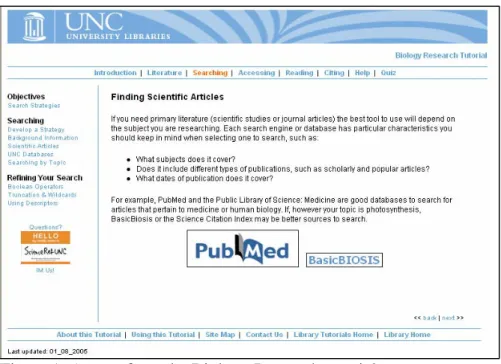
specific—such as, Biology Research (see Figure 1), Latin American Studies, and more. Often the subject-specific tutorials are developed in response to a request from a faculty member or department. The tutorials are coded in HTML and have a user-controlled
flow. The user decides when to click on the “next” button and proceed to the next section; the user can also navigate to any section at any time. The tutorials are often
Figure 1: A page from the Biology Research tutorial
The tutorials are meant to provide an overview of research topics or research in specific subject areas. They are long—for example, a tutorial may have six or seven sections, each with several subsections—and they contain a great deal of content.
Because they are written in HTML, demonstrations are shown with screen shots and brightly colored arrows. They contain no animation.
Last year, Instructional Services purchased Macromedia Captivate software with the intention of creating short, animated Flash tutorials. The software records the user’s mouse movements, including keyboard input, and then allows the user to add captions
and edit movements without re-recording; Flash skills are not required to use the
software. The resulting product is an animated, Flash movie. Unlike the HTML tutorials,
in part, the usability problems of the OPAC and library databases. For example, patrons
may experience failed searches when they include the article, such as “the,” “an,” or “a,” in a title search. Similarly, users may have a failed search when they search for the author with the first name first. Thus, the first animated tutorials developed in Instructional
Services focus on basic catalog searches; later tutorials will demonstrate searches in specific databases.
The tutorials tested in this study demonstrate an author search, a title search, and a keyword search in the UNC University Library OPAC. The tutorials have a control bar that patrons can use to track their progress in the tutorial, as well as pause and play it. The
tutorials demonstrate the mouse movements and text entries that a patron might use in a search. Highlighted text boxes offer an explanation of the animated actions. The shortest
tutorial, the Author Search, is just under two minutes in length, while the longest, the Keyword Search, is just under three minutes.
The current design of the library website and OPAC was usability tested in
various incarnations. The results of these tests reaffirmed the value of usability testing to the staff of Instructional Services. With this in mind, I sought to perform usability tests of
the three earliest developed Flash tutorials. Because these are animated tutorials, they aren’t “used;” rather, the tutorials are watched. However, we still wanted feedback from users on the design, speed, and their likeliness to use such a tutorial. Throughout the
study, the question was this: How can these tutorials be more usable? In other words, how can these tutorials help students better accomplish their own goals?
Chapter 2: Literature Review
This study relates to two different but overlapping areas of research: usability and computer-based instruction, particularly in libraries. The literature on usability reflects best procedures and practices, actual usability tests, and some theory. The literature on
computer-assisted instruction also includes best practice and usability, as well as assessment and evaluation. All inform my methodology and are relevant to this study.
There is little literature specifically on the use of Flash tutorials in libraries. Joseph S. Dumas and Janice C. Redish, in their text A Practical Guide to Usability Testing, say that usability rests on four key points:
1. Usability means focusing on users. 2. People use products to be productive.
3. Users are busy people trying to accomplish tasks. 4. Users decide when a product is easy to use. (4)
They argue for incorporating users throughout the design and implementation of the
product (10). The authors say that usability testing has evolved from “validating
products” to “diagnosing problems” (xi), a direction they agree with. Dumas and Redish say that “every usability test” must include the following: a “primary goal” of improving
the product; the participants are “real users” doing “real tasks,” who are observed and recorded; and the resulting data is analyzed to diagnose problems and find solutions (22).
product evaluated is to be sold, their work is useful for any setting, including the library,
where our users are paramount. A Practical Guide to Usability Test is an excellent source for anyone wishing to implement a usability process.
An established norm in usability testing is the low number of participants needed
for good results. Jakob Nielsen, Dumas and Redish (127-29), and others agree that as few as three participants can identify most usability problems. Five is a commonly identified
number, and studies have shown that more participants do not necessarily yield more data (Rubin).
Important web usability concepts are discussed in detail in texts like Jakob
Nielsen’s Designing Web Usability and Website Usability: A Designer’s Guide by Jared M. Spool, et al. Such usability features have been incorporated, generally speaking, into
the design of the University Library website and the HTML tutorials. Nielsen, an oft-cited usability expert, does not address the use of Flash in this book, but argues that animation should be used sparingly, only when you cannot “communicate as well by a
non-animated graphic” (143). Spool, et al recommend using animation when it will “support the content” of the site (89). However, both texts refer to HTML-based
websites, not tutorials. The context of library instruction is distinct from the scenarios presented in the above works, which are otherwise excellent sources for information on usability in web design.
An article from Jakob Nielsen in October, 2000, “Flash: 99% Bad,” offers Nielsen’s earliest views on Flash: “About 99% of the time, the presence of Flash on a
attention from the site’s core values.” In an update posted in June, 2002, Nielsen adds
that Flash has been improved and applauds Macromedia’s “important strategic decision to focus on useful use of Flash to build Internet-based applications.” Again, however, this discussion of Flash does not address the tutorial context, thus highlighting the value of
usability testing animated learning tools.
David Schaller, et al compare the usability of Flash with HTML in a 2004 article.
The authors acknowledge some of the limitations of Flash, including higher development costs and access issues for disabled users, and begin with the question of whether “Flash sites overcome these liabilities by creating more engaging and effective experiences for
users.” However, they also argue that many of the earliest usability issues with Flash were improved with new uses and software improvements. Their study participants were
middle school and college students who were asked to view different versions of the same website, one in HTML, the other with Flash. While the younger students enjoyed the animation and interactivity of the Flash site, the college students preferred the HTML
version, which “provides the most efficient and effective way to seek and retrieve information with maximum user control.” Despite their stated preference for the HTML
site, the college students spent more time at the Flash site and enjoyed it more. The authors of the study conclude that with this project, Flash was used appropriately, “in service of the larger site goals” of learning.
The creation of animated online tutorials also has foundations in multiple research studies of computer-based instruction. In a 1996 article, John Pane, Albert Corbett, and
dynamic presentations enhanced student understanding of the declarative information in
this lesson” (197). It’s important to note that the researchers were examining software that presented information rather than a process, unlike the tutorials assessed in my study, but the authors conclude on an important note: “Merely using animation and simulation
capabilities of modern computers does not guarantee improvements in students’ learning” (203). Certain kinds of learning are more appropriate for computer-based multimedia
instruction.
A few years later, in a study published in 1999, Susan Palmiter and Jay Elkerton evaluated computer-based animated demonstrations for learning computer-based tasks.
The researchers compared three different teaching methods: an animated demonstration alone; spoken “procedural text” alone; and a combination of computer-based animated
demonstration and spoken text (257). Palmiter and Elkerton found that participants who watched the demonstration, either alone or with accompanying spoken test, learned the process more quickly and better than the participants who only heard text. However, the
text group eventually learned the information, and retained it for a longer period of time. The researchers hypothesize that “the processing of animated demonstrations may not be
sufficient for retention and transfer of interface procedure” (257). However, this study reveals that a computer-based animation of a computer-based process can result in quick learning, valuable when a user has an immediate need for a skill.
Moving beyond evaluation, in 1999, Kathryn Marold, Gwynne Larsen, and Ken Shaw performed a usability test of a computer-based training program. The authors
three questions: “1) what did you like, 2) what did you dislike, and 3) what would you
change?” (307). Yet this simple, qualitative approach yielded valuable data, generally affirming their design decisions, but the authors sought more specific feedback and implemented another study which collected demographic information and asked
participants to use a likert-type scale to rate the effectiveness of various modules. The results of this revealed that the program was “perceived as effective and enjoyable”
(308).
More recently, researchers have begun to evaluate computer-based instruction in libraries, specifically as compared to classroom sessions with a librarian. Studies often
employ a pre-test and post-test as well as control groups, and the results generally suggest that online instruction is as effective as classroom instruction. In a 2000 study of 125
undergraduate students, Lucy Holman concluded just this (58). In a similar 2003 study, James Nichols, Barbara Shaffer, and Karen Shockey concluded that “student learning and student satisfaction were comparable for online tutorial and in-class instruction” (378).
While website and tutorial evaluation is different from usability, some studies have investigated both. Nancy W. Noe and Barbara A. Bishop sought to evaluate the
effectiveness of Auburn University’s information literacy tutorial when questions arose regarding its value to students. Using a pre-test and post-test, the authors found that after students viewed the tutorial, there “were appreciable gains in the number of correct
responses for seven of the eight questions” (177). Noe and Bishop also gained important information on the usability of the tutorial, particularly that some students found the
the researchers to speculate that, for students, “the tutorial is not interesting enough to
hold their attention” (181).
Various articles offer case studies and lessons learned from usability testing in a university environment. A study by Jerilyn Prescott and Matt Crichton, who had only a
few weeks and limited resources in which to perform a usability test of the University of Portland intranet, offers excellent and relevant suggestions for effective usability testing
on a budget. In a 2005 article, Jennifer Ward and Steve Hiller review important concepts of usability testing and outline how they’ve used such tests to improve the library website of the University of Washington and other universities.
In 2001, Brenda Battleson, Austin Booth, and Jane Weintrop performed a
usability test of the library website at the University of Buffalo, researching the question
of whether the website was “working for the users,” especially when “used for library research by undergraduates with little or no experience using the site” (190). The researchers designed a task-oriented survey of eleven questions. The research yielded
extensive data that resulted in many changes to the library website, outlined in the Battleson, et al article. The authors conclude that,
[T]he usability problems [revealed in this study] would have not been considered, much less identified had formal usability test of the Web site not been undertaken. Testers’ observations and the comments of the students participating in the test were invaluable in revealing where and why the site failed and helped prioritize the gross usability problems to be addressed. (194)
Usability testing, then, illuminated interface issues never suspected previously by the website designers. Battleston, et al also argue that the “test revealed the validity and
usability testing and the applicability of usability testing to library Web sites cannot be
understated” (197).
In their 2005 article, Sophie Bury and Joanne Oud discuss the importance of usability tests on library tutorials, beyond usability tests of the library website alone:
A library website functions as a gateway to many different kinds of information by offering logical paths through a myriad of resources, and it is important that information can be easily scanned and searched. Users will not necessarily move through information in a linear way but instead jump from one area of a site to another and may explore a number of different pathways within the site during any one visit. In contrast, the focus of a library instruction tutorial is to teach and its goal is effective learning. Students will typically need to sit and concentrate for a relatively long period of time… . While interactivity is a desirable component of online instruction, students still tend to move through the tutorial information in a relatively linear and sequential fashion. Users need to approach a tutorial with patience and attention, and a tutorial is typically less finite and task-oriented than a library website. (58)
Because the research on the usability of library tutorials is limited, the authors performed their own, testing the usability of an online information literacy tutorial at Wilfrid Laurier
University. While the authors had already gathered student feedback, they wished to find specific problems in areas of navigation, design, layout, interactivity, use of language, and content. However, a task-oriented usability test was not appropriate for their goals.
Instead, a subject pool of students was recruited and asked to read through the tutorial and answer a series of questions on a handout. The test concluded with a brief verbal
interview. The researchers sought to gain “students’ impressions” of the tutorial, rather than “their level of efficiency or success in carrying out specified tasks” (59). This methodology revealed areas that needed improvement: use of jargon, broken links,
text-heavy pages, and overly simple content (61). As a result of the test, the library
In sum, the research argues conclusively for the value of computer-based
instruction and usability testing of academic library websites, and particularly for
instructional tutorials and sites with Flash applications. The literature provided excellent examples of methodology as well as theoretical background of usability, to help address
Chapter 3: Methodology
This qualitative study attempts to assess the usability of three Flash library tutorials based on data collected from participants; I have also collected some basic demographic data, including participants’ self-assessment of their computer searching
skills. This study does not attempt to hypothesize relationships between data, and no variables were manipulated. The data was examined in aggregate rather than individually,
and no attempt was made to correlate individual students’ responses between the two data sets.
Participants
The unit of analysis in this study is the individual student. The sample was
non-probability convenience sampling: students were recruited via flyers placed at the Reference Desk at the R.B. House Undergraduate Library at the University of North Carolina at Chapel Hill. Following their participation, participants were given $10 as
compensation. Although the techniques were non-random, I successfully recruited five participants from the target population of undergraduate students at UNC, in line with the
Survey Instruments
The demographic and computer experience questionnaire functioned to gather basic information on the user, including eligibility for the study. They were asked their year of birth, whether they were a UNC student, their year in school, and their gender
(this question had an option of “other/prefer not to answer”). The computer experience question asked them to rank their experience with computers on a scale of 1-5, with 5
being very experienced. They were also asked if they used an online tutorial before. The survey usability questions were drafted with examples from usability questions in the literature, especially The Handbook of Usability Testing by Joseph
Dumas and Janice Redish. This list of questions was reviewed with Lisa Norberg, the Coordinator of Instructional Services for the UNC University Library. She had the
following concerns: whether to have sound; the location of the tutorial; and whether students would actually use the tutorial. Questions were added to address these concerns.
The questions were ordered such that the middle questions were simple questions
with yes and no answers. The first and last questions required reflection and invited longer responses.
The questions fall into the following categories: • Learning
• Question 1: Was this tutorial informative? If so, how?
• Question 2: Did you learn anything you didn’t know before? If so, what? • Ease of Use
• Question 5: Was it easy to read? • Question 6: Were there any problems? • Tutorial Functions
• Question 7: Did you stop the tutorial at any point?
• Question 8: If not, did you know that you could stop the tutorial?
• Question 9: Would the tutorial be better if it also had sound? (For
example, a narrator reading the information.) • Usefulness
• Question 10: Where would a tutorial like this be most useful? (For
example, on an error screen? On a help page? On an FAQs or How-do-I
page?)
• Question 11: How likely would you be to use a tutorial like this? And in
what circumstances? • Open-ended Feedback
• Question 12: What did you like best about this tutorial? • Question 13: What could be improved?
• Question 14: Do you have any other comments?
Tutorials
The tutorials were developed over the course of a few months by various staff of the University Library Instructional Services Department (I also participated in this process). The staff found the Captivate software easy to learn, though a challenge to
When the tutorial developer opens Captivate and clicks the button to record, the
software records the developer’s mouse and keyboard movements. Then, it converts the developer’s web activities to an animated movie, with captions highlighting different links and mouse clicks. The user can edit the captions and the recorded mouse
movements, as well as the length of time for each action.
The first developed tutorials focused on searching the UNC Libraries OPAC. The
earliest decisions and concerns focused on the design and timing of the tutorials more than the content. All of the tutorials will have the same design, and we sought feedback on the design before we proceeded with the development. Thus, I decided to test these
tutorials: Author Search, Title Search, and Keyword Search.
When the tutorials are linked from the library webpage, they will begin playing
when the user clicks on the link to them. For this study, the tutorials were loaded onto the library test server. Each tutorial was opened in a separate Internet Explorer browser window minimized at the bottom of the screen. The user had to hit the “play” button to
begin the animation. An on-screen control bar allows the viewer to control the tutorial with buttons that, from left to write, rewind, go back, pause, play, go forward, and exit.
The last button is an “info” button that, when clicked, lists the developer of the tutorial (in this case, the UNC University Library).
At one minute and 56 seconds, the Author Search tutorial is the shortest and
simplest of the three tutorials. Several of the captions appear on the same background; one caption fades out and another fades in. The OPAC design includes different shades of
Following is the script of the Author Search tutorial:
Screen 1
“Author Searching in the UNC-Chapel Hill Libraries Catalog.”
Screen 2
[Background image of default OPAC page.]
“The main catalog search screen defaults to a title search.” “To switch to an author search, click on the author tab.” [Image of mouse moving to and clicking on author tab.] Screen 3
[Image of author search OPAC page.]
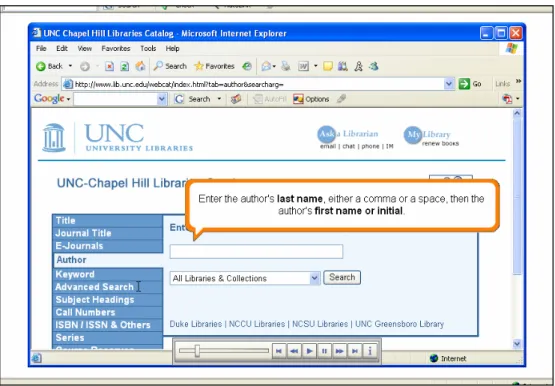
“Enter the author’s last name, either a comma or a space, then the author’s first name or initial.”
“For example, if you are looking for books by the author Jhumpa Lahiri, type ‘lahiri, jumpa.’”
[Image of “lahiri, jhumpa” being typed into search box.]
“Note that the catalog is not case sensitive, so you don’t need to capitalize the author’s name.”
“Click the search button.”
[Image of mouse moving to and clicking on search button.] Screen 4
[Results page appears.]
“The search results page appears.” [Page scrolls down.]
“Select the book you need from the results list.” [Image of book being chosen from results list.] Screen 5
[Image of record page for book.] “The record for the book appears.”
[Image of page scrolling down to reveal full record.]
“This page gives you the basic citation information for the book, its location and call number, and the subject headings assigned to it.”
“To find out if the book is available for use, click on the Check Availability link.” [Image of mouse moving to and clicking on Check Availability link.”
Screen 6
[Image of new page, with availability information.]
“This page indicates whether or not the book is available. DUE 05-01-06 indicates the book is already checked out.”
“To go back to the main record for the book, click on the Regular Display button.”
Screen 7
[Main record page appears.]
“From this page, you can save the record, return to the previous list of results, revise your search, or conduct a new search.”
“To return to the main catalog search page, click on the Start Over button.” [Image of mouse moving to and clicking on Start Over button.]
Screen 8
[Main OPAC page.] Screen 9
[Closing page.]
“Thank you for using the Author Search tutorial. If you have any questions about UNC-Chapel Hill Libraries catalog, please contact us!”
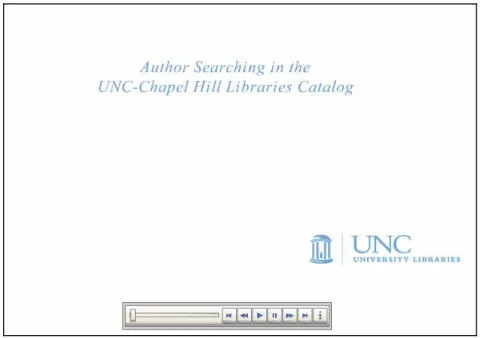
The following three screen shots are an attempt to illustrate the tutorial. The first (Figure
2) shows the opening page of the Author Search tutorial. The second and third (Figures 3 and 4) show Screen 3 of the tutorial.
Figure 3: Screen 3 of the Author Search tutorial, with search directions.
The Title Search tutorial, which is two minutes and 16 seconds in length, has the
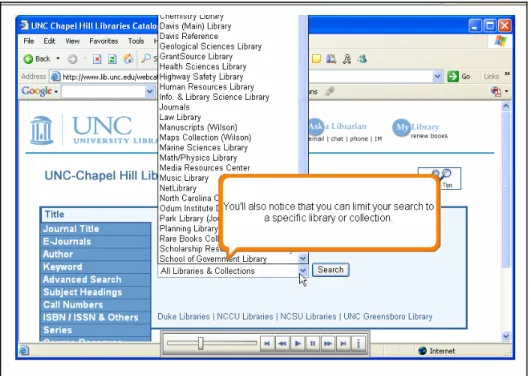
same format and style. It demonstrates how to search for a book or other work by title and offers tips such as eliminating the article “the,” “an,” or “a” in a title search. This tutorial also demonstrates how to limit searches to particular libraries at UNC-Chapel
Hill. The following screen shot illustrates this.
Figure 5: Limiting Searches to specific libraries in the Title Search tutorial.
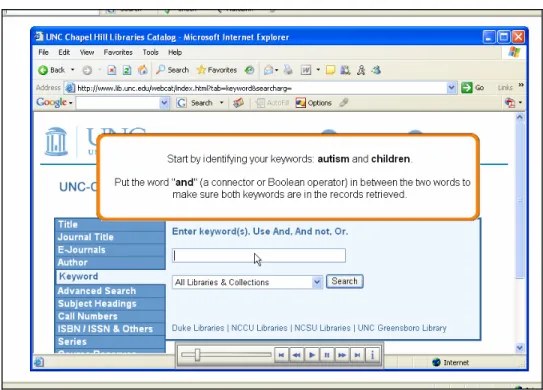
The Keyword Search tutorial, the longest at two minutes and 54 seconds, is also the most complex of the tutorials. It is about one minute longer than the other tutorials and discusses more sophisticated search strategies including Boolean connectors and
limiting a search by date of publication, material type, language, and additional
keywords. The following screen shot illustrates one of the Boolean lessons. Also note the
Figure 6: A page from the Keyword Search tutorial.
Study Procedures
Participants made individual appointments to meet the researcher in the computer classroom at R.B. House Undergraduate Library. They were greeted and seated and then
asked to read an information sheet about the study. Then, if the student wished to continue, they were asked to complete a brief handout, a demographic questionnaire (Appendix A), by hand. The students were asked to watch each of three tutorials,
organized in order of complexity, first the Author Search, then Title Search, then Keyword Search. Then, on the same computer, the students completed one survey in
Microsoft Word (Appendix B), in response to the three tutorials.
The researcher was available at all times but was not watching the participants directly. The study took less than 45 minutes for each student; some completed the study
Before formal testing began, a student was recruited for a pilot test of the
instruments and procedures. No changes were made as a result of the pilot test.
Ethical Issues
There were few potential ethical conflicts in this study. One area of concern was confidentiality. During the data collection phase of the study, the researcher worked at
the Reference Desks of both R.B. House Undergraduate Library and W.R. Davis Library at the University of North Carolina. There was a concern that students may recognize the researcher and be reluctant to approach her for assistance with research questions.
Ultimately, however, the potential for harm with this study was low.
The study was approved by the Institutional Review Board of the University of
Chapter 4: Results
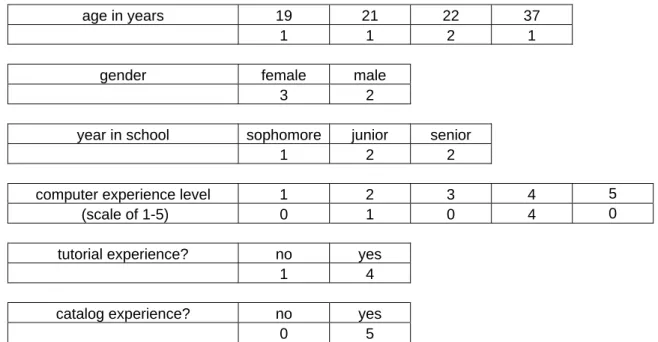
The following chart illustrates the information collected from participants through the demographic and computer experience questionnaire. All but one were born from 1983-1986, an expected range for traditional college students; the other was born in 1968.
Similarly, all but one identified themselves as experienced users of computers and all but one had watched a tutorial before the study. This demographic information reflects a user
group that is, generally, comfortable with computers and familiar with the library catalog.
age in years 19 21 22 37
1 1 2 1
gender female male
3 2
year in school sophomore junior senior
1 2 2
computer experience level 1 2 3 4 5
(scale of 1-5) 0 1 0 4 0
tutorial experience? no yes
1 4
catalog experience? no yes
0 5
Figure 7: Results from Demographic & Computer Experience Questionnaire
The study participants offered a range feedback on the tutorials. The data was analyzed question by question. The following is a summary of the responses for each
participant commented on the sound in the General Feedback questions), I have included
those results in the appropriate category.
Learning
• Question 1: Was this tutorial informative? If so, how?
• Question 2: Did you learn anything you didn’t know before? If so, what?
The tutorials were not all informative. One participant commented, “the author
and title tutorials were not helpful to me as I am relatively familiar with the online catalog.” The other comments, however, suggest the tutorials were informative. One student said, “it was definitely pretty informative because there are a lot of people who do
not have a clue on how to go about searching for sources.” Another student said that the tutorial “guided me through all facets of the search process in the University library
catalog.” A participant also commented on the design: “I have been through other tutorials that the library has had, and I believe that its simplicity helps the student to understand how to search in a timely, yet informative manner.”
When asked what they learned in the tutorial, all the students cited something from the Keyword Search tutorial, the last tutorial they viewed. As students who said
they are experienced with the library, perhaps they were ready for more advanced search techniques. A participant said, “I think I will be more effective when using the advanced search function—something I’ve used pretty much done by trial and error in the past. The
single most helpful thing I learned […] was the possibility of truncating a word with an asterisk. I will definitely use this tool in the future.” Another student also said he or she
results,” especially “how to limit search results by year published and library,” was
helpful. One student said, “The instructions for selecting search terms was (sic) particularly informative.”
The Keyword Search tutorial demonstrates how a user can save a search but does
not elaborate on the uses of this function. Two students commented on this function, and one suggested we provide more information on its use. Another lesson for one student
was, “I learned that you can search for books in other college libraries like NCSU, Duke, NCCU, and UNCG.”
Ease of Use
• Question 3: Did you have enough time to read all the screens?
• Question 4: Was the tutorial too fast or slow?
• Question 5: Was it easy to read?
• Question 6: Were there any problems?
These questions led to short answers, often “yes” or “no.” In response to question 3, every participant responded affirmatively. One commented that it was a “perfect
speed,” while others wished it had gone faster: “too slow, if anything,” said one participant, while another said it was “slightly too slow for someone with my basic
proficiency in searching the catalog.” In response to a different question, one person commented that the tutorial could be “slowed down a bit.” In response to question 4, a participant said, “at times it was difficult to process the information at the speed it was
The participants all said that the tutorial was easy to read. One commented on the
readability of the “text in a big bubble.” Another student liked that the tutorial “indicated where to do things by the captions by actually pointing out the appropriate field.” All participants indicated they had no problems with the tutorials.
Tutorial Functions
• Question 7: Did you stop the tutorial at any point?
• Question 8: If not, did you know that you could stop the tutorial?
• Question 9: Would the tutorial be better if it also had sound? (For example, a
narrator reading the information.)
The participants did not take advantage of the various tutorial functions. Only one
student reported stopping the tutorial, in this case for a “mid tutorial catalogue search for a personal test.” This participant commented on the speed of the catalog versus the tutorial: “the [catalog] search was so fast and the tutorial so slow, I almost beat the topic
change box.”
Of the four students who did not stop the tutorial, only one realized he or she could stop the tutorial; the others responded “no” in response to question 8.
The participants were asked if the tutorial would be better with sound, and the results were varied. Comments included, “Maybe” and “It doesn’t really matter.” Another
responded with a strong no: “usually you are in the library when you are doing the
tutorial and it can be a distraction to others trying to work. Also, […] I usually read much faster than what the programmed voice reads.” However, two participants said sound
said that sound would be better because “it would keep me engaged (tutorial was a little
boring).”
Usefulness
• Question 10: Where would a tutorial like this be most useful? (For example,
on an error screen? On a help page? On an FAQs or How-do-I page?)
• Question 11: How likely would you be to use a tutorial like this? And in what
circumstances?
Participants were asked to identify an appropriate place on the website for tutorials like this. Their suggestions included “on the card catalog underneath the
searching options—like search help,” the “help page,” a page “that shows an overload of results (ex. How to narrow your search),” and a “link titled ‘Tips for searching.’”
The participants were split on their likeliness to use such a tutorial. In response to question 11, one said, “Not too likely. If I were researching a topic and having difficulty getting useful results I would try it.” Another said, “Because I consider myself to be
proficient with searching the catalog, I would not likely use the tutorial unless I knew the library system had a book and I couldn’t find it for some reason.” One student said he or
she might use it, “If I happened to be doing any research and was having trouble finding my materials.”
However, two other participants stated they would be likely to use such a tutorial.
for.” All the students suggested a similar circumstance for using such a tutorial: if they
were having difficulty doing research and needed extra help.
Open-ended Feedback
• Question 12: What did you like best about this tutorial?
• Question 13: What could be improved?
• Question 14: Do you have any other comments?
When asked what they liked best about the tutorials, two participants commented that they felt “neutral” about the tutorial. Another commented that the “format was great.
Timing was perfect and it was really helpful.” Another liked how “informative” it was. One liked that it was “simple.”
The students offered a range of feedback, much of it discussed earlier in the results. One student said the tutorial was “not very engaging,” while a third said it was “a little boring.” However, student was particularly enthusiastic: “This is a great idea
because students could definitely manage their time a little better with researching a source.”
The students offered some unsolicited suggestions. One student expressed a
desire for controlling movement through the tutorial: “It might be better if the user could choose when to go on to the next screen rather than having a video (even though there is
Some students warned the researchers about students’ potential lack of interest in
the tutorials: “College students have a fundamental familiarity with how to conduct searches on computers,” said one participant. And while these students seemed interested in some of the advanced search techniques, one student warned, “you’ll have a hard time
convincing students who think they’re computer-savvy to take advantage” of such tutorials.
Chapter 5: Discussion
This study offered valuable feedback, even with such a small number of
participants, as suggested in the literature. The tested Flash tutorials are usable in design and presentation. The participants generally were able to read, follow, and understand the
information presented. The format was appealing or at least not distracting, and its simplicity particularly appealed to some students.
The participants’ conflicting opinions on sound and speed present a challenge. Some students expressed some interest in having sound implemented, while others recognized that a tutorial with sound might be inappropriate for library use. Perhaps a
tutorial with sound options can be implemented eventually. Similarly, students had different takes on the speed of the tutorial: one student would have preferred a slower
tutorial, which, given the feedback from others that it was the perfect speed or too slow, is a difficult issue to resolve. One possibility is to highlight the control bar so users realize they can stop the tutorial and go back if they want to repeat a screen. This might
help the more deliberate users. Despite some of the issues with the tutorial functions, overall, the participants found this new format of tutorial to be usable.
However, similar to what Battleson, et al and Oud and Bury found, while the student participants identified advanced search skills they learned from the tutorials, they were simultaneously unenthusiastic about the tutorials as learning tools. The participants
participants said they were unlikely to use such a tutorial and would only consider doing
so if they were struggling with a search.
A bigger question remains: while these tutorials may be usable for students who have been asked to watch them, will the tutorials be used by students who need them?
Will students be able to find them? Will they want to find them? Students’ comments suggest that they might not seek out such a learning tool unless they needed help. But
students, as generally savvy users of computers, may not realize their searches could be more efficient.
These tutorials exist because of usability problems with other search interfaces,
particularly the OPAC and electronic research databases. If students do not realize they are having problems with those search engines—perhaps they think the library does not
hold materials relevant to their search, or perhaps they are satisfied with the information they do find—then they would be unlikely to seek out this kind of search assistance. As confident, self-reported experienced users, the students who make up the demographic
for these tutorials might never realize what they do not already know.
The location of the tutorials, then, remains an important concern. If we can
highlight these tutorials on search pages, or create the programming to enable relevant tutorials to turn up as part of search results, we may increase their use and usability, as users would be more likely to find them when they need them. The participant’s
suggestion to include such tutorials on an “overload” page suggests that the participant considers this tutorial to be valuable as a corrective solution, similar to Google’s spelling
Internet searches. An OPAC that functions similarly might be more usable for our
patrons.
Study and Methodology Limitations
Because the sample and population for this study were non-random, this study is not generalizable. Although the sample was small, which threatens the external validity
of the method, and the sample was not random or representative, the established measures and procedures in usability make for greater reliability.
The study subjects included one sophomore, two juniors, and two seniors. A
freshman, particularly one with limited experience with UNC Libraries, may have contributed different feedback.
The participants viewed the tutorials in the same order and answered one survey about all three tutorials. The results may have changed if they viewed the tutorials in a different or rotating order. Further, the participants may have responded differently if
they completed a survey following each individual tutorial.
While the methodology yielded helpful data, a study where students interacted
Chapter 6: Conclusion
This study asked the following questions: How can these tutorials be more
usable? In other words, how can these tutorials help students better accomplish their own goals? This study shows that these tutorials are usable in the current format in that they
potentially help library users better and more quickly accomplish their goal of performing OPAC searches. The tutorials could be more usable if they were more engaging, perhaps
with the addition of sound or the use of humor. Their location is also a factor. They might be more usable if located on an OPAC search results screen or on a failed search page. They also might be more usable if they presented more complex information and
advanced searching tips.
A future study could examine the usability of the tutorials individually, rather
than as a group, and look to include freshman, especially first semester freshman, in the subject group. This study did not investigate the content of the tutorials. Future studies could examine the content, perhaps by evaluating the content of these tutorials as
compared to HTML tutorials with similar content. Perhaps a usability test that focused on the content of these tutorials could yield data on our users’ actual skills and real
information needs. Future studies could also examine how likely participants would be to use such a tutorial if located on a search results page.
Despite this research gap, this study suggests that with some refinement and
Because this is a new technology, Instructional Services will tread carefully with
its implementation of these Flash tutorials. Further, the new technology involved means that rather than turning to literature and others’ experiences, Instructional Services will need to perform its own regular evaluations of these tutorials to ensure they are useful
and usable to students.
Ultimately, the overarching usability problems are not with these tutorials, but
Chapter 7: Works Cited
Battleson, Brenda, Austin Booth, and Jane Weintrop. "Usability Testing of an Academic Library Web Site: A Case Study." Journal of Academic Librarianship 27.3 (2001):
188-98. LISA: Library and Information Science Abstracts.
Bishop, Barbara A., and Nancy W. Noe. "Assessing Auburn University Library's Tiger Information Literacy Tutorial (TILT)." Reference Services Review 33.2 (2005):
173-87. LISA: Library and Information Science Abstracts.
Bury, Sophie, and Joanne Oud. "Usability Testing of an Online Information Literacy
Tutorial." Reference Services Review 33.1 (2005): 54-65.
Dumas, Joseph S., and Janice C. Redish. A Practical Guide to Usability Testing. Rev. ed. ed. Portland, Or.: Intellect Books, c1999.
Holman, Lucy. "A Comparison of Computer-Assisted Instruction and Classroom
Bibliographic Instruction." Reference & User Services Quarterly 40.1 (2000): 53-60. <http://vnweb.hwwilsonweb.com/hww/jumpstart.jhtml?recid=0bc05f7a67b1790e06
bc114cd79d5996c12dd0f505a50344f6c7709c678c9f613544c4e496cc2feb&fmt=C>.
Marold, Kathryn A., et al. “Usability Testing for a Computer Skills WBT (Web Based
acm.org/citation.cfm?id=299724&coll=portal&dl=ACM&CFID=68459770&CFTO
KEN=12275989>.
Nichols, James, Barbara Shaffer, and Karen Shockey. "Changing the Face of Instruction: Is Online Or in-Class More Effective?" College & Research Libraries 64.5 (2003):
378-88. <http://vnweb.hwwilsonweb.com/hww/jumpstart.jhtml?recid=
0bc05f7a67b1790e06bc114cd79d59961693d33745eb101ab58272e9f6a24fab974884
0323932173&fmt=C>.
Nielsen, Jakob. Designing Web Usability. Indianapolis, Ind.: New Riders, c2000.
Nielsen, Jakob. "Flash: 99% Bad." useit.com. 11/25/2002 <http://www.useit.com/
alertbox/20001029.html>.
Palmiter, Susan, and Jay Elkerton. “An Evaluation of Animated Demonstrations of
Learning Computer-Based Tasks.” Proceedings of the 1991 ACM Conference. New Orleans: ACM Press, 1991.
Pane, John F., Albert T. Corbett, and Bonnie E. John. “Assessing Dynamics in
Computer-Based Instruction.” Proceedings of the 1996 ACM Conference. Vancouver: ACM Press, 1996.
Prescott, Jerilyn, and Matt Crichton. “Usability Testing: A Quick, Cheap, and Effective Method.” Proceedings of the 1999 ACM Conference. Denver: ACM Press, 1999.
Schaller, David T., et al. "To Flash Or Not to Flash? Usability and User Engagement of
HTML Vs. Flash." Museums and the Web 2004: Proceedings. <http://www. archimuse.com/mw2004/papers/schaller/schaller.html>.
Spool, Jared M., et al. Web Site Usability: A Designer's Guide. San Francisco: Morgan
Kaufmann Publishers, c1999.
Ward, Jennifer L., and Steve Hiller. "Usability Testing, Interface Design, and Portals."
Appendix A: Demographic Questionnaire
(Students completed this survey by hand.)
Demographic & Computer Experience Questionnaire
1. What year were you born?
19_____
2. Are you a UNC student?
Yes _____ No _____
3. Are you male or female?
M _____ F _____ other/prefer not to answer _____
4. What year are you in school? Freshman _____
Sophomore _____ Junior _____ Senior _____ Graduate _____ Other _____
5. With 0 being not experienced, and 5 being experienced, how experienced are you with computers?
__________ (please answer 1, 2, 3, 4, or 5)
6. Have you ever used an online tutorial before?
7. Have you searched the UNC catalog (for books or movies or other materials) before?
Appendix B: Usability Survey
(Students completed this survey in Microsoft Word on a PC.)
Please answer the following questions. Feel free to elaborate on any of your answers. 1. Was this tutorial informative? If so, how?
2. Did you learn anything you didn’t know before? If so, what?
3. Did you have enough time to read all the screens?
4. Was the tutorial too fast or slow?
5. Was it easy to read?
6. Were there any problems?
7. Did you stop the tutorial at any point?
8. If not, did you know that you could stop the tutorial?
9. Would the tutorial be better if it also had sound? (For example, a narrator reading the information.)
10. Where would a tutorial like this be most useful? (For example, on an error screen? On a help page? On an FAQs or How-do-I page?)
11. How likely would you be to use a tutorial like this? And in what circumstances?
12. What did you like best about this tutorial?
14. Do you have any other comments?