Secure Password Management Using Smartcards
Nuno Miguel Grilo Fonseca Pinheiro
Thesis to obtain the Master of Science Degree in
Information Systems and Computer Engineering
Examination Committee
Chairperson:
Prof. M ´ario Rui Fonseca dos Santos Gomes
Supervisor:
Prof. Ricardo Jorge Fernandes Chaves
Supervisor:
Prof. Carlos Nuno da Cruz Ribeiro
Members of the Committee:
Prof. Jo ˜ao Pedro Faria Mendonc¸a Barreto
The current security model was not designed to protect users from themselves, and this goes a long way towards understanding why security is so difficult. Rik Farrow
Acknowledgments
This work would not have been achieved without the help of many people.
I would like to thank my coordinators, Professor Ricardo Chaves and Professor Carlos Ribeiro, for their support. Their knowledge and experience provided me the right guidance to achieve this work. Their different views allowed interesting and important discussions which led this work to a better direction.
I would like to acknowledge GOTrust Technology Inc. for providing their Software Development Kit. This SDK allowed me to use and explore their secure microSD java card, without which most of the technical work of this thesis would have never been possible.
It is also important to acknowledge three open source projects which helped the development of this thesis. These projects are jCardSim (Java Card Runtime Environment Simulator), MUSCLE (Movement for the Use of Smart Cards in a Linux Environment) and Virtual Smart Card Architecture. These projects help the world to give a step forward on the creation of secure solutions based on smart cards.
I would like to thank my family and friends for all the strength and support they gave me in times of need. Two people which deserve to be highlighted are my brother and mother. A special thanks to them, for being everyday right by my side.
Last but not least, I would like to thank all who participated in the development of this thesis, either by performing the usability tests, proof-reading, or by discussing the proposed solution.
Abstract
Currently, most user authentication services are based on passwords. To avoid memorization of multiple passwords, users tend to re-use the same password on multiple systems. As such, finding the password of the user gives the attacker access to several systems of the user.
Some solutions mitigate this problem by allowing users to remember only one password. These solutions, such as Single Sign On or hash based password generators, require trustworthy external services or the generation of multiple dependent passwords. These systems are susceptible to DOS and brute force attacks. Another solution is the use of password managers that store passwords ciphered by a master password. Although being more resistant to DOS attacks, usually they are still susceptible to brute force ones. These solutions also provide weak access control after user authentication, enabling access from non-legitimate applications.
The work herein presented proposes a password manager based on smart cards where the pass-words are securely stored inside the smart card and can only be accessed after mutual authentication, eliminating the problem of brute force attacks. To perform access control, the chosen policy bases itself on the identity of the applications, avoiding masquerade attacks. To enable users to access smart card solutions without requiring a reader, a virtual smart card is also proposed, allowing users to access smart cards contained inside smart phones.
Keywords
Resumo
Acualmente, a maioria dos servic¸os de aut ˆenticac¸ ˜ao s ˜ao baseados em palavras-passe. Para evitar a memorizac¸ ˜ao de m ´ultiplas palavras-passe, os utilizadores tendem a reutilizar a mesma em diferentes sistemas. Como tal, descobrindo a palavra-passe do utilizador ´e poss´ıvel a um atacante aceder aos diversos sistemas do utilizador.
Algumas soluc¸ ˜oes mitigam este problema permitindo ao utilizador recordar-se apenas de uma palavra-passe. Estas soluc¸ ˜oes, como servic¸os de aut ˆenticac¸ ˜ao ´unica e geradores de palavras-passe baseados em func¸ ˜oes de hash criptogr ´afico, requerem servic¸os externos confi ´aveis ou a gerac¸ ˜ao de m ´ultiplas palavras-passe dependentes. Estes sistemas s ˜ao suscept´ıveis a ataques de negac¸ ˜ao de servic¸o e ataques de forc¸a bruta. Outra soluc¸ ˜ao ´e a utilizac¸ ˜ao de gestores de palavras-passe que guardam estas chaves utilizando cifra com uma chave mestra. Apesar de serem mais resistentes a ataques de negac¸ ˜ao de servic¸o, tipicamente s ˜ao ainda suscept´ıveis a ataques de forc¸a bruta. Estas soluc¸ ˜oes tamb ´em fornecem um controlo de acesso fraco ap ´os aut ˆenticac¸ ˜ao do utilizador, permitindo o acesso por aplicac¸ ˜oes n ˜ao legitimas.
O trabalho aqui apresentado consiste num gestor de palavras-passe baseado em cart ˜oes in-teligentes no qual as palavras-passe s ˜ao guardadas dentro do cart ˜ao inteligente e podem apenas ser acedidas ap ´os aut ˆenticac¸ ˜ao m ´utua, eliminando o problema de ataques de forc¸a bruta. Para re-alizar o controlo de accesso, a pol´ıtica tomada pela soluc¸ ˜ao proposta baseia-se na identidade das aplicac¸ ˜oes, evitando ataques de aplicac¸ ˜oes com falsa identidade. Para permitir aos utilizadores o acesso ao cart ˜ao inteligente sem necessitar de um leitor, ´e tamb ´em proposto um cart ˜ao inteligente virtual que permite aceder, a partir do computador, a um cart ˜ao inteligente presente dentro de um telem ´ovel.
Palavras Chave
Contents
1 Introduction 1 1.1 Motivation . . . 2 1.2 Thesis Goals . . . 3 1.3 Requirements . . . 4 1.4 Document Structure . . . 42 State of The Art 7 2.1 Single Password Authentication . . . 8
2.1.1 Single Sign On . . . 8
2.1.2 Hash Based Passwords . . . 9
2.1.3 Password Managers . . . 10
2.1.3.A Mozilla Firefox . . . 11
2.1.3.B Google Chrome . . . 11
2.1.3.C KDE KWallet . . . 12
2.1.3.D Gnome Keyring . . . 12
2.1.3.E Kamouflage . . . 13
2.1.3.F Web Solutions . . . 13
2.1.3.G Physical Device Solutions . . . 14
2.1.4 Summary . . . 15
2.2 Smart Cards . . . 17
2.2.1 Overview . . . 17
2.2.2 Smart Card Technologies . . . 18
2.2.3 Smart Card Formats . . . 19
2.2.4 Communication . . . 20
2.2.5 Smart Card Access Technologies . . . 21
2.3 Process Access Control . . . 23
2.3.1 System Call Access Control . . . 23
2.3.2 IPC Access Control . . . 24
3 Proposed Solution 27 3.1 Overview . . . 29 3.2 Trust Model . . . 29 3.3 Communication Security . . . 30 3.3.1 Message Protection . . . 31 3.3.2 Authentication . . . 31 3.4 Functional Communication . . . 32 3.5 Process Authentication . . . 34 3.6 Conclusion . . . 35 4 Solution Implementation 37 4.1 Inter Process Communication Technology . . . 38
4.2 Smart Card Access . . . 38
4.3 Applet . . . 42
4.4 Password Manager Server . . . 43
4.5 Client Integration . . . 43 4.6 Conclusion . . . 44 5 Solution Evaluation 45 5.1 Solution Comparison . . . 46 5.2 Solution Benchmark . . . 47 5.3 Usability Tests . . . 50 5.4 Requirements Fulfilling . . . 51 5.5 Conclusion . . . 52
6 Conclusions and Future Work 55
Bibliography A-1
Appendix A Password Manager API A-1
Appendix B Password Manager APDU specification B-1
Appendix C Credentials Type Mask C-1
Appendix D Graphical User Interface D-1
Appendix E Usability Survey E-1
List of Figures
2.1 Smart Card Architecture . . . 18
2.2 ID-1 smart card . . . 19
2.3 Subscriber Identity Module (SIM) card . . . 20
2.4 Go-TrustRMicro Secure Data (microSD) with embedded smart card . . . 20
2.5 Apdu format and field size in Bytes . . . 21
2.6 Personal Computer/ Smart Card (PC/SC) Architecture . . . 22
3.1 Password Manager Architecture . . . 29
3.2 Message format and protection . . . 31
3.3 Authentication Protocol . . . 32
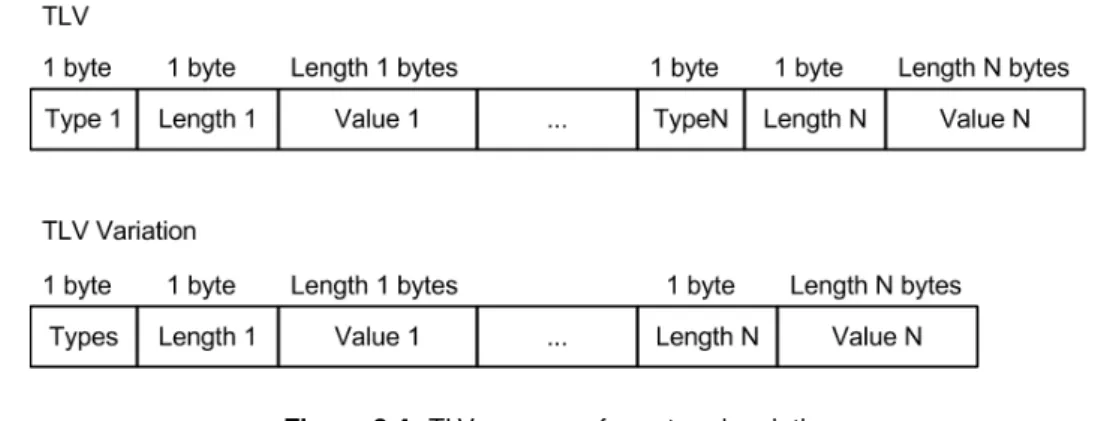
3.4 TLV message format and variation . . . 33
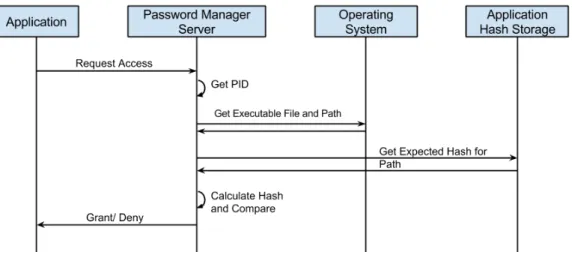
3.5 Access control components and workflow . . . 35
4.1 Inter Process Communication (IPC) technology between components . . . 39
4.2 Hardware Configuration Proposal . . . 39
4.3 Virtual Smart Card Architecture . . . 40
4.4 Proposed Virtual Smart Card . . . 40
4.5 Smart Card Get Response . . . 41
4.6 Smart Card Get Response in Mobile Scenario . . . 41
4.7 Smart Card Get Response in Mobile Scenario with optimization . . . 42
5.1 Direct Call Benchmark - Credential Creation Operation Performance . . . 48
5.2 Direct Call Benchmark - Credential Read Operation Performance . . . 48
5.3 Firefox Call Benchmark - Credential Creation Operation Performance . . . 49
5.4 Firefox Call Benchmark - Credential Read Operation Performance . . . 49
5.5 Ease of use and Speed Summary . . . 50
5.6 System Acceptability . . . 51
B.1 Security Related APDUs . . . B-2 B.2 Functional APDUs . . . B-3
D.1 Authentication Screen . . . D-2 D.2 Application Access Permission Screen . . . D-2
List of Tables
2.1 Comparison of Single-Password solutions . . . 15
2.2 Comparison of password managers . . . 16
3.1 Credential Attributes . . . 33
5.1 Comparison of Single-Password solutions including proposed solution . . . 46
5.2 Comparison of password managers including proposed solution . . . 47
Acronyms
APDU Application Protocol Data Unit
API Application Programming Interface
CPU Central Processing Unit
CRUD Create, Read, Update, Delete
EKE Encrypted Key Exchange
EPROM Erasable Programmable Read-Only Memory
GUI Graphical User Interface
HTTPS HyperText Transfer Protocol Secure
IPC Inter Process Communication
microSD Micro Secure Data
ms Milliseconds
mTAN Mobile Transaction Authentication Number
PC/SC Personal Computer/ Smart Card
PID Process Identifier
RAM Random-Access Memory
ROM Read-Only Memory
SC Smart Card
SIM Subscriber Identity Module
SSO Single Sign-On
TLS Transport Layer Security
TLV Type-Length-Value
USB Universal Serial Bus
VSCA Virtual Smart Card Architecture
XML Extensible Markup Language
XPCOM Cross Platform Component Object Model
1
Introduction
Contents
1.1 Motivation . . . . 2 1.2 Thesis Goals . . . . 3 1.3 Requirements . . . . 4 1.4 Document Structure . . . . 41.1
Motivation
In the last years, a rising number of services, both for single machines and distributed systems, has been introduced. These services handle different resources, from private data to public information, requiring a reliable and secure access control system to protect them. For this access control to be possible, an authentication scheme that allows people to prove their identity is required.
Several authentication schemes exist, based on at least one of three factors[? ]: something that the user knows, such as a simple pin or a complex password; something that the user owns, such as a physical token; or something that the user is, proven by his physical or behavioural attributes, such as their fingerprints. Knowledge based authentication is the most easily deployed, given the fact that there is no need for extra peripherals to perform its mechanisms. However, since this knowledge has to be memorized by users, they tend to choose weak passwords that can be more easily attacked in comparison to the other existing factors. Possession based authentication usually requires the distri-bution of one physical peripheral per system, making them harder to deploy and to be accepted by users. A currently popular and scalable alternative to the distribution of such peripherals is Mobile Transaction Authentication Number (mTAN) which consists on the usage of one time passwords re-ceived through short message service[? ][? ], which proves the user is in possession of the mobile phone. Authentication based on the physical or behavioural properties of the user also depends on the existence of a physical device to scan a user template confirming his identity. A problem related with this kind of authentication in a remote scenario is that sending this sample over the internet can lead to it being eavesdropped and reused, enabling an attacker to steal the user identity. In con-trast to password or token based approaches, where users can change their password or token, in the biometric scenario users will not be able to change their biological properties. These presented properties lead to password-based authentication being the most commonly used method[?].
Due to the knowledge based mechanism being the most habitual, a user which accesses multi-ple systems is often required to share a secret with each of them. Each of these secrets must be memorized by the user, which requires an effort that the user wants to avoid. A common approach to avoid this memorization effort is the re-usage of the same secret among different services[? ][?
]. This password re-usage leads to a new problem: in case of password disclosure from one of the services, all of these will be compromised, and an attacker can have access and control over all of the user’s resources[? ]. This attack is possible since the knowledge based authentication mechanism assumes that only the user knows its password but, with several services knowing this same secret, this assumption is broken.
The disclosure of the password may be due to different reasons, either user misuse, such as sharing a password for one service with another person, or an external factor, such as an attack to a remote server which stores the password. One recent attack that alarmed the online community was the access to the LinkedIn passwords database[? ]. This attack provided access to unsalted hashes of passwords which allowed access to the passwords of the users. Knowing these passwords and other user data, such as their e-mail, attackers can access other services of the users in which
the same credentials are used. Another problem that increases the risk of password disclosure is that, traditionally, most services do not provide support for third party solutions to perform operations on the behalf of the user. When the user wants to delegate a functionality from a service to a third party system, the user is required to share his password with this system so the third party can authenticate with the user’s identity. This sharing process increases the number of systems storing the password. Solutions have been proposed for services to provide access permission to third party software without users sharing their password[?].
Regarding the problem of users re-using their passwords, several solutions have been proposed to allow users to perform authentication with multiple services without requiring the memorization of multiple passwords. Such solutions can be considered as part of three categories: Single Sign On systems, a centralized third party system which performs authentication on behalf of the systems; Hash-based password generators, which generate unique passwords for different services; and Pass-word managers, applications which manage a protected database containing user’s passPass-words.
This document analyses these solutions in detail, identifying their security concerns, and studies mechanisms that can be used to solve them. Based on these mechanisms, a secure password manager will be proposed.
1.2
Thesis Goals
Understanding the risks associated with the usage of the same password in different services, and the trend for services to use authentication based on text secrets, it is concluded that there is a need for solutions that help users authenticate with different services, providing the same security strength of multiple passwords, but only requiring the memorization effort of a single password.
To cater such a system, this thesis has as its main goal the development of a password managing solution which allows the user to perform authentication towards multiple services, reducing the risks related with password re-usage. In terms of quality, the following properties are those that must be considered when designing the proposed solution and when analysing the existing state of the art:
Usability
Most security mechanisms tend to be disabled or not used by the users[?] if they do not provide a good usability or if they prompt the user for information too many times. The solution must be user-friendly and perform its operations with the smallest user interaction or impact.
Security
The solution must assure that the performed authentication towards the different systems can only be performed with the user’s authorization. It is necessary for the solution to be secure, since if compromised it would put at risk all the protected passwords.
Performance
Adding too many security mechanisms to a system may cause its performance to drop. The solution must have the least performance impact possible.
Portability
The solution main goal is to enable users to authenticate with multiple systems. This implies that the solutions must be designed to be portable, providing easy integration with those systems.
Availability
Since the solution is to be used to assist the user in authenticating towards multiple services, if the system is not available, the user will not be able to authenticate himself. This means that besides assuring the solutions is reliable and will not fail, it must also be remotely accessible or physically transportable for the user to be able to authenticate himself.
The main goal of the work presented in this document is to achieve a solution that fulfils the presented properties and provides a way for users to authenticate with several systems in a secure way, avoiding memorization effort.
1.3
Requirements
Based on the goals of this thesis, formal requirements can be specified. These requirements must be fulfilled by the password manager proposed in this document, namely:
1 The user must be able to authenticate himself towards multiple systems through the presentation of a single password.
2 The user must be able to authenticate himself towards multiple systems without having to share his memorized password.
3 The system performance must not affect the usability of the system.
4 The user must be able to use the system independently of his location.
5 The system must be easy to integrate with other systems.
6 The user interaction must be as simple as possible by automatizing the authentication process.
7 The system must assure user presence to perform its functionalities.
1.4
Document Structure
This document describes the proposed password manager solution which uses state of the art mechanisms to ensure a secure authentication with multiple systems.
To describe the proposed solution and the main gains from using it, this document is structured in the following chapters:
Chapter 2presents the state of the art analysis used as the base to design the proposed solution.
This analysis consists of: single password authentication solutions, which have the same goal as the proposed solution, which is to allow a user to authenticate towards several systems by mem-orizing only one password with the same security strength as multiple password memorization;
smart cards, cards with secure processing and storage capabilities; and process authentication, mechanisms that, besides user authentication, allow resources to have an access control based on which application is trying to access them.
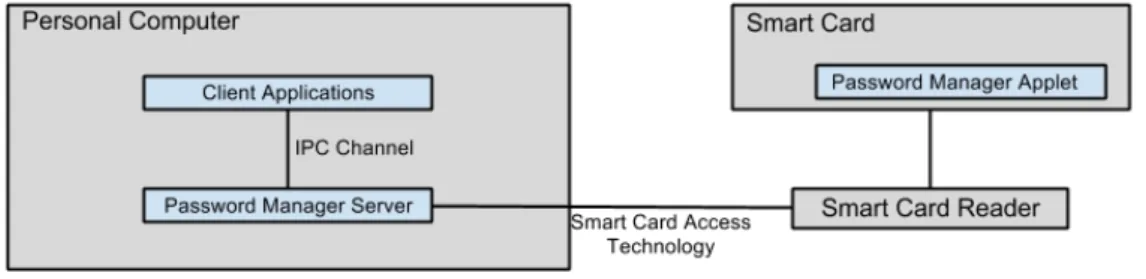
Chapter 3describes the proposed solution, a password manager based on smart cards, its
archi-tecture and how the desired goals are achieved, taking into account the existing state of the art herein presented.
Chapter 4discusses the implementation details of the proposed solution. It describes which
tech-nologies are used to implement each component of the proposed architecture and their role. It also describes the implementation of a solution which allows access to a smart card from a computer through a smart phone instead of a smart card reader.
Chapter 5 performs the evaluation of the proposed solution. Based on its the design and
imple-mentation, this chapter describes how the desired goals and requirements are achieved. It also compares the proposed solution with other single password authentication mechanisms and solutions in the state of the art.
Chapter 6concludes this document. It summarizes the developed work and introduces further work
2
State of The Art
Contents
2.1 Single Password Authentication . . . . 8 2.2 Smart Cards . . . . 17 2.3 Process Access Control . . . . 23 2.4 Conclusions . . . . 24
This chapter covers all the research performed to design and implement the proposed solution. Section 2.1 presents the different existing mechanisms that can be used to perform authentication towards multiple services without the user having to memorize a password for each of these. Special detail is given concerning password manager solutions. Section 2.2 describes smart card technology, namely cards with secure processing and storage capabilities, usually used as a trust component. Section 2.3 presents mechanisms that can be used to perform access control based on the identity of processes, protecting resources with more granularity than access control based on the user.
2.1
Single Password Authentication
A significant amount of effort has been spent along the years to provide secure authentication. However, due to the effort of memorizing multiple passwords, users tend to re-use the same password among different services, leading authentication mechanisms to lose some of its security properties. Passwords are supposed to be unique for each user and, for each user, unique on each system so the compromising of one system does not imply losing security in another. However, most users tend to use the same password on different systems, since it is hard to memorize a unique password for each system. This password sharing among different services can lead to an attacker having access to all user’s resources in case of disclosure of the password from one of the services.
Different solutions have been proposed to allow users to authenticate with multiple systems reduc-ing the memorization effort to a sreduc-ingle password. Although havreduc-ing the same goal, these solutions can be divided into three categories covered in this section: Single Sign On systems, solutions which pro-vide a centralized authentication service, covered in section 2.1.1; Hash based password generators, which generate passwords for the user, covered in section 2.1.2; and password managers, systems that store passwords for the user, covered in section 2.1.3.
2.1.1
Single Sign On
When a service requires user authentication, it usually implements its own authentication mecha-nism, sharing a secret with each particular user. A different approach is to delegate the user authen-tication to an external service. This type of service, known as Single Sign-On (SSO), consists of a service with the single purpose of authenticating the user and securely communicating a successful authentication to the services the user wants to access. Besides releasing the authentication and secret sharing responsibility from each particular service, SSO solutions allow users to memorize only one password to authenticate with multiple services, reducing the effort of memorizing multiple passwords.
To allow the usage of a SSO system, the service with which the user wants to authenticate must be aware of the SSO system, requiring the service to be designed or adapted to allow delegation of the authentication process. This service must also trust the SSO system implying that if a service does not trust the SSO system of the user, he will still need to memorize a new password for the service, which leads to SSO systems having low portability and only working with systems which trust them.
One reason that can lead to the disuse of SSO systems is the lack of assurance of their availability. In case of a denial of service attack or misbehaviour of the SSO system, it can be turned off or made unavailable, disabling user authentication.
Different SSO solutions have been proposed, such as OpenID and Shibboleth[? ], but none has been widely accepted, still requiring users to access multiple SSO accounts to access different services. This implies that SSO services are not yet truly single-password solutions.
In terms of security, on one hand, the fact that the user password is only shared with one service mitigates the risk of it being disclosed. On the other hand, the main problem of this type of solutions is that, in case the user password is disclosed by an attacker, either by a brute force attack to the password or misbehaviour of the SSO system, all the user services which are in the realm of the SSO system can be accessed.
A popular use case for SSO systems is the centralization of the authentication within services from a company. This is either applied inside corporations where employees have a single account for internal services, or in public services such as Google, where different services can be accessed through the same account. In these cases trust is assumed, since authentication is provided by the same entity as the services.
A new trend is for social networks, such as Facebook and Twitter, to provide SSO services[? ], allowing users to authenticate with third party services through the social network account.
2.1.2
Hash Based Passwords
Hash Based Password systems are systems that generate different passwords for different ser-vices based on a single master password provided by the user, allowing a user to share different passwords with different services without having to memorize them. When a user registers in one service, he inserts his master password and the name of the service in the password generator. Based on this data, a password is deterministically created. The next time the user wants to access that service, he repeats the generation process, obtaining the password for that given service. Some services can use more parameters than those previously specified, such as the username, adding more entropy to the generated passwords. In most cases, to improve usability, the entire process is automated, only requiring the user to insert his master password.
The algorithms used by these solutions, to generate the passwords, require two properties:
1 - It must be computationally hard to calculate the master password from the generated pass-words
2 - The algorithm must be deterministic
The first property assures that in case of disclosure of one of the passwords it is not computa-tionally feasible to discover the other passwords, protecting the access to other user services. The second property allows the user to regenerate all his passwords without requiring the application to store any information. To achieve these properties the generators typically use cryptographic hash functions which already provide these properties by definition.
The main disadvantage of these solutions is the fact that all the user’s passwords are related. This means that if one of the generated passwords is disclosed, an attacker can use dictionary or brute force attacks to disclose the master password, thus allowing the generation of all the passwords of the user and access to all his services. To mitigate the risk of these attacks, some solutions[? ][?
] generate the passwords through multiple rounds of hashing or by using computationally heavier hash functions, slowing the process of generating the passwords, ensuring that the attack will also be slower.
The main advantage of these solutions is their portability. These systems can be integrated with any system, as long as the user is free to choose his password. In case there is no extension for the browser the user is currently using, he can use a non-integrated standalone password generator, generate the passwords from this standalone application, and manually insert the passwords on these systems. This also guarantees the availability of the system since the user can run this standalone application in a smart phone or web-based application.
One example of this type of system, containing the presented properties, is HashPass[? ]. Hash-Pass features a browser extension that can be used to automatize the password filling process, pro-viding different passwords for different sites. It also offers a website in which users can manually type their master password and one parameter, and generate a password, allowing compatibility with systems that do not contain browsers compatible with the extension.
2.1.3
Password Managers
A password manager is a system which stores the passwords of the user for different systems and helps the user to authenticate without him having to remember all his credentials for these systems. Within Password Manager Systems we can identify two types of system:
1. Systems Internal to applications, for instance, a module of a browser that provides this function-ality.
2. Systems External to applications or multi-application systems, which store and deliver this data to different applications.
The most significant benefit from this type of solutions is that their implementation and integra-tion into the applicaintegra-tions only depends on the client side of these applicaintegra-tions and does not change the authentication scheme of the system. The server side of the applications is independent of the existence of a password manager, and does not require to be aware of its existence.
Since an attacker that has access to the passwords also has access to all the resources of the user, the main property that should be taken into account when designing a password manager is the security of the access control mechanism used to protect the passwords. This access control must consider the identity of the user who is accessing the data, usually proven by a password, and, in the case of external password managers, it should consider which application is trying to access the passwords.
In the following sections different solutions that exist in the market are analysed. This analysis is performed in terms of quality attributes and functionalities, identifying the main properties that must be implemented by these type of solutions, and the main pitfalls on the already existing solutions, with a main focus on their security properties.
2.1.3.A Mozilla Firefox
Mozilla Firefox1 is one of the most used browsers in the world having the functionality of storing
passwords inserted by the user and taking care of the automatic filling of these into forms. To imple-ment this functionality, Firefox contains a module, called nsILoginManageer, which is responsible for the secure data management. This module contains a well defined interface2which can be used by
other components of Firefox to store the data.
To allow the desired functionality, Firefox stores the form in which the user inserted the credentials, the name of the server that provided the page, the username and password fields and their user submitted values. All these fields are stored in a SQLite file and are unencrypted except for the username and password values.
The system provides the user two options from which to choose the key to encrypt the data. The first and default option is the usage of a predetermined key which is inside Firefox’s application code. The second option is for the user to define a master password which will have to be inserted into the system in the first data access of each session. In both cases the algorithm used for encryption is 3DES.
An important point to refer about nsILoginManager is that this module is also accessed by Firefox extensions to store their critical data, existing no physical or logical separation between user and extension data. This means that, if a malicious extension is installed, it will be possible for it to access all the stored data[? ].
The primary functionalities identified in the nsILoginManager interface are adding and removing credentials, modifying credentials, disabling saving for particular pages, checking which pages are disabled and getting all the credentials.
2.1.3.B Google Chrome
Like the previously analysed application, Google Chrome3is also one of the most used browsers
in the market and also has the same password management and filling features[?].
The storage is done in a similar way to Firefox: the name of the server which provided the page, the form filled by the user, the username and password fields and their user submitted values are stored into a SQLite file. In contrast to Firefox, the username values are not ciphered, only the passwords values. This means that if an attacker gains access to the SQLite file and directs an attack to the file’s owner, their work is halved, since it now only has to guess the password instead of both fields.
1Mozilla Firefox main pagewww.mozilla.org/firefox
2nsLoginManager APIhttps://developer.mozilla.org/en-US/docs/XPCOM_Interface_Reference/nsILoginManager 3Google Chrome main pagewww.google.com/chrome
When running in a Windows environment, Chrome hands over the responsibility of ciphering the password value to the operating system through the use of the CryptProtectData[?] function provided by Window’s Application Programming Interface (API).
This function encrypts the data with a key related to the users’ system credentials. Since this function is provided to all the applications and depends only on the user session, any application running over the same user session can access this data. When running Google Chrome on a Linux operating system, all the data, including the passwords, is not ciphered.
2.1.3.C KDE KWallet
Unlike the previous analyzed applications that featured password managing, KWallet[? ] is a system whose purpose is to work as a server for other applications that require sensitive data storage. KWallet is the default sensitive data storage system in the KDE environment. The sensitive data unit is called Wallet and these are provided to the applications after the user explicitly grants them access. Wallets are ciphered with the Blowfish algorithm and different wallets may have different keys. The communication platform used between KWallet and applications is the Inter Process Communica-tion (IPC) system DBUS[?]. DBUS ensures that its services are unique, meaning that there is no way that another application can register itself as being KWallet. It also ensures that all communications between two connected applications cannot be intercepted. However, if the process running KWallet is killed, another service can register using Kwallet’s identity, allowing applications to be mislead into trusting this service.
When KWallet is connected by an application, it prompts the application name and the required wallet and asks the user for the password to unlock this wallet. In case the user grants access to the application, it will have access to the credentials contained in this wallet for the current session. This solution does not guarantee that the application requesting the wallet is legitimate and another application with the same name can mislead the user.
The most important operations that applications are allowed to perform are the addition and re-moval of entries from wallets. Although it does not provide an operation to get all the entries such as Firefox’s nsILoginManager, it is possible to obtain entries with queries using wild cards, therefore it is possible to get all the entries of the wallet.
2.1.3.D Gnome Keyring
Like the previous example, Keyring[?], the default system for the Gnome environment, is a sensi-tive data manager that can be used by other applications.
The interaction with this system begins at the moment that the user is authenticated by the operat-ing system. Keyroperat-ing implements a Linux Pluggable Authentication Module[? ] that authenticates the user in the Keyring system at the same time that the user is authenticated by the operating system. The communication, just like in the KDE Kwallet, is made over the DBUS inter-process communica-tion platform, guaranteeing the previously explained properties : the Keyring server process is unique and communication between it and the applications cannot be intercepted.
From the moment when the user is authenticated, keyring provides the sensitive data to all appli-cations that request it and are running over the same user space as the user. To ensure this property the system uses one of DBUS’s authentication schemes, which consist in presenting to DBUS one key that is written in a file that is only readable by the user. The data is ciphered with the AES-128 algorithm using as key the SHA-256 hash of the user password used at operating system login.
The system takes special care by storing the deciphered data in non-paged memory. This prevents unencrypted data to be swapped into the disk, avoiding access to this data in case of abrupt system unplug.
To store and retrieve passwords from the system, Keyring allows programs to specify attribute values for the data. The set of stored attributes is defined either by a default schema or program specific schemas. An example of a default schema is for instance ’Network Passwords’, a template with the attributes user, server, protocol, domain and port. A client program can find a password by providing one or more attributes to the system. Because of such default schemas, the stored data can be used in different applications that are able to recognize the default formats.
2.1.3.E Kamouflage
Kamouflage[? ] is a system implemented as a Firefox password manager’s replacement. It focuses on avoiding password dictionary and brute force attacks after the file has been compromised. To provide a more secure storage, Kamouflage generates decoy passwords based on the user inserted passwords. This way, besides having stored the user set passwords, there are also a set of decoy passwords. To calculate the real passwords set, a master password must be used. The main goal of this system is to increase the effort required by an attacker to discover the true data.
When the attacker discovers the set of decoy passwords, they will be lead to performing online attacks in order to test them. These online attacks can be detected by the services in which these passwords are tested, and security measures can be performed by those.
2.1.3.F Web Solutions
Due to the great mobility of users and the usage of different devices, the ubiquity of their passwords is becoming a necessity.
Three major solutions exist to implement a distributed password manager. The simplest one is the storage of the passwords file in a distributed storage solution. An example of this is the storage of the passwords’ storage file identified for Firefox on a distributed file system. The risk associated with such a solution is that, besides having the problems regarding the used password manager, the passwords’ file may also be accessed by an attacker if the distributed storage system is compromised. A second solution consists on the implementation of a browser extension that stores the data in a remote server. To be functional this solution requires the existence of a compatible browser. An example of this type of application is Norton Identity Safe[?]. The last solution, and the most portable one, is the implementation over javascript, interacting with all the compatible browser and storing the data in a remote location.
Two existing applications, Fortnotes4and my1Login5, belong to this third model of implementation and both have a similar behaviour. In these solutions, the access to the data requires two memorized passwords, each with a different purpose. The first password is the password used by the user to authenticate himself towards the server. After authentication is successfully performed, the password database can be accessed. For the user to be able to read this database, he must decipher it using his second password. This key is only used to perform cryptographic operations and is never sent to the server. By having two passwords, the system is able to guarantee user authentication without needing any transformation of the cryptographic key stored on the server. In case of a successful attack to the server, the attacker will have to perform brute force attacks to the password databases, not to the keys. Besides these qualities, all communication is performed over HyperText Transfer Protocol Secure (HTTPS), providing an extra layer of security.
2.1.3.G Physical Device Solutions
In most classic password manager solutions, passwords are stored in the user’s computer pro-tected by a password. This password is usually short and weak, allowing attackers to perform suc-cessful brute force attacks to the file containing the passwords. To avoid granting the attacker the opportunity of performing such an attack, some solutions purpose the storage of the passwords in-side physical secure storage devices, such as smart cards, or through their ciphering with stronger keys stored in a different device.
IDKeeper[? ] is a password manager that stores passwords inside a smart card contained in a Universal Serial Bus (USB) key that can be accessed through a browser extension. To access the passwords the user needs to authenticate using a pin. Based on this pin, the browser extension and the USB key generate a session key to encrypt the messages containing the transported passwords. PwdCave[? ] proposes a password manager that uses Trusted Platform Module (TPM)[? ], a device with processing and secure storage capabilities included in most modern computers. Besides storing the passwords inside the TPM protected storage, instead of returning passwords to applica-tions, all the security operations are performed by the TPM, and only the result of password related computations is returned to the application. This method avoids unprotected passwords to be tem-porarily stored on memory, avoiding some eavesdropping attacks.
Although not secure storage based, Tapas[? ][? ] proposes a password manager based on dual possession. In this solution, the passwords can only be accessed when two devices are present, being these devices the personal computer and mobile phone of the user. Since the user can be authenticated towards each device through the presence of the other, the user is not required to insert a password. The passwords are stored, encrypted, on the mobile phone, while the key to decrypt them is stored in the computer, and both components need to cooperate to provide access to the data. If one of the devices is lost, an attacker will only have access either to the encrypted data, or to the cryptographic key. The encrypted data is assumed to be protected, since the key used to cipher the data can be large and strong, as opposed to passwords memorized by users. The communication
4Fortnotes main page
http://fortnotes.com 5my1Login main pagehttps://www.my1login.com/
between both devices is performed on top of Transport Layer Security (TLS), and the session keys are exchanged through an authenticated and secret out-of-band channel. A problem that exists in this solution is that the password manager can only be used in one computer, the one which has the key to decrypt the passwords.
2.1.4
Summary
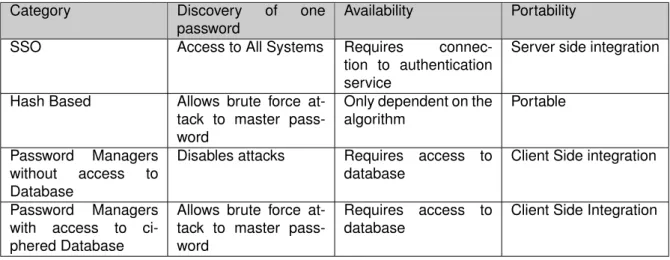
The main goal and the most significant security property in the analysed single-password authen-tication solutions is the way they defend themselves when one of the user’s passwords is disclosed to an attacker. Table 2.1 presents a summary on how these categories tolerate this disclosure, eval-uating password managers in situations when an attacker may or may not have gained access to the ciphered database.
Category Discovery of one password
Availability Portability
SSO Access to All Systems Requires connec-tion to authenticaconnec-tion service
Server side integration
Hash Based Allows brute force at-tack to master pass-word
Only dependent on the algorithm
Portable
Password Managers without access to Database
Disables attacks Requires access to database
Client Side integration
Password Managers with access to ci-phered Database
Allows brute force at-tack to master pass-word
Requires access to database
Client Side Integration
Table 2.1:Comparison of Single-Password solutions
It can be concluded from this table that password managers offer the best security properties when there is no access to the database, offering almost the same properties as hash based password generators in case of access to the database and one stored password. This table also compares the availability of the different categories. SSO solutions require the availability of the authenticating service, which can be compromised. The availability of a password manager depends on the access to his database, being dependent on its implementation. Hash based password generators tend to be the most available, due to the fact that the generation algorithm can be implemented in multiple devices and web services, and is available to the user in any situation. Another important property to be considered is their portability, SSO being the least portable due to its requirement of server awareness and integration. Hash based password generators are the most portable given the fact that passwords can be generated in any device, although their usability is improved through client side integration.
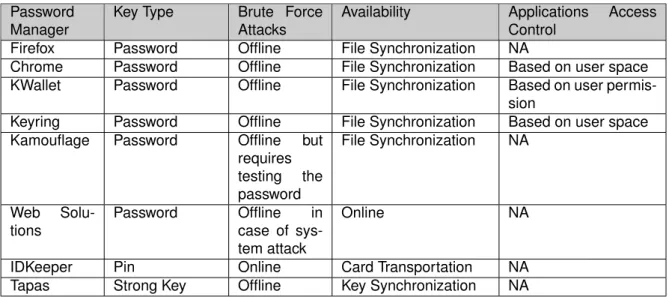
Table 2.2 summarizes important security properties of some of the analysed password managers. In this table the key type column defines the length of the key used to protect the data, assuming
Password Manager
Key Type Brute Force Attacks
Availability Applications Access Control
Firefox Password Offline File Synchronization NA
Chrome Password Offline File Synchronization Based on user space KWallet Password Offline File Synchronization Based on user
permis-sion
Keyring Password Offline File Synchronization Based on user space Kamouflage Password Offline but
requires testing the password File Synchronization NA Web Solu-tions Password Offline in case of sys-tem attack Online NA
IDKeeper Pin Online Card Transportation NA Tapas Strong Key Offline Key Synchronization NA
Table 2.2:Comparison of password managers
passwords and pins are weak keys. The brute force attack column defines how brute force attacks must be performed to try to access the passwords. Offline attacks refer to attacks in which the encrypted passwords can be accessed and an attacker can try every key to decipher them. Online attacks require the attacker to test each key against the system meaning that, not only is the attack slower, but also that security policies can be defined to block access to the passwords after a certain number of tries. The applications access control column refers to how the access control is performed when an application wants to access passwords stored on external password managers.
In most solutions, if the device that stores the database containing the ciphered passwords is lost, the database can be accessed, enabling offline attacks to be performed on it. Opposed to online attacks, which have their speed reduced to the speed of the system being attacked, these databases can be copied to additional and more powerful machines, increasing the speed of offline brute force attacks. Although a simple attack to web solutions would be an online brute force attack to the account of the user, if the system were to be exploited, and an attacker gained access to the data contained in the server, the attacker would be able to perform offline attacks to the databases.
The availability of most of these systems depends on the existence of a file containing the pass-words database. This file can be synchronized either through a cloud storage service or through physical transportation, for instance a USB pen drive. In both these cases, the copy of the file to such solutions leads to an augmented risk of the database being accessed to, since this file is shared in more locations.
Although not an external password manager, Google Chrome encryption is performed through Windows functions. The cryptographic key used by these functions is user space based. Any appli-cation running on the same user space uses the same key implying that it can access the passwords of the corresponding user. When using both this system or Keyring, if the user is mislead into running any malicious application, this application can access all the data without having to exploit any of the system’s privilege escalation vulnerability, since these solutions allow any application running over the user scope to access the data.
In the case of KWallet, although access control is based on user permission, the information provided for the user to make this decision is based on the name of the application. Since an attacker can define his exploit application name, it can mislead the user into trusting a malicious application. This leads us into believing that one important security feature that must be integrated into the system is the ability of specifying explicitly which applications can access the data.
The analysed solutions are only some of the ones that exist in the market, but their design, mech-anisms and problems are the same that are found in other solutions[?].
Despite the problems with existing solutions, password managers are important systems that can be secure, user-friendly and transportable if properly designed. The two following sections present mechanisms to deal with the two major problems identified: protection against offline attacks in case an attacker gains access to the device in which data is stored and control of applications accessing the data.
2.2
Smart Cards
In section 2.1.3 we identified several password managers that stored data into a disk or remotely. One of the problems that can arise in these systems occurs when the physical devices in which the data is stored are compromised. If a malicious user has access to these peripherals, he can access the encrypted data. With the increasing performance of cryptanalysis solutions through the usage of special purpose hardware[? ][? ], there is a trend for offline brute force and dictionary attacks to be more effective, turning ciphering with user passwords into a weak protection.
To prevent the occurrence of such attacks it is important to find a way that, based on a password, can protect the user’s data with methods other than cipher. This section introduces smart cards as a way to solve such problems.
An overview of smart cards, their architecture, and their main properties are discussed in section 2.2.1. Section 2.2.2 details how these smart cards can be programmed to implement the desired behaviour. Given the broad use of smart cards in a novelty of applications, these exist in several formats, presented in section 2.2.3. Section 2.2.4 describes the messages that must be used to communicate with smart cards, followed by section 2.2.5, that covers technologies which are used by computer applications to communicate with these smart cards.
2.2.1
Overview
Smart cards are card-shaped computers which contain digital data that is supposed to be read by systems instead of people. In the market both cards with and without chips exist. Cards without chips usually contain a magnetic stripe in which data is written. In the case of cards with chips both memory cards and processor cards exist. The obvious difference between these is that memory cards do not contain processing power. By adding processing capabilities to the card, it is able to authenticate the user or the system with which it is communicating before providing the stored data. It also allows the card to do computation, for instance, signing messages instead of providing the user the secret key.
In the purpose of this text only smart cards with processing capabilities are considered.
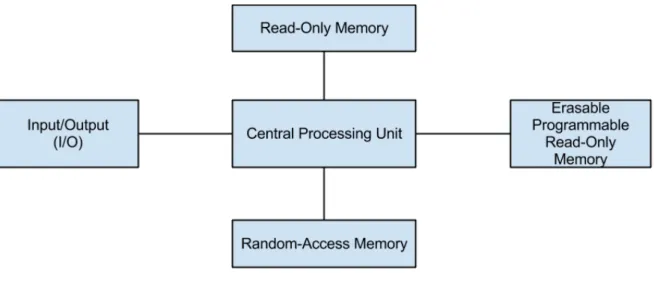
The architecture of smart cards[? ] consists on a Central Processing Unit (CPU) connected to the Input/Output of the card through which communication with the card is performed. The CPU is also connected to three memories, each with its own purpose. The Read-Only Memory (ROM) is used to store the card operating system and run time environments. Some applications, which are not expected to be replaced on the life cycle of the smart card, can also be stored in this memory. The Random-Access Memory (RAM) is used to temporarily store volatile memory to be used during the current session. The Erasable Programmable Read-Only Memory (EPROM) is used to store data and applications. This architecture is depicted in figure 2.1.
Figure 2.1:Smart Card Architecture
The communication with other system can either be done by contact interface with electrical sig-nals, as specified in ISO/IEC 7816, or by wireless communication, as specified in ISO/IEC 14443. These standards, besides specifying the protocols to be used, also specify their physical characteris-tics such as voltage or wave frequency, depending on the case.
For smart cards to be secure and useful for security solutions they must be tamper-resistant. Most smart cards have anti-physical tampering mechanisms and security functions such as ciphering and hashing functions are implemented by hardware, in a way that avoids side channel attacks[? ].
An important property provided by these devices is their transportability since they fit in a user pocket or wallet allowing it to travel with the user.
Due to their properties, smart cards are a popular solution used for possession based authenti-cation, most of the times being used in parallel with biometric or knowledge mechanisms to provide multi-factor authentication[? ][? ]. By using these solutions, the sensitive data, such as the key for possession based authentication or the user biometric template, is stored inside the card and cannot be externally accessed.
2.2.2
Smart Card Technologies
When designing a smart card system it is necessary to analyze the implementation and deploy-ment options in the market.
For implementation it is necessary to define in which operating system or run time environment the application will run. These can be divided into native environments or interpreted environments. Native environments allow applications to run without an interpreter allowing applications to achieve faster response times and less energy consumption. Interpreted environments, although associated with performance and energy costs, allow applications to be portable since their implementation does not depend on a particular hardware. It also allows the development of applications to be simpler, for this type of environment usually provides an application binary interface which implements the most fundamental and generic functions in smart cards applications. This improves smart cards projects in terms of project development time and cost.
One example of a run time platform for smart cards is the Java Card[?] Technology. Java Card is an open source platform that allows applications developed for it to run in a large range of smart card devices. It also allows more than one applet to be deployed on the card. To develop applets, which is the name for Java Card applications, the programmers can use a subset of the Java language. Since applications run in a virtual environment, the process of debugging applications is also simplified, since in the development phase they can be ran into a Java Card virtual machine in the developer’s computer. Before deploying the applet, it must be translated into a CAP file which is a specific file format runnable by the Java Card virtual machine on the card.
Although Java Card specifies the file format, it does not specify how to deploy, or how to commu-nicate with the applets in a multi-applet card. One of the existing standards that defines these two issues is Global Platform[? ], an open and interoperable infrastructure for Smart Cards, devices and systems.
2.2.3
Smart Card Formats
The market has evolved and different types of smart cards were created to enable different solu-tions. One property of the cards that had to be taken into account was their size and format, while keeping communication standards. ISO/IEC 7810 takes this into account and specifies different card formats[?].
The typical format for smart cards is the one used for banking and ID cards. Different cards from different providers and for different purposes usually compromise to this standard size (85.60 X 53.98 mm and 0.78mm thickness) specified in ISO/IEC 7810 as ID-1. Having a standardized market allows companies to be independent on specific suppliers while developing a system. This smart card format is depicted in figure 2.2.
Other format is the one specified in ISO/IEC 7810 as ID-000 which are Subscriber Identity Module (SIM) cards. SIM cards have a size of 25 X 15 mm and a thickness of 0.78 mm. These cards are specially designed to identify and authenticate subscribers on mobile devices, especially mobile phones. Other examples of usage of this kind of cards are mobile network adapters. An example of a SIM card is depicted in figure 2.3
Figure 2.3:SIM card
With the increase of the smart phone markets, the interest in applications with smart cards for this kind of devices has also increased. One problem is that usually these devices do not have external digital interfaces preventing them from communicate with ID-1 smart cards. Although most mobile phones already contain a smart card in the SIM format, these usually do not allow the installation of custom applications and are closed platforms when provided by telecommunication companies. To solve this problem, a new type of smart card was introduced. This solution consists in a smart card embedded in a flash memory Micro Secure DataMicro Secure Data (microSD) card. This type of cards is compatible with most smart phones in the market and can be deployed either closed with a single application or open for the user to install multiple applications. They can also be accessed from the computer through a microSD card reader. One example of this type of smart cards is Go-TrustRSecure microSD Java, depicted in figure 2.4.
Figure 2.4:Go-TrustRmicroSD with embedded smart card
Depending on the use case, some solutions also distribute smart cards embedded in other devices such as USB sticks. An advantage provided by such a solution is the fact that the USB stick, besides containing the smart card, also provides direct communication, not requiring a smart card reader.
2.2.4
Communication
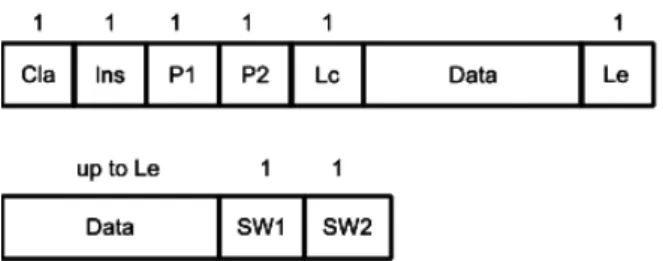
To communicate with smart cards, a specific type of message must be used. These messages are on the Application Protocol Data Unit (APDU) format, as specified by ISO/IEC 7816-4. The protocols used to communicate with smart cards are client-server based, where the card is the server, which only answers to requests from the client.
• CLA - 1 byte which represents the class of the instruction to be executed
• INS - 1 byte representing the instruction to be executed
• P1-P2 - 2 bytes used as parameters for the instruction
• LC - 1 byte representing the size of data sent in the message
• DATA -LC bytes with instruction specific data
• LE - 1 byte representing the maximum number of expected bytes on the response message
The messages sent from the card, the responses, follow the following format:
• Data - up to LE data bytes as specified in LE
• SW1-SW2 -2 bytes representing the result of the message, being 0x9000 the code for a suc-cessful execution
Since Lc is only one byte, the data field can only contain up to 255 bytes. This means that protocols used to communicate with smart cards need to be optimized so as much information as possible can be sent in this limited space. Some cards also implement a slightly different type of APDU, called Extended APDU, which can support more data in each message. In this document we only consider common APDUs since they are the general case.
Figure 2.5:Apdu format and field size in Bytes
Global platform defines specific APDUs to manage the life cycle of the card, such as installing and selecting applets.
2.2.5
Smart Card Access Technologies
Besides applications installed inside smart cards, systems which use smart cards also require an application to be installed on a host which communicates with the smart card. These applications deployed on the host usually have goals which need to have security properties but since they are deployed on systems which are not trustworthy, security functionalities are delegated to smart cards. The host in which they are deployed may either be a personal computer or a standalone terminal, and they must have a smart card reader either attached or integrated. In the case of the host being a personal computer, different applications may require access to the smart card and this smart card may be connected through a reader provided by any manufacturer.
Different solutions have been designed to provide an abstract access to smart cards. These tech-nologies provide a common interface to communicate through readers from different manufacturers, allowing a better portability of the developed applications. Besides this property, these solutions also provide transactional support to ensure that an application can have exclusive access a card.
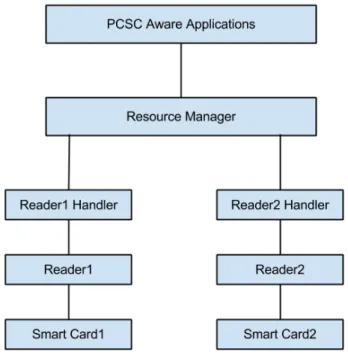
One specific solution covering these goals is Personal Computer/ Smart Card (PC/SC)[? ]. PC/SC is an open specification, and there are several implementations for different operating sys-tems. PC/SC achieves the required goals by specifying an architecture[? ] which has as main component a centralized resource manager. When a smart card aware application wants to com-municate with smart cards, the messages must be sent to the resource manager. This component is then responsible for forwarding the messages to a reader handler. Reader handlers are PC/SC drivers for specific smart card readers, which must be distributed by each manufacturer. A reader handler receiving a message can then forward it to its specific reader, which will deliver the message to the smart card. The reverse process is then performed to deliver the response to the requesting application. Having different reader handlers for different smart card readers, allows the applications to be unaware of differences that may exist in the behaviours of different readers, and also permits applications to communicate with smart cards through different interfaces, such as NFC and RFID. Figure 2.6 depicts a simplified vision of the PC/SC architecture. The messages transported by PC/SC must be according to the APDU format specified in 2.2.4.
2.3
Process Access Control
In classic operating systems access control is performed based on the user’s identity. When a user launches a process, it will have all the permissions associated with the user, and all the processes spawned by it will be granted those same permissions. Even if a system is protected by authentication, there may still be threats after the user is authenticated. In a scenario where a user would be required to insert a password to allow him to access a ciphered disk, and if a malware were to run on the user’s computer, this malware could access the contents of the disk since the user is authenticated. In some scenarios there may be a need for stronger policies to control access to resources.
In section 2.1.3 two multi-application password managing systems were presented, Keyring and Kwallet. One possible vulnerability found in these systems was the weak access control over which processes can access the passwords. Keyring allows any application running over a user space to access its corresponding data, and KWallet requests the user’s authorization by displaying an application name defined by the application. Both these solutions partially solve the problem but can still be maliciously explored by having the user run a malicious application. This access control is similar to that which is provided by classic operating systems.
A different approach that can be used to provide a better access control, is to grant access to resources only to applications defined by the user. This type of policy is performed by modern op-erating systems such as Android, which requires permission from the user for applications to share resources[?].
Since processes running over the same user space have access to the same files, it is not pos-sible to provide an authentication based on a secret key, since this key can be accessed by multiple applications.
This section presents mechanisms that can be used in classic operating systems, such as Linux, to provide an access control scheme based on the identity of the process. These mechanisms can be either at system level, as presented in 2.3.1, or can be at application level when using an IPC mechanism, as presented in 2.3.2.
2.3.1
System Call Access Control
When an application launched by a user runs in an operating system, it runs in a special mode called user mode[? ]. In this mode, applications access only a limited set of instructions provided by the computer, and are unable to access several resources, such as files and hardware devices. To have access to these resources, applications must use system calls provided by the operating system. The operating system performs access control when a system call is performed to assure the process has permissions over that resource.
Several solutions have been proposed to allow programmers and system administrators to expand or override the existing access control policies on the operating systems.
System call interposition is a technique that consists in intercepting system calls in place of the operating system. To achieve this, an application, which must be running in kernel mode, must change the handler pointers that exist in the system call table. This way, besides being able to change the access control policy, the application may also change the behaviour of system calls.
Other solution are Linux Security Modules[?], modules that register with the operating system the intent of controlling certain system calls. When such system calls occur, the operating systems calls these modules which may grant or deny access to the call.
Both these mechanisms have been used by several solutions[? ][? ][? ] to provide sand boxes and access control policies.
In these mechanisms, since they are required to run in kernel mode, one can access information about the process such as the executable used to launch it. From this information a module may confirm the identity of the process and control the access based on it.
These solutions may affect the performance of the systems since every system call will have to be processed by the interposition module.
2.3.2
IPC Access Control
Besides access control at system level, when two user space applications are communicating there may be a need for one of those to attest the legitimacy of the other. To endorse this legitimacy the processes must be able to identify each other, and based on this identification, be able to confirm some properties that will sanction the legitimacy of the process.
To identify a process, the used IPC mechanism must have functionalities to reliably know the Process Identifier (PID) of the processes communicating, which represents a unique identity of the process in the machine. An example is D-BUS which provides functions to access the PID of the communicating parties and the PID of registered services.
To confirm the desired properties of a process based on its PID, the operating system must provide functionalities which, based on this PID, allow applications to access information of the process. Over the Linux operating system, this information can be accessed through Procfs[? ], a virtual file system containing information on the running processes. Procfs, usually mapped in ’/proc’, contains folders whose names are the PID of the process they map. Inside each of these folders, different information on the respective process can be found. Examples of this information are the command used to launch the process and a copy of the executable at the time when the application was launched. With access to this information, an application may change its behaviour based on the properties of the communicating process.
2.4
Conclusions
This section analyses the set of solutions in the state of the art which assists in the user authen-tication towards different systems without having to memorize more than one password. It presents the Single Sign-On mechanism which solves the problem of having multiple credentials, while
intro-ducing problems such as the lack of trust in the authentication server and single point of failure. It also presents Password generation mechanisms which have as their major advantage their availabil-ity and the generation of passwords which are not weak or vulnerable to dictionary attacks. These solutions still have a problem, which is the fact that they create passwords that have are related to one another, thus enabling the derivation of all the user’s passwords in case one of them is discovered. Following, some password managing solutions were presented. These solutions store and provide the users their password when required, enabling them to choose different passwords without requir-ing their memorization. The problem in most systems belongrequir-ing to this type of solution is the storage of the data in non-secure devices, allowing the data to be subjected to brute-force attacks and access control based on the user space and the name of the application.
Although problems exist in all the solutions, password managers can be considered as the ones that offer the most qualities. They allow the storage of independent passwords, since they are gen-erated by the user, not by an hash function with a common key. Another advantage is that the user credentials are stored in a device belonging to the user, in contrast to Single Sign On systems, where the service failure will make all the dependent services fail.
To solve the two major problems found in password managers, two solutions were presented: the smart card technology, which solves the problem of secure storage whilst also providing transporta-bility; and mechanisms that allow the implementation of an access control policy based on the identity of the applications, which can be used to control which applications are allowed to access the data.