Valuing the User Experience in Human-Computer
Interaction: the Respected User Manifesto
Enrico Denti
Department of Computer Science and Engineering (DISI), Alma Mater Studiorum – Università di Bologna, Italy *Corresponding Author: [email protected]
Copyright © 2014 Horizon Research Publishing All rights reserved.
Abstract There is a no-man’s land between how the
Graphical User Interfaces are typically conceived, designed and engineered in desktop applications and mobile apps, and what users actually expect: it’s where the users’ experience, expectations, training, habits, mental attitude come into play. New software versions add features, change the GUI layout, behavior and environment for innovation and marketing reasons, but in doing so they often disregard the value of the user experience: all the user can do is accept the new situation and trying to adapt. To make things worse, customization options are usually limited when it comes to restoring the previous environment, and downgrading restrictions in software licenses also apply. Background services may also start at the worst time, monopolizing the system against the user’s will, causing frustration and possibly more serious problems due to service unavailability. In short, there’s a grey cross area in software design and deployment where the user is not fully respected as a person whose experience is intrinsically a value worth preserving.In this paper we analyze and discuss some common situations from different scenarios, and exploit them to extract some golden rules for a more respected software user – the Respected User Manifesto.Keywords Human-Computer Interaction, Graphical
User Interfaces Guidelines, User Experience, UI Design, Manifesto, Software Deployment, Downgrade Right1. Introduction
There is a no-man’s land between how the Graphical User Interfaces (GUI) are typically conceived, designed and engineered in desktop applications and mobile apps, and what users actually expect: it’s where the users’ experience, expectations, training, habits, mental attitude come into play. Solid GUI design principles and guidelines [1-8, 13-15] have been developed along the decades, but they typically refer to graphical aspects (colour, shape, size, layout, arrangement of items on the screen) and – more importantly from our viewpoint – are applied to the design and
development of a specific version of a software product. What happened in prior versions – in terms of graphical and behavioural choices become an established “de facto” standard in widespread mainstream software products, like office suites, browsers, and many others – is less often considered a key value to be preserved: rather, the emphasis is typically on proposing an appealing, self-selling new product, possibly with a new GUI, new features and an extended behaviour, that “shows different” to the general public so as to deserve the upgrade and be winning from the marketing viewpoint.
While this approach is well understandable for marketing reasons and can also actually help to spread innovation, balancing the natural users’ inertia and resistance to change, it also inherently disregards the value of the user experience, of the users’ habits developed over the time and of the way of working they induced, as well as of the training that was needed to reach such a level of expertise – and of its cost.
Of course, exploring new functional and aesthetical approaches and proposing new working philosophies is a crucial part of innovation: but at the same time, special attention should be paid to widespread software products, whose changes potentially impact (hundreds of) thousands of users. Even smaller changes may be alarming, but larger changes, like GUI re-designs with introduce new tools and new operating metaphors, may floor them completely – even if they aesthetically like the new GUI. The key point is that a drastic change in the working environment frustrates the users’ skill and expertise, making even long-experienced users feel as newbies: the perceived value of their skills (of which they might have been deservedly proud) suddenly decreases, together with their self-confidence and – worth noting – productivity.
prior version of the software, despite owning a license for the new version. Originally thought for business scenarios, in companies with hundreds of software installations using mission-critical, version-depending software, this option has recently become more and more popular among final users, when new version of widespread operating systems started to be pre-installed in new computers with no chance for the buyer to make a different choice. Unfortunately, restrictions to the downgrading option often apply to home users licenses: in some cases (typically, for OEM pre-installed products) the downgrade option is simply unavailable.
The key point is that such a demand shows that the problem of a neat migration to a new software version – independently from the fact that it is actually better and capable of boosting the personal productivity in the long term – is real, both for companies and final users. On the one hand, companies may need to downgrade for technical reasons – for instance, different file formats, legacy software that might no longer work with the new product, older unsupported hardware devices, etc. – and for organizational reasons – e.g. deployment planning, employees’ re-training (and related budget), productivity drop for some time, etc. On the other hand, final users have even fewer alternatives, their only option being, in most cases, just to accept the new situation and adapt.
To make things worse, customization preferences are usually limited when it comes to restoring the previous environment: so, re-creating an old-looking UI may be impossible even for the most determined and skilled user. This may be somehow surprising, given that most of the widespread software products come with really hundreds of customization options: yet, it is quite rare that an option exist to switch off a new GUI, or re-create the previous old-looking environment, or even just re-set keyboard shortcuts as they were (the latter problem is even more serious in localized versions of the software, which tend to be less stable and coherent than the original English version). Commercially speaking, the reason is clear – to push the new version and “force the switching”; at the same time, this choice negates the possible value for the userof such inertia, and his/her basic right to decide if, when, and to which extent to adopt the new version (GUI, behavior, etc.). Such a value is demonstrated, instead, by the many third-party extensions and plug-ins that restore the “old style” UI, keyboard shortcuts, look & feel, etc., that immediately appear on the market when a new version of a widespread software product is released. It’s not just a mere matter of resistance to change: users may actually have a deadline to meet, urgent tasks to complete, or simply prefer to take their time to get used to the new UI philosophy and decide whether they like it or not, whether their way of working can be positively affected by the new approach or not, etc.. Yet, once the new version is installed, the switchover has occurred and there’s usually no way back, the only user option being typically to move forwards, accept and adapt – whatever the consequences.
Apart from any economic, commercial, marketing and legal consideration, the fundamental question following the
above considerations is that the user experience and skills developed over timehave a value,and this value belongs to the user. Yet, this aspect is mostly unconsidered, both for the software vendor’s marketing convenience, and for the misleading (but common) idea that users cannot help eventually appreciating the new version, because “new is inherently better”: if they don’t, it must be just because they haven’t perceived the benefits yet. The possibility that the new version is experienced as an obstacle, maybe just for subjective reasons (it may simply not fit their way of thinking: we are not all the same, after all), is basically unconceivable – possibly because it would raise some troublesome design and opportunity questions.
Summing up, there’s a grey area in software design and deployment where the user is not fully respected as a person whose experience in software use is intrinsically a value worth preserving.
There are, however, other ways in which the user is not respected. Another typical case is when unexpressed (and often useless) constraints are imposed to complete some operation – like filling in a web form, an online check-in, reservation, payment, etc. – leaving the blameless user either blocked or (worse) half way. Apart from the obvious frustration and time waste, such situations can cause possible extra-costs due to the wrong or uncompleted operation. What is not respected, here, is the user legitimate expectation – that is, thekind of (smooth) experience of use that the user could reasonably expect: what makes it vain, instead, is the practical need to be in the software developer’s mind to be able to actually use the system.
Last, but not least, is the case where some background service (antivirus updates, software updates, cloud services synchronization, pre-scheduled system optimizations, etc.) suddenly starts – usually at the worst time – monopolizing the system resources regardless of the user’s will: this causes frustration at the least, and possibly more serious problems due to the substantial service unavailability if the user has some urgent task to complete. What is not respected, here, is the user’s right to have the last word about which services should run at any time, making his/her will prevail both over pre-defined schedules and over a pre-established concept of what is supposed to be the “user’s good” – in short, his/her right to know, choose and decide.
For these reasons, in this paper we analyze and develop the above situations, highlight and discuss the role of the user in such scenarios, to extract some desirable common principles for a more respected software user, synthesized in the Respected User Manifesto.
2. Selected Related Literature
A wide set of relevant literature exists, originated from different fields – from human-computer interaction (HCI) [8-12], to interface design, to licensing models and related legal issues. Moreover, various guidelines [1, 4-7] and manifestoes [2, 3] have been proposed in the past as a synthetic way to summarise relevant features, desirable behaviours and properties, valuable experiences – in several contexts and for several purposes.
In this Section we overview some of the most relevant contributions, putting in special evidence their applicability with respect to the scope of this paper.
2.1 Background from the HCI Area
Human-Computer Interaction (HCI) [8-12] is a very wide research field, covering many topics and various application areas: a short historic view can be found in [8], together with a list of over thirty links to other information sources aimed at tracing the development of modern user interfaces in the last fifteen years.
Today, HCI labs and institutes are present in many universities (e.g. [9-11]), with applications in several fields –industry, medicine, aerospace and automotive areas, tourism, learning, and many others. The research areas spread from Web 3D and virtual reality to information visualization, mobile devices, adaptive interfaces, interactive cognitive aid systems, etc.
Although the available literature is really broad (see e.g. [10,11] for a wide list of papers and projects; [12] for one of the many journals on this subject), most of such work seems to be aimed at dealing with specific problems, systems, goals: in fact, topics range from designing and evaluating specific systems, to discussing the use of specific technologies, improving usability in health and emergency systems, learning systems, cultural heritage and education, in mobile tools, etc., to developing advanced 3D applications and technologies, crowdsourcing, voice systems, up to human factors in computing systems (including interaction with robot systems), context-aware applications, trust issues, human behaviour modelling, tutoring systems, and others.
In this paper, instead, we will take a different perspective, trying to deduce a set of general, cross-area user rights from a respect-oriented perspective, independently of the specific application field – although all fields constitute valuable inspiration sources.
2.2 Background from the User Interface Design Area The UI design area also features a long, honourable history. Rooted in HCI, it is currently specific enough (in contrast with the HCI broadness) to be treated separately. Notable books (e.g. [13]) exist that encompass a long list of design principles for both interface and software design, emphasizing the user human factor. In this Section, we
focus on some specific rules for UI design and testing. 2.2.1 Mandel’s Golden Rules
In Chapter 5 of his book [6], Mandel discusses three UI design principles, called “Golden Rules”. His basic assumption is that the system should adapt to the user, not vice-versa, while “in the past, computer software was designed with little regard to the user”. Although the word “regard” is not intended here as “respect” in our sense, but more generally as the user being “a key aspect to be considered” in the software design process, mentioning the user as an aspect representing a value “per se” is a notable change of perspective. We will develop this aspect further in the following, deducing some user rights that logically derive from recognising such a user role.
More in detail, Mandel’s Golden Rule #1 states to “place users in control of the interface”, observing that the ultimate decision whether “to drive or be driven” (in his analogy, to drive the car or take the train) should be the user’s, not someone else’s. He further in-zooms this rule deriving ten detailed principles: among these, the emphasis on input devices (freedom to use keyboard or mouse, depending on personal habits and possibly on available devices – think of mice on laptops), on the chance to customize the interface (via proper preferences, with special regards to interaction techniques including shortcut keys, keystrokes, etc.) and on a transparent/facilitative UI is particularly worth noting.
While Golden Rule #2 is more strictly related to usability (reduce the user’s memory load), Golden Rule #3 insists on the value of UI consistency, both within and across products, as a means by which “users can transfer their knowledge and learning to a new program”. In fact, Mandel distinguishes among consistency in presentation, in behaviour and in interaction – the latter being referred to shortcut keys, mnemonics, etc. Needless to say, such an emphasis on consistency as a key value is of great interest in our perspective, as it intrinsically recognises the user knowledge and experience as key values worth preserving. 2.2.2 Usability (and its opposite)
In the context of this paper, usability is interesting in that it provides a complementary view of what “respecting the user” means and implies – that is, not only valuing the user knowledge and experience, but also recognising its value to improve acceptation, efficiency, comfort, and therefore productivity.
A radically different, unconventional approach [16] consists of intentionally creating and engineering the user discomfort – rather than the user comfort – in order to provide an intense, involving, possibly thrilling user experience in specific application contexts (mainly games, rides, installations, cultural experiences, etc.). This approach integrates HCI perspectives with performance studies to deliberately produce uncomfortable interaction: specific tactics (called visceral, cultural, control, intimacy) are exploited to embed discomfort in the user experience. Apart from other aspects, this approach calls for facing non-trivial ethical considerations, which involve the user’s “right to choose”, “right to withdraw”, the value of informed consent, privacy and anonymity issues. Of course, this is rather a specific kind of “user experience”, quite different from what people expect in the everyday software and from what we refer to in this paper; still, the emphasis on the user role and on his/her personal/ethical rights, and more generally on the user’s awareness, are on the same wavelength with our approach.
2.3. Background about Usability Guidelines
2.3.1 Mohkov’s ten web application usability guidelines In [1], ten web application usability guidelines are presented (an excerpt is reported in Table 4): while their formulation is intentionally GUI-oriented, some aspects involve respecting the user and valuing his/her experience, although sometimes indirectly. In particular:
• Rule #1 (“Keeping the UI consistent”), whose basic motivation is that “It takes long enough to establish familiarity with an interface”, emphasizes the value of the user experience intended as “familiarity”; • Rule #2 (“Guide the user”), which moves from the
assumption that “The worst thing to a user is having to guess what to do next”, and Rule #4 (“Give feedback”), rooted in “There’s few things worse in a web app than not knowing (..) give visual feedback when a user’s interacting (..) don’t leave him/her guessing”, point out that the user should not be required to glaze into the crystal ball to understand what to do / what is going on;
• Rule #9 (“Have Clear and Explanatory Error & Success Messages”) affirms the relevance of proper information, avoiding vague feedback.
2.3.2. Porter’s Twenty UI Design Principles
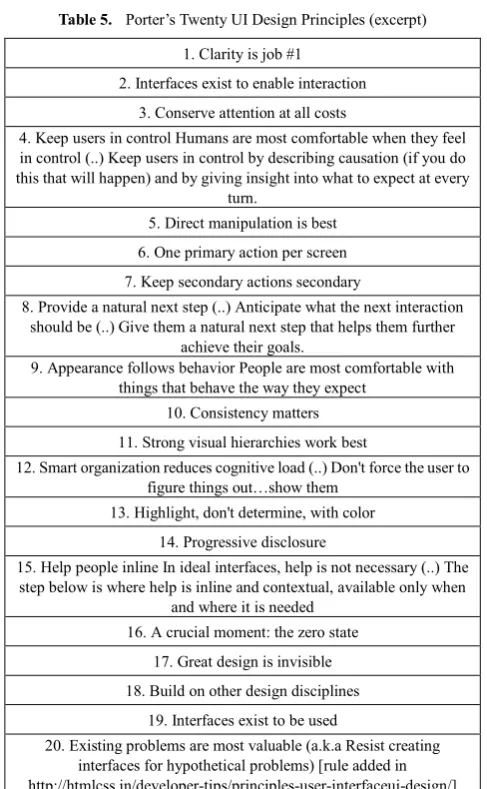
In [4], twenty UI design principles are presented and discussed (summarized in Table 5). Expectedly, their formulation is mainly technical and tailored to the GUI
designer: still, some do deal with user-respect-related aspects. In particular:
• Rule #4 (“Keep users in control”) points out an aspect that is similar to Mandel’s golden rule #1; • Rule #8 (“Provide a natural next step”) is another
instance of the principle that the user should not be required to glaze into the crystal ball;
• Rule #9 (“Appearance follows behaviour”), despite of its graphics formulation, is interesting in that emphasizes the role of expectable behaviour (“humans are most comfortable with things that behave the way they expect”) in making people feel “at home”. In a sense, this can be seen as an indirect recognition of the value of a known environment, that fits the user experience and expectations. The same concept is reaffirmed in Rule #12 (“Smart organization reduces cognitive load”) by suggesting “not to force the user to figure out things” – yet another instance of the “crystal ball” issue. Both rules #8 and #9 actually recall Mandel’s golden rule #3, though in different form.
• Rule #16 (“Help people inline”) is interesting for the assumption that ideal interfaces should be self--explanatory (“in ideal interfaces, help is not necessary”) – another way of emphasizing the “feel at home” principle above.
2.3.3. Weevers’s Seven Guidelines
In [5], seven guidelines are discussed for the design of high-performance mobile user experience (Table 6).
Again, although their primary intended scope is different, some user-respect aspects appear in-between. In particular, the focus on a “long-lasting relationship” (between the user and the app) implicitly promotes a view of the user experience – intended here as knowledge gained over time – as a value worth preserving: moreover, such a valuing also applies to the story of the brand (Rule #1).
Other rules, like Rule #4 (“Optimize UI flows and elements”) and, indirectly, Rule #7 (“Champion dedicated UI engineering skills”) emphasize the value of another kind of user “experience” – namely, the user feeling in using the application, specifically in the context of tricks to reduce the user waiting times and time wasting feeling (Rule #4) and in providing advanced (high-performance) usage feeling (Rule #7).
2.4. The Down-licensing Problem
possibly impacting the user habits and way of working. If the software license does not include this right, the user wishing to configure a new computer, or adding the software to a workstation that was not previously used for that task, could be unable to reproduce his/her standard working environment on the new machine. Being forced to move to the new software version may cause serious problems, both in terms of personal productivity – the user might not know the new version well, commands and features and UI might be different – and in terms of possible incompatibilities (e.g. different file formats).
To make things more intricate, some vendors distinguish between different versions and different editions – the first term being referred to different generations of a given product family, the latter to different functional offerings within the same product family – and apply different legal rules, possibly subordinating the downgrade possibility to the possess of a specific version/edition combination.
On the one hand, the right to downgrade is just one of the many terms that a commercial license can legally contain, and can be seen as a technique to promote the diffusion of the new version, create and defend market space for different editions, and more generally to push the market to adopt the new product with less inertia and smaller latency.
On the other, however, it should be recognised that software licenses are an asymmetric kind of agreement, as they are not freely negotiated between the two parties, but actually written by one party – the vendor – and accepted/rejected in toto by the other part – the user – that has basically no negotiation power, despite being the most affected by the version change.
3. Case Analysis
In this Section we discuss a set of relevant cases, developing the basic scenarios presented in the Introduction to extract some general principles, aimed at capturing the corresponding desirable “respected user” rights.
3.1 Valuing the user experience
New software versions typically feature an improved or brand new GUI, further/improved functionalities, possibly an extended behaviour, etc., not only for the worthy reason to provide the user with an innovative and better-performing product, but also for marketing purposes – appearing “new and different” to the general public, push the desire to upgrade, etc.
Unfortunately, as outlined in the Introduction, it is often the case that in doing so they disregard the value of the user experience and habits established for long over the time. This value is not just a personal perception: the monetary cost and the dedicated time of the training that was needed to reach that expertise level are real, and can be particularly relevant in widespread software products, where any change impacts thousands, possibly millions of users.
As a matter of fact, while innovation in itself is welcome, drastic changes in the working environment can easily frustrate the users’ skill and expertise, making even long-experienced users feel “downsized” to newbies – with obvious consequences on self-confidence and productivity.
In order to safeguard the value of the user experience, we suggest that the user should never be required to mandatorily change his/her habits, or learn new working processes that exclude the previous ones he/she was accustomed to, or be forced to adapt to new GUI or radically different interaction styles against his/her will. We formalize this as follows:
Rule 1: the user has the right to safeguard the value of his/her expertise, skills and overall experience with a given software product, including the procedures to perform the already-existing functions.
It should be noted that safeguarding the value of the user’s expertise, skills and experience implies that he/she should be able to perform the already-existing functions in the same way as before¸ without necessarily having to learn new ad-hoc procedures, or navigate through different or previously-inexistent menus, etc.
Three notable corollaries can be derived, that will be later refined in Rules 3, 4 and 5. First, if the GUI has been innovated, or new approaches have been included that could disorient the user, specific preferences and options should be included to enable/disable the new UI, menus, or features (or groups of features) singly (see also Rule 3 below), so that each user can define his/her personal adaptation path towards the new version (possibly leaving some features permanently disabled if they don’t fit his/her mind and way of thinking). Second, the opt-out approach should also be available at the behavior level: that is, if previously-existing tasks or functions require now different procedures to be performed, so that the older procedures the user was accustomed to no longer work as expected (or no longer work at all), it should be possible to disable the new procedures singly, reverting the product to the “old style” behavior. As a special, but particularly relevant, case, this principle should also cover the keyboard shortcuts (Rule 4 below) and their customization (Rule 5 below).
that he/she decides to migrate to another vendor’s product.
Rule 2: the user accustomed to a de-facto standard
product has the right to safeguard the value of his/her expertise, skills and experience also with respect to different software products from other vendors.
The above right can be enforced by different means, such as suitable customization options, compatibility modes, inter-operability tools, etc., or a mix of these: it is up to the challenging vendor (as well as its own interest, to “steal” as many users away from the leading product as possible) to define the most appropriate set of tools to accomplish this task. A reasonable way to do so could be, for instance, to provide specific user profiles in the new vendor’s product that are thought for users coming from a given competitor’s product: such profiles should collectively apply the whole set of preferences, options, etc. that are needed to make the incoming user feel like at home. (As an aside, it is worth noting that users can be more disoriented by apparent-ly-marginal behavioural details, such as a mouse wheel behaving differently than expected – like in the case of the Impress tool in the LibreOffice™ / OpenOffice™ suite vs. Microsoft’s PowerPoint ™ – or an “apply style” command working slightly differently, etc., than by major aesthetical changes, because GUI changes are immediately visible, while behaviour differences are hidden and therefore cannot be anticipated.)
3.3. Being in Control of UI and Application Features As briefly mentioned above, a common misleading among software developers and vendors is that users cannot help eventually appreciating the new version, because “being new, it is inherently better” – and if they don’t, that must be because they haven’t yet perceived the benefits, or haven’t yet got accustomed to the new approach – but they eventually will. While there is definitely an amount of truth in this statement – people naturally tend to resist to change, even without a specific reason – the user’s actual priorities, feelings, and reasons are up to the users, not the developers or the vendors. Of course, a carefully-planned deployment can be of great help in minimizing the users’ resistance and the subsequent experienced problems, especially in a business context; still, individual users, home users, professionals may have their own priorities – depending on their deadlines, personal way of working, etc. – that deserve to be respected: for these people, getting accustomed to a new GUI or product version may not be the top priority.
Moreover, the new version could simply be perceived by some users as negative, inadequate or somehow worse than the previous for subjective “inexplicable” reasons: in short, it does not fit with their way of thinking – and again, this feeling deserves to be respected.
For these reasons, we claim that the user has the right not to appreciate a revised GUI, look & feel, behaviour, or way of interacting that replaces an older one, whence
Rule 3: the user has the right to enable and disable singly
each new feature (or group of related features) in a clear and
transparent way, with no extra cost, and without using any third-party add-ons.
Clearly, the goal of this rule is to allow the user to restore the previous working environment as much as possible, yet in a reversible way, so that he/she can later re-enable any feature at any subsequent time to try it out or explore it according to his/her own needs, time, and priorities.
Special emphasis is put on the constraint that this must be possible transparently – that is, via some straightforward option, with no manual modification of any inner configuration files, no need to exploit special tools, etc. – and at no cost, because the chance to have full control over the software product should not be seen as an “extra feature” to be paid for, but as an intrinsic user right. The exclusion of third party software is motivated by the same basic need – to avoid both any indirect extra costs as well as further download & installation burden.
A typical example of the above situation could be the introduction of the Office “Ribbon” ™ in Microsoft Office™ 2007: despite of its indubitable effectiveness and graphic clearness, certainly appreciated by novices and the many users that found it hard to navigate the previous menu hierarchy, this tool actually disoriented some power users, suddenly deprived of the old-fashioned, but familiar, menu system that was the key of their efficiency and productivity – with no easy way back. As a result, perhaps unsurprisingly, several third-party commercial tool soon appeared to restore the old-style menus – a clear evidence both that a smoother, customizable and more user-respectful migration path would have been welcome, and that the user experience has a measurable economic value, if several people were willing to pay for tools to restore their old, familiar environment after already paying for the new version of their software product.
3.4. Being in Control of Keyboard and Mouse
Proper customization does not mean just supporting the chance to selectively restore the previous UI in terms of dialogs, older-style screens and menus, etc.: it also includes the proper keyboard and mouse personalization support. New software versions sometimes include a re-designed set of keyboard shortcuts (especially in localized versions of the software, often less stable and coherent than the original English version), inherently incompatible with the previous ones. While this can be seen somewhat a minor issue at a time where interaction is more and more mouse-based and touch-based, it should also be considered that keyboard shortcuts are mainly used by power users to speed up their everyday operations (e.g. creating and formatting hundreds of PowerPoint slides), more than by occasional users: consequently, an unexpected and irreversible change in this area can result in a dramatic decrease of efficiency precisely for the user category that is most sensitive to this aspect.
possibly restoring the original ones if desired. PowerPoint, however, did not: and again, unsurprisingly, third party tools appeared to provide this feature. The conclusion is analogous to the one above: power users need to be able control and fine-tune their migration path, because their productivity depends also on these “minor details” – and when efficiency is concerned, habits and familiarity do matter. We summarize this as follows:
Rule 4: the user has the right to maintain the same
keyboard shortcuts he/she was accustomed to, with no extra cost and without using any third-party add-on, for a reasonable amount of time.
Of course, the reasonable amount of time is somehow discretionary: however, given that widespread software products with a large installed mass tend to induce a correspondingly large inertia to change in their worldwide users, 2-3 previous versions should probably be considered the minimum. In order to reduce the overhead for software developers and vendors, make the version maintenance easier, and to facilitate the user migration among different software products of the same category, the above consideration could be subsumed as follows:
Rule 5: the user has the right to freely customize any
keyboard shortcut in a clear and transparent way, with no extra cost, and with no need of any third-party add-ons.
This approach lightens the burden on developers, according to the “one feature takes all” approach: give users the chance to customize the keyboard shortcuts and accelerators as they want, and it won’t be necessary to worry about previous versions anymore. Of course, such a customization should be possible in a simple and immediate way – ideally, just pressing the keys to be associated to a given command – and with proper help to intercept and solve possible conflicts. Interestingly, the software tools produced by small software houses, often with just one leading product, are more likely to adopt this approach than larger software companies – possibly because the former need to care about their installed users’ base quite more than the latter.
Input devices, however, are not limited to the keyboard: productivity depends on the overall user’s environment behavior, and this calls for attention even to apparently-marginal details in other input devices. A mouse wheel behaving differently than expected, for instance, can be very confusing, and possibly result the discriminating factor for a power user in deciding whether to adopt, or not to adopt, a given software product or version, or could become an obstacle if the new product is chosen by the management, out the direct users control. An interesting example of this kind of detail relevance can be found in the Impress ™ tool of the LibreOffice ™ / OpenOffice ™ suite, where the mouse wheel up/down does not cause the previous/next slide to be shown, as in PowerPoint and other similar software, but the up/down scroll of the same slide in the workspace – a perfectly reasonable behaviour in the abstract to provide more control on the design workspace, yet completely different from the “de-facto standard” that most users are accustomed to. This difference in behaviour is three times
subtle, in that a) it is not mentioned in the user’s guide and online help, so users discover it only at run time, b) cannot be modified by any preference and option, and c) only applies if the slide zoom is larger than a factor that depends on the shown area (typically ~33%). It is worth noting that discussions in online forums [17,18] have long focused on the technical specifications and on this behaviour being correct or not in the abstract, rather than on users accustomed to other “de facto standard” products; even more, the idea of making this aspect user-selectable is simply unconsidered, which speaks the volume on the need for a more respected-oriented, customization-based approach.
The rule below extends the previous Rule #5 to the mouse and, more generally, to any other input/pointing device:
Rule 6: the user has the right to freely customize any
pointing or input device in a clear and transparent way, with no extra cost, and with no need of any third-party add-ons.
3.5. Being in Control of Background Services
Another case where the user should be in control – and often is not – concerns the many background services (antivirus updates, software updates, cloud services synchronization, pre-scheduled system optimizations, etc.) that populate our desktop pc, smartphones, tablets, etc. It is not uncommon that such services start suddenly, usually at the worst time: the key point is that they often monopolize the system resources, virtually taking control of the pc/smartphone as long as they need, regardless of the user’s will and – above all – of his/her priorities, time, needs, etc.
This may cause frustration at the least, but also serious problems if the user has some urgent task to fulfill – be it an email to send, a train to book, or whatever. Reasonably, the user should have the right to say the last wordabout which services should run on his/her devices at any time, with the explicit chance to make his/her will prevail both over pre-defined schedules and, ultimately, over a pre-established concept of what is supposed to be the “user’s good”.
Again, there is a clear need for better transparency and control: the user should be possibly warned that a service is going to run, and be enabled to postpone it, re-schedule it, or even deny his/her consent if necessary. Moreover, it should also be possible for a user to inspect and control the running services, being shown not just a mere and undistinguished list of process names (often with little more than a vague explanation of their intended purpose) but a selection of those services and processes that could be possibly stopped, delayed, slowed down, etc. – in a word: controlled – with no direct consequences on the system “core” functionalities, but only on the selected service, its availability and performance. A clear yet concise explication of the consequences of operating on such a service or process should also be selectively provided. We synthetize this consideration in the following rule:
Rule 7: the user has the right to control and inspect the
It is worth noting the emphasis on the “inessential” word, which subsumes the above idea of constraining the user control capabilities to non-dangerous items, whose unavailability or performance downgrade does not undermine the system reliability and immediate robustness. Examples range from anti-virus scanning and updates, checking, downloading and installing software updates of any kind, remote folder synchronization (including remote services like Dropbox ™, Microsoft SkyDrive ™, etc.), etc.
3.6. No Constraint Guessing
The no man’s land of the un-respected user spreads to other areas of human-computer interaction. Another typical case is when unexpressed constraints prevent the user from completing an operation, with no or little/vague explanation of why the operation is being denied. The consequences range from frustration and time waste, at the least, to worries, rage, up to possible extra-costs if some misleading feedback got the user to repeat an operation that involved payments, orders, etc.: in fact, the wide area of online services, from the basic filling in of some web form, to airline check-ins, reservations, orders, payments of any kind, etc. provides plenty of examples of blameless users blocked or let half way due to some unexpressed (and often useless) constraint.
A major airline company, for instance, requires users to enter their home address in the online check-in form, but forgets to specify that, for some obscure reason, commas are not permitted in the address field – that is, precisely where most users would write one, to separate the street and the number. They could have pointed it out, of course, or, better, they could cut away the comma automatically, or just accept the comma as is – but they did not: users simply get a generic error message referred to something being wrong in the page, and remain blocked with no idea about what is wrong and how to proceed, their only option being a trial-and-error (with the risk that the system blocks their account due to too many errors), call a call center, etc.
Of course, that page violates the good practice of UI design, but what is worth highlighting is that the very reason behind the violation is not technical – it is a lack of user respect, the user having to be in the developer’s mind to guess how to actually use the system: what is not respected is the user legitimate expectation for a smooth, seamless experience. These problems have social consequences in terms of resistance to technology acceptation, difficulties to trust online systems (especially by less experienced, possibly elderly users), etc., that should not be ignored.
Rule 8: the user has the right not to guess unexpressed
constraints, format, requirements of any kind.
Unnecessary constraints should be avoided, but generally speaking any constraint, requirement, data request, etc. should be proportioned to the operation to be performed, if possible expected by the user in that context, and in any case made explicit in a clear, concise and transparent way.
3.7. No Behaviour Guessing
Theabove-mentionedlack of user respect, with the user having to be in the developer’s mind, may occur also when the GUI guidelines and design principles are, in themselves, well respected and the resulting GUI is judged user-friendly and possibly a positive example to imitate: the reason is the widespread adoption of “thin”, “essential” UIs, that eliminate the old-fashion menu bars and navigation bars, in favour of a more task-oriented approach made of pop-up menus, dynamic menus showing only the task-related items, etc. In fact, on the one hand this approach actually helps users to find what they need once they have interiorized the overall UI philosophy, but on the other may turn out to be an obstacle if the “natural way of thinking” of the user (there are some billions people around, after all) does not fit the UI philosophy. Such a user may then find it difficult to guess how to do what he/she wants, making his/her interaction with the UI frustrating, until a solution is found either in the online help or googling around.
An example is the “burn CD” option in Apple’s iTunes ™, which is very intimately bound to the playlist notion: if no playlist is defined and selected, the “burn CD” option never appears – and there’s no other way to find it in any menu, dialog, etc. Of course, in retrospect, once you know it,this approach is well reasonable and totally coherent with the object-oriented philosophy – after all, you do need a list of song to burn a CD, and the list of songs is called a playlist. Unfortunately, users accustomed to other major burning software could expect a dedicated menu item to operate on the CD burner –after all, similar items exist in iTunes too, to interact with the connected devices, to the store, etc. – and be stuck for not finding any. Indeed, in their philosophy one first should focus on the CD object, then on the songs to be added, not vice-versa. Clearly, both views are reasonable, but in the iTunes case the proposed one is also the only one – no recovery path is considered for the “diversely-thinking” users. The result is a product that, for this particular function, assumes that the user embraces not only its general philosophy, but also its practical consequences – which means to be in the developer’s mind. As a result, a user who is not mentally-tuned with the developer will lack the key to interpret the iTunes reality, and will probably need extra help to learn how to burn a CD, despite the overall user-friendliness of the product. Hence the following rule:
Rule 9: the user has the right not to guess the developer’s
mind to understand how to perform a task.
gently push him/her back onto the main pathway, showing how to do the same task the other way and its advantages, etc. – in short, respecting the difference, instead of ignoring it.
3.8. The Down-Licensing Issue
We have long discussed in the Introduction and in Section 2.4 the reasons and scenarios that determined the increasing request for software licenses allowing the software downgrade option – the need to safeguard personal productivity, the compatibility with legacy mission-critical software, the compatibility with older hardware or no-longer supported devices and peripherals are all worth considering. In this Section, we take it from another perspective. First, let us observe that, despite laws existing in any country to protect the user’s privacy on the one hand, and the consumer’s rights (commercial warranty, etc.) on the other, and despite the many software licenses available both in the commercial and in the open-source worlds, no legal constraint is usually provided by the law with respect to the down-licensing issue: any vendor is basically free to grant it or not, possibly reserving it to selected user categories, possibly requiring an extra fee for it, etc.
While this can be view as a natural consequence of being in a free market, we should all be aware that such a freedom actually promotes the view that software downgrading is a service to buy, rather than a right to observe: as a consequence, any vendor can freely choose whether to sell it or not – and under which conditions. Some more caution could perhaps be desirable: apart from any ethical opportunity consideration, is it actually convenient for vendors to possibly displease a loyal customer with an “all or nothing” approach, making him/her feel like a king’s subject, instead of a valued customer whose opinion and feedback is highly considered?
Following the respected user approach developed in this paper, which emphasizes at any step and in any situation the intrinsic (personal and monetary) value of the user experience in terms of personal expertise, skills, habits, time and energy, we devote our last rule to state this right:
Rule 10: the user has the right to use and install any prior
version of the software for which he/she owns a valid license. To concretize and enforce this right, vendors should maintain an online repository of (a reasonable number of) prior versions, so that registered users can download the version of choice at any subsequent time. Moreover, such a repository should be accessible free of charge, for the same principle stated above –there is a user’s right to support, not a service to sell.
4. The Respected User Manifesto
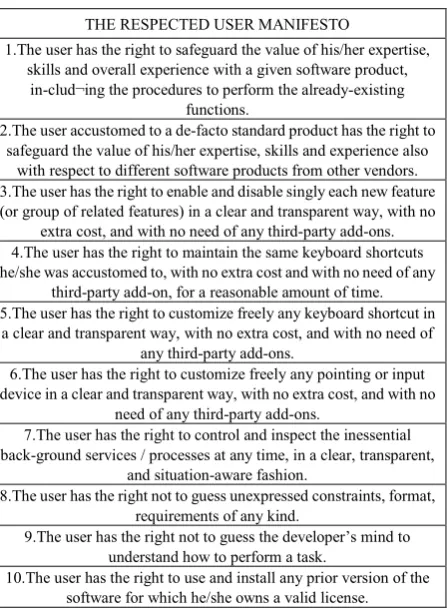
The above ten rules can be summarized as a set of user rights, called the Respected User Manifesto (Table 1). In this Section we discuss its novelty, similarities and differences both with respect to other manifestoes and to the
guidelines previously reviewed in the selected literature. Table 1. Summary of he Respected User Manifesto rules
THE RESPECTED USER MANIFESTO
1.The user has the right to safeguard the value of his/her expertise, skills and overall experience with a given software product,
in-clud¬ing the procedures to perform the already-existing functions.
2.The user accustomed to a de-facto standard product has the right to safeguard the value of his/her expertise, skills and experience also
with respect to different software products from other vendors. 3.The user has the right to enable and disable singly each new feature (or group of related features) in a clear and transparent way, with no
extra cost, and with no need of any third-party add-ons. 4.The user has the right to maintain the same keyboard shortcuts he/she was accustomed to, with no extra cost and with no need of any
third-party add-on, for a reasonable amount of time. 5.The user has the right to customize freely any keyboard shortcut in
a clear and transparent way, with no extra cost, and with no need of any third-party add-ons.
6.The user has the right to customize freely any pointing or input device in a clear and transparent way, with no extra cost, and with no
need of any third-party add-ons.
7.The user has the right to control and inspect the inessential back-ground services / processes at any time, in a clear, transparent,
and situation-aware fashion.
8.The user has the right not to guess unexpressed constraints, format, requirements of any kind.
9.The user has the right not to guess the developer’s mind to understand how to perform a task.
10.The user has the right to use and install any prior version of the software for which he/she owns a valid license.
4.1. Comparison with other Manifestoes
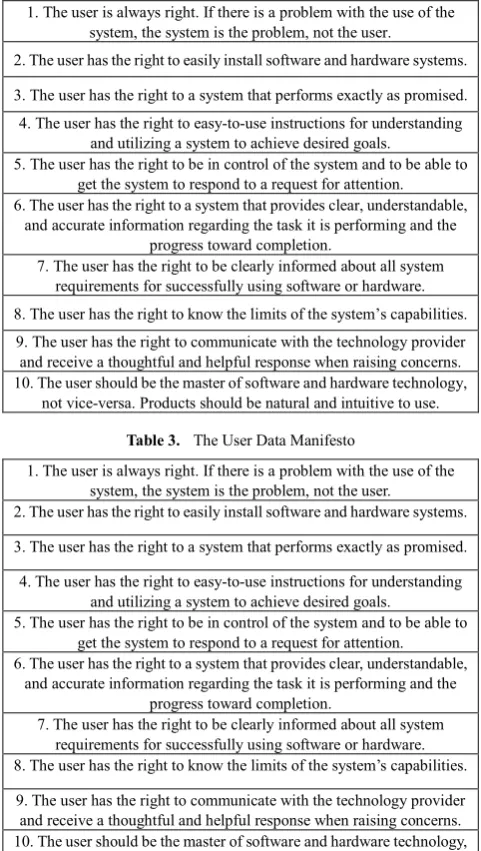
The Computer User’s Bill of Right [3] (summarized in Table 2) and the User’s Data Manifesto [2] (summarized in Table 3) are perhaps the two major manifestoes explicitly defined in the past to capture a relevant set of desirable computer user rights from specific viewpoints.
Ph.D psychologist Claire-Marie Karat wrote the first in 1998 after observing that “The technologists get far into the design of a system without really understanding who the target users are, the work that they do, and the context in which they do that work” – a viewpoint inspired by her work at IBM, aimed at evaluating the way people interact with their computers and design human interfaces. Of course, at that time the GUI design and the issue of human-computer interaction were still largely a land to be explored, so the focus was primarily on to technical and functional aspects: but, interestingly, most of her basic observations are still valid today.
[image:9.595.323.547.107.413.2]combined result of proper attention to specific usability issues, well-defined customization options, as well as several (apparently minor) details that closely impact the user everyday working experience. However, our rules aim at ensuring transparency, intended as the actual chance to know and be “in control” of what our devices do at any time, which is not that different from Karat’s original viewpoint. The main difference is probably referred to the degree of detail of the rules: while Karat’s rules are intentionally general, ours mean to express precise constraints referred to clearly-identifiable concrete situations, where the user skills and expertise may be at risk. Like any detailed formulation compared to a more general one, our approach takes the risk not the capture other situations possibly deserving attention: on the other hand, however, specific rules are much harder to misunderstand, equivocate or bypass than broader rules stating general principles, making it easier to identify violations and enforce the respect of the consequent rights.
Table 2. Clare-Marie Karat’s Computer User’s Bill of Right 1. The user is always right. If there is a problem with the use of the
system, the system is the problem, not the user.
2. The user has the right to easily install software and hardware systems.
3. The user has the right to a system that performs exactly as promised. 4. The user has the right to easy-to-use instructions for understanding
and utilizing a system to achieve desired goals.
5. The user has the right to be in control of the system and to be able to get the system to respond to a request for attention.
6. The user has the right to a system that provides clear, understandable, and accurate information regarding the task it is performing and the
progress toward completion.
7. The user has the right to be clearly informed about all system requirements for successfully using software or hardware. 8. The user has the right to know the limits of the system’s capabilities. 9. The user has the right to communicate with the technology provider and receive a thoughtful and helpful response when raising concerns. 10. The user should be the master of software and hardware technology,
[image:10.595.57.298.315.741.2]not vice-versa. Products should be natural and intuitive to use.
Table 3. The User Data Manifesto
1. The user is always right. If there is a problem with the use of the system, the system is the problem, not the user.
2. The user has the right to easily install software and hardware systems.
3. The user has the right to a system that performs exactly as promised. 4. The user has the right to easy-to-use instructions for understanding
and utilizing a system to achieve desired goals.
5. The user has the right to be in control of the system and to be able to get the system to respond to a request for attention. 6. The user has the right to a system that provides clear, understandable,
and accurate information regarding the task it is performing and the progress toward completion.
7. The user has the right to be clearly informed about all system requirements for successfully using software or hardware. 8. The user has the right to know the limits of the system’s capabilities. 9. The user has the right to communicate with the technology provider and receive a thoughtful and helpful response when raising concerns. 10. The user should be the master of software and hardware technology,
not vice-versa. Products should be natural and intuitive to use.
The User’s Data Manifesto [2] (summarized in Table 3) takes an intentionally narrower scope, aimed at “Defining basic rights for people to control their own data in the Internet age” – therefore facing data protection, ownership, and accessibility issues. These issues are, of course, of primary relevance in todays’ information society, where plenty of user’s data are spread around in a variety of online services of any kind, social networks, etc.; but for the same very reason, they also benefit from the protection of a large legal corpus of bills, laws and directives in any most advanced countries (see for instance [19, 20] for the United States, and [21] in the European Union), although with important differences in the degree of protection offered in the various situations.
Our manifesto, given its focus on the safeguarding of the user experience, has little to share with this approach in general: the major contact point is our Rule #10 about the software downgrading licensing issue, that actually considers a legal aspect in that it impacts the safeguarding of the accumulated user experience. As discussed in Sections 3.8 and 2.4, this aspect is typically not recognized as a user right from the legal viewpoint.
Table 4. Mohkov’s Ten Web App Guidelines (excerpt) 1. Have a Consistent and Standardized UI (It takes long enough to establish familiarity with an interface – don’t make it even harder) 2. Guide the user (The worst thing is having to guess what to do next)
3. Make (Call-to-Action) Interactive Objects Obvious 4. Give Feedback – Both for User’s Interacting and Progressing (few things [are] worse than not knowing (..) give visual feedback when a
user’s interacting (..) don’t leave them guessing (..)) 5. Never Have Users Repeat Anything & Keep Signup Info to a
Minimum
6. Always Have Default Values in Fields and Forms 7. Explain How the Input Info Will Be Used 8. Don’t Have any Reset or Mass-Delete Buttons 9. Have Clear and Explanatory Error & Success Messages 10. Include a Clear Visual Hierarchy and Navigation (Breadcrumbs)
4.2. Comparison with other Guidelines
[image:10.595.311.551.360.537.2]the inessential background services / processes..”), albeit in a more specific and limited formulation. The attention to the input control and handling also goes in the same direction as our Manifesto, though with a more specific formulation.
Similar considerations hold for Porter’s guidelines [4] (summarized in Table 5): though with a more technical angle, they also highlight the need to maintain the user in control (Rule #4) and to provide an explicit and natural workflow (Rule #8) promoting a coherent behavior with the user expectations (Rule #9) – what we would rephrase as “not guessing the developer’s mind”. Such attention is further strengthened by Porter’s rules #15 (help online) and #17 (care the design).
Table 5. Porter’s Twenty UI Design Principles (excerpt) 1. Clarity is job #1
2. Interfaces exist to enable interaction 3. Conserve attention at all costs
4. Keep users in control Humans are most comfortable when they feel in control (..) Keep users in control by describing causation (if you do this that will happen) and by giving insight into what to expect at every
turn.
5. Direct manipulation is best 6. One primary action per screen 7. Keep secondary actions secondary
8. Provide a natural next step (..) Anticipate what the next interaction should be (..) Give them a natural next step that helps them further
achieve their goals.
9. Appearance follows behavior People are most comfortable with things that behave the way they expect
10. Consistency matters 11. Strong visual hierarchies work best
12. Smart organization reduces cognitive load (..) Don't force the user to figure things out…show them
13. Highlight, don't determine, with color 14. Progressive disclosure
15. Help people inline In ideal interfaces, help is not necessary (..) The step below is where help is inline and contextual, available only when
and where it is needed 16. A crucial moment: the zero state
17. Great design is invisible 18. Build on other design disciplines
19. Interfaces exist to be used
20. Existing problems are most valuable (a.k.a Resist creating interfaces for hypothetical problems) [rule added in http://htmlcss.in/developer-tips/principles-user-interfaceui-design/] Weevers’ Seven Guidelines [5] (see Table 6) are somehow different, being thought for a mobile app scenario with a strong emphasis on performance (Rules #4 through #7), on technical aspects in general and on the branding issues in particular (Rules #1 and #2). The aspect of the user experience in our meaning (i.e., safeguarding the user past experience) is not their main focus, as it can be expected in an application segment which is experiencing a dramatic development, has a relatively small installed base with a
[image:11.595.312.550.181.288.2]little history behind it (which also means less value of the user experience in itself, and less inertia), and is generally more prone to change than the traditional software products’ sector. Nevertheless, the idea of the user as a “holder of value” is clearly perceivable, though the main focus is on his/her desires and willingness to experiment (Rule #3), rather than his/her past.
Table 6. Weevers’ Seven Guidelines
1.Define UI brand signatures 2.Focus the portfolio of products
3.Identify the core user stories 4.Optimize UI flows and elements
5.Define UI scaling rules 6.Use a performance dashboard 7.Champion dedicated UI engineering skills
5. Conclusions
In this paper we analyzed in depth several situations and frequent use-case scenarios in the context of human-computer interaction, GUI design, and related aspects to highlight the intrinsic value of the user experience in terms of accumulated expertise, skills, and habits, and discussed why and how such a value should deserve to be safeguarded, summarizing the result in the ten rules of the Respected User Manifesto.
The central idea of this paper is that the user experience need to be considered not only with respect to a single software product or application, as it is often the case in UI design guidelines, but with respect to the many versions that a widespread software product is likely to offer over the time, possibly taking into account other vendors’ products in selected, mainstream application areas.
We investigated some concrete situations where users are often not respected under that viewpoint, provided specific examples, discussed the possible consequent counter-measures and synthesized a set of corresponding desirable user rights. We then compared our synthesis with related literature, manifestoes and guidelines.
[image:11.595.56.300.238.633.2]long-term, however, developers and vendors could benefit from a software design style that focuses on the respected user, because respected users are likely to be much happier and loyal users, well willing to become the first (and free) witnesses of the product they use.
REFERENCES
[1] O. Mokhov, 10 Essential Web Application Usability Guidelines. SpeckyBoy Design Magazine, March 31, 2011. Online available from http://speckyboy.com/2011/03/31/10-essential-web-application-usability-guidelines/.
[2] The User Data Manifesto. Online available from http://userdatamanifesto.org/.
[3] C. M. Karat. The Computer User’s Bill of Rights. In S.H. Wildstrom, A Computer User's Manifesto, BusinessWeek, Sept. 1998. Online available from http://www.business-week .com/1998/39/b3597037.htm (also available from http://theomandel.com/resources/users-bill-of-rights/) [4] J. Porter. Principles of User Interface Design. Online
available from
http://bokardo.com/principles-of-user¬interface-design/ [5] I. Weevers. Seven Guidelines For Designing
High-Performance Mobile User Experiences. Smashing Magazine, July 18, 2011. Online available from http://uxdesign.smashingmagazine.com/2011/07/18/seven-g uidelines-for-designing-high-performance-mobile-user-exper iences/
[6] T. Mandel. The Elements of User Interface Design, Chapter 5. John Wiley & Sons, 1997. Online available from http://theomandel.com/wp-content/uploads/2012/07/Mandel-GoldenRules.pdf
[7] V. L. Edrigton. User Interface Design and Usability Testing: an Application. Master’s Paper, University of North Carolina, April 1999. Online available from https://cdr.lib.unc.edu/ indexablecontent?id=uuid:5581f676-fd7b-4803-98b4-45195 6079e82&ds=DATA_FILE
[8] HCI Bibliography. Online available from http://hcibib.org/hci-sites/history/
[9] HCI Lab – University of Udine. Online available from http://hcilab.uniud.it/
[10] HCI Institute – Carnegie Mellon University. Online available from http://www.hcii.cmu.edu/research
[11] Stanford HCI Group. Online available from http:// hci.stanford.edu/research
[12] Human-Computer Interaction, Taylor & Francis. ISSN 0737-0024 (Print), 1532-7051 (Online) . Available from http://www.tandfonline.com/action/journalInformation?journ alCode=hhci20#.UkKhy4byYZk
[13] R. Rubinstein, H.M. Hersh. The Human Factor: designing computer systems for people. Digital Press, 1984. ISBN-10: 0134450248. ISBN-13: 978-0134450247
[14] B. Shackel. Usability – context, framework, definition, design and evaluation. In B. Shackel, S. Richardson (eds), Human factor for informatics usability, 21-37, Cambridge University Press, New York, USA, 1991
[15] J. D. Gould, S. J. Boies, C. Lewis. Making usable, useful, productivity-enhancing computer applications. Communications of the ACM, Vol. 34, No. 1, 74-95, 1991. [16] S. Benford, C. Greenhalgh, G. Giannachi, B. Walker, J.
Marshall, T. Rodden. Uncomfortable User Experience. Communications of the ACM, Vol. 56, No. 9, 66-73, 2013. [17] Apache Openoffice Forum. Online available athttps://issues.
apache.org/ooo/show_bug.cgi?id=10931
[18] Openoffice.org Forum. Online available athttp://www.ooofo rum.org/forum/viewtopic.phtml?t=108821
[19] US privacy laws. Online available at http://www.information shield.com/usprivacylaws.html
[20] Data protection law - US. Online available at http://www.hg.org/data-protection.html