© 2018, IRJET | Impact Factor value: 6.171 | ISO 9001:2008 Certified Journal | Page 1170
In-house File Tracking System
Dr. Sunil Bhutada
1, Madhuri Kalluri
2, Karthik Dontha
31
Professor, Dept. of Information Technology, Sreenidhi Institute of Science and Technology, Telangana, India
2,3Student (Final year), Dept. of Information Technology, Sreenidhi Institute of Science and Technology,
Telangana, India
---***---Abstract -
This system being described helps to track thefile that is transferred to various departments of a huge organization. The age-old methodology of pen and paper-based maintenance is now digitalized. Different departments have different files which are to be tracked. The status and the location of the files are updated each time, which have to be considered while designing the product. Only few departments have access to key parts of the system else not every user is allowed to access or to trace the file. The database is implemented in such a way that it maintains every file, its status and the existence of it in a particular department. The implementation of this system on an intranet is done using web technologies and python as a server-side programming. The choice of python is mainly due to its extensive libraries, modules, packages. The application is designed to be deployed on either a LAN network or a WAN.
Key Words: File Tracking System, Barcode, Python, CGI Scripts
1.
INTRODUCTION
Organizations all over the world generate a healthy amount of documentation. A sector of organizations which relies heavily on paperwork is those which are managed and run by the government. Though a good portion of documentation is now digitalized, there are some cases in which a hardcopy of files is passed around the various departments of the company. In organizations of large size which have several physical files, there arises a need to manage and track the location of each file and keeping track of things is essential to promote the workflow. It reduces the delay of things that has to happen at the expected timeline. The pre-existing system of record maintenance is done using book and pen, which is time consuming, limited to the respective departments. It is difficult to analyze large number of records entered manually. This can be digitalized so that it is available to members of the department, easy to track, reduces time delay and response time. Once a package or a product is received by a department if it has to dispatch it has to forward to other departments while the timer keeps counting to calculate the response delay. The scope of this document is the part of the communication system designed to track and dispatch files among the departments of the intranet. To access this application, users are required to login into the portal with pre-existing credentials which will deny outside users to access or manipulate the system. The key differentiating factor for each department, directorate is
their id, where certain user has limited privileges and others are having full privileges.
2.
LITERATURE SURVEY
Laszlo Varallyai [1] talks about barcodes in his paper as, “If barcodes are utilized as a part of the business procedure, the handling can be computerized to expand profitability and lessen human mistake. At whatever point there is a need to distinguish or track something precisely, barcodes ought to be utilized. In customary workplace, specialists are required to enter a colossal measure of information into a client database framework. Rather than physically composing the client ID number into a database of data, contained in a barcode, an information section possibly filtered effortlessly. This builds the mechanization and lessens the human mistake.”
Dr. Gurudev Singh et al. [2] stated in their paper that, “Barcode is a predefined arrangement of black and white areas, organized to contain a particular snippet of data. It enables ongoing information to be gathered precisely and quickly. Mix of barcode innovation with PC and application programming enhances execution, efficiency and productivity.”
They also briefly explained the working of barcode technology as, “Barcode innovation works similarly as a console. As clicking a key sends a flag containing a character code to the PC, perusing a scanner tag brings about a similar sort of signs being sent to the processor. The barcode, as a result, goes about as a remarkable control number, which is related with a record giving fitting subtle elements of individual things. While filtering, the light is reflected from the barcode and the pickup optical gadget gets less light from the dull bars than from the spaces between them. The signs got through this procedure are then changed over into a frame, which can be perceived by the PC."
© 2018, IRJET | Impact Factor value: 6.171 | ISO 9001:2008 Certified Journal | Page 1171 coordination anchor from source to goal, which is in charge
of change of cost through client’s disappointment. Tracing framework distinguishes the situation of the shipment and educated the client in well progress. Without following framework, it is relatively difficult to discover conveyed things and regularly considered as lost or stolen thing that causes business misfortune.”
w3Schools [4] described CGI scripting as; “CGI is one of the fundamental parts of HTTP (Hyper-Text Transfer Protocol). It is an arrangement of measures that characterize a standard method for passing data or web-client demand to an application program and to get information back to forward it to clients. This is the trading of data between web-server and a custom content. At the point when the clients asked for the website page, the server sends the asked for page. The web server for the most part passes the data to all application programs that procedure information and sends back a recognized message; this system of passing information forward and backward amongst server and application is the Common Gateway Interface.”
Barry Doyle et al. [5], in his paper, stated that, “CGI was the primary generally bolstered innovation for dynamic substance is as yet upheld out-of-the-box by most web servers. CGI is a platform-independent provision with a straightforward, understood interface. The detriments are identified with scalability and convenience concerns. CGI isn't profoundly adaptable in light of the fact that another procedure must be made for each demand. For occupied websites serving a great many simultaneous clients, the CPU and memory use required to continually make and devastate forms seriously confines the quantity of simultaneous solicitations that can be taken care of. The utilization of scripting dialects additionally strains a Web servers limit because of the need to begin a mediator for each demand.”
3.
PROBLEM STATEMENT METHODOLOGY
To design the application in the most efficient way possible, there are several things that have to be taken into account. Each of these design issues have been discussed in the following sections:
A. Departments: The important part is to know what
all departments and directories, are existing in the organization and also learning what all files are to be dispatched across them.
B. Tracking Cycle: The workflow across the
departments right from file received till complete, the file being dispatched, pending, delay in response, bar code as an input all these are discussed.
4.
SYSTEM ARCHITECTURE
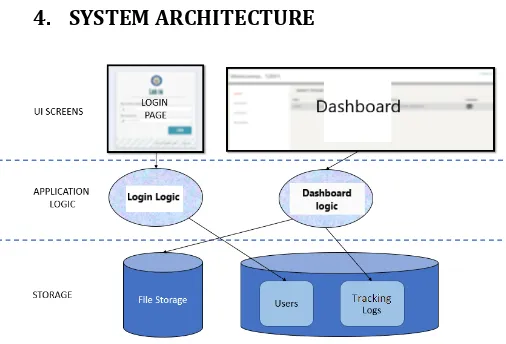
Fig -1: Architecture diagram
The architecture diagram describes the way the various components of the system interact with each other. This architecture diagram comprises of three main layers: The User Interface layer, the application logic layer and the storage or the database layer. Let us discuss each layer in detail along with their components in detail.
A. UI Layer
The user interface layer is generally concerned with the output screens or in simpler terns, the screens or interface which the user directly interacts with. These have to be seamlessly designed to give the users of the application a pleasant vibe as well as experience. The application consists of two distinguishable sets of screens as discussed below:
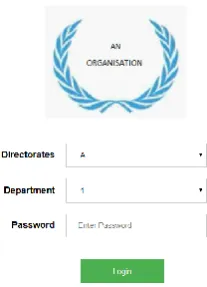
1. Login: Login screen will have to drop down lists
providing departments and directories where the user is allowed to select a particular department and directory and password is to be entered to login. Only specific departments and directories are provided with special privileges to access full functionalities but for others it will be limited options available. Only registered users will be able to access the application which will deny other users to perform login.
2. Dashboard: The dashboard of the application
consists of different tabs.
2.1.Inward: Once the user logins with required
credentials this screen appears. The demand no or the barcode number is taken from received window and entered here and is passed to dispatch pending page
2.2.Create New File: This screen will allow user to
[image:2.595.310.563.79.251.2]© 2018, IRJET | Impact Factor value: 6.171 | ISO 9001:2008 Certified Journal | Page 1172
2.3.Existing File: This screen will be accessed only
by higher authorities where they can dispatch the file to concerned departments or directorate with the help of demand details.
2.4.Dispatch Pending: Once the file reaches this
page it can be decided whether it can be dispatched or completed through forward option.
2.5.Dispatched Details: The files which have been
dispatched from dispatch pending appear here.
2.6.File Track: This will give the exact location of a
file in a particular directory or a department. The summary of the file traversal across various departments can be known.
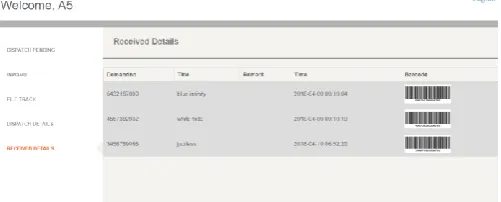
2.7.Received Details: The files forwarded by various
departments to a department appear here in a tabular format.
2.8.Completed: Once every task of a file is being
accomplished then the file appears in this page and it.
B. Application Logic
The application layer is the layer where you determine what must be done with the input data obtained from sources given by the client. It is the part in which a software engineer codes for a particular function to work. This application implements apache framework for displaying the user interface. It uses CGI scripts such as python to implement its application logic. The application consists of two distinguishable sets of code as discussed below:
1.
Login Logic: Here the user selects the department,directory and types the password. In the authentication part the details are verified by the existing details present in the database. There is no registration scope to disallow unauthorized users to gain access. It retrieves user information stored in the database and compares it for authentication.
2.
UI Logic: The UI Logic is the part of the code which isassociated with each part of the dashboard screens:
2.1.Inward: The demand no, barcode details given by
the user are taken and inserted into inward table in the background.
2.2.Create New File: The details of file while its creation
is given by user and they are inserted into the file table to be accessed by other tables in the database.
2.3.Existing File: The directory and the file input given
here are recorded into the table thereby the inserted to specific department.
2.4.Dispatch Pending: Once the user clicks forward the
file record must be inserted into dispatched table while the record gets deleted in the dispatch pending table.
2.5.Dispatched Details: The files which have been
dispatched are displayed from dispatched details table.
2.6.File Track: Every operation before performing its
task will be making an entry into this table so as summarize the file traversal across the application.
2.7.Received Details: The records from the table are
displayed here from the database.
2.8.Completed: the file is shifted to completed it is
displayed here
C. Storage Layer
The storage layer, as the name suggests is where we store non-volatile data or permanent data. The application consists of two distinguishable sets of storage as discussed below:
1.
File Storage: barcode images are auto generatedbased on certain parameters and stored on the server. The images are then referenced for display whenever required.
2.
Relational Database: The application uses Xampp’sphpmyadmin as its relational database. There are two tables which are used to design the logic as mentioned below:
2.1.
DeptUsers: This table will contain all the idscorresponding to directories, departments where the credentials are already stored and triggered while login action is attempted
2.2.
Tracking: This table contains all the filetraversals which are made by different departments. The schema used by these tables are (demandno, remarks, datetime, barcode)
5.
EXPERIMENTAL SETUP
Software requirement for the application to function with their process of installation are given below, in order to experience smooth functioning of the application the following steps have to be executed with utmost care and conscious.
1. Xampp Installation: Open any browser of choice
and search for the link:
© 2018, IRJET | Impact Factor value: 6.171 | ISO 9001:2008 Certified Journal | Page 1173
2. Python Installation: Now install python to provide
server-side programming, the link to download is given by https://www.python.org/downloads/. For the application being deployed it is important that python 2.7 version is to be selected while downloading.
3. Once python is downloaded under system properties - Environmental Variables -- User Variables -- add Path C:\Python2.7 (Location of python installation)
4. Add Path variable in System Variable so that it allows easy access Path - C:/Python27
5. In order to run .py, CGI scripts, follow the steps below:
•
Open the httpd.conf file in apache by clicking config but do not start apache yet.•
Look for AddHandler cgi-script .cgi .pl .asp and add .py to it•
Now start apache•
To run your files type localhost/ enter in name of file. Ex: localhost/hello.py•
We need to make sure to have the location of the python file on top of python files which shows the location of where python.exe is. Ex#!C:/Python27/python.exe•
Python files need print(”content-type: text/html/n/n”) below in order to print html content in its pages,, followed by print ( ) 6) We need to make sure that phpMyAdmin is working properly as it’s important to check whether the database is able to store records into tables existing in the database. The port number by default will be 3306 we must make sure that no other application is using the same port as it will not allow this software to run.6. Once the environment is setup it’s time to install the required packages for running the application, this can be installed by the default process of using pip but still we can install them using .exe files from python official website.
7. The list of packages to be installed are to be executed in the cmd- C:/Python27/Scripts
•
To establish connection with the MySQL database a package is to be imported named as MySQLdb, this can be done by downloading the .exe file from the link: https://pypi.python.org/pypi/MySQLpython/1.2.5 and once this file executes the requirement is satisfied.
•
To install winapi32: pip install pypiwin32•
To install cookie: pip install cookies•
To install boto: pip install boto8. Once everything is installed and setup accordingly runs a basic python program with .py extension kept in htdocs ex: hello.py, run the link localhost/hello.py if the program executes the required setup is successful.
6.
RESULTS AND OBSERVATION
Fig -2: Login page of the application
Based on the credentials the user provides, he or she is authenticated at the login. In the case that the credentials are false, he is denied access form the services of the system.
Fig -3: Creating a new file in the Admin department
[image:4.595.386.490.274.418.2] [image:4.595.308.559.510.651.2]© 2018, IRJET | Impact Factor value: 6.171 | ISO 9001:2008 Certified Journal | Page 1174 Fig -4: Dispatch pending page of the application
The file here once forwarded will be shifted to dispatched details and an entry is made into dispatched details and the record will be removed from dispatch pending.
Once a file is received it is displayed in the form of a tabular column with the demand details:
Fig -5: Received details page of the application
7.
CONCLUSION
The system here we implement is with the barcodes. Even though it’s not latest technology but still provides security and good identification of the packages. Later on, this current system can be upgraded to finger touch authentication, retina scanner authentication. The login credentials could be linked to user id’s which will be easy to link people with departments.
REFERENCES
1.
Laszlo Varallyai, From Barcode to QR code applications, Journal of Agricultural Informatics- Vol 3, No 2, 2012.2.
Dr. Gurudev Singh and Monika Sharma, Barcode Technology and its application in Libraries and Information Centers, International Journal of Next Generation Library and Technologies- Vol 1, No 1, February 2015.3.
AHM Shamsuzzoha and Petri T Helo, Real-time Tracking and Tracing System: Potentials for theLogistics network, International Conference on industrial Engineering and Operations Management, January, 2011.