5203
VIRTUAL REALITY ENGINE DEVELOPED IN PANDA 3D
FOR A CAVE BASED SYSTEM
1IBAÑEZ MEJÍA R., 2OLGUÍN-CARBAJAL M., 3RIVERA-ZARATE I. 4HERNANDEZ-BOLAÑOS M. AND 5CADENA MARTÍNEZ R.
1,2,3,4Profesor of the Instituto Politécnico Nacional, Department of postgraduated
5Profesor of Universidad Tecnológica de México, UNITEC
E-mail: 2[email protected], 3[email protected] 4[email protected] 5[email protected]
ABSTRACT
There is now a virtual reality laboratory in CIDETEC, which uses as a primary tool an immersion cabin, who consists of three projectors, mirrors and a structure of three screens, which display the virtual environments for educational purposes and simulation. It was noted that the virtual environment to run the tests did not meet the necessary requirements for optimal performance of immersion cabin. It was proposed to solve the problem caused by the usage of VRML to create the virtual environment by replacing that tool for one that also allows the usage of new hardware devices and improve the visual quality of the models represented. After testing several tools the decision was made to use Panda3D for the development of the virtual environment, which can load models created in design tools such as Blender and 3ds Max, allowing the optimal usage of the endless road system, alongside with collision detection, providing a better alternative to the use of virtual environments.
Keywords: Virtual Reality, Panda3D, Multipersonal VR Cockpit, Endless Road.
1. INTRODUCTION
Multipersonal Virtual Reality Cabin, is a system to immerse in a virtual environment to one or more people who can interact in real time making use of some hardware tools, such as HMD, Gloves, etc. This can increase the sense of realism. First Cave Automatic Virtual Environment (CAVE) system was developed in 1991 at the Electronic Visualization Lab at the University of Illinois at Chicago, and is a registered trademark of the University of Illinois. The CAVE structure is a multi-screen system, with cubic or panoramic displays, in which synthetic worlds generated by a set of computers and network video projectors are displayed in an integrated environment.
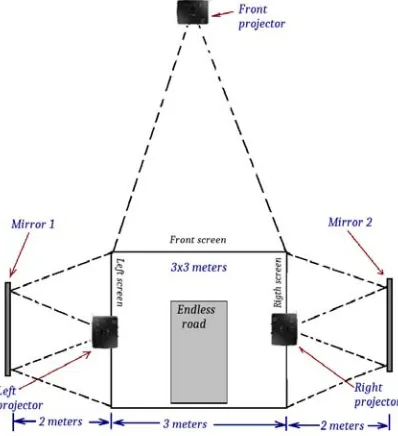
[image:1.612.317.516.412.630.2]In the CIDETEC of the National Polytechnic Institute of México an immersive multiuser system for Virtual Reality was developed, see figure 1, based on a CAVE system. The entire system as well as the devices developed to work in conjunction with the immersion booth were made entirely by CIDETEC students and teaching staff. The immersive multipersonal system was built as a research tool for works and themes of the Thesis of the Master in Computer Technology.
Figure 1. Multipersonal Cabin Projectors Configuration.
5204 end, Stereoscopic lenses based on anaglyph, RV gloves adapted video games, and RV engine based on a distributed processing system).
Also we must add the simulation software developed in the CIDETEC, like the travel through a little part of the bottom of the sea, the virtual reality model of the Graduated building of UPIICSA Campus, also the various solar system simulations as well as forest simulations used to test the Cabin endless road. In addition to simulated environments, interfaces and software have been developed for use in conjunction with the booth. Such developments include:
- Virtual environment for teaching calculation -Simulator of Shoot training for police forces
-Data Glove as a manipulation interface for virtual environments
-Endless road as a navigation system for virtual environments
-Lens passive 3D-based anaglyphs for viewing 3D images
- Real robotic arm manipulator using 3D virtual interface.
It is necessary to develop a test environment with the ability to test such devices in conjunction with the cabin. Therefore the developed environment must be able to synchronize three or more computers of the distributed processing system. Also the virtual environment must detect collisions and have the ability to incorporate the use of the endless road and other developed peripherals to interact in virtual worlds. Finally the developed environment must have a better performance than a VRML environment.
Among the items to be considered for this work the necessary characteristics of software that were considered:
1.- Start the virtual environment.
2. Read a virtual scene of a file
3.- Place the three virtual cameras in the corresponding positions with the real projectors of the Immersive system
4.- Manage the communication of each of the three processing cores and distribute the image corresponding to the projectors: right, center and left.
5.- Initiate and follow the behavior of virtual environment animations.
6.- Detect collisions between virtual elements and other virtual elements as well as between the user and the rest of the virtual environment.
7.- The software is capable of handling the following elements of the immersive system:
Number of displays 3 Elements of the processing system 3
Individual Display Resolution 1280x798
Frame rate 30fps
Polygons per second 60,000
8.- Handling particular hardware, such the students and researchers of the CIDETEC
9.- Easiness of virtual world creation, int this case the creation of a virtual world is a complex task in JAVA 3D wile in VRML is an easy task considering code extension.
10.- Other platforms compatibility, the capability for use virtual worlds developed for VRML in JAVA 3D or C objects in VRML or JAVA3D.
The immersion cabin needs a virtual environment that allows adding more devices for the execution of the same without having to create a special environment for each new device or make considerable modifications to be able to use it. This virtual environment must be generated by a language for virtual reality modeling that facilitates the implementation of hardware and in addition to that it can be used optimally in the virtual environment, the tools of this language should allow generating an interactive and immersive virtual environment.
The aim of the present development is to provide software that is compatible with the hardware resources developed for the immersion booth, which accepts the entry of new devices.
This work is organized as follows. Section II presents a brief overview of related work. Section III presents an introduction to endless road. Section IV offers a brief description of the Virtual environment development. Section V reports experimental results. Finally, in Section VII we draw our conclusions.
2. RELATED WORK
5205 environments are designed using multiple virtual reality modeling tools, these tools over time have evolved remarkably until they have the current tools.
The virtual environments are indispensable to simulate dangerous, inaccessible or nonexistent environments and their development allows the human being to experience them without physical risk and under total control. Since its inception the virtual environments have undergone an innumerable number of modifications in order to improve its performance and increase the sense of realism for the user. Among the AVs we can mention the work developed by Constance [6], which reports the study of the behavior of users when interacting with other people in this type of virtual environments and their primary objective is to develop a deep description of nature that emerges from The coexistence in team, learning and objectives in the MMOG. Fengyun [4], points out the role of computer clusters in order to execute any MMOG properly, and presents an approach of simple and effective load balancing that maintains the flexibility of a cluster when interacting with users.
Also we can include the work developed by Costa Castello [2], who designed a model for the execution of a robot through the Internet, making use of a virtual environment developed in VRML and some Java 3D tools. In the case of Thorsten [1] we report the creation and implementation of a virtual environment that represents detailed cities and attached to reality making use of the VRML language for its design.
Another advance in this respect is presented by Philip [3], which explains the development of a mathematical model that allows avoiding obstacles of the person in the physical environment where the simulation is developed and at the same time allows to avoid the obstacles in the Virtual environment.
The most notable reference of virtual educational environments was developed by Darren [5], who speaks of the ideal virtual educational environment, its characteristics, and means and provides a detailed reference of virtual environments already developed and that are currently in use.
In 1992 Cruz-Neira et al. They implemented the world's first CAVE system in the Electronic Visualization Laboratory, see [8]. CAVE systems have proven to be useful for a wide variety of applications in multiple laboratories around the world, see [9] [10] [11], however these systems are
expensive to implement according to the original reference. Due to the above, CAVE-type systems were proposed where the costs of installation, maintenance and development were reduced. One of these early CAVE systems where costs were reduced was from the Department of Information Sciences at the University of Pittsburgh [12]. Likewise the College of Computing of the Georgia Institute of Technology designed and built a system called Nave [13] Multi-screen, multi-user, stereoscopic and multisensory low-cost; The Nave is handled by desktop computers that handle three projectors with three rear projection screens using mirrors for each screen. Other low-cost cave systems, such as the University of Sao Paulo in Brazil [14] and the development of the Virtual Immersive Simplify System (VISS) developed in Colombia by Quintero Guerrero et al. [15], that uses two screens as a minimum CAVE like system, but very useful for learning and testing purposes.
Each of the cave systems mentioned above has required the use of specialized software to control the virtual world control system and the synchronization of the deployment system. The team that developed the first CAVE system generated CAVELib as an API for their CAVE system. The software was marketed from 1996 as a low-level Virtual Reality software package as a support for developers to generate all the graphics for their respective CAVE and CAVELib systems display them appropriately changing the point of view of each camera with respect to the position of the screens, as well as synchronizing the different computer systems that integrate the system of rolled up. Later, other software packages were developed for CAVE systems such as EON icube, VR Jugler, Cove, CaveUT, among others.
5206 language and VRML. However, the integration of navigation controls such as the endless road and the RV glove showed the need for an update of said software, which is the objective of this work.
Table 1. Multipersonal Cabin Software Desirable Chracteristics.
Software desirable Characteristic
Platform VRML C Java3D
1 Start virtual environment x x x
2 Load a scene x x
3 Place tree virtual cameras x
4 Manage multicore communication x x 5 Initiate and follow animations x x
6 Detect collisions x x
7 Handling immersive system
elements x x
8 Handling particular hardware x x
9 Easiness of virtual world creation x
10 Other platforms compatibility x
2.1 Introduction To Endless Road
The endless road system works by using virtual environments created in VRML, so it is limited to perform some operations and actions that if they can be simulated, are not performed optimally.
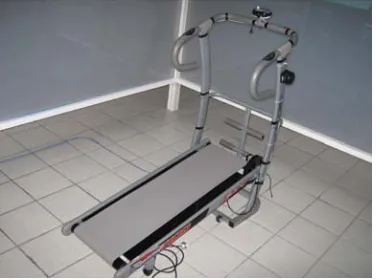
The endless road system was designed making use of the functionality of the mouse plus the operability of an exercise treadmill. This tool was created to be used as a navigation tool in the dive booth.
Figure 2. Treadmill Adapted As A Virtual Reality Navigation System.
The endless road system consists of a hardware device with an endless band spin detection system connected to an optical pickup detector which sends the data in digital format to the computer. The forward and backward movement signal is captured with an LED that is located on the scroll mechanism of the endless road system and in conjunction with a motion sensor you get the signal that is recognized by the computer as if It is a typical mouse. Left and right movement is handled using a knob located on the hardware device based on the movement of the mouse and is also recognized by the computer as the movement of a common mouse. Figure 2 shows the endless road system for the multipersonal VR cabin.
[image:4.612.322.511.375.542.2]Then the endless road system works as a navigation system that allows you to recognize the forward, backward, left and right movement, so you should handle this device as if it were a typical mouse for programming purposes. The control and projection system of the virtual world is a set of personal computers in a server client scheme, see figure 3.
[image:4.612.90.278.542.682.2]5207 Referring to the tool used for programming the virtual environments of the endless road system known as VRML, there are several problems that limit the performance of the system and do not allow improving the behavior of the environments represented in the dive cabin.
One of the notable problems is the constant failure of VRML-designed environments that have already been tested and cataloged as functional. When wanting to execute these environments are observed errors that did not exist in the past and that do not have to do with errors of design of the same ones. Very likely these problems are caused by incompatibility of the versions or by the lack of certain components in the system, certainly these problems can be solved without delay and do not represent a serious problem, but they waste time and call into question the functionality of the same. Another disadvantage that is observed is the limitation to develop graphics of better quality in the virtual environments designed in VRML. It is possible to develop 3D objects using this virtual modeling tool, but it represents a huge and unnecessary effort for its design.
Also, this markup language used to model objects in the virtual environment is limited in the use of hardware tools that interact with the environment, usually only supports the devices normally used in virtual reality, but otherwise, to operate another device , Is a very difficult task and with little information available.
The VRML language does not allow to develop events with the 3D objects, the programming of simulation of the physics, handling of special collisions, and other interactive activities, are not actions that can be developed directly in this language, but nevertheless, with the support of Other languages like Java, these activities can be developed but it consumes time and resources that with another language of modeling could be realized without much effort.
Keeping in mind all these current problems, a solution must be developed to allow the dive booth to take full advantage of its tools to increase the immersion sensation.
3 PROGRAM DEVELOPEMENT
Although virtual environments with VRML and Panda 3D had already been developed, the present program was developed using Panda 3D. The developed program allows you to navigate through a virtual environment, which is in the first person and was developed with the intention of being used
for the endless road system of the virtual reality laboratory's CIDETEC immersion booth.
The program starts with a set of libraries that is used for the start of Panda 3D, this set of libraries are necessary for the correct start of the environment and its interface with the virtual world. The code segment 1 contains such libraries. Line 1 has the libraries that allow the start of the Panda3D environment. Next, we import the basic modules for the operation of Panda 3D, line 2. Also a library call is necessary for the use of intervals, line 3. In addition to using text on screen it is necessary to include a library, line 4. One of the main elements for this development is the use of elements that represent 3D elements with movement (3D animations) which are called by means of the actors, Line 5. For the management of tasks such as data entry monitoring, lines 6 and 7 are used. Finally, to generate random values, close the program and the development of numerical operations, respectively, we have line 8.
Code Segment 1
_________________________________________
1 Import direct.directbase.DirectStart 2 from pandac.PandaModules import *
3 from direct.interval.IntervalGlobal import * 4from direct.gui.OnscreenText import OnscreenText 5 from direct.actor.Actor import Actor
6 from direct.task.Task import Task
7 from direct.showbase.DirectObject import DirectObject
8 import random, sys, math
There are two functions that are outside the "App" class, the purpose of each is similar.
The first function called "addInstructions" has two parameters that are provided at the moment of sending it to call, the variable "pos" specifies the value of "Y" for display text display, while "mg" contains the string Characters that conform the instructions as the case may be. The function displays the corresponding text on the screen using "OnscreenText" with the following parameters: Text: Corresponds to the text you want to display on the screen.
Style: It is used to activate or deactivate the default values for the unspecified parameters of the "OnscreenText" instruction, where the value "1" activates them.
5208 Align: Align the text to the left, right or center as the case may be.
Scale: Here you can change the font size of the text by specifying the scale in XY.
MayChange: This parameter is used to enable text modification at runtime and uses a Boolean value of TRUE or FALSE.
Main Program Pseudocode
1 Initialization of Panda 2 M = mouse position 3 K = Keyboard data 4 C = camera position 5 Align main C
6 Show coordinates of M 7 Start App class
8 Start collision traveser
9 Load 3D elements (Environment and avatars) 10 Start C
11 Start controls
12 Adding Functions to the Task List 13 for n = 1 to NumModels
14 Create a sphere for collision 15 Upload 3D model
16 Cycle animation 3D model 17 Create Walk and Route Intervals 18 end for
19 Create C
20 Collision sphere for C and terrain 21 Processing K and M Events
22 Update C position with K and M data 23 Detect collisions
24 Return values, collision and name 25 Finish class App
26 Run App class
27 Run principal cycle run()
The program starts by initiating the Panda environment, Code segment 1 corresponding to Main program pseudocode line 1. Mouse, Keyboard and Camera variables are initiated at lines 2, 3 and 4.
The main class "App" represents the start of a Panda3D program, which contains the entire main body of the program, main program pseudocode line 7.
After the main class is the class constructor called "_init_" where "self" is used to refer to it in the body of the program, which contains initialization of variables, declaration of functions and tasks, among others, line 7.
The variable "p" is initialized with an integer value of "0", while "base.cTrav" is used to handle CollisionTraverser type collisions that allow interaction with all environment objects and generate an action derived from A collision between objects. The action that is taken in this case is to push the object in the opposite direction to prevent an object from passing through another,
for this we use the variable "pusher" containing "CollisionHandlerPusher" that performs the behavior already mentioned, line 8.
The following instructions in the main class "App", are called to functions, which are executed in descending order, where the action that is carried out is to load the models, the terrain, the printed on the screen of the instructions of use of the Program, the configuration of the camera for first person and finally, the assignment of some keyboard buttons to perform certain actions, main program pseudocode line 9 to 12.
Then comes the execution of the tasks that are added to the list of tasks and carried out in a cycle, which in this case is infinite and only ends when the program is closed, line 13.
Now we begin to specify the contents of the functions already mentioned above, where the objects of the virtual environment are loaded, and the behavior of each of them is programmed. The instruction responsible for creating a collision sphere around the terrain model to limit the user's movement in the virtual environment, line 14. The function responsible for loading the model of the terrain of the virtual environment is the main piece where all the objects are located in the same initial point as reference, line 15.
The "loadAvatar" function consists of a set of instructions needed to load the model, corresponding to the selected avatar and cycle the animation so that it Repeat until the program is finished. To indicate the route that the model must follow, it is necessary to create a position and rotation interval, then the sequence is put in order to represent the motion simulation of the same. The "initCollisionSphere" instruction, as previously mentioned, is used to create a collision sphere, but unlike the previous function, this sphere is placed around the model, preventing the camera from traversing it Navigate the virtual environment. All of this are realized for each 3D animated model loaded, lines 15, 16 and 17.
5209 sphere is created around this model to prevent it from being pierced by the user.
The instructions for the fixed models of the virtual environment tree, stone, pole and statue specifies the position in the X, Y and Z axes of the model, the scale and the corresponding turns in the three axes. Also for each of these models a collision sphere is created to prevent them from being crossed by the user and instead push the camera towards one of the sides. The function "show_instructions" is in charge of displaying the corresponding text on the screen making use of the function "addInstrucciones" and "addText". The messages are specified in this part in addition to providing the X coordinate in the variables in the course of the execution of the program, in the "move" function, its value is assigned. The instructions corresponding to the initial behavior of the camera are specified in the instruction "initialize_camara". It tells you which coordinates to position at the beginning of the program in addition to the position of the camera with respect to the Y axis, line 19.
A variable "s" is declared to avoid redundant writing, a collision sphere is created around the camera and making use of the masks of bits specifies that this object can only collide with other objects that have the value of "1" . The collision is stored to be handled in the course of program execution and when a collision of this type is recognized, the camera is pushed and not allowed to come into contact with the object, line 20. The initialization of the controls corresponding to certain keyboard buttons. These buttons correspond to the "Esc", "a", and "d" keys that are handled in Panda3D as events, an event is identified by pressing a key and another different event is recognized when the button is released. The "Esc" key has its default action assigned to the Panda3D policies, while the action derived from pressing and releasing the corresponding keyboard buttons is specified in the "move" function. Basically these events use the array initialized in "0" called "array" to store a binary value, where "1" is used to identify when the button is pressed and "0" for when it is released, then it is called to call "Keystroke" function by passing the key name parameters and event number to store the corresponding values in the array, line 21.
The "move" function is a task that is repeated infinitely until the application is closed. Two variables are declared, where one stores the current value of the time the task has been running minus
the other variable converts to the character string the coordinates in which the user is positioned and displays them using the variable that was left pending in the function "show_instrucciones". The variable is used to accelerate movement of the camera by pressing the key corresponding to the left or right movement. In the comparison the corresponding value is analyzed in the arrangement for "cam-izq" and "cam-der", if "cam-izq" is different from "0", bone "1", then the camera moves to the left , Otherwise, it does nothing. Similarly for "cam-der", if its value is equal to "1", the camera moves to the right and accelerates the movement as the key is held down by using the variable "e". This function is the part of the program that is responsible for assigning the camera movement according to the movement of the mouse. The first three instructions are to hide the mouse cursor, line 22.
The variables "md", "x", as well as "y", are used to detect the XY coordinates of the mouse so that the rotation can be assigned to the Y axis as a reference point. This allows us to rotate the camera by moving the mouse To the left or right respectively. This function is repeated infinitely until the program ends, thus the position and the availability of the mouse are constantly being checked to determine in which direction the camera should rotate. Again the availability of the mouse is made to perform the movement forwards and backwards. If the current value of the Y axis is greater than zero, then the camera must be moved forward, however, if the Y value is less than zero, then the camera must be moved backwards. The function is called by all the animated or fixed objects of the virtual environment to create a collision sphere around them and thus collaborate with the sphere of the camera and not allow objects to be crossed. The parameters that are provided by each of the requesting functions are, the name of the object, the Boolean value True or False to specify whether the sphere must be visible or invisible, and the radius of the sphere. Then proceed to create the sphere with the requested characteristics of the corresponding object, line 23.
5210 The "App ()" statement executing the "App" class corresponds to its main cycle. To be able to run the program and "run ()", lines 26 and 27.
In this section we have explained the program designed in Panda3D, which constitutes the virtual environment, allows the use of models designed with other tools, the detection of collisions and the correct use of the endless road system.
4. EXPERIMENTS
[image:8.612.318.524.108.191.2]The first set of experiments were conducted in the software by using two different virtual worlds, one with lower computing requirements (Solar system simulation), and other with middle requirements (Walk with Dinosaurs), table 2 shows the requirements for every world.
Table 2. Test Virtual Scenarios.
Solar system tour Walk with dinosaurs Resolution ~1 Mpixel screen ~2 Mpixel screen Field of View 360 degrees 360 degrees Total number of
objects
90 3000
Number of animated
objects 9 1100
Tracking Guided througth an
endless road Guided througth an endless road
Max Polygons per
second 10 thousand 60 thousand Frames per second 30 60 Collision detection none Always
Because the virtual stage walking with dinosaurs is the most demanding computationally, is the one used in the rest of the report. This program, designed especially for the endless road, is a system of movement in first person, that is, what moves within the program is the perspective of the observer and not an avatar within the environment. This allows us to increase the sensation of immersion and realism within the environment. Figure 4 shows the bootstrap process of the program from the call to the python interpreter, once the virtual environment is loaded, and shows the initial position of the camera within the virtual environment, at the coordinates (0, 0.2) in the center of the virtual environment, with an upward displacement of 2 units representing an arbitrary height for the user.
Figure 4.1. Application bootstrap process
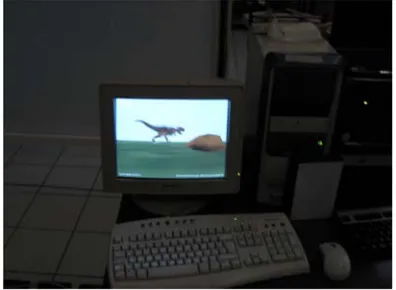
[image:8.612.317.515.322.467.2]In this section, it will be checked if the program works properly in the dive booth with the back-projection system with which it has, Figure 5 shows the execution of the program in the node "LRVIRTUAL01" of the Virtual Reality Lab, which is directly linked to the projector 1, which generates the front output of the cab. Figure 6 shows the program being displayed on the front screen of the cabin.
Figure 5. Virtual Reality Server Screen Executing The Developed Application.
[image:8.612.91.285.322.478.2] [image:8.612.334.513.514.633.2]5211 Figure 7. Application Movement Using The Endless
Road.
[image:9.612.96.286.352.497.2]It will be verified that the movement is carried out correctly in the environment. It was initially specified that a mouse movement or a step on the treadmill would correspond to a displacement of 1 meter in the environment. Figure 5.5 shows the movement in the program using the mouse and Figure 5.6 shows the movement using the treadmill.
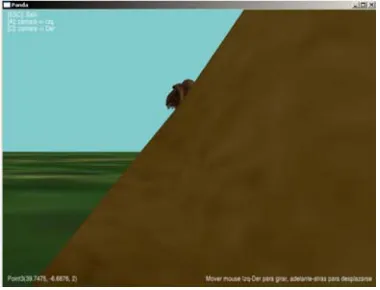
Figure 8. The Camera Is Unable To Traverse The Object (Rock) And Tends To Surround It.
The collision detection system of the virtual environment was tested, in Figure 8 we show the process of detection of collisions and the way in which Is controlled the physics of the viewer, which will tend to surround the objects in case try to force the passage through them.
In Figure 8 we the rock but in this case they are in an environment that detects collisions it is observed that, although the input device is trying Moving in a straight way, the movement of the camera is curved due to the influence of the rock, so in this scheme, collision detection works in a basic way, at least preventing the user from passing solid objects, which Slightly increases the sense of realism.
4.1 Tests in the Cave
Being this the first virtual environment developed in this center, which does not depend on the VRML engine, the movement is in general more natural than in the previous one since its acceleration is constant according to the turns or steps of the user in the way without end, whereas in VRML that same acceleration is incremental according to the distance of the pointer with the center of the virtual environment. The Panda3D engine gives better results when designing virtual environments than the VRML engine, allowing dynamic import of three-dimensional design software such as Maya, 3ds Max or Blender, which increases the quality of the models in Comparison with VRML which does not have import characteristics, increasing the time of development, besides the results are much less showy. In the previous system collisions were fixed and could not be special, but in the virtual environment developed in Panda3D there are many ways to program collision management.
[image:9.612.312.526.408.672.2]Table 3 shows the result of comparative evaluation between our proposal system and two of the common multipersonal cabin systems as we established it in the related work section.
Table 3. Multipersonal Cabin VR System Comparison.
Our Cave VISS NAVE
Resolution ~1 Mpixel
screen ~1 Mpixel per screen ~1 Mpixel per screen
Immersion immersive Semi-immersive immersive Field of View 250 degrees 170 degrees 250 degrees Users multiple
viewers, one tracked user
multiple viewers, one tracked user
multiple viewers, one tracked user
Comfort Anagliph
glasses -- lightweight glasses, wireless Screens Three 4:3 (3x
2.5 mts) Two 4:3 (1.2 x 1.6 mts) Three 4:3 Tracking/Latency Guided
througth an endless road wired connected, minimum latency
much less sensitive, simulator sickness less likely
Any traking system
Polygons per
second 60 thousand 60 thousand More than 120 thousand
Frames per
second 60 30 60
Cost 6,000 usd
Low cost Lowest cost 60,000 usd middle cost
5212 existing devices in the immersion cabin as the system Of endless road. The virtual environment consists of a source code developed in the Python programming language, which makes use of the libraries of Panda3D; All the instructions have comments that explain the actions that are carried out respectively.
Test the created software performance by using the Table 1 (Multipersonal cabin software desirable chracteristics) as this table is closely linked to the required software objectives, the result indicates the level of success of the software developed. It can be seen, Table 2, that the proposed software meets all requirements initially requested unlike the proposals previously tested, table 4.
The present development focuses on the development of software that integrates all the dispersed elements that have been developed around a virtual reality laboratory in the CIDETEC of IPN. These elements include but are not limited to:
A CAVE type system consisting of three screens with rear projection and optical reflex system.
An endless path based on a treadmill. A distributed processing system controlled
by a virtual reality engine.
An anaglyph based 3D visualization system.
A 3D object manipulation system based on a video game controller
Several virtual reality environments realized mostly in VRML.
Due to the nature of the development of each of the elements mentioned above, an element of integration of all of them is necessary. Among the options as an integrating element it is possible to use some of the libraries previously created by the scientific community such as CAVElib libraries or packages were developed for CAVE systems such as EON icube, VR Jugler, Cove, CaveUT among others. However from the beginning the purpose of all these elements was to understand the use and development of these elements in an intimate and from the beginning. Due to the above, the decision was taken that the integrating element would also be developed from scratch to understand and teach this learning in CIDETEC and IPN.
As a result there is a software with several limitations regarding the existing commercial and research software, however it has a set of virtues that are necessary for the research and student environment, namely the following:
It is a development for low cost system It is known all the software as well as all
its functions and it has the source code since it was developed in its entirety by the staff and students of the IPN.
It communicates perfectly with all the software and hardware previously developed in the virtual reality laboratory of CIDETEC IPN since it was developed having previous knowledge and in depth of said elements that were also developed here from the beginning.
Any researcher or student can make new hardware, software and scenarios that work with this development since all the code is freely available for.
It can be updated constantly because it has the source code and the equipment and can be tested in the laboratory as practices or as current and future research.
The fundamental difference between other previous developments and this is the fact that the present development was made to cover the particular needs of a research center with economic and unique resources, which are covered with this particular development. The learning generated in this research can be used by other educational and research centers with similar limitations and peculiarities in terms of requirements of low cost systems and own development needs.
This system can be used in the medical area for use by people with visual or hearing impairment, paraplegic or even elderly. Apply this same system to other contexts as treatment of phobias or the training of operation in hazardous environments.
5213 (Polygons per second) and number of screens that the system can handle from a minim or one to three screens simultaneously and with no decrease in overall system performance due to the use of a distributed processing system managed by the developed software.
Table 4. Multipersonal Cabin Software Final Analysis Results.
Software desirable Characteristic
Platform
VRML C Java3D Panda 3D
1 Start virtual
environment x x x x
2 Load a scene x x x
3 Place tree virtual
cameras x x
4 Manage multicore
communication x x x
5 Initiate and follow
animations x x x
6 Detect collisions x x x
7 Handling immersive system elements
x x x
8 Handling particular
hardware x x x
9 Easiness of virtual
world creation x x
10 Other platforms
compatibility x x x
5. CONCLUSIONS.
The virtual environment designed in Panda3D allows the integration of new hardware and test the existing devices in the immersion cabin as the endless road system. Regarding the interaction with the user in the virtual environment was taken into account and resolved using a collision detection system, which interacts with the user and does not allow him to pass through the objects. A series of behaviors were also programmed in some objects, where they are specified the intervals of displacement that allow them to traverse the virtual environment and to realize animations corresponding to the natural movement of the same ones.
The program was successfully tested on several computers with typical resources where it was only necessary to install the Panda3D program in order to run the virtual environment. Subsequently the program was installed and executed in the immersion booth obtaining satisfactory results.
It is clear that the developed software has many limitations respect to greater systems like the NAVE, but for learning and developing purpose is quite useful and in that case the developed software met al the initial requirements.
REFERENCES
[1] Thorsten Bockmühl. Gis and remote sensing for 3d urban modelling by means of VRML technology. University of the Bundeswehr Munich, 2006.
[2] Ramon Costa Castelló. Programación y teleoperación de robots a través de internet. Institut D Organitzación i Control de Sistemas Industrials, 2002.
[3] Philip W. Fink. Obstacle avoidance during walking in real and virtual environments, 2007.
[4] Fengyun Lu. Load balancing for massively multiplayer online games. Newcastle University School of Computing Science UK, 2006.
[5] Darren Nonis. 3DSingapore, 2005. virtual learning environments. Ministry of Education, [6] Constance A. Steinkuehler. Learning in
massively multiplayer online games, 2004. [7] Azmi Mohd Yusof, Mohd Ezanee Rusli, Mohd
Zaliman Mohd Yusoff, Ahmad Redza Razieff Zainuddin, Gamini Perhakaran, Eze Manzura Mohd Mahidin, Imran Mahalil, “SnoezelenCAVE: Virtual Reality CAVE Snoezelen Framework for Autism Spectrum Disorders”, Proceedings article, Springer Verlag, Lecture Notes in Computer Science, p. 443-453, DOI: 10.1007/978-3-319-25939-0_39
[8] Cruz Neira, C., Sandin, D., Defanti, T., Keynon, R. y Hart, J.; The CAVE: Surround-Screen Projection-Based Virtual Reality: The Design and Implementation of the CAVE. In: ACM Press, pp. 135 – 142. year 1992.
[9] TUFO, H. M., FISCHER, P. F., PAPKA, M. E., BLOM, K.; (1999), Numerical Simulation and Immersive Visualization of Hairpin Vortices. En: ACM Press, pp. 62.
[10] PAIR, Jarrell, PIEPO, Diane; (2002), Flatworld: A mixed reality environment for education and training. En: International Conference on Information Systems.
5214 [12] JACOBSON, Jeffrey, LEWIS, Michael;
(2005), Game engine virtual reality with CAVEUT. En: IEEE Computer, Vol 38, pp. 79 – 82.
[13] Pair, J., Jensen, C., & Flores, J. (2000). The NAVE Design and Implementation of a Non-Expensive Immersive Virtual Environment 249.
[14] ZUFFO, João Antonio, SOARES Luciano Pereira, ZUFFO Marcelo Knörich, LOPES Roseli de Deus; (2001), CAVERNA Digital - Sistema de Multiprojeção Estereoscópico Baseado em Aglomerados de PCs para Aplicações Imersivas em Realidade Virtual. En: IV Symposium on Virtual and Augmented Reality.