Citation:
Pattinson, C and Cross, R (2011) Does "thin client" mean "energy efficient"? Project Report. JISC. Link to Leeds Beckett Repository record:
http://eprints.leedsbeckett.ac.uk/821/
Document Version: Monograph
The aim of the Leeds Beckett Repository is to provide open access to our research, as required by funder policies and permitted by publishers and copyright law.
The Leeds Beckett repository holds a wide range of publications, each of which has been checked for copyright and the relevant embargo period has been applied by the Research Services team.
We operate on a standard take-down policy. If you are the author or publisher of an output and you would like it removed from the repository, please contact us and we will investigate on a case-by-case basis.
L E E D S M E T R O P O L I T A N U N I V E R S I T Y
JISC Final Report
Project Information
Project Identifier To be completed by JISC
Project Title Does “thin client” mean “energy efficient”
Project Hashtag
Start Date 18-1-2010 End Date 17-12-2010
Lead Institution Leeds Metropolitan University
Project Director Colin Pattinson
Project Manager Colin Pattinson
Contact email [email protected]
Partner Institutions None
Project Web URL http://www.leedsmet.ac.uk/research/thinc-efficiency-project-case-study.htm
Programme Name Greening ICT
Programme Manager Rob Bristow
Document Information
Author(s) Colin Pattinson, Roland Cross Project team
Project Role(s) Project team
Date 23/3/11 Filename ThinC Final report.doc
URL If this report is on your project web site
Access This report is for general dissemination
Document History
Version Date Comments
0.1 17/1/11 Initial version, awaiting data analysis 1.0 27/1/11 First cut of data analysis added 1.1 1/2/11 Cross check of data and final analysis 1.2 18/2/11 Document editing and revision
1.3 2/3/11 Report sent to JISC programme manager
Table of Contents
1 ACKNOWLEDGEMENTS ... 3
2 PROJECT SUMMARY ... 3
3 THIN AND THICK CLIENTS AND IT EFFICIENCY ... 4
3.1 PROJECT OUTPUTS AND OUTCOMES ... 4
3.2 BACKGROUND ... 4
3.2.1 Greening ICT ... 4
3.2.2 Aims and Objectives ... 7
3.2.3 Existing data on thick and thin client performance ... 7
3.2.4 Methodology ... 8
3.2.5 Implementation ... 9
3.2.6 Operation of the experiment ... 9
3.2.7 Assumptions... 9
3.3 RESULTS ... 10
3.4 IMMEDIATE IMPACT ... 11
3.5 FUTURE IMPACT ... 11
4 CONCLUSIONS ... 12
5 RECOMMENDATIONS ... 12
6 IMPLICATIONS FOR THE FUTURE ... 12
7 REFERENCES ... 13
8 APPENDICES... 14
8.1 APPENDIX A: USER FEEDBACK COMMENTS ... 14
1 Acknowledgements
The authors record their thanks to the JISC Greening ICT project for funding this work and for ongoing support and advice. We also record our appreciation of technical colleagues at Leeds Metropolitan University for technical support throughout the project, and in particular to those colleagues whose willingness to allow their workstations to be measured and – in many cases – replaced by different technologies, allowed us to gather the data which informs this project.
2 Project
Summary
The thick client –a personal computer with integral disk storage and local processing capability, which also has access to data and other resources via a network connection – is accepted as the model for providing computing resource in most office environments. The Further and Higher Education sector is no exception to that, and therefore most academic and administrative offices are equipped with desktop computers of this form to support users in their day to day tasks. This system structure has a number of advantages: there is a reduced reliance on network resources; users access a system appropriate to their needs, and may customise “their” system to meet their own personal requirements and working patterns. However it also has disadvantages: some are outside the scope of this project, but of most relevance to the green IT agenda is the fact that relatively complex and expensive (in first cost and in running cost) desktop systems and servers are underutilised – especially in respect of processing power. While some savings are achieved through use of “sleep” modes and similar power reducing mechanisms, in most configurations only a small portion of the overall total available processor resource is utilised.
This realisation has led to the promotion of an alternative paradigm, the thin client. In a thin client system, the desktop is shorn of most of its local processing and data storage capability, and essentially acts as a terminal to the server, which now takes on responsibility for data storage and processing. The energy benefit is derived through resource sharing: the processor of the server does the work, and because that processor is shared by all users, a number of users are supported by a single system. Therefore – according to proponents of thin client – the total energy required to support a user group is reduced, since a shared physical resource is used more efficiently.
These claims are widely reported: indeed there are a number of estimation tools which show these savings can be achieved; however there appears to be little or no actual measured data to confirm this. The community does not appear to have access to measured data comparing thin and thick client systems in operation in the same situation, allowing direct comparisons to be drawn. This is the main goal of this project. One specific question relates to the overall power use, while it would seem to be obvious that the thin client would require less electricity, what of the server?
Two other variations are also considered: it is not uncommon for thin client deployments to continue to use their existing PCs as thin client workstations, with or without modification. Also, attempts by PC makers to reduce the power requirements of their products have given rise to a further variation: the incorporation of low power features in otherwise standard PC technology, working as thick clients.
We were also aware of other factors surrounding a change such as this: we have addressed the technical issues of implementation and management, and the non-technical or human factors of acceptance and use: all are reported within this document.
Finally, our project is necessarily limited to a set of experiments carried out in a particular situation, therefore we use estimation methods to draw wider conclusions and make general observations which should allow others to select appropriate thick or thin client solutions in their situation.
3 Thin and Thick Clients and IT efficiency
3.1 Project Outputs and Outcomes
Output / Outcome Type
(e.g. report, publication, software, knowledge built)
Brief Description and URLs (where applicable)
Final report This report
Paper at international workshop Pattinson, C., Cross, R., “Measuring the Energy Use of Thin and Thick Client Desktops” Proceedings 27th Annual UK Performance Engineering Workshop, Bradford, July 2011. ISBN 978-0-9559703-3-7
Presentation at JISC event Leeds Greening ICT event June 2011
3.2 Background
Information and communications technology (ICT) is a major element in the overall energy requirement (and hence the carbon footprint) of Higher and Further Education. With an estimated 1.5 million PCs, 240,000 servers and 250,000 printers1 deployed at the end of 2008, and with growing demands for more technology-intensive teaching, learning and administration, there is a pressing need to seek to ensure that existing and new ICT is used in the most energy-efficient manner. This project builds on work undertaken at Leeds Metropolitan University2 by exploring the real cost and benefit of alternative technology implementations: in particular we address the question of the relative performance of thin vs. thick client systems in the HE environment.
This is a project in which colleagues from across the University (academic researchers; technical services and estates division) have collaborated, and is an extension of work we have undertaken to jointly develop and implement the University’s Green IT strategy. This strategy is part of the University’s overall commitment to sustainability, which has consistently placed us in the top 10 in the annual People and Planet league table of green universities3, and the Sunday Times greenest university in 20084. Our academic credentials are underlined by the fact that in October 2009 we enrolled the first cohort of students to our Green Computing MSc award5, the first of its kind in the UK.
3.2.1 Greening ICT
There can be no argument that energy efficiency, and what is often referred to as “the green agenda”, has become a very significant part of the business and education landscapes
1
Sustainable ICT in Further and Higher Education (Suste-IT) Final Report http://www.susteit.org.uk/publications/index.php
2
Pattinson, C. Siddiqu, T.M. "A Performance Evaluation of an Ultra-Thin Client System” in Proc. International Conference on E-Business, Oporto, Portugal July 2008 pp. 5 – 11.
and
Pattinson, C., Robinson, L “A Study Of The Effectiveness Of “Wake Up On LAN” As A Means Of Power Management” in Proc. International Conference on E-Business, Oporto, Portugal July 2008 pp. 73 – 6.
3
http://www.leedsmet.ac.uk/news/index_green_travel_201009.htm#
4
http://www.leedsmet.ac.uk/the_news/may08/greenuni.html
internationally, nationally and locally6. While organisations may adopt “green-ness” for a variety of reasons: to save money; to meet regulatory requirements; as part of their commitment to (corporate) social responsibility; in pursuit of a real desire to save the environment; or for the perceived marketing benefits, one outcome has been an upsurge of interest in ways of monitoring and reducing energy use.
In most organisations, the last 20 years have seen a domination of office IT provision by the PC on, or under, the desk, running applications in the device’s processor and memory, with data being stored either locally or in a networked server (a configuration termed thick client). Higher and further education teaching, research and administrative functions are no different from many others in this respect. The typical office desk has a monitor and keyboard connected to a separate base unit comprising processor, hard disk and associated hardware and software providing network connectivity, printing (remote and/or local), and the facility to attach universal serial bus (USB) compliant devices, thus allowing easy connection of peripherals (input-output devices, video cameras, off-line storage etc). In almost all cases, these facilities are attached to a network, allowing data to be retrieved from, and stored on, servers, and for data to be exchanged between users. The most typical means of operation in this setting is for a document (e.g. a report) to be retrieved from a network server, and stored temporarily on the local machine while it is processed by a program (a word processor in this example), also resident locally. When the task is completed, the revised document will be transferred back to the server for storage until it is required again. Some users elect to use their local disk for long-term data storage, moving the data across the network only when required by the need to share files with colleagues.
In essence, each user has a fully functional, stand alone computer system, with the added ability to access remote file storage (and possibly printing facilities) provided by a separate server device located elsewhere in the organisation. Some combination of organisational rules and personal preference governs the mix of local: remote storage utilisation by each user. This is the classic “workstation-server” model of computing, which has the advantages of being well-understood and reliable.
However, this model also has disadvantages: most significantly, the computing resource at the desktop is under-utilised, and the energy requirements (mainly for the operation of the hardware, but also the cooling required) are significant. The tendency for most office PCs to remain “on” throughout the working day – albeit increasingly often in standby or sleep mode (below) – means that the proportion of useful work to power drawn is coming under increasing scrutiny. Several power saving initiatives have been developed, including sleep mode, where power is removed (or significantly reduced) to all components in the computer apart from the memory and processor activity needed to detect a wake up signal (from the keyboard or externally via the network) and respond to it. Sleep mode is also referred to as standby or hibernate mode by some manufacturers. Whilst very effective in switching unused equipment away from a high-power “active” state, sleep mode clearly does not address the utilisation of power while the system is awake.
More radical approaches involve a realignment of the processing activity, so that more work (and/or data storage) takes place at a central location, with users sharing the processing facilities, offering economies of scale available from more intensive resource use and delivering lower overall energy consumption for equivalent activities. The ultimate extension of this model is the cloud computing paradigm, where very large data and server centres store and process data remotely, being accessed by the user via an internet connection. In the type of office computing environment widely employed in higher and further education (HE/FE), as well as in other business settings, one shared processor technology which is attracting much interest is the thin client. The goal of these systems is the transfer of the processing workload from often underutilised desktop computers (thick clients) to a configuration in which that work is carried out at a server, whose processing capacity can be shared amongst a number of users who access this resource via a simpler (and hence lower powered) device. The availability of network bandwidth and the enhanced reliability of
6 For example:
The Natural Edge Project http://www.naturaledgeproject.net/SustainableIT.aspx;
Gabriel, C. Why it’s not naive to be green Business Information Review 2008; 25; 230
Cabinet Office “Greening Government ICT” document set at http://www.cabinetoffice.gov.uk/cio/greening_government_ict.aspx
contemporary networks make it possible to rely on networked equipment in this way. The superficial appearance is of an updated version of the time-sharing, multi-user mini computers of an earlier age, but with much improved user interface and many additional capabilities. Proponents7 suggest that the overall benefits from this distribution of workload include an overall energy saving. The majority of recent research work has focused on the potential for thin client systems in mobile and wireless scenarios, where energy efficiency is an important consideration, and this would seem to support claims for the efficiency of thin client methods. However, there is little hard data to confirm this, and one recent paper has suggested that the number of users needed to deliver any worthwhile improvement is very large8. In particular there is a lack of reliable data describing the specific energy requirements of such systems (either at the data centre or the desktop) in the HE/FE environment. Furthermore, the impact of other factors, such as staff training, the consequences of a move to a more controlled desktop configuration, deployment costs and the need to replace existing technology, is not fully understood9. Finally, the existence of gradations of “thin-ness” and the tendency to reuse erstwhile “thick” PCs as thin client terminals, means that there is a need to look beyond the simple “thick vs. thin” division; to identify the various characteristics which contribute to “thin-ness” and to determine if some parts of thin client technology are more or less effective in particular circumstances.
The classic study comparing thin and thick clients, by the Fraunhofer Institute10 compares the “environmental effects” of the whole life cycle of thin and thick implementations of a single system (for their full life - manufacture, deployment and disposal), and defines a set of “typical usage scenarios”, based on levels of use of standard applications. It does not specifically address the kind of deployment typically seen in HE/ FE – where between 20 and 50 users (whether students in a laboratory session, academics preparing teaching and research material or administrative workers processing student records) use the same application program set in a broadly similar way. The question of which applications are more or less appropriate to deployment on a thin or thick client platform is also unclear. Some reports have suggested that thin client is best suited to kiosk type applications11, but here again, there is a shortage of real data to back this up, and very little such data exists for the kind of operational requirements seen in Higher and Further Education.
This project, part of the JISC Greening ICT initiative, aims to provide some actual measurement data against which to test the received wisdom. We installed a thin client deployment in an office environment within Leeds Metropolitan University, supporting a mixture of academic and administrative colleagues in their daily work. This deployment was a direct replacement for our normal staff desktop (PC-based thick client), thus some staff received the thin client replacement with a purpose built thin client terminal; some continued to work with their normal PC in thick client mode; while others were provided with low-energy, but still desktop-based, PC systems, running either as thin or thick clients. The limited timescales and our concern not to affect the day to day work of our volunteer colleagues led us to endeavour to deliver thin client systems as near as possible identical in look and feel to the thick client system being replaced. Once installed and operational, power consumption was measured by socket-mounted meters at each desk, and by recordings of the server system associated with the thin client deployment.
We measured usage during the autumn / winter term of 2010, permitting us to capture what we believe to be a typical sequence of operation, with academic staff preparing and delivering course material, gathering information in support of research, writing research papers and dealing with administrative duties; while administrative colleagues were handling issues of student enrolment, committee documentation and data reporting. We are unaware of any particular circumstances which would make this particular term, or this particular office, significantly different from any other across the University.
7
Greenberg, S., Anderson, C., Mitchell-Jackson, J. Power to the People: Comparing Power Usage for PCs and Thin Clients in an Office Network Environment
Thin Client Computing, Scottsdale, AZ August, 2001 http://www.lamarheller.com/technology/thinclient/powerstudy.pdf
8
Abaza, M., Allenby, D., The Effect of Machine Virtualization on the
Environmental Impact of Desktop Environments The Online Journal on Electronics and Electrical Engineering (OJEEE) Vol. 1, No. 1 http://www.infomesr.org/OJEEE-V1N1_files/W09-0010.pdf
9
Doyle, P. et al “Case Studies In Thin Client Acceptance”, UbiCC Journal, Volume 4,3
10
http://it.umsicht.fraunhofer.de/TCecology/docs/TCecology_en.pdf
3.2.2 Aims and Objectives
The principal aim of this project was to carry out direct measurements of energy consumption (electrical power) on a sample set of users whose patterns of work are representative of a typical university environment. Each user was allocated one of the combinations of client systems, with application support to permit them to carry out their normal workload. We set out to monitor the total energy draw of this operation: therefore we identified and configured a server specifically to support the thin client components of our service, whose energy use is also monitored.
During the project, we were also interested to determine users’ experience of the various systems: although we aimed to develop a thin client desktop identical to that of the thick client, we might expect there to be some change in user experience, whether real or perceived, and we were aware of the potential for resistance arising from a number of causes ranging from genuine performance issues, through lack of opportunity for personalisation of the computing environment to general resistance to change. We have therefore liaised with users to gather their experiences of the project overall.
3.2.3 Existing data on thick and thin client performance
Some of the reports on the performance of thin client systems have already been noted above; here we discuss the underlying data which has been used in earlier work.
1. Queen Margaret University
A 2008 report12 describes an installation then recently undertaken at Queen Margaret University, at a campus in Musselburgh, near Edinburgh. This is an almost wholly thin client site (a small number of PCs are available for certain applications which “are difficult to run over the thin client network”). It is also a location where subject areas are delivered “such as applied health sciences, [which] don’t need massive amounts of computing power or data analysis”. The measured energy of the thin client systems is quoted as 25 watts, compared to 120W for an “average” PC. The maximum number of thin clients per server is suggested as 40.
2. SusteIT
The SusteIT report provides the most complete and comprehensive review of work in this field, and it would be superfluous to repeat that here. The associated spreadsheet makes use of data (energy use etc) “… obtained from vendors and correct at the time [of writing]”. These data inform the spreadsheet which is used to calculate comparative energy requirements, and allowing users to estimate the relative energy performance of thick vs. thin clients for a particular user base.
3. Fraunhofer
The Fraunhofer Institute report, published in 2006, conducted a “whole life” comparison of thin and thick client systems then available and assessed raw material requirements, energy in use and disposal costs. The “use” phase is based on identifying three workload profiles (light, medium and heavy)13. The “medium user” category most closely resembles the usage profile of our users. It is suggested that 35 of this category of users in thin client mode means “the system is already working to full capacity”14. Note that later in the document, where power use is assessed numerically, the “worst case” measurement reported is based on 20 users per server15. The reported measurements are thin client: 26 – 31W; thick client 68 – 90W, depending on particular system specification.
12 Law, G., “QMU thin client saves energy costs” Grid Computing Now!, SusteIT/ JISC October 2008 13
See Table 2, p.7 of http://it.umsicht.fraunhofer.de/TCecology/docs/TCecology_en.pdf
3.2.4 Methodology
Our methodology required us to identify the candidate thin and thinner client systems to be used, the thick client variation being that provided by the university’s standard user desktop / application support. We also identified suitable candidate locations for deployment, against specific criteria, and appropriate metering and data gathering methods. Each is now discussed in turn:
Thin client systems: Our primary criterion for selection of this technology was that it would allow us to deploy application support in a form as near as possibly identical to that of the thick client systems they replaced: we felt it was not appropriate to involve users in a major change of system environment. We recognise that this may not be the most effective use of thin client systems in a longer term and wider scale deployment – where the cost of user training may be recouped by the improvements and savings made from optimal use of thin client devices, however, the scale and duration of our experiment meant that it was not appropriate to expect users to re-orientate themselves to a different user environment. We also sought to select a commonly used combination of hardware and software for our deployment, and determined that we would use Wyse terminals16, supported via a Citrix server platform, on a Dell Poweredge server.17
In addition, we configured a number of low-powered desktop PCs18 to operate as thin client terminals.
Thinner client systems: There is a spectrum of systems which could fit under the term “thinner client”, we defined it as being a desktop PC which is specifically promoted as being a low power device, but which is otherwise comparable to our standard desktop platforms in form and operation19.
Our thick client platforms, as noted above, utilised a variety of the standard university deployment systems, purchased over the last three years.20
We wished to ensure that our chosen test bed contained a group of users whose daily workloads represented a cross section of that expected across the institution; and we wished to find a location which was relatively self-contained, making it easier for us to install and maintain the test systems. Ideally, we would have selected a location which also had integral power monitoring, removing the need to manually read and record from separate power meters. Our final choice was our technology-enhanced learning team, not specifically because of their job role (although their support and willingness to work with us was a benefit), but because they occupied a building (the Old School Board Building in central Leeds) which is physically separate from, but close to, our other locations; because the team is of a size (office occupancy varying between 10 and 20 at any time) which allowed us to deploy our range of test systems; and because the workload offered a suitable mix of academic and administrative activities21. A disadvantage was that this location did not possess the inbuilt metering available elsewhere in the University hence we needed discrete metering using plug in meters at each desktop. However, the requirement for one of our team having to physically read the data meant that those involved in the experiment were able to make contact with a member of the project team on a regular basis.
16
Thin Client terminals: Wyse terminals C30LE, 1 GHz GOGX processor, 512MB memory, 64MB flash
memory, Citrix ICA 10.17 (build 104).
17 Thin Client Server platform: Dell Poweredge 2950, 2x quad core 3GHz Intel Xeon C5450 CPU, 10GB
RAM, Server OS: Windows Server 2003 Enterprise SP” running Citrix Metaframe XP FR3
18 Thin client low power desktops: FX160, Atom 1.6 GHz processor, 4GB memory, 64GB solid state
HD, Citrix 10.150.58643.
19
Thick client low power desktops: FX160, 4GB memory, 64GB solid state HD, running Windows XP
and standard staff build.
20 Thick client desktops: models included 1 x Dell Opitplex GX780 desktop, 1 x Dell Opitplex GX760
desktop, 3 x Dell Opitplex GX745 desktops, 4 x Dell Opitplex GX620 desktops, 2 x Dell Precision T1500
workstations
21 In reality, the user base became wider than this group and location, as we relocated equipment to
Power meter readings at the desktop were provided by using individual inline power meters.22 At the server, we measured energy by using Dell OpenManage Server Administrator.
3.2.5 Implementation
Our wish to achieve a common user experience across all platforms meant that we had to develop, test and deploy a thin client system which matched, as near as we possibly could, the user interface offered by the standard desktop. The reasons for this were discussed above, and we will consider the likely effects of this on our overall results in a later section of this document.
We made no adjustment to our power saving approaches used across the University, and made no special effort to reinforce, modify or remove the general advice and guidance given to all users about power use23. Therefore control of switch-off is with the individual user, and we would anticipate that the usage patterns is this respect are comparable to those across the institution.
The only exception to the above was that all participants were advised not to turn off power at the wall socket as this cuts off the power meters, losing historical data. Where building-wide interruptions to power supply occurred, the time of these was noted and meter readings adjusted accordingly.
3.2.6 Operation of the experiment
Following commissioning of the equipment, users followed normal working practices, with no constraints or added requirements placed on them by the team. Readings of the energy meter attached to each desk-based system were recorded at frequencies ranging from daily to twice weekly, depending on access constraints, together with any other information, such as reported issues and other experiences. We anticipated – correctly - that most operational problems would be reported and addressed at the time they arose, through our normal maintenance procedures.
We gathered data between 22nd October and 17th December, with measurements of the full thin client deployment commencing on 4th November. In total, 25 individuals took some part in the trial; in addition, we had three thin client systems available for general use in a development laboratory.
3.2.7 Assumptions
Some discussion was had within the project team about how we should display the results and what exactly we should measure. It was agreed that since we were interested in comparing the power consumption of different services, rather than different technologies, then we would measure power consumption regardless of whether the period was in normal business hours, weekends, bank holidays, part-time/full time employee, or how intensively an individual user operated the equipment.
The considered choice of the experiment location described above, meant we assumed the following:
We had a mixture of staff broadly representative of the HE sector in terms of
o Part time or full time
o Administrative, support, academic and managerial.
Participants behaved in a similar fashion as they had before the experiment.
Participants used both services to perform the same business functions.
22 Inline desktop power meters: Pro Elec PL09564 see http://www.amazon.co.uk/Plug‐Power‐Energy‐
Monitor‐Meter/dp/B000Q7PJGW
23
Users are requested to turn off devices at the end of the working day, and prior to long periods of
absence from their desks, but no specific measures are enforced, beyond our standard installation of
Any fluctuations in electricity usage between the different candidate services were due to the technology rather than the participant’s behaviour.
Due to lack of information concerning the accuracy of Dell OpenManage Server Administrator, we assumed the measurements were accurate to 0.1kWh (one either way on the last figure).
It is assumed that the power consumption of all other server based services (e.g. filestore and DNS etc) is consistent over thin and thick client services.
It is assumed that the power consumption of network devices is consistent over thin and thick client services
3.3 Results
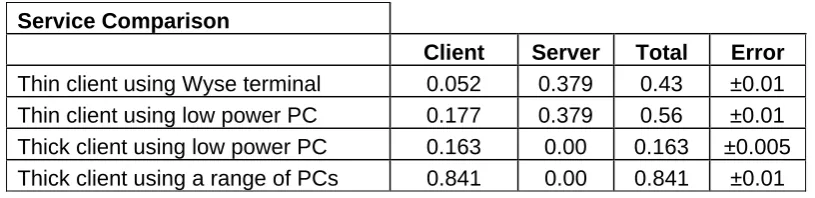
The overall results are summarised in the following table:
No. of participants 25
No. participants discarded 3
Total no. measurements 329
Total no. measurements discarded 10
Duration of experiment 54 days
Avg period of measurement
of single device 23.6 days
Daily
Device No. Power/kW Error Notes
Dell 160 thin client 6 0.177 ±0.002
Dell 160 thick client 2 0.163 ±0.005
it would appear low power PC power consumption varies little with type of client
Wyse terminal 4 0.052 ±0.003
Dell GX620 4 0.749 ±0.003
Dell GX 745 3 1.144 ±0.003
Dell GX760 1 0.43 ±0.01
Dell GX780 1 0.26 ±0.01
Workstation T1500 1 1.59 ±0.01
Average Thick Client PC 10 0.841 ±0.01
Toshiba Laptop 1 0.04 ±0.01
Interesting but of no real value to this study
Server
16
clients 6.1 ±0.1
Server per client 0.379 ±0.005
Table 1: Breakdown of power usage by type of technology
Service Comparison
Client Server Total Error
Thin client using Wyse terminal 0.052 0.379 0.43 ±0.01
Thin client using low power PC 0.177 0.379 0.56 ±0.01
Thick client using low power PC 0.163 0.00 0.163 ±0.005
[image:12.595.86.494.71.170.2]Thick client using a range of PCs 0.841 0.00 0.841 ±0.01
Table 2: Breakdown of power usage by service
Thin client using Wyse terminal 0.43 Thin client using low power PC 0.56 Thick client using low power PC 0.16 Thick client using a range of PCs 0.84
Table 3: Comparison of power usage by service
3.4 Immediate Impact
For further comparison, the QMU and Fraunhofer data quoted above (assuming 24 hour operation), give values of:
QMU thin client: 0.6 kWh; thick client: 2.88kWh
Fraunhofer thin client 0.624 – 0.744 kWh; Thick client: 1.632 – 2.16kWh
That our (2010) results are lower in all cases than those quoted 3 - 5 years ago is due to a combination of advances in energy saving across IT devices in general over that period, and to increased use of specific power saving options (sleep mode etc.). This suggests that the assumed values used in estimation tools may require review and updating.
Service Issues
We observed no issues of reliability specifically affecting the performance of the thin client equipment: two power outages were experienced, both general losses of power to geographical locations which affected all users in equal measure.
Two of our thin client users withdrew from the experiment, citing performance shortcomings when using particular graphics and resource-intensive applications. We are not aware that these users were predisposed to expect such problems – they had not made any prior detailed study of thin client systems and therefore would not be aware that this is often suggested as a problem for thin client users. We therefore conclude that these perceptions of unacceptable performance were genuine, and formed from actual experience. See Appendix A for examples of comments.
3.5 Future Impact
4 Conclusions
Although our measurements reinforce the widely held and published information that thin client technology offers a significant per user energy saving under conditions of normal use when compared to standard thick client configuration, the lowest energy consumption in our measurements was from use of low energy PCs used in thick client mode.
It should be repeated at this point that the nature of our experimental design, in particular the decision to replicate the thick client desktop may have meant we were not fine tuning the thin client deployment to the utmost. However, we do believe that the difference is significant, and would continue even with such tuning in place.
Also, it is possible that we were underutilising the server in thin client mode, but if we assume could double the number of clients without increasing power consumption or degrading the speed of the service (which is unlikely), the figures are:
Server Serving 32 Clients Client Server Total Error
Thin client using Wyse terminal 0.052 0.19 0.24 ±0.01 Thin client using low power PC 0.177 0.19 0.36 ±0.01
Thick client using low power PC 0.163 0.00 0.163 ±0.005 Thick client using a range of PCs 0.841 0.00 0.84 ±0.01
5
Recommendations
Our results suggest that the development of low-power PC systems has meant that these devices are now able to offer a solution which is better (in terms of energy use) than thin client systems operating in the same environment. When added to the consideration that a change to these systems will have less impact on infrastructure and user experience, the advantages are clear. We have not been able to assess the claims of longevity for thin client systems (we have heard oral statements that these systems are viable for double (or more) of the lifespan of a standard PC). This does not seem unlikely in respect of the technical specification of thin client terminals: their relative simplicity suggests that they should indeed have a longer life than the more complex PC solution, with consequent impact on costing. However, the technological lifespan may not be the limiting factor in user selection and choice, or in decisions to upgrade.
6 Implications for the future
Clearly, the decision to adopt a particular technology (thick or thin client system) is not based solely on power use, other factors are also relevant: reliability; expandability; flexibility; suitability for processing (and data) hungry applications are some of the technical considerations. User experience and resistance are significant non-technical barriers to change, and matters such as software licensing are often put forward as reasons making thin client “difficult”24, but perhaps the most significant reason for a reluctance to take up thin client technology to any great extent is that thick client technology has served for 20 years and users and technical staff are familiar with its operation. When this major intellectual investment is added to the significant financial commitment to thick client systems, it seems likely that any widespread adoption of thin client would require a combination of awareness raising; successful major implementations and possibly stimuli such as pricing.
Our experiments have of necessity been limited in scale, in respect of the numbers of users and the actual devices used, we therefore recommend that further experimental measurements be undertaken, assessing the use of thin client systems in different operational areas (in particular in student laboratories – both computer science and generic); and in larger scale office environments, where the actual limitations of server capacity can be
24 Note that these licensing matters can be, and are, addressed very effectively in thin client
addressed. We also recommend that further tests similar to ours, but with different platforms, be carried out.
Our wish not to affect the user experience may have meant that we were not using our systems to their best effect, and we would recommend that work be undertaken to explore using alternative user interfaces and software applications which are tailored to take advantage of the thin client paradigm.
Finally, we should be aware of what could be seen as the next expression of client-server methods: cloud computing. While it raises a number of legal, operational and organisational questions, taking all data processing and storage equipment off site (even off-shore) offers large potential energy savings at an organisational level.
7 References
Abaza, M., Allenby, D., The Effect of Machine Virtualization on the Environmental Impact of Desktop Environments The Online Journal on Electronics and Electrical Engineering (OJEEE) Vol. 1, No. 1 http://www.infomesr.org/OJEEE-V1N1_files/W09-0010.pdf
Cabinet Office “Greening Government ICT” document set at http://www.cabinetoffice.gov.uk/cio/greening_government_ict.aspx
Doyle, P. et al “Case Studies In Thin Client Acceptance”, UbiCC Journal, Volume 4,3 Gabriel, C. Why it’s not naive to be green Business Information Review 2008; 25; 230 Greenberg, S., Anderson, C., Mitchell-Jackson, J. Power to the People: Comparing Power Usage for PCs and Thin Clients in an Office Network Environment Thin Client Computing, Scottsdale, AZ August, 2001 http://www.lamarheller.com/technology/thinclient/powerstudy.pdf Law, G., “QMU thin client saves energy costs” Grid Computing Now!, SusteIT/ JISC October 2008
The Natural Edge Project http://www.naturaledgeproject.net/SustainableIT.aspx
Pattinson, C. Siddiqu, T.M. "A Performance Evaluation of an Ultra-Thin Client System” in Proc. International Conference on E-Business, Oporto, Portugal July 2008 pp. 5 – 11.
Pattinson, C., Robinson, L “A Study Of The Effectiveness Of “Wake Up On LAN” As A Means Of Power Management” in Proc. International Conference on E-Business, Oporto, Portugal July 2008 pp. 73 – 6.
Roy, R., Potter S., and Yarrow K. Designing low carbon higher education systems:
Environmental impacts of campus and distance learning systems Higher Education Vol. 9 No. 2, 2008 pp. 116-130
8 Appendices
8.1 Appendix A: User Feedback Comments
“Needs to have access to laptop if things need to be done quickly and ThinC is not performing.”
“Not appropriate - has been told, by [participant’s line manager], that she can be a control station.”
“Crucially I need the capacity to render videos which might require extra memory/processor. I currently have about 10 GB of files I am working on (TEL competition, ALT conference, TEL website) – these are time critical and I could not afford any disruption to my work on them.” “Using a USB to transfer my files could cause problems as I have 28 GB for CETL ALiC on the h drive (though as long as this is secure and at least read accessible I don’t need to transfer it).”
Project Identifier: ThinC Version: Final
Contact: [email protected] Date: 29 March 2012
Page 15 of 16
Document title: JISC Final Report Template Last updated : Feb 2011 - v11.0
8.2 Appendix B: Thin Client Service Questionnaire
Rating25 User No. Technolog y Days in exp. Hours Functionalit y Speed Internet
Browsing Problem Details Comments
#1 Dell 160 54 37
Considerably Worse Considerably Slower Considerably Worse
Could not hot desk, USB and printing problems, random logging off, work lost, screen freezing when scrolling, jerky and slow video, no ' safely remove hardware' icon, very slow all
round use. Quick log on
#2 Dell 160 26
No response to questionnaire
#3 Wyse 50 28.5
Slightly Better
More or Less the Same
More or Less the Same
Random logging off, work lost, slow loading files and web pages, video
frame reveal very slow. N/A
#4 Wyse 38 36
Considerably Worse Considerably Slower Slightly Worse
Random logging off, work lost, poor sound quality, issues with highlighting in documents, screen freezing, slow loading internet pages, random closing down windows explorer, no 'safely remove hardware' icon.
Quick log on, could use another Thin C system and view personal email folders.
#5 Wyse 22
No response to questionnaire
#6 Dell 160 16
No response to questionnaire
#7 Dell 160 47 8
Slightly Better
Slightly Faster
Slightly
Better USB and printing problems.
Project Identifier: Version:
Contact: Date:
Document title: ThinC Final Report Last updated : Mar 2012
Page 16 of 16 #8 Wyse 41 37
Slightly worse
About the same
Poor video streaming
We experienced numerous service interruptions due to connection being lost with Thin Client server.
#9 Dell 160 47 37
Considerably Worse
More or Less the Same
Slightly Worse
Citrix server and system
failures/outages resulted in lost data. Web site graphics are of a worse