TM
DASL
User's Guide
50807
Document No. 50807-01. 11/84
Copyright © 1984 by DATAPOINT Corporation. All rights reserved The "D" logo, DATAPOINT, DATABUS,
DATAFORM, DATAPOLL, DATASHARE, Lightlink, Integrated Electronic Office, DATACCOUNTANT, ARC, Attached
Resource Computer and ARCNET are trademarks of DATAPOINT Corporation registered in the U.S. Patent and Trademark Office. AIM, Associative Index Method,
ARCGATE, ARCLINK, DASP, RMS, Resource Management System, EMS, DASL, RASL, NOSL, EASL and DATASORT are trademarks of DATAPOINT Corporation.
System features and technical details are subject to change without notice.
The DASL USER's GUIDE, Vol. Ill, is another reference in the DASL library. Vol. III describes the NOSL
I/o
package. This work is a DATEC production. NOSLI/o
was written on a DA TAPOINT processor using an experimental writing tool. Then, the masters for printing were produced on a DATAPOINT 9660 Laser Printer.Please forward your comments on this document to: DATEC Publications
c
o
o
1. INTRODUCTION
OVERVIEW . . . . INTRODUCTION TO NOSL . . . . NOSLS AND STREAMS
2. INCLUDING NOSL
l- 1 1 - 3 1-4
OVERVIEW.... . . . .. . . . .. . . . 2-1 INCLUDE NOSL DEFINITION FILE . . . . 2-2 INCLUDE NOSL RELOCATABLE LIBRARY ... 2-3
3. THE NOSL FUNCTIONS
OVERVIEW
n$ open . . . . n$read . . . . n$wri te . . . . n$te11 . . . .. n$ seek . . . . n$size . . . . n$trunc . . . . n$status . . . .. n$f1ush . . . .. n$c1ose . . . .. n$format . . . .
4. THE NOSLS
OVERVIEW . . . . SELECTING A NOSL . . . . Disk NOSL . . . . DiskId NOSL . . . .
DiskR NOSL . . . . VirFil NOSL . . . . BufPag NOSL . . . .
3 - 1 3-4 3-5 3-6 3-7 3-8 3-9 3-10 3 -11 3-13 3-14 3 - 1 5
WORKSTATION OUTPUT NOSLS . . . . Print NOSL . . . .
4-34 4-43 Pipe NOSL . . . 4-46 S p l i t NOSL . . . 4-48
Mem NOSL . . . 4- 50
C
.... ';
Null NOSL . . . 4-525. NUMERIC SCANNERS
OVERVIEW . . . 5-1 STRING SCANNERS . . . 5-2 FIELD SCANNERS . . . 5-7 6. MEMORY MANAGEMENT
OVERVIEW . . . 6-1 VIRTUAL FILES . . . 6-2 OVERLAYS . . . 6-3 7. ERROR HANDLING
OVERVIEW . . . 7-1
C'
CUSTOMIZING ERROR HANDLING . . . 7-3()
INTRODUCTION
OVERVIEW
About this manual
This manual describes the NOSL I/O package. It contains general information about the NOSL I/O package for programmers who are unfamiliar with NOSL, and contains instructions for including NOSL, calling sequences for the NOSL functions, and descriptions of the internal memory manager and error handler.
Intended audience
This manual is intended for programmers writing software in DASL on the RMS operating system.
OVERVIEW
How this manual is organized
This manual is divided into seven chapters.
o
Chapter Content
1 An introduction to the NOSL I/O package. 2 The procedures for including the NOSL I/O
package into your DASL program.
3 A description of the NOSL functions.
4 A description of the different types of nosls and instructions for opening a nosl.
S A description of the numeric scanners that are part of the NOSL I/O package.
6 A description of the NOSL internal memory manager and its relationship to virtual files and overlays.
7 A description of the NOSL error handler and instructions for customizing error handling.
o
(
IntroductionAs a DASL programmer, you are probably aware that DASL has no internal I/O facility. In order to generate
I/o,
you must use one of the RMS I/O packages, or create your own I/O package.NOSL has been written as an easy to use, but powerful I/O package for the DASL programming language.
NOSL sets up tables and buffers
Performing I/O under RMS often requires you to provide memory for tables and buffers. The fields in these tables must in turn be initialized.
NOSL allocates memory for these tables and buffers, and initializes the tables with common default values, while giving you the flexibility to override the default values.
NOSL has common interfaces called nosls
NOSL provides a common interface to access a variety of devices.
NOSLS AND STREAMS
Introduction
The term "device" is often used to refer to printers, keyboards, and screens. In the previous section we learned that there is a corresponding nosl for every device supported by the NOSL I/O package.
In this section, we will find out that a nosl can also interface to another nosl. Because "device" does not accurately describe this interface, the term "stream" will be used to describe all NOSL interfaces instead.
Definition of a stream
A stream is anything whose contents can be treated as a sequence of bytes. Some examples of streams are
• a text file, • a printer, • a keyboard, and • a nosl.
n$Stream type
1-4
NOSL provides a type, n$Stream, to describe a stream. The NOSL open function returns a variable of this type, while the other NOSL I/O functions require a variable of this type as an input parameter.
Example:
lin n$Stream;
DASL USER'S GUIDE 50807-01
o
o
Streams are sequences of bytes
A stream is treated as a sequence of bytes.
The length of a stream is always measured as the number of bytes from the beginning to the ending of a stream.
Stream pointers
NOSL maintains a pointer to the current byte position of each stream. This stream pointer advances whenever reading or writing is performed on the stream, and can be examined and changed on certain streams.
Note: The first byte in a stream is at position zero. The stream pointer is generally set to zero when a stream is opened.
Nosls translate data to and from streams
Nosls are used to translate data to and from a stream. Since data is formatted differently within each stream, the nosls will
• remove device dependencies from input streams, and • add device dependencies into output streams.
NOSLS AND STREAMS
Nosls may be layered
1-6
Nosls may be layered on top of one another if more than one translation of a stream is needed.
Example: In order to read a standard RMS text file, a text decompression nosl must be layered on top of a binary disk nosl which inputs the compressed RMS text file.
Compressed RMS Text File
Binary Disk Nosl
Text
Decompression Nosl
DASL USER'S GUIDE 50807-01
c
INCLUDING NOSL
OVERVIEW
(-~)
iiiiiiiIiiIiiiiiiiiiiiiiiiiiiiiiiiiiiiiiiiiiiiiiiiiiiiiiiiiiiiiiiiiiiiiiiiiiiiiiiiiiiiiiiiiiiiiiiiiiiiiiiiiiiiiiiiiiiiiiiiiiiiiliiiiiii_
{
'-\ , , i()
Introduction
This chapter contains the procedures that are needed to include the NOSL
I/o
package into your DASL program.Overview of the procedure
The procedures for including the NOSL I/O package are outlined in the following table. A description of each procedure in this table is included in this chapter.
Task Action
1 Include the NOSL definition file into your program.
DASL
INCLUDE NOSL DEFINITION FILE
Int roduct ion
The NOSL definition file must be included in the INCLUDE portion of your DASL program.
Task Action
1 Include the NOSL definition file into your DASL program.
What is the NOSL definition file
Example
2-2
The NOSL definition file is a text file that contains definitions and external references that are needed to reference the NOSL
I/o
package.Its name is "N$/DEFS".
INCLUDE(D$INC) INCLUDE(DSRMS)
INCLUDE(N$/DEFS)
: (rest of the program)
DASL USER'S GUIDE 50807-01
o
o
(
.'\ ,,/'Introduction
The NOSL relocatable library must be included by the LIBRARY directive in LINK.
Task Action
2 Include the NOSL relocatable library in directives.
Selecting the correct NOSL library
your LINK
There are a couple of copies of the NOSL relocatable library that support two of the DATAPOINT instruction sets. Use this table to select the proper NOSL library for your instruction set.
If you are writing for the ... then use ...
5500 instruction set N$/REL5
6600 instruction set NS/REL
Also include the CUFs library
INCLUDE NOSL RELOCATABLE LIBRARY
Example
2-4
If you had selected N$/REL, your LINK directives might look like this:
SEGMENT MYPROG INCLUDE DASLASM INCLUDE D$LIB.D$START
LIBRARY N$ LIBRARY $CUFS
LIBRARY D$LIB LIBRARY RMSUFRS
*
DASL USER'S GUIDE
o
o
()
THE NOSL FUNCTIONS
OVERVIEW
Introduction
This chapter contains descriptions of the eleven NOSL functions that may be called by your DASL program to access the nosls.
Description
The NOSL functions are a set of functions that give you the ability to open, close, and manipulate a stream.
Note: A description of the individual nosls are found in the next chapter.
Parameterization of the NOSL functions
OVERVIEW
NUMBER
type3-2
NOSL defines a type, NUMBER, which represents the addressable memory area of a machine. This type is used in the NOSL read and write functions.
On machines with 16 bit pointers, NUMBER is defined as follows:
Type Definition Description
TYPDEF NUMBER UNSIGNED; Addressable memory area of a machine.
Note: On machines with 32 bit pointers, NUMBER is defined as LONG.
DASL USER'S GUTDE 50807-01
o
o
c
Selecting a NOSL function
Use the following table to determine which NOSL function to use.
If you want to ... then use ...
open a stream n$open.
read from a stream n$read.
write to a stream n$write.
determine position of a stream n$te11.
position to a location in a stream n$seek
determine the size of the stream n$size
truncate a stream n$trunc
determine the status of a stream n$status
empty internal buffers of a stream n$flush
close a stream n$close
output formatted data to a stream n$format
page
3-4
3-5
3-6
3-7
3-8
3-9
3-10
3-11
3-13
3-14
n$open
n$open function
3-4
n$open opens a stream.
Note: The n$open function is the only function that is parameterized differently for different nosls. See the next chapter for the different parameterizations.
All stream types support n$open.
Function Syntax Input Output
n$open (
st StreamType, Type of stream to open.
[ eF A n$ErrorFunc ) , Address of a function to call if an error occurs.
Note: See Error Handling.
[ eD A n$ErrorData ), Address of data
to pass into the error function. Note: See Error Handling.
[ other parameters ) Other parameters depending on the type of stream opened.
) n$Stream; Opened stream.
NIL i f unable to open the stre,am.
See the next chapter for examples.
DASL USER'S GUIDE 50807-01
o
(\
n$read function
n$read reads bytes from an input stream. Some nosls do not support n$read.
Function Syntax Input
nSread (
s n$Stream. Stream to read from.
p 1\ BYTE. Address of the first
byte to store the data read from the stream.
len NUMBER Number of read.
) NUMBER;
Example:
in n$Stream;
function () :=
VAR string [811 CHAR; n BYTE;
bytes to
Output
Number of bytes actually read. Note:
o
i fend-of-file.
n$write
n$write function
3-6
n$write writes bytes to an output stream. Note: If there is already data where the stream is positioned, it will be overwritten.
Some nosls do not support n$write.
Function Syntax Input
n$write (
s n$Stream, Stream to write to.
p " BYTE, Address of the first byte to write to the stream.
len NUMBER Number of bytes to write. ) :
Example:
out n$Stream:
function () : =
VAR STATIC s II CHAR := 'Hello':
{
n$write(out, &8101, SIZEOF 8);
DASL USER'S GUIDE
o
Output
o
o
c
n$tell function
n$tell returns the current position of the stream in bytes. Some nosls do not support n$tell.
Function Syntax Input
n$tell (
s n$Stream Stream to determine the current byte position.
) LONG;
Example:
file n$Stream;
function () :=
VAR pos LONG;
(
pos ;= n$tell(file);
Output
n$seek
n$seek function
n$seek positions the stream to a certain byte position.
3-8
Some nosls do not support n$seek.
Function Syntax Input
n$seek (
s n$Stream, Stream to change byte position.
pos LONG Byte location position to.
) LONG;
Example:
file n$Stream;
function () := VAR pos LONG; {
pos := n$seek(file, 0);
to
DASL USER'S GUIDE
Output
the
New byte position.
50807-01
o
o
n$size function
n$size returns the size of a stream in bytes. Some nosls do not support n$size.
Function Syntax Input
n$size (
s n$Stream Stream to the size.
) LONG;
Example:
file n$Stream;
function () := VAR size LONG;
(
determine
size := n$size(file);
Output
Size of the in bytes.
n$trunc
n$trunc function
3-10
n$trunc truncates the stream to the current position. Some nosls do not support n$trunc.
Function Syntax Input
n$trunc (
s n$Stream Stream to truncate. ) ;
Example:
file n$Stream;
function () :=
{
n$trunc(file) ;
DASL USER'S GUIDE
o
Output
o
o
()
c
Description
n$status includes a type, n$Status, that defines the different stream statuses, and a function, n$status, that returns the current status of a stream.
n$Status type
n$Status is defined as follows:
Type Definition Description
TYPDEF n$Status SETW (
n$busy. Stream is busy with another I/O.
n$EOR. Stream is positioned between logical records.
n$EOF Stream is positioned at the end of the stream.
n$status
n$status function
3-12
n$status returns the current status of the stream. All nosls support n$status.
Function Syntax Input
n$status (
s nSStream Stream to status.
) n$Status;
Example:
file n$Stream;
function ()
{
LOOP {
Output
check the
Status of stream.
WHILE - ( n$status(file)
&&
n$EOF );DASL USER'S GUIDE
o
the
o
o
c
n$flush function
n$flush flushes any internal buffers used by the stream . • Read buffers are simply marked empty, and
• Write buffers are dumped to the underlying stream or device.
All nosls support n$flush.
Function Syntax Input
n$flush (
s n$Stream Stream ) ;
Example:
out n$Stream;
function () : = (
n$flush(out);
to flush.
n$close
n$close function
3-14
n$close completes all pending operations and closes the stream.
Any
storage that was allocatedby
the nosl is released.All nosls support n$close.
Function Syntax Input
n$close (
s n$Stream, Stream to close.
Output
mode BYTE RMS close mode unless otherwise stated by the particular nosl. ) ;
Example:
out n$Stream;
function () :=
(
n$close(out, $CMCHOP);
DASL USER'S GUIDE 50807-01
o
Description
The n$format function outputs formatted data to an output stream.
n$format is actually a macro that calls other NOSL functions to perform various operations.
n$format function
n$format outputs formatted data to the output stream. Since n$format is a macro that calls n$write and n$flush, any nosl that does not support n$write and n$flush will not support n$format.
Function Syntax Input
n$format (
s n$stream. Stream to write formatted data to.
[ other parameters ) Up to eight n$format output specifications. ) ;
n$format
n$format output specifications
3-16
There are several n$format output specifications. Use the following table to select the type of formatted output needed for your data.
If you want to ... see page ...
output a single character 3-17
output a string 3-18
output a quoted string 3-19
output a decimal number 3-20
output an octal number 3-21
output a hexadecimal number 3-22
output a real number 3-23
output an end of line character 3-27
n$flush the output stream 3-27
DASL USER'S GUIDE 50807-01
o
o
Single character output
The
"c"
output specification outputs up to seven singlecharacters.
Note: If more than one character is specified, the
characters are stored in a temporary array and written with a single n$write.
n$format Syntax Description
C (
character CHAR, A single character to output output stream.
to the
[ characters J Up to six more characters to output to the output
commas. )
Example:
function (v, h BYTE) :=
{
stream separated by
n$format
String output
3-18
The
"s"
output specification outputs an "object in memory"(typically an array of characters but can be an INT, STRUCT, etc).
n$format Syntax Description
S (
object in memory, The string or object to output. Note: n$format expects the actual object and not the address of the object.
[ length UNSIGNED ] Number of characters to output. Note: If this parameter is not specified, SIZEOF the object will be used as the length.
)
Example:
function () : =
VAR STATIC array [] CHAR := 'Hello';
(
n$format(out, S( array) );
DASL USER'S GUIDE 50807-01
o
o
(~
Quoted string output
The quoted string output specification outputs the characters within single quotation marks.
n$format Syntax Description
'string' Quoted string
Example:
function () : = {
n$format(out, 'Hello' );
n$format
Decimal number output
)-20
The "D" output specification outputs the decimal value of a number in ASCII format.
n$Eormat Syntax
D (
number LONG,
( length UNSIGNED
)
Example:
function () : = {
)
Description
Number to output in decimal. Note: Negative numbers are output with a preceding minus sign.
Minimum length of the field where the number is output.
Note: The number is right
justified and padded with blanks on the left if it is smaller than the minimum length.
n$format(out, D( 4000, 10 ) );
Result:
4000
DASL USER'S GUIDE 50807-01
o
o
(-Octal number output
The "0" output specification outputs the octal value of a number in
ASCII
format.n$format Syntax
0 (
number LONG,
[ length UNSIGNED
)
Example:
function () : =
{
I
Description
Number to output in octal.
Note: The number is treated as an unsigned LONG. That means a -1 will be output as a 037777777777. The number may be cast to a BYTE or UNSIGNED to suppress this.
Minimum length of the field where the number is output.
Note: The number is right
justified and padded with zeros on the left if it is smaller than the minimum length.
n$format(out, O( 4000, 10 ) );
Result:
n$format
Hexadecimal number output
3-22
The "HI! output specification outputs the hexadecimal value of a number in ASCII format.
n$format Syntax
H (
number LONG,
[ length UNSIGNED
)
Example:
function
0
:=(
I
Description
Number to output in hexadecimal. Note: The number is treated as an unsigned LONG. That means a -1 will be output as a FFFFFFFF. The number may be cast to a BYTE or or UNSIGNED to suppress this.
Minimum length of the field where the number is output.
Note: The number is right
justified and padded with zeros on the left if it is smaller than the minimum length.
n$format(out, H( 4000, 10 ) );
Result:
IOOOOOOOFAO
DASL USER'S GUIDE 50807-01
o
c
Real number output
There are three real number output directives. Use the following table to determine which real output directive to use.
If you want to ... see
output a real number using scientific notation
output a real number using floating point notation
output a real number using the shorter of the two notations, scientific and floating point
page ...
3-24
3-25
n$format
Real number output in "e" format
3-24
The "Re" output specification outputs a real number in ASCII scientific notation.
n$format Syntax Description
Re (
number DOUBLE, Real number to output in the form [-)m.nnnnnnE[-)xxx
places UNSIGNED, Number of digits to output following the decimal point.
[ length UNSIGNED ) Minimum length of the field where the number is output.
Note: The number is right
justified and padded with blanks on the left if it is smaller than the minimum length.
)
Example:
function () :=
{
n$format(out, Re( 1234.56789, 2, 20 ) );
Result:
1.23E3
DASL USER'S GUIDE 50807-01
o
o
c
Real number output in "f" format
The "Rf" output specification outputs a real number in ASCII floating point notation.
n$Eormat Syntax Description
Rf (
number DOUBLE, Real number to output in the form [-lnmun.nnnnnn
places UNSIGNED, Number of digits to output following the decimal point.
[ length UNSIGNED I Minimum length of the field where the number is output.
Note: The number is right
justified and padded with blanks on the left if it is smaller than the minimum length.
)
Example:
function () : =
{
n$format(out, Rf( 1234.56789, 2, 20 ) );
Result:
n$format
Real number output in "g" format
3-26
The "Rg" output specification outputs a real number in the shorter of the two ASCII notations, scientific and floating point.
n$format Syntax Description
Rg (
number DOUBLE, Real number to output in the or "f" format, whichever is shorter.
Note: Does not output insignificant zeros.
places UNSIGNED, Number of digits to output following the decimal point.
"e"
[ length UNSIGNED ) Minimum length of the field where
)
Example:
function () : =
(
the number is output. Note: The number is right
justified and padded with blanks on the left if it is smaller than the minimum length.
nSformat(out, Rg( 1234.56789, 2, 20 ) );
Result:
1.23E3
DASL USER'S GUIDE 50807-01
o
' '
o
('
c
New line output
The "LN" output specification outputs a single $LEOR.
n$Eormat Syntax Description
LN
Example:
I
function () :={ n$format(out. LN );
Flush n$format internal buffers
The "F" output specification causes an n$flush to be performed on the output stream.
I:$£ ...
t SyntaxI
Deserlptl.nExample:
I
function () : =3-28 DASL USER'S GUIDE 50807-0l
,~~ \ ' .'
'J
()
THE NOSLS
OVERVIEW
Introduction
This chapter contains a description of the individual nosls and a guide for selecting a nosl.
Each nosl is a tool
The philosophy of NOSL is that of a toolbox. Each nos I described in this chapter is a small, easy to understand tool, designed to handle a particular job.
Parameterization of the NOSL open call
Each of the nosls in this chapter will include a description of their nosl open calls. Several parameters in each nosl open call are optional.
OVERVIEW
NUMBER type
As mentioned in the previous chapter, NOSL defines a type, NUMBER, which represents the addressable memory area of a machine. In this chapter, this type is used to define the buffer size in the NOSL open function.
On machines with 16 bit pointers, NUMBER is defined as follows:
Type Definition Description
TYPDEF NUMBER UNSIGNED; Addressable memory area machine.
of a
Note: On machines with 32 bit pointers, NUMBER is defined as LONG.
NOSL open error parameters
4-2
The NOSL open function contains two optional parameters (eF and eD) that may be used to customize error handling for each nosl. See the Error Handling chapter for further details.
DASL USER'S GUIDE 50807-01
o
o
(\
c
Overview
This section contains the description of a function that determines the device kind of an RMS filename, and a table of the different nosls available.
n$fKind function
n$fKind returns the device kind of an RMS filename. This function is useful for programs that do not know what kind of input or output device to read or write until run time.
Function Syntax Input Output
n$fKind (
sfentP 1\ $SFENT, Address of the file
entry table of the file to determine the device kind.
I pSubKind 1\ BYTE I, Address of a Initialized
byte. with subkind
code.
I eF 1\ n$ErrorFunc I, Address of error
function.
I eD 1\ n$ErrorData I Address of error data.
) BYTE; RMS device
SELECTING A NOSL
n$fKind function (continued)
Example: The following program segment scans an output device from the command line and calls an appropriate function based upon the device kind returned.
fi1eSpk $FILESPK := {
o
{ 'IN " ,
,
},4-4
$FILNAMR, $NOADR,
} ;
function () := VAR dK BYTE;
{
&'TEXT' ,&'
IF $SCANFLS(&fi1eSpk, 1) && D$CFLAG THEN $ERMSG();
dK := n$EKind(&EileSpk.$FSOSFT);
CASE dK ( $DKPIPE $DKPRINT DEFAULT
} ;
openPipe(); openPrinter(); error();
DASL USER'S GUIDE 50807-01
Which nosl?
Use the following table to determine which nosl to use.
If you want to ... then use ... page
input/output to a binary disk file Disk, or 4-6 Diskld nosl. 4-9
input from a binary disk file DiskR nosl. 4-12
input/output to a virtual file VirFil nosl. 4-15
provide a buffer for another nosl BufPag nosl. 4-17
decompress an input text nosl Decomp nosl. 4-19
compress to an output text nosl CmpOut nosl. 4-22
input from the workstation Workstation 4-24 input nosls.
output to the workstation Workstation 4-34 output nosls.
output to a printer Print nosl. 4-43
output to a pipe Pipe nosl. 4-46
duplicate output to two nosls Split nos1. 4-48
input/output to memory Mem nos1. 4-50
ignore nosl operations Null nos1. 4-52
Disk NOSL
Introduction
NOSL provides the Disk nosl for input and output of binary
data to a disk file.
End-of-file pointer
The Disk nosl uses the RMS end-of-file pointer to define the end-of-file rather than the first occurrence of a $LEOF
character.
NOSL function support
The Disk nosl supports all of the NOSL functions.
---4-6 DASL USER'S GUIDE 50807-01
o
o
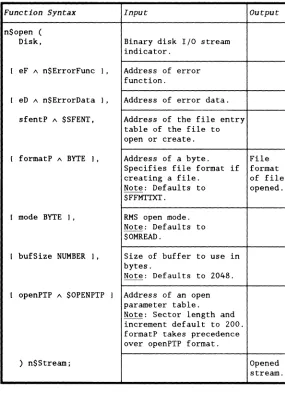
Disk nos I n$open
This function diagram describes the parameterization of the n$open for the Disk nosl.
Function Syntax Input
n$open (
Disk. Binary disk I/O stream
indicator.
[ eF 1\ n$ErrorFunc I. Address of error function.
[ eD 1\ n$ErrorData I. Address of error data.
sfentP 1\ $SFENT. Address of the file entry
table of the file to open or create.
[ formatP 1\ BYTE I. Address of a byte. Specifies file format i f
creating a file. Note: Defaults to $FFMTTXT.
[ mode BYTE I. RMS open mode. Note: Defaults to $OMREAD.
[ bufSize NUMBER J. Size of buffer to use in bytes.
Note: Defaults to 2048.
[ openPTP 1\ $OPENPTP J Address of an open
parameter table.
Note: Sector length and increment default to 200. formatP takes precedence over openPTP format.
) n$Stream;
Output
File format of file opened.
[image:51.396.85.370.147.547.2]Disk NOSL
Disk nosl n$open (continued)
Example:
o
out n$Stream;
fi1eSpk $FILESPK := {
{'OUT "
,
},4-8
$FILNAMR, $ NOADR,
} ;
function () :=
{
&'TEXT' ,&'
IF $SCANFLS(&fi1eSpk, 1) && D$CFLAG THEN SERMSG();
out := n$open(Disk" , &fileSpk.$FSOSFT" $OMPREP);
DASL USER'S GUIDE 50807-01
c
Introduction
In addition to the Disk nosl, NOSL provides the DiskId nosl for input and output of binary data to a disk file that is already open.
The file is opened by FAVID
The DiskId nosl opens the disk file by its file access variable (FAVID).
Uses for the Diskld nasi
The DiskId nosl is useful for
• opening several nosls on the same file, or
• keeping several files open while using a single set of buffers.
NOSL function support
Diskld NOSL
NOSL function results
The following NOSL functions have unique results when used with the DiskId nasI.
Function Results
n$close closes the nosl, but not the file.
Diskld nosl n$open
This function diagram describes the parameterization of the n$open for the DiskId nasI.
Function Syntax Input
n$open (
DiskId, Binary disk FAVIO IIO
stream indicator.
Output
I eF /\ n$ErrorFunc ) , Address of error function.
I eD /\ n$ErrorData ) , Address of error data.
id UNSIGNED, File access variable ID of an open file.
I bufSize NUMBER ) Size of buffer to use in bytes.
Note: Defaults to 2048.
) n$Stream; Opened
stream.
4-10 OASL USER'S GUIDE 50807-01
o
o
c
Diskld nosl n$open (continued)
Example: This program segment opens two nosls on one
disk file.
fI $PFDB;
fi1eSpk $FILESPK := { { 'OUT
$FILNAMR, $NOADR,
} ;
openPT $OPENPT := { &fI.
&'TEXT' ,&'
&fi1eSpk.$FSOSFT.$SFTENV[OI. &<$NAMEEXT>fi1eSpk.$FSOSFT.$SFTNAM
} ;
in1 n$Stream; in2 n$Stream; function () : =
VAR fav UNSIGNED;
(
,
}.IF $SCANFLS(&fi1eSpk. 1) && D$CFLAG THEN $ERMSG(); IF $OPEN($OMREAD. &openPT)
&&
D$CFLAG THEN$ERMSG();
DiskR NOSL
Int roduct ion
NOSL provides the DiskR nosl for reading data from a disk file. It is a read only version of the Disk nos1.
NOSL function support
The DiskR nosl supports all of the NOSL functions except
• n$write, • n$trunc, and • n$format.
DiskR nasi n$open
This function diagram describes the parameterization of the n$open for the DiskR nos I.
Function Syntax Input Output
n$open (
DiskR. Binary disk input
stream indicator.
[ eF A n$ErrorFunc J. Address of error function.
[ eD A n$ErrorData J. Address of error data.
sfentP A $SFENT. Address of the file
entry table of the file to open.
[ formatP A BYTE J. Address of a byte. File format of file opened.
[ mode BYTE J. RMS open mode. Note: Defaults to $OMREAD.
[ bufSize NUMBER J. Size of buffer to use
in bytes.
Note: Defaults to 2048.
[ openPTP A $OPENPTP J Address of an open parameter table.
) n$Stream; Opened
DiskR NOSL
DiskR nasi n$open (continued)
Example:
in n$Stream;
fileSpk $FILESPK := {
{ 'IN ' , },
$FILNAMR, $ NOADR, &'TEXT' ,&'
I ;
function () :=
IF $SCANFLS(&fileSpk, 1)
&&
D$CFLAG THEN $ERMSG(); in := n$open(DiskR", &fileSpk.$FSOSFT",4096);("
Introduction
NOSL provides the VirFil nosl as a virtual file facility. The VirFil nosl simulates a virtual file for both input and output.
Definition of a virtual file
A virtual file is a file that looks and acts like a real file, except it is maintained in memory. Input and output to a virtual file is therefore much faster than a disk file.
Note: The memory used by a virtual file is released by the virtual file handler when the virtual file is closed. If more than one virtual file is in use, the memory will not be released until all of the virtual files have been closed.
The spill file
If the virtual file runs out of memory, a "spill file" is created on disk to hold the data that did not fit in memory. Multiple virtual files will all use the same spill file if they run out of memory.
Note: NOSL will delete the spill file when all virtual files are closed.
Improving performance
VirFiI NOSL
NOSL function support
The VirFil nosl supports all of the NOSL functions.
VirFil nosl n$open
This function diagram describes the parameterization of the n$open for the VirFil nosl.
Function Syntax Input
n$open (
VirFil, Virtual binary disk I/O stream indicator.
Output
[ eF A n$ErrorFunc J, Address of error function.
4-16
[ eD A n$ErrorData J Address of
) n$Stream;
Example:
virtual n$Stream;
function () := (
virtual := n$open(VirFil);
DASL USER'S GUIDE
error data.
Opened stream.
50807-01
o
o
Int roduct ion
NOSL provides the BufPag nosl for buffering the data input or output from another nosI.
Performance improvement
The BufPag nosl is useful for improving performance by reducing the number of operations of another nosl. Note: The potential improvement in performance is bought at the price of memory allocated from your address space.
NOSL function support
The BufPag nosl supports all of the NOSL functions except n$trunc.
NOSL function results
The following NOSL functions have unique results when used with the BufPag nosl.
Function Results
n$open the position of the nos1 stream is the same as the position of the underlying stream.
BufPag NOSL
BufPag nos I n$open
This function diagram describes the parameterization of the n$open for the BufPag nosI.
Function Syntax Input
n$open (
BufPag, Page aligned buffer stream indicator.
[ eF 1\ n$ErrorFunc J, Address of error
[ eO 1\ n$ErrorData J. Address of error
under n$Stream, Stream to buffer.
[ bufSize NUMBER J Size of buffer to bytes.
Note: Defaults to
) n$Stream;
Example:
buff n$Stream;
function () :
=
VAR virtual n$Stream;
{
virtual := n$open(VirFil);
function.
data.
use in
256.
buff := n$open(BufPag", virtual, 512);
Output
Opened stream.
4-18 DASL USER'S GUIDE 50807-01
o
o
c
Introduction
NOSL provides Decomp as a text decompression nosl for decompressing text read in from one of the binary disk nosls.
End-ot-tile pointer
The Decomp nosl defines the end-of-file as the position specified by the RMS end-of-file pointer or the first occurrence of a $LEOF character, whichever comes first.
NOSL tunction support
The Decomp nosl supports all of the NOSL functions except
DecompNOSL
NOSL function results
The following NOSL functions have unique results when
used with the Decomp nos1.
Function Results
n$open the position of the nosl stream is the same as the position of the underlying stream.
n$read • stops reading i f a $LEOR character or the maximum number of characters is read. • sets the n$EOF status but does not return
the $LEOF if a $LEOF terminates the read rather than a $LEOR. The n$EOR status is not set in this situation.
n$tell
•
only valid when n$EOR status is set. • returns position of $LEOF if currentposition and SLEOF are separated by $LDELs or $LEOBs.
n$status returns n$EOF status if current position and $LEOF are separated by $LDELs or $LEOBs.
n$seek force n$EOR status. n$flush
n$close the nosl is closed, but the underlying stream is not.
4-20 DASL USER'S GUIDE 50807-01
o
o
('
Decomp nosl n$open
This function diagram describes the parameterization of the n$open for the Decomp nosl.
Function Syntax
n$open ( Decomp,
[ eF 1\ n$ErrorFunc ) , [ eD 1\ n$ErrorData ) ,
under n$Stream
) n$Stream;
Example:
in n$Stream; decomp n$Stream;
Input
Text decompression stream indicator.
Address of error function.
Address of error data.
Text stream to decompress.
fileSpk $FILESPK := { { 'IN '
$FILNAMR, $NOADR,
} ;
function () : =
{
&'TEXT' ,&'
Out:put
Opened stream.
, },
CmpOut NOSL
Introduction
NOSL provides CmpOut as a text compression nosl for writing compressed text to one of the binary disk output nosis.
NOSL function support
The CmpOut nosl supports all of the NOSL functions except n$read.
NOSL function results
4-22
The following NOSL functions have unique results when used with the CmpOut nosI.
Function Results
n$open the position of the nosl stream is the same as the position of the underlying stream.
n$tell forces a n$flush before performing normal n$seek operations.
n$size n$trunc
n$close the nosl is closed, but the underlying stream is not.
DASL USER'S GUIDE 50807-01
r"~\
<~
C'
,"CmpOut nos I n$open
This function diagram describes the parameterization of the n$open for the CmpOut nosl.
Function Syntax
n$open ( CmpOut,
[ eF 1\ n$ErrorFunc
[ eD 1\ n$ErrorData
under n$Stream
) n$Stream;
Example:
out n$Stream; cmp n$Stream;
Input
Text compression stream indicator.
J, Address of error function.
J, Address of error data.
Text stream to output compressed text to.
fi1eSpk $FILESPK := { { 'OUT
$FILNAMR, $NOADR,
} ;
function () := {
&'TEXT' ,&'
Output
Opened stream.
, },
WORKSTATION INPUT NOSLS
Introduction
NOSL provides several input nosls to input data from the workstation.
The workstation input nosls are WSIn, ChaIn, BWSln, and BChaln.
Unbuffered and buffered input
The workstation input nosls can be separated into unbuffered, WSln and ChaIn, and buffered, BWSIn and BChaIn input nosls. When doing an n$read,
• the unbuffered nosls will read up to 81 characters from the workstation. They will accept no more than the number of characters specified by the n$read . • the buffered nosls will read up to 81 characters to fill
the buffer and then return the number of characters specified by the n$read. If more characters were entered into the buffer than were specified by the n$read, the characters are retained in the buffer and returned on subsequent reads.
Predefined stream constants
4-24
Each of the workstation nosls have a corresponding predefined stream constant. These constants may be used as the stream parameter to the NOSL functions.
The only reason to actually "open" the workstation nosls, instead of using these stream constants, is to specify an optional parameter with a value other than their defaults.
DASL USER'S GUIDE 50807-01
o
c
NOSL function support
The workstation input nosls support all of the NOSL functions except
• n$write, • n$tell, • n$seek, • n$size, • n$trunc, and • n$format.
Which nosl?
Use the following table to determine which nosl to use.
If you want to ... then use . ..
input data from the keyboard WSIn.
input data from either the keyboard ChaIn. or chain file if chaining is active
buffer input from the keyboard BWSIn.
buffer input from either the keyboard BChaIn. or chain file if chaining is active
page
4-26
4-28
4-30
WORKSTATION INPUT NOSLS
WSln nosl
The WSIn nosl inputs from the keyboard.
n$WSln constant
n$WSIn is a constant that is available for you to use.
Constant Definition Description
n$WSln n$Stream; Predefined WSln input stream.
4-26
Example:
function () := VAR n BYTE;
8 (81) CHAR;
n := n$read(n$WSln, &8[01, SIZEOF s);
DASL USER'S GUIDE 50807-01
o
o
c
WSln nos I n$open
This function diagram describes the parameterization of the n$open for the WSIn nos!.
Note: This function will return a stream with the same value as the n$WSIn constant described above.
Funct:ion Synt:ax
n$open ( WSln,
[ eF 1\ n$ErrorFunc
[ eD 1\ n$ErrorData
[ noEnter BOOLEAN
) n$Stream;
Example:
in n$Stream;
function () : = VAR n BYTE;
) ,
) ,
)
s (81) CHAR; Input:
Workstation input stream indicator.
Address of error function.
Address of error data.
TRUE disables a $LEOR from being written to the workstation every time one is read from the keyboard. Note: Default is FALSE.
in := n$open(WSIn, , , TRUE); n := n$read(in, &s[O), SIZEOF s);
Out:put:
WORKSTATION INPUT NOSLS
Chain nosl
The ChaIn nosl inputs from either the keyboard or chain file if chaining is active.
n$Chaln constant
n$ChaIn is a constant that is available for you to use.
Constant Definition Description
n$Chaln n$Stream; Predefined ChaIn input stream.
4-28
Example:
function () : =
VAR n BYTE; s [811 CHAR;
n := n$read(n$Chaln. &s[O[. SIZEOF s);
DASL USER'S GUIDE 50807-01
o
o
Chain nasi n$open
This function diagram describes the parameterization of the n$open for the ChaIn nosI.
Note: This function will return a stream with the same value as the n$ChaIn constant described above.
Function Syntax
n$open ( ChaIn.
[ eF 1\ n$ErrorFunc
[ eD 1\ n$ErrorData
[ noEnter BOOLEAN I
) n$Stream;
Example:
in n$Stream;
function () : = VAR n BYTE;
I.
I.
s [811 CHAR; Input
Chain input stream indicator.
Address of error function.
Address of error data.
TRUE disables a SLEOR from being written to the workstation every time one is read from the keyboard or chain file.
Note: Default is FALSE.
in := n$open(ChaIn, , , TRUE); n := n$read(in, &s[OI, SIZEOF s);
Output
WORKSTATION INPUT NOSLS
BWSln nosl
The BWSln nosl buffers input from the keyboard.
n$BWSln constant
n$BWSln is a constant that is available for you to use.
Constant Definition Description
n$BWSln n$Stream; Predefined BWSln input stream.
4-30
Example:
function () := VAR n BYTE;
s [811 CHAR;
n := n$read(n$BWSln, &s[OI, SIZEOF s);
DASL USER'S GUIDE 50807-01
o
o
BWSln nosl n$open
This function diagram describes the parameterization of the n$open for the BWSIn nosl.
Note: This function will return a stream with the same value as the n$BWSIn constant described above.
Function Syntax Input
n$open (
BWSln. Buffered workstation input
stream indicator.
[ eF 1\ n$ErrorFunc I. Address of error
[ eD 1\ n$ErrorData I Address of error
) n$Stream;
Example:
in n$Stream;
function () : =
VAR n BYTE; s [811 CHAR;
in := n$open(BWSIn. &errorF); n := n$read(in. &s[OI. SIZEOF s);
function.
data.
Output
WORKSTATION INPUT NOSLS
BChaln nosl
The BChaln nosl buffers input from either the keyboard or chain file if chaining is active.
n$BChaln constant
4-32
n$BChaln is a constant that is available for you to use.
Constant DeEinition Description
n$BChaIn n$Stream; Predefined BChaIn input stream.
Example:
function () := VAR n BYTE;
s (81) CHAR;
n := n$read(n$BChaln, &8(0), SIZEOF s);
DASL USER'S GUIDE 50807-01
o
(
".".".'
BChaln nosl n$open
This function diagram describes the parameterization of the n$open for the BChaIn nosl.
Note: This function will return a stream with the same value as the n$BChaIn constant described above.
Function Syntax Input
n$open (
BChaln, Buffered chain input
stream indicator.
I eF A n$ErrorFunc I, Address of error function.
[ eD A n$ErrorData 1 Address of error
) n$Stream;
Example:
in n$Stream;
function () : =
VAR n BYTE; s [811 CHAR;
in ;= n$open(BChaIn, &errorF); n := n$read(in, &s[OI, SIZEOF s);
data.
Output
WORKSTATION OUTPUT NOSLS
Int roduct ion
NOSL provides several output nosls to output data to the workstation.
The workstation output nosls are WSOut, Line25, and LogOut.
Common buffer
4-34
The workstation output nosls share a common buffer. This buffer is flushed when
• the buffer is full,
• an n$read operation is performed by the n$WSIn or the n$Chaln nosl,
• an $LEOR character is written, or
• a write is performed on one of the other two output nosls.
Note: The common buffer is initialized with a $NL (newline character) which causes the first output to the screen to be
written on its own line.
DASL USER'S GUIDE 50807-01
o
o
Writing $LEORs
When a $LEOR is written to one of the workstation output nosls,
• the common buffer is flushed first, and
• a $NL is left as the first character in the common buffer. Note: This treatment of $LEORs enables you to write to the workstation exactly as if it was a file.
WSIO control code support
The following WSIO control codes are not supported by the workstation output nosls.
• $WSIS, • $WSISI, • $WSIN, • $WSINI, • $WSIDOCS, and • $WSCONFD.
Predefined stream constants
Each of the workstation nosls have a corresponding predefined stream constant. These constants may be used as the stream parameter to the NOSL functions.
WORKSTATION OUTPUT NOSLS
NOSL function support
The workstation output nosis support all of the NOSL functions except
• n$read, • n$tell, • n$seek, and • n$size.
Note: n$trunc is supported but performs no function.
Which nasi?
Use the following table to determine which nosl to use.
If you want to ... then use ... page
output to the workstation screen WSOut. 4-37 output to a pseudo 25th line on the Line25. 4-39 workstation screen
output to the workstation screen LogOut. 4-41 and log file if logging is active
4-36 DASL USER'S GUIDE 50807-01
o
o
('"
WSOut nasI
The WSOut nasI outputs to the workstation screen.
n$WSOut constant
n$WSOut is a constant that is available for you to use.
Constant Definition
n$WSOut n$Stream;
Example:
function () :=
{
Description
Predefined WSOut output stream.
WORKSTATION OUTPUT NOSLS
WSOut nosl n$open
This function diagram describes the parameterization of the n$open for the WSOut nosl.
Note: This function will return a stream with the same value as the n$WSOut constant described above.
Function Syntax
n$open ( WSOUt,
[ eF A n$ErrorFunc
[ eD A n$ErrorData
) n$Stream;
Example:
out n$Stream;
function () : =
{
J, J
Input
Workstation output stream indicator.
Address of error function.
Address of error data.
out := n$open(WSOut, &errorF); n$format(out, 'Welcome to NOSL', LN);
Output
Opened stream.
4-38 DASL USER'S GUIDE 50807-01
o
o
Line25 nos I
The Line25 nosl outputs to a pseudo 25th line on the workstation screen for status and operator entertainment messages.
After a message has been displayed by this nosl, the common buffer is primed with a $EEOL (erase to end of line) which will cause the message to disappear when something is written by one of the other workstation output nosls.
n$Line25 constant
n$Line25 is a constant that is available for you to use.
Constant Definition
n$LineZ5 n$Stream;
Example:
function () := {
Description
Predefined LineZ5 output stream.
WORKSTATION OUTPUT NOSLS
Line25 nosl n$open
This function diagram describes the parameterization of the n$open for the Line25 nosl.
Note: This function will return a stream with the same value as the n$Line25 constant described above.
Function Syntax
n$open ( Line25.
[ eF 1\ n$ErrorFunc
[ eO 1\ n$ErrorOata
) n$Stream;
Example:
out n$Stream;
function () := {
J. J
Input
Pseudo 25th line output stream indicator.
Address of error function.
Address of error data.
out := n$open(Line25, &errorF);
n$format(out. 'Waiting for a message'. LN); Output
Opened stream.
4-40 DASL USER'S GUIDE 50807-01
o
o
c
LogOut nos I
The LogOut nosl outputs to the workstation screen and log file if logging is active.
n$LogOut constant
n$LogOut is a constant that is available for you to use.
Constant Definition
n$LogOut n$Stream;
Example:
function () : =
{
Description
Predefined LogOut output stream.
WORKSTATION OUTPUT NOSLS
LogOut nosl n$open
This function diagram describes the parameterization of the n$open for the LogOut nosl.
Note: This function will return a stream with the same value as the n$LogOut constant described above.
Function Syntax Input
n$open (
LogOut. Log output stream
indicator.
Output
I eF 1\ n$ErrorFunc I. Address of error function.
4-42
I eD 1\ n$ErrorData I Address of error data.
) n$Stream;
Example:
out n$Stream;
function () : = {
out := n$open(LogOut, &errorF);
n$format(out. 'Processing labels', LN);
DASL USER'S GUIDE
Opened stream.
50807-01
o
C'
IntroductionNOSL provides the Print nosl to output data to a printer.
NOSL function support
The Print nosl supports all of the NOSL functions except • n$read,
• n$tell, • n$seek, • n$size, and • n$trunc.
Print NOSL
Print nosl n$open
This function diagram describes the parameterization of the n$open for the Print nosl.
Function Syntax Input
n$open (
Print, Printer output stream
indicator.
[ eF A n$ErrorFunc J, Address of error function.
[ eD A n$ErrorData J, Address of error data. sfentP A $SFENT, Address of file entry
table to open.
[ bufSize NUMBER J, Size of buffer to use in bytes.
Note: Defaults to optimum size declared by the printer.
[ offLineF A D$CALLF J Address of a function to
ca11 i f the printer is offline or out of paper. Note: Will display "Printer not ready" through Line25 nosl if function not specified.
) n$Stream;
Output
Opened stream.
4-44 DASL USER'S GUIDE 50807-01
o
0':
c
Print nasi n$open (continued)
Example:
prt n$Stream; prtSFT $SFENT := {
'PRT '. '$LP
} ;
function () : =
'PRT' 'L
Pipe NOSL
Introduction
NOSL provides the Pipe nosl to input and output data to a pipe.
NOSL function support
The Pipe nosl supports all of the NOSL functions except
• n$tell, • n$seek, • n$size, and • n$trunc.
NOSL function results
4-46
The following NOSL functions have unique results when
used with the Pipe nosl.
Function Results
n$read • causes a flush of any pending write data. • stops after the last character in the pipe
message or the maximum number of characters is read. If there is no current pipe message when a n$read is performed, an RMS physical read is performed on the pipe.
n$write discards any remaining read data. n$format
n$status
•
returns a n$EOR status when an entire pipe message has been read.• There is no n$EOF status for pipes.
DASL USER'S GUIDE 50807-01
o
o
Pipe nosl n$open
This function diagram describes the parameterization of the n$open for the Pipe nosl.
Function Syntax
n$open ( Pipe.
[ eF 1\ n$ErrorFunc I.
[ eD 1\ n$ErrorData I. sfentP 1\ $SFENT.
[ bufSize NUMBER I.
[ timeout BYTE I
) n$Stream;
Example:
pipe n$Stream; pipeSFT $SFENT := {
Input
Pipe I/O stream indicator.
Address of error function.
Address of error data.
Address of file entry table to open.
Size of buffer to use in bytes.
Note: Defaults to 256.
Number of seconds before a pipe operation will time out.
Note: Default is $FOREVER.
'PIPE 'MY_PIPE_NAME'. ·PIPE'. '
I;
function () := (
pipe := n$open(Pipe, , , &pipeSFT);
Output
Split NOSL
Introduction
NOSL provides the Split nos1 for duplicating output to two other nos1s.
NOSL function support
The Split nos1 supports all of the NOSL functions except
• n$read, • n$tell, • n$seek, and • n$size.
NOSL function results
The following NOSL functions have unique results when used with the Split nosI.
Function Results
n$trunc performs n$trunc on both "under" nosls.
n$status always returns O.
4-48 DASL USER'S GUIDE 50807-01
o
("'
c
Split nasi n$open
This function diagram describes the parameterization of the n$open for the Split nosl.
Function Syntax Input
n$open (
Split. Output splitter stream
indicator.
[ eF A n$ErrorFunc J, Address of error function.
[ eO A n$ErrorOata J. Address of error data. underl n$Stream. First stream to split the
output data to.
under2 n$Stream Second stream to split the output data to.
) n$Stream;
Example: The following program segment opens a split nos! that will duplicate output to a disk file and the workstation screen.
outO n$Stream; out n$Stream;
fileSpk $FILESPK :~ { { 'OUT
$FILNAMR. $NOAOR.
} ;
function () :~ (
&'TEXT' ,&'
Output
Opened stream.
, }.
Mem NOSL
Introduction
NOSL provides the Mem nosl for input and output to a block of memory.
Uses for the Mem nosl
The Mem nosl is primarily useful in conjunction with n$format for producing strings of text, as well as decimal, octal, hexadecimal, and floating numbers in memory.
NOSL function support
The Mem nosl supports all of the NOSL functions.
4-50 DASL USER'S GUIDE 50807-01
o
o
(
";:
/
(~\
c
Mem nasi n$open
This function diagram describes the parameterization of the n$open for the Mem nosI.
Function Syntax
n$open ( Mem.
[ eF " n$ErrorFunc I.
[ eD " n$ErrorData I.
buffP " BYTE.
buff Size UNSIGNED
) n$Stream;
Example:
mem n$Stream; buffer [801 BYTE;
function () {
Input
Memory 1/0 stream indicator.
Address of error function.
Address of error data.
Address of the first byte of memory to use.
Number of bytes in the memory buffer.
Output
Opened stream.
Null NOSL
Introduction
NOSL provides a nosl that will ignore all nosl operations.
The Null nosl is a "do nothing" nosl. All operations to the Null nosl are ignored.
Uses for the Nu" nosl
The null nosl may be used as a replacement of an optional disk file or printer nosl.
Example: A program that creates an output file if a certain option is specified on the command line can use the Null nosl if the option is not specified. This will alleviate having to check whether the option was set or not before every write, flush, etc ...
Predefined stream constant
The Null nosl has a corresponding predefined stream constant. This constant may be used as the stream parameter to the NOSL functions.
The only reason to actually "open" the Null nosl, instead of using this stream constant, is to specify an optional parameter with a value other than the defaults.
NOSL function support
The Null nosl supports all of the NOSL functions.
4-52 DASL USER'S GUIDE 50807-01
o
o
o
c
NOSL function results
The following NOSL functions have unique results when used with the Null nos1.
Function Results
n$open does nothing. n$write
n$trunc n$flush n$close n$format
n$read returns
o.
n$telln$seek n$size
n$status returns status n$EOR and n$EOF.
n$Null constant
n$Null is a constant that is available for you to use.
Constant Definition Description
n$Null n$Stream; Predefined Null input stream.
Example:
function () :=
VAR n BYTE; s [811 CHAR;