Prototyping and Evaluating a Wearable System for Mobile
Distributed Collaboration
Weidong Huang, Leila Alem, Jalal Albasri
CSIRO, Marsfield, NSW, Australia
Email: [email protected], [email protected], [email protected]
Received May 2013
ABSTRACT
We have developed a wearable system for mobile distributed collaboration called HandsInAir using emerging wireless and mobile technologies. This system was developed to support real world scenarios in which a remote mobile helper guides a local mobile worker in the completion of a physical task. HandsInAir consists of a helper unit and a worker unit. Both units are equipped with wearable devices having the same hardware configuration, but running different pieces of software to support the distinct roles of the collaborators (helper and worker). The two sides are connected via a wireless network and the collaboration partners can communicate with each other via audio and visual links. In this paper we describe the technical implementation of the system and present a preliminary evaluation of it. The paper con- cludes with a brief discussion of possible future work for further improvements and new developments.
Keywords: Wireless Network; Mobile Computing; Remote Collaboration; Video Mediated Communication; Remote Gestures
1. Introduction
Collaboration between individuals across geographic and organizational boundaries has become an essential aspect of our daily lives. Accordingly there has been a growing interest among researchers and engineers in developing systems that support communication and collaboration among remote individuals. The majority of these systems however have been designed to support collaboration where participants hold similar or equal roles, such as students working together to complete a group assignment. Rela-tively less attention has been given to systems in which partners have distinct roles, such as a worker guided by a helper.
As technologies become increasingly complex, our de- pendence on expertise in order to understand and use technology is growing rapidly. More and more real world scenarios can be found in which assistance from a remote helper is required to enable a local novice to accomplish a physical or technical task, such as an off-site technician guiding an on-site worker in machinery maintenance or repair.
It has been shown that a major issue contributing to the ineffectiveness of remote, in contrast to co-located collaboration, is the loss of common ground through which collaborators can communicate [1]. Studies have shown that providing collaborators access to a shared virtual space
can be effective at addressing this limitation and benefi-cial to the completion of collaborative tasks (e.g., [2]). In existing systems, a shared virtual space often takes the form of a video view of the workspace.
Further research indicates that video mediated com-munication is less efficient than face-to-face communica- tion due to a loss of non-verbal gestures over task objects that would otherwise be visually available to all [3]. A number of systems have been developed to incorporate gesturing into a shared visual space (e.g., [4-7]). These sys-tems however demand that at least one of the collabora-tors be confined to a desktop setting and often require a complex technical environment in order to support the sharing of gestures over the collaborative workspace. How to support the communication of hand gestures in a scenario where collaborators are fully mobile and not confined to traditional desktop environments has not yet been fully explored.
paper, we describe the technical implementation and present a preliminary evaluation of its prototype system. The paper concludes with a brief discussion of future work intended to advance the system. It should be noted that the working system of HandsInAir and a formal user study of it have been reported elsewhere (see [8,9] for more details).
2. System Prototype
2.1. Concepts and Tools
The system is comprised of two distributed nodes and collaboration takes place in a directed role oriented man-ner. The two roles are the worker who is present at the worksite and the helper who is offsite.
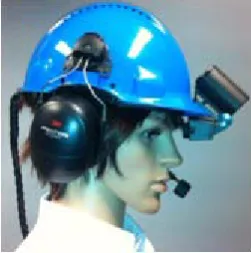
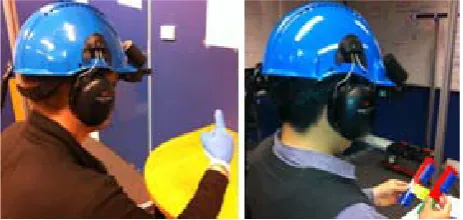
The hardware for the system was developed to be iden-tical at both nodes to allow easy swapping of roles if ne-cessary. It consists of a Microsoft Lifecam webcam mounted on top of the brim, and a Vuzix 920 Wrap near- eye display mounted beneath the brim of the helmet (see Figure 1). The webcam is used at the worker’s node to capture the view of the worksite and at the helper’s node to capture hand gestures performed in the space directly in front of the helper. The system combines the hand gestures with the live video feed of the worksite and the combined view is displayed to both collaborators via the near-eye display. A microphone headset is used to im-plement an audio link between the participants to facili-tate verbal communication. These peripheral devices are connected to a wearable PC worn by the collaborators in a backpack. The wearable PCs used had 1.6 Ghz Intel Atom processors, 1GB of RAM and ran Windows XP. The wearable PCs were chosen for their low weight and size which allow them to be easily worn by users.
[image:2.595.110.236.590.717.2]The system was developed in C++ with Microsoft Vis-ual Studio 2010 on Windows XP machines. A number of external libraries were utilized to perform networking and computer vision operations. C++ was chosen as the development language because of the system’s high per-formance requirements and compatibility with external libraries such as OpenCV [10].
Figure 1. Hardware setup.
Open CV is an open source library containing over 2000 computer vision and image manipulation functions. It was chosen because of its large range of functions and flexibility and was used to implement simple image ma-nipulations, windowing, display and capturing frames from the camera as well as color hue filtration for hand gesture recognition.
Due to network bandwidth limitations and the sys-tem’s real-time latency requirement, raw camera frames were too large to be transmitted over the wireless net-work unless they were compressed first. The system uses libjpeg-turbo [11], an optimized derivative of the open source IJG JPEG image compression library libjpeg [12]. The standard IJG libjpeg implementation was initially used for image compression; however the performance of the compression and decompression functions was too slow. Libjpeg-turbo accelerates baseline JPEG compres-sion and decomprescompres-sion for up to a 100% performance boost and enabled the system to achieve its real-time frame rate. Although OpenCV was built in JPEG com-pression and decomcom-pression algorithms they are restricted to the reading and writing of images from and to disk and not memory.
Microsoft technologies were used to support many of the HandsInAir functions. Winsock 2 (Windows Sockets) [13] was used to facilitate network communications. This allowed HandsInAir to exchange data independent of the network implementation between the two nodes. Micro-soft Foundation Class (MFC) Library [14] was utilized to multithread the core functions of the HandsInAir system enabling them to run concurrently in an event driven fa-shion [15,16]. Events such as capturing a frame from a camera or receiving a frame from a socket triggered reac-tive activities, such as sending or displaying the frame on the near-eye display.
2.2. System Architecture
A SharedBuffer class was used to enable the exchange of frames between threads. Within the SharedBuffer class frames were stored in a simple character array. Two sim-ple functions were imsim-plemented to read from and write to the SharedBuffer. Critical sections were used to lock the buffers during read and write operations so that only one thread could access or modify the image in the buffer at any one time. The SharedBuffer objects were held as global variables so that they could be accessed by all threads of the HandsInAir program.
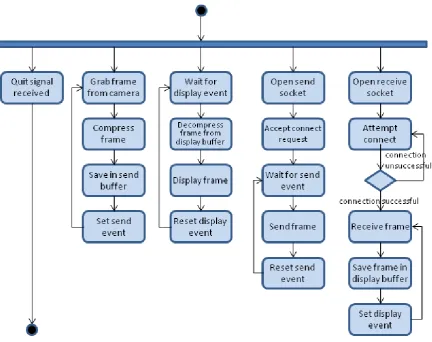
Figure 2. Activity diagram for the helper node.
tion of tasks and enabled them to synchronize their oper-ations. An additional Quit event was used to signal the receipt of a quit command from the user and end the program.
The h_Camera thread’s purpose is to continually up-date the SendBuffer with new frames from the local camera. It consists of a continuous loop that queries the camera for a new frame, and upon receiving the frame compresses it to a JPEG and saves it to the SendBuffer. Finally the h_Camera thread signals the Send Event in-dicating to the h_Send thread that the buffer has been updated with a new frame that is ready to be transmitted.
The h_Send thread begins by setting up a Winsock socket upon which it listens for an incoming connection. The function then waits on the listen socket for the re-mote node to attempt a connection. If a connection at-tempt is detected it is accepted and a second Winsock socket is created and used to send the image data. The h_Send function then enters a continuous loop that be-gins by waiting for the Send event to be signaled. Once the Send event is signaled by the h_Camera function, h_Send knows that there is a new frame in the SendBuf-fer that is ready to be sent. h_Send reads the image out of the buffer, sends it to the remote node over the socket
connection and finally resets the Send event. It then re-turns to the top of the loop where it waits to the Send event to be signaled by the capturing of another new frame.
Just as the h_Send and h_Camera functions coordinate their actions to accomplish the goal of sending a frame, the h_Receive and h_Display functions synchronize their actions in order to receive and display a frame from the remote node. h_Receive begins by setting up a receiving socket and attempting a connection to the remote node. Upon the successful establishment of a connection it en-ters a continuous loop in which it receives a frame from the socket and saves it in the DisplayBuffer. At the end of the loop it signals the Display event to notify the h_Display thread that a new frame has been received and is ready to be displayed.
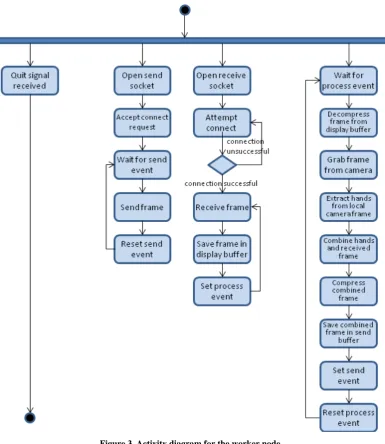
The HandsInAir program at the worker node is com-prised of three major functions w_Send, w_Receive and w_Process (see Figure 3). They are all started by the main function in separate threads in a similar fashion to the helper program’s functions. Two Event objects, Send and Process, are used to synchronise the threads and two SharedBuffer objects, SendBuffer and DisplayBuffer, are used to exchange image frames between the threads. A Quit event is used to signal termination of the program in the same way as the helper program.
The operations of the w_Receive and w_Send func-tions are similar to their counterparts in the helper pro-gram. The w_Receive function establishes a connection to the helper node and receives a frame containing the helper’s hand gestures over an arbitrary background. It saves the frame in the DisplayBuffer and signals the
Process event.
[image:4.595.106.492.286.731.2]The w_Process function is where the majority of the program’s activity takes place. It operates a continuous loop that waits on the Process event to be signaled by the arrival of a new frame from the remote node. It then reads the frame from the DisplayBuffer and decom-presses it from a JPEG to OpenCV’s IplImage format. Next w_Process uses OpenCV functions to extract the hand gestures from the received image, and overlay them onto a new frame of the worksite captured by the work-er’s local camera. The combined frame is displayed to the worker by updating a window on their near-eye dis-play, then compressed to JPEG format and saved in the SendBuffer object. Finally the w_Process function sig-nals the Send event to indicate there is a new frame ready to be sent and resets the Process event.
Extraction of hand gestures from an arbitrary back-ground in the frame received from the helper node was originally achieved using the OpenCV AdaptiveSkinDe-tector algorithm developed by Dadgostar and Sarrafza-deh [17]. The algorithm’s skin tone detection is based on expected hue and saturation values of skin. A histogram of expected HSV values was built by manually segment-ing a set of 20 trainsegment-ing images. The histogram is not only used to filter skin values from the input image but ad-justed on the fly with every subsequent frame to home in on the skin tone actually appearing in the image. Al-though the Dadgostar algorithm was quick and worked reasonably well in controlled conditions, significant dif-ferences between frames, poor lighting conditions and image compression quickly degraded the robustness of the skin tone detection and resulted in regions of skin not being detected as well as background artifacts being falsely detected as skin. The requirements called for high ro-bustness in hand gesture detection not only to be able to support the helper in varying environmental conditions but also to convey hand gestures to the worker as accu-rately and as clearly as possible. The adaptive skin detec-tion algorithm was replaced by requiring the helper to wear a pair of blue gloves, which enabled highly robust and efficient hand gesture recognition with simple color hue filtration of each frame. There was a concern that replacing natural hands by gloves would result in a loss in the richness of the information conveyed by the hand gestures and so two toned blue gloves were chosen so that their orientation would be as clear as possible to the worker.
2.3. System Operation
The HandsInAir system is designed to enable users to collaborate in a distributed environment. The users are comprised of a worker at one node interacting with physi- cal objects and a helper at the other node interacting with virtual objects. By using the system, the helper is able to instruct the worker by performing hand gestures over the virtual objects displayed on the near-eye display. The worker can see the helper’s hand gestures over worksite objects displayed on the near-eye display. Both the hel- per and the worker can communicate verbally over an audio link. Neither an interaction with the user interface nor a direct manipulation of system hardware is required allowing the worker to maintain unconstrained interac- tion with the worksite and task objects and the helper free to perform hand gestures in front of the camera.
More specifically, once the wireless connection is es- tablished, the system initializes two video streams be- tween the nodes. A video stream from the local worker’s camera is transmitted to the helper node and displayed on the near-eye display. This enables the helper to view the
work scene from the perspective of the onsite worker. Simultaneously the second video feed taken from the helper’s camera captures the helper’s hands as they ges-ture to items on the worker’s video feed. The capges-tured hands are extracted from the background and transposed onto the worker’s local feed allowing the worker to see the helper’s gestures. The worker’s and helper’s actions are effectively synchronized. On the one hand, the helper sees the video of the workspace (actions of the worker and physical objects), perceives the status of the task and directs the worker to perform further actions accordingly using hand gestures and audio commands. On the other hand, the worker hears the audio instructions, sees the visual aids by looking up in the near-eye display when necessary, and performs operations as instructed by the helper. This provides a real-time closed loop tele-guid- ance system.
3. System Evaluation
3.1. Method and Procedure
A pilot study was performed to evaluate the HandsInAir system. The study was designed to assess the system in facilitating distributed role oriented collaboration as well as test the concept of using hand gestures to mediate communication.
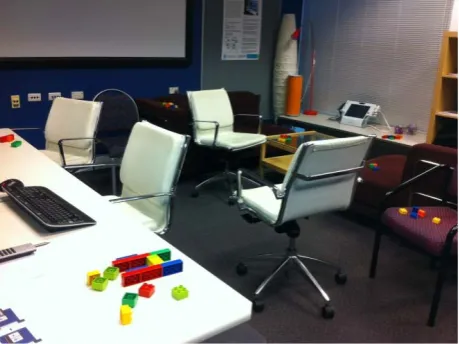
A meeting room was used to simulate the worker’s environment (see Figure 4) and an office room was used to simulate the helper’s environment. A wired network connection was laid between the two rooms, and a wire-less router was used at each end to provide the system with wireless connectivity, allowing users to experience full mobility with the equipment.
[image:5.595.310.540.548.720.2]To mimic real world collaborative physical tasks, us-ers were asked to work together to build simple shapes with Lego bricks (see Figure 5). Three stations were marked at the worker’s site for building the shapes. At
Figure 5. The helper (left) is guiding the worker (right).
the start of the test the helper would instruct the worker to build a letter of the alphabet using the Lego bricks at the first station. The helper would then ask the worker to put the model down and move to the second station where they would carry out a similar task. After that, the worker would be asked to take the two shapes built pre-viously to the third station and combine both shapes. In order to test the worker’s mobility, the Lego bricks were scattered randomly in the meeting room. The worker would be asked by the helper to move across the room to pick up these bricks. Obstacles were placed on the way beforehand so that the worker would have to avoid them while moving around. To avoid possible trip incidents, wheeled chairs were used as obstacles. This was to assess the workers’ awareness of their physical surroundings while wearing the head gear. In order to explore the mo-bility at the helper site participants were asked to deliver the instructions for the first shape from a seated position and for the second shape from a standing position. For the shapes to be combined at the third station, helpers were asked to deliver the instructions from whichever position they preferred, seated or standing.
Helpers were encouraged to use both pointing gestures as well as complex representational gestures to demon-strate assembly instructions to their partner while speak-ing to their partner verbally. Durspeak-ing each shape assem-bling, workers were not told what the final shapes would be until the end of the task.
Ten participants were recruited for the study on a vo-luntary basis. All of them did not have any experience of using such types of system before. Participants were randomly paired were conducted in pairs with one play-ing the role of the worker and the other the role of the helper. At the end of the test they were asked to fill out the first questionnaire. They then switched roles and car-ried out the tasks a second time. A final questionnaire was then administered, followed by a debrief session.
The specific objectives of this study included deter-mining whether the system was easy and intuitive to use and if the users found it enjoyable to communicate in such a manner. We would also like to know the expe-rience of helpers in guiding their partner using pointing gestures as well as representational gestures such as
communicating assembly instructions by making shapes with their hands.
The questionnaire was designed to collect qualitative data about the users’ experiences with the system. Addi- tional data was gathered through still and video capture of user behaviors as well as user feedback during the debrief sessions.
3.2. Results and Discussion
Participants felt strongly that the system was intuitive to use and easy to get accustomed to. They generally ex- pressed a high level of satisfaction with their task per- formance and with the extent of the communication with their partners. Tasks were completed with ease and speed. Hand gestures were regarded as extremely useful to com-municating task actions although it was observed the primary form of their communication was always verbal.
Participants expressed no preference gesturing while in a seated or a standing position while in the role of the helper, with an equal number preferring one over the other and some indicating no preference at all. All work-ers were able to navigate around obstacles in the room with extreme ease indicating a solid awareness of their physical environment.
Although helpers reported equal ease in using both gestures, workers found it easier to understand the point-ing gestures over the complex representational gestures. All participants agreed that pointing was more construc-tive to the task than showing shapes or assembly gestures. Many of the helpers reported difficulty perceiving the depth of Lego bricks as well as greater ease indicating flat assembly instructions as opposed to vertical ones. A lack of depth in the two dimensional image would con-tribute to the participants’ preference towards pointing over representational gestures. Difficulty was also ob-served when helpers were unable to judge the thickness of some Lego bricks. This resulted in clarification re-quired from their partner to amend an incorrect assembly instruction.
The relationship between participants was observed to play a role in the quality of their interactions. Some par-ticipants found the role of the worker rigid and confined to only following instructions. Others would take a more collaborative approach to the task, suggesting and trial-ing configurations without the explicit instruction of the helper. These collaborative workers were observed to use a trial and error strategy when they were unsure about an instruction. The worker would try a configuration and hold it up to the camera to get approval from the helper.
attention would be split between the physical task and the near-eye display. Furthermore many participants expressed a sense of clutter on the near-eye display when four hands would appear at the same time. Almost all partici-pants began innately coping with these difficulties by staggering the instructions and the execution of assembly tasks. Workers were observed to remove their hands from the view of the worksite while receiving instructions. They would then carry out the assembly task, place the object down on the workbench or hold it up to the cam-era and await confirmation from their partner that they had carried out the assembly successfully. Similarly hel-pers were observed to promptly remove their hands from the view after delivering their instructions and observe their partner to carry out the assembly task without inter-ference. All participants agreed that the system would be most suitable to non-time-critical tasks because of the slow mechanism of interaction. Unexpectedly however is that most participants did not find this cumbersome but more natural.
It was observed that the performance of the partici-pants was getting better while the process was approach-ing to its end. This indicated that the more they were familiar with the system, the better their performance. Two out of the ten participants, having previously played the role of the helper, were observed to sort the Lego bricks by color and size prior the start of the test, when they played the role of the worker. The majority of par-ticipants found it much easier to carry out tasks as the worker than to give instructions as the helper. However when asked which role they favored participants were equally divided between the two roles. Participants who favored the helper expressed they found the role more enjoyable because they felt greater control even though the majority of the responsibility and ambiguity resided on the helper’s side. It was indicated that the greatest mental demand came from structuring interactions within the limitations of the system as well as synchronizing instructions with their partner. This was best expressed in the words of one participant who said that “interacting with the system is easy; learning what it is useful for is where the curve is”.
Participants generally expressed an overall comfort with the equipment. They found it easy to use the near- eye display while maintaining awareness of their physi-cal environment and intuitive to interact with the system in the intended manner. One participant found the expe-rience challenging because the helmet would not fit cor-rectly on his head. The participant had to tilt the helmet forward far enough for the near-eye display to be visible. This however resulted in the camera mounted on the brim becoming aimed almost directly downward. The situation would have been improved if the camera and near-eye display were independently adjustable. However, the
na-ture of their current mounting on the helmet prevented this.
The majority of participants indicated no hindrance or discomfort by a lag or delay. One participant felt strongly while playing the role of the worker that there was a large discrepancy between what was displayed on the near-eye display and what could be seen in real life due to a lag which induced a sense of nausea. The same par-ticipant experienced difficulty correlating hand gestures on the eye-display to task objects in the physical work-space. Sensing their partner’s difficulty and discomfort the helper began administering instructions almost en-tirely verbally. As they continued the worker was ob-served to take over control of the task with the helper only consulted for approval of an assembly decision once it had been made. The same participant in the worker role also expressed feelings of “claustrophobia” while wear-ing the head gear and felt his awareness of the physical surroundings had been greatly diminished. The partici-pant however had no difficulty maneuvering around ob-stacles in the room.
It was expected to hear from participants that they found it difficult to coordinate holding the worker’s view still while the helper gestured over task objects. This feedback however was only received from a single par-ticipant. This could have been due to the inherent me-chanism of communication that was observed emerge from the remote interactions where the worker would naturally hold their head and hands still while receiving an instruction. Some participants expressed that they found the tasks too easy and that they did not require true collaboration. A few of the participants likened the expe-rience to that of playing first person video games and felt that prior experience with games made adjustment to the equipment easier.
One of the participants experienced difficulty adjust-ing to the audio link. Unlike a normal phone the audio link between participants incorporated a silence detection feature. The feature would disable the audio link when it detected no users were speaking. When it would detect a spike in the volume the audio channel was reopened. Although the feature worked well the participant found it difficult to determine whether there was someone on the other end because when no-one would talk they could hear total silence.
camera or clarified verbally to be correctly perceived from the helper side. Furthermore many participants found that the lack of depth perception on the two-dimensional im-age to be the most limiting factor. Participants were ob-served to exhibit difficulty from the helper’s perspective in discerning the exact sizes and positions of bricks in the workspace as well as communicating complex represen-tational hand gestures.
4. Conclusions
HandsInAir is a new real-time wearable system for re-mote collaboration. It employs novel approaches that support the mobility of remote collaborators and capture remote gestures. The system enables the helper to per-form hand gestures in the air without the need to interact with tangible objects. The system is lightweight, easy to set up, intuitive to use and requires little environmental or technical support. HandsInAir has demonstrated great capability of mediating remote collaboration and has significant potential for implementation in a wide range of real world applications such as telemedicine, remote maintenance and repair.
The greatest strength of the system is its capability of facilitating remote collaboration tasks. This can be seen from the fact that all participants in our study were able to collaborate effectively to successfully complete a se-ries of remote tasks. A majority of them expressed com-fort and ease using the system, and found it valuable for remote collaboration.
Findings in the usability study also further corrobo-rated concepts underlying remote collaboration and find-ings in previous studies (e.g. [18]). These included the prevalence of pointing gestures over complex representa-tional gestures, and the value of a shared workspace at providing common ground to facilitate communication.
The system lacked sufficient image quality and depth information which were cited as its main deficiencies. In the next iteration of the system we would rectify the shortcoming in the image quality by choosing a more suitable image compression method and hardware with greater graphics processing capabilities. Further work has also been planned to reorganize of the configuration of the camera and near-eye display on the helmet to make them independently adjustable and more comfortable and accessible to users.
Although a two-dimensional workspace was satisfac-tory for communicating pointing gestures, it was inade-quate for clearly communicating more complex assembly instructions through the use of representational gestures. Recent advancements in depth sensing technology have made it feasible to explore the development of a three dimensional shared workspace that would enable partic-ipants greater freedom and range of expression (e.g., [19,20]). The use of depth sensing technology to
imple-ment more robust hand gesture recognition based on depth filtration instead of color hue filtration will also be explored. The advanced detection mechanism would al-low the helper to incorporate instructional apparatus into the shared workspace.
REFERENCES
[1] H. H. Clark and S. E. Brennan, “Grounding in Commu-nication,” Perspectives on Socially Shared Cognition. American Psychological Association, Washington DC, 1991
[2] S. R. Fussell, R. E. Kraut and J. Siegel, “Coordination of Communication: Effects of Shared Visual Context on Collaborative Work,” ACM Conference on Computer Supported Cooperative Work, 2000, pp. 21-30.
[3] D. S. Kirk, T. Rodden and D. S. Fraser, “Turn It This Way: Grounding Collaborative Action with Remote Ges- tures,” ACM Human Factors in Computing Systems, 2007, pp. 1039-1048.
[4] L. Alem, F. Tecchia and W. Huang, “HandsOnVideo: Towards a Gesture Based Mobile AR System for Remote Collaboration,” Recent Trends of Mobile Collaborative Augmented Reality, Springer, New York, 2011, pp. 127- 138.
[5] S. R. Fussell, L. D. Setlock, J. Yang, J. Ou, E. Mauer and A. D. I. Kramer, “Gestures over Video Streams to Sup- port Remote Collaboration on Physical Tasks,” Human- Computer Interaction, Vol. 19, 2004, pp. 273-309.
[6] S. Gauglitz, C. Lee, M. Turk and T. Höllerer, “Integrating the Physical Environment into Mobile Remote Collabora- tion,” Proceedings of the 14th international conference on Human-computer interaction with mobile devices and services, 2012, pp. 241-250.
[7] H. Kuzuoka, “Spatial Workspace Collaboration: A Shared View Video Support System for Remote Collaboration Capability,” ACM Human Factors in Computing Systems, 1992, pp. 533-540.
[8] W. Huang and L. Alem, “HandsinAir: A Wearable System for Remote Collaboration on Physical Tasks,” Proceedings of the 2013 Conference on Computer Sup- ported Cooperative Work Companion, 2013, pp. 153-156.
[9] W. Huang and L. Alem, “Gesturing in the Air: Sup- porting Full Mobility in Remote Collaboration on Phy- sical Tasks,” Journal of Universal Computer Science, 2013.
[10] OpenCV. http://opencv.willowgarage.com/wiki/
[11] Libjpeg-Turbo. http://libjpeg-turbo.virtualgl.org/
[12] Independent JPEG Group. Available: http://www.ijg.org/
[13] Windows Sockets 2.
http://msdn.microsoft.com/en-us/library/ms740673(v=vs. 85).aspx
[14] Microsoft Foundation Classes.
http://msdn.microsoft.com/en-us/library/d06h2x6e(v=VS. 100).aspx
chronous Pattern.
http://msdn.microsoft.com/en-us/library/hkasytyf.aspx
[16] Critical Section Objects.
http://msdn.microsoft.com/en-us/library/ms682530(VS.85 ).aspx.
[17] F. Dadgostar and A. Sarrafzadeh, “An adaptive real-time skin detector based on Hue thresholding: A comparison on two motion tracking methods,” Pattern Recognition Letters, Vol. 27, No. 12, 2006, pp. 1342-1352.
[18] W. Huang and L. Alem, “Supporting Hand Gestures in Mobile Remote Collaboration: A Usability Evaluation,”
Proceedings of the 25th BCS Conference on Human Computer Interaction, 2011, pp. 211-216.
[19] F. Tecchia, L. Alem and W. Huang, “3D Helping Hands: A Gesture Based MR System for Remote Collaboration,” Proceedings of the 11th ACM SIGGRAPH International Conference on Virtual-Reality Continuum and its Appli- cations in Industry, 2012, pp. 323-328.