2018 International Conference on Applied Mechanics, Mathematics, Modeling and Simulation (AMMMS 2018) ISBN: 978-1-60595-589-6
Re-development and Application in Physics Experiment Teaching Using
Experiment Simulation Based on PhET
Guang-xing LIANG, Ying MA*,
Hong-jing XIE and Yang-fei LI
Department of Physics, School of Physics and Electronic Engineering,
Guangzhou University, Guangzhou 510006, China
*Corresponding author
Keywords: Virtual simulation, Physics experiment teaching, Offline teaching resources.
Abstract. The paper analyzed the role and background of simulation experiments in high school physics teaching, discussed the advantages and drawbacks of several current running physics experiment simulation software. Special attentions were paid on the PhET simulation experiment program. We found PhET is suitable for redeveloping and integrating into an off-line running package, which will benefit physics experiment teaching in rural areas where network coverage is poor. The paper describes the approaches and outcomes in redeveloping and integrating the simulation experiments based on PhET. For the sake of generality, we use Java language and HTML language for programming, and use HTML5 technique to integrate the experiments. Successful on-the-site running shows the feasibility and applicability of redeveloping PhET simulation experiment for physics experiment teaching.
Introduction
In recent years, the publicity of educational informatization integrated information technology deeper into experiment teaching. Governments and organizations are now making greater efforts in creating and promoting high quality experiment teaching resources. These resources highly upgraded the level of experiment teaching in practical education. Among all the information techniques being used in education, simulation experiments out-stand in experiment teaching for their vivid user interfaces, ideal experiment conditions, prompt response in data feedback, and opening for further developing. Simulation experiments will become more and more popular in real world teaching. Especially in under-developed areas, simulation experiments can relief the shortage of laboratories and experiment instruments. With the aid from simulation experiments, teachers can perform physics experiment teaching vividly.
Simulation Experiments for Teaching
Background
The plan of building simulation experiments for teaching is an important measure in pushing profound integration of modern information technology into experiment teaching, extending the width and depth of experiment teaching contents, stretching the time and space of classroom teaching, upgrading the quality and level of experiment teaching. The plan is an effective way to construct cyber, digital, personal, life-long education system. It helps establishing learning society, in which “everyone learns, learns everywhere and learns all the time”[1]. It also brings more and more coverage of high quality education resources, promoting educational informatization, improving education fairness, and raising the quality of education. In a word, the continuous developing of simulation experiment software just conform to the trend of educational informatization.
Development of Simulation Experiment Software
Simulation Physics Lab
“Simulation Physics Lab” was developed by Nanking Jinhuake Software Co. Ltd[2]. It consists of four modules: “The simulation physics lab main module”, “electric module”, “optics module”, “junior school module”. “Simulation Physics Lab” not only can display vivid experiment animations, but also provide users with real time experiment data. Since the software is encapsulated into a single pack, leaving no room for customizing and further developing, teachers can only use the modules provided in the pack to construct simulation experiments, which is quite limited in real teaching activities.
NOBOOK Virtual Simulation Experiment
“NOBOOK Virtual Simulation Experiment”(“NB experiment” for short) was developed by Beijing Nobook Education Co. Ltd[3]. By employing HTML5 technique, NB experiment can be accessed by muti-platform terminals, including electron whiteboard, PC, all-in-one PC, and panel computer, with Windows, IOS, or android operating systems. All the operations in the experiment are displayed vividly and accurate experimental data are provided at the same time. The items in NB experiment agree with those in the textbooks, users can demonstrate the experiments online in classroom teaching. However, discovering and extending tools are short in NB experiment. So it only serves basic teaching need. Moreover, NB experiment requires user registration, which is open to VIP members only. For personal users, there is no way to get the VIP statues. Occasional promotion activities on the official website will grant limited number of short-time access permissions. Consequently, the popularity of NB experiment in remote areas is poor.
PhET Simulation Program
Founded in 2002 by Nobel laureate Carl Wieman, the PhET (Physics Education Technology) Interactive Simulations project at the University of Colorado Boulder creates free interactive math and science simulations. PhET simulations are based on extensive education (https://phet.colorado.edu/en/research) and engage students through intuitive, game-like environments where students learn through exploration and discovery[4]. A team lead by Carl Wieman initiated the Physics 2000 project, to provide simulations to explain their work in physics. It soon occurred to him that the simulations would be useful in teaching physics. In 2002, he started to found PhET to improve the way that physics is taught and learned, using money from a grant from the National Science Foundation Distinguished Teaching Scholars program, the Kavli Foundation, and a portion of his Nobel Prize money. The PhET website, https://phet.colorado.edu, provides various physics simulations where users can interact with the simulation by changing conditions.
The simulation programs on the PhET official website are written in Java and HTML5[5,6], and are relatively independent to each other. It is possible to encapsulate the programs using Java and HTML languages. Hence, among the three programs, PhET is the best choice for developing simulation experiments for teaching purpose. At the moment, our programs run well on the web browsers in various Windows operating systems. With low hardware requirements, our program may find wide applications in preconcept understanding, preview experiment demonstrations for high school physics teaching. It is especially suitable for the under-developed areas.
PhET Simulation Program
The Developing of PhET Simulation Program
The Category of Data Resources in PhET Simulation Program
JAR Data Resource
JAR(Java Archive)is a platform-free document format, it combines various files into asingle ZIP compressed file[5,6]. There are two types of data for the simulation programs on the website of PhET, one of them is JAR package. Topics includ “motion”, “sound, vibration, and wave”, “work, energy, power”, “heat”, “quantum phenomena”, “light and radiation”, “electric field, magnetic field, circuit”, in a total of seven fields. These can meet the need of a majority of experiment teaching, according to our tests.
HTML Data Resources
HTML (Hyper Text Markup Language) is an application of general markup language. The “hypertext” means it allows non-text elements, such as graphics, links, even music and programs to be included in the web-page[5,6]. The other program resources on the PhET website are in HTML format, including 9 items in “motion”, 1 item in “sound, vibration, and wave”3 items in “work, energy, and power”, 5 items in “heat”, 1 item in “quantum phenomena”, 3 items in “light and radiation”, 8 items in “electric field, magnetic field, circuit”.
Using PhET Simulation Program
Using the Physics Simulation Program JAR Package in Windows System
JAR package should be run under certain environment. For Windows operating system, the JRE (Java Runtime Environment) should be installed beforehand. When setting up the environment, one can key in “JRE” in the search engine, then reach the official website and download JRE setup program. For the 32 bite Windows system, the corresponding program is marked Windows x86, and Windows x64 for 64 bite Windows system. When download is finished, double-click the installer and start the installation. At the end, take the following steps to set up environment variables:
(1) Set JAVA_HOME, variable name is JAVA_HOME, variable value is the path of JRE installation.
(2) Set CLASSPATH, build a new system variable, the name is CLASSPATH, variable value is %JAVA_HOME%\(the path of lib in JRE folder).
(3) Set PATH, in the frame filling PATH variable, add variable value %JAVA_HOME%\(the path of bin in JRE folder)at the very front.
(4) To verify if JRE is successfully installed, key in “cmd” in the system search, press “return” and enter the interface, key in “java -version”, press “return” again. A correct installation would respond with a version number, which means JRE runs correctly, hence the JAR packages in the computer can operate normally.
Using the HTML Data Resources of Physics Simulation Experiments in Windows Operating System
HTML data resources are quite common in Windows operating systems. To use these resources, simply open them in the browser. One can download the resources from PhET website and use them offline. No environment variable setting is needed. Just take and use.
Re-developing of PhET Simulation Experiments
Developing the Integrated Webpage for Physics Simulation Experiment Data Packages
Since HTML data resources are easier to use than the JAR packages, we choose HTML data resources for developing simulation experiment integrated package, JAR packages can be selected as add-ons. For HTML webpage building, the <div> labels are used to establish the main interface in the webpage, then the <a> labels are used to link the corresponding HTML data resources. In later and further developing steps, PHP and JavaScript scripts can be added. The integrated webpages written in HTML language has high flexibility and allows future developing.
Re-developing PhET Simulation Experiments
Download the source programs from PhET website, including JAR and HTML data resources. Analyze the requirement of these programs for computers, the compatibility of the experiments with textbooks, and the possibilities for further developing.
(2)Design algorithm
Choose HTML data resources, classify the source programs according to their contents. (3) Programming
Using HTML language, design the HTML static webpages and the links among them, so to build an integrated package for the HTML data resource, allowing to run offline.
(4) Pilot running and debug
Use various kinds of browsers to open the HTML static webpage to see if it runs correctly. Debug and beautify if needed.
(5)Documentation
When the whole process is finished, developers should run the simulation experiments according to the requirement in the textbooks, and design the experiment teaching tactics and procedures. Developers should provide users’ manual for the simulation experiments integrated package, in which the following should be included: the name, functions, computer running environments, installation and initiation of the program, data needed to be input, and the attentions. These will tell users how to use the package and to modify it according his or her need in teaching.
Designing the Interface for the Re-developing PhET Simulation Experiments
The current program integrated the simulation experiments based on PhET website. By using the HTML language, a static webpage is built to integrate the HTML type of the simulation experiments, which is classified into categories on the primary page. The main steps are as follows:
(1) Build a new txt file in the folder, rename its suffix as “.html”.
(2) Use the Notepad in Windows to open the file, input <html> and </html> at the first and the third lines. Leave the second line for the main format and contents.
(3) Start programming at the second line. First, use <head>, <title>, <style> labels to provide the title, layout of the webpage.
(4) In the <style> label, the arrangements of blocks, styles of the tables and contents are included.
(5) For the <style> label, color is expressed in hexadecimal RGB numbers, blocks are marked with c1,c2,c3, etc. The widths and heights of the blocks are represented in percentages, so as to fit different display page sizes. While the font size and table size can be represented in px (pixel).
(6) Use <div> label to separate blocks. (7) Use <ul>, <li> to edit titles.
(8) Use <a href=> labels to create linking pages, enabling transition within and among pages. The specified folders also need to be added to the <a href=> labels. Then webpages are categorized into folders. Links can be accessed through folder paths, enabling offline running of the simulation experiments.
This integrated simulation experiments package is written in HTML language. It runs well in the built-in browsers in most Windows operating systems. With low hardware and software requirements, it can start up in no time. It can be used for preview before class and demonstration in classroom teaching. For the current interface of the simulation experiments, there are not many HTML labels. But it serves basic need in experiment teaching.
Developing and Application Based on Re-designed PhET Simulation Experiments
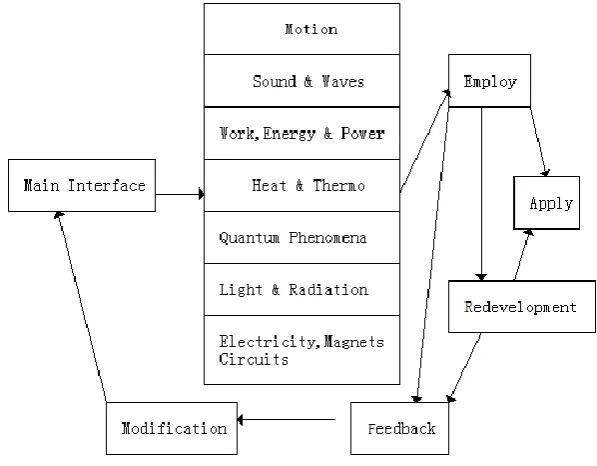
Theoretical Design and Structure Model of Simulation Experiments
make further improvement or simply use it in actual teaching activities. For example, in physics teaching, a teacher may arrange a series of simulation experiments according to the textbooks, then design the teaching tactics and procedures.
Figure 1. Design diagram of simulation experiment software.
Figure 2-1. Interface of simulation experiment in Chinese.
Using Integrated Simulation Experiments Package in Physics Experiment Teaching
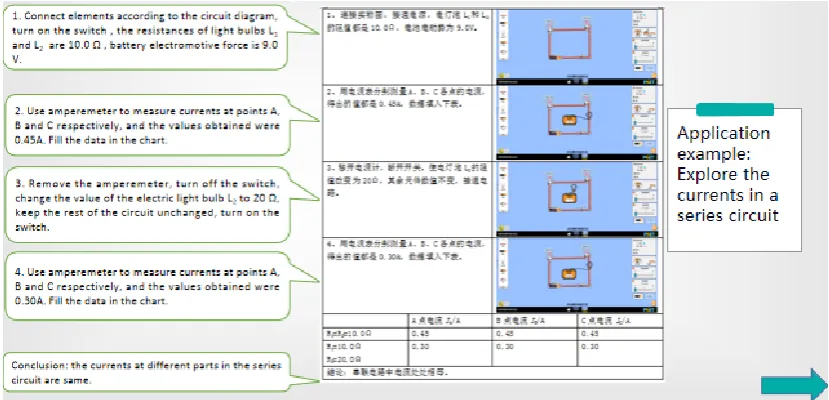
When the webpage of the package is finished, users may begin to work on teaching plans based on the physics textbooks. The package can also be used in classroom teaching for teachers and preview before class for students. Beginners should try to keep simulation experiments in pace with teaching activities. The purpose of this package is to reach seamless combination between simulation experiments and classroom teaching. Fig. 3 shows an example: exploring the currents in different parts of series circuit.
[image:6.595.76.491.242.442.2]The webpage of the integrated package is flexible. It allows further developing. Users can modify or customize the webpage according to his or her own requirement in actual teaching practise. However, some very basic knowledge of computer programming is required for developers. Users can take this opportunity to learn a program language, which will make teaching easier and more efficient.
Figure 3. Example: Exploring the currents of in different parts of series circuit.
Applications in Re-developing Simulation Experiments
Problems Solved by the Re-developed Simulation Package
For further re-developing, the JAR data resources in the simulation program can be used in Windows operating system, so they can be used as complements to HTML data resources. The HTML data resources are easier used in Windows operating system than that of JAR. So they can be used for further developing. The user manual for the integrated simulation experiments enables readers to modify and customize the integrated webpage.
Expected Outcome of the Re-developed Simulation Experiments
The virtual simulation teaching plan is to construct high level simulated virtual experiment environment and experiment objects through information technologies, such as virtual reality, multimedia, human-computer interaction, database, network communication, etc.[7,8] Students can perform experiments in virtual environments and obtain the same learning effect for experiment items specified by curriculum requirements.
self-development, experienced users may build his or her own teaching tools. Furthermore, users may try to develop school based curriculum according to practical needs, taking the advantages of coordination between simulation experiments and teaching activities. In teams of cost and flexibility for re-developing, PhET has no competitors.
Conclusion
The paper introduced a piece of offline simulation experiment software, with actual experiment course teaching plans based on textbooks. The simulated experiments take physics classrooms to vivid experiment situations, typically, the situations with ideal experimental conditions. Developers of this simulation experiment software will work hard to benefit more and more physics learners and people working in physics teaching.
[image:7.595.335.507.337.455.2]The software introduced in the paper, attended “the 10th Exchange Conference in Physics Teaching Skills and Education Experiences for Undergraduate and Graduate Students”, jointly hosted by the Physics Teaching Specialty Committee of The Chinese Society of Education and Yangtze University. The software was recommended for live show in the Designing and Making of Teaching Tools exchange activities. A certificate of honor is awarded (fig. 4). The author was awarded another certificate of honor (fig. 5) for his willingness to donate the software to schools in remote areas.
Figure 4. Certificate of honor for live show. Figure 5. Certificate of honor for donation.
Acknowledgement
This research is financially supported by the Teaching Reform Plan from Department of Education of Guangdong Province (granted number: 27888 from the No. 236 government document of Higher Education of Guangdong).
Special thanks to Ms. Ziping He, an undergraduate science student in the University of Hong Kong for assisting this project.
References
[1] Working panel of plan, Understanding the “Ten Years (2011-2020) Developing Plan for Education Informatization”, People’s Education Press, Beijing, 2012. (in Chinese)
[2] Simulation Physics Lab http://www.zhujiangroad.com/software/html/27/27132.html
[3] NOBOOK Virtual Lab, http://school.nobook.com.cn/site
[4] PhET .https://phet.colorado.edu/zh_CN/.
[5] X. X. Hu, HTML+CSS+JavaScript Webpage Design, from Beginner to Expert, Qinghua University Press, Beijing, 2017. (in Chinese)
[image:7.595.88.258.339.451.2][7] J. T. Chen, Analysis of Development Process and Localization Transformation of the Interactive Learning Tool PhET, Software Guide, 13(2014), 196-198. (in Chinese)