SAMSUNG
COMBINED
PROGRAMMING
MANUAL
for
DCS
DCS COMPACT
DCS COMPACT II
DCS-816
DCS-408
DCS-408i
Publication Information
Samsung Telecoms
reserves the right without prior notice to revise information in
this publication for any reason.
Samsung Telecoms also reserves the right without prior notice to make changes in
design or components of equipment as engineering and manufacturing may warrant.
Disclaimer
Samsung Telecoms is not responsible for errors or problems arising from customers
not installing, programming or operating their Samsung systems as described in this
manual.
Copyright 2001
Samsung Telecoms (UK) Limited
All rights reserved. No part of this manual may be reproduced in any form or by any
means – graphic, electronic or mechanical, including recording, taping, photocopy or
information retrieval system – without express written permission of the publisher of
this material.
Contents
Part
1
Introduction to Programming ...1–1
1.1 Using this Manual...1–1
1.2 Programming Overview...1–2
1.3 Programming Levels ...1–2
1.3.1 System Level ... 1–2 1.3.2 Customer Level... 1–2 1.3.3 Station Level ... 1–3
1.4 Keys Used for Programming...1–3
1.4.1 Soft Keys... 1–3 1.4.2 Other Keys ... 1–3
1.5 Programming Procedures...1–4
1.5.1 Precautions When Programming ... 1–4 1.5.2 Opening System or Customer Level Programming ... 1–4 1.5.3 Opening Station Level Programming ... 1–5 1.5.4 Programming DCS-408 and 408i Systems... 1–5
2
Program (MMC) List and Default Data ...2–1
2.1 Program (MMC) List ...2–1
2.2 Default Data...2–3
2.3 System Configuration: Quick Reference ... 2–9
3
Special Applications ...3–1
Voice Mail / Auto Attendant Integration...3–2
Individual Station Page...3–4
CLIP (Calling Line Identification Presentation)...3–5
Toll Restriction (Call Barring) Overview...3–6
S0 Overview...3–8
Part 1. Introduction to Programming
This manual describes the MMC programming required for the following types of
Sam-sung DCS keyphone system:
•
DCS
•
DCS Compact (Compact I)
•
DCS Compact II
•
DCS-816
•
DCS-408
•
DCS-408i.
In this manual, these systems are referred to as “DCS,” “Compact I (CI),” “Compact II
(CII)," "816," "408" and “408i” respectively. Programming requirements for these system
types are generally the same, but occasionally there are differences. Users of 408 and
408i systems should also read
Programming DCS-408 and 408i Systems
in section 1.5.4
of this manual. Unless otherwise stated, references to “DCS” include Compact I
sys-tems.
The different system types are discussed fully in the separate Samsung
General
De-scription
manuals for each system, where these have been published.
Software Version Numbers
The software version numbers of the systems for which this programming manual is
relevant are: DCS and Compact II=V6.10 or later; 816=V1.09 or later; 408 and
408i=1.04 or later.
1.1 Using This Manual
•
It is recommended that you read the whole of Part 1 of this manual which provides a
useful overview to MMC programming procedures.
•
For a comprehensive list of available MMCs, see Part 2.
•
For quick reference, Part 2 also provides a table listing the default settings for each
MMC and indicating which systems can use each MMC. A “Y” (“Yes”) in the
appro-priate column indicates that it can be used for that system.
•
To quickly check allowed configuration settings for each type of system—number of
trunk group members, card port numbers, and so on—see section 2.3
System
Con-figuration: Quick Reference
in Part 2
.
•
To begin programming, refer to the appropriate MMC(s) in Part 4. Check the
se-lected MMC header bar to make sure the program is available on your system, if
you haven’t already done so.
1-2
1.2 Programming Overview
When the keyphone system arrives from the factory it contains default data. This needs
to be customised, using the MMC programs, to suit the customer’s requirements.
MMC stands for Man Machine Code and each MMC is assigned a three-digit code (100,
101, and so on). These MMCs are used to view, create or change customer data on a
display keyphone (called KMMC programming). For example, MMC 601 is used to
cre-ate a station group; system speed dial numbers are entered in MMC 705; key functions
are assigned to individual keyphones (or “keysets”) using MMC 722; and system
dial-ling codes (such as extension numbers and feature codes) can be changed in MMC
724.
1.3 Programming Levels
There are three levels of programming: System level, Customer level and Station level.
System and Customer levels allow system-wide programming and are under passcode
protection to restrict access. System programming is done by the system installer (or
system technician), usually on a one-off basis, but also to manage any changes in the
customer’s requirements. Customer programming is done by the system administrator,
on a day to day basis, to manage station users’ requirements. Station level
program-ming does not require a passcode, allowing station users to make simple changes to
their keyset features.
To prevent conflicting data from being entered, only one person at a time can enter
Sys-tem or Customer programming. If you atSys-tempt to enter programming mode while
an-other keyset is being used for programming, your display shows [xxx PGM MODE]
where “xxx” is the keyset extension number of the station in programming mode.
While
programming is in progress, normal system operation is not affected.
1.3.1 System Level
This level is entered via MMC 800 and requires the installer’s (technician’s) passcode.
This is the highest level and allows access to all system programs, station programs
and maintenance programs. The installer (sometimes called the installing technician)
also decides which programs are accessible to the customer (the system administrator)
at Customer level.
•
All MMCs are accessible at this level.
1.3.2 Customer Level
This level is entered via MMC 200 and requires the customer’s passcode. It allows
ac-cess to station programs and system programs permitted by the system installer in
MMC 802. When the system administrator uses the customer passcode to access
sta-tion programs, data for all stasta-tions can be viewed or changed. Changes can be made
either system-wide or to selected keysets. (The system administrator should also refer
to the
System Administration
manual for their keyphone system if this is available.)
The system administrator or keyset user can access certain programs at a station
with-out using a passcode. At this level, only data for the selected station can be changed.
You should refer to the instructions provided in the
Samsung DCS Keyset User Guide.
•
Accessible MMCs at this level are nos. 100–121.
1.4 Keys Used for Programming
Programming may be done from any 6-button (6B), 12-button (12B) or 24-button (24B)
keyset with a liquid crystal display (LCD). (Refer to the
Samsung DCS Keyset User Guide
for a full description of keyset operation.)
1.4.1 Soft Keys
The three keys directly below
the LCD are called soft keys.
The left-hand soft key is
desig-nated as the LEFT soft key. This
key is used to save any
changed data while
program-ming, or to move the cursor to
the left on the LCD.
The right-hand soft key is
des-ignated as the RIGHT soft key.
This key is used to save any
changed data while
program-ming, or to move the cursor to
the right on the LCD.
DCS EuroDisplay Keysets
1.4.2 Other Keys
The following keys perform special functions:
VOLUME UP (+) / DOWN (–)
Scroll up/down through available options*
KEYPAD
Enter data using keys 0–9 and
[
, and dial options*
HOLD
Clear previous entry
ANS/RLS
Select “ALL” option (e.g. to make data apply to all,
rather than selected, stations)
SPEAKER
Store data and advance to next MMC
TRSF
Enter programming mode or
Store data and exit programming mode
1-4
The 6, 12 or 24 extra programmable keys can be set up to perform specific functions
when pressed during normal operation. During programming, some of these keys also
perform other specific functions. This is described in the individual MMC program
pro-cedure where applicable.
1.5 Programming Procedures
1.5.1 Precautions When Programming
•
The keyset must be on-hook (handset down) to allow programming.
•
Programming is available on any digital keyset with an LCD.
•
Programming is available only on digital telephones (not analogue ones).
•
If ‘INVALID DATA’ appears in the LCD while programming, you should re-enter the
correct data.
•
When you have successfully completed an entry, the LCD automatically changes for
the next step.
•
Programming halts if you have not pressed a key for a certain period of time (30
sec-onds by default, but this can be changed).
•
Programming halts if you pick up the handset while programming.
•
If you pick up the handset while programming, or the telephone plug is pulled out,
any new data shown in the LCD are saved.
I
MPORTANTWhen installing and programming a ‘default’ system
for the first time:
The system requires that you select the correct software version for your country
(e.g. by selecting “UK”) before you can do any other programming via either a
key-phone (KMMC programming) or a PC (PCMMC programming).
To select the country:
1. Press the TRSF key.
2. Enter 800 followed by the default passcode (4321)
The system sounds a warning and displays on the keyset:
Use the VOLUME Up/Down keys to select the country and press the RIGHT soft key.
The keyset displays:
Use the VOLUME Up/Down keys to select YES and press the RIGHT soft key. When
defaulted to the correct version, you can open programming as described next. The
country version selected can be changed in MMC 812,
Select Country
.
ENABLE TECH. PROG SELECT COUNTRY
1.5.2 Opening System or Customer Programming
To open programming:
1. Press the TRSF key.
2. Enter the MMC program number 200 (for Customer level programming) or 800 (for
System level programming).
3. Enter the relevant passcode.
4. Press key 1 (or use the VOLUME Up or Down key) to select ‘ENABLE’.
5. Press the SPEAKER key to have the program selection mode appear (or press the
TRSF key to halt programming).
6. Enter the MMC number, or select the program number with the Up or Down key and
press the SPEAKER key.
When opening system programming, you are advised to check MMC 812 (Select
Coun-try) to ensure that the correct country has been selected
before
you do any other
pro-gramming.
Carefully follow the instructions given with each MMC to program your system correctly.
1.5.3 Opening Station Level Programming
To open programming:
1. Press the TRSF key.
2. Enter the MMC program number.
Carefully follow the instructions given with each MMC to program your system correctly.
1.5.4 Programming DCS-408 and 408i Systems
Although physically similar in appearance, the “408” and “408i” are different systems and
may have different programming requirements and features. For example, the 408i
sup-ports ISDN whereas the 408 does not. Thus, an MMC relevant to one system may not be
relevant to the other. Similarly, where an MMC relates to both systems, some features
available on the 408i system may not be available on the 408 system, and vice versa.
This will be indicated in the MMC description, where appropriate.
These systems also differ significantly from all other keyphone systems, both in size and
physical appearance. In comparison with other systems, when programming your 408 or
408i:
•
Extension, group and trunk numbers are two digits by default (e.g. extension 21,
trunk 71, etc). All other systems use 3-digit numbers by default (e.g. extension 201,
trunk 701, etc).* Examples of programming shown in this manual use 3-digit
num-bers for convenience only.
(*Unless changed by the system installer in MMC 724.)
•
You can set up to four ‘Normal’ station groups. Group types AA, VM/AA and UCD
are not permitted.
2-1
Part 2. Program MMC List & Default Data
2.1 Program (MMC) List
100: STATION LOCK 317: ASSIGN STATION/STATION USE
101: CHANGE USER PASSCODE 318: DISTINCTIVE RING
102: CALL FORWARD 319: BRANCH GROUP
103: SET ANSWER MODE 400: CUSTOMER ON/OFF PER TRUNK
104: STATION NAME 401: CO/PBX LINE
105: STATION SPEED DIAL 402: TRUNK DIAL TYPE
106: STATION SPEED DIAL NAME 403: TRUNK TOLL CLASS
107: KEY EXTENDER 404: TRUNK NAME
108: STATION STATUS 405: TRUNK NUMBER
109: DATE DISPLAY 406: TRUNK RING ASSIGNMENT
110: STATION ON/OFF 407: FORCED TRUNK RELEASE
111: KEYSET RING TONE 408: ASSIGN TRUNK MUSIC ON HOLD SOURCE
112: ALARM REMINDER 409: TRUNK STATUS READ
113: VIEW MEMO NUMBER 410: ASSIGN DISA TRUNK
114: STATION VOLUME 411: ASSIGN E1 SIGNAL TYPE
115: SET PROGRAMMED MESSAGE 412: ASSIGN TRUNK SIGNAL
116: ALARM AND MESSAGE 414: MPD/PRS SIGNAL
119: SET CLIP DISPLAY 415: REPORT TRUNK ABANDON DATA
121: KEYSET LANGUAGE 416: ASSIGN AC15 TRANSLATION
200: OPEN CUSTOMER PROGRAMMING 417: PRI CRC4 OPTION
201: CHANGE CUSTOMER PASSCODE 418: CARD RESTART
202: CHANGE FEATURE PASSCODES 419: BRI OPTION
203: ASSIGN UA DEVICE 420: PRI OPTION
204: COMMON BELL CONTROL 421: MSN DIGIT
205: ASSIGN LOUD BELL 422: ASSIGN TRUNK COS
206: BARGE-IN TYPE 423: S/T MODE
207: ASSIGN VM/AA PORT 424: S0 MAPPING
208: ASSIGN RING TYPE 426: TRUNK GAIN CONTROL
209: ASSIGN ADD-ON MODULE 427: R2MFC SIGNAL
210: CUSTOMER ON/OFF 428: ASSIGN TRUNK/TRUNK USE
211: DOOR RING ASSIGNMENT 500: SYSTEM-WIDE COUNTERS
212: ALARM RINGING STATION 501: SYSTEM-WIDE TIMERS
213: ALARM MESSAGE 502: STATION-WIDE TIMERS
214: DISA ALARM RINGING STATION 503: TRUNK-WIDE TIMERS
215: VOICE DIALLER OPTIONS 504: PULSE MAKE/BREAK RATIO
216: VOICE DIALLER ASSIGNMENTS 505: ASSIGN DATE AND TIME
217: CCC OPTION 506: TONE CADENCE
219: COMMON RELAY SERVICE TYPE 507: ASSIGN AUTO NIGHT TIME
220: ISDN SERVICE TYPE 508: CALL COST
300: CUSTOMER ON/OFF PER STATION 509: C.O. TONE CADENCE
301: ASSIGN STATION COS 510: SLI RING CADENCE
302: PICKUP GROUPS 511: MW LAMP CAD
303: ASSIGN BOSS/SECRETARY 512: ASSIGN HOLIDAY
304: ASSIGN STATION/TRUNK USE 600: ASSIGN OPERATOR GROUP
305: ASSIGN FORCED CODE 601: ASSIGN STATION GROUP
306: HOT LINE 602: STATION GROUP NAME
308: ASSIGN BACKGROUND MUSIC SOURCE 603: ASSIGN TRUNK GROUP
309: ASSIGN STATION MUSIC ON HOLD 604: ASSIGN STATION TO PAGE ZONE
310: LCR CLASS OF SERVICE 605: ASSIGN EXTERNAL PAGE ZONE
311: ASSIGN SIM PARAMETER 606: ASSIGN SPEED BLOCK
312: ALLOW CLIP 607: UCD OPTIONS
313: ASSIGN PIN CODE 608: ASSIGN CLIP REVIEW BLOCK
314: CONFIRM OUTGOING CALL 700: COPY COS CONTENTS
315: SET RELOCATION 701: ASSIGN COS CONTENTS
704: ASSIGN WILD CHARACTER 737: DECT SYSTEM CODE 705: ASSIGN SYSTEM SPEED DIAL 738: DECT CLEAR REGISTRATION
706: SYSTEM SPEED DIAL BY NAME 739: BSI DOWNLOAD
707: AUTHORISATION CODE 740: STATION PAIR
708: ACCOUNT CODE 741: BSI CARD RESTART
709: PBX ACCESS CODE 742: BSI STATUS
710: LCR DIGIT TABLE 743: DECT BASE STATION (DBS) STATUS
711: LCR TIME TABLE 744: DECT REGISTRATION ON/OFF
712: LCR ROUTE TABLE 745: BSI CARRIER
713: LCR MODIFY DIGIT TABLE 750: VM CARD RESTART
714: DDI NUMBER & NAME TRANSLATION 751: ASSIGN MAILBOX 715: PROGRAMMED STATION MESSAGE 752: AUTO RECORD
716: UK LCR OPTION 753: WARNING DESTINATION
717: PIN CODE 754: VM HALT
718: MY AREA CODE 755: VM ALARM
720: COPY KEY PROGRAMMING 756: ASSIGN VM MOH
721: SAVE STATION KEY PROGRAMMING 757: VM IN/OUT
722: STATION KEY PROGRAMMING 800: ENABLE TECHNICIAN PROGRAM
723: SYSTEM KEY PROGRAMMING 801: CHANGE TECHNICIAN PASSCODE
724: DIAL NUMBERING PLAN 802: CUSTOMER ACCESS MMC NUMBER
725: SMDR OPTIONS 803: ASSIGN TENANT GROUP
726: VM/AA OPTIONS 804: SYSTEM I/O PARAMETER
727: SYSTEM VERSION DISPLAY 805: TX LEVEL & GAIN
728: CLIP TRANSLATION TABLE 806: CARD PRE-INSTALL
730: AA RECORD GAIN 807: VOLUME CONTROL
731: AA RAM CLEAR 808: T1 TRUNK CODING
732: AA TRANSLATION TABLE 809: SYSTEM MMC LANGUAGE
733: AA PLAN TABLE 810: HALT PROCESSING
734: AA MESSAGE MATCH 811: RESET SYSTEM
2-3
2.2 Default Data
Station Programs
DCS CI CII 816 408 408i
100: STATION LOCK Y Y Y Y Y Y ALL STATIONS UNLOCKED
101: CHANGE USER PASSCODE Y Y Y Y Y Y ALL STATION PASCODES=1234
102: CALL FO RWARD Y Y Y Y Y Y ALL STATION=0 (FWD CANCEL)
103: SET ANSWER MODE Y Y Y Y Y Y ALL KEYSETS ‘RING’ RING FREQUENCY DEFAULT=5
104: STATION NAME Y Y Y Y Y Y NONE
105: STATION SPEED DIAL Y Y Y Y Y Y NONE
106: STATION SPEED DIAL NAME Y Y Y Y Y Y NONE
107: KEY EXTENDER Y Y Y Y Y Y NONE
108: STATION STATUS Y Y Y Y Y Y SEE MMC 108
109: DATE DISPLAY Y Y Y Y Y Y COUNTRY: WESTERN
CLOCK: 24-HOUR DISPLAY: LOWERCASE
110: STATION ON/OFF Y Y Y Y Y Y AUTO HOLD: OFF
AUTO TIMER: ON HEADSET MODE: OFF HOT KEYPAD: ON KEY TONE: ON PAGE REJOIN: ON RING PREFERENCE: ON CALL COST: OFF AME BGM: OFF AME PSWD: OFF
111: KEYSET RING TONE Y Y Y Y Y Y SELECTION=5
112: ALARM REMINDER Y Y Y Y Y Y ALARMS SET TO NOTSET
113: VIEW MEMO NUMBER Y Y Y Y Y Y NO MEMOS ENTERED
114: STATION VOLUME Y Y Y Y Y Y RING VOL: 4
OFF HOOK RING VOL: 4 HANDSET VOL: 4 SPEAKER VOL: 13 BGM VOL: 13
115: SET PROGRAMMED MESSAGE Y Y Y Y Y Y NO MESSAGES SELECTED
116: ALARM AND MESSAGE Y Y Y Y Y Y ALARMS SET TO NOTSET
119: SET DISPLAY Y Y Y Y N Y NAME FIRST
121: KEYSET LANGUAGE Y N Y Y Y Y ENGLISH
DCS CI CII 816 408 408i
200: OPEN CUSTOMER PROGRAMMING Y Y Y Y Y Y CLOSED (DISABLED)
201: CHANGE CUSTOMER PASSCODE Y Y Y Y Y Y PASSCODE =1234
202: CHANGE FEATURE PASSCODES Y N Y Y Y Y DAY/NIGHT=0000
DISA ALARM=5678 ALARM CLR=8765 AA RECORD=4321 DECT (BSI) REGISTER =4321
203: ASSIGN UA DEVICE Y Y Y Y Y Y NONE
204: COMMON BELL CONTROL Y Y Y Y Y Y CONTINUOUS
205: ASSIGN LOUD BELL Y N Y Y Y Y UNASSIGNED
206: BARGE-IN TYPE Y Y Y Y Y Y NO BARGE IN
207: ASSIGN VM/AA PORT Y Y Y Y Y Y NORMAL PORT
208: ASSIGN RING TYPE Y Y Y Y Y Y ICM RING
209: ASSIGN ADD-ON MODULE Y Y Y Y N N NONE FOR MASTER
210: CUSTOMER ON/OFF Y Y Y Y Y Y SEE MMC 210
211: DOOR RING ASSIGNMENT Y Y Y Y Y Y STATION GROUP 500 (or 50)
212: ALARM RINGING STATION Y N Y N N N ALL SENSORS RING 500
DAY/NIGHT
213: ALARM MESSAGE Y N Y N N N NONE
214: DISA ALARM RINGING STATION Y Y Y Y Y Y DAY/NIGHT=500 (or 50)
215: VOICE DIALLER OPTIONS Y Y Y N N N 2CH-7USER-20BIN
216: VOICE DIALLER ASSIGNMENTS Y Y Y N N N NONE
217: CCC OPTION N Y N N N N NONE
219: COMMON RELAY SERVICE TYPE N N Y Y Y Y SEE MMC 219
220: ISDN SERVICE TYPE Y Y Y Y N Y VOICE
300: CUSTOMER ON/OFF PER STATION Y Y Y Y Y Y STN CALL PRT : OFF
FWD DLY USE : OFF OTHER FEATURES SET TO ON
301: ASSIGN STATION COS Y Y Y Y Y Y DAY CLASS = 1
NIGHT CLASS = 1
302: PICKUP GROUPS Y Y Y Y Y Y ALL STATIONS GROUP 1
303: ASSIGN BOSS/SECRETARY Y Y Y Y Y Y NONE
304: ASSIGN STATION/TRUNK USE Y Y Y Y Y Y DIAL = YES
ANS = YES
305: ASSIGN FORCED CODE Y Y Y Y Y Y NONE
306: HOT LINE Y Y Y Y Y Y NONE
308: ASSIGN BACKGROUND MUSIC
SOURCE Y Y Y Y Y Y NONE
309: ASSIGN STATION MUSIC ON HOLD Y Y Y Y Y Y NONE
310: LCR CLASS OF SERVICE Y Y Y Y Y Y LEAST COST ROUTING
2-5
DCS CI CII 816 408 408i
311: ASSIGN SIM PARAMETER Y N N N N N SIM TYPE = DTE
CALL MODE = MANUAL ANS MODE = MANUAL AUTO BAUD = ON DTR CHECK = ON ECHO = ON PROTOCOL = V110 SPEED = 9600
CHAR LENGTH = 8 BITS PARITY = NONE STOP BIT = 1
312: ALLOW CLIP Y Y Y Y N Y RCV=YES, SEND=YES,
INFO=CO Tel
313: ASSIGN PIN CODE N Y N N N N ALL STATIONS ARE CODE
#1
314: CONFIRM OUTGOING CALL Y N Y Y Y Y NONE
315: SET RELOCATION Y N Y Y Y Y NONE
316: COPY STATION USABLE Y N Y Y N N NONE
317: ASSIGN STATION/STATION USE Y N Y Y N N DIAL=YES
318: DISTINCTIVE RING Y N Y Y Y Y T=F-STN, C=F-STN
319: BRANCH GROUP – – – – – – NOT USED IN UK
400: CUSTOMER ON/OFF PER TRUNK Y Y Y Y Y Y 1A2 EMULATE: OFF
TRUNK INC DND: OFF TRUNK FORWARD: ON LCR ALLOW:OFF
401: C.O./PBX LINE Y Y Y Y Y Y ALL TRUNKS C.O. LINE
402: TRUNK DIAL TYPE Y Y Y Y Y N ALL TRUNKS DTMF
403: TRUNK TOLL CLASS Y Y Y Y Y Y ALL TRUNKS F-STN
DAY/NIGHT
404: TRUNK NAME Y Y Y Y Y Y NO NAMES ENTERED
405: TRUNK NUMBER Y Y Y Y Y Y NO NUMBERS ENTERED
406: TRUNK RING ASSIGNMENT Y Y Y Y Y Y ALL TRUNKS DAY/NIGHT:
500 (or 50)
407: FORCED TRUNK RELEASE Y Y Y Y Y Y NONE
408: ASSIGN TRUNK MUSIC ON HOLD
SOURCE Y Y Y Y Y Y TONE
409: TRUNK STATUS READ Y Y Y Y Y Y SEE MMC 409
410: ASSIGN DISA TRUNK Y Y Y Y Y Y ALL TRUNKS NORMAL
411: ASSIGN E1 SIGNAL TYPE – – – – – – NOT USED IN UK
412: ASSIGN TRUNK SIGNAL Y Y Y N N N IMMEDIATE
414: MPD/PRS SIGNAL Y Y Y Y Y N NONE
415: REPORT TRUNK ABANDON DATA Y Y Y Y N Y REPORT=YES
416: ASSIGN AC15 TRANSLATION Y Y Y N N N UNUSE DID TRANS
417: PRI CRC4 OPTION Y N Y N N N CRC4 ON
419: BRI OPTION Y Y Y Y N Y CHANNEL ANY: YES BRI MODE: P-P DDI DLSEND: OVERLAP BRI CODING: A-LAW POWERFEED: NO
420: PRI OPTION Y N Y N N N CHANNEL ANY: YES
PRI MODE: DDI DLSEND: OVERLAP
421: MSN DIGIT Y Y Y Y N Y NONE
422: ASSIGN TRUNK COS Y Y Y Y Y Y DAY CLASS: 1
NIGHT CLASS: 1
423: S/T MODE Y Y Y Y N Y TRUNK
424: S0 MAPPING Y Y Y Y N Y NONE
426: TRUNK GAIN CONTROL Y N Y Y Y Y RX=+0.0 dB, TX=+0.0 dB
(ALL TRUNKS)
427: R2MFC SIGNAL N N N N N N NOT USED IN UK
428: ASSIGN TRUNK/TRUNK USE Y N Y Y N N DIAL=YES
500: SYSTEM-WIDE COUNTERS Y Y Y Y Y Y SEE MMC 500
501: SYSTEM-WIDE TIMERS Y Y Y Y Y Y SEE TABLE OF TIMERS
AND VALUES IN MMC 501
502: STATION-WIDE TIMERS Y Y Y Y Y Y NO ANS FWD: 015 SEC
DTMF DURATION: 100 MS FIRST DGT DELAY: 600 MS
503: TRUNK-WIDE TIMERS Y Y Y Y Y Y ANS.BAK TM: 600 MS
CLEARING: 002 SEC CO SUPV TM: 400 MS DTMF DURATION: 100 MS FIRST DGT DELAY: 600 MS FLASH TIME: 070 MS NO RING TM: 004 SEC PAUSE TIME: 003 SEC PRS DET TM: 000 MS RNG DET.TM: 300 MS WINK: 200 MS
MF/DP INT TM: 0800 MS MFR DLY TM: 000 SEC
504: PULSE MAKE/BREAK RATIO Y Y Y Y Y N MAKE/BREAK = 33
PULSES PER SECOND = 10
505: ASSIGN DATE AND TIME Y Y Y Y Y Y FOLLOWS S/W VERSION
RELEASE DATE
506: TONE CADENCE Y Y Y Y Y Y SEE MMC 506
507: ASSIGN AUTO NIGHT TIME Y Y Y Y Y Y NONE
508: CALL COST Y Y Y Y Y Y UNIT COST PER MP: 200
PENCE
CALL COST RATE: 100%
509: C.O. TONE CADENCE N Y N N N N SEE MMC 509
510: SLI RING CADENCE Y Y Y Y Y Y SEE MMC 510
511: MW LAMP CAD Y N Y N N N ON: 1000MS, OFF: 1000MS
512: ASSIGN HOLIDAY Y N Y Y Y Y NONE
2-7
DCS CI CII 816 408 408i
601: ASSIGN STATION GROUP Y Y Y Y Y Y SEE MMC 601
602: STATION GROUP NAME Y Y Y Y Y Y NONE
603: ASSIGN TRUNK GROUP Y Y Y Y Y Y SEE MMC 603
604: ASSIGN STATION TO PAGE ZONE Y Y Y Y Y Y NO STATIONS ASSIGNED
’ALL ZONE’ IS SET
605: ASSIGN EXTERNAL PAGE ZONE Y Y Y Y Y Y NONE
606: ASSIGN SPEED BLOCK Y Y Y Y Y Y SYSTEM: SEE MMC 606
STATIONS: ONE BIN OF 10 ENTRIES
607: UCD OPTIONS Y Y Y Y N N SEE MMC 607
608: ASSIGN CLIP REVIEW BLOCK Y Y Y Y N Y ONE BIN OF 10 ENTRIES
700: COPY COS CONTENTS Y Y Y Y Y Y NONE
701: ASSIGN COS CONTENTS Y Y Y Y Y Y TOLL LEVEL: ALL COS=A
ALL FEATURES (EXCL. OVERRIDE)=YES
702: TOLL DENY TABLE Y Y Y Y Y Y ALL ENTRIES=0
703: TOLL ALLOWANCE TABLE Y Y Y Y Y Y ALL ENTRIES=0
704: ASSIGN WILD CHARACTER Y Y Y Y Y Y ALL X, Y, Z=1
705: ASSIGN SYSTEM SPEED DIAL Y Y Y Y Y Y NONE
706: SYSTEM SPEED DIAL BY NAME Y Y Y Y Y Y NO NAMES
707: AUTHORISATION CODE Y Y Y Y Y Y NONE
708: ACCOUNT CODE Y Y Y Y Y Y NONE
709: PBX ACCESS CODE Y Y Y Y Y Y NONE
710: LCR DIGIT TABLE Y Y Y Y Y Y DEPENDS ON S/W
VER-SION
711: LCR TIME TABLE Y Y Y Y Y Y SEE MMC 711
712: LCR ROUTE TABLE Y Y Y Y Y Y SEE MMC 712
713: LCR MODIFY DIGIT TABLE Y Y Y Y Y Y DEPENDS ON S/W
VER-SION
714: DDI NUMBER AND NAME
TRANSLA-TION Y Y Y Y N Y SEE MMC 714
715: PROGRAMMED STATION
MESSAGE Y Y Y Y Y Y 20 MESSAGES (10 PRE-PROGRAMMED) (SEE MMC
715)
716: UK LCR OPTIONS Y Y Y Y Y Y SEE MMC 716
717: PIN CODE N Y N N N N NONE
718: MY AREA CODE – – – – – – NOT USED IN UK
720: COPY KEY PROGRAMMING Y Y Y Y Y Y NONE
721: SAVE STATION KEY PRO GRAMMING Y Y Y Y Y Y RESTORE
722: STATION KEY PROGRAMMING Y Y Y Y Y Y SEE MMC 722
723: SYSTEM KEY PROGRAMMING Y Y Y Y Y Y SEE MMC 723
724: DIAL NUMBERING PLAN Y Y Y Y Y Y SEE MMC 724
725: SMDR OPTIONS Y Y Y Y Y Y SEE MMC 725
727: SYSTEM VERSION DISPLAY Y Y Y Y Y Y INSTALLED CARD VERSIONS
728: CLIP TRANSLATION TABLE Y Y Y Y N Y NONE
730: AA RECORD GAIN Y N Y Y N N +0.0 dB
731: AA RAM CLEAR Y Y Y Y N N NONE
732: AA TRANSLATION TABLE Y Y Y Y N N SEE MMC 732
733: AA PLAN TABLE Y Y Y Y N N SEE MMC 733
734: AA MESSAGE MATCH Y Y Y Y N N MSG INDEX NO.
735: AA USE TABLE Y Y Y Y N N PLAN 01
736: ASSIGN AA MOH Y Y Y Y N N NOT USE
737: DECT SYSTEM CODE Y Y Y N N N AUTH CODE: FFFF
SYSTEM ID: 000
738: DECT CLEAR REGISTRATION Y Y Y N N N FORCED MODE
739: BSI DOWNLOAD Y Y Y N N N NONE
740: STATION PAIR Y Y Y Y N N NONE
741: BSI CARD RESTART Y Y Y N N N NONE
742: BSI STATUS Y Y Y N N N NONE
743: DBS STATUS Y Y Y N N N NONE
744: DECT REGISTRATION ON/OFF Y Y Y N N N DISABLE
745: BSI CARRIER Y Y Y N N N 1111111111
750: VM CARD RESTART Y N Y N N N DOWNLOAD=YES
751: ASSIGN MAILBOX Y N Y N N N ALL STN=YES, ALL GRP=NO
752: AUTO RECORD Y N Y N N N MB=NONE, PORT=NONE
CALL=I
753: WARNING DESTINATION Y N Y N N N DEST=500
754: VM HALT Y N Y N N N NONE
755: VM ALARM Y N Y N N N THRESHOLD=80%
756: ASSIGN VM MOH Y N Y N N N NOT USE
757: VM IN/OUT Y N Y N N N IN/OUT
800: ENABLE TECHNICIAN PROGRAM Y Y Y Y Y Y DISABLE
801: CHANGE TECHNICIAN PASSCODE Y Y Y Y Y Y DEFAULT PASSCODE = 4321
802: CUSTOMER ACCESS MMC NO. Y Y Y Y Y Y SEE MMC 802
803: ASSIGN TENANT GROUP Y N N N N N ALL ASSIGNMENTS TENANT 1
804: SYSTEM I/O PARAMETER Y Y Y Y Y Y SEE MMC 804
805: TX LEVEL AND GAIN Y Y Y Y Y Y SEE MMC 805
806: CARD PRE-INSTALL Y Y Y Y N N NONE
807: VOLUME CONTROL Y Y Y Y Y Y SEE MMC 807
808: T1 TRUNK CODING – – – – – – NOT USED IN UK
809: SYSTEM MMC LANGUAGE Y N Y Y Y Y ENGLISH
810: HALT PROCESSING Y Y Y Y N N NONE
811: RESET SYSTEM Y Y Y Y Y Y NONE
2.3 System Configuration: Quick Reference
Description DCS Compact I Compact II 816 408 408i
AA card port numbers 3951–8 3951–6 381–61 381–4 N/A N/A
AA Translation tables 1 & 2 (entries) 100 100 100 50 N/A N/A
Account codes 500 250 200 200 100 100
Authorisation codes 250 100 100 30 10 10
BGM port numbers 3701–2 371–2 371–2 371–2 371 371
CALL keys (max.) 8 8 5 4 2 2
Classes of Service (COS) 30 30 30 10 4 4
CLIP Translation Table entries 250 250 200 200 N/A 100
Daughterboards (keyset) KSU Any DLI port Motherboard None None None
DDI entries 200 200 200 50 N/A 20
DECT ports 48 24 24 N/A N/A N/A
LCR Digit Table (max. entries) 500 500 500 300 100 100
MOH port numbers 3701–2 371–2 371–2 371–2 371 371
Operator Groups (part of Station Group) 1 1 1 1 1 1
Operator Group members (sequential /
dis-tributed ring) 32 30 30 16 8 8
Operator Group members (unconditional
ring) 32 30 10 16 8 8
Page zones (no. of internal) 4 4 4 4 2 2
Page zones (no. of external) 4 4 4 1 1 1
Pickup Groups 20 20 20 8 4 4
2
-9
2.3 System Configuration: Quick Reference (cont’d)
Description DCS Compact I Compact II 816 408 408i
Speed dials (total) 1500 500 600 500 300 300
Speed dials (system)(max.) 500 500 500 300 200 200
Station Groups (number of) 30 30 20 10 4 4
Station Group members (sequential /
dis-tributed ring) 48 30 30 16 8 8
Station Group members (unconditional
ring) 32 30 10 16 8 8
Station Group numbers 500–529 500–529 500–519 500–509 50–53 50–53
Trunk Groups (number of) 11 11 11 4 2 2
Trunk Group members 80 10 40 10 4 4
Trunk Group numbers 9, 80–89 9, 80–89 9, 80–89 9, 80–82 9, 8 9, 8
UCD Groups 102 102 53 34 N/A N/A
2
-10
Voice dial card port numbers 3551–2 3551–2 355–6 N/A N/A N/A
Notes:
1Misc 2 card=381–4, AA card=381–6, both cards installed=381–90
2UCD Group can be created from any Station Group 501–529 (CI) or last 10 Station Groups 520–529 (DCS)
3UCD Group can only be created from last 10 Station Groups 510–519
3-1
Part 3. Special Applications
Part 3 provides additional information covering the following topics:
•
Voice Mail / Auto Attendant Integration
•
Individual Station Page
•
CLIP (Calling Line Identification Presentation)
•
Toll Restriction (Call Barring) Overview
3–2
Voice Mail/Auto Attendant Integration
(In-Band / SMDI )
This section focuses mainly on in -band integration. Systems may alternatively
accommo-date Bellcore standard SMDI—available by setting in MMC 210 (SMDI VMS SET option).
Because of the increased popularity of voice mail and auto attendant use, all DCS systems
include many programmable options to address this demand. The degree of integration
that can be achieved depends on the abilities of the voice mail/auto attendant (VM/AA)
sys-tem as well as the telephone syssys-tem.
The following describes the capabilities provided by systems for voice mail via in-band
inte-gration.
Hardware Provisions
•
The VM/AA system must be connected to single line circuits on any SLI card.
•
Each port is equipped with a dedicated DTMF receiver for detecting DTMF signalling
from the VM/AA.
•
These ports also provide an instant break in loop current when the calling party
hangs up. This is called a disconnect signal.
Software Provisions
•
Screened Or Unscreened Transfer
There are no special codes needed to transfer a call. Simply hookflash, receive
transfer dial tone and dial the destination.
•
Direct In Lines
Any C.O. call can be assigned to ring at an individual station or a station hunt group
assigned to the VM/AA.
•
Calls or Recalls to the Operator
Dialling 0 will always result in a ringback signal. If the operator is busy, the call
con-tinues to ring in queue to the operator.
•
Message Waiting
3–3
In-Band Signalling
Systems can be programmed to send the calling station’s extension number after
the voice mail system answers. These DTMF signals may include a leading digit to
indicate the type of call and additional information about the original caller. DTMF
signals may also be substituted for call progress tones to speed up voice mail call
processing. This program allows call forwarding to a mailbox and bypassing of the
main greeting for automatic message retrieval. Blind (unscreened) transfers may be
performed because the recall will be correctly identified.
Note: The effectiveness of this program depends on the ability of the voice mail system to make use of this information.
•
Station Hunt Group With Overflow
Each station group can have an individual overflow destination with an individual
overflow timer. The overflow destination will ring whenever a call to the group is not
answered. If the voice mail system becomes inoperative, calls are automatically
routed to the overflow destination.
•
Internal Call Forwarding to Voice Mail
This option in MMC 300 provides the ability to allow or deny call forwarding of
inter-nal calls to voice mail. This feature conserves disk drive space by only storing calls
originating outside the system.
•
One-Touch Voice Mail Access
One-touch speed dial keys can be programmed to automatically dial, log into and
re-trieve messages from voice mail.
•
Call Progress Tones
3–4
Individual Station Page
Keyphone systems were not designed to permit page announcements to individual keysets.
However, a forced auto answer key (FAUTO) can be used to do this.
1. Program a keyset for RING in MMC 103.
2. Assign a FAUTO key (in MMC 722) to each keyset that is allowed to page individual
keysets.
3. Call another station. When you hear ringback tone, press the FAUTO key. The ringing
will stop and an Auto Answer call is set up.
3–5
CLIP
(Calling Line Identification Presentation)
Hardware Provisions
ISDN trunk cards.
Software Provisions
The MMCs related to CLIP are listed below with a short description of their uses. They are listed
in the recommended order in which they should be programmed. This sequence is suggested
so that the installer/technician gets a better understanding of how the feature works. There is no
technical reason to strictly follow this sequence.
l
MMC 312
(ALLOW CLIP)
Used to determine which keysets are allowed to re-
ceive CLIP displays.
l
MMCs 722 and 723
(STATION & SYSTEM KEY
PROGRAMMING)
It is strongly recommended that all keysets allowed
CLIP in MMC 312 are programmed with a CLIP key
using this MMC.
l
MMC 728
(CLIP TRANSLATION TABLE)
Allows for the creation of a list of names that
corre-spond to numbers received from the Central Office
(C.O.). These names will be displayed when a call
rings in that has NUMBER ONLY data provided by the
C.O.
l
MMC 725
(SMDR OPTIONS)
Provides the ability to print CLIP data and abandoned
calls on the Station Message Detail Recording
(SMDR) report.
l
MMC 119
(SET CLIP DISPLAY)
Station users can determine what CLIP data is
dis-played when a call rings at the user’s station.
l
MMC 501
(SYSTEM-WIDE TIMERS)
You may need to adjust the CLIP DISPLAY timer. This
is the length of time that CLIP data is displayed at
us-ers’ stations after the CLIP key is pressed.
l
MMC 415
(REPORT TRUNK ABANDON
DATA)
Used to determine which trunks will record data in the
Call Abandon list and print with an Abandon “A” flag
on the SMDR report.
l
MMC 608
(ASSIGN CLIP REVIEW BLOCK)
Used to assign CLIP Review blocks to keysets to al-
low the user to review CLIP data for previous calls
.l
MMC 701
(ASSIGN COS CONTENTS)
All CLIP features are included in this MMC so that the
system installer can allow or deny them.
lMMC 724
3–6
Toll Restriction (Call Barring)
Overview
The system allows each station to be assigned a class of service (COS) for day and night
modes. Into this COS is brought the dialling restrictions to be applied to each station.
Dial-ling restrictions are applied in MMC 702 (Toll Deny Table) and MMC 703 (Toll Allowance
Table).
Eight levels of restriction are available to stations: A, B, C, D, E, F, G and H. Level A
im-poses no restrictions on station dialling; level H restricts stations to
internal calls
only; and
levels B to G are programmable. In addition, the Wild Card Table (MMC 704) can be used to
provide more flexibility when programming.
Toll Restriction Rules
•
The Deny Table entries prevent certain numbers being dialled.
•
The Allowance Table entries are the ONLY exceptions to the Deny Table entries.
•
Listing codes in the Allowance Table with no entries in the Deny Table gives “no
restriction”.
•
A wild card in any position in the Deny Table means an exception exists in the
Al-lowance Table for the digits defined by the wild card.
•
A wild card at the end of an entry means that more digits may be dialled.
•
Never put a single wild card as an entry in the Allowance Table.
•
When changing an entry in the BCDEFG status, ALL digits must be entered.
Use of Deny Table
Example
Let’s assume that you want to restrict (bar) the dialling of the following codes to your users:
0860 and 0850 car phone numbers, 0891and 0898 premium rate numbers, 00 International
numbers and 01 STD numbers. You would set up the Deny Table as follows:
TOLL DENY TABLE
ENTRY DIGITS B C D E F G
001 0860 1 0 0 0 0 0
002 0850 1 0 0 0 0 0
003 0891 1 1 1 1 0 0
004 0898 1 1 1 1 0 0
005 00 1 1 0 0 0 0
006 01 1 0 0 1 0 0
Note: The number of entries allowed varies between systems (see MMC 702).
From the above table (“1” means a number is barred):
3–7
•
Stations with Toll Levels F or G applied will have no restrictions.
Use of Wild Cards and the Allowance Table
The Wild Card Table in MMC 704 appears as follows.
WILD CARD 0 1 2 3 4 5 6 7 8 9 * # X 0 0 0 0 0 0 0 0 0 0 0 0 Y 0 0 0 0 0 0 0 0 0 0 0 0 Z 0 0 0 0 0 0 0 0 0 0 0 0
The digits 0–9, * and # are values that each of the wild cards X, Y and Z can take. This is
explained later. (You are also unlikely to use any wild card apart from X.)
In the Deny Table, the STD code 01 has been barred to users with a B or E Toll level. It may,
however, be necessary to allow some STD codes to be dialled. For example, the codes
01869, 01993, and 01235 are codes local to Oxford and you may want users in the Oxford
area to have access to these codes, with all other STD codes barred. You can achieve this
using the Wild Card Table and Toll Allowance Table as follows:
Delete entry 006 in the Deny Table and add the following entry:
TOLL DENY TABLE
ENTRY DIGITS B C D E F G
006 01XXX 1 1 1 1 0 0
and in the Toll Allowance Table make the following entries:
TOLL ALLOWANCE TABLE
ENTRY DIGITS B C D E F G
001 01869 1 1 1 1 0 0
002 01993 1 1 1 1 0 0
003 01235 1 1 1 1 0 0
In the above table, any station assigned a Toll level B, C, D or E will be allowed to dial only
01869, 01993 and 01235 numbers, but all other STD codes will be barred. Stations with a
Toll level F or G will be barred from dialling all STD codes.
The changes necessary in the Wild Card Table to implement these requirements are shown
below, where the Wild Card character X represents any value between 0 and 9 (i.e. a “1” is
placed in the field for any value that X is allowed to represent).
WILD CARD 0 1 2 3 4 5 6 7 8 9 # * X 1 1 1 1 1 1 1 1 1 1 0 0 Y 0 0 0 0 0 0 0 0 0 0 0 0 Z 0 0 0 0 0 0 0 0 0 0 0 0
3–8
S
0
Overview
Contents
Introduction ... 3–9 Specifications ... 3–9
PRI ... 3–9 BRI ... 3–9 ISDN Services ... 3–10
Installation ... 3–12 Operation ... 3–12
Ports ... 3–12 PRI and BRI LT-T Mode ... 3–13 BRI LT-S Mode ...3–13
Features Reference Tables ... 3–14
Related Timers ... 3–14 PRI and BRI LT-T Port ... 3–14 PRI and BRI LT-S Port ... 3–16
Pin Assignment of Connectors ... 3–16
PRI ... 3–16 BRI ... 3–16
3–9
Introduction
In the DCS there are two line cards for ISDN. One is the PRI card containing one Primary
Rate Interface; the other is the BRIN card containing four Basic Rate Interfaces. For
Com-pact (I and II) and 816 systems there are two types of BRI card, one with two BRI access,
the other with four.
The following topics are covered:
Hardware specification of each card
Installation
Operation
ISDN features supported
Note: 1. This document is based on BRI and PRI V2.0 (Nov 4 1996) or later. Therefore, some fea-tures are not applicable to the old version.
2. Main CPU software versions required are 4.0 or later (DCS), 2.3 or later (CII), 1.02 or later (816).
Specifications
PRI
(The PRI option is not applicable to Compact I, 816 or 408/408i systems.)
The card has the following configuration:
Contains one PRI access with RJ-45 interface having 120Ω line
termination.
Operates in LT-T mode only. You can only connect to a PSTN ISDN Network Termination
Port (NT).
BRI
The different types of BRI card are shown in Table 1.
System
Card name
Number of
BRI access
Power feeding
to S port
DCS
BRIN
BRI (old)
4
4
YES
NO
Compact II
4BRI
2BRI
4
2
YES
YES
Compact I &
816
4BRI
2BRI
4
2
NO
NO
Table 1 - BRI cards
3–10
Each port operates in either LT-T or LT-S mode. Every setting is done by MMC - there is
no jumper or DIP switch to set. You can connect an NT line or ISDN terminals. (See note,
below.)
For LT-S ports, you can decide whether or not power is supplied to that port by MMC
419.
32 numbers (DCS—range 7801 to 7832) or 24 numbers (Compact II—range 7801 to
7824) are reserved for terminals attached to the LT-S ports. Each number can be
as-signed to only one port. However, a port can have more than one number. (That is, two
ISDN terminals with the same MSN number cannot exist in different LT-S ports.)
Each S
0bus must be terminated with a 100Ω termination resistor. The original BRI cards
did not have this resistor. However, it is fitted to cards manufactured from mid 1997. It is
important that this termination is present on each installation, and should be checked by
the installer.
Note: 1. In BRI, LT-T and LT-S mode can be selected only by MMC programming. However, you should connect the Tx and Rx cable pair from the MDF correctly. Tx and Rx connections are reversed between LT-T and LT-S mode (see Table 15).
2. If you are connecting a T0 port to an NT, take care if there is a termination present some-where other than on the BRI card on the bus.
ISDN Services
Outgoing calls when origination party is non-S
0terminal
When an extension seizes an ISDN TRK or S
0terminal attached to the system, the ISDN
bearer capability (BC) and high layer compatibility (HLC) will be coded as in Table 2.
ORIGINATION
BC
HLC
DGP (Digital keyphone)
Speech
Telephony
SLT (ICM/CO ring in MMC 208)
3.1 kHz Audio
Telephony
SLT (DATA ring in MMC 208)
3.1 kHz Audio
Telephony
Table 2 - Coding of BC/HLC when an extension seizes an ISDN TRK or S0 terminal
Incoming calls when destination party is non-S
0terminal
When an incoming call is present on the ISDN TRK or S
0port, the call will be accepted if the
3–11
BC
HLC
DESTINATION
Speech
Telephony
DGP (Digital keyphone)
SLT (ICM/CO ring in MMC 208)
3.1 kHz Audio
Telephony
SLT (ICM/CO ring in MMC 208)
3.1 kHz Audio
None
DGP
SLT (ICM/CO ring in MMC 208)
3.1 kHz Audio
Fax G2/3
SLT (DATA ring in MMC 208)
Table 3 - Accepted BC and HLC when destination is a non-S0 terminal
Accepted BC and HLC combinations on the ISDN TRK or S
0port
For calls between S
0and ISDN TRK, the following BC and HLC combinations (Table 4) will
be accepted, regardless of which party is the originator.
BC
HLC
LLC
Speech
Telephony
A-law
3.1 kHz Audio
Telephony
A-law
3.1 kHz Audio
none
A-law
3.1 kHz Audio
Fax G2/3
A-law
Unrestricted Digital Info
none
none
Unrestricted Digital Info
Teletex
none
Unrestricted Digital Info
OSI
none
Unrestricted Digital Info
Video New
none
Unrestricted Digital Info
Mixed
none
56 kHz Data
none
none
V.110
none
proper value
V.120
none
proper value
Video
none
none
7 kHz Audio
none
none
Unrestricted Digital Info
Fax G4
Fax G4
Table 4 - Accepted BC and HLC when destination is a non-S0 terminal
Supported bearer capability
Speech, Unrestricted Data, 3.1 kHz Audio, 7 kHz Audio, Video
Supported high layer compatibility
3–12
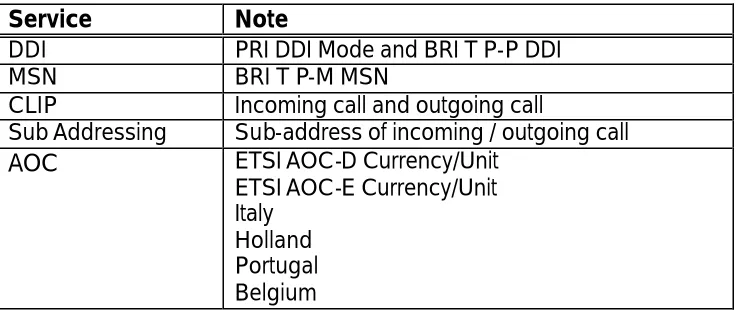
Service
Note
DDI
PRI DDI Mode and BRI T P-P DDI
MSN
BRI T P-M MSN
CLIP
Incoming call and outgoing call
Sub Addressing
Sub-address of incoming / outgoing call
AOC
ETSI AOC-D Currency/Unit
ETSI AOC-E Currency/Unit
Italy
Holland
Portugal
Belgium
Table 5 – Supported ISDN supplementary services
Installation
The installation procedure is as follows:
1) Switch off the power to the system.
2) Insert the card in the appropriate slot.
3) Execute MMC 811 (Reset System).
4) Carry out related MMC programming according to your intended use of the card.
5) Run MMC 418 (Card Restart).
Note:
§ In DCS, both BRI and PRI must be installed in the Basic Key Service Unit (not the Expansion Cabinet).
§ The PRI card must be installed in the first slot with the next even-numbered slot empty.
§ 100Ω line termination may not be present on the BRI card. If not, termination should be provided somewhere outside the BRI card.
§ In BRI, LT-T and LT-S mode can be selected only by MMC programming. However, you should connect the Tx and Rx cable pair from MDF correctly. Tx and Rx connections are reversed be-tween LT-T and LT-S mode (see Table 15).
Operation
Ports
After installation, the system allocates a port number to each B-channel in exactly the same
way as the analogue trunk case. Thus, a BRI will be assigned eight port numbers, while a
PRI will be assigned 30.
3–13
PRI & BRI LT-T Mode
Making an outgoing call
Overlap sending
You can seize a port by dialling the port number (e.g. 701). When you see SETUP ACK
dis-played on your keyset, you can dial the destination number.
Enblock sending
You can make a call through the
enblock
sending mode port by dialling the port number
and the destination number followed by #.
Incoming call routing
This depends on the mode of BRI/PRI set by MMC 419/420. See Table 6
.
Operational mode
Associated table
Note
PRI NOR
BRI P-P NOR
BRI P-M NOR
MMC 406
"TRK RING"
This table has global meaning -
applied to the ports set to DDI
PRI DDI
BRI P-P DDI
MMC 712
"DDI TABLE"
Same as above
BRI P-M NOR
MMC 421
"MSN DIGIT"
A table is required for each BRI
access
Table 6 - Incoming call routing according to MMC 419/420
BRI LT-S Mode
Note: All of the following examples are valid only after programming with the appropriate MMC. Refer to Part 4 of this manual.
Making a call from a DCS subscriber (DGP/SLT) to an ISDN terminal attached to LT-S port
To call a terminal attached to an LT-S port, dial the MSN of the terminal. If a terminal with
MSN of 7803 is attached to 703, and you dialled 7803, a SETUP message will be sent out
through 703 with calling party number of 7803. All terminals with MSN of 7803 will alert.
Alternatively, to call a terminal (or terminals), dial the port number. This time the calling
party number of the SETUP message is vacant. All the terminals attached to that port will
alert, with no regard to MSN number.
In the above cases, dial is always sent in enblock mode.
Caution
When making a call from an S0 terminal, take care with the CLI number. It is usually sent when the call is made, and if that number is not registered in MMC 424 the system will disconnect the call.
Making a call from a terminal attached to LT-S
p
ort to a DCS subscriber (DGP/SLT)To call a DCS subscriber from an ISDN terminal, dial the number you want to call. It is of no
concern to the BRI card whether the terminal sends the number in enblock or overlap
mode.
Making a call from a terminal attached to LT-S port to a remote terminal through a TRK
3–14
TRK. (DATA calls must use an ISDN TRK.)
Routing an incoming call to the terminals attached to LT-S port
Incoming calls are routed according to the properties of the selected TRK. Routing is
con-trolled by the MMC tables. You can put a terminal number into the DDI, MSN or TRUNK
RING table as a destination, with or without a wild card digit. You can then answer the
in-coming call from the terminal.
Features Reference Tables
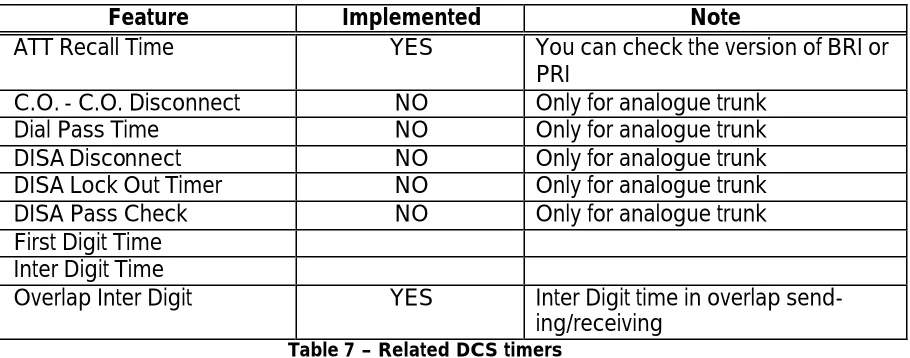
Tables 7 and 8 explain briefly which system features are applicable to ISDN cards.
Related Timers
Feature
Implemented
Note
ATT Recall Time
YES
You can check the version of BRI or
PRI
C.O. - C.O. Disconnect
NO
Only for analogue trunk
Dial Pass Time
NO
Only for analogue trunk
DISA Disconnect
NO
Only for analogue trunk
DISA Lock Out Timer
NO
Only for analogue trunk
DISA Pass Check
NO
Only for analogue trunk
First Digit Time
Inter Digit Time
Overlap Inter Digit
YES
Inter Digit time in overlap
send-ing/receiving
Table 7 – Related DCS timers
Note: These values can be changed in MMC 501 or 503.
PRI and BRI LT-T Port
Call feature capability
Feature
Implemented
Note
Transfer
NO
Transfer to remote user through ISDN TRK is
not allowed
Conference
YES
Conference with remote user through ISDN
TRK
Forward
YES
External Forward - forward to remote user
through ISDN TRK
SMDR
YES
SMDR report of the calls through ISDN TRK
port
Toll Check
YES
Toll check through ISDN TRK port
DISA
YES
Use an ISDN TRK as DISA outgoing line
3–15
MMC dependency
MMC
Related
Note
MMC 403 Trunk Toll Class
YES
MMC 404 Trunk Name
NO
MMC 404 Trunk Number
NO
For an outgoing call, if there is no
matching number in the DDI table this
number will be used as calling party
number
MMC 406 Trunk Ring Assignment
YES
PRI Mode: NOR
BRI Mode: P-P NOR, P-M NOR
MMC 407 Forced Trunk Release
YES
MMC 408 Assign Trunk Music On
Hold Source
YES
MMC 409 Trunk Status Read
YES
Displays the Cabinet / Slot / Port
num-bers
MMC 410 Assign DISA Trunk
YES
MMC 411 E1TRK Signal
NO
MMC 412 Assign Trunk Signal
NO
Only for AC15
MMC 414 MPD/PRS Signal
NO
Analogue only
MMC 415 Report Trunk Abandon
Data
YES
MMC 416 Assign AC15 Translation
NO
Only for AC15
MMC 417 PRI CRC4 Option
YES
MMC 418 Card Restart
YES
Restarts PRI or BRI
MMC 419 BRI Option
YES
MMC 420 PRI Option
YES
MMC 421 MSN Digit
YES
BRI Mode: P-M MSN
MMC 422 Assign Trunk COS
YES
MMC 423 S/T Mode
YES
Only for BRI
MMC 424 S0 Mapping
YES
Only for BRI S port
MMC 508 Call Cost
NO
MMC 509 C.O. Tone Cadence
NO
Only for Analogue trunk
MMC 603 Assign Trunk Group
YES
MMC 702 Toll Deny Table
YES
MMC 703 Toll Allowance Table
YES
MMC 714 DDI Table
YES
PRI: DDI
BRI: P-P DDI
3–16
Call feature capability
For LT-S ports, only basic call functions are provided - you cannot use other functions
(transfer, forward, hold etc) from an LT-S terminal. However, a DGP can transfer/forward a
call to an LT-S terminal. Other features (conference, hold etc) operate in a similar way.
There is no COS check for an LT-S port.
Pin Assignment of Connectors
PRI
PRI card has one RJ-45 connector with the pin assignments shown in Table10.
Pin Number
Assignment
1
Rx
2
Rx
4
Tx
5
Tx
Table 10 - Pin assignments of RJ-45 at customer premises side for PRI
BRI
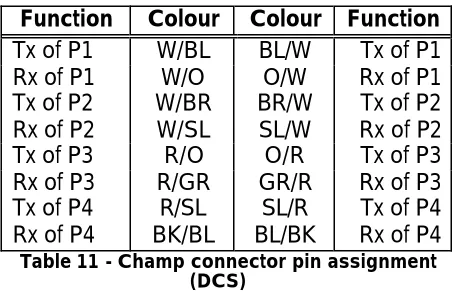
Champ connector
DCS
Function
Colour Colour Function
Tx of P1
W/BL
BL/W
Tx of P1
Rx of P1
W/O
O/W
Rx of P1
Tx of P2
W/BR
BR/W
Tx of P2
Rx of P2
W/SL
SL/W
Rx of P2
Tx of P3
R/O
O/R
Tx of P3
Rx of P3
R/GR
GR/R
Rx of P3
Tx of P4
R/SL
SL/R
Tx of P4
Rx of P4
BK/BL
BL/BK
Rx of P4
Table 11 - Champ connector pin assignment (DCS)
3–17
Compact I
Function
Colour Colour Function
Tx of P1
W/BL
BL/W
Tx of P1
Rx of P1
W/O
O/W
Rx of P1
Tx of P2
W/GR
GR/W
Tx of P2
Rx of P2
W/BR
BR/W
Rx of P2
Tx of P3
W/SL
SL/W
Tx of P3
Rx of P3
R/BL
BL/R
Rx of P3
Tx of P4
R/O
O/R
Tx of P4
Rx of P4
R/GR
GR/R
Rx of P4
Table 12 - Champ connector pin assignment
(Compact I)
Note: Table 12 is based on expansion slot 1 of Compact I. Tx and Rx has no polarity.
Compact II
Function
Colour Colour Function
Tx of P1
SL/P
P/SL
Tx of P1
Rx of P1
BR/P
P/BR
Rx of P1
Tx of P2
GR/P
P/GR
Tx of P2
Rx of P2
O/P
P/O
Rx of P2
Tx of P3
BL/P
P/BL
Tx of P3
Rx of P3
SL/Y
Y/SL
Rx of P3
Tx of P4
BR/Y
Y/BR
Tx of P4
Rx of P4
GR/Y
Y/GR
Rx of P4
Table 13 - Champ connector pin assignment
(Compact II)
Note: Table 13 is based on expansion slot 1 of Compact II. Tx and Rx has no polarity.
816
Function
Colour Colour Function
Tx of P1
W/GR
GR/W
Tx of P1
Rx of P1
W/BR
BR/W
Rx of P1
Tx of P2
W/SL
SL/W
Tx of P2
Rx of P2
R/BL
BL/R
Rx of P2
Tx of P3
R/O
O/R
Tx of P3
Rx of P3
R/GR
GR/R
Rx of P3
Tx of P4
R/BR
BR/R
Tx of P4
Rx of P4
R/SL
SL/R
Rx of P4
Table 14 - Champ connector pin assignment
(816)
3–18
User Side (LT-T)
Pin Number
NT Side (LT-S)
Tx
3
Rx
Rx
4
Tx
Rx
5
Tx
Tx
6
Rx
Table 15 - Pin assignment of RJ-45 for BRI
Note: DCS-408 and 408i users should refer to the Installation Manual provided with their system for details of pin connections for BRI.
Making an RJ-45 connector extension to BRI
As shown in Table 15, LT-S (NT side) and LT-T (User side) have different pin assignments in
RJ-45. You can use the pin assignment tables (11–14) with Table 15 according to the
func-tion of the BRI port. You should connect pins with the pins in Table 15 that have the same
name.
Note: RJ-45 sockets come in different styles which look similar. However, pin numbers may be ter-minated in different places. Therefore, always check the pin numbers on your connectors.
BRI Related MMC Procedure
3–19
Order of Programming
Carry out programming as shown in the diagram, below.
Note:
1. This item does not have to be programmed prior to MMC 419 or MMC 418 (because those MMCs have no effect on this item). However, this item must be preceded by MMC 423.
2. This item displays its name as "BRI-TRK" or "BRI-STN" according to the port setting in MMC 423. 3. This item is only applicable when a BRI access is programmed as P-MP MSN in MMC 419. 4. Only for a STATION port set in MMC 423.
Example of programming a STATION port
Assume that you have a BRI card installed in DCS and its ports are numbered from 701 to
708. You want to use the 4th BRI access (707 and 708) as a STATION port to connect ISDN
terminals. The procedure is:
MMC 423 S/T mode
MMC 424 S0 Mapping (NOTE 1)
MMC 419 BRI-STN (NOTE 2)
MMC 419 BRI-TRK (NOTE 2)
MMC 421 MSN Digit (NOTE 3)
T
S
Program MSN in your ISDN terminal (NOTE 4)
3–20