PassText User Authentication Using Smartcards
Kishore Kumar, N. Santhosh Kumar, Aleem Md, M. Sandeep 4
CSE Department, VITS-School of Engineering and Technology, Karimnagar, AP, INDIA
Abstract— In general, PINs and alphanumeric passwords can be used for Remote user authentication methods, which help to access the remote systems. But, these password based authentication methods fall into several vulnerabilities of security and usability factors. This paper discuss on the dynamic ID based remote user authentication scheme using PassText, which is similar to Pass Phrases and gives more security as compared to other authentication schema. This also compares with the existing graphical passwords. This makes more usable than graphical passwords.
Keywords
—
remote user authentication, PassText, Smart CardsI. INTRODUCTION
Users are authenticated to the remote system to get access the resources in an authorized way. In general, users use PINs, alphanumeric passwords or textual passwords for remote user authentication methods.
Password based authentication schemes are of two types: one- strong passwords and remaining – weak passwords. But, these are vulnerable to usable and security issues in network based remote user authentication methods, which involves the server or the remote system must keep a password table to store all the passwords of the registered users to the system. Since password tables cannot be revealed and they are usually large, it is hard and inefficient to maintain such tables. With password table at the remote system there is a threat of password being revealed to the outside world, to overcome this problem, in many schemes verification table has replaced password table. This table consists of hashed value of each password instead of passwords in their plaintext form. But still these schemes with verification table are vulnerable to stolen verifier attack. Therefore many schemes without verification table have been proposed, but these schemes are based on static login ID. There are numerous applications where static ID leaks partial information about the user’s login message to the adversary. The adversary could intercept the login ID and later try to manipulate it to create a forged login message. Therefore, employing a dynamic ID for each login can avoid the risk of ID-theft. We have used a password authentication scheme using smart cards, which is proposed by Misbah et al. [3], which is resistant to various security threats over the networks. Because of traditional passwords, we are facing the usability and security problems such as the passwords should be remembered easily for long time and hard to guess and crack with automated tools. In order to solve these problems, we propose a “Remote user authentication scheme using PassText” which is form a strong password to increase the usability and security of the remote system. The passtext password [2] can be formed by reading a file and make a change and form a strong password with number of iterations done to make changes in the text file and concatenated in every iteration. It makes long, strong password with small number of changes. It makes Passtext authentication scheme resilient against the brute-force and dictionary attack. The proposed scheme can be secure against ID theft, guessing attack, insider attack, replay attack, stolen verifier attack, Impersonation attack and reflection attacks.
It allows the users to freely choose and change and chooses his own file at the time of enrollment stage. It successfully achieves mutual authentication. It is also secure against the brute force and dictionary attacks. It is also gives a chance to used by the blind people with help of braili language.
This paper organized as follows, In Section 2, we review the various authentication schemes, which are available for remote user authentication process, Section 3 describes the proposed scheme, and Section 4 analyzes the Security and Usability of Proposed scheme, finally concluded in Section 5. The notations are used through out the paper as follows:
A, Ui denotes the user. ID denotes the identity of A.
PTPW denotes the encoded PassText as a Strong password.
S denotes the remote server.
⊕ denotes the bitwise XOR operation. h( ) represents an hash function.
U1=>U2: data’ represents U1 sends data to U2 through a secure channel.
U1 U2: data’ represents U1 sends data to U2 through a common channel.
II. RELATED WORK
Many researchers have recognized inherent shortcomings of simple passwords and as a result, a wealth of different authentication approaches exists. This section provides a quick overview of the most well known user authenticating techniques. According to Renaud et.al, these techniques have been classified based on fallowing characteristic of the user:
i) Location of the User ii) Owning of the User iii) User’s Knowledge
A. Location of the User
This character gives the location or where the user is located at that instant. In this, we have GeoBio Indicator and phone call verification. GeoBio Indicator and Phone Call Verification methods can be used to identify location of the user.
B. Owning of the User
This section describes what the user owning or having makes to prove his identity in authentication process. In this we have Bio Password, PassThoughts. The Bio Password is nothing but the user’s fingerprints, retina, voice, face and tokens like smart cards can be taken for this classification. Pass Thoughts that is proposed by Thrope et.al, which study on the behaviour of user make the user to authenticate to the system. Suspected behaviour of user can be rejected to access the system resources.
C. Knowledge of the User
user in authentication process. The knowledge based authentication schemes can be classified in to two categories: one- textual passwords and the other – graphical passwords.
1. Textual Password Approaches.
Text based approaches can be further subdivided into syntactic, semantic and one-time methods. The classical passwords and passphrases are examples of syntactic methods in which a user is expected to memorize a sequence of characters or words. The sequence can either is generated for the user or user selected [19]. The problem is that a user’s ability to memorize complicated or multiple passwords are limited, and so authentication may present problems for the user. Alternatively, easy to remember passwords are also easy to guess and so provide a low level of security. Some researcher’s present methods, which might be easier for users to remember, for example, the Check-Off Password System (COPS) allows users to enter characters in any order and therefore the users can choose to remember their password in many different ways. Each user is assigned 8 different characters selected from the sixteen most commonly used letters. The user may use any character more then once to form words which are easy to remember and so it is claimed COPS provides an advantage over regular passwords. Semantic or cognitive passwords typically work by asking a user some questions and treating the user’s answer as the key to the authentication mechanism. One approach described by Renaud [19] relies on asking the user clarifying questions until the answer matches the one expected by the system. An alternative technique provided a set of questionnaires, which asking users to answer some fact-based or opinion-based questions. These approaches are not very user friendly as it might take a long time for the user to arrive at the desired answer, and since users are very sensitive to the time component of authentication protocol, the cognitive based methods are not expected to become widely popular.
One-time password approaches are designed to provide a higher level of security for crucial systems such as bank accounts. If a hacker somehow obtains a valid password he would not be able to reuse it after the initial break in. Two main approaches exist either using hardware or using codebooks. Both of these are expensive to implement and demanding of the user’s time. In passbooks methodology a user is provided with a listing of codes, each code can be used for only a single log in. After a code is used it is crossed off and the next code becomes a valid password for the next session. After all of the codes in the passbook are used a new passbook needs to be ordered. This approach clearly only works in cases where access to the system is not needed on a daily basis.
2. Graphical password Approaches.
Graphical passwords[5] are designed to take advantage of human visual memory capabilities, which are far superior to our ability to remember textual information. Two main types of graphical passwords are currently in use: Recognition based and position based methods are the main approaches in current research. In recognition-based systems, users must identify images they have previously seen among new graphics. Probably, the most well known recognition based graphical authentication system is called Passfaces [6, 7]. It relies on the ease with which people recognize familiar faces. During enrollment, a user is presented with a set of faces he is asked to memorize. During authentication a screen with nine faces is presented to the user, with one of the faces being
from his passface set. User has to select a face, which is familiar from the enrollment step. This process is repeated five times resulting in a relatively small space of 59050 possible face combinations. Obviously this is not sufficient if the system is open to an exhaustive search.
Another authentication system, Déjà Vu [5], is based on random art images. User is asked to choose 5 images as his pass set and during authentication needs to select his pass set from a challenge set of 25 pictures. Since the pictures used are completely random and are generated by a computer program
it is next to impossible to share a Déjà Vu password with others. The two systems mentioned above are probably representative of many other similar recognition based graphical authentication systems currently in existence. Visual Identification Protocol [1,15], Picture Password [10], and PicturePins[17] are all reliant on exploiting the users’ good visual memory and power of recall to easily authenticate users by making them pick familiar images from a large set of graphics.
The remaining authentication approaches presented in this paper are graphical position-based systems. A typical position based approach is presented in PassPoints, a system based on having the user select points of interest within a single image. The number of points is not limited and so a relatively large search space is protecting against any attempt to guess a PassPoints authentication sequence [27]. This is similar to the methodology used in the original patent for graphical passwords obtained by Blonder in 1996 [5].
An alternative to having a user select a portion of an image is to have a user input a simple drawing into a predefined grid space. This approach is attempted in [22] with a system called Passdoodles and also in [25] with a system called Draw-a-Secret. Finally, a V-go Password requests a user to perform simulation of simple actions such as mixing a cocktail using a graphical interface [23].
The aim of this overview of user authentication systems was not to produce a comprehensive listing, but rather to introduce the reader to the current state of the art in the field. Many variations on the presented approaches were not described in sufficient detail and some, such as textual passwords with graphical assistance, Authentigraph, Pseudoword recognition, Image with Sound, Triangle and Movable Frame schema, Inkblot reminder are only mentioned here so that an interested reader can investigate them further.
3. Shortcomings of the Existing Approaches
The reason why so many different user authentication approaches exist is because all current methodologies have certain shortcomings making their use difficult or impossible for some groups of users or on some systems. Alphanumeric passwords suffer from users picking names, simple words or their phone numbers as passwords instead of random strings. Such tendencies make the actual password search space much smaller and therefore susceptible to a dictionary brute force attack. A lot of research went into restricting a user’s choices during enrollment process in order to make passwords more secure[2, 14, 13]. For example the following set of restrictions on alphanumeric password choices is given by Klein[11]:
i)Passwords based on the user’s account name, initials or given name
iii)Passwords which match a reversed word in the dictionary with some or all letters capitalized iv) Passwords which match a word in a dictionary with an arbitrary letter turned into a control character v)Passwords which match a dictionary word with the numbers 0, 1, 2, and 5 substituted for the letters o, l Next we consider the drawbacks of graphical passwords. First, people with impaired vision will have a problem with most graphical passwords, particularly those employing images with many small details. These users typically depend on text-reading software to interact with a computer and so would have no way of knowing what is on the picture. Second, people who have motor control problems will have a hard time precisely manipulating a mouse or any other similar pointing device and so may experience some difficulty in using graphical passwords, particularly those based on the selection of small subparts of an image, such as PassPoints. People with certain other types of visual problems such as colorblindness may also experience problems with graphical passwords dependent on colorful images.
In general almost any possible user authentication approach will have a group of individuals to which such an approach presents a problem. For example Dyslexic users will have problems reading and therefore remembering text. Dyspraxics have problems with memorization of sequences, which is necessary in almost all authentication approaches reliant on sequential selection, or entry of data. Prosopagnosic people have difficulty with face recognition and so can’t deal well with systems like PassFaces [7]. The only solution is to have user authentication schemas, which incorporate multiple approaches within a single user validation methodology.
Particular problems have been identified with most of the more popular graphical password methodologies.
• In a Draw-a-Secret (DAS) schema it has been shown that users tend to select drawings, which are easy to remember and as a result decrease the size of DAS password space. In particular users tend to create drawings, which are symmetric, contain only 1 to 3 strokes and are centered [24, 27]. Having this information makes a brute force attack against DAS possible.
• In an investigation of the PassPoints system it has been demonstrated that accurate recollection of the password is strongly reduced if a small tolerance region is used around the user’s password points. But if a large region is used the password space of PassPoints is being reduced. Additionally it was established that not all images are suitable as PassPoints graphics. In particular images with few memorable points such as images with large expanses of green grass or overly complicated images should be avoided.
• A system such as PassFaces is also subject to a reduced password space, which in the case of PassFaces is already barely sufficient. It has been shown that users of a face recognition based authentication system tend to select certain faces more often then others if they are permitted to select their own passwords. In particular, both males and females select attractive female faces predominantly over all other types of faces. People also tend to choose faces of people from their own race .
Another significant drawback of graphical passwords is the so-called shoulder surfing problem. While in alphanumeric authentication schemas it is easily solved with a replacement
of the password with a familiar star pattern [******], the situation is much harder for GP. A person who observes a few login sessions could eventually realize what the password is or obtain information making the guessing of the password much easier. Sobrado et al. propose a shoulder surfing secure graphical password schema, however it requires over a 1000 small pictures to be displayed on a single screen, making it impossible to use on most portable devices and a nightmare for people with impaired vision. Additionally a lengthy, 10 step, sequence is required for secure authentication. A similar but somewhat modified approach is presented in Hoanca et al. and a broad overview of solutions to the shoulder surfing problem is given by Li et al.
III. PROPOSED PASSTEXT SCHEME
In the Proposed Pass Text system authentication, the user is not required to memorize any strong password, in fact the user is not required to memorize any text at all, he is however free to do so. User only needs to memorize the sequence of changes he makes to the text document. We argue that this is relatively easy since working with documents is something many computer users frequently do anyways. Also the choice of the base document can be made to reflect a user’s previous knowledge without sacrificing the security aspect of the system. The system can be designed with customizable options for each user:
1. The default option is for all users to be presented with a common text. For example the Declaration of Independence can serve as a widely known base text document.
2. A user can select an option of having his user name associated with a particular text from a list of possible base text (a more secure but less convenient option is for user to select a text from a larger list of texts).
3. Another option is for a user to provide his own base text file, but this might be a problem for login from remote systems. Due to the limited resources particularly in the case of small mobile devices there may not be immediate access to the user’s chosen base text file.
In this section, we describes the proposed scheme consists of three phases – Registration, Authentication and Password change Phase.
A. Registration Phase:
This phase is invoked when a new user Ui wants to register with the remote system.
Step 1: Ui selects a password PTPWi by selecting the text file and makes small changes like add the text, delete and replace with few iterations and then submits h(PTPWi) to the remote system through a secure channel.
Step 2: S computes a nonce
Ni = h(PTPWi ) ⊕h(x ⊕ SIDi),
Here, x is a secret key of the remote system and SIDi is smart card’s unique identity.
Step 3: Personalizes the smart card with the parameters h (.) , Ni and SIDi,
B. Authentication Phase:
This section consists of two phases: login, verification.
Login Phase: The user Ui inserts his smart card into the card reader, and keys his IDi and password PTPWi. Then, the smart card performs the following operations:
Step 1: Computes Bi = h (PTPWi) ⊕ Ni
Step 2: Computes Ci = h (Bi ⊕Tu )
Step 3: Ui S: (SIDi , Ci , Tu ) Verification Phase:
Upon receiving the login message (SIDi, Ci, Tu) at time T*,the remote system authenticates the user Ui with the following steps:
Step 1: Verifies the validity of the time interval between Tu & T*. If (T* - Tu) ≤ΔT, S accepts Ui’s login request, otherwise rejects the login request, here ΔT denotes the valid time interval.
Step 2: Computes Bi = h(x ⊕ SIDi). Thereafter, remote system computes Ci = h(Bi ⊕Tu) and compares it with the received Ci. If it holds, the remote system accepts the login request. Otherwise, rejects the login request.
Step 3: Now S computes D=h (Bi ⊕ h(Ts)), where Ts is the current timestamp of remote system.
Step 4: S U: (D, Ts)
Step 5:Upon receiving the login message (D, Ts) at time T**, if (Tu=Ts) Ui terminates the session, otherwise checks the validity of the time interval between Ts & T**. If (T** - Ts) ≤ΔT, Ui computes D=h(Bi ⊕h(Ts)) and compares it with the received D. If it holds the user confirms that the user is communicating with the valid S.
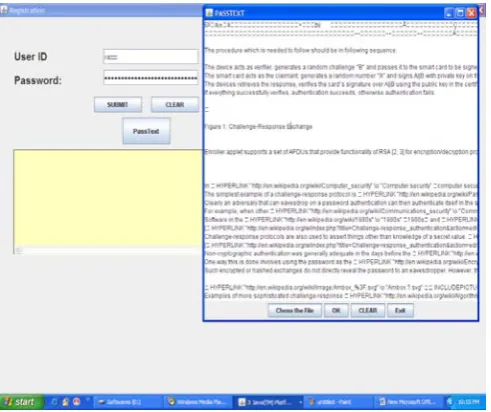
Fig. 1 An example of PassText authentication while reading the text file from the User.
C. Password Change Phase:
This phase is invoked whenever the user Ui wants to change his password. He can easily change his password without
taking any assistance from the remote system. The phase works as follows:
Step P1: The user Ui inserts the smartcard into the smartcard terminal. He submits the password PTPWi and request to change the password.
Step P2: The user Ui then chooses a new password PTPWi*. Step P3: The smartcard computes
Ni* = Ni ⊕h(PTPWi ) ⊕h(PTPWi* ), which yields Ni* = h(PTPWi* ) ⊕h(x)
Step P4: The nonce Ni will be replaced with Ni*.The password PTPWi has been changed to PTPWi*. In this section, we have analyzed the proposed scheme which is secure against guessing attack, insider attack, replay attack, Impersonation attack, reflection attack, and stolen verifier attacks.
IV.USABILITY AND SECURITY ANALYSIS OF PROPOSED SCHEME
This section analyse the security and usability factors which influence the user to get the more flexibility and more security while accessing to a remote system.
A.The Security Analysis
Proposed system is secured one against the various vulnerabilities as fallows:
1. It is secure against guessing attack.
It is extremely difficult for an adversary to retrieve the user’s password or remote system’s secret key x from the intercepted parameters (SIDi , Ci , Tu).
2. It is secure against insider attack.
In the registration phase, h(PTPWi) is submitted, instead of submitting password in plain text form. Therefore, password will not be revealed to S. So, even if the user uses the same password to login other servers, insider attack is not possible.
3. It is secure against impersonation attack.In the proposed
scheme if an adversary intercepts the login message {SIDi, Ci, Tu} and computes Ci’ with fresh timestamp T’, the attack will fail in step 2 of verification phase.
4. It is secure against reflection attack.
During Step 3 of login phase, the adversary can copy and block the message sent by Ui i.e.{CIDi, Ci , T}.Next the adversary can impersonate S to send Ts (=Tu) and D (= Ci) to Ui in step 5 of verification phase. However, Ui will terminate the session in step 6 because Ts & Tu are identical. The proposed scheme can withstand reflection attack.
5. It is secure against replay attack.
A replay attack cannot work because it will fail Step1 of the verification phase for time interval (T*-Tu) ≤ΔT.
6. It is secure against stolen verifier attack.
Since the proposed scheme does not maintain verifier table, therefore, it is secure against stolen verifier attack.
7. It is secure against brute force attack:
Suppose, the user uses a text file of size 64k with three changes done in three iterations, the password space becomes ( 218 )3 .
With this, the scheme solely resistant to dictionary and brute force attacks.
8. Password space Analysis of Proposed Scheme with Various Authentication Methods:
B. The Usability of the System
Proposed system provides Usability to the users with PassText authentication as fallows :
1. It provides more usability as compared to other
authentication methods.
Here, the users have a flexibility to use a text file of his or her own choice or system generated text template to authenticate to the system.
In survey, most of the people are interested to choose their own text files for registration. Only few people are interested to choose the system templates for registration. With this, the scheme solely resistant to dictionary and brute force attacks. 2. Blind People can also use this system with their text editable tools. It is also used by the people who suffer from color blindness.
3. In our survey, total of 20 graduates have been participated to use this system with help of learning session. They are satisfied and face less number of login fail attempts during the learning process.
One participant share his feelings that “ just by making a small change in text file is easy to remember as compared to remember a strong password or passphrase. So, making Changes in text file is good practice “.
4. During the logging in to the system, the login time is also medium compared to other authentication methods. The Table II describes about the login time of the various authentication schemes.
TABLEI
COMPARISONOFPASSWORDSPACEANALYSISOFPASSTEXT ANDOTHERSCHEMES
TABLEII
COMPARISON OF LOGIN TIME OF VARIOUS SCHEMES
S.No Scheme Login time
1 PassFaces 20 sec
2 Déjà vu 30
3 Convex Hull Click(CHC) 72 4 Proposed Pass Text Scheme 60
V. CONCLUSION
This paper is studied on Passtext authentication schema, which is powerful than other authentication methods. This Passtext authentication is good enough to resist brute-force and dictionary attacks and it is applied to a dynamic id based remote user authentication scheme, which also achieves mutual authentication which can apply for several applications. This paper proves usability of the Passtext authentication is better than the other text-based approaches for habituated users. This scheme will become more popular if we give more training to the end users.
REFERENCES
[1] A. D. Angeli, L. Coventry, G. I. Johnson and M. Coutts.,
Usability and user authentication: Pictorial passwords vs. PIN., Contemporary Ergonomics, pages 253–258., Taylor & Francis, London, 2003.
[2] R. V. Yampolskiy , Secure Network authentication with PassText, The IEEE International conference on Information and Technology ITNG’07.
[3] Misbah et.al , A Simple and Efficient Solution for Remote User Authentication Using Smart Cards” ,1-4244-0674-9/06/IEEE 2006. [4] J.-C. Birget, D. Hong and N. Memon, Robust Discretization, with an
Application to Graphical Passwords, Available at: citeseer.ist.psu.edu/birget03robust.html, Retrieved November 4, 2005.
[5] G. E. Blonder, Graphical Passwords, United States Pattent 5559961, 1996.
[6] S. Brostoff and M. A. Sasse, Are Passfaces More Usable Than Passwords? A Field Trial Investigation, Proceedings of CHI 2000, People and Computers XIV, pp. 405 - 424, Springer, September 2000.
[7] R. U. Corporation, The Science Behind Passfaces, Real User,
Available at: http://www.realuser.com/, June 2004.
[8] R. Dhamija and A. Perrig, Deja Vu: A User Study. Using Images for Authentication, Proceedings of the 9th USENIX Security Symposium, Denver, Colorado, August 2000.
[9] N. I. G. T. Force., Player id, age verification and border control technology forum., Available at: http://www.nevadaigtf.org/ TechnologyForum.html., Retrieved October 23, 2005.
[10] W. Jansen, S. Gavrila, V. Korolev, R. Ayers and R. Swanstrom,
Picture Password: A Visual Login Technique for Mobile Devices,
Available at: http://csrc.nist.gov/publications/nistir/nistir-7030.pdf, Retrieved October 24, 2005.
[11] D. V. Klein, Foiling the cracker: A survey of and improvements to password security, USENIX Conference Proceedings, 1990. [12] S. Li and H.-Y. Shum, Secure Human-Computer Identification
against Peeping Attacks, Available at:
citeseer.ist.psu.edu/li03secure.html, Retrieved November 4, 2005. [13] F. Monrose, M. K. Reiter and S. Wetzel, Password Hardening based
on Keystroke Dynamics, International Journal of Information Security, 1(1):69--83, 2001.
[14] R. Morris and K. Thompson, Password Security: a Case History, CACM, 1979, pp. 594--597.
[15] D. Nali and J. Thorpe., Analyzing User Choice in Graphical Passwords., Tech. Report TR-04-01, School of Computer Science Carleton University, Canada, 2004.
[16] J. Pierce, J. Wells, M. Warren and D. Mackay, Conceptual Model for Graphical Authentication, 1st Australian Information Security Management Conference, Edith Cowan University, Australia, 2003.
[17] Pointsec, PicturePINs, Available at:
http://www.pointsec.com/news/download/Pointsec_PPC_2.0_POP_P A1.pdf, November 2002.
[18] N. Provos and D. Mazieres, A Future-Adaptable Password Scheme,
USENIX Annual Technical Conference, Monterey, California, USA, June 6-11, 1999.
[19] K. Renaud and E. Smith, Jiminy: Helping Users to Remember Their Passwords, Annual Conference of the South African Institute of Computer Scientists and Information Technologists, Pretoria, South Africa, 25-28 September 2001.
[20] A. D. Rubin, Independent one-time passwords, Proceedings of the 5th Security Symposium USENIX Association, Berkeley, CA, June 1995.
Scheme Alphabet length in UMI Password Space Size Password
Password 64 8(chars) 2.8x10¹⁴
Password 72 8(chars) 7.2x10¹⁴
Password 96 8(chars) 7.2x10¹⁵
PassPhrase. 50000 5(words) 3.1x10²³
PassPoints
3928 5 (clicks) 9.3x10¹⁷
Text with Graphical
Assistance 10 (spaces) 8 (chars) 2 x 10⁶
DAS 5 x 5 grid 5 (elements) 5x10⁵
Picture Password
30 8 (selections) 6.5x10¹¹
Daja Vu 20 5 (images) 1.5x10⁴
PassFace 9 5 (faces) 5.9x10⁴
PIN Numbers 10 4(numbers) 1x10⁴
Check-Off
Password8 16 4 (check-offs) 7.2x10
16
PassThought 95 8(chars) 6.6x10¹⁵
PassText 95 2(changes) 2.6x10494
PassText 95(half of Page) 3(changes) 951250
[21] L. Sobrado and J.-C. Birget, Graphical passwords, Available at:
http://rutgersscholar.rutgers.edu/volume04/sobrbirg/sobrbirg.htm, Retrieved November 3, 2005.
[22] J. Thorpe, P. C. v. Oorschot and A. Somayaji, Pass-thoughts:
Authenticating with Our Minds, Available at:
citeseer.ist.psu.edu/thorpe05passthoughts.html, Retrieved October 23, 2005.
[23] J. Thorpe and P. V. Oorschot, Graphical Dictionaries and the Memorable Space of Graphical Passwords, 13th USENIX Security Symposium, pp. 135–150.
[24] J. Thorpe and P. v. Oorschot, Towards Secure Design Choices For Implementing Graphical Passwords, 20th Annual Computer Security Applications Conference, Tucson, Arizona, December 6-10, 2004. [25] C. Varenhorst, Passdoodles; a Lightweight Authentication Method,
Available at: http://people.csail.mit.edu/emax/ papers/varenhorst.pdf, July 27, 2004.
[26] D. Weinshall and S. Kirkpatrick, Passwords you’ll never forget, but can’trecall,Availableat:
http://www.cs.huji.ac.il/~kirk/Imprint_CHI04_final.pdf, Retrieved October 24, 2005.
[27] S. Wiedenbeck, J. Waters, J.-C. Birget, A. Brodskiy and N. Memon, PassPoints: Design and Longitudinal Evaluation of a Graphical Password System, International Journal of Human-Computer Studies, Volume 63, Issues 1-2, Elsevier Science, July 2005.