1204 | P a g e
Cloud Computing: All you need to know about
1
Anand Kumar,
2Lalita Bisht
1,2
Contractual faculty
Department of Computer Science D.S. B. Campus, Kumaun University,
Nainital, Uttarakhand, (India)
ABSTRACT
In the field of computing, cloud computing changes the way we use computer and forms the basis for the
tomorrow’s computing. Cloud computing is a general term that is hosting services over the internet. The cloud
is somewhere on the other end of the internet connection where we can store data and access services and
application securely. It is the delivery of on-demand computing resources. Cloud computing is an emerging model of business computing . Modern computing is changing so rapidly towards the cloud based architecture.
In this paper we explore and review the concept of cloud computing, components of cloud, the cloud services,
deployment models of cloud computing, properties, advantages and disadvantages, recent development of cloud
computing, It also tries to bring out the benefits and limitation of cloud computing.
Keywords: cloud client, community cloud, hybrid cloud, IaaS, private cloud, public cloud, PaaS,
SaaS. ,.
INTRODUCTION
According to the official NIST definition, "cloud computing is a model for enabling ubiquitous, convenient,
on-demand network access to a shared pool of configurable computing resources (e.g., networks, servers, storage,
applications and services) that can be rapidly provisioned and released with minimal management effort or
service provider interaction‖[1]
A pool of abstracted, highly scalable and managed infrastructure capable of hosting end user. It is a service that
provides virtualized resources as a service over the internet. ―A large-scale distributed computing paradigm that
is driven by economies of scale, in which a pool of abstracted, virtualized, dynamically-scalable, managed
computing power, storage, platforms, and services are delivered on demand to external customers over the
Internet (Foster et al 2008)‖
Cloud computing is vast term and a global technology which is used in today’s computing as a service. In the
present scenario cloud computing is widely used in the field of business. Cloud computing provide cheap and
easy solution access to use the resources externally. As an emerging field, the benefits of cloud computing has
been acquired by many organizations like research organization, data storage etc by hosting their applications.
In contrast to previous paradigms Grid and cluster computing, Cloud computing is not application-oriented but
1205 | P a g e
Fig 1- Nist visual model of cloud computing
Cloud computing can be thought of as the successor of grid computing (Grid computing is the collection of
computer resources from multiple locations to reach a common goal and it is made up of applications used for
computational computer problems that are connected in a parallel networking environment)
In addition, cloud terminology has a high overtake with other major areas, such as Clusters, Grids computing,
and web services etc. In todays the best cloud service providers are Amazon Web Services, Microsoft Azure,
Google drive/ Google Cloud Platform, IBM Cloud, Atlantic.net, GoDaddy, VMware, Oracle Cloud, Verizon
Cloud, Red Hat, MageCloud eCommerce, CloudSigma, Rackspace, Adobe, SAP, Dropbox etc. It is a new
paradigm shift which provides 1-Value of online computing as everything is connected. 2- World wide
computing- internet is everywhere so unknowingly we use cloud computing every day. 3- Ubiquitous
environment- means it doesn’t make matter whichever device is used.
1206 | P a g e
Key concept of cloud computing [3]
Cloud computing provides services and resources over the internet. The technology of hardware/software
changes so fast which increases cost of hardware and software. As Cloud computing provide services and
resources over the internet so it definitely decreases the cost of hardware and software services. The cloud
provides on demand services such as server and network storage. There is a mechanism called pooling of
resources to serve multiple users and their demand simultaneously by allocate and deallocate the virtual and
physical resources to the end users as required by the user.[4]. The major factor that affecting the growth and
popularity of cloud computing is that the use and speed of internet is increased day by day.
Components of cloud computing [5]
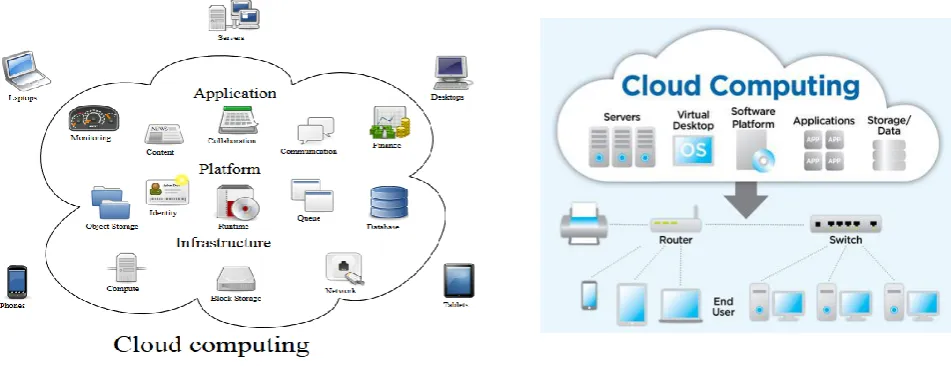
Fig-4, 5 Components of Cloud Computing
Clients[6]
A cloud client is either hardware/software or both which is specially designed for a cloud to access the cloud
services through computing terminal/ web browsers. "A cloud client consists of computer hardware and/or
computer software that relies on cloud computing for application delivery, or that is specifically designed for
delivery of cloud services and that, in either case, is essentially useless without it. Examples are computers,
phones, operating system and browsers etc." (Wikipedia, 2016)
Different types of cloud clients are explained as follows-
Cloud Hardware Clients:
1. Thick Client:-They are full featured computer that are complete in itself and contain their own
processor, memory and peripherals.They can be used in networked environment or standalone. Thick
client are most expensive to deploy but provide better security and less overhead for resources.
1207 | P a g e
2. Thin Client:- They are lightweight computers made to connect to server from remote location andwhich contains only the essentials components like input/output devices for user interaction, they don’t
have own memory, storage and processors. They work on client-server architecture. The server does
most of the task and stores information for the thin client. For proper function they require continuous
interaction to the server. Examples: sun Solaris blade server with thin client, Linux thin client, VXL
technology etc.
3. Smart phone/ mobile devices/ tablets: - They interact with cloud data storage/ cloud services via
some application or web browser from anywhere. Examples: Onlive, Android phones/ tablet, iPhone,
iPad and windows based mobile phones as well.
Cloud Software Clients:
1. Rich/ Fat client: - These are desktop applications connected in networked environment or Fat
clients are applications that make use of network support. These applications can run offline but
provide limited functionality. Example: - Microsoft outlook etc.
2. Smart clients: - The trend is move from traditional client/server architecture to a web based
model. In which a smart client is installed locally and allow interacting cloud services through the
use of web services. And the installation and updating is done automatically over some kind of
network.
3. Web Applications/ thin client: - As the name suggests these type of applications are web
applications and rarely installed by the user. It includes web browsers and remote desktop
applications (such as Microsoft Terminal Server client and Citrix clients) etc.
Cloud clients: - if we talk about the software clients of a cloud, there are certainly numerous different ways to
access the cloud and the users expect very often as a browser based interface But if client software has to be
installed, it is most of the time of the lightweight type.
There are many ways to access the cloud. Live Mesh for example offers a Web based solution and a client tool.
OneDrive (previously SkyDrive, Windows Live SkyDrive, and Windows Live Folders) is a file-hosting service
operated by Microsoft as part of its suite of online services. It allows users to store files as well as other personal
data like Windows settings or BitLocker recovery keys in the cloud. Files can be synced to a PC and accessed
from a web browser or a mobile device, as well as shared publicly or with specific people. There are some cloud
client examples are the Google calendar and Gmail application .After the installation of the browser plug-in,
they are working without Internet connection in read-only mode. [7]
There are 3 different types of software using cloud computing.
Web-based clients: - The web based clients are used for example in the Salesforce.com Customer
Relationship Management (CRM) system, Google Apps or Google Docs. Google Docs is an office
1208 | P a g e
Client applications:- there are some system that used client application for cloud services but oftennot exclusively. But some client application in addition offers the web-based solution. Like Microsoft
live mesh.
Applications with cloud-extensions: - there are some desktop applications which give you an option
to use cloud services by choosing optional extensions to the application. For example Mathematica and
MatLab. The latest versions of these software packages provide an extension for compute-intensive
tasks. They are capable of using Cloud Computing to perform expensive evaluations.
Cloud services
The main objective of cloud computing is to offer computing power, storage and service. Types of services are:
Hardware as a Service (HaaS), Sofware as a Service (SaaS), Data as a Service (DaaS) and Infrastructure as a
Service (IaaS). Linthicum[8] gives 11 major types of services: Storage-as-a-service, Database-as-a-service,
Information-as-a-service, Process-as-a-service, Application-as-a-service, Platform-as-a-service,
Integration-as-a-service, Security-as-Integration-as-a-service, Management/governance-as-Integration-as-a-service, Testing-as-a service,
Infrastructure-as-a-service. Some of the cloud services are explained below:
1- SaaS( software as a service)
Saas: Software as a Service is the model in which an application is hosted as a service to customers who access
it through internet. Users can access the application using internet. Some of the applications are CRM,
accounting, web content manager. The main advantage of SaaS is that 1- user can get software in less money as
there is no need to install the software. 2- It offers reliability as web is reliable so as the software. 3-it is secure
as it uses SSL (secure socket layer). This type of public cloud computing delivers applications over the internet
through the browser. The most popular SaaS applications for business can be found in Google’s G Suite and Microsoft’s Office 365. [9]
Software as a Service deployment model is a service where client simply make use of a web-browser to access
this software that others have developed and offer as a service over the web[10].
2- Platform as a service (PaaS)-
Platform as a service is a cloud deployment model which allow user to build their own application without the
cost and complexity of buying and managing any hardware and software[11]. In other word PaaS model is a
development platform that supports full Software Lifecycle which allows cloud consumers to build their own
cloud services and applications directly on the PaaS cloud. Hence, the difference between SaaS and PaaS is that
SaaS only hosts completed cloud applications whereas PaaS offers a development platform that hosts both
completed and in-progress cloud applications. For this PaaS must have application development and hosting
1209 | P a g e
PaaS provides sets of services and environment that specifically target developers, who can use shared tools,processes, and APIs to accelerate the development, test, and deployment of applications. Salesforce’s Heroku
and Force.com are popular public cloud PaaS offerings.
3- IaaS (infrastructure as a service)
IaaS can be used to satisfy the infrastructure needs of the user or clients locally or globally with some specific
hardware configuration for a specific task [11]. In IaaS Cloud consumers directly use IT infrastructures
components like processor, storage, networks and other fundamental computing resources provided in the IaaS
cloud. IaaS provides the users growing and shrinking resources demand in ad-hoc manner by using
Virtualization in order to integrate/decompose physical resources. The basic strategy of virtualization is to set up
independent virtual machines (VM) that are isolated from both the underlying hardware and other VMs. An
example of IaaS is Amazon's EC2[12].
IaaS delivers hardware resources (CPU, disk space or network components) as a service. And the requested
resources are usually delivered as a virtualization platform by the Cloud service provider and can be accessed
over Internet by the client. The client has full control( because the demand of resources is shrinking or growing
according to the need) of the virtualized platform and is not responsible for managing the underlying
architecture[13]. At a basic level, IaaS public cloud providers offer storage and compute services on a
pay-per-use basis. Amazon Web Services was the first IaaS provider and remains the leader, followed by Microsoft
Azure, Google Cloud Platform, and IBM Cloud.
4- Network as a service (NAAS): Network-as-a-service (NaaS) is a business model for delivering network
services virtually over the Internet on a pay-per-use or monthly subscription basis. NaaS sometimes includes the
provision of a virtual network service by the owners of the network infrastructure to a third party. Often this
includes network virtualization using a protocol such as OpenFlow[14].
5-Test environment as a service: Test Environment as a service (TEaaS) referred to as "on-demand test
environment," is a test environment delivery model.
6-Mobile back end as a service (MBaaS): considered as a subset of PaaS for the developers of mobile
applications generally goes by the name of MBaaS), or sometimes just BaaS (back end as a service).
7-Data as a service (DaaS): DaaS, model can be used to provide on demand data to the user regardless of
geographic or organizational separation of provider and consumer.
IDaaS (identity as a service): IDaaS provide the services related to management of user identity and its
associated rights and permissions across private data centers and pubic cloud sites. IDaaS providers maintain
1210 | P a g e
policies, user groups, and individual privileges. Okta is the clear leader in cloud-based IDaaS; CA, Centrify,IBM, Microsoft, Oracle, and Ping provide both on-premises and cloud solutions.
Cloud application [15]
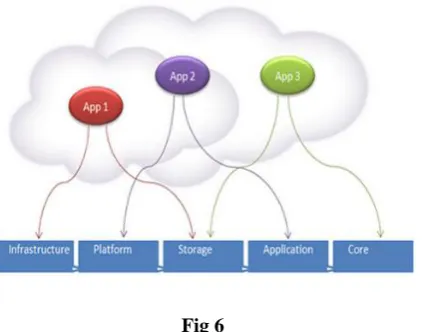
A cloud application is software program where cloud based and local components works together. In this the
remote servers is for processing logic and is accessed through a web browser or cloud client or devices such as
desktop, mobile phones with a continual internet connection. Cloud app is considered as an evolved web app
but as far as functionality concern cloud apps provide far better services than web app.
Data is stored and compute cycles occur in a remote data center typically operated by a third-party company.
The back end ensures uptime, security and integration and supports multiple access methods. Cloud
applications don't need to permanently reside on the local device. They can function offline, but can be updated
online.
Cloud application can be used to access a wider range of services such as on-demand computing cycle, storage,
application development platform. Cloud application supports different user requirement like data backup, data
compression and backup schedule etc. cloud application usually categorized by advanced features such as: data
is stored in cloud and cached locally for offline use and they can be used to access a wider range of services
such as on-demand computing cycle, Storage, application development platforms. Cloud application must
support true multi-tenancy to support various needs for consumer and also support for virtualization technology,
which plays main role in cloud apps
Fig 6
Example- Some common examples include Evernote, Sugar Sync, Salesforce, Dropbox, and NetSuite. Other
qualifying examples such as web email (Google, Yahoo, Microsoft Hotmail, etc.).
Benefits of cloud Application:
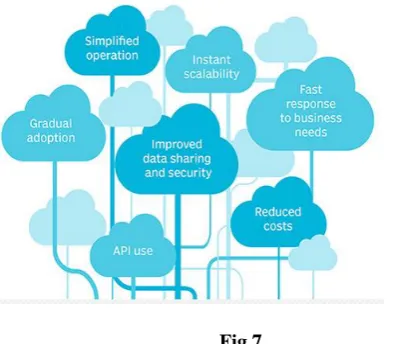
Fast response to business needs. Cloud applications can be updated, tested and deployed very quickly.
1211 | P a g e
Instant scalability: As demand increases or decreases, available capacity adjusted accordingly.API use: Third-party data sources and storage services can be accessed with an application programming
interface (API).
Fig 7
Reduced costs: The size of data centers run by major cloud infrastructure and service providers, along with
competition among providers, has led to lower prices.
Improved data sharing and security: Data stored on cloud services is instantly available to authorized users.
Due to the security concern cloud providers hire world-class security experts to give best suited. And also the
data is centralized and backed up, monitor and update on regular basis to provide better security and reliability.
Cloud platform[16]
Cloud platform lets developers write application that run in the cloud or use service provided from the cloud or
both. Different names are used for the platform today, like platform as a service (pass) or on demand platform.
And it has new way of supporting application and has great potential.
When a developer team made an application on premises today, they already have all the resources that an
application needs. Similarly if development team wishes to create a cloud application they must have built its
own cloud platform. So that’s why vendors are rising to this challenge, and a number of cloud platform
technologies are available today.
A PaaS is a Platform with more cost effective model of application development and delivery than traditional
platform. These services provided as virtualized services. Cloud platform is delivery of a computing platform
and solution stack. It facilitates development and deployment of applications without buying and managing
underlying hardware and software layers. Paas examples- commercial examples are Amazon web services,
Google AppEngine, Microsoft azure and open source are open shift, CloudFoundry etc.
1212 | P a g e
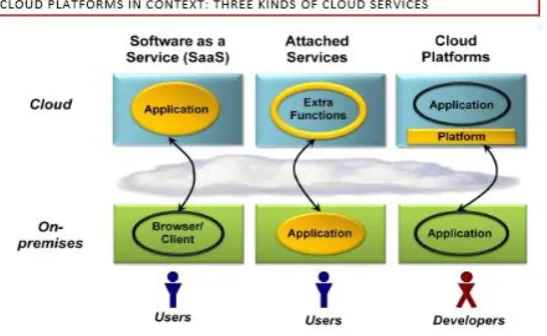
Figure 8 shows services in the cloud can be grouped into three broad categories. Those categories are-1- Software as a service (SaaS)- a SaaS application runs entirely in the cloud (i.e. on cloud servers with
internet support). The on- premises client is typically a browser or some other cloud client.
2- Attached services: - every on- premises application provides useful function on its own. And these
application enhances itself by using application specific services in the cloud. These services are usable
by only the particular application, they are thought of as attached to it. Example- Apple’s iTunes
provides most services on its own but buying and other services are accessed by apple cloud.
3- Cloud platforms: it provides cloud based services for creating applications. Rather than building their
own custom foundation, for example, the creators of a new SaaS application could instead build on a
cloud platform. For example in Figure 1 the direct users of a cloud platform are developers, not the end
users.
One broad way to think about it is to view a platform as any software that provides developer-accessible
services for creating applications. A general model for application platforms is shown below.
1213 | P a g e
Whether its on-premises or in the cloud, an application platform can be thought of as comprising three parts:A foundation: -Every application uses some platform software on the machine it runs on. This typically
includes various support functions, such as operating system, libraries etc.A group of infrastructure services: - In modern distributed environment, applications frequently use other
resources or services of other computers and rely on it. It is common to provide remote storage, integrationservices etc.
A set of applications services: - As maximum application become service oriented, the function they offers
become accessible to new applications. Primarily these applications provide services to the end user they alsomake them parts of the application platform.
Cloud storage [17]
Cloud storage is a service where data is remotely maintained, retrieve, managed and backed up. It is network
storage where data is stored and accessible to multiple users by using cloud clients. The cloud storage is
available to users over a network, which is usually the internet.
Cloud storage allows the user to store files online so that the user can access them from any location via the
internet using some authentication method. The cloud service provider makes the data available online by
keeping the uploaded data on an external server.
Many of these services are free up to a certain number of GB, with additional storage available for a monthly
fee. Cloud storage services may be accessed through a co-located cloud computer service, a web service
application programming interface (API) or by applications that utilize the API, such as cloud desktop storage, a
cloud storage gateway or Web-based content management systems.
At the simplest level, cloud storage can just be one user with access to one server. A user would upload his data
through a terminal and store it on a server for safe keeping. In a scenario where that server was to malfunction,
retrieving your data files would be impossible task until that server came back online. From a customer
standpoint, this system would be highly ineffective as it would be unreliable and consumers would reject such
an unreliable product in the marketplace. For the idea of cloud storage to be a feasible business, the simplest
level of cloud storage would have to be expanded immensely to address the issue of reliability Cloud storage is
achieved through following the concepts of redundancy and repetition. Without these concepts, cloud storage
1214 | P a g e
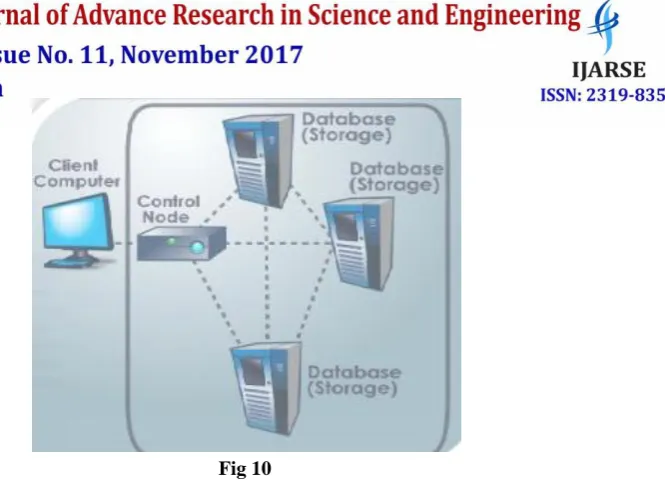
Fig 10Redundancy is really the core of cloud data enough times so that the chance of losing that data becomes nearly
irrelevant. Having multiple data servers to store data decreases the chances of losing data. A single data server
store data is good, but ten data servers is a lot better
Along with multiple data servers come multiple power supplies. Having all data servers on one power supply
would counteract the use of having multiple servers. If one power supply were to power all the servers in a
network, and for some reason it went offline, all the servers on that network would go down, and the entire
network will be inaccessible. To overcome this issue, servers have their own power supply. So the main concept
behind cloud storage is redundancy and repetition. Without these concepts, cloud storage would be very
difficult, if not impossible to exist. Redundancy is really the core of cloud storage.
Each data server is at the same time, separate but the same. All information on each server is the same.
Repetition is the key factor here. User data is copied and distributed to each server. The data servers each
receive their own copy of the data. If one copy is changed on a server, all copies are changed to reflect that on
the rest of the servers. Having the same information on each server along with redundant equipment is how
cloud storage is able to function. Some cloud storage providers are Dropbox, Google Drive, Microsoft
SkyDrive, Box etc. all the cloud storage providers should provide the services like Collaboration, Mobile App
Support, automatic backup of data and some free storage etc.
Cloud infrastructure [18]
Cloud infrastructure refers to the hardware and software components (servers, network, storage, virtualization
software) require establishing and supporting a cloud computing model or it is collection of hardware and
software resources that is needed to build applications that can be accessed by the cloud, and those application
can be accessed remotely using networking services and the internet.
[ https://www.sdxcentral.com/cloud/definitions/cloud-infrastructure-introduction/] It also includes an abstraction
layer that virtualizes resources and presents to users logically through an interface called as application program
1215 | P a g e
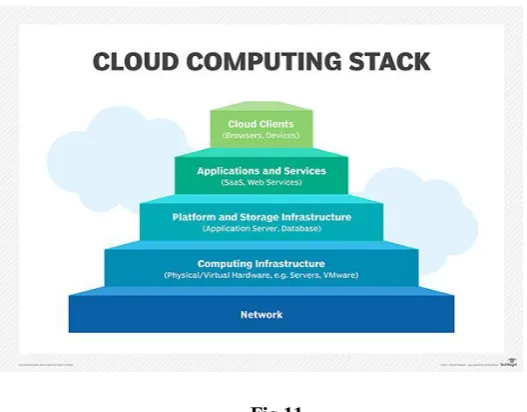
The cloud infrastructure typically consists of three components 1- computing (this refers computing power toprovide cloud services and includes servers, virtualization software etc.) 2- networking(routers, switches are
used in this field, and uses white box switches running software defined networking (SDN) software on
commodity server hardware. ) 3- storage(cloud requires large amount of storage and the storage system have
their own networking gear and storage software to manage high performance connectivity with the service.)
In cloud architecture, Cloud infrastructure refers to the back-end components. The hardware components in data
centers includes multicore, multisocket servers, LAN equipment, persistent storage but in larger volume.
Major cloud providers such as Google cloud platform provide services which are based on shared and
multi-tenant servers. And this model requires high capacity and high density system which fulfill the predictable as
well as unpredictable demand of the user.
Fig 11
Cloud infrastructure typically uses locally attached storage (SSD and HDD) instead of sharing of storage. The
disks in cloud system are aggregated using a distributed file system designed for a storage scenario such as big
data. In a private cloud infrastructure the provider/organization owns all cloud infrastructure components and
collects them with its own data centers. In a public cloud infrastructure the cloud infrastructure is owned by
third party. And in hybrid cloud infrastructure the mix of both is implemented.
Cloud Deployment Models
There are basically four deployment models of cloud computing, known as public cloud, private cloud, hybrid
cloud and community cloud. Each of theseare discussed below.
Public cloud
Public cloud services are being available to the client/user via the third party service provider through internet.
1216 | P a g e
the services are free but sometimes it is free to some restrictions and sometimes not. Here public doesn’t meanthat users data is visible to public but the sevice provider provide some access mechanism to the user[2]. (E.g.
Amazon, Google). The data stored in multiple data centers may not be easily retrievable. The benefits of public
cloud service are: easy and in-expensive resources because hardware and application cost bear by the service
provider, scalable because fulfill requirements according to the demand, payment on usage, and automatic
backup [03].
A public cloud is owned by the Cloud service provider and is open for public use. The infrastructure is provided
to public and handled by third party. The main feature of public cloud is multi tenancy, means more than one
user can access anywhere any time through internet. Example of a public cloud is Amazon EC2 (Amazon
Elastic Compute Cloud)[09]
Private cloud
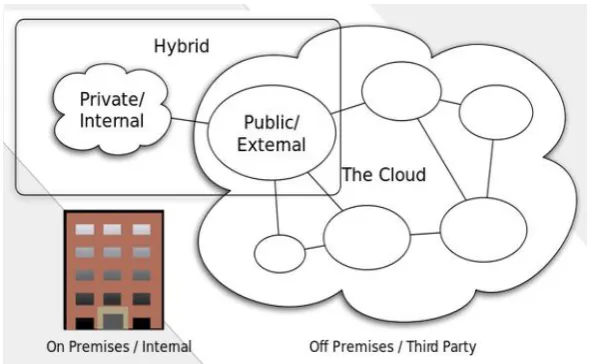
Fig 12
Private cloud are owned by organization and or leased for exclusively to the specific organization. Here
functionality is directly not exposed to the consumer. in private cloud, all things comprises within a single
organization, and managed by the organization or a service provider or third party regardless whether it is
located on-premise or off-premise [10].
In private cloud hardware and software sharing is limited. Security is main concern in Private cloud. Private
cloud is close to the traditional model of local area networks (LANs) but with the added advantages of
virtualization[09].
Hybrid cloud
A hybrid cloud is a cloud deployment model which is a combination of public cloud and private cloud within a
single organization. It is an integrated cloud service utilizing both public and private clouds to perform several
task/operations within an organization. Public cloud services are more cost effective and scalable than private
clouds [19].Therefore, an organization can maximize their proficiency by deploy public cloud services for all
non-sensitive operations, and private cloud services for sensitive operations and rely on private cloud where
1217 | P a g e
Or as the name suggests Hybrid Clouds is mix-up of public and private cloud in a same network within a sameorganization. This can be done if private cloud need services from public cloud. E.g. Private cloud can store
information on their private cloud and we can use that information on public cloud[4].
Community cloud:
A community cloud is shared, controlled and used by a group of Organizations that have shared or same
interests, such as specific security requirements or same business requirements or a common mission. All
members of the community cloud share access to the data and applications in the shared cloud[2].
The community clouds shared by several enterprises and support a specific community that has a shared mission
or common interest. This may be managed by the enterprises or a third party or service provider and may reside
on-premise or off-premises[3].
Properties of cloud computing-
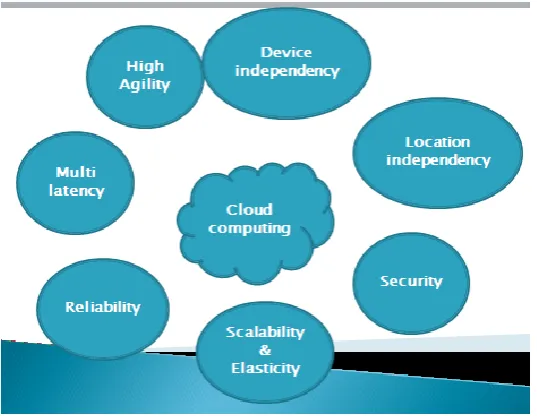
Device independency: - [20] Cloud computing is device-independent because in cloud computing resources
can be accessed not just from any computer but also from any type of computer on the Internet. Platform
independence is achieved by accessing cloud services by using Internet connection and a web browser; it really
does not matter if the computer being used is a traditional desktop or laptop PC, or a tablet, smartphone or smart
TV. Such device independency is a killer feature of cloud computing because user can access cloud services
from anytime anywhere from any device just with internet connection. It means that users can move freely
between computing devices -- such as work PC, home PC, laptop and tablet. Device Independence in the
context of cloud computing means the freedom of cloud users to access their data or files in different devices or
gadgets they use Whether it is cellular phones, net books or any alike devices[21]
Location independency: - cloud computing platform is location independent. In location independence the
customer generally has no control or knowledge over the exact location of the provided resources for example;imagine if DropBox required customers to login to their website to access their data. Do you believe that they
would have been as successful with that approach instead of allowing users access to their data from every
application, every device, and every operating system (mobile and desktop) available. Please note that
Compliance and regulatory issues surrounding data storage can affect location independence. For example, Safe
Harbor can be utilized by specific US entities when dealing with privacy laws in the EU.
Security:
-
cloud computing provide security by apply methods which detect intrusion and defend against security breaches, backup data, and check data for errors time to time. Security of the Cloud relies on trusted1218 | P a g e
Scalability and elasticity:
-
elasticity is the ability of a system to increase the workload on its current and additional (dynamically added on demand) hardware resources Elasticity in cloud infrastructure involvesenabling the hypervisor to create virtual machines or containers with the resources to meet the real-time
demand.
Fig 13
Scalability is the ability of a system to increase the workload on its current hardware resources. Scalability often
referred to as the capability of a system, network or process to handle a growing amount of work, or its potential
to be enlarged in order to accommodate that growth. While scalability can rely on elasticity, it can also be
achieved with over provisioning.
There are two types of scalability:
The first option is Scale-Up – this type of scalability can work with any application to a limited degree. In an
elastic environment, scaling up would be accomplished by moving the application to a bigger virtual machine orby resizing the VM.
The second option is Scale-out, by provisioning more instances of the application tiers on additional virtual
machines and then dividing the load between them.Reliability:
- Reliability is defined as the probability that a given item will perform its intended function for agiven period of time under a given set of conditions Cloud reliability means how the cloud is available to
provide the services even when several of its component fails. Cloud computing makes data backup, disaster
recovery and business continuity easier and less expensive, because data can be mirrored at multiple redundant
sites on the cloud provider’s network. [22]
Multi tenancy: -Multi-tenancy is an architecture in which a single instance of a software application serves
1219 | P a g e
of the application, such as color of the user interface (UI) or business rules, but they cannot customize theapplication's code. Multi-tenancy can be economical because software development and maintenance costs are
shared. It can be contrasted with single-tenancy, an architecture in which each customer has their own software
instance and may be given access to code. With a multi-tenancy architecture, the provider only has to make
updates once. With single-tenancy architecture, the provider has to touch multiple instances of the software in
order to make updates.
In cloud computing, the meaning of multi-tenancy architecture has broadened because of new service models
that take advantage of virtualization and remote access. A software-as-a-service (SaaS) provider, for example,
can run one instance of its application on one instance of a database and provide web access to multiple
customers.[23]
High agility: - agility is known as the rapid provisioning of computer resources. Cloud environments can
usually provide new compute instances or storage in minutes. So high agility is means high provisions of
computer resources. As agility may be defined as "the power of moving quickly and easily; nimbleness" it's easy
to see how this rapid provisioning is referred to high agility.
Cost effective: - Cloud computing eliminates the capital expense of buying hardware and software and setting
up and running on-site datacenters—the racks of servers, the round-the-clock electricity for power and cooling,
the IT experts for managing the infrastructure. It adds up fast.
Speed: -Most cloud computing services are provided self service and on demand, so even vast amounts of
computing resources can be provisioned in minutes, typically with just a few mouse clicks, giving businesses a
lot of flexibility and taking the pressure off capacity planning.
Global scale: -The benefits of cloud computing services include the ability to scale elastically. In cloud speak,
that means delivering the right amount of IT resources—for example, more or less computing power, storage,
bandwidth—right when its needed and from the right geographic location.
Performance: - The biggest cloud computing services run on a worldwide network of secure datacenters, which
are regularly upgraded to the latest generation of fast and efficient computing hardware. This offers several
benefits over a single corporate datacenter, including reduced network latency for applications and greater
economies of scale. [24]
Advantage of using Cloud computing [25]
Cost efficient: -There are a number of reasons to attribute Cloud technology with lower costs. The billing
model is pay as per usage; the infrastructure is not purchased thus lowering maintenance. Initial expense and1220 | P a g e
much cheaper rates and hence, lowers the company’s expenses. Besides, there are pay-as-you-go and one-timepayment and other scalable options available, which makes it very reasonable for the organization.
Pay per use:Compute resources are measured at a granular level, enabling users to pay only for the resources
and workloads they use Cloud service providers often implement redundant resources to ensure resilient storageand to keep users' important workloads running -- often across multiple global regions.
Migration flexibility: Organizations can move certain workloads to or from the cloud or to different cloud
platforms as desired or automatically for better cost savings or to use new services as they emergeAlmost unlimited storage: - the storage capacity of cloud is almost unlimited. Hence no more need to worry
about running out of storage.Backup and recovery:-Since all the data is stored in the cloud which is redundant , so backing it up and
restoring the same is relatively much easier than storing the same on a physical device.Automatic software integration:
-
in the cloud, software integration is done automatically. So we don’t need to worry about taking additional efforts to integrate application as per our preferences. The integration isautomatic so this aspect takes care of itself. And cloud integration with different enterprise applications offer
multiple advantages over traditional methods of integration Here are a few benefits of Cloud Computing
Integration:
1.
Up-to-date Information: All the applications on the cloud are in-sync with each other, so the end
user fetches the most recent data or information. A change made by one user reflects on anotherapplication almost instantaneously.
2.
Improved functioning: Changing manual segments to automated ones improves the accuracy level
of various operations. This makes frictionless system. Automation improves the overall efficiency ofinformation sharing.
3.
Safe: A user-name and password is allocated to each and every employee in order to verify themselves
to gain access to cloud. A set of security protocols are also followed so that the information cannot bemodified or altered by someone who doesn’t have the access to do so.
4.
Flexibility and Scalability
.
5.
Higher availability: Cloud computing integration provides higher availability of different resources
to the end users. As all the services are hosted on a cloud, it improves the efficiency of theorganization’s infrastructure. Since only an internet connection is needed to access this cloud, there is
1221 | P a g e
Easy access to information: - Once we register our self in the cloud, we can access the cloud information
from anywhere by using Internet connection. The feature of accessing the data lets you move beyond thelimitation of time zone and geographic location issues.
Quick deployment: -
cloud gives the facility to quick deployment. Once you opt for the cloud service, your entire system can be fully loaded and fully functional within a matter of few seconds. And also the time ofdeployment is depend upon the kind of service and technology you need for your business.
Flexibility
:
This is an extremely important characteristic. With enterprises having to adapt even more rapidly to changing business conditions, speed to deliver is critical. Cloud computing stresses on getting applications tomarket very quickly by using the most appropriate building blocks necessary for deployment
Disadvantage of using Cloud computing
Security in the cloud: -
before adopting the cloud technology you should know that you are giving your organization sensitive information to the third party service provider. This could put your organization greatrisk. Hence you need to make sure that you choose most trusted, secure and reliable service provider, who will
keep your information totally secure.
Prone to attack: -storing sensitive information into the cloud makes your company’s data vulnerable to hack
and intrusion attack. As we all know that nothing on the internet is completely secure and safe hence there is
always a possibility of stealth of sensitive organization data.
Technical issues: - As we all know that data on the cloud can be accessed anytime and from anywhere using
internet, there are times when cloud system can have some serious dysfunction. And the fact that this technologyis always prone to corrupt and other technical issues. Even the best cloud service providers run into this kind of
trouble, to overcome this in spite of keeping up high standards of maintenance you will need a very good
Internet connection to be logged onto the server at all times.
Future of cloud computing
Since cloud computing is rapidly growing technology, some development is very likely. There are thousands of
possibilities beginning to form as the future of cloud computing.
Better performance: -
as the new hardware and software came into existence in near future so the older system become obsolete and we have to accept new software and new hardware hence the service provider andcloud client become faster.
1222 | P a g e
Better security: - as the time changes new technologies evolves and old technologies become obsolete so the
new era of cloud computing definitely provide better security than now.Mobile cloud is the future of cloud computing:
-
as the speed of internet and users of mobile increasing day by day. So the new apps is definitely based upon the mobile cloud computing to expand the span of cloudand to develop more and more mobile app for the cloud services.
Increase mobile app support:- in near future the web of cloud application will be spread and due to this the
mobile all is built to access the cloud services. This will provide more flexibility to the existing as well as newconsumer of cloud computing.
Data security will continue to be superior: -Undoubtedly, the physical security of data centers is
important, but the logical data is also important. Do due to technology advancement the data security willcontinue to superior.
More application, more hybrid cloud adoption and increased growth in the market for the cloud.
Data handling: -with data stored on multiple clouds and the need to bring heterogeneous distributed data
together for various purposes the need for federation of cloud data sources (and matching federation ofsoftware) arises. Hence new models, methods and solutions for federating data (moving data to code) and
federating software (moving software to data) are needed.
Cloud Consultancy: the major obstacles towards wide -scope cloud uptake consists mainly in the lack of
knowledge about cloud usage, its impact, movement from normal to cloud based provisioning etc.Conclusion:
Cloud computing is a vast term and a global technology which is used in today’s computing world as a service. In the present scenario cloud computing is widely used in the field of business. Cloudcomputing is now becoming a business standard. It simplifies the user’s accessibility. It provides a virtual
storage space to the user which could be used without bothering about the details of the entire mechanism.
Cloud computing provide on demand computer resources to the client whether it is software or hardware. The
demand can grow and shrink at any time according to the user’s requirement and cloud handled this
accordingly. Cloud’ computing is proving to be a good investment to organization those who are using it. In the
current scenario cloud services is provided by big organization like Google, Microsoft, amazon etc. and they
provide reliable cloud services. Some good examples of using Cloud are: Dropbox – An online storage
providing 2 GB of free storage to the users. Google – Letting the users to create documents and calendars for
free .In this paper we summarize the basics of cloud computing like cloud services, deployment model and some
more topics and concluded that in cloud we store our confidential information so the cloud service provider is
able to give proper data abstraction to the outside world to continue the services in the future. It is the latest
1223 | P a g e
many areas like security and privacy issues are not been answered by the experts and still remains open. If wetalk about the future, implementation of cloud computing in mobile is the new trend by combining cloud
computing and mobile computing. With the advent of technology and increasing speed of internet very soon,
cloud technology will work much faster and more efficiently than today.
REFERENCES
[1] (NIST Special Publication 800-145).
[2] J.SRINIVAS1, K.VENKATA SUBBA REDDY2, Dr. A.MOIZ QYSER3 title-CLOUD COMPUTING
BASICS 2012, 343-347)
[3]CharuAgarwal, Concepts, Challenges and Opportunities of Cloud Computing for Business Analyst, 25-30]
[4]Varsha, AmitWadhwa, Swati Gupta, Study of Security Issues in Cloud Computing 230-234)
[5][https://www.slideshare.net/bluse2/cloud-computing-on-isoiec-jtc-https://www.slideshare.net/sagarsane/cloud-computing-ppt-5338377]]
[6] [Hoefer_Howanitz_Paper cloud clien, the client side of cloud computing, 2009,1-20.]
[7] https://en.wikipedia.org/wiki/OneDrive]
[8] Linthicum D.S.: Cloud Computing and SOA Convergence in Your Enterprise, AddisonWesley, New York,
USA, 2009.]
[9] T.Swathi1, K.Srikanth2, S. Raghunath , VIRTUALIZATION IN CLOUD COMPUTING 2014, pg.540 – 54]
[10]( Manish M. Pote , C A Dhote, Deepak Sharma, Cloud Computing – Understanding Risk, Threats,
Vulnerability and Controls: A Survey 2013 p 9-14]
[11][ Saju MathewImplementation of Cloud Computing in Education - A Revolution 2012, 473-475]
[12] ([Santosh Kumar and R. H. Goudar, Cloud Computing – Research Issues, Challenges, Architecture,
Platforms and Applications: A Survey, 2012 p 356-360)
[13] [PankajSareen , Cloud Computing: Types, Architecture, Applications, Concerns, Virtualization and Role of
IT Governance in, 2013, p 533- 538]
[14] .[https://en.wikipedia.org/wiki/Network_as_a_service]
[15][https://www.techrepublic.com/blog/the-enterprise-cloud/cloud-app-vs-web-app-understanding-the-differences/][http://searchcloudapplications.techtarget.com/definition/cloud-application]
[16] [http://www.davidchappell.com/CloudPlatforms--Chappell.pdf]
[17][https://www.baylor.edu/business/mis/nonprofits/doc.php/197132.pdf]
[http://public.csusm.edu/fangfang/Teaching/HTMmaterial/StudentProjectFall2011/Team3.pdf]
[https://en.wikipedia.org/wiki/Cloud_storage]
[18][http://searchcloudcomputing.techtarget.com/definition/cloud-infrastructure]
[19] [ MichaelKretzschmar, S Hanigk, ―Security management interoperability challenges for
collaborative clouds‖, Systems and Virtualization Management (SVM), 2010, pp. 43-49, October
25-29, 2010.]
[20] [http://www.explainingcomputers.com/cloud.html]
1224 | P a g e
[22] [gurpreetkaur, rajeshsingh ,A Review on Reliability Issues in Cloud Service page no 9-13][23] [http://whatis.techtarget.com/definition/multi-tenancy]
[24][https://azure.microsoft.com/en-in/overview/what-is-cloud-computing/]