Systems
GC26-3859-1 File No. 5370-30
IBM 3800 Printing Subsystem
Programmer's Guide
for
OS/VS2 SVS
--...-
.-- -- -- --
- -
-
--~---
~----
-
-
-....,-- -....,-- _
..
-Second Edition (April 1978)
This edition replaces the previous edition (numbered GC26-3859-0) and makes it obsolete. This edition applies to Release 1.7 of OS/VS2 SVS and to any subsequent releases of that system unless otherwise indicated in new editions or technical newsletters. Corresponding information for OS/VS2 MVS and for OS/VS 1 is in the IBM 3800 Printing Subsystem Programmer's Guide, GC26-3846. Significant changes are summarized under "Summary of Amendments" following the list of figures. Each technical change is marked by a vertical line to the left of the change.
Information in this publication is subject to significant change. Any such changes will be published in new editions or technical newsletters. Before using the publication, consult the latest IBM System/370 Bibliography, GC20-0001, and the technical newsletters that amend the bibliography, to learn which editions and technical newsletters are applicable and current.
Requests for copies of IBM publications should be made to the IBM brapch office that serves you.
PREFACE
Related Pub6cations
This book provides:
• Planning and conversion information for the IBM 3800 Printing Subsystem. The intended audience is data-processing managers, system planners, and system programmers planning to incorporate a 3800 into an OS/VS2 SVS system.
• Information on how to usethe 3800. This is intended for application programmers and system programmers who will be using the 3800 Printing Subsystem.
There is no prerequisite reading for this publication, although a basic knowledge of computers and system printers is assumed.
The following publications are referred to in this book:
• Forms Design Reference Guide for the IBM 3800 Printing Subsystem,
GA26-1633, which contains information on forms design and on designing and making or obtaining forms overlays.
• IBM 3800 Printing Subsystem Character Design and Coding Form,
GX26-3713, which is a pad of forms for designing and coding characters for the 3800.
• OS/VS2 SVS Independent Component: IBM 3800 Printing Subsystem System Information, GC26-3858, which contains information on the programming and use of the 3800 under SVS. This book is arranged in chapters that supplement the various system library books that they pertain to. For example, the "JCL" chapter contains information to update
OS/VS JCL Services, GTOO-0141, and OS/VS JCL Reference, GT28-0618, with new and changed JCL parameters for the 3800.
• OS/VS2 SVS Independent Component: IBM 3800 Printing Subsystem Logic, SY26-3854, which includes the program logic for the IEBIMAGE utility program and for other system changes to support the 3800.
• OS/VS Service Aids, GC28-0633-1 (obtained by ordering temporary order number GT28-0633-1), which tells how to use the AMASPZAP program, which may be needed when working with and maintaining the modules on SYS 1.IMAGELm.
• OS /VS Utilities, GC3S-000S-1 or OS/VS~ SVS Utilities, GT3S-000S- 2, which te~ how to use IEBUPDTE, IEHPROGM, and other utility
programs needed when working with and maintaining the modules on SYSl.IMAGELm.
• Reference Manual for the IBM 3800 Printing Subsystem,GA26-1635,
HASP Publications
Notational Conventions
If you are using HASP (the Houston Automatic Spooling Program) with your SVS system, you should have the following books and the technical
newsletters for each of them:
• OS/VS2 HASP II Version 4 User's Guide, G27-0052
• OS/VS2 HASP II Version 4 System Programmer's Guide, GC27-6992
• OS/VS2 HASP II Version 4 Operator's Guide, GC27-6993
A uniform system of notation describes the format of the job control language and IEBIMAGE utility commands. This notation is not part of the language; it simply provides a basis for describing the structure of the commands.
The command-format illustrations in this book use the following conventions:
• Brackets, [ ], indicate an optional parameter.
• Braces, { }, indicate a choice of entry; unless a default is indicated, you must choose one of the entries.
• Items separated by a vertical bar,
I,
represent alternative items. No more than one of the items may be selected.• An ellipsis, ... , indicates that multiple entries of the type immediately preceding the ellipsis are allowed.
• Other punctuation (parentheses, commas, apostrophes, etc.) must be entered as shown.
• Boldface type indicates the exact characters to be entered. Such items must be entered exactly as illustrated (in upper case).
• Italic type specifies fields to be supplied by the us~r.
CONTENTS
Preface ... 3
Related Publications ... 3
HASP Publications ... 4
Notational Conventions ... 4
Figures ... 9
JI Summary of Amendments ... 11
Introduction ... 13
How the 3800 Prints ... ' ... 14
How a Character is Printed.. ... 16
Optional Features of the 3800 ... 19
Burster-Trimmer-Stacker ... 19
Additional Character Generation Storage ... 19
Two-Channel Switch ... 20
Planning for the 3800 ... 21
Overprinting ... 21
Underscoring ... 22
Folding ... 22
Compatibility with Print Trains ... 22
Channel Command Considerations ... 23
Paper Considerations ... 23
Forms Design Considerations ... 23
Forms Control Considerations ... 24
Page Margins ... 24
FCB Change for Users of ISO Paper Sizes ... 24
Output Writer Considerations ... ; ... 25
SYSOUT Classes ... 25
SYSOUT Data Set Block Size ... 25
Spool Space Allocation ... 25
Writer Procedure Considerations ... 25
Job Separation ... 26
Reassigning Printing to Alternate Printers ... 27
High Level Language Considerations ... 27
Considerations for High-Density Dumps ... 28
Performance Considerations ... 29
Data Security ... ; ... 3 1 System Generation Considerations ... 3 1 System Programming for the 3800 ... 33
Job Control Language (JCL) ... 34
What SETPRT Does ... 35
Who Uses SETPRT ... 35
The SETPR T Macro Instruction ... 36
The SETPR T Supervisor Call ... 36
Defaults for JCL, SETPRT, and the 3800 ... 37
The JFCB Extension and Exit ... 37
Using the 3800 ... ~ ... 41
How to Specify Character Arrangements ... 42
How to Intermix Character Styles and Pitches ... 43
Intermixing Style or Pitch Using the Table Reference Character and OPTCD=J ... 43
Rules for Coding Table Reference Characters ... 44
Rules for Merging Data Lines into One Print Line ... 44
How to Modify Character Arrangement Tables ... 46
How to Change and Create Characters ... ~ ... 47
The World Trade National Use Graphics ... 47
User-Designed Graphic Characters ... 48
The Character Cell ... 48
Matching Existing Characters ... 48
Character Design Procedures ... 50
Character Design Guidelines ... 55
Composite Designs ... 58
How to Request Multiple Copies ... 58
How to Modify Copies ... 61
How to Flash Forms ... 62
How to Use Format Characters ... 62
How to Specify Forms Control. ... 63
Print Control Characters and Channel Codes ... 63
How to Burst and Offset Stack Output ... 65
The IEBIMAGE Utility Program ... 67
Forms Control Buffer (FCB) Modules ... 67
Copy Modification Modules ... 67
Character Arrangement Tables ... 68
Graphic Character Modification Modules ... 68
Input and Output for IEBIMAGE ... 69
Operation Groups ... 69
Output for Each Operation Group ... 70
Control. ... 75
Job Control Statements ... 75
Restrictions ... 75
Invoking the IEBIMAGE Program from a Problem Program ... 76
Maintaining the SYS l.IMAGELIB Data Set ... 77
Utility Control Statements ... 77
Continuation of Control Statements ... 78
INCLUDE Statement ... 78
OPTION Statement ... 79
FCB Statement ... 79
COPYMOD Statement ... 82
TABLE Statement ... 86
GRAPHIC Statement ... 88
NAME Statement ... 91
IEBIMAGE Examples ... 92
Example 1: Building a Forms Control Buffer Module ... 92
Example 2: Building a Forms Control Buffer Module ... 93
Example 3: Building a Forms Control Buffer Module ... 94
Example 4: Building a Forms Control Buffer Module ... 95
Example 5: Building a Forms Control Buffer Module to Replace STD3 for
Iso
Paper Sizes ... ! • • • • • • • • • • • • • • • • • • • • 96Example 6: Building a Copy Modification Module ... 97
Example 7: Building a Copy Modification Module ... 98
Example 9: Building a Character Arrangement Table Module ... 100
Example 10: Building a Character Arrangement Table Module ... 101
Example 11: Building a Character Arrangement Table Module ... 102
Example 12: Listing the World Trade National Use Graphics Graphic Character Modification Module ... 102
Example 13: Building a Graphic Character Modification Module ... 103
Example 14: Building a Graphic Character Modification Module and Modifying a Character Arrangement Table to Use It ... 103
Example 15: Building a Graphic Character Modification Module ... 105
Example 16: Defining a Character and Using It ... 106
The Structure of Modules Produced by IEBIMAGE ... 109
The Header Information ... 109
Naming Conventions for Modules ... 109
The FCB Module Structure ... 110
The Copy Modification Module Structure ... 111
The Character Arrangement Table Module Structure ... 111
The Graphic Character Modification Module Structure ... 113
Appendix A: IBM-Supplied Character Sets ... 115
Appendix B: IBM-Supplied Character Arrangement Tables ... 123
Appendix C: World Trade National Use Graphics ... 135
Appendix D: Paper Sizes, Weights, and Maximum Characters per Line ... 141
Appendix E: Channel Commands ... 143
Appendix F: Sense Bytes ... 145
Appendix G: IEBIMAGE Program Messages ... 147
Problem Determination ... 152
Glossary ... 155
FIGURES
Figure 1. Figure 2. Figure 3.
Figure 4. Figure 5. Figure 6. Figure 7. Figure 8. Figure 9.
Figure 10.
The IBM 3800 Printing Subsystem ... 13
An Overview of How the 3800 Prints ... 15
The Loading Sequence for the GIl Character Arrangement Table ... 17
How the 8-bit Data Code Causes Printing ... 18
An Overview of SYSOUT Processing to the 3800 ... 33
An Overview of Direct Processing to the 3800 ... 33
Parameters and Defaults for JCL, SETPRT, and the 3800 ... 38
The Result of Merging Different Pitch Data Lines ... 45
Dualing of Graphics, where Two Data Codes Print the Same Character ... 47
The 18-Column by 24-Row Printing Cell, with a 10-Pitch Gothic "A" ... 49
Figure 11. The Scan Patterns of some Gothic Underscored, Text, and Katakana Characters ... 51
Figure 12. The Scan Patterns of the Format Intersection in Three Pitches and Line Weights ... 52
Figure 13. The Portions of the Character Cell Available for Printing at the Three Line Spacings and Three Pitches ... 53
Figure 14. The IBM 3800 Printing Subsystem Character Design and Coding Form ... 54
Figure 15. Transferring the Dot Pattern to the Right Side of the Design Form ... 56
Figure 16. Some Scan Patterns to Illustrate the Design Guidelines ... 57
Figure 17. Four Logos Constructed Using 10-Pitch Characters ... 58
Figure 18. Output in Response to COPIES = 14 ... 59
Figure 19. Output in Response to COPIES=(6,(1,3,2» ... 60
Figure 20. IEBIMAGE Listing of a Forms Control Buffer Module ... 71
Figure 21. IEBIMAGE Listing of Three Segments of a Copy Modification Module ... 72
Figure 22. IEBIMAGE Listing of a Character Arrangement Table Module ... 73
Figure 23. IEBIMAGE Listing of Two Segments of a Graphic Character Modification Module ... 74
Figure 24. Character Sets Supplied with the 3800 ... 115
Figure 25. WCGM Assignments for Gothic and Gothic Underscored (in All Three Pitches) and Gothic-IS Condensed Characters ... 116
Figure 26. WCGM Assignments for Katakana Characters (in All Three Pitches) ... 117
Figure 27. WCGM Assignments for OCR-A Characters ... 118
Figure 28. WCGM Assignments for OCR-B Characters ... 119
Figure 29. WCGM Assignments for Text 1 and Text 1 Underscored Characters ... : ... 120
Figure 30. WCGM Assignments for Text 2 and Text 2 Underscored Characters ...•... ·121
Figure 31. WCGM Assignments for Format Characters (in All Three Pitches) ... 122
Figure 32. Character Arrangement Tables Supplied with the 3800 ... 124 Figure 33. The GSI0, GSI2, GSIS and GSC; and GUI0, GUI2,
GUIS, and GUC (Underscored) Character
Figure 34. The GF10, GF12, GF15, and GFC Folded Character
Arrangement Tables ... 126
Figure 35. The 3211 Group and 1403 Group of Gothic Character Arrangement Tables ... 127
Figure 36. The TU10, T11, TN, and SN Character Arrangement Tables. 128 Figure 37. The DUMP Character Arrangement Table ... 129
Figure 38. The OCR Group of Character Arrangement Tables ... 130
Figure 39. The Katakana Group of Character Arrangement Tables ... 131
Figure 40. The Format Group of Character Arrangement Tables ... 133
Figure 41. The World Trade National Use Graphics ... 136
Figure 42. Common-Use Paper Sizes Usable in the 3800 ... 141
Figure 43. ISO Paper Sizes Usable in the 3800 (Not Available in the United States and Canada) ... 141
Figure 44. Maximum Characters per Line on Common-Use Paper Sizes ... 142
SUMMARY OF AMENDMENTS
April, 1978
OPTION OVERRUN
This revision describes the format and use of the OPTION OVERRUN statement in the IEBIMAGE program. The OPTION OVERRUN capability is provided inPTF# UY77715.
INTRODUCTION
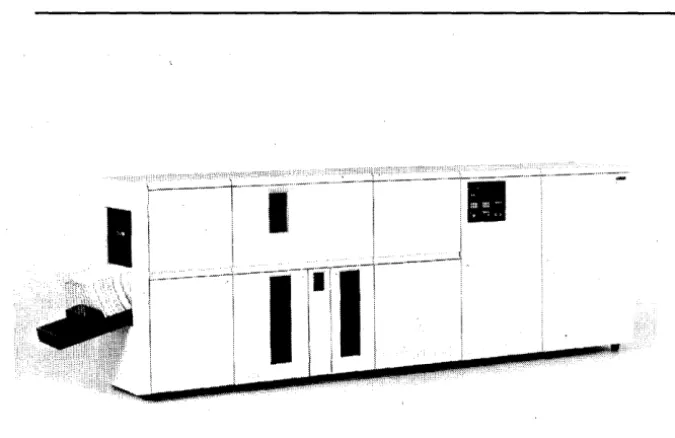
The IBM 3800 Printing Subsystem (Figure 1) is a nonimpact, high-speed, general-purpose system printer that uses an electrophotographic technique with a low-powered laser to print on single-ply computer output paper.
I
I
I,
II
Figure 1. The IBM 3800 Printing Subsystem
The 3800 is designed to print faster and provide more features than current impact printers and to provide compatibility for user programs that have previously used impact printers. It also provides easy-to-use programming interfaces for its functions and features. Among these features are:
• Character generation storage is provided for printing 128 graphic
characters (two character sets). As an option, character generation storage for an additional 127 characters is available. Printing speed is independent of the number of characters being used.
• Any two of 20 different character sets (including 10-, 12-, and 1S-pitch and 1S-pitch condensed sets) can be used, and these can be changed between data sets or intermixed on a page, without operator intervention. With the optional additional character generation storage, up to four character sets can be used when printing each data set.
• Graphic character modification allows the substitution or extension of graphic characters in an already-defined character set.
• Multiple copies are printed on single-ply paper, with ~very copy an original, eliminating the need for multiple-ply paper and subsequent deleaving.
• Copy modification permits printing of predefined data or suppressing the printing of selected data on one or more copies.
[image:13.621.221.559.147.366.2]How the 3800 Prints
• The optional Burster-Trimmer-Stacker bursts the fanfold output, trims 1/2 inch (12.7 mm) from each edge, and stacks the sheets in groups so that individual jobs can easny be identified and removed.
• Forms overlay permits printing of forms as data is being printed, thus reducing the need for preprinted forms.
• The mark form feature permits marking the horizontal perforations between pages to simplify job separation.
As long as there is sufficient data to print, the 3800 prints at a constant high speed. It can process, for example, 1000 II-inch long pages in approximately six minutes of continuous printing, regardless of the number of lines per page.
The 3800 Printing Subsystem operates under the OS/VS2 SVS operating system via a channel' attachment, and can be added to a system configuration with an mM System/370 Model 145, 148, 155-11, 158, 158-2 (in Japan), 158-3, 165-11, 168, or 168-3, or System/370 3031, 3032, or 3033 Processor. A 3800 Subsystem may be attached to a System/370 Model 135 or 138 via RPQ S00338.
The output writer controls the setup and use of the 3800 and can reassign the printing of data sets between impact printers and the 3800. If the printing requires special features unique to the 3800, the operating system ignores the JCL keywords specifying these features when the job is reassigned to an impact printer.
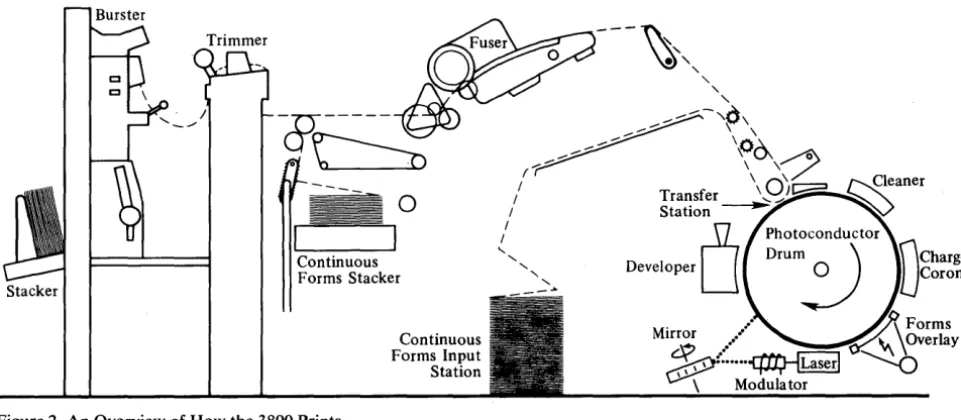
Data to be printed is transmitted one line at a time from the processor to the 3800 where it is stored in an internal page buffer. As each page is completed, it is exposed by the modulated beam of a low-powered laser onto the
photoconductive surface of a rotating drum, thereby creating a latent image of the page to be printed. The latent image is coated with toner (a thermoplastic material impregnated with lampblack) and at the transfer station the toned image is transferred from the drum to the paper. The paper then passes through the fuser, which fuses the toned image into the paper. Meanwhile, the surface of the drum is cleaned and reconditioned for following exposures. If
there is then sufficient data in the page buffer to print another page, printing continues without stopping the paper motion. Forms can be printed with the data by flashing the image of a forms overlay negative onto the drum.
Burster
Stacker
~---~"
-n---&
U~-..
~/---~~~\
---
'00-o \ , = : 0 ""'---- ", \~
--_
-
0
/
/
Transfer' 0 ' /
\ .. j~~leaner
/ Station ~
Continuous Forms Stacker
Continuous Forms Input Station
[image:15.618.96.577.65.275.2]/
U
Photoconductor... Drum
0)
nCharge_'::. Developer
J
IlJcoronaMirror....
./J\
~
orms•• ~" \ Overlay
~:.::
...
~~Modulator
Figure 2. An Overview of How the 3800 Prints
To further understand how the 3800 prints, you should understand the terminology used and the relationship between the 8-bit character data code (usually an EBCDIC code) transmitted to the 3800 and the graphic character that prints. The following list gives some of the terms involved:
The Term and its Definition
character:
*
A letter, digit, or other symbol that is used as part of the organization, control, or representation of data. A character is often in the form of a spatial arrangement of adjacent or connected strokes.character set:
*
A set of unique representations calledchar~cters, for example, the 26 letters of the English alphabet, 0 and 1 of the boolean alphabet, the set of signals in the Morse code alphabet, the 128 characters of the ASCII alphabet.writable character generation module: A 64-position portion of the 3800's character generation storage that holds the scan elements of one character set. There are two WCGMs in the basic 3800, and optional added storage provides two more.
What It Is in the 3800
The scan pattern that modulates the laser beam exposing the graphic character onto the photoconductor.
The scan patterns for each IBM-supplied set of a maximum of 64 graphic characters reside on a read-only flexible disk in the 3800. (In this book, only IBM-supplied character sets are referred to as "character sets.")
The WCGM is used for generating the printed characters from their scan patterns.
character arrangement: An arrangement Character arrangements are represented in composed of graphic characters from one or the 3800 by character arrangement tables. more modified or unmodified character
sets.
character arrangement table: A table, including a 256-byte translate table that translates the user's data code to the 3800' s control electronics code, and identifiers for up to four character sets and graphic character modification modules to be used.
*
American National Standard definitionHow a Character is Prlnted
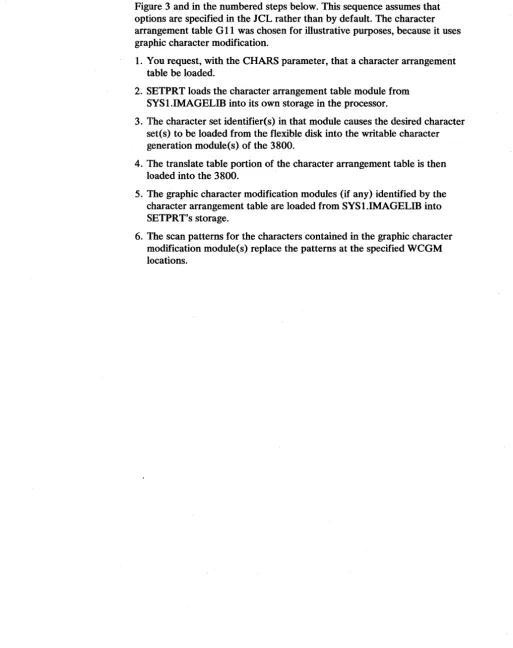
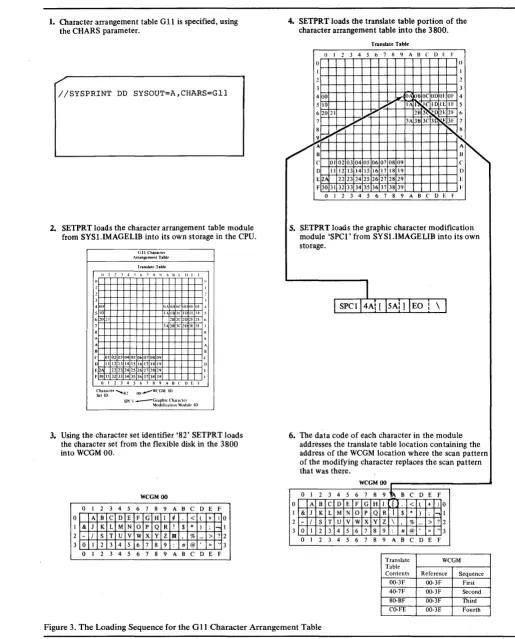
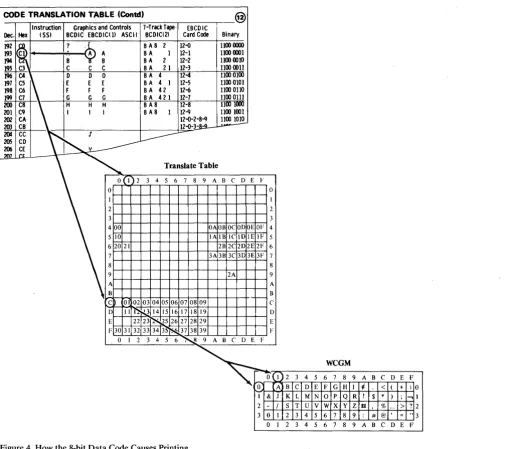
[image:16.618.45.559.92.741.2]The sequence of events that prepare the 3800 for printing is described in Figure 3 and in the numbered steps below. This sequence assumes that options are specified in the JCL rather than by default. The character arrangement table G 11 was chosen for illustrative purposes, because it uses graphic character modification.
1. You request, with the CHARS parameter, that a character arrangement table be loaded.
2. SETPRT loads the character arrangement table module from SYSl.IMAGELIB into its own storage in the processor.
3. The character set identifier(s) in that module causes the desired character set(s) to be loaded from the flexible disk into the writable character generation module(s) of the 3800.
4. The translate table portion of the character arrangement table is then loaded into the 3800.
5. The graphic character modification modules (if any) identified by the character arrangement table are loaded from SYSl.IMAGELIB into SETPRT's storage.
1. Character arrangement table GIl is specified, using the CHARS parameter.
//SYSPRINT DD SYSOUT=A,CHARS=Gll
2. SETPRT loads the character arrangement table module from SYS1.IMAGELIB into its own storage in the CPU.
(;11 (,harac.:II.'r Arrang,emt'nl Tabh.'
I"ranslall'Table
II I J", S h 7 X I) .. \ Ii ( I) I I
400 OAOHo("ODtll' 01 .t
510 1,.\ II IC II> 110 II· -' 62021
H38.lC31.1E31
C O l 02 03 04 05 06 07 OS 09
l) II 12 13 14 15 16 17 18 19 E 2A 22 23.24 25 26 27 28 29 F 30 ) I 32 33 34 35 36 37 38 39
o I 2 3 4 5 6 7 S 9 A 8 C () E I· ~ta;;;:ler ... 82 OO.--WCGM III
SP<'! .._____Graphic Charal.:tcr
Modification Moduk ID
3. Using the character set identifier '82' SETPRT loads the character set from the flexible disk in the 3800 . into WCGM 00.
WCGM 00
o I 2 3 4 5 6 7 8 9 ABC D E F
o A B C D E F G H I ¢ < ( + 1 0
& J K L M N 0 p Q R ! $ * ) ; ...,
- / S T U V W x y Z tl % - > ? 0 I 2 3 4 5 6 7 8 9 : # @ , = " o 1 2 3 4 5 6 7 8 9 ABC D E F
4. SETPR T loads the translate table portion of the character arrangement table into the 3800.
Translate Table
0 I 2 3 4 5 6 7 II 9 ABC D F I·
() ()
1 I
2 2
3 3
400 rl OAI9B O(,OD OE OF 4 5 10 ~." IAI~ I(,ID IEIF 5 620 21 oJ'" 2H 2t.: ~ 2E 21' 6
7 ~ 3A3B 3C 3~ ~3F 7
8
"
' - I I9,
"
/~
~'"
(' 01 02 0304 OS 06 0708 09D II 12 13 14 15 16 17 18 19 D E 2A 22 23 242S 2627 2829 E
F 30 31 32 33 34 35 36 37 38 39 I:
0 I 2 3 4 S 6 7 8 9 ABC D E I'
5. SETPRT loads the graphic character modification module 'SPCl' from SYS1.IMAGELIB into its own storage.
I
SPCl 4Al [ SAl] lEO I
\
I
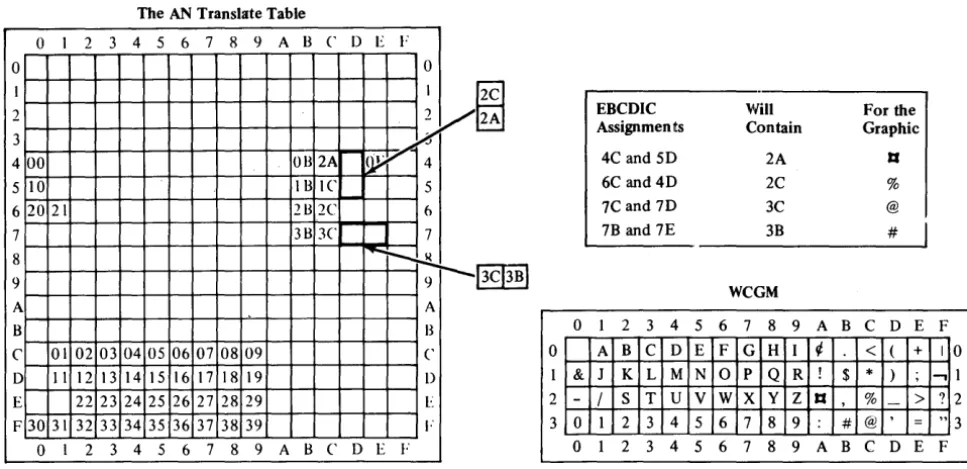
6. The data code of each character in the module addresses the translate table location containing the address of the WCGM location where the scan pattern of the modifying character replaces the scan pattern that was there.
WCGM 00
I
0 I 2 3 4 5 6 7 8 9 t~ B C D E F 0 A B C D E F G H 1 ( < ( + 10
I & J K L M N 0 p Q R I $ * ) ; ...,1 2 - / S T U V W x y z \ % - > ? 2
3 0 1 2 3 4 5 6 7 8 9 : # @ = " 3 0 1 2 3 4 5 6 7 8 9 A B C D E F
Translate WCGM Table
[image:17.613.50.565.56.695.2]Contents Reference Sequence 00-3F 0O-3F First 40-7F 0O-3F Second 80-BF 0O-3F Third CO-FE 0O-3E Fourth
CODE TRANSLATION TABLE (Contd) @
Instruction Graphics and Controls HrackTape- EBCDIC Dec. Hex (SS) BCDIC EBCDIC( II ASCII BCDIC(2) Card Code Binary 192 ?
~
BA8 2 12-0 1100 0000 193Cl
I'
-. A BA 1 12-1 1100 IXXlI 194 B B BA 2 12-2 1100 0010 195 C3 C C C BA 21 12-3 1100 0011196 C4.
~
0 0 0 BA 4 12-4 1100 0100197 C5 E E E BA 4 1 12-5 1100 0101 198 C6 F F F BA 42 12-6 1100 OUO 199 C7 G G G B A 421 12-7 1100 om
200 C8
\
H H H BA8 12-8 1100 llXXl201 C9 I I I BA8 1 12~ 1100 1001 202 CA 12-o-2-8~ ~
203 CB
12-0-3:8:9-204 CC
tl
J L---205 CO206 CE y
207 rt
Translate Table
0(1) 2 3 4 5 6 7 8 9 A B (' 0 E F
0 0
I I
2 2
3 3
400 OA OB OC 00 OEOF 4
5 10 IA IE 1(' 10 IEIF 5
62021 2B 2C 20 2E 2F 6
7 3A 3B 3C 303E 3F 7
8 8
9 2A 9
A A
B B
C~ 01 02 0304 0506 0708 09
. _ ;
-('
0 II~ ~ 14 15 16 17 18 19 0 E 22 23 ~ 7.5 26 27 28 29 E F 30 31 32 33 34 3~~ 37 38 39 F
0 I 2 3 4 5 6~ 9 A B (' 0 E F
WCGM
~-Ol
2 3 4 5 6 7 8 9 A B C o E Fo A B C o E F G H I ¢ < ( + 10 I & J K L M N o p Q R ! $ * ) ~ ...., I 2 - / S T U V W x y Z tI % -- > ? 2 3 0 I 2 3 4 5 6 7 8 9 : # @' = " 3 0 I 2 3 4 5 6 7 8 9 A B C 0 E F
Figure 4. How the 8-bit Data Code Causes Printing
[image:18.615.36.542.72.522.2]OPTIONAL FEATURES OF THE 3800
Optional features for the IBM 3800 Printing Subsystem are:
• A Burster-Trimmer-Stacker
• Additional character generation storage
• A two-channel switch
Burster-Trimmer-Stacker
I
The Burster-Trimmer-Stacker can be added to the base machine in order toi produce individual sheet output. The trimmer removes 1/2 inch (12.7 mm)
from each edge of the form. The form is then fed to the burster, which separates the continuous forms into individual sheets. These sheets are then moved to the stacker.
The output from each data set is offset from that of the preceding data set in the stacker. Copies and groups of copies are also offset. The programmer can request, through J CL, that the job output go to the Burster-Trimmer-Stacker or to the continuous forms stacker (see "How to Burst and Offset Stack Output" in the "Using the 3800" chapter). The operator must thread the paper into the Burster-Trimmer-Stacker when he receives the message to do so.
Additional Character Generation Storage
The character generation storage in the basic 3800 is sufficient for 128 graphic characters-two character sets. Character generation storage for two more character sets can be added. Since the data code X'FF' is reserved to indicate a non-printable character, the last position of the added storage cannot be used and the maximum capacity with the added storage is 255 characters.
Two-Channel Switch
A two-channel switch is available as an optional feature for attaching the 3800 via two channels to two separate processors. The switching is done manually via the interface enable/disable switches on the 3800. Only one channel interface can be enabled at a time.
With the two-channel switch installed, a dynamic switch feature can be added that allows both channel interfaces to be enabled at the same time. Selection of the interface to be used is determined by programming. The'dynamic switch feature allows the 3800 to be attached to two channels of a single processor and provides alternate path capability. (Note: The alternate path support is not used if the 3800 is connected to byte multiplexer channels.) The dynamic switch feature also allows the 3800 to be attached to two processors in a MP environment and allows both processors, one at a time, to access the 3800, thus providing alternate path capability. (Note: For MP systems this dynamic two-channel switch configuration is recommended because it reduces potential I/O supervisor overhead in accessing the 3800.)
PLANNING FOR THE 3800'
Overprinting
On the mM 3800 Printing Subsystem, most of the jobs you are currently printing on your IBM 1403 or 3211 can be printed without change. Because of the differences in the way the 3800 prints, there are new things you can do with your 3800, and there are some incompatibilities with impact printers. This chapter describes the thing~ you should consider-both the new features and the incompatibilities-when planning for the 3800.
Because printing on the 3800 is done by transferring images to the paper from a constantly revolving drum, overprinting cannot be done. Overprinting on an impact printer requires stopping the paper in a fixed position (that is, no carriage movement) while two or more lines of data are printed in the same line space. This results in having two or more sets of printed characters superimposed one on the other (or one set superimposed on itself, for boldface printing).
While the 3800 cannot create multiple images at the same print location (except for characters with underscores), it can merge lines of nonconflicting data into a single line before exposing the resulting line onto the moving drum. (Nonconflicting data lines contain either blanks or the same data characters as those in the corresponding positions of previously transmitted lines.)
The following two examples of frequently-used impact printer applications of overprinting are included to indicate what the results would be on the 3800.
• Boldfaced printing-the same data is printed on an impact printer more than once in the same position to emphasize it with a heavier and darker image. Since the data to be superimposed is identical, the 3800 prints it with no special emphasis in terms of contrast or thickness to make it stand out against other data. The user may, however, design boldface characters and load them into the printer by means of the graphic character
modification feature.
Underscoring
Folding
The 3800 prints with underscores using either of two methods:
• The 3800 has a built-in underscore capability. When an underscore and another printable character are to be printed in the same character position on a page, the 3800 generates and prints an underscore when it prints the character .
• Six underscored character sets (in Gothic and Text) are supplied.
Using the built-in underscore capability requires transmitting the output data lines containing the character to be underscored and the underscore
separately over the channel to the 3800. Using the appropriate underscored character set permits transmitting one line rather than two, with a resulting saving in channel use and transmission time. The use of an underscored character set, however, may require additional character generation storage when underscored printing is intermixed with nonunderscored (for example, when Text 1 and 2 and underscored Text 1 and 2 are used together), and requires specifying the desired underscored character arrangement table name in the JCL CHARS parameter. The amount of underscoring required, then, should be the primary factor in determining which of the two methods is used.
Folding is a technique used in impact printers with the Universal Character Set (UCS) feature to allow printing in uppercase graphic characters when lowercase graphic characters are called for and not available on the print train. Activating the Fold function on an impact printer is done by issuing the Fold channel command, while 'deactivating the same function is done by issuing the Unfold channel command. While the 3800 does not recognize the Fold and Unfold channel commands, using the GF10, GF12, GF15, or GFC character arrangement table provides the folding effect (ignoring'the first 2 bits of each character's 8-bit data code). If character arrangement tables with the folding feature for other than Gothic characters are desired, they can be provided by the user.
Compatibility with Print Trains
The 3800 provides compatibility for users of other IBM printers by providing
-"
character arrangement tables that correspond with and have the same names as the standard 1416 and 3216 print trains (as used on IBM 1403 and 3211 Printers). Desired groups of these character arrangement tables can be specified during system generation. In addition, new character arrangement tables are provided, as a Basic group, to include the characters found in various print trains and to provide for different pitches, underscoring, and the folding effect.
The 3800 programming support does not provide character arrangement tables equivalent to nonstandard 1416 and 3216 print trains. Any program using a nonstandard print train must have a user-defined character
Channel Command Considerations
Paper Considerations
Channel commands direct a channel, control unit, or device to perform an operation or set of operations. Channel commands for the 3800 are listed in Appendix E.
Certain channel commands are device dependent and cannot be used interchangeably among printers. The following is a complete list of channel commands that are valid for either the IBM 1403 or IBM 3211 Printer but are
not accepted by the 3800:
1403
Diagnostic Write Diagnostic Data Read Diagnostic Check Read Raise Cover
UCS Load (without folding) UCS Load (folding) UCS Gate
3211
Load UCSB Fold Unfold Read PLB Read UCSB Read FCB Check Read Diagnostic Write Diagnostic Gate Skip to Channel 0 Raise Cover
The 3800 uses continuous single-ply fanfold forms with both edges punched for tractor feeding, and perforations between the pages. The paper may be of various light pastel colors; it can be preprinted, have ruled lines
Or
color striping, or can be blank.The sizes and basis weights of paper that can be used in the 3800, and the maximum number of characters than can be printed on each width at each of the three available pitches, are given in "Appendix D: Paper Sizes, Weights, and Maximum Characters per Line."
See the Forms Design Reference Guide for the IBM 3800 Printing
Subsystem for specifications for the paper and forms that are acceptable for
printing in the 3800.
Forms Design Considerations
The 3800 Printing Subsystem can use preprinted forms, or can create its own forms as it prints the data, by using:
• The forms overlay feature to print forms from previously-prepared negatives
• The Format character sets to print squares; rectangles, and column rules
• The copy modification feature to print headings, legends, explanatory remarks. and similar data on copies of a report, as well as to suppress certain data on certain copies
For information on how to request flashing of forms, refer to "How to Flash Forms" in the "Using the 3800" chapter. Performance considerations when using forms overlay are discussed later in this chapter under "Performance Considerations." For information on designing and making or obtaining forms overlay negatives, see the Forms Design Reference Guide for the IBM 3800
Printing Subsystem, listed in the "Preface."
Information on using Format characters is in the "How to Use Format Characters" section. Copy modification is discussed under "How to Modify Copies."
Forms Control Considerations
Page Margins
The 3800 uses a forms control buffer (FCB) to control the vertical format of the page, as does the IBM 3211 Printer. The format of the 3800 FC~,
however, is different from that of the 3211.
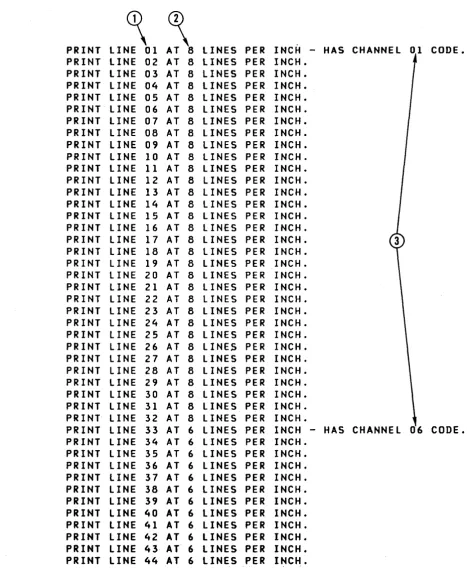
The 3800 can print with a vertical line spacing of either 6, 8, or 12 lines per inch or an intermix of any of these on the same page. The 3800 FCB must describe the exact length of the forms being printed. Further information on this topic is under "How to Specify Forms Control."
The 3800 reserves the top and bottom 1/2 inch of each page for accelerating and decelerating paper when it is necessary to start or stop printing. If current programs are designed to print in these areas of a page, either the printing format or the FCB definition must be changed.
For example, only 10 inches on an II-inch long page can be used for printing with the 3800. Therefore, if a program must print 61 lines per page on an II-inch long page, it cannot do so using a line spacing of 6 lines per inch for the whole page. The FCB must be redefined to obtain 61 printable lines at various vertical line spacings, or all at 8 lines per inch, in order to fit in the 10-inch printable length. Jobs that in the past required printing across page boundaries (such ~s long graphs, or computer-produced contour or
demographic maps) cannot be produced in the same way on the 3800.
Left.and right page margins must allow at least 1/2 inch (12.7 mm) between the page edge and the ends of the print line, except for the widest paper size. Because the maximum printable line width is 13.7 inches (348 mm), the right margin on 14-7/8 inch paper is 0.675 inch. For a 3800 using ISO paper sizes, the right margin is 17.3 mm for 378 mm paper.
FCB Change for Users of ISO Paper Sizes
Output Writer Considerations
SYSOUT Classes
For further information on the output writer, see the "Job Management" chapter of OS/VS2 SVS Independent Component: IBM 3800 Printing
Subsystem System Information.
Any interruption for operator action (such as changing forms) reduces the overall throughput of the 3800. To minimize operator intervention, a separate SYSOUT class can be established for each type of printing that requires special operator action. With the 3800, three setup operations require explicit operator action:
• The changing of forms
• Inserting a forms overlay frame
• Threading paper in the burster or continuous forms stacker
Additional SYSOUT classes can be defined based on priority, print load, output data set sizes, etc.
SYSOUT Data Set Block Size
Spool Space Allocation
For any output device type, the output writer runs more efficiently when processing SYSOUT data sets that have larger blocking factors. Cataloged procedures, programs, and jobs tha~ are run repetitively should specify relatively large blocking factors for SYSOUT data sets.
I When the output requires an average of one or two copies, the 3800 can print
I SYSOUT data sets as fast as or faster than an impact printer. In that case, the
, spool space allocation made for impact printers is adequate for the 3800 , printer. However, if a large number of copies is planned, it could take the
i 3800 more time to print them (since it prints one copy at a time) than it
i would an impact printer using multi-ply forms. Spool saturation could result if
i the 3800 uses more time than an impact printer to free spool space. In that
i case, additional direct-access space should be provided for SYSOUT data [ sets.
Writer Procedure Considerations
IBM supplies two writer procedures, WTR and WTR3800. Either one can be used for writing on any supported printer, punch, or tape drive. For increased function, flexibility, and efficiency, you may wish to modify them or add new ones.
Writer procedures can be used to provide defaults for certain characteristics when writing on a 3211 or 3800 printer. Temporary changes to these
characteristics for the life of a writer can be made by the operator in the Start command. On a 3211, the writer procedure (as overriden by the Start
Job Separation
Other things that are specified in a writer procedure are punching vs. printing (if on tape), SYSOUT classes to be processed, the job separator routine name, region size, address space type, control character type, record length, record format, and number of buffers. For a 3800 writer procedure, you may wish to have a logical record length large enough to accommodate a print control character, table reference character, and the maximum print line length of 204 characters. You may also wish to have more buffers for a 3800 than for impact printers and punches, due to its higher speed. The various procedure parameters greatly affect performance.
For further information on writer procedures, see the "Job Management" chapter of OS/VS2 SVS Independent Component: IBM 3800 Printing
Subsystem System Information.
The 3800 automatically marks the bottom of each page at the left margin. When the End-of -Transmission channel command is issued by the output writer after each job, copy (in page-number sequence), or copy group, this marking is changed from one vertical bar to two, and vice versa. If the output is going to the Burster-Trimmer-Stacker, each job, copy, or copy group also is offset from the previous one in the stacker.
If, in addition to this automatic marking, job separator pages are specified, the 3800 has a Mark Form channel command that can cause a row of vertical bars to be placed on the perforations between pages. The output writer issues this command for job separation on the 3800, since the 3800 cannot print a normal line (for example, asterisks) on the perforations. User-written separator routines can also use' this command.
The Mark Form command is supported only when the RECFM parameter specifies M (machine control characters). The command generates three or more copies (depending on the page size) of the page to be marked so that the marks always appear, regardless of the fold. This makes it unnecessary to transmit multiple copies of the job separator page. If no job separator page is used, a command to skip to a new page should always precede the Mark Form command so that copies of only the blank pages and not the data are
generated.
Reassigning Printing to Altemate Printers
The operator can reassign printing destined for the 3800 to an impact printer. There are some restrictions, however, that apply:
• If the UCS parameter is omitted, the output writer uses the character arrangement table name specified in the CHARS parameter (assuming it is also a valid print train name) as the name of the print train for an impact printer with the UCS feature. For example, CHARS=All is valid for both the 3211 and the 3800 printer. If more than one character arrangement table is specified, the first one is used. If no CHARS parameter is specified, the output writer recognizes a valid name specified in the UCS parameter as being the character arrangement table name for a 3800. See Figure 32 for the names of the IBM-supplied character arrangement tables.
• Both the CHARS and the UCS parameters can be specified on the output DD statement, to be used by the appropriate printer. In the above example, specifying CHARS=GS10,UCS=Al1 is valid for either a 3800 or a 3211,
but the special characters included in GS 1 0 that are not on an A 11 print train are printed as blanks on the 3211.
• Characters that cannot be printed by the impact printer (such as user-designed characters) are printed as blanks.
• Specification of features unique to the 3800 (such as FLASH for forms overlay) is ignored.
• Any group value subparameters of the COPIES parameter are ignored for an impact printer.
• Table reference characters, if any, at the beginning of data lines are not printed on the impact printer if OPTCD=J is specified.
• If the print line length exceeds the limit allowed by the impact printer, the line is truncated. For example, when CHARS = DUMP is specified, the maximum output line length is 204 characters. However, when printed on an impact printer, the output lines are truncated to the maximum line length of that printer.
• For jobs with specific forms control requirements, the alternate printer should have an FCB or a carriage control tape equivalent to that used by the 3800. For instance, if you are using the IBM-supplied FCB named STD3 (which prints 80 lines at 8 lines per inch on ll-inch-long paper) you can reassign the printing to a 3211 that has an equivalent FCB image. It is not possible to create an impact-printer FCB equivalent to a 3800 FCB that intermixes different vertical line spacings on a page.
High
Level Language Considerations
Considerations for High-Density Dumps
With the 3800, paper can be saved by changing either or both of the two printing dimensions:
• Increasing the number of characters per inch (the pitch) permits the use of narrower paper, or permits more data to be printed on one line.
• Increasing the number of lines per inch (changing the FCB), permits the use of shorter paper, or allows more lines of data to be printed per page.
The programming support for the 3800 provides two options for printing system dumps in condensed formats:
• By specifying the DUMP character arrangement table (using
CHARS=DUMP), dumps are printed in IS-pitch characters with each print line displaying 64 bytes of storage, rather than 32 bytes.
• By specifying FCB=STD3, 80 lines per page are printed at 8 lines per inch.
The use of CHARS = DUMP requires 14-7/8 inch wide paper (or 378 mm wide for a 3800 using ISO paper sizes). The use of FCB=STD3 requires II-inch long paper (see the section, "FCB Change for Users of ISO Paper Sizes" earlier in this chapter for information on redefining STD3 for a 3800 that uses ISO paper sizes).
Dumps can also be printed using IS-pitch characters to print 32 storage bytes per line, thus using narrower paper (9-1/2 inches wide, or 235 mm wide for a 3800 that uses ISO paper sizes), or using 8 lines per inch to print up to 60 lines on shorter paper (8-1/2 inches long, or 10 inches long for the nearest ISO paper size). Any desired combination of these formats can be used.
Information on requesting and reading high-density dumps is in OS/VS2
SVS Independent Component: IBM 3800 Printing Subsystem System Information. ABEND dumps are described in the "Debugging Guide" chapter of that book; information on requesting SNAP dumps is in the "Supervisor Services and Macro Instructions" chapter; and stand-alone and SVC dumps (available through the PRDMP facility) are covered in the "Service Aids" chapter.
When CHARS=DUMP is specified in VSl, be sure that your writer
Performance Considerations
The 3800 Printing Subsystem operates at a constant rate, moving paper at a nominal speed of 31.8 inches per second as long as data to be printed is available in the page buffer. The photoconductor on the drum surface is nominally 77 inches long. There is a 2-inch gap where the supply and takeup ends of the photoconductor material pass into reels mounted inside the drum. Since the image to be printed cannot be generated across the 2-inch gap, all the pages that can be printed in one revolution of the drum must fit into a 77 -inch length. Data must be available in the page buffer in time to print each successive page while the drum is revolving if maximum printing speed is to be maintained. A delay in filling the page buffer to complete the data for any page can result in deferring the printing of at least one page to the next length of photoconductor.
To illustrate, assume that ll-inch-Iong forms are being printed. Seven such forms can be printed in each 77-inch length of photoconductor per drum revolution. If there is just one instance when all the data for a page to be printed is not in the page buffer when the image is to be generated, only six forms can be printed in that revolution of the drum. If this occurs consistently during the printing of the data set, the 3800 performs at only 6/7 of its potential. .
The approximate formula PB-:-N, where PB is the number of bytes of available page buffer storage and N is as given in the following tables, can be used to estimate the maximum data content of a page that can be printed without performance degradation.
Page length (common-use sizes) in inches 3-1/2 5-1/2 7 8-1/2 11 Page length (ISO sizes) in inches 3 4 6 8 10 12
N, number of required pages in the page buffer when using f onns overlay 8
6 5
5
4
N, number of required pages in the page buffer when using f onns overlay 9 8 6 5 5 4
N, number of required pages in the page buffer when not using fonns overlay 2 2 2 2 2
N, number of required pages in the page buffer when not using fonns overlay 2 2 2 2 2 2
For example, for an II-inch page, the maximum data content is determined from the 52K-byte page buffer capacity as follows:
Fonns overlay utilized: Maximum page size in bytes (PB+4) 13,312
No fonns overlay: Maximum page size in bytes (PB+ 2) 26,624
reduction of768 bytes is required for a 3800 with the optional
Burster-Trimmer-Stacker attached .. · The amount of page buffer occupied by
copy modification data can be closely approximated by assuming 1 byte for every non.,.repetitive character (including blanks) in a line, 3 bytes for every set of four or more repeating characters in a line, and 6 bytes for each unique entry appearing on one or more copies. When using hardware underscore, an additional byte of storage is requITed for. each underscored character, and there is no consecutive character compreSSIon for the line~
To optimize performance, these general recommendations should be followed when planning for a 3800:
• Direct output to the 3800·from a problem program is not recommended since it is unlikely that a problem program can drive the 3800 at full speed. In addition, direct output would not provide for the enhanced page
recovery available with SYSOUT. Data to be printed by the 3800 should be assigned to SYSOUT data sets.
• To estimate the amount of storage required for a page of data, allow one byte per character printed. When four or more identical characters occur consecutively within a line, such as fill blanks at the end of the printable data line, only three bytes are required for each such compressed group. For example, a print line of 120 characters requires 123 bytes of page buffer storage. A page of printed output from the standard storage dump used in system installations consists of one line for the page number and 55 lines for the storage information. Because each of the storage data lines includes a few groups of repeated characters among the 120 that are printed, the page buffer storage is about 101 bytes per line rather than the 123 that might be expected. The data for an entire output page of 55 lines will occupy about 5600 bytes in the page buffer.
• It is recommended that the 3800 be attached to either a byte or a block multiplexer channel. Attachment to a selector channel is not recommended unless the channel is dedicated, because other devices on the same channel can be totally superseded when the 3800 is running. The 3800 work load should be added to the existing channel work load to help determine whether a byte or a block multiplexer channel is appropriate.
• The DASD unit(s) containing the spool volume(s) should have an access time that will not limit production of printed output. For example, an IBM 3330 or 3340 attached to the processor by a different block multiplexer channel than the 3800 should have a suitably fast access time, while a slower DASD device may not.
• An estimate of the approximate data rate can be made by using the number of characters (including imbedded blanks) to be printed on a page and the time it takes to print that length of page at 31.8 inches per second. For example, an II-inch page takes about 0.346 second~ to pass a point in the 3800. If each such page contains 3100 bytes, the channel data rate
required to maintain this printing would be 3100 divided by 0.346 or about 8960 bytes per second.
• To avoid I/O interrupts caused by using the channel 9 and 12 codes in the FeB, the application program can count lines to determine page size or line position on the page.
Data Security
• Further performance recommendations for using a 3800 with the system output writer are in OS/VS2 SVS Independent Component: IBM 3800
Printing Subsystem System Information.
• When printing at 12 lines per inch vertical spacing, the maximum single-copy printing speed when the 3800 is attached to a block
multiplexer channel, can be maintained if the approximate data limits in the following table are observed:
Common-use paper sizes ISO paper sizes
Maximum Maximum
Page length characters Page length characters
in inches per page in inches per page
3-1/2 5190 3 4530
5-1/2 7770 4 5830
7 9720 6 8400
8-1/2 11700 8 11000
11 14880 10 13600
12 16230
For a 3800 attached to a byte multiplexer channel, the listed limits should be reduced by about 28 % •
The 3800 contains several features for protecting the data in the page buffer from improper alterations or disclosures:
• Page buffer data cannot be read back into the processor using available channel commands.
• Residual data in the page buffer cannot be printed because page definition is destroyed after the last copy of a page has been exposed onto the photoconductor.
• Residual images on the photoconductor are removed by the cleaner assembly, which prevents reading the images on the photoconductor.
System Generation Considerations
The 3800 Printing Subsystem independent component can be added to your system through a full system generation or an I/O device generator. It is not supported as an output console device. The SYS1.1MAGELIB system data set is required for a system using the 3800.
The groups of character arrangement tables desired at your location (as shown in the first column of Figure 31 in "Appendix B: IBM-supplied Character Arrangement Tables") can be selected at system generation.
An optional channel capability, requested by using the OPTCI:IAN parameter of the 10DEVICE macro, can be requested only for a 3800 that has both the optional two-channel switch and the dynamic switch feature.
For more information on generating your system, see the "System
Generation" chapter of OS/VS2 SVS Independent Component: IBM 3800
SYSTEM PROGRAMMING FOR THE 3800
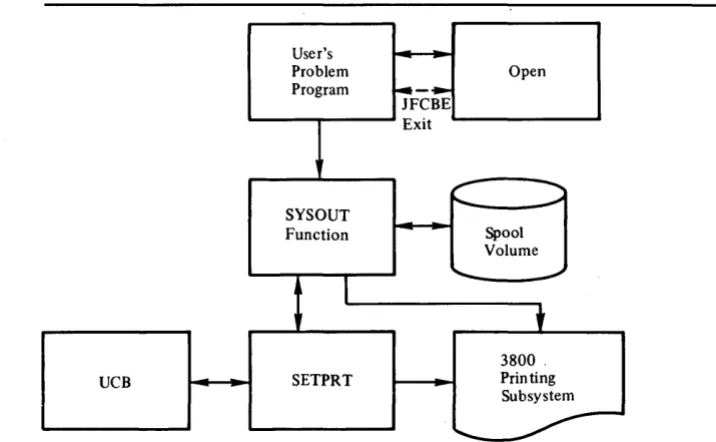
The IBM 3800 Printing Subsystem can be used either as a system output device or as a direct (that is, unit-record) output device. Figures 5 and 6 show the relationships of the various system functions that occur between the user and the 3800, for the system printer and the direct configurations,
respectively.
User's
Problem Open
Program ~-~
JFCBE Exit
~
-...
"'- ~ SYSOUT
Function Spool
Volume
I
' -
~t
3800 .
UCB SETPRT Printing
Subsystem
"'-
-Figure 5. An Overview of SYSOUT Processing to the 3800
User's
r-
ProblemI Program
I
I
t
JFClm ExitI
•
I
I
I Open
I
I
L ___
t
3800
UCB SETPRT Printing
Subsystem
"'-
-Figure 6. An Overview of Direct Processing to the 3800
The JCL parameters are discussed in the next section of this chapter and also
[image:33.613.207.565.168.389.2]OS/VS2 SVS Independent Component: IBM 3800 Printing Subsystem System Information.
The output writer is a key link between the user and the 3800 for SYSOUT processing. In the previous chapter, "Planning for the 3800," specific 3800-related considerations are discussed under "Output Writer Considerations. "
Another link for both SYSOUT and direct processing to the 3800, is SETPRT, which is discussed later in this chapter.
Following that, other sections of this chapter discuss "Defaults for JCL, SETPRT, and the 3800," and "The JFCB Extension and Exit."
Job Control Language
(JCL)'
The following JCL parameters can be used to define the output data set's requirements to the operating system. While many of these same parameters can be specified if using the SETPRT macro, specifying them in the JCL usually gives more flexibility.
The keywords and functions they perform are as follows:
BURST =
CHARS=
COPIES=
Whether or not the forms should be threaded into the Burster-Trimmer-Stacker for bursting.
The names of the character arrangement tables, which define the characters to be used in printing.
The number of copies of a data set to be printed, and/or the number of identical pages to be printed before printing the next group of identical pages.
FCB= The name of the FCB module to be used in the vertical formatting of the page, and if the format should be verified by printing of the FCB data. FLASH = The name of the forms overlay frame to be used, and how many copies are
to be printed with the overlay.
MODIFY = The name of the copy modification module to be used in modifying the data, and a table reference character for selecting which character arrangement table is to be used for printing of the modifying data.
OPTCD=J Specifies that each line of data contains a table reference character for selection of a character arrangement table to be used when printing that line. (This is a DCB subparameter.)
OPTCD=U Specifies unblock data check, allowing error conditions caused either by unprintable characters, or by trying to print multiple characters in one print position, to be sent to the host system. (This is a DeB subparameter.)
It may be desirable not to specify any of the keywords in either the JCL or in theSETPRT macro, and take either the output writer defaults or the 3800's machine defaults. For example, if the machine defaults are used, you get a Gothic 10-pitch character set and a folded character arrangement table. The FCB is 6 lines per inch to the length of the form, with the first print line printing on the first line allowable for printing and the last print line printing on the last allowable line. COPIES is equal to 1, BURST is equal to its last setting, MODIFY, FLASH, and OPTCD=J are ignored and Block Data Check is unchanged.
Some jobs may have simple requirements that can be taken care of by one or more keywords,·for instance:
What SETPRT Does
Who Uses SETPRT
• To print using uppercase and lowercase Text characters:
//PRINTER DD SYSOUT=A,CHARS=T11
• To print high-density system dumps:
//SYSABEND DD SYSOUT=A,CHARS=DUMP
• To print data in IS-pitch Gothic characters, using a folded character arrangement table:
//PRINTER DD SYSOUT=A,CHARS=GF15
• To print three copies of a data set:
//PRINTER DD SYSOUT=A,COPIES=3
• To create a form by projecting an image from a forms overlay frame named "Tops":
//PRINTER DD SYSOUT=A,FLASH=TOPS
• To alter a copy of a data set with a copy modification module named "Spot":
//PRINTER DD SYSOUT=A,MODIFY=SPOT
• To alter a copy of a data set with a copy modification module named "Line" that uses an underscored Gothic 10-pitch character arrangement table named "GUIO" which is the second of two character arrangement tables names:
//PRINTER DD SYSOUT=A,CHARS=(GS10,GU10),MODIFY=(LINE,1)
• To print using the OPTCD=J subparameter in your DCB, where each line of data is coded with a table reference character to select one of the character arrangement tables specified with the CHARS keyword:
//PRINTER DD SYSOUT=A,CHARS=(GS10,GS15),DCB=(OPTCD=J)
Most of these jobs will run when allocating to the 3800 directly (that is, changing the SYSOUT=A to UNIT=3800). One difference arises, however, when multiple copies that require retransmission of the data set are requested using the COPIES parameter. Such retransmission must be done by the user, when allocating direct. See "How to Request Multiple Copies" for more details.
SETPRT is the operating system facility that sets selected control information in the 3800 Printing Subsystem and maintains information about the
subsystem.
The possible users of SETPRT are:
• Open, which uses SETPRT to reset the 3800 to the subsystem defaults and to initially set the printer with control information as presented in JCL (as modified by JFCBE or DCB Open exit routines).
• Problem programs, which can use SETPRT only when allocating the 3800 as a direct device (that is, specifying UNIT=3800 or device address).
The following explanation of SETPRT is divided into two parts: the SETPRT macro instruction and the SETPRT supervisor call (SVC 81).
The SETPRT Macro Instruction
The SETPRT macro instruction allows specification of the following:
BURST = Whether or not forms are to be burst or stacked without bursting CHARS = Up to four names of character arrangement tables
COPIES= The total number of copies to be printed
COPYNR= The starting copy number, for copy modification reference
FCB= The FCB module name, and whether the module needs verification
FLASH = The forms overlay frame name, and the number of copies to be flashed with the forms overlay
INIT= Whether or not to initialize the printer to hardware defaults
MODIFY = The copy modification module name, and the table reference character for the copy modification data.
OPTCD= Whether or not data checks should be blocked
REXMIT = Whether or not data is being retransmitted
The SETPRT macro instruction builds a parameter list from the user-supplied parameters, establishes address ability to the list, and calls the SETPRT SVC. For further details on the SETPRT macro instruction and its specification, see the "Data Management" chapter of OS/VS2 SVS Independent Component:
IBM 3800 Printing Subsystem System Information.
The SETPRT Supervisor Call
The SETPRT SVC accesses the following modules from SYSl.lMAGELIB (or the first three types from the user's storage, in the event they are there) and puts them into its storage area:
• Forms control buffer modules
• Copy modification modules
• Character arrangement table modules
• . Graphic character modification modules
The SVC then builds channel programs to load data from these modules into the 3800's buffers.
After the character sets and translate tables have been loaded, the SETPRT SVC checks the character arrangement table modules to see if any graphic character modification modules are needed. If so, it accesses the modules and builds the necessary channel p:rOf,~uriS t::, load tb.,D modules and modify the characters. Each modifying character carries its own index into the translate table. The 3800 then modifies the appropriate location in the proper WCGM, pointed to by the contents of the translate table location.
The SETPRT SVC loads the data from the forms control buffer module and copy modification modules into the 3800's buffers. It also, when requested, sends the messages to the operator to insert a specified forms overlay frame and to thread the Burster-Trimmer-Stacker or the continuous forms stacker.
Defaults for JCL, SETPRT, and the 3800
The output writer and the Open executors use the parameters that are specified in the J CL to control the functions requested. When these
parameters are not specified in the JCL, defaults are used as specified in the output writer, the SETPRT macro, or the 3800, in that order. Figure 7 indicates what parameters can be specified in the JCL (for both SYSOUT and direct allocation) and in the SETPRT macro. The defaults and special
conditions are aiso noted.
The output writer defaults for CHARS, BURST, FLASH, and FCB are specified in the Writer procedure started, or in the actual Start Writer command. If the default is not specified, the machine defaults are used.
For HASP, the defaults are set at HASP initialization time.
The JFCB Extension and Exit
When keywords unique to the 3800 are specified on the DD card, a JFCB Extension (JFCBE) is generated by the operating system to carry the requested setup information. This control block is conditional and does not exist if only the keywords UNIT = 3800, COPIES without group value specifications, or FCB are indicated. When a JFCBE is created, its existence is indicated by bit JFCBEXTP in the main JFCB. The JFCBE contains the requested 3800 setup requirements as indicated in your JCL, with the
exception of FCB information, which appears in the main JFCB as it does for other printers that use an FCB.
Your program has the opportunity to examine or modify the JFCBE during the Open JFCBE exit. This exit is similar to the DCB exit and is taken no matter what device is allocated or whether a JFCBE exists; you specify in the DCB the address of an exit list and in that list request a type X'lS' exit (refer to the "Data Management" chapter of OS / VS2 SVS Independent
Component: IBM" 3800 Printing Subsystem System Information for details
concerning l:lser exits). If you require both a DCB and a JFCBE exit, you must use the JFCBE exit request 'to accomplish both (both cannot be separately specified in the exit list, as only the first· occurrence of either is taken ,during Open processing). For the format of the JFCBE, see the "System Data Areas" section of OS/VS2 SVS Independent Component:
Parameters
CHARS= table name table name table name table name
COPIES= nnn
group value 1 group value 2
group value n
FLASH= overlay name count
MODIFY = module name trc
FCB= FeB id
VERIFY BURST=YIN OPTCD=U
OPTCD=J (DCB subparameter) Notes:
Can be specified in JCL
SYSOUT Direct
Yes Yes
Yes Yes
Yes Yes
Yes Yes
note 2 note 3
Yes Yes
Yes note 3
Yes
Yes Yes
note 6 note 6
Yes Yes
note 7 note 7
Yes Yes
Yes Yes
Yes Yes
note 10 note 10
Yes Yes
Can be specified InSETPRT macro Yes Yes Yes Yes note 4 Yes note 6a Yes note 7 Yes Yes note 9 note 11
3800's Hardware Defaults note 1 note 5 note 12
note 12
note 8
note 13
note 14
1. The printer provides the 10-pitch Gothic character set with one folded character arrangement table referencing all 64 positions in the WCGM.
2. If group values are specified, the total of all group values replaces the value nnn.
3. If nnn is specified, it is ignored for direct output. Only the first group value is used. If the user specifies only nnn and no group values, a value of 1 is used.
4. Only one group can be specified at a time. 5. One copy is printed, if nothing is specified.
6. If the· overlay name is specified and the count is not specified, all copies printed are flashed.
6a. In SETPRT, if the overlay name is specified and the count is specified as zero, the operator is asked to insert the overlay frame but no copies are flashed.
7. If the copy modification module name is specified, and the trc (table reference character) is not, SETPRT assumes a tre of
O. .
8. The default FCB is 6 lines per inch, tothe length of the form, with a channell code at the first printable line. The first half inch at the top of the form, and the last half inch at the bottom of the form are not available for printing.
9. The default is BURST=N (no bursting), if not specified.
10. Only the unblock data check can be specified as a sub parameter of the DCB parameter. If unspecified, the default is "block data check. "
11. Either the block data check or the unblock data check can be specified. The default, if not specified with the SETPRT macro, is "block data check. "
12. This function is inactive unless specified in JCL or SETPRT.
13. The "hardware default" for bursting is wherever the forms have been threaded by the operator. 14. The OPTCD=J subparameter is meaningless unless specified in JCL.
[image:38.613.40.525.62.325.2]Restart Processing
When control is given to your exit routine, registers are as follows:
Register
o
Contents
The address of a copy of the JFCBE in user storage area. If no JFCBE exists, this register contains zero.
The address of the DCB being processed.
2-15 Standard user exit contents.
The user st.orage area pointed to by register 0 also contains the 4-byte FCB module name, obtained from the JFCB and placed following the 176-byte JFCBE copy.
If the user copy of the JFCBE is modified during an exit routine, this should be indicated by turning on bit JFCBEOPN (X'80' in JFCBFLAG in the JFCBE copy). On return to Open, this bit indicates whether the system copy of the JFCBE is to be updated. The FCB module name copy in the user area, however, is used to update the JFCB, irrespective of the bit's setting.
Because the 3800 setup requirements indicated initially on JCL may have been altered as a result of an Open JFCBE exit, Restart operations
interrogate the system copy of the JFCBE, if one exists, to determine if the bit signifying that you have modified the JFCBE during Open is on. If
USING THE 3800
The OS/VS2 SVS operating system supports the operation of the IBM 3800 Printing Subsystem via a channel attachment. You specify JCL DD statement parameters to control the functions of the 3800. The operating system initia