EPiC Series in Computing
Volume 58, 2019, Pages 17–26Proceedings of 34th International Confer-ence on Computers and Their Applications
Virtual Reality Physics Lab
Andrew E. Munoz
1, Christopher J. Lewis
1, Nicholas Bolling
1, William
Zandbergen
1Connor Scully-Allison
1, Vinh Le
1, Sergiu Dascalu
1, Benjamin Brown
1Department of Computer Science and Engineering University of Nevada, Reno
Reno, Nevada 89557
{amunoz24, christopherlewis, nicholas.bolling, wzandbergen, cscully-allison, vle}@nevada.unr.edu
Abstract
Virtual Reality has become a popular entertainment medium; however, it could also potentially be useful in creating interactive experiences that act as educational tools for students. Through the use of this technology, virtual experiences facilitate the learning of various concepts through interactive simulation. This project focuses on the development of a virtual reality application that can be used to help teach different physics concepts to young students, in engaging virtual environments and further promote STEM education principles. Each level developed for the game instructs on concepts such as force, acceler-ation, velocity, position, etc. This paper will discuss both the specifications and design of the project as well as discuss the initial demo results and future development.
1
Introduction
Virtual Reality (VR) is an emerging technology that has grown exponentially in the last few years. On the forefront of virtual interactive hardware are virtual reality headsets and their controllers. Products such as the HTC Vive, Oculus Rift, and Playstation VR provide immer-sive experiences that outperform what computer monitors can provide. Widely used in the entertainment industry as a means to experience games and cinema in new ways, VR can also be used as a tool for educational purposes. Our team has designed a project that acts as both a game and educational experience that students can use to learn about various physics concepts. This software not only helps users learn about physics through an interactive experience but also helps to promote STEM (Science, Technology, Engineering, Mathematics) [6] education principles.
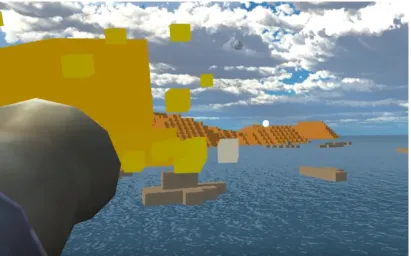
Figure 1: Screenshot displaying the in game shooting animation. The player will be able to shoot from a canon and will see a red and orange cloud animation indicating a shot has been fired.
has written on the subject and recording the details in notes for later use. Labs that are associ-ated with classroom lectures address the remaining two forms of VARK learning. Students are given the opportunity to see what was being described in their lecture while interacting with the lecture material. Our project will address all four forms of learning through an experience developed using the Unity game engine and the HTC Vive headset.
This paper is structured in the following manner. Section 2 goes over some projects and studies that relate to virtual reality in education; Section 3 provides information on the software specification used; Section 4 describes in detail the design and architecture; Section 5 presents the developed prototype; Section 6 details the feedback and results obtained from the demo; and Section 7 presents our conclusion and details our plans for future developments.
2
Related Works
There have been a few applications as well as studies in recent years that combine Virtual Reality technology and education. Virtual Reality technology is fairly new and therefore still has significant room for growth. Due to Virtual Reality’s ability to engage and stimulate the user in a way no other format can, it makes it an obvious tool for educational use as it keeps the user immersed and focused on the task that is presented to them.
Virtual Reality Physics Lab Andrew E. Munoz, Chrisopher J. Lewis, et. al.
was designed to run in the CAVE, which is a multi-person room sized virtual reality system developed at the Electronic Visualization Laboratory (EVL) [10]. The NICE project provides an engaging setting where children construct and cultivate simple virtual ecosystems, collaborate via networks with other remotely-located children, and create stories from their interactions in the real and virtual world. Our work iterates on this by moving educational software onto a more portable and easily accessible hardware platform.
There have also been a few studies to show that Virtual Reality technology can be a beneficial and effective way for students to learn various concepts. One such study focused on how virtual reality could help individuals with special needs [3]. The study demonstrates how virtual reality can be used to help those with special needs learn through a virtual environment. In this research Buzio et. al. concluded that, due to the many advances in VR technology, it can help provide students with self-directed learning that can also improve their cognitive abilities. An efficient means of measuring a students learning is to effectively measure different teach-ing methods that could potentially be used. One article describes the design as well as methods of assessment used for educational games geared toward first and second grade students. It is detailed in the procedure that a pretest, posttest, and preference survey were used as means of evaluating the different means of teaching, i.e with and without the use of video games [9].
Another study was conducted that focused on collecting data that could help determine if a person was able to learn effectively in a virtual environment. In this study, an experiment was conducted where electrical activity from a persons brain was collected through electroen-cephalography (EEG), which is a neuroimaging method that can capture a persons brain activity through sensors or electrodes that are placed on the scalp [7]. The experiment placed individu-als into both a virtual environment and at a desktop to complete the same type of simulation. Using the EEG to compare the difference in brain activity, results showed that the participants responded well to the VR simulation but improvements still needed to be made [7]. This study demonstrates that VR technology is feasible for educational purposes, however there are very few applications currently available that utilize this potential.
These applications and studies each offer different perspectives on how virtual reality can be a beneficial tool for education. While this project is inspired from each of these ideas, it is distinctive in that it focuses specifically on teaching lessons in physics.
3
Software Specifications
Before diving into a full description of the design of this software we have included a description of the requirements elicitation stage of our software development to justify our design decisions and to better encourage reproduceability of our work. The functional requirements for this project include three tiers with the first tier being base level requirements, the second tier being the deliverables for a demonstrable prototype, and the third tier as potential future developments.
The first tier covers basic functionality and user interaction such as teleportation-based-movement, movement without teleportation, menu area and display, and data that is displayed to the user on an in game canvas. Another base level requirement is the ability for the user to shoot a projectile from an in game object as shown in Figure 1. In this case, the user is placed in a virtual environment with a cannon that they can interact with and shoot cannon balls into the distance. Finally, the last base requirement is that users will be able to point to where they want to teleport through the use of a curved ray. This helps make movement throughout the environment easy for the user.
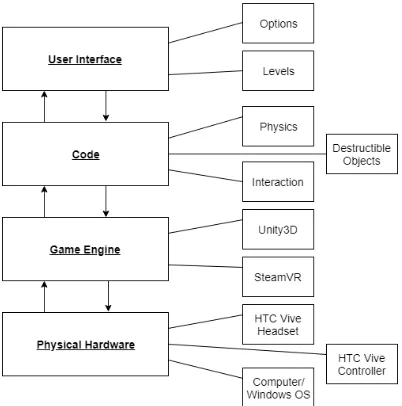
Figure 2: Graph that shows the layered architecture of VR Physics Lab. The core development in this paper oriented around the ”code” and ”user interface” layers.
level requirements. These requirements necessitate a scoring system, multiple levels, a target system, and a respawn ability for certain objects. Through a scoring system, the user will have a set goal when playing the game and also offers the potential for replay ability as users may want to go back and beat their high score. As it stands currently, the game has two levels and each level is scored differently with one focused on hitting as many targets as possible and the other having a time constraint. The levels themselves will be detailed further in the Software Design section. The third requirement deals with a target system that allows players to shoot projectiles at targets placed in the distance. This requirement is tied to the first requirement as it allows users to gain a score based on how many targets they are able to hit. The last requirement in this level is the ability for certain objects to respawn. In the game, users can interact with many different objects of different shapes, sizes, and weights. Since the game environment places the users on an island, some of the objects can fall off the map and respawn to their original position.
There is an additional third level of requirements that deals with additions for possible future development. These include a color-blind mode, in game achievements, experience points, and a simulation based on air resistance. As these requirements are not part of the current build of the project, they will be detailed further in the Conclusion and Future Development section.
Virtual Reality Physics Lab Andrew E. Munoz, Chrisopher J. Lewis, et. al.
4
Software Design
The design of the Virtual Reality Physics Lab can be broken down into four distinct layers comprised of many separate modules. These layers are the User Interface, Code, Game Engine, and the Physical Hardware. Each layer also has multiple modules which provide granular functionality supporting the responsibility of that layer. The relation between layers can be seen in Figure 2.
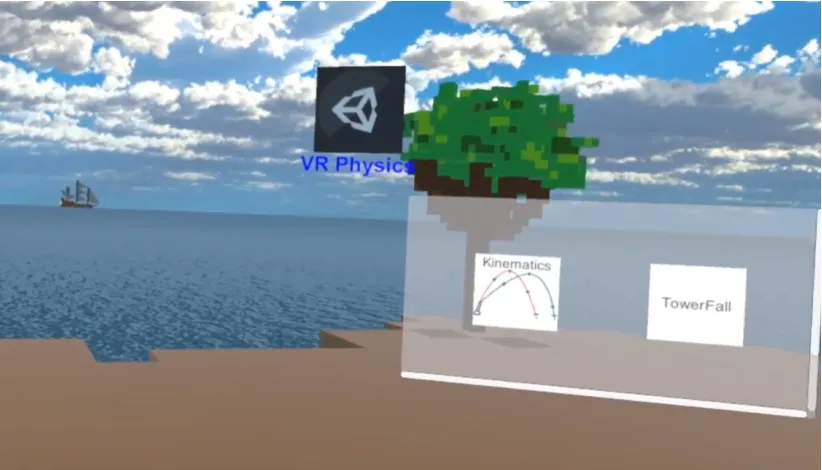
The User Interface layer handles what the user sees and how well they are able to interact with the game world. It is the first step when the application is being initialized and is the user’s first impression of the game. For our game, the user interface is the menu area that the users are placed in when the application first starts. The users are placed on an island with a floating screen in front of them which they can interact with to choose which simulation/level to begin. This is the first of the two modules for the user interface component, which are options and levels. The options module enables users to make a profile and choose between different simulations. The levels module consists of the simulations that the user can choose from.
The code layer is where most game development occurred and represents the most substan-tial effort expended from a software engineering perspective. The modules attached to this layer include physics, destructible objects and interaction. Our team developed a physics engine that emulated real world physics to immerse the user and to be able to show how an object would act in the real world. The physics module is the most important aspect of the code layer because the game itself is based on showing realistic physics to the user. The next module, destructible objects, was developed with the help of the open source 3D modeling software, Blender [2]. Using Blender, our team developed models which crumbled apart when a heavy object in the
game collided with them. Lastly, an interaction module enabled users to interact with certain objects in the game space. Interactable objects are labeled in the game space to make it easier for users to know what to do.
The game engine acts as the base of the Virtual Reality Physics Lab as it helps connect all the pieces of code and assets together. For the game engine, our team utilized Unity3D, which is the first module, as the main development tool along with some of the assets Unity provides which will be detailed further in the Project Implementation section. The second module is SteamVR [8]. This virtual reality system and software connects the HTC Vive headset, controllers, and sensors to the main computer system.
Lastly, the physical hardware component connects to the game engine software and allows for the execution of the application. This layer consists of three separate modules which include HTC Vive headset, controllers, and a computer running the Windows operating system. These modules are connected to each other to help run the application software in a virtual 3D environment. The HTC Vive headset is connected to the controllers which act as the user’s main tool for movement via teleportation and interaction within the game environment. The computer is then connected to both headset and controllers. It is used to run the application software and show the display on the headset.
5
Prototype Implementation
During the beginning of project development, our team broke down the design elements shown in the Software Design section to create an agile development plan to help ensure that our goals for the project were met. In order to accomplish this, our team separated the design elements that needed further development (i.e. UI, Physics, Interaction, etc.) and split them among the team. These elements were allocated to group members who displayed active interest in the component and, in some cases, group members worked together on a component.
In terms of team understanding, the development team held weekly meetings to ensure that the goals were being met and to make any necessary adjustments. Our team also made use of the agile software development technique pair programming. The use of this technique resulted in higher production and efficiency [4] within the development team and enabled production of a working prototype. Another strategy used during the development process was test driven development (TDD). By utilizing unit, and component, tests before writing code we were able to confirm that all elements were working as they were designed before integration [11].
5.1
Menu
Through a game menu, the user can navigate through the provided simulations. The game menu is displayed when the application starts. Figure 3 shows a screenshot of the menu area and the multiple levels that users can choose from. This menu allows users to input their name to create a user profile and allows them to choose between simulations. There is also a menu screen the users can access once in the simulations that allow the users to either replay the level or quit back to the main menu.
5.2
Game Environments
Virtual Reality Physics Lab Andrew E. Munoz, Chrisopher J. Lewis, et. al.
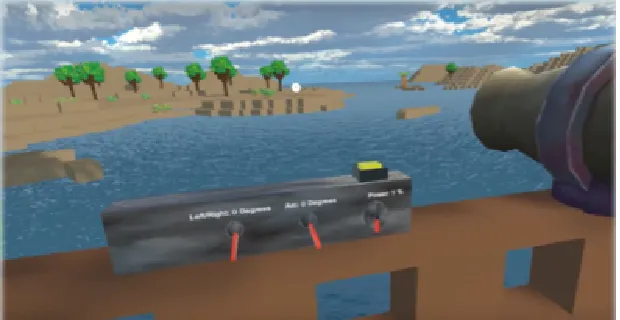
Figure 4: Displays screenshot from Seaside Blast where user can adjust cannon rotation, arc, power, and fire cannons.
simulations a thematic relation which binds them together. In each simulation, the user is placed on a new island with a different objective. Outside of the general island theme, the game was also designed to have a voxel-like look evocative of the popular game Minecraft. This design choice was made to provide students with the subliminal impression that the game will be fun like games they are familiar with and not dryly instructional like many educational games can be.
5.3
Simulations
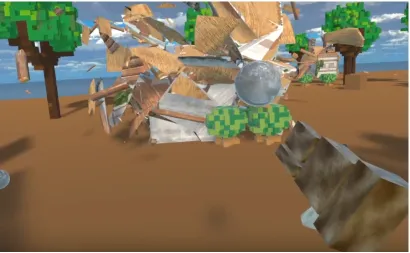
For the prototype, our team fully developed two separate simulations that users can play and test. Figures 4 and 5 show each simulation which offer users different tasks and goals. The first simulation, shown in Figure 4, is titled Seaside Blast and it places users on a pirate ship where their main goal is to shoot targets in the distance with a cannon. The user’s challenge is that they have a limited amount of cannon balls and therefore they must try to hit all the targets before running out of shots. The second simulation, titled Towerfall shown in Figure 5, places users on an island with a table of different objects. Each object is labeled and textured with different elements like “wood” or “steel” and shows an accompanying weight. Users can pick up and throw these objects freely. The main goal requires that users use these objects to destroy the city around them as quickly as possible. A timer tracks their progress and gives a metric of relative success.
5.4
Lessons
Figure 5: Screenshot from Towerfall, which shows building being destroyed as the user throws an object from the game world.
5.5
Development Tools Used
During the development of this project, we made use of a few different tools and assets to make the Virtual Reality Physics Lab the best experience possible. Each of these development tools helped make the final application have a quality aesthetic and realistic physics.
Unity3D: Cross platform 3D engine and user friendly development tool.
MagikaVoxel: Free software that allows for the creation of 3D Voxel Art models that can be then used in game engines such as Unity [1].
Blender: Free software development tool that enables users with the ability to create 3D models[2]. Our team utilized this tool for the creation of destructible objects.
VRTK (Virtual Reality Toolkit): A collection of scripts that help in finding VR solutions in concepts such as locomotion, interactions, as well as controls that include buttons and levers [12].
6
Results and Discussion
Virtual Reality Physics Lab Andrew E. Munoz, Chrisopher J. Lewis, et. al.
As the Virtual Reality Physics Lab was intended and geared towards a younger audience, many of those who wanted to test the game were younger individuals. The station was consis-tently busy with a line of elementary aged kids waiting for their turn to enter the virtual space. The Virtual Reality Physics received a lot of good feedback from both those who were able to demo the game as well as those who passed by the booth and asked questions. Through the many interactions of different users during the demo period, we were able to learn a lot about ways to improve the usability of the game such as including brief instructions that can help the user figure out how to get started once they are in the virtual space.
While the HTC Vive allowed for effective use of hardware in terms of movement and tracking, the one drawback is that it is not the most efficient when it comes to portability. The hardware system is portable; however, it needs to be set up in an open space to allow for the sensors to track the users movement within a certain area that is marked during the set up phase. In a classroom setting, space would have to be made in order to allow for the hardware to be effective.
7
Conclusion And Future Development
In this paper, we presented the design and development of a simulation that teaches users about different physics concepts through virtual interaction, in a fun and engaging way. Educators will be able to use this project with its unique voxel art style to attract students to play the game. This will allow students to feel both engaged and immersed in the game world while also learning about physics concepts within a controlled learning environment.
Concerning future development, we first plan to include identifying metadata along with user profiles so they can go back and check their statistics for each simulation. With this profile the user will be able to save and load data from previous play sessions. Additional simulations are planned with the next level being a buoyancy level that deals with the force a liquid puts onto an object causing the object to float. Our team also plans to develop hand models so that the user will see hands as opposed to the HTC Vive controllers. Lastly, we plan to expand playability beyond the HTC Vive by supporting the Oculus Rift and mobile devices. We also plan to add compatibility with additional hardware components that will allow for haptic feedback. Due to IRB requirements, the evaluation of students in our demographic is extremely stringent and accordingly a user study could not be accomplished within the bounds of this project timeline; however, in addition to the modifications outlined to the game itself, a formal user study will be drafted and implemented to fully glean the educational impact of this software.
8
Acknowledgement
This work was conducted as part of a year long independent study at the University of Nevada, Reno. We would also like to thank Professor Eelke Folmer for his assistance during the devel-opment of the project.
References
[1] AFrame. Building with MagicaVoxel. Available at https://aframe.io/docs/0.8.0/guides/ building-with-magicavoxel.html[Last accessed October 12, 2018].
[3] Alberto Buzio, Mario Chiesa, and Riccardo Toppan. Virtual reality for special educational needs. In Proceedings of the 2017 ACM Workshop on Intelligent Interfaces for Ubiquitous and Smart Learning, SmartLearn ’17, pages 7–10, New York, NY, USA, 2017. ACM.
[4] Mehmet Celepkolu and Kristy Elizabeth Boyer. The importance of producing shared code through pair programming. InProceedings of the 49th ACM Technical Symposium on Computer Science Education, SIGCSE ’18, pages 765–770, New York, NY, USA, 2018. ACM.
[5] DefinedStem. VARK Learning Styles: Visual, Auditory, Read/Write, Kinesthetic. Available at
https://www.definedstem.com/wp-content/uploads/2017/05/VARK.pdf[Last accessed October 08, 2018].
[6] Elaine J. Hom. What is STEM Education? Available at https://www.livescience.com/ 43296-what-is-stem-education.html[Last accessed October 08, 2018].
[7] Ryan Hubbard, Aldis Sipolins, and Lin Zhou. Enhancing learning through virtual reality and neurofeedback: A first step. InProceedings of the Seventh International Learning Analytics & Knowledge Conference, LAK ’17, pages 398–403, New York, NY, USA, 2017. ACM.
[8] PCGamer. SteamVR - Everything you need to know. Available athttps://www.pcgamer.com/ steamvr-everything-you-need-to-know/[Last accessed October 12, 2018].
[9] Ricardo Rosas, Miguel Nussbaum, Patricio Cumsille, Vladimir Marianov, M´onica Correa, Patricia Flores, Valeska Grau, Francisca Lagos, Ximena L´opez, Ver´onica L´opez, Patricio Rodriguez, and Marcela Salinas. Beyond nintendo: design and assessment of educational video games for first and second grade students.Computers & Education, 40(1):71 – 94, 2003.
[10] Maria Roussos, Andrew E. Johnson, Jason Leigh, Craig R. Barnes, Christina A. Vasilakis, and Thomas G. Moher. The nice project: Narrative, immersive, constructionist/collaborative environ-ments for learning in virtual reality. In Proceedings of ED-MEDIA/ED-TELECOM 1997, pages 917–922, 1997.
[11] Ian Sommerville. Software Engineering. Pearson, 10th edition, 2015.