Network Security Issues in Context of RSNA and
Firewall
Mohd. Izhar
HMR Inst. of Tech. & Mgt,GGSIP University, Delhi, Ph.D. Scholar of Mewar University, NH-79, Gangrar,
Chittorgarh, Rajsthan India
Mohd. Shahid
Ph.D. Scholar of Mewar University, NH-79, Gangrar,
Chittorgarh, Rajsthan India
V.R.Singh,
Ph.DPh.D. Supervisor of Mewar University, NH-79, Gangrar,
Chittorgarh, Rajsthan India
ABSTRACT
Network Security is a major issue in wired and wireless network. Wireless Network is more vulnerable to attack. Vulnerability is the threat to the network in the form of virus or the way used by attacker in order to breach the security and bypass the security measures. IEEE 802.11i and 802.11-2007 provides RSNA methods for wireless network security. WECA, the alliance for Wi-Fi devices provides WPA2 modes of security. The responsibility of network administer is to provide network resources to the legitimate and authorized users and at the same is to protect it from illegitimate and misuse by unauthorized, immoral unlawful clients and cyber criminals and also to find the solution for the other security threats such as Phishing, malware and malicious code. The Network resources are made available by way of authentication and authorization of users. The protection against illegal and misuse of network is taken place by applying some RSNA and WPA2 Methods. But these authentications, authorizations and protections of RSNA and WPA2 modes are weak and vulnerable to numerous attacks and its advanced version such as 802.11n with AES gets compatibility issues with software as well as with hardware.
This Paper, by developing a practical network scenario and configuring its devices according to various RSNA and WPA2 modes examines these security measures and conclude that these security methods are not sufficient and requires more other measures. These others measures such as web browser compatibilities, OS effectiveness, firewall and hardware security modules have been taken into account in order to develop a secure wireless Network Model. Various Network Monitoring tools have also been used to show that how easily the security is breached and/or bypassed.
General Terms
Network, Security, RSNA, 802.11, firewall, Phishing
Keywords
WLAN,CSMA/CA,CCMP,TKIP and MAC
1.
INTRODUCTION
Wireless LAN deployments should be made as secure as possible. Many network security threats today are spread over the Internet. The most common threats include: Viruses, Worms, Trojan horses, Spyware & adware, Hackers attack, Denial of service attacks, Data interception & theft and Identity theft. IEEE 802.11 Standard securitiesare weak and vulnerable to numerous network attacks. Security modes such as SSID broadcast disable function, MAC address filtering, WEP data encryption and WPA2 modes are failed to provide securities. MAC address filtering is not a good solution for
wireless network security as Mac address, besides other disadvantages of MAC address filtering, can easily be spoofed. WEP key is cracked within minutes.
[image:1.595.333.519.281.467.2]
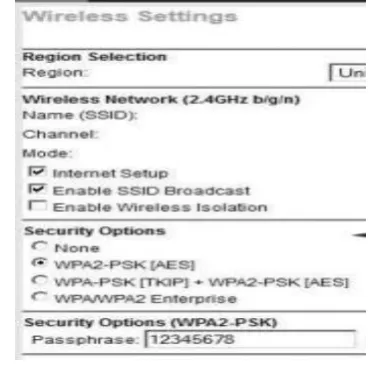
Figure 1. Various Securities Modes
This paper builds a Wireless Network test bed for examining the several security issues and shows that how easily the security is breached and/or bypassed. The Network model is created mostly by using various d-link, cisco and surecom network devices, where various Wireless Access point are installed at different points and are connected with a server with wire and two-layered switches. Server in turn is connected with router having built in firewall, the router is placed in-between backbone internet and server. The nodes such as Laptop, PDA, and/or Desktop with network adapters are connected wirelessly at these wireless access points in order to use internet facility.
2.
BACKGROUND
Many Papers have been published relating to network security issues of wireless LAN 802.11, showing various simulative platform and practical approaches of software and hardware in order to illustrate breach of the security [51].
2.1
MAC Filtering and Spoofing[25],[45].
MAC filtering allows only some MAC address to be part of wireless network but there are various ways by which one can easily change the MAC address as desired. Typically following 3 ways are common:
1. One can change the MAC address through device manager of the System.
2. One can also change the MAC address through editing the Registry of the System.
3. The MAC address can be changed through the MAC address Changer such as TMAC and SMAC soft wares.
2.2
WEP Key and its Cracking[50]
The procedure for wep key cracking is very simple and one need only a Bootable DVD of Backtrack which contains various utilities used for cracking, Wireless card and the WEP network which needs to be active that means other users are connected already and doing things on the network. Some methods of attack need not the active WEP Network
2.3
WPA2 Weakness[16]
WPA encryption is understood stronger than wep and it was designed specifically to replace wep. WPA uses TKIP for security, which stands for Temporal Key Integrity Protocol. In the TKIP mode, the encryption keys are changed at set intervals. That means it takes long time to intercept the keys by the hackers as these aredynamic and if somebody is able to find the key, these keys might get changed, and becomes useless for the hackers. WPA2 can also be used for wireless encryption and is known as 802.11i standard/AES.WPA2 can be implemented in two versions Personal and Enterprise. WPA2 Personal protects unauthorized network access by utilizing a set-up password. WPA2 Enterprise verifies network users through a server. The Problem by using WPA2
is that the entire device on network must use WPA2 or compatible. If any of the device on the network that only supports WPA, this device will not be able to join the network unless router supports WPA/WPA2 mixed mode. Also WPA2 and advanced encryption such as CCMP-AES is understood secure way for home and small offices but the problem isthat many AP still in use are good enough for security purposes but they are lacking Wireless-N or other advanced encryption of WPA2.
3.
TOOLS METHODS AND SERVICES
3.1
Testbed
A typical scenario of WLAN is developed in which different nodes are considered connecting through the access points. A WLAN includes a leased line or wired internet at the back, the same is connected to the server through router with built in firewall and various access points are connected through different switches. These access points are points where WLAN users log-on to connect the nets.
3.2
Tools
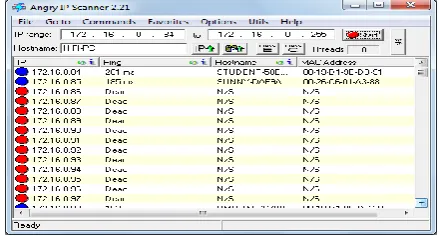
There are a lot of network monitoring tools available those are used by network administrator to monitor and performance for improvement purposes. The hackers also use the same for breaching the network Securities. IP scanners are the tools used for scanning the whole network that provides the information of each and every node such as ip and mac address as shown in figure 3. Even advanced IP Scanner, can wake up and shut down remote groups of Windows machines. Angry Ip Scanner has been used in this paper for the purpose of scanning whole network. The list are as follows : Advanced IP Scanner 2.2.224, Colasoft MAC Scanner Pro 2.2, Angry IP Scanner 2.x, IPScan-II.The tool which has been used for scanning the network is free open source Angry IP scanner[39][51].
[image:2.595.65.281.72.189.2]SMAC is a powerful MAC Address Spoofer for Windows 7, VISTA, 2008, 2003, XP, 2000 systems which has been used for changing the MAC address as shown in the Figure 4. Technitium MAC Address Changer or TMAC can also be used to change (spoof) Media Access Control (MAC) Address of Network Interface Card (NIC) or Wireless Network Card (Wi-Fi), irrespective of the NIC's drivers or its manufacturer.
[image:2.595.321.541.450.568.2]OPNET Technologies and IT guru academic edition is a software business organization that provides performance analysis for computer networks and applications. OPNET is leader in the modeling, simulation, and analysis of strategic and tactical defence communications networks and net-centric. The Developed model can be simulated by using OPNET Technologies. Backtrack is Linux OS which contains various utilities used for cracking the network. It uses the Aircrack-ng as one of its utility. Aircrack-ng is an 802.11 WEP and WPA-PSK keys cracking program that can recover keys, once enough data packets is captured. It implements the standard FMS attack along with some optimizations like KoreK attacks, as well as the all-new PTW attack, thus making the attack much faster compared to other WEP cracking tools. The Tools has been used for the purpose of cracking the WEP. The Simple Steps are as follows: Boot from the Backtrack DVD as shown in the figure 5:
In command mode type startx to load graphical interface. Type iwconfig to list all the network interface. The Command airmon-ng start wlan0 is used to device to keep on monitor mode. The command airodump-ng mon0 provides information about wireless network and its client. Now type the command airodump-ng -c <channel> -w <output filename> - -bssid <bssid including :'s> mon0. This command is used for recording the data in a file. One need around 10,000 – 30,000 packets of date to crack the password. Now open a new terminal type the command aireplay-ng --arpreplay -b <bssid> -h <client STATION address> mon0, it
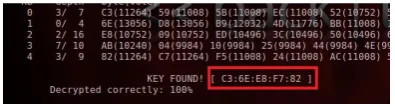
will increase the nos. of packets and stop it at about 5000 packets. Open a 3rd terminal window to crack the packets, type aircrack-ng -z -b <bssid> <output filename from earlier>*.cap and within some minutes and around some 5000 to 30000 packets, it will show the message the key found in hexadecimal form as shown in the figure 6[50].
3.3
Cryptography Services
Cryptography has several applications in network security. Cryptography can provide five services. Four of these are related to the message exchange. The fifth is related to the entity trying to access a system for using its resources. IEEE Std 802.11 provides the ability to protect the contents of messages. This functionality is provided by the data confidentiality service. IEEE Std 802.11 provides three cryptographic algorithms to protect data traffic: WEP, TKIP, and CCMP. That means one can use the devices conforming this IEEE standard or WPA2 devices for security evaluation purpose.
3.4
OS and Browser Capabilities
Browser Capabilities includes windows Firewall, Windows Defender, Smart Screen Filter, InPrivate filtering and ActiveX Control and Windows Update. Antivirus and/or antispyware programs for protections from spyware and malicious software/malware can also be used.
3.5
Software and Hardware Firewall
A firewall is like a gatekeeper that checks information coming from outside and decide to block or allows it. Firewall is a software or hardware that checks information coming from the Internet or a network. Windows Firewall with Advanced Security is a Microsoft Management Console (MMC) snap-in that provides moreadvanced options for IT professionals [44]. Firewall can be in the form of hardware such as router or hardware firewalls are incorporated into the router that is placed between a computer and an Internet gateway. A Firewall has one or more of three methods to control traffic flowing in and out of the network: Packet Filters, Proxy Servers and Stateful Packets Filters [40].
[image:3.595.61.281.74.230.2]• Packet filtering - Packets (small chunks of data) are analyzed against a set of filters and are sent to the requesting system and all others are discarded.
[image:3.595.331.529.143.196.2]Figure 7. Security Services Classification Figure 6. WEP Key Found by Using BACK Track5
[image:3.595.318.536.377.486.2]Figure 5. Back Track is used for Cracking the WEP Key
[image:3.595.59.281.459.603.2]• Proxy service - Information from the Internet is retrieved by the firewall and then sent to the requesting system and vice versa.
• Stateful inspection - A newer method that doesn't examine the contents of each packet but instead compares certain key parts of the packet to a database of trusted information. Information traveling from inside the firewall to the outside is monitored for specific defining characteristics, and then incoming information is compared to these characteristics. If the comparison yields a reasonable match, the information is allowed through. Otherwise it is discarded.
Firewalls are used as filters based on several conditions [32]. If a certain IP address outside the company is reading too many files from a server, the firewall can block all traffic to or from that IP address. One can customize the settings for each type of network location in Windows Firewall as shown in the figure.
The advantages of a hardware firewall include the following [33] [44] [45]:
Software firewalls utilize more system resources, like disk space and memory than hardware firewalls that results in reduced speed. A single hardware firewall provides protection for the complete network, which means all computers got protection and single hardware firewall is affordable. Hardware firewalls work perfectly for businesses that use a broadband Internetconnection, like DSL or cable modem. A hardware firewall is not easily vulnerable to any malicious software unlike software firewalls.
Disadvantages: Configuration of a hardware firewall is difficult therefore a novice might not be able to install it. The traffic going out from the website is considered safe by the hardware firewall, this can create an issue if malware, penetrates your network and tries to connect to the internet.
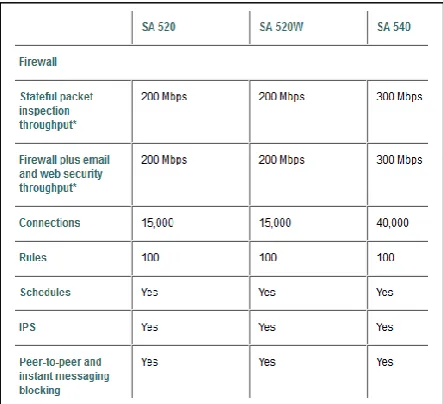
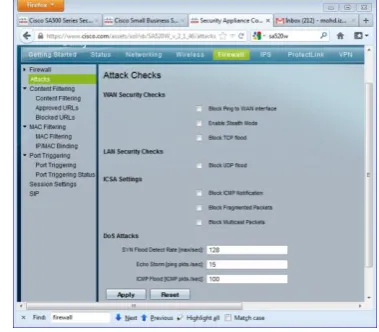
The Cisco SA 500 Series Security Appliances are comprehensive gateway security solutions that combine firewall, VPN, and optional web and email security capabilities for network security as shown in the figure [45]
4.
RESULTS AND DISCUSSIONS
Wireless LAN deployments should be made as secure as possible. Standard 802.11 securities are weak and vulnerable to numerous network attacks. WPA encryption is understood stronger than wep and it was designed specifically to replace wep. The Problem by using WPA2 is that the entire device on network must use WPA2 or compatible. If any of the device on the network that only supports WPA, this device will not be able to join the network unless router supports WPA/WPA2 mixed mode. Also WPA2 and advanced encryption such as CCMP-AES isunderstood secure way for home and small offices but the problem is that many AP still in use are good enough for security purposes but they are lacking Wireless-N or other advanced encryption of WPA2. D-link offers DAP-1360 wireless N access points as shown in figure.
The Phishing attack can be minimized by using the latest browser capabilities such as SmartScreen Filter [44]. Microsoft SmartScreen Filter is a feature in Windows Internet Explorer that helps in detecting the phishing and Malware websites. Such websites fraudulently got to reveal personal and financial information from the users. SmartScreen Filter runs in the background and as per the users’ consent sends the web addresses of the sites that a user visits to the Microsoft SmartScreen service in order to get in checked as lists of known phishing and malware sites. If SmartScreen Filter discovers that a website visited is on the list of known malware or phishing sites, Internet Explorer displays a blocking webpage and the Address bar appears in red. Malware websites distribute software that can attack the computer. Information that is submitted to the SmartScreen web service is transmitted in encrypted format over HTTPS and cannot be used for any advertising purpose.
Internet Explorer 9 allows to use ActiveX Filtering to block ActiveX controls, the 3rd party software which are not trustworthy one and are used forweb rich experiences such as audio video players plug in. IE9 can block all these ActiveX control and is turned them back on for only the sites which are trustworthy.
[image:4.595.316.538.71.273.2]InPrivate filtering prevents websites from collecting information of a user who uses the browser as InPrivate
Figure 9. The Cisco SA 500 Series features
[image:4.595.59.277.271.418.2]filtering, cookies and temporary internet files are kept in memory and cleared as the browser is closed. Even temporary information is encrypted and stored to show web pages correctly. It is secured to an extent but it can not prevent hackers from seeing and recording which websites you visited.
When someone visits a website, some content are provided by a different website. That content could be used to gather information. Tracking Protection list is a new feature introduced in web browser Internet Explorer 9. It prevents the websites for collecting information. Users can create their own custom lists or install lists directly from an official Microsoft website to allow to get information by these websites. One can turn off Tracking Protection or ActiveX Filtering to show content on specific websites that is trusted one.
Software\Hardware Firewall is also one of the best solutions to protect the network from various attacks. A typical hardware firewall has different solution to the network security issues as shown in the figure 10 [45]. But the System needs an efficient system administrator to install the same and to optimum use of its all facilities which can be affordable for mid-level organization. Small and Home Office can rely on software firewall which comes as a free utility of OS or browser.
5.
CONCLUSION
Network Security is the ultimate goal for an administrator if one way of defense failed as it has been shown through that how RSNA methods of securities are defeated by hackers by breaching the security and/or by bypassing the security measures, still there are variety of ways, such as windows Firewall, Windows Defender, Smart Screen Filter, InPrivate filtering, ActiveX Control, Windows Update, aantivirus and/or antispyware programs to protect the network and its nodes from malware and worm attack. These are termed as free alternatives and with a little effort by configuring; it provides greater flexibility and control. Hardware firewall is also affordable and it is used to have the best protection to Network and nodes of the network [45]. However, it is necessary to use both the hardware and the software firewall, as each one of them offers distinct but much-needed security features and benefits. It is essential to keep testing the firewall to confirm its functioning properly. Moreover hardware\software firewall and Operating System and its
updating at regular intervals are the final way to ensure complete protection for network security. That means Network security is accomplished through hardware and software. The software must be constantly updated and managed to protect from emerging threats
.
6.
ACKNOWLEDGMENT
Our sincerely thanks to the management of HMR Institute of Technology and management, GGSIP University, Hamidpur, Delhi, PDM College of Engineering, M.D. University, 3A, Sarai Aurangabad, Bahadurgarh, Haryana and Mewar University, NH-79, Gangrar, Chittorgarh Rajasthan who supported the most in preparing this document.
7.
REFERENCES
[1] IEEE Std 802.11™-2007, Revision of IEEE Std 802.11-1999, IEEE 3 Park Avenue New York, NY 10016-5997, USA 12 June 2007.
[2] IEEE Std. 2009 Revision of IEEE Std 802.11™-2007, 30 Sept. 2009.
[3] Changhua He & John C Mitchell “Security Analysis and Improvements for IEEE 802.11i”, Network and Distributed System Security Symposium, San Diego, California, 3-4 February 2005.
[4] Shivaputrappa Vibhuti, “IEEE 802.11 WEP (Wired Equivalent Privacy) Concepts and Vulnerability” , San Jose State University, CA, USA, CS265 Spring 2005 (26.03.2005)
[5] NETGEAR, Inc. “Wireless Networking Basics”, October 2005.
[6] Lu Zhengqiu; Tian Si; Wang Ming; Ye Peisong; Chen Qingzhang; “Security analysis and recommendations for Wireless LAN 802.11b network”, Consumer Electronics, Communications and Networks (CECNet), 2011 International Conference on 16-18 April 2011.
[7] Finn Michael Halvorsen & Olav Haugen “Cryptanalysis of IEEE 802.11i TKIP”, Norwegian University of Science and Technology, June 2009.
[8] IEEE Std 802.11i-2004, Amendment to IEEE Std 802.11™, 1999 Edition (Reaff 2003) as amended by IEEE Stds 802.11a™-1999, 802.11b™-1999,802.11b™-1999/Cor 1-2001, 802.11d™-2001, 802.11g-2003, and 802.11h-2003] Amendment 6: Medium Access Control (MAC) Security Enhancements, 23 July 2004.
[9] Back and Tews “Practical attacks against WEP and WPA”, November 8, 2008.
[10]Paul Arana, “Benefits and Vulnerabilities of Wi-Fi Protected Access 2 (WPA2)”, INFS 612 – Fall 2006
[11]Behrouz A. Forouzan “Data Communication and Networking”, McGraw-Hill Forouzan Networking Series, Fourth Edition Copyright © 2007.
[12]NIST Special Publication 800-97, “Establishing Wireless Robust Security Networks: A Guide to IEEE 802.11i”, February 2007.
[image:5.595.58.248.354.520.2][13]Diaa Salama Abd Elminaam1, Hatem Mohamed Abdual Kader, and Mohiy Mohamed Hadhoud, “Evaluating The Performance of Symmetric Encryption Algorithms”, International Journal of Network Security, Vol.10, No.3, PP.213{219, May 2010
[14]A.K.M. Nazmus Sakib et al”Security Improvement of WPA 2 (Wi-Fi Protected Access 2)” (IJEST), Vol. 3 No. 1 Jan 2011
[15]Vijay Chandramouli, “A Detailed Study on Wireless LAN Technologies”, 23.10.2002
[16]“Understanding the New WPA TKIP Attack Vulnerabilities & Motorola WLAN Countermeasures”, Motorola, Inc. 2008.
[17]Dajiang He, Charles. Q. Shen. “Simulation study of IEEE 802.11e EDCF” 2003
[18]Ismahnsi Binti Ismail, “Study of Enhanced DCF(EDCF) in Multimedia Application”, 2005
[19]Preeti Venkateswaran, “Experiments to Develop Configurable Protocols”, 2005
[20]Mark Greis, Tutorial for the Network Simulator “ns” 2008
[21]Lecture notes 2003-2004 University de Los Andes, Merida, Venezula and ESSI Sophia-Antipols, France.
[22]Guillermo Alonso Pequeño Javier Rocha Rivera, “Extension to MAC 802.11 for performance improvement in MANET”, 2007
[23]Sam De Silva, Using TCP “Effectively in Mobile Ad-hoc Wireless Networks with Rate Adaptation”, 2007
[24]Turkan Ahamad & Manar Younis “The Enhancement of Routing Security in Mobile Ad-hoc Networks”, IJCA(0975 – 888),Volume 48– No.16, June 2012.
[25]Payal Pahwa, Gaurav Tiwari, Rashmi Chhabra “Spoofing Media Access Control (MAC) and its Counter Measures”, IJAEA, Jan. 2010 .
[26]Farhad Soleimanian & Zeinab Abbasi “Analysis and Evaluation of Dynamic Load Balancing in IEEE 802.11b Wireless Local Area” , IJCA(0975 – 888), Volume 47– No.22, June 2012.
[27]Joshua Wright “Detecting Wireless LAN MAC Address Spoofing”, 2003.
[28]Fanglu Guo and Tzi-cker Chiueh “ Sequence Number-Based MAC Address Spoof Detection”, 2005.
[29]Stuart Compton, SANS Institute, “802.11 Denial of Service Attacks and Mitigation”, May 2007.
[30]D. Gupta, G. Tiwari,Y. K and P. Kumar “Media Access Control (MAC) MAC Spoofing and its Counter Measure”, IJRTE, 2009
[31]Siemens Enterprise Communications, “WLAN Security Today: Wireless more Secure than Wired”, white paper July 2008.
[32]Website :http://computer.howstuffworks.com, Aug. 2012
[33]Website :http:// milesweb.com , Aug 2012
[34]Website : http://www.technitium.com, Aug 2012
[35]Website : http://www.klcconsulting.net/smac.
[36]Website: http://www.softpedia.com/ get/ Network-Tools/ IP-Tools/ IPScan-II.shtml
[37]Website : http://ip-scan.qarchive.org/, May 2012
[38]Website : ww.radmin.com/products/ipscanner, May 2012
[39]Website : http://www.angryip.org/w/Home, May 2012
[40]Website : http://www.opnet.com/itguru-academic
[41]Website : http://www.wikipedia.org. Aug 2012.
[42]Website : http://www.aircrack-ng.org. Aug 2012
[43]Website : http://www.makeuseof.com
[44]website : http://Microsoft.com/india, Aug 2012
[45]Website :http:/ Cisco.com aug 2012
[46]Richa Bansal, Siddharth Tiwari, Divya Bansal “Non-cryptographic methods of MAC spoof detection in wireless LAN”, ICON 2008: 1-6.
[47]Guenther Lackner, Udo Payer, and Peter Teu, “ Combating Wireless LAN MAC-Layer Address Spoofing with Fingerprinting Methods”, January 20, 2009.
[48] Hassene Bouhouche & Sihem Guemara, “A QoS-based Resources Reservation Mechanism for Ad Hoc Networks”, IJCA (0975 – 8887), Volume 6– No.3, September 2010
[49]CERT-In Monthly Security Bulletin- February 2012, website : http://www.cert-in.org.in
[50]Mohd. Izhar, Mohd. Shahid & Dr. V.R.Singh”A Practical Approach for Evaluation of Security Methods of Wireless Network” unpublished.
[51]Mohd. Izhar, Mohd. Shahid & Dr. V.R.Singh, “ Reliable and Secure wifi Performance model by way of cryptography and RSNA” in-press