PLjr
M[ID
DIGITAL
RESEARCHT~
PL/I
Language
COPYRIGHT
Copyright © 1982 by Digital Research. All rights reserved. No part of this publication may be reproduced, transmitted, transcribed, stored in a retrieval system, or translated into any language or computer language, in any form or by any means, electronic, mechanical, magnetic, optical, chemical, manual or otherwise, without the prior written permission of Digital Research, Post Office Box 579, Pacific Grove, California, 93950.
DISCLAIMER
Digital Research makes no representations or warranties with respect to the contents hereof and specifically disclaims any implied warranties of merchantability or fitness for any particular purpose. Further, Digital Research reserves the right to revise this publication and to make changes from time to time in the content hereof without obligation of Digital Research to notify any person of such revision or changes.
TRADEMARKS
CP/M and CP/M-86 are registered trademarks of Digital Research. Concurrent CP/M-86, LINK-86, MP/M II, MP/M-86, and PL/I-86 are trademarks of Digital Re-search. SP/k is a trademark of the University of Toronto. IBM is a trademark of
International Business Machines, Incorporated. Digital Equipment Corporation is a registered trademark of Digital Equipment Corporation. Z80 is a registered trademark of Zilog, Inc. Intel is a registered trademark of Intel Corporation. MicroSoft is a registered trademark of MicroSoft Incorporated.
The PLII Language Reference Manual was prepared using the Digital Research TEX Text Formatter and printed in the United States of America by Commercial Pressl
Monterey.
Foreword
The PLfI system is a complete software package for both applications and system programming. Digital Research has implemented PLfI for both the 8080 and 8086 processors. These implementations are compatible at the source code level. This manual describes source code requirements for both implementations.
PLII runs under the Digital Research single-user operating systems, CPfM®, CPfM-86®, or concurrent CPfM-86™. It runs in a multi-user environment under
MPfM IITM or MPfM-86™. This manual assumes you are already familiar with the operating system you are using and minimizes references to specific operating systems.
The PLfI Language Reference Manual is the formal specification of the PLfI pro-gramming language. This manual is primarily intended to be a reference document and is therefore not tutorial in nature. Some previous programming experience with PLfI or with another language is assumed.
The Language Reference Manual describes the overall structure and organization of PLfI source programs in the form of blocks and procedures. There is also a specification of the character set of the language, rules governing the formation of identifiers, con-stants, delimiters, operators, and comments.
This manual describes the various data types allowed in PLfI, including arrays and structures, as well as the rules governing conversion between data types. This manual also describes rules governing the scope of data declarations.
Assignments and expressions, sequence control statements, run-time storage man-agement, and 110 processing are also described.
Table of Contents
1 Introduction
1.1 1.2
Documentation Set
Notation ... .
1
2
2 Program Structure
2.1
2.2
2.3 2.4 2.5 2.6 2.7 2.8 2.9 2.10 2.11 2.12 2.13 2.14 2.15High-level Organization ... . Blocks ... . Internal vs. External Blocks ... . Scope of Variables ... . Procedure Blocks ... . The CALL Statement ... . The RETURN Statement ... . Actual and Formal Parameters ... . The PROCEDURE Statement ... . Low-level Organization ... . The Character Set ... . Identifiers ... . Constants ... . Delimiters and Separators ... . 2.14.1 Spaces ... . 2.14.2 Operators ... . 2.14.3 Special Characters ... . 2.14.4 Comments· ... . Preprocessor Statements ... . 2.15.1 The %INCLUDE Statement ... . 2.15.2 The %REPLACE Statement ... .
3 4 7 9 11 12 12 13 16 19 20 21 21 22
22
22 23 24 25 25 263 Data Types and Attributes
3.1 Arithmetic Data ... 27
3.1.1 FIXED BINARY ... 28
3.1.2 FIXED DECIMAL ... 29
Table of Contents
(continued)
3.2 String Data ... 31
3.2.1 Character-string Data ... 31
3.2.2 Bit-string Data ... 32
3.3 Control Data Items ... 33
3.3.1 LABEL Data ... 33
3.3.2 ENTR Y Data ... 34
3.4 POINTER Data ... 36
3.5 FILE Data. . . . .. . . .. . . 37
3.6 The DECLARE Statement ... 37
3.7 Multiple Declarations ... 38
3.8 Default Attributes ... 40
4 Data Conversion 4.1 Arithmetic Conversions ... 42
4.2 Arithmetic Conversion Functions ... 45
4.2.1 The FIXED BIF ... 45
4.2.2 The FLOAT BIF ... 45
4.2.3 The BINARY BIF ... 46
4.2.4 The DECIMAL BIF ... ,... 46
4.2.5 The DIVIDE BIF ... 47
4.3 String Conversions ... 47
4.3.1 Arithmetic to Bit-string Conversion.. .. . . .. . 47
4.3.2 Arithmetic to Character Conversion ... 48
4.3.3 Bit-string to Arithmetic Conversion ... 49
4.3.4 Bit to Character-string Conversion ... 49
4.3.5 Character to Arithmetic Conversion ... 49
4.3.6 Character to Bit-string Conversion ... 50
5 Data Aggregates 5.1 Array Declarations ... 51
5.2 Arra y References ... 53
Table of Contents
(continued)
5.4 Arrays in Assignment Statements ... 57
5.5 Structures. . . 58
5.6 Mixed Aggregates ... 61
5.7 Mixed Aggregate Referencing ... 62
6 Assignments and Expressions 6.1 The Assignment Statement ... 65
6.2 Expressions. . . 65
6.2.1 Prefix Expressions ... 65
6.2.2 Infix Expressions ... 66
6.3 Precedence of Operators ... ~ . . . 66
6.4 Concatenation. . . 67
6.5 Relational Operators ... 67
6.6 Bit-string Operators ... 69
6.7 Exponentiation. . . 69
6.8 Pseudo-variables. . . 70
6.8.1 Character SUBSTR ... 70
6.8.2 Bit SUBSTR ... 71
6.8.3 UNSPEC.... . . 72
7 Storage Management 7.1 Storage Class Attributes ... 75
7.1.1 The STATIC Attribute ... .... 75
7.1.2 The INITIAL Attribute ... 76
7.1.3 The AUTOMATIC Attribute... ... . .... ... 77
7.2 Based Variables and Pointers ... 77
7.3 The ALLOCATE Statement ... 79
7.4 Multiple Allocations ... 79
7.5 The FREE Statement ... 81
7.6 The NULL BIF ... 82
7.7 The ADDR BIF ... 83
7.8 Storage Sharing ... 83
Table of Contents
(continued)
8 Sequence Control
8.1 The Simple DO Statement ... 87
8.2 The Controlled DO Statement ... ~ . . . .. . . . 88
8.3 The IF Statement ... 92
8.4 The STOP Statement ... 93
8.5 The GOTO Statement ... 93
8.6 The Nonlocal GOTO Statement ... 95
9 Condi tion Processing 9.1 The ON Statement ... 97
9.2 The SIGNAL Statement ... 100
9.3 The REVERT Statement ... 100
9.4 The ERROR Condition ... 101
9.5 Arithmetic Error Conditions ... 104
9.6 The ONCODE BIF ... 105
9.7 Default ON-units ... 106
9.8 I/O Conditions ... 106
10 The OPEN Statement 10.1 The OPEN Statement ... 107
10.2 Establishing File Attributes ... 111
10.3 The CLOSE Statement ... 115
10.4 The File Parameter Block ... 115
10.5 I/O Conditions ... 116
10.5.1 The ENDFILE Condition ... 116
10.5.2 The UNDEFINEDFILE Condition ... 117
10.5.3 The KEY Condition ... 117
10.5.4 The END PAGE Condition ... 117
10.5.5 Default I/O ON units... 118
10.6 I/O Condition BIFs ... 118
10.6.1 The ONFILE Function... 118
10.6.2 The ONKEY Function... ... 119
Table of Contents
(continued)
10.7 Predefined Files ... 119
10.8 I/O Categories ... 120
10.8.1 STREAM I/O ... 120
10.8.2 RECORD I/O ... 120
11 Stream I/O 11.1 LIST-directed I/O ... 122
11.1.1 The GET LIST Statement ... 123
11.1.2 The PUT LIST Statement ... 123
11. 2 Line-directed I/O ... 124
11.2.1 The READ Varying Statement ... 124
11.2.2 The WRITE Varying Statement... 125
11.3 EDIT-directed I/O ... 126
11.3.1 The Format List ... 126
11.3.2 Data Format Items ... 127
11. 3. 3 Control Format Items ... 130
11. 3.4 Remote Format Items ... 131
11.3.5 The FORMAT Statement ... 132
11. 3.6 The Picture Format Item ... 132
11.3.7 The GET EDIT Statement ... 141
11.3.8 The PUT EDIT Statement ... 141
12 Record I/O 12.1 The READ Statement ... 143
12.2 The READ with KEY Statement ... '... 143
12.3 The READ with KEYTO Statement ... 144
12.4 The WRITE Statement ... 144
12.5 The WRITE with KEYFROM Statement ... 145
13 Built-in Functions 13.1 Arithmetic Functions ... 147
13.2 Mathematical Functions ... 147
Table of Contents
(continued)
13.4 Conversion Functions ... 149
13.5 Condition-handling Functions ... 149
13.6 Miscellaneous Functions ... 149
13.7 List of BIFs ... 154
Appendixes
A PL/I Statements 173 B Data Attributes ... 181B.l ALIGNED... ... 181
B.2 AUTOMATIC. . . 181
B.3 BASED... ... 181
B.4 BINARY. . . 182
B.5 BIT... ... 182
B.6 BUILTIN... 182
B.7 CHARACTER. . . 182
B.8 DECIMAL. . . 183
B.9 ENTRy... 183·
B.I0 ENVIRONMENT... 183
B.ll EXTERNAL ... 184
B.12 FILE ... 184
B.13 FIXED ... 184
B.14 FLOAT... 184
B.15 INITIAL ... 185
B.16 LABEL ... 185
B.17 POINTER... 185
B.18 RETURNS ... 185
B.19 STATIC... 185
B.20 VARIABLE ... 186
Table of Contents
(continued)
C ASCII and Hexadecimal Conversions ... 187
D Implementation Notes ... 193
E PL/I Bibliography ... 195
F Glossary ... 199
List of Figures
2-1 Begin and Procedure Blocks ... S 2-2 Internal and External Blocks ... 82-3 Subroutine and Function Invocation ... 12
2-4 Actual and Formal Parameters ... 13
5-1 Two-dimensional Array ... S2 5-2 Array Element References ... S3 5-3 Array Initialization ... SS 5-4 Hierarchy of Structure Levels ... 60
5-5a An Array of Structures ... 62
5-5b A Structure of Arrays ... 63
7-1 Multiple Allocations of a Based Variable ... 80
7-2 Linked List ... 82
Table of Contents
(continued)
List of Tables
2-1 PL/I Symbols ... 20
2-2 PL/I Operators ... .. 22
2-3 Special Character Delimiters and Separators ... 23
-3-1 3-2 PL/I Float Binary Numbers Bit-String Constant Formats 30 33 4-1 Character to Arithmetic Conversion ... 50
6-1 6-2 PL/I Operator Precedence PL/I Bit-String Operators 66 69 9-1 Error Codes-Group A ... 102
9-2 Arithmetic Error Condition Codes ... 104
10-1 PL/I Implied Attributes ... 112
10-2 Valid File Attributes for each 1/0 Statement ... 112
10-3 PL/I Valid File Attributes ... 113
11-1 Stream 1/0 Naming Conventions ... 121
11-2 Picture Format Characters ... 133
11-3 Picture Output Characters ... 135
11-4 Picture Edited Output ... 134
11-5 Picture Edited Output ... 140
C-1 ASCII Symbols ... 187
Section 1
Introduction
PLfI is an implementation of PLfI for microcomputers that use the 8080, 8086, 8088 or similar processor. It is formally based on the ANSI General Purpose Subset (Subset G) as specified by the ANSI PLfI Standardization Committee X3J1. Subset G has the formal structure of the full language, but in some ways it is a new language and in many ways an improved language compared to its parent.
PLfI Subset G is easier to learn and use, and it is a highly portable language because its design generally insures hardware independence. It is also more efficient and cost effective as programs written in PLfI Subset G are easier to implement, document, and maintain. In many ways PLfI Subset G can be considered the first high-level, stan-dardized, general-purpose programming language.
1.1 Documentation Set
The PLfI Language Reference Manual presents a detailed but concise description of the PLfI programming language. It is not a tutorial on how to program in PLfI, but rather a functional description of the language, its syntax, and semantics. This manual is a reference document that supplements Digital Research's PLfI Language Program-ming Guide.
The PLfI Language Programming Guide includes example programs that illustrate many of the features of PLfI, as well as the mechanical aspects of compiling and linking programs. If you have not programmed in PLfI before, you should read the Program-ming Guide first, while cross-referencing specific topics in the Reference Manual. If
you are already an experienced PLfI programmer, you might want to read the Reference Manual only.
1.2 Notation PL/I Language Reference Manual
1.2 Notation
The following notational conventions appear throughout this document:
• Words in capital letters are PL/I keywords.
• Words in lower-case letters or in a combination of lower-case letters and digits separated by a hyphen represent variable information for you to select. These words are described or defined more explicitly in the text.
• Example statements are given in lower-case. • the vertical bar
I
indicates alternatives. • }S represents a blank character. • Square brackets [ ] enclose options.• Ellipses ... indicate that the immediately preceding item can occur once, or any number of times in succession.
• Except for the special characters listed above, all other punctuation and special characters represent the actual occurrence of those characters.
• Within the text, the symbol CTRL represents a control character. Thus, CTRL-C means control-CTRL-C. In a PL/I source program listing or any listing that shows example console interaction, the symbol A represents a control character.
• The acronym BIF refers to one of the PL/I built-in functions.
Section 2
Program Structure
2.1 High-level Organization
Every PL/I program is composed of statements from the following general categories:
• Structural statements • Declarative statements • Executable statements
Structural statements define distinct, logical units within a program and therefore determine the overall, high-level organization. When a program executes, control always flows from one of these logical units to another. Logical units can contain other logical units; they can be nested. Structural statements also determine the hierarchical structure of a program where some logical units are subordinate to others.
Declarative statements determine the environment of a logical unit. The environment is simply the names and attributes of variables that are available or active in a logical unit. Declarative statements specify the context of variables that can be legally manip-ulated in a logical unit.
Executable statements are statements that perform some action. Both structural statements and declarative statements serve only to create a context for executable statements. All executable statements fall into o~e of the following categories:
• Preprocessor statements that execute at compile time and manipulate external source files.
• Assignment statements that assign the value of an expression or constant to a variable.
• 110 statements that control the flow of data to and from 110 devices. • Memory management statements that manipulate storage.
• Sequence control statements that transfer the flow of control between logical units.
2.1 High-level Organization PL/I Language Reference Manual
All PL/I statements, except the assignment statement, consist of an optional label, followed by a keyword and statement body, and end with a semicolon. Subsequent sections of this manual describe each type of statement in detail. For reference, Appendix B contains a complete alphabetical list of PL/I statement formats.
2.2 Blocks
PLiI is a block-structured language. This means that you group one or more state-ments into logical units called blocks. A block is a collection of statestate-ments in which declared variables are known. Inside a block, you can declare variables and, for certain variables, you can allocate and free storage. You can nest blocks in one another, but not overlap them.
There are two types of blocks: BEGIN blocks and PROCEDURE blocks. A BEGIN block is a sequence of statements delimited by BEGIN and END statements. A PRO-CEDURE block is delimited by PROPRO-CEDURE and END statements.
A BEGIN block has the following format,
[label:] BEGIN; statement-l;
statement-n; END [label];
PL/I Language Reference Manual
A PROCEDURE block has the following format,
proc-name:
PROCEDURE-statement; statement-1;
statement-n; END [proc-name];
2.2 Blocks
where proc-name identifies the procedure, and statement-1 through statement-n are any PL/I statements.
Note: the proc-name is optional for the END statement, but if included it must match the proc-name label for the PROCEDURE statement.
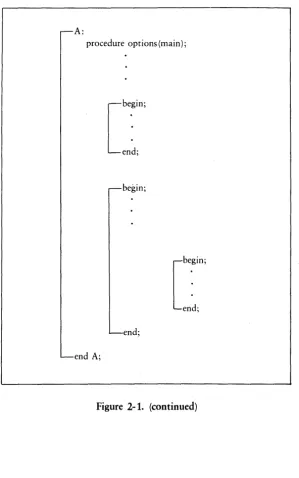
The essential difference between a BEGIN block and a PROCEDURE block is how they receive control during program execution. Control flows into a BEGIN block in the usual sequential manner. At this point, the block becomes active. When control transfers, programmatically, outside the block, or its corresponding END statement executes, the block terminates.
PL/I skips PROCEDURE blocks during the usual execution seauence, and they receive control only when invoked (see Section 2.S.) Figure 2-1 illustrates the block concept.
PROCEDURE block BEGIN block
A: .--begin;
procedure options (main);
statement (s) statement(s)
2.2 Blocks PL/I Language Reference Manual
A:
procedure options (main);
begin;
[
b~in;
end; end;
end A;
[image:19.473.73.372.54.532.2]PL/I Language Reference Manual 2.3 Internal vs. External Blocks
2.3 Internal vs. External Blocks
In PLII, each block is categorized as either internal or external depending on its relationship with other blocks.
Note: an external procedure is separate from other blocks. The procedure is not con-tained, nested, in any other block. Thus the main procedure is always an external procedure. An internal procedure is one that is contained in an encompassing block.
A PL/I program can have one or more external procedures that contain nested internal procedures or blocks. Each external procedure can be separately compiled and linked together to form a runnable program. One of the external procedures forming the program must be the main procedure.
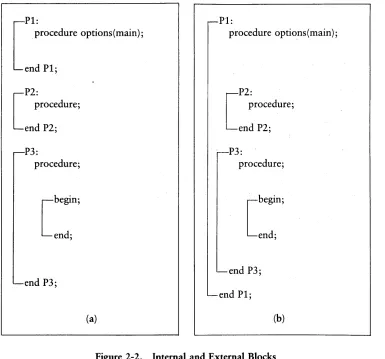
In Figure 2-2(a), blocks PI, P2, and P3 are all external but the BEGIN block is internal to P3. In Figure 2-2(b), PI is the external block, and P2, P3, and the BEGIN block are all internal. The format of the main procedure is:
proc-name:
PROCEDURE OPTIONS(MAIN);
Statements or Blocks
2.3 Internal vs. External Blocks
P1:
[
procedure options(main);
end P1;
P2:
[
procedure;
end P2;
P3:
procedure;
[begin;
end;
end P3;
(a)
PL/I Language Reference Manual
P1:
procedure options(main);
P2:
[
procedure;
end P2;
P3:
procedure;
[begin;
end;
end P3;
end P1;
[image:21.468.33.418.60.419.2](b)
Figure 2-2. Internal and External Blocks
PL/I Language Reference Manual 2.4 Scope of Variables
2.4 Scope of Variables
The scope of a variable is the set of blocks in which the variable is known. Variables can be either local or external relative to a block in which they appear.
When you declare a variable in a block, you can reference it in that block or any contained block. The variable is said to be local to that block because you cannot reference it outside the block where you declare it. In a contained block, a reference to a variable declared in a containing block is called an up-level reference.
The following example illustrates the concept of scope:
Pi:
procedure; declare
(afb) fixed binary(7);
a
=
2; 1* a is local to Pi *1b
=
3; 1* b is local to Pi *1 P2:procedure; declare
b fixed binary(7);
b
=
2; 1* b is local to P2 *1a
=
a*b; 1* b here refers to P2 bt not Pi b *1 end P2;put list (afb);
end Pi;
PL/I creates a new variable b in block P2 because it is a declared variable in that block. The PUT LIST statement is outside P2; therefore, the value of the variable b of Pi is 3. Because there is no declaration for the identifier a in P2, a is an up-level reference to the variable a declared in Pi, and the assignment statement in P2 changes its value. Thus, this code sequence produces the values 4 and 3.
2.4 Scope of Variables PL/I Language Reference Manual
i
p 1 : pro c e d u r e ; declarez fixed binary external;
P,.,· .:..
.
procedure; declare
z fixed binary external;
P3:
[
~::i: ~e
z float binary; 1* not external *1
end; end P3; end P2; end Pi;
PL/I Language Reference Manual
Pi:
procedure options(Main); declare x float binary;
begin;
declare x fixed;
-end;
P2:
procedure;
declare x character(10) varying;
end P2;
end Pi;
2.4 Scope of Variables
In this sequence, the scope of x is limited to each block in which it is declared. Although the name is identical in each declaration, the Compiler treats each one as a completely different variable with its own data type, and stores them in different memory locations.
2.5 Procedure Blocks
In PL/I, there are two types of procedures: subroutines and functions. Both types perform a specific task and are logically separate from the rest of the program. Both types can execute the same sequence of code one or more times without duplicating the code at each occurrence.
2.5 Procedure Blocks PL/I Language Reference Manual
A function is a procedure that manipulates data items and then returns a single value. You invoke a function by referencing its function name and argument list in a statement. Control passes to the function that performs its task and then returns a single value that replaces the function reference. Control then resumes at the point of reference.
2.6 The CALL Statement
The general form of the CALL statement is
CALL proc-name[(sub-l, ... ,sub-n)] [(arg-l,oo.,arg-m)];
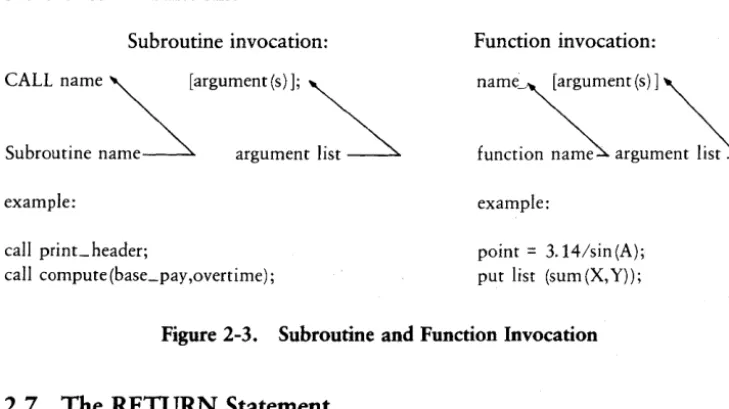
where sub-l through sub-n are optional subscripts that are required only when proc-name is a subscripted entry variable (Section 3.3.2). Arg-l through arg-m represent the actual parameters passed to the procedure. Figure 2-3 illustrates the invocation of subroutines and functions.
Subroutine invocation:
CALL name ~ [argument(s)]; ~
Subroutine
name~
argument list~
example:
call print_ header;
call compute (base_pay ,overtime);
Function invocation:
name~ [argument(s)] ~
f u n c t i S argument
l~
example:
point = 3.14/sin(A);
[image:25.479.32.397.256.461.2]put list (sum (X, Y));
Figure 2-3. Subroutine and Function Invocation
2.7 The RETURN Statement
The RETURN statement returns control to the point in the calling block immediately following the procedure invocation. It also returns a value if the procedure is a function
2.7 The RETURN Statement PL/I Language Reference Manual
The general form of the RETURN statement is
RETURN [( return-exp)] ;
where return-exp is the function value the procedure returns to the calling point. When necessary, PL/I converts the returned value to conform to the attributes specified in the RETURN option of the procedure statement.
The RETURN statement ends the procedure block that contains it. If the main procedure has the RETURNS attribute, PL/I returns control to the operating system.
Some examples of valid RETURN statements are shown below:
return;
return ()-(**2); return (F(A t ( 5 » ) ;
2.8 Actual and Formal Parameters
The data items that you transmit to a procedure are called the actual parameters, while the data items expected by a procedure and defined in the PROCEDURE state-ment, are called the formal parameters. Upon invocation of a procedure block, PL/I pairs each actual parameter with its corresponding formal parameter as shown in Figure 2-4 below.
!
call compute (a
+
(b+
c),rl2,3.14);actual parameter list
compute: procedure (X,Y,Z);
formal parameter list
~---end compute;
2.8 Actual and Formal Parameters PL/I Language Reference Manual
When you pass the actual parameter by reference, the actual parameter and corre-sponding formal parameter share storage. In this case, any changes made to the formal parameter in the invoked procedure change the value of actual parameter of theinvok-ing block.
When you pass the actual parameter by value, the actual and formal parameters do not share storage. In this case, PLII passes a copy of the actual parameter to the invoked procedure, so that any changes to the formal parameter affect only the copy, not the actual parameter value.
The following example program illustrates parameter passing.
A:
procedure; declare
ACTUAL fixed binarYt DUMMY fixed binary;
call X(ACTUAL); call }{«DUMMY»;
[
}{~rocedure
(FORMAL); declare FORMAL fixed FORMAL=
3;end
}n
end A;
binary;
PL/I passes ACTUAL by reference. Therefore, the assignment statement in the pro-cedure.X changes the value of ACTUAL throughout the program. PL/I passes DUMMY
PL/I Language Reference Manual 2.8 Actual and Formal Parameters
PLfI passes actual parameters by reference when the data attributes of the actual parameter are the same as the data attributes of the formal parameter. PLfI passes an actual parameter by value when it is one of the following:
• a constant • an entry name
• an expression consisting of variable references and operators • a variable reference enclosed in parentheses
• a function invocation
• a variable expression whose data type does not match that of the formal parameter
In the latter case, PLII converts the actual parameter to the type, precision, and scale of the formal parameter. The following program illustrates this concept:
A:
procedure; declare
}-{ character (7) t
(YtZ) fixed binar't'; call p(}-{ dY) tZ);
P:
end end
procedure(AtBtC) ; declare
A B C p ; A;
A character (7) t
B fixed binarYt C float binary; = 'Digital I ; = 100;
2.8 \ctual and Formal Parameters PL/I Language Reference Manual
The CALL statement sends the procedure three actual parameters X, Y, and Z cor-responding to the three formal parameters A, B, and C. PL/I passes the first actual parameter by reference because it matches the formal parameter, and the second param-eter by value because it occurs as an expression. PL/I converts the third paramparam-eter to the FLOAT data type and passes it by value.
2.9 The PROCEDURE Statement
In PL/I, you can define a procedure with a procedure statement at any point in a program. However, for readability you should place all procedures together in a single section at the end of the main program. The main program is, itself, a single-procedure definition.
The procedure statement identifies the entry point to the procedure, delimits the beginning of the) procedure block, defines the formal parameter list, and gives the attributes of the returned value for functions. The procedure can consist of a sequence of one or more statements including the corresponding END statement that ends the procedure definition. The END statement can also be the exit point of the procedure, although embedded RETURN statements can appear within the procedure body.
The general form of the procedure statement is,
proc-name: PROCEDURE[(parm-l, ... , parm-n)]
[OPTIONS(option, ... )] [RETURNS(attribute-list)] [RECURSIVE] ;
where parm-l through parm-n are the formal parameters for the procedure which you must declare within the procedure body at the principle block level. A formal parameter can be,
• a scalar variable • an array
• a major structure
but cannot have the attributes:
PL/I Language Reference Manual 2.9 The PROCEDURE Statement
[OPTIONS(option, ... )] defines a list of one or more of the options MAIN, STACK(b), or EXTERNAL.
The MAIN option identifies the procedure as the first procedure to receive control when the program begins execution.
The ST ACK(b) option sets the size of the run-time stack to the number of bytes specified by b. The default value is 512 bytes.
The EXTERNAL option identifies the procedure as an externally compiled proce-dure. It is often useful to group separately compiled procedures into a single compi-lation, where the procedures reference the same global data. According to the Subset G standard, you must compile each subroutine separately, and duplicate the global data area in each compilation. You can then combine the individual modules using the linkage editor to produce the object module.
In PL/I, an EXTERNAL option in a procedure heading makes the procedure acces-sible outside the module.
2.9 The PROCEDURE Statement PL/I Language Reference Manual
The following code sequence shows an example of how to use the EXTERNAL option:
ITlodule:
procedure; declare
1 Slobal data static,
2 a field character(20) varyins initial( " ) , 2 b field fixed initial(O),
2 c field float initial(O);
[
se:r:~edure
(0) options(external);declare c character(20) varyinS; a field
=
c;end set a;
[
s e: r
~ ~
e d u r e (x) 0 p t ion 5 ( ext e rn a I ) ; declare x fixed;b field
=
x; end set b;[
s e : r :
~
e d u r e (y) 0 p t ion s ( ext ern a I ) ; declare y float;c field
=
y; end set c;[
s u:
~
0 c e d u r ere t urn s ( flo at) 0 p t ion s ( ext ern a I ) ; return (b field + c field);end SUITd
[
displaY:
procedure options(external);
put sKip list(a_field tb_field tc_field); end display;
PL/I Language Reference Manual 2.9 The PROCEDURE Statement
This code defines five external procedures: set_a, set_b, set_c, sum, and display. These procedures are then accessed in the code sequence shown below:
- c a 11 ext:
procedure options(main); declare
set a entrY (character(ZO) varying) t set b entrY (fixed) t
set c entrY (float) t
SUftl returns(float) t
displa>' entrY;
call set a(\JohnsontJ/); call set b(Z5);
call set c(5.50); put sKip list(sum(»; call display();
end call ext;
These two code sequences when compiled separately and linked together, form a single runable program.
PL/I requires the RETURNS attribute list for a function procedure to give the char-acteristics of the value returned by the function.
The RECURSIVE attribute indicates that the procedure can activate itself, either directly or indirectly, while the procedure is executing.
2 10 Low-level Organization
The low-level organization of PL/I source text includes a specification of the character set and the rules for forming identifiers, both keywords and declared names, operators, constants, delimiters, and comments.
2.10 Low-level Organization PLfI Language Reference Manual
You can create the PLfI source program using ED the CPfM Context Editor or a similar text editor.
Note: all PLfI source programs must have the filetype PLI.
2.11 The Character Set
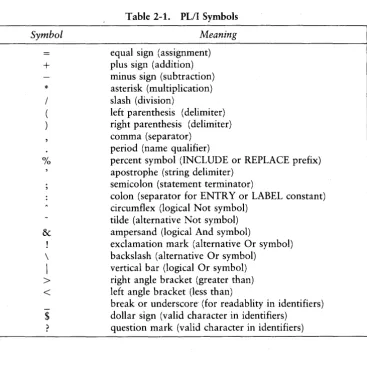
The PLfI character set consists of both upper- and lower-case letters, numeric digits, and other symbols. Table 2-1 shows the symbols recognized by PLfI and briefly describes their use.
[image:33.471.36.404.186.554.2]Symbol
+
* % & \I
><
$Table 2-1. PLfI Symbols
Meaning
equal sign (assignment) plus sign (addition) minus sign (subtraction) asterisk (multiplication) slash (division)
left parenthesis (delimiter) right parenthesis (delimiter) comma (separator)
period (name qualifier)
percent symbol (INCLUDE or REPLACE prefix) apostrophe (string delimiter)
semicolon (statement terminator)
colon (separator for ENTRY or LABEL constant) circumflex (logical Not symbol)
tilde (alternative Not symbol) ampersand (logical And symbol)
exclamation mark (alternative Or symbol) backslash (alternative Or symbol)
vertical bar (logical Or symbol) right angle bracket (greater than) left angle bracket (less than)
break or underscore' (for readablity in identifiers) dollar sign (valid character in identifiers)
PL/I Language Reference Manual 2.12 Identifiers
2.12 Identifiers
An identifier is a string of from one to thirty-one characters that are either letters, digits, or the underscore. The first character must be a letter. PL/I always represents
letters internally in upper-case. Therefore, two identifiers that differ only in case rep-resent the same identifier.
PL/I allows the question mark character to be embedded in identifiers to allow access
to external system entry points.
Note: it is good practice to avoid embedded question marks to maintain upward compatibility with full PL/I.
Every identifier in the source text of a PL/I program must be either a keyword or a
declared name. Keywords are those identifiers that have a special meaning in PL/I when
used in a specific context. Examples of keywords are the names of built-in functions, statements, and data attributes. The PLII Language Command Summary contains a complete list of keywords.
Declared names are identifiers whose use or meaning you define in a DECLARE statement (Section 3.6). A keyword can appear in a declaration as a user-defined identifier. The meaning of the identifier depends on how and where it appears. PL/I
determines the meaning in context. For example, INDEX is a keyword because it is the name of a PL/I built-in function. However, in the context of the declaration,
declare index fixed binary;
index is a declared name and not a keyword.
2.13 Constants
Constants are text items that have a fixed literal meaning that cannot change during program execution. In PL/I, the basic constants are:
• arithmetic (Example: 3674.799)
2.14 Delimiters and Separators PLfI Language Reference Manual
2.14 Delimiters and Separators
Separate items, such as identifiers, must be distinguishable. PLfI recognizes certain characters as delimiters and separators.
Generally, delimiters enclose one or more text items while separators mark the end of one item and the beginning of another. In PLfI, each identifier and arithmetic constant must be preceded and followed by one or more delimiters or separators. Delimiters can be either spaces, operators, or certain special characters.
2.14. 1 Spaces
In PLfI, a space can be either a blank, or a tab (CTRL-I). PLfI ignores any carriage return, line-feed, or carriage return line-feed sequence that is embedded in a string constant. For example, the assignment statement,
string = 'WHEN YOU HAVE A VERY LONG STRING LIKE THIS, PUI ALLOWS YOU TO PUT SOME OF IT ON ANOTHER LINE';
assigns the specified character string to the variable string. Any blanks or tabs that precede ALLOWS are included in the string.
2.14.2 Operators
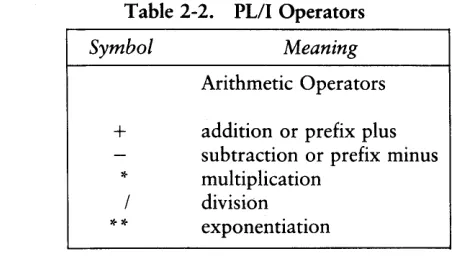
An operator is a symbol for a mathematical or logical operation. There are four types of operators in PLfI as shown in Table 2-2.
[image:35.468.98.324.436.565.2]Note: operators that consist of two characters, such as
>
=,
are called composite operators and must not be separated by blanks or other spaces.Table 2-2. PLfIOperators
Symbol
+
* **
Meaning
Arithmetic Operators
addition or prefix plus subtraction or prefix minus multiplication
PL/I Language Reference Manual 2.14 Delimiters and Separators
Table 2-2. (continued)
Symbol Meaning
>
A> or->
>=
= or-=
<=
<
A< or-<
Comparison Operators
greater than not greater than
greater than or equal to equal to
not equal to
less than or equal to less than
not less than
Bit-string Operators
or not
& and
! or
I
orThe String Operator
!! or
II
concatenate2.14.3 Special Characters
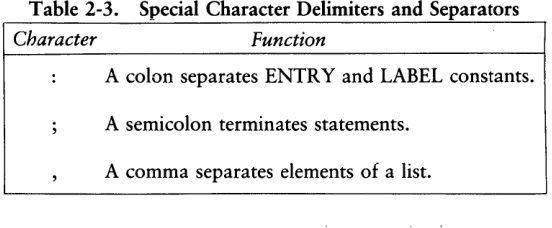
[image:36.468.132.381.56.368.2]Table 2-3 shows the special characters that can also function as delimiters or sep-arators in PL/I. Subsequent sections of the manual contain examples of their use.
Table 2-3. Special Character Delimiters and Separators
Character Function
A colon separates ENTRY and LABEL constants.
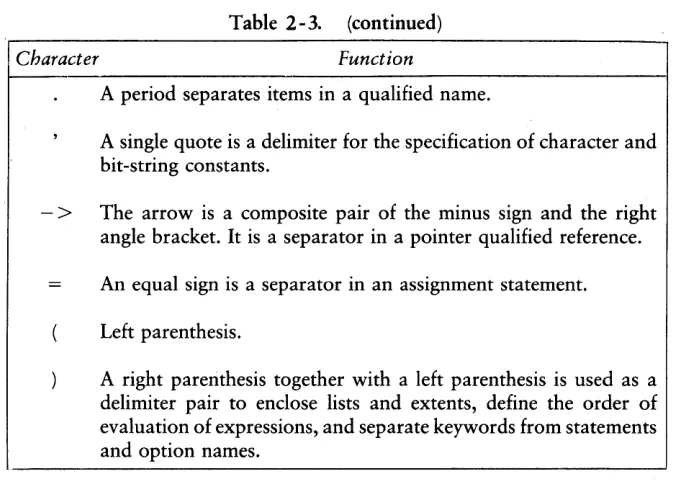
[image:36.468.109.385.446.560.2]2.14 Delimiters and Separators PL/I Language Reference Manual
Table 2-3. (continued)
Character Function
A period separates items in a qualified name.
A single quote is a delimiter for the specification of character and bit-string constants.
- >
The arrow is a composite pair of the minus sign and the right angle bracket. It is a separator in a pointer qualified reference.An equal sign is a separator in an assignment statement.
Left parenthesis.
A right parenthesis together with a left parenthesis is used as a delimiter pair to enclose lists and extents, define the order of evaluation of expressions, and separate keywords from statements and option names.
2.14.4 Comments
Comments providedocunientary text in a PL/I source program. The Compiler ignores comments, so you can place them wherever a delimiter is appropriate. Precede a com-ment by the composite pair /* and end the comment by the reverse composite pair
* /. For example:
[image:37.468.49.387.51.293.2]PL/I Language Reference Manual 2.15 Preprocessor Statements
2.15 Preprocessor Statements
PL/I allows modification of the source program or inclusion of external source files at compile time through the use of preprocessor statements. Preprocessor statements are identified by a leading % symbol before the keyword:
INCLUDE or REPLACE
2.15.1 The %INCLUDE Statement
The %INCLUDE statement copies PL/I source text from an external file at compile time. The statement is useful for filling in a structure declaration or format list. The form of the statement is
%INCLUDE 'filespec';
where filespec designates the file to copy into the source program. Filespec must be a standard CP/M file specification, [d:]filename[.typ], and must be enclosed in paren-theses. If there is no drive specification, PL/I assumes the drive containing the source program. When the Compiler encounters the %INCLUDE statement in the source file, it begins reading the file specified by % INCLUDE. When the Compiler reaches the end of the %INCLUDE file, it resumes reading the original source file.
The following code sequence is an example of the %INCLUDE statement:
f :
procedure;
declare a fixed binary; %include 'struc.lib'; declare c float;
end f;
The Compiler includes the source text from the file struc.lib at the point of the %INCLUDE statement.
2.15 Preprocessor Statements PL/I Language Reference Manual
2.15.2 The %REPLACE Statement
The %REPLACE statement allows the Compiler to replace constants for defined identifiers throughout the source program. The form of the statement is:
%REPLACE identifier BY constant;
The Compiler replaces every occurrence of the given identifier in the source text with the specified constant. The constant can be any string or unsigned arithmetic constant. You can write multiple %REPLACE statements as a single %REPLACE statement, with the elements separated by commas.
For example, the statement
%replace true by \l/b;
replaces all occurrences of true by the constant bit string'l'b, so that the Compiler interprets the statement,
do l...Jhile (true);
as:
do while ('lib);
PL/I requires that all %REPLACE statements occur at the outer block level before any nested inner blocks.
Note: to facilitate program maintenance and debugging, you should write all %REPLACE statements directly following the procedure heading.
Section 3
Data Types and Attributes
Data items in a PL/I program are either constants or variables. A constant is a data item whose value does not change during program execution, while the value of a variable can change during execution.
Every data item is associated with a set of properties called attributes that include such things as a range of subscript values, the operations that can be applied, and the amount of storage required. The DECLARE statement explicitly assigns attributes to data variables, while in some cases, such as constants, attributes are implicitly assigned by system defaults (see Section 3.6).
Data variables can represent single data items. A single data item, either a variable or constant, is called a scalar. Data variables can also represent multiple data items called aggregates. (Section 5 describes data aggregates.)
PL/I supports six types of data:
• arithmetic • string • pointer • label • entry
• file
The following sections describe each of these data types in detail.
3.1 Arithmetic Data
PL/I supports three types of arithmetic data:
• FIXED BINARY for representing integer values
• FLOAT BINARY for representing very large or very small numbers, with the decimal point allowed to float
3.1 Arithmetic Data PLfI Language Reference Manual
Each arithmetic data item has an associated precision and scale value expressed as integer constants p and q enclosed in parentheses. The precision p specifies the number of decimal or binary digits the data item can contain. For FIXED DECIMAL numbers, the scale q specifies the number of digits to the right of the decimal point.
If you do not explicitly declare the precision and scale of a variable in a DECLARE statement, PLfI implicitly supplies them according to default rules.
3.1.1 FIXED BINARY
FIXED BINARY data represents integers. A variable declared as FIXED BINAR Y[ (p)] is an integer that has p binary digits. The maximum range of pis:
1
<=
P<=
15PLfI internally represents this data type in two's complement form. Therefore, the range of a FIXED BINARY number is from -32768 to +32767.
The amount of storage PLfI allocates for a FIXED BINARY number depends on the precision you declare.
If p
<
=
7, then PLfI allocates one byte; if p>
7, then PLfI allocates two bytes.The default precision for FIXED BINARY is fifteen. Declaring a variable as FIXED, BINARY, or FIXED BINARY is equivalent to declaring it as FIXED BINARY(15).
Note: assigning values to FIXED BINARY variables outside the legal range produces undefined results.
PLfI treats decimal integers in the source program as FIXED BINARY data only if
they appear in contexts that require FIXED BINARY values, such as subscripts or arithmetic operations involving other FIXED BINARY data. Otherwise, constants default to FIXED DECIMAL. In PLfI, conversion from other types of data usually occurs with truncation (Section 4 has the conversion rules). For example, the following code assigns the value one to the variable I.
PL/I Language Reference Manual 3.1 Arithmetic Data
3.1.2 FIXED DECIMAL
FIXED DECIMAL data is used for calculations where exact decimal values must be maintained, as for example, in commercial applications. FIXED DECIMAL data with a zero scale factor can also represent integer data.
A variable declared as FIXED DECIMAL[(p[,q])] is a decimal number with a sign, a total of p decimal digits, with q digits to the right of the decimal point. The maximum number of digits p for FIXED DECIMAL is fifteen, and the scale q must be less than the precision. The range of a FIXED DECIMAL number x IS
-10**(p-q) < Ixl < 1Q**(p-q) where:
1
<
=
P<
=
15 and°
<
=
q<
=
PIn PL/I, all decimal constants, except those used in a FIXED BINARY context, with or without a decimal point default to FIXED DECIMAL. The default precision and scale for FIXED DECIMAL is (7,0). Also, the form of a constant implicitly determines its default precision and scale. For example:
3.25 defaults to FIXED DECIMAL(3,2) 302 defaults to FIXED DECIMAL(3,0)
Internally, PL/I represents decimal numbers in nine's complement BCD format. The number of bytes occupied by a FIXED DECIMAL number depends on its declared precison. If the precision is p, the number of bytes reserved is the integer part of,
(p+2)/2
resulting in a minimum of one byte and a maximum of eight bytes.
3.1 Arithmetic Data PLII Language Reference Manual
3.1.3 FLOAT BINARY
FLOAT BINARY data is useful in scientific applications for representing very large or very small numbers. A variable declared as FLOAT BINARY(p) has three parts: a sign, s; p binary digits that are the fraction, or mantissa, and represent significant digits of the number; and an integer exponent e, that represents the scale factor. For example, the FLOAT BINARY number 3.56E3 has the following parts:
Sign7 mantiSS7 ex
pon7
+ 3.56 3
PL/I supports both single-precision and double-precision FLOAT BINARY numbers.
The following table shows the allowed precisions and the approximate range of mag-nitudes for each type.
Table 3-1. PLII FLOAT BINARY Numbers
Type Precision
p
Range rsingle 1
<=
P<=
24 5.88*10**-39<=
Ixl<=
3.40*10**38double 25
<=
P<=
53 9.46*10**-308<=
Ixl<=
1.80*10**308The default precision for FLOAT BINARY is twenty-four, so declaring a variable FLOAT is equivalent to declaring it FLOAT BINARY(24).
A FLOAT BINARY constant is a number expressed in scientific notation as a sequence of decimal digits with an optional decimal point followed by the letter E, followed by an optionally signed decimal integer exponent. For example, the following code
A = 2.3E2; B = -L1~G7E+5;
C = 1.98E-2;
PL/I Language Reference Manual 3.1 Arithmetic Data
You can mix constants of different data types in an expression. PL/I automatically converts to the common data type before evaluating the expression. For example, in the following code sequence,
declare P float binary;
p
=
p + 3.14159;PL/I converts the FIXED DECIMAL constant 3.14159 to FLOAT BINARY format before performing the addition.
3.2 String Data
PL/I supports two types of string data:
• character string • bit string
A character string is any sequence of ASCII characters, including the empty or null sequence. A bit string is a sequence of bits. The length of a string is the number of characters or bits in the string. The following sections describe each type of string data.
3.2 1 Character-string Data
A variable declared as CHARACTER(n) is a character string of length n, where n is a value between 1 and 254. For example, the statement
declare A character( 10);
defines the variable A as a character string ten characters long. If a character string assigned to A is shorter than A, PL/I pads the string with blanks on the right to the length of A. If a longer string is assigned to A, PL/I truncates the string on the right.
Character-string constants are a sequence of characters enclosed in apostrophes. If
3.2 String Data PL/I Language Reference Manual
What's Happening?
is written as:
'What"s Happening?'
The null or empty character string has a length of zero and is defined by using two consecutive apostrophes.
Character-string variables can also have the VARYING attribute indicating that the variable can represent varying length strings to a maximum length of n. For example, the statement
declare A character(10) varying;
defines· A to represent any character-string value whose length is not greater than ten.
PL/I allows control characters in string constants. The circumflex character " in a
string constant indicates a control character. PL/I masks the high-order three bits of
the character to zero, thus converting the string "M, or "m, to a carriage return character. Similarly, it converts the string "I to the horizontal tab character. PL/I translates a
double circumflex "" within the string to a single" character.
Note: PL/I programs should avoid using the control character feature if compatibility is a requirement, because the circumflex is not available in other PL/I implementations.
3.22 Bit-string Data
Bit strings represent logical data items. A bit string containing all zero-bits is false; a bit string containing anyone-bits is true.
A variable declared as BIT(n) is a bit-string data item containing n binary digits, where n is a value between one and sixteen. For example, the statement,
declare A bit(3);
defines a bit string of length three. Bit-string assignments follow the same rules as for character strings, except that padding is done with zero-bits instead of blanks.
PL/I Language Reference Manual 3.2 String Data
You can write bit-string constants in any of four different formats. Each format corresponds to a base which is the number of bits used to represent each digit in the constant. A bit-string constant is a sequence of digits and letters enclosed in apostrophes followed by the letter B, and optionally followed by a digit indicating the base. The default base, B or B1, is two digits. The following table shows the various formats.
Table 3-2. Bit-String Constant Formats
Format
B B1 B2 B3 B4
Base
2 2
4 8 16
0,1 0,1
Digits and/or Characters in Representation
0,1,2,3
0,1,2,3,4,5,6,7
0,1,2,3,4,5,6,7,8,9,A,B,C,D,E,F
Note: the characters and/or digits used in the sequence must be valid for the base specified by the format.
The following examples illustrate the equivalence of the optional formats to the base 2 format:
\ 101'51 is equivalent to \ 101'5 \ 101'52 is eqttil,Jalent to \010001'5 \ 101'53 is equil,Jalent to \001000001'5 \101'54 is equil,Jalent to \000100000001'5 \SA'54 is equivalent to \10011010'5 \77'53 is equil,Jalent to \111111'5
3.3 Control Data Items
Control data items control the flow of program execution. Statement labels and procedure names are examples of control data constants.
3.3.1 LABEL Data
3.3 Control Data Items PL/I Language Reference Manual
Assignments of label constants or other label variables can be made to a label variable following the same rules as assignments of other types of variables.
Both label constants and label variables are subject to the same scope rules as declared names. A LABEL data item is known only within the block in which it is declared explicitly by a DECLARE statement, or implicitly by its use as a label constant.
Label constants can be subscripted by a single, optionally signed, integer constant. All occurrences of subscripted labels with the same identifier in a single block constitute an implicit declaration of a constant-label array for that block. The occurrence of the same label name within any other block, including a contained block, defines a new declaration local to that block. Any such implicitly defined constant-label array is defined only for those subscripts that occur in its corresponding block. You can explic-itly define label variables to be singly subscripted arrays in a DECLARE statement.
Note: in PLfI, the only operators that you can use with LABEL data are the equal (=) and not equal
C
= or -=) comparison operators.3.3.2 ENTR Y Data
In PLfI all ENTRY data items are either entry constants or entry variables. Entry constants correspond to either internal procedures, or to separately compiled external procedures. Entry variables are data items that can take on entry-constant values during program execution.
The calling program must use an ENTRY declaration to define the characteristics of the formal parameters and returned values for all externally compiled procedures.
Note: you must ensure that the ENTRY declaration matches the externally defined procedure, so the linkage editor can properly combine the program segments.
Variables that take on entry constant values are also defined with an ENTRY dec-laration. If required by the application, entry variables can be subscripted, but entry constants cannot. As with LABEL data, the only operators used with ENTRY data are the equal and not equal comparison operators.
PL/I Language Reference Manual 3.3 Control Data Items
The general form for an ENTRY statement is
proc-name [(bound-pair-l, ... ,bound-pair-n)] [VARIABLE] [ENTRY [(att-l, ... ,att-m)]
[RETURNS (return-att) ];
where the attributes can be in any order, but must specify either ENTRY or RETURNS.
The identifiers are given in the following manner:
• proc-name gives the entry-data item name
• bound-pair-l, ... ,bound-pair-n gives the optional bound-pair list • att-l, ... ,att-m gives the list of formal parameter attributes • return-att gives return-value attribute for a function entry item
The VARIABLE attribute indicates that the data item is an entry variable that must be assigned an entry constant value during program execution. The bound-pair list is only valid if the item has the VARIABLE attribute. You can omit the list of formal parameter attributes if the procedure does not require any parameters. In this case, you can also omit the ENTRY attribute if you specify the RETURNS attribute.
If a particular parameter has the dimension attribute, it must appear as the first attribute. If the parameter is a structure, the structuring information that the level numbers provide must precede the attribute definition. PL/I does not permit attribute factoring in the list att-l through att-m.
Some examples of valid ENTRY statements are given below:
declare }-{
declare \ /
I
declare P
declare Q declare R
entrY;
entn' \)ariable;
(0:10) entn'(fixedtfloat) \)ariable;
3.3 Control Data Items PL/I Language Reference Manual
The following code sequence illustrates entry data items:
declare
(}-( ,Y) float binar}',
A
entrY variable,F(3) entry(float) returns(float) variable,
ZZ
entry(float) returns(float); P 1 :procedure;
}{ =
5 ;end P1; PZ:
procedure;
}{=Z5 ;
end PZ;
Y=8;
if Y 5 then A
=
P 1 ; elseA
=
PZ; call A; F(Z) = ZZ; Y=
F(Z)OO; put list(Y);3.4 POINTER Data
POINTER data addresses specific locations in memory. The value of a POINTER data item is the address of a variable in the program. The general form of a POINTER variable declaration is:
DECLARE X POINTER;
PL/I Language Reference Manual 3.4 POINTER Data
You can use POINTER data with based variables to dynamically manage storage. Section 7.2 describes based variables.
3.5 FILE Data
In PLlI, FILE data items consist of file constants and file variables that access external data. A file constant declaration takes the general form:
DECLARE file_id FILE;
A file variable declaration takes the general form,
DECLARE file_id FILE VARIABLE;
where file_id is a PL/I identifier assigned to represent the file. If file_id is not a param-eter, PL/I automatically treats the identifier as EXTERNAL, so that it accesses the same data set in all modules that declare it EXTERNAL.
If you do not open the file explicitly with an OPEN statement including the TITLE option, PL/I accesses the disk file file_id.DAT on the default drive.
Section 10 presents FILE data in more detail. The PLII Language Programming
Guide contains examples of FILE data use.
3.6 The DECLARE Statement
In PL/I, you must use the DECLARE statement to define all variable names in a program that are not the names of built-in functions or pseudo-variables (Section 6.8). File constants and variables must also be defined in a DECLARE statement. Control constants, such as statement labels and procedure names, are declared implicitly by their use in a program.
The DECLARE statement associates each variable name with the proper attributes for the declared data type. The general form of the DECLARE statement for scalar variables is
3.6 The DECLARE Statement PL/I Language Reference Manual
where name is the variable identifier, and attribute list is one or more characteristics of the variable name. Multiple attributes can appear in any order but must be separated by spaces.
The following examples illustrate valid PL/I DECLARE statements:
declare x fixed binary; declare pi float binary(53);
declare overtiMe pay fixed deciMal(5,2) initial(OOO.OO); declare (first_naMe,last_naMe) character(20) varying; declare EOF bit(1) initial('l'b);
declare list head pointer static initial(null);
3.7 Multiple Declarations
For convenience and simplicity, PL/I allows multiple declarations in a single state-ment. In general, you can write any sequence of DECLARE statements of the form,
DECLARE definition-I; DECLARE definition-2;
DECLARE definition-n;
in the equivalent form,
DECLARE definition-I, definition-2, ... definition-n;
where each definition item is separated by commas and zero or more spaces, and the DECLARE statement is terminated by a semicolon.
If several item definitions share the same attributes, you can factor them to the right. That is, you can .write a sequence of definitions of the form,
item-l attr-A, item-2 attr-A, ... item-n attr-A
in an equivalent factored form:
PL/I Language Reference Manual 3.7 Multiple Declarations
Repeated applications of this rule are also allowed. For example, the statement
declare «A,B) fixed binan', C float binary) static external;
is equivalent to:
declare A fixed binar~ static external t 5 fixed binary static external t C float binary static external;
The ordering of attributes is unimportant, with the exception that the dimension list attribute for an array must follow the array name and precede other attributes. Also, the level numbers for members of structures must precede the member name. Both attributes can be factored.
Because a dimension list is on the right of the name to which it applies, it is factored to the right as above. However, because level numbers precede their member names, they are factored to the left. A sequence of the form,
level-k item-I, level-k item-2, ... level-k item-n
is equivalent to the sequence:
level-k (item-I, item:-2, ... item-n)
For example, the statement
declare 1 A basedt
2 (5 fixed binarYt C character(2»;'
is equivalent to:
declare 1 A based,
3.8 Default Attributes PL/I Language Reference Manual
3.8 Default Attributes
An attribute list cannot contain conflicting attributes, such as two data types, or two storage class attributes. If you do not specify a complete set of attributes in a DECLARE statement, then the Compiler supplies the attributes according to the fol-lowing default rules:
• If no attribute is specified, FIXED BINARY(15) is assumed.
• If DECIMAL or BINARY is specified without FIXED or FLOAT, then FIXED is assumed.
• If FIXED or FLOAT is specified without BINARY or DECIMAL,then BINARY is assumed.
• If no precision for FIXED BINARY is specified, FIXED BINARY(15) is assumed.
• If no precision and scale for FIXED DECIMAL is specified, FIXED DECI-MAL(7,O) is assumed.
• If no precision for FLOAT BINARY is specified, then FLOAT BINARY(24) is assumed.
• If no length is specified for BIT, then BIT(l) is assumed.
• If no length is specified for CHARACTER, then CHARACTER(l) is assumed.
Section 4
Data Conversion
Data conversion is a process that changes the representation of a given value from one type to another. In PL/I, all conversion involves a source, a target, and a result. The source is the data item being converted; the target is the type to which the source item is being converted, and the result is the actual converted value with the data type of the target.
PLiI performs conversions in the following general categories:
• arithmetic to arithmetic (type and precision) • arithmetic to string
• string to arithmetic
• format specified in EDIT-directed 110 (see Section 13)
PL/I does not perform conversion for LABEL, ENTRY, POINTER, or FILE data types.
Part of the versatility and power of PL/I lies in your freedom to declare data in a wide variety of types. With this freedom comes a responsibility to understand how the language converts data from one type to another, either explicitly or implicitly.
The following list shows some of the contexts in which PL/I performs default data conversion.
• In an assignment statement, PL/I converts the expression to the type of the variable to which it is assigned.
variable = expression;
4 Data Conversion PL/I Language Reference Manual
proc-name:
PROCEDURE RETURNS(return-att);
RETURN (return-exp); END [proc-name];
• In any arithmetic expression, if the operands are not the same type, PL/I converts them to a common type before performing the operation.
A+B A-B A*B
AlB A ** B
• During 1/0 processing, PL/I converts to and from character string data when using the PUT or GET statement respectively.
PUT LIST (output-list); GET LIST (input-list);
• PL/I converts values specified in some statements to integer values.
DO (control-var) ...
END;
• PL/I has built-in functions (BIFs) that perform specific conversions.
4.1 Arithmetic Conversions
Arithmetic conversions occur in several contexts: