Security Risks in Bluetooth Devices
Vinayak P. Musale
Master of EngineeringDepartment of Computer Science & Engineering Walchand Institute of Technology, Solapur.
Maharashtra, India.
S. S. Apte
Phd, Head & ProfessorDepartment of Computer Science & Engineering Walchand Institute of Technology, Solapur.
Maharashtra, India.
ABSTRACT
The Bluetooth is widely used to link cell phones to their accessories, and its security has not been considered a major problem. This research paper describes the critical problems and the risks that are identified in all Bluetooth-enabled kits that are tested. Also this paper will explain what Bluetooth is, how it works, and some of the vulnerabilities and risks associated with it.
Keywords
: Bluetooth, Security, Wireless, Risks1.
INTRODUCTION
Bluetooth provides a short range (usually up to a maximum of 100 meters) wireless communication between devices making it convenient for users and thus eliminating the need for messy cables. According to Bluetooth Special Interest Group (2006), “Bluetooth wireless technology is the most widely supported, versatile and secure wireless standard on the market today.”
Bluetooth operates in the open 2.4 GHz ISM band and is “now found in a vast array of products such as input devices, printers, medical devices, VoIP phones, whiteboards and surveillance cameras. However the proliferation of these devices in the workplace exposes organizations to security risks.”
1.1 What is Bluetooth?
In the past, the only way to connect computers together for the purpose of sharing information and/or resources was to connect them via cables. This can be, not only cumbersome to setup, but it can get messy real quick. Bluetooth provides a solution to this problem by providing a cable-free environment.
According to the official Bluetooth website, www.bluetooth.com, Bluetooth wireless technology is a short range communication technology intended to replace the cables connecting portable and/or fixed devices while maintaining high levels of security. It is relatively robust, operates on low power, and is a low cost technology. Bluetooth uses a Time-Division Duplex scheme for full duplex transmission. In other words, Bluetooth technology is simply used to connect an electronic device to another without the physical cable. Bluetooth is intended to be a standard that works at two levels:
1. It provides agreement at the physical level (radio-frequency standard).
2. It also provides agreement at the next level up, where products have to agree on when bits are sent, how many will be sent at a time and how the parties in a conversation can be sure that the message received is the same as the message sent.
The Bluetooth protocol uses a combination of circuit and packet switching. To send/receive data, Bluetooth uses a frequency-hopping spread spectrum technique which makes it difficult to track or intercept transmissions. The Bluetooth standard uses three transmit power classes. These are 1mW, 2.5mW and 100mW. Each Bluetooth device has a unique 48 bit hard-wired device address for identity, which allows for 2^48 devices.
Bluetooth devices basically form piconets to communicate. Each piconet comprises of up to eight active devices where one is the 'master' and the rest are 'slaves'. The master searches for Bluetooth devices followed by invitations to join the piconet addressed to specific devices. The 'master' then assigns a member-address to each slave and controls their transmissions. Devices can belong to several piconets. Bluetooth also provides for easy integration of TCP/IP for networking. Bluetooth uses the radio range of 2.45 GHz. This is a globally available bandwidth used worldwide for compatibility.
“The idea behind Bluetooth technology was born in 1994, when a team of researchers at Ericsson Mobile Communications initiated a feasibility study of universal short-range, low-power wireless connectivity as a way of eliminating cables between mobile phones and computers, headsets and other devices.” (2005, Bialoglowy). In 1998, this group evolved to the Bluetooth Special Interest Group (SIG). Along with Ericsson, other founding members included Nokia, Intel, IBM and Toshiba. Today, ”the SIG is comprised of over 4,000 members who are leaders in the telecommunications, computing, automotive, music, apparel, industrial automation, and network industries and a small group of dedicated staff in Hong Kong, Sweden, and the USA “ (Bluetooth SIG, 2006)
Many people wonder where the name “Bluetooth” came from. According to Bluetooth SIG (Bluetooth SIG, 2006), the name "Bluetooth" is taken from the 10th century Danish King Harald Blatand – or Harold Bluetooth in English. During the formative stage of the trade association a code name was needed to name the effort. King Blatand was instrumental in uniting warring factions in parts of what are now Norway, Sweden, and Denmark - just as Bluetooth technology is designed to allow collaboration between differing industries such as the computing, mobile phone, and automotive markets. The code name as “stuck”.
1.2 How Bluetooth Works
Bluetooth can be used to connect almost any device to another device. ”Bluetooth can be used to form ad hoc networks of several (up to eight) devices, called piconets. (Vainio, 2000). When Bluetooth devices first connect, there is a piconet master that initiates the connection, and the others are slave devices. “One piconet can have a maximum of seven active slave devices and one master device. All communication within a piconet goes through the piconet master. Two or more piconets together form a scatternet, which can be used to eliminate Bluetooth range restrictions.” (Haataja, 2006) It is not possible to be a master of two different piconets because a piconet is a group of devices all synchronized on a hopping sequence set by the master. For that reason, any devices that share a master must be on the same piconet. “Scatternet environment requires that different piconets must have a common device (so-called scatternet member) to relay data between the piconets.” (Haataja, 2006)
As stated in the Bluetooth SIG website, “Bluetooth technology operates in the unlicensed industrial, scientific and medical (ISM) band at 2.4 to 2.485 GHz, using a spread spectrum, frequency hopping, full-duplex signal at a nominal rate of 1600 hops/sec. The 2.4 GHz ISM band is available and unlicensed in most countries.” Bluetooth devices within a 10 to 100 meters (or 30 to 300 feet) range can share data with a throughput of 1 Mbps for Version 1.2 and up to 3 Mbps for Version 2.0 + Enhanced Data Rate (EDR).
Data is transmitted between Bluetooth devices in packets across the physical channel that is subdivided into time units known as slots. As described in an article of JDJ, the world’s leading java resource.
The radio layer is the physical wireless connection. To avoid interference with other devices that communicate in the ISM band, the modulation is based on fast frequency hopping. Bluetooth divides the 2.4 GHz frequency band into 79 channels, 1 MHz apart (from 2.402 to 2.480 GHz), and uses this spread spectrum to hop from one channel to another, up to 1,600 times per second. (Mikhalenko, 2006)
Bluetooth SIG further explains that within a physical channel, a physical link is formed between any two devices that transmit packets in either direction between them. In a piconet physical channel there are restrictions on which devices may form a physical link. There is a physical link between each slave and the master. Physical links are not formed directly between the slaves in a piconet. (Bluetooth SIG, 2006)
Profiles are used with Bluetooth so that devices can communicate with each other and that there is interoperability between vendors. These profiles define behaviors of the Bluetooth devices, the roles and capabilities for specific types of applications. Each profile specification contains information on the following topics:
• Dependencies on other profiles
• Suggested user interface formats
• Specific parts of the Bluetooth protocol stack used by the profile. To perform each task, each profile uses particular options and parameters at each layer of the stack. (Bluetooth SIG, 2006)
2.
BLUETOOTH SECURITY
Security has played a major role in the invention of Bluetooth. The Bluetooth SIG has put much effort into making Bluetooth
a secure technology and has security experts who provide critical security information. In general, Bluetooth security is divided into three modes: (1) non secure; (2) service level enforced security; and (3) link level enforced security. In non-secure, a Bluetooth device does not initiate any security measures. In service-level enforced security mode, .two Bluetooth devices can establish a non secure Asynchronous Connection-Less (ACL) link. Security procedures, namely authentication, authorization and optional encryption, are initiated when a L2CAP (Logical Link Control and Adaptation Protocol) Oriented or Connection-Less channel request is Bluetooth Security made” (Haataja, 2006). The difference between service level enforced security and link level enforced security is that in the latter, the Bluetooth device initiates security procedures before the channel is established.
3.
SECURITY ARCHITECTURE
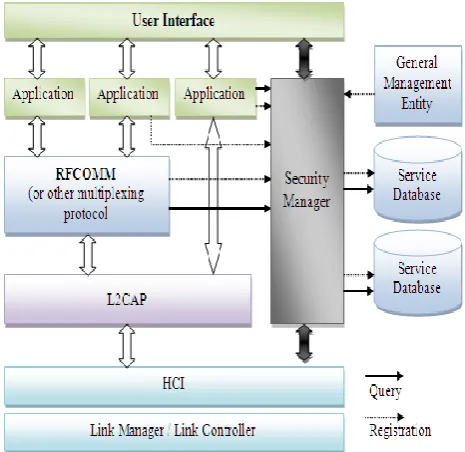
[image:2.595.314.547.364.590.2]Because of these many new risks that a new technology like Bluetooth creates, a good security design is essential for it to be successful. However, since Bluetooth is a relatively recent invention and we are well aware of the security risks and needs for technologies in today's world (especially having the similar 802.11 wireless technology available to examine), the architecture of Bluetooth security was very well thought out to begin with.
Figure 1: Bluetooth Security Architecture
The figure 1 illustrates the general security architecture. The key component in the architecture is a security manager, with the following functions:
Store security-related information on both services and
devices into corresponding service and device
databases.
Grant or refuse access requested by protocol
Command the link manager to enforce authentication
and/or encryption before connecting to the application,
using the HCI.
Query PIN entry to set-up trusted device relationship.
Employing such a centralized security manager is flexible to implement different access policies and easy to add new policies without affecting other parts.
Moreover, the security manager acts as a bridge to join application level and link level security controls together and thus helps in providing end-to-end security.
Authentication should be performed after determining what the security level of the requested service is. That is to say, the authentication can only be performed when a connection request to a service (SCO link) is submitted.
The design of secure interaction between devices in Bluetooth consists of the following phases:
An initial phase, called pairing, in order to establish a "link" key, which will then be used for encryption and decryption for secure connections. This is the most dangerous stage of connecting to Bluetooth devices together; as if an attacker can spy on this part of the interaction then he may be able to establish what the link key is [2] . During this pairing, an initialization key is generated based on each device's address, and a PIN which is shared between the devices. Once pairing has occurred, each device considers the other to be "trusted", and thus it grants its access to certain things on itself. Due to the fact that someone spying on this would be able to determine what the initialization key, and thus the link key, the Bluetooth Special Interests Group (SIG) [3] recommend that this stage is carried out in private, and that PIN should be long and manually input if possible. The PIN should also random and not common PINs like "0000".
Using this initialization key, the devices then agree on a link key which they will use to establish a secure connection between each other when needed. There are two types of link key. The first is a unit key, where a device's individual unit key (which every Bluetooth device has) is chosen as the link key. This method clearly allows other a device to spy on data being transferred between a device it is trusted by and some other device, or even to send false data to another device by impersonating using the unit key. The other method is combination keys, in which an individual link key is generated for each individual link between two devices, based on each of their Bluetooth addresses. Whenever a device wishes to access another Bluetooth device, it gets the other to send it a challenge. It then encrypts this challenge using the link key along with other information (using a safer+ algorithm [4] ) and returns a partial result to the device he wishes to access. This other device then verifies the partial result and communication can take place using encrypted wireless interaction. This can then be mirrored in reverse to complete a mutual pairing.
When data is then being communicated, the link key is used to help to generate a ciphering for an encryption algorithm, which again makes it more secure as the link key is not used directly for encryption or decryption during the communication.
As mentioned above, Bluetooth’s security procedures include authorization, authentication and optional encryption. Authentication involves proving the identity of a computer or
computer user, or in Bluetooth’s case, proving the identity of one piconet member to another. Authorization is the process of granting or denying access to a network resource. Encryption is the translation of data into secret code. It is used between Bluetooth devices so that eavesdroppers cannot read its contents. However, even with all of these defense mechanisms in place, Bluetooth has shown to have some security risks. The next section of this paper will describe some of the known security issues associated with Bluetooth technology.
4.
KNOWN SECURITY ISSUES
Given that this Bluetooth security has been well thought out and the scope for a hacker to be able to attain the link key as minimal especially if Bluetooth SIG's recommendations are taken aboard, any security compromises must take a different form than trying to obtain or guess the decryption key. Currently there are just a few known methods for bypassing Bluetooth's security measures.
One method of hacking Bluetooth has been named "Bluesnarfing", and, as with most Bluetooth hacks, the reason for its existence is a fault of the way Bluetooth is implemented on certain mobile phones, and in this case the way in which the object exchange (OBEX) protocol is implemented. What it does is, it can silently access the mobile phones contacts, calendar and pictures without the owner ever knowing a clear violation of the owner's security expectations. Nokia is one of a few mobile phone companies who have acknowledged that some of their devices have this fault, and have addressed it with updated firmware for the faulty products. [5]
Another method is that of "backdoor" hacking. This is where a device which is no longer trusted can still gain access to the mobile phone and gain access to data as with Bluesnarfing, or also use services like WAP etc. [6]
A third flaw in some mobile phones allows for a hacker to use a method called "bluebugging" in order to hack into the owner's phone. It is possibly the most dangerous of the attacks, and allows hackers to send/read SMS, call numbers, monitor phone calls and also do everything that backdoor and Bluesnarfing allows. This is a separate vulnerability from Bluesnarfing and does not affect all of the same phones as Bluesnarfing.
The seemingly harmless "Bluejacking" is a different style of attack. It works on the fact that during the initialization process, when a device wishes to be paired with you, a message containing the device's name and whether you want to pair with this device is displayed. To many people this is just an innocent joke to get a reaction out of someone by renaming their phone and then sending them a clever anonymous message and watching their reaction [6]. However, if a malicious individual names their phone something like "Click accept to win!!" then they can gain access to someone's Bluetooth device if an owner falls for the trick.
There is also the possibility for Denial of Service (DoS) attacks on Bluetooth devices. This works exactly the same way that traditional DoS attacks work, with a hacker sending invalid Bluetooth requests and his occupying a devices Bluetooth channel so it cannot communicate with any other Bluetooth devices.
The first three of these issues are purely faults of the manufacturers of particular mobile phones, and firmware has been released since their discovery to correct any faulty models. These problems illustrate the dangers of using Bluetooth devices if they are not implemented properly. Indeed, they can all be solved, for most phones, by switching the phone into "invisible" mode so that it will not be recognized by other Bluetooth devices. Switching off the Bluetooth capability when you are not using it is another more extreme option. The Bluejacking and Cabir worm issues can only hack someone’s phone if they agree to be paired with the device and in the case of the cabir worm if they then also agree to install the software that it tries to install. There are also security updates and antivirus software readily available for users. These user security measures show that, as with any technology, there is responsibility on the user to take care of their device, and if they do so they should not be at a large risk. Generally, Bluetooth is accepted as a well-designed and secure medium of transfer, so long as their users take care of their devices.
5.
BLUETOOTH
VULNERABILITIES
AND SECURITY RISKS
Bluejacking is the process of sending unsolicited messages, or business cards, to Bluetooth-enabled devices. This does not involve altering any data from the device, but nonetheless, it is unsolicited. Devices that are set in non discoverable mode are not susceptible to bluejacking. In order for bluejacking to work, the sending and receiving devices must be within 10 meters of one another. While this method has been widely used for promotional purposes, Bluetooth device owners should be careful never to add the contact to their address book. While Bluejacking is usually not done with malicious intent, repetitive bogus messages can be annoying to the user, and in some cases, can render the product inoperable. This can also open the door to a variety of social engineering attacks.
Bluesnarfing is a method of hacking into a Bluetooth-enabled mobile phone and copying its entire contact book, calendar or anything else stored in the phone’s memory. By setting the device in non-discoverable, it becomes significantly more difficult to find and attack the device. However, “the software tools required to steal information from Bluetooth-enabled mobile phones are widely available on the Web, and knowledge of how to use them is growing.” (Kotadia, 2004) Companies such as Nokia and Sony Ericsson are making sure new phones coming to market will not be susceptible to Bluesnarfing.
“The backdoor attack involves establishing a trust relationship through the “pairing” mechanism, but ensuring that it no longer appears in the target’s register of paired devices. In this way, unless the owner is actually observing their devices at the precise moment a connection is established, they are unlikely to notice anything untoward, and the attacker may be free to continue to use any resource that a trusted relationship with that device grants access to., This means that not
only can data be retrieved from the phone, but other services, such as modems, or Internet, WAP and GPRS gateways may be accessed without the Owner’s knowledge or consent.” (The Bunker, 2003)
The cabir worm is malicious software that uses Bluetooth technology to seek out available Bluetooth devices and send itself to them. According to Bluetooth SIG (2006), “The cabir worm currently only affects mobile phones that use the Symbian series 60 user interface platform and features of the Bluetooth wireless, Bluetooth Security technology. Furthermore, the user has to manually accept the worm and install the malware in order to infect the phone.” Although this may be the case, this shows that it is achievable to write mobile viruses that spread via Bluetooth and may cause other hackers to explore the possibilities of writing Bluetooth viruses. The Mabir worm is essentially a variant of the Cabir worm where it uses Bluetooth and Multimedia Messaging Service messages (MMS) to replicate.
6.
INHERENT RISKS WITH
BLUETOOTH DEVICES
Bluetooth is a very nice technology but the security issue has to be taken into serious consideration. Risks are inherent to any wireless technology. The most significant risk in the wireless technology is that the underlying communication medium is open to everybody, including authentic users as well as the intruders. Bluetooth used short-range radio which is very vulnerable. For instance, if the intruders had the frequency to connect to your PC, they can use their own Bluetooth technology to monitor and mouse to get access. So they can have all information in your PC. And if the attacker’s headsets connected to your mobile phone by hacking the frequency, you will never know somebody bugged your phone and everything will be unsafe. Therefore we need to put extra efforts in security section to make sure the technology is safe for the users. The Bluetooth technology needs to sort out the following specific threats
All the vulnerabilities that exist in a conventional
wired network apply to wireless technologies. Malicious entities may gain unauthorized access to
an agency's computer network through wireless
connections, bypassing any firewall protections. Sensitive information that is not encrypted or that is
encrypted with poor cryptographic techniques and
that is transmitted between two wireless devices
may be intercepted and disclosed.
DoS attacks may be directed at wireless connections or devices.
Malicious entities may steal the identity of legitimate users and masquerade as them on internal
or external corporate networks.
Malicious entities may be able to violate the privacy of legitimate users and be able to track their
movements.
Malicious entities may deploy unauthorized equipment (e.g., client devices and access points) to
surreptitiously gain access to sensitive information. Handheld devices are easily stolen and can reveal
sensitive information.
Data may be extracted without detection from improperly configured devices.
Viruses or other malicious code may corrupt data on a wireless device and subsequently be introduced to
a wired network connection.
Malicious entities may, through wireless connections, connect to other agencies or
organizations for the purposes of launching attacks
and concealing their activities.
Interlopers, from inside or out, may be able to gain connectivity to network management controls and
thereby disable or disrupt operations.
Malicious entities may use third-party, untrusted wireless network services to gain access to an
agency's or other organization's network resources. Internal attacks may be possible via ad hoc
transmissions.
7.
THE FUTURE
The SIG outlined in its roadmap through to 2012 to continue to tackle issues of privacy and security. Nokia and Ericsson have both developed software upgrades for phones vulnerable to Bluetooth attacks. Both companies have also made sure that new phones coming to market will be able to defend against attacks. Although consumers are still advised to use long PIN codes to decrease the risk of a security violation. Most experts regard Bluetooth as still being the most secure form of wireless networking today as confirmed by a study by Mississippi State University. Bluetooth is considered more secure than any other wireless technology, such as 802.11 networks and Wi-Fi which is vulnerable to security threats due to its weak WEP and WPA protocols. Everything considered Bluetooth is expected to become more pervasive as demand for wireless grows.
8.
CONCLUSION
Bluetooth is constantly growing in popularity because of the convenience of exchanging information between mobile devices. As Bluetooth usage rises, so do the security and identify the risks associated with the technology.
Bluetooth is a WPAN standard that is moderately secure but still has weaknesses in its security architecture, making it vulnerable to attacks by malicious intruders. With its ever-growing popularity as a standard technology in wireless
personal networks, Bluetooth security has become an increasingly important aspect.
It is important that consumers understand the technology and the risks involved in their uses. Most of these risks can be easily mitigated by following device configuration guidelines and security policies when it comes to the use of a Bluetooth device.
Bluetooth users should familiarize themselves with Bluetooth security issues before using Bluetooth devices, and especially before they bring these devices into the work place.
9. REFERENCES
[1] The Preliminary Study
http://student.vub.ac.be/PreliminaryStudy.html
[2] The Referenced White Paper
https://www.bluetooth.org/foundry/sitecontent/document /security_whitepaper_v1
[3] Bluetooth Special Interest Group, 2006, http://www.bluetooth.com
[4] IEEE document from
http://www.vlsi.ee.upatras.gr/pkitsos/Kitsos_IEEEPC.pdf
[5] Sarbanes-Oxley Compliance Journal. 2005. Detecting Bluetooth Security Vulnerabilities. Retrieved July 1,
2006 from
http://www.sox.com/News/detail.cfm?articleID= 217
[6] Bluejacking. http://www.bluejackq.com/.
[7] Bialoglowy, Marek. 2005. Bluetooth Security Review, Part 2. Security Focus.Retrieved on July 1, 2006 from http://www.securityfocus.com/print/infocus/1836.
[8] IEEE 802.15, the Wireless Personal Area Network Working Group.http://www.ieee802.org/15/.
[9] E. Ferro and F. Potorti, "Bluetooth and Wi-Fi wireless protocols: A survey and a comparison," IEEE Wireless Commun., vol. 12, no. 1, pp. 12-16, Feb. 2005.
[10]Baker, N. "ZigBee and Bluetooth: Strengths and weaknesses for industrial applications," IEE Computing & Control Engineering, vol. 16, no. 2, pp 20-25, April/May 2005.
[11]Sarkar, S.; Anjum, F.; Guha, R., "Optimal communication in bluetooth piconets", IEEE Transactions on Vehicular Technology, Vol.54, Issue 2, March 2005, pp. 709-721.
[12]Dayong Ye; Quan Bai Minjie,”P2P Distributed Intrusion Detections by Using Mobile Agents”, Computer and Information Science, 2008. ICIS 08. Seventh IEEE/ACIS International Conference, 23 Sep - 25 Sep 2008, pg. 1-5.
[13]Ashraf; A. Gkelias; M. Dohler; A.H. Aghvami, "Time-synchronised multi-piconet Bluetooth environments", IEE Proceedings-Comm., Vol.153, Issue 3, June2006, pp. 445-452.
[14]Bluetooth Special Interest Group, "The Bluetooth Specification, Core 2.1+ ERD ", July 26, 2007.
[15]Kapil Bhoria, Harish Rohil, “A comparative study of emerging wireless standards: Bluetooth, Wi-Fi, and WiMAX”, the 2nd
Trends in Engineering and Technology (IETET-2011), Kanipla, Kurukshetra (Haryana).
[16]Cambridge Silicon Radio, BlueCore2-Extemal Product Data Sheet. Cambridge, UK, Aug. 2006.
[17]S. Lee, "Performance evaluation of IEEE 802.15.4 for low-rate wireless personal area networks," IEEE Trans. Consumer Electron., vol. 52, no. 3, pp. 742-749, Aug. 2006.
[18]Charlie Kaufman, Radia Perlman, mike Specinor, “Network Security: PRIVATE Communication in a PUBLIC World, 2nd Edition.”
[19]A. Laurie and B. Laurie. Serious flaws in Bluetooth security lead to disclosure of personal data. http://bluestumbler.org.
[20]How Bluetooth Works,