EMC
®
Data Domain
®
Boost for Databases and
Applications
Release 1.0
Administration Guide
P/N 302-000-230
Copyright © 2015 EMC Corporation. All rights reserved. Published in the USA. Published May 2015
EMC believes the information in this publication is accurate as of its publication date. The information is subject to change without notice.
The information in this publication is provided as is. EMC Corporation makes no representations or warranties of any kind with respect to the information in this publication, and specifically disclaims implied warranties of merchantability or fitness for a particular purpose. Use, copying, and distribution of any EMC software described in this publication requires an applicable software license. EMC2, EMC, and the EMC logo are registered trademarks or trademarks of EMC Corporation in the United States and other countries.
All other trademarks used herein are the property of their respective owners.
EMC Data Domain Boost for Databases and Applications Release 1.0 Administration Guide 3
CONTENTS
Preface
Revision History
Chapter 1
Product Overview
Introduction to the product ... 14
DD Boost distributed segment processing... 14
Terminology used in this guide... 15
Supported configurations ... 16
High-availability configurations... 16
Virtualization support... 17
Data Domain replication... 17
Road map for product operations ... 18
Chapter 2
Data Domain System Configuration
Licensing the Data Domain system... 20Enabling DD Boost on a Data Domain system ... 20
Changing DD Boost access rights ... 21
Enabling the DD Boost operations through a firewall ... 22
Setting up the storage units ... 22
Enabling the distributed segment processing ... 23
Enabling the advanced load balancing and link failover ... 24
Enabling the DD Boost-over-FC service ... 25
DD Boost-over-FC path management ... 26
Validating the database and Data Domain system connection... 26
Chapter 3
Product Installation
Preparing to install the software... 30AIX installation... 31
Installing the software on AIX ... 31
Uninstalling the software on AIX... 32
HP-UX installation ... 33
Installing the software on HP-UX ... 33
Uninstalling the software on HP-UX ... 34
Linux installation ... 34
Installing the software on Linux... 34
Uninstalling the software on Linux... 35
Solaris installation ... 36
Installing the software on Solaris ... 36
Uninstalling the software on Solaris ... 37
Microsoft Windows installation ... 37
Installing the software on Windows... 37
Uninstalling the software on Windows... 38
Product software components... 39
Contents
Chapter 4
Product Configuration
Road map for configuration ... 42
Setting up the configuration file ... 42
Syntax rules for the configuration file ... 43
Common parameters... 43
Configuring operations over Fibre Channel and Ethernet networks... 45
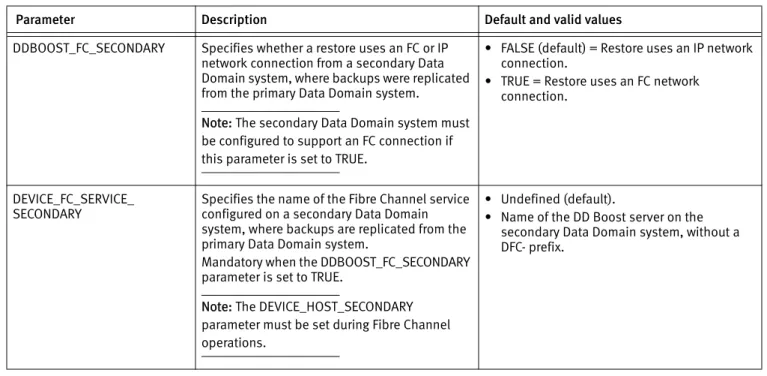
Configuring restores of replicated backups... 46
Configuring the lockbox for backups and restores... 48
Lockbox requirements for backups and restores ... 48
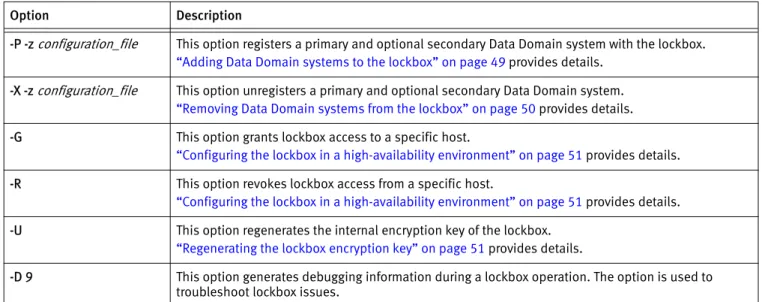
Configuring the lockbox with the ddbmadmin command ... 49
Troubleshooting tips ... 52
Debug log settings ... 52
Debug log files ... 53
Backup or restore fails due to an inaccessible lockbox... 54
Command ddbmadmin -P encounters a conflict with an installed application... 54
Command ddbmadmin -P fails when IPv6 is enabled... 55
Command ddbmadmin -U fails with an internal decryption error... 55
Chapter 5
Operations on DB2 Systems
Product overview in a DB2 environment ... 58DB2 backup processes... 58
DB2 restore processes ... 58
DB2 backups of transaction logs ... 59
Product configuration in a DB2 environment ... 59
Integrating the product into the DB2 environment ... 59
Configuring the DB2 parameters... 59
Configuring DB2 transaction log archiving ... 60
Configuring DB2 backup deletion ... 61
Preventing deletion of DB2 backup images ... 62
Performing backups and recovery with the DB2 CLP ... 62
Performing DB2 backups with the DB2 CLP... 62
Performing DB2 restores with the DB2 CLP ... 63
Performing DB2 recovery with the DB2 CLP... 65
Performing backups and restores with the DB2 GUI ... 66
Preparing for DB2 disaster recovery... 66
DB2 DPF requirements ... 67
DB2 HADR requirements ... 68
DB2 troubleshooting tips ... 69
DB2 operation might generate empty debug logs on Windows ... 69
DB2 recover operation fails due to the logarchoptn value... 69
Pruning of a multisession backup leaves entries in the DB2 history... 69
Pruning of DB2 log history after a rollforward might produce errors... 70
Pruning of log backups fails due to the logarchoptn value ... 70
Database backup might fail when run concurrently with backups of a high number of archived logs... 71
Chapter 6
Operations on SAP HANA Systems
Product overview in a SAP HANA environment ... 74SAP HANA backup processes ... 74
SAP HANA restore processes ... 75
SAP HANA backups of redo logs ... 75
EMC Data Domain Boost for Databases and Applications Release 1.0 Administration Guide 5
Contents
Integrating the product into the SAP HANA environment... 75
Configuring the SAP HANA parameters ... 76
Enabling the configuration file in SAP HANA Studio ... 76
Configuring automatic backups of SAP HANA redo logs ... 77
Performing backups, recovery, and deletion with SAP HANA Studio ... 78
Performing backups with SAP HANA Studio ... 78
Performing restore and recovery with SAP HANA Studio... 80
Deleting backups with SAP HANA Studio ... 82
Performing backups and recovery with the SAP HANA CLI ... 82
Performing backups with the SAP HANA CLI... 83
Canceling backups with the SAP HANA CLI ... 83
Checking backups with the SAP HANA CLI ... 83
Performing recovery with the SAP HANA CLI... 84
Preparing for SAP HANA disaster recovery... 85
SAP HANA scale-out requirements... 85
Chapter 7
Operations on SAP with Oracle Systems
Product overview in a SAP with Oracle environment... 88SAP with Oracle backup processes... 88
SAP with Oracle restore processes ... 89
Product configuration in a SAP with Oracle environment... 89
Integrating the product into the BR*Tools environment... 89
Confirming the environment and file permissions... 91
Enabling administrator privileges for SAP with Oracle restores on Windows 91 Configuring the SAP with Oracle parameters... 91
Performing backup and recovery with SAP BR*Tools ... 93
Performing backups with BR*Tools... 93
Performing restore and recovery with BR*Tools ... 94
Preparing for SAP with Oracle disaster recovery ... 95
Restoring the required Oracle and SAP BR*Tools files... 95
Cluster requirements... 96
Glossary
Index
EMC Data Domain Boost for Databases and Applications Release 1.0 Administration Guide 7
Title Page
TABLES
1 Software installation directories on AIX ... 32
2 Software installation directories on HP-UX... 33
3 Software installation directories on Linux... 35
4 Software installation directories on Solaris ... 36
5 Product software components... 39
6 Common parameters... 43
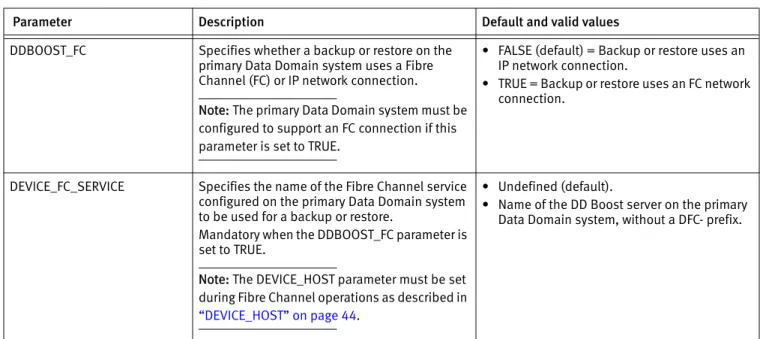
7 Parameters for operations over FC networks ... 46
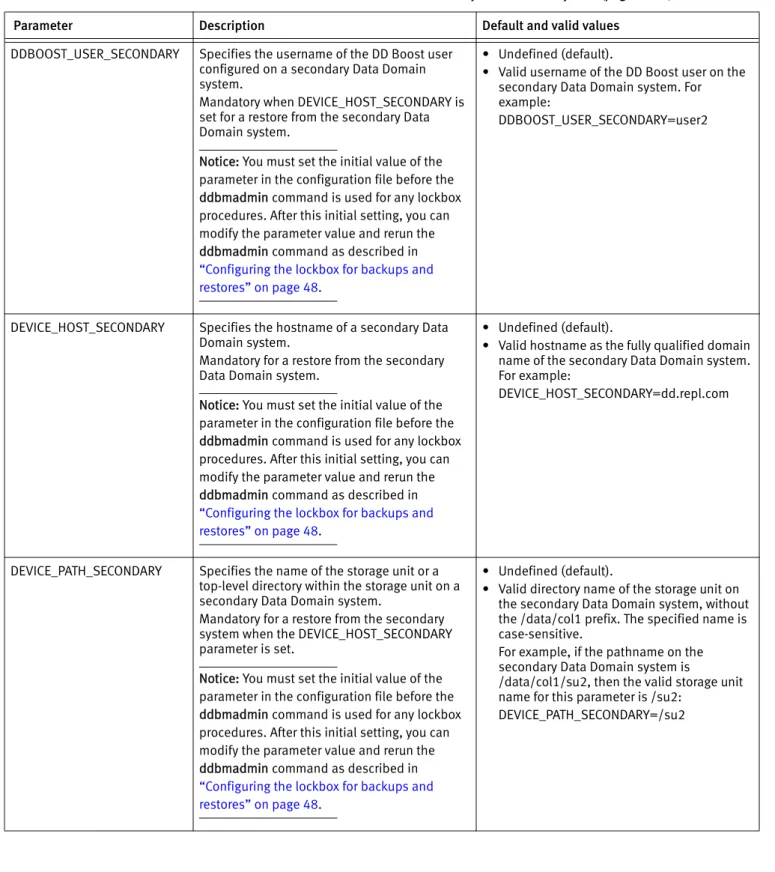
8 Parameters for restores from a secondary Data Domain system... 47
9 Options of the ddbmadmin command for lockbox operations... 49
10 Parameters for debugging ... 52
11 DB2 parameters ... 60
12 SAP HANA parallelism parameter ... 76
Preface 9
PREFACE
As part of an effort to improve its product lines, EMC periodically releases revisions of its software and hardware. Therefore, some functions described in this document might not be supported by all versions of the software or hardware currently in use. The product release notes provide the most up-to-date information on product features.
Contact your EMC technical support professional if a product does not function properly or does not function as described in this document.
Note: This document was accurate at publication time. Go to EMC Online Support (https://support.emc.com) to ensure that you are using the latest version of this document.
Purpose
This document describes how to install, configure, and use the EMC Data Domain Boost for Databases and Applications (DDBDA) release 1.0.
Audience
This document is intended for system administrators or database administrators (DBAs) who are responsible for installing software and maintaining backup and recovery systems for databases or applications.
Users of this guide must be familiar with the following topics:
◆ Backup, recovery, database, applications, and network terminology ◆ Backup and recovery procedures
◆ Disaster recovery procedures
Related documentation
You can find additional EMC publications for this product release and related products at EMC Online Support (https://support.emc.com).
The EMC DD Boost for Enterprise Applications Software Compatibility Guide, available from EMC Online Support, provides details on supported environments and platforms.
Conventions used in this document
EMC uses the following conventions for special notices:
NOTICE is used to address practices not related to personal injury.
Preface
Typographical conventions
EMC uses the following type style conventions in this document:
Where to get help
EMC support, product, and licensing information can be obtained as follows:
Product information —For documentation, release notes, software updates, or information about EMC products, go to EMC Online Support at:
https://support.emc.com
Technical support —Go to EMC Online Support and click Service Center. You will see several options for contacting EMC Technical Support. Note that to open a service request, you must have a valid support agreement. Contact your EMC sales representative for details about obtaining a valid support agreement or with questions about your account.
Online communities —Visit EMC Community Network at https://community.EMC.com for peer contacts, conversations, and content on product support and solutions. Interactively engage online with customers, partners, and certified professionals for all EMC products.
Your comments
Your suggestions will help to improve the accuracy, organization, and overall quality of the user publications. Send your opinions of this document to:
Bold Used for names of interface elements, such as names of windows, dialog boxes, buttons, fields, tab names, key names, and menu paths (what the user specifically selects or clicks).
Italic Used for full titles of publications referenced in text.
Monospace Used for:
• System output, such as an error message or script • System code
• Pathnames, file names, prompts, and syntax • Commands and options
Monospace italic Used for variables.
Monospace bold Used for user input.
[ ] Square brackets enclose optional values.
| Vertical bar indicates alternate selections—the bar means “or”. { } Braces enclose content that the user must specify, such as x or y or z. ... Ellipses indicate nonessential information omitted from the example.
EMC Data Domain Boost for Databases and Applications Release 1.0 Administration Guide 11
REVISION HISTORY
The following table presents the revision history of this document. Revision Date Description
05 May 6, 2015 Updated the following information:
• “Product overview in a SAP HANA environment” on page 74 - Deleted the Note about a limitation in redirected recovery to an alternate host.
• “Pruning of DB2 log history after a rollforward might produce errors” on page 70 - Added this topic under “DB2 troubleshooting tips.”
04 November 26, 2014 Updated the following information:
• “High-availability configurations” on page 16 - Added details about DB2 HADR support.
• “DB2INSTANCE” on page 60 - Updated the parameter details. • “SOURCE_DBNAME” on page 60 - Updated the parameter details.
• “DB2 HADR requirements” on page 68 - Added the topic about the DB2 HADR support 03 August 7, 2014 Updated the following information:
• “Validating the database and Data Domain system connection” on page 26 - Updated the information about running the rpcinfo command.
Revision History
02 July 9, 2014 Updated the following information:
• “Introduction to the product” on page 14 - Added the final Note about network support for DDBDA operations.
• Table 6 on page 43 - Updated the DEVICE_HOST and DEVICE_PATH parameter descriptions.
• “Configuring operations over Fibre Channel and Ethernet networks” on page 45 - Updated details about network operations and the two document ID numbers. • “Command ddbmadmin -P encounters a conflict with an installed application” on
page 54 - Added this troubleshooting topic.
• “Command ddbmadmin -P fails when IPv6 is enabled” on page 55 - Added this troubleshooting topic.
• “DB2 backups of transaction logs” on page 59 - Updated details about archived logging and rollforward recovery.
• “DB2INSTANCE” on page 60 - Updated the DB2 parameter description.
• “Configuring DB2 transaction log archiving” on page 60 - Updated details in step 3. • “Configuring DB2 backup deletion” on page 61 - Updated details in the first
paragraph.
• “Preventing deletion of DB2 backup images” on page 62 - Added this new topic. • “DB2 recover operation fails due to the logarchoptn value” on page 69 - Updated
details in the first paragraph.
• “Pruning of log backups fails due to the logarchoptn value” on page 70 - Updated details in the first paragraph.
• “Database backup might fail when run concurrently with backups of a high number of archived logs” on page 71 - Updated this DB2 troubleshooting topic.
• “Integrating the product into the SAP HANA environment” on page 75 - Added the Note about creating the opt subdirectory if it does not exist.
• “PARALLELISM” on page 76 - Updated the SAP HANA parameter description. • “Performing backups, recovery, and deletion with SAP HANA Studio” on page 78 -
Updated the topic title and reordered the subtopics.
• “Performing backups and recovery with the SAP HANA CLI” on page 82 - Updated the topic heading and added subtopics on canceling, checking, and recovering backups. • “Enabling administrator privileges for SAP with Oracle restores on Windows” on
page 91 - Added this new topic.
• Table 13 on page 92 - Updated the GROUP_BY_FS and SAVESETS parameter descriptions.
• “save set” on page 99 - Added the glossary definition of save set. 01 March 6, 2014 Initial release of DDBDA 1.0.
Product Overview 13
CHAPTER 1
Product Overview
This chapter includes the following topics:
◆ Introduction to the product ... 14
◆ Terminology used in this guide... 15
◆ Supported configurations ... 16
Product Overview
Introduction to the product
EMC® Data Domain® Boost for Databases and Applications (DDBDA) is an EMC product
that enables you to perform backups and restores of DB2, SAP HANA, or SAP with Oracle database data with a Data Domain system. You can use the database-specific backup and recovery tools to complete the product operations.
DDBDA performs backups to and restores from a Data Domain system by using the Data Domain Boost (DD Boost) interface.
A backup to a Data Domain system takes advantage of the DD Boost feature by using the following two components:
◆ The DD Boost library API enables the backup software to communicate with the Data
Domain system.
The EMC DD Boost for Enterprise Applications Software Compatibility Guide, available from EMC Online Support (https://support.emc.com), provides details about the supported versions of the DD Boost library and DD OS.
◆ The distributed segment processing (DSP) component reviews the data that is already
stored on the Data Domain system and sends only unique data for storage. The DSP component enables the backup data to be deduplicated on the database or application host to reduce the amount of data transferred over the network. “DD Boost distributed segment processing” on page 14 provides more details.
During the restore of a backup to the client, the Data Domain system converts the stored data to its original nondeduplicated state before sending the data over the network. You can perform DD Boost backups and restores over either an Ethernet (IP) or Fibre Channel (FC) network connection.
Note: DDBDA does not distinguish TCP/IP network types (LAN, WAN, or MAN) and can successfully operate where packet loss is strictly 0% and latency is less than 20 ms.
DD Boost distributed segment processing
There are two modes of operation for sending backup data to a Data Domain system through DD Boost, one with distributed segment processing (DSP) enabled and the other with DSP disabled. The operation mode is set on the Data Domain system.
When DSP is enabled, the deduplication process is distributed between the DD Boost library and the Data Domain system. Parts of the deduplication process are run on the database or application host so that the DD Boost library sends only unique data to the Data Domain system over the network.
Terminology used in this guide 15
Product Overview
Distributed segment processing provides the following benefits:
◆ Throughput is potentially greater because the DD Boost library sends only unique data
instead of all the data to the Data Domain system. The throughput improvements depend on the level of redundancy in the data being backed up, the overall workload on the database server, and the database server capability. In general, greater throughput is attained with higher redundancy, greater database server workload, and greater database server capability.
◆ The network bandwidth requirements are significantly reduced because only the
unique data is sent to the Data Domain system over the network.
◆ Recovery from failed backups can be potentially much faster. If a large backup fails in
the middle or towards the end and a user restarts the backup, the data already sent to the Data Domain system does not need to be resent. The backup completes more quickly on retry.
When distributed segment processing is enabled, the DD Boost library, which is part of the product, performs the following tasks:
1. Segments the data.
2. Computes IDs for the data segments.
3. Checks with the Data Domain system for duplicate segments.
4. Compresses unique segments that are not found on the Data Domain system.
5. Sends the compressed data to the Data Domain system, which writes the unique data to disk.
The local compression algorithm used by the DD Boost library must be configured on the Data Domain system. The EMC Data Domain Operating System Administration Guide provides more information about local compression and its configuration.
When distributed segment processing is disabled, the DD Boost library sends the data directly to the Data Domain system over the network. The Data Domain system then segments, deduplicates, and compresses the data before writing the data to the disk. Note: Distributed segment processing cannot be disabled on an Extended Retention Data Domain system.
Terminology used in this guide
The terms “product” and “software” in this guide refer to DDBDA, unless specified otherwise.
The generic sections of this guide use the term “transaction logs” for the logs required to recover data backed up by DDBDA. The different applications that the product supports use application-specific terms for the logs, such as archived logs and so on.
The UNIX references in this guide apply to both UNIX and Linux operating systems, unless specified otherwise. The Windows references apply to all the supported Microsoft Windows operating systems, unless specified otherwise.
Product Overview
The DDBDA processes distinguish between the restore and recovery of a database:
◆ Restore means to retrieve data from backup and store the data on disk. ◆ Recover means to apply the transaction logs to make the database consistent. “Glossary” on page 97 provides details about terms used in this guide.
Supported configurations
You can deploy DDBDA in a database stand-alone or high-availability configuration in a supported environment.
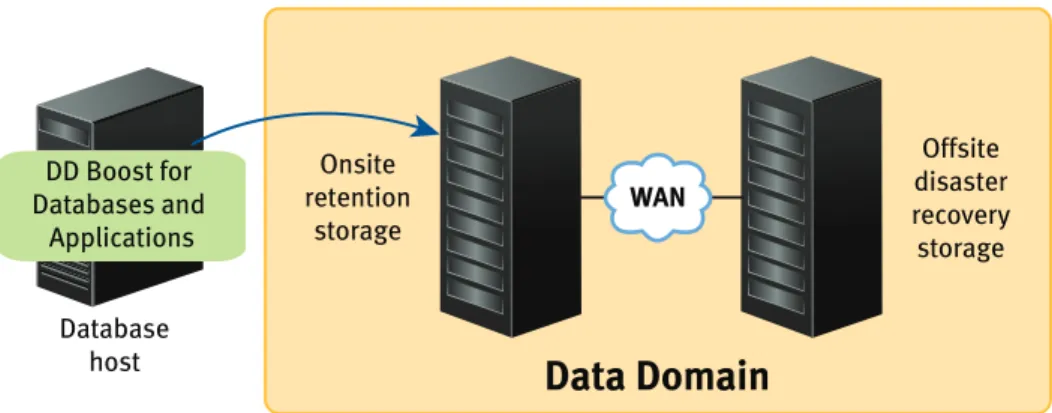
The following figure shows a stand-alone configuration that uses the product to back up or restore the data on the database server host to or from the Data Domain system.
Figure 1 DDBDA in a stand-alone configuration
The DDBDA version must be compatible with the Data Domain system and DDBDA configurations. Data Domain does not support combinations other than those detailed in the EMC Data Domain Boost Compatibility Guide, which is available from EMC Online Support (https://support.emc.com). Access the guide from the Support by Product page by typing Data Domain Software in the Find a Product field and then clicking the
Documentation link on the product page.
High-availability configurations
DDBDA supports backups and restores in the following high-availability environments:
◆ DB2 Database Partitioning Feature (DPF) environment ◆ DB2 High Availability Disaster Recovery (HADR) environment ◆ SAP HANA scale-out multinode environment
◆ SAP with Oracle active-passive cluster
A DB2 DPF system offers an environment where a single database is divided into multiple partitions, either on the same host or on multiple hosts.
A DB2 HADR system consists of a primary host and multiple standby hosts. HADR replicates all the data changes from the primary host to the standby hosts, and provides fast failover to a standby host if the primary host fails. You can perform a backup on the primary host only.
SAP HANA software supports high availability on a SAP HANA scale-out appliance that contains multiple nodes.
Data Domain
WAN
Offsite disaster recovery storage Onsite
retention storage
Database host DD Boost for Databases and
Supported configurations 17
Product Overview
A SAP with Oracle active-passive cluster includes multiple hosts (nodes) connected by a shared SCSI bus with common storage attached. A user can define cluster services, such as disk services, and assign the services their own IP addresses and names (virtual cluster hosts). The services and their associated storage can migrate for failover between the hosts in the cluster.
The EMC DD Boost for Enterprise Applications Software Compatibility Guide, available from EMC Online Support (https://support.emc.com), provides details about the supported versions and cluster environments.
Note: You must install DDBDA on each node in a high-availability environment.
Virtualization support
DDBDA supports several types of virtualization software, such as VMware, Solaris zones, Microsoft Hyper-V, and so on.
The EMC DD Boost for Enterprise Applications Software Compatibility Guide, available from EMC Online Support (https://support.emc.com), provides details about the
supported environments and platforms. “Solaris installation” on page 36 provides details about Solaris zones.
Note: You must install DDBDA in the guest operating system.
Data Domain replication
The EMC Data Domain Replicator provides automated, encrypted replication for disaster recovery and multisite backup and archive consolidation. The Data Domain Replicator software asynchronously replicates only compressed, deduplicated data over a wide area network (WAN).
DDBDA does not insatiate or monitor a replication. However, the product can restore from the replicated copy on a secondary Data Domain system. You must have used the product to originally create the backup on a primary Data Domain system. A Data Domain
administrator performs the backup replication from the primary system to the secondary system.
Note: The replication process must not change the names of the directories and files created by DDBDA.
To enable the backup replication and subsequent restore from a secondary Data Domain system, the user ID or primary group ID of the DD Boost users on the primary and secondary systems must be identical.
You must meet specific configuration requirements to automatically enable the restore of replicated backups from a secondary Data Domain system when the primary Data Domain system is unavailable. “Configuring restores of replicated backups” on page 46 provides details.
The EMC Knowledgebase Article number 182294, titled Configuration of DDBoost Users on Source and Destination DDRs for MTree Replication, provides more details. The article is available from EMC Online Support.
Product Overview
Road map for product operations
Use the following road map to install and configure the DDBDA software, and perform backups and restores with the product on the supported database and application hosts.
Before you click a cross-reference, check the page number of your current topic in the guide in case you need to return to the same location from the cross-referenced topic. 1. Review the EMC Data Domain Boost for Databases and Applications Release Notes for
the most up-to-date information about the product.
2. Ensure that the required Data Domain systems are set up, configured, and enabled according to Chapter 2, “Data Domain System Configuration.”
3. Install the DDBDA software according to Chapter 3, “Product Installation.”
4. Configure the product according to Chapter 4, “Product Configuration.”
5. Follow the appropriate procedures to protect the database system:
• Perform DB2 operations according to Chapter 5, “Operations on DB2 Systems.”
• Perform SAP HANA operations according to Chapter 6, “Operations on SAP HANA Systems.”
• Perform SAP with Oracle operations according to Chapter 7, “Operations on SAP with Oracle Systems.”
6. Use the following information to troubleshoot issues with the product operations: • “Troubleshooting tips” on page 52
• “DB2 troubleshooting tips” on page 69
Data Domain System Configuration 19
CHAPTER 2
Data Domain System Configuration
This chapter includes the following topics:
◆ Licensing the Data Domain system... 20
◆ Enabling DD Boost on a Data Domain system ... 20
◆ Changing DD Boost access rights ... 21
◆ Enabling the DD Boost operations through a firewall ... 22
◆ Setting up the storage units ... 22
◆ Enabling the distributed segment processing ... 23
◆ Enabling the advanced load balancing and link failover ... 24
◆ Enabling the DD Boost-over-FC service ... 25
◆ Validating the database and Data Domain system connection... 26
Note: The Data Domain administrator must configure the Data Domain system for DD Boost operations. This chapter provides examples of the basic configurations. The Data Domain documentation provides details on the Data Domain system configurations.
Data Domain System Configuration
Licensing the Data Domain system
You require the EMC Data Domain Boost license to use the Data Domain Boost for Databases and Applications (DDBDA) software.
You also require a replication license for both the source and destination Data Domain systems to use the replication feature.
Contact your EMC Data Domain representative for more information and to purchase licensed features.
The EMC Data Domain Operating System Administration Guide provides details about all the licensed features and how to display and enable Data Domain licenses.
Enabling DD Boost on a Data Domain system
You can enable DD Boost on a Data Domain system through the ddboost enable command or from the EMC Data Domain System Manager on the Data Management > DD Boost page as described in the EMC Data Domain Operating System Administration Guide.
Use the Data Domain command line interface to complete the required administration tasks. The EMC Data Domain Operating System Command Reference Guide provides details about the commands.
1. On the Data Domain system, log in as an administrative user.
2. Run the following command to verify that the file system is enabled and running: # filesys status
The file system is enabled and running.
If the file system is disabled, run the following command to enable the file system: # filesys enable
3. Run the following command to verify that the DD Boost license is enabled: # license show
Feature licenses:
## License Key Feature -- --- ---1 ABCD-EFGH-IJKL-MNOP DDBOOST -- ---
---If the DD Boost license is disabled, run the following command to add the DD Boost license by using the license key that Data Domain provided:
# license add license_key
Changing DD Boost access rights 21
Data Domain System Configuration
4. Establish the DD Boost username and password for the Data Domain system. Note: The username, password, and role must be set up on the Data Domain system as described in the EMC Data Domain Operating System Administration Guide. The username and password are case-sensitive and must match the username and password provided in the procedure “Configuring the lockbox for backups and restores” on page 48.
Run the following commands to establish the username and password: # user add username password password
# ddboost set user-name username
“Changing DD Boost access rights” on page 21 provides information about how changing a username and access rights affects the operations on a Data Domain system.
5. Run the following command to enable DD Boost: # ddboost enable
DD Boost enabled
6. Run the following command to verify that DD Boost is enabled: # ddboost status
Changing DD Boost access rights
By default, when the DD Boost service is first enabled on a Data Domain system, the service is accessible to all database servers. You can use the ddboost access command to override this default and restrict the access to specific database servers.
For example, the Data Domain administrator can run the following commands to remove the default access permission for all servers and add new access permissions for two specific database servers, dbserver1.datadomain.com and dbserver2.datadomain.com. The EMC Data Domain Operating System Command Reference Guide provides details about the commands.
# ddboost disable
# ddboost access del clients *
# ddboost access add clients dbserver1.datadomain.com dbserver2.datadomain.com
# ddboost enable
These commands establish a set of access controls that enable DD Boost access only to the two database servers, dbserver1.datadomain.com and dbserver2.datadomain.com.
Data Domain System Configuration
Consider the following guidelines when you change the DD Boost access rights:
◆ Ensure that no backup operations are running to the Data Domain system when you
change any access rights. You can run the ddboost disable command to prevent operations while access is being changed.
◆ Specify only a fully qualified domain name, IP address, or resolvable DNS name for the
client when modifying the client access control list.
◆ After the access rights are changed, you can run the ddboost enable command to
enable DD Boost and the access rights will take effect.
You can run the ddboost access show command to verify which database hosts have the DD Boost access rights. If the command output is simply *, then all database servers have the access rights. For example:
# ddboost access show
DD Boost access allowed from the following clients *
# ddboost access show
DD Boost access allowed from the following clients: dbserver1.datadomain.com
dbserver2.datadomain.com
Enabling the DD Boost operations through a firewall
The Data Domain system as initially configured does not operate through a firewall, neither for a database server connection to a Data Domain system nor for one Data Domain system connection to another. If you need the Data Domain system to operate through a firewall, contact your network support provider.
The following ports must be open in a firewall to enable DD Boost backups and optimized duplication:
◆ TCP 2049 (NFS) ◆ TCP 2051 (Replication) ◆ TCP 111 (NFS portmapper)
◆ TCP xxx (select a port for NFS mountd, where the default MOUNTD port is 2052)
Setting up the storage units
One or more storage units must be created on each Data Domain system that will be used with DDBDA. Each storage unit name on a single Data Domain system must be unique. However, you can use the same storage unit name on more than one Data Domain system. Note: Storage unit names are case-sensitive.
You must provide the storage unit name when you configure the operations with DDBDA.
Chapter 4, “Product Configuration,” provides more information.
You can create a storage unit through the ddboost storage-unit command or from the EMC Data Domain System Manager on the Data Management > DD Boost page as described in the EMC Data Domain Operating System Administration Guide.
Enabling the distributed segment processing 23
Data Domain System Configuration
For example, you can run the following command on the Data Domain system for each storage unit that you want to create:
# ddboost storage-unit create storage_unit_name
You can run the following command to list the status of the storage units: # ddboost storage-unit show
Name Pre-Comp (GiB) Status ---- -- ---SU_ABCDE03 5.8 RW SU_ABCDE5 9.8 RW/Q ---- -- D : Deleted
Q : Quota Defined RO : Read Only RW : Read Write
You must create at least one storage unit on each Data Domain system that you will use with DDBDA. You can share a storage unit on a Data Domain system among multiple database hosts.
The storage on a Data Domain system can be provisioned through optional quota limits for a storage unit. Quota limits can be specified either when a storage unit is created or later through separate commands. The EMC Data Domain Operating System Command Reference Guide provides details about the quota and ddboost commands.
Enabling the distributed segment processing
Distributed segment processing is a DD Boost software feature that uses the DD Boost library on the database server and the Data Domain software on the DDR. DDBDA loads the DD Boost library during backup and restores operations.
You must configure the distributed segment processing option on the Data Domain system. The option setting applies to all the database servers and all the software that uses DD Boost on this Data Domain system.
You can manage the distributed segment processing through the ddboost option command or from the EMC Data Domain System Manager on the Data Management > DD Boost page as described in the EMC Data Domain Operating System Administration Guide. You can run the following command to configure the distributed segment processing option:
# ddboost option set distributed-segment-processing {enabled |
disabled}
Enabling or disabling the distributed segment processing option does not require a restart of the Data Domain file system.
Distributed segment processing is enabled by default on a system initially installed with the Data Domain operating system (DD OS) release 5.2 or later. If a system is upgraded from DD OS release 5.0.x or 5.1.x to DD OS release 5.2 or later, distributed segment processing is left in its previous state.
Data Domain System Configuration
Enabling the advanced load balancing and link failover
Note: This topic applies only if you use an Ethernet connection, not Fibre Channel, for backup and restore operations with DDBDA.
The advanced load balancing and link failover feature enables the combination of multiple Ethernet links into a group and the registration of only one interface on the Data Domain system with DDBDA.
The Data Domain documentation provides details about the features and benefits of advanced load balancing and link failover.
If an interface group is configured when the Data Domain system receives data from the DD Boost client, the data transfer is load balanced and distributed as separate jobs on the private network, providing greater throughput, especially for customers who use multiple 1 GbE connections.
You can manage advanced load balancing and link failover through the ddboost ifgroup command or from the EMC Data Domain System Manager on the Data Management > DD Boost page as described in the EMC Data Domain Operating System Administration Guide.
You can perform the following steps to create an interface group on the Data Domain system by adding existing interfaces to the group and registering the Data Domain system with DDBDA. After the interface group is set up, you can add or delete interfaces from the group.
1. Run the ddboost ifgroup command to add the interfaces into the group. The interfaces must have been created with the net command. For example:
# ddboost ifgroup default add interface 192.168.1.1
# ddboost ifgroup default add interface 192.168.1.2
# ddboost ifgroup default add interface 192.168.1.3
# ddboost ifgroup default add interface 192.168.1.4
This example assumes that no additional named interface groups have been created and uses the default interface group.
2. Select one interface on the Data Domain system to register with DDBDA. Create a failover aggregated interface and register that interface with DDBDA. The EMC Data Domain Operating System Administration Guide describes how to create a virtual interface for link aggregation.
It is not mandatory to use an interface in the ifgroup to register with DDBDA. An interface that is not part of the ifgroup can also be used to register with DDBDA. The interface should be registered with a resolvable name using DNS or any other name resolution mechanism.
3. Run the following command to enable the feature on the Data Domain system: # ddboost ifgroup enable
Enabling the DD Boost-over-FC service 25
Data Domain System Configuration
4. Run the following command to verify the configuration: # ddboost ifgroup show config interfaces
Group Name Status Interface --- --- ---default enabled 192.168.1.1 default enabled 192.168.1.2 default enabled 192.168.1.3 default enabled 192.168.1.4
Enabling the DD Boost-over-FC service
DD OS release 5.3 and later provides support for the Data Domain Fibre Channel (DFC or FC) mechanism of communication between the DD Boost library and the Data Domain system.
Note: Support of the DD Boost-over-FC service with the DDBDA software requires that a presales FC qualifier has been submitted and approved. Contact your EMC Data Domain representative for more details.
The Data Domain documentation provides details about the features and benefits of the DD Boost-over-FC service.
The Data Domain system must have an HBA that the DD Boost-over-FC service supports. The EMC Data Domain Operating System Command Reference Guide and EMC Data Domain Operating System Administration Guide provide information about using the scsitarget command for managing the SCSI target subsystem.
The Data Domain administrator can complete the following steps to configure the DD Boost-over-FC service.
1. Run the following command to enable the DD Boost-over-FC service: # ddboost option set fc enabled
2. Optionally run the following command to set the dfc-server-name: # ddboost fc dfc-server-name set server_name
Alternatively, accept the default name, which is the base hostname of the Data Domain system. A valid dfc-server-name consists of one or more of the following characters:
• lowercase letters (a–z) • uppercase letters (A–Z) • digits (0–9)
• underscore (_) • dash (–)
Note: The dot or period character (.) is not valid within a dfc-server-name. You cannot use the fully qualified domain name of a Data Domain system as the dfc-server-name.
Data Domain System Configuration
3. Run the following command to create a DD Boost FC group: # ddboost fc group create group_name
For example:
# ddboost fc group create lab_group
4. Run the following command to configure the device set of the DD Boost FC group: # ddboost fc group modify group_name device-set count count endpoint
{all | none | endpoint_list} For example:
# ddboost fc group modify lab_group device-set count 8 endpoint all
5. Run the following command to add initiators to the DD Boost FC group: # ddboost fc group add group_name initiator initiator_spec
For example:
# ddboost fc group add lab_group initiator "initiator-15,initiator-16"
6. Verify that the DFC devices are visible on the database server.
7. Ensure that the user who performs the backups and restores has the required permission to access the DFC devices.
“Configuring operations over Fibre Channel and Ethernet networks” on page 45
provides details about configuring DDBDA to use the FC network connection.
DD Boost-over-FC path management
The ifgroup-based advanced load balancing and link failover mechanism described in a previous topic is based on Ethernet interfaces and is not applicable to the Fibre Channel transport. Instead, a different path mechanism is provided for the DD Boost-over-FC solution. The Data Domain documentation provides more details.
Validating the database and Data Domain system connection
Depending on the type of network connection being used, you can run the appropriate command to validate the communication between the database server host and the Data Domain system:◆ If you have a DD Boost-over-IP system, you can log in to the database server and run
the rpcinfo command if the command is available on the system. For example: # rpcinfo -p Data_Domain_system_hostname
The command output must include the ports listed in “Enabling the DD Boost operations through a firewall” on page 22. For example:
# rpcinfo -p Data_Domain_system_hostname
program vers proto port service 100000 2 tcp 111 portmapper 100000 2 udp 111 portmapper 100024 1 udp 779 status
Validating the database and Data Domain system connection 27
Data Domain System Configuration
100024 1 tcp 782 status 537220272 2 tcp 3006
100005 1 tcp 2052 mountd 100005 1 udp 2052 mountd 100005 2 tcp 2052 mountd 100005 2 udp 2052 mountd 100005 3 tcp 2052 mountd 100005 3 udp 2052 mountd 100003 3 tcp 2049 nfs 100003 3 udp 2049 nfs 285824256 1 udp 709 537329792 1 tcp 3007 537220001 2 tcp 2051 537220001 3 tcp 2051 537220439 1 tcp 695 537220017 1 tcp 727
◆ If you have a DD Boost-over-FC system, you can log in to the database server and run
the appropriate command to verify that the DFC devices are visible on the client. The EMC Data Domain Operating System Command Reference Guide provides details about the supported commands.
You can use the ddbmadmin command to verify the username, password, and valid access permissions for the Data Domain system. “Configuring the lockbox for backups and restores” on page 48 provides more details about how to use the command.
Product Installation 29
CHAPTER 3
Product Installation
This chapter includes the following topics:
◆ Preparing to install the software... 30 ◆ AIX installation... 31 ◆ HP-UX installation ... 33 ◆ Linux installation ... 34 ◆ Solaris installation ... 36 ◆ Microsoft Windows installation ... 37 ◆ Product software components... 39 ◆ Verifying the installed software ... 39
Product Installation
Preparing to install the software
Ensure that you meet the following prerequisites before you install the Data DomainBoost for Databases and Applications (DDBDA) software on the database or application server host:
◆ The database or application server host contains the supported database or
application server software, installed and functioning properly in a supported environment.
The EMC DD Boost for Enterprise Applications Software Compatibility Guide, available from EMC Online Support (https://support.emc.com), describes the supported software and operating system versions.
◆ You have reviewed the information in the latest version of the EMC Data Domain Boost
for Databases and Applications Release Notes.
◆ The Data Domain system has been prepared according to the information in Chapter 2, “Data Domain System Configuration.”
◆ You have operating system root or administrator privileges on the database or
application server host.
◆ You have obtained one of the following software licenses:
• Data Protection Suite for Enterprise Applications Capacity license • Data Protection Suite Capacity license
Contact your EMC sales representative for more details about the appropriate license for the environment.
Note: You receive a password with the software license. You must use the password when you uncompress the downloaded software package.
◆ You have downloaded the DDBDA software package from EMC Online Support at https://support.emc.com, and extracted the installation package from the file. You must uncompress the downloaded file twice. First, uncompress the file by using WinZip on Windows (recommended) or an unzip utility on UNIX/Linux that supports encryption. Then uncompress the resulting file on the DDBDA host by using WinZip again on Windows or the gunzip utility on UNIX/Linux.
Example: Preparing for a DDBDA installation on Windows
1. Download the DDBDA software package to the Windows DDBDA host.
2. Use WinZip to uncompress the file. When you are prompted for a password, type the password that you received with the software license.
3. Use WinZip again to uncompress the resulting zip file. Example: Preparing for a DDBDA installation on AIX
1. Download the ddbda_aixpower.zip file to a Windows system.
2. Use WinZip to uncompress the file. When you are prompted for a password, type the password that you received with the software license.
AIX installation 31
Product Installation
3. Transfer the ddbda_aixpower.tar.gz file to the AIX DDBDA host. 4. Uncompress and extract the DDBDA package:
gunzip ddbda_aixpower.tar.gz tar -xvpBf ddbda_aixpower.tar
AIX installation
You must complete the required procedures to install and uninstall the DDBDA software on AIX. The following topics provide detailed instructions.
Installing the software on AIX
You can install the DDBDA software on AIX by running the installp command line interface (CLI) program or the AIX System Management Interface Tool (SMIT), which is a graphical user interface (GUI) program. In a supported cluster, you must install the software on each node that will perform backups and recovery.
1. Complete the preparation tasks in “Preparing to install the software” on page 30. Ensure that you log in as the root user and you are in the correct directory, which contains the downloaded software installation files.
Note: If you do not start the installation from the correct directory, the installation might fail.
2. Run either the installp CLI program or the SMIT GUI program: • To run the CLI program, type the following command:
installp -a -d /dir_pathname EMCddbda.rte
where /dir_pathname is the complete pathname of the directory that contains the software installation files.
To verify that the installation succeeded, type the following command:
lslpp -L all | grep -i emcddbda
If the lslpp command output includes EMCddbda.rte 1.0.0.0, then the installation succeeded.
• To run the SMIT GUI program, perform the following steps: a. Type the following command:
smitty install_latest
b. In the Entry Field, type the complete pathname of the directory that contains the software installation software files.
c. Select the option SOFTWARE to install . d. Type yes in response to the following prompts:
Accept new license agreements? Preview new license agreements?
Product Installation
f. Select EMCddbda.rte to install the software. g. Select Install and Update Software.
h. Press Enter to begin the installation.
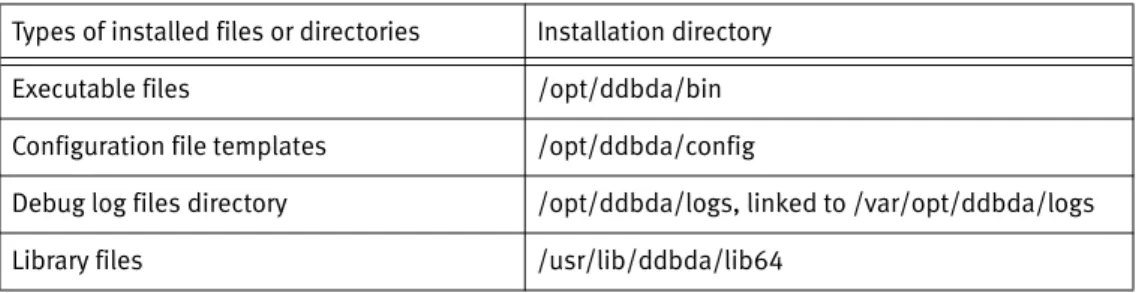
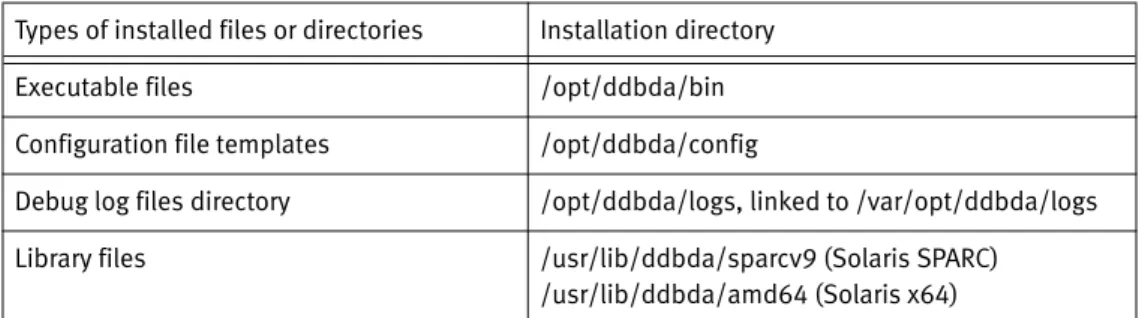
The installation on AIX stores the different types of software files in the directories shown in the following table.
3. Configure the DDBDA software by following the instructions in Chapter 4, “Product Configuration.”
Uninstalling the software on AIX
You can uninstall the DDBDA software on AIX by running the installp command or the SMIT GUI program. In a supported cluster, you must perform the uninstall procedure on each node that contains the software.
1. Ensure that no database or application backups are running.
2. As the root user, use one of the following methods to uninstall the software: Note: You do not need to shut down a database to uninstall the software. • Use the command line interface by typing the following command:
installp -u EMCddbda.rte
• Use the SMIT GUI program:
a. Type the following smitty command:
smitty remove
b. Select F4=List to display a list of the installed software packages. c. Select the package to uninstall:
EMCddbda.rte
d. Set the PREVIEW Only option to No. e. Press Enter to uninstall the software. f. Exit the SMIT GUI program.
The uninstall procedure does not remove certain files and directories that contain logs and lockbox files. You must manually remove these items after saving a copy, if required. Table 1 Software installation directories on AIX
Types of installed files or directories Installation directory Executable files /opt/ddbda/bin Configuration file templates /opt/ddbda/config
Debug log files directory /opt/ddbda/logs, linked to /var/opt/ddbda/logs Library files /usr/lib/ddbda/lib64
HP-UX installation 33
Product Installation
HP-UX installation
You must complete the required procedures to install and uninstall the DDBDA software on HP-UX. The following topics provide detailed instructions.
Installing the software on HP-UX
You can install the DDBDA software on HP-UX by using the swinstall utility to run the command line interface (CLI) or the graphical user interface (GUI) program. In a supported cluster, you must install the software on each node that will perform backups and recovery.
1. Complete the preparation tasks in “Preparing to install the software” on page 30. Ensure that you log in as the root user and you are in the correct directory, which contains the downloaded software installation files.
Note: If you do not start the installation from the correct directory, the installation might fail.
2. Type the swinstall command to run either the CLI or GUI program: • To run the swinstall CLI program, type the following command:
swinstall -x mount_all_filesystems=false -s /dir_pathname/EMCddbda.pkg DDBDA
where /dir_pathname is the complete pathname of the directory that contains the software installation files.
• To run the swinstall GUI program, type the following command:
swinstall -x mount_all_filesystems=false -i -s /dir_pathname/EMCddbda.pkg DDBDA
where /dir_pathname is the complete pathname of the directory that contains the software installation files. Perform the following steps in the GUI program: a. From the Actions menu, select Install (analysis).
When the analysis is complete, a “Ready with Warnings” message appears. The message is normal.
b. Click OK to continue the installation.
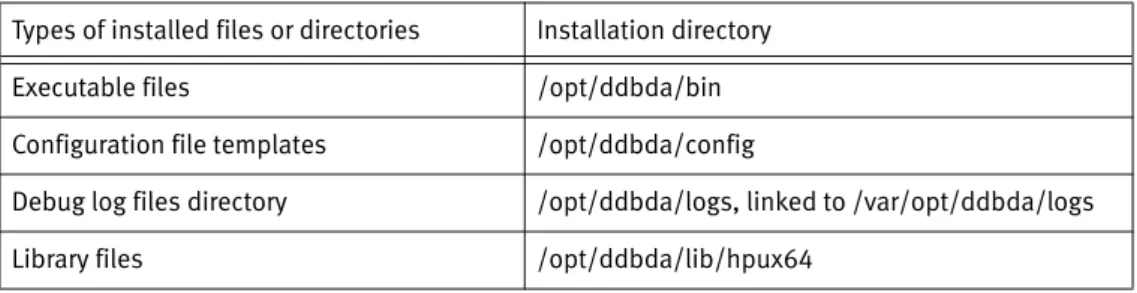
The installation on HP-UX stores the different types of software files in the directories shown in the following table.
Table 2 Software installation directories on HP-UX
Types of installed files or directories Installation directory Executable files /opt/ddbda/bin Configuration file templates /opt/ddbda/config
Debug log files directory /opt/ddbda/logs, linked to /var/opt/ddbda/logs Library files /opt/ddbda/lib/hpux64
Product Installation
The installation on HP-UX stores informational messages including installation errors in the /var/adm/sw/swagent.log file. If an error occurs during the installation, check this file to obtain details about the error.
3. Configure the DDBDA software by following the instructions in Chapter 4, “Product Configuration.”
Uninstalling the software on HP-UX
You can uninstall the DDBDA software on HP-UX by running the swremove command or GUI program. In a supported cluster, you must perform the uninstall procedure on each node that contains the software.
1. Ensure that no database or application backups are running.
2. As the root user, use one of the following methods to uninstall the software: Note: You do not need to shut down a database to uninstall the software. • Use the CLI by typing the following command:
swremove DDBDA
• Use the swremove GUI program:
a. Type the following swremove command:
swremove -i DDBDA
b. Select Actions > Remove (analysis).
c. When the system analysis is complete, click OK to complete the uninstall. d. To confirm the uninstall, click Yes.
The uninstall procedure does not remove certain files and directories that contain logs and lockbox files. You must manually remove these items after saving a copy, if required.
Linux installation
You must complete the required procedures to install and uninstall the DDBDA software on Linux. The following topics provide detailed instructions.
Installing the software on Linux
You can install the DDBDA software on Linux by running the rpm command. In a supported cluster, you must install the software on each node that will perform backups and recovery.
1. Complete the preparation tasks in “Preparing to install the software” on page 30. Ensure that you log in as the root user and you are in the correct directory, which contains the downloaded software installation files.
Note: If you do not start the installation from the correct directory, the installation might fail.
Linux installation 35
Product Installation
2. On a RHEL 6 Linux platform, ensure that you have downloaded and installed the compat-libstdc++-33 package.
3. Type the rpm command to install the software on Linux x64:
rpm -i emcddbda-1.0.0.0-1.x86_64.rpm
4. To verify that the installation was successful, type the rpm -aq command:
rpm -aq | grep -i emc
The command output must include the following line: emcddbda-1.0.0.0-1
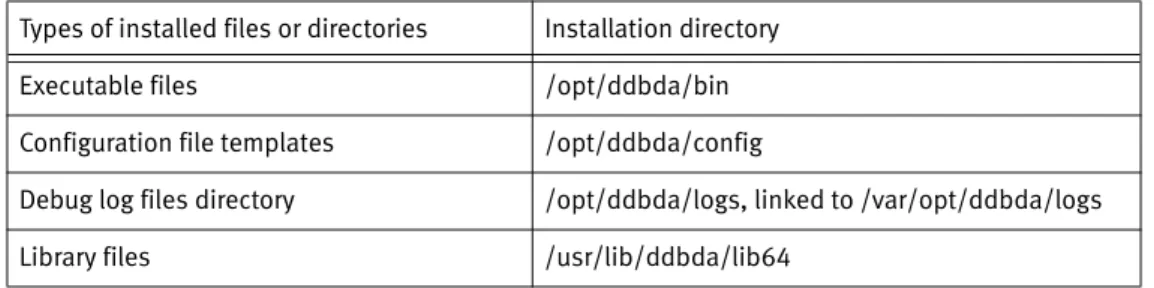
The installation on Linux stores the different types of software files in the directories shown in the following table.
5. Configure the DDBDA software by following the instructions in Chapter 4, “Product Configuration.”
Uninstalling the software on Linux
You can uninstall the DDBDA software on Linux by running the rpm command. In a supported cluster, you must perform the uninstall procedure on each node that contains the software.
1. Ensure that no database or application backups are running.
2. As the root user, type the following command to uninstall the software: Note: You do not need to shut down a database to uninstall the software.
rpm -e emcddbda-1.0.0.0-1
The uninstall procedure does not remove certain files and directories that contain logs and lockbox files. You must manually remove these items after saving a copy, if required. Table 3 Software installation directories on Linux
Types of installed files or directories Installation directory Executable files /opt/ddbda/bin Configuration file templates /opt/ddbda/config
Debug log files directory /opt/ddbda/logs, linked to /var/opt/ddbda/logs Library files /usr/lib/ddbda/lib64
Product Installation
Solaris installation
You must complete the required procedures to install and uninstall the DDBDA software on Solaris. The following topics provide detailed instructions.
Installing the software on Solaris
You can install the DDBDA software on Solaris by running the pkgadd command. In a supported cluster, you must install the software on each node that will perform backups and recovery.
1. Complete the preparation tasks in “Preparing to install the software” on page 30. Ensure that you log in as the root user and you are in the correct directory, which contains the downloaded software installation files.
Note: If you do not start the installation from the correct directory, the installation might fail.
If the Solaris system has Solaris zones (containers) and the software is to run on a sparse root zone, install the software on the global zone and on each required sparse root zone.
2. Verify that the basedir variable setting is basedir=default in the /var/sadm/install/admin/default file.
3. Type the following pkgadd command to install the software:
pkgadd -d /dir_pathname EMCddbda
where /dir_pathname is the complete pathname of the directory that contains the software package.
4. Type y when prompted whether to continue the installation.
The installation on Solaris stores the different types of software files in the directories shown in the following table.
5. Configure the DDBDA software by following the instructions in Chapter 4, “Product Configuration.”
Table 4 Software installation directories on Solaris
Types of installed files or directories Installation directory Executable files /opt/ddbda/bin Configuration file templates /opt/ddbda/config
Debug log files directory /opt/ddbda/logs, linked to /var/opt/ddbda/logs Library files /usr/lib/ddbda/sparcv9 (Solaris SPARC)
Microsoft Windows installation 37
Product Installation
Uninstalling the software on Solaris
You can uninstall the DDBDA software on Solaris by running the pkgrm command. In a supported cluster, you must perform the uninstall procedure on each node that contains the software.
1. Ensure that no database or application backups are running.
2. As the root user, uninstall the software by typing the following command: Note: You do not need to shut down a database to uninstall the software.
To uninstall the software on Solaris zones, first uninstall the software on the global zone and then uninstall the software on each required sparse root zone.
pkgrm EMCddbda
3. Type y when prompted.
The uninstall procedure does not remove certain files and directories that contain logs and lockbox files. You must manually remove these items after saving a copy, if required.
Microsoft Windows installation
You must complete the required procedures to install and uninstall the DDBDA software on Windows. You can also modify, repair, and remove an existing installation on Windows. The following topics provide detailed instructions.
Installing the software on Windows
You can install the DDBDA software on Windows by running the software installer, EMCDDBDA.msi. In a supported cluster, you must install the software on each node that will perform backups and restores.
1. Complete the preparation tasks in “Preparing to install the software” on page 30. Ensure that you log in as an administrator and you are in the correct directory, which contains the downloaded software installation files.
Note: If you do not start the installation from the correct directory, the installation might fail.
2. Run the Windows installer, EMCDDBDA.msi, and follow the instructions provided by the installation wizard.
3. Click Finish to exit the installer.
The installation on Windows stores all the executable files, configuration file
templates, and library files in the directory C:\Program Files\EMC DD Boost\DA\bin\. The installation also creates the debug log files directory,
Product Installation
4. Verify that the system %PATH% environment variable includes the software installation directory. For example:
a. Right-click My Computer and select Manage. b. Click Properties.
c. On the Advanced tab under Environment Variables, click Settings.
d. In System Variables, verify the Path variable. The Path variable must include the software installation directory, C:\Program Files\EMC DD Boost\DA\bin.
Note: The directory pathname can include spaces, but there cannot be spaces before or after the pathname.
5. Configure the DDBDA software by following the instructions in Chapter 4, “Product Configuration.”
Uninstalling the software on Windows
You can uninstall the DDBDA software on Windows by using the Windows installer or Windows Control Panel. In a supported cluster, you must perform the uninstall procedure on each node that contains the software.
1. Log in as the Windows system administrator on the software host. 2. Ensure that no database or application backups are running. 3. Uninstall the software by using one of the following methods:
Note: You do not need to shut down a database to uninstall the software. Before you complete the uninstall, save a copy of any configuration files, if required.
• Windows installer method:
a. Run the Windows installer, EMCDDBDA.msi.
b. On the Change, repair, or remove installation page, select Remove and click Next.
c. In the Remove the Program dialog box, click Remove to uninstall the software. • Windows Control Panel method:
a. In the Windows Control Panel window, select Add or Remove Programs or Programs and Features, depending on the Microsoft Windows version. b. In the Add or Remove Programs window, select Data Domain Boost for
Databases and Applications and click Remove.
The uninstall procedure does not remove certain files and directories that contain logs and lockbox files. You must manually remove these items after saving a copy, if required.
Product software components 39
Product Installation
Product software components
The following table lists the major software components installed on the database or application host during an installation of the DDBDA software.
Verifying the installed software
You can verify the installed version of DDBDA by checking the version of the ddbmadmin program file, where file_name is the complete pathname of the ddbmadmin binary:
◆ On UNIX systems, run the following command:
what file_name
◆ On Linux systems, run the following command:
strings file_name | grep "@(#)"
◆ On Windows systems, check the system Properties for file_name.
Table 5 Product software components Component name Description
Components used with all applications:
ddbmadmin Program used for lockbox operations with DDBDA. liblocktbl.so
libccme*.xx libcryptocme*.xx libCSP*.so
On UNIX and Linux, library files used for lockbox operations with DDBDA.
locktbl.dd ccme*.dll cryptocme*.xxx CSP*.dll
On Windows, library files used for lockbox operations with DDBDA.
libDDBoost.xx DD Boost library file used by DDBDA. Components used with DB2 only:
db2_ddbda.cfg Configuration file template for DB2 operations. libddboostdb2.xx DDBDA library used for DB2 operations.
Components used with SAP HANA only: hdbbackint DDBDA executable for SAP HANA operations. sap_hana_ddbda.utl Configuration file template for SAP HANA operations.
Components used with SAP with Oracle only:
backint DDBDA executable for SAP with Oracle (BR*Tools) operations. sap_oracle_ddbda.utl Configuration file template for SAP with Oracle operations.
Product Installation
You can run the appropriate command on the operating system to display the software version number:
◆ On AIX:
lslpp -L all | grep -i emcddbda
◆ On HP-UX:
swlist -l product DDBDA
◆ On Linux:
rpm -aq | grep -i emc
◆ On Solaris:
Product Configuration 41
CHAPTER 4
Product Configuration
This chapter includes the following topics:
◆ Road map for configuration ... 42 ◆ Setting up the configuration file ... 42 ◆ Configuring operations over Fibre Channel and Ethernet networks... 45 ◆ Configuring restores of replicated backups... 46 ◆ Configuring the lockbox for backups and restores... 48 ◆ Troubleshooting tips ... 52
Note: The configuration procedures described in this chapter apply to all the supported database servers. Review the configuration information in the subsequent chapters for additional procedures that apply to specific database servers.
Product Configuration
Road map for configuration
Use the following road map to configure the Data Domain Boost for Databases and Applications (DDBDA) software for backups and restores on the supported database servers.
1. Set up the configuration file to be used for the product operations according to
“Setting up the configuration file” on page 42.
2. Configure the product to use the required network connections according to
“Configuring operations over Fibre Channel and Ethernet networks” on page 45. 3. If required, configure restores of replicated backups according to “Configuring restores
of replicated backups” on page 46.
4. Configure the lockbox used by the product according to “Configuring the lockbox for backups and restores” on page 48.
5. Complete the required application-specific configurations: • “Product configuration in a DB2 environment” on page 59
• “Product configuration in a SAP HANA environment” on page 75
• “Product configuration in a SAP with Oracle environment” on page 89
Setting up the configuration file
You must set up a configuration file to be used for backups and restores with DDBDA. You must customize a configuration file template that the software installation provides by setting specific parameters in the file.
The software installation provides the following templates for the configuration file:
◆ db2_ddbda.cfg—Template for the DB2 configuration file
◆ sap_hana_ddbda.utl—Template for the SAP HANA configuration file ◆ sap_oracle_ddbda.utl—Template for the SAP with Oracle configuration file
The configuration file templates are installed in the following directory:
◆ On UNIX and Linux: /opt/ddbda/config/
◆ On Windows: C:\Program Files\EMC DD Boost\DA\config\
Make a copy of the required configuration file template, for example, in the original directory or an alternate location, and modify the parameter settings in the file as required. Follow the guidelines in “Syntax rules for the configuration file” on page 43. Note: The uninstall of the product software removes the original configuration file templates.
“Common parameters” on page 43 describes the common parameters that you set in the configuration file for backups and restores of all the supported databases and
applications.
The following common parameters are mandatory:
◆ DDBOOST_USER ◆ DEVICE_HOST ◆ DEVICE_PATH
Setting up the configuration file 43
Product Configuration
Subsequent topics describe additional parameters that you can set in the configuration file for specific operations. Subsequent chapters describe additional database-specific parameters.
Syntax rules for the configuration file
The configuration file must conform to the following syntax rules:
◆ Each parameter setting must be one of the following formats:
NAME=value
NAME=value1;value2;value3
where:
• NAME is the parameter name.
• value, value1, value2, value3 are the assigned parameter values.
◆ Parameter names and values are case-sensitive, unless specified otherwise. ◆ If a parameter value contains a quotation mark, then enclose the value with outer
quotes that are different from the inner quote:
• Use double quotes to enclose a parameter value that contains a single quote. For example: DEVICE_PATH= "/new's"
• Use single quotes to enclose a parameter value that contains a double quote.
◆ A mandatory parameter must always be set for the specified operation. If an optional
parameter is not set, the operation uses the default value of the parameter, if such a value exists.
◆ Use white spaces as preferred. DDBDA ignores all the white spaces.
◆ When a line starts with the # symbol, any text on the line is a comment. DDBDA
ignores all the comments.
Common parameters
The following table describes the common parameters that DDBDA uses for backups and restores of all the supported databases and applications.
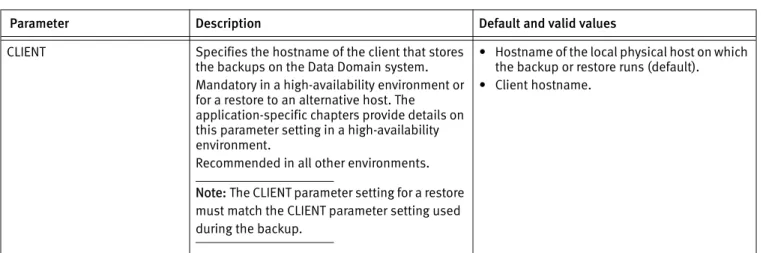
Table 6 Common parameters (page 1 of 3)
Parameter Description Default and valid values CLIENT Specifies the hostname of the client that stores
the backups on the Data Domain system. Mandatory in a high-availability environment or for a restore to an alternative host. The application-specific chapters provide details on this parameter setting in a high-availability environment.
Recommended in all other environments. Note: The CLIENT parameter setting for a restore must match the CLIENT parameter setting used during the backup.
• Hostname of the local physical host on which the backup or restore runs (default). • Client hostname.