Quartus II Software and Device Support Release Notes
Version 15.0
2015.05.04RN-01080-15.0.0 Subscribe Send Feedback
This document provides late-breaking information about the Altera® Quartus® II software release version 15.0.
For information about operating system support, refer to the readme.txt file in your altera/<version number> /quartus directory.
New Features and Enhancements
The Quartus II software release version 15.0 includes the following new features and enhancements: • Full support for the MAX® 10 10M02 device.
• Support for the Arria® 10 10AX115 and 10AX090 ES devices.
• Improved timing models for Arria 10 devices; you must recompile previous Arria 10 device designs and IP with the Quartus II software version 15.0.
• A redesigned Design Space Explorer (DSE) II GUI with improved graphical elements to indicate user flow and improved label names for ease of use.
• Improvements to the Quartus II Pin Planner; you can now highlight channels in the Pin Finder.
Memory Recommendations
A full installation of the Quartus II software requires up to 24 GB of available disk space.
Altera recommends that your system be configured to provide virtual memory equal to the recommended physical RAM that is required to process your design.
Note: Peak virtual memory may exceed these recommendations. These recommendations are based on the amount of physical memory required to achieve runtime within 10% of that achieved on hardware with an infinite amount of RAM.
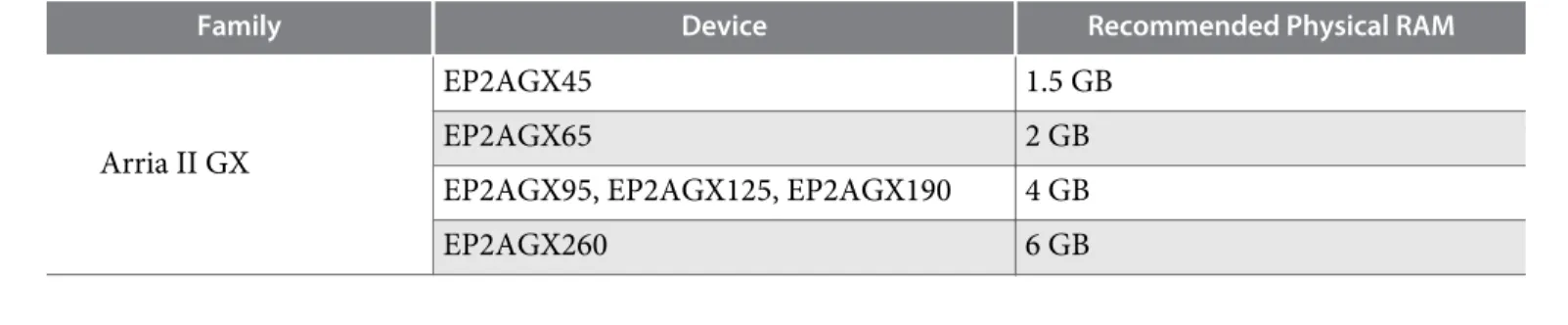
Table 1: Memory Requirements for Processing Designs
These requirements are the same for both Windows and Linux installations.
Family Device Recommended Physical RAM
Arria II GX
EP2AGX45 1.5 GB
EP2AGX65 2 GB
EP2AGX95, EP2AGX125, EP2AGX190 4 GB
EP2AGX260 6 GB
© 2015 Altera Corporation. All rights reserved. ALTERA, ARRIA, CYCLONE, ENPIRION, MAX, MEGACORE, NIOS, QUARTUS and STRATIX words and logos are
trademarks of Altera Corporation and registered in the U.S. Patent and Trademark Office and in other countries. All other words and logos identified as trademarks or service marks are the property of their respective holders as described at www.altera.com/common/legal.html. Altera warrants performance of its semiconductor products to current specifications in accordance with Altera's standard warranty, but reserves the right to make changes to any products and services at any time without notice. Altera assumes no responsibility or liability arising out of the application or use of any information, product, or service described herein except as expressly agreed to in writing by Altera. Altera customers are advised to obtain the latest version of device
ISO 9001:2008 Registered
Family Device Recommended Physical RAM Arria II GZ
EP2AGZ225 4 GB
EP2AGZ300 6 GB
EP2AGZ350 8 GB
Arria V
5AGXA1 6 GB
5AGTC3, 5AGXA3, 5AGXA5 8 GB
5AGXA7, 5AGTC7 10 GB
5AGXB1, 5AGXB3, 5AGTD3, 5ASTD3,
5ASXB3 12 GB
5AGXB5, 5AGTD7, 5AGXB7, 5ASXB5,
5ASTD5 16 GB
Arria V GZ
5AGZE1 8 GB
5AGZE3, 5AGZE5 12 GB
5AGZE7 16 GB
Arria 10
10AS048, 10AX048 28 GB
10AS057, 10AX057 30 GB
10AS066, 10AX066 32 GB
10AX090 44 GB
10AT115, 10AX115 48 GB
10AX016, 10AS016 18 GB
10AX022, 10AS022 20 GB
10AX027, 10AS027 22 GB
10AX032, 10AS032 24 GB
Cyclone IV E
EP4CE6, EP4CE10, EP4CE15, EP4CE22,
EP4CE30, EP4CE40 512 MB
EP4CE55, EP4CE75 1 GB
EP4CE115 1.5 GB
Cyclone IV GX
EP4CGX15, EP4CGX22, EP4CGX30 512 MB
EP4CGX50, EP4CGX75 1.5 GB
EP4CGX110, EP4CGX150 2 GB
Cyclone V
5CEA2, 5CGXC3, 5CEA4, 5CGXC4, 5CEA5, 5CGTD5, 5CGXC5, 5CSEA5, 5CSTD5, 5CSXC5, 5CSEA6, 5CSXC6, 5CEA7, 5CGTD7, 5CGXC7, 5CSEA2, 5CSEA4, 5CSXC2, 5CSXC4, 5CSTD6
6 GB
5CEA9, 5CGTD9, 5CGXC9 8 GB
MAX II All 512 MB
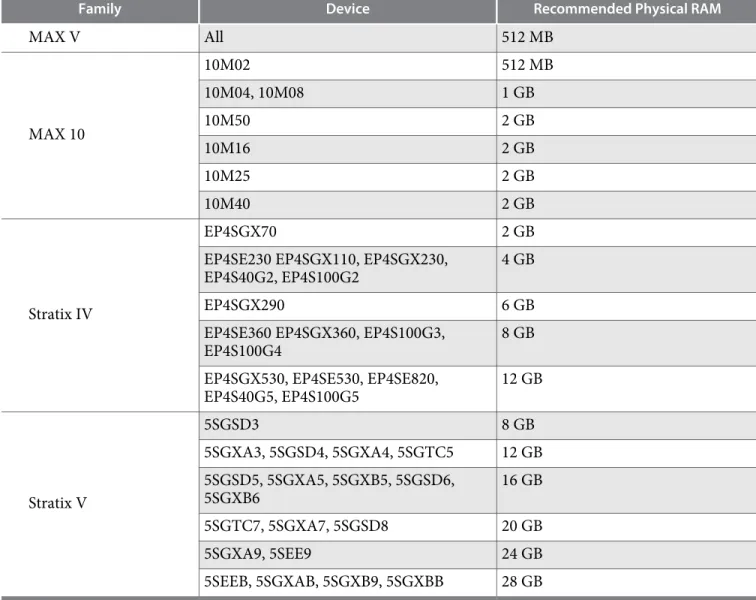
Family Device Recommended Physical RAM
MAX V All 512 MB
MAX 10
10M02 512 MB
10M04, 10M08 1 GB
10M50 2 GB
10M16 2 GB
10M25 2 GB
10M40 2 GB
Stratix IV
EP4SGX70 2 GB
EP4SE230 EP4SGX110, EP4SGX230,
EP4S40G2, EP4S100G2 4 GB
EP4SGX290 6 GB
EP4SE360 EP4SGX360, EP4S100G3,
EP4S100G4 8 GB
EP4SGX530, EP4SE530, EP4SE820,
EP4S40G5, EP4S100G5 12 GB
Stratix V
5SGSD3 8 GB
5SGXA3, 5SGSD4, 5SGXA4, 5SGTC5 12 GB 5SGSD5, 5SGXA5, 5SGXB5, 5SGSD6,
5SGXB6 16 GB
5SGTC7, 5SGXA7, 5SGSD8 20 GB
5SGXA9, 5SEE9 24 GB
5SEEB, 5SGXAB, 5SGXB9, 5SGXBB 28 GB
Changes in Device Support
Table 2: Device Support Not FixedDescription Workaround
EyeQ does not run without PRBS checker in Arria 10 designs The EyeQ Start button is grayed out when attempting to test a transceiver channel. This issue occurs when testing a transceiver channel without first associating either a hard or soft PRBS checker to that channel.
To run EyeQ in Arria 10 designs, select the Enable prbs soft
accumulators option in the Native PHY IP core IP Parameter Editor.
RN-01080-15.0.0
Table 3: Device Support Fixed
Description Workaround
Pin-Out File might contain incorrect voltages in Quartus II software release version 13.1 Arria 10 Edition
The Pin-Out File (.pin) generated by the Quartus II software might contain incorrect voltages for some Arria 10 ES voltage rails. The voltage rails affected are:
• VCC • VCCL • VCCERAM • VCCL_HPS • VCCIOREF_HPS • VCCPLL_HPS
This issue is corrected in Quartus II software release version 14.0 Arria 10 Edition.
Default VCCIO voltage for 10AX115 devices is incorrect in Quartus II software release version 13.1 Arria 10 Edition On the Voltage page of the Quartus II software, the default voltage listed for VCCIO (2.5 V) is incorrect.
This issue is corrected in Quartus II software release version 14.0 Arria 10 Edition.
Netlist viewer does not refresh when the design is recompiled The Netlist Viewer will not update after recompilation if the Netlist Viewer window is open when you modify and recompile the design by double-clicking on Fitter in the Task pane on the left side of the Quartus II software.
This issue is corrected in Quartus II software release version 14.1.
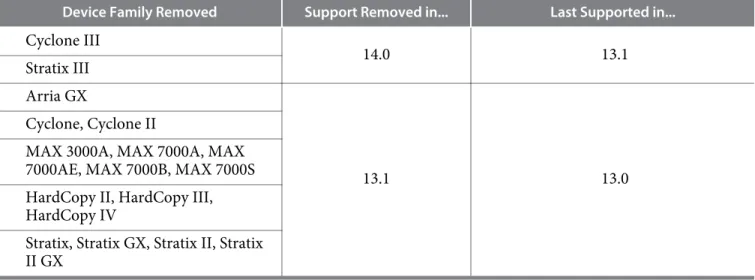
Table 4: Device Support Removed
These device families are no longer supported by the Quartus II software.
Device Family Removed Support Removed in... Last Supported in... Cyclone III
14.0 13.1
Stratix III Arria GX
13.1 13.0
Cyclone, Cyclone II
MAX 3000A, MAX 7000A, MAX 7000AE, MAX 7000B, MAX 7000S HardCopy II, HardCopy III, HardCopy IV
Stratix, Stratix GX, Stratix II, Stratix II GX
Related Information Altera Knowledge Base
For more information about known device issues and workarounds.
Changes to Software Behavior
This section documents instances in which the behavior and default settings of the Quartus II software have been changed from earlier releases of the software, and known issues with the software.
Refer to the Quartus II Default Settings File (.qdf), <Quartus II installation directory>/quartus/bin/assignment_ defaults.qdf, for a list of all the default assignment settings for the latest version of the Quartus II software. The Pin Planner has been updated for the Quartus II software release version 15.0
• You can now highlight transceiver clock multiplier unit (CMU) capable channels in the Quartus II Pin Finder. When creating a query, select Pin type in the Condition column, and CMU in the Value column. The CMU value is only available if your target device has CMU channels.
• You can now highlight GT transceiver capable channels in the Quartus II Pin Finder. When creating a query, select Pin type in the Condition column, and GT Capable in the Value column. The GT Capable value is only available if your target device has GT channels.
Improvements to double-adjacent error location determination logic
Prior to this release, the Quartus II software only enabled double-adjacent error detection location determination when you included the cyclic redundancy check (CRC) atom in your design. If you included the CRC pin, without the CRC atom, the software disabled double-adjacent error detection location determination.
If you enable internal scrubbing, the software will now correct any bitstreams, including double-adjacent errors, created with the Quartus II software release version 15.0.
Corrects ECC pipeline settings for Stratix V and Arria 10 RAMs from the Quartus II software version 14.1 The Quartus II software release version 15.0 corrects an issue where error correction code (ECC) pipeline registers were incorrectly bypassed for Stratix® V and Arria 10 device RAMs. Prior to this fix, if your Quartus II software release version 14.1 design included two or more instances of M20K RAM WYSIWYG in ECC mode with ECC pipeline stage enabled set to ON, the software might reset ECC pipeline stage enabled to OFF.
Device Support and Pin-Out Status
Table 5: Full Device SupportFull compilation, simulation, timing analysis, and programming support is now available for the new devices listed in this table.
Device Family Devices
MAX 10 10M02, 10M04, 10M08, 10M40, 10M50
Arria 10 10AS066ES, 10AX066ES, 10AX115ES, 10AX115E2,
10AT115E2
RN-01080-15.0.0
Table 6: Advance Device Support
Compilation, simulation, and timing analysis support is provided for these devices. The Compiler generates pinout information for these devices in this release, but does not generate programming files.
Device Family Devices
Arria 10 10AX048, 10AS048, 10AX057, 10AS057, 10AX066,
10AS066, 10AX090, 10AX115, 10AT115
MAX 10 10M16, 10M25
Table 7: Initial Information Device Support
Compilation, simulation, and timing analysis support is provided for these devices. Programming files and pinout information are not generated for these devices in this release.
Device Family Devices
Arria 10 10AX016, 10AS016, 10AX022, 10AS022, 10AX027,
10AS027, 10AX032, 10AS032
Timing and Power Models
Table 8: Timing and Power Model StatusDevice Family Device Timing Model Status Power Model Status
Arria 10
10AX016, 10AS016, 10AX022, 10AS022, 10AX027, 10AS027, 10AX032,
10AS032,10AX048, 10AS048
Advance (1) Preliminary
10AX057, 10AS057, 10AX066, 10AS066, 10AX090, 10AX115, 10AT115
Preliminary Preliminary
(1) This release contains advance timing models for some Arria 10 devices. These models will change and
should not be relied on for production timing. For more information about working with advance timing models, review the System Design with Advance FPGA Timing Models white paper, or contact Altera.
Device Family Device Timing Model Status Power Model Status
Arria V
5AGXB5, 5AGXB7
Final – 12.1 SP1 (2) Final – 13.1
5AGTD7 Final – 14.0
5AGXA1, 5AGXA3,
5AGTC3 Final – 13.0 SP1
(2) Final – 14.0
5AGXA5, 5AGXA7 Final – 13.1 (2) Final – 14.0
5AGXB1, 5AGXB3,
5AGTD3 Final – 13.0
(2) Final – 13.1
5AGTC7 Final – 13.1 (2) Final – 13.1
Arria V GZ All Final – 12.1 SP1 (2) Final – 13.0
Arria V SoC 5ASXB3, 5ASXB5,
5ASTD3, 5ASTD5 Final – 14.0 Final – 14.0
Cyclone V
5CEA2, 5CEA4, 5CEA7, 5CEA9, 5CGXC7, 5CGXC9, 5CGTD7, 5CGTD9
Final – 13.0 SP1 Final – 13.1
5CEA5, 5CGXC4,
5CGXC5 Final – 13.1 Final – 13.1
5CGXC3 Final – 14.0
Cyclone V SoC
5CSEA2, 5CSEA4, 5CSXC2, 5CSXC4
Final – 14.0
Final – 14.1 5CSEA5, 5CSEA6,
5CSXC5, 5CSXC6, 5CSTD5, 5CSTD6
Final – 14.0
Stratix V
5SGXA7, 5SGXA5,
5SGTC5, 5SGTC7 Final – 12.1
(2) Final – 13.0
5SGSD3, 5SGSD4, 5SGSD5, 5SGXA3, 5SGXA4, 5SGXB5, 5SGXB6, 5SGXAB, 5SGXA9, 5SEE9, 5SEEB, 5SGXB9, 5SGXBB
Final – 12.1 SP1 (2) Final – 13.0
5SGSD6, 5SGSD8 Final – 13.0 SP1 (2) Final – 13.0
MAX 10 10M02, 10M04,
10M08, 10M50, 10M16, 10M25, 10M40
Preliminary Preliminary
The current version of the Quartus II software also includes final timing and power models for the Arria II GX, Arria II GZ, Cyclone IV E, Cyclone IV GX, MAX II, MAX II Z, MAX V, and Stratix IV device
(2) The timing model was updated in Quartus II software version 13.1. RN-01080-15.0.0
families. Timing models for these device families became final in the Quartus II software versions 11.1 or earlier.
Related Information
System Design with Advance FPGA Timing Models
IBIS Models
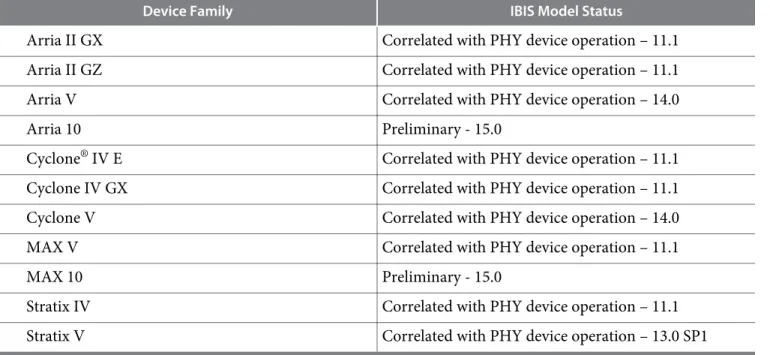
Table 9: IBIS Model Status for the Quartus II Software Release Version 15.0
Device Family IBIS Model Status
Arria II GX Correlated with PHY device operation – 11.1
Arria II GZ Correlated with PHY device operation – 11.1
Arria V Correlated with PHY device operation – 14.0
Arria 10 Preliminary - 15.0
Cyclone® IV E Correlated with PHY device operation – 11.1
Cyclone IV GX Correlated with PHY device operation – 11.1
Cyclone V Correlated with PHY device operation – 14.0
MAX V Correlated with PHY device operation – 11.1
MAX 10 Preliminary - 15.0
Stratix IV Correlated with PHY device operation – 11.1
Stratix V Correlated with PHY device operation – 13.0 SP1
EDA Interface Information
Table 10: Synthesis Tools Supporting the Quartus II Software Release Version 15.0
Synthesis Tools(3) Version NativeLink Support
Mentor Graphics® Precision 2014b Yes
Synopsys® Synplify, Synplify Pro, and Synplify
Premier 2015.03 Yes
Table 11: Simulation Tools Supporting the Quartus II Software Release Version 15.0
Simulation Tools Version NativeLink Support
Aldec Active-HDL 10.1 (Windows only) Yes
(3) EDA Synthesis tools that support the Quartus II software version 15.0 will be released by vendors shortly
after the release of the Quartus II software. Contact your vendor account manager for details.
Simulation Tools Version NativeLink Support
Aldec Riviera-PRO 2014.10 Yes
Cadence Incisive Enterprise Simulator (IES) 14.10.013 (Linux only) Yes
Mentor Graphics ModelSim® PE 10.3d Yes
Mentor Graphics ModelSim SE 10.3d Yes
Mentor Graphics ModelSim-Altera 10.3d Yes
Mentor Graphics Questa® 10.3d Yes
Synopsys VCS and VCS MX 2014.03-SP1 (Linux only) Yes
Table 12: Formal Verification (Equivalence Checking) Tools Supporting the Quartus II Software Release Version 15.0
Formal Verification Tools Version NativeLink Support
Cadence Encounter Conformal 8.1 —
Antivirus Verification
The Quartus II software release version 15.0 has been verified virus free using the following software: McAfee VirusScan Enterprise + AntiSpyware Enterprise Version: 8.8.0 (8.8.0.1247)
Scan Engine Version (32 bit): 5700.7163 Scan Engine Version (64 bit): 5700.7163 DAT Version: 7750.0000
Software Issues Resolved
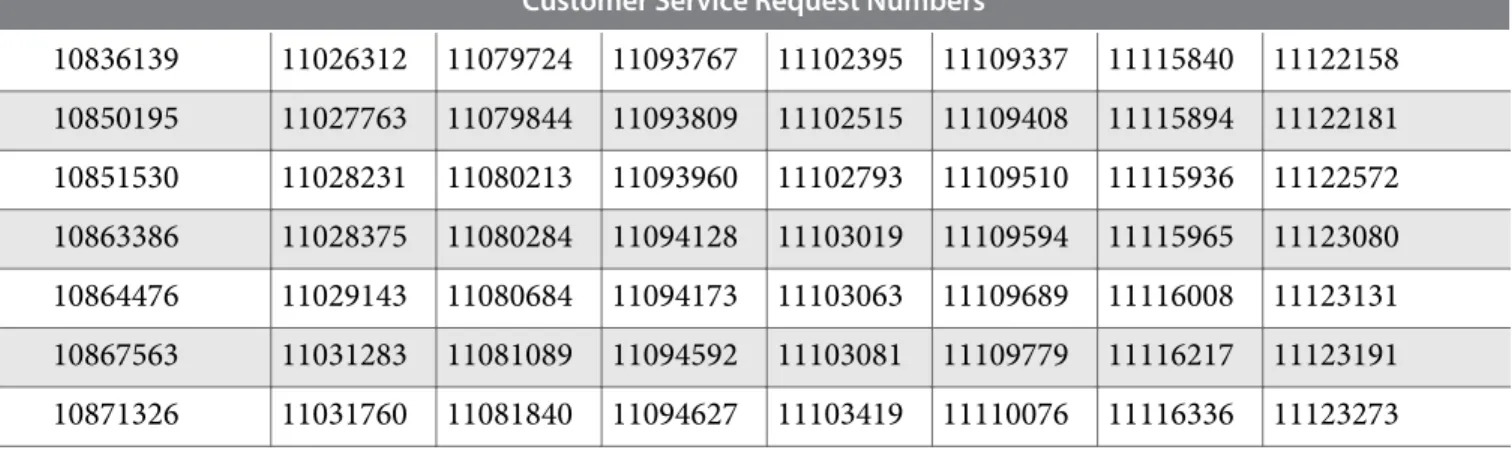
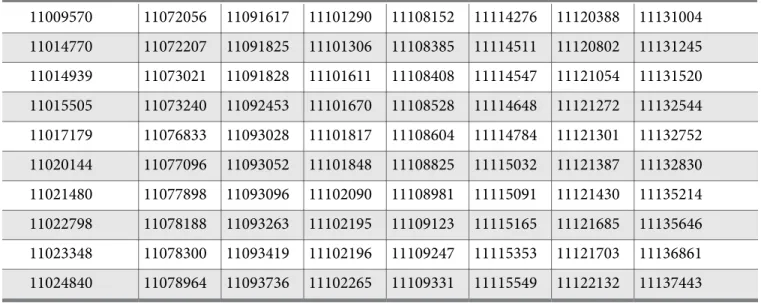
Table 13: Issues Resolved in the Quartus II Software Release Version 15.0
Customer Service Request Numbers
10836139 11026312 11079724 11093767 11102395 11109337 11115840 11122158 10850195 11027763 11079844 11093809 11102515 11109408 11115894 11122181 10851530 11028231 11080213 11093960 11102793 11109510 11115936 11122572 10863386 11028375 11080284 11094128 11103019 11109594 11115965 11123080 10864476 11029143 11080684 11094173 11103063 11109689 11116008 11123131 10867563 11031283 11081089 11094592 11103081 11109779 11116217 11123191 10871326 11031760 11081840 11094627 11103419 11110076 11116336 11123273
RN-01080-15.0.0
Customer Service Request Numbers
10876802 11032595 11082271 11095023 11103663 11110200 11116449 11123513 10879692 11035398 11083373 11095114 11103843 11110304 11116529 11123819 10884338 11035660 11084090 11095565 11104078 11110763 11116614 11124052 10884523 11036560 11084158 11095982 11104106 11110824 11116664 11124134 10896505 11037740 11084165 11096264 11104236 11110947 11116692 11124445 10897081 11038002 11084357 11096354 11104342 11111293 11117022 11124718 10897583 11038334 11084859 11096635 11104454 11111332 11117152 11125032 10924541 11038350 11085169 11096724 11104502 11111439 11117252 11125345 10924582 11038514 11085737 11096849 11104971 11111466 11117275 11125421 10929671 11039225 11085948 11096930 11105008 11111518 11117285 11125464 10958169 11042419 11085957 11097646 11105123 11111528 11117360 11125761 10962283 11042861 11086098 11097976 11105528 11111789 11117686 11125871 10964310 11043668 11086244 11098188 11105609 11111909 11117742 11125937 10964966 11044092 11086602 11098380 11105626 11112143 11117826 11125977 10965913 11044899 11086661 11098442 11105630 11112178 11117871 11126213 10965983 11046164 11086707 11098977 11105665 11112268 11118080 11126248 10969783 11046379 11087248 11099100 11105702 11112278 11118316 11126341 10970455 11046722 11087391 11099217 11106055 11112575 11118429 11128105 10972120 11047421 11087474 11099492 11106122 11112951 11118434 11128596 10980037 11047736 11088337 11099641 11106264 11112996 11118535 11128741 10980085 11049692 11088487 11099814 11106269 11113210 11118588 11128815 10980579 11050108 11088881 11099886 11106357 11113329 11118862 11129350 10990645 11057839 11089007 11099894 11106474 11113751 11118960 11129419 10991390 11057939 11089356 11099904 11106586 11113752 11119046 11129681 10991708 11059203 11089696 11100295 11106989 11113868 11119273 11129830 10993425 11060121 11089958 11100392 11107218 11113954 11119456 11130081 10993826 11062791 11090158 11100705 11107412 11114042 11119600 11130592 10996044 11063462 11090461 11100796 11107658 11114129 11119713 11130720 10996276 11068346 11090607 11100923 11107721 11114197 11119947 11130783 10997700 11068820 11091187 11100980 11107774 11114215 11120094 11130943 10998009 11069149 11091264 11101011 11108036 11114251 11120349 11130948
Customer Service Request Numbers
11009570 11072056 11091617 11101290 11108152 11114276 11120388 11131004 11014770 11072207 11091825 11101306 11108385 11114511 11120802 11131245 11014939 11073021 11091828 11101611 11108408 11114547 11121054 11131520 11015505 11073240 11092453 11101670 11108528 11114648 11121272 11132544 11017179 11076833 11093028 11101817 11108604 11114784 11121301 11132752 11020144 11077096 11093052 11101848 11108825 11115032 11121387 11132830 11021480 11077898 11093096 11102090 11108981 11115091 11121430 11135214 11022798 11078188 11093263 11102195 11109123 11115165 11121685 11135646 11023348 11078300 11093419 11102196 11109247 11115353 11121703 11136861 11024840 11078964 11093736 11102265 11109331 11115549 11122132 11137443
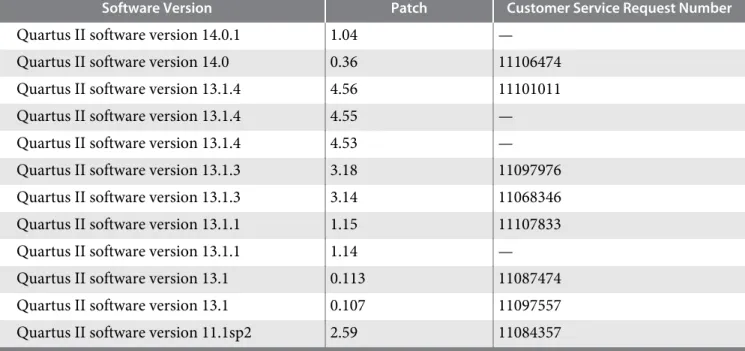
Software Patches Included in this Release
Table 14: Software Patches included in the Quartus II Software Release Version 15.0
Software Version Patch Customer Service Request Number
Quartus II software version 14.1a10s 0.07sa 11125464 Quartus II software version 14.1a10s 0.06sa —
Nios® II software version 14.1.1 1.08 —
Quartus II software version 14.1.1 1.06 —
Quartus II software version 14.1.1 1.03 11120388
Quartus II software version 14.1.1 1.02 11120094
Quartus II software version 14.1.1 1.01 11114251
Quartus II software version 14.1 0.28 11106474
Quartus II software version 14.1 0.25 11121054
Quartus II software version 14.1 0.20 11089007
Quartus II software version 14.1 0.13 11114810
Quartus II software version 14.1 0.12 11114251
Quartus II software version 14.1 0.11 11014770
Quartus II software version 14.1 0.06 11068346
Quartus II software version 14.1 0.02b —
Quartus II software version 14.0.2 2.14 —
Quartus II software version 14.0.2 2.09 11068346
Quartus II software version 14.0.2 2.05 11095114
RN-01080-15.0.0
Software Version Patch Customer Service Request Number
Quartus II software version 14.0.1 1.04 —
Quartus II software version 14.0 0.36 11106474
Quartus II software version 13.1.4 4.56 11101011
Quartus II software version 13.1.4 4.55 —
Quartus II software version 13.1.4 4.53 —
Quartus II software version 13.1.3 3.18 11097976
Quartus II software version 13.1.3 3.14 11068346
Quartus II software version 13.1.1 1.15 11107833
Quartus II software version 13.1.1 1.14 —
Quartus II software version 13.1 0.113 11087474
Quartus II software version 13.1 0.107 11097557
Quartus II software version 11.1sp2 2.59 11084357
Latest Known Quartus II Software Issues
Information about known software issues is available on the Quartus II Software Support webpage. You can find known issue information for previous versions of the Quartus II software on the Altera Knowledge Database webpage.
Information about issues affecting the Altera IP Library is available in the Altera IP Release Notes.
Related Information
• Quartus II Software Support
• Altera Knowledge Database
• Altera IP Release Notes
Document Revision History
Table 15: Quartus II Software Release Version 15.0 Document Revision History
Date Version Changes
May 2015 15.0.0 Initial release.