An
IT Briefing
produced by
Optimizing Data Efficiency with Windows
File Server and Storage Consolidation
© 2008 TechTarget
BIO
Optimizing Data Efficiency with Windows File Server and
Storage Consolidation
By Pete Brey
Pete Brey is the Technical Marketing Director for HP’s Enterprise NAS group in Colorado. Brey is responsible for the development and delivery of innovative network-attached storage solutions, based on the HP PolyServe File System technology.
This
IT Briefing
is based on a HP/TechTarget Webcast, “Optimizing Data Efficiency with
Windows File Server and Storage Consolidation.”
This TechTarget
IT Briefing
covers the following topics:
• Current Windows File Server Environments
. . . 1
• The HP Model: Windows File Server Consolidation
. . . 1
• Cost Relief. . . 3
• Customer Scenarios . . . 3
• Consolidating with Shared Data . . . 4
• An HP Adaptive Storage Solution: Enterprise Virtual Array
File Services . . . .5
• EVA File Services Architecture . . . 6
• Managerial and Operational Efficiencies . . . 6
• Common Questions . . . 9
Copyright © 2008 Hewlett-Packard. All Rights Reserved. Reproduction, adaptation, or translation without prior written permission is prohib-ited, except as allowed under the copyright laws.
About TechTarget IT Briefings
TechTarget IT Briefings provide the pertinent information that senior-level IT executives and managers need to make educated purchasing decisions. Originating from our industry-leading Vendor Connection and Expert Webcasts, TechTarget-produced IT Briefings turn Webcasts into easy-to-follow technical briefs, similar to white papers.
Design Copyright © 2004–2008 TechTarget. All Rights Reserved. For inquiries and additional information, contact:
Optimizing Data Efficiency with
Windows File Server and
Storage Consolidation
Current Windows File Server
Environments
Many IT Managers today see a chaotic picture when they look at their Windows computing resources. Windows servers dot the landscape, each with their own dedicated resources typically deployed and managed by individual workgroups. These servers primarily host user home and workgroup share appli-cations and are characterized by Windows servers with direct attached storage or NAS appliances. This amalgam produces silos of server and storage resources throughout the enterprise, which make it very difficult for a centralized IT department to man-age direct access or to deploy resources consistently within the enterprise. At the same time, corporate management is calling for more application uptime and lower IT budgets. Business demands often require levels of collaboration or access to data wells across departments that are next to impossible for IT departments to support. Yet, while storage resources in many organizations can be better characterized as puddles rather than pools, businesses cannot afford the time to take down those servers one by one to consolidate storage. One technology that appeals to every IT manager facing these problems today is shared, or pooled, storage. Shared storage is more efficient, less expensive, and much easier to manage. These current chaotic Windows file server environ-ments are known as “sprawl.” Sprawl makes inex-pensive cheap systems very exinex-pensive for several reasons. First, the management burden is substantial because there are:
•
Numerous separate puddles of storage•
Multiple points to backup and maintain through-out the environment•
Difficulties with capacity growth in a fragmented system•
Large amounts of time consumed in data replica-tion between individual departments or groupsSecond, sprawl is an expensive use of hardware and software assets. Storage capacity in particular is wasted. HP’s research shows that server utilization is sometimes below
1
5% in these environments. Third, the availability of solutions is suboptimal. Individual servers are typically not fault tolerant, so system crashes can have seriously damaging consequences. Also, downtime, whether scheduled or accidental, is very expensive because the user community cannot work while the system is down.Figure
1
shows that server and storage consolidation is currently one of the most prominent areas of focus within the IT industry. It is not only of managerial importance, but also of strategic importance. The majority of the IT budget, fully 70
%, goes to mainte-nance and operations. Upgrades and capacity growth also take enormous amounts of time. This leaves relatively little time or money for new initiatives and proactive, strategic IT projects. Businesses can benefit enormously from redirecting some of their mainte-nance and operations resources toward new initia-tives that drive strategic competitive advantage for the organization.The HP Model: Windows File
Server Consolidation
The HP model, shown in Figure
2
, is built on an adaptive infrastructure, which takes individual user applications and web silos and moves them to a modular, unified environment. This enables HP to help IT departments reduce costs, increase agility, and improve the overall quality of their IT infrastruc-ture.HP’s new File Server Consolidation technology is making the process of storage and Windows file server consolidation much more practical for resource-challenged IT managers. The technology essentially combines hundreds of disparate file servers and their individual puddles of storage spread throughout the organization into a single, consolidated, network-
Figure 1
attached pool. This means that direct-attached stor-age can look to any server on the network as if it were part of a shared resource. Over time, at their own pace, IT organizations can move these puddles of storage into a centralized pool. In the process, they realize the benefits of reduced hardware costs, sim-plified and more efficient management, and better availability and performance. HP’s File Server Consol-idation technology provides immediate cost savings as well as dramatic improvements in utilization and uptime.
Cost Relief
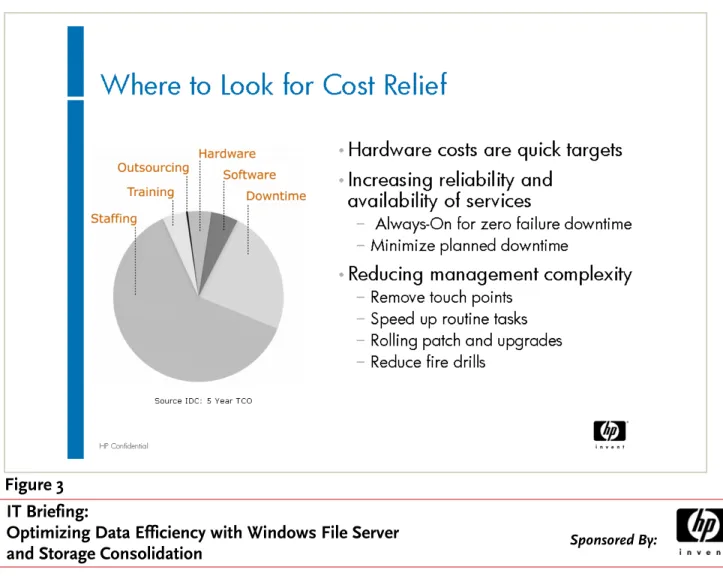
Hardware and software are easy targets of cost con-tainment efforts but, as shown in Figure 3, they are actually very small parts of the IT pie. In fact, staffing is the dominant piece of the cost equation. Conse-quently, ways of increasing staffing efficiency will drive even higher levels of cost relief in maintenance and operations, thereby freeing up more resources for new initiatives.
Figure 4 shows the results of the HP solution from a total cost of ownership (TCO) perspective, including both hard and soft costs. In this example, a corpora-tion had 5
0
servers with an average utilization rate of1
5%. By means of the HP consolidation process, the IT group was able to drive its server count down to12
and its average utilization rate up to 7
0
%. The chart shows clearly that soft costs dominate. Well over 80
% of the total savings produced by the consolida-tion effort were derived from reducconsolida-tions in soft costs. This made it possible to shift staffing resources from maintenance initiatives to new initiatives that drive strategic competitive advantage for the organization.Customer Scenarios
Several customer case studies clarify the advantages associated with employing the HP solution to file server and storage consolidation. The first presented an environment with 5
0
file servers hosting Windows home shares on a plethora of platforms, from Win-dows NT to WinWin-dows2000
and Windows200
3, with direct access storage (DAS), and a single NAS appliance system. Storage usage was inconsistent, with some systems tapped out and others at less than1
5%. The NAS box in particular was running at 78%. Managing this chaotic environment was prob-lematic and labor intensive, requiring five people and over200
person-hours per week to oversee user management, conduct backups, fix crashes, install patches, and perform other vital IT functions. Withthe HP solution, the IT environment was consoli-dated to
1
5 servers with just two management points. This reduced the overall cost structure by 75% and reduced management time to less than 40
person-hours per week (only one person.) The HP solution also increased overall performance, data availability, and security.In the second customer scenario, enterprise file shares were hosted all over the organization. IT had unused space on their SAN, but was experiencing data growth of over 3
0
% that forced them to migrate data constantly. IT also faced particular challenges related to user management and general growth in their storage environment. With the HP solution, they were able to leverage their SAN into flexible storage architecture. They eliminated the need for data migra-tion, load balancing, and user movement by creating a single data pool from which all filers could be served. The HP solution also enabled online capacity growth of up to2
PB. Furthermore, the solution pro-vided unified block- and file-level access, which was hugely beneficial for the IT organization, and failover capabilities without additional cost.In the third customer scenario, a British Media Shar-ing company had gone through several IT consolida-tions as a result of corporate mergers. They had
1
6,000
corporate users with home shares and thou-sands of online users loading profiles. The perfor-mance of their own in-house solution was limited because they had a nonscalable system. Furthermore, they were experiencing massive data growth. With the HP solution, they were able to consolidate to an inte-grated, shared data solution. They reduced their infra-structure and operating costs by over 50
% and reduced their file server hardware significantly. These reductions drove a greater than200
% performance improvement at peak load and enabled the creation of a robust fault-tolerant system that produced no user downtime. The HP solution clearly produced a very attractive IT environment for this company.Consolidating with Shared Data
Consolidating with shared data provides several bene-fits. First, consolidating servers and storage can lead to server count reductions of up to 75% and improve storage utilization by 3
0
%. Second, it allows modular scaling, enabling IT departments to add server or storage capacity as needed and to scale beyond theFigure 4
limits of a single system. In old environments, with puddles of storage and individual systems that need to be maintained, the limits of the collective system are defined by the limits of the individual systems. With HP’s shared data approach, these systems are aggregated to exceed the limits of any individual sys-tem. Third, consolidating shared data also provides for integrated high availability. Failover is accomplished in a matter of seconds with a full Active/Active config-uration. Furthermore, there is no single point of fail-ure, which is extremely valuable in providing high availability environments for user and departmental shares. Fourth, it simplifies and centralizes manage-ment of the overall solution. It creates a single data pool to manage, allocate storage, and backup. Also, it works with all Windows server-based tools that exist today.
An HP Adaptive Storage
Solution: Enterprise Virtual
Array File Services
The typical IT environment has about
2
5 managed entities or file-serving silos. Correspondingly, there are2
5 different free-space puddles to manage and2
5different backup jobs needed to protect those man-aged entities. The average utilization rate is around
1
5%. Because of the number of managed entities, storage utilization is uneven and the maximum file system throughput achieved is the throughput of any one given system, which is generally between100
MB and 300
MB per second. Also, it is not possible to do hard upgrades with this type of architecture.HP has a specific solution to these problems: Enter-prise Virtual Array File Services (EVA.) Figure 5 shows a comparison between the traditional environment and an environment with HP’s EVA File Services util-ity. The number of managed entities is reduced from
2
5 to1
, as are the number of free space pools and the number of backup jobs required. Correspondingly, the utilization rate is driven from1
5% to 65% on aver-age. Storage utilization across this environment goes from being very uneven and sparse to very consistent and high. The maximum file system throughput achieved with this system is approximately ten times better than is likely in the traditional environment. Finally, incremental upgrades are possible with this solution. The IT productivity improvements delivered by HP EVA File Services are clearly substantial.EVA File Services Architecture
The EVA File Services architecture, shown in Figure 6, is primarily multiple Windows servers combined to form a single logical NAS cluster. With specialized PolyServe clustered file system software, all file serv-ers can cache and serve all files. As a result, there are no hot spots. Clients who connect to this cluster are load-balanced across all the file servers within the cluster. It is fully fault tolerant, because if one compo-nent in the cluster fails, the other compocompo-nents take up its load. It is also operationally efficient. There is one point of backup, no replication required to share data between clients, and one single pane of glass to manage all the servers and storage.
One unique aspect of the HP EVA File Services prod-uct is that it was built on Windows technology; the filers that are part of the cluster run on standard Windows Server
200
3. Thus, it supports CIFS with the native Microsoft protocols. It integrates directly with Active Directory (AD) and Direct File Service (DFS) and also supports native ACLs and oplocks. Another unique advantage of this approach is that it presents virtual mount points to the clients. Conse-quently, clients do not need to know about theinter-nal workings of the cluster. Failovers or upgrades within the cluster happen in the background. Finally, because it works with Windows standard storage management tools, it also works with all the standard Windows management software that exists today, including backup software, antivirus software, replica-tion, VSS, and DR software, and WAFS providers.
Managerial and Operational
Efficiencies
Scalability
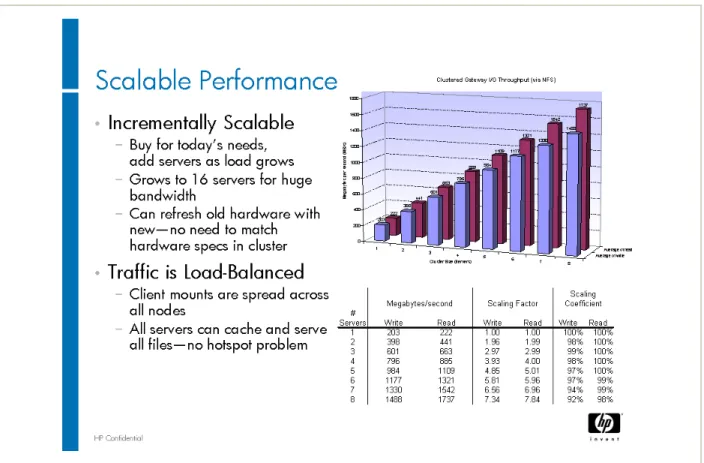
This HP solution performs well in many ways. As shown in Figure 7, it is incrementally scalable, so capacity can be purchased for current needs and servers can be added as the load grows. It can sup-port up to
1
6 servers for very large bandwidth approaching 3 GB per second. Also, old hardware can be refreshed without taking down clusters and impacting the service provided to users. Traffic is load-balanced, with client mounts spread across all nodes so that all servers can see the same data. Because of this shared data approach, there are no hot spots.Availability
The HP EVA File Services product provides compre-hensive availability. In the event of a failover event, automatic CIFS client failover occurs. The client auto-matically reconnects to a surviving server through a virtual mount point. The cluster automatically updates the DFS replica state based on server health within the cluster. This eliminates planned downtime because it is possible to conduct online server upgrades, rolling OS upgrades, rolling security patches, and rolling software updates without ever having to impact the cluster itself.
Simplicity
The management capabilities of the HP solution are effectively simplified. With only one interface, IT man-agement can:
•
View and reallocate free space pools across the cluster•
See more volume information•
Connect from any node•
Provision storage from any node•
Maintain a single global namespace•
Manage up to2
TB per file system and up to12
8 file systems per cluster•
Audit storage usage easilyThe HP EVA File Services product also improves operational efficiency. It enables IT to improve stor-age utilization, simplify storstor-age manstor-agement, and enable consistent file server management. Figure 8 delineates these improvements in operational effi-ciency in greater detail.
Figure 9 shows a picture of the actual management interface. The complete cluster can be seen from one single pane of glass. It is an intuitive point-and-click interface that allows a manger to transfer resources and look at the up-to-date health of individual com-ponents within the cluster.
In sum, there are several important reasons to con-solidate with HP’s EVA File Services. First, it helps drive maximum IT efficiency by enabling higher levels of productivity for all IT resources, not just hardware and software. Second, it increases overall availability by providing higher levels of uptime and greatly
Figure 7
Figure 8
simplified maintenance. Thus there is less disruptive impact on the business. Third, it improves scalability, so business has higher levels of performance in the right places at the right times.
Additional information about HP’s EVA File Services is available at www.hp.com/storage. Click on the mid range link and go to EVA File Services. Information concerning deployment, per event, consulting, and
education services for HP storage is available at www.hp.com/hps/storage/.
Information about HP Care Pack services for storage is available at www.hp.com/hps/carepack/storage/ cp_networked.html.
General information about HP products is available at www.hp.com and www.polyserve.com.
Common Questions
Question: How does this solution scale performanceand capacity independently?
Answer: The ability to scale performance and capac-ity independently is one of the hallmarks of this par-ticular product. It is possible because of the way the product is architected. Performance can be scaled by scaling the number of nodes within the cluster. Capacity can be scaled by independently scaling the backend storage.
Question: Is a particular kind of storage necessary to be able to scale backend storage?
Answer: Yes, shared storage is required. HP requires a SAN backend configuration. This enables all of the nodes in the cluster to see exactly the same storage, which helps eliminate hot spots that common in the industry.
Question: Are particular kinds of backup software necessary?
Answer: HP supports a wide range of third party backup solutions, including HP’s own Data Protector solution.
Question: Is it possible to use iSCSI storage with this approach?
Answer: Absolutely. iSCSI can be used in place of the Shared Storage SAN backend configuration. Some customers are doing that now.
Question: Does each node in the cluster need to be backed up separately or can they all be backed up as a pool?
Answer: No, each node in the cluster does not need to be backed up separately. One of the unique aspects of this product is that it is possible to take an individual node and provision it as a backup node. One backup job can be managed from a central loca-tion with a single backup license.
Question: How does enhanced availability due to cli-ent failover work between the differcli-ent nodes in the network?
Answer: A virtual mount point is presented so any failover activity happening within the cluster is com-pletely transparent to the clients. Clients will auto-matically migrate their connections to a new server on the fly.
Sponsor_01_2008_0001
About TechTarget
We deliver the information IT pros need to be successful.
TechTarget publishes targeted media that address your need for information and resources. Our network of technology-specific Web sites gives enterprise IT professionals access to experts and peers, original content, and links to relevant information from across the Internet. Our events give you access to vendor-neutral, expert commentary and advice on the issues and challenges you face daily. Our magazines give you in-depth analysis and guidance on the critical IT decisions you face. Practical technical advice and expert insights are distributed via specialized e-Newsletters, video TechTalks, podcasts, blogs, and wikis. Our Webcasts allow IT pros to ask questions of technical experts.
What makes TechTarget unique?
TechTarget is squarely focused on the enterprise IT space. Our team of editors and network of industry experts provide the richest, most relevant content to IT professionals. We leverage the immediacy of the Web, the networking and face-to-face opportunities of events, the expert interaction of Webcasts, the laser-targeting of e-Newsletters, and the richness and depth of our print media to create compelling and actionable information for enterprise IT professionals.