Tivoli
®IBM
Tivoli
Workload
Scheduler
Reference
Guide
Version8.2(RevisedDecember2004)
SC32-1274-02
Tivoli
®IBM
Tivoli
Workload
Scheduler
Reference
Guide
Version8.2(RevisedDecember2004)
SC32-1274-02
Note
Beforeusingthisinformationandtheproductitsupports,readtheinformationin“Notices”onpage331.
ThirdEdition(December2004)
Thiseditionappliestoversion8,release2,modificationlevel0ofIBMTivoliWorkloadScheduler(programnumber 5698-WSH)andtoallsubsequentreleasesandmodificationsuntilotherwiseindicatedinneweditions.
ThiseditionreplacesSC32–1274–01.
Contents
Figures
.
.
.
.
.
.
.
.
.
.
.
.
.
. vii
Tables
.
.
.
.
.
.
.
.
.
.
.
.
.
.
. ix
About
this
guide
.
.
.
.
.
.
.
.
.
.
. xi
Whatisnewinthisguide. . . xi
Whoshouldreadthisguide . . . xi
Whatthisguidecontains . . . xi
Publications . . . xii
IBMTivoliWorkloadSchedulerlibrary . . . . xii
Relatedpublications . . . xv
Accessingpublicationsonline . . . xvi
Orderingpublications. . . xvi
Providingfeedbackaboutpublications . . . . xvi
Accessibility . . . xvii
Tivolitechnicaltraining . . . xvii
Supportinformation . . . xvii
Conventionsusedinthisguide . . . xvii
Typefaceconventions . . . xvii
Operatingsystem-dependentvariablesand paths. . . xviii
Commandsyntax. . . xviii
Chapter
1.
Quick
start
.
.
.
.
.
.
.
.
. 1
Creatingaplan . . . 1
Managingjobsandjobstreams . . . 5
Chapter
2.
The
production
cycle
.
.
.
. 7
Maininterfacesandprocessesoftheproduct . . . 7
Userinterfaces. . . 7
Preandpostproductioncommands . . . 8
Securitycommands . . . 8
Productionprocesses . . . 8
TheprocesstreeonUNIXplatforms . . . 9
TheprocesstreeonWindowsplatforms . . . . 11
Automatingtheproductioncycle . . . 13
Customizingthefinaljobstream . . . 13
Addingthefinaljobstream . . . 13
Startingaproductioncycle . . . 14
Managingtheproductionenvironment . . . 14
ChoosingtheIBMTivoliWorkloadScheduler StartofDay . . . 14
Changingthestartofday . . . 15
Creatingaplanforfutureorpastdates . . . . 15
Usingreports. . . 16
Launchingjobs . . . 16
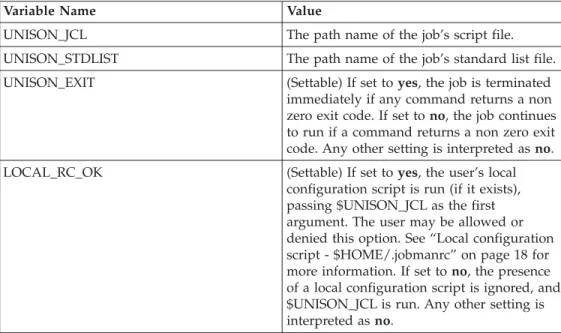
Jobenvironmentvariables . . . 16
Standardconfigurationscript-jobmanrc . . . 17
Localconfigurationscript-$HOME/.jobmanrc 18 Productionprocessingcommands . . . 19
Theschedulrcommand . . . 20
Thecompilercommand . . . 21
Thestagemancommand . . . 23
Thelogmancommand. . . 26
Thewmaeutilcommand . . . 28
Chapter
3.
Composer
reference
.
.
.
. 31
Managingschedulingobjects . . . 31
Workstationdefinitions . . . 33
Workstationclassdefinitions. . . 39
Domaindefinitions . . . 40 Jobdefinitions . . . 42 Userdefinitions . . . 47 Calendardefinitions . . . 49 Parameterdefinitions . . . 50 Promptdefinitions . . . 52 Resourcedefinitions . . . 54
Thecomposercommandlineprogram . . . 55
Runningcomposer . . . 55 Commandsyntax . . . 57 Commanddescriptions . . . 58 add . . . 60 build . . . 61 continue . . . 62 create . . . 63 delete . . . 65
display,list,print . . . 67
edit . . . 70 exit . . . 71 modify . . . 72 new . . . 74 redo. . . 75 replace . . . 77 systemcommand . . . 78 validate. . . 79 version . . . 80
Chapter
4.
The
scheduling
language
.
. 81
Syntaxforjobstreams. . . 81
Keywords . . . 82 Dependencies. . . 83 Casesensitivity . . . 83 Keyworddescriptions . . . 83 at. . . 84 carryforward . . . 85 comments . . . 86 confirmed . . . 87 deadline . . . 88 end . . . 89 every . . . 90 except . . . 91 follows . . . 93 freedays . . . 94 jobstatement . . . 96 keyjob. . . 101 keysched . . . 102 limit . . . 103 needs . . . 104 on . . . 105
©CopyrightIBMCorp. 1999,2004
iii
|| || || || || || || || || || || || ||
opens . . . 108
priority . . . 110
prompt . . . 111
schedule . . . 112
until . . . 113
Chapter
5.
Conman
reference
.
.
.
. 115
Runningconman . . . 115
Examples. . . 115
Controlcharacters . . . 115
Runningsystemcommands . . . 115
Userprompting . . . 116
Terminaloutput . . . 116
Offlineoutput . . . 116
Selectingtheconmancommandprompt . . . 117
Commandsyntax . . . 117
Wildcardcharacters . . . 117
Delimitersandspecialcharacters . . . 118
Listofcommands . . . 118
Selectingjobsincommands . . . 120
Synopsis . . . 121
Arguments . . . 121
Selectingjobstreamsincommands . . . 128
Synopsis . . . 128
Arguments . . . 128
Commanddescriptions . . . 134
Conmancommandprocessing. . . 134
adddepjob . . . 135 adddepsched . . . 137 altpass. . . 139 altpri . . . 140 canceljob. . . 141 cancelsched. . . 143 confirm . . . 145 console . . . 146 continue . . . 147 deldepjob . . . 148 deldepsched . . . 150 display . . . 152 exit. . . 153 fence . . . 154 help . . . 155 kill . . . 156 limitcpu . . . 157 limitsched . . . 158 link. . . 159 listsym . . . 161 recall . . . 162 redo . . . 163 releasejob . . . 165 releasesched . . . 167 reply . . . 169 rerun . . . 170 resource . . . 173 setsym . . . 174 showcpus . . . 175 showdomain . . . 179 showfiles. . . 180 showjobs . . . 182 showprompts . . . 190 showresources . . . 192 showschedules . . . 194 shutdown . . . 197 start . . . 198 status . . . 200 stop . . . 201 stop;progressive . . . 203 submitdocommand . . . 204 submitfile . . . 206 submitjob . . . 208 submitsched . . . 210 switchmgr . . . 212 system . . . 213 tellop . . . 214 unlink. . . 215 version . . . 217
Chapter
6.
Utility
commands
.
.
.
.
. 219
Commanddescriptions . . . 219
atandbatchcommands . . . 220
caxtract . . . 224 cpuinfo . . . 225 datecalc . . . 227 dbexpand . . . 231 delete . . . 232 evtsize. . . 233 jbxtract . . . 235 jobinfo. . . 237 jobstdl. . . 239 maestro . . . 241 makecal . . . 242 metronome.pl . . . 244 morestdl . . . 245 parms . . . 246 paxtract . . . 247 prxtract . . . 248 r11xtr . . . 249 release. . . 250 rextract . . . 252 rmstdlist . . . 253 showexec. . . 254 StartUp . . . 255 version . . . 256 wmaeutil. . . 258 xrxtrct. . . 260 Unsupportedcommands . . . 265
Chapter
7.
The
report
commands
.
.
. 267
Reportcommands. . . 267
Commandoutput . . . 267
rep1-rep4bcommands . . . 269
rep7command . . . 270 rep8command . . . 271 rep11command . . . 272 reptrcommand. . . 273 xrefcommand . . . 274 Samplereports . . . 275
Chapter
8.
The
Extended
Agent
reference
.
.
.
.
.
.
.
.
.
.
.
.
. 279
WhatareExtendedAgents? . . . 279
| |
Workstationdefinition . . . 279
Accessmethodinterface. . . 279
Methodcommandlinesyntax . . . 279
Methodresponsemessages. . . 282
Methodoptionsfile . . . 282
Methodexecution . . . 283
Launchjob(LJ)task . . . 283
Managejob(MJ)task. . . 284
Checkfile(CF)task . . . 284
Getstatus(GS)task . . . 285
Thecpuinfocommand . . . 286
Troubleshooting . . . 286
Jobstandardlisterrormessages . . . 286
Methodnotexecutable . . . 286
ConsoleManagermessages. . . 286
Composerandcompilermessages . . . 286
Jobmanmessages . . . 286
Chapter
9.
The
Network
Agent
reference
.
.
.
.
.
.
.
.
.
.
.
.
. 289
Overview. . . 289
ConfiguringaNetworkAgentworkstation . . . 289
NetworkAgentcommandlineexample . . . 291
Optionsfile . . . 291
Internetworkdependencies. . . 292
Creatinganinternetworkdependencytoajob stream. . . 292
InternetworkdependenciesandConman . . . 293
Chapter
10.
Setting
User
Security
Definitions
.
.
.
.
.
.
.
.
.
.
.
. 297
Centralizingsecurity . . . 297
Workingwiththesecurityfile . . . 298
Creatingthesecurityfile . . . 298
Modifyingthesecurityfile . . . 298
Securityfilesyntax . . . 299
Userdefinitions . . . 299
Samplesecurityfile . . . 308
dumpsec . . . 312
makesec . . . 313
Appendix
A.
Support
information
.
.
. 315
Searchingknowledgebases. . . 315
Searchtheinformationcenteronyourlocal systemornetwork. . . 315
SearchtheinformationcenterattheIBM supportWebsite . . . 315
SearchtheInternet . . . 315
Obtainingfixes. . . 316
ContactingIBMSoftwareSupport . . . 316
Determinethebusinessimpactofyourproblem 317 Describeyourproblemandgatherbackground information . . . 317
SubmityourproblemtoIBMSoftwareSupport 317
Appendix
B.
Managing
time
zones
319
ActivatingtheTimeZonefeature. . . 319Runningajobstreamnottimezone–enabled whenthemasterdomainmanagerisaheadof thefault-tolerantagent . . . 320
Runningajobstreamtimezone–enabledwhen themasterisaheadofthefault-tolerantagent . 320
Runningajobstreamnottimezone–enabled whenthemasterdomainmanagerisbehindthe fault-tolerantagent. . . . 320
Runningajobstreamtimezone–enabledwhen themasterdomainmanagerisbehindthe fault-tolerantagent. . . . 321
Submittingadhocajobstreamspecifyinganat dependency . . . 321
Submittingajobstreamspecifyinganat dependencythatoccursduringdaylightsaving time . . . 322
Timezonelist . . . 322
Appendix
C.
The
auditing
feature
.
.
. 325
Enablingtheauditfeature . . . 325
Auditinglogformat . . . 325
Auditlogheader . . . 329
Sampleauditlogentries. . . 330
Notices
.
.
.
.
.
.
.
.
.
.
.
.
.
. 331
Trademarks . . . 332Glossary
.
.
.
.
.
.
.
.
.
.
.
.
. 333
Index
.
.
.
.
.
.
.
.
.
.
.
.
.
.
. 337
Contentsv
| || || || || || || || || || || | | | | | | | | | | | | | | | | | | | | | | | | | | | |Figures
1. ProcesstreeonUNIX . . . 10
2. ProcesstreeonWindows . . . 12
3. Networklinks . . . 160
4. Startedworkstationsinnetwork . . . 199
5. Stoppedworkstationsinnetwork . . . 202
6. Unlinkednetworkworkstations . . . 216
7. Localandremotenetworks . . . 290
8. Deadzones . . . 319
©CopyrightIBMCorp. 1999,2004
vii
|| ||
| |
Tables
1. Commandsyntax. . . xviii
2. Jobenvironmentvariables. . . 16
3. Variablesofjobmanrc . . . 17
4. Listofreservedwords . . . 32
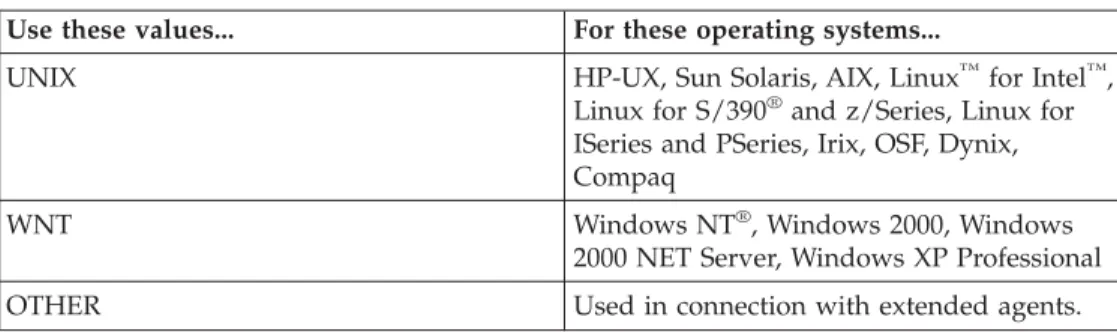
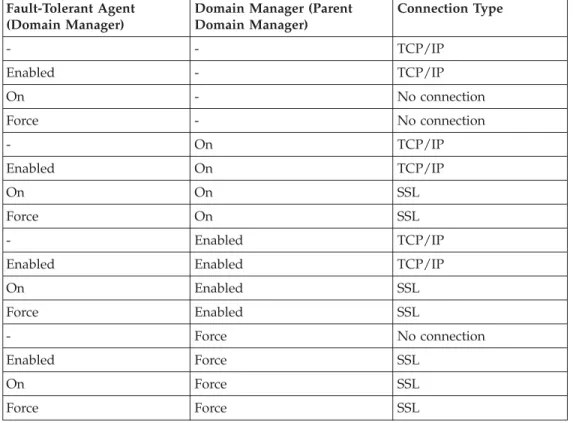
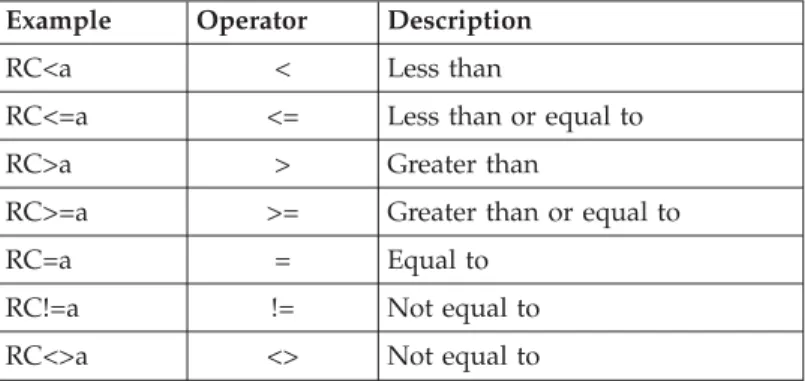
5. Valuesforthesupportedoperatingsystems 34 6. Typeofcommunicationdependingonthe securitylevelvalue. . . . 36 7. Comparisonoperator . . . 43 8. Logicaloperators. . . 44 9. Comparisonoperator . . . 97 10. Logicaloperators. . . 98 11. Objectattributes . . . 301 12. Actions . . . 302 13. Actions(continued) . . . 302
©CopyrightIBMCorp. 1999,2004
ix
|| | | | | | |
About
this
guide
IBM®Tivoli® WorkloadSchedulersimplifiessystemsmanagementacross
distributed environmentsbyintegratingsystemsmanagementfunctions.IBMTivoli Workload Schedulerplans,automates, andcontrolstheprocessingofyour
enterprise’s entireproductionworkload.TheIBMTivoliWorkloadSchedulerReference Guideprovidesdetailedinformationaboutthecommandlineinterface,scheduling language,andutilitycommandsforIBM TivoliWorkloadScheduler.
What
is
new
in
this
guide
Thiseditionisa refreshofIBMTivoliWorkloadSchedulerReferenceGuide,Version 8.2, previouslyrefreshedinApril2004.
Thesearethemainenhancementstotheguide:
v Anew ″SeeAlso″sectionhasbeenprovidedinthedescriptionofseveral commands.
v Moreexampleshavebeenprovidedforthecommands.
v Anew sectiondescribingtheproductinterfacesandprocesseshasbeenincluded inChapter2, see“Maininterfacesandprocessesoftheproduct”onpage7. v Anew chaptercalled″Quickstart″ hasbeenaddedfor newusers.
v MoreinformationabouttheSecurityFile hasbeenadded,seeChapter10, “SettingUserSecurityDefinitions,”onpage297.
v Anew appendixhasbeenaddedgivingyouinformationabouthowtocontact IBMSoftwareSupport,seeAppendixA,“Supportinformation,” onpage315. v Anew appendixhasbeenaddedtodescribetheTimeZonefeature,see
AppendixB,“Managingtimezones,”onpage319.
v Theinformationinthisguidehasbeen updatedtoreflectthetwoAPARs IY58702andIY53459.
Who
should
read
this
guide
Thisguideisintendedforadministratorsandadvanced usersof IBMTivoli Workload Scheduler.
What
this
guide
contains
Thismanualcontains thefollowingchapters: v Chapter1,“Quickstart,”onpage1
Explainsthebasic stepsa newuser shouldfollowtobegintouseIBMTivoli WorkloadSchedulerforthefirsttime.
v Chapter2,“Theproductioncycle,”onpage7
Describeshow IBMTivoliWorkloadSchedulerdeterminesat theendofeach daywhichscheduleshavetobe runthenextdaybased ontheinformation storedinthedatabaseandontheresultsoftheprocessingofthecurrent productionday.
v Chapter3,“Composerreference,”onpage31
©CopyrightIBMCorp. 1999,2004
xi
| | | | | | | | | | | | | | | | | |
DescribestheschedulingobjectsthatyoucandefineintheIBM TivoliWorkload Schedulerdatabaseandexplainstheusageand syntaxofthecommandsusedin thecomposerprogramtomanagetheseobjectsinthedatabase.
v Chapter4,“Theschedulinglanguage,”onpage81
Explainshowtocreatea jobstream,basedontheschedulingobjectsdefinedin theIBM TivoliWorkloadSchedulerdatabase,usingthecomposercommand. v Chapter5,“Conman reference,”onpage115
Describestheconmancommandlineinterface.Thisisusedtomonitor and managejobsand jobstreamsduringa productionday.
v Chapter6,“Utility commands,”onpage219
DescribestheIBM TivoliWorkloadSchedulerutilitycommandsthatmanagethe environment.
v Chapter7,“Thereportcommands,”onpage267 Describeshow toprintdifferenttypesofreports.
v Chapter8,“TheExtendedAgentreference,”onpage279
Describeshow tocreateanduseextendedagentstoextendIBM TivoliWorkload Schedulerjobschedulingfunctionstoothersystemsandapplicationssuchas localorremoteUNIXSystems,Peoplesoft,SAPR/3,z/OS,OPC,Oracle CCM, andVMS.
v Chapter9,“TheNetworkAgentreference,”onpage289
Describeshow tocreateanduseanetworkagentworkstationtomanage schedulinginternetworkdependencies.
v Chapter10,“SettingUser SecurityDefinitions,”onpage297 Describeshow tomanagetheSecurityFile.
v AppendixA, “Supportinformation,”onpage315
DescribesthedifferentoptionsforobtainingsupportforIBM products. v AppendixB,“Managingtimezones,”onpage319
ListsthetimezonessupportedbyIBMTivoliWorkload Scheduler. v AppendixC,“Theauditingfeature,”onpage325
Describeshow toenableandusetheauditingoptiontotrackchanges appliedto thedatabase andtotheplan.
Publications
Thissectionlists publicationsintheTivoliWorkloadSchedulerlibraryandanyother relateddocuments.Italso describeshowtoaccessTivolipublicationsonlineand how toorderTivolipublications.
IBM
Tivoli
Workload
Scheduler
library
IBM TivoliWorkloadSchedulercomprisesseveralseparateproductsavailable ona varietyofplatforms,and thelibraryissimilarlydivided:
IBMTivoliWorkloadSchedulingsuitelibrary
Thislibrarycontainsallcross-platformandcross-productpublicationsfor IBM TivoliWorkloadScheduler.
IBMTivoliWorkloadSchedulerdistributedlibrary
ThislibrarycontainsallofthepublicationsthatrefertousingIBMTivoli WorkloadScheduleronplatforms otherthanz/OS®.
| | | | | | | | |
IBMTivoliWorkloadSchedulerforz/OSlibrary
Thislibrarycontains allpublicationsthatapply onlytoIBMTivoli WorkloadSchedulerforz/OS.
IBMTivoliWorkloadSchedulerforApplicationslibrary
Thislibrarycontains allpublicationsthatapply onlytoIBMTivoli WorkloadSchedulerforApplications.
IBMTivoliWorkloadSchedulerforVirtualizedData Centerslibrary Thislibrarycontains allpublicationsthatapply onlytoIBMTivoli WorkloadSchedulerforVirtualized DataCenters.
IBM
Tivoli
Workload
Scheduling
suite
library
Thefollowingpublicationsareavailable intheIBM TivoliWorkloadScheduling suitelibrary.Thisincludespublicationswhicharecommontoallproducts, platforms,and components.
v IBMTivoliWorkloadScheduler:GeneralInformation,SC32-1256
ProvidesgeneralinformationaboutallIBMTivoliWorkloadSchedulerproducts. Itgivesanoverviewof howtheycanbeusedtogethertoprovideworkload managementsolutionsforyour wholeenterprise.
v IBMTivoliWorkloadScheduler:JobSchedulingConsoleUser’sGuide,SC32-1257 Describeshow toworkwithIBMTivoliWorkload Scheduler,regardlessof platform,usinga commonGUIcalledtheJobSchedulingConsole.
v IBMTivoliWorkloadScheduler:JobSchedulingConsoleReleaseNotes,SC32-1258 Provideslate-breakinginformationabouttheJobSchedulingConsole. v IBMTivoliWorkloadScheduler:WarehouseEnablementPackVersion1.1.0
ImplementationGuideforTivoliEnterprise DataWarehouse,Version1.1,
ProvidesinformationaboutenablingIBMTivoliWorkload Schedulerfor Tivoli DataWarehouse.
Note: ThisguideisonlyavailableontheproductCD.Itisnotpossibletoaccess itonline, asyoucantheotherbooks(see“Accessingpublicationsonline” onpagexvi).
IBM
IBM
Tivoli
Workload
Scheduler
distributed
library
Thefollowingpublicationsareavailable intheIBM IBMTivoliWorkloadScheduler distributed library.Thisincludespublicationswhichrefertousingtheproducton all platformsexceptz/OS.
v IBMTivoliWorkloadScheduler:ReleaseNotes,SC32-1277
Provideslate-breakinginformationaboutIBMTivoliWorkloadScheduleron platformsotherthanz/OS.
v IBMTivoliWorkloadScheduler:Planningand InstallationGuide,SC32-1273 Describeshow toplanforand installIBMIBM TivoliWorkloadScheduleron platformsotherthanz/OS,and howtointegrateIBMTivoliWorkloadScheduler withNetView®,TivoliDataWarehouse,andIBM IBMTivoliBusiness Systems Manager.
v IBMTivoliWorkloadScheduler:ReferenceGuide,SC32-1274
DescribestheIBMTivoli WorkloadSchedulercommandlineusedonplatforms otherthanz/OS,andhow extendedandnetworkagentswork.
v IBMTivoliWorkloadScheduler:AdministrationandTroubleshooting,SC32-1275
Aboutthisguide
xiii
| | | | | | | | | | | | | | | | | | | | | | | | | | | | | | | | | | | | | | | | | | | | |ProvidesinformationabouthowtoadministerIBMTivoliWorkloadScheduler onplatformsotherthanz/OS,and whattodo ifthingsgo wrong.Itincludes helponmanymessages generatedbythemaincomponentsofIBMTivoli WorkloadScheduler.
v IBMTivoliWorkloadScheduler:LimitedFault-tolerantAgentforOS/400®,SC32-1280 Describeshow toinstall,configure,anduseIBMTivoliWorkloadScheduler limitedfault-tolerantagentsonAS/400®.
v IBMTivoliWorkloadScheduler:PlusModuleUser’sGuide,SC32-1276
Describeshow tosetupand usetheIBMTivoliWorkloadSchedulerPlus module.
See http://www.ibm.com/software/tivoli/products/scheduler/foran introductiontotheproduct.
IBM
IBM
Tivoli
Workload
Scheduler
for
z/OS
library
The followingdocuments areavailableintheTivoliWorkloadSchedulerforz/OS library:
v IBMTivoliWorkloadSchedulerforz/OS:GettingStarted,SC32-1262 DiscusseshowtodefineyourinstallationdataforIBM TivoliWorkload Schedulerforz/OSandhowto createandmodifyplans.
v IBMTivoliWorkloadSchedulerforz/OS:InstallationGuide Describeshow toinstallTivoliWorkloadSchedulerforz/OS.
v IBMTivoliWorkloadSchedulerforz/OS:Customizationand Tuning,SC32-1265 Describeshow tocustomizeTivoliWorkloadSchedulerforz/OS.
v IBMTivoliWorkloadSchedulerforz/OS:Managing theWorkload,SC32-1263 Explainshowtoplanandscheduletheworkloadand howtocontroland monitorthecurrentplan.
v IBMTivoliWorkloadSchedulerforz/OS:QuickReference,SC32-1268
Providesaquickandeasy consultationreference tooperateTivoliWorkload Schedulerforz/OS.
v IBMTivoliWorkloadSchedulerforz/OS:DiagnosisGuideandReference,SC32-1261 Providesinformationtohelpdiagnoseandcorrectpossibleproblemswhenusing TivoliWorkloadSchedulerforz/OS.
v IBMTivoliWorkloadSchedulerforz/OS:Messages andCodes,SC32-1267 Explainsmessagesandcodes inTivoliWorkloadSchedulerforz/OS. v IBMTivoliWorkloadSchedulerforz/OS:ProgrammingInterfaces,SC32-1266
ProvidesinformationtowriteapplicationprogramsforTivoliWorkload Schedulerforz/OS.
v IBMTivoliWorkloadSchedulerforz/OS:LicensedProgramSpecifications,GI11-4208 ProvidesplanninginformationaboutTivoliWorkloadSchedulerfor z/OS. v IBMTivoliWorkloadSchedulerforz/OS:Memo forprogram5697-WSZ,GI11-4209
Providesasummaryofchangesforthecurrentrelease oftheproduct.
v IBMTivoliWorkloadSchedulerforz/OS:ProgramDirectoryforprogram5697-WSZ, GI11-4203
Providedwiththeinstallationtapefor TivoliWorkloadSchedulerforz/OS (program5697-WSZ), describesalloftheinstallationmaterialsand gives installationinstructionsspecifictotheproductreleaselevelor featurenumber. v IBMTivoliWorkloadSchedulerforz/OS:ProgramDirectoryforprogram5698-WSZ,
GI11-4207 | | | | | | | | | | | | | | | | | | | | | | | | | | | | | | | | | | | | | | | | | | | | | | |
ProvidedwiththeinstallationtapeforTivoli WorkloadSchedulerforz/OS (program5698-WSC),describes alloftheinstallationmaterialsandgives installationinstructionsspecifictotheproductreleaselevelorfeature number. See http://www.ibm.com/software/tivoli/products/scheduler-zos/for an introductiontotheproduct.
IBM
IBM
Tivoli
Workload
Scheduler
for
Applications
library
Thefollowingmanualsareavailable intheIBM IBMTivoliWorkloadSchedulerfor Applicationslibrary:
v IBMTivoliWorkloadSchedulerforApplications:ReleaseNotes,SC32-1279
Provideslate-breakinginformationabouttheIBMTivoliWorkloadScheduler extendedagents.
v IBMTivoliWorkloadSchedulerforApplications:User’sGuide,SC32-1278 Describeshow toinstall,use,and troubleshoottheIBMTivoliWorkload Schedulerextendedagents.
See http://www.ibm.com/software/tivoli/products/scheduler-apps/foran introductiontotheproduct.
IBM
IBM
Tivoli
Workload
Scheduler
for
Virtualized
Data
Centers
library
Thefollowingmanualsareavailable intheIBM IBMTivoliWorkloadSchedulerfor Virtualized DataCenterslibrary:
v IBMTivoliWorkloadSchedulerforVirtualizedDataCenters: ReleaseNotes,SC32-1453 Provideslate-breakinginformationaboutIBMTivoliWorkloadSchedulerfor VirtualizedDataCenters.
v IBMTivoliWorkloadSchedulerforVirtualizedDataCenters: User’sGuide,SC32-1454 Describeshow toextendtheschedulingcapabilitiesofIBMTivoliWorkload Schedulertoworkloadoptimizationandgridcomputingbyenablingthecontrol ofIBMLoadLeveler® andIBMGridToolboxjobs.
See http://www.ibm.com/software/info/ecatalog/en_US/
products/Y614224T20392S50.html foranintroductiontotheproduct.
Related
publications
Thefollowingdocuments alsoprovideusefulinformation:
v IBMRedbooks™:HighAvailabilityScenarioswith IBMTivoliWorkloadSchedulerand
IBMTivoliFramework
ThisIBM Redbook,shows youhowtodesignand createhighlyavailable IBM TivoliWorkloadSchedulerandIBMTivoliManagement Framework(TMR server,Managed NodesandEndpoints) environments.ItpresentsHigh AvailabilityClusterMultiprocessing(HACMP™)forAIX® andMicrosoft® Windows®Cluster Service(MSCS) casestudies.
ThisRedbookcanbe foundontheRedbooksWebsiteat http://www.redbooks.ibm.com/abstracts/sg246632.html
v IBMRedbooks:CustomizingIBMTivoliWorkloadSchedulerforz/OSV8.2toImprove
Performance
ThisIBM Redbookcoversthetechniques thatcanbe usedtoimprovethe performanceofTivoliWorkloadSchedulerforz/OS(includingend-to-end scheduling).
ThisRedbookcanbe foundontheRedbooksWebsiteat http://www.redbooks.ibm.com/abstracts/sg246352.html
Aboutthisguide
xv
| | | | | | | | | | | | | | | | | | | | | | | | | | | | |v IBMRedbooks:End-to-EndSchedulingwithIBMTivoliWorkloadSchedulerVersion8.2 ThisIBM Redbookconsidershowbesttoprovideend-to-endschedulingusing TivoliWorkloadSchedulerVersion8.2,bothdistributed (previouslyknown as Maestro™)and mainframe(previouslyknownasOPC) components.
ThisRedbookcanbe foundontheRedbooksWebsiteat http://www.redbooks.ibm.com/abstracts/sg246624.html
The TivoliSoftwareGlossary includesdefinitionsformanyofthetechnicalterms relatedtoTivolisoftware.TheTivoliSoftwareGlossaryisavailableat thefollowing Tivolisoftware libraryWebsite:
http://publib.boulder.ibm.com/tividd/glossary/tivoliglossarymst.htm
Accessing
publications
online
The productCDcontainsthepublicationsthatareintheproductlibrary.The formatofthepublicationsisPDF, HTML,orboth.Toaccessthepublicationsusing a Webbrowser,opentheinfocenter.htmlfile.Thefileisintheappropriate
publicationsdirectoryontheproductCD.
IBM postspublicationsforthisand allotherTivoliproducts,astheybecome available andwhenevertheyareupdated,totheTivolisoftwareinformationcenter Website.AccesstheTivolisoftwareinformationcenterbyfirst goingtotheTivoli software libraryat thefollowingWebaddress:
http://www.ibm.com/software/tivoli/library/
Scrolldownandclick theProduct manualslink.IntheTivoliTechnicalProduct DocumentsAlphabeticalListingwindow,clicktheappropriateTivoliWorkload Schedulerproductlinktoaccesstheproduct’slibrariesat theTivolisoftware informationcenter.AllpublicationsintheIBMTivoliWorkloadSchedulersuite library,distributed libraryand z/OSlibrarycanbe foundundertheentryIBM TivoliWorkloadScheduler.
Note: IfyouprintPDFdocuments onotherthanletter-sizedpaper,settheoption intheFile→ PrintwindowthatallowsAdobeReadertoprintletter-sized pagesonyour localpaper.
Ordering
publications
YoucanordermanyTivolipublicationsonline atthefollowingWebsite: http://www.elink.ibmlink.ibm.com/public/applications/
publications/cgibin/pbi.cgi
Youcanalsoorderbytelephonebycallingoneofthese numbers: v IntheUnitedStates:800-879-2755
v InCanada:800-426-4968
Inothercountries,seethefollowingWebsitefora listof telephonenumbers: http://www.ibm.com/software/tivoli/order-lit/
Providing
feedback
about
publications
IfyouhavecommentsorsuggestionsaboutTivoliproductsanddocumentation, completethecustomerfeedbacksurvey atthefollowingWeb site:
http://www.ibm.com/software/sysmgmt/products/support
Accessibility
Accessibilityfeatureshelpuserswitha physicaldisability,suchasrestricted mobilityorlimited vision,tousesoftwareproductssuccessfully.Withthisproduct, youcanuseassistivetechnologiestohearand navigatetheinterface.Youcanalso usethekeyboardinsteadofthemousetooperateallfeaturesofthegraphicaluser interface.
For additionalinformation,seetheAccessibilityAppendixintheIBMTivoliJob SchedulingConsoleUser’s Guide.
Tivoli
technical
training
For Tivolitechnicaltraininginformation,refertothefollowingIBMTivoli EducationWebsite:
http://www.ibm.com/software/tivoli/education
Support
information
Ifyouhaveaproblemwithyour IBMsoftware,youwanttoresolveit quickly.IBM provides thefollowingwaysforyouto obtainthesupportyouneed:
v Searchingknowledgebases:Youcansearchacrossalargecollectionof known problemsandworkarounds,Technotes, andotherinformation.
v Obtainingfixes:Youcanlocatethelatestfixesthatarealreadyavailableforyour product.
v ContactingIBM SoftwareSupport:Ifyoustill cannotsolve yourproblem,and youneedtoworkwith someonefromIBM,youcanusea varietyof waysto contactIBMSoftwareSupport.
For moreinformationaboutthesethreewaysofresolvingproblems,see AppendixA,“Support information,”onpage315.
Conventions
used
in
this
guide
Thisguideusesseveralconventionsforspecialtermsandactions, operating system-dependent commandsandpaths,comman syntax,andmargingraphics.
Typeface
conventions
Thisguideusesthefollowingtypefaceconventions: Bold
v Lowercase commandsandmixedcasecommandsthatareotherwise difficult todistinguishfromsurrounding text
v Interfacecontrols(check boxes,pushbuttons,radiobuttons,spin buttons, fields,folders,icons,listboxes, itemsinsidelistboxes,
multicolumnlists,containers, menuchoices,menu names,tabs,property sheets), labels(suchasTip:,andOperatingsystem considerations:) v Keywords andparametersin text
Italic
v Wordsdefinedintext
v Emphasisofwords(wordsaswords)
v Newtermsintext(exceptina definitionlist) v Variablesand valuesyoumustprovide
Monospace
v Examplesandcodeexamples
v Filenames,programming keywords,andotherelementsthataredifficult todistinguishfromsurroundingtext
v Messagetextandprompts addressedtotheuser v Textthattheusermust type
v Valuesforargumentsorcommandoptions
Operating
system-dependent
variables
and
paths
ThisguideusestheUNIX®conventionforspecifyingenvironmentvariablesand for directorynotation.
WhenusingtheWindows commandline, replace$variablewith %variable%for environment variablesand replaceeachforwardslash(/)withabackslash(\)in directory paths.Thenamesofenvironmentvariablesarenotalwaysthesamein Windows andUNIX.Forexample,%TEMP%inWindowsisequivalentto$tmpin UNIX.
Note: Ifyouare usingthebashshellonaWindows system,youcanusetheUNIX conventions.
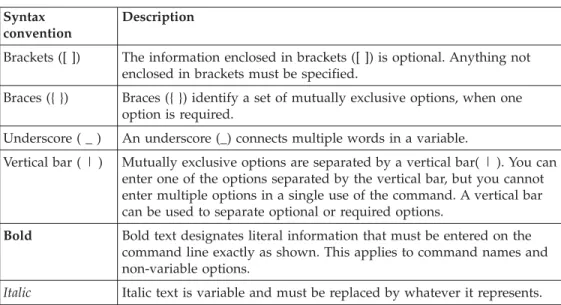
Command
syntax
Thisguideusesthefollowingsyntaxwhereveritdescribescommands:
Table1.Commandsyntax
Syntax convention
Description
Brackets([]) Theinformationenclosedinbrackets([])isoptional.Anythingnot enclosedinbracketsmustbespecified.
Braces({}) Braces({})identifyasetofmutuallyexclusiveoptions,whenone optionisrequired.
Underscore(_) Anunderscore(_)connectsmultiplewordsinavariable.
Verticalbar(|) Mutuallyexclusiveoptionsareseparatedbyaverticalbar(|).Youcan enteroneoftheoptionsseparatedbytheverticalbar,butyoucannot entermultipleoptionsinasingleuseofthecommand.Averticalbar canbeusedtoseparateoptionalorrequiredoptions.
Bold Boldtextdesignatesliteralinformationthatmustbeenteredonthe commandlineexactlyasshown.Thisappliestocommandnamesand non-variableoptions.
Chapter
1.
Quick
start
TheIBM TivoliWorkloadSchedulerproductsuiteprovidesyouwiththeabilityto manage yourproductionenvironmentandautomate manyoperatoractivities.IBM TivoliWorkload Schedulerpreparesjobsforexecution,resolvesinterdependencies, and launchesandtrackseachjob.Becausejobsbeginassoonastheirdependencies are satisfied,idletimeisminimizedandthroughputsignificantlyimproved.Jobs never runoutof sequence,and,ifa jobfails,IBMTivoliWorkloadScheduler handlestherecovery processwithlittleornooperatorintervention.
Thesection “Creatinga plan”providesyouwithastep bystep pathofbasic informationand operationstoimplementIBMTivoliWorkloadSchedulerinyour environment usingthecommandlineinterface.Alternatively,youcanusetheJob Scheduling Consoletoperform thesame tasks.Formoreinformation,refertoJob SchedulingConsoleUser’s Guide.
Thereare twobasicconceptstoperformjobschedulingwithIBM TivoliWorkload Scheduler:
thedatabase
ResidesontheMasterDomainManagerandcontains allthedefinitionsfor schedulingobjects,suchasjobs,jobstreams,resources,andworkstations.It also holdsstatisticsofjobandjobstreamexecution,aswell asinformation ontheuserIDthatcreatedanobjectandwhenanobjectwaslast
modified. Theprogramusedtomanageobjectsinthedatabaseisthe composer.Foradditionalinformation,refertoChapter3, “Composer reference,”onpage31.
theplan
Contains alljobschedulingactivity plannedfora periodofoneday.In IBM TivoliWorkloadScheduler,theplaniscreatedontheMasterDomain Manager every24hours andconsistsofallthejobs,jobstreams,and dependencyobjectsthatare scheduledtorunonthatday.Attheendof theproductionday,anyjobstreamsthatdidnotcompletesuccessfullyor thatare eitherinrunningorstill waitingtobe run,canbecarriedforward intothenext day'splan.For additionalinformationonhowtheplanis producedbytheMasterDomainManager,refertoChapter2,“The productioncycle,”onpage7.Theprogramusedtointeractwiththeplan during thecurrentprocessingdayisconman.For additionalinformation, refertoChapter5,“Conmanreference,”onpage115.
Whenyouhaveinstalledyourschedulingenvironmentbyfollowingthe
instructions intheIBM TivoliWorkloadScheduler Planningand InstallationGuide,you are readytocreatea planthatrunsdailywiththenecessaryinformationrelatedto your environment.See“Creatingaplan”forhowtodo this.
Creating
a
plan
Tocreatea planthatrunsdaily,performthefollowingsteps: 1.
Loginto ashellon theMaster DomainManager
Loginusingtheuser IDyouspecifiedat installationtimeandfrom thatshellperform alltheoperations describedinthefollowingsteps.
©CopyrightIBMCorp. 1999,2004
1
| | | | | | | | | | | | | | | | | | | | | | | | | | | | | | | | | | | | | | | | | | | | | | |
2.
Start theIBMTivoliWorkloadSchedulerprocesses
Perform thisstepfromtheuser commandlinebyrunningtheStartup commandtostartthescheduler networkmanagement process.For more detailsabouttheStartupcommand,referto“StartUp”onpage 255.
3.
Addin thedatabasethedefinitionstodescribe thetopologyofyour schedulingenvironment
Thisstepcanbe dividedasfollows: a.
Definetheworkstationsinyourenvironment
Aworkstationisusuallyaphysicalworkstationonwhich jobsand jobstreams arerun,however,inthecaseof extendedagents,theworkstationsare logicaldefinitions hostedbyaphysical workstation.Defineaworkstationfor eachmachinebelonging toyourschedulingenvironment withtheexceptionoftheMasterDomainManagerwhich isautomaticallydefinedduringtheIBMTivoliWorkload Schedulerinstallation.Foradditionalinformation,referto “Workstationdefinitions”onpage33.
b.
Definedomains
Usethisstep ifyouwanttocreatea hierarchicaltreeofthe paththroughthedomains.IBM TivoliWorkloadScheduler worksdownwardsthroughthistreewhendistributingthe planat thebeginningof theproductionday,andupwards, whensendinginformationbacktotheMasterDomain Manageraboutjobsand jobstreamsrunonthetarget workstations.Foradditionalinformationreferto“Domain definitions”onpage40.
4.
Define usersallowedto runjobsonWindowsworkstations
On Windowsworkstationsonly,defineanyuserallowedtorunjobs usingIBMTivoliWorkload Schedulerbyspecifyingusernameand password. Foradditionalinformationreferto“Userdefinitions”on page47.
5.
Define dependencies
Dependenciesareconditions thatmustbe metbeforea jobcanstart. They canbedefinedforthejobstreamitself,forajobwithin thejob stream, orforboth.Themaximumnumberofdependenciesthatcan be setfora joborjobstreamis40.Foradditionalinformationreferto Chapter4,“Theschedulinglanguage,”onpage81.Theseare someof thedependenciesthatyoucanset:
a.
Timedependencies
Setatimedependencytospecifytheearliestorlatesttime ajoborjobstreamcanbestartedorthetimewithinwhich ajoborjobstreammust complete.Youcanalso identify
| | | | | | | | | | | | | | | | | | | | | | | | | | | | | | | | | | | | | | | | | | | | | | | | | |
dayswhenthejobstreamshouldnotrun.For more details,referto“Keywords”onpage82.
b.
Openfile dependencies
Useopenfiledependenciestospecifyfiles thatmustbe availablebefore ajoborjobstreamcanbestarted.For moredetails, referto“opens” onpage108.
c.
Follow dependencies
Setafollowdependencytodefineotherjobs andjob streamsthatmust completesuccessfullybeforea jobor job stream. Formoredetails, referto“follows”onpage93. d.
Resources
Useresourcestospecifyphysicalorlogicalobjects belongingtoa workstationthatare requiredtorunajob onthatworkstation.Becauseresourceavailabilityis checkedbeforerunningjobsonaspecific workstation, resourcescanbeusedasdependenciesto makejobandjob streammanagementmoreflexible.For example,youcan definea resourcecalledTAPES,with avalue of2, identifyingthetwosystem tapedrives andthendefine twojobs thatrequirethatbothtapedrives areavailable as adependency. Jobswith thisdependencycannotrun concurrently,becauseeachtimeajobisruntheTAPES resourceisinuse. Foradditionalinformationreferto “Resourcedefinitions”onpage54.
e.
Prompts
Usea promptwhenyouwantto associatea uniquename toatextualmessagerequestingananswerfromthe operator.Promptsare usedasdependenciestoprevent jobsfromstartinguntilan affirmativeresponseisreceived. Foradditionalinformationreferto“Prompt definitions”on page52.
f.
Limit SetLimittosetthemaximumnumberofjobs thatcanrun simultaneouslyin ajobstream.For additionalinformation, referto“limit”onpage103.
g.
Priority
Usethisdependencyto setthepriorityofajoborjob stream.For additionalinformationreferto“priority”on page110.
6.
Define jobs
Ajob isa unitofworkthatrunsonworkstations,suchasan executablefile,program,orcommandscheduledandlaunchedby IBM TivoliWorkloadScheduleraspartofajobstreamprocessing. It usuallyincludesallnecessarycomputerprograms,links,files,and instructions totheoperatingsystem.Itdoesnotincludescheduled
Chapter1.Quickstart
3
| | | | | | | | | | | | | | | | | | | | | | | | | | | | | | | | | | | | || | | | | | | | | | | | | | |datesand timestorun,becausetheseare definedasargumentsofthe jobstreamsdefinition.Foradditionalinformationreferto“Job
definitions”onpage42. 7.
Define jobstreams
Ajob streamisanordered sequenceof jobstobe runrespectingset dependencies. Jobsmightbegrouped togetherina jobstreambecause theyall runonthesameday,sharea commonfunction,orshare commondependencies. ForadditionalinformationrefertoChapter4, “Theschedulinglanguage,”onpage81.
8.
Define calendars
Acalendardefinesifand whenajobstreamhastorun. Useitto include orexcludedaysina dailyruncycle.Acalendardefinitioncan be assignedtooneormorejobstreams.Foradditionalinformation referto“Calendar definitions”onpage49.
9.
Define parametersthatrepresentvariablesinside jobsorjobstreams Aparameterdefinitionisthemappingbetweenanameandavalue, this valuebeingthevalueofa variableusedinajoborina job streamfora specificargument.Parameternamesare replacedwith the corresponding valuesinside thejoborjobstreamdefinitionsatthe endof aprocessingdaywhentheproductionplaniscreatedforthe next processingday.Foradditionalinformationreferto“Parameter definitions”onpage50.
10.
Automate theplangenerationat theendofthecurrentproductionday Addthefinaljobstreamtothedatabasetoperformpre-production and post-productionprocessingtoensure fullautomation oftheplan generationat theendofeachcurrentproductionday.For additional informationreferto“Automatingtheproductioncycle”onpage13. 11.
Generate theplan
RuntheJnextdaycommandtogeneratetheplan.Thiscommandstarts theprocessingoftheschedulinginformationstored inthedatabase and createstheplanforthenext productionday.If youautomated the plangenerationasdescribed instep10,youonlyneedtorunthe Jnextdaycommandthefirst time.
Thisplanisstoredina filenamedSymphonywhichisdistributedfrom theMasterDomainManager downthrough thechild domainsatthe start ofdaytime(bydefaultat6:00AM).Once thenew production dayhasstarted,anymodificationyoumakeintheobjectsstoredin thedatabasehasnoeffectonthecurrentproductiondayprocessing exceptforthejobs andjobstreams orfilessubmitted usingconmansbj or conmansbs.For additionalinformationrefer toChapter2, “The productioncycle,”onpage7.
Whenyoucompletethisstep bystep process,yourschedulingenvironmentisup and running,with batchprocessingofan orderedsequenceofjobs andjobstreams beingperformedagainstresources definedona setofworkstations.Bydefault,the first timeyouruntheJnextdaycommand,thenumberof jobsthatcanrun
simultaneouslyona workstationiszero,somakesurethatyouincreasethisvalue
| | | | | | | | | | | | | | | | | | | | | | | | | | | | | | | | | | | | | | | | | | | | | | | | | | |
bychanging the cpu limit toallow jobexecutionon thatworkstation, seethe section “limitcpu”onpage157 formoredetails.Thisbatchprocessingrevolves around a24hourcycleandisgeneratedagainat theendofeachproductionday bytheMasterDomainManager.
Managing
jobs
and
job
streams
Ifyounowwanttomodifysomethingduringtheday,whiletheproductionday planisalreadyprocessing, usetheconmanprogram.Youcandefineormodifya job and addittotheplanusingthecommandconmansbj onlyifthejobwillrunona workstationthathasalreadyreceivedtheplan.SeeChapter5,“Conmanreference,” onpage115formoredetailsabouttheconmanprogram. Theactionsyoucan perform usingtheconmancommandarethefollowing:
Addordeletedependencies
Usethis commandtoaddordeletedependenciestoajobstreamortojob within ajobstream. Foradditionalinformationonaddingdependencies referto“Conman commandprocessing”onpage134 andforadditional informationondeletingdependenciesreferto“deldepjob” onpage148. Change limit
Perform thisoperationtochangethelimitofthenumberofjobsthatcan be runsimultaneouslyonaworkstationorthejoblimitforajobstream. See“limitcpu”onpage157for moredetails.
Change priority
Usethis optiontoalterthepriorityfora joborajobstream. See“altpri” onpage140 formoredetails.
Change fence
Thefenceisavalue thatcanbe setonworkstations.Setthejobfenceona workstationtopreventjobswhosepriorityislessthanorequaltothe value setforfencefromrunningonthatworkstation. See“fence”onpage 154 formoredetails.
Release ajob orajob stream
Perform thisoperationtoreleasespecific oralldependenciesfromajobor a jobstream.For additionalinformationonhow todothisreferto“release job” onpage165.
Cancelajob orajob stream
Perform thisoperationifyouwanttocancela joborajobstreameither immediatelyorafteritsdependenciesareresolved.For additional informationonhowtodo thisreferto“canceljob” onpage141. Stopjobexecutionorrerun ajob
Perform thisoperationifyouwanttostop jobexecutionbyrunningthe kill command.Formore informationreferto“kill” onpage156.Usererun jobtorunthejobagain. Forinformationreferto“rerun”onpage170. Note: Whenyoureruna jobitisplacedinthesamejobstreamasthe
originaljob,andit inheritstheoriginaljob's dependencies. Link orunlinkworkstationsin yourschedulingenvironment
Perform thisoperationtoconnectordisconnectaworkstationfromthe schedulingnetwork.BecauseIBM TivoliWorkloadSchedulerusesa store-and-forward technologyformaintainingconsistencyand
fault-toleranceacrossthenetwork,whenyouunlinka workstation,allthe messages arestoredinthemessagesfileand thensentallat onceassoon asthelinkisreestablished.Thiscommanddoesnotimpactanyother
Chapter1.Quickstart
5
| | | | | | | | | | | | | | | | | | | | | | | | | | | | | | | | | | | | | | | | | | | | | | | | | |processesrunningonthesystem.For additionalinformationonlinking workstations,referto“link”onpage159,and,onunlinkingworkstations referto“unlink” onpage215.
Stop, startorshutdowntheIBMTivoliWorkloadSchedulerprocesses Perform thisoperationtoactonproductionprocesses,forexample,the IBM TivoliWorkloadSchedulerprocesses,exceptforthenetwork management process.TheshutdownoperationstopsallIBMTivoli WorkloadSchedulerprocesses,includingthenetworkmanagement process.For additionalinformationreferto“stop”onpage201,“start”on page198,and “shutdown”onpage197.
Submita command
Perform thisoperationtosubmitacommandonaworkstationasa scheduler job.Ifnotspecifiedinthesubmitoptions, thejobnamedefaults toa stringthatbeginswith thecommandnameandthejobstreamdefaults toJOBS. Theeventsreportingtheresult oftheexecutionareloggedinthe database.For additionalinformationreferto“submitdocommand” on page204.
Submita job
Perform thisoperationtosubmitacommandtorunajobdefinedinthe database withina jobstreamduring thecurrentproductiondayona workstationwhichhasreceivedtheplan.Ifnotspecifiedinthesubmit options, thejobstreamdefaultstoJOBS. Thiscommandcanonlybe runon theMasterDomainManager.Theeventsreportingtheresultof the
executionarelogged inthedatabase.Foradditionalinformationreferto “submitjob”onpage208.
Submita jobstream
Perform thisoperationtosubmitacommandtorunjobstreamdefinedin thedatabaseduring thecurrentproductiondayonaworkstationwhich hasreceivedtheplan. Thiscommandcanonlybe runontheMaster DomainManager.Theeventsreporting theresult oftheexecutionare logged intothedatabase.Foradditionalinformationreferto“submit sched” onpage210.
Submita file
Perform thisactionif youwanttosubmitascriptfileasajobwithin ajob streamduring thecurrentproductiondayonaworkstationwhichhas receivedtheplan.Ifnotspecifiedinthesubmitoptions,thejobname defaults tothefilenameandthejobstreamdefaultstoJOBS.The events reportingtheresult oftheexecutionare loggedinthedatabase.For additionalinformationreferto“submitfile”onpage206.
| | | | | | | | | | | | | | | | | | | | | | | | | | | | | | | | | | | | | | |
Chapter
2.
The
production
cycle
TheIBM TivoliWorkloadSchedulerplanistheto-dolistthattellsIBMTivoli Workload Schedulerwhatjobstorun, andwhatdependenciesmust besatisfied before eachjobislaunched.Theplancovers24hours.The periodcovered bythe planisreferredtoastheproductionday.Theplanstartsat thetimedefinedbythe startglobaloption,whichissetbydefaultto6:00a.m.
Anew planiscreatedatthestartof theproductiondayandisplacedina productioncontrolfilenamedSymphony. Oncetheplanhasbeencreated,acopy of thisfileissenttoall subordinateworkstations.Thesubordinatedomain managersdistributetheircopyto alltheFTAs intheirdomainandtoallthe domainmanagersthataresubordinate tothem,and soondowntheline.This enablesfaulttolerantagentsthroughoutthenetworktocontinueprocessingevenif thenetworkconnectiontotheirdomainmanagerisdown.
AteachdestinationFTAtheIBMTivoliWorkload Schedulerprocessesaccessthe copy oftheSymphony file,read theinstructions aboutwhichjobistoberunand make callstotheoperatingsystemtolaunchjobsasrequired.Theoperating system runsthejob,andinreturn informsIBM TivoliWorkloadSchedulerwhether thejobhascompletedsuccessfullyornot.Thisinformationisenteredinto the Symphony filetoindicatethestatusofthejob.Inthis waytheSymphonyfileis continuouslyupdatedwiththestatusofthejobs:theworkthatneedstobedone, theworkinprogress,and theworkthathasbeencompleted. IftheFTAisnot full-statusitonlymonitorswhatconcernsitsownjobprocessing. Ifitisfull-status, it alsomonitorswhathappens initsdomainand initsdomain’schilddomains. EveryFTAreceivesthesamesymphonyfileandeveryFTAupdatesthepartsof thesymphonyfiletowhichitisrelated,whilethemasterdomainmanager(and its backup)containsa copyofthesymphonyfilehavingalltheseupdates
Toturnoveranewday,pre-productionsetupisperformedfortheupcoming day, and post-productionloggingand reportingisperformedforthedayjustended. Thischapterdescribestheproceduresandcommandsyouusetoperformthese tasks.
Main
interfaces
and
processes
of
the
product
Thissectiondescribes themaininterfacesandprocessesusedbyIBMTivoli Workload Scheduler.
User
interfaces
Acombinationofgraphical andcommandlineinterfaceprogramsisprovidedto runIBMTivoliWorkloadScheduler.Thecommandlineinterface(CLI)isavailable forcertain advancedfeatureswhichare notavailable inthegraphicaluserinterface (Job SchedulingConsole).Theuser interfacesare:
Composer
Acommandlineprogramusedtodefineschedulingobjectsandcompose schedules.
©CopyrightIBMCorp. 1999,2004
7
| | | | | | | | | | | | | | | | | | | | | | | | | | | | |
Conman
AcommandlineprogramusedtomonitorandcontroltheIBMTivoli WorkloadScheduler’s productionenvironment.
Job SchedulingConsole
An interactivegraphicalinterfaceusedtocreate,modify,anddeleteobjects intheproductdatabaseandplan.
Pre
and
post
production
commands
The followingcommandsare usedtoset uptheIBM TivoliWorkloadScheduler’s processingday.Toautomatetheprocess,thecommandsarenormallyplacedina schedulethatrunsatthestartof eachday.
schedulr
Thecommandwhichselectsschedulesforexecution. compiler
Thecommandwhichcompilestheproductioncontrolfile. stageman
Thecommandwhichcarriesforwarduncompleted schedules,andinstalls theproductioncontrolfile.
logman
Thecommandwhichlogsjobstatistics.
Security
commands
The followingcommandsare usedtodefineandmaintainuser privileges. dumpsec
Thecommandwhichcreatesaneditablecopyoftheproductsecurityfile. makesec
Thecommandwhichcompilesandinstallstheproductsecurityfile.
Production
processes
The followingare theIBM TivoliWorkloadSchedulerproductionprocesses: Netman
Theprocess whichreceivesservicerequestsand invokesappropriate programs.
Mailman
Theprocess whichroutesmessagestoeitherlocalorremote workstations. Batchman
Theprocess whichcommunicatesdirectlywiththeplanandupdatesit. Jobman (onWindowsandUNIX),Jobmon(onWindows),joblnch.exe(on Windows)
Theprocesseswhichcontroltheactualexecutionofjobs.They are
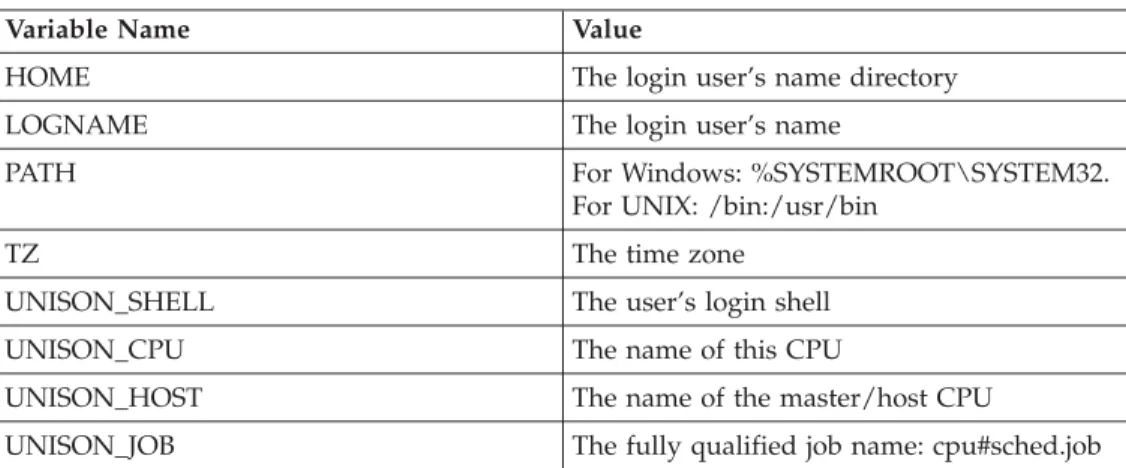
responsibleforlaunchingand trackingjobsusingthescriptsjobmanrcand .jobmanrc.For informationaboutthesescripts,see“Launchingjobs”on page16.
Writer Theprocess,generatedbyNetman,whichestablishes thelinkbetween workstationsintheIBM TivoliWorkloadSchedulernetwork.
| | | | | | | | | | | | | | | | | | | | | | | | | | | | | | | | | | | | | | | | || |
The
process
tree
on
UNIX
platforms
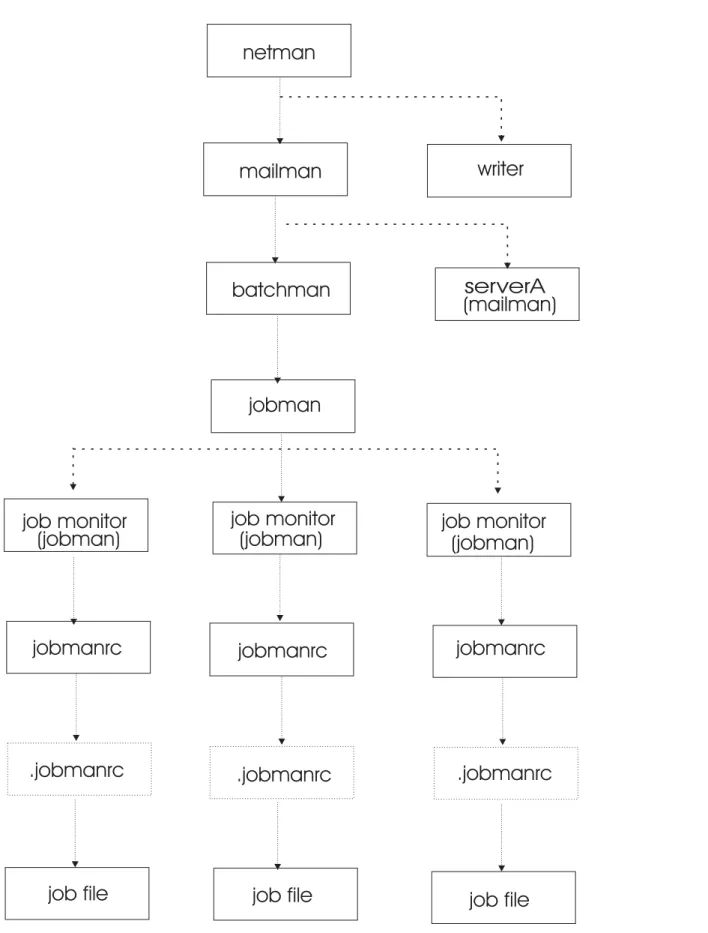
Figure1 showstheIBM TivoliWorkloadSchedulerprocesstreeonUNIX platforms:
Chapter2.Theproductioncycle
9
|| | |
netman
mailman
batchman
jobman
jobmanrc
jobmanrc
jobmanrc
.jobmanrc
.jobmanrc
.jobmanrc
job file
job file
job file
job monitor
writer
serverA
(mailman)
job monitor
job monitor
(jobman)
(jobman)
(jobman)
Figure1.ProcesstreeonUNIX
The
process
tree
on
Windows
platforms
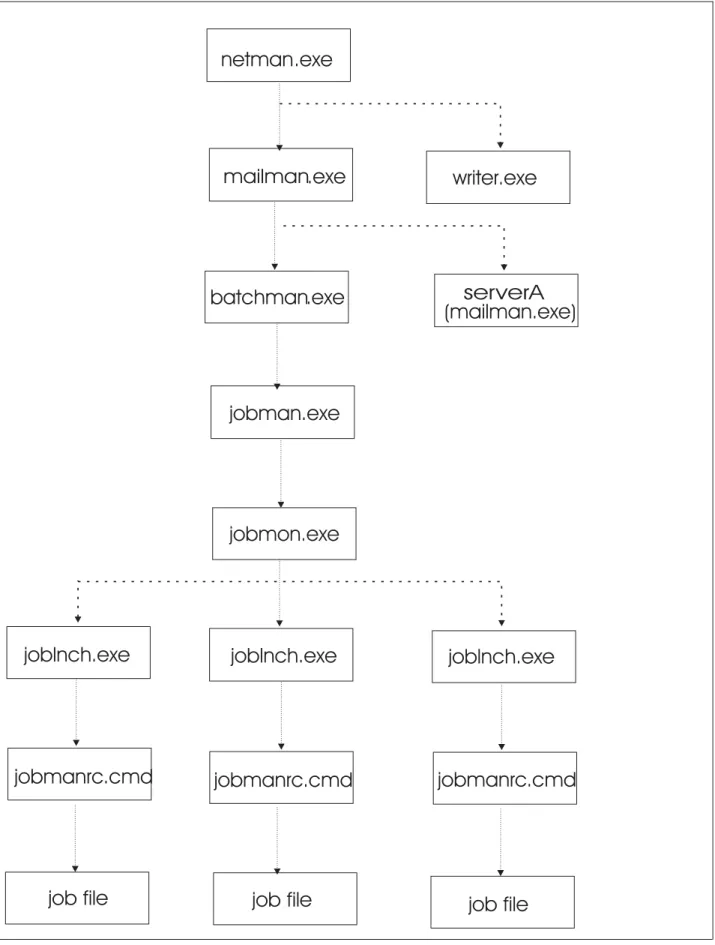
Figure2 showstheIBM TivoliWorkloadSchedulerprocesstreeonWindows platforms:
Chapter2.Theproductioncycle
11
|| | |
netman
mailman
batchman
jobman
job file
job file
job file
writer
serverA
(mailman.exe)
.exe
.exe
.exe
.exe
.exe
jobmon.exe
joblnch.exe
joblnch.exe
joblnch.exe
jobmanrc.cmd
jobmanrc.cmd
jobmanrc.cmd
Automating
the
production
cycle
Pre-productionandpost-productionprocessingcanbeautomated fullybyadding thefinaljobstreamsuppliedwiththeproduct,ora user-suppliedequivalent,to thedatabase.Acopy ofthesupplied jobstreamisintheSfinalfileinthe
TWShome/Sfinaldirectory.AcopyofthejobscriptisintheTWShome/Jnextday directory.Youmight finditusefultoprintcopiestohelpyouunderstandthe turnover process.
Thefinaljobstreamisplacedinproductioneveryday,and resultsinrunningajob namedJnextday priortothestartofa newday.Thejobperformsthefollowing tasks:
1. Runstheschedulrcommandtoselectjobstreamsforthenew day’sproduction plan.For moreinformation,see“Theschedulrcommand”onpage20.
2. Runsthecompilercommandtocompiletheproductionplan.Formore information,see“Thecompilercommand”onpage21.
3. Runsthereptrcommandtoprintpre-productionreports.For moreinformation, see“reptrcommand”onpage273.
4. Stopsthescheduler.
5. Runsthestagemancommandtocarryforwarduncompleted jobstreams,log theoldproductionplan, andinstallthenewplan. Formoreinformation,see “Thestagemancommand”onpage23.
6. Runthewmaeutilcommandtostop allconnectorinstancesand thenrestart themtorefreshthesymphonyfile.Formoreinformation,see“Thewmaeutil command”onpage28.
7. Startsthescheduler forthenew day.
8. Runsthereptrcommandtoprintpost-productionreportsforthepreviousday. For moreinformation,see“reptrcommand”onpage273.
9. Runsthelogmancommandtologjobstatisticsforthepreviousday.Formore information,see“Thelogmancommand”onpage26.
Customizing
the
final
job
stream
Before usingthefinaljobstream,youcanmodifyittomeet yourneeds,oryoucan createa differentjobstreamtouseinitsplace.
Whencreatingyour ownjobstream,modelit ontheonesupplied withthe product. Ifyouchoosetodo so,considerthefollowing:
v Ifyouchoosetochangethewaystagemangenerateslogfilenames,remember thatreptrandlogman mustusethesame names.
v Ifyouwouldliketo printthepre-productionreportsinadvanceofanew day, youcansplittheJnextdayjobintotwojobs.Thefirstjobwillrunschedulr, compiler,andreptr. Thesecondjobwillstop thescheduler,runstageman,start thescheduler,and runreptrandlogman.Thefirst jobcanthen bescheduledto runatanytimepriortotheendofday,whilethesecondjobisscheduledtorun justprior totheendof day.
Adding
the
final
job
stream
Afteryouhaveinstalleda masterdomainmanager,regardlessofthemethodof installationyouused,youmustaddthefinaljobstreamtothedatabaseand run Jnextday.Thisjobstreamisplacedinproductioneveryday, andresultsinrunning a jobnamedJnextdayprior tothestart ofa newday.Theinstallationcreatesan Sfinalfileonyourworkstationcontainingthefinaljobstreamdefinition.Youcan
Chapter2.Theproductioncycle
13
| | | | | |usethisSfinalfileorcreateandcustomizea newone.SeetheIBMTivoliWorkload Scheduler Planningand InstallationGuideversion8.2fordetailsaboutcustomizingthe finaljobstream.
The followingisanexampleofconfiguringamasterdomainmanager afterthe installation:
1. LoginasTWSuser.
2. Runthetws_envscripttoset theIBM TivoliWorkloadSchedulerenvironment asfollows:
v UNIX:onCshells launchsource/tws_home/tws_env.sh
v UNIX:onKornshellslaunch./tws_home/tws_env.sh
v From aWindowscommandline:launch\tws_home\tws_env.cmd Wheretws_homerepresents theproductinstallationdirectory. 3. Runthecomposercommand.
4. Addthefinaljobstreamdefinitiontothedatabasebyrunningthefollowing command:
composer add Sfinal
IfyoudidnotusetheSfinalfileprovidedwiththeproductbutcreatedanew one,useitsnameinplaceofSfinal.
Starting
a
production
cycle
Tostart aproductioncycle,followthese steps:
1. LoginasTWSuseronthemasterdomainmanager.
2. Atacommandprompt,runtheJnextdayjobbyenteringthefollowing command:
Jnextday
Thisperformspre-productionprocessingandstartstheschedulerproduction processes.
Note: DonotupdateorbuildtheTivoliWorkloadSchedulerdatabasewhile Jnextdayisrunning,asthiscoulddamagethedatabase.
3. WhentheJnextdayjobcompletes,checkthestatusofIBM TivoliWorkload Scheduler:
conman status
IftheIBMTivoliWorkloadSchedulerstartedcorrectly,thestatusis Batchman=LIVES.
4. Raise thelimittoallowjobs torun.Thedefaultjoblimitafterinstallationis zero.Thismeansnojobswillrun,soyoumightwanttoraisethejoblimitnow:
conman "limit;10"
Managing
the
production
environment
Thissectiondescribes howtochangethestartofdayforIBM TivoliWorkload Schedulerand createaplantoprocessfutureorpastdaysprocessing.
Choosing
the
IBM
Tivoli
Workload
Scheduler
Start
of
Day
Youcanchoosefromthreecommonoptionsforthestart oftheproductionday: v Earlymorning | | | | | | | | | | | | | | | | | | | | | |
v Lateafternoon v Midnight
Thesearea fewoftheschedulingimplications: Start TimeandLatestStart Time
Starttimes(atkeyword)are alwaysspecifiedinrelationtothescheduler productiondaystarttime. Youmayneedto add“+1day” tojobstreams whosejobsrunacrossproductiondays.Also,ensurethatthelateststart time(untilkeyword) isa timelaterthanthestarttime.
Onkeyword
Productionandcalendardays mightnotbethesame.Ifyourproduction daystartsat06:00a.m.(thedefaultsetting),05:59a.m.willbethelast minute oftheproductionday.AjobstreamdefinedtorunON MONDAY at 05:30willbeselectedonMondayandwillrunonthecalendarday Tuesday at5:30a.m.
Carryforward keyword
Placingthestartof daynear midnighttocorrespondwith thecalendarday willtendtoproducealargenumberofcarriedforwardjobstreams.This mayincreasethecomplexityof managingthedatacenter.
Deadline
Notificationsaresentwhenjobs andjobstreamshavereachedtheir deadlinebuthavenotyetstarted,orhavenotyetfinishedrunning.A deadlinespecifiesthetimewithinwhichajoborjobstreammust complete.
Changing
the
start
of
day
Thestart ofdayforIBMTivoliWorkload Scheduleriswhenthefinaljobstreamis runandtheschedulerprocessesare stoppedand restarted.Tospecifythestart of dayforthescheduler:
1. Modifythestartoption intheglobaloptsfile.Thisisthestart timeofthe processingdayin24hourformat:hhmm(0000-2359).Thedefaultstarttimeis 6:00a.m.
2. Modifythestarttime(atkeyword)ofthefinaljobstreamtorunoneminute before theendofday.
Creating
a
plan
for
future
or
past
dates
Youcancreateaplanthatrunsprocessingnormallyscheduledforafutureorpast dayofprocessing. Thisprocedureeffectivelyrecreatesanyspecifieddayof
processing. Youmayneed tousethisprocedureifyoulostadayofprocessingdue toan emergency.
1. Unlinkand stopallworkstationsinyour schedulernetwork.Thisstopsall processinginthenetwork.
2. Runtheschedulrcommandwith thedateoption tocreateaprodskedfile:
schedulr -date ddmmyyyy
Withthedateoptionyoucanspecifytocreateaplanbasedona futureorpast dayofprocessing.
3. RunthecompilercommandtocreateaSymnewfile:
compiler (-date ddmmyyyy)
Youcanusethedateoptionwiththecompilertospecifytoday’sdateorthe dateofthedayyouaretryingtore-create.Thisoptionmaybe necessaryifyou