Andi Zhou. Direct Answers or Brief Informative Suggestions? Performance of Different Types of Search Assistance Tools on Different Types of Search Tasks. A Master’s Paper for the M.S. in I.S degree. April, 2018. 36 pages. Advisor: Robert Capra
While search assistance tools can help users with their search in various ways, would they always be effective for every type of search task? This study explored the different performance between two kinds of search assistance tools on exploratory tasks and comparative tasks. A user study was conducted on an experimental web search interface with the search assistance widget displaying on the right-hand side. Each participant was asked to do exploratory and comparative tasks on each search assistance tool. We
collected and analyzed data from participants’ web logs, pre-test and post-task
questionnaires, and the semi-structured interviews by the end of the study sessions. The findings suggest the effectiveness of each type of search task is different between the two search assistance tools; the dimension assistance is more helpful in comparative tasks whereas the link-suggesting assistance is more favored by exploratory tasks.
Headings:
DIRECT ANSWERS OR BRIEF INFORMATIVE SUGGESTIONS?
PERFORMANCE OF DIFFERENT TYPES OF SEARCH ASSISTANCE TOOLS ON DIFFERENT TYPES OF SEARCH TASKS
by Andi Zhou
A Master’s paper submitted to the faculty of the School of Information and Library Science of the University of North Carolina at Chapel Hill
in partial fulfillment of the requirements for the degree of Master of Science in
Information Science.
Chapel Hill, North Carolina April 2018
Approved by
Table of Contents
1. Introduction ... 2
2. Literature Review ... 4
3. Method ... 8
4. Results ... 14
5. Discussion... 22
6. Conclusion ... 24
References:... 26
Appendix A. The Dimension Assistance Data for All Tasks ... 28
Appendix B. Consent Form ... 29
Appendix C-1. Pre-Test Questionnaire ... 33
Appendix C-2. Post-Task Questionnaire ... 33
1.
Introduction
Web search engines have been used commonly to help people seek information online. As a journey of gaining knowledge, senses of uncertainty may arise at the beginning of information seeking and could continually last in the following search activities (Chowdhury and Gibb, 2013). To address the uncertainty, studies on information retrieval (IR) have been exploring a variety of search assistance systems helping users by different approaches, for example, suggesting terms to help users refine queries (Kelly et al., 2009) and suggesting queries within the same domain that may achieve better performance (Li et al., 2013). These techniques have been embraced by industry and performed well on guiding users to find the answer for the questions.
This study will explore how two types of search assistance tools support users for exploratory and comparative tasks. One search assistance tool is the link-suggesting assistance, which provides links to the webpages that previous searchers thought was relevant; the other search assistance is the dimension assistance, which gives several solutions to the same question and suggests various aspects for the users to evaluate the solutions. We would like to answer three research questions through this study:
RQ1. How do users like the dimension assistance and the link-suggesting assistance?
RQ2. Would the dimension assistance be more supportive on the comparative tasks?
2.
Literature Review
This chapter reviews existing studies in various aspects of information retrieval with search assistance tools: (1) different types of search assistance tools and (2) studies that evaluate search assistance tools via user studies, especially those compare the performance between different search assistance tools.
2.1 Search Assistance tools
Search assistance tool is one major application of interactive Information Retrieval (IIR), which is also known as Interactive Searching. They include search engines with features that provide suggestions on the user interface (Capra., 2015; Huurdeman et al., 2016), or algorithms that predict related information or users’ knowledge level on the search topic (Liu et al., 2016). According to Xie et al.’s (2017) definition, search assistance tools act as the part of “system support” in information retrieval (IR) process, interacting with users to fulfill their tasks.
2.1.1 Query and term suggesting techniques help user formulate appropriate queries by suggesting possible queries or term replacements within the topic. Kim and Croft (2014) suggest a framework to enhance the variety of better query suggestions by topically clustering the terms from retrieved documents. The test results show that the search supporting approach managed to predict more query suggestions and that would reach more relevant results. Another study on web searching (Li et al., 2013) use hidden topic models to propose a query suggesting technique that ranks correspondence between the topic distribution of the input query and the possible queries. The validation test shows the performance surpasses the traditional feature extracting approaches, and that would have better implications on refining queries within a topic domain.
2.1.2 “Search trails” is another feature of search assistance tool. This would display search results according to similar tasks performed by other users. Capra et al. (2015) design a search assistance system with a feature showing search trails of three users with the same task, then conduct a user study with 48 participants on tasks of different levels of complexity. They find that user tend to use the search guide feature more when completing a more complicated task, and expectation and satisfaction about the assistance tool vary depending on the task complexity. Yuan and White (2012) compare the behavior between domain experts and novices on search and find that the search trails from experts are well-structured on general and specific ideas, which are valuable for novice users to do complex tasks in the same knowledge domain.
widget that users can add related keyword to their query, a query-suggesting widget, a widget displaying the user’s most recent queries that they could resubmit by clicking, and a widget showing saved results. The researchers aim to examine the necessary of every single feature in different stages of information seeking. Results show that the topic category filter, the term-suggesting widget and the query-suggesting widget less necessary after the pre-focus stage of Vakkari’s IR process (2001). However, based on the eye-tracking analysis, the features showing personal searching history are more frequently viewed after the pre-focus stage, which indicates there are more needed at the later stages of searching.
2.2 User Studies on Search Assistance Tools
User study is a commonly used method of evaluating the performance of IR systems, especially when user satisfaction is more valuable. A great many of search assistance studies conduct user study after presenting the tool in order to evaluate their performance and usefulness. Moreover, some studies have their participants doing task on the same search engine but with different assistance tools so as to compare difference between the two assistances (Kelly et al., 2009), or to observe the quality of the search assistance against the baseline (Capra et al., 2015).
Kelly et al. investigated the differences between a query suggestion system and term suggestion system by conducting a with-in subject user study (2009). Query suggesting and term suggesting are different techniques of search assistance. Query suggesting means the feature provides relevant alternative queries according the input query, while term suggesting refers to presenting a list of related single terms and
subjects complete tasks on various four topics, in which two of them were doing on the query suggestion system and did the rest topics with the term suggestion system. Results found that users trust the query suggesting approach more than the other, despite that the retrieval performance on either system are similar.
3.
Method
This study conducts a with-in subject user study with 8 participants on a search engine with two different search assistance tools: (1) the dimension assistance that provides multiple solutions and circumstances and (2) the link-suggesting assistance based on other users’ results of a similar task.
3.1 Search Environment
The search environment is designed and developed as a search website. With JavaScript, PHP, and MariaDB, the search website is able to record the web log including mouse movement, clicks, and the timestamps. The web log is the primary source of search behaviors during data analysis.
Picture 1. Search Interface
launch a query and look at the results. The search assistance widget is on the right side of the interface. In order to precisely observe whether and when the participants use the assistance, we covered the widget on default; it will only show the suggestion
information if the mouse is hovering the widget.
Picture 2. The Link-Suggesting Assistance
Picture 3. The Dimension Assistance
3.2 User Study
The user study was a with-in subject study with 8 participants on two types of search tasks to evaluate if one assistance tool favors a specific type of search task. Each participant was asked to complete 2 search tasks with each search assistance tool. 3.2.1 Search Tasks
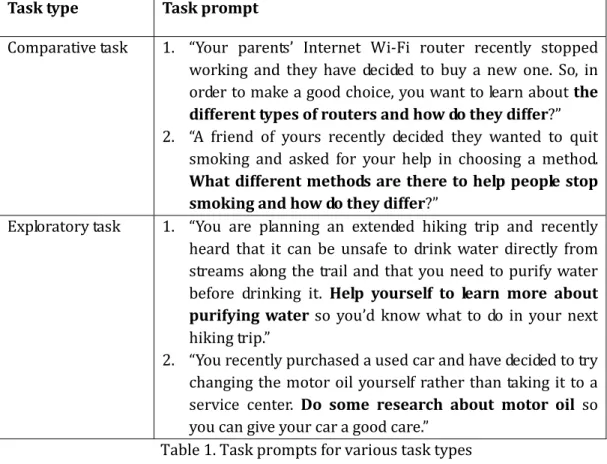
pattern to formulate the prompt. Below show the 4 tasks we used in the user study and how we changed the wordings to differentiate the types.
Task type Task prompt
Comparative task 1. “Your parents’ Internet Wi-Fi router recently stopped working and they have decided to buy a new one. So, in order to make a good choice, you want to learn about the different types of routers and how do they differ?” 2. “A friend of yours recently decided they wanted to quit
smoking and asked for your help in choosing a method. What different methods are there to help people stop smoking and how do they differ?”
Exploratory task 1. “You are planning an extended hiking trip and recently heard that it can be unsafe to drink water directly from streams along the trail and that you need to purify water before drinking it. Help yourself to learn more about purifying water so you’d know what to do in your next hiking trip.”
2. “You recently purchased a used car and have decided to try changing the motor oil yourself rather than taking it to a service center. Do some research about motor oil so you can give your car a good care.”
Table 1. Task prompts for various task types
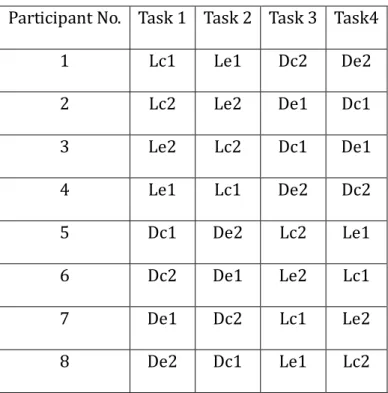
each task will be conducted four times on each test environment, meaning that for each combination of task and environment, data will be available from four participants.
Participant No. Task 1 Task 2 Task 3 Task4
1 Lc1 Le1 Dc2 De2
2 Lc2 Le2 De1 Dc1
3 Le2 Lc2 Dc1 De1
4 Le1 Lc1 De2 Dc2
5 Dc1 De2 Lc2 Le1
6 Dc2 De1 Le2 Lc1
7 De1 Dc2 Lc1 Le2
8 De2 Dc1 Le1 Lc2
Table 2. Test arrangement on task and environment
3.2.2 Procedure
Each user study session began with a consent form (Appendix B) and a pre-test questionnaire (Appendix C-1) collecting their demographic data. Next, before going on the task, participants were informed that there would be a widget on the right of the page that could be helpful during the tasks and that they were welcome to take advantage of it for completing the tasks. Then, they were asked to do the tasks on the search
asking about the satisfaction of each search assistant, their expectation of help for each task they had, and their overall experience.
3.3 Data Collection and Analysis
The study collected both qualitative and quantitative data. With participants’ permission, all qualitative data were collected from the semi-structured interview by audio recording. The qualitative data were coded by the researcher and will be the main source of users’ subjective preferences.
Quantitative data mainly came from the pre-test questionnaire, the post-task questionnaire, the web logs recorded by the back-end of the search interfaces, and the timestamps of every special event during the tasks. The quantitative data were regarded as measurements for task difficulty and effectiveness of the search assistance tools.
Given the limited sample size for this study, the data analysis prioritized the qualitative analysis and the analysis on the post-task questionnaires. Analysis on the web logs served as the secondary approach to the determination, which only used for
4.
Results
4.1 Participant Demographics
8 participants were recruited for this study through the SILS email lists. The demographics data were collected by the pre-test questionnaire. All participants are current students at UNC Chapel Hill with a major or minor in Information or Library Science. The participants are between 20 to 27 years old. 75% identified themselves as female and 25% were male.
4.2 Overall Engagement on Search Assistances
All participants completed the four tasks successfully. Seven out of eight participants accessed the assistance for help during the tasks. Among them, six
participants used it in every task, while one didn’t reach it in one of the four tasks. The reason that this participant didn’t look at the assistance was because they said they were previously familiar with this task topic and were already satisfied with the results from their own search.
One participant didn’t used the assistance at all when doing the four tasks. However, in order to collect opinion from them, the researcher asked them to look at the assistance of each task in the post-test interview and asked how they would like or dislike the information displayed.
“mouseleave” event from the continuous events on the same web widget. In the tasks where participant used the search assistances, the average time spent on the assistance widget was 283 seconds, which is 19.1% of the average time spent on completing the tasks. Meanwhile, 773 seconds in average were spent on exploring from their own search results (including activities on inputting the query and on the result list), approximately 52.1% of the average time on tasks. For the rest 29% of the time, we interpreted it as the participants were reading and evaluating the relevance of the articles. Among the 7 participants who used the search assistances with their tasks, 6 participants spent more time on searching themselves, while 1 participant spent slightly more time on the search assistance widget than their own search.
Figure1. Average Time Distribution on Each Task
4.3 Assistance Helpfulness on Each Task.
4.3.1 Exploratory Task 1: Purify Water
the task was easy to do and ended up being satisfied with the webpages they bookmarked. Six participants used the search assistance widget during this task and four participants thought it was helpful, where two were provided the dimension assistance and the other two were given the link-suggestion one.
It is hard to tell which one was better for this task when merely comparing the helpfulness between the two assistances by time engagement or participants’ rates.
However, the link-suggesting assistance is observed to be more supportive when focusing on the answers from the four participants who were not able to start the task confidently from their previous knowledge. Two of them were given the dimension assistance, but they all answered “neutral” to question 6 (“I found that the content in the search assistant was helpful.”). On the contrary, both the other two participants, who were provided the link-suggesting assistance, agreed or strongly agreed that the assistance was helpful for the task. This is also correlate with the number of links that displayed in the assistance were bookmarked by the four participants. Though the two assistances provided the exact same list of links, the two participants who used dimension assistance only bookmarked 1 page, while the other two embraced 4 pages from the link-suggesting assistance.
4.3.2 Exploratory Task 2: Motor oil
This task is rated as the most unfamiliar one to the participants. Only one
participant stated they were familiar with the topic of this task and could confidently start the search. Three participants didn’t agree this task was easy to complete. However, all the participants were satisfied with the results they found at the end.
none of the participants thought they used it a lot for help. As for the rating, the average score on dimension assistance was less than 7 with a minimum score of 3 (negative), while the link-suggesting assistance was scored 8 in average with a minimum score of 6 (neutral). Therefore, the link-suggesting assistance would provide more helpfulness than the other for this task.
4.3.3 Comparative Task 1: Wifi Router
The task was the second most unfamiliar one among the participants. Three participants agreed that they were familiar with the topic prior to doing the task, while the rest of the five participants didn’t have much knowledge that made them able to
confidently start the search. However, none of the eight participants thought the task was hard to complete and no one was unsatisfied with the links they bookmarked by the end.
Seven participants used the search assistance widget for this task. While all the seven participants agreed the assistance they used was helpful, the dimension assistance received a higher average score (9.67) than the link one (8.25). On the other hand, participants who were given the dimension assistance strongly agreed that they “used the search assistance a lot to help with the task”. This is also proved by the web log data, where 2.67 new queries were issued per person after referring to the dimension assistance whereas the search-suggesting assistance only encouraged 1 new query per person for this task.
4.3.4 Comparative Task 2: Stop Smoking
Seven participants used the search assistance widget with three were given the link-suggesting one and four with the dimension one. One participant gave a score of 2 to the assistance they used, which is the link-suggesting assistance. This is also the lowest among all the scores given by the participants in all the tasks. However, this does not mean the link-suggesting assistance worked poorly for this task, since the average rating on the two types of assistance was not different, and most participants answered
positively to the helpfulness on both types.
4.4 Post-test Interview
A semi-structured interview was conducted at the end of each test session. The questions were designed to reveal participants’ overall comments on the assistance widget, preference for which type of assistance, and further suggestions on the search assistance.
The first question asked the participants if the assistance was helpful and in what way it helped for the tasks. All participants responded “Yes” to the first half question, especially when they weren’t familiar with the topics. In the second half of the question, participants mentioned various ways of the support they got. Below show the opinions mentioned by multiple participants:
“Helped me figure out what to put in the query.” (P2, P5, P6, P7)
Four participants thought the assistance helped them make better queries. Three of them emphasized this would serve well when facing an unknown topic by telling them “what I could look for” or “helping me come up with some vocabs to start”.
Four participants mentioned the assistance made tasks easier by giving the exact answers directly. They said it not only provided information that’s “well-related to what the task was asking for”, but also saved the time and efforts on improving queries and evaluate untrusted results one by one.
“Reminded the options that I could have missed.” (P1, P4, P5, P6)
Four participants said the assistance reminded something they could have ignored. But they had different reasons for appreciating the benefit. Two said that it helped them to check if they got everything they needed by the end of searching a familiar topic. One said the reminder was a good supplement for deficiency since they normally did only one query and just look at the first result page. The remaining one said it helped learned about an unfamiliar topic by introducing more than just the general knowledge.
“Gave a clear summary and saved my time.” (P1, P4, P6, P8)
Four participants liked the assistance gave a clear preview of all alternatives. They all mentioned that they did not need to waste time on reading the long articles and summarizing the ideas from different pages.
“The information there seemed more accurate than my search results.” (P2,
P3, P6)
Three participants stated the assistance gave better information than their search results and two said they only referred to the assistance in some tasks.
task A and task B, where the assistance in A and B was different. Seven participants noticed the difference in the assistance. While the other one replied “No, I don’t see the difference”, they expressed their preference on one assistance against the other type in the follow-up question.
Five participants preferred the dimension assistance. Here are the reasons they liked about the method / dimension list for the following reasons:
+ “It inspired the things I haven’t think of.”
+ “It gave me another way to think about the task.”
+ “It’s a nice way to check I got all the information and there wasn’t any extraordinary thing I had no idea about.”
+ “It’d help me to get a start by breaking down the task into useful terms.” + “It saves the researcher’s time by giving a clear view of different aspects.” + “It put all the characteristics for me without me having to read the article and learn that.”
Besides, some participants provided what they disliked about the link-suggesting assistance:
- “Links suggestions might be redundant because I can get the same pages from my search.”
- “I don’t want to be overly driven by the links recommended by others.” - “I don’t need just the links if I already knew what the things were; a summary of why I should use this instead of that would be nicer.”
On the contrary, three participants liked the link-suggesting assistance more for the following reasons:
+ “It’s more specific and would save me time and take me straight to where I need to go.”
+ “It’s nice to see what other people like and what the popular results are.” + “It gives direct guiding and answers to the specific tasks.”
Also, they put some disagreements on the dimension assistance:
- “The different aspects made the task more complicated and had to think about more queries to search.”
- “Didn’t think the methods / dimensions were relevant to the tasks.”
5.
Discussion
When investigating time engagement on the search assistance, we did not find more time were spent in the tasks where participants said they have used the assistance a lot. In other words, there is no correlation between the amount of time and the
participants’ subjective dependence on the assistance. We prioritized participants’ self-assessment here because time length is not the only measurement. Instead, the subjective engagement may involve how quick (efficiency) and how much (extent) the assistance helped.
Participants’ answers to the question “If you had the power to customize it, what would you wish to see on the assistance?” in the interview may introduce some ideas for improving the search assistance. Two participants mentioned that they would like to see a brief description for each dimension so they would compare them on the top without having to examine each dimension in depth. This would prevent the potential defect of complicating the search.
5.1 Limitations
or their assessment on the task difficulty or the helpfulness of the assistances, which could eventually bias the data.
6.
Conclusion
This study explored the effectiveness of the two search assistance tools and how differently the two search assistance tools help with the search (RQ1). Both the search assistance tools would make the search easier. However, participants’ likes and dislikes on each assistance tools revealed that the dimension assistance affects more on the process of gaining awareness and refining the queries, but the link-suggesting assistance provides direct answers that could be preferred by those who wants rapid results.
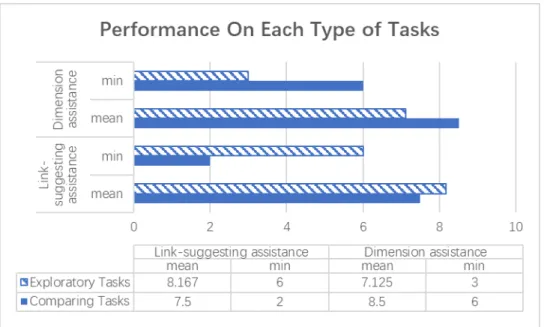
Figure 2. Performance on Each Type of Tasks
The analysis on the post-task questionnaires showed if each search assistance favors one type of the search tasks against the other (RQ2 and RQ3). We did find the contrast from the rates for the helpfulness on the post-task questionnaires. For
(with mean: 7.5 and minimum: 2), indicating that the link-suggesting assistance performs better on exploratory tasks. For comparative tasks, the dimension assistance received higher scores with the mean of 8.5 and the minimum of 6 than in the exploratory tasks, where the mean is 7.125 and the minimum is 3. This suggests the dimension assistance is more effective on comparative tasks.
References:
Capra, R., Arguello, J., Crescenzi, A., & Vardell, E. (2015). Differences in the use of search assistance for tasks of varying complexity. Proceedings of ACM SIGIR Conference on Research and Development in Information Retrieval, 23-32. doi:10.1145/2766462.2767741
Chowdhury, S., Gibb, F., & Landoni, M. (2014). A model of uncertainty and its relation to information seeking and retrieval (IS&R). Journal of Documentation, 70(4), 575-604. doi:10.1108/JD-05-2013-0060
Hugo C. Huurdeman, Max L. Wilson, and Jaap Kamps. 2016. Active and Passive
Utility of Search Interface Features in Different Information Seeking Task Stages.
Proceedings of the 2016 ACM on Conference on Human Information Interaction
and Retrieval (CHIIR '16). ACM, New York, NY, USA, 3-12.
doi:10.1145/2854946.2854957
Kelly, D., Gyllstrom, K., & Bailey, E. (2009). A comparison of query and term suggestion features for interactive searching. Proceedings of ACM SIGIR Conference on Research and Development in Information Retrieval, 371-378. doi:10.1145/1571941.1572006
Kim, Y., & Croft, W. (2014). Diversifying query suggestions based on query
Li, L., Xu, G., Yang, Z., Dolog, P., Zhang, Y., & Kitsuregawa, M. (2013). An efficient
approach to suggesting topically related web queries using hidden topic model.
World Wide Web, 16(3), 273-297. doi:10.1007/s11280-011-0151-3
Liu, J., Liu, C., & Belkin, N. (2016). Predicting information searchers' topic knowledge
at different search stages. Journal of the Association for Information Science and
Technology, 67(11), 2652-2666. doi:10.1002/asi.23606
Moraveji, N., Russell, D., Bien, J., & Mease, D. (2011). Measuring improvement in user search performance resulting from optimal search tips. Proceedings of ACM SIGIR Conference on Research and Development in Information Retrieval, 355-364. doi:10.1145/2009916.2009966
Vakkari, P. (2001). A theory of the task-based information retrieval process: A summary and generalisation of a longitudinal study. Journal of Documentation, 57(1), 44-60. doi:10.1108/EUM0000000007075
Xie, I., Joo, S. and Bennett-Kapusniak, R. (2017), User involvement and system
support in applying search tactics. Journal of the Association for Information
Science and Technology, 68: 1165–1185. doi:10.1002/asi.23765
Yuan, X., & White, R. (2012). Building the trail best traveled: Effects of domain
knowledge on web search trailblazing. In Proc. ACM SIGCHI Conference on
Human Factors in Computing Systems, 1795-1804.
Appendix A. The Dimension Assistance Data for All Tasks
Task Topic Categories / Methods and Dimension Exploratory Task
1 Water Purification
We found different types/methods of the topic: 1. Filters
2. Chemical tablets 3. Boiling
You may consider the effectiveness in terms of: 1. Time required to purify the water.
2. The weight of the equipment. 3. The taste of the purified water.
4. Types of microorganisms being eliminated. Exploratory Task
2
Motor Oil
We found different types/methods of the topic: 1. Conventional oil
2. Premium conventional oil 3. Full-synthetic oil
4. Synthetic-blend oil 5. High-mileage oil
You may consider the effectiveness in terms of: 1. Viscosity.
2. Frequency of changing.
3. Performance in different weathers. Comparative Task
1.
Wifi Routers
We found different types/methods of the topic: 1. Single-band
2. Dual-band 3. Single-WAN 4. Dual-WAN
You may consider the effectiveness in terms of: 1. Whether it supports dual-band technology. 2. The maximum speed that it supports. 3. How expensive is it.
4. Whether it allows a printer to be connected to it. Comparative Task
2
Quit Smoking
We found different types/methods of the topic: 1. Nicotine replacement therapy
2. Zyban 3. Chanix 4. Acupuncture
You may consider the effectiveness in terms of: 1. Time required.
Appendix B. Consent Form
University of North Carolina at Chapel Hill Consent to Participate in a Research Study Adult Participants
Consent Form Version Date: Jan. 24th, 2018 IRB Study # 18-0084
Title of Study: An investigation of search assistance tools for different types of tasks Principal Investigator: Andi Zhou
Principal Investigator Department: School of Information and Library Science Principal Investigator Email Address: [email protected]
Faculty Advisor: Robert Capra
Faculty Advisor Contact Information: 919-962-9978
_________________________________________________________________ What are some general things you should know about research studies?
You are being asked to take part in a research study. To join the study is voluntary. You may choose not to participate, or you may withdraw your consent to be in the study, for any reason, without penalty.
Details about this study are discussed below. It is important that you understand this information so that you can make an informed choice about being in this research study. You will be given a copy of this consent form. You should ask the researchers named above, or staff members who may assist them, any questions you have about this study at any time.
What is the purpose of this study?
The study aims to evaluate the effectiveness of search assistance tools on different types of search tasks and explore users’ needs for search assistance. Results of the study are expected to contribute to the development of search assistance tools for complicated search tasks.
Are there any reasons you should not be in this study? You are NOT eligible for participating the study if:
You are under the age of 18.
You are not a student at UNC Chapel Hill.
You are not fluent in reading and speaking English.
How many people will take part in this study?
The study will last from about 40 minutes to 1 hour. The session will consist of 4 tasks, 5 surveys, and one semi-structured interview.
What will happen if you take part in the study?
First, you will be asked to fill out a short survey about your demographic background. Next, we will give you a brief description of the search system you are going to use for doing the study tasks. There will be 4 search tasks about different problems that we would like you to resolve by using an experimental search system. After each task, you will be given a short questionnaire about that task. Finally, after completing all tasks, we will ask you a few questions about your overall experience. For any reason, you may choose not to answer any question during the study.
Data that we are collecting from you during the study: Your responses to the questionnaires will be saved.
As you are doing the tasks, your mouse movements, clicks, and your search queries will be logged by a program embedded on the webpage.
We will record the audio when you answer the questions in the final interview. You have the choice to decline being recorded in the interview. In this case, we will do the interview without recording.
Would you permit us to audio record the interview for data collecting?
□ Yes □No
What are the possible benefits from being in this study?
You may not personally benefit from being in this study. However, outcomes of the study may contribute to the field of interactive information retrieval.
What are the possible risks or discomforts involved from being in this study? We do not anticipate any risks in the study. However, you may experience minor embarrassment if you are not able to find a satisfying result to complete a task. We will do our best to keep the your data confidential and protect your privacy, but there could be a risk of breach of confidentiality.
How will information about you be protected?
You will be assigned an ID number at the beginning of the study, and it will be the only reference of the data you provide during the analysis and written reports. Data collected during this study may be stored on password-protected UNC servers, UNC’s OneDrive cloud storage, and on the password-protected computer of the principal investigator. Only researchers working on this project will be given permissions to view the data. After completion of the study, all collected data will be deleted and/or destroyed.
Specifically, to better protect your privacy, we will take the following steps to process and/or dispose the audio files that record from the interview:
The audio files will be manually review and part of the interview will be
Once we complete the review and transcription work, all audio files will be deleted and/or destroyed from all storage.
The transcripts will be deleted from all storages once the study has ended.
Voluntary Participation:
Your participation is voluntary. You have the right to decide and/or refuse to join the study. Also, for any reason, you may withdraw your consent to the study at any time without penalty. During the session, you may choose not to answer any question for any reason.
Will you receive anything for being in this study?
You will be receiving a $10 gift card for taking part in this study. Will it cost you anything to be in this study?
It will not cost you anything to participate in this study. What if you have questions about this study?
You have the right to ask, and have answered, any questions you may have about this research. If you have questions about the study (including payments), complaints, concerns, or if a research-related injury occurs, you should contact the researchers listed on the first page of this form.
What if you have questions about your rights as a research participant?
Participant’s Agreement:
I have read the information provided above. I have asked all the questions I have at this time. I voluntarily agree to participate in this research study.
______________________________________________________ Signature of Research Participant
____________________ Date
______________________________________________________ Printed Name of Research Participant
______________________________________________________ Signature of Research Team Member Obtaining Consent
____________________ Date
______________________________________________________ Printed Name of Research Team Member Obtaining Consent
Appendix C-1. Pre-Test Questionnaire
Gender: __________ Age: _________ years old
Appendix C-2. Post-Task Questionnaire
Before doing the task, I was already familiar with the topic of the task: Strongly agree Agree Neutral Disagree Strongly disagree
My previous knowledge helped me start the search confidently: Strongly agree Agree Neutral Disagree Strongly disagree Overall, I’m satisfied with the results I’ve bookmarked: Strongly agree Agree Neutral Disagree Strongly disagree I think the search task was easy to complete:
Strongly agree Agree Neutral Disagree Strongly disagree
I used the search assistant (the widget on the right) a lot to help with the task: Strongly agree Agree Neutral Disagree Strongly disagree
I found that the content in the search assistant (the widget on the right) was helpful:
Strongly agree Agree Neutral Disagree Strongly disagree
To rate the helpfulness of the search assistant, I would give it a score of:
Not helpful at all Very helpful
Appendix D. Post-Test Interview Questions (Semi-Structured)
I saw you were looking at the search assistant while doing the tasks…
Do you think the search assistant helped you with the tasks? How did it help?
There were two kinds of search assistants as you’re doing different tasks, did you notice that?
(If they have noticed the difference) Which one do you think was more helpful? Could you walk through how did you approach the task and how did it help?
(If they didn’t notice the difference) How do you like the search assistant? Could you share how did it help you with the task?