
System Analysis for Technical Support. A Master‘s Paper for the M.S. in I.S degree. July 2010. 99 pages. Advisor: Professor Stephanie W. Haas
Among many available frameworks and international standards for technical support service, Information Technology Infrastructure Library (ITIL) is one of the earliest and most popular frameworks, being widely followed and implemented all over the world in both private and public sectors. Many supporting tools are designed and developed based on the processes recommended by ITIL. However if the processes are not followed by the actual business practice then such supporting tools might not fulfill the business demand as desired. This paper uses Remedy® Action Request System as an example tool to identify the
possible gaps between the ITIL Incident Management process and actual
business processes, and then uses the data extracted from Remedy® to evaluate an ITIL based sample SLA to demonstrate potential deficiencies caused by
business deviation from ITIL processes. Countermeasures are also given based on business scenarios.
Headings:
SYSTEM ANALYSIS FOR TECHNICAL SUPPORT
by Qianqian Rui
A Master’s paper submitted to the faculty of School of Information and Library Science of the University of North Carolina at Chapel Hill
in partial fulfillment of the requirements for the degree of Master of Science in
Information Science.
Chapel Hill, North Carolina July, 2010
Approved by:
Table of Contents
1. Introduction ... 5
1.1 Research Question ... 8
1.2 Problem Statement ... 9
1.3 Objectives ... 10
1.4 Scope ... 11
1.5 Study Significance ... 12
2. Literature Review ... 14
2.1 Common Framework and Standards for Technical Support ... 14
2.2 ITIL Framework... 18
2.3 Incident Management Process ... 21
2.4 Service Level Management and Service Level Agreement ... 22
2.5 Technology for Service Desk and Incident Management ... 23
3. ITIL Service Management, Incident Management and Service Level Management ... 25
3.1 ITIL Service Management ... 25
3.2 ITIL Service Desk ... 27
3.3 Service Desk Types ... 30
3.3.1 Local Service Desk ... 30
3.3.2 Centralized Service Desk ... 31
3.3.3 Virtual Service Desk ... 31
3.3.4 Follow the Sun ... 32
3.3.5 Specialized Service Desk Groups ... 33
3.4 Support Models ... 33
3.5 ITIL Incident Management Process ... 37
3.5.1 Basic Concepts for Incident Management ... 37
3.5.2 Incident Management Workflow ... 39
3.6 ITIL Service Level Management and SLA ... 45
4. Remedy® Incident Management ... 48
5. SLA Reporting and Deficient Business Scenarios ... 58
5.1 Reporting Methods ... 58
5.2 Deficient Scenarios and Counter Measures ... 61
6. Sample SLA Reporting ... 70
6.1 ITIL SLA Reporting Metrics Calculation ... 70
6.2 Sample Report ... 76
7. Discussion and Conclusion ... 80
7.1 Problems and Limitations ... 80
7.2 Recommendations for Future Studies ... 81
Appendix 1: ITIL Sample Service Level Agreement ... 82
Appendix 2: Sample Fields Searchable in Remedy® ... 88
List of Tables
List of Figures
Figure 1: Organizational Technical Support ... 6
Figure 2: Incident Management and SLA in a Sample ITIL Process Design ... 7
Figure 3: Incident Analysis and SLA Adherence... 9
Figure 4: The ITIL Framework ... 15
Figure 5: The COBIT Framework ... 16
Figure 6: The ISO/IEC 20000 Standard ... 17
Figure 7: ITIL Core Topics ... 19
Figure 8: ITIL Model ... 27
Figure 9: Local Service Desk ... 30
Figure 10: Centralized Service Desk ... 31
Figure 11: Virtual Service Desk ... 32
Figure 12: ITIL Incident Management Process Workflow... 39
Figure 13: Sample Remedy® Ticket Information Fields 1 ... 50
Figure 14: Sample Remedy® Ticket Information Fields 2 ... 51
Figure 15: Sample Remedy® Three-level Classification ... 52
Figure 16: Sample Ticket Priority Matrix ... 53
Figure 17: Sample Ticket Status Flow ... 54
Figure 18: Sample Ticket/Incident Handling Flow Chart ... 57
Figure 19: Sample Search and Report function of Remedy® ... 58
Figure 20: Sample Remedy® Search Function ... 59
Figure 21: Sample Remedy® Dashboard Report ... 60
Figure 22: Sample Support Organization with External Service Members 1 ... 63
Figure 23: Sample Support Organization with External Service Members 2 ... 64
Figure 24: Sample Support Organization with Third Party Involvement ... 65
Figure 25: Sample Support Organization with Customer/User Interaction ... 67
Figure 26: Sample Support Organization with Dispatcher/Dispatcher Groups ... 69
1. Introduction
Technical support, as one important section of the discipline of Information
Technology (IT) service, nowadays become more and more important in the
business practices given the dependency business have upon IT activities[15].
During years of practice certain IT models have been well established and
followed all over the world for technical support.
Technical support primarily aims for timely trouble shooting and problem
solving associated with products such as computers, software systems, and
electronic goods. Due to the improvement of the technology as well as other
factors, for example, cost saving and business extension, technical support now
covers a wider scope of services, including asset management for the related
product or service, customer relationship management. Managing all the
incidents1, assets, and customer information during support became a critical
aspect of the service, hence systems are developed to assist the processes and
build the repository of the service provided, such as records of incidents.
Technical support can be delivered, depending on the situation, by different
technologies, from help desks to self-service web pages. For a given type of
technical support there are normally customized systems for such type of support
ready in the market. BMC Remedy® offers the market-share and growth leading
1
software products that have tailored applications for businesses sizing from small
to cross-continental[2].
Given the importance of technical support to stable business operation, being
able to define and measure the Quality of Service (QoS) is crucial for both
technical support service vendors and customers[38]. Definition and measurement
of QoS can be assured through negotiated contracts for “increasing accountability
and providing strict guidelines to the … services to be provided”[13, page 185]
. In the
IT service industry, this kind of contract is called Service Level Agreement (SLA).
SLAs take the service received by the customers as the subject of the agreement.
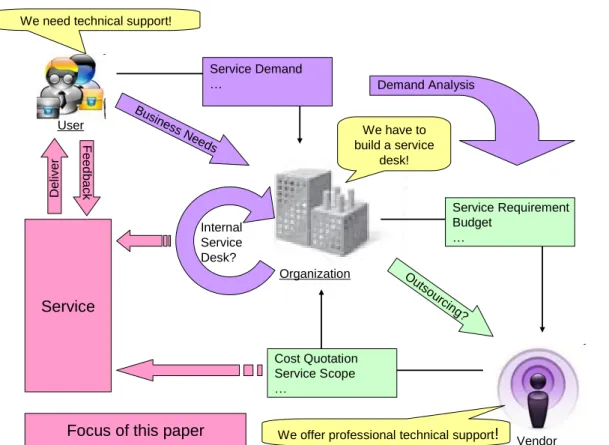
Figure 1 shows an overall organizational demand for the above mentioned
services and the focus of this paper is marked in light pink color.
User
We need technical support!
Organization
We have to build a service
desk!
Busine ss Ne
eds
Vendor We offer professional technical support!
Ou tso urcin g? Cost Quotation Service Scope … Service Requirement Budget … Service Demand … Internal Service Desk? Demand Analysis Service Deliver F e e d b a ck
Focus of this paper
Incident management, the process of “restore normal service operation as
quickly as possible and minimize the adverse impact on business operations” [8,
page 86]
, is highly visible to business and hence one of the first to-be-implemented
processes in technical support. Incident management systems, such as Remedy®
Action Request System, which are used during the incident management process
to record and track the lifecycle of incidents, can be a good source of quantitative
data for evaluation of SLA adherence. An example of Incident Management and
SLA in a process design based on ITIL is shown in Figure 2.
1.1 Research Question
With well established frameworks such as IT Infrastructure Library (ITIL),
International Organization for Standardization / International Electrotechnical
Commission 20000 (ISO/IEC 20000) and Control OBjectives for Information and
related Technology (COBIT), many systems or applications have been designed
and used for delivering or assisting technical support services.
ITIL was developed more than 15 years ago by the United Kingdom (UK)
government to document IT Service Management best practice, with the
“involvement of industry experts, consultants and practitioners” [23, page 9]
. Given the
early recognition and significance of ITIL, the framework has become the de facto
standard around world for both private and public sectors [23]. BMC Remedy®
designed and built their IT supporting systems closely based on the framework of
ITIL. The company is well recognized in the market of technical support service.
However, ITIL only offers a framework; the actual implemented business
processes could vary from the framework, or have specific procedures for certain
service handling. When business processes deviate from the framework on which
BMC Remedy® based its product, meaning that the intended system processes
from BMC Remedy® are not closely followed by users, deficiencies arise and
reduce the usability of the system. Consequently, such deviation may a) make it
harder to use the data provided by the system for SLA adherence evaluation
Figure 3: Incident Analysis and SLA Adherence[16]
Incident management is a major component of ITIL and a core practice of
technical support service, and thus also faces these problems. This paper
examines the ITIL framework best-practice business process for incident
management and compares it to the BMC Remedy® Service Desk: Incident
Management (hereafter referred to as Remedy®) system process for incident
tracking and processing. It then proposes possible system improvements as well
as a prototype for proper reporting of service level adherence, as demonstrated in
Figure 3.
1.2 Problem Statement
which “One man‟s routine of work is made of the emergencies of other people”[18,
page 316]. Therefore one key aspect of tools for technical support is “determining the
proportion of missing functionality versus erroneous operation breakdowns”[10, page
430]
. For example, a tool can be lean and with limited functions, perhaps omitting
some that are truly necessary. Or a tool may include as many functions as
possible, resulting in complexities that might lead to erroneous operation. Possible
problems of Remedy® therefore could be in the following list:
I. Adherence to the ITIL framework makes it less flexible for various
businesses to adapt to;
II. Certain system features are not efficient enough to support the
business incident tracking practice because of the tools;
III. Too many features inherited from ITIL framework which confuse users
during operation;
IV. Inability to provide sufficient data for service level adherence evaluation
if desired processes are not followed.
1.3 Objectives
To address the problems listed above, improvement measures can be
suggested both from system functionality perspective and system process
perspective. This paper also aims to come up with a prototype report for service
level evaluation based on the improved functionality and process.
Objectives of this paper are:
II. Describe the ITIL framework reflected in Remedy® for technical
support;
III. Describe how the service performance should be evaluated based on
the framework and the possible data that can be drawn from Remedy®
for the evaluation;
IV. Compile a sample report for the SLA adherence evaluation based on
the data that can be drawn from Remedy®;
V. Demonstrate possible deviations of actual business processes from the
framework and the impact on extracting data from Remedy® for SLA
adherence evaluation;
VI. Suggest measurements for business process and system process
integration, as well as possible system improvement.
1.4 Scope
Incident Management deals with users directly, serving as the single or first
point of contact for the support processes, therefore it is easier to demonstrate its
value to business as the representative of support services. Remedy®, adhering
its architecture to ITIL best practices, is the market leader in the service desk
business, with 26.7% of the globe market share in 2006[9]. Hence the scope of this
paper will be restricted to the Incident Management process and the Remedy
system that is used for the Incident Management processes, focusing on incident
tracking and handling.
Precautionary incident management, for instance user education and
support such kind of incident management process. However certain data
extracted from Remedy® can also be used for precautionary purposes. This will
be discussed in Chapter 6 on SLA evaluation.
1.5 Study Significance
Technical support for many organizations is critical given that sufficient
support keeps smooth and stable business performances. Defects in IT systems
could reduce work efficiency, and in the worst case, result in huge financial or
reputation loss; effective support hence does not only try to get the incidents
solved as quickly as possible but also seeks to minimize the fallout from incidents,
through proper disaster recovery mechanisms. The ability to evaluate the support
service level is consequently also critical for both service providers and customers.
Consider the resolution percentage of incidents as an indicator for service level
performance; it helps both the service provider and the customer to reach an
understanding of the capability of the service provider to solve incidents. Low
percentage probably represents a failure of service and could be used as a basis
for service cost negotiation. The data can be drawn from the incident tracking
systems by calculating the ratio of the number of resolved incidents over the
number of recorded incidents. Such data, if it can then be automatically
summarized by the systems, will increase the service level assessment ability for
both service providers and customers.
This study looks at the possible insufficiency of Remedy® caused by the
deviation of business process from the ITIL framework, and tries to come up with
and eventually to better reflect and report the service level based on the data in
the system. Such improvement and reports can help both vendors and customers
of the service to better evaluate the QoS for service sustain and future
2. Literature Review
2.1 Common Framework and Standards for Technical Support
Over its lifetime, the IT industry has developed a number of frameworks and
standards to address the growing needs of management and practice. Three of
the common ones used for technical support are ITIL, COBIT and ISO/IEC 20000.
ITIL:
To provide standards for the discipline of IT services in both public and private
sectors, starting from the 1980‟s United Kingdom's Office of Government
Commerce (OGC) developed a set of documentation named Information
Technology Infrastructure Library (ITIL), which consists of comprehensive,
consistent and coherent concepts and best practices for IT Service Management
and can be tailored for use in most IT organizations. Figure 4 shows the high-level
Figure 4: The ITIL Framework[17]
COBIT:
In 1996, Information Systems Audit and Control Association (ISACA) and the
IT Governance Institute (ITGI) released the first version of The Control Objectives
for Information and related Technology (COBIT), with the mission “to research,
develop, publicize and promote an authoritative, up-to-date, international set of
generally accepted information technology control objectives for day-to-day use
by business managers and auditors”[28, Control Objectives for IT: COBIT®]
. It is originally
created as an audit framework then it later matured to an overall IT management
framework [23]. COBIT functions as an overarching framework for IT governance,
providing “common language to communicate goals, objectives and expected
results to all stakeholders”[19, COBIT Framework for IT Governance and Control]
. Since its first
release COBIT has now evolved to version 4.1, including 34 processes to cover
Figure 5: The COBIT Framework [19]
ISO/IEC 20000:
ISO/IEC 20000, as shown in Figure 6, is the first international standard
specifically aimed at IT Service Management developed by the British Standard
Institution (BSI Group) in 2005. It has been aligned with the ITIL process approach
and “describes an integrated set of management processes for the effective
delivery of services to the business and its customers” [26, What is ISO/IEC 20000?]
.
Unlike ITIL and COBIT, which are frameworks, ISO/IEC 20000 provides
management processes. It also defines the requirements for service providers to
deliver services with acceptable quality.
Figure 6: The ISO/IEC 20000 Standard [31]
Given the number of choices of frameworks and standards available,
organizations “can face uncertainty in understanding which framework, method or
standard of practice they need in order to excel at managing IT services” [39, page
145 ]
.
Among the above mentioned three frameworks and standard, ITIL is
commonly regarded as strong in describing concept and processes to outline how
IT services should be delivered. COBIT is well recognized for its controls and
metrics[48]. ISO/IEC 20000 is designed to reflect the best practice contained in ITIL
but at the same time support other frameworks and standards such as Microsoft
ISO/IEC 20000 into a more integrated and powerful practice with proper audit
control [23,24] and security. However given the early entrance to the market and
longer years of practice ITIL has already been adopted by many organizations as
a proven methodology[11]; therefore this paper focuses on the ITIL framework, on
which Remedy® based its process.
2.2 ITIL Framework
The core guidance of ITIL (Version 3) is broken into five topics as shown in
Figure 7:
Service Strategy
Service Design
Service Transition
Service Operation
Figure 7: ITIL Core Topics [39]
In the center of the service lifecycle defined by ITIL is Service Strategy, which
offers guidance about how to set objectives and expectations towards IT services.
Service Strategy aims to help organizations to think and develop a long-term
strategy for better investment, and covers processes such as Service Portfolio
Management, Demand Management, IT Financial Management, and Supplier
Management. With Service Strategy in place organizations should be able to not
only handle the risk and cost of the services more effectively but also have a more
distinctive performance[39].
Service Design follows the Service Strategy, turning the strategies into
about the design of services, service processes and service capabilities to meet
the business demand[39]. The key processes covered in this section are: Aspects
of Service Design, Service Catalogue Management, Service Requirements,
Service Design Models, Capacity Management, Availability Management, and
Service Level Management.
Service Transition provides guidance for the “development and improvement
of capabilities for transitioning new and changed services into live service
operation”[39, page 12]
. It is related to Service Asset and Configuration Management,
Service Validation and Testing, Evaluation, Release and Deployment
Management, Change Management, and Knowledge Management. These
processes encompass the realization of the Service Design, with controlling of
risks and introducing of Knowledge Management System for decision assisting.
The realization of the objectives defined in Service Strategy and planned in
Service Design is ultimately carried out during Service Operation. It offers
guidelines about the delivery of agreed services by the following processes:
Event Management, Incident Management, Problem Management, Request
Management, Application and Technical Management. Together with the methods
and tools, two major control perspectives are given for the Service Operation:
proactive and reactive, which guide managers and practitioners to maintain
stability of the service and at the same time allow changes in the service delivery.
Continual Service Improvement (CSI) aims to guide organizations through
For CSI the measurement and control are defined for improvements to align the
services to changing business needs. A Plan-Do-Check-Act model is used to build
a close-loop system for receiving inputs for improvements. Processes covered by
CSI are: Service Level Management, Service Measurement and Reporting, and
Continual Service Improvement
ITIL organized the above described core guidelines into an evolving life cycle
as shown in the figure above. Practice fundamentals, principles, lifecycle
processes and activities, supporting organization structures and roles, technology
considerations, practice implementation, challenges, risks and success factors,
examples and templates are given for each phase of the cycle, with
Complementary Publication and Web Support Services as assisting tool to
provide information about relevant publications, glossaries, and interactive
knowledge center.
2.3 Incident Management Process
As mentioned before, the ability to handle incidents is a core function of
technical support service. Professionally issues are called “incidents” and the
process of handling them is referred to as Incident Management.
The definition of Incident Management used by ITIL is the process through
which IT support organizations manage to restore normal service operation as
quickly as possible and with minimum disruption to the business[39]. The target is
not to solve the problem from root but to find a solution or workaround in a
background once user have at least a temporary solution and are to continue
work.
There are six components defined by ITIL for Incident Management:
Incident detection and recording
Classification and initial support
Investigation and diagnosis
Resolution and recovery
Incident closure
Ownership, monitoring, tracking, and communication
The process is a stream-lined workflow and usually has very clear history
records of how an incident is handled and by whom; the supporting systems for
Incident Management are also mostly, if not all, work-flow or thread based[45]. This
kind of system architecture fits naturally into the business process of incident
handling, because “information technology must be integrated with the design of
the process it supports”[15, page 392]
. On the other hand, it restricts ad-hoc types of
support, such as collaboration or intervention. Details will be analyzed in the
following chapter.
2.4 Service Level Management and Service Level Agreement
Service Level Management is implemented for measuring the level and quality
of support services. A pre-defined agreement called Service Level Agreement
(SLA) contains service targets for service providers (in this case the support
made upon providing specific services, such as high-speed LAN, telephony, etc.
There are also customer-based SLAs that aim to provide services to a specific
group of customers, for example all the users in one company. Some
organizations as well choose to maintain multi-level SLAs for corporate level,
customer level and service level, to keep the SLAs at a manageable size and
avoid duplication of content in different copies of SLA[32]. No matter how the SLAs
are structured, they should contain a mutual understanding for the service to be
reached. Certain parameters can be mutually and unambiguously used to
measure the service levels. For example, the performance of the support team
can be reflected by data such as response time2 and resolution time3; and
performance of systems or infrastructure can be measured the percentage of time
they are available for use. Post-service extraction and analysis of such data, the
parameters for SLA, is then an important function which is expected from the
applications used for technical support as a major tool for SLA adherence
evaluation[38]. A sample SLA provided by ITIL as general guidelines can be found
in Appendix 1: ITIL Sample SLA.
2.5 Technology for Service Desk and Incident Management
For efficient and effective support service, ITIL recommend organizations to
have certain incident managing/logging tools, and even a full toolset if needed.
Particularly for Incident Management, ITIL list workflow or process engine and
automated escalation as must-have components to allow the pre-definition and
control of the incident management processes. Workflow or process engine is a
kind of software application that manages modeled processes, in this case the
2
Response time: the time technicians need to response to an incident, (definition of starting point varies).
3
workflow of incidents resolution; automated escalation is needed for automatically
escalate incident from one support level to another to meet the defined response
or resolution time. “Easy-to-use reporting facilities” to allow incident metrics to
be produced is also mentioned by ITIL for service operation[8].
As a major product in the market of support service tools, Remedy® is
designed to manage workflow as its main job[7]. It also contains objects called
“Escalations” for automated hierarchic escalation triggered by a defined rule or
pre-set date/time[1]. A reporting function is also available, allowing customer to
define report criteria[1] as needed Basically Remedy® aligned itself with the best
practice recommended by ITIL. Functions and architecture of Remedy® will be
3. ITIL Service Management, Incident Management and Service Level
Management
3.1 ITIL Service Management
In the ITIL framework, IT services were categorized into the following two
management sets [39].
Service Support: This part of the ITIL structure ensures that users are
properly supported to carry out their business functions; for example the IT
configurations are identified and recorded for users, processes are defined and
described, issues and incidents are taken care of. The support is performed by the
following components:
Service Desk. Service Desk is the single-point-of-contact to users for
service support; it serves as the entry point of the support process by
accepting issues from users and creates incidents accordingly When an
incident is solved the solution/workaround is also passed to users by the
Service Desk.
Incident Management. it is the process of quickly handling incidents to
minimize the interruption of business and restore normal operation.
Problem Management. Problem Management aims to diagnose the root
causes of incidents and prevent reoccurrence of similar incidents.
Change Management. If changes are needed to the IT infrastructure
resulted from incident handling, Change Management should be in
Release Management. With Release Management the introduction of
new releases of software and hardware can be integrated to the existing
infrastructure in a controlled manner, avoiding confusion of versions and
licenses.
Configuration Management. This process is established for proper
tracking of all the configuration changes in the system for record
keeping and future reference.
Service Delivery: compared with Service Support, Service Delivery focuses
on how to ensure the adequate delivery of support service by integrating the
following components:
Availability Management. The objective of Availability Management is to
maintain the availability of services at a reasonable cost.
Capacity Management. This is the practice to optimize the match
between IT resources and business demands.
IT Service Continuity Management. This section is targeted to setup
proactive preventive measures for possible disasters and also recovery
measures in case of disasters.
Service Level Management. To ensure the quality of delivered services,
Service Level Agreements (SLAs) are made to measure, monitor and
report the service achievements.
Financial Management for IT Services. Financial Management is the
calculation of budget and cost of IT services to ensure IT infrastructures
are purchased at a reasonable price and services are delivered at an
Figure 8: ITIL Model[25]
Technical support overall requires the combination of both Service Support
and Service Delivery. However the concern of this paper focuses more on Service
Support, assuming the proactive Service Delivery activities have already been
fulfilled. Service Level Management which will also be partially analyzed in this
paper, given SLA is a major measurement definition document for the quality of
service. Figure 8 shows the ITIL model for Service Support and Service Delivery,
as well as the focus of this paper on Incident Management and Service Level
Management.
3.2 ITIL Service Desk
Under the conceptual name of Technical Support, Service Desk is the
physical “place” the support actually takes place. ITIL use the term to refer to the
“functional unit made up of a dedicated number of staff responsible for dealing
with a variety of service events”[8, page 198]
of contact for technical support to users/customers. Issues raised by end users
are received by Service Desk which then initiates the incident handling process
upon receiving issues. In practice the function of Service Desk is implemented
under various names, for example help desk, call center, or contact center
Call Center. As implied by the name, call centers provide support via
centralized supporting offices by receiving and transmitting phone calls. This type
of support mainly aims to serve the customers who are geographically distributed,
with product support or information inquiries. Such centers can also be extended
to handle faxes, emails, live chats or even traditional communication means such
as letters, and in this case is called a contact center.
Help Desk. Typically the responsibilities of help desks include providing
information and assistance for troubleshooting issues raised by users, as well as
maintaining hardware, software, and infrastructure. Large help desks are often
divided into different teams to deal with different topics or special aspects of
issues[34]. A typical labor force division for help desks, for example, might be:
Deskside support. Troubleshoots issues with desktops, laptops and
peripherals (e.g. blackberry devices).
Network support. Provide support for network utilities and software such
as fire wall.
Server support. This team is responsible for server related services
such as Network Shares, Email configuration and account
Application support. Support for customized application software in the
organization can be provided by a support team..
Other support. Depends on the support scope, some help desks also
cover service for office equipments, such as phone systems, printers,
scanners, fax machines, etc.
Self-service Help Center. To reduce labor and overhead costs, some
organizations build portals to technical knowledge databases to enable
troubleshooting in a self-service manner. Most such portals are web-based, with
search functions and indexed question-and-answer lists for users. Some portals
are semi-interactive, that based on users‟ feedback it can further limit the number
of returned hits4. MS Office online is an example of a self-service portal
(http://office.microsoft.com/en-us/help/default.aspx). For further support, contact
information is normally also available in the portals in case users are not able to
solve the problem based on the searched results returned by the database.
Conceptually, Call Centers, Contact Centers and Help Desks are the similar to
Service Desks, however the latter have a broader range of services and
user-centric approach, such as Asset Management for IT services and
Procurement Management for infrastructure, which enables a more integrated
Service Management infrastructure with business processes[43]. In the ITIL
framework, Service Desk is universally used instead of other titles.
4
3.3 Service Desk Types
Service desks can be structured and deployed many ways, depending on the
need and other restrictions such as security and cost.
3.3.1 Local Service Desk
Local Service Desks are located close to or within the user community they
serve, as shown in Figure 9. The advantage of this kind of Service Desks is the
visibility of the Service Desks and convenient communication between the Service
Desks and users. However, as pointed out by ITIL, it is normally organizationally
costly and not efficient to have a group of staff located in one place and waiting to
deal with coming incidents[8].
3.3.2 Centralized Service Desk
It is in general more efficient and cost-effective to have centralized services
instead of having Service Desks located locally in different sites. In this way the
overall needed technicians will be less compared with local Service Desk
organization; and since on average the frequency of occurred events is higher,
technicians could be able to gain a higher skill levels by getting more chances to
solve incidents. A sample structure of centralized Service Desk is shown in Figure
10.
Figure 10: Centralized Service Desk [8]
3.3.3 Virtual Service Desk
Technologies such as the Internet make it possible to have a single and
centralized Service Desk organization although the technicians are physically
one hand, a virtual Service Desk greatly reduces the cost but on the other hand, it
may have a higher requirement for security and uniformity of service quality[8].
Figure 11: Virtual Service Desk [8]
3.3.4 Follow the Sun
The idea of 24-hour follow the sun service support is very intriguing to some
international organizations which have customers to serve all day long. It is
possible to have several service locations spread in different time zones to provide
service one after another so that can cover 24 hours a day. Similarly to virtual
Service Desks, this kind of Service Desk also has high requirements for security,
3.3.5 Specialized Service Desk Groups
If certain kind of incidents occur more frequently or need more attention, there
can be a specialized Service Desk group dedicated them for faster solution. For
example, resetting passwords is one of the most frequently occurred incidents in
Daimler Northeast Asia, hence the support team have assigned specialized
technician(s) to deal with resetting password specifically and the support hotline
have a code devoted for resetting password (+86-10-8417-3333).
Different ways of organizing Service Desks not only pose different needs for
structure and infrastructure but also have impact on Service Level Agreement
construction and evaluation. For example, for virtual Service Desks it is very
important to draft the SLA considering culture terms, user demand and time
differences. And when evaluating the SLA adherence of virtual Service Desks,
impact from such factors should also be accounted for; take user demand as an
example, technicians serving the market in United States of America and
technicians serving the market in Mexico might deal with different volume of
incidents, but not necessarily mean the ones dealing with more incidents per day
should be evaluated for better service quality.
3.4 Support Models
Depending on the business need and taking into consideration factors such as
cost and efficiency, organizations can choose to either build their own support
team or outsource it to third party. For either choice they then need to decide how
to structure the support team and how much responsibility to assign to the team.
service level would also need to be defined.
IT engineers can be a very expensive resource for some levels of expertise;
asking them to sit there all day and respond to problems which can be solved by
re-booting the computer is something businesses would like to avoid. However
there are cases so complex that they need very proficient IT engineers. To better
serve the business and users, technical support is often organized into several
levels, each of which specializes in a specific level of technical assistant
expertise[33]. ITIL recommended a three-level support organization for incident
handling[8]. However, the actual implementation of support levels depends on the
business demands such as service expectations and budgets.
Level 0 Support:
Although not part of the standard support levels, Level 0 does exist in practice.
Before users approach help desk technicians, there can be other resources for
them to consult. Self-service help desk portals are one of these. Users can be
formally divided into end-users and key users based on their proficiency and
familiarity with the application. End users are advised to contact key users for
trouble-shooting before raising the question to technical support. Reasons for
doing so may include the dispersed locations for users and technicians.
Geographically, users (key users and end users) are closer together and speak
the same “language” thus helping to clarify the questions more quickly. If the
question is beyond key-users‟ ability to answer then there is help desk to turn to.
In this situation it is not only more efficient but also less expensive if issue
However building self-service portals requires integrated resources and
sometimes professional databases or knowledge bases; and having key users
also requires professional training. Given such restrictions the Level 0 Support is
only applicable for certain business scenarios.
Level 1 Support:
Level 1 Support is the initial point of contact of users to the technical support
process. Technicians in this level gather information about the issue from users,
and identify the cause of the issue (if possible), by analyzing the symptoms
reported. Once the diagnosis is done, an incident will be created in the incident
tracking systems for further resolution. If the issue is straight-forward and simple
then it might be solved right at this level. The target for the first level support is to
handle 70-80% of the reported issues[29]. However the technicians in this level are
not required to have competency for troubleshooting complex problems: most of
their routine tasks come from on the following areas:
User authorization and authentication: maintain user accounts and
authorization for systems and applications;
Office equipment: maintain the equipment and educate user to use
equipments such as desktop and laptop computers, printer, scanner, fax
machine, etc.
Application: install/uninstall software applications, troubleshoot basic
application problems;
Infrastructure: identify, and if possible, solve simple issues in the
ensure power supply, fix common printer failures (for example paper
jam),
Level 2 Support:
Issues not able to be solved by Level 1 support are escalated to Level 2
support. The second level technicians provide more in-depth and professional
support on advanced incident resolution. Before a Level 2 support technician
works on solving an incident, he/she should review the incident that has been
assigned from Level 1, double check the validity of the incident and figure out if
there has been prior similar occurrence that can be used as reference to reduce
workload and improve efficiency. Typical support work from level 2 is: software
repairing, testing, database diagnoses and so on. If issues still cannot be solved at
this level, Level 3 support will be involved.
Level 3 Support:
For common practice this level is normally the highest level for technical
support. Technicians in this level are experts in the field and should be able not
only to solve issues but also to foresee future issues and develop new features if
required. Similar to Level 2 support, once an issue is escalated to this level it
should be reviewed by the technician first for validation and then for further
handling. A solution is usually expected from this level; however there might be
rare cases where an incident is too complex, or cannot be solved without
changing the basic architecture of the product,. If so, then Level 3 support will
need to figure out a workaround and contact the original developers of the product
Level 4 Support:
As mentioned, there can be circumstances in which original developers of
products need to be involved for trouble-shooting; therefore, although not common,
the fourth level exists but is outside the organization. Technicians in this level
know the product better than any other, and also are able to modify the product
better than any other. Nevertheless due to organizational complexity and costs,
this level of support will be established only for large, expensive and mission
critical products.
3.5 ITIL Incident Management Process
“Incident”, as defined by ITIL terminology, refers to “an unplanned interruption
to an IT service or reduction in the quality of an IT service. Failure of a
configuration item that has not yet impacted service is also an incident, for
example failure of one disk from a mirror set” [8, page 376 ]
. Incident Management is
then the process to deal with incidents. The process flow of Incident Management
suggested by ITIL is shown in Figure 12.
3.5.1 Basic Concepts for Incident Management
ITIL introduced some basic concepts as the prerequisite for Incident
Management, enumerating Timescales, Incident Models, and Major Incidents.
Major Incidents are treated in a separate procedure to reduce overall timescale [8].
Timescales. Timescales should be agreed upon for every stage of incident
management, based on the targets within SLA (for instance, most commonly,
model). These timescales can then be used for escalations.
Incident Models. This is a series of pre-defined “standard” steps for handling
a particular type of incident which occurs more often than average, for instance,
resetting a password. The models should be also reflected or defined in the tools
used for incident handling[8], so as to achieve certain automation in the process to
reduce time and efforts. Take Remedy® for example, incident models are defined
as templates in the system, so that certain fields such as category and priority of
incidents are automatically filled out, saving the time of technicians from doing it
manually.
Major Incidents. Major Incident is defined as “the highest category of impact
for an Incident”, which “results in significant disruption to the business” [8, page 379]
. A
separate procedure should be established to handle such kind of incidents for
faster resolution with more attention to avoid huge impacts or undesired long
resolution time. Criteria for being a major incident are reflected in incident
prioritization matrix, which will be described later during the incident management
3.5.2 Incident Management Workflow
The ITIL Incident Management Workflow is displayed as in Figure 12. The
process starts when the Service Desk receives an issue report. An issue can be
raised via phone, via email or other means by users to Service Desk. It can also
be reported by technical staff; for example, if they notice something unusual
during the routine network monitoring they may raise it as an incident. Another
source of issue reports is from Event Management, which is “any detectable or
discernible occurrence that has significance for the management of the IT
Infrastructure or the delivery of IT service and evaluation of the impact a deviation
might cause to the services” [8, page 67]
; typically events are notifications created by
an IT service, such as planned maintenance events.
Step 1: Incident Identification
Upon receiving a call/email from users, Service Desk must first identify
whether it is a valid incident. A user may call the Service Desk to report issues not
related to technical support or simply request information. In this case technicians
should be able to make a judgment if it is an incident, and decide whether to
initiate the incident management process.
Step 2: Incident Logging
Logging of all incidents is required as a must by ITIL, and certain relevant
information about the incident should be recorded so that a full historical record is
available for future reference. Such information may include[8] the elements as
Element Time of Record Updatable?
Unique reference number Upon creation N
Incident categorization (often broken down into between two and four levels of sub-categories)
Upon creation Y
Incident urgency Upon creation Y
Incident impact Upon creation Y
Incident prioritization Upon creation Y
Date/time recorded Upon creation N
Name/ID of the person and/or group recording the incident
Upon creation N
Method of notification (telephone, automatic, e-mail, in person, etc.)
Upon creation Y
Name/department/phone/location of user Upon creation Y Call-back method (telephone, mail, etc.) Upon creation Y
Description of symptoms Upon creation Y
Incident status (active, waiting, closed, etc.) Upon handling Y
Related Configuration Item Upon handling Y
Support group/person to which the incident is allocated Upon handling Y Related problem/Known Error Upon handling Y Activities undertaken to resolve the incident Upon handling Y
Resolution date and time Upon resolution N
Closure category Upon resolution N
Closure date and time Upon resolution N
Table 1: Incident Record Elements
Step 3: Incident Categorization
Categorization of an incident is introduced for accurate allocation of incidents
to technicians, as well as for future reference and analysis. For example, incidents
can be categorized as “Hardware”, ”Software”, ”Authorization”, ”Security”, so that
each type of incident can be assigned to a specific support group. There is no
“standard” categorization of incidents suggested by ITIL, given that each
organization can be unique and may have different support organizations so a
one-size-fit-all categorization might not help. Steps for assisting to identify suitable
categorization, though, are provided as guidance, including brainstorming
sessions attended by management and support team, reviewing history records of
incidents as reference, and trial period of the support service for limited or full
Step 4: Incident Prioritization
This is an important aspect of incident management, which determines how
much attention the incident will get and how it will be handled. Prioritization of
incidents normally depends on both the urgency of the incident and the level of
impact it may cause[8]. ITIL recommended providing clear guidance about incident
levels to the support staff so that incidents can be handled uniformly. However ITIL
also noted that priority of incidents may be dynamic, for instance a high priority
incident can be assigned with lower priority once given a workaround, which can
reduce the impact of the incident and consequently make it less critical. An
example of incident priority is shown in Table 2.
Table 2: Sample Priority Coding System [8]
While prioritizing incidents, if an incident is recognized as a Major Incident,
then the separate Major Incident handling process should be initiated to deal with
Step 5: Initial Diagnosis
An initial diagnosis is expected from the Service Desk technician upon
receiving an incident, especially when the incident is reported by users via phone
and the users are on hold for a possible answer. Technician should try to discover
the full symptoms of the incident in this stage and determine what has gone wrong
and how to further deal with it.
Step 6: Incident Escalation
Functionally, once it is clear that an incident cannot be solved by one level of
support technicians, it should be escalated to the next level as soon as possible.
The rules of escalation are normally regulated by the SLA.
Even if an incident is being dealt with at the right support level, it might be
necessary to inform higher management about the situation, in the event that the
incident is of great impact (for example Priority 1 incidents).
Rules and timescale for escalating the incident from one level to another
should be regulated in SLA. If not, then they have to be agreed upon by both
service providers and the customers. Such agreements need to be embedded
within the tools used for support service[8].
Step 7: Investigation and Diagnosis
To solve an incident, investigation and diagnosis will be needed. ITIL offered
· Establishing exactly what has gone wrong or being sought by the user
· Understanding the chronological order of events
· Confirming the full impact of the incident, including the number and range of
users affected
· Identifying any events that could have triggered the incident (e.g. a recent
change, some user action)
· Knowledge searches looking for previous occurrences by searching
previous Incident/Problem Records and/or Known Error Databases or
manufacturers‟/suppliers‟ Error Logs or Knowledge Databases.
Details of such activities should be documented in the incident record by the
supporting tool for historical record completeness and future reference.
Step 8: Resolution and Recovery
Once a resolution to an incident is identified, it should be properly tested then
applied. Recovery actions could be taken by user or the technician, depending on
the scenario. However the resolution and recovery is implemented, the incident
record should be updated accordingly with all relevant information and details.
With resolution and recovery, the incident should be passed back to Service Desk
for final closure.
Step 9: Incident Closure
Incidents can be closed with a full resolution and users‟ acceptance of
resolution and agreement to close. Service Desk technicians should check the
satisfaction (whether users are satisfied with the solution, whether users are
satisfied with the efficiency of technicians handling the incidents, and whether
users are satisfied with the attitude of technicians during interacting), and incident
documentation (if the documentation is complete) before the formal closure. An
incident can be reopened in case it recurs; however it would be wise to have
pre-defined rules about “if and when an incident can be re-opened”[8, page 100]
.
3.6 ITIL Service Level Management and SLA
To ensure that IT services can be delivered with an agreed level of quality,
Service Level Management (SLM) is recommended by ITIL for service contract
negotiation, service target documentation and service monitoring as well as
reporting. The negotiated contract, Service Level Agreement (SLA), contains the
targets and quality measurements for the expected service, which should be a
mutual understanding between the service provider and receiver.
The emphasis on SLA is that it ought to be mutually beneficial for both parties
instead of “used as a way of holding on side or the other to ransom” [32, page 111]
. To
be mutual and valid, conditions that cannot be monitored or measured should not
be included in SLAs, else it would result in disputes or a “blame culture” [32, page 111]
.
Once an SLA is documented and agreed upon, both the service provider and
customer should monitor the service performance against SLA, to validate the
proposed targets for the service.
and formats for SLA monitoring and evaluation. Such periodic reports “incorporate
details of performance against all SLA targets, together with details of any trends
or specific actions being undertaken to improve service quality”[32, page 123]
.
Gathering the resource and compiling the reports can be very time-consuming,
therefore “the extent, accuracy and ease with which automated reports can be
produced” [32, page 123]
is mentioned by ITIL as a criteria for selecting the supporting
tools.
For incident handling, it is essential that the “targets included in SLAs are the
same as those included in Service Desk tools and used for escalation and
monitoring purposes”[32, page 119]
, else the contractual parties could end up
measuring something other than what has been agreed within SLA. In this case it
would be hard to judge whether the SLA targets have been met or not. Proposed
metrics for monitoring and reporting the efficiency and effectiveness of the
Incident Management Process by ITIL are listed below.
Service Status:
· Total numbers of Incidents (as a control measure for the overall incident
handling capacity)
· Breakdown of incidents at each stage (e.g. ”Assigned”, ”WiP”, ”Closed”,
etc.)
· Number of major incidents and their percentage to total number of incidents
Operation Performance:
· Mean elapsed time to achieve incident resolution or circumvention, broken
down by impact code
· Percentage of incidents handled within agreed response time (incident
response-time targets may be specified in SLAs, for example, by impact
and urgency codes)
· Number of incidents reopened and as a percentage of the total
· Number and percentage of incidents incorrectly assigned
· Number and percentage of incidents incorrectly categorized
Capacity Analysis:
· Percentage of Incidents closed by the Service Desk without reference to
other levels of support (often referred to as „first point of contact‟)
· Number and percentage of the incidents processed per Service Desk agent
· Number and percentage of incidents resolved remotely, without the need for
a visit
· Number of incidents handled by each Incident Model
· Breakdown of incidents by time of day, to help pinpoint peaks and ensure
matching of resources.
Cost Management:
· Average cost per incident
These metrics will be used in the following chapters as the base for SLA
4. Remedy® Incident Management
Remedy® aligned its product process as close as possible with ITIL. The
Incident Management process of Remedy® thus follows the ITIL Incident
Management framework design.
4.1 Ticket
An incident is reflected as a “ticket”5 in the Remedy® system. A ticket
contains “information about support interventions made by technical support staff,
or third parties on behalf of an end user who has reported an incident that is
preventing them from working with their computer as they would expect to be able
to” [46, Ticket (support)]
. Handling an incident then is reflected in the Remedy® system
as the process of handling a ticket.
Table 3 lists the information that ITIL considers essential for an incident record;
the corresponding data fields of a Remedy® ticket are given in the second column.
The data fields are also marked by ID in Figure 13 and Figure 14 with the
Remedy® Incident Management interface.
5 These tickets are so called because of their origin as small cards within a typical wall mounted work planning system
ID ITIL Incident Record Information Remedy® Ticket Data Field
1 Unique reference number Ticket ID
2 Incident categorization Classification, Component,
Component Type
3 Incident urgency Priority
4 Incident impact Priority
5 Incident prioritization Priority
6 Date/time recorded Timestamp
7 Name/ID of the person and/or
group recording the incident
Owner (First Name, Last Name,
etc.)
8 Method of notification Source
9 Name/department/phone/location
of user
Caller (First Name, Last Name, ,
Department, Email, etc.)
10 Call-back method Notification Via
11 Description of symptoms Short Description, Details
12 Incident status Assign, Work In Progress, Sleep,
Solve, Close
13 Related Configuration Item Activities CI
14 Support group/person to which
the incident is allocated
Assignee
15 Related problem/Known Error Ref. No.
16 Activities undertaken to resolve
the incident
Activities, Log Diary
17 Resolution date and time Timestamp
18 Closure category Classification, Component,
Component Type
19 Closure date and time Timestamp
Figure 13: Sample Remedy® Ticket Information Fields 1
Figure 14: Sample Remedy® Ticket Information Fields 2
5
Classification, Component, Component Type. This is a sample three level
classification of incident defined by the support organization, as illustrated in
Figure 15. The three data fields are normally filled with pre-defined values for
uniformity, depending on the demand of the users or organization of support
team.
Figure 15: Sample Remedy® Three-level Classification
Priority. Priority of a ticket reflects the agreed priority matrix in SLA, which is
determined by incident urgency and incident impact. Figure 16 shows an
Figure 16: Sample Ticket Priority Matrix [42]
Timestamp. For every activity upon a ticket, Remedy® can record the
timestamp of when the activity takes place. For example, Ticket Closure date
and time will be recorded by the system when the status of the ticket is
changed to “Closed”.
Owner. This field refers to the owner of a ticket, normally the one who logged
the ticket.
Caller. This field refers to the raiser of a ticket, normally the user who reported
the incident.
Status. Process of handling the ticket is mirrored as the status of the tickets,
“Sleep”. A possible flow of status is shown as in Figure 17 below:
Figure 17: Sample Ticket Status Flow
Log Diary. This is a text field that allows technicians to input any text for
communication or history recording.
4.2 Ticket Handling
The ticket handling process in Remedy® can be mapped with ITIL Incident
Management Process step by step.
Step 1: Incident Identification
Upon receiving a call/email from user, the technician has to judge
whether the user is reporting an incident, or making a service request. If it
by choosing “Incident”; otherwise, the technician chooses “Request”.
Step 2: Incident Logging
By opening a ticket, the technician added a record to the ticket
database. Remedy® provides standard templates for Incident Models
These templates have certain fields already filled out for a given type of
frequent incident. When a technician encounters one of these incidents,
using the standard templates not only saves time tin completing the ticket
information but also reduces human errors such as assigning the wrong
categorization.
Step 3: Incident Categorization
The technician should fill out the Classification, Component,
Component Type of the ticket, or choose the corresponding template type.
Step 4: Incident Prioritization
The technician needs to choose a pre-defined priority for the ticket
depending on the urgency and impact of the incident.
Step 5: Initial Diagnosis
The technician who logged the ticket will perform an initial diagnosis of
the incident, noting down anything that is helpful for solving the incident in
the Log Diary. Normally, doing initial diagnosis means someone is actually
working on the ticket, hence the status of the ticket should be changed to
“Work In Progress” by clicking on the status button of “WiP”.
If the technician dealing with the ticket cannot resolve it within the
target timescale, then he/she must “Assign” it to the next support level.
Step 7: Investigation and Diagnosis
The process of investigation and diagnosis of tickets can also be
documented in the Log Diary.
Step 8: Resolution and Recovery
Once a resolution is given, the status of a ticket should be set to
“Solved” by the technician and waiting for owner to set the status to “Close”.
The resolution method should be logged in the field of “Way of Solution”.
Step 9: Incident Closure
The owner of a ticket is responsible for contacting the caller of the ticket
and reach for an agreement to close the ticket. Once the caller can accept
the resolution and agree to close, the technician should change the status
of the ticket to “Close”.
Normally Steps 1-6 are performed by one technician. With escalation
(assign the ticket to other people/group) the technician involves more people in
the incident handling process. An example flow chart of the process is shown
5. SLA Reporting and Deficient Business Scenarios
5.1 Reporting Methods
To examine the service level and report on SLA adherence with regard to
Incident Management, certain data need to be extracted from Remedy® as the
basis of the analysis. There are two ways of extracting data from Remedy®:
Searches and Reports.
The Search feature can give some simple statistics based on given
parameters such as time, categories or status; for example how many tickets
of a specific category have been closed during the past month. The built-in
Report function is also available for both Remedy predefined reports (e.g.
Dashboard Reports) and custom reports[6]. Figure 19 shows some examples of
how to get statistical data from Remedy®.
For the metrics ITIL proposed for monitoring Incident Management
process (refer to Chapter 3.6), most of the data can be drawn from Remedy®
either by searches (example as in Figure 20) or reports (example as in Figure
21), without much manual calculation.
Figure 21: Sample Remedy® Dashboard Report
6
![Figure 2: Incident Management and SLA in a Sample ITIL Process Design [47]](https://thumb-us.123doks.com/thumbv2/123dok_us/8337302.2213441/9.892.147.744.445.1026/figure-incident-management-sla-sample-itil-process-design.webp)
![Figure 3: Incident Analysis and SLA Adherence [16]](https://thumb-us.123doks.com/thumbv2/123dok_us/8337302.2213441/11.892.171.751.112.630/figure-incident-analysis-and-sla-adherence.webp)
![Figure 4: The ITIL Framework [17]](https://thumb-us.123doks.com/thumbv2/123dok_us/8337302.2213441/17.892.138.820.106.541/figure-the-itil-framework.webp)
![Figure 5: The COBIT Framework [19]](https://thumb-us.123doks.com/thumbv2/123dok_us/8337302.2213441/18.892.162.756.125.714/figure-the-cobit-framework.webp)
![Figure 6: The ISO/IEC 20000 Standard [31]](https://thumb-us.123doks.com/thumbv2/123dok_us/8337302.2213441/19.892.222.700.193.636/figure-the-iso-iec-standard.webp)
![Figure 7: ITIL Core Topics [39]](https://thumb-us.123doks.com/thumbv2/123dok_us/8337302.2213441/21.892.221.699.124.609/figure-itil-core-topics.webp)
![Figure 8: ITIL Model [25]](https://thumb-us.123doks.com/thumbv2/123dok_us/8337302.2213441/29.892.143.791.115.482/figure-itil-model.webp)
![Figure 9: Local Service Desk [8]](https://thumb-us.123doks.com/thumbv2/123dok_us/8337302.2213441/32.892.152.729.615.1019/figure-local-service-desk.webp)
![Figure 10: Centralized Service Desk [8]](https://thumb-us.123doks.com/thumbv2/123dok_us/8337302.2213441/33.892.150.735.482.911/figure-centralized-service-desk.webp)
