Nicole Stevenson. Will You Return Home?: A Study on the Utility of Navigational Aids. A Master's paper for the M.S. in I.S. degree. April, 2003. 63 pages. Advisor: Barbara Wildemuth.
Many users view academic websites as an important information portal. As the popularity of the internet grows, academic institutions have developed more online resources to accommodate the ever growing demand for a broad range of information. Academic institutions rely on the internet to provide a cost effective means of collecting information from and disseminating information to a diverse group of users. As more information becomes accessible, the study of website design, particularly navigational aids, becomes increasingly important. Navigational aids, such as a well designed homepage, site search and sitemap, provide a means for sorting through the myriad of information now available on the internet. Researchers have argued that the homepage is the most important page on a website. If so, are users more likely to return to the homepage instead of using other navigational aids?
This study explored the usage of navigational aids by 13 University of North Carolina School of Dentistry students with at least one year of experience using the school’s website. Results showed that the most commonly used navigational aid was the homepage and that students preferred using the back button (47%) and home text link (45%) to return to the homepage. Although links to the upper level directories, main navigational categories, site search and sitemap were rarely used, they should still be incorporated into the design of content pages. They can be helpful and some users expect to find and use these navigational aids.
Headings:
World Wide Web – Navigational Aids World Wide Web – Usability
WILL YOU RETURN HOME?
A STUDY ON THE UTILITY OF NAVIGATIONAL AIDS
by
Nicole Maureen Stevenson
A Master’s paper submitted to the faculty of the School of Information and Library Science of the University of North Carolina at Chapel Hill
in partial fulfillment of the requirements for the degree of Master of Science in
Information Science.
Chapel Hill, North Carolina April, 2003
Approved by:
TABLE OF CONTENTS
Introduction ... 2
Relevant Literature...4
Academic Websites... 4
Issues in Website Navigation ... 7
Navigational Aids... 9
Methods ... 11
Participant Selection... 11
Website Selection... 13
Interview Structure ... 14
Analysis ... 16
Results and Discussion... 17
Pre-Questionnaire Findings... 17
Navigational Aids Used and Identified... 18
Summary and Conclusion ... 37
Bibliography ... 39
Appendix A: Student Profiles for the 1999-2001 Entering Classes... 42
Appendix B: Website Statistics ... 43
Appendix C: UNC School of Dentistry Homepage ... 45
Appendix D: Template Used on Most UNC School of Dentistry Webpages ... 47
Appendix E: Template with Navigational Aids Identified ... 48
Appendix F: Informed Consent Form ... 49
Appendix G: Pre-Questionnaire ... 51
Appendix H: Contexts and Tasks... 52
Appendix I: Screen Shots of Webpages Students Were Asked to Find... 54
INTRODUCTION
Over the years, the size of the internet and the number of users who rely on the internet for their information seeking needs has increased exponentially. Coffman and Odlyzko (2002) estimate that the size of the internet will increase between 70% and 150% annually. Chon (1996) estimates that the number of internet users and computers will increase between 50% and 100% each year. The popularity of the internet and computer technology has diffused through many areas of our society including
education, research, government, service and business entities. Academic institutions, in particular, have welcomed this new technology. “[It] ideally suits a university mission and environment in the sense that universities are primarily information gathering and dispensing institutions” (Mechitov, Moshkovich & Underwood, 2001, p. 652). The internet provides a cost effective means for collecting and distributing information. It enables information to be accessed instantaneously across vast distances and by diverse audiences. With such a massive amount of information so readily accessible, the study of website design, particularly navigational aids, has become increasingly important. Navigational aids provide a means for sorting through the myriad of information available on the internet.
answer to another question. In each of these cases, users will expect to find aids internal to the site such as links to the homepage, main navigation categories, site search, sitemap and upper level directories.
Some researchers argue that the homepage is the most important webpage on a website. Hilligoss (2001) compared the homepage to the front door or entryway of a building. “[It] answers the basic questions visitors have when they arrive at a new site and points them where they should go to find answers to their more pressing questions” (Hilligoss, 2001, p.2). If the homepage is the most important webpage on a website, will users return to the homepage more frequently than following links to other navigational aids?
RELEVANT LITERATURE
Academic websites can also be categorized as informational websites. Many users including faculty, staff, students, parents, alumni, researchers, and benefactors visit academic websites to find information on a variety of topics. To accommodate such a diverse group of users, designers must organize websites so that they are easy to use for both knowledgeable and non-knowledgeable users. A well designed website will incorporate an adequate number of navigational aids to help prevent users from
becoming disoriented and from experiencing cognitive overload. The literature reviewed here will discuss evaluations of academic websites, issues associated with navigation in informational websites, and the navigational aids that can assist website users.
Academic Websites
Gullikson, Blades, Bragdon, McKibbon, Sparling & Toms, 1999; King, 1998; Raward, 2001; Shemberg, 2000).
In Maquignaz and Miller’s (2002) study of the Victoria University Library website, they stressed the importance of usability testing. Data gathered from usability tests can be used to enhance a website’s design so that it can better satisfy its users’ needs. Good site design is especially important for academic library websites since they serve as information resources for a diverse group of users. “This is however a fairly new concept in the educational context where initially sites comprised digitized versions of print documents and learning materials” (Maquignaz & Miller, 2002, p. 351). In their study, Maquinaz and Miller (2002) used a variety of research methodologies such as statistical analyses of data collected from the server, an online survey and focus groups to not only determine the strengths and weakness of the site but also to gather data on user needs and habits. They found that users were less concerned about how they retrieved the information they needed than about the overall experience of the service (e.g., did they find the information they needed, how helpful was the information they found, how quickly did they find the information). Suggestions for improved site design included files that load quickly, eye pleasing designs and a variety of simplistic, easy to use navigational tools such as a site search and sitemap. They did not distinguish between the design of homepages and content pages.
In the University of Nevada – Las Vegas’ three iterations of their academic library website, they found that improved access to electronic resources and enhanced
navigation. They explain how a sitemap is used as a communication tool for content and graphic designers and how it becomes more detailed as the site structure is understood better.
In many cases, site maps are only used internally by the design team to organize work and obtain consensus on the goals of the project. In some cases, though, site maps are cleaned up and shared with clients…Often just the “primary” navigation paths are reflected in the sitemap. For example, even though it is common that users are able to reach the home page of a site from any page on the site, this fact is not reflected on a site map…, it is just assumed” (p. 268).
Gullikson et al.’s (1999) study of the Dalhousie University website
(http://www.dal.ca/), a university website that has received several design awards, was one of the few studies focusing on the design and architecture of an academic website as a whole. They found that 21 students and three faculty members could only find answers to 60 percent of the questions they were asked to find, questions that the investigators categorized as “not difficult” (Gullikson et al., 1999, p. 300). Participants gave the website a 55 percent or “D” rating. “Clearly, the designers of the [Dalhousie University] web site do not see the university and its programs, services, and general organisation in the same way as the students and faculty; there is conflict in mental models” (Gullikson et al. 1999, p.302). The investigators attributed the poor rating to the confusing categorization and labeling of information and the site’s poor navigational capabilities. They recommended that all sites include a standard menu of all navigational aids on all webpages, give users cues to where they are within a site’s structure, provide a site search, sitemap and frequently asked questions section, provide multiple access points or pathways to information in efforts to accommodate a diverse user group, and provide a means for getting to the top-level menu (e.g., homepage) from anywhere on the site.
users, not designers. Gullikson et al. (1999), Newmann and Landay (2000), and
Vaughan’s (2001) studies suggest that designers view the homepage as one of the most important elements, if not the most critical, when designing a site’s structure and
navigation. It is the starting point for all major design decisions. How can this page be used to portray the organization’s corporate identity? How many main navigation categories should the site include? What terms should be used to describe the main navigation categories and how will these terms fit into the homepage’s design?
Furthermore, how should content pages be designed so that they remain consistent with homepage design elements? It is clear that designers view the homepage as an
important element in the website design process but is it as important to users trying to find information on a site?
Issues in Website Navigation
Websites, also known as hypermedia systems, have been categorized as a non-linear organization of information (Gupta & Gramopadhye, 1995). Text and graphics can be linked to any piece of information on the same or other websites. There are no limitations, restrictions or guidelines on the number of links that can be found in a document or where links can lead. Since information can be accessed using multiple pathways, users can become disoriented easily. They can experience difficulty determining where they are, where they came from and where they need to go. They can become frustrated, lose task-orientation and refuse to use the system.
Disorientation, or the feeling of being lost in the unstructured network of interconnected pieces of information, is a major problem with hypermedia systems (Darken & Sibert, 1993; Gupta & Gramopadhye, 1995; McDonald & Stevenson, 1998).
psychology, the popularity of the computer and the internet has generated more interest in this subject within technical bodies of literature (Gulz, 2002). Research has shown that users can experience cognitive overload in many aspects of their life and that cognition differs from person to person (Gulz, 2002). Cognitive overload occurs when users have to absorb, digest, and remember more information than their cognitive resources allow. When searching for the answer to a question online, users have to remember the question, the location of previous webpages, information reviewed on previous webpages, how they got to the current webpage and website, what navigational aids are available, how to use the navigational aids available, and where links on the current webpage will lead them. Remembering the answers to all of these questions can be challenging when using a text-based system and even more so when using images, animations, 3-D graphics, audio, video, and database-driven systems.
The three most noticeable signs of cognitive overload are frustration, increased error rates, and refusing to use new, more efficient work habits (Albers, 1997). When users become frustrated, they begin clicking on links to pages they have visited
previously in an attempt to re-orient themselves with their current location and to regain task orientation. As stress levels increase, users are less likely to explore new
pathways. The easiest way to reduce cognitive overload is to stop using the system and ask someone for help (Albers, 1997; Halio, 1992).
Users’ prior experience with a website or with the web in general, may affect their experiences of disorientation and cognitive overload. When users are first introduced to a website, they have to learn how it is structured and how to best navigate it. As they browse websites, they are constantly building their knowledge bases by assimilating and accommodating information digested, including the location and usefulness of
modifying the existing schema to fit in the new information. According to Lawless and Brown’s definitions of assimilation and accommodation, users with prior knowledge of the site’s content and experience using similarly structured websites should have less difficulty finding information.
McDonald and Stevenson (1998) reported that both knowledgeable and non-knowledgeable system users experience cognitive overload. They were more likely to use navigational aids as a means of orienting themselves with a website, whereas knowledgeable users relied on their background knowledge of the website. Shyu and Brown (1995) found that users with a greater command of the content domain and better visual and spatial orientation abilities performed better, had more pleasant attitudes, felt more confident and used time more efficiently.
Navigational Aids
When designing a website, designers must consider the navigational needs of knowledgeable and non-knowledgeable users. At some point, all users will be
inexperienced at navigating a site’s content and determining its structure. Darken and Sibert (1993) defined navigation as the “process by which people control their movement using environmental cues and artificial aids such as maps so that they can achieve their goals without getting lost” (p.157). They explained the challenges designers face when developing an effective navigation system in a virtual environment.
“Even in the physical world, the natural navigational abilities of humans and other animals are not completely understood. When the world is a virtual one, the problem is exacerbated by the degradation of sensory cues resulting from poor resolution, device latencies, and other
Navigational aids are essential for effective exploration of websites but there exists a balance that needs further research. To date, there are no standards for (1) understanding how users navigate websites, (2) how many navigational aids should be accessible from a webpage, or (3) where navigational aids should be located within a webpage. Hammond and Allinson (1988) recommended having multiple navigational aids that cater to a broad range of content and users. Gupta and Gramopadhye (1995) and Kim (1999) warned against having too many navigational aids or cues within the same system. Their research suggested that users can become confused by
inconsistencies in the site’s structure and how information is structured by different navigational aids. For example, an index or site search will present information differently than a sitemap.
When designing a website, designers must pay special attention not only to how a website is structured but also to the types of navigational aids available and where the navigational aids are located within content pages. Navigational aids should be located in places where users expect to find them. Navigational aids must encourage the continual assimilation and accommodation of new information without causing cognitive overload. With limited screen size and the potential for cognitive overload, should designers incorporate navigational aids that are rarely used? Should some navigational aids be more visible than others? This study attempts to answer these questions. More specifically, the current study will determine:
(1) whether users return to the homepage more often than using other navigational aids such as a sitemap, site search, main navigational categories, and links to upper level directories,
METHODS
Thirteen students who had completed at least one year of academic instruction in the Doctorate of Dental Surgery (DDS) program at the University of North Carolina (UNC) School of Dentistry were recruited via email to participate in this study. They were asked to find nine webpages on the UNC School of Dentistry website and to explain their navigation choices. The webpages were divided into two contexts.
Students should have been more familiar with Context 2 than Context 1 since Context 2 included tasks that required students to find webpages to resources they use frequently (see Appendix H for contexts and tasks). Log files, videotapes, and audiotapes were used to determine how often students used each navigational aid, whether they knew where each navigational aid was located and why they used each navigational aid.
Participant Selection
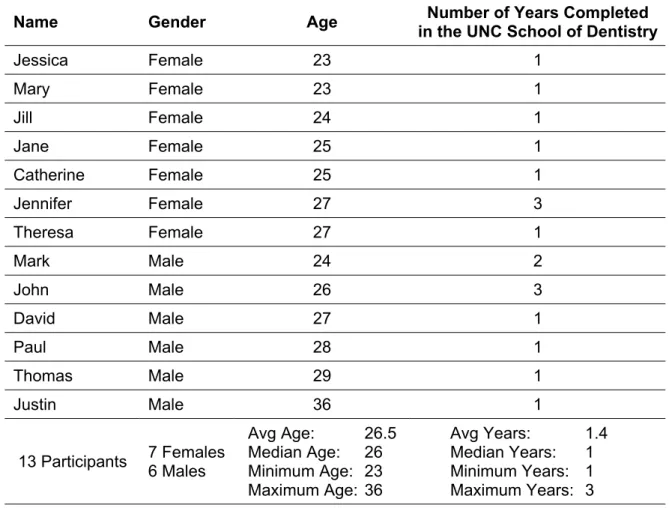
All participants graduated from a four year undergraduate program and were at least 23 years of age. Seven of the participants were female and five were male. As part of their academic instruction, they were required to use the Electronic Syllabus to view and print their course schedule and course material (i.e. course objectives,
handouts, lecture notes, supplemental material). All participants used the UNC School of Dentistry website more than 20 times within the last six months and between one and five times per week for reasons other than the Electronic Syllabus. This sample is well-educated, resourceful and experienced using the internet, particularly the UNC School of Dentistry website.
Table 1: Participant Characteristics
Name Gender Age in the UNC School of DentistryNumber of Years Completed
Jessica Female 23 1
Mary Female 23 1
Jill Female 24 1
Jane Female 25 1
Catherine Female 25 1
Jennifer Female 27 3
Theresa Female 27 1
Mark Male 24 2
John Male 26 3
David Male 27 1
Paul Male 28 1
Thomas Male 29 1
Justin Male 36 1
13 Participants 7 Females 6 Males
Avg Age: 26.5 Median Age: 26 Minimum Age: 23 Maximum Age: 36
Website Selection
As a world renowned dental school and the only dental school in the state of North Carolina, the UNC School of Dentistry website (http://www.dent.unc.edu/) attracts a variety of national and international audiences including faculty, staff, students,
patients, practitioners, benefactors and researchers. The school is recognized as one of the premier dental schools in the nation and has been ranked as one the top fifteen research institutions in National Institute of Health funding for more than five years1 (National Institute of Health, 2003). To its credit, the school is the only repository for the National Clefting Database and houses the Comprehensive Center for Inflammatory Diseases (CCID) and Center for Oral and System Diseases (COSD), two internationally recognized comprehensive care centers that provide specialized care for dental
disorders. Prospective students use the website to find information about admissions, financial aid, the academic and living environment, and dental careers. Current students use the website regularly to review course schedules and to access an electronic
syllabus that contains lecture outlines, handouts, exams, and reference material. Many users rely on the website to find contact information for and research opportunities with faculty who have unique expertise in clinical and investigative areas. Not least, patients use the website frequently to find information about dental disorders, referrals,
appointments, and directions to the school.
As of November 1, 2002, the UNC School of Dentistry website encompassed more than 300,000 files and 25 gigabytes of data; some files were dynamically
generated from more than 30 databases. From August 1, 2002 to November 1, 2002, the site averaged more than 1,400,000 page views and more than 68,000 unique visitors. The UNC School of Dentistry homepage (http://www.dent.unc.edu/) and the
Electronic Syllabus (http://www.dent.unc.edu/academic/syllabus/) were the two most visited webpages. See Appendix B for more website statistics.
During the study, the site was organized into a hierarchical structure. Most files were divided into the 10 main navigation categories (e.g., News & Events,
Administration, Academic Affairs, Departments & Units, Research, Patient Care, Resources, Dental Foundation, Alumni Association, Continuing Education). A few files were duplicated in more than one section of the website and a number of files were interlinked between categories. See Appendix C for a screen shot of the UNC School of Dentistry homepage and Appendix I for screen shots of webpages students were asked to find during this study. This website was chosen because of its popularity and its reputation for being a respectable and reliable information resource.
Interview Structure
Semi-structured interviews were used to ask participants questions about navigation decisions as they occurred. All one-on-one interview sessions were conducted using the same computer in the same office located in the UNC School of Dentistry. The length of time for each session varied depending on how quickly
participants completed assigned tasks and the amount of feedback given. On average, study sessions lasted about 30 minutes.
Before each study participant arrived, three internet Explorer 6.0 browser
pre-questionnaire was used to collect background information about the participants such as their age, gender and graduation class, as well as information about their current use of the School of Dentistry’s website.
Participants were then asked to think out loud as they completed five tasks in Context 1 and four tasks in Context 2. The tasks in Context 1 included questions that a student who has just graduated from a DDS program might ask: admissions information for the Orthodontics graduate program, a listing of faculty and staff in the Orthodontics department, admissions information for the Pediatric graduate program, scholarships and fellowships, the DentalOPPS job listing for DDS graduates, and the UNC School of Dentistry job listing. The tasks in Context 2 included questions from webpages that students should have visited before the study sessions: the student rosters, Dent 100 reading list, Dent 103 handouts, library resources, and continuing dental education courses. See Appendix H for details on contexts and tasks. After all tasks for each context were completed, participants were instructed to close the current browser window and open the next browser window.
Analysis
RESULTS AND DISCUSSION
Pre-Questionnaire Findings
UNC School of Dentistry Website Use
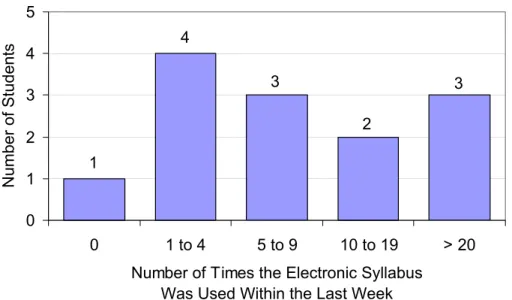
Figure 1: Number of Times Students Used the Electronic Syllabus within the Last Week
3 2
3 4
1
0 1 2 3 4 5
0 1 to 4 5 to 9 10 to 19 > 20 Number of Times the Electronic Syllabus
Was Used Within the Last Week
Number of Students
As expected, the two third year students used the Electronic Syllabus
infrequently. Third and fourth year students have more clinical requirements and less web supported classroom instruction. As a result, they have significantly less need for the electronic syllabus, excluding review. Due to the question’s ambiguity, the
responses may be an underestimate of how often students actually used the Electronic Syllabus. Several of the students asked if the question meant within the last seven days or within the “last week”. For example, if a student participated in a Thursday study session, they may have only counted the number of times they had used the Electronic Syllabus from that Monday to that Thursday.
Navigational Aids Used and Identified
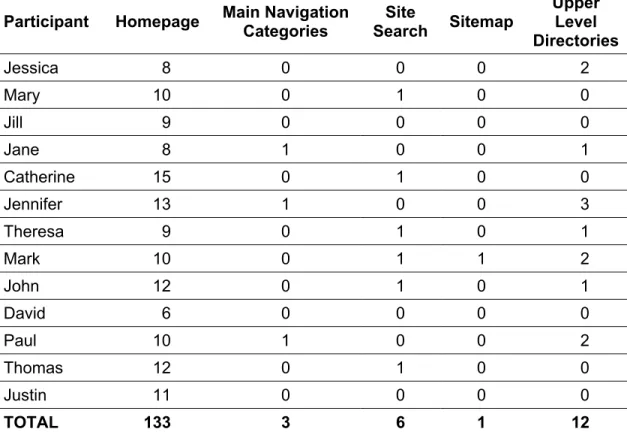
Table 2: Number of Times Each Navigational Aid Was Used in Both Contexts Participant Homepage Main Navigation Categories Search Site Sitemap
Upper Level Directories
Jessica 8 0 0 0 2
Mary 10 0 1 0 0
Jill 9 0 0 0 0
Jane 8 1 0 0 1
Catherine 15 0 1 0 0
Jennifer 13 1 0 0 3
Theresa 9 0 1 0 1
Mark 10 0 1 1 2
John 12 0 1 0 1
David 6 0 0 0 0
Paul 10 1 0 0 2
Thomas 12 0 1 0 0
Justin 11 0 0 0 0
TOTAL 133 3 6 1 12
*All clicks on the home text link in the upper level directories listing were counted as returns to the homepage
Table 3: Number of Times Each Navigational Aid Was Used in Context 1 Participant Homepage Main Navigation Categories Search Site Sitemap
Upper Level Directories
Jessica 6 0 0 0 2
Mary 7 0 1 0 0
Jill 6 0 0 0 0
Jane 4 1 0 0 1
Catherine 12 0 1 0 0
Jennifer 10 1 0 0 3
Theresa 6 0 1 0 1
Mark 7 0 1 1 2
John 9 0 1 0 1
David 4 0 0 0 0
Paul 8 1 0 0 2
Thomas 9 0 1 0 0
Justin 6 0 0 0 0
TOTAL 94 3 6 1 12
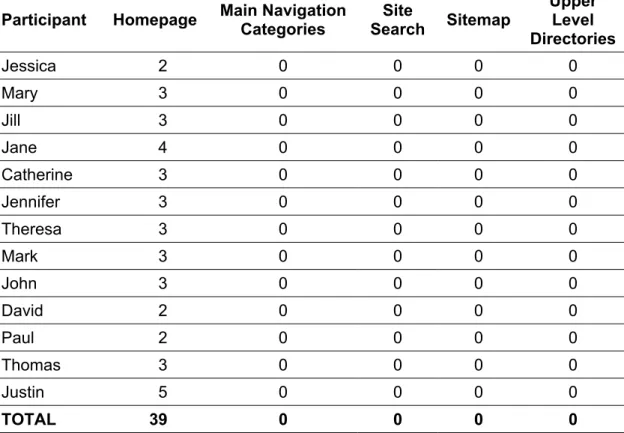
Table 4: Number of Times Each Navigational Aid Was Used in Context 2 Participant Homepage Main Navigation Categories Search Site Sitemap
Upper Level Directories
Jessica 2 0 0 0 0
Mary 3 0 0 0 0
Jill 3 0 0 0 0
Jane 4 0 0 0 0
Catherine 3 0 0 0 0
Jennifer 3 0 0 0 0
Theresa 3 0 0 0 0
Mark 3 0 0 0 0
John 3 0 0 0 0
David 2 0 0 0 0
Paul 2 0 0 0 0
Thomas 3 0 0 0 0
Justin 5 0 0 0 0
More Navigational Aids Used When Completing Unfamiliar Tasks
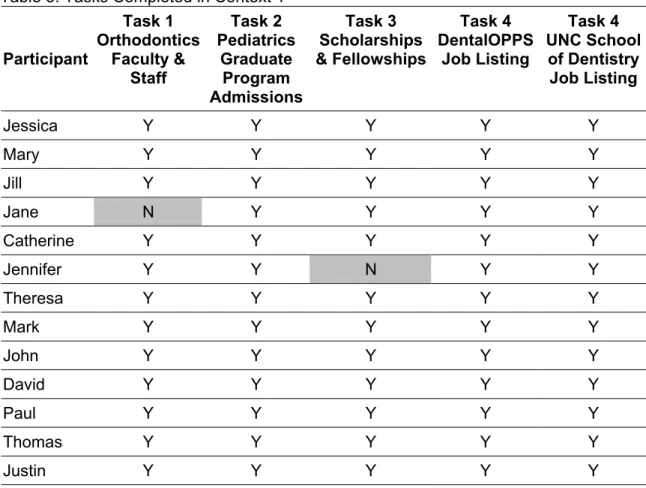
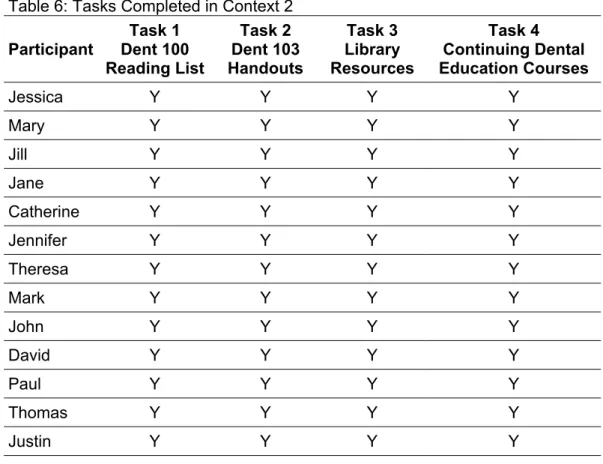
Although Context 1 had one more task than Context 2, this considerable difference is most likely due to the fact that students were less familiar with the tasks they were asked to complete in Context 1. Context 1 focused on questions that students who have just graduated from a Doctorate of Dental Surgery (DDS) program might ask whereas Context 2 focused on questions that a current student in the DDS program at the UNC School of Dentistry might ask. In Context 1, students completed all but two tasks (see Table 5) and used at least one navigational aid to complete each task. In Context 2, students completed all tasks (see Table 6). None of the students used a navigational aid to find the Dent 103 handouts, Task 2, and less than half of the students used a navigational aid to find library resources, Task 3.
Table 5: Tasks Completed in Context 1
Participant Task 1 Orthodontics Faculty & Staff Task 2 Pediatrics Graduate Program Admissions Task 3 Scholarships & Fellowships Task 4 DentalOPPS Job Listing Task 4 UNC School of Dentistry Job Listing
Jessica Y Y Y Y Y
Mary Y Y Y Y Y Jill Y Y Y Y Y
Jane N Y Y Y Y
Catherine Y Y Y Y Y
Jennifer Y Y N Y Y
Theresa Y Y Y Y Y
Mark Y Y Y Y Y John Y Y Y Y Y David Y Y Y Y Y Paul Y Y Y Y Y
Thomas Y Y Y Y Y
Table 6: Tasks Completed in Context 2 Participant Task 1 Dent 100 Reading List Task 2 Dent 103 Handouts Task 3 Library Resources Task 4 Continuing Dental Education Courses
Jessica Y Y Y Y
Mary Y Y Y Y
Jill Y Y Y Y
Jane Y Y Y Y
Catherine Y Y Y Y
Jennifer Y Y Y Y
Theresa Y Y Y Y
Mark Y Y Y Y
John Y Y Y Y
David Y Y Y Y
Paul Y Y Y Y
Thomas Y Y Y Y
Justin Y Y Y Y
In Context 1, the webpages for Tasks 1 and 2 were in the same upper level directory but in different folders. The faculty and staff listing for the Orthodontics department, Task 1, was located in the /depts/academic/ortho/ directory and the admissions information for the Pediatric graduate program, Task 2, was located in the /depts/academic/ped/ directory. The shortest path to complete Task 2 was four clicks. When asked to find the admissions information for the Pediatric Dentistry program, seven students returned to the homepage by using the back button in the browser and six students used the home text link in the upper level directories listing (counted as returning to the homepage).
bottom of the homepage). Next, they selected an Electronic Syllabus calendar or course listing view. Within seconds, they were able to find the reading list for Dent 100. To complete the next task, Task 2 in Context 2, students had to navigate to another course webpage to find handouts. Like the faculty and staff listing of the Orthodontics
department and the webpage for Pediatric Dentistry admissions information, these course pages were located in the same upper level directory but in different folders. The reading list was located in the /academic/syllabus/dds1/courses/dent100/ directory and the handout was located in the /academic/syllabus/dds1/courses/dent103/ directory. The shortest path from the reading list for Dent 100 to the handouts for Dent 103 was also four clicks. To find the handouts for Dent 103 on the same day, students clicked the back button until they returned to their preferred view of the Electronic Syllabus, not the homepage as they did when looking for the admissions information for the Pediatric graduate program.
Confusion Caused by Starting on a Webpage Other Than the Homepage
Many students showed signs of frustration and disorientation when asked to complete the first task in both contexts. They spent relatively little time orienting
themselves with where they were within the website’s directory structure. Instead, they immediately began clicking on links they thought were relevant to the question of interest. In Context 1, students were asked to navigate from a webpage with
Orthodontics admissions information to “a listing of faculty and staff in the Orthodontics
department.” See Appendix I for a screen shot of the webpage with Orthodontics admissions information. They did not realize that they were in the Academic Affairs section of the website and had to navigate to the Department and Units section of the website. Many of the students tried clicking on “Orthodontics” or “ADE” in the upper level directories listing. A few students clicked on the Advanced Dental Education (ADE) button in the left sidemenu. All of the students who clicked on the ADE text link or button then clicked on a text link to Orthodontics, which led them back to the same page that they had started. Jessica sighed, “I keep going to the same page. You don’t give hints, huh? Can I go home?”
Jane was the only person who could not find the faculty and staff listing for the Orthodontics department. While looking for the webpage, Jane asked in desperation, “I am trying everything now. I am stuck. Can you tell me where it is?” She appeared to be confused by having to start on the admissions information webpage for the
Orthodontics graduate program in the Academic Affairs section of the website. She exclaimed, “Can I go back to the beginning (referring to the homepage)? I was lost on the first page. It was confusing me.” She still appeared to be confused even after returning to the homepage several times. After more than five minutes of making
moment that she seemed to have re-oriented herself with where she was within the website. All other students were able to re-orient themselves with where they were within the website during their first visit to the homepage.
Navigational Aids Identified
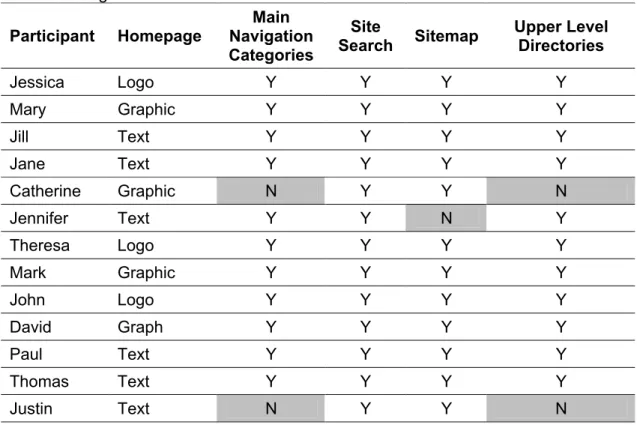
All students were able to find a link to the UNC School of Dentistry’s homepage and the site search. Two students could not find the main navigation categories and the links to the upper level directories. Only one student could not locate the sitemap. See Table 7 for navigational aids that students identified.
Table 7: Navigational Aids Identified Participant Homepage
Main Navigation Categories
Site
Search Sitemap
Upper Level Directories
Jessica Logo Y Y Y Y
Mary Graphic Y Y Y Y
Jill Text Y Y Y Y
Jane Text Y Y Y Y
Catherine Graphic N Y Y N
Jennifer Text Y Y N Y
Theresa Logo Y Y Y Y
Mark Graphic Y Y Y Y
John Logo Y Y Y Y
David Graph Y Y Y Y
Paul Text Y Y Y Y
Thomas Text Y Y Y Y
Justin Text N Y Y N
Perceived Purpose of the Navigational Aid with Links to the Upper Level Directories
links mimicked the abbreviated directory names in the page’s web address and showed how users can navigate from the school’s homepage to the current webpage (see Appendix E). Out of 13 students, six students did not use this navigational aid and two could not find this navigational aid when asked to point to the links to the upper level directories (see Table 7).
When asked if they had noticed the light blue bar with text links to the upper level directories before they were asked to point to it, eight students, including the two who could not locate this navigational aid, said no. Seven students said that they would not use this navigational aid and an additional two students said that they would only use this aid to return to the homepage. When asked if she noticed the upper level
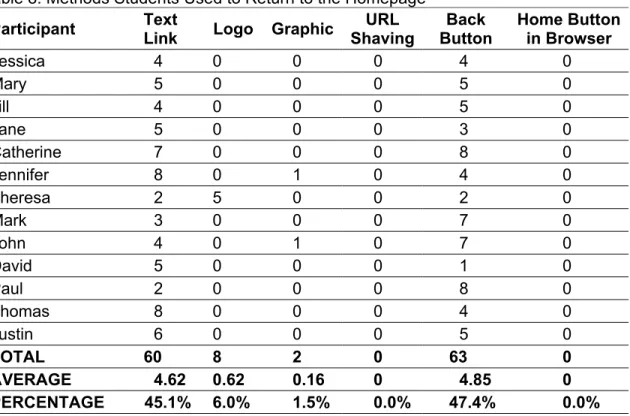
directories, Jane said, “I do just cause it says home. It’s a quick way to get back home. Usually I don’t have time to examine it.” In fact, all of the students interviewed used the home text link in the upper level directories listing at least two times. See Table 8 for the methods students used to return to the homepage.
Table 8: Methods Students Used to Return to the Homepage Participant Text
Link Logo Graphic
URL Shaving Back Button Home Button in Browser
Jessica 4 0 0 0 4 0
Mary 5 0 0 0 5 0
Jill 4 0 0 0 5 0
Jane 5 0 0 0 3 0
Catherine 7 0 0 0 8 0
Jennifer 8 0 1 0 4 0
Theresa 2 5 0 0 2 0
Mark 3 0 0 0 7 0
John 4 0 1 0 7 0
David 5 0 0 0 1 0
Paul 2 0 0 0 8 0
Thomas 8 0 0 0 4 0
Justin 6 0 0 0 5 0
TOTAL 60 8 2 0 63 0
Students seemed to view the upper level directories listing as a substitute for the back button instead of as a means for orienting themselves with where they were within the website. When asked when she would use this navigational aid, Jill remarked, “I would use it if I forgot something and needed to go back to a page. Instead of using the back key.” She did not use this navigational aid in either context, even when she
backtracked a number of times trying to find the listing of scholarships and fellowships. John explained why he would not use the listing,
“I probably wouldn’t ever use it. Depends on how I got to where I was. If I got to here by going through each of those, I would probably hit back if I wanted to go to a particular one. Basically, I would have already gotten to where I was that way. In this situation where I was here already and I don’t know how I got to that, I might use it but if I were using the webpage I would more likely use back than hit any of these.”
John only used links to the upper level directories when trying to find the faculty and staff listing for the Orthodontics department. He clicked on “Orthodontics” which returned him back to the same page that he started.
Homepage Was the Navigational Aid of Choice
In both contexts, returning to the homepage was the navigational aid of choice. Out of all the navigational aids used, students used the homepage as a navigational aid more than 86 percent of the time. They gave the following reasons when asked why they choose to return to the homepage.
Thomas: Oh, just cause it seems like it has everything you need to know. I don’t remember ever not finding something I needed.
Mark: I always go back home for almost everything I do. I’ve got it bookmarked on my computer. I just know how to get to everything from there that I have looked for fast.
Mary: I would go back to the homepage cause I know that page and I can use it to look around.
Theresa: That’s where I usually start cause I can usually figure out where I need to go from there. That’s what I always do. Cause it’s safe. I mean I like the homepage because it makes me remember things I need to look up. Like, oh yeah, I need to check…
Jane: I feel that that page is fairly informative on the different categories and the submenus drop down. I feel that you can find anything on the homepage.
Paul: Cause that’s the way I usually go. I can usually navigate to wherever I want to go from the homepage.
Students seemed to be comforted by their familiarity with the homepage. In fact, on several occasions, students returned to the homepage before the next task was read completely. They viewed it as a “safe place.” This was not always the case. Some of the students mentioned that at first they thought the UNC School of Dentistry homepage was “too busy,” but as they became more familiar with the page they appreciated the convenience of getting to popular resources such as the Electronic Syllabus within one or two clicks (see Appendix B for a list of the top 15 most visited resources on the UNC School of Dentistry website). The students especially liked the submenus that popped up when they moused over main navigation categories (see Appendix C). The
submenus allowed users to view and click on resources that were two and three levels deep into the website.
Like designers, the students also viewed the homepage as the starting point for all major navigation decisions. It seemed as if students used the homepage as a
the number of links users followed increased. When students became frustrated, they abandoned their current search strategy, returned to the homepage, and formulated a new search strategy.
The submenu feature seemed to have reduced the cognitive load placed on users and hence, the amount of frustration users experienced when navigating the website. They could examine the submenu items for each main navigation category one by one and from top to bottom. Users only had to remember the main navigation
How Should I Return Home?
The most common methods for returning to the homepage were the back button (47%) and the home text link in the upper level directories listing (45%). See Table 8 for methods students used to return to the homepage. The popularity of the back button has been well documented. Catledge and Pitlow (1995) and Tauscher and Greenberg (1997) reported that back button use consisted of 41% and 30% of user clicks.
Chakrabarti, Gibson, and McCurley’s (1999) study of volunteers using browsers with and without “backlinks” suggested that the addition of backlinks to browsers enhanced navigation for some users. In Zimmerman and Walls’ (2000) study, they observed that some participants purposely sought links, buttons, and navigational aids when trying to find information while others relied only on the back button. In their words, participants who relied only on the back button seemed “to navigate as if lost in a maze”
(Zimmerman & Walls, 2000, p. 583). In this study, students who relied most heavily on the back button were most likely to return to the homepage, perhaps in efforts to re-orient themselves with where they were within the “maze.”
Students seemed to have chosen a method of returning to the homepage based on habit and convenience. Some of them had developed a habit of using the back button. The back button and the home button in the browser are the only navigational aids for returning to a site’s homepage that remain consistent for every website visited. Their appearance and location do not change. In all, students used the back button to return to the homepage a total of 63 times. When asked if they were on a UNC School of Dentistry webpage, but not the homepage and wanted to return to the homepage, how would they return home, some of the students replied:
Jill I would probably type it in. If there were a link to the homepage, I would click on it. No, no, I would probably just click the back key to be honest with you. That’s what I normally do.
To use the browser’s home button students would have had to set the browser’s homepage to the UNC School of Dentistry’s homepage. None of the students used the browser’s home button, probably because they were unsure where the browser’s home button would take them. Only one student admitted to setting his personal browser to the UNC School of Dentistry homepage. When asked how he would return to the homepage, he said without hesitation that he would use the home button in his browser.
Two students said that they would use the logo to return to the homepage but only one student actually used this navigational aid during the study session. Theresa remarked, “I would use the icon (pointing to the UNC School of Dentistry logo). I am big on pictures." Most of the other students did not seem as if they knew that they could return to the homepage by clicking on the school’s logo. David answered with
excitement, “I would hit home on the directory structure. Or you can click here (pointing to the logo)! I just noticed the hand pop up.”
and then decided to “go back.” Furthermore, following this link was more practical than typing in the school’s web address. It required less time and energy, especially when students were already on a UNC School of Dentistry content page.
When Browsing Fails, Users Try the Site Search
The task requiring students to find the listing of all scholarships and fellowships in Context 1 was the hardest and least familiar task of all. The only webpage on the UNC School of Dentistry website that had a listing of scholarships and fellowships was under the Dental Foundation. Only one student expressed familiarity with the Dental
Foundation. Jane said, “I knew that cause I am familiar with the Dental Foundation. Whenever you need anything with money you go to the Dental Foundation.” All of the other students experienced great difficulty when trying to find this webpage.
Six of the students found the listing of scholarships and fellowships by browsing, six students found it by using the site search, and one student had to be told where to find this webpage. This was the only task in either context where students chose to use the site search, and all of the students who chose to use this navigational aid spent more than two minutes browsing and repeatedly returning to the homepage before they
decided to use the site search. When asked when they would use the site search, many students said that they would rather browse the website. They would only use the site search if they knew exactly what they were looking for and could not find it. This coincides with Campagnoni and Ehrlich’s (1992) finding that browsing is the
much and it doesn’t sort it into neat categories. I don’t know if this one does or not but that has been my experience with other websites.”
Some students asserted that since they were more familiar with the UNC School of Dentistry website, they would not use the site search as often as they would on other websites. Others mentioned that they might use the search more often if they were able to type search terms into a text box. See Appendix E for the drop down search menu. Jennifer commented, “If I were on another website and they had a search button, I would probably use it. I think that the fact that this has writing in it makes me not want to use it as much because I would have to click on it twice to get a place where I can type in it.” Gullikson, et al. (1999) also reported that when a “match” was not evident, users expected to find a place “to type words into” (p. 299).
What about the Sitemap?
Only one student knew what the sitemap was and used it during this study. Two students guessed what the sitemap was and five students said that they noticed the sitemap but had never used it. The majority of students said that if they had a choice between using the sitemap and the search, they would only use the sitemap if they could not think of a search term. Two students seemed excited when they viewed the sitemap for the first time. Jill gasped,
“Ahhh cool. That is neat. I think I would probably use that. I am serious. I really think I would. I think it makes it a lot faster if you know what you are looking for instead of surfing for it.”
She was the only student who said that she would use the sitemap if it were more noticeable.
website, neither student mentioned the sitemap. Thomas explained how he would find information on the school’s website and on an unfamiliar website:
Interviewer: If you were lost [on the school’s website], what would be the first thing you would do?
Thomas: Previously, it would be go home. I did that a lot when I was looking for things. Now that I know that the sitemap is here I would use that just because it’s a lot faster and I think that it’s better than the homepage.
Interviewer: If you were on another website that you were not familiar with and you were lost, let’s say you did a search on Google and the page you found wasn’t quite what you were looking for but you knew that that website had it what would you do? Thomas: Probably go back to the homepage, the main page of that
website and look for it again in the subcategories and subheading and if I can’t find it, do a search. Sometimes you get lost; you get so deep into the structure of the website you have no idea of where you’re at. Again, I haven’t used [the school’s website] for a whole lot more than the Electronic Syllabus and looking up departments and the schedule. It’s hard cause websites are all so different and you have to learn the website and its underpinning. Once you learn how this site has been setup, it is very logical. Interviewer: Do you think there is a learning curve?
Thomas: I think there is.
A few students said that now that they know what the sitemap is, they still would not use the sitemap. John remarked when asked if he would use the sitemap, “Probably not, because it is so busy and so small. It is difficult for me to read.” David explained what he would do if he were lost on the UNC School of Dentistry webpage:
“I would go back to the homepage. Hmmm. I could also use the sitemap but I don’t know if I would use that, though, to be honest with you,
Sitemaps can be a valuable resource when users have time to browse through all of the links. The UNC School of Dentistry’s sitemap, which contains over 220 links that can also be accessed from the school’s homepage, can be overwhelming. See Appendix I for a screen shot of the first page of the school’s sitemap. Perhaps the sitemap should be programmed in the same way as the homepage, where submenus appear as a result of user actions. The sitemap, though, would allow users to initiate the opening and closing of submenus. Submenus could be opened and remain open until the user chooses to close them and users could open submenus beyond tertiary level webpages. The current sitemap and homepage do not display links that are more than three levels deep into the site’s directory structure.
Sitemaps can also be helpful when building a cognitive map of a site’s directory structure. The initial investment in time can pay off later when users have to find information within a short period of time, given that they have not forgotten the
idiosyncrasies of the site’s structure. This strategy may be best suited for frequent users of an entire site. In this study, students seemed to be less interested in learning the website’s structure and more interested in finding frequently used information quickly. Students seemed to have developed an understanding of the directory structures for familiar resources through the repeated use of these resources. This is not surprising since the only resources they used on a weekly basis were academic related.
Why Users Did Not Utilize the Main Navigational Categories
Two students could not locate the main navigation categories; six students later revealed that they did not notice the main navigation categories before they were asked to point to them; and nine students said that they would not use the main navigational categories. Students did not give any reasons for why they did not notice the main navigation categories. Two plausible explanations may be their appearance and that students did not look for them. The main navigation categories blended in with the other parts of the webpage and therefore were not immediately obvious. This may not be a bad design feature since most students admitted that now that they know where the main navigation categories are located, they still would not use them. Students gave the following reasons for not using the main navigation categories:
Mark I wouldn’t use them. The main categories are listed on the top but I don’t think I would think of it until I get home. I would go back to the homepage cause I can get these other categories to come up whereas here I can’t.
John Rarely have I ever been in an occasion when I was looking on the website under one and I needed to go to the other. Usually if I want to go to one of the main ones, a lot of times I would go back to the homepage cause then it’s easy. Cause I know that they popup and give subcategories of each. Paul I don’t think I would ever use them. The most I use on the
school webpage is always from the school homepage.
SUMMARY AND CONCLUSION
This study has several limitations. Only 13 out of 234 second, third and fourth year students participated in this study. The only navigational aids that were studied were the homepage, site search, sitemap, main navigation categories and links to upper level directories. Although these are the most common navigational tools, there may be others that may be helpful to users. Furthermore, the UNC School of Dentistry website was the only website evaluated in this study. This website focuses on dental information whereas a typical university will encompass a broader range of information.
Even though this study has limitations, it yielded interesting results. Results from this study suggest that navigational aids, particularly the ability to return to the
homepage, are important elements of website design. Users viewed the homepage as one of the most, if not the most, important navigational aids. When starting on a webpage other than the homepage, all study participants returned to the homepage at least once before finding information to complete the next task. When navigating from one section of the website to another, participants preferred returning to the homepage so that they could review the popup submenus before making a selection. The two most frequently used methods for returning to the homepage were using the back button and clicking on the home text link in the upper level directory listing. Although the upper level directory listing, site search, sitemap, and main navigation categories were useful
BIBLIOGRAPHY
Albers, M.J. (1997). Cognitive strain as a factor in effective document design. In Proceedings of the 15th Annual International Conference on Computer Documentation,
Vol. 21, pp. 1-6, Salt Lake City, Utah, United States: ACM Press.
Campagnoni, F.R. & Ehrlich, K. (1989). Information retrieval using a hypertext-based help system. ACM Transactions on Information Systems, 7(3), 271-291.
Catledge, L., & Pitlow, J. (1995). Characterizing browsing strategies in the World Wide Web. Computer Networks and ISDN Systems, 27, 1065-1073.
Chakrabarti, S., Gibson, D.A., & McCurley, K.S. (1999). Surfing the Web backwards.
Computer Networks, 31(11-19), 1679-1693.
Chon, K. (1996). Internet inroad. Communications of the ACM, 39(6), 59-60.
Clausen, H. (1999). User-oriented evaluation of library and information centre Web sites.
New Library World, 100(1146), 5-10.
Coffman, K.G., & Odlyzko, A.M. (2002). Growth of the Internet. In Kaminow, I.P., & Tingye, L. (Eds.), Optical Fiber Telecommunications IV B: Systems and Impairments
(pp. 17-56). Academic Press. Available online April 9, 2003 at http://www.dtc.umn.edu/ ~odlyzko/doc/oft.internet.growth.pdf.
Cohen, L.B., & Still, J.M. (1999). A comparison of research university and two-year college library web sites: content, functionality, and form. College and Research Libraries, 60, 275-289.
Darken, R.P., & Sibert, J.L. (1993). A toolset for navigation in virtual environments. In Conference Proceedings of ACM User Interface Software & Technology,pp. 157-165, November 3-5, 1993, Atlanta, Georgia, United States: ACM Press.
Gullikson, S., Blades, R., Bragdon, M., McKibbon, S., Sparling, M., &
Toms, E.G. (1999). The impact of information architecture on academic Web site usability. Electronic Library, 17(5), 293-304.
Gulz, A. (2002). Spatially oriented and person oriented thinking – implications for user interface design. Education and Information Technologies, 7(1), 67-80.
Halio, M.P. (1992). Helping users navigate in multimedia documents: the affective domain. In Proceedings of the 10th Annual International Conference on Systems documentation, pp. 233-236, Ottawa, Ontario, Canada: ACM Press.
Hammond, N., & Allison, L. (1988). Travels around a learning support environment: rambling, orienteering or touring. In Proceedings of the SIGCHI Conference on Human Factors in Computing Systems, pp. 269-273, Washington, D.C., United States: ACM Press.
Hilligoss, P.B. (2001). The Role of Web Home Page Information Elements in User-Site Orientation Efforts. Unpublished master’s thesis, University of North Carolina at Chapel Hill, Chapel Hill, NC.
Kim, J. (1999). An empirical study of navigational aids in customer interfaces. Behaviour and Information Technology, 18, 213-224.
King, D.L. (1998). Library home page design: a comparison of page layout for front-ends to ARL Library web sites. College & Research Libraries, 59, 458-465.
Lawless K.A., & Brown, S.W. (1997). Multimedia learning environments: issues of learner control and navigation. Instructional Science, 25, 117-131.
Maquignaz, L., & Miller, J. (2002) Learning from our clients : Victoria University Library web site evaluation. In Proceedings of the 11th Biennial Conference and Exhibition: E-volving Information Futures, Vol. 1, pp. 343-358. February 6-8, 2002, Croydon, Victoria, Australia: Victorian Association for Library Automation Press. Available online April 9, 2003 at http://www.vala.org.au/vala2002/2002pdf/24MaqMil.pdf.
McDonald, S., & Stevenson, R.J. (1998). Navigation in hyperspace: an evaluation of the effects of the effects of navigational tools and subject matter expertise on browsing and information retrieval in hypertext. Interacting with Computers, 10, 129-142.
Mechitov A.I., & Underwood S., Moshkovich H.M., & Taylor R. (2001). Experimental study of academic web sites. Education, 121(4), 652-662.
National Institutes of Health, Office of Extramural Research. Award Trends. Retrieved April 7, 2003 http://grants2.nih.gov/grants/award/awardtr.htm
Newman, M.W., & Landay, J.A. (2000). Sitemaps, storyboards, and specifications: a sketch of web site design practice. In Proceedings of designing interactive systems: processes, practices, methods, and techniques, pp. 263-274, August 17-19, 2000, New York City, New York, United States.
National Institute of Health, Office of Extramural Research. (April 14, 2003). NIH Award Trends. Retrieved April 17, 2003, from http://grants2.nih.gov/grants/award/awardtr.htm Raward, R. (2001). Academic library website design principles: development of a checklist. Australian Academic & Research Libraries, 32(2), 123-136.
Shyu, H.S., & Brown, S.W. (1995). Learner-control: the effects on learning a procedural task during computer-based videodisc. International Journal of Instructional Media, 22(3), 217-232.
Stover, M., & Zink, S.D. (1996). World Wide Web home page design: patterns and anomalies of higher education library home pages. Reference Services Review, 24 (3), 7-20.
Tauscher, L.M., & Greenberg, S. (1997). How people revisit Web pages: empirical findings and implications for the design of history mechanisms. International Journal of Human-Computer Studies, 47, 94-137.
Vaughan, J. (2001). Three iterations of an academic library web site. Information Technology and Libraries, 20(2), 81-92.
APPENDIX A:
Student Profiles for the 1999-2001 Entering Classes GENERAL CLASS INFORMATION
Year Admitted: 1999 2000 2001
Expected Graduation Year: 2003 2004 2005
Total Applicants: 893 805 807
Total Students Accepted: 77 78 79
Acceptance Rate: 8.62% 9.69% 9.79%
Average Students Accepted: 78 Average Applicants: 836
Average Acceptance Rate: 9.34%
CLASS AVERAGES
Year Admitted 1999 2000 2001 1999-2001
Age: 23.8 24.9 24.8 24.5
Grade Point Average: Science 3.38 3.39 3.51 3.43 Grade Point Average: Non-Science 3.45 3.44 3.54 3.48 Dental School Admissions Test:
Academic Average
18.6 19.4 19.3 19.1
Dental School Admissions Test: Perceptual Ability
17.1 17.9 18.1 17.7
Dental School Admissions Test: Quantitative Reasoning
18.1 18.4 18.1 18.2
Dental School Admissions Test: Reading Comprehension
20.3 21.4 21.2 21.0
Dental School Admissions Test: Total Science
18.3 18.8 19.0 18.7
APPENDIX B Website Statistics
(August 1, 2002 to November 1, 2002) GENERAL WEBSITE STATISTICS
Total Successful Hits1 23,422,163
Average Successful Hits Per Day 254,588 Total Number of Pages Viewed2 1,400,170 Average Number of Pages Viewed Per Day 15,219
Total Number of Visits 308,593
Average Number of Visits Per Day 3,354
Number of Unique Visitors 68,577
1 The number requests made by a user. A webpage containing five graphics will generate six hits; one for the webpage and five for the graphics.
2 The number of times a visitor came to the site. If a visitor was idle for more than 30 minutes and then returns to the website, a new visit was counted.
TOP 10 VISITED RESOURCES
Resource Visits Views Avg. Time
Viewed 1 UNC School of Dentistry Homepage
http://www.dent.unc.edu/
113,336 191,612 3:50 2 Electronic Syllabus
http://www.dent.unc.edu/academic/syllabus/
16,390 23,979 0:24 3 Webmail1
http://www.dent.unc.edu/webmail/
16,248 22,746 5:06 4 For Prospective Students
http://www.dent.unc.edu/portals/students/ prospective/
8,797 14,516 0:53
5 Academic Programs – DDS
http://www.dent.unc.edu/academic/programs/dds/
8,404 14,876 0:52 6 Career in Dentistry2
http://www.dent.unc.edu/careers/
6,829 8,951 1:10 7 Electronic Syllabus – DDS 1 Calendar
http://www.dent.unc.edu/academic/syllabus/ dds1/calendar/
6,791 28,691 0:40
8 For Current Students
http://www.dent.unc.edu/portals/students/current/
5,934 9,524 0:27 9 People Search
http://www.dent.unc.edu/search/people/
4,897 6,321 0:21 10 Electronic Syllabus – DDS 2 Calendar
http://www.dent.unc.edu/academic/syllabus/ dds2/calendar/
4,303 22,955 0:35
TOP 15 GEOGRAPHIC REGIONS
Geographic Regions Visits
1 North America 241,464
2 Region Unspecified1 58,993
3 Western Europe 2,609
4 Asia 1,807
5 Middle East 1,288
6 South America 738
7 Australia 525
8 Northern Europe 416
9 Eastern Europe 352
10 Southern Africa 117
11 Pacific Islands 112
12 Region Not Found2 73
13 Caribbean Islands 55
14 Central America 29
15 Northern Africa 12
Total for the Geographic Regions above 308,590
1 Region Unspecified occurred when the region could not be determined from the visitors IP address
2 Region Not Found occurred when the visitor’s country code could not be found
APPENDIX C:
APPENDIX D:
APPENDIX E:
APPENDIX F: Informed Consent Form
A Study on the Utility of Navigational Aids on the UNC School of Dentistry Website
Informed Consent Form Introduction:
I am inviting you to participate in a research study on the utility of navigational aids on the UNC School of Dentistry website. The study will be conducted by Nicole Stevenson under the supervision of Dr. Barbara Wildemuth.
Purpose:
The purpose of this study is to determine the utility of navigational aids on webpages other than the homepage.
What Will Happen During the Study:
1. You will asked to complete a pre-questionnaire.
2. You will be asked to complete nine tasks requiring you to find information on the UNC School of Dentistry website.
3. You will be asked to identify navigational aids on UNC School of Dentistry webpages.
4. You will be asked general questions about these navigational aids. 5. You will be given $10 cash for participating in this study.
6. You will be videotaped and audiotaped during the entire study session. 7. If you have any questions or concerns about this study, you can contact: Researcher’s Contact Information: Research Advisor’s Contact Information:
Nicole Stevenson Barbara Wildemuth
[email protected] [email protected] 919-966-2912 (Work) 919-962-8072 (Work)
Your Privacy is Important:
• We will make every effort to protect your privacy.
• We will not use your name in any of the information we gather from this study or in any of the research reports.
• We will not release any information gathered in the study that can be traced to you.
• All information collected in this study session will be identified by your assigned pseudonym.
Risks and Discomforts:
We do not know of any personal risk or discomfort you will have from being in this study.
Your Rights:
• You can decide on your own whether you want to be in this study.
• You will not be treated any differently if you decide not to be in the study. • If you decide to be in the study, you will have the right to quit the study at any
time.
Institutional Review Board Approval:
The Academic Affairs Institutional Review Board (AA-IRB) of the University of North Carolina at Chapel Hill has approved this study. If you have any concerns about your rights in this study you may contact the AA-IRB at 919-962-7761 or at [email protected]
Your Consent:
I have had the chance to ask any questions I have about this study and they have been answered for me.
I have read the information in this consent form and I agree to be in the study. There are two copies of this form. I will keep one copy and return the other to Nicole Stevenson.
(Signature of Participant)
APPENDIX G: Pre-Questionnaire
1. Gender: Female Male
2. Age:
3. Graduation Year: 2003 2004 2005 2006
4. How many times have you used the website within the last week?
0 times < 5 times < 10 times < 20 times > 20 times
5. How many times have you used the website within the last six months?
0 times < 5 times < 10 times < 20 times > 20 times
6. Do you use the website for reasons other than the Electronic Syllabus?
yes no
7. How often do you use the website for reasons other than the Electronic Syllabus?
APPENDIX H: Contexts and Tasks
Context 1
Starting Page:
Admissions Information for the Orthodontics graduate program (see Appendix H for screen shot)
http://www.dent.unc.edu/academic/programs/ade/ortho/
* This webpage is located in the Academic Affairs section of the website. The only departmental faculty and staff listed in this section are those affiliated with Academic Affairs.
Task 1: Find a listing of all faculty and staff in the Orthodontics department * To find this webpage, users had to navigate from the Academic Affairs section of the website to the Departments and Units section.
Task 2: Find the Admissions Information for the Pediatric Graduate Program * This webpage is also located in the Departments and Units section of the website.
Task 3: Find a listing of all scholarships and fellowships
* This is the most difficult task. The only webpage on the UNC School of Dentistry website that has a listing of all scholarships and fellowships is under the Dental Foundation.
Task 4: Find the DentalOPPS job listing for DDS Graduates
* This webpage is located in the Alumni section of the website.
Task 5: Find the UNC School of Dentistry job listing
Context 2
Starting Page:
Student Rosters (see Appendix H for screen shot) https://www.dent.unc.edu/secure/student/rosters/
* This webpage is located in the Student Information section of the website, a section linked under Academic Affairs or the “For Current Students” section of the homepage.
Task 1: Find the reading list for Dent 100 – Social And Ethical Issues In Dental Practice on Thursday, October 17, 2002 at 9:00am
*This webpage is located in the Electronic Syllabus under the Academic Affairs section of the website.
Task 2: Find the handouts for Dent 103 – Biochemistry on the same day, Thursday, October 17, 2002 at 12:00pm
*This webpage is located in the Electronic Syllabus under the Academic Affairs section of the website.
Task 3: Find a webpage that lists library resources available to UNC School of Dentistry faculty and staff
*This webpage is located in the Resources section of the website.
Task 4: Find a webpage that lists Continuing Dental Education courses offered by the UNC School of Dentistry
APPENDIX I:
Screen Shots of Webpages Students Were Asked to Find STARTING WEBPAGE FOR CONTEXT 1:
SCHOLARSHIPS AND FELLOWSHIPS
APPENDIX J: INTERVIEW QUESTIONS
1. If you were on a UNC School of Dentistry webpage, but not the homepage, how would you return to the homepage?
2. Did you know how to return to the homepage before you were asked to locate and point to a link to the UNC School of Dentistry homepage?
3. Did you notice the main navigation categories before you were asked to locate and point to it?
4. When would you use the main navigation categories?
5. Did you notice the light blue bar with links to the upper level directories before you were asked to locate and point to it?
6. When would you use the links in the light blue bar?
7. Did you notice the search before you were asked to locate and point to it? 8. When would you use the search feature?
9. Did you notice the sitemap before you were asked to locate and point to it? 10. Do you know what a sitemap is? If yes, when would you use the sitemap? 11. If the sitemap was more visible, would you use the sitemap?