Administrator‟s Guide for Microsoft
Application Virtualization (App
-V) 5.0
MDOP Information Experience Team
Summary
:
Microsoft Application Virtualization (App-V) 5.0 helps businesses provide their end users with access to virtually any application, anywhere without installing applications directly on their computers.
Category:
Guide
Applies to
: App-V 5.0
Source
: TechNet Library (http://go.microsoft.com/fwlink/?LinkID=271502
)E-book publication date
: February 2013
Copyright © 2013 by Microsoft Corporation
All rights reserved. No part of the contents of this book may be reproduced or transmitted in any form or by any means without the written permission of the publisher.
Microsoft and the trademarks listed at
http://www.microsoft.com/about/legal/en/us/IntellectualProperty/Trademarks/EN-US.aspx are trademarks of the Microsoft group of companies. All other marks are property of their respective owners.
The example companies, organizations, products, domain names, email addresses, logos, people, places, and events depicted herein are fictitious. No association with any real company, organization, product, domain name, email address, logo, person, place, or event is intended or should be inferred.
This book expresses the author’s views and opinions. The information contained in this book is provided without any express, statutory, or implied warranties. Neither the authors, Microsoft Corporation, nor its resellers, or distributors will be held liable for any damages caused or alleged to be caused either directly or indirectly by this book.
Contents
Getting Started With App-V 5.0 ... 6
About App-V 5.0... 6
What's New in App-V 5.0 ... 7
Release Notes for App-V 5.0 ... 9
Evaluating App-V 5.0 ... 9
High Level Architecture for App-V 5.0 ... 10
Accessibility for App-V 5.0 ... 11
Planning for App-V 5.0 ... 13
Preparing Your Environment for App-V 5.0 ... 14
App-V 5.0 Prerequisites ... 14
Planning to Deploy App-V ... 23
App-V 5.0 Supported Configurations... 24
Planning for the App-V 5.0 Server Deployment ... 29
Planning for the App-V 5.0 Sequencer and Client Deployment ... 31
Planning for Migrating From a Previous Version ... 32
App-V 5.0 Planning Checklist ... 33
Deploying App-V 5.0 ... 34
Deploying the App-V 5.0 Sequencer and Client ... 35
How to Deploy the Client ... 38
About Client Configuration Settings ... 43
How to Install the App-V 4.6 SP2 Client and the App-V 5.0 Client on the Same Computer ... 56
How to Install the App-V 5.0 Client for Shared Content Store Mode ... 56
How to Install the Sequencer ... 57
How to Modify Client Configuration Using the ADMX Template and Group Policy ... 58
How to Uninstall the App-V 5.0 Client ... 58
Deploying the App-V 5.0 Server ... 59
How to Deploy the App-V 5.0 Server ... 61
How to Deploy the App-V 5.0 Server Using a Script ... 64
How to Install the Publishing Server on a Remote Computer ... 77
How to Install the Management and Reporting Databases on Separate Computers from the Management and Reporting Services... 79
How to install the Management Server on a Standalone Computer and Connect it to the Database ... 81
How to install the Reporting Server on a Standalone Computer and Connect it to the Database ... 82
App-V 5.0 Deployment Checklist ... 83
Operations for App-V 5.0 ... 84
Creating and Managing App-V 5.0 Virtualized Applications ... 84
How to Sequence a New Application with App-V 5.0 ... 87
How to Modify an Existing Virtual Application Package ... 95
How to Create a Virtual Application Package Using an App-V Package Accelerator ... 103
Administering App-V 5.0 Virtual Applications ... 105
About App-V 5.0 Dynamic Configuration ... 107
How to Connect to the Management Console ... 129
How to Add or Upgrade Packages Using the Management Console ... 129
How to Configure Access to Packages using the Management Console ... 130
How to Publish a Package Using the Management Console ... 131
How to Delete a Package in the Management Console... 131
How to Add or Remove an Administrator Using the Management Console ... 131
How to Register and Unregister a Publishing Server Using the Management Server ... 132
How to Create a Custom Configuration File Using the App-V 5.0 Management Console 133 How to Transfer Access and Configurations to Another Version of a Package Using the Management Console ... 133
How to Customize Virtual Applications Extensions for a Specific AD Group ... 133
How to View and Configure Applications and Default Virtual Application Extensions ... 134
Managing Connection Groups ... 135
About the Connection Group Virtual Environment ... 135
How to Create a Connection Group ... 137
How to Delete a Connection Group ... 137
How to Publish a Connection Group ... 137
Deploying App-V 5.0 Packages by Using Electronic Software Distribution (ESD) ... 138
How to deploy App-V 5.0 Packages Using Electronic Software Distribution ... 138
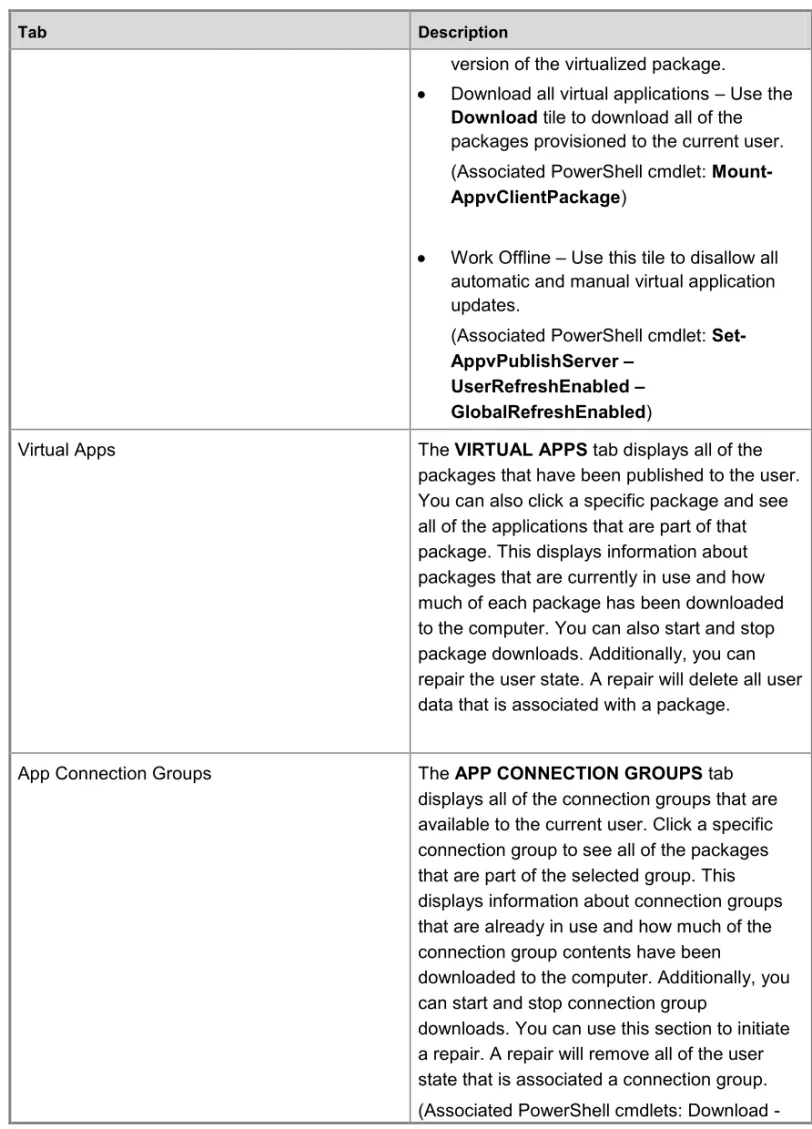
Using the App-V 5.0 Client Management Console ... 139
How to Access the Client Management Console ... 141
How to Configure the Client to Receive Package and Connection Groups Updates From the Publishing Server ... 141
Migrating from a Previous Version... 143
How to Convert a Package Created in a Previous Version of App-V ... 143
How to Migrate Extension Points From an App-V 4.6 SP2 Package to a Converted App-V 5.0 Package for All Users on a Specific Computer ... 145
How to Migrate Extension Points From an App-V 4.6 SP2 Package to App-V 5.0 for a Specific User ... 146
How to Revert Extension Points from an App-V 5.0 Package to an App-V 4.6 SP2 Package For All Users on a Specific Computer ... 146
How to Revert Extension Points From an App-V 5.0 Package to an App-V 4.6 SP2 Package for a Specific User ... 147
How to Use an App-V 4.6 SP1 Application From an App-V 5.0 Application ... 148
Maintaining App-V 5.0 ... 148
How to Move the App-V Server to Another Computer ... 149
Security App-V 5.0 ... 149
App-V 5.0 Security Considerations ... 149
Microsoft Application Virtualization 5.0 Privacy Statement ... 151
Administering App-V using PowerShell ... 151
How to Use the PowerShell Cmdlets ... 153
How to Apply the User Configuration File Using PowerShell ... 157
How to Apply the Deployment Configuration File Using PowerShell ... 157
How to Sequence a Package Using PowerShell ... 158
How to Create a Package Accelerator Using PowerShell... 159
How to Enable Reporting on the App-V 5.0 Client using PowerShell ... 160
How To Install the App-V Databases and Convert the Associated Security Identifiers (SID) Using PowerShell ... 161
Getting Started With App
-V 5.0
App-V 5.0 requires thorough planning before you deploy it or use its features. If you plan your deployment carefully and manage it so that it meets your business needs.
If you are new to this product, we recommend that you read the documentation thoroughly. Before you deploy it to a production environment, we also recommend that you validate your deployment plan in a test network environment. You might also consider taking a class about relevant technologies. For more information about Microsoft training opportunities, see the Microsoft Training Overview at http://go.microsoft.com/fwlink/p/?LinkId=80347.
You can download this administrator’s guide at http://go.microsoft.com/fwlink/?LinkId=269810 (http://go.microsoft.com/fwlink/?LinkId=269810).
This section of the App-V 5.0 Administrator’s Guide includes high-level information about App-V 5.0 to provide you with a basic understanding of the product before you begin the deployment planning.
About App-V 5.0
Provides a high-level overview of App-V 5.0 and how it can be used in your organization.
Evaluating App-V 5.0
Provides information about how you can best evaluate App-V 5.0 for use in your organization.
High Level Architecture for App-V 5.0
Provides a description of the App-V 5.0 features and how they work together.
Accessibility for App-V 5.0
Provides information about features and services that make this product and its corresponding documentation more accessible for people with disabilities.
About App
-V 5.0
What‟s new?
The following list displays what is new with App-V 5.0:
IT Diagnostics and Monitoring - App-V 5.0 enhances the ability to generate reporting information about computers running the App-V 5.0 client and virtualized packages.
End-to-End Programmability - Leveraging PowerShell 3.0, App-V 5.0 offers a complete programmability solution for packaging, client and server operations.
Simple and Effective Client Console - App-V 5.0 offers a modern client console designed to simplify the top end user and Tier 1 support engineer scenarios.
Use the following link to view updated product information and known issues for App-V 5.0.
What's New in App
-V 5.0
This section is for users who are already familiar with App-V and want to know what has changed in App-V 5.0 If you are not already familiar with App-V, you should start by reading Planning for App-V 5.0.
Changes in Standard Functionality
The following sections contain information about the changes in standard functionality for App-V 5.0.
Changes to Supported Operating Systems
For more information, see App-V 5.0 Supported Configurations.
Changes to the sequencer
The following sections contain information about the changes in the App-V 5.0 sequencer.
Specific change to the sequencer
The following table displays information about what has changed with the App-V 5.0 sequencer
Sequencer Feature App-V 5.0 Sequencer Functionality
Reboot processing When an application prompts for a restart, you should allow the application to restart the computer running the sequencer. The
computer running the sequencer will restart and the sequencer will resume in monitoring mode. Specifying the virtual application directory Virtual Application Directory is a mandatory
parameter. For best results, it should match the installation directory of the application installer. This results in more optimal performance and application compatibility. Editing shortcuts/FTAs The Shortcuts/FTA page is on the Advanced
editing page after the sequencing wizard has completed.
Change History Tab The Change History tab has been removed for App-V 5.0.
OSD Tab The OSD tab has been removed for App-V 5.0.
Sequencer Feature App-V 5.0 Sequencer Functionality
App-V 5.0.
Files/Virtual File System Tab These tabs are combined and allow you to modify package files.
Deployment Tab There are no longer options to configure the
server URL in the packages. You should configure this now using deployment configuration, or the management server. Package Converter Tool You can now use PowerShell to convert
packages created in previous versions.
Add-on/Middleware You can expand parent packages when you
are sequencing an Add-On or Middleware application. Add-ons and Middleware packages must be connected using connection groups in App-V 5.0.
Files output The following files are created with App-V 5.0,
Windows Installer (.msi), .appv, deployment configuration, user configuration, and the Report.XML.
Compression/Security descriptors/MSI packages
Compression and the creation of a Windows Installer (.msi) file are automatic for all packages and you can no longer override security descriptors.
Tools / Options The Diagnostics window has been removed as
well as several other settings.
Installation Drive An installation drive is no longer required when you install an application.
OOS Streaming If no stream optimization is performed,
packages are stream faulted when they are requested by computers running the App-V 5.0 client until they can launch.
Sequencing error detection
The App-V 5.0 sequencer can detect common sequencing issues during sequencing. The
Installation Report page at the end of the sequencing wizard displays diagnostic messages categorized into Errors, Warnings, and Info depending on the severity of the issue.
To display more detailed information about an event, double-click the item you want to review in the report. The sequencing issues, as well as suggestions about how to resolve the issues are displayed. Information from the system preparation report and the installation report are
summarized when you have finished creating a package. The following list displays the types of issues available in the report:
Excluded files.
Driver information.
COM+ system differences.
Side-by-side (SxS) conflicts.
Shell Extensions.
Information about unsupported services.
DCOM.
Connection Groups
The App-V feature formerly known as Dynamic Suite Composition is now referred to as
Connection Groups in App-V 5.0. For more information about using Connection Groups see Managing Connection Groups.
Release Notes for App
-V 5.0
Read the following release notes thoroughly before you install App-V 5.0: http://go.microsoft.com/fwlink/?LinkId=263602
Evaluating App
-V 5.0
Before you deploy Microsoft Application Virtualization (App-V) 5.0 into a production environment, you should evaluate it in a lab environment. You can use the information in this topic to set up App-V 5.0 in a lab environment for evaluation purposes only.
Configure lab computers for App
-V 5.0 Evaluation
Use the following link for information about setting up the App-V 5.0 sequencer on a computer in your lab environment.
Installing the App-V 5.0 Sequencer and Creating Packages
Use the following links for information about setting up the App-V 5.0 sequencer and creating packages in your lab environment.
How to Install the Sequencer
Configuring the App-V 5.0 Server
Use the following links for information about setting up the App-V 5.0 server in your lab environment.
How to Deploy the App-V 5.0 Server
Administering App-V 5.0 Virtual Applications
Installing the App-V 5.0 Client
Use the following link for more information about creating and managing virtualized packages in your lab environment.
How to Deploy the Client
How to Configure the Client to Receive Package and Connection Groups Updates From the Publishing Server
High Level Architecture for App
-V 5.0
Use the following information to help you simplify you Microsoft Application Virtualization (App-V) 5.0 deployment.
Architecture Overview
A typical App-V 5.0 implementation consists of the following elements.
Element More information
App-V 5.0 Management Server The App-V 5.0 Management server provides overall management functionality for the App-V 5.0 infrastructure. Additionally, you can install more than one instance of the management server in your environment which provides the following benefits:
Fault Tolerance and High Availability – Installing and configuring the App-V 5.0 Management server on two separate computers can help in situations when one of the servers is unavailable or offline. You can also help increase App-V 5.0 availability by installing the Management server on multiple computers. In this scenario, a network load balancer should also be considered so that server requests are balanced.
Scalability – You can add additional management servers as necessary to support a high load, for example you can
Element More information
install multiple servers behind a load balancer.
App-V 5.0 Publishing Server The App-V 5.0 publishing server provides functionality for virtual application hosting and streaming. The publishing server does not require a database connection and supports the following protocols:
HTTP, and HTTPS
You can also help increase App-V 5.0
availability by installing the Publishing server on multiple computers. A network load balancer should also be considered so that server requests are balanced.
App-V 5.0 Reporting Server The App-V 5.0 Reporting server enables authorized users to run and view existing App-V 5.0 reports and ad hoc reports that can help them manage the App-V 5.0 infrastructure. The Reporting server requires a connection to the App-V 5.0 reporting database. You can also help increase App-V 5.0 availability by installing the Reporting server on multiple computers. A network load balancer should also be
considered so that server requests are balanced.
App-V 5.0 Client The App-V 5.0 client enables packages created using App-V 5.0 to run on target computers.
If you are using App-V 5.0 with Electronic Software Distribution (ESD) you are not required to use the App-V 5.0 Management server, however you can still utilize the reporting and streaming functionality of App-V 5.0.
Accessibility for App
-V 5.0
Microsoft is committed to making its products and services easier for everyone to use. This section provides information about features and services that make this product and its corresponding documentation more accessible for people with disabilities.
Access Any Command with a Few Keystrokes
The information in this section only applies to the App-V 5.0 sequencer. For specific information about the App-V 5.0 server, see the Keyboard Shortcuts for the App-V 5.0 Management Server section of this document.
Access keys let you quickly use a command by pressing a few keys. You can get to most commands by using two keystrokes. To use an access key:
1. Press ALT.
The keyboard shortcuts are displayed over each feature that is available in the current view. 2. Press the letter shown in the keyboard shortcut over the feature that you want to use.
To cancel the action that you are taking and hide the keyboard shortcuts, press ALT.
Keyboard Shortcuts for the App
-V 5.0 Management Server
Keyboard Shortcuts for the App-V 5.0 Management Server:
To do this Press
Rename App-V 5.0 connection groups or the App-V 5.0 publishing server description.
F2
Transfer access and configuration information from an existing App-V 5.0 package.
CTRL + Shift + A
Transfer default configurations from an existing App-V 5.0 package.
CTRL + Shift + C
Refresh the current page of the App-V 5.0 client console.
F5
On the Connections Groups page of the client management console, copies as a new version.
CTRL + Shift + C
Documentation in Alternative Formats
If you have difficulty reading or handling printed materials, you can obtain the documentation for many Microsoft products in more accessible formats. You can view an index of accessible product documentation on the Microsoft Accessibility website. In addition, you can obtain additional Microsoft publications from Learning Ally (formerly Recording for the Blind & Dyslexic, Inc.). Learning Ally distributes these documents to registered, eligible members of their
distribution service.
Important
For information about the availability of Microsoft product documentation and books from Microsoft Press, contact:
Learning Ally (formerly Recording for the Blind & Dyslexic, Inc.)
20 Roszel Road Princeton, NJ 08540
Telephone number from within the United States:
(800) 221-4792
Telephone number from outside the United States and Canada:
(609) 452-0606
Fax: (609) 987-8116
http://www.learningally.org/ Web addresses can change, so you might be unable to connect to the website or sites mentioned here.
Customer Service for People with Hearing Impairments
If you are deaf or hard-of-hearing, complete access to Microsoft product and customer services is available through a text telephone (TTY/TDD) service:
For customer service, contact Microsoft Sales Information Center at (800) 892-5234 between 6:30 AM and 5:30 PM Pacific Time, Monday through Friday, excluding holidays.
For technical assistance in the United States, contact Microsoft Product Support Services at (800) 892-5234 between 6:00 AM and 6:00 PM Pacific Time, Monday through Friday, excluding holidays. In Canada, dial (905) 568-9641 between 8:00 AM and 8:00 PM Eastern Time, Monday through Friday, excluding holidays.
Microsoft Support Services are subject to the prices, terms, and conditions in place at the time the service is used.
For More Information
For more information about how accessible technology for computers helps to improve the lives of people with disabilities, see the Microsoft Accessibility website.
Planning for App
-V 5.0
The goal of deployment planning is to successfully and efficiently deploy Microsoft Application Virtualization (App-V) 5.0 so that it does not disrupt your users or the network.
There are a number of different deployment configurations and prerequisites that you must consider before you create your deployment plan. This section includes information that can help
you gather the information that you must have to formulate a deployment plan that best meets your business requirements.
Planning information
Preparing Your Environment for App-V 5.0
This section describes the computing environment requirements and installation prerequisites that should be planned for before beginning App-V 5.0 setup.
Planning to Deploy App-V
This section describes the minimum hardware and software requirements necessary for App-V 5.0 client, sequencer and server feature installations. Additionally, associated feature planning information is also displayed.
App-V 5.0 Planning Checklist
Planning checklist that can be used to assist in App-V 5.0 deployment planning.
Preparing Your Environment for App
-V 5.0
There are a number of different deployment configurations and prerequisites that you must consider before you create your deployment plan. This section includes information that can help you gather the information that you must have to formulate a deployment plan that best meets your business requirements.‖
Planning information
App-V 5.0 Prerequisites
Provides information about configuring your environment for running the App-V 5.0 client, Remote Desktop Services client, sequencer, and server
App
-V 5.0 Prerequisites
Before you begin the Microsoft Application Virtualization (App-V) 5.0 Setup, you should make sure that you have met the prerequisites to install the product. This topic contains information to help you successfully plan for preparing your computing environment before you deploy the App-V 5.0 features.
For computers that run Windows 8 or Windows Server 2012, the following prerequisites are already installed:
Microsoft Windows .NET Framework 4.5. This eliminates the Microsoft Windows .NET Framework 4 requirement.
Windows PowerShell 3.0
Update for Windows KB2533623
Installation prerequisites for App-V 5.0 Note
The following prerequisites are already installed for computers that run Windows 8.
Each of the App-V 5.0 features have specific prerequisites that must be met before the App-V 5.0 features can be successfully installed.
Prerequisites for the App-V 5.0 client
The following table lists the installation prerequisites for the App-V 5.0 client:
Prerequisite Details
Software requirements Microsoft Windows .NET Framework 4 (Full Package) (http://go.microsoft.com/fwlink/?LinkId=272940) Windows PowerShell 3.0 (http://www.microsoft.com/en-us/download/details.aspx?id=29939) Note
Installing PowerShell 3.0 requires a restart.
Download and install KB2533623
(http://go.microsoft.com/fwlink/?LinkId=272935)
The client installer will detect if it is necessary to install the following prerequisites, and it will do so accordingly:
The Microsoft Visual C++ 2010 Redistributable
(http://go.microsoft.com/fwlink/?LinkId=268 896)
The Microsoft Visual C++ 2005 SP1 Redistributable
Prerequisites for the App-V 5.0 Remote Desktop Services client
The following prerequisites are already installed for computers that run Windows Server 2012.
The following table lists the installation prerequisites for the App-V 5.0 Remote Desktop Services client:
Prerequisite Details
Software requirements Microsoft Windows .NET Framework 4 (Full Package)
(http://go.microsoft.com/fwlink/?LinkId=272940)
Prerequisite Details
Windows PowerShell 3.0 (http://www.microsoft.com/en-us/download/details.aspx?id=29939)
Note
Installing PowerShell 3.0 requires a restart.
Download and install KB2533623
(http://go.microsoft.com/fwlink/?LinkId=272935)
The client installer will detect if it is necessary to install the following prerequisites, and it will do so accordingly:
The Microsoft Visual C++ 2010 Redistributable
(http://go.microsoft.com/fwlink/?LinkId=268 896)
The Microsoft Visual C++ 2005 SP1 Redistributable
Prerequisites for the App-V 5.0 Sequencer
The following prerequisites are already installed for computers that run Windows 8 and Windows Server 2012.
The following table lists the installation prerequisites for the App-V 5.0 Sequencer. If possible, the computer that runs the Sequencer should have the same hardware and software configurations as the computers that will run the virtual applications.
If the system requirements of a locally installed application exceed the requirements of the Sequencer, you must meet the requirements of that application. Additionally, because the sequencing process is system resource-intensive, we recommend that the computer that runs the Sequencer has plenty of memory, a fast processor, and a fast hard drive. For more information see App-V 5.0 Supported Configurations.
Prerequisite Details
Software requirements Microsoft Windows .NET Framework 4 (Full Package)
(http://go.microsoft.com/fwlink/?LinkId=272 940)
Note
Prerequisite Details
Windows PowerShell 3.0 (http://www.microsoft.com/en-us/download/details.aspx?id=29939)
Download and install KB2533623
(http://go.microsoft.com/fwlink/?LinkId=272 935)
Prerequisites for the App-V 5.0 server
The following prerequisites are already installed for computers that run Windows Server 2012:
Microsoft Windows .NET Framework 4.5. This eliminates the Microsoft Windows .NET Framework 4 requirement.
Windows PowerShell 3.0
Update for Windows KB2533623
The following table lists the installation prerequisites for the App-V 5.0 server. The account that you use to install the server components must have administrative rights on the computer that you are installing on. This account must also have the ability to query Active Directory Directory Services. Before you install and configure the App-V 5.0 servers, you must specify a port where each component will be hosted. You must also add the associated firewall rules to allow incoming requests to the specified ports.
Web Distributed Authoring and Versioning (WebDAV) is automatically disabled for the Management Service.
The App-V 5.0 server is supported for a standalone deployment, where all the components are deployed on the same server, and a distributed deployment. Depending on the topology that you use to deploy the App-V 5.0 server, the data that you will need for each component will slightly change.
The installation of the App-V 5.0 server on a computer that runs any previous version or component of App-V is not supported. Additionally, the installation of the server
components on a computer that runs Server Core or a Domain Controller is also not supported.
Prerequisite Details
Management Server Microsoft Windows .NET Framework 4 (Full Package)
(http://go.microsoft.com/fwlink/?LinkId=272
Note
Note
Prerequisite Details 940) Windows PowerShell 3.0 (http://www.microsoft.com/en-us/download/details.aspx?id=29939) Note
Installing PowerShell 3.0 requires a restart.
Windows Web Server with the IIS role enabled and the following features:
Common HTTP Features (static content and default document), Application
Development (ASP.NET, .NET
Extensibility, ISAPI Extensions and ISAPI Filters), Security (Windows Authentication, Request Filtering), Management Tools (IIS Management Console).
Download and install KB2533623
(http://go.microsoft.com/fwlink/?LinkId=272 935) Microsoft Visual C++ 2010 SP1 Redistributable Package (x64) (http://go.microsoft.com/fwlink/?LinkId=272 937) Microsoft Visual C++ 2010 SP1 Redistributable Package (x86) (http://go.microsoft.com/fwlink/?LinkId=272 938)
64-bit ASP.NET registration The App-V 5.0 server components are
dependent but they have varying requirements and installation options that must be deployed. Use the following information to prepare your environment to run the App-V 5.0 management server.
Installation location - by default this component will be installed to:
%PROGRAMFILES%\Microsoft Application Virtualization Server.
Location of the App-V 5.0 management database - SQL Server Name, SQL Instance Name, Database Name.
Prerequisite Details
Access rights for the App-V 5.0
management console - This is the user or the group that should be granted access to the management console at the end of the deployment. After the deployment, only these users will have access to the management console until additional administrators are added through the management console.
Note
Security groups and single users are not supported. You must specify an AD DS group.
App-V 5.0 management service website name – specify a name for the website or use the default name.
App-V 5.0 management service port binding - this should be a unique port number that is not used by another website on the computer.
Support for Microsoft Silverlight– Microsoft Silverlight must be installed before the management console is available. While this is not a requirement for the
deployment, the server must be able to support Microsoft Silverlight.
Management Database
Note
The database is required only when using the App-V 5.0 management server.
Microsoft Windows .NET Framework 4 (Full Package) (http://go.microsoft.com/fwlink/?LinkId=272 940) Microsoft Visual C++ 2010 SP1 Redistributable Package (x86) (http://go.microsoft.com/fwlink/?LinkId=267 110)
Prerequisite Details
and installation options that must be deployed. Use the following information to prepare your environment to run the App-V 5.0 management database.
Installation location - by default this component will be installed to
%PROGRAMFILES%\Microsoft Application Virtualization Server.
Custom SQL Server instance name (if applicable) – the format should be
INSTANCENAME, because the installation assumes that it is on the local machine. If you specify the name with the following format, SVR\INSTANCE will fail.
Custom App-V 5.0 database name (if applicable) – you must specify a unique database name. The default value for the management database is
AppVManagement.
App-V 5.0 management server location – specifies the machine account on which the management server is deployed. This should be specified in the following format
Domain\MachineAccount.
App-V 5.0 management server installation administrator - specifies the account that will be used to install the App-V 5.0 management server. You should use the following format:
Domain\AdministratorLoginName.
Reporting Server Microsoft Windows .NET Framework 4 (Full Package) (http://www.microsoft.com/en-us/download/details.aspx?id=17718) Microsoft Visual C++ 2010 SP1 Redistributable Package (x86) (http://go.microsoft.com/fwlink/?LinkId=267 110)
Windows Web Server with the IIS role with the following features: Common HTTP
Features (static content and default document), Application Development
Prerequisite Details
Extensions and ISAPI Filters), Security
(Windows Authentication, Request Filtering), Security (Windows Authentication, Request Filtering),
Management Tools (IIS Management Console)
64-bit ASP.NET registration
Installation location - by default this component is installed to
%PROGRAMFILES%\Microsoft Application Virtualization Server.
App-V 5.0 reporting service website name – specifies the name of the website or the default name that will be used.
App-V 5.0 reporting service port binding - This should be a unique port number that is not already used by another website that runs on the computer.
Reporting Database
Note
The database is required only when using the App-V 5.0 reporting server.
Microsoft Windows .NET Framework 4 (Full Package) (http://www.microsoft.com/en-us/download/details.aspx?id=17718) Microsoft Visual C++ 2010 SP1 Redistributable Package (x86) (http://go.microsoft.com/fwlink/?LinkId=267 110)
The App-V 5.0 server components are
dependent but they have varying requirements and installation options that must be deployed. Use the following information to prepare your environment to run the App-V 5.0 reporting database.
Installation location - by default this component will be installed to
%PROGRAMFILES%\Microsoft Application Virtualization Server.
Prerequisite Details
INSTANCENAME, because the installation assumes that it is on the local machine. If you specify the name with the following format, SVR\INSTANCE will fail.
Custom App-V 5.0 database name (if applicable) – you must specify a unique database name. The default value for the reporting database is AppVReporting.
App-V 5.0 reporting server location – specifies the machine account on which the reporting server is deployed. This should be specified in the following format
Domain\MachineAccount.
App-V 5.0 reporting server installation administrator - specifies the account that will be used to install the App-V 5.0 reporting server. You should use the following format:
Domain\AdministratorLoginName.
Publishing Server Microsoft Windows .NET Framework 4 (Full Package) (http://www.microsoft.com/en-us/download/details.aspx?id=17718) Microsoft Visual C++ 2010 SP1 Redistributable Package (x86) (http://go.microsoft.com/fwlink/?LinkId=267 110)
Windows Web Server with the IIS role with the following features: Common HTTP Features (static content and default document), Application Development
(ASP.NET, .NET Extensibility, ISAPI Extensions and ISAPI Filters), Security
(Windows Authentication, Request Filtering), Security (Windows Authentication, Request Filtering),
Management Tools (IIS Management Console)
64-bit ASP.NET registration The App-V 5.0 server components are
dependent but they have varying requirements and installation options that must be deployed. Use the following information to prepare your
Prerequisite Details
environment to run the App-V 5.0 publishing server.
Installation location - by default this component is installed to
%PROGRAMFILES%\Microsoft Application Virtualization Server.
App-V 5.0 management service URL – specifies the URL of the App-V 5.0 management service. This is the port that the publishing server communicates with, and it should be specified using the following format: http://localhost:12345.
App-V 5.0 publishing service website name – specifies the name of the website or the default name that will be used.
App-V 5.0 publishing service port binding - This should be a unique port number that is not already used by another website that runs on the computer.
Planning to Deploy App
-V
You should consider a number of different deployment configurations and prerequisites before you create your deployment plan for Microsoft Application Virtualization (App-V) 5.0. This section includes information that can help you gather the information that you must have to formulate a deployment plan that best meets your business requirements.
Review the App
-V 5.0 Supported Configurations
After preparing your computing environment for the App-V 5.0 feature installation, make sure that you review the Supported Configurations information for App-V 5.0 to confirm that the computers on which you are installing the App-V 5.0 features meet the minimum hardware and operating system requirements. For more information about App-V 5.0 prerequisites, see App-V 5.0 Prerequisites.
App-V 5.0 Supported Configurations
Plan for App
-V 5.0 Server deployment
If you plan to use a server-based deployment scenario for your App-V 5.0 environment, it is important to understand the differences between the types and functions of the App-V 5.0 servers.
Planning for the App-V 5.0 Server Deployment
Plan for App
-V 5.0 Sequencer and Client
Sequencing, the process used by App-V 5.0 to create virtual applications and application
packages, requires the use of a computer with the App-V 5.0 software installed. Before you install the sequencer you should understand the best methods for running the sequencer and creating virtualized applications.
Planning for the App-V 5.0 Sequencer and Client Deployment
Planning for Migrating from a Previous Version
Before attempting to upgrade to App-V 5.0 you should understand the recommended path so that existing server configurations, packages and clients will function in your new App-V 5.0
environment.
Planning for Migrating From a Previous Version
App
-V 5.0 Supported Configurations
This topic specifies the requirements that are necessary to install and run Microsoft Application Virtualization (App-V) 5.0 in your environment.
App-V 5.0 server system requirements
The App-V 5.0 server does not support the following scenarios:
Deployment to a computer that runs Microsoft Windows Server Core.
Deployment to a computer that runs a previous version of App-V 5.0 server components.
You can install App-V 5.0 side-by-side with the App-V 4.5 Lightweight Streaming Server (LWS) server only. Deployment of App-V 5.0 side-by-side with the App-V 4.5 Application Virtualization Management Service (HWS) server is not supported.
Deployment to a computer that runs Microsoft SQL Server Express edition.
Remote deployment of the management server database or the reporting database. The installer must be run directly on the computer running Microsoft SQL for the database installation to succeed.
Deployment to a domain controller.
Short paths are not supported. If you plan to use a short path you must create a new volume.
Important
The following table lists the operating systems that are supported for the App-V 5.0 management server installation.
Microsoft provides support for the current service pack and, in some cases, the
immediately preceding service pack. To find the support timelines for your product, see the Lifecycle Supported Service Packs. For additional information about Microsoft Support Lifecycle Policy, see Microsoft Support Lifecycle Support Policy FAQ.
Operating system Edition Service pack System architecture
Microsoft Windows Server 2008 (Standard, Enterprise, Datacenter, or Web Server)
R2 SP1 and higher 64-bit
Microsoft Windows Server 2012 (Standard, Datacenter)
64-bit
Deployment of the management server role to a computer with Remote Desktop Sharing (RDS) enabled is not supported.
Management Server hardware requirements
Processor—1.4 GHz or faster, 64-bit (x64) processor
RAM— 1 GB RAM (64-bit)
Disk space—200 MB available hard disk space, not including the content directory.
Publishing Server operating system requirements
The following table lists the operating systems that are supported for the App-V 5.0 publishing server installation.
Microsoft provides support for the current service pack and, in some cases, the
immediately preceding service pack. To find the support timelines for your product, see the Lifecycle Supported Service Packs. For additional information about Microsoft Support Lifecycle Policy, see Microsoft Support Lifecycle Support Policy FAQ.
Operating system Edition Service pack System architecture
Microsoft Windows R2 64-bit
Note
Important
Operating system Edition Service pack System architecture Enterprise, Datacenter, or Web Server) Microsoft Windows Server 2012 (Standard, Datacenter) 64-bit
Publishing Server hardware requirements
Processor—1.4 GHz or faster. 64-bit (x64) processor
RAM— 2 GB RAM (64-bit)
Disk space—200 MB available hard disk space. not including content directory
Reporting Server operating system requirements
The following table lists the operating systems that are supported for the App-V 5.0 reporting server installation.
Microsoft provides support for the current service pack and, in some cases, the
immediately preceding service pack. To find the support timelines for your product, see the Lifecycle Supported Service Packs. For additional information about Microsoft Support Lifecycle Policy, see Microsoft Support Lifecycle Support Policy FAQ.
Operating system Edition Service Pack System architecture
Microsoft Windows Server 2008 (Standard, Enterprise, Datacenter, or Web Server) R2 64-bit Microsoft Windows Server 2012 (Standard, Datacenter) 64-bit
Reporting Server hardware requirements
Processor—1.4 GHz or faster. 64-bit (x64) processor
RAM—2 GB RAM (64-bit)
Disk space—200 MB available hard disk space
SQL Server database requirements
The following table lists the SQL Server versions that are supported for the App-V 5.0 database and server installation.
App-V 5.0 server type
SQL Server version Edition Service pack System
architecture Management / Reporting Microsoft SQL Server 2008 (Standard, Enterprise, Datacenter, or the Developer Edition with the following feature: Database Engine Services.) 32-bit or 64-bit Management / Reporting Microsoft SQL Server 2008 (Standard, Enterprise, Datacenter, or the Developer Edition with the following feature: Database Engine Services.) R2 SP2 32-bit or 64-bit Management / Reporting Microsoft SQL Server 2012 (Standard, Enterprise, Datacenter, or the Developer Edition with the following feature: Database Engine Services.)
32-bit or 64-bit
App-V 5.0 client system requirements
The installation of the App-V 5.0 client on a computer that runs Windows Server is not supported.
The following table lists the operating systems that are supported for the App-V 5.0 client installation.
Microsoft provides support for the current service pack and, in some cases, the
immediately preceding service pack. To find the support timelines for your product, see the Lifecycle Supported Service Packs. For additional information about Microsoft Support Lifecycle Policy, see Microsoft Support Lifecycle Support Policy FAQ.
Operating system Service pack System architecture
Microsoft Windows 7 SP1 32-bit or 64-bit
Microsoft Windows 8 Professional 32-bit or 64-bit
Client hardware requirements
The following list displays the supported hardware configuration for the App-V 5.0 client installation.
Processor— 1.4 GHz or faster 32-bit (x86) or 64-bit (x64) processor
RAM— 1 GB (32-bit) or 2 GB (64-bit)
Disk— 100 MB for installation, not including the disk space that is used by virtualized applications.
App-V 5.0 Remote Desktop client system requirements
The following table lists the operating systems that are supported for App-V 5.0 Remote Desktop client installation.
Microsoft provides support for the current service pack and, in some cases, the
immediately preceding service pack. To find the support timelines for your product, see the Lifecycle Supported Service Packs. For additional information about Microsoft Support Lifecycle Policy, see Microsoft Support Lifecycle Support Policy FAQ.
Operating system Edition Service pack
Microsoft Windows Server 2008 R2 SP1
Microsoft Windows Server 2012
Remote Desktop client hardware requirements Note
The following list displays the supported hardware configuration for the App-V 5.0 client installation.
Processor— 1.4 GHz or faster 32-bit (x86) or 64-bit (x64) processor
RAM— 1 GB (32-bit) or 2 GB (64-bit)
Disk— 100 MB for installation, not including the disk space that is used by virtualized applications.
App-V 5.0 Sequencer system requirements
The following table lists the operating systems that are supported for App-V 5.0 Sequencer installation.
Microsoft provides support for the current service pack and, in some cases, the
immediately preceding service pack. To find the support timelines for your product, see the Lifecycle Supported Service Packs. For additional information about Microsoft Support Lifecycle Policy, see Microsoft Support Lifecycle Support Policy FAQ.
Operating system Edition Service pack System architecture
Microsoft Windows 7 SP1 32-bit and 64-bit
Microsoft Windows 8 32-bit and 64-bit
Microsoft Windows Server 2008
R2 SP1 32-bit and 64-bit
Microsoft Windows Server 2012
32-bit and 64-bit
Planning for the App
-V 5.0 Server Deployment
The Microsoft Application Virtualization (App-V) 5.0 server infrastructure consists of a set of specialized features that can be installed on one or more server computers, based on the requirements of the enterprise.
Planning for App-V 5.0 Server Deployment
The App-V 5.0 server consists of the following features:
Management Server – provides overall management functionality for the App-V 5.0 infrastructure.
Management Database – facilitates database predeployments for App-V 5.0 management.
Publishing Server – provides hosting and streaming functionality for virtual applications.
Reporting Database – facilitates database predeployments for App-V 5.0 reporting.
Listed following are the recommended methods for installing the App-V 5.0 server infrastructure:
Install the App-V 5.0 server. For more information, see How to Deploy the App-V 5.0 Server.
Install the database, reporting, and management features on separate computers. For more information, see How to Install the Management and Reporting Databases on Separate Computers from the Management and Reporting Services.
Use Electronic Software Distribution (ESD). For more information, see How to deploy App-V 5.0 Packages Using Electronic Software Distribution.
Install all server features on a single computer.
Server-Related Protocols and External Features
The following displays information about server-related protocols used by the App-V 5.0 servers. The table also includes the reporting mechanism for each server type.
Server Type Protocols External Features
Needed Reporting IIS server HTTP HTTPS This server-protocol combination requires a mechanism to synchronize the content between the Management Server and the Streaming Server. When using HTTP or HTTPS, use an IIS server to download ICO and OSD files and a firewall to protect the server from exposure to the Internet.
Internal
File SMB This server-protocol
combination requires support to
synchronize the content between the Management Server and the Streaming Server. Use a client computer with file sharing or streaming
Server Type Protocols External Features Needed
Reporting
capability.
Planning for the App
-V 5.0 Sequencer and Client Deployment
Before you can start to use Microsoft Application Virtualization (App-V) 5.0, you must install the App-V 5.0 sequencer, the App-V 5.0 client, and optionally the App-V 5.0 shared content store. The following sections address planning for these installations.
Planning for App-V 5.0 sequencer deployment
App-V 5.0 uses a process called sequencing to create virtualized applications and application packages. Sequencing requires the use of a computer that runs the App-V 5.0 sequencer.
For information about the new functionality of App-V 5.0 sequencer, see the Changes to the sequencer section of What's New in App-V 5.0.
The computer that runs the App-V 5.0 sequencer must meet the minimum system requirements. For a list of these requirements, see App-V 5.0 Supported Configurations.
Ideally, you should install the sequencer on a computer running as a virtual machine. This enables you to more easily revert the computer running the sequencer to a ―clean‖ state before sequencing another application. When you install the sequencer using a virtual machine, you should perform the following steps:
1. Install all associated sequencer prerequisites. 2. Install the sequencer.
3. Take a ―snapshot‖ of the environment.
You should have your corporate security team review and approve the sequencing process plan. For security reasons, you should keep the sequencer operations in a lab that is separate from the production environment. The separation arrangement can be as simple or as comprehensive as necessary, based on your business requirements. The sequencing computers must be able to connect to the corporate network to copy finished packages to the production servers. However, because the sequencing computers are typically operated without antivirus protection, they must not be on the corporate network unprotected. For example, you might be able to operate behind a firewall or on an isolated network segment. You might also be able to use virtual machines that are configured to share an isolated virtual network. Follow your corporate security policies to safely address these concerns.
How to Install the Sequencer
Note
Planning for App-V 5.0 client deployment
To run virtualized packages on target computers, you must install the App-V 5.0 client on the target computers. The App-V 5.0 client is the component that runs a virtualized application on a target computer. The client enables users to interact with icons and specific file types to start virtualized applications. The client also helps obtain application content from the management server and caches the content before the client starts the application. There are two different client types: the client for Remote Desktop Services, which is used on Remote Desktop Session Host (RD Session Host) server systems and the App-V 5.0 client, which is used for all other computers.
The App-V 5.0 client should be configured by using either the installer command line or by using a PowerShell script after the installation has been completed.
The settings must be defined carefully in advance in order to expedite the deployment of the App-V 5.0 client software. This is especially important when you have computers in different offices where the clients must be configured to use different source locations.
You must also determine how you will deploy the client software. Although it is possible to deploy the client manually on each computer, most organizations prefer to deploy the client through an automated process. A larger organization might have an operational Electronic Software Distribution (ESD) system, which is an ideal client deployment system. If no ESD system exists, you can use your organization’s standard method of installing software. Possible methods include Group Policy or various scripting techniques. Depending on the quantity and disparate locations of your client computers, this deployment process can be complex. You must use a structured approach to ensure that all computers get the client installed with the correct configuration. For a list of the client minimum requirements see App-V 5.0 Prerequisites.
How to Deploy the Client
Planning for the App-V 5.0 Shared Content Store (SCS)
The App-V 5.0 shared content store mode allows the computer running the App-V 5.0 client to run virtualized applications and none of the package contents is saved on the computer running the App-V 5.0 client. Virtual applications are streamed to target computers only when requested by the client.
The following list displays some of the benefits of using the App-V 5.0 shared content store:
Reduced app-to-app and multi-user application conflicts and hence a reduced need for regression testing
Accelerated application deployment by reduction of deployment risk
Simplified profile management
How to Install the App-V 5.0 Client for Shared Content Store Mode
Planning for Migrating From a Previous Version
Before you attempt to upgrade to App-V 5.0 or later versions, any version prior to 4.6 SP2 must be upgraded to version 4.6 SP2. You should plan to upgrade your clients first, and then upgrade the server components.
App-V 5.0 supports only packages that are created using App-V 5.0 or packages that have been converted to the App-V 5.0 (.appv) format.
App-V 5.0 client coexistence with previous version
App-V 5.0 client is allowed to run on the same computer with the App-V 4.6 SP2 version of the client. This coexistence helps to make the migration easier. With both client versions running, you can convert an App-V 4.6 SP2 package to the App-V 5.0 format and both packages can be published. You can define the migration policy for the converted package, which will allow the converted App-V 5.0 package to assume the file type associations and shortcuts from the App-V 4.6 SP2 package.
App-V 5.0 can co-exist only on computers that run App-V 4.6 SP2. The migration is not supported if App-V 4.6 SP2 is not installed. You must apply App-V 4.6 SP2 before you install App-V 5.0.
App-V 5.0 client coexistence is supported for the following scenario:
The computer is running App-V 4.6 SP2, and App-V 5.0 is also installed on the same computer.
For more information about how to configure App-V 5.0 client coexistence, see How to Install the App-V 4.6 SP2 Client and the App-V 5.0 Client on the Same Computer.
Convert previous-version packages using the package converter
Before you migrate a package that was created using App- 4.6 SP2 or earlier to App-V 5.0, you must convert the package to the .appv file format.
The Package Converter only supports direct conversion of packages created using App-V 4.5 and later. To use the package converter on a package created using a previous version, you must use an App-V 4.5 or later version of the sequencer to upgrade the package, and then you can perform the package conversion.
For more information about converting a package using the package converter, see How to Convert a Package Created in a Previous Version of App-V. After the file has been converted, you can deploy to target computers that run the App-V 5.0 client.
App
-V 5.0 Planning Checklist
This checklist can be used to help you plan for preparing your computing environment for Microsoft Application Virtualization (App-V) 5.0 deployment.
Important
Important
This checklist outlines the recommended steps and a high-level list of items to consider when planning for an App-V 5.0 deployment. It is recommended that you copy this checklist into a spreadsheet program and customize it for your use.
Task References Notes
Review the getting started information about App-V 5.0 to gain a basic understanding of the product before beginning deployment planning.
Getting Started With App-V 5.0
Plan for App-V 5.0 1.0 Deployment Prerequisites and prepare your
computing environment.
App-V 5.0 Prerequisites
If you plan to use the App-V 5.0 management server, plan for the required roles.
Planning for the App-V 5.0 Server Deployment
Plan for the App-V 5.0 sequencer and client so you to create and run virtualized applications.
Planning for the App-V 5.0 Sequencer and Client Deployment
If applicable, review the options and steps for migrating from a previous version of App-V.
Planning for Migrating From a Previous Version
Plan for running App-V 5.0 clients using in shared content store mode.
How to Install the App-V 5.0 Client for Shared Content Store Mode
Deploying App
-V 5.0
Microsoft Application Virtualization (App-V) 5.0 (App-V 5.0) supports a number of different deployment options. This section of the App-V 5.0 Administrator’s Guide includes information you should consider about the deployment of App-V 5.0 and step-by-step procedures to help you successfully perform the tasks that you must complete at different stages of your deployment.
App
-V 5.0 Deployment Information
Deploying the App-V 5.0 Sequencer and ClientThis section describes how to install the App-V 5.0 sequencer which is used to virtualize applications, and the App-V 5.0 client which runs on target computers to facilitate virtualized packages.
Deploying the App-V 5.0 Server
This section provides information about installing the App-V 5.0 management, publishing, database and reporting severs.
App-V 5.0 Deployment Checklist
This section provides a deployment checklist that can be used to assist with installing App-V 5.0.
Deploying the App
-V 5.0 Sequencer and Client
The App-V 5.0 Sequencer and client enable administrators to virtualize and run virtualized applications.
Deploy the client
The App-V 5.0 client is the component that runs a virtualized application on a target computer. The client enables users to interact with icons and to double-click file types, so that they can start a virtualized application. The client can also obtain the virtual application content from the management server.
Installation of the standard version of the App-V 5.0 client on computers that run
Windows Server is not supported. Installation of the App-V 5.0 Remote Desktop services client is only supported for RDS enabled servers.
By default, after you install the App-V 5.0 client, the client information is stored in the registry in the following registry key:
HKEY_LOCAL_MACHINE \ SOFTWARE \ MICROSOFT \ APPV \ CLIENT. When you deploy a virtualized package to a client, the associated package data is stored in the following location: C:
\ ProgramData \ App-V. However, this location can be re-configured with the following registry key:
HKEY_LOCAL_MACHINE \ SOFTWARE \ MICROSOFT \ SOFTWARE \ MICROSOFT \ APPV \ CLIENT \ STREAMING \ PACKAGEINSTALLATIONROOT.
The following directories must be available on a local volume for each user that logs into the computer running the App-V 5.0 client:
%APPDATA% \ Microsoft \ AppV \ Client \ VFS
%LOCALAPPDATA% \ Microsoft \ AppV \ Client \ VFS
For log file information that is associated with the App-V 5.0 client, search in the following log:
Finally, packages that are currently stored on computers that run the App-V 5.0 client are saved to the following location: C:\ProgramData\App-V\<package id>\<version id>.
You can also deploy the App-V 4.6 client side-by-side with the App-V 5.0 client. Client
coexistence requires that you add or publish virtualized applications by using either a deployment configuration file or a user configuration file, because there are certain settings in these
configuration files that must be configured in order for App-V 5.0 to function with App-V 4.6 clients. When a package is upgraded by using either the client or the server, the package must resubmit the configuration file. This is true for any package that has a corresponding configuration file, so it is not specific to client coexistence. However, if you do not submit the configuration file during the package upgrade, then the package state will not function as expected in coexistence scenarios.
App-V 5.0 dynamic configuration files customize a package for a specific user. You must create the dynamic user configuration (.xml) file or the dynamic deployment configuration file before you can use them. To create the file it requires an advanced manual operation.
When a dynamic user configuration file is used, none of the App-V 5.0 information for the extension in the manifest file is used. This means that the dynamic user configuration file must include everything for the extension that is specific to App-V 5.0 in the manifest file, as well as the changes that you want to make, such as, deletions and updates. For more information about how to create a custom configuration file, see How to Create a Custom Configuration File Using the App-V 5.0 Management Console.
How to Deploy the Client
How to Uninstall the App-V 5.0 Client
How to Install the App-V 4.6 SP2 Client and the App-V 5.0 Client on the Same Computer
Client Configuration Settings
The App-V 5.0 client stores its configuration in the registry. You can gather some useful information about the client if you understand the format of data in the registry. You can also configure many client actions by changing registry entries.
About Client Configuration Settings
Configure the client by using the ADMX template and Group Policy
You can use the Microsoft ADMX template to configure the client settings for the App-V 5.0 client and the Remote Desktop Services client. The ADMX template manages common client
configurations by using an existing Group Policy infrastructure and it includes settings for the App-V 5.0 client configuration.
You can obtain the App-V 5.0 ADMX template from the Microsoft Download Center.
After you download and install the ADMX template, perform the following steps on the computer that you will use to manage Group Policy. This is typically the Domain Controller.
2. Save the .adml file to the following directory: Windows \ PolicyDefinitions \ <Language
Directory>
After you have completed the preceding steps, you can manage the App-V 5.0 client configuration settings with the Group Policy Management console.
The App-V 5.0 client also stores its configuration in the registry. You can gather some useful information about the client if you understand the format of the data in the registry. You can also configure many client actions by changing registry entries.
How to Modify Client Configuration Using the ADMX Template and Group Policy
Deploy the client by using the Shared Content Store mode
The App-V 5.0 Shared Content Store (SCS) mode enables the SCS App-V 5.0 clients to run virtualized applications without saving any of the associated package data locally. All required virtualized package data is transmitted across the network; therefore, you should only use the SCS mode in environments with a fast connection. Both the Remote Desktop Services (RDS) and the standard version of the App-V 5.0 client are supported with SCS mode.
If the App-V 5.0 client is configured to run in the SCS mode, the location where the App-V 5.0 packages are streamed from must be available, otherwise, the virtualized package will fail. Additionally, we do not recommend deployment of virtualized applications to computers that run the App-V 5.0 client in the SCS mode across the internet.
Additionally, the SCS is not a physical location that contains virtualized packages. It is a mode that allows the App-V 5.0 client to stream the required virtualized package data across the network.
The SCS mode is helpful in the following scenarios:
Virtual desktop infrastructure (VDI) deployments
Remote desktop services (RDS) deployments
To use SCS in your environment, you must enable the App-V 5.0 client to run in SCS mode. This setting should be specified during installation. By default, the client is not configured to use SCS mode. You should install the client by using the suggested procedure if you plan to use SCS. However, you can configure an existing App-V 5.0 client to run in SCS mode by entering the following PowerShell command on the computer that runs the App-V 5.0 client:
set-AppvClientConfiguration -SharedContentStoreMode 1
There might be cases when the administrator pre-loads some virtual applications on the computer that runs the App-V 5.0 client in SCS mode. This can be accomplished with PowerShell
commands to add, publish, and mount the package. For example, if a package is pre-loaded on all computers, the administrator could add, publish, and mount the package by using PowerShell commands. The package would not stream across the network because it would be locally stored.
How to Install the App-V 5.0 Client for Shared Content Store Mode
Deploy the Sequencer
The Sequencer is a tool that is used to convert standard applications into virtual packages for deployment to computers that run the App-V 5.0 client. The Sequencer helps provide a simple and predictable conversion process with minimal changes to prior sequencing workflows. In addition, the Sequencer allows users to more easily configure applications to enable connections of virtualized applications.
For a list of changes in the App-V 5.0 Sequencer, see What's New in App-V 5.0. How to Install the Sequencer
App
-V 5.0 client and Sequencer logs
You can use the App-V 5.0 Sequencer log information to help troubleshoot the Sequencer installation and operational events while using App-V 5.0. The Sequencer-related log information can be reviewed with the Event Viewer. The following line displays the specific path for
Sequencer-related events:
Event Viewer \ Applications and Services Logs \ Microsoft \ App V. Sequencer-related events are prepended with AppV_Sequencer. Client-related events are prepended with
AppV_Client.
How to Deploy the Client
Use the following procedure to install the Microsoft Application Virtualization (App-V) 5.0 client and Remote Desktop Services client. You must install the version of the client that matches the operating system of the target computer.
Running the App-V 5.0 client on computers running App-V 4.6 SP1 or prior versions is not supported. Additionally, installing the client on a computer that runs Windows Server is not supported.
The computer on which you plan to install the App-V 5.0 client must be running Microsoft .NET 4 Framework (Full) and Microsoft KB 2533623, and PowerShell 3.0. Otherwise, the installation will fail.
1. Copy the App-V 5.0 client installation files to the computer on which it will be installed. To install the standard version of the client, double-click appv_client_setup.exe and click
Install. To install the Remote Desktop Services version of the client, double-click
appv_client_setup_rds.exe and click Install. Before the installation begins, the installer will evaluate the computer for any missing App-V 5.0 Prerequisites.
Important