NMEA Reference Manual
SiRF Technology, Inc. 148 East Brokaw Road San Jose, CA 95112 U.S.A. Phone: +1 (408) 467-0410 Fax: +1 (408) 467-0420 www.SiRF.com
1050-0042
January 2005, Revision 1.3
SiRF, SiRFstar, and SiRF plus orbit design are registered in the U.S. Patent and Trademark Office. This document contains information on a product under development at SiRF. The information is intended to help you evaluate this product. SiRF reserves the right to change or discontinue work on this product without notice.
ii NMEA Reference Manual—January 2005
NMEA Reference Manual
Copyright © 1996-2005 SiRF Technology, Inc. All rights reserved.
No part of this work may be reproduced or transmitted in any form or by any means, electronic or mechanical, including photocopying and recording, or by any information storage or retrieval system without the prior written permission of SiRF Technology, Inc. unless such copying is expressly permitted by United States copyright law. Address inquiries to Legal Department, SiRF Technology, Inc., 148 East Brokaw Road, San Jose, California 95112, United States of America.
About This Document
This document contains information on SiRF products. SiRF Technology, Inc. reserves the right to make changes in its products, specifications and other information at any time without notice. SiRF assumes no liability or responsibility for any claims or damages arising out of the use of this document, or from the use of integrated circuits based on this document, including, but not limited to claims or damages based on infringement of patents, copyrights or other intellectual property rights. SiRF makes no warranties, either express or implied with respect to the information and specifications contained in this document. Performance characteristics listed in this data sheet do not constitute a warranty or guarantee of product performance. All terms and conditions of sale are governed by the SiRF Terms and Conditions of Sale, a copy of which you may obtain from your authorized SiRF sales
representative.
Getting Help
If you have any problems contact your SiRF representative or call or send an e-mail to the SiRF Technology support group:
phone +1 (408) 467-0410
iii
Contents
Preface . . . .
ix
1. Output Messages. . . .
1-1
GGA —Global Positioning System Fixed Data . . . .
1-2
GLL—Geographic Position - Latitude/Longitude . . . .
1-3
GSA—GNSS DOP and Active Satellites. . . .
1-4
GSV—GNSS Satellites in View . . . .
1-5
MSS—MSK Receiver Signal. . . .
1-5
RMC—Recommended Minimum Specific GNSS Data. . . .
1-6
VTG—Course Over Ground and Ground Speed . . . .
1-7
ZDA—SiRF Timing Message . . . .
1-7
150—OkToSend . . . .
1-8
2. Input Messages . . . .
2-1
Transport Message . . . .
2-1
NMEA Input Messages . . . .
2-2
100—SetSerialPort . . . .
2-2
iv NMEA Reference Manual—January 2005
101—NavigationInitialization . . . .
2-3
102—SetDGPSPort . . . .
2-4
103—Query/Rate Control . . . .
2-5
104—LLANavigationInitialization . . . .
2-6
105—Development Data On/Off . . . .
2-6
106—Select Datum . . . .
2-7
MSK—MSK Receiver Interface . . . .
2-8
v
Figures
vii
Tables
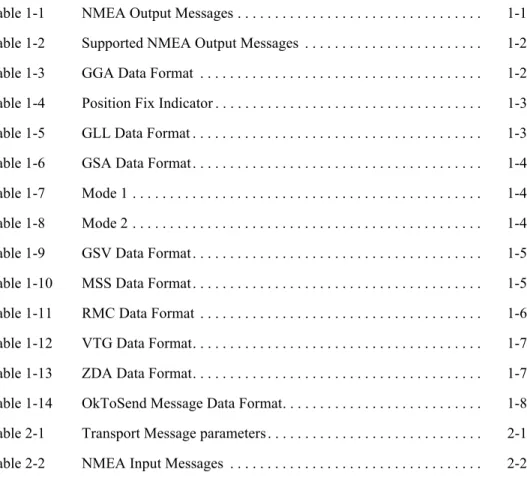
Table 1-1 NMEA Output Messages . . . 1-1 Table 1-2 Supported NMEA Output Messages . . . 1-2 Table 1-3 GGA Data Format . . . 1-2 Table 1-4 Position Fix Indicator . . . 1-3 Table 1-5 GLL Data Format . . . 1-3 Table 1-6 GSA Data Format. . . 1-4 Table 1-7 Mode 1 . . . 1-4 Table 1-8 Mode 2 . . . 1-4 Table 1-9 GSV Data Format. . . 1-5 Table 1-10 MSS Data Format. . . 1-5 Table 1-11 RMC Data Format . . . 1-6 Table 1-12 VTG Data Format. . . 1-7 Table 1-13 ZDA Data Format. . . 1-7 Table 1-14 OkToSend Message Data Format. . . 1-8 Table 2-1 Transport Message parameters . . . 2-1 Table 2-2 NMEA Input Messages . . . 2-2
viii NMEA Reference Manual—January 2005
Table 2-3 Supported NMEA Input Messages. . . 2-2 Table 2-4 Set Serial Port Data Format . . . 2-3 Table 2-5 Navigation Initialization Data Format . . . 2-3
Table 2-6 Reset Configuration - Non SiRFLoc Platforms . . . 2-4
Table 2-7 Reset Configuration - SiRFLoc Specific . . . 2-4 Table 2-8 Set DGPS Port Data Format . . . 2-4
Table 2-9 Query/Rate Control Data Format (See example 1) . . . 2-5
Table 2-10 Messages . . . 2-5 Table 2-11 LLA Navigation Initialization Data Format . . . 2-6 Table 2-12 Reset Configuration . . . 2-6 Table 2-13 Development Data On/Off Data Format . . . 2-7 Table 2-14 Select Datum Data Format . . . 2-7 Table 2-15 RMC Data Format . . . 2-8
ix
Preface
All SiRF product support a subset of the NMEA-0183 standard for interfacing marine electronic devices as defined by the National Marine Electronics Association (NMEA). The NMEA Reference Manual provides details of NMEA messages developed and defined by SiRF. It does not provide information about the complete NMEA-0183 interface standard.
Who Should Use This Guide
This manual was written assuming the user has a basic understanding of interface protocols and their use.
How This Guide Is Organized
This manual contains the following chapters:
Chapter 1, “Output Messages” defines SiRF developed NMEA output messages.
Chapter 2, “Input Messages” defines SiRF developed NMEA input messages.
Related Manuals
You can refer to the following document for more information:
•
NMEA-0183 Standard For Interfacing Marine Electronic Devices•
SiRF Binary Protocol Reference Manual•
SiRF Evaluation Kit User Guidex NMEA Reference Manual—January 2005
Contacting SiRF Technical Support
Address:
SiRF Technology Inc. 148 East Brokaw Road San Jose, CA 95112 U.S.A. SiRF Technical Support:
Phone: +1 (408) 467-0410 (9 am to 5 pm Pacific Standard Time)
Email: [email protected]
General enquiries:
Phone: +1 (408) 467-0410 (9 am to 5 pm Pacific Standard Time)
1-1
Output Messages
1
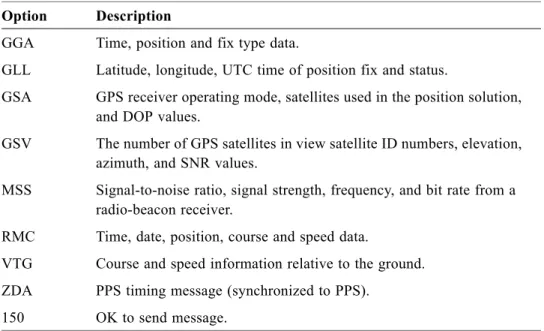
Table 1-1 lists each of the NMEA output messages specifically developed and defined by SiRF for use within SiRF products.
Table 1-1 NMEA Output Messages Option Description
GGA Time, position and fix type data.
GLL Latitude, longitude, UTC time of position fix and status.
GSA GPS receiver operating mode, satellites used in the position solution,
and DOP values.
GSV The number of GPS satellites in view satellite ID numbers, elevation,
azimuth, and SNR values.
MSS Signal-to-noise ratio, signal strength, frequency, and bit rate from a
radio-beacon receiver.
RMC Time, date, position, course and speed data.
VTG Course and speed information relative to the ground.
ZDA PPS timing message (synchronized to PPS).
150 OK to send message.
1-2 NMEA Reference Manual—January 2005
1
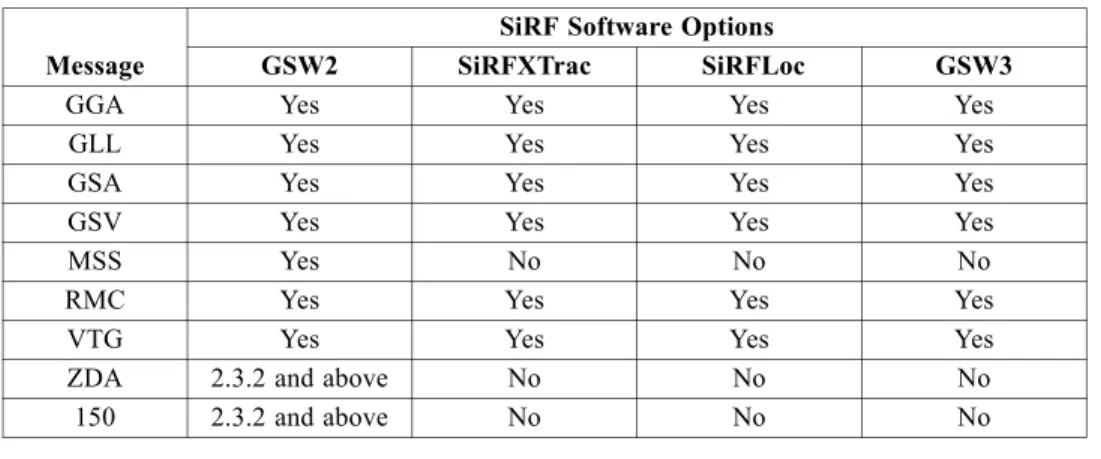
Table 1-2 provides a summary of SiRF NMEA output messages supported by the specific SiRF platforms.
Table 1-2 Supported NMEA Output Messages
Message
SiRF Software Options
GSW2 SiRFXTrac SiRFLoc GSW3
GGA Yes Yes Yes Yes
GLL Yes Yes Yes Yes
GSA Yes Yes Yes Yes
GSV Yes Yes Yes Yes
MSS Yes No No No
RMC Yes Yes Yes Yes
VTG Yes Yes Yes Yes
ZDA 2.3.2 and above No No No
150 2.3.2 and above No No No
Note – GSW2 software only outputs NMEA version 2.20 (and earlier). XTrac and GSW3 software have conditional defines (UI_NMEA_VERSION_XXX) to allow a
choice between NMEA 2.20 and 3.00. The file NMEA_SIF.H contains the NMEA
version defines.
GGA —Global Positioning System Fixed Data
Note – Fields marked in italic red apply only to NMEA version 2.3 (and later) in this NMEA message description.
Table 1-3 contains the values for the following example:
$GPGGA,161229.487,3723.2475,N,12158.3416,W,1,07,1.0,9.0,M, , , ,0000*18
Table 1-3 GGA Data Format
Name Example Units Description
Message ID $GPGGA GGA protocol header
UTC Time 161229.487 hhmmss.sss
Latitude 3723.2475 ddmm.mmmm
N/S Indicator N N=north or S=south
Longitude 12158.3416 dddmm.mmmm
E/W Indicator W E=east or W=west
Position Fix Indicator 1 See Table 1-4
Satellites Used 07 Range 0 to 12
HDOP 1.0 Horizontal Dilution of Precision
MSL Altitude 9.0 meters
Units M meters
Geoid Separation meters
Units M meters
Age of Diff. Corr. second Null fields when DGPS is not used Diff. Ref. Station ID 0000
Checksum *18
Table 1-4 Position Fix Indicator
Value Description
0 Fix not available or invalid 1 GPS SPS Mode, fix valid
2 Differential GPS, SPS Mode, fix valid
3-5 Not supported
6 Dead Reckoning Mode, fix valid
Output Messages 1-3
1
Note – A valid position fix indicator is derived from the SiRF Binary M.I.D. 2 position
mode 1. See the SiRF Binary Protocol Reference Manual.
GLL—Geographic Position - Latitude/Longitude
Note – Fields marked in italic red apply only to NMEA version 2.3 (and later) in this NMEA message description.
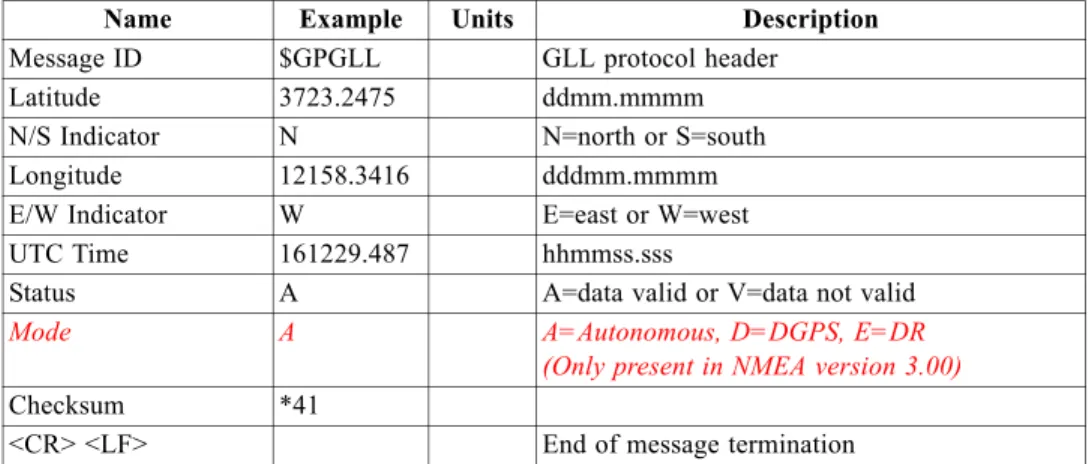
Table 1-5 contains the values for the following example: $GPGLL,3723.2475,N,12158.3416,W,161229.487,A,A*41
Table 1-5 GLL Data Format
Name Example Units Description
Message ID $GPGLL GLL protocol header
Latitude 3723.2475 ddmm.mmmm
N/S Indicator N N=north or S=south
Longitude 12158.3416 dddmm.mmmm
E/W Indicator W E=east or W=west
UTC Time 161229.487 hhmmss.sss
Status A A=data valid or V=data not valid
Mode A A=Autonomous, D=DGPS, E=DR (Only present in NMEA version 3.00)
Checksum *41
1-4 NMEA Reference Manual—January 2005
1
GSA—GNSS DOP and Active Satellites
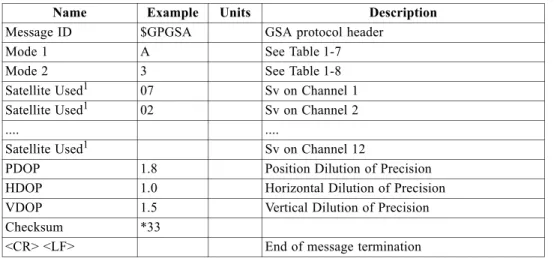
Note – Fields marked in italic red apply only to NMEA version 2.3 (and later) in this NMEA message description.
Table 1-6 contains the values for the following example: $GPGSA,A,3,07,02,26,27,09,04,15, , , , , ,1.8,1.0,1.5*33
Table 1-6 GSA Data Format
Name Example Units Description
Message ID $GPGSA GSA protocol header
Mode 1 A See Table 1-7
Mode 2 3 See Table 1-8
Satellite Used
1. Satellite used in solution.
1 07 Sv on Channel 1
Satellite Used1 02 Sv on Channel 2
.... ....
Satellite Used1 Sv on Channel 12
PDOP 1.8 Position Dilution of Precision
HDOP 1.0 Horizontal Dilution of Precision
VDOP 1.5 Vertical Dilution of Precision
Checksum *33
<CR> <LF> End of message termination
Table 1-7 Mode 1
Value Description
M Manual—forced to operate in 2D or 3D mode
A 2D Automatic—allowed to automatically switch 2D/3D
Table 1-8 Mode 2
Value Description
1 Fix not available 2 2D (<4 SVs used) 3 3D (>3 SVs used)
Output Messages 1-5
1
GSV—GNSS Satellites in View
Table 1-9 contains the values for the following example:
$GPGSV,2,1,07,07,79,048,42,02,51,062,43,26,36,256,42,27,27,138,42*71 $GPGSV,2,2,07,09,23,313,42,04,19,159,41,15,12,041,42*41
Table 1-9 GSV Data Format
Name Example Units Description
Message ID $GPGSV GSV protocol header
Number of Messages
1. Depending on the number of satellites tracked, multiple messages of GSV data may be required.
1 2 Range 1 to 3
Message Number1 1 Range 1 to 3
Satellites in View 07
Satellite ID 07 Channel 1 (Range 1 to 32)
Elevation 79 degrees Channel 1 (Maximum 90)
Azimuth 048 degrees Channel 1 (True, Range 0 to 359)
SNR (C/No) 42 dBHz Range 0 to 99, null when not tracking
.... ....
Satellite ID 27 Channel 4 (Range 1 to 32)
Elevation 27 degrees Channel 4 (Maximum 90)
Azimuth 138 degrees Channel 4 (True, Range 0 to 359)
SNR (C/No) 42 dBHz Range 0 to 99, null when not tracking
Checksum *71
<CR> <LF> End of message termination
MSS—MSK Receiver Signal
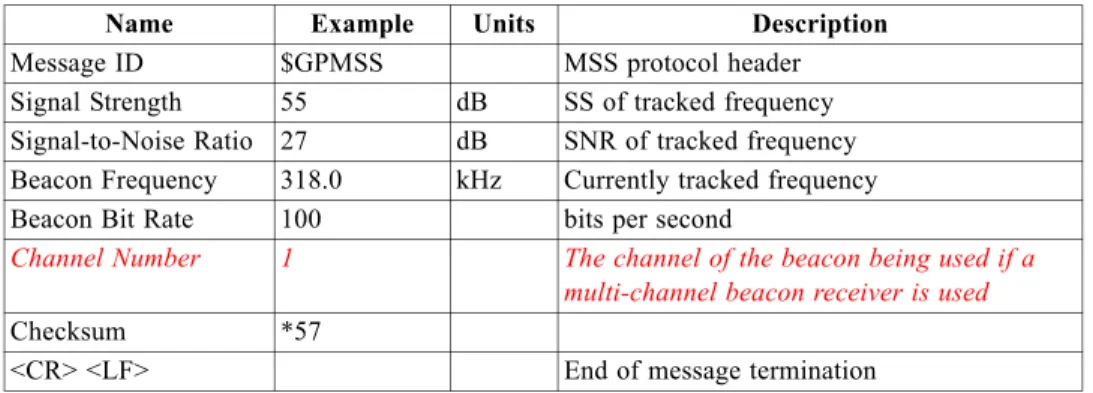
Note – Fields marked in italic red apply only to NMEA version 2.3 (and later) in this NMEA message description.
Table 1-10 contains the values for the following example: $GPMSS,55,27,318.0,100,1,*57
Table 1-10 MSS Data Format
Name Example Units Description
Message ID $GPMSS MSS protocol header
Signal Strength 55 dB SS of tracked frequency
Signal-to-Noise Ratio 27 dB SNR of tracked frequency
Beacon Frequency 318.0 kHz Currently tracked frequency
Beacon Bit Rate 100 bits per second
Channel Number 1 The channel of the beacon being used if a multi-channel beacon receiver is used
Checksum *57
1-6 NMEA Reference Manual—January 2005
1
Note – The MSS NMEA message can only be polled or scheduled using the MSK NMEA input message. See “MSK—MSK Receiver Interface” on page 2-8.
RMC—Recommended Minimum Specific GNSS Data
Note – Fields marked in italic red apply only to NMEA version 2.3 (and later) in this NMEA message description.
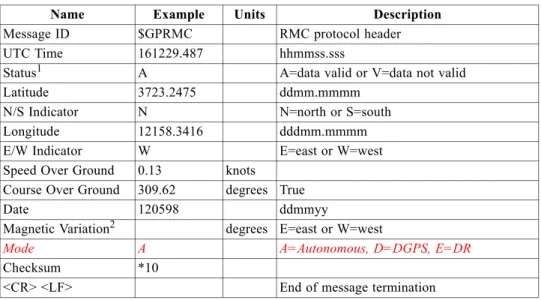
Table 1-11 contains the values for the following example:
$GPRMC,161229.487,A,3723.2475,N,12158.3416,W,0.13,309.62,120598, ,*10
Table 1-11 RMC Data Format
Name Example Units Description
Message ID $GPRMC RMC protocol header
UTC Time 161229.487 hhmmss.sss
Status
1. A valid status is derived from the SiRF Binary M.I.D 2 position mode 1. See the SiRF Binary Protocol Reference Manual.
1 A A=data valid or V=data not valid
Latitude 3723.2475 ddmm.mmmm
N/S Indicator N N=north or S=south
Longitude 12158.3416 dddmm.mmmm
E/W Indicator W E=east or W=west
Speed Over Ground 0.13 knots
Course Over Ground 309.62 degrees True
Date 120598 ddmmyy
Magnetic Variation
2. SiRF Technology Inc. does not support magnetic declination. All “course over ground” data are geodetic WGS84 directions.
2 degrees E=east or W=west
Mode A A=Autonomous, D=DGPS, E=DR
Checksum *10
Output Messages 1-7
1
VTG—Course Over Ground and Ground Speed
Note – Fields marked in italic red apply only to NMEA version 2.3 (and later) in this NMEA message description.
Table 1-12 contains the values for the following example: $GPVTG,309.62,T, ,M,0.13,N,0.2,K,A*23
Table 1-12 VTG Data Format
Name Example Units Description
Message ID $GPVTG VTG protocol header
Course 309.62 degrees Measured heading
Reference T True
Course degrees Measured heading
Reference M Magnetic
1. SiRF Technology Inc. does not support magnetic declination. All “course over ground” data are geodetic WGS84 directions.
1
Speed 0.13 knots Measured horizontal speed
Units N Knots
Speed 0.2 km/hr Measured horizontal speed
Units K Kilometers per hour
Mode A A=Autonomous, D=DGPS, E=DR
Checksum *23
<CR> <LF> End of message termination
ZDA—SiRF Timing Message
Outputs the time associated with the current 1 PPS pulse. Each message is output within a few hundred ms after the 1 PPS pulse is output and tells the time of the pulse that just occurred.
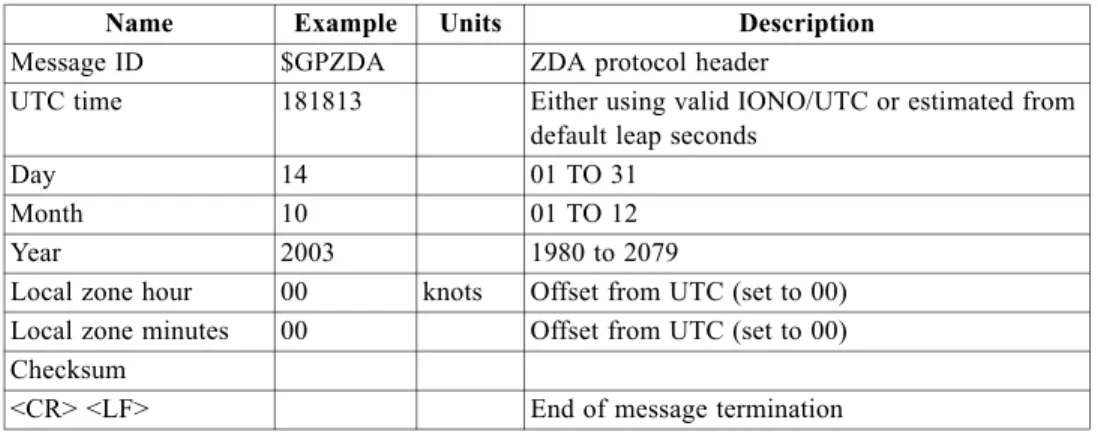
Table 1-13 contains the values for the following example: $GPZDA,181813,14,10,2003,00,00*4F
Table 1-13 ZDA Data Format
Name Example Units Description
Message ID $GPZDA ZDA protocol header
UTC time 181813 Either using valid IONO/UTC or estimated from
default leap seconds
Day 14 01 TO 31
Month 10 01 TO 12
Year 2003 1980 to 2079
Local zone hour 00 knots Offset from UTC (set to 00)
Local zone minutes 00 Offset from UTC (set to 00)
Checksum
1-8 NMEA Reference Manual—January 2005
1
150—OkToSend
This message is being sent out during the trickle power mode to communicate with an outside program such as SiRFDemo to indicate whether the receiver is awake or not. Table 1-14 contains the values for the following examples:
1. OkToSend $PSRF150,1*3F 2. not OkToSend
$PSRF150,0*3E
Table 1-14 OkToSend Message Data Format
Name Example Units Description
Message ID $PSRF150 PSRF150 protocol header
OkToSend 1 1=OK to send, 0=not OK to send
Checksum *3F
2-1
Input Messages
2
NMEA input messages enable you to control the Evaluation Receiver while in NMEA protocol mode. The Evaluation Receiver may be put into NMEA mode by sending the SiRF binary protocol message “Switch to NMEA Protocol - Message I.D. 129” (see the SiRF Binary Protocol Reference Manual). This can be done by using a user
program or by using the SiRFSDemo software and selecting Switch to NMEA Protocol
from the Action menu (see the SiRF Evaluation Kit User Guide or the SiRFDemo User
Guide). If the receiver is in SiRF binary mode, all NMEA input messages are ignored. Once the receiver is put into NMEA mode, the following messages may be used to command the module.
Transport Message
Table 2-1 describes the transport message parameters.
Table 2-1
Start Sequence Payload Checksum End Sequence
$PSRF<MID>
1. Message Identifier consisting of three numeric characters. Input messages begin at MID 100. 1
2. Message specific data. Refer to a specific message section for <data>...<data> definition.
Data2 *CKSUM
3. CKSUM is a two-hex character checksum as defined in the NMEA specification, NMEA-0183 Standard For Interfacing Marine Electronic Devices. Use of checksums is required on all input messages.
3 <CR> <LF>
4. Each message is terminated using Carriage Return (CR) Line Feed (LF) which is \r\n which is hex 0D 0A. Because \r\n are not printable ASCII characters, they are omitted from the example strings, but must be sent to terminate the message and cause the receiver to process that input message.
4
Transport Message parameters
Note – All fields in all proprietary NMEA messages are required, none are optional. All NMEA messages are comma delimited.
2-2 NMEA Reference Manual—December 2004
2
NMEA Input Messages
Table 2-2 NMEA Input Messages
Message
1. Message Identification (MID).
MID1
SetSerialPort 100 Set PORT A parameters and protocol
NavigationInitialization 101 Parameters required for start using X/Y/Z
2. Input coordinates must be WGS84.
2
SetDGPSPort 102 Set PORT B parameters for DGPS input
Query/Rate Control 103 Query standard NMEA message and/or set output rate LLANavigationInitialization 104 Parameters required for start using Lat/Lon/Alt
3. Input coordinates must be WGS84.
3
Development Data On/Off 105 Development Data messages On/Off Select Datum 106 Selection of datum to be used for coordinate
transformations.
MSK Receiver Interface MSK Command message to a MSK radio-beacon receiver. Table 2-2 describes the NMEA input messages.
Note – NMEA input messages 100 to 106 are SiRF proprietary NMEA messages. The MSK NMEA string is as defined by the NMEA 0183 standard.
Table 2-3 provides a summary of supported SiRF NMEA input messages by the specific SiRF platforms.
Table 2-3 Supported NMEA Input Messages
Message ID
SiRF Software Options
GSW2 SiRFXTrac SiRFLoc
100 Yes Yes Yes
101 Yes No Yes
102 Yes No No
103 Yes Yes Yes
104 Yes No Yes
105 Yes Yes Yes
106 Yes Yes Yes
MSK Yes No No
100—SetSerialPort
This command message is used to set the protocol (SiRF binary or NMEA) and/or the communication parameters (Baud, data bits, stop bits, and parity). Generally, this command is used to switch the module back to SiRF binary protocol mode where a more extensive command message set is available. When a valid message is received, the parameters are stored in battery-backed SRAM and the Evaluation Receiver restarts using the saved parameters.
Input Messages 2-3
2
Table 2-4 contains the input values for the following example:Switch to SiRF binary protocol at 9600,8,N,1 $PSRF100,0,9600,8,1,0*0C
Table 2-4 Set Serial Port Data Format
Name Example Units Description
Message ID $PSRF100 PSRF100 protocol header
Protocol 0 0=SiRF binary, 1=NMEA
Baud 9600 4800, 9600, 19200, 38400
DataBits 8
1. SiRF protocol is only valid for 8 data bits, 1stop bit, and no parity.
8,71
StopBits 1 0,1
Parity 0 0=None, 1=Odd, 2=Even
Checksum *0C
<CR> <LF> End of message termination
101—NavigationInitialization
This command is used to initialize the Evaluation Receiver by providing current position (in X, Y, Z coordinates), clock offset, and time. This enables the Evaluation Receiver to search for the correct satellite signals at the correct signal parameters. Correct initialization parameters enable the Evaluation Receiver to acquire signals quickly.
Table 2-5 contains the input values for the following example: Start using known position and time.
$PSRF101,-2686700,-4304200,3851624,96000,497260,921,12,3*1C
Table 2-5 Navigation Initialization Data Format
Name Example Units Description
Message ID $PSRF101 PSRF101 protocol header
ECEF X -2686700 meters X coordinate position
ECEF Y -4304200 meters Y coordinate position
ECEF Z 3851624 meters Z coordinate position
ClkOffset 96000 Hz Clock Offset of the Evaluation Receiver
1. Use 0 for last saved value if available.If this is unavailable, a default value of 96,000 is used.
1
TimeOfWeek 497260 seconds GPS Time Of Week
WeekNo 921 GPS Week Number
ChannelCount 12 Range 1 to 12
ResetCfg 3 See Table 2-6 and Table 2-7
Checksum *1C
Table 2-6 Reset Configuration - Non SiRFLoc Platforms
Hex Description
0x01 Hot Start— All data valid
0x02 Warm Start—Ephemeris cleared
0x03 Warm Start (with Init)—Ephemeris cleared, initialization data loaded
0x04 Cold Start—Clears all data in memory
0x08 Clear Memory—Clears all data in memory and resets the receiver back to factory defaults
Table 2-7 Reset Configuration - SiRFLoc Specific
Hex Description
0x00 Perform a hot start using internal RAM data. No initialization data is used.
0x01 Use initialization data and begin in start mode. Uncertainties are 5 seconds
time accuracy and 300 km position accuracy. Ephemeris data in SRAM is used.
0x02 No initialization data is used, ephemeris data is cleared, and warm start
performed using remaining data in RAM.
0x03 Initialization data is used, ephemeris data is cleared, and warm start
performed using remaining data in RAM.
0x04 No initialization data is used. Position, time and ephemeris are cleared and a cold start is performed.
0x08 No initialization data is used. Internal RAM is cleared and a factory reset is performed.
2-4 NMEA Reference Manual—December 2004
2
102—SetDGPSPort
This command is used to control the serial port used to receive RTCM differential corrections. Differential receivers may output corrections using different
communication parameters. If a DGPS receiver is used that has different
communication parameters, use this command to allow the receiver to correctly decode the data. When a valid message is received, the parameters are stored in battery-backed SRAM and the receiver restarts using the saved parameters.
Table 2-8 contains the input values for the following example: Set DGPS Port to be 9600,8,N,1.
$PSRF102,9600,8,1,0*12
Table 2-8 Set DGPS Port Data Format
Name Example Units Description
Message ID $PSRF102 PSRF102 protocol header
Baud 9600 4800, 9600, 19200, 38400
DataBits 8 8,7
StopBits 1 0,1
Parity 0 0=None, 1=Odd, 2=Even
Checksum *12
Input Messages 2-5
2
103—Query/Rate Control
This command is used to control the output of standard NMEA messages GGA, GLL, GSA, GSV, RMC, and VTG. Using this command message, standard NMEA messages may be polled once, or setup for periodic output. Checksums may also be enabled or disabled depending on the needs of the receiving program. NMEA message settings are saved in battery-backed memory for each entry when the message is accepted.
Table 2-9 contains the input values for the following examples: 1. Query the GGA message with checksum enabled
$PSRF103,00,01,00,01*25
2. Enable VTG message for a 1 Hz constant output with checksum enabled $PSRF103,05,00,01,01*20
3. Disable VTG message $PSRF103,05,00,00,01*21
Table 2-9 Query/Rate Control Data Format (See example 1)
Name Example Units Description
Message ID $PSRF103 PSRF103 protocol header
Msg 00 See Table 2-10
Mode 01 0=SetRate, 1=Query
Rate 00 seconds Output—off=0, max=255
CksumEnable 01 0=Disable Checksum, 1=Enable Checksum
Checksum *25
<CR> <LF> End of message termination
Table 2-10 Messages Value Description 0 GGA 1 GLL 2 GSA 3 GSV 4 RMC 5 VTG
6 MSS (If internal beacon is supported)
7 Not defined
8 ZDA (if 1PPS output is supported)
9 Not defined
Note – In TricklePower mode, update rate is specified by the user. When switching to NMEA protocol, the message update rate is also required. The resulting update rate is the product of the TricklePower Update rate and the NMEA update rate (i.e., TricklePower update rate = 2 seconds, NMEA update rate = 5 seconds, resulting update rate is every 10 seconds, (2 X 5 = 10)).
2-6 NMEA Reference Manual—December 2004
2
104—LLANavigationInitialization
This command is used to initialize the Evaluation Receiver by providing current position (in latitude, longitude, and altitude coordinates), clock offset, and time. This enables the receiver to search for the correct satellite signals at the correct signal parameters. Correct initialization parameters enable the receiver to acquire signals quickly.
Table 2-11 contains the input values for the following example: Start using known position and time.
$PSRF104,37.3875111,-121.97232,0,96000,237759,1946,12,1*07
Table 2-11 LLA Navigation Initialization Data Format
Name Example Units Description
Message ID $PSRF104 PSRF104 protocol header
Lat 37.3875111 degrees Latitude position (Range 90 to -90)
Lon -121.97232 degrees Longitude position (Range 180 to -180)
Alt 0 meters Altitude position
ClkOffset 96000 Hz Clock Offset of the Evaluation Receiver
1. Use 0 for last saved value if available. If this is unavailable, a default value of 96,000 is used.
1
TimeOfWeek 237759 seconds GPS Time Of Week
WeekNo 1946 Extended GPS Week Number (1024 added)
ChannelCount 12 Range 1 to 12
ResetCfg 1 See Table 2-12
Checksum *07
<CR> <LF> End of message termination
Table 2-12 Reset Configuration
Hex Description
0x01 Hot Start— All data valid
0x02 Warm Start—Ephemeris cleared
0x03 Warm Start (with Init)—Ephemeris cleared,
initialization data loaded
0x04 Cold Start—Clears all data in memory
0x08 Clear Memory—Clears all data in memory and resets receiver back to factory defaults
105—Development Data On/Off
Use this command to enable development data information if you are having trouble getting commands accepted. Invalid commands generate debug information that enables the you to determine the source of the command rejection. Common reasons for input command rejection are invalid checksum or parameter out of specified range.
Input Messages 2-7
2
Table 2-13 contains the input values for the following examples:1. Debug On $PSRF105,1*3E 2. Debug Off
$PSRF105,0*3F
Table 2-13 Development Data On/Off Data Format
Name Example Units Description
Message ID $PSRF105 PSRF105 protocol header
Debug 1 0=Off, 1=On
Checksum *3E
<CR> <LF> End of message termination
106—Select Datum
GPS receivers perform initial position and velocity calculations using an earth-centered earth-fixed (ECEF) coordinate system. Results may be converted to an earth model (geoid) defined by the selected datum. The default datum is WGS 84 (World Geodetic System 1984) which provides a worldwide common grid system that may be translated into local coordinate systems or map datums. (Local map datums are a best fit to the local shape of the earth and not valid worldwide.)
Table 2-14 contains the input values for the following examples: 1. Datum select TOKYO_MEAN
$PSRF106,178*32
Table 2-14 Select Datum Data Format
Name Example Units Description
Message ID $PSRF106 PSRF106 protocol header
Datum 178 21=WGS84 178=TOKYO_MEAN 179=TOKYO_JAPAN 180=TOKYO_KOREA 181=TOKYO_OKINAWA Checksum *32
2-8 NMEA Reference Manual—December 2004
2
MSK—MSK Receiver Interface
Table 2-15 contains the values for the following example: $GPMSK,318.0,A,100,M,2,*45
Table 2-15 RMC Data Format
Name Example Units Description
Message ID $GPMSK MSK protocol header
Beacon Frequency 318.0 kHz Frequency to use
Auto/Manual Frequency
1. If Auto is specified the previous field value is ignored.
1 A A : Auto, M : Manual
Beacon Bit Rate 100 Bits per second
Auto/Manual Bit Rate1 M A : Auto, M : Manual
Interval for Sending $--MSS
2. When status data is not to be transmitted this field is null.
2 2 sec Sending of MSS messages for status
Note – The NMEA messages supported by the Evaluation Receiver does not provide the ability to change the DGPS source. If you need to change the DGPS source to internal beacon, use the SiRF binary protocol and then switch to NMEA.
ADDITIONAL AVAILABLE PRODUCT INFORMATION
Part Number Description
1050-0042 NMEA Reference Manual
1050-0041 SiRF Binary Protocol Reference Manual 1065-0136 Product Inserts
1050-0056 SiRFstarIII System Development Kit User Guide
1050-0053 GSW3 Software System Development Kit Reference Manual 1050-0054 S3SDK Board System Development Kit Reference Manual 1050-0055 GSP3 Chip System Development Kit Reference Manual
1055-1034 GSP3f Data Sheet
1055-1035 GRF3w Data Sheet
Available on the Developer Web Site
APNT3001 SSIII System Guidelines and Considerations
APNT3002 PCB Design Guidelines for SSIII Implementations
APNT3003 Back-Up Power Operation for SSIII Architectures
APNT3004 Troubleshooting Notes for SSIII Board Development
APNT3005 Co-Location and Jamming Considerations for SSIII Integration
APNT3006 GPIO Pin Functionality for SSIII
APNT3007 I/O Message Definitions for SSIII
APNT3008 Implementing User Tasks in the SSIII Architecture
APNT3009 Effects of User Tasks on GPS Performance for SSIII
APNT3010 Advanced Power Management (APM) Considerations for SSIII
APNT3011 Multi-ICE Testing Issues for SSIII
APNT3012 Production Testing of SSIII Modules
APNT3014 Automotive Design Considerations for SSIII
SiRF Technology Inc.
148 East Brokaw San Jose, CA 95112 Tel: +1-408-467-0410 Fax: +1-408-467-0420 Email: [email protected] Website: http://www.sirf.com SiRF France Tel: +33-6-0717-7862 Fax: +44-1344-668157 Email: [email protected] SiRF Texas Tel: +1-972-239-6988 Fax: +1-972-239-0372 Email: [email protected] SiRF Germany Tel: +49-81-529932-90 Fax: +49-81-529931-70 Email: [email protected]
SiRF United Kingdom
Tel: +44-1344-668390 Fax: +44-1344-668157 Email: [email protected] SiRF Taiwan Tel: +886-2-2723-7853 Fax: +886-2-2723-7854 Email: [email protected] SiRF Japan Tel: +81 44829-2186 Fax: +81 44829-2187 Email: [email protected] SiRF India Tel: +91-120-251-0256 Fax: +91-120-251-0584 Email: [email protected]
NMEA Reference Manual
© 2005 SiRF Technology Inc. All rights reserved.
Products made, sold or licensed by SiRF Technology, Inc. are protected by one or more of the following United States patents: 5,488,378; 5,504,482; 5,552,794; 5,592,382; 5,638,077; 5,883,595; 5,897,605; 5,901,171; 5,917,383; 5,920,283; 6,018,704; 6,037,900; 6,041,280; 6,044,105; 6,047,017; 6,081,228; 6,114,992; 6,125,325; 6,198,765; 6,236,937; 6,249,542; 6,278,403; 6,282,231; 6,292,749; 6,297,771; 6,301,545; 6,304,216; 6,351,486; 6,351,711; 6,366,250; 6,389,291; 6,393,046; 6,400,753; 6,421,609; 6,427,120; 6,427,121; 6,453,238; and AU729,697. Other United States and foreign patents are issued or pending. SiRF, SiRFStar, SiRF plus Orbit design are registered in the U.S. Patent and Trademark office. SnapLock, SnapStart, SingleSat, Foliage Lock, TricklePower, Push-to-Fix, WinSiRF, SiRFLoc, SiRFDRive, SiRFNav, SiRFXTrac, SiRFSoft, SoftGPS, UrbanGPS, and Multimode Location Engine are trademarks of SiRF Technology, Inc. Other trademarks are property of their respective companies.
This document contains information on SiRF products. SiRF reserves the right to make changes in its products, specifications and other information at any time without notice. SiRF assumes no liability or responsibility for any claims or damages arising out of the use of this document, or from the use of integrated circuits based on this data sheet, including, but not limited to claims or damages based on infringement of patents, copyrights or other intellectual property rights. No license, either expressed or implied, is granted to any intellectual property rights of SiRF. SiRF makes no warranties, either express or implied with respect to the information and specification contained in this document. Performance characteristics listed in this document do not constitute a warranty or guarantee of product performance. SiRF products are not intended for use in life support systems or for life saving applications. All terms and conditions of sale are governed by the SiRF Terms and Conditions of Sale, a copy of which may obtain from your authorized SiRF sales representative.
December 2004
Please Recycle