Accolades for Database Administration
“I’ve forgotten how many times I’ve recommended this book to people. It’s well written, to the point, and covers the topics that you need to know to become an effective DBA.”
—Scott Ambler, Thought Leader, Agile Data Method
“This is a well-written, well-organized guide to the practice of database administration. Unlike other books on general database theory or relational database theory, this book focuses more directly on the theory and reality of database administration as practiced by database professionals today, and does so without catering too much to any specific product implementation. As such, Database Administration is very well suited to anyone interested in surveying the job of a DBA or those in similar but more specific roles such as data modeler or database performance analyst.”
—Sal Ricciardi, Program Manager, Microsoft
“One of Craig’s hallmarks is his ability to write in a clear, easy-to-read fash-ion. The main purpose of any technical book is to transfer information from writer to reader, and Craig has done an excellent job. He wants the reader to learn—and it shows.”
—Chris Foot, Manager, Remote DBA Experts and Oracle ACE
“A complete and comprehensive listing of tasks and responsibilities for DBAs, ranging from creating the database environment to data warehouse administration, and everything in between.”
—Mike Tarrani, Computer Consultant
“I think every business manager and every IT manager should have a copy of this book.”
—Dan Hotka, Independent Consultant and Oracle ACE
“This book by Craig Mullins is wonderfully insightful and truly important. Mullins describes the role and duties of data administrators and database administrators in modern organizations with remarkable insight and clarity.” —Michael Tozer, Author and former U.S. Navy officer
Database
Administration
Second Edition
Database
Administration
The Complete Guide to DBA Practices
and Procedures
Second Edition
Craig S. Mullins
Upper Saddle River, NJ • Boston • Indianapolis • San Francisco New York • Toronto • Montreal • London • Munich • Paris • Madrid
Capetown • Sydney • Tokyo • Singapore • Mexico City
Many of the designations used by manufacturers and sellers to distinguish their products are claimed as trademarks. Where those designations appear in this book, and the publisher was aware of a trademark claim, the designations have been printed with initial capital letters or in all capitals.
The author and publisher have taken care in the preparation of this book, but make no expressed or implied warranty of any kind and assume no responsibil-ity for errors or omissions. No liabilresponsibil-ity is assumed for incidental or consequen-tial damages in connection with or arising out of the use of the information or programs contained herein.
The publisher offers excellent discounts on this book when ordered in quan-tity for bulk purchases or special sales, which may include electronic versions and/or custom covers and content particular to your business, training goals, marketing focus, and branding interests. For more information, please contact:
U.S. Corporate and Government Sales (800) 382-3419
For sales outside the United States, please contact: International Sales
[email protected] Visit us on the Web: informit.com/aw
Library of Congress Cataloging-in-Publication Data
Database administration : the complete guide to DBA practices and procedures / Craig S. Mullins.—2 [edition].
pages cm
Includes bibliographical references and index.
ISBN 978-0-321-82294-9 (alk. paper)—ISBN 0-321-82294-3 (alk. paper) 1. Database management. I. Title.
QA76.9.D3M838 2013 005.74—dc23
2012029466 Copyright © 2013 Craig S. Mullins
All rights reserved. Printed in the United States of America. This publication is protected by copyright, and permission must be obtained from the publisher prior to any prohibited reproduction, storage in a retrieval system, or trans-mission in any form or by any means, electronic, mechanical, photocopying, recording, or likewise. To obtain permission to use material from this work, please submit a written request to Pearson Education, Inc., Permissions Depart-ment, One Lake Street, Upper Saddle River, New Jersey 07458, or you may fax your request to (201) 236-3290.
ISBN-13: 978-0-321-82294-9 ISBN-10: 0-321-82294-3
Text printed in the United States on recycled paper at Edwards Brothers Malloy in Ann Arbor, Michigan.
First printing October, 2012
Editor-in-Chief
Mark Taub
Acquisitions Editor
Greg Doench
Development Editor
Susan Brown Zahn
Managing Editor
John Fuller
Production Editor
Caroline Senay
Copy Editor
Barbara Wood
Indexer
Richard Evans
Proofreader
Diane Freed
Technical Reviewers
William Arledge Kevin Kline
Editorial Assistant
Michelle Housley
Cover Designer
Chuti Prasertsith
Compositor
Rob Mauhar The CIP Group
To my wife, Beth, for her unending love,
constant support, and beautiful smile.
ix
Contents
Preface xxxi
How to Use This Book xxxiii
Acknowledgments xxxv
About the Author xxxvii
Chapter 1 What Is a DBA? 1
Why Learn Database Administration? 3
A Unique Vantage Point 4
DBA
Salaries 4
Database
Technology 6
The Management Discipline of Database Administration 9
A Day in the Life of a DBA 12
Evaluating a DBA Job Offer 14
x Contents
Database, Data, and System Administration 15
Data
Administration 15
Database
Administration 19
System
Administration 20
DBA
Tasks 20
Database
Design 21
Performance Monitoring and Tuning 22
Ensuring
Availability 24
Database Security and Authorization 24
Governance and Regulatory Compliance 26
Backup and Recovery 26
Ensuring Data Integrity 27
DBMS Release Migration 29
Jack-of-All-Trades 29
The Types of DBAs 31
System
DBA 31
Database
Architect 32
Database
Analyst 33
Data
Modeler 33
Application
DBA 34
Task-Oriented
DBA 36
Performance
Analyst 36
Data Warehouse Administrator 36
Staffing
Considerations 37
How Many DBAs? 37
DBA Reporting Structures 40
Multiplatform DBA Issues 42
Production versus Test 44
The Impact of Newer Technology on DBA 46
Procedural DBAs: Managing Database Logic 46
Contents xi
The Internet: From DBA to eDBA 50
The Personal DBA and the Cloud 53
NoSQL, Big Data, and the DBA 55
New Technology Impacts on DBA 56
DBA
Certification 56
The Rest of the Book 58
Review 58
Bonus
Question 59
Chapter 2 Creating the Database Environment 61
Defining the Organization’s DBMS Strategy 61
Choosing a DBMS 63
DBMS
Architectures 68
DBMS
Clustering 71
DBMS
Proliferation 73
Hardware
Issues 73
Cloud Database Systems 74
Installing the DBMS 75
DBMS Installation
Basics 75
Hardware
Requirements 76
Storage
Requirements 76
Memory
Requirements 78
Configuring the DBMS 80
Connecting the DBMS to Supporting Infrastructure Software 81
Installation
Verification 81
DBMS
Environments 82
Upgrading DBMS Versions and Releases 82
Features and Complexity 87
Complexity of the DBMS Environment 87
Reputation of the DBMS Vendor 89
Support Policies of the DBMS 89
xii Contents
Organization
Style 89
DBA Staff Skill Set 90
Platform
Support 90
Supporting
Software 91
Fallback
Planning 92
Migration
Verification 92
The DBMS Upgrade Strategy 92
Database Standards and Procedures 92
Database Naming Conventions 93
Other Database Standards and Procedures 96
DBMS
Education 103
Summary 104
Review
104
Bonus Question 105
Suggested
Reading 105
Chapter 3 Data Modeling and Normalization 107
Data Modeling Concepts 108
Entity-Relationship
Diagramming 110
The Components of a Data Model 113
Entities 113
Attributes 115
Keys 120
Relationships
122
Discovering Entities, Attributes, and Relationships 124
Conceptual, Logical, and Physical Data Models 125
What Is Normalization? 128
The Normal Forms 128
First Normal Form 129
Second Normal Form 129
Third Normal Form 132
Contents xiii
A Normalized Data Model 133
Further Normal Forms 134
Normalization in Practice 135
Additional Data Modeling Issues 135
Summary 136
Review 137
Bonus
Question 138
Suggested
Reading 138
Chapter
4 Database
Design 141
From Logical Model to Physical Database 141
Transform Entities to Tables 142
Transform Attributes to Columns 142
Build Referential Constraints for All Relationships 146
Build Physical Data Structures 147
Database Performance Design 150
Designing
Indexes 150
Hashing
158
Clustering
159
Interleaving
Data 160
Denormalization 160
When to Denormalize 161
Prejoined
Tables 164
Report
Tables 164
Mirror
Tables 165
Split
Tables 165
Combined
Tables 168
Redundant
Data 168
Repeating
Groups 169
Derivable
Data 170
Hierarchies 171
xiv Contents
Special Physical Implementation Needs 173
Denormalization
Summary 173
Views 175
Data Definition Language 177
Temporal Data Support 177
A Temporal Example 178
Business Time and System Time 179
Summary 180
Review 181
Bonus
Question 181
Suggested
Reading 182
Chapter
5 Application
Design 185
Database Application Development and SQL 186
SQL 186
Set-at-a-Time Processing and Relational Closure 189
Embedding SQL in a Program 191
SQL Middleware and APIs 192
Application
Infrastructure 193
Object Orientation and SQL 199
Types of SQL 200
SQL Coding for Performance 202
Querying XML Data 203
Defining
Transactions 205
Transaction
Guidelines 207
Unit of Work 207
Transaction Processing Systems 207
Application
Servers 209
Locking 210
Types of Locks 212
Lock
Time-outs 213
Contents xv
Deadlocks 214
Lock
Duration 215
Lock
Escalation 219
Programming Techniques to Minimize Locking Problems 220
Locking
Summary 220
Batch
Processing 221
Summary 222
Review
222
Bonus
Question 223
Suggested
Reading 223
Chapter
6 Design
Reviews 227
What Is a Design Review? 227
Rules of Engagement 228
Design Review Participants 229
Knowledge and Skills Required 232
Types of Design Reviews 232
Conceptual Design Review 233
Logical Design Review 235
Physical Design Review 236
Organizational Design Review 237
SQL and Application Code Design Review 238
Pre-Implementation Design Review 239
Post-Implementation Design Review 239
Design Review Output 239
Additional
Considerations 240
Dealing with Remote Staff 240
Mentorship and Knowledge Transfer 240
Summary 241
Review
241
Suggested
Reading 242
xvi Contents
Chapter 7 Database Change Management 243
Change Management Requirements 244
The Change Management Perspective of the DBA 246
Types of Changes 247
DBMS
Software 248
Hardware
Configuration 248
Logical and Physical Design 248
Applications 249
Physical Database Structures 250
Impact of Change on Database Structures 250
The Limitations of ALTER 252
Database Change Scenarios 254
Comparing Database Structures 257
Requesting Database Changes 258
Standardized Change Requests 259
Communication 260
Coordinating Database and Application Changes 260
Compliance 261
DBA Scripts and Change Management 262
Summary 262
Review 263
Suggested
Reading 263
Chapter
8 Data
Availability 265
Defining
Availability 267
Increased Availability Requirements 268
Cost of Downtime 271
How Much Availability Is Enough? 273
Availability
Problems 274
Loss of the Data Center 274
Network Problems 275
Contents xvii
Loss of the Server Hardware 276
Disk-Related
Outages 278
Operating System Failure 279
DBMS Software Failure 279
Application
Problems 279
Security and Authorization Problems 280
Corruption of Data 280
Loss of Database Objects 281
Loss of Data 282
Data Replication and Propagation Failures 283
Severe Performance Problems 283
Recovery
Issues 284
DBA
Mistakes 284
Outages: Planned and Unplanned 286
Ensuring
Availability 287
Perform Routine Maintenance While Systems Remain
Operational 288
Automate DBA Functions 290
Exploit High-Availability Features 291
Exploit Clustering Technology 292
Database Architecture and NoSQL 296
Summary 296
Review
297
Suggested
Reading 298
Chapter
9 Performance
Management 299
Defining
Performance 299
A Basic Database Performance Road Map 302
Monitoring versus Management 304
Reactive versus Proactive 306
xviii Contents
Preproduction Performance Estimation 307
Historical
Trending 308
Service-Level
Management 308
Types of Performance Tuning 311
System
Tuning 311
Database
Tuning 312
Application
Tuning 312
Performance Tuning Tools 313
DBMS Performance Basics 315
Summary 316
Review
316
Bonus
Question 317
Suggested
Reading 317
Chapter
10 System
Performance 319
The Larger Environment 320
Interaction with the Operating System 320
Allied
Agents 321
Hardware
Configuration 322
Components of the DBMS 324
DBMS Installation and Configuration Issues 327
Types of Configuration 327
Memory
Usage 328
Data Cache Details 332
“Open” Database Objects 336
Database
Logs 336
Locking and Contention 341
The System Catalog 342
Other Configuration Options 343
General
Advice 344
System
Monitoring 345
Contents xix
Summary 346
Review
346
Bonus
Question 347
Suggested
Reading 347
Chapter
11 Database
Performance 349
Techniques for Optimizing Databases 349
Partitioning 350
Raw Partition versus File System 351
Indexing 352
Denormalization 355
Clustering 356
Interleaving
Data 360
Free
Space 360
Compression 361
File Placement and Allocation 362
Page Size (Block Size) 364
Database
Reorganization 365
Determining When to Reorganize 369
Automation 371
Summary 371
Review 371
Suggested
Reading 372
Chapter
12 Application
Performance 373
Designing Applications for Relational Access 373
Relational
Optimization 374
CPU and I/O Costs 376
Database
Statistics 376
Query
Analysis 378
Joins 379
Access Path Choices 381
xx Contents
Additional Optimization Considerations 391
View
Access 391
Query
Rewrite 392
Rule-Based
Optimization 393
Reviewing Access Paths 394
Forcing Access Paths 398
SQL Coding and Tuning for Efficiency 399
A Dozen SQL Rules of Thumb 400
Additional SQL Tuning Tips 406
Identifying Poorly Performing SQL 406
Summary 407
Review 407
Suggested
Reading 408
Chapter
13 Data
Integrity 409
Types of Integrity 409
Database Structure Integrity 410
Types of Structural Problems 410
Managing Structural Problems 411
Semantic Data Integrity 414
Entity
Integrity 416
Unique
Constraints 417
Data
Types 417
Default
Values 419
Check
Constraints 419
Triggers 426
Referential
Integrity 433
Temporal Database Systems 444
Summary 446
Review 447
Suggested
Reading 448
Contents xxi
Chapter
14 Database
Security 449
Data
Breaches 449
Database Security Basics 451
Database
Users 455
Granting and Revoking Authority 456
Types of Privileges 457
Granting to PUBLIC 460
Revoking
Privileges 461
Label-Based Access Control 463
Security
Reporting 465
Authorization Roles and Groups 466
Roles 466
Groups 467
Other Database Security Mechanisms 468
Using Views for Security 468
Using Stored Procedures for Security 470
Encryption 470
Data at Rest Encryption 472
Data in Transit Encryption 472
Encryption
Techniques 472
SQL
Injection 473
SQL Injection Prevention 475
Auditing 477
External Security 478
Job Scheduling and Security 479
Non-DBMS DBA Security 480
DBMS Fixpacks and Maintenance 480
Summary 481
Review 481
Suggested
Reading 482
xxii Contents
Chapter 15 Regulatory Compliance and Database
Administration
483
A Collaborative Approach to Compliance 486
Why Should DBAs Care about Compliance? 487
Metadata Management, Data Quality, and Data Governance 488
Metadata 488
Data
Quality 489
Data
Governance 489
Database Auditing and Data Access Tracking 490
Database Auditing Techniques 493
Privileged User Auditing 495
Data Masking and Obfuscation 496
Data Masking Techniques 497
Database Archiving for Long-Term Data Retention 498
The Life Cycle of Data 499
Database
Archiving 500
Components of a Database Archiving Solution 505
The Impact of e-Discovery on DBA 506
Closer Tracking of Traditional DBA Tasks 507
Database Change Management 508
Database Backup and Recovery 508
Summary 511
Review
511
Suggested
Reading 512
Chapter 16 Database Backup and Recovery 515
The Importance of Backup and Recovery 515
Preparing for Problems 516
Backup 517
Full versus Incremental Backups 521
Database Objects and Backups 523
Contents xxiii
DBMS
Control 524
Concurrent Access Issues 525
Backup
Consistency 527
Log Archiving and Backup 529
Determining Your Backup Schedule 531
DBMS Instance Backup 533
Designing the DBMS Environment for Recovery 533
Alternate Approaches to Database Backup 534
Document Your Backup Strategy 536
Database Object Definition Backups 536
Recovery 537
Determining Recovery Options 538
General Steps for Database Object Recovery 540
Types of Recovery 541
Index
Recovery 550
Testing Your Recovery Plan 551
Recovering a Dropped Database Object 552
Recovering Broken Blocks and Pages 553
Populating Test Databases 553
Alternatives to Backup and Recovery 554
Standby
Databases 554
Replication 555
Disk
Mirroring 556
Summary 557
Review 557
Suggested
Reading 558
Chapter
17 Disaster
Planning 559
The Need for Planning 559
Risk and Recovery 561
xxiv Contents
General Disaster Recovery Guidelines 563
The Remote Site 564
The Written Plan 564
Personnel 569
Backing Up the Database for Disaster Recovery 569
Tape
Backups 570
Storage Management Backups 572
Other
Approaches 573
Some
Guidelines 573
Disaster Prevention 575
Disaster and Contingency Planning Web Sites 576
Summary 576
Review 576
Suggested
Reading 577
Chapter 18 Data and Storage Management 579
Storage Management Basics 579
Files and Data Sets 583
File Placement on Disk 584
Raw Partitions versus File Systems 586
Temporary Database Files 587
Space
Management 587
Data Page Layouts 588
Index Page Layouts 592
Transaction Logs 594
Fragmentation and Storage 595
Storage
Options 596
RAID 597
JBOD 604
Storage Area Networks 604
Contents xxv
Network-Attached
Storage 605
Tiered
Storage 606
Planning for the Future 608
Capacity
Planning 608
Summary 609
Review 609
Suggested
Reading 610
Chapter 19 Data Movement and Distribution 613
Loading and Unloading Data 614
The LOAD Utility 614
The UNLOAD Utility 618
Maintaining Application Test Beds 621
EXPORT and IMPORT 622
Bulk Data Movement 623
ETL
Software 623
Replication and Propagation 623
Messaging
Software 624
Other
Methods 625
Distributed
Databases 626
Setting Up a Distributed Environment 627
Data Distribution Standards 629
Accessing Distributed Data 630
Two-Phase
COMMIT 631
Distributed Performance Problems 632
Summary 633
Review 634
Bonus
Question 634
Suggested
Reading 635
xxvi Contents
Chapter 20 Data Warehouse Administration 637
What Is a Data Warehouse? 637
Analytical versus Transaction Processing 638
Administering the Data Warehouse 640
Too Much Focus on Technology? 641
Data Warehouse Design 641
Data
Movement 644
Data
Cleansing 645
Data Warehouse Scalability 649
Data Warehouse Performance 650
Data
Freshness 654
Data
Content 654
Data
Usage 655
Financial
Chargeback 655
Backup and Recovery 656
Don’t Operate in a Vacuum! 657
Summary 658
Review 658
Suggested
Reading 659
Chapter
21 Database
Connectivity 661
Multitier, Distributed Computing 661
A Historical Look 661
Business
Issues 663
What Is Client/Server Computing? 663
Types of Client/Server Applications 667
Network
Traffic 670
Database
Gateways 671
Database
Drivers 672
Connection
Pooling 674
Contents xxvii
Databases, the Internet, and the Web 675
Internet-Connected
Databases 676
Web Development and Web Services 680
Summary 681
Review 682
Suggested
Reading 682
Chapter
22 Metadata
Management 685
What Is Metadata? 685
From Data to Knowledge and Beyond 686
Metadata
Strategy 687
Data Warehousing and Metadata 688
Types of Metadata 689
Repositories and Data Dictionaries 691
Repository Benefits 693
Repository
Challenges 693
Data
Dictionaries 695
Summary 696
Review
696
Suggested
Reading 697
Chapter
23 DBA
Tools 699
Types and Benefits of DBA Tools 699
Data Modeling and Design 700
Database Change Management 701
Table
Editors 707
Performance
Management 708
Backup and Recovery 714
Database
Utilities 715
Data Protection, Governance, Risk, and Compliance Tools 716
Data Warehousing, Analytics, and Business Intelligence 721
xxviii Contents
Programming and Development Tools 724
Miscellaneous
Tools 726
Examine Native DBA Tools 728
Evaluating DBA Tool Vendors 729
Homegrown DBA Tools 732
Summary 733
Review 733
Chapter 24 DBA Rules of Thumb 735
Write Down Everything 735
Keep
Everything 736
Automate! 737
Share Your Knowledge 739
Analyze, Simplify, and Focus 741
Don’t
Panic! 742
Measure Twice, Cut Once 743
Understand the Business, Not Just the Technology 743
Don’t Become a Hermit 745
Use All of the Resources at Your Disposal 745
Keep
Up-to-Date 746
Invest in Yourself 747
Summary 748
Final
Exam 748
Appendix
A Database
Fundamentals 753
What Is a Database? 753
Why Use a DBMS? 754
Advantages of Using a DBMS 755
Summary 759
Contents xxix
Appendix B The DBMS Vendors 761
The Big Three 762
The Second Tier 763
Other Significant Players 763
Open-Source DBMS Offerings 764
Nonrelational DBMS Vendors 765
NoSQL DBMS Vendors 765
Object-Oriented DBMS Vendors 766
PC-Based DBMS Vendors 766
Appendix C DBA Tool Vendors 769
The Major Vendors 769
Other DBA Tool Vendors 770
Data Modeling Tool Vendors 771
Repository
Vendors 772
Data Movement and Business Intelligence Vendors 773
Appendix D DBA Web Resources 775
Usenet
Newsgroups 775
Mailing
Lists 776
Web Sites, Blogs, and Portals 778
Vendor Web Sites 778
Magazine Web Sites 778
Consultant Web Sites 779
Blogs 780
Database
Portals 781
Other Web Sites 782
Appendix E Sample DBA Job Posting 785
Job
Posting 785
Database Administrator (DBA) 785
xxx Contents
Bibliography 793
Database Management and Database Systems 793
Data Administration, Data Modeling, and Database Design 799
Database Security, Protection, and Compliance 802
Data Warehousing 804
SQL 805
Object Orientation and Database Management 807
Operating Systems 807
Related
Topics 808
DB2
812
IMS
813
MySQL 813
Oracle 814
SQL
Server 815
Sybase 816
Other Database Systems 817
Glossary 819
Index 853
xxxi
Preface
The need for database administration is as strong as, or stronger than, it was when I originally wrote the first edition of this book in 2002. Relational database management systems are still at the core of most serious produc-tion systems, and they still need to be managed. And this is still the job of database administrators. Whether you use Oracle, Microsoft SQL Server, DB2, Informix, Sybase, MySQL, Teradata, PostgreSQL, Ingres, or any combi-nation of these popular DBMS products, you will benefit from the informa-tion in this book.
But a decade is forever in the world of information technology. And even though some basic things stay the same (e.g., databases require administration), many things change. The second edition of this book incorporates the many changes that impact database administration that have occurred in the industry over the past decade. What made the book unique remains. It is still the industry’s only non-product-based description of database administration techniques and practices. The book defines the job of database administrator and outlines what is required of a database
xxxii Preface
administrator, or DBA, in clear, easy-to-understand language. The book can be used
• As a text for learning the discipline of database administration • As the basis for setting up a DBA group
• To augment a DBMS-specific manual or textbook
• To help explain to upper-level management what a DBA is, and why the position is required
But what is new? One of the significant improvements added to this edition is coverage of regulatory compliance. The number of governmental and industry regulations has exploded over the course of the past decade, and many of these regulations dictate changes in the way that data is managed, handled, and processed. Although the most visible governmen-tal regulation is undoubtedly the Sarbanes-Oxley Act (aka the U.S. Public Company Accounting Reform and Investor Protection Act of 2002), there are many others, including HIPAA (the Health Insurance Portability and Accountability Act) and GLB (the Gramm-Leach-Bliley Act) to name a cou-ple. The most visible industry regulation is PCI DSS (Payment Card Industry Data Security Standard). All of these regulations, and many others, impose an additional administrative burden on data. This edition of the book pro-vides an entire chapter devoted to this topic, including the impact of regula-tory compliance on data management tasks such as metadata management, data quality, database auditing, data masking, database archiving, and more traditional DBA tasks such as database change management and database recovery.
Database security is another rapidly evolving area that required a signif-icant upgrade from the first edition. Fresh coverage is offered on new secu-rity functionality and requirements, including label-based access control, encryption, and preventing SQL injection attacks.
The book adds coverage of technology that was not widely adopted ten years ago, such as XML, and where appropriate it discusses nascent technology that DBAs should be aware of, including NoSQL and cloud com-puting. It also covers newer DBMS functionality, such as temporal database support and INSTEAD-OF triggers.
How to Use This Book xxxiii
Finally, the entire book was reviewed and revised to ensure that each topic addressed up-to-date technology and requirements. Care was taken to ensure that the example DBMS features used to highlight specific technol-ogies are accurate and up-to-date. For example, consider the descriptions of DB2 HADR, SQL Server 2012 AlwaysOn, and Oracle Transparent Data Encryption.
With the second edition of this book you now have a timely, accurate, and updated guide to implementing and maintaining heterogeneous data-base administration. You can use it to learn what is required to be a suc-cessful database administrator. And you can use it on the job in conjunction with the vendors’ manuals or product-specific books for your particular DBMS products.
How to Use This Book
This book can be used as both a tutorial and a reference. The book is orga-nized to proceed chronologically through DBA tasks that are likely to be encountered. Therefore, if you read the book sequentially from Chapter 1 through Chapter 24, you will get a comprehensive sequential overview of the DBA job. Alternatively, you can read any chapter independently because each chapter deals with a single topic. References to other chap-ters are clearly made if other material in the book would aid the reader’s understanding.
xxxv
Acknowledgments
Writing is a rewarding task, but it also requires a lot of time—researching, writing, reviewing, editing, and rewriting over and over again until you get it just right. But no one can write a technical book in a vacuum. I had many knowledgeable and helpful people to assist me along the way.
First of all, I’d like to thank the many industry experts who reviewed the original book proposal. The following folks provided many useful sug-gestions and thoughts on my original outline that helped me to create a much better book: Michael Blaha, Keith W. Hare, Michael J. Hernandez, Robert S. Seiner, and David L. Wells. Additionally, I’d like to thank everyone who took the time to listen to my ideas for this book before I began writing. This list of folks is too numerous to include, and I’m sure I’d miss some-one—but you know who you are.
I would like to thank the many folks who have reviewed and com-mented on the text of this book. For the second edition of the book, Bill Arledge and Kevin Kline provided their expertise to the review process and offered many helpful corrections and suggestions that improved the quality of the book. And let’s not forget the reviewers of the first edition: Dan Hotka, Chris Foot, Chuck Kosin, David L. Wells, and Anne Marie Smith
xxxvi Acknowledgments
pored over each chapter of various incarnations of the manuscript, and this book is much better thanks to their expert contributions. Special thanks go to data modeling and administration gurus William J. Lewis and Robert S. Seiner, who took extra time to review and make suggestions on Chapter 3. I’d also like to thank my brother, Scott Mullins, who offered his guidance on application design and development by reviewing Chapter 5.
My appreciation goes to Mary Barnard, who did a wonderful job editing the first edition of this book; and Greg Doench, who did a similarly fantas-tic job with the second edition. Kudos to both Mary and Greg for making my book much more readable.
Additionally, thanks to the many understanding and patient folks at Addison-Wesley who worked with me to make each edition of the book come to fruition. This list includes Michelle Housley, Patrick Peterson, Stacie Parillo, Barbara Wood, and Mary O’Brien who were particularly help-ful throughout the process of coordinating the production of the book.
Thank you, too, to my wonderful wife, Beth, whose understanding and support made it possible for me to write this book. Indeed, thanks go out to all my family and friends for being supportive and helpful along the way.
And finally, a thank-you to all of the people with whom I have worked professionally at SoftwareOnZ, NEON Enterprise Software, Embarcadero Technologies, BMC Software, Gartner Group, PLATINUM Technology, Inc., Duquesne Light Company, Mellon Bank, USX Corporation, and ASSET, Inc. This book is a better one due to the many outstanding individuals with whom I have had the honor to work.
xxxvii
About the Author
Craig S. Mullins is President and Principal Consultant for Mullins Consult-ing, Inc., a consulting practice specializing in data management and database management systems. Craig has extensive experience in the field of data-base management, having worked as an application developer, a DBA, and an instructor with multiple database management systems, including DB2, Oracle, and SQL Server. Craig has worked in multiple industries, including manufacturing, banking, commercial software development, education, research, utilities, and consulting. Additionally, Craig worked as a Research Director with Gartner Group, covering the field of database administration. He is the author of DB2 Developer’s Guide, the industry-leading book on DB2 for z/OS, currently in its sixth edition.
Craig is a frequent contributor to computer industry publications, hav-ing authored hundreds of articles in the past several years. His articles have appeared in popular industry magazines and Web sites, including Database Programming & Design, Data Management Review, DBMS, DB2 Update, Oracle Update, SQL Server Update, and many others. Craig writes several regular columns, including a monthly column called “The DBA Corner” for
Database Trends and Applications magazine, a quarterly column called
xxxviii About the Author
“The Database Report” for The Data Administration Newsletter (www. tdan.com), and a regular column on DB2 and mainframe data management called “z/Data Perspectives” for zJournal Magazine. Craig is also a regular blogger, managing and authoring two popular data-related blogs: The DB2 Portal (http://db2portal.blogspot.com) focusing on DB2 for z/OS and main-frame “stuff,” and Data and Technology Today (http://datatechnologytoday. wordpress.com), which focuses on data and database management issues, DBA news and thoughts, metadata management, and data architecture, as well as data-related topics in the realm of IT and software. Craig is also the publisher and editor of The Database Site (www.thedatabasesite.com).
Craig regularly presents technical topics at database industry confer-ences and events. He has spoken to thousands of technicians about database management and administration issues at such conferences as Database and Client/Server World, SHARE, GUIDE, DAMA Symposium, Enterprise Data World, IBM Information On Demand Conference, the DB2 Technical Conference, the International DB2 Users Group (IDUG), and Oracle Open World. He has also spoken at regional database user groups across North America, Europe, Asia, and Australia.
Craig graduated cum laude from the University of Pittsburgh with a double major in computer science and economics and a minor in mathe-matics. Craig has been appointed as an Information Management Champion by IBM for his work in the field of DB2 database administration, develop-ment, and management.
Readers can obtain information about this book, including corrections, future editions, and additional writings on database administration by the author, at the author’s Web site at www.craigsmullins.com. The author can be contacted at [email protected] or in care of the publisher.
61
2
Creating the Database Environment
One of the primary tasks associated with the job of DBA is the process of choosing and installing a DBMS. Unfortunately, many business executives and IT professionals without database management background assume that once the DBMS is installed, the bulk of the work is done. The truth is, choosing and installing the DBMS is hardly the most difficult part of a DBA’s job. Establishing a usable database environment requires a great deal of skill, knowledge, and consideration. This chapter will outline the princi-ples involved in establishing a usable database environment.
Defining the Organization’s DBMS Strategy
The process of choosing a suitable DBMS for enterprise database manage-ment is not as difficult as it used to be. The number of major DBMS vendors has dwindled due to industry consolidation and domination of the sector by a few very large players.
Yet, large and medium-size organizations typically run multiple DBMS products, from as few as two to as many as ten. For example, it is not uncom-mon for a large company to use IMS or IDMS and DB2 on the mainframe,
Choosing a suitable DBMS for enterprise database management is not as difficult as it used to be.
62 Chapter 2 Creating the Database Environment
Oracle and MySQL on several different UNIX servers, Microsoft SQL Server on Windows servers, as well as pockets of other DBMS products such as Sybase, Ingres, Adabas, and PostgreSQL on various platforms, not to men-tion single-user PC DBMS products such as Microsoft Access, Paradox, and FileMaker. Who chose to install all these DBMSs and why?
Unfortunately, often the answer is that not much thought and plan-ning went into the decision-making process. Sometimes the decision to purchase and install a new DBMS is driven by a business need or a new application. This is reasonable if your organization has no DBMS and must purchase one for the first time. This is rarely the case, though. Regardless of whether a DBMS exists on-site, a new DBMS is often viewed as a require-ment for a new application. Sometimes a new DBMS product is purchased and installed without first examining if the application could be success-fully implemented using an existing DBMS. Or, more likely, the DBAs know the application can be implemented using an existing DBMS but lack the organizational power or support to reject a new DBMS proposal.
There are other reasons for the existence of multiple DBMS platforms in a single organization. Perhaps the company purchased a commercial off-the-shelf application package that does not run on any of the current DBMS platforms. Sometimes the decision to buy a new DBMS is driven by the desire to support the latest and greatest technology. For example, many mainframe shops moving from a hierarchic (IMS) or CODASYL (IDMS) database model to the relational model deployed DB2, resulting in an addi-tional DBMS to learn and support. Then, when client/server computing became popular, additional DBMSs were implemented on UNIX, Linux, and Windows servers.
Once a DBMS is installed, removal can be difficult because of incompat-ibilities among the different DBMSs and the necessity of converting appli-cation code. Furthermore, when a new DBMS is installed, old appliappli-cations and databases are usually not migrated to it. The old DBMS remains and must continue to be supported. This complicates the DBA’s job.
So what should be done? Well, the DBA group should be empowered to make the DBMS decisions for the organization. No business unit should be allowed to purchase a DBMS without the permission of the DBA group. This is a difficult provision to implement and even more difficult to enforce. Business politics often work against the DBA group because it frequently possesses less organizational power than other business executives.
The DBA group should be empow-ered to make the DBMS decisions for the organization.
Defining the Organization’s DBMS Strategy 63
Choosing a DBMS
The DBA group should set a policy regarding the DBMS products to be supported within the organization. Whenever possible, the policy should minimize the number of different DBMS products. For a shop with multiple operating systems and multiple types of hardware, choose a default DBMS for the platform. Discourage deviation from the default unless a compelling business case exists—a business case that passes the technical inspection of the DBA group.
Most of the major DBMS products have similar features, and if the fea-ture or functionality does not exist today, it probably will within 18 to 24 months. So, exercise caution before deciding to choose a DBMS based solely on its ability to support a specific feature.
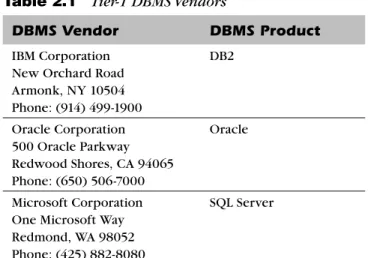
When choosing a DBMS, it is wise to select a product from a tier-1 ven-dor as listed in Table 2.1. Tier 1 represents the largest venven-dors having the most heavily implemented and supported products on the market. You can-not go wrong with DB2 or Oracle. Both are popular and support just about any type of database. Another major player is Microsoft SQL Server, but only for Windows platforms. DB2 and Oracle run on multiple platforms ranging from mainframe to UNIX, as well as Windows and even handheld devices. Choosing a DBMS other than these three should be done only under spe-cific circumstances.
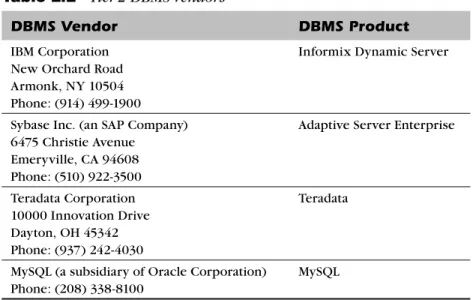
After the big three come MySQL, Sybase, Teradata, and Informix. Table 2.2 lists these tier-2 DBMS vendors. All of these offerings are quality DBMS
When choosing a DBMS, select a product from a tier-1 vendor.
Table 2.1 Tier-1 DBMS Vendors
DBMS Vendor DBMS Product
IBM Corporation New Orchard Road Armonk, NY 10504 Phone: (914) 499-1900
DB2
Oracle Corporation 500 Oracle Parkway Redwood Shores, CA 94065 Phone: (650) 506-7000
Oracle
Microsoft Corporation One Microsoft Way Redmond, WA 98052 Phone: (425) 882-8080
SQL Server
64 Chapter 2 Creating the Database Environment
products, but their installed base is smaller, their products are engineered and marketed for niche purposes, or the companies are smaller with fewer resources than the Big Three (IBM, Oracle, and Microsoft), so there is some risk in choosing a DBMS from tier 2 instead of tier 1. However, there may be solid reasons for deploying a tier-2 solution, such as the high performance offered by Informix or the data warehousing and analytics capabilities of Teradata.
Of course, there are other DBMS products on the market, many of which are fine products and worthy of consideration for specialty process-ing, certain predefined needs, and niche roles. If your company is heavily into the open-source software movement, PostgreSQL, EnterpriseDB, or MySQL might be viable options. If an object DBMS is important for a spe-cific project, you might consider ObjectDesign or Versant. And there are a variety of NoSQL DBMS offerings available, too, such as Hadoop, Cassandra, and MongoDB.1
However, for the bulk of your data management needs, a DBMS from a tier-1, or perhaps tier-2, DBMS vendor will deliver sufficient functionality with minimal risk. A myriad of DBMS products are available, each with 1. If you prefer commercial software over open source, there are commercial offerings of some of the NoSQL products. For example, DataStax is based on Cassandra.
Choosing any of the lower-tier candidates involves incurring additional risk.
Table 2.2 Tier-2 DBMS Vendors
DBMS Vendor DBMS Product
IBM Corporation New Orchard Road Armonk, NY 10504 Phone: (914) 499-1900
Informix Dynamic Server
Sybase Inc. (an SAP Company) 6475 Christie Avenue Emeryville, CA 94608 Phone: (510) 922-3500
Adaptive Server Enterprise
Teradata Corporation 10000 Innovation Drive Dayton, OH 45342 Phone: (937) 242-4030
Teradata
MySQL (a subsidiary of Oracle Corporation) Phone: (208) 338-8100
MySQL
Defining the Organization’s DBMS Strategy 65
certain features that make them worthy of consideration on a case-by-case basis. Choosing any of the lower-tier candidates—even such major names as Software AG’s Adabas and Actian’s Ingres—involves incurring additional risk. Refer to Appendix B for a list of DBMS vendors.
I do not want it to sound as if the selection of a DBMS is a no-brainer. You will need a strategy and a plan for selecting the appropriate DBMS for your specific situation. When choosing a DBMS, be sure to consider each of these factors:
• Operating system support. Does the DBMS support the operating systems in use at your organization, including the versions that you are currently using and plan on using?
• Type of organization. Take into consideration the corporate phi-losophy when you choose a DBMS. Some organizations are very conservative and like to keep a tight rein on their environments; these organizations tend to gravitate toward traditional mainframe environments. Government operations, financial institutions, and insurance and health companies usually tend to be conservative. More-liberal organizations are often willing to consider alternative architectures. It is not uncommon for manufacturing companies, dot-coms, and universities to be less conservative. Finally, some companies just do not trust Windows as a mission-critical environ-ment and prefer to use UNIX; this rules out some database vendors (Microsoft SQL Server, in particular).
• Benchmarks. What performance benchmarks are available from the DBMS vendor and other users of the DBMS? The Transaction Pro-cessing Performance Council (TPC) publishes official database per-formance benchmarks that can be used as a guideline for the basic overall performance of many different types of database processing. (Refer to the sidebar “The Transaction Processing Performance Council” for more details.) In general, performance benchmarks can be useful as a broad indicator of database performance but should not be the only determinant when selecting a DBMS. Many of the TPC benchmarks are run against database implementations that are not representative of most production database systems and there-fore are not indicative of the actual performance of a particular DBMS. In addition, benchmarks are constantly updated to show new
Benchmarks are constantly updated to show new and improved performance measurements.
66 Chapter 2 Creating the Database Environment
and improved performance measurements for each of the major DBMS products, rendering the benchmark “winners” obsolete very quickly.
• Scalability. Does the DBMS support the number of users and data-base sizes you intend to implement? How are large datadata-bases built, supported, and maintained—easily or with a lot of pain? Are there independent users who can confirm the DBMS vendor’s scalability claims?
• Availability of supporting software tools. Are the supporting tools you require available for the DBMS? These items may include query and analysis tools, data warehousing support tools, database admin-istration tools, backup and recovery tools, performance-monitoring
The Transaction Processing Performance
Council (TPC)
The Transaction Processing Performance Council is an independent, not-for-profit organiza-tion that manages and administers performance benchmark tests. Its mission is to define transaction processing and database benchmarks to provide the industry with objective, verifiable performance data. TPC benchmarks measure and evaluate computer functions and operations.
The definition of transaction espoused by the TPC is a business one. A typical TPC trans-action includes the database updates for things such as inventory control (goods), airline reservations (services), and banking (money).
The benchmarks produced by the TPC measure performance in terms of how many transactions a given system and database can perform per unit of time, for example, num-ber of transactions per second. The TPC defines three benchmarks:
• TPC-C, for planned production workload in a transaction environment
• TPC-H, a decision support benchmark consisting of a suite of business-oriented ad hoc queries and concurrent data modifications
• TPC-E, an updated OLTP workload (based on financial transaction processing) Additional information and in-depth definitions of these benchmarks can be found at the TPC Web site at www.tpc.org (see Figure 2.1).
Defining the Organization’s DBMS Strategy 67
tools, capacity-planning tools, database utilities, and support for various programming languages.
• Technicians. Is there a sufficient supply of skilled database profes-sionals for the DBMS? Consider your needs in terms of DBAs, tech-nical support personnel (system programmers and administrators, operations analysts, etc.), and application programmers.
• Cost of ownership. What is the total cost of ownership of the DBMS? DBMS vendors charge wildly varying prices for their technol-ogy. Total cost of ownership should be calculated as a combination of the license cost of the DBMS; the license cost of any required supporting software; the cost of database professionals to program, support, and administer the DBMS; and the cost of the computing resources required to operate the DBMS.
Figure 2.1 The TPC Web site
68 Chapter 2 Creating the Database Environment
• Release schedule. How often does the DBMS vendor release a new version? Some vendors have rapid release cycles, with new releases coming out every 12 to 18 months. This can be good or bad, depending on your approach. If you want cutting-edge features, a rapid release cycle is good. However, if your shop is more conser-vative, a DBMS that changes frequently can be difficult to support. A rapid release cycle will cause conservative organizations either to upgrade more frequently than they would like or to live with outdated DBMS software that is unlikely to have the same level of support as the latest releases.
• Reference customers. Will the DBMS vendor supply current user ref-erences? Can you find other users on your own who might provide more impartial answers? Speak with current users to elicit issues and concerns you may have overlooked. How is support? Does the vendor respond well to problems? Do things generally work as advertised? Are there a lot of bug fixes that must be applied contin-uously? What is the quality of new releases? These questions can be answered only by the folks in the trenches.
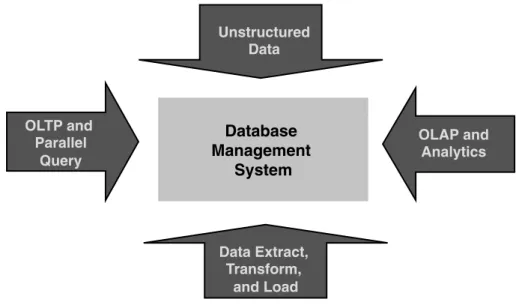
When choosing a DBMS, be sure to take into account the complexity of the products. DBMS software is very complex and is getting more complex with each new release. Functionality that used to be supported only with add-on software or independent programs is increasingly being added as features of the DBMS, as shown in Figure 2.2. You will need to plan for and support all the features of the DBMS. Even if there is no current require-ment for certain features, once you implerequire-ment the DBMS the programmers and developers will find a reason to use just about anything the vendor threw into it. It is better to plan and be prepared than to allow features to be used without a plan for supporting them.
DBMS Architectures
The supporting architecture for the DBMS environment is very critical to the success of the database applications. One wrong choice or poorly implemented component of the overall architecture can cause poor perfor-mance, downtime, or unstable applications.
When mainframes dominated enterprise computing, DBMS architec-ture was a simpler concern. Everything ran on the mainframe, and that
The supporting architecture for the DBMS environment is very critical to the success of the data-base applications.
Defining the Organization’s DBMS Strategy 69
was that. However, today the IT infrastructure is distributed and heteroge-neous. The overall architecture—even for a mainframe DBMS—will prob-ably consist of multiple platforms and interoperating system software. A team consisting of business and IT experts, rather than a single person or group, should make the final architecture decision. Business experts should include representatives from various departments, as well as from account-ing and legal for software contract issues. Database administration repre-sentatives (DA, DBA, and SA), as well as members of the networking group, operating system experts, operations control personnel, programming experts, and any other interested parties, should be included in this team.
Furthermore, be sure that the DBMS you select is appropriate for the nature and type of processing you plan to implement. Four levels of DBMS architecture are available: enterprise, departmental, personal, and mobile.
An enterprise DBMS is designed for scalability and high performance. An enterprise DBMS must be capable of supporting very large databases, a large number of concurrent users, and multiple types of applications. The enterprise DBMS runs on a large-scale machine, typically a mainframe or a high-end server running UNIX, Linux, or Windows Server. Furthermore, an enterprise DBMS offers all the “bells and whistles” available from the DBMS vendor. Multiprocessor support, support for parallel queries, and other advanced DBMS features are core components of an enterprise DBMS.
Four levels of DBMS architecture are available: enterprise, departmental, per-sonal, and mobile.
Unstructured Data
OLAP and Analytics
e s a b a t a D
t n e m e g a n a M
System
Data Extract, Transform,
and Load OLTP and
l e l l a r a P
Query
Figure 2.2 Convergence of features and functionality in DBMS software
70 Chapter 2 Creating the Database Environment
A departmental DBMS, sometimes referred to as a workgroup DBMS, serves the middle ground. The departmental DBMS supports small to medi-um-size workgroups within an organization; typically, it runs on a UNIX, Linux, or Windows server. The dividing line between a departmental data-base server and an enterprise datadata-base server is quite gray. Hardware and software upgrades can allow a departmental DBMS to tackle tasks that previously could be performed only by an enterprise DBMS. The steadily falling cost of departmental hardware and software components further contributes to lowering the total cost of operation and enabling a work-group environment to scale up to serve the enterprise.
A personal DBMS is designed for a single user, typically on a low- to medium-powered PC platform. Microsoft Access, SQLite, and FileMaker2 are examples of personal database software. Of course, the major DBMS vendors also market personal versions of their higher-powered solutions, such as Oracle Database Personal Edition and DB2 Personal Edition. Some-times the low cost of a personal DBMS results in a misguided attempt to choose a personal DBMS for a departmental or enterprise solution. How-ever, do not be lured by the low cost. A personal DBMS product is suitable only for very small-scale projects and should never be deployed for multi-user applications.
Finally, the mobile DBMS is a specialized version of a departmental or enterprise DBMS. It is designed for remote users who are not usually connected to the network. The mobile DBMS enables local database access and modification on a laptop or handheld device. Furthermore, the mobile DBMS provides a mechanism for synchronizing remote database changes to a centralized enterprise or departmental database server.
A DBMS designed for one type of processing may be ill suited for other uses. For example, a personal DBMS is not designed for multiple users, and an enterprise DBMS is generally too complex for single users. Be sure to understand the differences among enterprise, departmental, personal, and mobile DBMS software, and choose the appropriate DBMS for your specific data-processing needs. You may need to choose multiple DBMS types—that is, a DBMS for each level—with usage determined by the needs of each development project.
If your organization requires DBMS solutions at different levels, favor the selection of a group of DBMS solutions from the same vendor whenever
2. FileMaker is offered in a professional, multiuser version, too.
Defining the Organization’s DBMS Strategy 71
possible. Doing so will minimize differences in access, development, and administration. For example, favor Oracle Database Personal Edition for your single-user DBMS needs if your organization uses Oracle as the enter-prise DBMS of choice.
DBMS Clustering
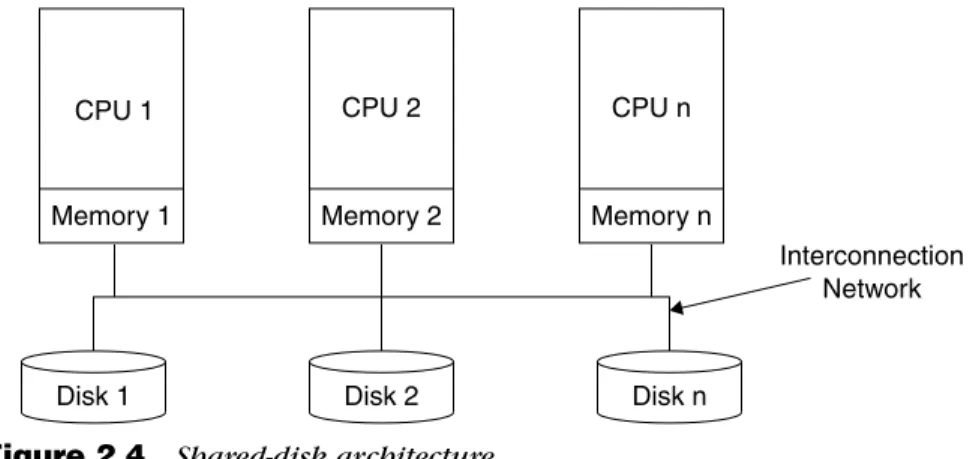
Clustering is the use of multiple “independent” computing systems work-ing together as a swork-ingle, highly available system. A modern DBMS offers clustering support to enhance availability and scalability. The two pre-dominant architectures for clustering are shared-disk and shared-nothing. These names do a good job of describing the nature of the architecture—at least at a high level.
Shared-nothing clusteringis depicted in Figure 2.3. In a shared- nothing architecture, each system has its own private resources (memory, disks, etc.). The clustered processors communicate by passing messages through a network that interconnects the computers. In addition, requests from cli-ents are automatically routed to the system that owns the resource. Only one of the clustered systems can “own” and access a particular resource at a time. In the event a failure occurs, resource ownership can be dynamically transferred to another system in the cluster. The main advantage of shared- nothing clustering is scalability. In theory, a shared-nothing multiprocessor
A modern DBMS offers clustering support to enhance availability and scalability.
The main advan-tage of shared-nothing clustering is scalability.
CPU 1
Memory 1
CPU 2
Memory 2
CPU n
Memory n Interconnection
Network
2
n
n
n
2 2
1 1
1
Disks 1 Disks 2 Disks n
Figure 2.3 Shared-nothing architecture