
THE APPLICATION OF THE PARETO
PRINCIPLE IN SOFTWARE ENGINEERING.
Ankunda R. Kiremire
19th October, 2011
1
Introduction
The “Pareto Principle”, or more commonly “the 80/20” rule is a relation that describes causality and results. It claims that roughly 80% of output is a direct result of about 20% of the input. First observed in 1906 by Italian Economist Vilfredo Pareto with relation to land and population, the Pareto principle has been applied in a variety of fields ranging from Economics, and Business, to Biology and Criminology, in an attempt to not only explain observations in the field, but also fine tune the practices in that field towards improved efficacy[7]. For a principle so widely observed and applied, its application in the Software Engineering field is still in its infant stages. It was the goal of this paper [2]to extend the principle to the software development process to make it less work intensive, and yet more efficient. This was done by applying it to the Water Fall model of the Software development process as it is one of the most applied models in the field. The results obtained did in fact agree with the principle, and show which tasks can be either ignored, designated, or eliminated altogether in an attempt to reduce the effort to 20% of its original value, and yet maintain as high as 80% of the output.
1.1
Pareto Principle
The Pareto Principle is also referred to as the 80-20 rule, the law of the vital few, or the principle of factor sparsity[1, 4]. It states that for many events, roughly 80% of the effects come from 20% of the causes. It is named after an Italian Economist Vilfredo Pareto who in 1906 noticed that 80% of the land in Italy was owned by 20% of the population. He confirmed the principle when he also noticed that 20% of the pea pods in his garden produced 80% of the peas [4]. He then went on to carry out surveys on a variety of other countries and found out that the principle held when it came to land ownership versus population. Close observation of many fields would yield the realization that this principle is in fact more wide spread. In business for example, a common rule of thumb is that 80% of your sales come from 20% of your clients. While it might not come as a surprise that the top 20% of the world population control
82.70% of their income [5], its interesting to know that the rule also applies to subsets of the income range. An example is that the top 3 richest people in the world own as much as the next 7 combined [3]. Business is the field where this rule is observed the most. Business managers for example realize that:
• 80% of their profits come from 20% of their customers,
• 80% of their complaints come from 20% of their customers,
• 80% of their profits come from 20% of the time they spend,
• 80% of their sales come from 20% of their products, and
• 80% of their sales are made by 20% of their sales staff.
Because it is observed so often in this field, many businesses have achieved dra-matic improvements in efficiency and profitability by concentrating on the im-portant areas, and ignoring, eliminating or automating the rest [7]. In software engineering, Microsoft observed that by fixing the top 20% of the most reported bugs, 80% of the bugs and crushes would be eliminated [6]. Other than that optimization problem, there has been limited application of the Pareto princi-ple to the Software Engineering principrinci-ple and yet it has a lot of promise. The authors of the paper therefore tackled this problem with the aim of applying the pareto principle to the software development process in a bid to optimize and reduce what is traditionally a time and labor intensive process. The most common Software Development Process model is the waterfall model and it is this model that the authors decided to begin their optimization idea with. They outlined all the tasks and subtasks (144 tasks in total) in the waterfall model and gave this list to software developers in the field to test. These developers identified what they thought were the important tasks in the whole process, and compared the use of their resources when doing all the tasks with when they only did the top 20% of the tasks and the results were published in their paper [2]. The results showed that reducing the number of tasks by half (to 85 tasks), they could still maintain 70%-80% of the original productivity.
1.2
The Waterfall Model
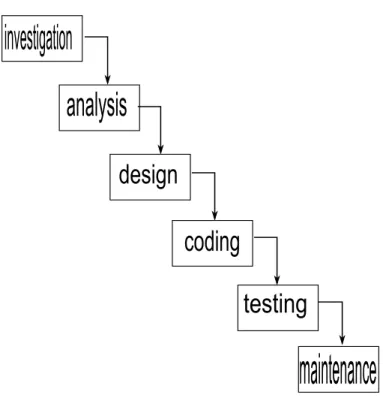
The Software Development Life Cycle (SDLC) is a course through which a soft-ware product is developed from scratch, or is rid of any problem. It consists of phases, procedures and steps that guide a developer from the beginning to end of the Development process. Some of the popular process models currently available include Spiral model, Rapid Application Development (RAD), Itera-tive model, V-model, and the Waterfall model. The Waterfall model is the most applied model in the field because of its versatility and clarity. It can easily and clearly be applied to projects of varying sizes. It also involves a lot of testing and documentation, thereby making it easy even for outsiders to follow and identify any problems with the product.
The waterfall process consists of 6 main phases that each consist of tasks that should be completed within that phase. The 6 main phases are:
• Preliminary Investigation: It is the first phase of the project and involves figuring out what problem is and whether it is feasible to take on the project. Factors like time, Technology, and budget are considered in this phase.
• Requirement analysis: This phase is where all the requirements of the system are collected. It can also be referred to as the data gathering phase. It involves figuring out all the requirements and creating the appropriate documentation. The output from this phase is the software requirement specification.
• System Design: This phase involves translating the system requirements into software representation. It involves designing the algorithm, data structure, architecture, and interface with an eye on the inputs, and out-puts of the system components.
• Coding: This phase, as the name suggests, involves coding. It involves “adding flesh” to the skeleton that was created in the previous phase.
• Integration and Testing: All the individual programs are integrated in this phase to check and see if the whole system meets the requirements that were stated in the first phase. It involves testing all the individual units, and then all the units when integrated in the system.
• Implementation and Maintenance: This phase involves the actual imple-menting or “running” of the system. Output from this phase would typi-cally include user manuals, executables, libraries, and additional software documentation.
All the phases outlined above consist of many tasks and subtasks that help to acheive the goal of each phase, and document the progression of the project as well.
2
Results
The 144 tasks that make up the 6 phases of the waterfall model were split into two categories; those that can be ignored, and those that require extreme attention. The goal was to reduce the number of activities in a bid to achieve the 80% threshold value. This led to reducing the number of activities from 144 to 85 [2]. Much as this may not be a reduction of 20%, it is still a significant reduction in input time other resources and yet maintaining a reasonable amount of output. The tasks are arranged hierarchically from phase through to subtask. It follows the format Phase i/task j/subtask k where subtask k is a portion of task j which is part of Phase i.
2.1
Tasks that can be ignored
The following tasks can be ignored without significantly reducing the output of the project[2].
1. Concept Definition Phase /Feasibility Analysis/ Problem Concept Explo-ration
• Collection of product/ system’s relevant information like required processing for these data items or input
• Formulating alternatives
2. Concept Definition Phase /Requirements’ Definition
• For all system elements (at abstract level), gather and establish Non-functional Requirements
• Doing analysis of Non-functional Requirements
• Justifying the system’s economic (cost) feasibility using COCOMO Model and Wide-Band Delphi Process
• Justifying the system’s technical feasibility using COCOMO Model and Function Points
3. Requirements Elicitation & Specification Phase/ Requirements Analysis
• Collecting (in detail) Non-functional Requirements
4. Requirements Elicitation & Specification Phase/ Requirements’ Specifica-tion
• Reviewing the SRS from user/ client for customer Acceptance and agreement
5. User Design Phase/Requirements’ Definition for all system elements (at abstract level)
• Gather and establish Non-functional Requirements
• Doing analysis of Non-functional Requirements
• Justifying the system’s economic (cost) feasibility using COCOMO Model and Wide-Band Delphi Process
• Justifying the system’s technical feasibility using COCOMO Model and Function Points
6. User Design Phase/Structural Analysis of SRS (Software Requirements Specification)
• Detailed analysis of different functions to be supported
• Creating Data Flow Diagram (DFD)- Level 0 to determine what to do (at abstract level)
• Documenting all this
7. User Design Phase/Structured Design/ Software Architecture Design’
• Documenting all this
8. User Design Phase/Detailed Design (System Design)
• Designing and documenting the algorithms of the modules
• Design the Project Definition Procedure
• Design the Project Management Procedure
• Design the System Analysis Procedure
• Design the Software Programming Procedure
• Documenting all these tasks
9. Implementation (Coding & Unit Testing) Phase/Implementation Process
• Test the code using Reviews
• Reviewing the code tests
• Approving the change by the user/ client
10. Implementation (Coding & Unit Testing) Phase/Unit Testing Process
• Create test data like Live Data and Sampling
• Develop test requirements (standards)
11. System Testing phase/System Integration and System Testing
• Create ’Draft Integration Plan’ to identify standards for integration
• Testing the System Integration to provide appropriate training for personnel to carry out the integration
• Provide appropriate documentation on each subsystem for integra-tion
• Provide audit or review reports
• Identify standards for integration
• Develop system test requirements (Standards)
• Create system test data like Sampling
• Doing SQA (Validation) by (Doing the White-box Testing, Doing the Beta Testing), Doing SQA (Verification) by (Doing User manual Inspection)
• Reviewing the Integration Plan (if any change)
• Ensuring the working again (if any change)
• Developing test conditions
• Create test data/ cases (for user to check the system)
13. Operations & Maintenance Phase/Maintaining the deployed system
• Maintain support request log
14. Retirement/ Replacement Phase/Retirement process
• Conduct parallel operations (if applicable)
• Retire system
2.2
Tasks that should be done
The following is the list of activities which must befocused as giving 80% of overall productivity[2].
1. Concept Definition Phase Feasibility Analysis/ Problem Concept Explo-ration
• Analyzing the problem domain
• Collection of product or system’s relevant information (like Data el-ements, system inputs and System’s required outputs)
2. Concept Definition Phase Feasibility Analysis/ Requirements’ Definition
• For all system elements (at abstract level)
• Gather and establish Functional Requirements
• Allocating some requirements to software
• Doing analysis of Functional Requirements
• Investigating the problem properly from the user
• Taking decisions for new requirements (prioritizing user requirements)
• Justifying the system’s technical feasibility (by Estimating complex-ity of system)
• Justifying the system’s Behavioral feasibility using Bench-Marks and Perspectives
3. Requirements Elicitation & Specification Phase /Requirements Analysis
• Collecting (in detail) Functional Requirements
• Documenting the requirements & data related to the system being built
• Review and finalize the requirements (to have agreement from the user about freezing of requirements), for design phase
4. Requirements Elicitation & Specification Phase/Requirements Specifica-tion
• Organizing user requirements into Software Requirements Specifica-tion (SRS)
• Focusing on what needs to be done, not how to do
• Documenting all this?
5. User Design Phase/Structural Analysis of SRS (Software Requirements Specification)
• Creating the use cases and Use Case Diagram
• Identification of the data flow among the different functions
• Documenting all this?
6. User Design Phase/Structured Design/Software Architecture Design
• Decomposing the system into modules
• Representing relationship among the modules 7. User Design Phase/Detailed Design (System Design)
• Designing and documenting the data structures (objects) of the mod-ules (programs)
• Create the Entity Relationship Diagram (ERD)
• Creating the Activity Diagram of each use case (scenario) of the system
• Design the Software Design Procedure
• Design the Deployment/ Implementation (hardware) procedure 8. User Design Phase/Creating Object-Oriented Design
• Identifying various objects related to the problem domain and the solution domain
• Refining the objects structure and their relationships to obtain the detailed design
• Creating Sequence Diagram
• Create the Class Diagram
• Documenting all these?
9. Implementation (Coding & Unit Testing) Phase/Implementation Process
• Creating the source code
• Creating object code
• Reviewing the code tests
• Reviewing the requirements (if change occurs) as well as design for verification and validation (SQA Software Quality Assurance)
• Approving the change by the user/ client and Document the change 10. Implementation (Coding & Unit Testing) Phase/Unit Testing Process
• Create test data (like Assumed Data, Live Data and Sampling) Plan the unit testing
• Establishing the test cases
• Develop test requirements (standards)
• Execute the unit test cases (checking each module or interface) Man-aging the unit design
• Documenting the test results and reports
11. System Testing phase/System Integration and System Testing
• Create Draft Integration Plan (to identify the components/ units/ modules to be integrated
• Identify personnel for integration)
• Perform integration (to integrate sub-systems)
• Testing the System Integration (to provide the overall planning and coordination Integrator activities)
• Plan the final Integration Plan
• Document subsystem software unit and database
• Plan system testing, create system test data (like Assumed Data, Live Data)
• Execute the system tests
• Ensuring the working of (internal logics and Functions And Verifica-tion)
• Doing SQA (Validation) (by checking the conformity of user require-ments)
• Doing the Black-box Testing
• Doing the Alpha Testing)
• Creating the validation document/ report
• Doing SQA (Verification) (by Checking the conformity of Software Requirements Specification (SRS))
• Doing the Tool-based Inspection
• Creating the verification document/ report
• Documenting the (test results and reports)
12. Operations & Maintenance Phase/Deploying the system
• Plan installation
• Distribute software
• Install software
• Plan software testing
• Execute the test (by user)
• Accept software in operational environment
13. Operations & Maintenance Phase/Maintaining the deployed system
• Operate the system
• Providing technical assistance and consultancy (for corrective main-tenance), in case of errors
• Providing the user’s requirements to extend it further 14. Retirement & Replacement Phase/Retirement process
• Notify user(s)
2.3
Comparison traditional waterfall to reduced waterfall
To compare the software development process in its complete form to the re-duced form that was proposed in the sections above, some measurement param-eters were identified [2]. These paramparam-eters included• FP (Total Function Points of the phases of the software Waterfall process model)
• N (Total Environmental Non-functional Influence Factors)
• CAF (Complexity Adjustment Factors)
• AFP (Adjusted Functional Points)
• KLOC (Kilo Lines of Code)
• E (Effort) - Unit of measurement is Persons- Month
• TDEV (Project Time Duration) - Unit of measurement is Persons-Month (PM)
• SS (Average Staff) - Unit of measurement is Persons
The table below shows the results showing how these parameters were affected by embracing the Pareto principle in the Waterfall model, for a variety of pro-gramming languages.
It is clear from the table that there is a marked improvement in effeciency by ignoring the less important tasks outlined in the section above. A more cautious Architect could just assign less importance to the tasks that should be ignored and still that should amount in an improvement in efficiency of the Software development process.
References
[1] N. Bunkley. New york times:joseph juran, http://www.nytimes.com/2008/03/03/business/03juran.html, March 2008.
[2] M. Iqbal and M. Rizwan. Application of 80/20 rule in software engineering Waterfall Model, pages 223–228. IEEE, 2009.
[3] T. is Money. The forbes top 100 billionaire rich-list, http://www.thisismoney.co.uk/money/news/article-1607938/the-forbes-100-billionaire-rich-list.html, Accessed October 2011.
[4] A. Narula. what is 80/20 rule?,http://www.80-20presentationrule.com/whatisrule.html, Accessed October 2011.
[5] H. D. Report. Chapter 3: The widening gap in global opportuni-ties, http://hdr.undp.org/en/media/hdr 1992 en chap3.pdf, Accessed Octo-ber 2011.
[6] P. Rooney. Microsoft’s ceo: 80-20 rule applies to bugs, not just features,
http://www.crn.com/news/security/18821726/microsofts-ceo-80-20-rule-applies-to-bugs-not-just-features.htm;jsessionid=4y9xsrtocbwxlpvhrhueuw**.ecappj01, October 2002.
[7] Wikipedia. Pareto principle,http://en.wikipedia.org/wiki/pareto principle#other applications, Accessed October 2011.
![Figure 2: Table showing comparisons for different programming languages[2]](https://thumb-us.123doks.com/thumbv2/123dok_us/8553877.2309843/11.918.205.846.258.911/figure-table-showing-comparisons-different-programming-languages.webp)
