A System for the Management of Clinical Tasks
Throughout the Clinical Process with
Notification Features
Ant´onio Silva1, Tiago Oliveira2, Jos´e Neves1, Ken Satoh2, Paulo Novais1
1 Algoritmi Centre/Department of Informatics, University of Minho, Braga, Portugal
{pjon,jneves}@di.uminho.pt
2
National Institute of Informatics, Tokyo, Japan {toliveira, ksatoh}@nii.ac.jp
Abstract. Computer-Interpretable Guidelines have been associated with a higher integration of standard practices in the daily context of health care institutions. The Clinical Decision Support Systems that deliver these machine-interpretable recommendations usually follow a Q&A style of communication, retrieving information from the user or a clinical repository and performing reasoning upon it, based on the rules from Clinical Practice Guidelines. However, these systems are limited in the reach they are capable of achieving as they were initially conceived for use in very specific moments of the clinical process, namely in physi-cian appointments. The purpose of this work is thus to present a system that, in addition to Q&A reasoning, is equipped with other functionali-ties such as the scheduling and temporal management of clinical tasks, the mapping of these tasks onto an agenda of activities to allow an easy consultation by health care professionals, and notifications that let health care professionals know of task enactment times and information collec-tion times. In this way, the system ensures the delivery of procedures. The main components of the system, which reflect a different perspec-tive on the delivery of CIG advice that we call guideline as a service, are disclosed, and they include a health care Personal Assistant Web Ap-plication, a health care assistant mobile apAp-plication, and the integration with the private calendar services of the user.
1
Introduction
Computer-Interpretable Guidelines (CIGs) are machine-interpretable versions of Clinical Practice Guidelines (CPGs). The latter are systematically developed statements associated with the promotion of best medical practices and reduc-tion of medical error [?]. The aim of these documents is to provide clinical advice for specific circumstances and to support health care professionals in their de-cisions [?]. Their formalisation as CIGs in Clinical Decision Support Systems (CDSSs) brings forth the development of a new range of operations that can be performed with the knowledge they enclose. Such include automated reasoning
for the generation of recommendations, consistency checking within the same CIG and across different CIGs, and merging CIG knowledge with contextual information such as patient and physician preferences or available health care resources, to name a few [?]. The point of these operations is to tailor care in order to generate better outcomes and avoid adverse events. Nonetheless, man-aging patients is a challenging endeavour for health care professionals given that they are typically responsible for numerous cases at the same time and each case involves the enactment of several and complex procedures. Managing this complexity is something that the current applications for CIG execution do not contemplate in the functionalities they offer [?,?,?,?]. Current CIG-based sys-tems do not provide mechanisms for integrating CIG recommendations in the daily routine of health care institutions, which calls forth the need for such sys-tems to assume a new style of communication that can further promote a positive impact on the outcomes of care [?].
CIGs are considered to be the best approach to the concept ofliving guide-lines, which captures statements for clinical decision support that are dynamic -in the sense that they are capable of evolv-ing and provid-ing advice based on the latest evidence - and interactive [?]. This interactive component is related to the ability to cover tasks such as patient tracking, patient follow-up, scheduling of procedures, and the monitoring of procedure constraints, and, at the same time, autonomously inform health care professionals about important aspects of these procedures in the most diverse situations.
Following the identified need for different ways in which to deliver CIG-based advice, the work herein proposes a different perspective regarding this matter. Its main contribution is a system that allows different implementations of CIGs. We show how these implementations can be differently oriented through a Personal Assistant Web Application and a health care assistant mobile app. The principle behind the system and the presented implementations is that the constraints supported my a CIG model and placed on clinical tasks can be used to enhance CIG-based CDSSss. The system is based on the CompGuide ontology for CIGs [?], which treats CPGs as sets of various clinical tasks organised in a work flow. The present paper represents an extension of the work in [?].
Section 2 describes related work regarding systems for CIG execution, fea-turing a description of their means of operation. In Section 3, we present the CompGuide ontology and respective main features that led to the implemen-tations described in the following section. Section 4 provides details about the CompGuide architecture for the deployment of CIGs and how its services are used as a basis for the Personal Assistant Web Application and the health care assistant mobile application developed to accompany health care professionals. Section 5 describes the functionalities supporting care with examples of CIG execution. Finally, Section 6 presents the conclusions drawn so far with the de-velopment of the health care assistant and future directions for the work.
2
Existing Systems for CIG Execution
Based on the classification of CDSSs presented in [?] - tools for information management, tools for patientspecific advice, and tools for focusing attention -and the analysis of current CIG execution approaches [?], it is possible to observe that the most significant examples fall under the category of tools for patient-specific advice. This is the case of CIG execution engines such as the GLIF3, Guideline Execution Engine (GLEE) [?], the Spock Engine [?], and the GLARE Execution Engine [?], which were specifically developed for the application of guidelines to patients in health care settings.
GLEE [?] is based on the third version of the Guideline Interchange For-mat (GLIF3) [?], which, in turn, was designed to support guideline modelling as a flowchart of structured steps that represented clinical actions and decisions. The architecture of GLEE provides three layers of abstraction, namely data,
business logic anduser interface. Thedata layer contains an electronic medical record with patient data, a guideline repository, and a clinical event monitor that allows the execution of CIGs driven by clinical events. The business logic
layer contains an execution engine consisting of a server and many clients that interact with users. The bottom interface layer contains the applications respon-sible for exchanging information with the upper layers. The execution engine records every clinical parameter from a patient during the execution of a CIG, suggesting actions to be performed. In addition, the user can control the process by confirming or deciding different transitions between actions.
The Spock Engine [?] was developed to enable the execution of CIGs in the Asbru model [?]. It incorporates an inference engine that can retrieve data from the patients electronic medical record. It is a modular client-server application that consists of a set of classes to store guidelines, a parser to interpret their content and a synchronizer that establishes the communication with external systems. This execution engine stores different data structures such as state transitions, a queue of scheduled awaiting tasks, and the list of recommendations already issued. This strict control of tasks stems from the expressiveness of the Asbru temporal model, which provides various temporal patterns for the control of recommendation steps.
The GLARE Execution Engine was also developed based on a CIG model focused on temporal constraints, the Guideline Acquisition, Representation and Execution (GLARE) [?]. CIGs in GLARE follow a proprietary graph-based structure, where a clinical action is represented by a node. It is possible to define atomic actions like queries to obtain information, work actions that represent medical procedures, decision actions with sets of conditions, and conclusions that describe the output of a decision. Similarly to the other systems, GLARE also defines three abstraction layers. In this case they are called system, xml, anddbms. The system layer contains an execution interface tied to an execution engine that interprets and updates XML files representing instances of patients and guideline executions in thexmllayer. These are intermediate structures used to exchange data with thedbms layer and thesystemlayer in a structured way.
All these systems use structures and well-defined languages that can be read and analysed by a program. Furthermore, they also feature a guideline reposi-tory, a run-time engine for the CIG knowledge, and an electronic medical record. Furthermore, they may, as in the case of the GLARE Execution Engine, support modules that describe the context, mainly in terms of available resources, of the health care institution where CIG deployment is taking place. Their objective is to run CIG instructions against data from patients and produce tailored recom-mendations, according to the observed state. In these systems, the role of the execution engine is straightforward, in the sense that it is merely concerned with following the constraints of the clinical work flow, comparing items of the pa-tient state with conditions stated in rules dictating whether a recommendation should be provided or not. Most applications for CIG execution, including the above-given examples, exist in the form of client-server applications, with the intelligence engine placed on the client side. Furthermore, these applications are mostly available as desktop applications, which is an obstacle to their potential for reaching health care professionals and their ease of deployment.
The idea of enhancing CDSSs with additional features that allow them to achieve a higher level of integration of clinical recommendations in clinical prac-tice comes from the ever-increasing role of Ambient Assisted Living (AAL) in enabling new information and communication services which transparently sup-port people in their everyday lives [?,?]. In fact, a similar idea has been explored in [?], where a personal memory assistant, capable of intelligent scheduling and deployed over a platform, called iGenda. The assistant acts as the support for a centralised manager system that can manage several services and is responsible for the scheduling of multiple agendas, taking into account the availability of resources or the health conditions of the users. Although different, the work pro-posed herein can be related to this project and others such as the Collaborative Memory Aids [?] and Hermes [?], but with the focus placed on the health care professional.
3
CompGuide Ontology for Clinical Practice Guidelines
The CIG model used in this work is the CompGuide ontology [?]. It provides representation primitives for clinical recommendations based on Web Ontology Language (OWL) by following a task network model in which each recommen-dation assumes the form of a task. In order to reflect this, a set of key OWL classes were defined as subclasses of ClinicalTask. They include the folllowing:– Action: a task that should be performed by a health care professional such as an observation, procedure, exam, or treatment application;
– Question: a task to get information about the clinical parameters that build the state of the patient;
– Decision: a task that encodes a decision regarding the state of a patient, featuring various options and respective conditions;
– Plan: a composed task containing instances of the other tasks defined to achieve a specific goal.
In CompGuide there are object properties that connect instances of the classes as mentioned above in order to define the relative order between tasks. In this regard, it is possible to define: sequential tasks, parallel tasks which should be executed simultaneously, and alternative tasks from which one is automati-cally selected for execution. In this sense, a guideline in CompGuide resembles a linked list of recommendations.
Additionally, it is possible to define different types of conditions that con-strain task execution, including trigger conditions to select one amongst alter-native tasks, pre-conditions which must be verified before executing a task, con-ditions for options in Decision tasks, and expected outcomes for clinical tasks. The Condition class allows the representation of these conditions with specific properties for clinical parameters and their values.
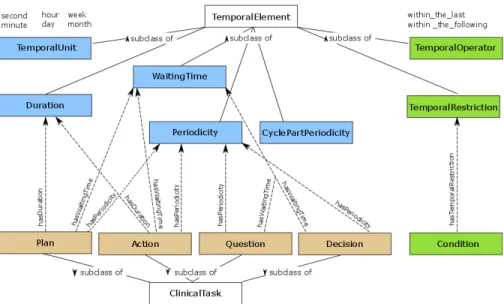
The classes that enable the representation of temporal restrictions are all subclasses of TemporalElement [?]. The relationship between these temporal classes and the classes in ClinicalTask are shown in Figure 1, along with the properties used to connect them. One of the subclasses ofTemporalElement is
TemporalUnitwhich represents the different units in which a temporal constraint may be expressed. It is an enumerated class consisting of the instances second,
minute, hour, day, week, month, and year. The main classes that enable the definition of temporal restrictions about the execution of tasks are:
– Duration: definition of how longActions andPlans should last. – WaitingTime: definition of a delay in the start of a clinical task. – Periodicity: definition of the frequency of a clinical task.
– CyclePartPeriodicity: a nested temporal pattern for the definition of a peri-odicity within a periperi-odicity.
Temporal reasoning about the state of a patient is enabled by the Temporal-Restriction class, whose instances can be associated with a Condition through the hasTemporalRestriction property. With the hasTemporalOperator property aTemporalOperator is specified for the restriction.TemporalOperator consists of two instances,within the last andwithin the following. The operatorwithin the-last is used when one aims to express that a condition about the patient state must have held true at least once, within a period of time just before execution time. It is used in trigger conditions, pre-conditions and conditions of rules in
Decisioninstances. This operator is interpreted by checking if, in the state of the patient, there is a record regarding the parameter in the condition, registered within the specified time frame, whose value validates the condition. As for the
within the followingoperator, it expresses a condition about the future, in which one aims to observe the effect a clinical task has after being applied to a patient. Such conditions are used in task outcomes. Within the context of a CPG for the diagnosis and treatment of colon cancer, an example of a temporal restriction would be an Action that advised chemotherapy with an outcome stating that the tumour should become operable within six months. In this case, there is a condition with a temporal restriction featuring awithin the following operator. The details of the CompGuide model are further provided in [?], along with an assessment of the expressiveness of the model compared to other approaches
Fig. 1: Representation of the CompGuide ontology with clinical tasks and respective temporal elements.
that revealed that it enables the representation of more temporal patterns. The interpretation of the work flow of tasks, their clinical constraints, and their tem-poral constraints demands an execution engine capable of analysing these three aspects and crossing them with patient information. However, these instructions may become too intricate for a clear understanding, which demands ways of de-livering CIGs that also help to manage the complexity of these recommendations during their enactment.
4
CompGuide Architecture for CIG Execution
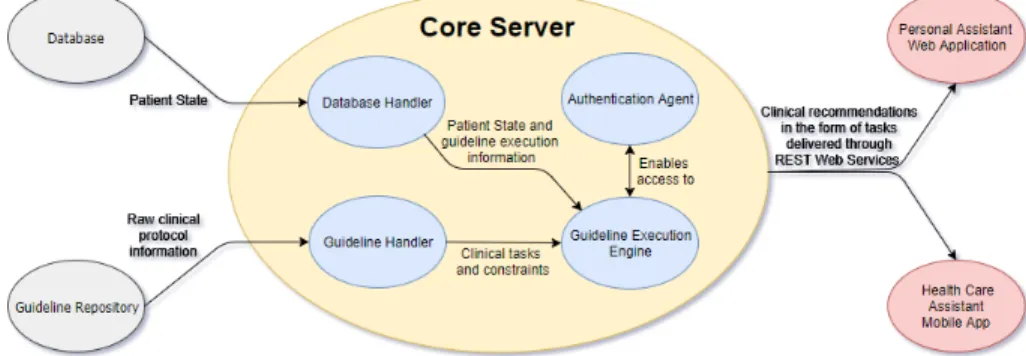
The CompGuide system follows a service-oriented architecture that aims to pro-vide recommendations to support medical decision-making. As shown in Figure 2, it consists of a Core Server that is the central component of the architec-ture and was developed as a RESTful web service application. The usage of web services as the means to access the Core Server offers consistent performance to access the web resources, better scalability and modifiability, providing the possibility of improving selected services without compromising others. This ar-chitectural style grants greater flexibility when integrating CIG execution func-tionalities in third party applications [?]. Given the architecture style used for the system and the concept of a centralised CIG management system that allows different implementations, the distribution of CompGuide follows asoftware as a service (Saas) model.
The Core Server has four modules: the Authentication Agent, the Guide-line Handler, the Database Handler and the Guideline Execution Engine. The
Authentication Agent is the component responsible for the authentication and authorization of the different types of users of the system, namely administra-tors and health care professional, such as physicians or nurses. The Guideline Handler is responsible for managing the access to recommendations of CIGs in the Guideline Repository, keeping different CIGs represented according to the CompGuide ontology, organised by authorship and by date. This compo-nent consists of a collection of OWL files. In order to use a CPG for execution, the Guideline Handler accesses the selected CIG in the Guideline Repository
and pulls the corresponding care flow, delivering it to the Guideline Execution Engine. This module uses information about the patient state provided by the
Database Handler as well as temporal constraints on the execution of the clinical tasks and temporal constraints on the state of a patient given by the Guideline Handler to fill in the data entry points of the care flow and produce recom-mendations. Thus, theGuideline Execution Engine interprets all the scheduling constraints on the tasks and produces enactment times. The applications imple-mented to interact with the health care professionals are then responsible for verifying starting and ending. These mechanisms to follow the execution of pro-cedures over time and to check the execution of tasks are absent from most CIG frameworks [?], but they are essential to have a decision support that is truly capable of following up on guideline deployment.
TheCore Server, as mentioned before, provides these features as RESTful web services implemented in Java, using the RESTEasy API over a WildFly Ap-plication Server. The Personal Assistant Web ApAp-plication, which uses the web services available in the Core Server, was developed as a web application fol-lowing the Model-View-Control(MVC) paradigm using Java Server Faces (JSF). TheHealth Care Assistant Mobile Application is an android application devel-oped in Java, which also uses the same web services. The purpose of the Core Serveris to make available CIG services that anyone can integrate into their own applications, with a special focus on AAL applications. Following the parallel with Saas, this form of delivering CIGs can be considered to be guideline as a service.
4.1 CompGuide RESTful Web Services
The CompGuide web services provide a set of features that allows accessing the
Guideline Repository as well as saving, removing and updating information in theDatabase. Their description is as follows.
TheGuideline Service handles the logic of the execution of a guideline, task to task, obtaining codified tasks in the ontology, providing them as recommen-dations. The Get Tasks Service provides a list of tasks that must be executed at a given moment. In order to get the next task to be executed, the user must perform a request to theNext Task Service.
TheGuidelines Service has only one web service that provides the list of ex-isting guidelines in the data base. Additionally, theGuideline Execution Service
represents the execution of a guideline initiated by a physician and associated with a patient, so this web service provides information about the execution of a guideline. To add a new execution, the user must perform a request to theAdd Guideline Execution Service. Regarding theGuideline Execution Active Service, this web service provides a list of the active executions of guidelines for a specific user.
It is also possible to retrieve and alter patient information through thePatient Service, which allows to add, remove, update and retrieve patient information.
Finally, theTask Service andUser Service follow the same structure of the previous services, allowing the access and manipulation of information about these respective entities in theDatabase.
4.2 Personal Assistant Web Application
The Personal Assistant Web Application is an application that highlights the role of CPGs as patient management and following tools. Based on the informa-tion provided by the Execution Engine, it can keep track of clinical tasks that should be carried out by the health care professional. By using information and communication systems, it is possible to provide CIGs with dynamism, presence, and interactivity that may bring them closer to the concept of living guidelines. It enables the management of information about CPGs, health care profession-als that are users in the system, and patients to which CPGs are applied. As such, one can create, edit and delete all this information, according to the type of authorization in the system.
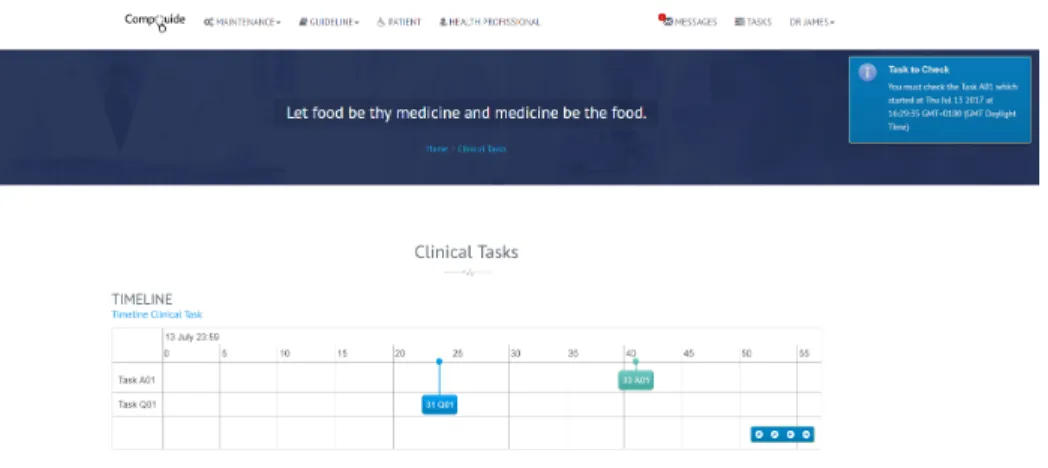
In order to facilitate the visualisation of the clinical tasks, for the health care professionals, the application provides two forms of displaying these rec-ommendations. The first is a timeline in which all the clinical tasks are shown over a chronogram. A timeline of activities has the ability to compress multiple tasks into a single continuity without compromising the succession, and the easy understanding of clinical procedures. The benefits from such a representation include the capacity to sequence events and reduce the potential for overbur-dening the health care professional. Additionally, by visualising all of the pieces of a guideline treatment, care providers can make more focused, effective deci-sions about resources and timetables. This view is shown in Figure 3. In it, it
is possible to observe clinical tasks for the management of colon cancer, namely sequential workup actions to ascertain the state of the patient.
Fig. 3: Timeline view of clinical procedures in the CompGuide Personal Assistant Web Application.
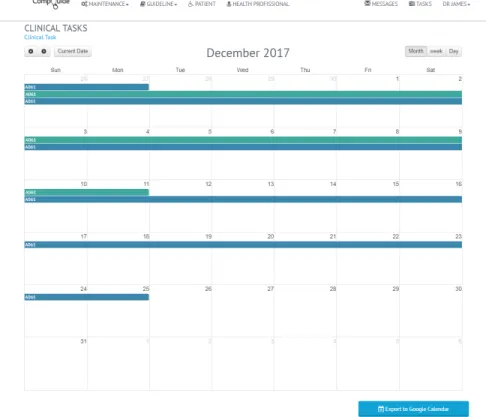
The other available view is a calendar in which the health care professional can visualise the tasks according to the temporal granularity he sees fit, namely week, day, and month. While with the timeline it is easier to detect the starting and ending points of tasks, with the calendar view it is easier to grasp the temporal constraints that bind clinical tasks such as durations, waiting times and periodicities. Figure 4 shows the same tasks as in the timeline, but displayed over a week, where it is possible to verify, for instance, for how long a clinical task should be applied. The purpose of the calendar view is to avoid overlooking tasks and dismissing them as that may have an adverse impact on the evolution of the patient.
Fig. 4: Calendar view of clinical procedures in the CompGuide Personal Assistant Web Application.
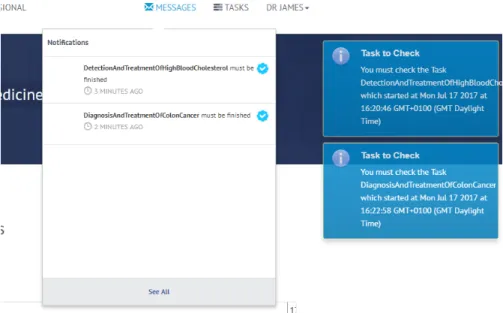
In order to ensure the execution of tasks at the designated time, it was neces-sary to implement a notification system and a message box. These elements are both shown in Figure 5. The message box features messages such as indications about the tasks that should be performed or should have already been performed, offering the possibility to mark them as executed. As for the notification system, it is used to periodically alert the user about task enactment times and steps to collect information about the patient, such as the outcomes of clinical tasks, according to their respective temporal restrictions. The notifications are shown as a pop-up message.
Fig. 5: Message box and notification in the CompGuide Personal Assistant Web Appli-cation.
4.3 Health Care Assistant Mobile Application
In order to improve patient monitoring to increase the efficiency when treating the patients and the preparation for the appointments by the health care pro-fessionals, we developed a mobile solution. The mobile application allows the physicians or nurses to consult and monitor the progress of patients as well as the clinical recommendations wherever they need to.
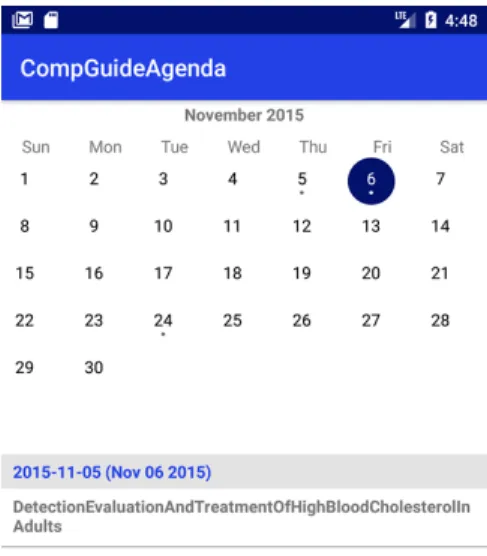
The application uses the CompGuide web services to request all the patient data and clinical tasks, whereby the recommendations are displayed in a calendar of clinical procedures that was implemented using the Custom Calendar library [?]. The clinical tasks are the same that can be seen in the web application, since these two assistants, the web and mobile application, use the centralised RESTful web service developed in the Core Server. The fact that all the data is centralised in only one component makes allows a better tracking of the user actions, greater control over his decisions and get constant supply of clinical recommendations.
The calendar widget provides the view and methods necessary to display a calendar and schedule events. With this calendar, it is possible to navigate through the months and by clicking on a particular date, all the events for that day are shown below in the calendar, as depicted in Figure 6.
Its main objectives are to provide timely clinical recommendations and inte-grate them in the clinical practice of the health care professional. As future work, a push notification feature can be implemented in order to inform the users of
when they should execute clinical tasks, when they should start them and when they should finish them.
4.4 Integration with Google Calendar
The Google calendar API was developed to allow the integration of applications with Google calendar and its features. The managing of events and the push notifications are the most interesting features, the user can use to monitor and supervise the clinical tasks to take control of all patient parameters and clinical process. With this API, it is possible to manage the information regarding the clinical recommendations as well as oversee and follow-up these tasks anytime and anywhere with only a mobile device. Thus, both health care assistants can sync the calendar present in CompGuide with their Google calendar account. The Google calendar provides a public RESTful API that allows the integration with a variety of devices and services on the internet. This API lets the users display, create and modify calendar events as well as work with many other calendar-related objects, such as calendars or access controls [?]. Furthermore, its Java API is native to the Android operating system, allowing a possible integration in the future with the mobile application.
Regarding the integration of the API, firstly it was necessary the registra-tion of the applicaregistra-tion in the Google console, and then the download of Google credentials, to use in the application. After these credentials were integrated into the project, it was possible to communicate with the API. This REST API can be utilised by making explicit HTTP calls, but there are client libraries im-plemented in various programming languages that make the API easier to use. Thus, we used the Java client library, since the web and mobile assistants are implemented in Java.
To export the clinical tasks, presented in the calendar view of the CompGuide web assistant, it is necessary to click on the ”Export to Google Calendar” button. This view is shown in Figure 4 a). After this action, the user will be redirected to the Google consent screen, asking to authorise the CompGuide application to request some user data. If the user approves, then Google gives a temporary access token that allows the application to request user data. Therefore, the CompGuide will attach the access token to the request, process all the clinical tasks and its temporal constraints, in order to create the events into the Google calendar of the user.
Through the Google calendar application, the users can see the clinical tasks and their details by clicking on the task, as shown in Figure 7 b).
Fig. 7: Calendar view of clinical procedures in Google calendar.
5
Execution Examples
To test our temporal ontology, we used the NCCN Clinical Practice Guideline for Colon Cancer [?]. Its representation resulted in an OWL file containing 223 task instances, of which: 190 were Action tasks, 21 were Question tasks, one was a Decision task, and 11 were Plans. Out of the 223 tasks, a total of 95 had temporal constraints. The representation of the NCCN guideline in the model was carried out using Prot´eg´e, an ontology editor for OWL. 4.1. This CPG includes procedures that unfold over different phases of treatment, from cancer staging to follow-up, and presents a wide variety of temporal patterns. The most abundant pattern was thePeriodicity, mainly because of the rich description of chemotherapy regimens made in this protocol.
As demonstrated in [?], the temporal ontology was able to represent effec-tively all the temporal patterns in the CPG, with a special focus on Durations
andPeriodicites, since they were the most frequent temporal aspects. Consider-ing an example of a task in the form of a clinicalActionfrom the CPG, which we will refer to as Example 1 from now on, the use of aDuration constructor may be derived from the following description ”perform neoadjuvant therapy for six months”. In it, theAction consists in neoadjuvant therapy (a term used to refer to chemotherapy or radiotherapy) before treatment with a Duration expressed using an exact duration value of six and a temporal unit of month.
Regarding periodic tasks, most of them were also bounded by aDuration. The constraints followed a structure similar to the one in the recommendation ”apply medication for neoadjuvant therapy every two weeks for two-three months”, which we will consider as Example 2. It is possible to identify the Action to apply medication for neoadjuvant therapy, the periodicity value of two with a temporal unit of week, a minimum duration value of two, a maximum duration value of three, and the respective temporal unit of month. In this case, the execution engine would recommend the execution of the task with the specified frequency at least for two months and at most for three.
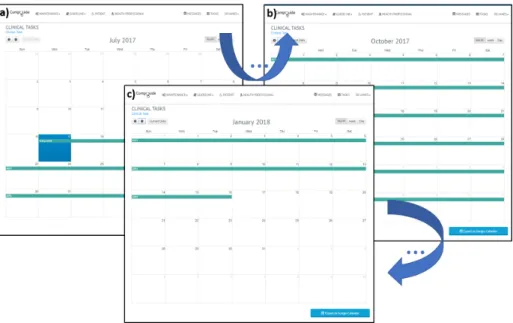
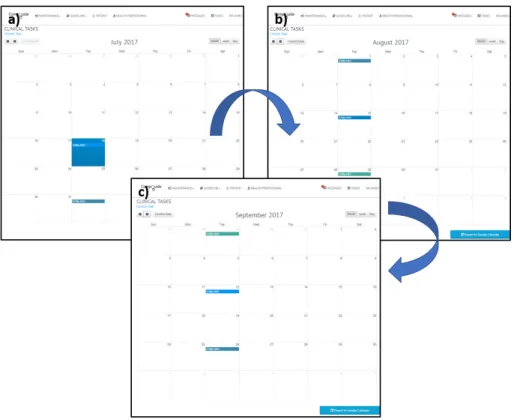
TheGuideline Execution Enginefrom the CompGuide architecture is used to produce inferences that ultimately result in recommendations of clinical tasks. Once these recommendations are retrieved, their constraints (in this case, their temporal constraints) are interpreted by the Personal Assistant Web Application and mapped onto the different views mentioned earlier. With this, for Example 1, an event with a duration of 6 months is created, starting on the 18th of July of 2017, as shown in Figure 8 a), and finishing on the 16th of January of 2018, as can be seen in Figure 8 c). The corresponding result for the expression that concerns Example 2 consists of a set of events that repeat every two weeks, so the application will unfold the recommendation in multiple events and register them in the timeline. Although the execution engine would recommend the execution of the task with the frequency at least for two months and at most for three, the Personal Assistant Web Application will display the maximum duration (three months) because it is the upper bound of the task. Nonetheless, the task controllers will notify the health care professional when the minimum duration is achieved. As such, the result would be six new calendar events from the start date of the task execution up to three months. The first and second events start on the 18th of July and 1st of August, as shown in the Figure 9 a). The third and fourth start on the 15th and 29th of August, as depicted in Figure 9 b). Finally, the fifth and sixth events start on 12th and 26th of September, as shown in Figure 9 c). Then, the user can consult on the timeline and calendar widgets the scheduling of these events in order to execute the clinical task and manage its completion. Whenever the users should execute the tasks or when they should start them, the application provides notifications, as side messages, about the different temporal constraints, thus alerting the user.
Fig. 8: Execution of a clinical task from Example 1, as can be seen in the Personal Assistant Web Application. Figures a), b), and c) show different consecutive execution times.
6
Conclusions and Future Work
The CompGuide system presented herein aims to increase the reach of CIGs beyond the medical office. The purpose of the different implementations is to ensure the timely enactment of clinical procedures over the course of patient management, removing the possibility of inadvertently skipping steps that may prove to be crucial later on for his recovery. In addition to decision support func-tionalities, common to other CIG systems, the CompGuide system allows the development of additional scheduling and alert features to assist the health care professional in keeping track of their patients. Therefore, its main contribution is a new method to integrate CPG advice in a clinical setting and make it easily available. The Guideline Execution Engine included in theCore Server estab-lishes the relative order of tasks to be executed and their execution times based on the clinical information retrieved from the patient. This is the most complex part of CIG deployment, given the complexity, the procedural and temporal patterns of CPGs may show. Once these constraints are produced and delivered through a distribution model, in the form of guideline as a service, it becomes possible to develop reminder tools like the ones described herein. Here lies a de-velopment that can close the gap between CPGs and practitioners and promote the integration of evidence-based clinical advice in AAL monitoring systems.
This mapping of the clinical tasks onto a temporal execution line raises a relevant question. The modus operandi of the Personal Assistant Web
Appli-Fig. 9: Execution of a clinical task from Example 2, as seen in the Personal Assistant Web Application. Figures a), b), and c) show different consecutive execution times.
cation is to issue notifications and alerts in order to promote compliance from the physician. However, if tasks are not executed at their appropriate times, the tool only issues alerts and allows the physician to skip the task and move to the next one. There are other methods to manage this situation, but all of them have drawbacks. Re-scheduling the task may imply verifying if the state of the patient allows the enactment of the procedure at a later time. Not per-forming the task may be equally damaging to the patient. Such an issue will be under consideration in future developments of the system. Additionally, we recognise the need for an evaluation of the system and both the Personal As-sistant Web Application and the health care asAs-sistant mobile app. Such can be done by through an experiment in which a physician uses the system and its two implementations to obtain advice about the patients he is responsible for. In addition to usability assessments, with this experiment, it will be possible to compare the recommendations provided by the system to those the health care professional would usually issue. It is our intention to conduct this study and obtain an assessment of the fitness of the system to CIG deployment.
Acknowledgements
This work has been supported by COMPETE: POCI-01-0145-FEDER-0070 43 and FCT Funda¸c˜ao para a Ciˆencia e Tecnologia within the Project Scope UID/CEC/ 00319/2013.