Kodjovi Nyalali Lotchi
IMPLEMENTATION OF HOSTING AND
MULTI SERVER MANAGEMENT
CONTROL PANEL FOR MULTITRONIC
Technology and Communication
ACKNOWLEDGEMENTS
“Watchman, what do you say of the night? The night is long ... but the day comes! Thus spoke Sylvanus Olympio the first President of Togo (West Africa). Through struggles and effort I could now see the day rising and the timid rays of sun ap-pearing in the horizon ushering me to this academic achievement.
To my Mother and Father who have been my best teachers in life and who through effort and extraordinary sacrifices raised a boy to become a man I am to-day, I dedicate this thesis.
To my fiancée Ahiale Delali who has always been on my side to encourage and support me from day one and throughout my whole education here in Finland To my brothers, sisters and their respective families I show a great appreciation for their motivation, guidance and prayers.
To my uncle Kokouvi Djagli, his wife and his children for being a second family to me and who at a point in time took good care of me.
To Patrik Hall a CTO at Multitronic for his kindness and trust by allowing me to carry this thesis project inside his company I show my deep appreciation
To Antti Virtanen my thesis Supervisor a man of principle who has been a perfect tutor and guide for me during the whole project.
Vaasa 13th, June 2013
Keywords ISPConfig, web hosting, server management VAASAN AMMATTIKORKEAKOULU
UNIVERSITY OF APPLIED SCIENCES Degree Program in Information Technology
ABSTRACT
Author Kodjovi Nyalali Lotchi
Title Implementation of Hosting and Multi-Server Management Control Panel for Multitronic
Year 2013
Language English
Pages 59 + 21 Appendices Name of Supervisor Antti Virtanen
The objective of this thesis work is to implement a hosting and multi-server man-agement control panel for Multitronic a Web shop and Web hosting company in Finland.
First and foremost, the current situation at Multitronic as far as web hosting and server management are concerned was studied. The objective was to analyse ways to improve their current system and allow customers to manage their own various hosted services from a single panel. For this purpose ISPConfig 3 an open source hosting control panel for Linux was used.
After the implementation of ISPConfig, the next activity was to create users and to migrate some existing clients from the old servers to ISPConfig. A security consideration was taken into account in order to prevent any intrusion and hacking on the servers.
The outcome of this thesis work will be double. Firstly, it is possible to have all servers controlled and managed from a single control panel by the administrator. Secondly the users namely Resellers and Clients who have their web applications, Emails, and other services hosted by Multitronic can manage them from ISPCon-fig web interface.
ACKNOWLEDGEMENTS ABSTRACT
1 INTRODUCTION ... 13
2 CURRENT SITUATION AND AIM OF THE PROJECT ... 14
2.1 Multitronic Oy ... 14
2.2 Current Situation and Technology ... 14
2.2.1 Networks and Servers ... 15
2.2.2 Servers ... 15
2.3 Structure of the Thesis ... 16
3 OPEN SOURCE AND PROPRIETARY CONTROL PANEL SYSTEMS .. 17
3.1 Open Source Control Panel System: Virtualmin ... 17
3.2 Proprietary Control Panel System: cPanel ... 17
3.3 Hosting and Multi server Control Panel System: ISPConfig... 18
3.3.1 Choosing the suitable tools ... 19
3.3.2 ISPConfig 3 ... 19
4 PROJECT DEVELOPMENT DESCRIPTION ... 20
4.1 Different Type of Installations of ISPConfig 3... 20
4.2 Supported Daemons/Software and Linux Distribution ... 21
4.3 ISPConfig 3 Users... 22
4.3.1 Admin ... 22
4.3.2 Resellers ... 22
4.3.3 Client ... 22
4.4 Reference about Modules, Functions and Forms ... 23
4.4.1 Tabs ... 23 4.4.2 Tools ... 23 4.4.3 Sites ... 24 4.4.4 Email ... 24 4.4.5 DNS ... 24 4.4.6 Monitor ... 24 4.4.7 Domains ... 24 4.4.8 VServers ... 25
5.1 Project Planning and Overview ... 26
5.2 Implementation of ISPConfig 3 ... 26
5.2.1 Single server Setup and Configuration ... 26
5.2.2 Multi server Setup and Configuration. ... 28
5.2.3 Installation of the Server 1 (web server): web010. multitronic.fi 28 5.2.4 Installation of the Server 2 (mail server): mail2.multitronic.fi ... 36
5.2.5 Installation of the Server 3 (database server): db2. multitronic.fi37 5.2.6 Installation of the Server 4 and Server 5: (DNS server) ns3.multitronic.fi and ns4.multitronic.fi ... 37
6 MIGRATION OF FILES FROM OLD SERVERS TO ISPCONFIG ... 38
6.1 Clients Migration ... 38
6.2 Domain Name Migration ... 39
7 TEST RESULT AND ANALYSIS ... 40
7.1 Test, Result and Analysis Planning ... 40
7.2 Testing Servers... 40
7.2.1 Testing Servers Setting in ISPConfig ... 40
7.2.2 Testing Server1: Web Server ... 44
7.2.3 Testing Server2: Mail Server ... 47
7.2.4 Testing Server3: Database Server ... 50
7.2.5 Testing Server4 and Server 5: DNS servers ... 51
7.3 Testing Security features... 52
7.4 Testing Migrated clients ... 54
8 CONCLUSIONS ... 58
REFERENCES ... 59 APPENDICES
CGI Common Gateway Interface CTO Chief Technical Officer
DNS Domain Name Server
FCGI Fast Common Gateway Interface FTP File Transfer Protocol
HTTP Hypertext Transfer Protocol IMAP Internet Message Access Protocol
IP Internet Protocol
IPv4 Internet Protocol version 4 IPv6 Internet Protocol version 6
MTA Mail Transfer Agent
PHP Hypertext Preprocessor
PHP-FM Hypertext Pre-processor - fastCGI Manager POP3 Post Office Protocol 3
RDBMS Relational Database Management System SFTP Secure File Transfer Protocol
SMTP Simple Mail Transfer Protocol
SNI Server Name Indication
SSL Secure Sockets Layer
Vsftp Very Secure File Transfer Protocol
Figure 1. Dashboard of Virtualmin p. 12
Figure 2. Dashboard of cPanel p. 13
Figure 3. ISPConfig Dashboard showing the tabs p. 18
Figure 4. Hosts file with the IP addresses of the Servers p. 13 Figure 5. Edited version of the file /etc/mysql/my.cnf p. 24 Figure 6. Contents of the created file /etc/fail2ban/ jail.local p. 26 Figure 7. Contents of the created file /etc/fail2ban/ filter.d/ pureftpd.conf
p. 26 Figure 8. Edited version of the file /etc/ default/ pure-ftpd-common. p. 27
Figure 9. Setting of the Services on the Servers p. 36
Figure 10. Example of the Configuration of the Database server p. 36
Figure 11. Admin dashboard after login p. 39
Figure 12. Form to create a Reseller p. 40
Figure 13. Form to set the limits to the reseller p.41
Figure 14. Reseller dashboard p. 41
Figure 15. Form to create an Email p. 43
Figure 16. SquirrelMail interface after login p. 44
Figure 17. Yahoo box showing Email received from [email protected] p. 44
Figure 18. Interface of phpMyAdmin after login p. 45
Figure 21. Form to create a DNS zone p. 47
Figure 22. fail2ban log file p. 48
Figure 23. Scan summary of a directory called data p. 49
Frame 1. Name and IP addresses of the Servers p. 23
Frame 2. MySQL root user records queries p. 27
Frame 3. Services configured by ISPConfig on the web server p. 28 Frame 4. Configuration file with Dovecot server selected. p. 29 Frame 5. /etc/apache2/conf.d/SquirrelMail.conf edited file p. 30 Frame 6. etc/apache2/conf.d/SquirrelMail.conf edited file p. 30 Frame 7. Portion of the Configuration file of the web server p. 37 Frame 8. Portion of ISPConfig migration API called migrate.php. p. 51
Table 1. The internal IP addresses p.10 Table 2. Configuration of the services on the five servers p.38
APPENDIX 1. List of Servers and Their Roles at Multitronic APPENDIX 2. Full List of Managed Services in ISPConfig APPENDIX 3. Some Configurations of the Single Server
APPENDIX 4. Some Configurations of the Multi Server Setup: The Web Server APPENDIX 5. Some Configurations of the Multi Server Setup: The Mail Server APPENDIX 6. Some Configurations of the Multi Server Setup: The database Server
APPENDIX 7. Some Configurations of the Multi Server Setup: The DNS Servers APPENDIX 8. ISPConfig remote API Scripts: migrate.php
1
INTRODUCTION
As the world of Information Technology becomes more and more virtual and dy-namic, it is important to come out with better and efficient ways to store, manage and share data and files. Servers constitute a core element in this infrastructure. But better services are offered if multiple servers are well managed and adminis-tered. Likewise, with the boom of internet many people and companies need a simple yet robust control panel in order to manage their web applications, web-sites and/or Email services. But few of them can host and manage these services on their own physical servers. Therefore, they need the services of professional hosting companies. Multitronic is one of them. Over the years they have been providing hosting services to companies and individuals.
However, they have been confronted with some challenges related to the man-agement of their servers, and the services provided to their customers. The first challenge is to give the customer a client level access to the Multitronic servers. Secondly, since multiple servers are administered by Multitronic, it could be bet-ter and more efficient to have a single control panel through which all servers are managed. Finally, like any server, those at Multitronic are also confronted to secu-rity and vulnerability threats.
The objective of this thesis is to address these problems. A suitable tool to take care of this is ISPConfig 3, a Linux based hosting control panel. All existing serv-ers will therefore be managed from ISPConfig 3. Three usserv-ers (administrators, re-sellers, clients) with different permission level to ISPConfig will be created. The first phase of this thesis will be to study the current situation at Multitronic and determine why ISPConfig is a suitable tool to be used. After that a description of the application as well as its various functionalities will be made. The second phase will involve the implementation of ISPConfig 3 followed by the reinforce-ment of security considerations. After that all existing clients, files and databases will be migrated from the existing servers to ISPConfig.
2
CURRENT SITUATION AND AIM OF THE PROJECT
Before deploying any new system at Multitronic it was appropriate to look at the current situation onsite. They activities, services and technologies were studied. 2.1 Multitronic OyMultitronic Oy is a Finnish company founded in 1995. Currently it is one of the leading web shops in Finland.
The activities of Multitronic Oy evolve around four main areas: - Web shop
- Internet - Services - Programming
Multitronic Oy has over 20 000 different products in their web shop. The product can be ordered online or picked at the shop. They also offer to their customers the possibility to have a customized built computer.
Multitronic Oy provides internet based and web services such as web application and website hosting as well as email hosting on their own reliable servers.
In a large scale, Multitronic Oy offers various hardware and software services on computers, computer peripherals, network and data security and servers. They also provide after sales services.
With their own programming department and team they take care of any pro-gramming application and system they will need. On demand the also perform programming task for their customers.
2.2 Current Situation and Technology
2.2.1 Networks and Servers
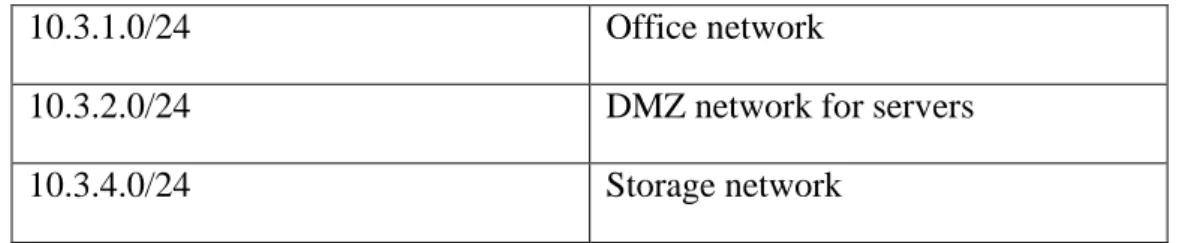
Multitronic Oy connects to internet by means of two public IP addresses 231.28.138.32/27 and 194.197.222.0/24. In the firewall IPs in 231.28.138.32/27 network are mapped to internal IP addresses. IPs in the 194.197.222.0/24 network are routed. The internal IP addresses are assigned as shown below in Table 1. Table 1. The internal IP addresses
10.3.1.0/24 Office network
10.3.2.0/24 DMZ network for servers
10.3.4.0/24 Storage network
2.2.2 Servers
A server is a computer dedicated to run one or more services as a host to serve the needs of the users of other computers on a network. There are various types of servers running at Multitronic. They are structured as follows:
- Physical Server - Vmware vSphere
- Servers for Web and Email Services
The entire list of all twelve various servers and their respective task is shown in Appendix 1
Judging by the high number of servers managed at Multitronic, it is easy to see how challenging it will be to administer them effectively. Eventually, the adminis-trator shifts from one shell interface to another.
Furthermore, Multitronic provides to their customers various internet services, such as website and/or email hosting, server management. The customers need to connect to the Multitronic servers in order to perform some basics tasks related to their own activities, such as the management of their websites, creation of email,
FTP accounts and sub domains. But the challenge is to have a web interface or web based control panel where the clients can login. From there it will be possible for them to have a user friendly interface in order to manage some of their own services. By doing so there will not be need for instance to ask an administrator at Multitronic to create a sub-domain or an Email account.
The security threats and an intrusion is another serious situation the company is facing. There have been attacks and hacking on the servers . It is a must that the running servers or any new one should have en enforced security features.
2.3 Structure of the Thesis
This thesis is structured in six main chapters.
Chapter 3 discusses other control panels. The focus is on two types of application: - Open source application: Virtualmin
- Proprietary application: C Panel
Chapter 4 is about the project development description. This will be the theory part of the project where a description about ISPConfig will be made. The major functions will also be described.
Chapter 5 involves the implementation and the configuration of ISPConfig 3. Chapter 6 deals with the migration of files, clients and databases to ISPConfig. Finally in Chapter 7 a thorough analysis followed by a test is made on the system. The idea is to check if all functions and features are working properly.
3
OPEN SOURCE AND PROPRIETARY CONTROL PANEL
SYSTEMS
There are both open sources and proprietary control panels available. One of each type is described below.
3.1 Open Source Control Panel System: Virtualmin
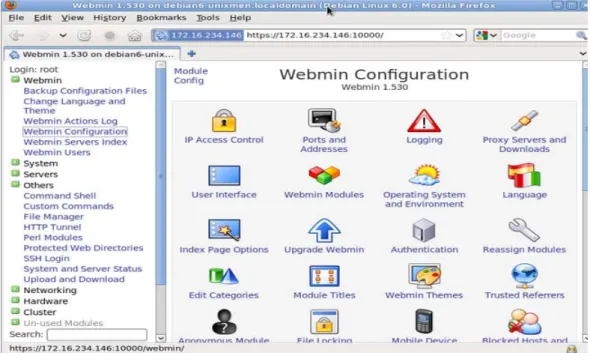
Virtualmin is a powerful and flexible web hosting control panel for Linux and UNIX systems. Its main role is to manage virtual domains, mailboxes, databases, applications, and the entire server. These services are taken care of via web inter-face; it offers four methods for managing servers: Web, mobile device, command line, and remote API. Virtualmin can be integrated with Cloudmin, Webmin, and Usermin for management of a whole data centre. The Figure 1 shows the dashboard of Virtualmin. /1/
Figure 1. Dashboard of Virtualmin
3.2 Proprietary Control Panel System: cPanel
cPanel is defined by most people as the most popular, and first, commercially-available control panel software commercially-available on the market.
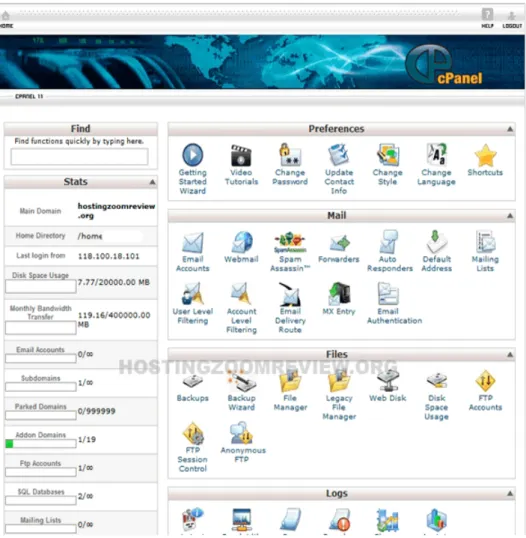
cPanel is based in Unix and provides a web hosting control panel. It also gives to the user a graphical interface and automation tools that can help in the process of creating and hosting a webpage. It allows integration for other third party module. It can be used as a dedicated server or virtual private server. The Figure 2 shows the dashboard of cPanel /2/
Figure 2. Dashboard of cPanel
3.3 Hosting and Multi server Control Panel System: ISPConfig
The challenges listed in Chapter 2.2 show how important it is for Multitronic to upgrade their system as far server management is concerned. They need a system that will provide a possibility to perform a multi-server management panel. With it the main admin could be able to manage all their services.
There is also a need to manage their client effectively and give them a web inter-face from which they could manage some of their own services. A customer hav-ing a web or Email hosthav-ing plan with Multitronic should be able to create emails, databases and FTP accounts, set quota and perform any tasks he might need for his business.
It is also very important to have a system that takes into account security consid-erations. Because of the use of dynamic pages with PHP nowadays it is capital to secure web and database servers in order to prevent any intrusion.
3.3.1 Choosing the suitable tools
There are many hosting control panel available. Before choosing the suitable one, there have been several discussions with Multitronic. In the discussions, few of the existing panels were compared to ISPConfig based on the type of licence used and some key features supported. It came out clearly that ISPConfig is an open source application therefore there will not be a need to buy an expensive licence. Furthermore ISPConfig support some key features that are not found in some of the other hosting panels. Some of these features are: plug-in support, IPV6 (for future use), secure file transfer tool using Vsftp and open source MTA named Postfix. After taking into consideration all these parameters, ISPConfig was se-lected.
3.3.2 ISPConfig 3
ISPConfig 3 is an open source hosting control panel for Linux which is capable of managing multiple servers from one control panel. With this control panel, it is possible for an administrator to manage websites, emails and etc. ISPConfig is an open source application with BSD license. This project started in 2005 and was implemented by the German company Projektfarm GmbH. /3/
4
PROJECT DEVELOPMENT DESCRIPTION
The ISPConfig was described in this part. The recommended application and the Linux distribution were listed.
4.1 Different Type of Installations of ISPConfig 3 There are three different types of setup.
- Single Server Setup - Multiple Server Setup - Mirror Server Setup
The single server setup consists of having the name, web, database and email servers installed on a single server. ISPConfig also is installed on the same server. This type of setup is the most spread because it involves fewer resources and is quite easy to install and configure. A single physical or virtual server could be used /4/
The multiple-server setup consists of controlling multiple dedicated servers from just one ISPConfig installation. In this case all services (web, email, DNS, MySQL) are hosted on each server. Another possibility is to setup dedicated serv-ers for each service (dedicated web servserv-ers, dedicated email servserv-ers, dedicated DNS servers, dedicated MySQL database servers), yet having all of them man-aged by ISPConfig.
The advantage of the multiple server setups is that it is more scalable. If in the fu-ture more websites or databases are needed, it will be simple to extend the system by adding more servers. This feature is practical because if in a future there hap-pen to be an old webpage that cannot run a newer version of PHP the administra-tor can just add a new extra web server with an older version of PHP on it. /4, 43-68/
The mirror server setup consists of creating slave servers or mirrors of the ISP-Config server. In this case only the configurations on the master server can be
copied from the master to the mirror. This server cannot contain any item like web site content or databases. /4, 11/
4.2 Supported Daemons/Software and Linux Distribution
ISPConfig support multiple Daemons/Software and managed services:
- IPv4 support: it is the fourth generation of internet protocol. It uses 32-bit address.
- IPv6 support: it is the latest revision of the internet protocol. It uses 128-bit address.
- Websites tools
- FTP users: these are users that can make a file transfer from one host to another one.
- MySQL databases: this is the most used open source relational database management system (RDBMS)
- Shell users: this user can have access to the shell command line - Email tools
- DNS: this is the naming system for computers, services or resources con-nected to the internet or to a private network.
- Virtualization (through OpenVZ): this tool takes care of creating virtual servers.
- Firewall: it controls the incoming and outgoing network traffic. It deter-mines whether a data should be allowed to pass or not.
- Webalizer & AWStats statistics: these two applications generate analysis for the WebPages. They show statistics about the number of visitors, hits, referrers, and etc.
- Quota/Traffic Limits: these tools are used by the administrator to limit dif-ferent type of quota to the end user
The supported Linux distributions are: - Debian 5 & 6 (recommended)
- CentOS 5.2 – 6.4 - Fedora 10 and 12-15
- OpenSuSE 11.1 – 12.2Be /5/
4.3 ISPConfig 3 Users
There are three access levels for ISPConfig users: admin, resellers, and clients. 4.3.1 Admin
Admin is the user with the highest permission and has full control over the ISP-Config control panel and all its functions. The admin account is the default ac-count created with the installation. However this acac-count is different from the root account which is a system user account. S/he creates all other accounts: other ad-ministrators with specific functions (for example web site admin, DNS admin), reseller and clients. The main administrator gives rights, privileges and quotas to the resellers and clients depending on how much they are willing to pay.
4.3.2 Resellers
Resellers are companies or individuals who sell Web hosting. It usually refers to companies that own a dedicated server or have bought a reseller hosting plan from another Web hosting provider.
Having a reseller account gives privileges to have access to almost all modules and parts of the system configuration. A reseller can create clients and sell to them services (web hosting, email hosting, DNS hosting, etc.).
4.3.3 Client
A client is a company or individual that buys web hosting services from either the admin or the reseller. A client can have multiple websites and/or email accounts as well as other services depending how much he is willing to pay. S/he can be created by a reseller or directly by the admin.
4.4 Reference about Modules, Functions and Forms Some main modules found in ISPConfig are introduced next. 4.4.1 Tabs
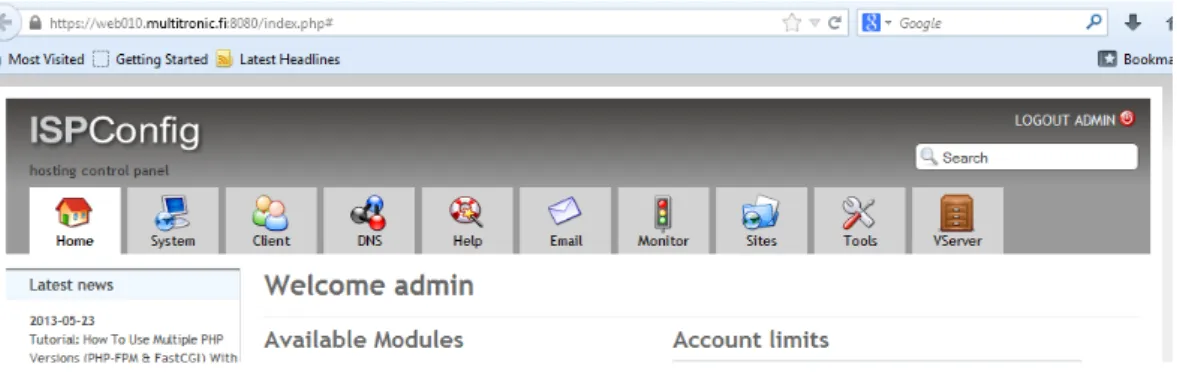
After login ISPConfig has the following tabs depending on the user. The admin has access to all modules whereas the reseller and the client have access to only selected modules. The modules are: Home, Sites, Email, Monitor, System, DNS, Help, Client and Tools. The Figure 3 gave an overview for these modules.
Figure 3. ISPConfig different modules. 4.4.2 Tools
There are useful tools to manage various services.
User settings include e.g. password and language. After login in for the first time, the user is asked to change the password for a new one for security reason. An-other setting is related to the language. As of today ISPConfig is available in 22 languages.
The interface is where the theme and start module can be changed. By default upon login the user is directed to the dashboard.
By means of Resync tool, all configuration files are rewriting. This is useful in the case the configurations are lost. To bring the lost files back, Resync tool is used again.
4.4.3 Sites
From the sites tab one can create WebPages, Domains and Sub domains (for web-sites and VHost), FTP accounts, shell users, MySQL databases, and cron jobs. Full statistics can be obtained from here as well as the display of disk quota. The admin can enable or disable various features (like PHP, CGI, SSL, SuExe, etc.) according to the need of the client.
4.4.4 Email
Here is where email accounts area created. By connecting to the web server some email protocols are defined: email forwarding, spam filter settings, configuration of the system, fetch mail from remote POP3 and/or IMAP servers, black- and white lists, etc.
4.4.5 DNS
From this tab the admin creates the zone and DNS for various domains. This can be done in two ways:
- Using DNS wizard found in ISPConfig. This wizard allows automatically the creation of a set of common DNS.
- Creating DNS manually. This is for experienced users. Here an existing DNS zones can be modified and a new one creates
4.4.6 Monitor
Under the monitor tab the state of all servers are displayed for better management. One can have an overview of the characteristics of the servers such as: logs, CPU, memory, disk usage. It also shows the system log and the job queue.
4.4.7 Domains
Here is where domains can be added. Later on the client will make use of it when he creates his website or an email account.
4.4.8 VServers
By means of VServers virtual machines can be created. In ISPConfig the tech-nique used is based on openVZ which is an open source application. These types of servers are created by using either OS Templates or VM Template.
5
SYSTEM IMPLEMENTATION AND CONFIGURATION
At this stage of the thesis the focus was on the implementation and the configura-tion of the applicaconfigura-tion.5.1 Project Planning and Overview
A lot of considerations have been taken into account before the implementation of ISPConfig. Since this application will be used in a production line by Multitronic, it is very important that several tests are made before the actual installation. For that reason a multiple test or setups (single-setup and multi-server setup) was conducted on various virtual servers running Ubuntu 12LTS and 13LTS and CentOS 6. All prerequisites were carefully analyzed and if possible a replacement was made on each needed application. Another important feature to consider prior to the installation is the security features since it will be impossible to install some of them after the installation of ISPConfig.
5.2 Implementation of ISPConfig 3
Prior to the installation a recommended Linux distribution mentioned in the chap-ter 4.2 was installed.
5.2.1 Single server Setup and Configuration
In this setup, a single server was used to hosts all needed servers such as web, email, DNS, database servers. After they have been installed and configured ISP-Config is installed at the end.
The single-server setup was installed on two versions of Ubuntu (12 LTS and 13 LTS) and on CentOS6. The installations and configurations are quite similar for both servers. The base system is prepared with the configuration of the network, the host and the firewall. After that some needed applications were installed. Be-low are some of them:
- Quota: this application helped to assign a disk space and Email box quota to the client
- Apache: that was the web server installed. It was preferred to another one called Nginx
- MySQL: this application was already defined in 4.2
- PhpMyAdmin: this was a tool used to manage MySQL by means of the web browser.
- Courier-IMAP Courier-Authlib, And Maildrop: these applications were used to take care of the email services such as user authentication, mail filter and delivery.
- Postfix: it is a mail transfer agent (MTA). It was installed to take care of the electronic mail routing and delivery.
- Getmail: this was used for mail retrieval from POP3 and IMAP4 servers. - Amavisd-new, SpamAssassin and ClamAV: these were the antivirus in-stalled to protect the servers from any intrusion, spams or viruses.
- mod_php, mod_fcgi/PHP5, and suPHP: these were PHP versions and tools installed. Once the system was ready, suPHP can be used to execute PHP script with the permission of a client owning a file been executed.
- Ruby: it is an object-oriented programming language.
- WebDAV: this is a Web Distributed Authoring and Versioning. It was in-stalled as a file server. It is a better file management tool for multiple users over the internet.
- Pureftpd: this is a secure FTP server.
- Bind:it is the most used DNS software on the internet
- Webalizer and AWStats: these tools were already defined in 4.2.
- Fail2ban: this application was installed as an intrusion prevention tool. It monitors log files and can ban a particular IP after several unsuccessful login at-tempt.
- SquirrelMail: this was an open source webmail used by ISPConfig. And finally ISPConfig was installed and configured.
Although these applications were installed on the single-server setup, almost all of them were installed on the multi-server setup also.
However this setup was made just for the testing purpose. The idea was to get fa-miliar with how ISPConfig works.
Some configurations of the single-server setup are shown in Appendix 3. 5.2.2 Multi server Setup and Configuration.
This installation is known as the five Ubuntu base systems because it involves five servers: one master server which runs the web server and ISPConfig, and four other dedicated servers which run the database, the email and the two DNS. These servers are named as follows with their respective IP address in Frame 1.
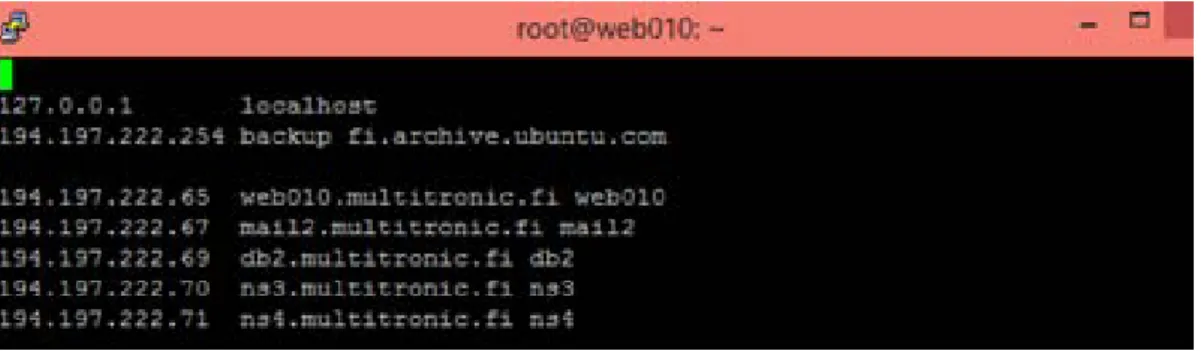
Server1: 194.197.222.65 web010.multitronic.fi web010 Server2: 194.197.222.67 mail2. multitronic.fi mail2 Server3: 194.197.222.69 db2.multitronic.fi db2 Server4: 194.197.222.70 ns3.multitronic.fi ns3 Server5: 194.197.222.71 ns4.multitronic.fi ns4 Frame 1. Name and IP addresses of the Servers
All the five servers are installed separately. However it is to be noted that the in-stallation steps are similar from one server to another with few variation. A de-scription of how all servers are installed and configured is given below
5.2.3 Installation of the Server 1 (web server): web010. multitronic.fi
The first thing done here was to edit the hosts file and add the IP addresses and hostnames for all the five servers. After the editing, etc/hosts file looked like this as shown below in the Figure 4.
Figure 4. Hosts file with the IP addresses of the Servers
The next task is to synchronize the system clock with network Protocol time (NTP) and install MySQL server with this script:
apt-get –y install ntp update
apt-get -y install mysql-client mysql-server
MySQL was configured during the installation. The installer asked for the crea-tion of a new password. This password is used later by the root to login to phpMyAdmin. Since this application will be accessed online it was appropriate to allow MySQL to listen to all the interfaces not only the localhost. For that reason the file named /etc/mysql/my.cnf was edited and the code line that forced MySQL to listen to the localhost only was commented out as shown in the Figure 5. /4, 23/
Figure 5. Edited version of the file /etc/mysql/my.cnf .
After that the following applications like Apache2, PHP5, phpMyAdmin, FCGI, suExec, Pear, mcrypt, PureFTPd, quota, vlogger, webalizer, and awstats were in-stalled according to the ISPConfig 3 Manual. /4, 24-25/
During the installation some apache module like suExec, rewrite, ssl, actions, in-clude were enabled with the following command:
a2enmod suexec rewrite ssl actions include ruby dav_fs dav auth_digest
The installation of these apache modules were made for security reason. Under normal circumstances, CGI (Common Gate Interface) and SSI (Server Side In-clude) modules execute as the same user through all file because apache reads all file hosted on the web server. With suExec installed on the web server, Apache users can be able to run CGI and SSI under their own user ID and no more under the common ID. This feature can prevent anybody who is hosted on the web server to read the files or databases of another user hosted on the same web server. In the other hand, mod_rewrite can give possibility to manipulate URLs by means of website redirecting for instance. Some of these modules were installed by de-fault by the Linux distribution. They were just enabled during this installation. PureFTPD is then configured to allow FTP and TLS sessions. This configuration is important because TLS will encrypt the files transferred from the host to the web server. /4, 26/
echo 1 > /etc/pure-ftpd/conf/TLS
TLS need an SSL certificate to function. A free one could be generated as fol-lows:
openssl req -x509 -nodes -days 7300 -newkey rsa:2048 -keyout /etc/ssl/private/pure-ftpd.pem -out /etc/ssl/private/pure-ftpd.pem
But Multitronic has his own certificate which was used for that purpose.
At this stage the pureFTPs was restarted and the file /etc/fstab was edited. Like-wise, after the installation of vlogger, webalizer and awstats, a file named
/etc/cron.d/awstats was also edited. These two files were edited according to the ISPConfig 3 Manual. /4, 24-25/
After that quota was enabled by the following command:
mount -o remount /
quotacheck –avugm quotaon –avug
The next applications installed were Jailkit and fail2ban. Jailkit was configured later by ISPConfig. However PureFTPd was set to be monitored by fail2ban. For that reason, a file named jail.local (located at /etc/fail2ban/) was created. The con-tent of the file can be seen in the in the Figure 6.
Figure 6. Contents of the created file /etc/fail2ban/jail.local.
A filter file named pureftpd.conf (located at etc/fail2ban/filter.d/) was also created and can be seen in the Figure 7. /4, 25-26/
Figure 7. Contents of the created file /etc/fail2ban/ filter.d/ pureftpd.conf.
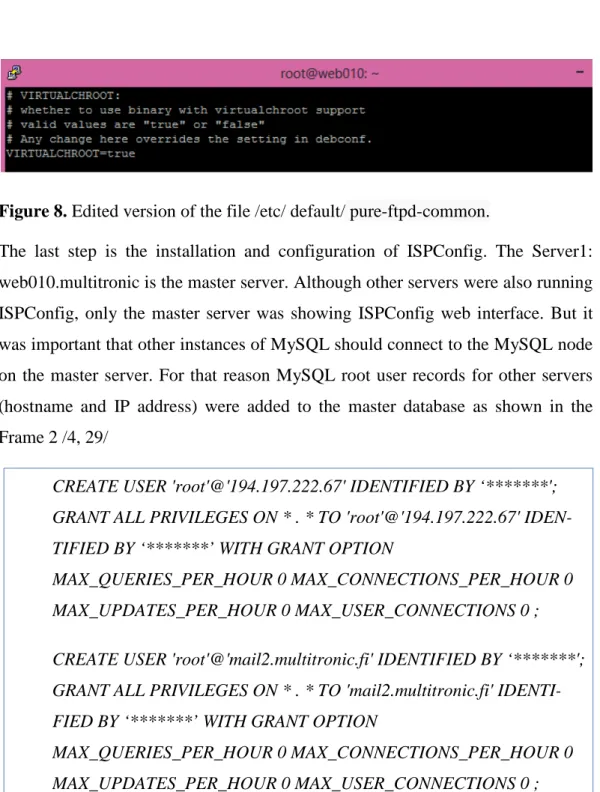
Furthermore according the Figure 8, the virtualchroot is set to be true in the file named pure-ftpd-common under /etc/default directory. This setting was useful
when a symlink was created for both SquirrelMail and phpMyadmin. This can al-low users to folal-low these symlinks. /4, 55/
Figure 8. Edited version of the file /etc/ default/ pure-ftpd-common.
The last step is the installation and configuration of ISPConfig. The Server1: web010.multitronic is the master server. Although other servers were also running ISPConfig, only the master server was showing ISPConfig web interface. But it was important that other instances of MySQL should connect to the MySQL node on the master server. For that reason MySQL root user records for other servers (hostname and IP address) were added to the master database as shown in the Frame 2 /4, 29/
CREATE USER 'root'@'194.197.222.67' IDENTIFIED BY ‘*******'; GRANT ALL PRIVILEGES ON * . * TO 'root'@'194.197.222.67' IDEN-TIFIED BY ‘*******’ WITH GRANT OPTION
MAX_QUERIES_PER_HOUR 0 MAX_CONNECTIONS_PER_HOUR 0 MAX_UPDATES_PER_HOUR 0 MAX_USER_CONNECTIONS 0 ; CREATE USER 'root'@'mail2.multitronic.fi' IDENTIFIED BY ‘*******'; GRANT ALL PRIVILEGES ON * . * TO 'mail2.multitronic.fi' IDENTI-FIED BY ‘*******’ WITH GRANT OPTION
MAX_QUERIES_PER_HOUR 0 MAX_CONNECTIONS_PER_HOUR 0 MAX_UPDATES_PER_HOUR 0 MAX_USER_CONNECTIONS 0 ;
The MySQL queries shown in the Frame 2 applied to the mail server. However the same queries were used for other servers after changing the IP addresses and the name of the servers.
Next was to download and install the latest version of ISPConfig (ISPConfig 3.0.5) from sourceforge with the following link:
After the installation the application is configured with Multitronic details. During the configuration, a database was created. The Frame 3 showed the services that were configured by the ISPConfig installer by answering n (for no) and y (for yes).
Full qualified hostname (FQDN) of the server, eg server2.domain.tld [web.multitronic.fi]: <-- web010.multitronic.fi Shall this server join an existing ISPConfig multiserver setup (y,n) [n]: n Configure Mail (y,n) [y]: <-- n
Configure FTP Server (y,n) [y]: <-- y Configure DNS Server (y,n) [y]: <-- n Configure Apache Server (y,n) [y]: <-- y Configure Firewall Server (y,n) [y]: <--y Install ISPConfig Web-Interface (y,n) [y]: <--y
Frame 3. Services configured by ISPConfig on the web server.
It should be observed that among the services or servers available, only Jailkit, FTPserver, Apache Server, and Firewall Servers were configured. /4, 25/
After this the webmail (SquirrelMail) was installed. This webmail needed to run with dovecot which is an open source IMAP and POP3 email server. Dovecot was configured later by the SquirrelMail installer as seen in this portion of the configuration file of SquirrelMail in the Frame 4.
Please select your IMAP server: bincimap = Binc IMAP server courier = Courier IMAP server cyrus = Cyrus IMAP server
dovecot = Dovecot Secure IMAP server exchange = Microsoft Exchange IMAP server hmailserver = hMailServer
macosx = Mac OS X Mailserver mercury32 = Mercury/32
uw = University of Washington's IMAP server
gmail = IMAP access to Google mail (Gmail) accounts quit = Do not change anything
Command >> <-- dovecot
Frame 4. Configuration file with Dovecot server selected.
After the installation, some Apache configuration files were configured in order to use SquirrelMail from within ISPConfig. To do that a symlink called Squirrelmail.conf was created under /etc/apache2/conf.d/ and pointed to /etc/SquirrelMail/apache.conf with the following script
cd /etc/apache2/conf.d/
ln -s ../../SquirrelMail/apache.conf SquirrelMail.conf /etc/init.d/apache2 reload
The file named /etc/apache2/conf.d/SquirrelMail.conf shown in the Frame 5 was also edited by adding the following lines of code
value include_path .AddType application/x-httpd-php .php php_flag magic_quotes_gpc Off php_flag track_vars On php_admin_flag allow_URL_fopen Off php_value include_path .
php_admin_value upload_tmp_dir /var/lib/SquirrelMail/tmp php_admin_value open_basedir
/usr/share/SquirrelMail:/etc/SquirrelMail:/var/lib/SquirrelMail:/etc/hostna me :/etc/mailname
Frame 5. /etc/apache2/conf.d/SquirrelMail.conf edited file.
In these lines of code the magic_quote flag was set to off so that the data coming to the PHP is not escaped automatically. This should be done rather at runtime. The allow_URL_open flag was also set to off to prevent any code injection vul-nerability.
After that, a directory (/var/lib/SquirrelMail/tmp) owned by the user www-data was created and Apache is reloaded.
At this level SquirrelMail can be accessed from the web browser by typing:
But it will be convenient to use webmail as an alias than SquirrelMail. To fix that problem, the following lines of code are added to
etc/apache2/conf.d/SquirrelMail.conf file as shown in the Frame 6. /4, 55-60/ Alias /SquirrelMail /usr/share/SquirrelMail
Alias /webmail /usr/share/SquirrelMail [...]
After reloading Apache once again, the SquirrelMail webmail can be opened with these URLs:
Some configurations of the master server web010.multitroic.fi are shown in Appendix 4.
5.2.4 Installation of the Server 2 (mail server): mail2.multitronic.fi
The installation of the mail server is similar to the one of the web server with little variation. After the Hosts files were edited and the system clock synchronized, postfix, dovecot and MySQL were installed with a single command:
apt-get -y install postfix postfix-mysql postfix-doc client mysql-server openssl getmail4 rkhunter binutils dovecot-imapd dovecot-pop3d
Next is the installation of some antivirus (amavisd-new, SpamAssassin, and ClamAV ) with the next script: /4, 30/
apt-get -y install amavisd-new spamassassin clamav clamav-daemon zoo unzip bzip2 arj nomarch lzop cabextract apt-listchanges libnet-ldap-perl libauthen-sasl-perl clamav-docs daemon libio-string-perl libio-socket-ssl-perl libnet-ident-libio-socket-ssl-perl zip libnet-dns-libio-socket-ssl-perl
It should be possible later for ISPConfig3 to run the PHP-based shell script. For that reason the command line version of PHP was installed
The next task was to install and configure mailman (according to ISPConfig man-ual). During its installation, a first mailing list called mailman was created with the email and password of the administrator. /4, 31/
At this stage ISPConfig3 was once again installed. During this installation, the only service that was configured was the Firewall Server. The configuration of the mail server is done later when the mail client (SquirrelMail) is installed.
Some configurations of mail2.multitronic.fi server are shown in Appendix 5. 5.2.5 Installation of the Server 3 (database server): db2. multitronic.fi After the basic settings are done both MySQL client and server were installed. This is followed by the installation of the command line version of PHP and fail2ban. Later ISPConfig3 was installed. Here also only the Firewall Server was configured by the ISPConfig installer. /4, 33-35/
Some configurations of db2.multitronic.fi server are shown in the Appendix 6.
5.2.6 Installation of the Server 4 and Server 5: (DNS server)
ns3.multitronic.fi and ns4.multitronic.fi
Both DNS servers have the same installation scripts as well as the same configu-ration. They were installed like the Database server. But there was an additional server called BIND DNS installed. Only this server was configured by ISPConfig. /4, 36-40/
Some configurations of ns3.multitronic.fi and ns4.multitronic.fi servers are shown in Appendix 7.
6
MIGRATION OF FILES FROM OLD SERVERS TO
ISP-CONFIG
The next task was to migrate some clients from the old servers owned by Multi-tronic to the new ones installed
6.1 Clients Migration
Multitronic has hundreds of clients whose WebPages, emails, virtual servers they are hosting. With the implementation of the new control panel, it is therefore im-portant to migrate these existing customers to the newly installed ISPConfig. This phase of the project consisted of two things:
- Planning the migration: this is done by preparing a script that has to take care of the migration.
- Choosing the clients and the services that can be migrated now. The idea was to migrate only some of the clients and services in order to see how the new server handles them. This will be tested for a few days and even months. If every-thing goes ahead smoothly all other customers and services will be migrated. A few things should be taken into account as far as the migration is concerned. The schema of almost the clients might looks like this:
- Client 1 with website services:
• Domains: DNS, Secondary DNS
• Mail: Email users, Email aliases
• Web site: FTP account - Client 2 with virtual server services
The first phase of the transfer involved the migration of few clients and their de-tail from the old severs to the new one. The following ISPConfig remote API scripts were used:
- Soap_config.php.
A file named DB.php is also used in order to link the Multitronic client’s data-base.
But before the migration is made possible, a remote user must be created inside ISPConfig. His login information is used to connect to the remote servers.
The complete script for the migration.php is in Appendix 8. 6.2 Domain Name Migration
Here a domain name is migrated from another hosting panel (from a company called iPage in USA) under ISPConfig. The domain name used is creein.com. It was directed to two name servers: ns1.yourwebhosting and ns2.yourwebhosting. Prior to the migration the owner of the domain has to update the name server to the ISPConfig name servers (ns3.multitronic.fi and ns4.multitronic.fi).
The transfer or change of name server was ready after 24h according to the set-tings of ipage.com name servers.
7
TEST RESULT AND ANALYSIS
7.1 Test, Result and Analysis PlanningAt this stage of the project, the focus was to check if ISPConfig3 worked perfectly and could be used in the production network without any problem. The first thing to check was to see if all installed servers run smoothly. Server security and pro-tection tools were tested and analysed.
After that it was checked if clients and domain name were moved successfully from remote servers to ISPConfig. Next is to see if websites and emails accounts could be created and run on the ISPConfig. During the test, results obtained were be thoroughly analysed.
7.2 Testing Servers
The objective here was to see if all the five servers are installed and working properly.
7.2.1 Testing Servers Setting in ISPConfig
The first thing to do was to check the settings of the servers and the main task each of them perform. A summary of their main task is configured in the panel through:
System>Server System
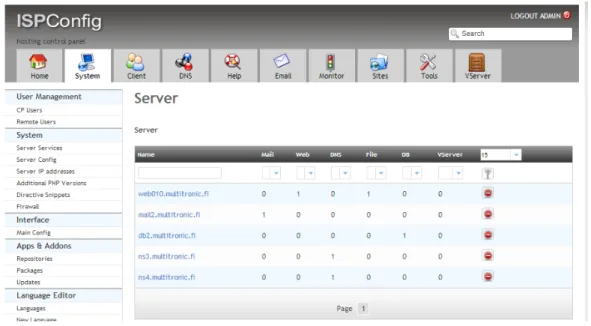
After the settings, the state of all servers can be seen in the Figure 9. At the left side under the Service tab there is a list of all other services and tools that can be used.
Figure 9. Setting of the Services on the Servers.
Next was the configuration of individual servers. A typical example is how each and every server can be configured. Below in the Figure 10 was an example a configuration of the Database server (Server 3).
Figure 10. Example of the Configuration of the Database server
These examples and tests made on the servers showed they were working without problem. This explains why during the installation the mode of ISPConfig that
was selected is expert mode instead of standard mode. The reason was that with the expert mode the installer gives more configuration option. These values could be changed to suit the need of each server. Some of these options or values were already set as a default in the standard mode. (The standard mode is mostly used for the single server-setup). This was seen during the installation of the servers. Frame 7 below showed a portion of the configuration file of the web server.
Installation mode (standard,expert) [standard]: <-- expert …..
MySQL server hostname [localhost]: <-- localhost MySQL root username [root]: <-- root
MySQL root password []: <-- ********** …..
Shall this server join an existing ISPConfig multiserver setup (y,n) : <-- n MySQL master server hostname []: <-- web010.multitronic.fi
……
Frame 7. Portion of the Configuration file of the web server.
Furthermore, it should be noted that the web server (web010.multitronic.fi) is the master server. During the installation these two questions were asked for all the servers:
Shall this server join an existing ISPConfig multiserver setup (y,n) : <-- n
The answer to the first question is NO for the web server because this server is the master server. It was installed at the first position and could not join any existing one. But since all other serves were installed later the answer is Yes since they have to join an existing server and communicate with it.
Though ISPConfig was installed on all the servers it is only on the web server that its web interface is configured. That is the reason why the URL of the whole ap-plication carries the IP address of the web server (194.197.222.65). Other servers are working at the background
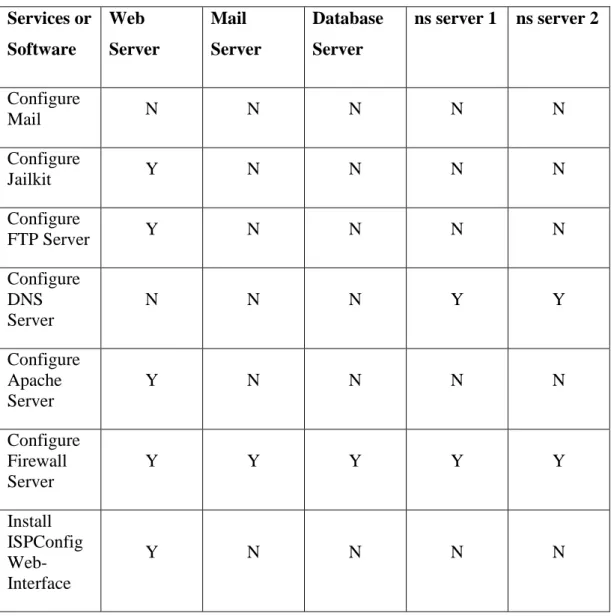
The rest of the configurations were almost the same. The table 2 below showed the available services on the serves and those who were configured. (N for Not configured and Y for Configured)
Table 2. Configuration of the services on the five servers.
The table clearly showed that only the Firewall was configured for all servers in order to enforce security measures. It also showed that the mail server was not configured for none of the servers. Because this configuration is done later after the mail client (SquirrelMail) is installed.
Services or Software Web Server Mail Server Database Server ns server 1 ns server 2 Configure Mail N N N N N Configure Jailkit Y N N N N Configure FTP Server Y N N N N Configure DNS Server N N N Y Y Configure Apache Server Y N N N N Configure Firewall Server Y Y Y Y Y Install ISPConfig Web-Interface Y N N N N
7.2.2 Testing Server1: Web Server
The tests to be performed here is to see if the control panel is there and if it could be accessed via the web browser. The following addresses are used:
http(s)://web010.multitronic.fi:8080 http(s)://194.197.222.65:8080
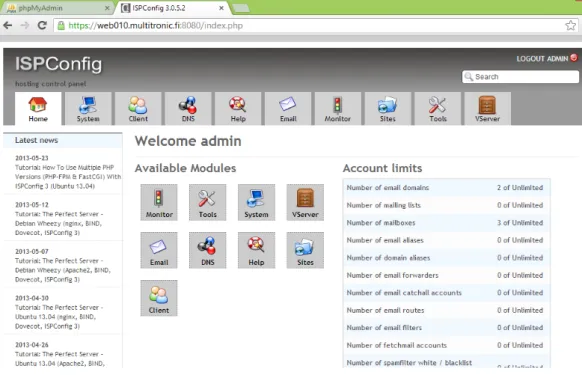
From the web browser it can be seen that ISPConfig is correctly installed and the admin can login and have access to the dashboard as shown by the Figure 11.
Figure 11. Admin dashboard after login.
The second thing to check was if the system users such as admin, reseller and cli-ent can be created.
The administrator is the default user having the highest permission. This account is created automatically when ISPConfig is installed. The admin can create other admin with the same right or reduced rights.
- Creating and testing a Reseller account It is created by going to:
Client>Reseller > Add Reseller
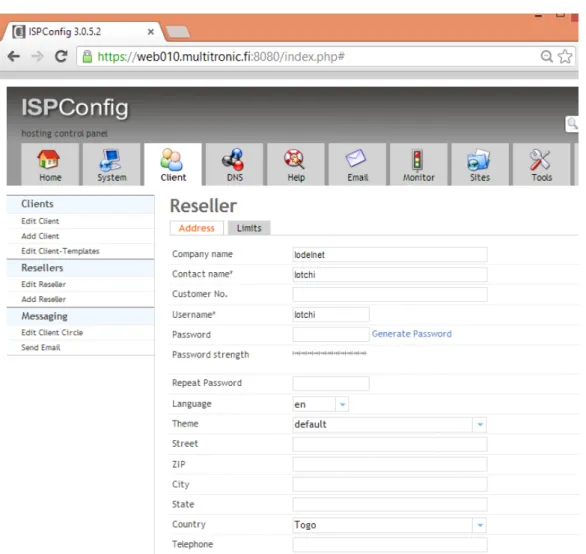
The form that appears is filled as seen in the Figure 12. The first tab in the form (Address) showed the necessary details and information about the reseller.
Figure 12. Form to create a Reseller.
From here the admin can use the second tab (Limits) to configure the permission and set the limits that should be given to the reseller as shown in the Figure 13.
Figure 13. Form to set the limits to the reseller.
With the login information given to the reseller he could also login to the system. After login, the reseller’s interface looked similar to the one of the administrator as shown by the Figure 14 apart from some tabs that were missing.
Figure 14. Reseller dashboard .
The major permissions of the reseller are
- Create and manage clients
- Read client’s statistics
- Create and manage WebPages
- Create DNS entries
- Creating and testing a Client account
The client is created like the reseller. The following tab was used
Client> Clients > Add Clients
The creation of the clients and his dashboard was similar to the one of the reseller as shown in the Figure 10, Figure 11 and Figure 12.
By allowing all registered clients and reseller to login to the ISPConfig, an oppor-tunity is given them to manage their own basic settings and services. Depending on the limit given by the administrator, a client can create a sub-domain as well as creating and managing their own databases. The ISPConfig control panel is user friendly and can be easily used by a reseller or client with limited computer knowledge.
7.2.3 Testing Server2: Mail Server
The objective here is to check if the SquirrelMail (webmail) was installed success-fully and working with ISPConfig. An email account was created and tested by sending and receiving emails.
The following URLs can be used to access the webmail.
From ISPConfig control panel an email account cab be created as follows:
Email > Email Box > Add new Mailbox
Figure 15. Form to create an Email.
An ema
pa-trikhall.com does not need to access his mail box via Multitronic main webmail address (like his own domai
The Figure 16 below showed the webmail interface once a user (example:
Figure 16. SquirrelMail interface after login.
An email was sent from (with username Nyalali LOTCHI).It arrived in the Yahoo box successfully as showed by the Figure 17 below.
Figure 17. Yahoo box showing Email received from [email protected]. Next was to send a reply from the ya
The inbox of least three emails were received from Nyalali LOTCHI.
7.2.4 Testing Server3: Database Server
And important feature showing the existence of the DB server is the phpMyAd-min. During the installation of MySQL a root user was created with a password. This login information is used to login to the phpMyAdmin (as shown by the
Fig-ure 18) panel through the following URL
Figure 18. Interface of phpMyAdmin after login.
Furthermore a database user can be created as shown by the Figure 19 by going to:
Sites > Databases > Database User
Once the database user is created a database (c1patrik_data) can also be created with success as displayed in the Figure 20.
Figure 20. List from db2.multitronic.fi’s shell showing new database (c1patrik_data).
7.2.5 Testing Server4 and Server 5: DNS servers
The aim here was to see if these name servers are recognized by ISPConfig. Some domain names were created. After that it was verified it these domain names were properly resolved over internet. The first step was to create a DNS Zone like the one displayed in the Figure 21 by going to:
Figure 21. Form to create a DNS zone.
Adding a client’s domain was done immediately after a client was created. If not, it will be impossible to create a web site, a database or an email address. The do-main name is an identification string that characterizes each customer over the internet.
7.3 Testing Security features
Since the objective of this project is to use this ISPConfig in the production line, a special attention has been paid to the security setups. Some tools and antivirus were installed and configured. They can be seen under the Monitor tab:
Monitor > Logfiles
Each of them plays a specific role. A few of them are mentioned below: - Fai2ban
Its role is to prevent an intrusion on the server by observing login attempts to ser-vices such as SSH, FTP, SMTP, Apache, etc. If it noticed many failed login at-tempts from the same IP address or host, fail2ban prevents any new attempt. The Figure 22 below showed a result of a fail2ban log from the ISPConfig.
Figure 22. fail2ban log file
Figure 22 above clearly showed the server bein monitored (db2.multitronic.fi) as well the log file on 31st May 2013 at 23h50. A closer look at the log file showed an IP 119.36.186.44 which was banned an unbanned after exactly 10mn. This IP was unbanned may be after several unsuccessful attempts just due to a wrong login. The banning time is not permanent. It lasted for only 10mn in order to al-low this same IP to make a new attempt again.
However, this protection cannot prevent the server from a distributed brute force attack. And also for the mean time fail2ban does not support IPv6.
- Antivirus
A free cross-platform antivirus named ClamAV was installed and running. The logs of this antivirus are similar to the one of fail2ban shown in the Figure 22. The same result can also be seen from the shell as shown by the Figure 23.
Figure 23. Scan summary of a directory called data.
Figure 23 showed how a directory called data is scanned. This directory contained all the email boxes. The summary showed the number of directories and files scanned as well the final result.
By means of these logs the administrator can be aware of any intrusion or mali-cious activities.
7.4 Testing Migrated clients
Before the migration was done, a remote user was created in ISPConfig by going to:
System >> User Management > Remote User
The username created (migrate) and the password created were used to connect to the remote servers for the migration. After that a few clients were migrated from the old servers to the new one with success by means of ISPConfig remote API scripts. When the scripts were run the result of the transfer can be seen in the ISPConfig panel as shown in the Figure 24.
Figure 24. Portion of list of some migrated clients to ISPConfig.
It could be observed from the result that the clients were migrated with their de-tails like company name, contact name, customer No, City and Country. These details were the same used on the old server and kept in Multitronic database. That is why the file named migrate.php included both DB.php and
soap_config.php as shown by the Frame 8 below. The same file showed some pa-rameters like country_name, customer_no and etc which were taking care of the customer’s details.
...
require_once "DB.php";
require_once "soap_config.php";
...
if ($temp_record === FALSE) { //* Set the function parameters. $random_rs_id = 1; $params = array( 'company_name' => $customer_data['icustomer_company'], 'contact_name' => $customer_data['icustomer_name'], 'customer_no' => $customer_id, ... 'country' => $customer_data['icustomer_countryid'], 'telephone' => $customer_data['icustomer_phone'], 'mobile' => '',
Frame 8. Portion of ISPConfig migration API called migrate.php.
But the migration was made possible only after ISPconfig was connected to the remote servers (Multitronic’s old servers). The connection was made possible by
soap_config.php script. The entire script is shown below in the Frame 9.
<?php $username = '********'; $password = '********'; $soap_location = $soap_uri = ?>
The username and password used here are the one of the remote user previously created. The code line above showed the soap_loaction and the soap_uri. The soap_location is the SOAP server to where the request of the migration was sent to whereas the soap_uri is the name space of the SOAP service.
8
CONCLUSIONS
During this project a hosting and multi-server control panel named ISPConfig was implemented for Multitronic. The need behind this project was to improve their web hosting services as well as their server management system.
At the end of the implementation various test were made to show that the system was working perfectly. It was also possible to migrate some clients with their de-tails from the old server to the new one.
Security features were also taken into account. The applications installed involve some antivirus and tools that can ban unwanted IPs.
Since this project was made on a company server it was important to do a lot of test before deciding to make the final implementation. For that reason several im-plementations were made on three versions of Linux operation system.
However there were some limitations. It was planned to move all clients, data-bases, FTP accounts and Emails from the old servers to the new one (ISPConfig), but this could not be done. Only few clients with their details were migrated. Be-cause although the installed ISPConfig works properly, it should be tested for a longer period before all other clients and services are migrated to it.
This project could still be expanded. There are a lot features and services provided by ISPConfig that need to be studied. More security features could be added such as mpm-itk in order to prevent any intrusion from a web site already hosted on the servers.
Other application and tools that are used separately at Multitronic could be inte-grated into ISPConfig in the future. Some of them are their billing module and spam filter application (clean mail).
REFERENCES
/1/ Description about Virtualmin. Virtualmin official Web Page. Accessed
12/05/
/2/ Description about cPanel. Cpanel Official Webpage. Accessed
24/04/2013.
/3/ Description about ISPConfig. ISPConfig official Webpage. Accessed
15/05/2013
/4/ Falko, T. 2013. ISPConfig 3 Manual, Version 1.4, 11-19.
/5/ ISPConfig supported Linux distributions ISPConfig Official Webpage.
LIST OF SERVERS AND THEIR ROLES AT MULTITRONIC
Multitronic Oy
- Network:
We have two public networks at Multitronic, 213.28.138.32/27 and 194.197.222.0/24... In the firewall, IPs in 213.28.138.32/27 network is mostly mapped to internal IP addresses, IPs in the 194.197.222.0/24 network is routed. Internal IP addresses:
10.3.1.0/24 Office network
10.3.2.0/24 DMZ network for servers 10.3.4.0/24 Storage network
- Physical servers: Vmware vSphere
- Servers for web and email hosting:
ns.multitronic.fi
IP address public 213.28.138.36 IP address private 10.3.2.10
Operating System CentOS 5, 32-bit
ns2.multitronic.fi
IP address public 213.28.138.37 IP address private 10.3.2.40
Operating System CentOS 6, 32-bit
Services Secondary bind nameserver
dream.multitronic.fi
IP address public 213.28.138.38 IP address private 10.3.2.1 IP address storage 10.3.4.1
Operating System CentOS 6, 64-bit
Services Time server, NFS server for webservers, Data-base for current hosting software, POP and IMAP server for old email system.
web001.multitronic.fi
IP address public 213.28.138.39 IP address private 10.3.2.100 IP address storage 10.3.4.100
Services Old email platform, web server. web002.multitronic.fi
IP address public 213.28.138.43 IP address private 10.3.2.101 IP address storage 10.3.4.101
Operating System Debian testing since 2006, extremly old Services GSM gateway and Nagios.
web004.multitronic.fi
IP address public 213.28.138.48 IP address private 10.3.2.103 IP address storage 10.3.4.103 Operating System CentOS 5, 32-bit Services Web services, mysql
web005.multitronic.fi
IP address public 213.28.138.49 IP address private 10.3.2.104 IP address storage 10.3.4.104 Operating System CentOS 4, 32-bit
Services Web services, mysql, php 4 web006.multitronic.fi
IP address public 194.197.222.10 Operating System CentOS 5, 32-bit Services Ruby on Rails server
web007.multitronic.fi
IP address public 194.197.222.51 Operating System CentOS 5, 32-bit Services Webserver, mysql
mail.multi24.net: Our main zimbra email server IP address public 194.197.222.8
Operating System CentOS 5, 64-bit Services Email collaboration
mail2.multi24.net: Zimbra Open Source edition IP address public 194.197.222.7
Operating System CentOS 5, 64-bit Services Email collaboration
mail3.multi24.net: Zimbra 8 beta testing. IP address public 194.197.222.6 Operating System CentOS 6, 64-bit Services Email collaboration
FULL LIST OF MANAGED SERVICES IN ISPCONFIG
- IPv4 support - IPv6 support - Websites tools
o Name-based and IP-based virtual hosts o SSL websites
o SNI support, allows more than one SSL vhost per IP ad-dress
o CGI
o PHP (available PHP modes for Apache: mod_php, FCGI, CGI and SuPHP; for nginx: FCGI (PHP-FPM))
o Individual PHP settings per website o SSI
o Ruby (Apache only) o Python (Apache only) o Rewrites/redirects
o Custom Apache/nginx directives o Subdomains o Alias domains o Password-protected folders o WebDAV - FTP users - MySQL databases
- Shell users (jailed and non-jailed), SFTP, SCP; password- and key-based logins
o SMTP
o POP3, IMAP, POP3S, IMAPS o Email accounts
o Email aliases o Spam filter
o Virus filter o White lists o Blacklists
o Header and body checks o Auto responder
o Fetching emails from remote servers with get mail o Mailman mailing lists
- DNS
o DNS wizard for creating zones easily o Management of DNS zones and records o Import tool for BIND zone files
o Supported record types: A, AAAA, ALIAS, CNAME, HINFO, MX, NS, PTR, RP, SRV, TXT
o Master and slave DNS servers - Virtualization (through OpenVZ)
- Firewall
- Webalizer & AWStats statistics - Quota/Traffic Limits
o Harddisk quota o Mail quota
SOME CONFIGURATIONS OF THE SINGLE SERVER
- Source: ISPConfig 3 Manual, Version 1.4 (pages 11-20) and
- Configurations done during the generating the SSL Certificate
Country Name (2 letter code) [FI]:<-- “FI").
State or Province Name (full name) [Vaasa]: <-- Vaasa.
Locality Name (eg, city) [Vaasa]: <-- Enter your City.
Organization Name (eg, company) [Multitronic Oy]: <-- Multitronic Oy
Organizational Unit Name (eg, section) [IT Department]: <-- Enter your Organ-izational Unit Name (e.g. "IT Department").
Common Name (eg, YOUR name) []: <-- Enter the Fully Qualified Domain Name of the system (e.g. " ispconfig.multitronic.fi ").
Email Address [**********@yahoo.fr]: <-- Enter your Email Address.
- Some configurations done during the installation of ISPConfig
Select language (en,de) [en]:<-- ENTER
Installation mode (standard,expert) [standard]:<-- ENTER
Full qualified hostname (FQDN) of the server, eg server1.domain.tld [ispconfig.m ultitronic.fi]:<-- ENTER
MySQL server hostname [localhost]:<-- ENTER
MySQL root username [root]:<-- ENTER
MySQL root password []:<-- *****************
MySQL database to create [dbispconfig]:<-- ENTER
MySQL charset [utf8]:<-- ENTER
Generating a 4096 bit RSA private key ...++
...++ writing new private key to 'smtpd.key'
---
You are about to be asked to enter information that will be incorporated into your certificate request.
What you are about to enter is what is called a Distinguished Name or a DN. There are quite a few fields but you can leave some blank