Sybase IQ
15.0
Copyright © 2009 by Sybase, Inc. All rights reserved.
This publication pertains to Sybase software and to any subsequent release until otherwise indicated in new editions or technical notes. Information in this document is subject to change without notice. The software described herein is furnished under a license agreement, and it may be used or copied only in accordance with the terms of that agreement.
To order additional documents, U.S. and Canadian customers should call Customer Fulfillment at (800) 685-8225, fax (617) 229-9845. Customers in other countries with a U.S. license agreement may contact Customer Fulfillment via the above fax number. All other international customers should contact their Sybase subsidiary or local distributor. Upgrades are provided only at regularly scheduled software release dates. No part of this publication may be reproduced, transmitted, or translated in any form or by any means, electronic, mechanical, manual, optical, or otherwise, without the prior written permission of Sybase, Inc.
Sybase trademarks can be viewed at the Sybase trademarks page at http://www.sybase.com/detail?id=1011207. Sybase and the marks listed are trademarks of Sybase, Inc. ® indicates registration in the United States of America.
Java and all Java-based marks are trademarks or registered trademarks of Sun Microsystems, Inc. in the U.S. and other countries. Unicode and the Unicode Logo are registered trademarks of Unicode, Inc.
All other company and product names mentioned may be trademarks of the respective companies with which they are associated. Use, duplication, or disclosure by the government is subject to the restrictions set forth in subparagraph (c)(1)(ii) of DFARS 52.227-7013 for the DOD and as set forth in FAR 52.227-19(a)-(d) for civilian agencies.
About This Book ... vii
CHAPTER 1 New Features in Sybase IQ 15.0 ... 1
High performance analytics... 1
Direct loading of data from clients ... 1
Improved loading for large single (fact) tables ... 2
Improved multiplex configuration and concurrent load support . 5 Improved query performance ... 6
Database collation improvements ... 12
Information lifecycle management... 13
Benefits of dbspace management and table partitioning ... 14
Range partitioning ... 14
Configurable tablespaces ... 16
Secure business intelligence... 34
FIPS support ... 34
Kerberos authentication support ... 35
IPv6 support ... 36
CREATE DATABASE ENCRYPTED clause extension... 36
Login management changes ... 36
Improved operational management ... 38
Improved multiplex high availability ... 38
Query and system diagnostics and monitoring utilities ... 39
License management through SySAM 2 ... 39
Message log management ... 40
IQ main store and IQ temporary store space management .... 45
CHAPTER 2 Behavior Changes in Sybase IQ 15.0 ... 49
Deprecated features... 50
Deprecated collations ... 53
SQL Anywhere changes ... 55
System tables and views... 55
New and changed system tables ... 55
System views ... 60
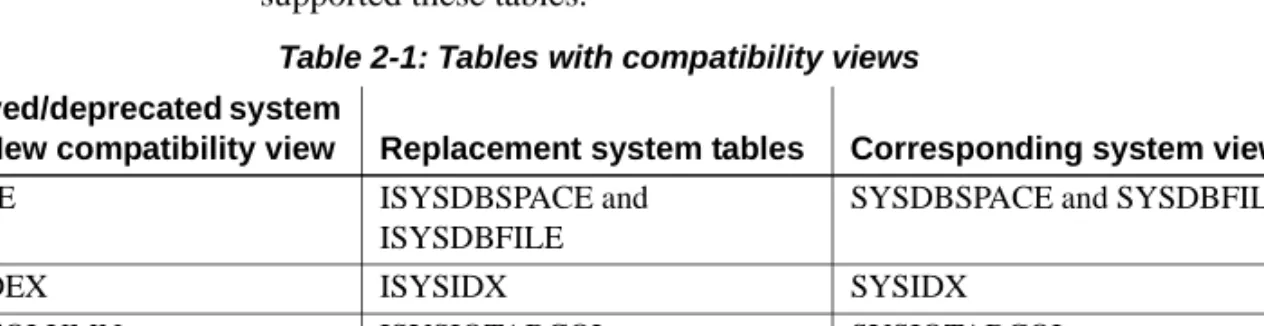
Compatibility views... 61
Consolidated views ... 61
Data Definition Language (DDL) changes ... 62
Backup and restore changes... 62
New and changed stored procedures ... 62
Changes to identifiers... 65
Database collation behavior changes ... 65
Database option changes ... 66
New database options for Sybase IQ 15.0... 67
Changed option names and values... 67
Changed default values of database options ... 68
Changed default behavior of database options... 68
Removed database options... 69
Start-up and connection changes ... 69
Start and stop utility changes ... 69
New version number in start_iq [CR 494427]... 70
File and directory name changes ... 70
Server log files default to four digits ... 71
Request log file analysis... 71
Windows registry changes ... 71
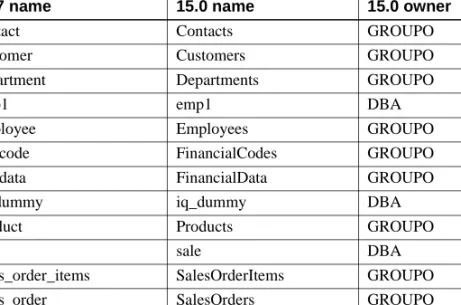
Demo database changes ... 72
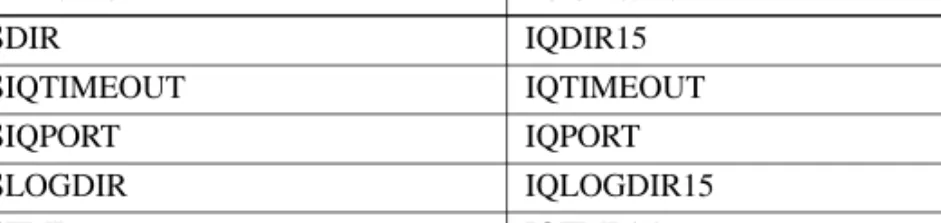
Environment variable name changes ... 73
Character set conversion ... 73
Localization environment variables renamed ... 74
Simplified TDS tools iqdsedit and iqisql ... 74
Query enhancements and changes ... 74
Disjunction of subquery predicates ... 74
Data load, update, and extraction changes... 75
Load performance improvements... 76
FP conversion ... 76
SQLCODE change for 0 rows updated [CR 533932] ... 76
Non-blocking named pipes [CR 406712]... 76
Installation and migration changes... 77
Network Clients for all platforms... 77
SDK no longer installed... 77
Sybase Central enhancements ... 77
Limits, memory, and disk use changes ... 77
Cache size defaults increased ... 77
Reserved space size calculation ... 78
Setting IQ main and IQ temporary cache sizes... 78
Documentation changes ... 79
New Features Guide ... 79
Administration Guide ... 80
A P P E N D I X A New and Changed Syntax ... 81
SQL statements ... 81 SQL functions... 86 Database options ... 86 System tables... 87 System views ... 88 System procedures ... 89
Startup and database administration utilities ... 90
Subject This book describes new features in Sybase® IQ 15.0.
Audience This book is for users of previous versions of Sybase IQ who want to find out what is new and different in this release of the software.
Related Sybase IQ
documents The Sybase IQ 15.x documentation set includes:
• Release Bulletin provides information about last-minute changes to the product and documentation.
• Installation and Configuration Guide provides platform-specific instructions on installing, migrating to a new version, and configuring Sybase IQ for a particular platform.
• Advanced Security in Sybase IQ covers the use of user encrypted columns within the Sybase IQ data repository. You need a separate license to install this product option.
• Error Messages lists Sybase IQ error messages referenced by Sybase error code, SQLCode, and SQLState, and SQL preprocessor errors and warnings.
• IMSL Numerical Library User’s Guide: Volume 2 of 2 C Stat Library contains a concise description of the IMSL C Stat Library time series C functions. This book is only available to RAP – The Trading Edition™ Enterprise users.
• Introduction to Sybase IQ includes hands-on exercises for those unfamiliar with Sybase IQ or with the Sybase Central™ database management tool.
• Large Objects Management in Sybase IQ explains storage and retrieval of Binary Large Objects (BLOBs) and Character Large Objects (CLOBs) within the Sybase IQ data repository. You need a separate license to install this product option.
• New Features in Sybase IQ 15.0 documents new features and behavior changes for version 15.0.
• New Features Summary Sybase IQ 15.1 summarizes new features and behavior changes for the current version.
• Performance and Tuning Guide describes query optimization, design, and tuning issues for very large databases.
• Quick Start lists steps to build and query the demo database provided with Sybase IQ for validating the Sybase IQ software installation. Includes information on converting the demo database to multiplex.
• Reference Manual – Includes two reference guides to Sybase IQ:
• Reference: Building Blocks, Tables, and Procedures describes SQL, stored procedures, data types, and system tables that Sybase IQ supports.
• Reference: Statements and Options describes the SQL statements and options that Sybase IQ supports.
• System Administration Guide – Includes two volumes:
• System Administration Guide: Volume 1 describes startup,
connections, database creation, population and indexing, versioning, collations, system backup and recovery, troubleshooting, and database repair.
• System Administration Guide: Volume 2 describes writing and running procedures and batches, programming with OLAP, accessing remote data, setting up IQ as an Open Server, scheduling and event handling, programming with XML, and debugging.
• User-Defined Functions Guide provides information about the user-defined functions, their parameters, and possible usage scenarios. • Using Sybase IQ Multiplex tells how to use multiplex capability, designed
to manage large query loads across multiple nodes.
• Utility Guide provides Sybase IQ utility program reference material, such as available syntax, parameters, and options.
Other sources of
information Use the Sybase Getting Started CD, the SyBooks CD, and the Sybase Product Manuals Web site to learn more about your product:
• The Getting Started CD contains release bulletins and installation guides in PDF format, and may also contain other documents or updated information not included on the SyBooks CD. It is included with your software. To read or print documents on the Getting Started CD, you need Adobe Acrobat Reader, which you can download at no charge from the Adobe Web site using a link provided on the CD.
• The SyBooks CD contains product manuals and is included with your software. The Eclipse-based SyBooks browser allows you to access the manuals in an easy-to-use, HTML-based format.
Some documentation may be provided in PDF format, which you can access through the PDF directory on the SyBooks CD. To read or print the PDF files, you need Adobe Acrobat Reader.
Refer to the SyBooks Installation Guide on the Getting Started CD, or the README.txt file on the SyBooks CD for instructions on installing and starting SyBooks.
• The Sybase Product Manuals Web site is an online version of the SyBooks CD that you can access using a standard Web browser. In addition to product manuals, you will find links to EBFs/Maintenance, Technical Documents, Case Management, Solved Cases, newsgroups, and the Sybase Developer Network.
To access the Sybase Product Manuals Web site, go to Product Manuals at http://sybooks.sybase.com.
Sybase certifications
on the Web Technical documentation at the Sybase Web site is updated frequently.
❖ Finding the latest information on product certifications
1 Point your Web browser to Technical Documents at http://certification.sybase.com/ucr/search.do.
2 Either select the product family and product under Search by Base Product; or select the platform and product under Search by Platform. 3 Select Search to display the availability and certification report for the
selection.
❖ Finding the latest information on component certifications
1 Point your Web browser to Availability and Certification Reports at http://certification.sybase.com/.
2 Either select the product family and product under Search by Product; or select the platform and product under Search by Platform.
3 Select Search to display the availability and certification report for the selection.
❖ Creating a personalized view of the Sybase Web site (including support pages)
Set up a MySybase profile. MySybase is a free service that allows you to create a personalized view of Sybase Web pages.
1 Point your Web browser to Technical Documents at http://www.sybase.com/support/techdocs/.
2 Click MySybase and create a MySybase profile.
Sybase EBFs and software
maintenance
❖ Finding the latest information on EBFs and software maintenance
1 Point your Web browser to the Sybase Support Page at http://www.sybase.com/support.
2 Select EBFs/Maintenance. If prompted, enter your MySybase user name and password.
3 Select a product.
4 Specify a time frame and click Go. A list of EBF/Maintenance releases is displayed.
Padlock icons indicate that you do not have download authorization for certain EBF/Maintenance releases because you are not registered as a Technical Support Contact. If you have not registered, but have valid information provided by your Sybase representative or through your support contract, click Edit Roles to add the “Technical Support Contact” role to your MySybase profile.
5 Click the Info icon to display the EBF/Maintenance report, or click the product description to download the software.
Syntax conventions This documentation uses the following syntax conventions in syntax descriptions:
• Keywords SQL keywords are shown in UPPER CASE. However, SQL keywords are case insensitive, so you can enter keywords in any case you wish; SELECT is the same as Select which is the same as select.
• Placeholders Items that must be replaced with appropriate identifiers or expressions are shown in italics.
• Continuation Lines beginning with ... are a continuation of the statements from the previous line.
• Repeating items Lists of repeating items are shown with an element of the list followed by an ellipsis (three dots). One or more list elements are allowed. If more than one is specified, they must be separated by commas.
• Optional portions Optional portions of a statement are enclosed by square brackets. For example:
RELEASE SAVEPOINT [ savepoint-name ]
It indicates that the savepoint-name is optional. The square brackets should not be typed.
• Options When none or only one of a list of items must be chosen, the items are separated by vertical bars and the list enclosed in square brackets. For example:
[ ASC | DESC ]
It indicates that you can choose one of ASC, DESC, or neither. The square brackets should not be typed.
• Alternatives When precisely one of the options must be chosen, the alternatives are enclosed in curly braces. For example:
QUOTES { ON | OFF }
It indicates that exactly one of ON or OFF must be provided. The braces should not be typed.
Typographic
conventions Table 1 lists the typographic conventions used in this documentation.
Table 1: Typographic conventions
The demo database Sybase IQ includes scripts to create a demo database (iqdemo.db). Many of the queries and code samples in this document use the demo database as a data source.
Item Description
Code SQL and program code is displayed in a mono-spaced (fixed-width) font.
User entry Text entered by the user is shown in bold serif type.
emphasis Emphasized words are shown in italic.
file names File names are shown in italic.
database objects Names of database objects, such as tables and procedures,
are shown in bold, san-serif type in print, and in italic online.
The demo database contains internal information about a small company (employees, departments, and financial data), as well as product (products), and sales information (sales orders, customers, and contacts).
See the Sybase IQ installation guide for your platform or talk to your system administrator for more information about the demo database.
Accessibility
features This document is available in an HTML version that is specialized for accessibility. You can navigate the HTML with an adaptive technology such as
a screen reader, or view it with a screen enlarger.
Sybase IQ 15.0 and the HTML documentation have been tested for compliance with U.S. government Section 508 Accessibility requirements. Documents that comply with Section 508 generally also meet non-U.S. accessibility guidelines, such as the World Wide Web Consortium (W3C) guidelines for Web sites. The online help for the Sybase IQ plug-in for Sybase Central, which you can navigate using a screen reader, describes accessibility features, including Sybase Central keyboard shortcuts.
Configuring your accessibility tool
You might need to configure your accessibility tool for optimal use. Some screen readers pronounce text based on its case; for example, they pronounce ALL UPPER CASE TEXT as initials, and Mixed Case Text as words. You might find it helpful to configure your tool to announce syntax conventions. Consult the documentation for your tool.
For information about how Sybase supports accessibility, see Sybase Accessibility at http://www.sybase.com/accessibility. The Sybase Accessibility site includes links to information on Section 508 and W3C standards. For a Section 508 compliance statement for Sybase IQ, go to Sybase Accessibility at http://www.sybase.com/products/accessibility.
If you need help Each Sybase installation that has purchased a support contract has one or more designated people who are authorized to contact Sybase Technical Support. If you cannot resolve a problem using the manuals or online help, please have the designated person contact Sybase Technical Support or the Sybase subsidiary in your area.
About this chapter This chapter describes the new features introduced in Sybase IQ 15.0. Features are organized according to the themes shown in the chapter table of contents.
Note For new features documented in 12.7 ESD releases, see the latest version of the Release Bulletin in the Sybooks Online Help at
http://infocenter.sybase.com/help/index.jsp.
Contents
High performance analytics
Enhancements to loads and queries improve product performance. For a list of new options and new option settings that may provide additional performance benefits if appropriate for your environment, see “Database option changes” on page 66.
Direct loading of data from clients
Sybase IQ now supports bulk loading of remote data via the LOAD TABLE USING CLIENT FILE statement. LOAD TABLE USING FILE loads data on the local server, as does the LOAD TABLE FROM syntax, which is deprecated in this release. LOAD TABLE USING FILE also replaces the deprecated utility iq_bcp.
Topic Page
High performance analytics 1
Information lifecycle management 13
Secure business intelligence 34
Both server and client need to be at Sybase IQ 15.0 level. A combination of 15.0 server and 12.7 client returns a File I/O Error.
For syntax, see LOAD TABLE statement in Chapter 1, “SQL Statements,” in Reference: Statements and Options.
Improved loading for large single (fact) tables
In order to meet the challenges of the exponential growth of information and the demand for real-time access to data, Sybase IQ has significantly improved the performance of loading High_Group (HG) indexes and Containment (also called WORD) (WD) indexes, while transactions are still allowed to access the tables being loaded. This load performance improvement for HG and WD
indexes affects: • INSERT...SELECT • INSERT...LOCATION • LOAD • UPDATE • CREATE INDEX • Updatable cursors
The LOAD TABLE statement now performs parallel loads of HG and WD
indexes, thus executing faster than in previous releases.
IQ also supports loading partitioned tables. Table partitioning is a separately licensed Sybase IQ feature.
INSERT...LOCATION supports 2GB large object (LOB) data
By default, if a remote data column contains over 2GB, Sybase IQ silently truncates the column value to 2GB.
Users must be specifically licensed to use the Large Objects Management functionality. For details on the Large Objects Management option, see Large Objects Management in Sybase IQ.
LOAD TABLE QUOTES clause example
The LOAD TABLESTRIP ON keyword has been deprecated in this release. The following example shows the results of a query using the LOAD TABLESTRIP RTRIM keyword instead of the STRIP ON keyword.
LOAD TABLE QUOTES option example Consider a table defined as:
CREATE TABLE t1 (c1 INT, c2 VARCHAR(20), c3 VARCHAR(20))
with the following input data:
1, apple , fruit1 , 2, "banana" , "fruit2", 3, " pear ", " fruit3 ",
The result of loading this data is displayed by running the following query:
SELECT c1, c2, c3, LENGTH(c2), LENGTH(c3) FROM t1
Given the values of the QUOTES and STRIP options used during the LOAD TABLE command, the following table displays the result of the query above, with each result enclosed by ‘<’ and ‘>’:
Notes on the results:
LOAD TABLE options
Results of
SELECT c1, c2, c3, LENGTH(c2), LENGTH(c3) FROM t1
QUOTES STRIP c1 c2 c3 length(c2) length(c3)
ON RTRIM <1> <apple> <fruit1> <5> <6> <2> <banana> <fruit2> <6> <6> <3> < pear > < fruit3 > <6> <8> ON OFF <1> <apple > <fruit1 > <6> <7> <2> <banana> <fruit2> <6> <6> <3> < pear > < fruit3 > <6> <8> OFF RTRIM <1> < apple> < fruit1> <6> <7> <2> < “banana”> < “fruit2”> <9> <9> <3> < “ pear ”> < “ fruit3 ”> <9> <11> OFF OFF <1> < apple > < fruit1 > <7> <8>
<2> < “banana” > < “fruit2”> <10> <9> <3> < “ pear ”> < “ fruit3 ”> <9> <11>
• With QUOTES ON and STRIP RTRIM, both leading space and trailing space for the non-enclosed field c2 row 1 are trimmed.
• With QUOTES ON and STRIP OFF, only the leading space for the non-enclosed field c2 row 1 is trimmed.
• With QUOTES OFF and STRIP RTRIM, only the trailing space for the non-enclosed field c2 row 1 is trimmed.
• With QUOTES OFF and STRIP OFF, neither leading space nor trailing space for the non-enclosed field c2 row 1 is trimmed.
• With QUOTES ON and STRIP RTRIM, both leading space and trailing space within quotes for the enclosed fields c2 and c3 row 3 are NOT trimmed.
Loading partitioned tables
There are a few special considerations for loading partitioned tables:
• When loading a partitioned table, the best performance is achieved when the partitioning column is the first column in the column list of the statement.
List partitioning columns before large object (LOB) columns in the
SELECT statement clause of an INSERT...LOCATION statement and load data from a primary file, if possible. The data in the primary file should be rearranged using a pre-load process, if possible.
• The START ROW ID clause of the LOAD TABLE and INSERT statements is not allowed on a partitioned table. The following error is reported and a rollback is performed on the load operation:
"Option START ROW ID not allowed on a partitioned table."
(SQLCODE -1009416L, SQLSTATE QCB14, Sybase error code 21054) • Partial width inserts are not recommended, as the START ROW ID clause
of the INSERT statement is not supported on a partitioned table.
Be sure to include the partition key column of the partitioning columns of the table in the column list of the load operation and leave all non-specified columns as NULL, if you do perform a partial width insert. If the partition key column is omitted from the column list, the following error is reported:
"Operation not allowed — partition key column %2 not specified."
(SQLCODE -1009418L, SQLSTATE QCB16, Sybase error code 21056) where %2 is the name of the partition key.
• The APPEND_LOAD database option behaves differently for partitioned and non-partitioned tables. Row ID ranges are assigned to each partition in a partitioned table. For partitioned tables, when APPEND_LOAD is ON, new rows are appended at the end of the appropriate partition. When
APPEND_LOAD is OFF, the load reuses the first available row IDs and space from deleted rows of the appropriate partition.
For non-partitioned tables, when APPEND_LOAD is ON, new rows are added after the maximum row ID that is at the end of the table rows. When
APPEND_LOAD is OFF, the load reuses the deleted row IDs. With non-partitioned tables, you can also control where rows are inserted by using the LOAD or INSERTSTART ROW ID clause to specify the row at which to start inserting.
• An attempt to update the contents of a partitioning column results in the following error:
"Updating partition key column on a partitioned table is not allowed."
(SQLCODE -1009417L, SQLSTATE QCB15, Sybase error code 21055)
Improved multiplex configuration and concurrent load support
Multiplex functionality is significantly updated and enhanced for Sybase IQ 15.0.
A new book, Using Sybase IQ Multiplex, consolidates all Sybase IQ multiplex information formerly in the IQ documentation set and the new multiplex features documentation Revision 01 of the New Features Guide.
Using Sybase IQ Multiplex includes these topics:
Improved query performance
Enhanced support for parallel queries and the ability to choose subquery predicate processing behavior enable experienced DBAs to tune query performance.
Improved tokenization
Tokenization can now be applied to columns with more than 64K distinct values.
Chapter/Appendix Description Notes
Chapter 1, “Multiplex Overview” Introduces multiplex functionality. Formerly Chapter 3, “Multiplex Overview,” in Revision 01 of New Features Guide Chapter 2, “Managing Multiplex Servers”
Describes how to create, configure, and administer multiplex servers
Formerly Chapter 4, “Managing Multiplex Servers,” in first revision of
New Features Guide
Chapter 3, “Running Multiplex Transactions” Describes behavior of DML and DDL operations on multiplex servers Formerly Chapter 5, “Running Multiplex Transactions,” in first revision of New Features
Guide.
Chapter 4, “Monitoring with Sybase Central”
Describes the enhanced graphical user interface in the IQ Plug-in that supports multiplex visualization and performance monitoring
Formerly Chapter 6, “Performance Monitoring with Sybase Central” in first revision of New
Features Guide.
Chapter 5, “Backing Up and Restoring Data in a Multiplex Environment”
Describes how to back up Sybase IQ data in a multiplex. Updated information previously in Sybase IQ System Administration Guide. Appendix A, “Multiplex Reference”
Lists the syntax for SQL statements, system objects, and options that support multiplex capability.
Multiplex-specific subset of syntax formerly in Appendix A, “New and Changed Syntax
Reference” in first revision of New Features Guide.
When you create a permanent table in a Sybase IQ database, IQ stores all column values in a default index. This default index, called an FP (fast projection) index, optimizes projections and enables certain kind of search conditions to be evaluated.
Each column has one FP index, and each FP is an array of n fixed-length entries where n is the number of rows in the table. Each column value is stored sequentially in ascending RecordID order.
With a small number of distinct or unique values, such as a state, date, or month field, an optimized form of the FP can be created that will reduce the number of disk pages required, dramatically reducing both the storage required for a column and I/O costs for projection.
These optimized FP indexes have two pieces: 1. a lookup table where each distinct value in the column appears exactly once and 2. the logical array of column cell values, except instead to storing the actual cell values each element of the logical array is a key into the lookup table to where the cell value is stored.
The sp_iqindexmetadata stored procedure generates a report describing a specified index or indexes belonging to a specified owner or table. The output allows easy checking of whether a given index is a 1-byte, 2-byte, 3-byte, or flat style FP index. For details, see “sp_iqindexmetadata procedure” in Chapter 7, “System Procedures,” in Reference: Building Blocks, Tables, and Procedures.
FP(1) index
When the number of values is within 256, a 1-Byte FP index is created. The FP index starts with this form.The actual key value of each row is stored in the lookup table and the FP entry (lookup key) contains the index into the lookup table. For a 1-Byte FP index, each FP entry occupies 1 byte.
FP(2) index
When the number of values exceeds 256, but is less than or equal to 65536, the same lookup table grows. Each FP entry (lookup key) contains the index into the lookup table but occupies 2 bytes instead of 1.
To avoid the overhead of converting 1-byte entries into 2-byte entries, users can specify the IQ UNIQUE value to be greater than 256 and less than or equal to 65536 at table creation time.
FP(3) index
When the distinct count exceeds 65536, you can create a 3-byte FP index. The FP(3) index is structurally similar to FP(1) and FP(2) indexes, with the following key differences:
• The maximum size of the FP(3) lookup table is 16777216, not 65536. • The FP(3) index buffer storage contains lookup keys of 3 bytes each. The 3-byte index stores values in a column (column data), as long as the distinct count does not exceed 16777216. Users can create a 3-byte index on columns only if the size of column data is greater than 3 bytes. Therefore, you cannot create an FP(3) index on columns with data types BIT, TINYINT,
SMALLINT, CHAR(<=3), VARCHAR(<=3), BINARY(<=3) and
VARBINARY(<=3). Sybase IQ also does not support FP(3) indexes for LONG VARCHAR and LONG VARBINARY data types.
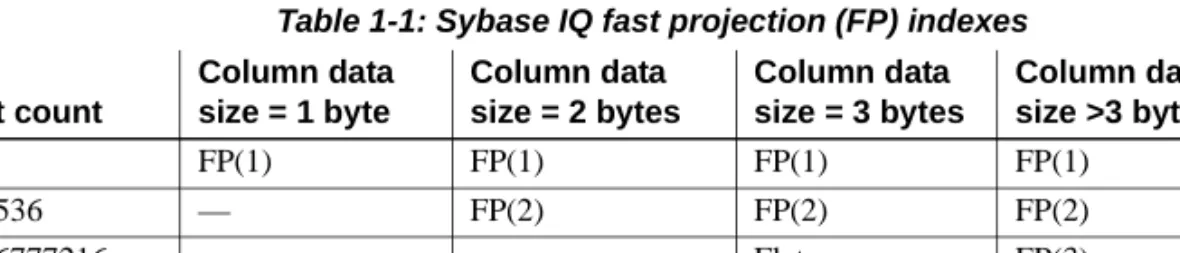
To create an FP(3) index, either the MINIMIZE_STORAGE must be set ON, or the column must have been created with an IQ UNIQUE constraint value between 65537 and 16777216, including these two values. An FP(3) may also be created after rollover from an FP(2) index, once the unique count exceeds 65536, but only for data sizes shown in Table 1-1 and excluding data types BIT,
TINYINT, SMALLINT, CHAR(<=3), VARCHAR(<=3), BINARY(<=3) and
VARBINARY(<=3). See “Using IQ UNIQUE constraint on columns” in Chapter 9, “Ensuring Data Integrity,” in the System Administration Guide: Volume 1 and the “MINIMIZE_STORAGE option” in Chapter 2, “Database Options,” in the Reference: Statements and Options.
Behavior changes There are some differences in the behavior of FP indexes from earlier releases.
Table 1-1: Sybase IQ fast projection (FP) indexes
Like FP(1) and FP(2) indexes, the FP(3) index is not supported for columns whose data type is wider than 255 bytes or less than four bytes wide. The creation of an FP(3) index, overflow, or a forced transition to an FP(3) index is permitted only if the space used by the lookup table is less than the current value of the FP_LOOKUP_SIZE option and less than the portion of the main cache specified by the current setting of FP_LOOKUP_SIZE_PPM.
Distinct count Column data size = 1 byte Column data size = 2 bytes Column data size = 3 bytes Column data size >3 bytes <257 FP(1) FP(1) FP(1) FP(1) 257 - 65536 — FP(2) FP(2) FP(2) 65537-16777216 — — Flat FP(3) >16777216 — — — Flat
The maximum number of lookup pages used in Sybase IQ is controlled by the
FP_LOOKUP_SIZE option and the FP_LOOKUP_SIZE_PPM option, whichever is lower. See “FP_LOOKUP_SIZE option” and “FP_LOOKUP_SIZE_PPM option” in Chapter 2, “Database Options,” in Reference: Statements and Options.
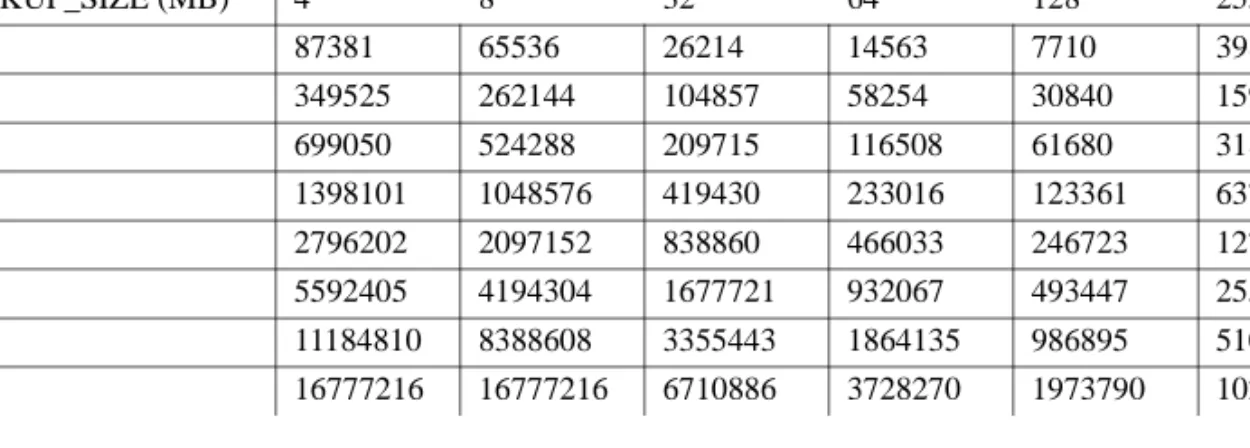
Table 1-2 calculates the maximum number of distinct values that can be supported in an FP(3) index based on the following formula:
FP_LOOKUP_SIZE / (Column-Data size + Cardinality size)
Cardinality size is the space reserved to store cardinality of all individual data in the lookup store. Cardinality size can have a value of either 4 or 8 bytes. In this example, it has a maximum value of 8 bytes.
Table 1-2: Maximum unique values in FP(3)
Notes
The values illustrated in Table 1-2 are estimates for the number of unique values in a column for the given value of option FP_LOOKUP_SIZE; actual values may vary. Such variations are possible because counts can be stored as 4 bytes or 8 bytes.
Table 1-2 is based on the condition that the value of FP_LOOKUP_SIZE is less than or equal to the value of FP_LOOKUP_SIZE_PPM.
Configuring FP(3) indexes
You may need to adjust the temporary cache size when configuring 3-byte indexes. You can set values using the server startup command line parameter
-iqtc or using the sa_server_option system procedure temp_cache_memory_mb
option as follows:
Column data type width (bytes)
FP_LOOKUP_SIZE (MB) 4 8 32 64 128 255 1 MB 87381 65536 26214 14563 7710 3986 4 MB 349525 262144 104857 58254 30840 15947 8 MB 699050 524288 209715 116508 61680 31895 16 MB 1398101 1048576 419430 233016 123361 63791 32 MB 2796202 2097152 838860 466033 246723 127583 64 MB 5592405 4194304 1677721 932067 493447 255166 128 MB 11184810 8388608 3355443 1864135 986895 510333 256 MB 16777216 16777216 6710886 3728270 1973790 1020667
CALL sa_server_option('temp_cache_memory_mb', value)
The enumerated FP indexes use a hash object to manage the values represented in the column. The size of the hash object used with a 3-byte FP can get large, depending on the number of distinct values and the width of the column. With a large enough temporary cache allocation, increasing the value of the option
HASH_PINNABLE_CACHE_PERCENT above the default value of 20 percent can improve performance by allowing the entire hash object to remain in the cache.
Cache usage In order to maximize the use of FP(3) indexes, set the FP_LOOKUP_SIZE
option a value larger than the default of 16MB. Refer to Table 1-2 for maximum distinct counts allowed on a column for an FP(3) index. Table 1-2 also contains examples, with values less than 16777216, where a rollover to a Flat FP occurs for a smaller unique count than the expected 16777216. Loads Columns with a 3-byte index have additional cache requirement for loading
data. Set FP_LOOKUP_SIZE to an appropriate value before loading columns with 3-bytes indexes.
If a scarcity of pinned buffers occurs, Sybase IQ returns a warning in the .iqmsg file, which also contains notification of possible thrashing:
Warning: Hash Insert forced buffer unpinning detected for FP Index
Warning: Hash Insert thrashing detected for FP Index
Flat FP index
When the number of distinct values exceeds 16777216, no lookup table is created. Each FP entry contains an actual column cell value.
If MINIMIZE_STORAGE is on, you can avoid the overhead of converting lookup FP entries into flat style. When the distinct row count for a particular field increases beyond 16777216, then an FP(3) index is automatically converted to a flat style FP index. Specify the IQ UNIQUE value to be greater than 16777216 at table creation time to create flat style FP.
Note When you create a table with the DATE data type, a 2-byte FP index is created on the DATE field, which is independent of the settings in database option MINIMIZE_STORAGE.
If you want to create a 3-byte FP or flat style FP index on the DATE field, use the following IQ UNIQUE values when creating the table:
• For a 3-byte FP index— IQ UNIQUE should be between 65537 and 16777216.
• For a flat style FP index— IQ UNIQUE should be higher than 16777216.
Enhanced use of HG indexes
Use multicolumn HG indexes to enhance the performance of ORDER BY
queries with reference to multiple columns. This change is transparent to users, but improves query performance.
Queries with multiple columns in the ORDER BY clause run faster using multicolumn HG indexes. For example, if the user has multicolumn index
HG(x,y,z) on table T, then this index is used for ordered projection:
SELECT abs (x) FROM T ORDER BY x, y
In the above example, the HG index vertically projects x and y in sorted order. If the ROWID() function is in the SELECT list expressions, multicolumn HG
indexes are also used. For example:
SELECT rowid()+x, z FROM T ORDER BY x,y,z
If ROWID() is present at the end of an ORDER BY list, and if the columns of that list—except for ROWID()— exist within the index, and the ordering keys match the leading HG columns in order, multicolumn indexes are used for the query. For example:
SELECT z,y FROM T ORDER BY x,y,z,ROWID()
Enhanced parallelism within queries
Earlier versions of Sybase IQ had limited ability to utilize many CPUs while running a single query. Sybase IQ 15.0 significantly increases the types of operators that are automatically parallelized by the Sybase IQ query engine. This feature is enabled by default and requires no change in query syntax or specific tuning.
Improved subquery performance
Subquery flattening is an optimization technique in which the Sybase IQ optimizer rewrites a query containing a subquery into a query that uses a join. The new database options SUBQUERY_FLATTENING_PREFERENCE and
SUBQUERY_FLATTENING_PERCENT control under what circumstances the optimizer chooses to use this optimization.
The FLATTEN_SUBQUERIES option has been deprecated in Sybase IQ version 15.0.
Using caching methods
A correlated subquery contains references to one or more tables outside of the subquery and is re-executed each time the value in the referenced column changes. Sybase IQ 15.0 allows users to choose caching methods for executing the correlated subquery.
See “SUBQUERY_CACHING_PREFERENCE option” in Chapter 2, “Database Options,” in Reference: Statements and Options.
Reduce temp space use for queries
Sybase IQ 15.0 has improved the in-memory compression of some transient structures (hashes, sorts) for many queries improving performance and decreasing resource use.
Database collation improvements
Support of database collations has changed in Sybase IQ 15.0 to take advantage of the space efficiency and speed of the SQL Anywhere Collation Algorithm.
• The new database option SORT_COLLATION allows implicit use of the
SORTKEY function on ORDER BY expressions. When the value of this option is set to a valid collation name or collation ID, any string expression in the ORDER BY clause is treated as if the SORTKEY function has been invoked.
See “SORT_COLLATION option” in Chapter 2, “Database Options,” in Reference: Statements and Options.
• The SORTKEY function now uses the International Components for Unicode (ICU) library, instead of the Sybase Unicode Infrastructure Library (Unilib®) and has new syntax.
For more information, see “SORTKEY function [String]” in Chapter 4, “SQL Functions,” of Reference: Building Blocks, Tables, and Procedures. • The new CREATE DATABASE parameter COLLATION supports
specification of a collation for a database.
See CREATE DATABASE statement in Chapter 1, “SQL Statements,” in Reference: Statements and Options.
• The CP874toUTF8 utility converts data in the CP874 character set into UTF8 collation, a collation supported by Sybase IQ for the Thai language. The CP874toUTF8 utility now calls the International Components for Unicode (ICU) library to perform data conversion. You can also load data in the CP874 character set without converting it to UTF8 using this utility. See “CP874toUTF8 utility” in Chapter 3, “Database Administration Utilities,” ofUtility Guide.
See ”Understanding collations” at
http://infocenter.sybase.com/help/topic/com.sybase.help.sqlanywhere.11.0.1/dba dmin_en11/supplied-collations-choosing-natlang.html in SQL Anywhere Server - SQL Usage.
Information lifecycle management
Partitioning and dbspace management allow administrative operations (data placement, dbcc, backup, restore) to be performed at a finer granularity than at the table or database level.
Tablespace is a well known term for storage space management in databases. In Sybase IQ 15.0, the term dbspace management is synonymous with tablespace management.
Benefits of dbspace management and table partitioning
In Sybase IQ 15.0, dbspace management and range table partitions: • Provide data placement capability
• Provide hierarchical storage management by supporting relocation of less critical data to cheaper storage
Dbspace management and range table partitions improve maintainability and availability by:
• Supporting dbspace read-only (RO) vs. read-write (RW) status • Supporting dbspace online vs. offline status
• Shortening backup/restore by allowing backing up or restoring one or more RO dbspaces and/or files, or all RW files
• Supporting data validation on a dbspace or a table partition target. See “sp_iqcheckdb procedure” in Chapter 7, “System Procedures,” in Reference: Building Blocks, Tables, and Procedures.
• Allowing Sybase IQ servers to start with unavailable and/or non-usable dbspaces marked “offline” except for the catalog store and the Sybase IQ system dbspace.
Range partitioning
Partitioning is a scheme of dividing large objects into subobjects, for example: • Storage space is partitioned into tablespaces
• Tables can be partitioned into table partitions
Table objects can be table partitions, columns, indexes, IQ base tables, join
indexes, unique constraints, primary keys or foreign keys.
A table partition is a collection of rows that is a subset of a user-created table. A given row cannot be placed in two different partitions. Each partition can be placed in its own dbspace and managed individually. A partition shares its parent table’s logical attributes:
• Column definition with the same integrity constraints and defaults • The same referential integrity constraints
• The same unique and primary key constraints • The same check constraints
The table creator chooses whether to partition a table, how to partition it, and the number of partitions. The table creator defines the partition key, a table column that determines how a table should be partitioned. For syntax see CREATE TABLE statement and ALTER TABLE statement in Chapter 1, “SQL Statements,” in Reference: Statements and Options.
A fundamental administration concept of partitioning is the ability to make a subobject read-only. Once a subobject is set read-only, validated, and backed up, it needs minimal maintenance.
Partitioning improves administration and runtime operations, particularly backup, restore, and database validation, by organizing storage and data according to business requirements.
Sybase IQ 15.0 range partitioning divides a table into logical partitions based on the values of a single table column. Only base tables can be partitioned; global temporary tables or declared local temporary tables cannot. All rows of a table partition are physically colocated, and the user must name each partition.
Sybase IQ supports a maximum of 1024 partitions for range partitioning. The most common form of range partitioning is to partition the table by date; for example, June_2009, July_2009, and so on. A range table partition may be assigned to a dbspace.
DDL operations on partitions
You can drop, rename, partition, unpartition, merge, split, and move table partitions, with the following restrictions:
Operation Restriction
Drop You cannot drop a partition key column
or the last partition of a partitioned table.
Rename N/A
Partition an unpartitioned table N/A
Merge two adjacent partitions Both partitions must reside in the same dbspace. No data movement is required.
Partitioned tables cannot participate in a join index.
DML operations on partitions
You can perform DML operations including load, insert, delete, truncate, and truncate table partition for range partitioning. Update is supported except updating the partition key column.
Sybase IQ returns an error for DML operations on a only table or read-only table partition. Insert and load statements or insert by updatable cursor generate an error and operations roll back, if the given row does not fit into the specified range of partitions.
The START ROW ID option for load on a partitioned table is disallowed, and partial width loads and inserts are not supported for the partitioned table. The
APPEND_LOAD option for loads on a partitioned table appends new rows to the end of the appropriate partition.
For more considerations, see “Loading partitioned tables” on page 4.
Configurable tablespaces
A tablespace is a unit of storage within the database that you can administer as a logical subset of the total storage. Individual objects and subobjects may be allocated to individual tablespaces. Each database includes multiple
tablespaces.
Dbspaces, dbfiles, and stores
In Sybase IQ 15.0, a dbspace is a tablespace that consists of one or more operating system files.
Split a partition All rows must belong to one of the two partitions after splitting. Split partition must be on same dbspace as original so that no data movement is required. Move a partition to a new dbspace. All rows of the partition are moved to
data pages in the new dbspace. CREATE permission in the new dbspace is required.
The meaning of the term varies according to the product version you are using. Sybase IQ 12.7 implemented one-to-one mapping between a dbspace and a database file. With DEFAULT_DISK_STRIPING option 'ON', Sybase IQ automatically distributed data across all available dbspaces for optimal performance and ease of administration. Users could not specify in which dbspace a table or index should be created.
The term dbfile, with a corresponding logical filename and physical file path, refers to each operating system file.
Each dbspace name, dbfile name, and physical file path must be unique. The dbfile name can be the same as the dbspace name.
A store is one or more dbspaces that store persistent or temporary data for a special purpose. Sybase IQ has three stores:
• The catalog store contains the SYSTEM dbspace and up to twelve additional catalog dbspaces.
• The IQ main store contains the IQ_SYSTEM_MAIN dbspace and other user dbspaces.
• The IQ temporary store contains the IQ_SYSTEM_TEMP dbspace.
Types of dbspaces
There are six types of dbspaces, each designed to store a particular type of Sybase IQ data:
Dbspace type Data stored
Files contained by dbspace
Number of dbspaces
The SYSTEM dbspace System tables, views, stored procedures, SQL Anywhere tables, and function definitions
One One or more
Other catalog dbspaces SQL Anywhere tables
Catalog store
The SYSTEM dbspace The IQ catalog dbspace named SYSTEM contains metadata for your IQ database, stored in the same format as tables in a SQL Anywhere relational database system. SQL Anywhere is a relational database system that can exist with or without IQ. You may have SQL Anywhere style tables in your catalog store along with your IQ tables. Each catalog dbspace contains exactly one file.
IQ_SYSTEM_MAIN IQ database structures including IQ
rollforward/rollback data for each committed
transaction and each active checkpointed transaction, the incremental backup metadata, and database space and identity metadata. IQ user objects may be stored here but Sybase recommends that you put them in other main dbspaces.
One or more One or more
Other main dbspaces (also called user dbspaces)
IQ objects such as tables, indexes, join indexes, and table metadata.
One or more One or more
IQ_SYSTEM_TEMP Set of 1 to n temporary dbfiles that define a single temporary dbspace for a standalone database or multiplex node
One or more One
IQ_SYSTEM_MSG External file that logs messages about database activity
One per multiplex node
One
Dbspace type Data stored
Files contained by dbspace
Number of dbspaces
Other catalog dbspaces You may create SQL Anywhere tables in a separate dbspace from the SYSTEM dbspace.
IQ_SYSTEM_MAIN dbspace
The IQ_SYSTEM_MAIN dbspace is created at database creation or when you upgrade an older IQ database to Sybase IQ 15.0. IQ_SYSTEM_MAIN is a special dbspace that contains structures necessary for the database to open: the IQ checkpoint log, IQ rollforward/rollback data for each committed transaction and each active checkpointed transaction, the incremental backup metadata, and database space and identity metadata. IQ_SYSTEM_MAIN is always online when the database is open.
Additional files may be added to IQ_SYSTEM_MAIN. In Sybase IQ 15.0, IQ_SYSTEM_MAIN would normally be relatively small compared to the total main IQ store space and may be created as a file system file, even if other dbspaces and files are raw devices.
For guidelines for the sizing of IQ_SYSTEM_MAIN, see Table 1-3 on page 21. Do not include reserve space in the total database size. Multiplex users should also see “Updating the IQ_SYSTEM_MAIN dbspace” in Chapter 3, “Running Multiplex Transactions,” in Using Sybase IQ Multiplex
The IQ_SYSTEM_MAIN dbspace cannot be made read-only.
Other user main dbspaces
The best practice is to avoid placing user tables or indexes in
IQ_SYSTEM_MAIN. The administrator may allow user tables to be created in IQ_SYSTEM_MAIN, especially if these tables are small, very important tables. However, the recommended method is that immediately after creating the database, the administrator creates a second main dbspace (a user main dbspace), revokes CREATE privilege IN DBSPACE IQ_SYSTEM_MAIN from PUBLIC, grants CREATE IN DBSPACE for the new main dbspace to selected users or PUBLIC, and sets PUBLIC.DEFAULT_DBSPACE to the new user main dbspace.
For example:
CREATE DBSPACE user_main USING FILE user_main 'user_main1' SIZE 10000;
GRANT CREATE ON user_main TO PUBLIC;
REVOKE CREATE ON IQ_SYSTEM_MAIN FROM PUBLIC; SET OPTION PUBLIC.DEFAULT_DBSPACE = 'user_main';
IQ temporary dbspace
A single dbspace for the IQ temporary store, IQ_SYSTEM_TEMP, is created when you create a database or upgrade an older IQ database Sybase IQ 15.0 Each IQ dbspace may contain any number of files. The only limit is that the total number of IQ files is 16384.
IQ message file dbspace
IQ_SYSTEM_MSG is a system dbspace that points to the file path of the database IQ message log file. IQ_SYSTEM_MSG is not considered a store because it doesn’t store any data.
The IQ_SYSTEM_MSG dbspace has one file per multiplex node. By default, the physical file name for the message file on a simplex server or a coordinator of a multiplex is <dbname>.iqmsg. The physical file name for the IQ message file on a secondary node in a multiplex is <servername>.iqmsg.
IQ_SYSTEM_MSG is not an IQ store dbspace, so ALTER commands such as
READONLY and OFFLINE do not apply to IQ_SYSTEM_MSG.
To change the path, use the command ALTER DBSPACE IQ_SYSTEM_MSG RENAME'filepath'. The name change takes effect when the server is restarted.
You can also change the logical filename with ALTER DBSPACE IQ_SYSTEM_MSG ALTER FILE filename RENAME TO newfilename.
Sizing guidelines for main and temporary stores
Several changes in Sybase IQ 15.0 architecture affect data storage: • The IQ_SYSTEM_MAIN dbspace holds all of the database metadata
other than IQ table metadata. IQ table metadata is stored in the table's dbspace and the TLV log. If a node is down, the multiplex needs to store versions in order to synchronize them when the node comes back up. These versions may use large amounts of space.
• Approximately 20 percent of the IQ_SYSTEM_MAIN dbspace is now used for preallocated free list space and not available for user data. • Because Sybase IQ 15.0 performs more operations in parallel, it uses more
temporary space than previous releases.
Three factors influence the space required for the IQ_SYSTEM_MAIN store: • Versioning – the volume of versions maintained varies
• Nature of data and indexes
• Dynamic nature of the data – the capacity to load more data at any time While Sybase can offer general guidelines, the combination of these factors makes each database’s requirements unique. For a development or report server with a total size under 500GB, an IQ_SYSTEM_MAIN file of 10 to 20GB may suffice. For a production database, see Table 1-3 for size guidelines.
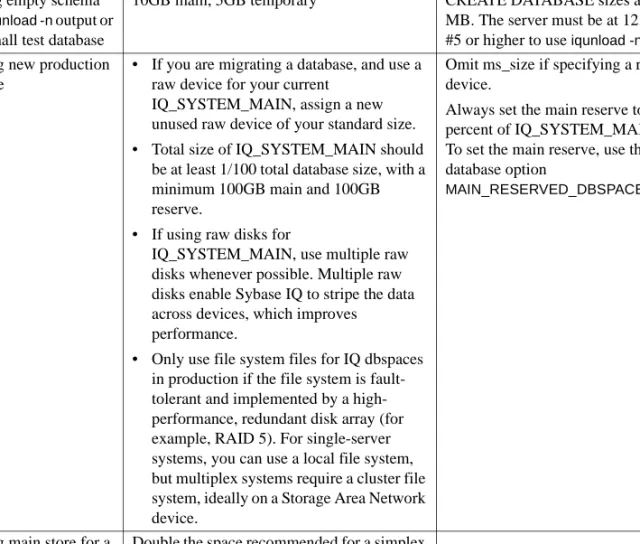
Table 1-3: Size guidelines for IQ_SYSTEM_MAIN and IQ_SYSTEM_TEMP in production databases
Task Guideline Notes
Loading empty schema from iqunload -n output or for a small test database
10GB main, 5GB temporary CREATE DATABASE sizes are in MB. The server must be at 12.7 ESD #5 or higher to use iqunload -n. Creating new production
database
• If you are migrating a database, and use a raw device for your current
IQ_SYSTEM_MAIN, assign a new unused raw device of your standard size. • Total size of IQ_SYSTEM_MAIN should
be at least 1/100 total database size, with a minimum 100GB main and 100GB reserve.
• If using raw disks for
IQ_SYSTEM_MAIN, use multiple raw disks whenever possible. Multiple raw disks enable Sybase IQ to stripe the data across devices, which improves performance.
• Only use file system files for IQ dbspaces in production if the file system is fault-tolerant and implemented by a high-performance, redundant disk array (for example, RAID 5). For single-server systems, you can use a local file system, but multiplex systems require a cluster file system, ideally on a Storage Area Network device.
Omit ms_size if specifying a raw device.
Always set the main reserve to 20 percent of IQ_SYSTEM_MAIN size. To set the main reserve, use the database option
MAIN_RESERVED_DBSPACE_MB.
Creating main store for a multiplex
Double the space recommended for a simplex database, or at least 200GB main and 200GB reserve dbspace.
Examples Example 1 In CREATE DATABASE syntax, default size units are in MB, not GB. The following statement creates a database with 100GB
IQ_SYSTEM_MAIN with 100GB reserve (for future expansion):
CREATE DATABASE 'test.db' IQ PATH 'test.iq'
IQ SIZE 100000 IQ RESERVE 100000
TEMPORARY PATH 'test.iqtmp' TEMPORARY SIZE 5000
Example 2 MAIN_RESERVED_DBSPACE_MB lets you control the amount of space Sybase IQ sets aside in your IQ main store for certain small but critical data structures used during release savepoint, commit, and checkpoint operations. Sybase recommends that you set the
MAIN_RESERVED_DBSPACE_MB option value to 20 percent of the
IQ_SYSTEM_MAIN SIZE. See “IQ main store and IQ temporary store space management” on page 45 for more about MAIN_RESERVED_DBSPACE_MB. For example, if IQ_SYSTEM_MAIN is 100GB, set it to 20GB, as follows:
SET OPTION PUBLIC.MAIN_RESERVED_DBSPACE_MB = 20000
Example 3 You can specify the IQ_SYSTEM_MAIN size in the database migration command. The -ms_size parameter requires a value in MB, not GB. Omit -ms_size if specifying a raw device. For a raw device, you must specify an unused raw partition. For more about migration, see the Installation and Configuration Guide.
For example, this statement creates an IQ_SYSTEM_MAIN on a raw device:
iqunload -au -ms_filename /dev/rdsk/c1t0d1 -c "UID=DBA;PWD=SQL;DBF=latest.db"
For example, this statement creates an IQ_SYSTEM_MAIN on a raw device:
iqunload -au -ms_filename \\\\.\\PhysicalDrive1 -c "UID=DBA;PWD=SQL;DBF=latest.db"
Dbfiles and output files
The SYSDBFILE view shows all the dbfiles in your database, including the catalog dbspace file, the IQ message file, dbfiles in the IQ main and temporary dbspaces, the transaction log file, and the SA temporary file.
Files that are not dbfiles do not appear in the SYSDBFILE view. These include files that may be generated on server startup, such as the console log (specified by the -o switch) and the SQL log (specified by -zo). These log files do appear as database properties or server properties and may be examined by stored procedures such as sa_db_properties( ) or the system function db_property( ). For syntax, see “Version information in the message log” in Chapter 1, “Overview of Sybase IQ System Administration” in System Administration Guide: Volume 1.
Naming dbspaces
You can rename a user dbspace and dbfile names, but you cannot rename or drop catalog dbspace SYSTEM, IQ main dbspace IQ_SYSTEM_MAIN, IQ temporary dbspace IQ_SYSTEM_TEMP, and IQ message dbspace
IQ_SYSTEM_MSG.
You can rename the dbfile names in IQ_SYSTEM_MAIN and IQ_SYSTEM_TEMP, and you can change the dbfile name of IQ_SYSTEM_MSG files, but you cannot change the dbfile names in SYSTEM. You cannot use ALTER DBSPACE RENAME TO in order to rename dbspaces IQ_SYSTEM_MAIN or IQ_SYSTEM_TEMP, IQ_SYSTEM_MSG, or SYSTEM.
The dbspace of a table is implicitly or explicitly specified. For base tables, the value of the DEFAULT_DBSPACE option implicitly determines the dbspace location, or the location may be specified explicitly using the CREATE TABLE IN dbspace_name clause. Base tables are typically created in a dbspace in the IQ main store, but may also be created without IQ indexes in a dbspace in the catalog store.
For global temporary tables, specify the IN SYSTEM clause to explicitly create a SA global temporary table. IQ temporary tables are created in IQ_SYSTEM_TEMP by default.
The dbspace of indexes and table subobjects is always specified, either implicitly based on the table dbspace or explicitly with an IN clause. Indexes and partitions are implicitly created in the table dbspace. The partitioned subsets of columns of a partitioned table are implicitly created in the dbspace of the corresponding partitions.
All indexes and table subobjects must be in the same store as the table. For example, an index on a base table in the IQ main store must also be in the IQ main store.
Dbfile attributes and operations
A dbfile has read-write or read-only status. A dbfile is read-write when it is added, and its runtime read-write status depends on both the read-write status of the dbspace and of the dbfile. The administrator can alter the
read-write/read-only status of a dbfile, but cannot alter the online/offline status of a dbfile.
Operations that can be performed on dbfiles include add, drop, rename logical name, and rename the file path. See ALTER DBSPACE statement in Chapter 1, “SQL Statements,” in Reference: Statements and Options.
Dbspace attributes and operations
A dbspace may have three types of online/offline status: online, offline, or dynamically offline. Dynamically offline means that the dbspace is marked offline in memory, as opposed to marked offline in the catalog. If a database starts and one or more dbfiles cannot be opened, the database starts but the dbspace is marked dynamically offline.An administrator can use ALTER DBSPACE ONLINE to bring a dbspace back online after fixing a problem, but this only changes the dbspace’s in-memory status.
In addition to online, offline, or dynamically offline status, a dbspace also has write or only status. When created, a dbspace is online and read-write.
A dbspace also has striping attributes. An administrator may specify whether striping is on and the stripe size.
Operations that can be performed on dbspaces include add, drop, and rename. See CREATE DBSPACE statement, ALTER DBSPACE statement, and DROP statement in Chapter 1, “SQL Statements,” in Reference: Statements and Options.
For multiplex dbspaces, see “Updating dbspaces in multiplex” in Chapter 3, “Running Multiplex Transactions,” in Using Sybase IQ Multiplex
Read-only and read-write dbspaces and files
For a read-only dbspace, the administrator has the following capabilities: • Add a file
• Rename the file path of a dbfile in the dbspace (requires main dbspaces are offline)
• Rename the dbspace or dbfile in the dbspace
A file is read-only when either the file status is read-only or the file status is read-write, but the owning dbspace status is read-only. Altering a dbspace to read-only does not alter the catalog status of its associated files to read-only, but does make the file(s) read-only at the operating system level. In other words, the file's catalog read-only or read-write status remains the same, but data in the file cannot be modified.
To create a table object in a dbspace or to move a table object to a new dbspace requires CREATE permission in the dbspace. The CREATE permission in a dbspace can be granted/revoked to/from a user or a group. Any member in a group inherits CREATE permission from the group. By default, CREATE permission on IQ_SYSTEM_MAIN, IQ_SYSTEM_TEMP, and SYSTEM is granted to PUBLIC. For other IQ main dbspaces, the system administrator must explicitly grant CREATE permission on the dbspace to a group/user before they can create or move objects into that dbspace. For example, if a table is to be placed on a new IQ main dbspace, the user must have CREATE permission on that dbspace. Users must also have RESOURCE permission to create objects.
A dbspace and its associated files can have individual RO or RW status, for example:
A table or join index is read-only when assigned to a RO dbspace. A table partition is read-only when the partition is assigned to a RO dbspace. No data modifications such as insert, delete, update, load, truncate table, and
insert/delete/update through an updatable cursor are allowed to a RO table or RO table partition. No DDL operations such as ALTER TABLE add/drop column, create/drop index are allowed on a RO table or RO table partition.
Object Status Effective status Table’s dbspace Table’s status dbspace1 RW RW dbspace1 RW - file1 RO RO - file2 RW RW dbspace2 RO RO dbspace2 RO - file1 RO RO - file2 RW RO dbspace3 RW RO dbspace3 RO - file1 RO RO - file2 RO RO
Attempts to write to a read-only dbspace are detected when the modified pages are flushed to disk. Pages modified during an INSERT...VALUES statement are not written to the database until the next command that is not an
INSERT...VALUES statement. (INSERT...VALUES is the only command that behaves this way.) Sybase IQ returns an error for DML operations on a read-only table or read-read-only table partition.
Operations to join indexes, including create join index, drop join index, and synchronize join index, fail if any of the join tables are RO.
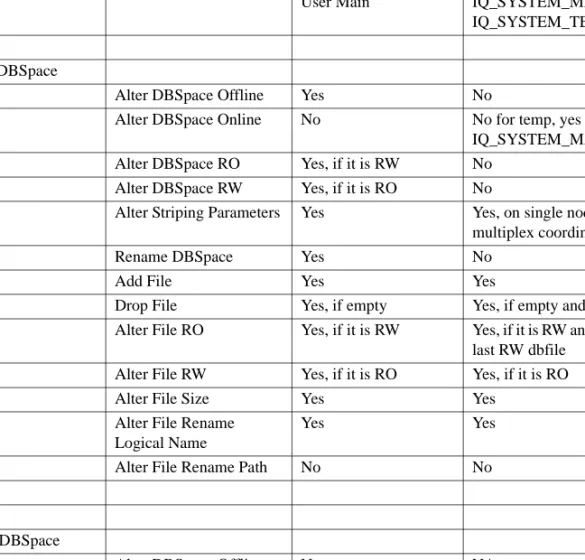
The following table lists allowed dbspace configuration transitions.
Table 1-4: Allowed dbspace configuration transformations
State Alter Type Allowed Allowed
User Main IQ_SYSTEM_MAIN,
IQ_SYSTEM_TEMP Online DBSpace
Alter DBSpace Offline Yes No
Alter DBSpace Online No No for temp, yes for IQ_SYSTEM_MAIN Alter DBSpace RO Yes, if it is RW No
Alter DBSpace RW Yes, if it is RO No
Alter Striping Parameters Yes Yes, on single node and multiplex coordinator
Rename DBSpace Yes No
Add File Yes Yes
Drop File Yes, if empty Yes, if empty and RO
Alter File RO Yes, if it is RW Yes, if it is RW and not the last RW dbfile
Alter File RW Yes, if it is RO Yes, if it is RO
Alter File Size Yes Yes
Alter File Rename Logical Name
Yes Yes
Alter File Rename Path No No
Offline DBSpace
Alter DBSpace Offline No NA
Alter DBSpace Online Yes NA
Alter DBSpace RW No NA
Alter Striping Parameters Yes NA
Rename DBSpace Yes NA
Add File No NA
Drop File Yes, if empty NA
Alter File RO Yes NA
Alter File RW Yes NA
Alter File Size No NA
Alter File Rename Logical Name
Yes NA
Alter File Rename Path Yes NA
Dynamically Offline DBSpace
Alter DBSpace Offline Yes, if RO NA
Alter DBSpace Online Yes NA
Alter DBSpace RO Yes, if RW NA
Alter DBSpace RW No NA
Alter Striping Parameters Yes NA
Rename DBSpace Yes NA
Add File No NA
Drop File Yes, if empty NA
Alter File RO Yes NA
Alter File RW Yes NA
Alter File Size No NA
Alter File Rename Logical Name
Yes NA
Alter File Rename Path No NA
Read-only DBSpace
Alter DBSpace Offline Yes, if online NA Alter DBSpace Online Yes, if offline NA
Alter DBSpace RO No NA
Alter DBSpace RW Yes, if online NA
Alter Striping Parameters Yes NA
Rename DBSpace Yes NA
Add File Yes NA
Drop File Yes, if empty NA
Alter File RO Yes, if RW NA
Alter File RW Yes, if RO NA
Alter File Size No NA
Alter File Rename Logical Name
Yes NA
Alter File Rename Path Yes, if offline NA
read-write DBSpace
Alter DBSpace Offline No No
Alter DBSpace Online Yes, if dynamically offline
No
Alter DBSpace RO Yes No
Alter DBSpace RW No No
Alter Striping Parameters Yes Yes
Rename DBSpace Yes No
Add File Yes Yes
Drop File Yes, if empty Yes, if empty and RO
Alter File RO Yes, if RW Yes, if RW
Alter File RW Yes, if RO Yes, if RO
Alter File Size Yes, if RW Yes, if RW
Alter File Rename Logical Name
Yes Yes
Alter File Rename Path No No
Read-only File
Alter File RO No No
Alter File RW Yes Yes
Alter File Size No No
Alter File Rename Logical Name
Yes Yes
Alter File Rename Path Yes, if offline No
Read-write File
Alter File RO Yes Yes
Alter File RW No No
Alter File Size Yes Yes
Object placement for non-partitioned tables
You can specify a dbspace for a table object (including columns of any data type, indexes, primary and foreign keys, unique constraints, join indexes, and non-partitioned tables) at object creation or when you move the object. You must have CREATE privilege in the dbspace. For example:
CREATE TABLE tab1 ( col1 INT IN dsp1, col2 VARCHAR(20), col3 CLOB IN dsp2, col4 DATE,
col5 BIGINT,
PRIMARY KEY (col5) IN dsp4) IN dsp3;
CREATE DATE INDEX col4_date ON tab1(col4) IN dsp5;
Resulting data allocation is as follows:
Object placement for partitioned tables
For a partitioned table, you can place each table partition in an individual dbspace. You may also place each column for a table partition in an individual dbspace. In general, however, individual dbspaces are recommended only for
BLOB or CLOB columns or columns of CHAR, VARCHAR or VARBINARY
greater than 255 bytes. For example:
Alter File Rename Logical Name
Yes Yes
Alter File Rename Path No No
Notes
• Dynamically offline means the dbspace is marked offline in memory, as opposed to marked offline in the catalog
• A read-only IQ_SYSTEM_MAIN dbfile can be dynamically offline
• For IQ_SYSTEM_MSG, the only modification that is permitted is to rename the path, which is done using the command ALTER DBSPACE IQ_SYSTEM_MSG RENAME 'filepath'
State Alter Type Allowed Allowed
Dbspace name Data
dsp1 FP index for col1
dsp2 FP index for col3
dsp3 FP indexes for col2, col4, and col5
dsp4 Primary key (HG on col5)
CREATE TABLE tab2(
col1 INT IQ UNIQUE(65500), col2 VARCHAR(20),
col3 CLOB PARTITION (p1 IN dsp11, p2 IN dsp12, p3 IN dsp13),
col4 DATE, col5 BIGINT,
col6 VARCHAR(500) PARTITION (P1 IN dsp21, p2 IN dsp22),
PRIMARY KEY (col5) IN dsp2) IN dsp1 PARTITION BY RANGE (c4)
(p1 VALUES <= ('2006/03/31') IN dsp31, p2 VALUES <= ('2006/06/30') IN dsp32, p3 VALUES <= ('2006/09/30') IN dsp33 );
CREATE DATE INDEX c4_date ON foo(c4) IN Dsp3;
Resulting data allocation is as follows:
Partition Dbspace Data
p1 dsp11 FP indexes for col3
(CLOB data)
dsp21 FP index for col6
(VARCHAR(500) data)
dsp31 FP indexes for col1, col2, col4, and col5
p2 dsp12 FP for col3 (CLOB
data)
dsp22 FP for col6
(VARCHAR(500) data)
dsp32 FP indexes for col1, col2, col4, and col5
p3 dsp13 FP index for col3
(CLOB data) dsp33 FP indexes for col1,
col2, col4, col5, and col6 (varchar(500) data)
Non-partitioned dsp1 Lookup store for
col1 and other share data (for all partitions)
Starting databases
In order for a database to start, all files of IQ_SYSTEM_MAIN, all files of IQ_SYSTEM_TEMP, and the catalog file SYSTEM must be available. A database can be started skipping other user and catalog dbspaces that cannot be fully opened. All read-write files of IQ main store dbspaces other than the IQ_SYSTEM MAIN dbspace and any catalog dbspace other than SYSTEM that cannot successfully open all files of the dbspace, logs an error and marks the dbspace dynamically offline (marked offline in memory, as opposed to marking it offline in the catalog). If all files of IQ_SYSTEM_TEMP cannot be opened, the database will not start unless the -iqnotemp startup parameter is used.
Sybase IQ consistency checks the commit_id in each dbspace file header against the value in the system tables ISYSDBFILE and ISYSIQDBSPACE and marks any file or dbspace that does not match offline as above.
A dbspace that has been marked offline at start time may be brought online via the ALTER DBSPACE ONLINE statement, assuming that the problem has been corrected and the dbspace can be opened.
A table object that resides in an offline dbspace is unavailable. Any DDL or DML request except ALTER DBSPACE ONLINE to any table object in an offline dbspace generates an error. Note that after you make a dbspace offline, there may still be data pages in the buffer cache. In the case of a very small table, the entire table may be in memory in the buffer cache and temporarily available, even if the dbspace is offline.
Non-partitioned dsp2 Primary key HG on
col5 (for all partitions)
Non-partitioned dsp3 DATE index
col4_date (for all partitions)