Busines s W hit e Paper
webMethods OneData: MDM
Core Concepts and Functionality
An Overview of Capabilities for an Enterprise
MDM Strategy
Charles Greenberg
Sr. Manager, Product Marketing
MDM Competency Center, Software AG
April 2013
COntEntS
THE MDM MISSION STATEMENT
3
WEBMETHODS ONEDATA FUNCTIONAL OVERVIEW
5
ONEDATA CUSTOMER HUB SOLUTION
16
METADATA REGISTRY MODULE
17
THE MDM MISSION STATEMENT
The benefits of an enterprise-wide Master Data Management (MDM) solution would seem easily enough defined and understood. A mission statement for successful implementation would probably commit to achieving 100 percent, error-free, company-wide data that is measurable by zero inaccuracies, zero redundancy or duplication, and a total realization and consolidation of enterprise-wide data standardization and definition.
Efficient and effective business processes, comprehensive and timely delivered strategic decision support, reduced time to market, and customer satisfaction levels literally rise and fall on the quality of available data and the ability to realize a single and definitive view of the master record—whether it be customer, product, supplier, vendor, employee or location.
Often, data quality can be quantified in terms of a company’s bottom line. For example, poor data can impede the flow of invoicing, shipping and misrepresent inventories. Conversely, good or clean data flushes out bottlenecks and speeds along product creation, delivery and payment. But some side effects of inconsistent data are less tangible, such as a decrease in end-user automation compliance when applications seem to consistently provide misleading or bad data. Additionally, carefully planned initiatives or business innovations are undermined. How successful can projects be if team members believe that their best efforts to enrich customer profiles for sales and marketing enablement will be mitigated by inconsistent data?
When you consider today’s highly complex and diversified computing environments, and the huge volumes of data inter change, the case for buying an MDM solution has never been clearer or more urgent. Selecting the correct software, however, is still a major challenge. That said, first-time buyers and perhaps to a greater extent second-time buyers are asking:
1. Do I really need to purchase multiple MDM products to manage multiple subject areas or domains?
2. Do I have to reinvent my data model in order to utilize a specific MDM solution? 3. Does MDM software really require constant IT intervention for enterprise interoperability
and acts of simple data interchange?
Solution Overview
webMethods OneData is a highly collaborative, multi-domain, data management platform, designed to enrich, create and deploy any kind of shared enterprise-wide data. Master data (such as product/item, customer/counter-party, vendor/supplier, account and employee), reference data (such as enterprise hierarchies, code tables and dimensions), technical and business metadata are all successfully managed by OneData users to support numerous use cases, solutions and mission-critical business requirements. Chief among those uses are data consolidation, integration and cleansing, enabling data managers and data stewards to import data from multiple enterprise systems and create one version of the truth to distribute back to the systems of origination. This precept extends to both operational MDM and analytical MDM (reference data management).
When you consider today’s
highly complex and
diversified computing
environments, and the
huge volumes of data inter
change, the case for buying
an MDM solution has never
been clearer or more urgent.
What Makes webMethods OneData Multi-Domain?
webMethods OneData MDM is a generic, data management framework, which provides the necessary functionality to support any kind of sharable data sets. The subject area or domain is driven entirely by the data model and its attributes, structures and subject areas. Unlike Customer Data Interchange (CDI) and Product Information Management (PIM) solutions, webMethods OneData does not ascribe to one particular type of process flow or subject-driven, data management methodology. OneData offers an extremely high level of end-user configu-rability and the ability to import external data models from different modeling tools. This means multiple domains—including customer, product, vendor, supplier, location and employee—can be readily introduced into webMethods OneData, can easily coexist and be interrelated based on business requirements.
The MDM Collaborative Environment
webMethods OneData supports the MDM ideal of total collaboration. OneData’s deep level of collaborative functionality enables data stewards, system administrators and business users internally to join as one team to manage compliance and implement prescribed data manage-ment rules that support data entry, data creation, data cleansing and enrichmanage-ment, or data governance in general.
A second level of high collaboration maintains the relationship and ease of interoperability between webMethods OneData and all relevant external source and subscribing systems, databases and tools across the enterprise landscape.
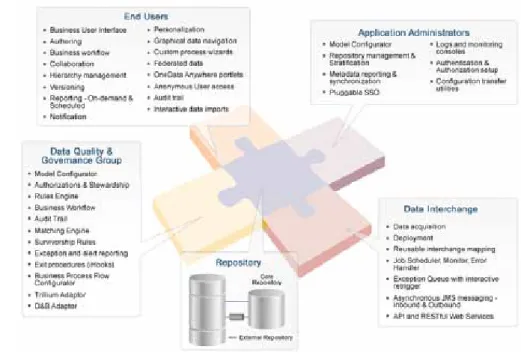
Figure 1 provides a comprehensive overview of webMethods OneData’s modules, functionality and strategic architecture. There are five major areas:
Figure 1: webMethods OneData Modules
webMethods OneData MDM
is a generic, data manage-
ment framework, which
provides the necessary
functionality to support any
kind of sharable data sets.
1. End-User Enablement:
This functionality enables users to easily collaborate on everything from workflow creation and execution, to data and hierarchy management, to enabling business users to read, search and query their own view of the data.
2. Application Administrators:
This grouping provides administration, not only for OneData’s system infrastructure such as login controls and security but also for key data management functions, such as a granular approach to versioning. It also provides the ability to schedule data management jobs and routines.
3. Data Quality and Governance Group:
webMethods OneData is a data governance tool and, as such, it provides comprehensive support for rule-driven data management, including:
•
Survivorship rules (the ability to systematically indicate a dominant source for certain data types)•
End-user authorization, auto-mapping and matching•
The ability to audit and log any minute change to the data 4. Data Interchange:Since MDM clearly cannot function in a silo, external collaboration must be facilitated as much as possible. webMethods OneData provides inbound/outbound API, RESTful Web services and strong support for external standards as well as asynchronous messaging.
5. Repository:
As the central component of the OneData solution, the repository houses system metadata. It provides an area completely dedicated to the creation, enrichment, management and creation of data, and a release or deployment area where approved data and cleansed data is ultimately distributed to downstream applications and databases.
WEBMETHODS ONEDATA FUNCTIONAL OVERVIEW
While the term module may be applicable, all detailed components are considered core for supporting MDM’s evolving scope and ongoing enterprise mission. All modules, therefore, are immediately available and integrated out-of-the-box.
End-User Empowerment
Users
webMethods OneData provides both read-write and read-only functionality. Users who are given the privileges to update data or administer the application are counted as read-write users. Others who need search, report creation and the capability to export data—but are not allowed to change data— are considered to be read-only users. In addition, the optional public user feature allows unlimited concurrent access with the same set of privileges for anonymous (or non-logged in) users.
Business User Interface
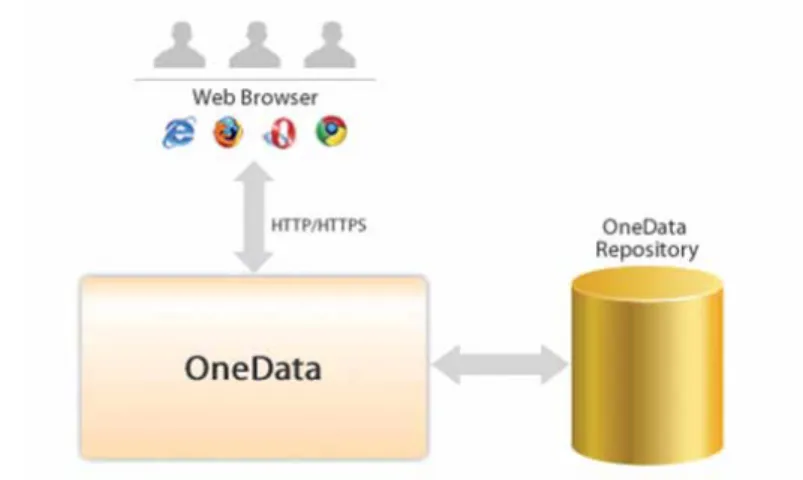
A fundamental capability of webMethods OneData is its consistent support for the non-technical business user. The intuitive, browser-based User Interface (UI) is metadata-driven and generated by OneData as soon as objects are created or imported. Consequently, no programming changes are needed to accommodate changes in the data model. Additionally, the UI can provide support for thousands of concurrent named users.
webMethods OneData
is a data governance tool
and, as such, it provides
comprehensive support
for rule-driven data
management.
This OneData front-end has a comprehensive feature set to create, view, maintain and report on business objects, which may be stored locally within the OneData-owned repository or in remote databases.
OneData Anywhere
OneData Anywhere is a feature that provides portal functionality allowing OneData contents to be displayed. By utilizing a live link, business data can be viewed by any external application or website simply by means of pasting a few lines of code. This enables the website visitor to access data sets without actually logging into OneData.
Figure 2: OneData Anywhere Portlet
OneData enables users to both read and update data using the portlet. User authentication is performed using Single Sign-On (SSO). This makes the data management process much more seamless and enables easier integration into the existing landscape. OneData objects also include “deep links” that enable external users to access data without having to navigate the OneData UI. Additionally, OneData Anywhere can be configured in flex mode.
Data Authoring, Data and Relationship Management
A vast array of data management features are available in the webMethods OneData front-end, including filter/search, add/ copy/ edit/ delete/ restore, multiple-column sort, import/export, and print/email, making OneData a powerful business tool.
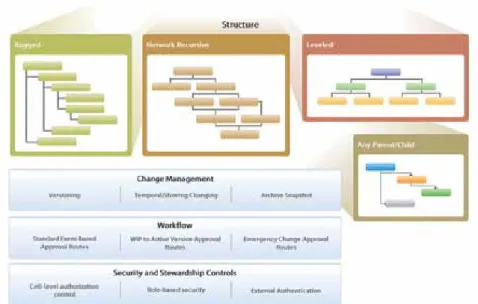
Business-critical hierarchical structures of various types (self-recursive and network-recursive hierarchies) are created and managed with the OneData front-end. These structures are different from other parent-child structures since the hierarchies are “ragged,” that is to say, there is no concept of named levels and the number of nodes between the root node and any leaf node vary from one leaf to the other.
OneData hierarchies support large volume trees (nodes more than 1 million). Additional differentiating features include:
•
The ability to filter on any attribute and navigate down the filtered branches•
Graphical navigation•
Integrated hooks•
Temporal maintenance (when compared to versioning, which is also an option) webMethods OneData also enables the highly productive, external loading of complete hierarchies, eliminating the need for manual manipulation after importing.OneData enables users to
both read and update data
using the portlet. User
authentication is performed
using Single Sign-On (SSO).
Advanced Versioning for Ragged Hierarchies
The basic hierarchy management module enables users to create and manage hierarchical structures of various types (self-recursive and network-recursive hierarchies) with the OneData front-end and is part of the core solution. The advanced versioning module integrates the concept of versioned hierarchies and associated entities. Changes are processed through the workflow approval as a version.
Figure 3: webMethods OneData’s Basic Hierarchy Management
Emergency changes to approved versions are done via the standard workflow process. This module also provides the ability to create scratch-pad versions that can be merged back into work-in-progress versions.
Emergency changes to approved versions are done via the standard workflow process. This module also provides the ability to create scratch-pad versions that can be merged back into work-in-progress versions.
Reporting
OneData provides several ways to report on the data managed by the application as well as on the objects and the contained metadata. Reporting helps increase the visibility of the data to the end users, helping to maintain or improve quality over time.
Administrators, or users with the right privileges, may utilize a wizard-driven approach to build and publish reports that may then be accessed by other users who have been provided access to them. Additionally, users may create personal reports for individual use. More complex queries may be built using the free-hand report writer.
Apart from the reporting module, data can be reported on or printed from any of the data browse or maintenance screens using the delivery options feature. Capabilities include print as PDF, Microsoft® Excel® or HTML with the additional option to email selected (or all) data sets.
Published reports can be scheduled to run periodically and sent to a selected list of users or email addresses through OneData.
OneData provides several
ways to report on the data
managed by the application
as well as on the objects and
the contained metadata.
If the OneData reporting module does not serve your reporting needs, external reporting tools can be pointed to the publishing repository to create and report directly since OneData’s underlying database is open.
Collaboration
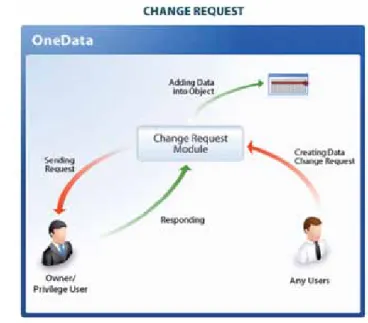
The collaboration module consists of two primary components: change requests and discussion forums. A change request is the means by which a user without the privileges to make a change could initiate a request to the data owner for making that change. A completed change request serves as a detailed log entry for why a particular change or set of changes were made and who approved the changes. It also is a means of keeping read-only users in the change management loop.
Figure 4: OneData’s Change Request Capability
Discussion forums allow users to start a discussion thread and authorized users to contribute to the thread. This replaces the typical approach of discussion threads communicated or scattered via emails.
notification
Email notification can be enabled as required for a variety of events. Emails are event-based notifications and are sent to the configured users. Some of the events include user account creation, workflow item pending in inbox, data approval notification, scheduled report execu-tions, errors on import and deployment jobs, among others. Notifications can be batched and sent to the users at specific times during the day if the volume of notifications is significant. The notification message can be configured to internal corporate standards.
Personalization
There are four levels of configuration of objects in OneData that control the behavior and presentation to an end user:
1. Repository 2. Project 3. Object 4. User
Discussion forums allow
users to start a discussion
thread and authorized users
to contribute to the thread.
Personalization refers to the user’s ability in the repository to configure the look and feel of objects to his/her specifications. Users can set back-up users in the event of absence from work. Favorite shortcuts as well as saved searches are among the other options that are specific to a user and configured by them.
ADMINISTRATION
Model Configurator
The model configurator module in OneData provides application administrators the ability to create individual objects from database tables, and further build composite objects from atomic objects, that are then used in the application. Additionally, this module allows the configuration of the presentation layer, relationships and rules. These capabilities are at the core of developing the business layer on top of the persistent database objects. The properties defined using the object definition module are stored in the OneData metadata schema.
Object definition can be enabled in two modes. In DDL generation-enabled mode, any changes to the model that impact the database structure will be generated and the corresponding database structure change commands executed in the repository (only valid for data objects). In DDL generation-disabled mode, the object definition module is used only to manage and synchronize the OneData metadata layer with the underlying database layer.
NOTE: In support of its customer hub solution, webMethods OneData provides an industry standard B2B template—or accelerator—as part of its base product.
Administrative Workbench
The administrative workbench provides tools for application administration, including repository configuration, system properties and the pre-requisite setup for most modules. System proper-ties control the behavior of the application. Pre-requisites for deployment or acquisition modules include FTP/SFTP sites and remote database connections. Messaging queues, whether real-time or batch, are pre-requisites to enable the messaging module.
Other features in the workbench include basic monitoring of user sessions, connected reposito-ries and connections.
Security – Authentication & Authorizations
The security module in webMethods OneData has two components: authentication and authorization. Authentication can be internal to the OneData application, or external via LDAP or Microsoft® Active Directory®. SSO is also supported based on HTTP headers. A pluggable,
SSO module enables users to bypass OneData’s sign-on if they are currently logged-on to the corporate SSO environment.
The administrative workbench
provides tools for application
administration, including
repository configuration,
system properties and the
pre-requisite setup for most
modules.
Authorization in OneData is role-based. Authorization is highly granular, providing the ability to control column-level as well as row-level access to data. Functions, folders, reports, jobs, among other types of objects, are also controlled via authorization privileges. This role-based granularity is also extended to row filtering and aligned with specific editing functions and users.
Repository Stratification
Project is a way to stratify a webMethods OneData repository into logical segments that can be administered independently. This allows the logical division of various classifications of data in logically different locations. Also, the concept of projects enables providing access to data on a need-to-know basis. The concept of project-level “administrators” allows the overall administration task of OneData to be divided into functional groups.
Figure 6: Repository Stratification
A user can be created in one project but can access and be part of multiple projects.
DATA QUALITy/GOVERNANCE
Dual Schema with Workflow
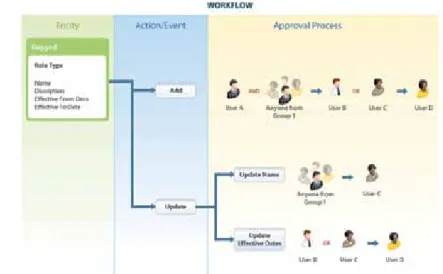
To ensure ongoing data quality and governance, it is critical to engage the data owners, typically the business users, to validate changes. webMethods OneData’s automated workflow processes, change request forums and email notification, integrated with the data changes, provide a collaborative environment for stakeholders to ensure ongoing data quality.
Figure 7: Multi-Layered Workflow
webMethods OneData’s
automated workflow
processes, change request
forums and email notification,
integrated with the data
changes, provide a collabo-
rative environment for
stakeholders to ensure
ongoing data quality.
A central component of the governance framework is the concept of a separate work area for all changes. This results in a dual schema landscape, with the OneData repository partitioned into an authoring or staging area and a release or production area.
Data enrichment in the authoring area is considered “work-in-progress,” whereas the release area is the location for data that has been approved and advanced from workflow. Distribution of enriched or cleansed data to target enterprise databases and applications is typically done only from the release area. OneData allows deployment out of the work area.
The second component of the governance framework is the workflow capability of OneData. Workflow rules are configured to create approval routes based on specific events or event/ attribute combinations. Data-driven workflow rules route the approvals based on the data value(s) involved. Workflow events are triggered at each approval level to customize the actions as needed as well as in some cases, to trigger “system” approvals. Additional rules in terms of mandatory attributes can be setup at approval steps to ensure data completion or enrichment before final approval. Since changes in data can affect multiple downstream systems across functions, it is critical that the data is validated and approved by business owners. Workflow, like change requests, is linked to email notifications.
External Workflow
Since webMethods MDM also provides tight integration with external processes (such as BPMS), the depth and breadth of its workflow capabilities can be called externally to help propagate data governance in systems outside the OneData MDM hub. Once an external workflow has been evoked and completed, control is then returned to OneData.
Audit Log
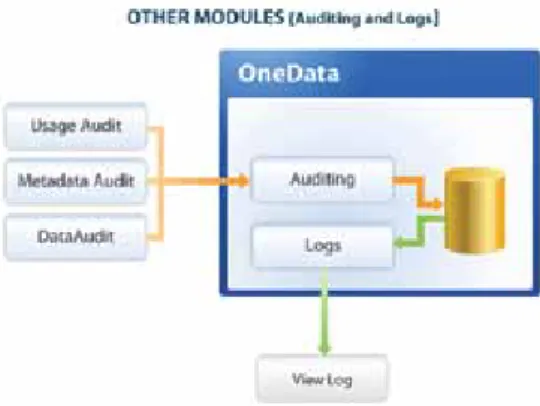
webMethods OneData maintains an audit trail for every change made to the data model as well as to the data. Detailed audit log viewing and reporting capabilities are provided out-of-the-box. Additionally, logs are maintained for system usage and executed jobs.
Figure 8: webMethods OneData Audit Log
The set of logs maintained include DML logs, DDL logs, distribution logs, data usage logs and data audit logs.
iHooks and Rules Engine
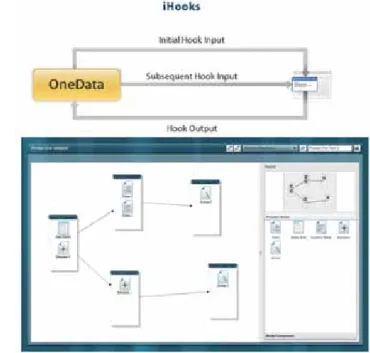
iHooks is a way to invoke validation routines, interactive process flow wizards and post-action events, such as data manipulation and workflow approval. It is an extensive framework that allows extensibility of the application either with stored procedures or Java® Remote Method
webMethods OneData
maintains an audit trail for
every change made to the
data model as well as to
the data.
Hooks are executed automatically on an event or invoked by the end user interactively through the OneData front-end. Hooks have been used in scenarios ranging from enforcing validation rules to creating a 10-step prompted wizard to create a customer.
Figure 9: Graphical Process Flow
Process Flow
The process flow module’s core functionality constitutes an integral part of OneData’s approach to governance. The module enables interactive hooks that are directed to call out external procedures and applications for integration into OneData’s workflow capability.
Providing unprecedented power to this module is the process flow builder, which allows administrators to easily draw and design process flow, eliminating the need for any kind of coding. Using a drag-and-drop graphical interface, users quickly build business processes, including rapid prototyping of MDM processes, where minimal change management is necessary.
Additionally, the graphical process modeling interface facilitates the execution of wizards, change management plug-ins, and provides a faster plug-in development environment.
third-Party Data Quality Adapters
webMethods OneData MDM provides out-of-the-box adapters for direct integration with both Trillium Software Systems and Dun & Bradstreet business directories.
The TSS webMethods OneData Connector allows data to be passed to the industry-leading Trillium Software System for cleansing, matching and the standardization of both customer and product master data. Utilizing probability thresholds, returned records are then reconciled, organized, governed and synchronized for operational and analytical uses within the OneData solution. Trillium also provides a third-party postal director for address validation and enrichment. OneData’s Trillium interface (or even OneData’s ability to leverage other DQ engines), maximizes DQ performance by allowing all matching to be accomplished in a single run. This feature significantly reduces the typical number of required matching iterations required for the matching/cleansing process within an MDM use case.
webMethods OneData MDM
provides out-of-the-box
adapters for direct integration
with both Trillium Software
Systems and Dun & Bradstreet
business directories.
As a world leader in customer business and consumer directories, Dun & Bradstreet provides the necessary functionality to easily enrich customer addresses. The solution will maintain and update Dun numbers, as well as supporting record groupings and basic hierarchy management.
DATA INTERCHANGE
Data Acquisition
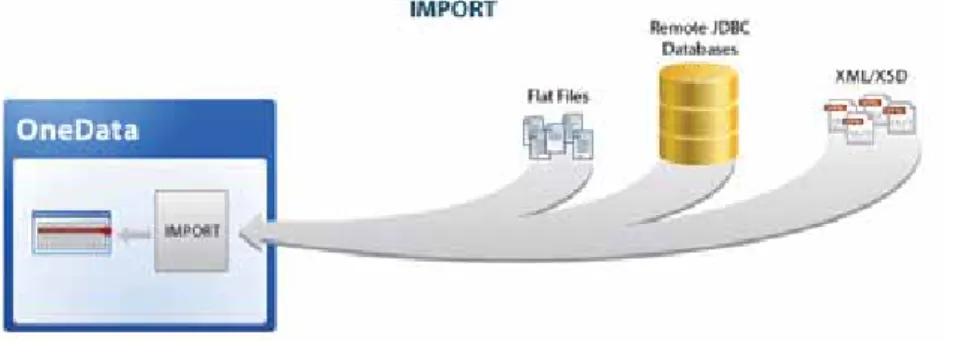
The data acquisition module allows authorized users to import data into the repository, either interactively or in the background using a scheduled job. Importing is supported through interchange mapping, providing additional control on acquisition in terms of encoding schemes, bypass indicators and advanced transformation. A where clause is used for quickly filtering-out data not relevant to the current import.
Figure 10: OneData’s Import Capability
Data acquisition can be performed in multiple formats as depicted in the data deployment module. A built-in scheduler allows for scheduled acquisition jobs. Additionally, exception queue functionality allows authorized users to re-trigger error records logged in the exception queue.
Deployment
The distribution module in webMethods OneData allows you to propagate data to external systems using different delivery mechanisms, such as remote database updates, remote procedure calls and file generation with FTP transfer options. Publish/subscribe messaging, and various distribution types (remote database updates, JMS, XML, SQL and text files) are available. Distribution jobs are invoked by either using the built-in scheduler or using an external scheduler via the command line.
Data acquisition can be
performed in multiple
formats as depicted in the
data deployment module.
The flexible deployment capabilities distribute the repository contents to subscribing systems, enabling quick alignment of all applications without any programming. Distribution techniques available include messaging, XML, direct updates, and email or file transfer.
With the loosely coupled integration between webMethods OneData and downstream systems, the tables or objects in the latter do not have to have the same structures/columns as the source OneData entity.
Data is deployed in delta/incremental mode, incremental with respect to the last successful job run. Additional options exist in case of remote database update jobs where the job is run additionally in synchronize mode or delete/insert mode.
Metadata transfer and Reporting
The OneData Metadata schema holds the configuration within each repository and drives the presentation as well as data interchange layers in OneData. Customized reports can cover metadata content, such as user/role allocations, workflow rules and associations.
The configuration of one repository can be migrated to another repository using the transfer metadata utility. The typical route for such migrations would be from the OneData develop-ment instance to the test instance and then on to the production instance.
Messaging
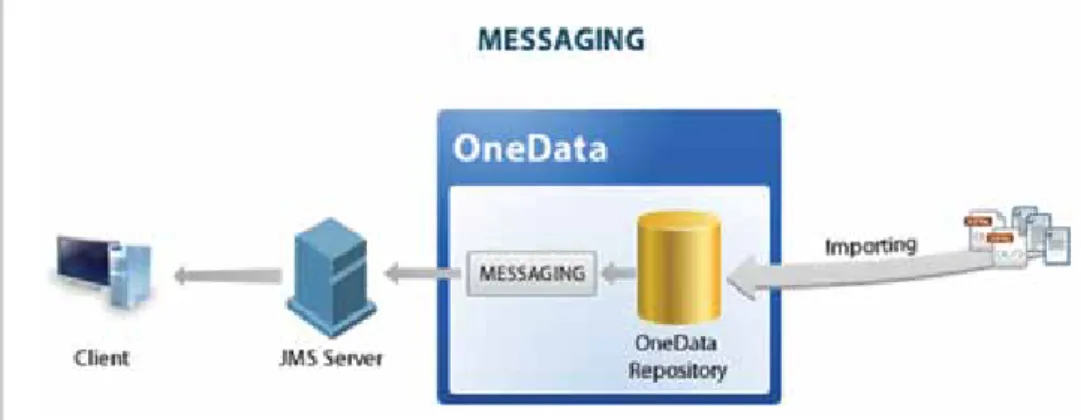
The messaging module in OneData has two modes in which a customer can use it. Asynchronous read/write uses the real-time message queue/listener and enables interchange with Service-Oriented Architecture (SOA)/Enterprise Service Bus (ESB) layer with minimal effort. Alternatively, batch message generation and publish capability via the deployment module can be used to publish incremental change messages at scheduled intervals.
Figure 12: OneData Messaging
Customized reports can
cover metadata content,
such as user/role allocations,
workflow rules and
webMethods OneData provides the capability to use asynchronous messaging by being able to read data from and write to messaging queues (point-to-point) as well as messaging topics (publish-subscribe) in systems, such as Websphere MQ and Weblogic JMS, using Java® Messaging
Service (JMS) technology.
API and REStful Web Services
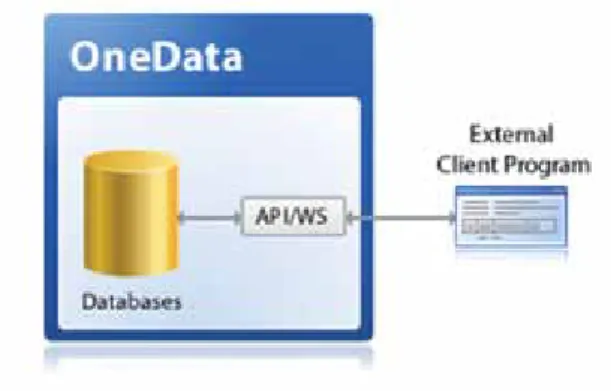
webMethods OneData exposes a set of API and RESTful Web Services functions that can be used to enable external programs to retrieve information from OneData as well as execute various OneData actions (such as OneData jobs, execute reports), provided the external program has the appropriate authorizations.
Figure 13: API/REStful Web services
In addition to APIs specific to module functions, generic API/RESTful Web services allow users to create specific outputs without having to create a new function definition. The authorization layer is enforced on the data read/write API calls, thereby eliminating the need to create a separate authorization layer outside of OneData.
Repository
There are three distinct areas, or schemas, in the repository:
•
Internal OneData metadata area•
Authoring work area•
Release areaThe metadata area controls the behavior of the application; its contents include configuration settings for the user interface/presentation layer, user accounts and authorizations. The authoring and release areas contain your data. Initial data changes are made in the authoring area, which are subsequently moved to the release area after the required workflow approvals.
In addition to APIs specific
to module functions,
generic API/RESTful Web
services allow users to
create specific outputs
without having to create a
new function definition.
The authoring area is optional; in a “single-schema landscape,” without the authoring area, all changes would be made directly in the release area.
A defining aspect of OneData is that all three database schemas are stored unencrypted and without any proprietary structures. This makes it open to third party tools and applications, assuming the right privileges have been provided.
webMethods OneData also works as a presentation layer on top of external databases, where the data physically does not persist in the OneData repository.
A typical OneData implementation includes one production instance and non-production instances for purposes such as development and test.
ONEDATA CUSTOMER HUB SOLUTION
webMethods OneData MDM fully supports Customer Data Integration (CDI), including MDM customer consolidation style. By leveraging the OneData toolset and additional CDI-specific functionality, the OneData Customer Hub Solution fully supports the complete customer data management life cycle.
Figure 14: Customer Hub Process Flow
OneData’s Customer Hub process flow includes:
•
Flexible modeling as well as out-of-the-box, industry standard templates•
Data acquisition•
Data quality connectors to both Trillium Software Systems and Dun & Bradstreet•
Merging like records, post matching/grouping (OneData enables un-merging as well)•
Survivorship rules (designating a most trusted source for data attributes), which can be implemented historically (allowing one source within the customer hub to supersede another) or systematically (allowing one external system to supersede another)•
Customer data enrichment, which can be accomplished by mapping to external resources (such as postal directories) and by using OneData’s workflow capability•
Hierarchy management•
DeploymentwebMethods OneData MDM
fully supports Customer
Data Integration (CDI),
including MDM customer
consolidation style.
Figure 15: MDR/11179
METADATA REGISTRy MODULE
The webMethods OneData Metadata Registry (MDR) is a ready-to-use enterprise metadata registry based on the ISO 11179 standard. The 11179 standard is designed to facilitate a common understanding of metadata terms and definitions across organizations and heterogeneous computer environments. By using OneData’s flexible modeling strategy, the solution also enables importing data dictionaries and file-based metadata, including standards-based models for CDISK and NIEM.
The MDR registry module sits atop the webMethods OneData MDM platform, automatically integrating with all available OneData functionality, including OneData’s Web-based user interface, modeling capabilities, data acquisition/data interchange, workflow, hierarchy manage-ment, iHooks (exit procedures), reporting, security and repository. At any point in time, OneData end users can readily return to or extend their data management use cases and implementation to reference data and master data.
The MDR module itself contains the ISO/IEC 11179 standard meta model as a template. Strict compliance to the ISO 11179 registry standard is ensured through rules-driven workflow of administered items. The 11179 standard, however, can be easily modified within OneData. Additionally, OneData’s configurable user interface enables business users to view when necessary a more simplistic view of the MDR model. The webMethods OneData MDR solution also supports the import of:
•
Administered items•
Permissible values•
Value meanings•
Classification schemesThe 11179 standard is
designed to facilitate a
common understanding
of metadata terms and
definitions
MetaMap
OneData MDR also provides MetaMap, a tool for enterprise analysis and discovery of metadata assets. By utilizing MetaMap’s data acquisition capabilities, users can automatically link any two metadata assets to each other. A manual linking capability is also provided. Custom utilities are provided to load both physical and technical metadata as well as logical models.
ABOUT ONEDATA OBJECTS
Objects are the basic building blocks in webMethods OneData that business models and processes are built upon. In a OneData system, you can have:
•
Data objects•
Virtual objects•
Conceptual objects•
Remote objects•
System objectsEach type of object has a different set of characteristics and properties attached to it. At an atomic level, a data object can be approximately correlated to a database table or view; however, an object additionally has abstractions that make it more easily understandable to the business user. A conceptual object is made up of multiple data objects to create a functional model with inherent security, workflow and navigation controls that can be different from that of the individual data objects. A remote object is table-hosted in an external system that is presented as a data object to the OneData end user. System objects allow other users systems to obtain read-only view information about data object structures and OneData metadata.
MetaMap utilizes a
best-in-breed, embedded Matching
Engine for data matching
capabilities that go beyond
the simplistic matching
algorithms based on string
matches and soundex.
SA G_MD M_C or e_C onc ep ts_F unc tionalit y_WP_Apr13
T O F I N D T H E S O F T W A R E A G O F F I C E N E A R E S T Y O U ,
P L E A S E V I S I T
W W W . S O F T W A R E A G . C O M
Take the next step to get there—faster. To find the Software AG office nearest to you, please visit www.SoftwareAG.com.
ABOUT SOFTWARE AG
Software AG (FRA: SOW) helps organizations achieve their business objectives faster. The company’s big data, integration and business process technologies enable customers to drive operational efficiency, modernize their systems and optimize processes for smarter decisions and better service. Building on over 40 years of customer-centric innovation, the company is among the top 10 fastest-growing technology companies in the world and is ranked as a “leader” in 15 market categories, fueled by core product families Adabas and Natural, ARIS, Terracotta and webMethods. Software AG has more than 5,400 employees in 70 countries and had revenues of €1.05 billion in 2012. Learn more at www.SoftwareAG.com.
Software AG—Get There Faster
Software AG | Uhlandstraße 12 | 64297 Darmstadt | Germany
© 2012 Software AG. All rights reserved. Software AG and all Software AG products are either trademarks or registered trademarks of Software AG. Other product and company names mentioned herein may be the trademarks of their respective owners.