Teaching Programming via the Web:
A Time-Tested Methodology
Rex Karsten, (E-mail:
[email protected]
), University of Northern Iowa Shashidhar Kaparthi, (E-mail:[email protected]
), University of Northern IowaRoberta M. Roth, (E-mail:
[email protected]
), University of Northern IowaAbstract
Advances in information and communication technologies give us the ability to reach out beyond the time and place limitations of the traditional classroom. However, effective online teaching is more than just transferring traditional courses to the World Wide Web (WWW). We describe how we have used “off the shelf” software and the infrastructure that is available via the WWW to develop and deliver a complete learning experience in programming business applications using a popular programming language. The course is unique in its coordinated use of traditional and nontraditional materials to introduce and explain difficult programming constructs. Student performance, job placement, and feedback have confirmed the convenience and effectiveness of this method.
Introduction
caused univ
variety of pressures have caused academicians to rethink traditional means of providing student instruction (Cooper, 2000; Green, 2000). Reduced funding levels have contributed to the need to find ways to increase instructional efficiency. Declining enrollments have ersities to seek ways to appeal to the non-residential, non-traditional student population. Advances in information and communication technologies provide the ability to reach out beyond the confines of the traditional classroom. As Management Information Systems instructors, these technologies offered the potential to extend our instructional capability and course offerings. However, our original research made it obvious that there is more to online learning than simply transferring traditional courses and course resources to the WWW, as many universities have discovered since the initial over-hype of online learning the 1990’s (Beckett, 2004; Hafner, 2002). A review of the literature and our personal experience as online educators indicates that certain courses lend themselves to online instruction, and the careful design and utilization of the available technologies can enhance the experience and success of students and instructors
T
(Karsten & Kaparthi, 1998; Rouche & Rouche, 2003). The next section of the paper describes the factors involved in course selection. A description of our teaching methodology, including course content, organization, presentation, access, and interaction follows. Evidence of course success is next, with conclusions and recommendations completing the paper.
Course Selection
students’ ability to learn a programming language. Second, our experience with one of the essential components of our on-line course (visual explanations) suggested that we had found a unique and effective way to provide computer-based support for learning complex programming concepts. We have made extensive use of WWW-based visual explanations (Tufte, 1997) as teaching aides in our regular programming classes. Students have rated the visual explanation teaching aides as significantly more helpful than in-class examples worked out on the blackboard Karsten & Kaparthi (1998). As a result, we felt confident that we could provide complete and effective programming instruction via the WWW.
As faculty members in Management Information Systems, we are constantly challenged to provide our students with the opportunity to learn to use new hardware and software technology. One of the challenges of online learning is to persuade end users that it is interesting and worthwhile (Beckett, 2004). Our choice of Visual Basic programming was in part based on a need to offer our students an opportunity to learn a programming language that is widely used in graphical user interface, client-server environments. Providing these skills promised to broaden the appeal of our graduates to employers, as well as give our students a solid foundation in an up-to-date software development tool (Radcliffe, 1996; Spain, 1996). Moreover, the structure of the Visual Basic language lends itself to the structure of the WWW, which enhanced our ability to create a meaningful learning experience for students.
Course Content and Organization
Our review of the distance learning literature made us appreciate the simultaneous need to develop both structure and flexibility into our course design (Notar et al., 2002). Some Internet-based courses provide all materials on-line, requiring students to spend a considerable amount of time in front of the computer. We wanted freedom from the time and place constraints of the traditional classroom, but also desired the flexibility of being able to work on-line and off-line on course materials. Therefore, we included a mixture of computer-based and textbook-based resources in our course.
We had concerns at the outset that it would be difficult to monitor student progress and respond effectively to student questions if students were working though the course materials at widely varying rates. Therefore, we provided a basic timeline for the course so that the students followed guidelines for progressing through the course materials. This structure made sure that students were at approximately the same place in the overall course, without major individual variation. It also helped provide a little external motivation, so students did not procrastinate excessively. While we feel the structure set an appropriate pace for the course, it was also flexible enough to accommodate reasonable differences in individual student learning.
The course material was originally organized around a carefully chosen introductory Visual Basic textbook (course materials and the text have been updated to coincide with the latest version of Visual Basic. We are in the process of updating to VB.NET). Based on our prior experience teaching introductory programming courses, the selected text was appropriate both in content and in its logical, ordered presentation of programming concepts. The text makes extensive use of clear, though static, examples and explanations of introductory-level programming concepts. The text also provides numerous, hands-on programming exercises that reinforce student understanding and use of the programming language and the programming development environment.
material, and references to appropriate textbook material and exercises. The course syllabus identifies the date(s) by which each computer-based module, its text counterpart, and assigned exercises were to be completed. Dates for homework assignment submission, quizzes, and tests were also specified. Material for a new unit was made available after the specified date by which the activities required by the previous unit were to have been completed. For example, Unit 2 materials were made available online after students completed the scheduled assignments and tests for Unit 1. In essence, the manner in which modules and units were presented was intended to move the class along at a suitable speed, while individual students could adjust their learning pace within unit-defined parameters. This helped us manage the coordination problem we feared if students were able to make totally autonomous choices about completion of the course materials.
Another element of our course structure dealt with deadlines we imposed on homework assignments, quizzes, and unit tests. Students were given approximately four days to complete and electronically submit a homework assignment following completion of the associated course materials. For quizzes, students were informed that they could access a quiz one time only during a 24-hour period of time specified on the syllabus. Students were limited to working a maximum of 30 minutes on the quiz. Tests were handled similarly, although students were given a 48-hour period in which the test was available and had one hour to complete the test. These procedures helped assure us that students were staying up with the course materials in order to meet the assignment and testing benchmarks.
We must emphasize that our WWW-based resources do not duplicate text materials. The modules preview and expand upon textbook content. Moreover, these resources provided additional, dynamic examples and highly visual explanations of the important programming concepts and relationships introduced in the text. We have found these visual explanations particularly helpful in conveying concepts and relationships that novice programmers traditionally find difficult (e.g., parameter passing). Moreover, feedback from students suggests that dynamic, visual explanations enhance and/or reinforce their understanding of virtually all topics covered in the course. Answers to, and where necessary, visual explanations of, selected textbook exercises were also provided in on-line modules.
WWW-based course resources were also used to facilitate student understanding and use of the programming software. As each programming concept was introduced that required the use of new features of the VB development environment, a demonstration of the necessary feature(s) was provided. For example, in the module that introduces subprograms, annotated slides containing actual pictures of the development environment guide students step-by-step through the mechanics of creating a subprogram in the VB development environment. Ideally, the time students spend acclimating themselves to the intricacies of the software package can instead be spent on the problem-solving process, not on unproductive efforts to figure out the development environment.
The course modules were organized in an electronic course syllabus that permitted point and click access to module content. While the modules previewed text-based instruction, they also provided additional, stand-alone programming instruction. In addition, the syllabus provided access to additional learning and programming aides. For example, a special module including debugging hints and tips as well as a step-by-step demonstration of the VB debugging environment was provided. A variety of other teaching and programming resources were also organized and made available in special modules in a similar, user-friendly fashion.
Whereas the text provides static examples, explanations, and exercises, the WWW-based modules provide alternative explanations that are more dynamic and visual. When appropriate, the modules also introduced and provided software-specific instruction. Finally, modules were developed containing additional learning and programming resources.
Access, Presentation, and Interaction
A description of how student’s access and use course materials may provide a better appreciation of instructional presentation. Students access the course web site and click on that day’s instructional module. The module previews its textbook counterpart and emphasizes the most important concepts on which to concentrate. These modules can be thought of as a “timeless” counterpart of traditional lectures that can be viewed and reviewed when, and as often, as individual students require. E-mail and a “frequently asked questions” (FAQ) forum support responses to individual and group questions. Students may move through the modules within a unit according to personal instructional needs. Periodic assignments, quizzes, and tests motivate students to move through course material at an appropriate pace, and provide feedback regarding mastery of the course content. Students who wish to move into a new unit prior to its availability electronically may do so via the textbook. When new unit modules are eventually provided on-line, they may be used to reinforce, expand, or perhaps correct, understanding acquired via the textbook.
Programming assignments were submitted via the Internet, with grading criteria and explanations provided in return via e-mail. We also posted the best student programming assignments submitted via the WWW, allowing students to compare their work to a good student-submitted assignment.
It is the use of WWW-based modules to provide dynamic, visual explanations of programming concepts and relationships that makes our mode of presentation unique and has most contributed to course success. Constructed using readily available, off-the-shelf software, these visual explanations convey programming concepts and relationships (e.g., sorting algorithms, identifier scope) via a series of slides. These conceptual slide shows are viewed under the manual control of the individual student user. This approach has been most popular with new programming students, since it permits them to control both the speed and direction of execution. The software allows us build a number of useful features in our presentations. For example, color is used to highlight a variable or value of special interest. Narrative is enhanced with brightly colored dialog boxes that “pop up” and contain “dynamic documentation” offering insights into a flow of control event. Familiar objects such as highlighted text, colored arrows, and “stop signs” focus student attention on important programming relationships or events. The web-based visual explanations take full advantage of the computer-supported instructional medium. These dynamic explanations offer a superior way of facilitating student understanding of abstract and unfamiliar programming concepts and relationships because (Ross, 1991):
• They convey program dynamics, with execution of the presentations controlled by the student. Slide transition (i.e., explanation steps) occurs a step at a time, going backward or forward, or continuously executed at the pace and discretion of the student user.
• The explanations are easy to use. Accessing and manipulating the explanations simply requires that students be able to access the WWW and operate a mouse.
Students have reported that the visual explanations have directly supported their programming efforts. For example, students have regularly reported using the explanations to clarify or refresh their understanding of how certain data structures (e.g., arrays) work while in the process of constructing algorithms and programs.
We believe our “hybrid” instructional approach offers flexibility beyond that associated with traditional, classroom-based instruction or courses offered solely via the Internet, while providing sufficient structure to ensure student success. Organizing and presenting the course around a traditional text permits students to study and work off-line as well as on. Dynamic, visual explanations that take advantage of the electronic instructional medium are also available according to individual student needs. E-mail and a FAQ list provide additional individual and group support. In sum, the organization and presentation of this course reflects our recognition of the time and place constraints inherent in any instructional effort, even distance education. We attempted to impose and release those constraints in a fashion most conducive to individual and group learning. The following section provides evidence of the success of this innovative course delivery strategy
Evidence of effectiveness
Our first session with our on-line visual basic course was initially conducted over an 8-week period during the Fall semester, 1997. Since that time, subsequent sessions have been offered during the summer, since students indicated a strong desire to take a summer course that did not require local residence. Every session of the course has been completed with no significant technical glitches along the way.
Initially, 23 students were enrolled in the course. Eighteen students completed the course. The overall GPA of the class was 3.4, suggesting that students were more than able to meet our performance expectations in the course.
Following completion of the course, students were mailed an evaluation questionnaire to gather feedback on their experiences and opinions of the course. Nine of the students returned this questionnaire (a 50% response rate), so our results are not statistically meaningful. However, we can use this feedback to get a general sense of the students’ reaction to their experience in this Internet course.
Eight of the nine students reported that they accessed the on-line course modules several times per week. One student indicated accessing the on-line modules just one per week. One student reported using the textbook daily; six reported using the textbook several times per week; and two reported using the textbook once a week.
Unfortunately, five of the nine students reported performing few or none of the recommended textbook exercises. Three students said they performed most of the recommended exercises. Just one student reported performing nearly all of the recommended exercises.
Students were asked to respond to a number of items concerning their general reaction to the Internet course. A five-point Likert-type scale was used, with 1 = Strongly disagree and 5 = Strongly agree (see Table 1). Overall responses were quite favorable. Students felt the course organization was appropriate and effective (M = 4.78, SD = 0.41); course content was appropriate (M = 4.89, SD = 0.33); and course difficulty was appropriate (M = 4.89, SD = 0.33). All responding students indicated that course delivery via the Internet was appropriate (M = 5.00, SD = 0.0). Students were satisfied with skills developed or enhanced in the course (M = 4.56, SD = 0.53) and felt the amount of work was balanced throughout the course (M = 4.67, SD = 0.50).
Slightly lower scores were given to items assessing the course’s self-paced nature on students’ motivation to learn. Students felt that the self-paced course did enable more learning (M = 4.11, SD = 0.93), and that computer access to course materials enabled more learning (M = 4.22, SD = 0.67). The positive response was less strong regarding whether the self-regulated learning format increased their motivation to learn (M = 3.56, SD = 1.13). However, there was strong agreement that students would recommend the course to their colleagues (M = 4.78, SD = 0.44).
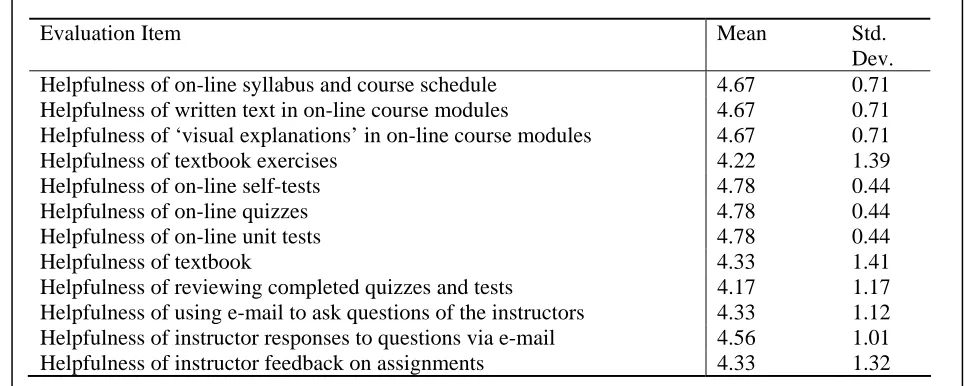
Students were also asked to assess the helpfulness of various aspects of the course materials and format. A five-point Likert-type scale was used, with 1 = Not helpful and 5 = Very helpful (see Table 2). Again, student responses were generally favorable. Students found the on-line syllabus and course schedule (M = 4.67, SD = 0.71), written text in the on-line modules (M = 4.67, SD = 0.71), and ‘visual explanations’ in the on-line modules (M = 4.67, SD = 0.71) quite helpful. Students also reacted favorably to the on-line self-tests (M = 4.78, SD = 0.44), on-line quizzes (M = 4.78, SD = 0.44), and on-line exams (M = 4.78, SD = 0.44). Student reaction was slightly lower regarding the textbook (M = 4.33, SD = 1.41) and textbook exercises (M = 4.22, SD = 1.39).
Students felt it was helpful to review completed quizzes and tests (M = 4.17, SD = 1.17). Students also felt using e-mail to ask questions of instructors was helpful (M = 4.33, SD = 1.12) and that instructor responses to questions via e-mail were helpful (M = 4.56, SD = 1.01). Instructor feedback on homework assignments was also considered helpful (M = 4.33, SD = 1.32).
Although only one-half of our students returned the evaluation questionnaire, the above results indicated a favorable reaction to the Internet Visual Basic course. We were especially gratified that the students expressed satisfaction with the skills they developed through the course. Anecdotally, two students reported that they received job offers as a result of the skills learned in the course. In addition, the corporate employer that sponsored most of our non-traditional, corporate students has requested that another session of the course be offered this spring. We feel confident that our course was effective in delivering quality instruction in business application programming with Visual Basic.
Conclusions
The overall satisfaction expressed by the students and the absence of problems during the course suggests that our mixed media, on-line course was a success and was an effective means of delivering the course material. The fact that every student indicated that he/she would take another course offered via the Internet in a similar format reinforces our belief in the value of this educational delivery approach. At present, we are exploring offering additional programming instruction via the Internet, including an advanced Visual Basic applications development course.
References
Beckett, H. (2004), Blend skills for a better class of e-learning. Computer Weekly. January 20, 2004, pp. 20.
Cooper, L. (2000). Online courses. Technical Horizons in Education, v.27, pp. 86+. Green, J. (2000). The online education bubble. The American Prospect, v.11, 22, pp. 32+.
Hafner, K. (2002). Lessons Learned at Dot-Com U. The New York Times, May 2, 2002, Section G, page 5.
Karsten, R., & Kaparthi, S. (1998). Using dynamic explanations to enhance novice programmer instruction via the WWW. Computers & Education, v.3/4, pp. 195-201.
Notar, C.E., Wilson, J.D. & Ross, K.G. (2002). Distant Learning for the development of higher level cognitive skills. Education, v. 122(4), pp. 642-648.
Radcliffe, D. (1997). Matches made in heaven. Computerworld, v.32 (46), pp. 97-102.
Roueche, J.E. & Roueche, S.D. (2003). More than arm’s length: Distance makes a difference. Community College Week, v. 16(5), pp. 3+.
Ross, R.J. (1991). Experiences with the DYNAMO program animator. ACM SIGCSE Bulletin, 1991, 23, pp.35-42.
Spain, W. (1996) Visual Basic. Computerworld, v.30 (44), pp.102.
Table 1: Student Ratings of Visual Basic On-line Course
Evaluation Item Mean Std. Dev.
Course organization was appropriate and effective 4.78 0.41
Course content was appropriate 4.89 0.33
Course difficulty was appropriate 4.89 0.33
Course delivery via Internet was appropriate 5.00 0.00 Self-paced course enabled more learning 4.11 0.93 I am satisfied with skills developed or enhanced in this course 4.56 0.53 Computer access to course materials enabled more learning 4.22 0.67 Amount of work was balanced throughout course 4.67 0.50 Self-regulated learning format increased motivation to learn 3.56 1.13
Would recommend course to others 4.78 0.44
Rating Scale: 1 = Strongly Disagree, 5 = Strongly Agree
Table 2: Student Ratings of Course Material Contribution to Learning
Evaluation Item Mean Std.
Dev. Helpfulness of on-line syllabus and course schedule 4.67 0.71 Helpfulness of written text in on-line course modules 4.67 0.71 Helpfulness of ‘visual explanations’ in on-line course modules 4.67 0.71
Helpfulness of textbook exercises 4.22 1.39
Helpfulness of on-line self-tests 4.78 0.44
Helpfulness of on-line quizzes 4.78 0.44
Helpfulness of on-line unit tests 4.78 0.44
Helpfulness of textbook 4.33 1.41
Helpfulness of reviewing completed quizzes and tests 4.17 1.17 Helpfulness of using e-mail to ask questions of the instructors 4.33 1.12 Helpfulness of instructor responses to questions via e-mail 4.56 1.01 Helpfulness of instructor feedback on assignments 4.33 1.32