WYSINC – Application for Wireless
Synchronization
R. Divya A. A. Dwivedi
UG Student UG Student
Department of Electronics & Communication Engineering Department of Electronics & Communication Engineering
MBICT, New V. V. Nagar MBICT, New V. V. Nagar
P. B. Soni Assistant Professor
Department of Electronics & Communication Engineering MBICT, New V. V. Nagar
Abstract
WISYNC is about to provide wireless communication through an enhanced innovation of web browser & application. Main task deals with the connecting Android device and any computer system over the network. In this mainly concentrated on the file transferring between Android device and Computer System. At Android side one WISYNC application is there and at the other end in the computer system Web Browser is there to synchronize data between two systems. Transfer files back, send text messages, play music, view your photos and manage applications. This system allows you to seamlessly synchronize of your data of your phone to PC or Laptop at much higher rates.
Keywords: WISYNC
________________________________________________________________________________________________________
I. INTRODUCTION
The Purpose of this system is to capture in natural language and at functional level, the description and requirement of “WIRELESS SYNCHRONIZATION”. This System focus on Transferring & Managing files, Contacts and call logs, Sending text messages, Playing music, Viewing photos, Data disabling. This module replaces your USB cable with your web browser. Wireless Synchronization systems can be used by any user who wants to have a smart phone to be system lied for his day today life. Main modules of this system are Transferring & Managing files. This system will help user to transfer files without using USB cable. Also provides functionality to user like Contacts and call logs, Sending text messages, Playing music, Viewing photos, Data disabling etc.
Existing systems are manual system. Because of new innovations I.T. field, everyday thousands of solution will be a part of market. Manually it is not possible to cover all tools and services. It is time consuming and tedious. For any kind of IT Product or service and even for little solution user has to goes from different organization's web sites. It is time consuming and tedious. Some time it doesn’t gives required solution.
This system that lets you wirelessly manage & control your Android device from a web browser over-the-air. It lets you wirelessly connect to any PC, Swap files between your Android and PC at lightning fast speed, With the help of data disabling feature unwanted usage of data can be avoided, You can also manage your contact list, create groups, add new contacts, disconnect calls and dial numbers directly from your PC.
II. LITERATURE SURVEY
There are so many ways to do wireless communication between different systems. Wireless communication introduced in the 19th century & wireless communication technology has developed over the subsequent years. It comes as a most used medium to transfer data from one side to another one. In wireless communication the data can be transferred through air without requiring direct connections like cables, wires or any electronic conductors.
In today's scenario the wireless communication refers to a different wireless devices and technologies ranging smart phones to computers, tabs, laptops, Bluetooth Technology, printers. There are so many ways to do wireless communication include, IR wireless communication, satellite communication, Microwave radio, Bluetooth, etc.
limited range. Similar to GPS devices, some phones make use of signals from satellites to communicate.
In Bluetooth Technology, the main function is that permits you to connect a various electronic devices wirelessly to a system for the transferring of data. Cell phones are connected to hands free earphones, mouse, wireless keyboard. By using Bluetooth device, the information from one device to another device. This technology has various functions and it is used commonly in the wireless communication market.
Advantages of Wireless Communication includes : Any data or information can be transmitted faster and with a high speed, Maintenance and installation is less cost for these networks, The internet can be accessed from anywhere wirelessly, It is very helpful for workers, doctors working in remote areas as they can be in touch with medical centers.
Disadvantages of Wireless Communication includes: An unauthorized person can easily capture the wireless signals which spread through the air, it is very important to secure the wireless network so that the information cannot be misused by unauthorized users
Applications of Wireless Communication includes: Applications of wireless communication involve security systems, television remote control, Wi-Fi, Cell phones, wireless power transfer, computer interface devices and various wireless communication based projects.
III. MEHODOLOGY
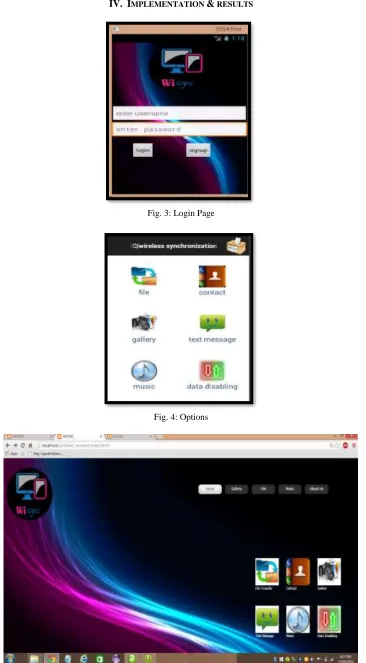
WISYNC for Android replaces your USB cable with your web browser. Transfer files back and forth, send text messages, play music, view your photos and manage systemizations — all without installing anything on your computer. It functions as a web server, allowing your Android device and your computer to communicate over the network.
- Transferring and Managing files
Click Files to view the contents of your SD card. If you want to clean out your file system, deleting files from here is quicker than going through a file manager on your Android. Transfer files between Android devices and computers. Cut, copy, paste, search, rename or delete files on the SD card.
- Contacts and call logs
This module Contacts and Call Logs panels allow you to browse your Android’s contacts and view its call history. User can also create Group, search, create contacts, check and delete call logs.
- Sending Text Messages
This module is used to send SMS messages using the Messages panel. No need to pick up your Android and type messages in; participate in a conversation right from your web browser.
- Playing Music
The Music panel allows you to use your Android device as a jukebox. Play, search, import, export, delete, or set as phone call, notification and alarm ringtones.
- Viewing Photos
Use Photos panel to show off photos on your monitor instead of your Android’s small screen. Preview, delete, import, export, set as wallpaper and photos slide show from desktop.
- Data Disabling
Fig. 1: USE CASE Diagram
Fig. 3: Login Page
Fig. 6: File upload
V. CONCLUSION
It is to be concluding that the WYSINC and Browser side web application prove a simple file transferring medium between smart phone and computer systems. It also provides a secure communication due to authentication part of overall system. With the use of this system it is very simple to transfer almost all kind of data from one way to another securely. Always any system shows signs of improvement, due to that any different medium can added other than the web browser / web application at computer system for better security and high data transfer rate..
REFERENCES
[1] A. Aggarwal, M. Kapoor, L. Ramachandran, A. Sarkar, Clustering algorithms for wireless ad hoc networks, in: Proceedings of the 4th International Workshop
on Discrete Algorithms and Methods for Mobile Computing and Communications, Boston, MA, USA, 2000, pp. 54–63.
[2] M. Kalia, D. Bansal, R. Shorey, Data scheduling ans sar for bluetooth mac, in: IEEE 51st Vehicular Technology Conference Proceedings, VTC 2000-Spring,
Tokyo, vol. 2, 2000, pp. 716–720.
[3] A. Capone, M. Gerla, R. Kapoor, Efficient polling schemes for bluetooth picocells, in: IEEE ICC 01, vol. 7, Helsinki, Finland, 2001, pp. 1990–1994.
[4] Lessard et al., “Wireless Communication in the Automated Factory Environment”, IEEE Network, vol.2, no.3, May 1988, pp.64-69.
[5] J.M.Kahn and J.R.Barry, “Wireless Infrared Communications,” Proceedings of the IEEE, vol. 85, no. 2, February 1997, pp. 265-298