No. 51 January-February 1990
THE
M
Embedded
Systems
Looking for an easy way to put together an embedded controller? Then don't put down this issue.
Embedding An
XT
Motherboard
page 8
This is for those of you who want it all. Cheap hardware, a familiar (MS-DOS) environment, and complete tools for development and debugging.
Writing A Neural
page 16Network
In
C, Part 1
Neural Nets are delivering nearly everything that AI promised. Our series includes all the software needed to experiment with this fascinating technology.
LIMBO, Part 4
page 30Give your robot a body (and part of a mind).
Marketing Your
Own
Software
page 66
How and wh~re should you advertise your new product? What kind of response should you expect when you do advertise? .
And More ...
Getting Started in
Hardware
The
Poet and The
Computer
01
a 7447019388 3
$3.95
SUPER 25Mhz 386 SYSTEM!
Tower Cases w/Power Supply
with 4MB RAM and Rotary Voice Coil Hard Drive For extra speed and reliability we've included a 44MB Mitsubishi
MR535 voice coil hard drive with an access time of 28ms, and a super fast 1: 1 interleave HD controller card.
' 1
1MB AT SYSTEM
Includes: 1MB RAM, 1.2MB & 1.44MB FD, 44MB Mitsubishi MR535 Voice Coil HD (28ms), Fast 1:1 Interleave HD Controller, Mono Graphics Video Card, 12" Amber Monitor, 101 Key Keyboard, Serial/Paral-leVGame Ports, Clock/Calendar, Full 1 Year Warranty. FREE assembly and testing.6/1 OMhz ... $1249
6/12Mhz ... 1295
XTSYSTEM
4.7711 OMhz w/2 360K Floppies ... 7254.77110Mhz w/20MB HD ... 929
4.77/10Mhzw/30MB HD ... 955
Color options for our systems (includes video card and monitor) ATI Graphics Solution ... 39
CGA Color ... 175
EGA Color ... 350
VGA Color (Analog w/Mitsubishi monitor) ... , ... .495
CGAlEGAlVGA (Multisync) ... 495
FLOPPY DRIVES
TEAC 360K ... 74TEAC 1.2MB ... 85
TEAC 3 1/2" 720K ... 79
TEAC 31/2" 1.44MB ... 90
HARD DRIVES
XT 20MB Miniscribe/Kalok 8425 (65ms) ... 2398425 w/controller ... 279
XT 30MB Miniscribe/Kalok 8438 (65ms) ... 249
8438 w/controller ... 299
AT 44MB Mitsubishi MR535, Rotary Voice Coil (28ms) ... 459
AT 71 MB Miniscribe 3085 Rotary Voice Coil (25ms) ... 699
VIDEO CARDS
Mono Graphics w/Parallel port ... 39CGA Graphics Card ... 45
ATI Graphics Solution Mono w/CGA Emulation ... 79
CGAlEGA w/256K ... 95
CGAlEGAlVGA 8-Bit. ... 149
CGAlEGAlVGA 16-Bit... ... 189
• 25Mhz 80386 CPU, AMI Bios, Full Size MB • 4MB of RAM, expands to 8MB on MB • 1.2MB and 1.44MB Floppy Drives • 12" Amber Monitor w/Mono Graphics Card • 1 01-Key Enhanced Keyboard • Serial/Parallel/Game Ports, Clock/Calendar • 200-Watt Power Supply • Socket for 80287, 80387 or Weitek • Full 1 Year Warranty w/Std AT Case ... $2395
$
24J.95
w/1MB ... $250Less (Mega Tower) 20Mhz 386 ... $150 Less Mini Tower $225 Standard Tower $269'rhe'· •.
Most · .•
9o~t··.•
·Effe¢tive·i.M'~Y•••.
t9Sp~e4 Upy()urt\Tor~8()Sy~teqtJ Upgradeyour
.·.hard driv~. c()l1tr9g~~<J)iscover.thei~~! ge~~r(l~on· 0f.~ani··.dri.\le~()?1;t'911~r9ar9~.A~·.tlle.··chartJ)~lQ}V; demonstrates,·the.·.speed.improyerneIlts.are.iI1crediple! Controller Card Type Standard I~Ml\or,~:.1· .•. lnt~r'~ay~,Mefllt
PJ~WA2,.·.2:1..•.
lnt~rl.~ave'i~F~"·i .. · .. ·• ~CL,.1.:1 .• lnterl~aye;.MFfJI··(.i>,···.iii.Y OTC 7287.1:t Interleave,RLL~w/Cache 167 KB/Sec:) 26fKB/Sec;522 Ksisec:
799 'Kb/Sec; .-; .. :::.' .. :":."::'.·
'~~:~;~ff~~~;~f~r~~~~,0'jc1~~5:~~c~~~
·'911~ging ·froIl1.~ .~!aIl9ar~.t\.!.90Iltr()I~er.toil:J· •.••
int~rI~aye controllerimproves~tforIlulIlC:t!by.3PO%tN()ie:fest
results~singljjMhtAtMiisnbishjMFi535Haf{fi>rjve'ani:l Spinf1itl!Disk.Optimizer~CONTROLLER CARDS
KEYBOARDS
NCL 1:1 MFM Controller ... $110 Chicony Enhanced 1 01-Key ... $67DTC 7287 1:1 RLL w/Cache ... 165 Keytronic Enhanced 10 1-Key ... 67
Focus 1 01-Key Tactile, Switchable
CABINETS
Control/Caps Lock, Dust Cover ... 89 (#1 Find by Micro C Staff) XT Slide Case, Lock, LED ... 38 • All Keyboards, XT/AT switchable* AT Slide Case, Lock, LED 3 half ht., 1 full ht. drives ... 72Baby Tower, w/200 watt PS,
SOFTWARE
2 half ht., 2 -31/2" Drives, MS-DOS 3.21 w/GW Basic ... 49Baby Motherboard ONLy ... 145
Mini Tower, w/200 Watt PS, MS-DOS 3.3 w/GW Basic ... 95
DR-DOS 3.3 w/GEM ... 49
3 half ht, 2 - 3 112" Drives, SpinRite Disk Optimizer ... 49
holds Full or Baby size MB ... 225
5 Bay Std. Tower, 250 Watt PS, 386Max Memory Manager for 386 Systems ... 69
3 half ht., 1 full ht drives ... 269
6 Bay Mega Tower, 200 Watt PS ... 239
MOTHERBOARDS
XTlTurb04.77/10Mhz ... $75AT 6/10Mhz ... 189
AT 6/12Mhz ... 225
AT 8/16Mhz ... 319
386 8/20Mhz w/Phoenix Bios, holds up to 8MB on board ... 750
386 16/25Mhz w/AMI Bios holds up to 8MB on board ... 899
386 33Mhz ... Call
CHIPS
XT/AT/386 Memory ... Call Math Co-Processors ... CallPOWER SUPPLIES
150-Watt XT Power Supply ... 50200-Watt AT Power Supply ... 78
EXPANSION CARDS
Clock ... 18Game (Joystick) ... 14
Parallel Port (LPT1 , 2 or 3) ... 18
Serial Port, 2 ports, 1 installed, (COM1 or 2) ... 18
2nd Serial Port Kit... ... 18
Serial Port, 4 ports installed ... 99
Multi Drive Controller, up to 2 drives, Supports 360K, 720K, 1.2MB & 1.44MB ... 39
XT
XT Multi-IO, Ser/Par/Clock/ Game/2 Floppy Drives ... .47XT Floppy Controller ... 19
XT 640K RAM Card (w/OK) ... 25
XT 2MB EMS Memory Board (OK) ... 49
AT/386
AT Multi-IO, Ser/Par/Game ... 332nd Serial Port Kit. ... 20
AT 2MB EMS Memory Board (OK) ... 99
MONITORS
12" Amber Monochrome TTL.. ... 89CGA Color RGB ... 249
~MicroS~here~
1:COM,oU
TCR'C'
"HARDWARE MANUFACTURER ~,I
I CJ V, SINCE 1983·' EGAlCGA Autoswitch .31 dot ... 362CGAlEGAlVGA Multisync (.31 dot) ... 489
VGAAnalog (Mitsubishi .28 dot) ... 489
Orders Only Please!
Jl-800-234-8086
Tech Calls:(503) 388-1194
Hours: Mon-Fri 9:00-5:30'I
~J~~jWg
AT&T
C++
RELEASE 2.0
SPECIFICATION
E~[1~ag
MS
WINDOWS
COMPArl BI LITY
£~1~IWg
EASY PORTABILITY
FROM MICROSOFT
C
[J~[i~Jlg
C++DEBUGGER
&
EXPANDED
C++
TOOLS
[/0fE~.R.7g
OS/2 UPGRADE
AVAILABLE NOW!
DEBUGGER, and now the wait is over.
We listened carefully to what you wanted in a next generation MS DOS C++
compiler. The answer is '!ou wanted expande~ and Zortech C++ V2.0 Improved documentatIon,
fdi~i~~:er's I-~[~ \V7If:~~~y /;s~ebn~~
!
tc:
.§Ii;Hl:;ll..o@..(~Il.f!!~j'j' )':II~HIH{;;'I'\
andYou wanted, «'!1i
':!liif~~, f~!':ii0\(.{!ir~1~1~~1H(~1
delivered.A
th~&ITatve2stOl
I
(E::~: (c\.n-il.1H~;
I~~n'
....
)'i'.:.: (iii!)) YouI I! • (c:; :: IDlil~,~~ci=r' ~~Hi·ai) ~€J\ wanted to
leatures
I
\..c~~
::r~ir-j\:"
.'
:~~tI1~! ~!b)
be able towith the ll~t
..
~li'~f.Ir.','~;!\!I~!f?' n'~li~i~\i~";.)lpower
'R.mjl\J~.!ll:.~(?:
~'(;r;~:' .t;·i~f
upgradeoffered by - - - to an
multiple inheritance and OS/2 version compiler
For many, EMS
programming support, built into the compiler is important, so it's in there too.
You were happy using the 18 classes prOVided in C++ TOOLS, but we
revised and expanded it anyway.
You never asked for a free TSR library to be included, but we knew you'd love to
use our neat little package,
so we included it tree. type safe linkage, so here it supporting Presentation
is. Manager, Y.c0u did not w,ant You liked our FlASH it to cost a lortune, so it s GRAPHICS You wanted compatibility
with MS WINDOWS, we
added it.
You repeatedly asked for easier portability from Microsoft
C,
we got themessage, and have written the library functions you
need.
You wanted the world's first MS DOS C++ source level
available , . - - - ,
for $150. Here is our list of highly package
recommended C++ cooks: for its
You want speed, but
to look at C+ + language;Stroustrup $32.25 wanted a
C+ + Ansv.er Book;Hansen $26.95
the c+ + for C Programmers $29.95 CCI+as+s standard c+ + Primer;iippman $30.25
library interrace,
SOURCE Ask about our new c++ Video Tutorial so we've CODE, so L - -_ _ . _ _ _ _ _ _ _ _ _ - : - l written it. we are
including it.
G--lOVJ
Yo Order:
Already own Zortech C++? Call the order hotline for details of our low cost upgrades.To order Zortech C++
for the first time, just call the order hotline. We accept payment by' Mastercard/Visa/COD.
Alternatively, mail the coupon below with your check ar credit card details.
ZORTECH INC.,
1165 Massachusetts Avenue, Arlington, Iv1A
02174, USA
Voice 617-646-6703
Fax 677-643-7969
ZORTECH LTD.,
106- 7 08 Powis Street, London, SE 18 6LU,
ENGLAND.
Voice (44)-1-316-7777
Fax (44}-1-3 7 6-4738
Name
A d d r e · s - s - - -
o
o
DEVELOPER'S EDITfON$450 (Save $200)o
OS/2 COMPILER UPGRADE $749.95C++ COMPILER $799.95
o
C++ DEBUGGER $749.95City--,.,-~ _ _ _ _ State_Zip___ 0 C
+
+-
TOOLS $ 7 49.95Visa/MC# _---:;-;-_ _ _ _ _ _ . 0 LIBRARY SOURCE CODE $ 749.95
Exp.Date _ _ _ Tel _ _ _ _ _ _ _ . 0 COMPILER & LIBRARY SOURCE $299.95
All MicroSoft trademarks are ocknowledged. For US orders please add $5.05 shipping
Reader Service Number 70
o
C++ VIDEO COURSE $499.95o
C+ + Language /Stroustrup $32.25o
C+ + Answer Book/Hansen $26.95o
C+ + for C Programmers/Phol $29.95o
C++ Primer/Lippman $30.25Overseas orders at international mail rates.
--ENAllY.
A debugging
tool tough enough to
handle the DOS
Nasties.
New Version 2.0
So1f1t-Nasty over-write? No sweat!
Soft-ICE memory range break points help you track down memory over-write problems whether you are doing the over-writing or another program is over-writing you.
Hung program? No problem!
When the system hangs, you now have hope. With Soft-ICE you can break out of hung programs no matter how bad the system has been trashed. And with Soft-ICE's back trace ranges you can re-play the instructions that led up to the crash.
Program too large? Not with Soft-ICE!
Soft-ICE runs entirely in extended memory. This means you can debug even the largest DOS programs. And since your program runs at the same address whether Soft-ICE is loaded or not you can find those subtle bugs that change when the starting address of your code changes.
System debugging? Soft-ICE is a natural!
Soft-ICE is ideal for full source level debugging of TSRs, interrupt service routines, self booting programs, DOS loadable device drivers, real-time kernels, non-DOS O/Ss and ROMs. Soft-ICE can even debug within DOS &: BIOS.
How Soft-ICE Works
Soft-ICE uses the power of the 80386 to sur-round your program in a virtual machine.
This gives you complete control of the DOS environment, while Soft-ICE runs safely in protected mode. Soft-ICE uses the 80386 to provide real-time break points on memory locations, memory ranges, execution,
II
0 ports, hardware & software interrupts. With Soft-ICE you get all the speed and power of a hardware-assisted debugger at a software price.Don't want to switch debuggers? You don't have to!
Soft-ICE can run stand-alone or it can add its powerful break points to the debugger you already use. Use your favorite debugger until you require Soft-ICE. Simply pop up the Soft-ICE window to set powerful real-time break points. When a break point is reached, your debugger will be activated automatically.
MagicCV with Soft-ICE
Using Soft-ICE with CodeView gives you the features necessary for professional level systems debUgging. MagicCV and Soft-ICE can work in concert with Code-View to provide the most powerful debugging platform you will find anywhere.
"These may be the only two products I've seen in the last two or three years that exceeded my wildest expectations for power, compatibility and ease-of-use."
-Paul Mace
Paul Mace Software
New Soft-ICE 2.0 features
RUN
CODEVIEW~M
Soft-ICE MagicCV
MagicCV for Windows
$386 $199 $199
Buy Soft-ICE &: MagicCV(W) -Save $86. Buy MagicCV and MagicCVW
-Save $100. Buy All 3
30 day money-back guarantee Visa. MasterCard and AmEx accepted
-Save $186.
A w,. _ 0 0' O'H''''C''O,,",
C Back Trace Ranges
C Symbolic & Source level debugging
[J EMS 4.0 support with special EMS debugging commands
C Windowed user interface
T]?Nu-Mega
\/-TECHNOLOGIES
CALL TODAY (603) 888-2386 or FAX (603) 888-2465
P.O. BOX 7607 • NASHUA, NH • 03060- 7607
2 MICRO CORNUCOPIA, #51, Jan-Feb, 1990 Reader Service Number 110'
IN 8K
- ..
MagicCV
~;~
'.
Code View is a great integrated debugger. but it uses over 200K of conventional memory. MagicCV uses advanced features of the 80386 to load CodeView and symbols in extended memory. This allows MagicCV to
run Code View in less than 8K of conven-tional memory on your 80386 PC NEW-Version 2.0 includes EMS 4.0 driver. Attention Windows Developers!
THE M I C R 0 TECHNICAL JOURNAL
MICRO CORNUCOPIA
JANUARY/FEBRUARY 1990 - ISSUE NO. 51
8
16
26
28
30
42
50
Gene Toner
Embedding An XT Motherboard
Wouldn't it be wonderful if you could use one of those $50 XT cards as an embedded system? You can, ducky. You really can.
Russ Eberhart and Roy Dobbins
Writing A Neural Network in C, Part 1
Russ and Roy are applying neural nets to some incredibly practical projects. In this series you'll get the theory,· the application, and you'll get the code so
you can try your own applications. (Also check out our neural oriented Tidbits.)
Gregory K. Landheim
3D-Surface Generation, Part 2
Greg finishes up his 3-D project by getting right into the code.
Norman Cousins
The Poet and The Computer
Bob Nansel
LIMBO, Part 4
Bruce Eckel
Capturing
&Graphing A Voice, Part 2
Bruce tackles the digital half of his speach problem.
Karl Lunt
Getting Started In Hardware
This is for all of you who've asked for an entrance level article on hardware.
58
C'ing Clearly64
Culture Comer66
On Your Own78
Units and Modules82
Shareware90
Techtips84
TidbitsCover Illustration by Jerry Werner.
;iH E M I C ROT EC,H N I CAL JOUR N A L
. Editor and P~blisher
David J. Thompson
Associate Editors
Gary Entsminger Larry Fogg Cary Gatton
Contributing Writers
Anthony Barcellos Bruce Eckel Michael S. Hunt
Scott Ladd Laine Stump
Advertising & Distribution
Gareth Thomson
Accounting
Sandy Thompson
Reader Services
Nancy Ellen Locke
Graphic Design & Production
Carol Steffy
'MICRO CORNUCOPIA (ISSN 0747-587X) is published hi-monthly for $18 per year by Micro
Cornucopia, Inc. 155 NW Hawthorne, Bend, OR 97701. Second-class postage paid at Bend, OR arid additional mailing offices. POSTMASTER: Send address changes to MICRO CORNUCOPIA, PO
Box 223, Bend, OR 97709. Printedon recycled paper.
SUBSCRIPTION RATES: 1 yr. (6 issues) $18.00
2 yr. (12 issues) $34.00 3 yr. (18 issues) $48.00 .1 yr. Canada & Mexico $26.00 ;. "1 yr. Other foreign (surface) $36.00
; J yr. Foreign (airmail) $50.00
CHANGE OF ADDRESS: . Please send your old label and new address to:
MICRO CORNUCOPIA
P.O. Box 223 Bend, Oregon 97709 READER SERVICES:
;' For orders and., subscription .... problems call
1~-888-8087, 9 am to 5 pm, Pacific time, M-F. FAX your VISA or.. MC order to llS, oUr FAX
" number is (503) 389-6833.
TECHNICAL ASSISTANCE For help call 503-382~, .
.. 9
am
to noon Pacific time, M-F' . BBS -24 hrs; 300-1200-2400 baud8 Bits, No Parity, 1 Stop Bit ". Copyright 1990 by Micro. Cornucopia, Inc. , . , All rights reserved .
ISSN0747-587X
.
.s?~u·.··
By
David
J.
Thompson
Our Paper
You've probably noticed that our paper has changed. This paper isn't quite as white as our old paper and it's coated. That's the bad news. The good news: it's made of 50% recycled pulp and it's the least glossy coated paper of this type we've found.
In the past we paid top dollar because we insisted on the highest quality uncoated paper. (No coating-no glare.) But in the last six months, paper companies have raised the price for our wonderful paper a bunch, while they've substantially reduced what they're willing to pay for recycled paper.
Maybe we can save some money and (because of the coating) improve our reproduction. Plus, since we pur-chase over 14,000 pounds of paper each time we print a magazine, we'll save about 42,000 pounds of trees a year. Just by using recycled paper.
I broached the subject of coated versus uncoated at
SOG East. Everyone voted for uncoated. Then I added that it contained recycled pulp. It was unanimous again. They voted to try the new paper.
Futures, Bricks, And The Wall Street Journal
The call I answer most often isn't a tech call (and it isn't nature), it's a sales call.
"I'm calling with the information you requested on commodities futures."
"Commodities futures? I didn't request any informa-tion on commodities futures."
Contented Timber •
You asked for a place
to
put your things ...
The Tele
1MFILE SYSTEM
is
just the thing
BerryComputers presents The Tele Toolkit - a complete Operating Systems Kernel
If It's Data, It Must Be A File
Tele's file system is modular at several levels. FS is respon-sible for all storage and transfer of data.
The physical interface to disk devices is through MS-DOS installed device drivers (MS-DOS itself is by-passed). Therefore, Tele will work with the same devices that MS-DOS supports.
Separate from the physical interface is the directory struc-ture. Tele supports installable file systems; each device can have a unique media format. Only MS-DOS compati-ble media are supported in FS.
Some other Tele components involve installable file systems. For instance, the UX component emulates the Unix ketneL Most of its code supports Unix media. Networks are sup-ported by an installable file system that causes directory operations to be performed on a device in a remote com-puter system. FS itself only supports MS-DOS media, but it provides the main hooks by which any other file system· can be emulated.
The bulk of Tele FS code supports hierarchical directory structures and file redirection. Because MS-DOS is not involved, you can use FS to avoid .its restrictions.
Tele FS also includes serial communications support. 8250
controllers are supported in bidirectional interrupt mode. Ring and break indicators are also supported. Serial ports can be accessed directly, or redirected through the file
system. Files can also be redirected from the keyboard and to the console display and printer.
To support efficient communication and storage, FS con-tains a modified Huffman compression algorithm. The modification automatically recognizes fields within records and applies a different compression tree to each type of field. Compression can be processed directly on blocks or continuously and transparendy within the file system.
All source code, in C and assembly, is included. Tele SK is required for FS. CD is also required for console device support.
Demo Diskette $ 5 (refundable with purchase) SK system kernel $50 (multitasking)
CD console display $40 (windows, requires SK) FS file system $40 (MS-DOS media, requires SK) OS core $130 (SK, CD, and FS)
Telephone support is freely available.
The Tele Toolkit is available from:
Crosby As~ociates
P.O. Box 248
Sutter Creek, California
95685
CALL NOW TO ORDER:
(209) 267-0362
(FAX) (209) 267-0115
Visa, Mastercard, American Express & Discover Card accepted.
MS-DOS is a Irademark of Microsofl Corporalion. Unix is a Irademark of AT&T
Reader Service Number 147
VOICE MASTER KEY
®VOICE RECOGNITION
SYSTEM
FOR PC/COMPATIBLES
&
TANDY 1000 SERIES
A FULL FEATURED VOICE I/O SYSTEM
GIVE A NEW DIMENSION TO PERSONAL COMPUT-ING ... The amazing Voice Master Key System adds voice recognition to just about any program or application. Voice command up to 256 keyboard macros from within CAD, desktop publishing, word process-ing, spread sheet, or game programs. Fully TSR and occupies less than 64K. Instant response time and high recognition accuracy. Voice recognition tool-box utili-ties are included. A genuine productivity enhancer! SPEECH RECORDING SOFTWARE ... Digitally record your own speech, sound, or music to put into your own software programs. Software provides sampling rate variations, graphics-based editing, and data compres-sion utilities. Create software sound files you can add to macros for voice recognition verification response. A complete, superior speech and sound development too/. SOFTWARE CONVERSION CODES . . . The Voice Master Key System operates a growing list of third party talking software titles using synthesized phone-tics (text-to-speech) or digitized PCM, ADPCM, and CVSDM encoded sound files. Voice Master Key System does It all!
EVERYTHING INCLUDED. . .Voice Master Key System consists of a plug-in card, durable lightweight microphone headset, software, and manual. Card fits any available slot. External ports consist of mic inputs and volume controlled output sockets. High quality throughout, easy and fun to use.
ONLY $149.95 COMPLETE
ONLY $89.95 FOR TANDY 1000SUTLMODELS-SOFTWARE PACKAGE ONLY. Requires Tandy Brand Electret microphone.
ORDER HOTLINE: (503) 342-1271 Monday-Friday, BAM to 5PM Pacific Time
Visa/MasterCard, company checks, money orders, CODs (with prior approval) accepted. Personal checks subject to 3 week shipping delay. Specify computer type and disk format (3Y2" or 5W') when ordering. Add $5 shipping charge for delivery in USA and Canada. Foreign inquiries contact Covox for C & F quotes. 3ODAYMONEY BACK GUARANTEE IF NOT COMPLETELY SATISFIED. ONE YEAR WARRANTY ON HARDWARE.
CALLORWRITE FOR FREE PRODUCT CATALOG
@
covox
iNC.
675-0 Conger SI. Eugene, Oregon 97402 U.S.A. TEL: 503-342-1271. FAX 503-342-1283Reader Service Number 143
Letters
Long Lawn, Laments Loyal Loiterer My motorcycle vacation took me through Bend. I have not been in Bend since P~P (pre-microprocessor) days, and there have been a few changes! A tour of Bend would not have been complete without a swing by Micro C.
I don't make a habit of visiting pub-lishing headquarters, but Micro C is an exception. Alas, no one was home-probably out rafting/tubing instead of mowing the lawn. (Gosh, I hope that wasn't too metaphysical.)
Keep up the good work ....
Nils R. Olson
419 Woodhaven Drive Vacaville, CA 95687-5941
Editor's note: Thanks Nils for the photo. Yes it does look like it's time for our annual mow. (It's more physical than metaphysical.)
SpinRite Defended
I've been a faithful follower of Micro
C from the day I bought my first micro-computer (my old Kaypro II), but I think that you goofed when you trashed Spin-Rite in recent issues. I bought SpinSpin-Rite as a last resort to save my ailing hard disk (a Miniscribe 32 MB, 65 ms, on a card-the kind you get from Com-puAdd) in my XT clone (built from a kit from, where else, MicroSphere).
I was getting a lot of read/write er-rors and an increasing number of bad sectors when running the surface analy-sis part of PCTools. Doing a destructive reformat (and, of course, reloading all my files from backup) was the only way to get the disk back into reliable shape. Then the problem would reappear and get worse within a month or so.
I ran SpinRite on the flakey drive (full, deep testing with nondestructive
Finally, you can choose the best editor for your needs without compromising performance or paying too much. And organiza-tions that want the "same" editor for everyone can pick VEDIT® for most users and VEDIT PLUS for their power users. The new family of VEDIT text editors are upwards compatible, easy to use and offer exceptional performance, flexibility and stunning speed. (3 to 30 times faster than the competition on large files where speed really counts.)
Call for your free evaluation copy today. See why VEDIT has been the #1 choice of programmers, writers and engineers since 1980.
VEDIT Jr.- Unmatched performance for only $29.
All VEDIT editors include a pull-down menu system with "hot keys;' context sensitive on-line help, pop-up status and ASCII table, a configurable keyboard layout and flexible, unlimited keystroke macros. Edit files of any size and any line length .. Perform block operations by character, line, fileorcolumn. Undo up to 1000 keystrokes- keystroke by keystroke, line by line, or deletion by deletion. Automatic indent, block indent and paren-theses matching speed program development. Word wrap, paragraph formatting, justification, centering, adjustable mar-gins and printing for word processing. Run DOS programs.
VEDIT-A best value at only $69.
Simultaneously edit up to 36 files and split the screen into win-dows. Search/replace with regular expressions. Includes the best compiler support available- menu driven, easy selection of compiler options, supports "Include" files and MAKE utilities. VEDIT PLUS-Ultimate programmer's tool for only $185. VEDIT PLUS adds the most powerful macro programming language of any editor. It eliminates repetitive editing tasks and permits creating your own editing functions. The macro language includes testing, branching, looping, user prompts, keyboard input, string and numeric variables and control over the size, position and color of windows. Source level macro debugging with breakpoints and tracing. Macros developed with VEDIT PLUS also run under VEDIT.
30 day money-back guarantee. Call for pricing of XENIX, OS/2 and FlexOS versions. Very attractive quantity pricing is avail-able for schools, hardware and software vendors.
VEDIT and CompuView are registered trademarks of CompuView Products, Inc. BRIEF is a trademark of UnderWare, Inc. Norton Editor is a trademark of Peter Norton Computing Inc. OEdit is a trademark of SemWare.
'Supports IBM PC, XT, AT, PS/2 and clones with CGA, MGA, EGA, VGA, Wyse 700, Amdek 1280 and other displays. Also supports Concurrent DOS, DESOview, Microsoft Windows, PC-MOS/386 and most networks.
'Also available for MS-DOS (CRT terminals), TI Professional and others.
Introducing ••.
The 1st Family of
Lo~
Cost, Powerful
Text Editors
VEDIT
Jr.
VEDIT
VEDIT PLUS
$
29
$
69
$185
FREE Evaluation Copy*
Call 1·800·45·VEDIT
Compare Features and Speed
VEDIT BRIEF 2.10 Norton 1.3 OEd it 2.07
Pull-Down menus Yes No No Yes
Pop-Up ASCII table Yes No No No Keystroke macros 100+ 1 No 100+ Regular Expressions Yes Yes No No "Cut and Paste" buffers 36 1 1 100 Text (book) markers 10 10 No No Undo keystroke by keystroke Yes Yes No No Undo line by line Yes No No No Normal/max Undo levels 500/1000 30/300
-
-Variable tab positions Yes Yes No No Configurable keyboard Yes Yes No Difficult Integrated mouse support Yes No Yes No FILE LIMITSEdit files larger memory Yes Yes Difficult No Maximum line length >8096 512 65,535 512 Maximum lines/file 8,388,607 65,535 >65,535 20,000
COMPILER SUPPORT None None
Menu driven Yes No
-
-Select Compiler options Menu Difficult
-
-Support "Include" files Yes No
-
-BENCHMARKS 50K FILE
Simple search 0.2 sec 1 sec 1 sec 0.3 sec Save and continue 1 sec 2 sec 2 sec 1 sec 1000 replacements 3 sec 19 sec 17 sec 2.5 sec BENCHMARKS 3 MEG FILE
Simple search 1:40 min 1:36 min Cannot Cannot Save and continue 1:05 min 3:23 min Cannot Cannot 60,000 replacements 3:18 min 1:44 hour Cannot Cannot Block-column copy (40 x 200) 2 sec 30 sec Cannot 2 sec Insert 1 Meg file in
middle of 1 Meg file 1:11 min 15:13 min Cannot Cannot
PRICE $69 $195 $15 $54.95
[image:9.606.20.287.28.232.2]Embedding
An
XT Motherboard
Putting
Together
A
Conlplete Developlnent Systeln
Without Trading
In
Your
House
There are fancy chips and fancy boards. But however you do it, there's one big im-pediment to developing an embedded sys-tem-it's putting together a complete set of tools and then learning how to use them.
And ICE: you know, in-circuit emula-tion. Boy, that's wonderful when you're de-bugging code on a deaf-mute board (espe-. cially when it pretends to be brain dead)(espe-. So,
when Gene offered to do this article, what could I say? (ICE is nice.)
M
systems goes way back. Most of y experience with embedded my early recollection is clouded by the memory of intense P?in. The pain centered on the following ques-tions. Why do little low cost single chip micro controllers require a large highcost in-circuit emulator to make them function? Why does a micro controller that costs $5 for the mask programmed part cost $50 for the EPROM version?
I spent a lot of my early days in en-gineering wrestling with these questions. I also had a lot more courage than brains in those days. My first experience was with a Z80 single board computer on the SID bus (it was memorable). I hoped the Navy would use the machine to test jet engines.
This was around 1978, and I also had a TRS-80 model 1. I used to say TRS-80 model 1 computer, but I know better now. The TRS-80 had a workable assem-bler, but the EPROM programmer sup-plied by the Navy couldn't talk to it. It couldn't talk to anything. It had a hex keypad. Humans cursed it.
In-circuit emulators for the Z80 cost a
fortune then, a small fortune now. The project requirements for this device changed as it developed (this is an ad-vanced engineering management tech-nique called lithe moving target"). The device would have to calculate in floating point. I wrote a four-function floating point arithmetic package in Z80 as-sembly. What a pain.
Next I used an 8048 single chip micro-controller in a temperature micro-controller. I only needed integer math for this beast. The cost of an 8048 (the version they pro-gram at the factory) then was about $5, but unless you wanted at least 5000 pieces, Intel wouldn't consider the pro-gram mask.
board computer when I finished. The worst part was that I still couldn't afford an in-circuit emulator for debugging the code.
There's a neat little circuit you can build around the 8048 to cause it to single step through a program. You can monitor the state of the address bus with LEDs. You can have the 8048 write inter-mediate results to an output port with more LEDs. Then you can single step your way through the bugs, bum new EPROMs, single step, bum new EPROMs, single step ....
The Prescription For Embedded Pain These were just two early experiences. I also wrote a cross assembler for the National Semiconductor 8073 micro-processor in TR5-80 model 1 BASIC. I did this to avoid hand assembly.
Interestingly, this processor had an on-board integer BASIC interpreter and interfaced to a terminal. National de-signed a board with this processor, EPROM, RAM, I/O, and one of the EPROM sockets would program 2716s!
It was a dream come true until my BASIC program grew beyond about 20 lines. You needed a calendar to time the execution. They threw in a BASIC in-struction that jumped to machine lan-guage routines, but no assembler. I wrote the assembler.
You might think I would have learned, but I still do embedded control-lers. Fortunately, I now have real solu-tions for development.
What is the ideal platform for an embedded controller? It should be inex-pensive, flexible, expandable, available, and reliable. Plus, there should be great software support, such as assemblers, de-buggers, and high level languages, all in-expensive. We don't want to have to sell the kids to control the temperature in the aquarium (hmmmmm ... ).
The answer, of course, is the XT! No,
\Vau might think I
would have learned,
but I still do
em-bedded controllers.
Fortunately, I now
have real solutions
for development.
not the whole XT, just the motherboard. Embed the mother to handle any control task you want. Editor's note: Micro C is not always a safe place to make offhand com-ments about the fairer sex.
A 12 MHz motherboard costs about $80 these days, an 8 MHz unit about $65, usually less without the BIOS (more about this later). These boards have eight expansion slots for adding anything and
power supplies are only $35.
Figure I-Motherboard 1/0 Map
I/O DECODED I/O USED
OOOOh - 001Fh 16 0020h - 003Fh 2 0040h - 005Fh 4 0060h - 007Fh 4 OOSOh - 009fh 4
OOAOh - OOBFh 1
By
Gene Toner
IDEC, Inc. P.O. Box 69 Fountainville, PA 18923
What really makes this board attrac-tive, however, is the C-THRU-ROM by DATALITE. This software package does things that $20,000 in-circuit emulators just dream about.
It lets you write your programs in Mi-crosoft C 5.x or Turbo C 2.X, cross load the executable and the C symbol table to the target system, and DEBUG ON THE TARGET SYSTEM IN C (using a debug-ging environment very similar to Micro-soft's CodeView). Finally, it lets you bum the whole works into EPROM, all for less than $500.
XT Motherboards
The usual XT motherboard will hold up to 640K of parity checked RAM and 40K of ROM. This ROM space is usually mapped as 8K of BIOS residing at para-graph FEOO and 32K of ROM BASIC at F600. Both of these ROM spaces are available for embedded programs.
In most embedded applications, 640K is overkill since RAM is usually only used for variables and stack. Other appli-cations, such as data loggers and pattern recognizers, make good use of every-thing they can get. Also, RAM is a
Text Continued on page 12
FUNCTION
DMA control.l.er Interrupt control.l.er Timer counter PPI (S255) chip DMA page registers NMI mask bit
•
•
•
Figure 2-PC Card with a Dead-man Timer
R4 :5.1K
I
J2
jil""""C23-iliip-CZ-ili ... C2:I-ili"t-C26
-ili
...
CZ- 7- +:5TTTTT
CZ3 - C27 .OIIS"+12
Rl lK
... _ ... _+5REr
R:5
:5.1K
DSc'l J1B3O..::=.::....-...::;~
Jl.A3I Al AI!
DO JlJ\9
DI JLA8
IIi!
JlJ\7 D3 JLA6
D4
J1A!I 0:5
JlJ\4 D6 JI.A3
D7 J1.A2
tIlTEo DECODES 02CQ.02DO, 03CQ.03DQ, 16 LDCATI~S
1
ICI
II
IDR 3 12 J1B14
IDV 13 I!I!
J1B13 14 D1
21 J1J\e4 1:5 DI! JIA2:5 co --J 03 20
19
JLA26 (;) 04
JIA27 (\J 11:5 18 JLA26 D6 17
JIAI!:! 07 16
JIA24 DB 1:5
JIA23 JIA22 JI.A11
IC3
17 14 DO 1:1 Dl
8 D2
18 ~!
:0:5
21 D6 D7
JI.Bl JI.B31
J1.B3 Jl.B7 Jl.B9
REr+ 12 +:5REr REr- 16
0\
0
CD
0
U
~
<I
- - - -... ---.1:5.1 - - - - + - - - . 1 : 5 . 2
.I:5.!IO - - - - . . - . . . " , . . - .1:5.49
- -... --t--.-=--.1:5.48
-1--+---t-:-;::;--.1:5.47
C20
-12
C19
-12
ICI:5
+:5Rrr
R9
R6 CHO-1-"---""',.."..--"-....;....-.1:5.3
R7 CHO+ 1-"-_-""''''''---"''=--.1:5.4
R8
RI3
~ ... _ .... R""I",O _....:C::.H::..I-_ .r.5.:5
LF444B
~ ... _...,R""l1_---=C::.H::..;I+~ .r.5.6
IC7 R12
> - - - - J : 5 . 2 1
f
J:5'1!2
J:5.1!3
f
J-Ie
~:
R17 -12~l
R~-i
1t
y-
y-k'
--- y+ y+
:! 1
2[:~a3
'<E'
R14CHe-',i:~-
3RZZ CH4-.JS.7
:
LF'444~
J:IJl
C LG
+ 10 Rl:! CHZ+ R23 CH4+
I"-S
6 r;~ !Cl0
-~'
6 7l'--. Ica J:l.a 11 J:I.12
ca 8 IC7 C9 8 IC12
J~J
R16'I~J
-12-"*'
"*'
~:
-12 R~
~:
+12
v--Ie R21 y+
4
j
2'<E:
Re6CH:I-y- 1
v+ 4
'.1~&-
3J:I.13
2
L13
Ria00-I
..e.'
6 -;-~ICURZ7 CH:I+
:! [F'~ 3 14 LF'444D .JS.14
C LG
r--.S
~12
R19 CH3+ CIO 8 ICle6 7~ IC9 J:I.10
J~J
R28C7 8 IC7
J~J
R20-==-~
I
~
~:
R33y-V+
'i:~3
8~9
R30 CIi6-J:l.l:1I
6 -;-~ ICl3 ~IO
R31 CIi6+ .JS.16
I Cll a
ICII!
'I~J
R3I!I I
"*'
ICI3 \ I
II
-II! R37
+12 v-V+
4
2
L13
R34CH7-1
J:l.17 ICI8
'1~&-3
14 LF'444DPC710 EDC
~12
R3:I CH7+SAMPLE
6 -;-~ICI4
PC6 :~ J:I.18
PC:! 13 Cl2 8 ICte
PC4 17 .JS.e6
'1~1
R36JLI2 RESET 3:1 RESET ~: 16
.JS27 J:l28
-==-PCl :: .JS29
,
PCO 2S .JS.3OI
IlR S CS PB7 24 .JS.31mv 36 RD PB6 e3 .JS.32 +:1
I
'JR If) PB:I 22 J:l.33 lIMTRIG 13 12
At If) PB421 .JS.34 L-.JS2:J
: Al C\J .JS.3:I +:1 lceo
14 18
AD co PB320 7406F'
I
l
AD PB2 19 .JS.36 R3
PBl 18 .JS.37 1M
J:l.38 R2 R y+
D7 27 PDQ 37 :IlK 2
TH~---D7 PA7 38 .JS.39 TR If)
~ D6
If) PA6 39 .JS.40
JUI IDCHCK J e tO~ v D~
~ os PAS 40 .JS.41 CUT ....
~ D4 PM 1 .JS.42 J4 IC20 GND tV
.!!L..2!. D3 PA3
2 J:I.43
7406£ IC1'
lfm
~ De PA2 3 .JS.44 --C22
.!!...E Dl Pi'll J:I.4:! Dl~
TDUE
I ~ DO PAD 4 .JS.46
wonderful place to develop and debug programs.
Along with the memory, other on-board resources include four DMA chan-nels, one dedicated fo DRAM refresh. There are three counter/timer channels-one dedicated to requesting refresh
cy-cles, one to interrupting the processor (used in the PC for time of day with a link interrupt), and one to work the speaker.
There is also an eight-level priority in-terrupt controller. Level 0 (highest prior-ity) connects to the counter/timer chan-nel 0, and chanchan-nell connects to the key-board adapter circuits. The other six in-terrupts are bussed to the adapter cards.
The keyboard adapter circuits provide an externally clocked serial input to the motherboard, with an interrupt generated at the conclusion of a received byte. There is also an eight-position DIP switch mapped into the I/O space to allow for static input to a program; nor-mally the board reads this switch at power up. Figure 1 presents the I/O map of the devices on the motherboard.
STOMP OUT
EPROM MADNESS
I .--.. "
~,..".saving both time and money during your development cycle, Programmable in seconds via your PC printer port or any computer RS232 port, it can emulate most 27xxx devices,
• 8K-8M bit devices • High speed download:
-Universal RS232 -PC printer port • Menu driven software • Battery backup
• 8-256 bit downloads • Easily expandable: -4 EPROMS per unit -Up to 8 units • Also programs like a real EPROM $599 for 150nS units with 256K bits
Ask for pricing of other options Made in USA by:
T~XEL ~BS
INC.
Box 239 .RONKONKOMA, NY ·11779 516-737-5147
[image:14.597.40.578.32.735.2]Reader Service Number 178
Figure 3-Function Offsets (from BASE)
OFFSET (HEX) READ FUNCTION
o CHO CONVERSION DATA 1 CHl CONVERSION DATA 2 CH2 CONVERSION DATA 3 CH3 CONVERSION DATA 4 CH4 CONVERSION DATA 5 CH5 CONVERSION DATA 6 CH6 CONVERSION DATA 7 CH7 CONVERSION DATA
8 NO FUNCTION 9 NO FUNCTION A NO FUNCTION B NO FUNCTION
C 8255 A PORT READ DATA D 8255 B PORT READ DATA E 8255 C PORT READ DATA F NO FUNCTION
• • •
Figure 4-C Code to Monitor EOC
get_channel (chan)
char chan;
int eoc; int result;
WRITE FUNCTION
SET AID CHO FOR INPUT SET AID CHl FOR INPUT SET AID CH2 FOR INPUT SET AID CH3 FOR INPUT SET AID CH4 FOR INPUT SET AID CH5 FOR INPUT SET AID CH6 FOR INPUT SET AID CH7 FOR INPUT
LOWER 8 BITS D/A 0 VALUE UPPER 4 BITS D/A 0 VALUE LOWER 8 BITS D/A 1 VALUE UPPER 4 BITS D/A 1 VALUE
8255 A PORT WRITE DATA 8255 B PORT WRITE DATA 8255 C PORT WRITE DATA 8255 CONTROL REGISTER
outp(BASE+chan,O);
1* start the conversion process *1 1* select the channel, start *1
1* monitor EOC *1 eoc=O;
while(!eoc) 1* loop executes until EOC is high *1 eoc=inp(BASE+OxOe) & Ox80; 1* get the EOC value *1 result=inp(BASE+chan); 1* get the converted value *1 return(result);
C-THRU-ROM
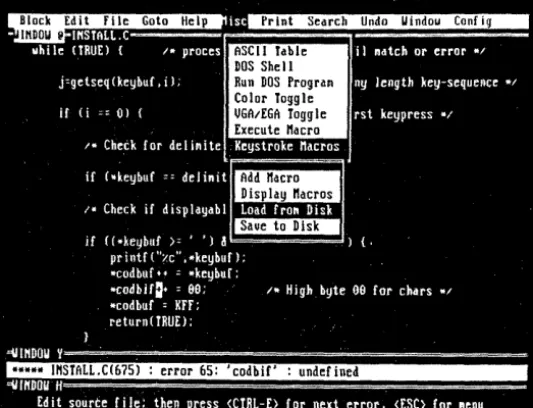
C-THRU-ROM lets you write C code, compile it with Microsoft or Turbo, dump it to the target XT via a serial port, and debug it (remotely). The only thing you can't do is use DOS calls. Microsoft tells you which of its library routines use DOS calls in the ''Writing Programs for Read-Only Memory" section of its manual.
After the usual compile and link, C-THRU-ROM starts to work. The LOC command in C-THRU then locates the re-sulting program.
Located? Besides the program code and data, an EXE file contains informa-tion on program memory requirements, segment modifications, and the start address. DOS resides in low memory and loads programs right above itself. Pro-grams start at the first byte of code and end with the last byte of data.
In our embedded system, we (usually) don't have things so well lined up. ROM gets mapped in high memory space so it can pick up the 8088's power-on jump vector (paragraph FFFFh). RAM, how-ever, must start at paragraph OOOOh to support the 256 four-byte interrupt vec-tors. Fortunately, C-THRU's LOC can handle a memory map with holes in it.
Once located, the program communi-cates via the serial port to the target sys-tern's kernel for debugging. Kernel? Se-rial port? This is the only hard part of the whole package: getting the C-THRU-ROM kernel configured for, and running on, the target system. C-THRU supplies the kernel source, but you must con-figure it for your own motherboard.
In an XT motherboard, the kernel must initialize all the ports, set up inter-rupt vectors in low RAM, and set up the DMA channel and timer for DRAM re-fresh. For all this, you should have a good idea what's going on inside the XT's hardware. Once you have the kernel running, however, the debugging en-vironment is grand.
Even though the target system has, say, no drive, no monitor, no keyboard, no nothing (but a serial port), you can download programs from the host and debug them on the target.
So the program resides on the target system, and the C-THRU-ROM program RDEB runs on the host Pc. You're step-ping through C code (or assembly or both) one line at a time, watching varia-bles change. You can also set breakpoints on C symbols. The environment is a lot like CodeView.
13
CONVERTS ACTION DIAGRAMS;
For line 0 to T
Put leading spaces in the output string
Put the line number and ': ' in the output string Calculate offset (line
*
32)I
If line is not 0 or 4r
For count equals 0 to 31[ Character value is count plus offset Add character and space to the output string
1* Endfor */ /* Else */
/* Add 'Control characters, can't print them!' to the */ /* output 6tring */
/* Endifelse */
/* Display the output string */
/* Add CR and LF to the output string */
[image:15.594.211.547.30.729.2]After you've finished debugging, you simply link the C program with C-lHRU-ROM's startup code (which re-places the normal C startup code) and produce an Intel hex format file. Then send the file to your EPROM program-mer. (My Taiwanese programmer loves Intel hex.)
There are some drawbacks to the package, the most limiting being C-lHRU's inability to debug interrupt routines. So, we usually write polling loops for initial debugging and then add interrupts later.
Talking To The World
After building several embedded sys-:-tems, I have discovered that microproces-sor systems, used as controllers (read that as left alone in the real world), some-times jump out of their programs into what is affectionately known as outer space.
Editor's note: Apparently, this is the part of outer space where daisies grow.
If it's really important to keep the sys-tem running, you should include a dev-ice known as a dead-man timer in the design. If a dead-man timer isn't serviced at a certain interval, it resets the proces-sor.
The service to the dead-man must be from the main loop of the program, not from an interrupt routine. It's possible for the processor to be totally lost but still be capable of servicing interrupts.
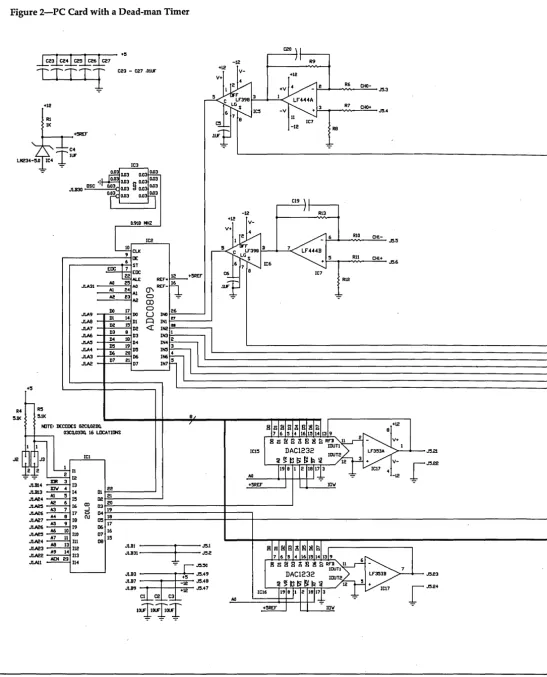
Since I couldn't find any PC cards containing a dead-man, I built my own. Because It would be silly to put together a whole board with one or two tiny chips, I added a little something: 8 chan-nels of 8-bit 10 KHz AID conversion, 2 channels of 8- or 12-bit DI A, and 22 digi-tal 1/0 lines. See Figure 2.
The heart of the AID is the National Semiconductor ADC0809 eight channel
AID converter. This is a successive
ap-proximation eight-bit converter with an internal eight-channel multiplexer. In this design it will perform a conversion in about 100 microseconds (lC2).
The 20L 10 PAL handles address de-coding, supplying all the read and write strobes. The decode is for 16 contiguous addresses at the starting points Indicated on the schematic. The D
I
A function (lCs 15 and 16) generates analog signals for the real world. [image:16.595.215.566.38.492.2]The schematic indicates the part num-ber for the 12-bit converters, but the 8-bit parts (DAC830) are pin for pin compat-ible. The 8255 programmable peripheral
Figure 5-Assembly Routine to Collect AID Data From Channel 5
DATA_SEG SEGMENT AT 0040H RESULT DB 2
DATA_SEG ENDS
STACK_SEG SEGMENT PARA STACK ' STACK' AT oeOOH DB 100 DUP(?)
STACK_SEG
CODE_SEG ASSUME
ENDS
SEGMENT AT OF600H CS:CODE_SEG
MOV AX,DATA_SEG MOV DS,AX
;INITIALIZE THE DATA SEG
MOV AX,STACK_SEG ;INITIALIZE THE STACK MOV SS,AX
MOV SP,OH
ASSUME
;INITIALIZE EXTRA IF USED DS:DATA_SEG,SS:STACK_SEG
START:
MOV AL,O
MOV DX,BASE+S ;CONVERT CH 5 OUT DX,AL ; START
MOV DX,BASE+OFH ;POINT TO C PORT LOOPO: IN AL,DX ;GET THE CONDITION
AND 10000000B ;RESET UNUSED BITS JZ LOOP 0 ;LOOP UNTIL EOC IS HIGH
MOV DX,BASE+S ;POINT TO THE DATA XOR AX, AX ; CLEAR
IN AL,DX ;GET THE DATA MOV AX, DS: RESULT ;STORE IT
•
• •
interface chip (lC18) supplies the 24 I/O lines. I use two lines on the board so there are 22 available through the I/O connector.
The dead -man timer (lC19) is a CMOS 555 timer configured as a resetable mon-ostable multivibrator. When it times out, it makes the I/O channel check bus line active. I installed a jumper on the line to disable this function during debugging.
All real world inputs and outputs enter the card through the 50 pin dual row header. I use PET input differential op amps to buffer all the analog inputs. Differential inputs are much more im-mune to noise than single-ended inputs.
I included capacitors in the amplifiers' feedback loops for filtering, if necessary. Following the op amps, I added sample and hold amplifiers so our slow AID
converter won't be confused by rapidly changing signals. Don't let inputs to the ADC0809 exceed the 0-5 volt range.
A Cheap Alternative
The alternative to using C-lHRU-ROM for this type of development is to do all the development and debugging on a Pc. This is feasible and could be even more so.
Replace the standard BIOS ROM on the PC with a ROM program that initial-jzes the motherboard and then jumps to the highest paragraph. of the next. lower ROM. This would allow development to start in the "crash and burn" type en-vironment.
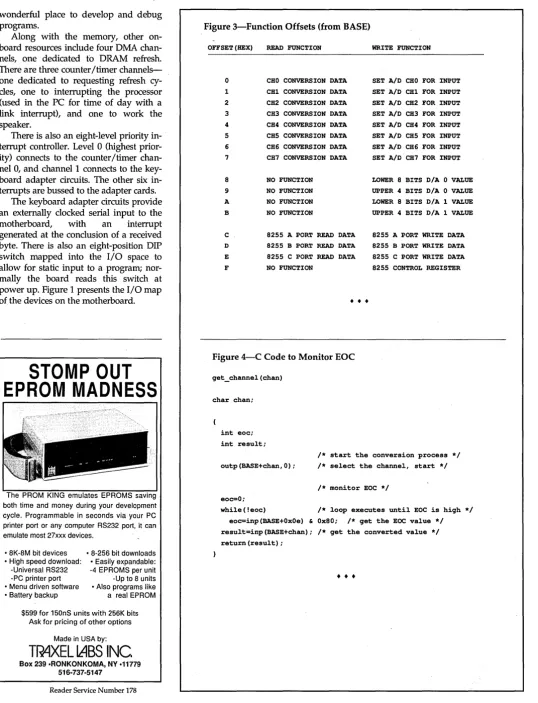
lan-guage for the jump ROM environment. First, disable the dead-man timer on the card by removing the jumper J4 for development. The card has the following address offset mapping, the base address in the processor's I/O space being 02CO, 02DO, 03CO or 03DO, depending on the jumper setting. (See Figure 3).
To start a conversion, in AID channel 5, for instance, just write data to the address of channel 5 (the board address plus an offset of 5). It doesn't matter what you write.
After the write, the EOC (end of con-version) line will go low. (Monitor this line by reading the high bit (bit 7) of port C of the 8255.) My program monitors this line, waiting for it to go high, indicating the conversion's done.
A C program to do this might look like Figure 4. Note that BASE is the base address of the board.
While this code would work fine with the C-THRU package, you'd need a loca-tor program to justify the compiler's seg-ment references if you used this with a simple jump-start ROM.
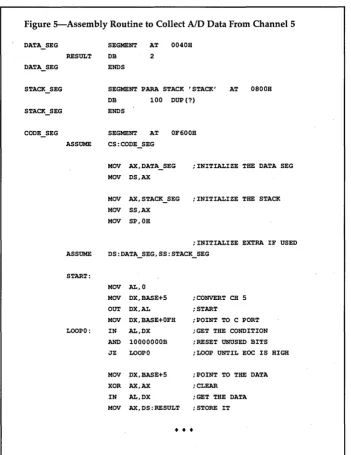
To run in a jump-start type environ-ment (without a locator program) would require .that the C compiler handle the lo-cation, or you'd have to use assembly language. In assembly, of course, you have complete control of the segments and jump locations.
In Figure 5, you'll see my assembly language version of the C program in Figure 4. I wrote it for a PC motherboard with 64K of RAM starting at OOOOOh, the jump start ROM at FEOOOh, and the user ROM at F6000h.
The last thing the jump start ROM will do after initializing the peripherals, the RAM refresh, and the interrupt vec-tor table is to far jump to FDFFOh, the last paragraph of the user ROM. Here you must place a far jump to your code's entry point, with interrupts disabled.
The Offerings
IDEC, Inc., offers the following pack-ages to support the development of embedded systems using the PC-XT motherboard as the platform for stand-alone applications:
C-THRU-ROM by DATALlTE List $500-IDEC $400
Includes fully developed kernel for standalone PC
A!D+D/A+I10+DEADMAN ADAPTER
A&T List $199-IDEC $139 Bare board + PAL
IDEC $49
Both of the above List $699-IDEC $500
Initialization + Jump ROM for PC List $49-IDEC $25
for non C-THRU ROM development
• • •
AS~OW
~;~;;~
AT LAST!
FLOW CHART AND ANAL VZE YOUR ASSEMBLY LANGUAGE
SOURCE CODE
• Flow Charts • Tree Diagrams • Stack Sizing • Register Analysis • CPU Timing Analysis • Procedural X-Reference
• 8088/87 to 80386/387
• Context-Sensitive Help break_currenUine editor_warning
This add was prepared on a laser printer usin
n Idee Supervision captured Tiff image, Xerox
entura Publisher, ZSoft's PC Paintbrush IV,and
pplication Techniques' Pizazz Plus. Call:
• MenulBatch/Command line Operation
• MASM 5.1 Compatible
~=
r-
save screenL
display-warning restore screen editor_warning insert blank line adjuslJine -join_line~
editor_warning adjusUine delete_ediUne editor line outVISA
215-249-0673
Reader Service Number 180
Master
Card
19855 Stevens Creek Blvd, Sutte 154
Cupertiro, CA 95014
(408) 244-6826 ediUine_oUt
-VISA • Me 30 - Day Money Back Guarantee
Reader Service Number 139
[image:17.595.41.556.370.727.2]\ \
Implementing A Neural Network In
C:
Part
l'
Russ and Roy were hits at SOG East. After their presentation, I found myself in a' motel room cornered by these two neural ad-dicts. I must say my mind is still working on the inputs-back propagation, I think it's called.
All seriousness aside, neural nets are very possibly the most important new tech-nology I've seen. Once you're comfortable with the concepts, things really open up. In many ways this is everything that AI had promised, and more.
N
eural networks are hot! For many good reasons. We now use appli-cations which include embedded neural networks in manufacturing, teaching, aerospace engineering, finan-cial advising, circuit board analysis, and more.Contrary to popular opinion, you don't need a super parallel processing computer, a Sun workstation, or a PhD. in neurobiology to use a neural network. A PC and the C code for the neural net-work tool (NNT) we develop in this ar-ticle will get you going.
This issue we'll briefly introduce NNTs, explain how they work, and show you all the equations and code you need to create one. In Part 2, we'll show you how to train and use our NNT. Mean-time, download our NNT (including C source code and .EXEs) from the Micro C BBS and tell us what you think about this fascinating technology.
Editor's note: We've excerpted Russ &
Roy's article(s) from their forthcoming book on implementing and using neural networks, due in 1990 from Academic Press.
Intro
classifies new examples based on the pat-terns it's learned.
Neural networks are particularly use-ful for solving problems that use impre-cise or fuzzy input patterns. They're par-ticularly inappropriate for solving prob-lems requiring precise calculations. You'll probably never successfully balance your checkbook with one. (Of course your checkbook might be unbalanceable, any-way.)
We broadly characterize NNTs using three criteria:
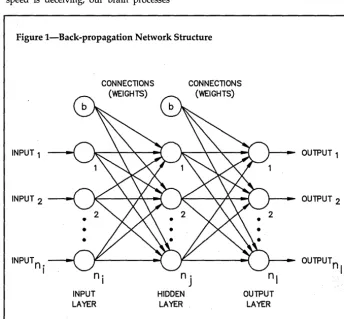
(1) Network architecture: in general, how slabs (made up of layers) are inter-connected and how they receive input and output. More on slabs and layers later. For now, look over Figure 1: a typi-cal NNT feedforward architecture. Feed-forward means that the information flow is always in one direction, from input to output, without any feedback.
(2) The type of transfer function we use for processing elements (PEs or nodes or neurodes) in the network. That is, what function describes the output of an element given its input?
(3) The type of learning paradigm we use to train the network.
Think of these three criteria (or cate-gories) as the top level attributes of an NNT. As we'll show you, you can't al-ways vary these attributes inde-pendently. Certain architectures, for ex-ample, preclude certain learning para-digms.
Neural biological. structure (as we cur-rently understand it) and the implemen-tation or represenimplemen-tation of this structure in NNTs differ significantly. Let's face it-the brain is much more complex than anything we can write (yet!). Loosely, we say that a processing element (PE) or unit in an NNT is roughly analogous to a bio-logical neuron.
In a typical NNT, each processing ele-ment (PE) connects to other processing elements. Each of these connections can
By Russ Eberhart and Roy Dobbins
6770 Halfcrown Court Columbia, MD 21044
be positively or negatively weighted. In-formation about the state of a PE passes on to the PE(s) connected to it based on these weights and the network's transfer function.
Neurons in biological neural networks typically cycle in about 10-100 millisec-onds. The clock frequency in an 80286 or 80386-based microcomputer is generally 10-30 MHz, which results in a basic cycle of 0.03-0.10 microseconds.
Even taking into account the number of multiply accumulate operations need-ed to calculate and propagate a new value for a PE (typically 10-100), the basic cycle time for an individual PE is still only about 1-10 microseconds, orders of magnitude faster than our brain! But speed is deceiving; our brain processes
Neural networks
are particularly
[image:19.603.212.556.401.720.2]useful for solving
problems that use
imprecise or fuzzy
input patterns.
Figure l-Back-propagation Network Structure
INPUT 1
INPUT 2
INPUT
n .
ICONNECTIONS (WEIGHTS)
n·
IINPUT LAYER
CONNECTIONS (WEIGHTS)
n·
J
HIDDEN LAYER
nl
OUTPUT LAYER
OUTPUT 1
OUTPUT 2
OUTPUT
n I
many kinds of information faster. Neural networks are hot, but they're far from perfected. At this juncture several commercial products show pro-mise, but even the best of these will no doubt change (for the better) as we learn more about our brains and more about computers.
But enough general introduction. Let's create an NNT, beginning with a few definitions for the back-propagation model, the architecture we'll use.
The Back-Propagation Model
Although a back-propagation neural network model is generally considered a good one, it has no "standard" defini-tion. Neural network experts agree mostly on the algorithms they use to de-scribe network training and operation, but don't agree how these algorithms should be implemented.
We'll try to simplify our implementa-tion by describing the back-propagaimplementa-tion (BP) model (as we understand it) in some detail. We'll examine each of its elements and describe how these elements com-bine to form the BP topology. I
Figure 1 (remember you looked before) shows a simple, three-layer, BP model.
• Each circle represents a pro-cessing element (PE).
• Each arrow represents an inter-connection (synapse) and its as-sociated weight.
• The PEs with the letter "b" inside are called bias nodes.
In this article (and our book), sub-scripted lower case letters represent the attributes of individual PEs (nodes) and of individual connections.
• the letter "i" represents an input,
• "0" represents an output,
• "w" represents a connection weight,
• "n" represents the number of nodes in a layer.
• The subscripts "i,j,l" refer to the input, hidden, and output layers, respectively.
(If you use more than one hidden layer, the subscript "k" represents it.)
For example, "ii" is the input to an input layer PE, "oj" is the. output of a hidden layer PE, and "nt is the number of PEs in the output layer.
Bold lower case letters represent vec-tors. For example, "ii" represents the input vector to the input layer, made up of all the individual inputs. "01"
repre-sents the output vector of the output layer.
We often work with a combination of an input vector and its associated output vector. This combination of an input and its associated output comprises a "pat-tern vector," represented by a "p."
We list the input part first, then the output. Typically we divide all our pat-terns into two categories or sets: a train-ing set and a testtrain-ing set. The subscripts "r,s" are associated with training and testing, respectively.
Neural networks
are hot, but they're
far from perfected
even the best of
these will no doubt
change ... as we
learn more about
our brains and more
about computers.
So, for example, "pr" is a training pat-tern and "ps" is a testing pattern. In both cases, in the representation of the vector (for example, in the pattern files for the NNT), the output components follow the input components.
Connection weights require two sub-scripts that represent the sending and re-ceiving layers. For example, the weight of the connection from an input PE to a hid-den PE is "Whi." Note that the receiving PE layer is the first subscript, and the sending PE layer is the second. While this may seem somewhat counter-intui-tive to you, it's the generally accepted way to represent weights, and corre-sponds to the matrix notation which sometimes represent weights.
We represent matrices by bold capital letters. For example, "Wji" represents the matrix of connection weights to the hid-den layer (from the input layer).
Don't despair (if you're despairing); we'll use vectors and matrix notation sparingly.
We'll also use three coefficients later: • the learning coefficient, eta (11), • the momentum factor, alpha (a),
• and the error term, delta (8). Later, we'll describe each of the net-work elements. In Part 2 we'll describe the operation and training of the BP net-work of Figure 1, step by step. Let's ex-amine now how we present input to the network.
Network Input
On the left of Figure 1, note the inputs entering the network via the input layer (a layer of processing nodes). These in-puts can be a set of raw data, a set of parameters, or whatever we've chosen to represent as a pattern.
For our BP NNT, the value of each input can take on any value between
a
and 1. That is, the input values are analog and are normalized between the valuesa
and 1. The fact that we can use analog inputs adds significant flexibility toourNNT.Does the normalization between
a
and 1 constrain us in any way? Probably not, at least not usually. Whenever we deal with a real-life computer system that's re-ceiving input, we're always limited to some extent by the size of the number we can put in. As long as the resolution of our input data doesn't get lost in the nor-malization process, we're all right.In our implementation of the BP NNT, we use standard floating point variables, called "float" in C. Floats are 32 bits long, using 24 bits for a value, and 8 bits for an exponent.
We therefore have a resolution of about 1 part in 16 million, or, stated another way, resolution to 7 decimal places. If your data has 7 significant figures or less, you'll be okay. We haven't found this at all limiting. Even input data from a 16-bit analog to digital (A/D) converter requires a little less than 5 digits of resolution. Most of the appli-cations we've seen require 3 to 5 digits of resolution.
If your inputs all consist of raw data points, you'll probably normalize all the channels together. If the inputs consist of parameters, you may normalize each channel separately, or normalize chan-nels that represent similar kinds of para-meters together. For example, if some of your parameter inputs represent ampli-tudes and some represent time intervals, you might normalize the amplitude channels as a group and the time chan-nels as a group.
Feedforward Calculations
Now (assuming we have the input pattern represented by our normalized set of inputs) what happens at the input layer? Given that the values are normal-ized, the input PEs simply split the signal into multiple paths to the hidden layer PEs.
In other words, the output of each input layer PE is exactly equal to the input, and is in the range of
a
to 1.(Another way of looking at the input layer is that it normalizes input. Most . NNT implementations normalize inputs before they're presented to the network.)
The input signals are then sent to the PEs of the hidden layer via the connec-tions from the input layer. A weight is associated with each connection. Note that each PE of the input layer connects to every PE of the hidden layer. Likewise, each PE of the hidden layer connects to every PE of the output layer.
Also note that each connection, and all data flow, goes from left to right in Figure 1. This one-way flow is called "feedforward." There are no feedback loops, even from a unit to itself, in a feed-forward network. All standard back propagation implementations, including our BP NNT, are feedforward.
The way the net input to a PE is cal-culated, and the way the PE calculates its output as a function of its net input, de-pends on the type of transfer function we're using in the NNT. Our implemen-tation (and most BP NNTs today) uses an additive sigmoid PE.
We'll now show you the mathemati-cal equations that describe the training and testing/running modes of a BP NNT. We won't derive or prove them (sparing you those mathematics), but you can find all the proofs you want in Rumelhart and McClelland (V 01. 1). Much of what you'll want to know is in Chapter 8, the chapter on internal repre-sentations. (See References.)
The signal presented to a hidden layer
PE in the network of Figure 1 due to one single connection is just the output value of the input node (the same as the input of the input node) times the value of the connection weight.
The net input to a hidden PE is the sum of the values for all connections coming into the PE, as described in Equa-tion 1. Note that this includes the input from the node we call the "bias node," which we assume always has an output of 1, and which we treat otherwise as
any other node. We'll say more about the bias node later.
ij=
L
WjiOj Equation 1Equation 2 describes the output of a hidden node as a function of its net input. This is the sigmoid