ISSN: 1816-949X
© Medwell Journals, 2019
Proposal and Implementation for Highly Available Solution of
Virtual Infrastructure and VDI
Lubos Mercl, Josef Horalek and Dagmar El-Hmoudova
Faculty of Informatics and Management, University of Hradec Kralove,
Hradec Kralove, Czech Republic
Abstract: For businesses it is important the efficient resource allocation which brings savings and maximize their use and thus increase the possibilities for the market competition and its competitiveness. In current information age it is important to effectively deal with IT and personnel resources. This study deals with the virtual infrastructure implementation that brings efficiency in the use of these two sources. It is aimed primarily at the Windows client operating systems, however, it also includes the possibility of using virtual infrastructure for whole IT environment. The solution possibilities are described and guidance throughout the implementation design is provided and the whole solution design is primarily aimed at saving resources mentioned above, scalability and high availability.
Key words: Virtualization, Windows server, Hyper-V, system center, VDI, scalability
INTRODUCTION
Now a days, consolidation and optimal utilization of company resources is important for the competitiveness of businesses. An effective tool in this area as well as in the area of IT provides the enterprise the possibility of using virtualization, whether in the server or client virtualization (Marshall et al., 2006; Olzak et al., 2010).
One of the trends in information technology is a desktop virtualization which is based on traditional virtualization principles, however, it is not focused on traditional server virtualization but on client operating system Virtualization (VDI).
The actual implementation of virtualization was expected to bring improvements primarily in the following areas (Dasilva et al., 2012; Horalek et al., 2015):
C Cost savings
C Streamlining support of business goals of the Company
C Infrastructure consolidation C Security
C abstraction between virtual and physical layer and resources
Furthermore, the implementation should have generated solution of problems, caused mainly by ill conceived and unconsolidated management and by out dated technology implementation, especially in terms of end-point devices (Alander, 2013).
Requirements for future solution: The transition to virtualized solutions and the implementation of VDI were carried out in the company which is part of a multinational group and deals with providing financial services and employs around 200 employees in the branch where implementation was conducted and where operating system Windows 7 and Office Microsoft Office 2010 standard are used.
The company also requires that the entire infrastructure is available 24/7, so that, users could work whenever needed and the entire solution should be resistant to outages as any failure or delay may affect the operation of the company causing unexpected expenses (hidden costs).
For reasons of existing solutions based on Microsoft technologies and the existence of a multi-licensing contract with this company it was decided before the project start that Microsoft technology would be used, namely Windows Server 2012 R2, Hyper-V® Server 2012 R2, System Center 2012 R2 and desktop operating system Windows Professional 8.1 and Microsoft Office 2013 Standard (Minasi, 2014; Ventresco, 2013; Mousa, 2012).
For this reasons, other solutions from Vmware (Marshall et al., 2006; Ventresco, 2013) product called Horizon, solutions from Citrix (14) products called XenApp and XenDesktop or some other solutions will not be applied (Interop ITX, 2015). It means there will be considered a solution from Microsoft (Marshall et al., 2006; Minasi, 2014) and completely based on their products. The basic applications used have already been mentioned above and given the anticipated consolidation
the reduction in the used applications occurred. Among other used applications belongs SAP system client. To other systems accessible applications will be solved through so-called thin clients. These are applications which are accessed on the principle of a client-server, thus without the need to install but in conjunction with remote login using presentation virtualization.
Users will be able to work whenever 24/7 and in an environment where they have all the tools necessary for their working activities, mainly access to applications, corporate, personal and working data. The solution will be highly available, therefore, resistant to hardware and software errors and also there will be the possibility of renewal in the shortest possible time. Some users will have access to their desktop using the internet with the help of a web browser. The basic options for the connection to the virtual desktop will be possible via. zero or thin client, a web portal or via remote desktop protocol (Minasi, 2014).
MATERIALS AND METHODS
Method of implementation: The actual implementation process was divided into the following steps: Analysis of environment and the requirements of the newly created VDI infrastructure focused primarily on user requirements.
Design of infrastructure services and technologies used. Pilot design and implementation of the proposed solution and its basic functional testing and subsequent acceptance. Gradual implementation of the solution across the entire environment and migration of existing infrastructure. Finally, an analysis of options for further expansion and further development of the newly introduced virtualized architecture and especially, VDI infrastructure was conducted. The whole project was evaluated.
The most important project phase is its overall analysis because the expression of Total Cost of Ownership (TCO) and Return on Investment (ROI) are based on it (Marshall et al., 2006).
Main expected benefits: As mentioned above this implementation should help with cost savings, should help with infrastructure consolidation and create an environment for future easy expansion of virtual infrastructure and information systems. Also, for users should be created an environment of their virtual computers where they will be able to work from different places with various equipment.
[image:2.612.328.527.99.288.2]Proposed solution: The proposed solution is based on the definition of virtualization which defines virtualization as the abstraction of physical resources from other
Fig. 1: The overall proposed solution
cooperating resources and parts of the information infrastructure (Panek, 2013; Eaves and Stockman, 2012; Mousa, 2012).
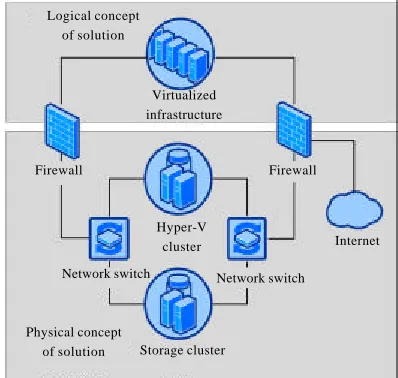
The actual proposal of solution was divided into two parts, namely the physical and logical infrastructure. This division into two parts ensures the separation of physical and virtual infrastructure and improvement of its security.
Figure 1 illustrates complex suggested solutions. Both parts of the infrastructure are not completely separated though because of the ties of the physical infrastructure to the logical one, primarily due to ties to active directory and for possible monitoring and management. This link is implemented with the use of communication through two firewalls.
The physical infrastructure: Physical design of solution includes a layer of data storage and of virtualization, thus several hypervisors that will offer resources to logical layer. It is therefore, a set of physical servers that offers scalability which provides the possibility of further expansion in the possible need to extend computing infrastructure resources. Physical infrastructure consists of several components:
C Storage cluster-high availability storage solution C Hyper-V cluster-high availability hyper-V solution C Network switch-high availability solution for
network interconnection
C Firewall-providing operational separation of physical and logical layer
C Internet-represents the connection to the public Internet and connection to other publicly provided information services
Physical concept of solution
Logical concept of solution
Virtualized infrastructure
Hyper-V cluster
Network switch Firewall
Storage cluster
Internet
Fig. 2: Virtualization and division of resources
Logical infrastructure: The logical proposal represents virtualized servers that provide the infrastructure of IT network. This layer will be completely virtualized and will use the resources of the physical layer while providing its resources to users and other virtual servers. Figure 2 illustrates how sources are divided at several Hyper-V guests among multiple virtual machines. The division of resources can be dynamic when is dividing ensured by the actual needs of individual virtual machines (Eaves and Stockman, 2012).
RESULTS AND DISCUSSION
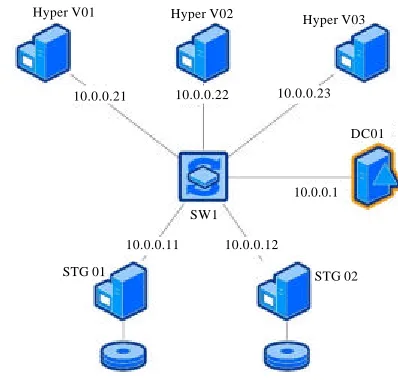
Implementation: The actual implementation required first the creation and basic testing of physical infrastructure to ensure its functionality to support the entire production environment. Subsequently, the logical virtualized infrastructure was created through the migration of existing infrastructure components. Physical infrastructure: In the first phase of the implementation the physical infrastructure which consists of a data storage, virtualization platform hyper-V and other network elements (two switches and two firewalls) was created. The physical infrastructure design is presented in Fig. 3 and this design includes several servers which provide the infrastructure especially for general virtualization platform.
Data storage: The storage provides a space mainly for data of applications servers and users. In the implementation phase, this layer included two servers called STG01 and STG02 that contain both, discs for system and virtual infrastructure.
These two discs are composed of several discs with RAID5 implemented which provides resistance to drive failures, using data storage on multiple disks simultaneously.
These servers create a cluster for high availability so in case of one server’s failure task is undertaken by the second server and thus the data are constantly available. Hyper-V virtualization platform: Although, virtualization now includes only three host servers, the
Fig. 3: The physical design of the solution
solution is designed so that it can add another Hyper-V hosts at any moment ant thus strengthen the computing performance for virtual machines.
Virtual machines can be moved among all the servers through Hyper-V replica and therefore, it will be possible to react to potential problems and optimize the use of all Hyper-V guests. Consequently, a Hyper-V cluster for the virtual infrastructure was created. A ll servers use Microsoft Hyper-V® Server 2012 R2 edition.
Network elements and infrastructure services: The physical design includes two switches for connecting storage and Hyper-V clusters and for connection to a virtualized infrastructure. It includes two firewalls that allow communication filtering between physical and logical infrastructure.
Furthermore, the connection to the Internet in the physical layer should be ensured which would ideally be solved by connecting through the firewalls aforementioned. The entire physical infrastructure uses the address network range 10.0.0.0/24 without the use of the DHCP protocol for enhanced security.
Domain controller DC01 which creates a domain hyper V. local was designed for testing and then on it the DNS server was made.
Logical infrastructure: The logical infrastructure includes a set of virtual machines that make up the entire infrastructure of servers, either for virtual desktop solutions or for servers and other applications and systems which include domain controller, DNS and DHCP server, SQL server, server for system center and a server for virtual desktops.
Hyper-V host Resources: CPU, RAM, NIC and other Hyper-V host
Resources: CPU, RAM, NIC and other
Hyper-V host Resources: CPU, RAM, NIC and other
10.0.0.21
Hyper V01 Hyper V02 Hyper V03
10.0.0.22 10.0.0.23
10.0.0.11
10.0.0.1 SW1
STG 01 STG 02
DC01
[image:3.612.326.525.97.287.2]Fig. 4: Logic design solution
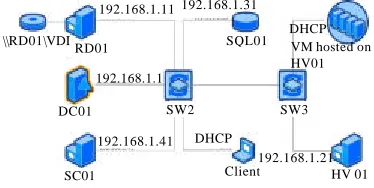
For testing purposes several servers that host the services required for launching virtual desktop infrastructure had to be created. These servers are presented in Fig. 4.
In the picture all the servers that were used for testing are indicated, furthermore, their IP address is presented here or information that the machine uses the IP address from the DHCP server. For the testing phase, all these servers (except physical server HV01) were installed on one physical server.
Virtual machine DC01: DC01 virtual machine contains installed Windows server 2012 R2 datacenter and it primarily provides basic services of domain controller, DNS and DHCP server.
This server is also used for central management of all other servers. As a part of testing a domain CORP.local was created.
Virtual machine RD01: RD01 virtual machine has also installed Windows Server 2012 R2 Datacenter and it provides roles used for remote connections, namely: C RD web access which provides a web interface for
connection to the VDI
C RD gateway which serves as a gateway for access to infrastructure and to the server in the private infrastructure from anywhere
C RD licensing which is designed to manage licensing VDI solutions
C RD session host which allows to offer users applications through remote desktop and use local resources on given server
Furthermore, the server for testing purposes is used as a networking storage for data of virtual servers (in the final solution, this should be implemented through the servers STG01 and STG02).
Virtual machine SQL01: Virtual desktop infrastructure needs a database server as well. This database server is implemented on a virtual machine SQL01 where Windows Server 2012 R2 Datacenter and Microsoft SQL Server 2014 Enterprise Edition are installed.
Virtual machine SC01: Virtual machine SC01 provides the infrastructure with tool services from the system center family, namely virtual machine manager and configuration manager. Windows Server 2012 R2 Datacenter is installed as the operating system.
Virtual machine client: Virtual machine called client was created as well. It is used for testing VDI infrastructure. Windows 8.1 Professional is installed on this machine.
Physical machine HV01 and other virtual machines: A second physical machine HV01 was also configured to test. There has been installed Microsoft Hyper-V® Server 2012 R2 Edition and it provides resources for hosting instances of virtual desktops on HV01 and other virtual machines which are illustrated in Fig. 4 and called VM hosted on HV01 which are virtualized.
Besides, the remote desktop services role is installed on this server. It provides the service of the Virtualization Host which serves as users host virtual desktop.
The actual implementation of VDI infrastructure: After configuring all servers and above mentioned services it was necessary to create the actual VDI infrastructure using the Add Role Wizard in Windows Server it was decided to deploy a standard Remote Desktop Services and virtual machine-based desktop deployment.
During setting up wizard it was necessary to choose where the RDS components will be installed, i.e., connection broker and RD web Access on RD01 and virtualization host on the HV01. The same procedure was repeated for the deployment type based on sessions (session-based deployment).
Next, the service gateway of the server RD01 was added and certificate for communication between clients and RDS gateway server was generated. Subsequently, relational collection named relational collection was established for a user group who are added into created group VDI-session and each user was assigned a maximum 20 GB in the network folder\\RD01\VDI\Users. Additionally applications calculator, paint and WordPad were published. After creating the collection it is necessary to generate a template of a virtual desktop Win8-teplate on the server HV01. Then a collection named, e.g., VDI-collection which is a comprehensive collection type is generated, created template is chosen and the other attributes of the virtual desktop are set up. Virtual machines are located in the shared folder \\RD01\VDI\VMs and user data in RD01 location \\RD01\VDI\VMusers.
\\RD01\VDI
192.168.1.11 192.168.1.31
DC01
DHCP VM hosted on HV01 SQL01
Client
192.168.1.21 SW3 RD01
192.168.1.1
SW2
192.168.1.41 DHCP
The implementation of SC virtual machine manager tools: The next step for the implementation is SC Virtual Machine Manager 2012 R2 (further SCVMM) which is used to manage virtualized data centers and servers. On SC01 server VMM management server was installed for the management of virtual environment and the tool VMM console for the management of SCVMM system, nevertheless prior to the installation of these tools it was necessary to install Windows assessment and deployment kit for Windows 8.1 and Microsoft SQL Server 2012 command line utilities.
Furthermore, the SCVMM for the needs of storing its data in a database was connected to the database on the server SQL01 for MSSQLSERVER installation where a new database virtual manager DB was created. Consequently, it is necessary to set up the service account and the ports for communication with other components and finally a host virtualization is connected with management using SCVMM with the means of a wizard for adding a guest to the administration.
The actual implementation of SC configuration manager tools: For effective physical and virtual environment management System Center Configuration Manager 2012 R2 (further SCCM) was subsequently implemented. Then, on the server SC01 was installed and configured a central administrative location of the tool SCCM.
During the installation, a separate primary location CORP with code COD was created and it was installed on the server of the console for the management of the SCCM tool. Subsequently, there was created a connection of the tool SCCM and the database on the server SQL01 where was SCCM12 instance made and the database name was set to CMCOD.
The server was also chosen as a distribution point, management point of the SCCM and folders were selected where data would be saved.
Testing of the implementation: The first step leading to testing was to perform functional tests of all the instruments used they were tested in proper functionality. Next, there was conducted functional test of VDI infrastructure to test user access and the proper functioning of the offered services and applications. There were created two accounts-user1 and user 2. The user 1, who was a member of the VDI-session group to test VDI solutions and launch applications published through a web portal and the user user 2, who was a member of the VDI-collection group and who was approaching his personal virtual desktop using RDP.
User 1 tested the ability to access web portal VDI a solution https://rd01.corp.local/RDWeb, functionality of
published applications and the ability to connect to their personal virtual desktop. User user 2 tested the possibility of RDP connection to the IP address of the RD connection broker and subsequent redirection to a virtual machine that was automatically created for the user.
CONCLUSION
Selected implementation of virtualization and complete virtual desktop solution should provide an enterprise mainly with cost savings, streamlining support of business goals and the consolidation of the enterprise IT infrastructure.
Through the virtualization in particular enterprise the functioning of the infrastructure was optimized and therefore the resources were better allocated, financial as well as IT ones, computing resources and above all human resources.
In terms of solving the given issue and the whole project it was found out that the entire implementation is very sensitive to the proposed solution when if poorly chosen technical or other specification additional costs are generated. It may also lead to the extension of the entire project which also generates additional costs.
Among such typical problems belong poor judgment of required available computational resources or lack of openness of possible further infrastructure expansion or undetected potential bottleneck solutions.
This analysis to solution design must comprehensively analyses the lowest elements of the infrastructure which can have a substantial effect on the solution and therefore, deal with networking, data storage, graphics performance and more.
An important factor is also the entire IT strategy and vision of infrastructure which both directly and indirectly affects the whole proposal. This strategy identifies additional needs of infrastructure and its openness to further expansion which is important for the whole existing analysis required resources and future needs.
network. During the financial analysis the future 5 years were analyzed when estimated total costs for existing solution was 3 mil. €. In contrast to the proposedvirtualized solution which resulted only in 2.55 mil. € and therefore it is expected to save 0.45 mil. €.
For virtual solution the highest costs accounted for initial investment (1 mil. €) but in subsequent years the maintenance costs ranged from 0.3-0.35 mil. €. For existing solution, the annual costs ranged from 0.52-0.6 mil. €.
Indicated amounts and other benefits that derive from the implementation confirm that virtualization brings considerable savings in resources and also provides additional indirect benefits which include for example, a better opportunity to respond to changes in the structure of the services offered and thereby it streamlines the company functioning and its employees.
ACKNOWLEDEGMENT
The support of Czech Science Foundation GACR 15-11724S DEPIES is gratefully acknowledged.
REFERENCES
Alander, L., 2013. 4 Keys to designing a virtual desktop environment: The CIO of lone star college system discusses how to evaluate desktop virtualization opportunities, set up pilots and ultimately establish a reliable production environment. J. Technol. Horiz. Educ., 40: 31-35.
Dasilva, D.A., L. Liu, N. Bessis and Y. Zhan, 2012. Enabling green it through building a virtual desktop infrastructure. Proceeding of the 2012 8th International Conference on Semantics, Knowledge and Grids (SKG), October 22-24, 2012, IEEE, Derby, UK., ISBN:978-1-4673-2561-5, pp: 32-38.
Eaves, A. and M. Stockman, 2012. Desktop as a service proof of concept. Proceedings of the 13th Annual Conference on Information Technology Education, October 11-13, 2012, ACM, New York, USA., ISBN:978-1-4503-1464-0, pp: 85-86.
Horalek, J., R. Cimler and V. Sobeslav, 2015. Virtualization solutions for higher education purposes. Proceeding of the 25th International C o n f e r e n c e o n R a d i o e l e k t r o n i k a (RADIOELEKTRONIKA), April 21-22, 2015, IEEE, Czech Republic, ISBN:978-1-4799-8119-9, pp: 383-388.
Interop ITX, 2015. Guide to VDI: Evaluating top vendors. I n t e r o p I T X , L a s V e g a s , N e v a d a . h t t p : / / w w w . n e t w o r k c o m p u t i n g . com/applications/guide-vdi-evaluating-top-vendors/1146540291.
Marshall, D., W.A. Reynolds and M.D. Crory, 2006. Advanced Server Virtualization: VMware and Microsoft Platforms in the Virtual Data Center. CRC Press, Boca Raton, Florida, USA.,.
Minasi, M., 2014. Mastering Windows Server 2012 R2. Sybex, Indianapolis, Indianas,.
Mousa, M.A., 2012. Virtualization technology revolution of virtual desktop infrastructure. J. Tech. Sci. Technol., 1: 17-23.
Olzak, T., J. Sabovik, J. Boomer and R.M. Keefer, 2010. Microsoft Virtualization: Master Microsoft Server, Desktop, Application and Presentation Virtualization. Elsevier, Amsterdam, Netherlands, ISBN:978-1-59749-431-1, Pages: 485.
Panek, W., 2013. MCSA Windows Server 2012 Complete Study Guide: Exams 70-410, 70-411, 70-412 and 70-417. John Wiley & Sons, New York, USA.,. Ventresco, J., 2013. Implementing Vmware Horizon