©2006- 2007 Infor-Med Medical Information Systems Inc.
Praxis® is a Registered Trademark of Infor-Med Corporation, Woodland Hills, California Scanaway™ is a Trademark of Infor-Med Corporation, Woodland Hills, California
A SECOND MEDICAL BRAIN
Similar Encounters ... 7
Rare Cases... 8
Quality is the Major Benefit... 9
Charting “Bass-Ackward”... 9
Speech Recognition ... 9
The Learning Curve... 10
A Neural Network Approach to Charting ... 14
Habit Change... 15
THE CRITICAL DIFFERENCE BETWEEN A CONCEPT PROCESSOR AND A TEMPLATE... 15
Mini-demo of Concept Processor and Template ... 16
Comparison of Concept Processing With Other Ways of Entering Information... 16
Legal Caveats Regarding Templates ... 17
Templates that “Save” ... 18
III - THE CONCEPT PROCESSOR AND PRAXIS 3 ... 19
“Agents” ... 20
Agents and the Concept Processor... 22
Free Agents ... 23
Reminders ... 23
Clinical Practice Guidelines ... 24
Intelligent Scheduler ... 24
Health Maintenance... 26
The Chronically Returning Patient With Multiple Complaints... 26
Separating Information From Noise ... 28
Intelligent Flow Charting ... 29
Growth Charts... 31
The Pre-SOAP Protocols... 31
Dictation / Transcription... 31
Printing or Faxing Out Any Kind of Form Automatically ... 32
Graphic Overlays ... 33
Contact Data... 36 Conclusion: The Philosophy of Concept Processing... 36
I - INTRODUCTION
We recommend that you download and review the Praxis® demo (www.praxisemr.com/demo) prior to reading this document. The demo illustrates how Praxis EMR and the Concept Processor function.
For over fifteen years, concept processing has proven to be the fastest and most flexible way to document medicine across all specialties. An innovation in the field, this unique technology leaves cumbersome templates behind and has become the solution to medical documentation.
The Concept Processor found inside the PRAXIS Electronic Medical Records program presents the ideal solution for the busiest of clinics as it markedly reduces time with paper, improves the quality of patient care, and ultimately increases the enjoyment of medical practice.
With this new version of PRAXIS EMR, concept processing has evolved from being simply the most powerful documentation software in medicine to an actual helper—a “second medical brain”—for the practicing physician.
II - CONCEPT PROCESSING: WHAT IS IT?
Medicine is an art; no two doctors practice it the same way. A physician’s personal touch brings subtlety to the practice of medicine, and over the years every practitioner develops his or her own individual approach to this fascinating art.
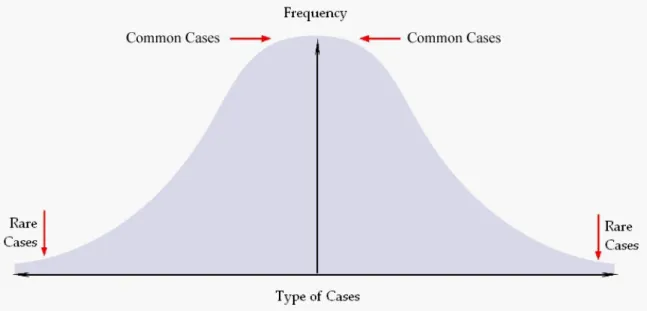
In addition, each practitioner experiences a bell-shaped frequency distribution of cases. Some cases are amazingly rare, while a few might never be seen in a lifetime of clinical practice. Still others, however, may arise several times a day. Indeed, it is this very repetition and familiarity of clinical cases that makes medicine learnable in the first place.
Figure . Bell-Shaped Curve.
A Concept Processor is a software engine that greatly enhances the
documentation of a new patient encounter by instantly retrieving text from the most similar previous encounter for review, editing and reuse.
This process will result in one of three outcomes:
1. The new patient encounter may be identical to one previously “learned” by the program. Medical schools may argue that there are no two identical patients, and therefore no two identical cases. However, in the reality of daily practice, doctors often find themselves writing the same cases in the same way. This is true because repetition exists within the mind of the provider. In other words, each doctor tends to develop a
particular set of words he or she uses to express the same concepts.
2. The new patient encounter may be different, but similar to one previously learned from another patient.
3. The new patient encounter is unique and different from any seen before.
No other possibilities exist; an encounter must fall within the bell-shaped curve of case types for any given provider.
I
I
d
d
e
e
n
n
t
t
i
i
c
c
a
a
l
l
E
E
n
n
c
c
o
o
u
u
n
n
t
t
e
e
r
r
s
s
If the encounter today is identical to one treated in the past, the text will be generated instantly. Not only is the charting generated immediately in the provider’s own words, but it is also accompanied by all the additional documentation required at the same time: printed or faxed prescriptions; instructions and patient handouts; procedures and
operative reports; letters to referring providers; admitting orders to the hospital; laboratory orders; return visits and scheduling; even the routing slip for billing purposes. All of these documents can be faxed or printed along with the progress note…instantly!
The text produced has be to the doctor’s liking because it was the same doctor who wrote it, albeit for a previous patient with exactly the same condition as the current one. Generating an entire note with all its corresponding documents in this manner is certainly faster than dictation or speech recognition, to say nothing about writing long hand.
S
S
i
i
m
m
i
i
l
l
a
a
r
r
E
E
n
n
c
c
o
o
u
u
n
n
t
t
e
e
r
r
s
s
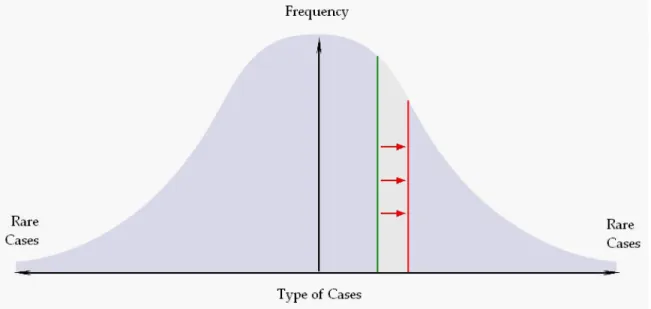
Figure . The new encounter (in red) is created by editing a similar previous encounter (in green).
If the new encounter is not identical to the closest found encounter, then the provider simply edits from the text of that closest encounter to fit his or her current needs. Making small changes in text is obviously faster and easier than entering an entire new case from scratch. After the few changes are made, the entire set of documents is produced
instantly as before. In addition all the new changes are saved separately and await similar cases in the future.
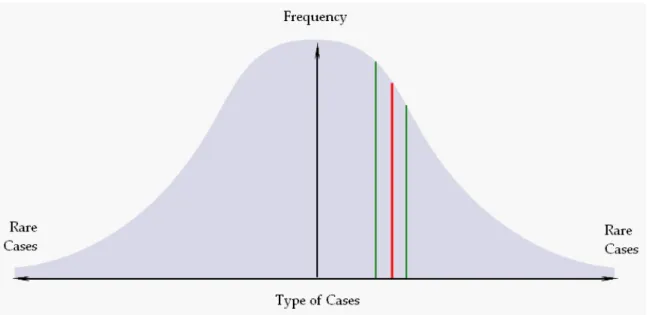
If a future encounter were to fall in between these two closest encounters, then that editing would take half the time of the previous one, and then a quarter of the time for the next such case, and so on…the more the system is used, the faster and smarter it performs. In fact, the Concept Processor becomes a “second brain” for its physician user, continually helping to document faster, better, and easier, and always using this
Figure . Note that the distance between the new encounter in red and the two previous encounters in green is half as much as in the previous case. The more one charts, the less editing one needs to make.
This is the key to concept processing!
The efficiency of documentation improves exponentially until it reaches the reading speed for one’s own writing. And, of course, reading one’s own writing is easier and faster than reading someone else’s. This unique approach uses the computer as the brain’s helper, instead of a hindrance, in the complex process of clinical documentation.
R
R
a
a
r
r
e
e
C
C
a
a
s
s
e
e
s
s
Even rare cases are no problem for the Concept Processor.
Patient encounter elements that make up a rare case—such as physical findings, X-Ray reports, procedures, instructions to the patient, and others—may be employed to meet the case’s documentation needs with minor, if any changes. Indeed, most elements making up a rare case have probably been recorded in the past with many other patients presenting far more common problems. Often, what makes a case rare is the particular way the set of encounter elements comes together. Because elements that make up any encounter follow independent bell-shaped curves of their own, they are easily recalled by the Concept Processor to use for a rare or unique case. For example, the precise fever instructions for a case of the common cold may be used for a case of Mediterranean Hemorrhagic Fever with few if any changes (and those changes are saved for future use). As a result, even a rare case need not be entered from scratch, and recycling elements from previous cases using the Concept Processor is still an infinitely faster process than doing it the old-fashioned way.
Q
Q
u
u
a
a
l
l
i
i
t
t
y
y
i
i
s
s
t
t
h
h
e
e
M
M
a
a
j
j
o
o
r
r
B
B
e
e
n
n
e
e
f
f
i
i
t
t
While speed is the most obvious benefit of Concept Processing, it is not the most important benefit.
Concept processing provides an opportunity for continual self-teaching and self-learning. Each new encounter improves the quality of one’s writing and of the medicine that one practices. Random errors are reduced and medical quality continues to evolve much after one reaches optimum charting speeds. In fact, the quality improvement is never ending. Not only does the practitioner make sure that all the t’s are crossed and all the i’s are dotted, but the chart itself may then also be used the way an airplane pilot uses a checklist, to make sure that nothing is forgotten or overlooked. The doctor may use his or her own dynamic chart to prompt the right questions, check for the right physical findings, and order the correct studies or treatments—even at 3 o’clock in the morning. It is all self-designed and self-taught. Any additional symptoms the provider elicits will be
automatically added to the knowledge base to consider with future patients experiencing similar conditions. The software never forgets; this is the exciting part of the Concept Processor: It is constantly improving not only on the text one produces, but on the medicine that one practices.
C
C
h
h
a
a
r
r
t
t
i
i
n
n
g
g
“
“
B
B
a
a
s
s
s
s
-
-
A
A
c
c
k
k
w
w
a
a
r
r
d
d
”
”
Although this method of charting may seem unusual or contrary to traditional medical teachings, one should realize that this form of documentation is a natural part of the human thought process. In fact, the human brain functions much like a biological “Concept Processor” by searching for the right phrases, sentences and even entire paragraphs to articulate spontaneous ideas that come to mind. No human being thinks out every word being uttered; the process of verbalization—oral or written—is automatic. Certainly, experienced physicians have felt this while dictating or writing at 3 o’clock in the morning!
Therefore, instead of charting what one does, doesn’t it make far more sense to do what one charts? Certainly, doing what one has written is not only faster and easier, but also opens opportunities for learning, and in turn, for practicing better medicine. (See Charting Bass Ackward=, by Clayton Reynolds MD).
S
S
p
p
e
e
e
e
c
c
h
h
R
R
e
e
c
c
o
o
g
g
n
n
i
i
t
t
i
i
o
o
n
n
Some ask whether PRAXIS includes “speech recognition” technology. The answer is that all Electronic Medical Record programs include speech recognition because it, like the keyboard or mouse, is external to the software application. The only purpose of speech recognition software is to convert human voice into typewritten text or into hotkey directions that may be interpreted by the EMR. PRAXIS accepts the generated text and obeys the produced verbal commands, and so do many other EMRs, but that is not the
issue. The issue is what is behind the speech recognition program, and that where concept processing as described here is dramatically different from inflexible templates. Three viable speech recognition programs exist in the market today, and all of them are compatible with most EMRs. Hence, no one should have to pay for a glorified speech recognition program that can be obtained off the shelf for a small fraction of its “integrated” cost. The real question should always be: what is behind the EMR?
T
T
h
h
e
e
L
L
e
e
a
a
r
r
n
n
i
i
n
n
g
g
C
C
u
u
r
r
v
v
e
e
Unlike templates, the concept processing program arrives to a provider much like John Locke’s “tabula rasa”: containing no clinical information at all, yet ready for content to be added and developed as each user sees fit.
The greatest surprise is the speed at which the system becomes useful. To understand how this works, one must first begin to understand how we humans learn to express ourselves.
While the Oxford English Dictionary defines more than four hundred thousand words, the average college educated adult uses less than fifteen hundred of them – although no two humans use the same set! In other words, over time, each person tends to develop his or her own subset of words that are later relied upon for forming phrases.
A similar process occurs with sentences and text fragments. The human mind seems to store a set of comfortable phrases, sentences and even paragraphs that are accessed with extraordinary speed when needed. During this process, the brain cortex sends an instruction to select words that express a sudden thought, and the subconscious responds almost instantly with a string of words based on previous experience.
All of these naturally occurring principles are transferred to the computer. For example, if a doctor commonly describes a normal abdominal exam as follows: “Abdomen soft, non-tender, liver/spleen not enlarged, bowel sounds normoactive, no masses palpable,” then the practitioner need not re-enter this text the next time an encounter requires the same normal abdominal exam! It is ready to be accessed as learned from previous similar experiences. The same is true for medications, instructions to patients (i.e. the fever instructions mentioned earlier), laboratory orders, and so on.
To fit the program to a particular doctor’s needs and style, the training process begins by linking the provider to a trained medical transcriptionist and PRAXIS expert via the Internet. The trainer’s task is two-fold: to teach the doctor how to use PRAXIS, and to “prime the pump” by having the clinician dictate hypothetical cases, starting from the most common in the practice. What the provider quickly finds is that with each new “sample” case entered, the system increasingly assists by providing the right text, ready at hand. Each case is entered faster and easier until the system is ready for use in the clinic.
Figure . While doctor dictates, the medical transcriptionist training him on-line populates PRAXIS with his own initial cases.
Getting started in the clinic after doing the first cases with the transcriptionist becomes easy. The physician begins by entering the simplest cases, then the more complicated ones, and finally the rest. The process is that simple.
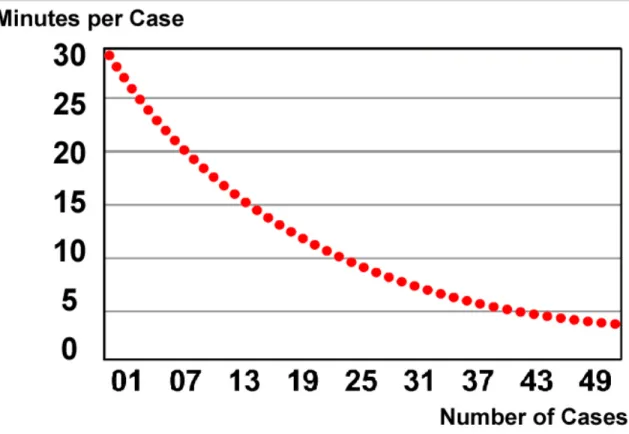
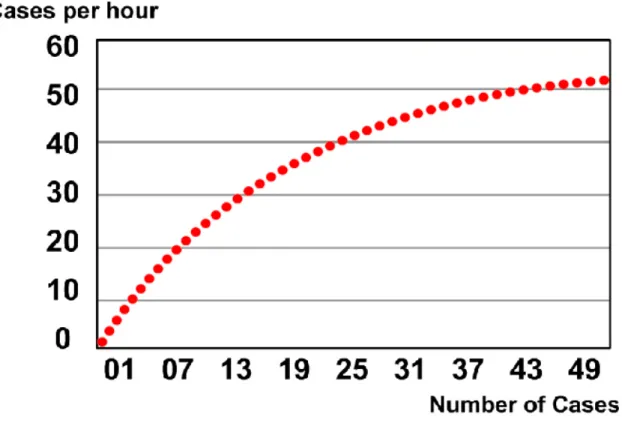
Figure . Time that the average case takes to enter versus the number of cases entered. Obviously, the learning process gets faster and faster as more cases are seen.
The exciting discovery about the use of the Concept Processor in charting, is that even as the charting speed reaches its plateau (a few seconds per average encounter in a family practice, for example) the quality of charting and medical practice continues to improve indefinitely. The provider may progressively add content to his or her own documentation and knowledge base with every case seen. Each encounter note forms the source to consider more facts and issues regarding this patient, as learned from other similar cases seen in the past.
Figure . Average speed of cases that may be charted per hour.
Thus, while speed is the most obvious benefit of concept processing, it is not the most important.
Concept processing provides an opportunity for continual self-teaching and self-learning. Each new encounter improves the quality of one’s writing and of the Medicine that one practices. Random errors are reduced and medical quality continues to evolve much after one reaches optimum charting speeds. In fact, the quality improvement is never ending. Not only does the practitioner make sure that all the t’s are crossed and all the i’s are dotted, but the chart itself may then also be used the way an airplane pilot uses a checklist—to make sure that nothing is forgotten or overlooked. The doctor may use his own dynamic chart to prompt the right questions, check for the right physical findings, and order the correct studies or treatments—even at 3 o’clock in the morning. It is all self-designed and self-taught. Any additional symptoms the provider elicits will be
automatically added to the knowledge base to consider with future patients experiencing similar conditions. The software never forgets; that is the exciting part of the Concept Processor.
A
A
N
N
e
e
u
u
r
r
a
a
l
l
N
N
e
e
t
t
w
w
o
o
r
r
k
k
A
A
p
p
p
p
r
r
o
o
a
a
c
c
h
h
t
t
o
o
C
C
h
h
a
a
r
r
t
t
i
i
n
n
g
g
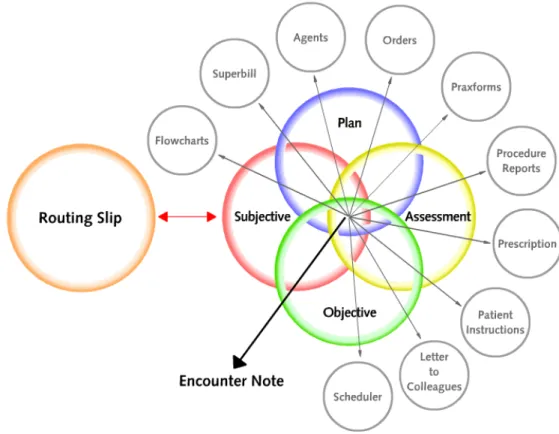
Figure . Venn diagram representing the elements that make up the Encounter Note. These elements have bell-shaped curves of their own, and they are constantly improving their individual texts. At the same
time, they interact with each other in real time to create the Note on the fly learning from the past.
The previous discussion may lead one to believe that the Concept Processor is a simple holder of entire encounters as one free text that then is brought back as a unit.
Nothing could be further from the truth! In fact, an encounter can be thought of as a logical combination of many elements such as prescriptions, objective findings,
instructions, and others. Each of these elements includes multiple variations of their own. In other words, each element has its own bell-shaped frequency distribution curve. All these elements and their variations then link logically to each other and to the
assessment of the case based on previous experience and repetition. For example, all medications are found by frequency distribution, with the most frequently prescribed medication appearing on top of the list. Selecting any medication to be prescribed, then leads to an automatic search for all the encounters that have used this medication in the past. In this way the selection of the actual closest assessment becomes much faster and precise. One could start with a unique physical finding, a specific laboratory result, a
procedure to be done, or even an particular patient instruction or a given referral. Each of these elements will lead the Concept Processor to find the closest assessment for this case. Once found, the closest assessment then instantly recalls all the other related elements exactly as they were used previously to make up the encounter. Note that we say “the closest assessment” and not “the closest diagnosis”. Indeed, a diagnosis may be treated in countless of different ways, depending on clinical and non-clinical conditions such as insurance requirements, patient preference, and other such variations. Each variation represents a different assessment of the same diagnosis. The Concept Processor finds the closest assessment of the diagnosis as it was handled in the past, and not simply the closest diagnosis itself. Obviously, the more the software is used, the more assessments are available to search into, and the better the ability to find a close encounter or a close element to use for this encounter. Eventually, the knowledge base begins to mimic the thinking process of its user, constantly assisting with the right words exactly when needed. This neural-network type logic parallels and projects the Gestalt of the human mind by turning one’s personal concepts into words and phrases at the speed of one’s mind.
H
H
a
a
b
b
i
i
t
t
C
C
h
h
a
a
n
n
g
g
e
e
Medicine is always evolving: Different payers demand different requirements for the same type of case; a wealth of articles is published in medical journals each month; rules are constantly changing. It can become nearly impossible for a physician to keep all of this information straight for future reference. The beauty of the Concept Processor is that it learns everything on the fly—anytime, anywhere—and any addition or change made once is ensured to be there the next time. For example, if a practitioner learns of a new treatment approach in a journal or at a seminar, it is easily entered into the knowledge base. Then, when the right case presents itself in the future, the learned approach will appear instantly. The provider can enter and access new information, such as journal references, so easily that patients and colleagues will begin to wonder how he or she could possibly remember so much. The habit change becomes automatic, and given that medical practice is based on habit, the Concept Processor is probably one of the most powerful aids devised to practice better medicine.
As we discuss elsewhere (see page 24 and the full technical paper at
www.praxisemr.com/practiceguidelines), the Concept Processor and free text does not contradict the use of Clinical Practice Guidelines (CPGs). In fact, the opposite is true. The moment a physician agrees that a CPG is worth incorporating into the practice, the change has begun. It is the habit of the provider that must be changed with his or her full consent, and nothing does it better or faster than the Concept Processor.
T
T
H
H
E
E
C
C
R
R
I
I
T
T
I
I
C
C
A
A
L
L
D
D
I
I
F
F
F
F
E
E
R
R
E
E
N
N
C
C
E
E
B
B
E
E
T
T
W
W
E
E
E
E
N
N
A
A
C
C
O
O
N
N
C
C
E
E
P
P
T
T
P
P
R
R
O
O
C
C
E
E
S
S
S
S
O
O
R
R
A
A
N
N
D
D
A
A
T
T
E
E
M
M
P
P
L
L
A
A
T
T
E
E
At first glance, the Concept Processor’s rapid text generation may lead to the conclusion that it is some sort of template system (some have stated that it appears to be “a
A template is nothing more than a boilerplate used for data entry "shorthand.” The inflexibility of this approach results in a series of significant problems:
Problem 1: Templates are generated by someone else, using their words, their
directions, and their thinking. The template approach assumes that the designer knows more about medicine than the physician user. Even more problematic, this approach assumes that that the template designer knows what the practicing physician is thinking at the point of care.
Problem 2: Since it is impossible for someone else to create a template that thinks like its user, the template designer must devise some format that makes it applicable to any given encounter. The result is a series of cumbersome pick lists that the provider must sift through to make the template appropriate to the patient encounter.
Problem 3: Even if the pick list offered is appropriate, finding text that someone else
devised from a lengthy list is much more difficult than finding self-written text. From the order of symptoms to the approach used, everything is far easier to find when one is looking at one’s own writing.
Problem 4: Much information on medicine is not written anywhere, and cannot be written anywhere. It is based on personal experience, preference, taste, and approach. Medicine is, after all, an art form. The template cannot possibly take this into account. In fact, it subtly coerces the physician to change the uniqueness of his or her practice to of that of one-kind-fits-all approach. This is sad.
Although many template systems claim that they allow for changes in the text, the reality is that the editing of the template uses a clumsy approach that does not lend itself well to the patient encounter, especially under the stress of the daily practice. Often, template-based software allows for only one way of treating any given diagnosis, and the choices do not fit the complexities of encounter variation. This is not what medicine is about. As a result, the effort of changing templates “on the fly,” makes them very time-consuming and complicated – often more so than writing longhand.
M
M
i
i
n
n
i
i
-
-
d
d
e
e
m
m
o
o
o
o
f
f
C
C
o
o
n
n
c
c
e
e
p
p
t
t
P
P
r
r
o
o
c
c
e
e
s
s
s
s
o
o
r
r
a
a
n
n
d
d
T
T
e
e
m
m
p
p
l
l
a
a
t
t
e
e
Short Demo showing knowledge base curves, templates, and knowledge exchanger (see below)
http://www.praxisemr.com/knowledgeexchanger
C
I
I
n
n
f
f
o
o
r
r
m
m
a
a
t
t
i
i
o
o
n
n
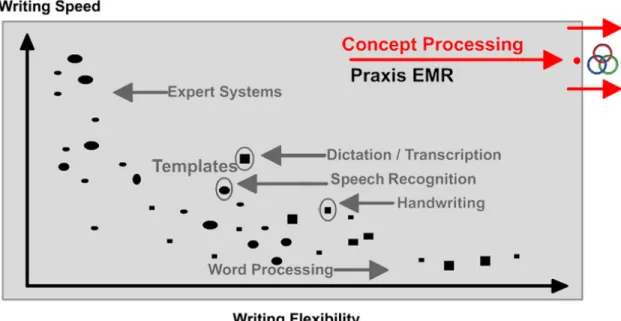
Figure . Comparison of the Concept Processor and other types of EMRs. Note the inverse relation between writing speed and writing flexibility implicit in all other systems.
Indeed, an inverse relationship exists between the speed and the flexibility of data-entry. At one extreme, expert systems templates may generate text instantly, but the text does not accurately represent what the doctor wants to express at the time. At the other extreme are those systems that allow for complete manual changes (such as a word processor) at the expense of speed and accessibility. In the middle range one sees the templates, where the doctor is selecting from endless pick lists, only to find that the pick lists are overwhelming and not adequate for the task at hand.
In comparison, the Concept Processor “migrates” from the initial 0,0 stage into the top right quadrant, and then slowly continues to evolve to the right as it improves in knowledge and flexibility.
L
L
e
e
g
g
a
a
l
l
C
C
a
a
v
v
e
e
a
a
t
t
s
s
R
R
e
e
g
g
a
a
r
r
d
d
i
i
n
n
g
g
T
T
e
e
m
m
p
p
l
l
a
a
t
t
e
e
s
s
"PRAXIS has much greater utility and flexibility... than a template-driven program. In addition, PRAXIS has another very valuable feature that you may not have considered: that is, enhanced legal protection for the busy practitioner.
Good documentation is critical to properly defend a physician against a malpractice claim. However, it is not only important to record what was done, but also to show the logical progression of thought that lead to a diagnosis or course of action.
PRAXIS requires the physician to record his thinking process, and to refine the logic with each new patient. By focusing on the difference between patients, the record necessarily reflects why one given diagnosis or therapy was chosen over another.
This in turn allows the defense attorney to use the record to assert the uniqueness of the patient, and why this therapy was chosen for this patient. Since a physician is not held to be a guarantor of a cure of a good result, but instead must choose an acceptable
treatment based on the information available to the physician at the time the choice was made, clear documentation of what was known is usually an adequate defense.
There is another related problem that is latent in every template-driven
program that is not present in PRAXIS. The templates in other systems are subject to discovery and to use against the defending physician. Imagine how pleased a plaintiff's attorney would be to find that a physician's entire practice could be reduced to a series of simple statements.
Suddenly, the art of medicine is diminished, and the defending physician appears to be a mere technician in the way he practices, forcing all his patients into a single mold. However, since PRAXIS is based on the examination of previous patients, these records are not subject to discovery since they are protected by physician-patient confidentiality.
While the process by which a physician using PRAXIS to enter data is discoverable, that process is little different than what is now done without PRAXIS. While several other systems provide for such things as accurate and legible recording of notes and prescriptions, it is the flexibility and theory behind PRAXIS that will, in the long run, provide the best legal protection for the practicing physician".Curtis E. Harris, M.S., M.D., J.D., Practicing Endocrinologist, Professor of Medical Law University of Oklahoma, Oklahoma City,
T
T
e
e
m
m
p
p
l
l
a
a
t
t
e
e
s
s
t
t
h
h
a
a
t
t
“
“
S
S
a
a
v
v
e
e
”
”
One must be careful in recognizing and distinguishing the various ways EMRs save data. During a presentation, a demonstrator might appear to quickly generate a case, and some templates save a given diagnosis for future use. With these templates, however, a case can only be saved under a given diagnosis name, later to be recalled for future use as an entire block of boilerplate text. Because a physician does not evaluate and treat a given diagnosis in a monolithic way, but in fact in a myriad of different manners, even this kind of "savable template" does not come close to the efficiency and accuracy of the Concept Processor.
This is because the Concept Processor instantly allows a practitioner to access and edit from the closestencounter. The practitioner is still using editing skills, but the more one uses the system, the more the system learns past cases, and in turn, the less one needs to edit with each new encounter. In essence, the software becomes a mirror of the user’s own mind, and a great thinking partner.
III -
THE CONCEPT PROCESSOR AND PRAXIS 3
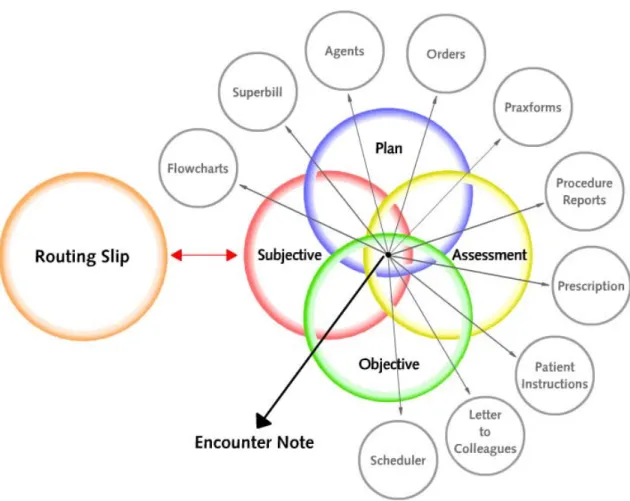
Figure . Venn diagram representing the elements that make up the Encounter Note. These elements interact with each other in real time to create the Note and help with the practice.
As we have outlined, the Concept Processor utilizes a neural-network approach to find the right words precisely when needed by learning from the past. Therefore it is not limited to the standard SOAP-type elements such as history of present illness, objective findings, procedures, or prescriptions. It goes much farther!
Based on critical feedback from hundreds of PRAXIS users, it was discovered that the documentation features—as vital as they are—make up only a small part of what the Concept Processor could accomplish within an EMR. The most exciting of these is the unique way in which the Concept Processor becomes a doctor’s intellectual partner as we shall see next.
2) An Intelligent Scheduler based on the scheduling of previous patients presenting similar conditions.
3) Automatic Health Maintenance that is created effectively and efficiently in the moment cases are seen.
4) A unique method for handling recurring patients with multiple, chronic complaints. Unlike acute medical problems, with chronic follow-up cases the doctor knows exactly what the patient has. The treatment is no longer one of making a diagnosis, but of management over time. This process is guided by the computer’s ability to remember the numerous diagnostic and therapeutic tasks needed during each visit. With these follow-up cases, the computer becomes an extraordinary mental helper for the busy physician, and improves the quality of medicine.
5) Intelligent flow-charting of labs, medications, vital signs and other clinical parameters, instantly created and customized for each patient and physician.
6) Pre-SOAP protocols that help the clinic assistants properly prepare the patient prior to the doctor’s encounter. These protocols also allow the generation of the most appropriate questionnaires, vital signs, medications status, and other clinical parameters required by the provider for any type of case.
7) Graphic Overlays that learn from the past to show graphic images at the point of care, and thus help to instantly illustrate objective findings, descriptions, procedure reports, and patient handouts.
8) Dictation/Transcription that progressively reduces the cost of, and ultimately the need for, this human service.
9) Automatic printing and/or faxing of any form required during the encounter, from the hospital admitting forms, to prescriptions, to department of motor vehicles forms. 10) The most powerful prospective and retrospective query engine in medicine, and a revolutionary approach to Clinical Practice Guidelines and queries that simply cannot be equaled by templates.
11) Instant Intelligent charging for services based on similar charges in the past for the same type of case.
In addition to these unique features, many other improvements have been made, such as drug contraindication detection, rapid and automatic classification of incoming scanned documents, HIPAA protection and HIPAA logging.
Most of the above features are currently a reality in hundreds of clinics, are unique to concept processing, and will be discussed throughout the remainder of this document.
“
Think of an “agent” as a special electronic memo or e-mail that includes intelligent features specially created for medicine. In effect, the agent becomes an “ambassador” for the physician. The special features described below are not found in any other e-mail or internal memo systems.
1) Calendar: An agent can be set up to show its message instantly – even with urgency by creating special sounds in the recipient’s computer – or at a pre-set time in the future. For example, a user may send a message to the front office to “remind a patient six months from today” to come back for an X-Ray. This agent will then remain inactive until the specified date and time, when the front office staff will receive the message to call the patient.
2) Conditions and User Programmability: An agent can activate under certain conditions, for example, when a particular type of healthcare giver connects with patient. A message request to examine a heart murmur could automatically appear when the first cardiologist sees the patient.
3) Prompting for Response: The agent can also request information from a recipient with pre-assigned responses to select from, such as indicating whether and when a task was completed. Once the agent has performed its task, all of the resulting information can be programmed to return to the sender under pre-set conditions. This makes a simple but
4) “Fuzzy” Recipient: It is common for several professionals in an office to be trained for overlapping duties; after all, every business must be prepared for busy moments, absences, or a certain level of turnover. When a task is requested of the “front office,” a doctor may not necessarily know, or be concerned by, who will be handling it when the time comes. The provider may then send a task to everyone in the “front office” , but when the first front office person opens the message, the agent is deleted from the inbox of the other users. Then, an “audit trail” is created showing exactly who read the
message and when. In addition, special groups may be created as aliases for any given task without naming anyone in particular (“Cardiologists,” ”Phone operators,” or
“Dietitians”). The agents can be directed to that group, and the first member of the group to open the message will be then identified by the agent as responsible for carrying out the physician’s order.
5) Audit trail: Anyone who has worked in an office knows that responsibilities and tasks are not always carried out. The “audit trails” mentioned above are agents that can be triggered to find out if, when and by whom an order was carried out. Accountability and the documentation of these actions are critical in medicine so patients are not abandoned by accident.
6) Intelligent attachments: As a follow up of the previous point, all inserted notes such as X-Rays, ECGs, letters from consultants, financial letters, EOB’s, and so on, must be entered in the record via agents. These agents learn the clinic’s exact protocol for handling each document, such as which provider to present the document to first, and so on. This makes possible to track exactly what changes were made before the document was added to the record (i.e. who reviewed it, when was it reviewed, who was forwarded what, etc).
7) Intelligent filing: Not only do agents know how to handle a document, but they also know exactly how to file new documents into a patient’s existing record. In fact, if the right folder is not yet present, the agent will even create a new one and store the document within. The agents may also be used to “flag” certain information within the document, which can then be located and opened when needed. In this way, the agent not only stores timely and accurate information, but also ensures that the documentation is kept exactly where it is needed for later review.
8) Graphic Image Recall: Using agents to file documents is as easy as using them to recall and locate documents. This feature allows an agent to use graphic images and link them with given clinical condition (see page 33). The next time a patient presents with the same condition, the agent will instantly find the appropriate graphic image and show it to the provider.
9) External Events: Agents can be triggered manually, by the encounter note (see next), and also by pre-set events such as abnormal laboratory results or missed appointments. Once triggered, the agent can alert the right people in the clinic with detailed instructions about an abnormal lab, a missed appointment, and many other conditions that may have taken place.
A
time of creation, but is automatically ready for patients presenting with similar conditions. This is because the agent is part of the encounter note, and as so, is linked to the assessment that will recall it for use with similar cases. This means—as with other facets of a Concept Processing based EMR—that the more the system is used, the less the provider needs to set up reminders, instructions and health maintenance features, and the smarter and faster the system becomes. As with all other
components of the encounter note, the doctor selects the closest agent, slightly alters its properties, and has a brand new agent to use immediately, and in the future.
Since the encounter note is not only a description of what was done for a given patient in the past, but also a reminder of things that need to be done in the future, all of these features allow the user to create a customizable health-maintenance system, effortlessly on the fly.
F
F
r
r
e
e
e
e
A
A
g
g
e
e
n
n
t
t
s
s
In addition to these Encounter Note agents, PRAXIS also allows for the creation of independent agents developed by any user in the clinic for fast and easy reuse via keywords that recall the agent’s properties for the future. Thus, any communication that is routine to the clinic can be placed inside an agent, which then generates and sends the message as needed (i.e. “lunch is ready”, “You have a call from the CCU”, “please call….”). If an agent is urgent, the recipient will receive sound warnings to review it at once. These agents may also be set up to handle medication refills, phone calls, and incoming documentation such as letters and faxes. As mentioned earlier, every agent documents itself in the appropriate part of the patient record.
R
R
e
e
m
m
i
i
n
n
d
d
e
e
r
r
s
s
The use of agents opens up an entire new spectrum of what can be accomplished in a busy clinic.
Assume a physician evaluates a patient for a skin lesion believed to be benign, but wishes to recheck the lesion during the next visit.
The doctor can set up a personal agent to trigger exclusively for his or her use during the return visit. Other users may open the patient record in the meantime and nothing will happen. This provider may open the record of the patient and nothing will happen. However, the very next time the patient shows up at the clinic and the same doctor opens the chart, the reminder agent will trigger automatically. If the patient does not return within the pre-set amount of time, another agent may be set up to remind the doctor (“Ms. Jones did not make the appointment within 90 days, and you wanted to check her skin lesion!”).
Because these agents are linked to a particular type of assessment, if a different patient presents the same type of case in the future, the agents will prompt the same way.
time. The more cases the user sees, the better health maintenance system the user creates, and the faster the whole process becomes.
As mentioned earlier, PRAXIS is a wonderful “habit changer” which leads to the topic of Clinical Practice Guidelines.
C
C
l
l
i
i
n
n
i
i
c
c
a
a
l
l
P
P
r
r
a
a
c
c
t
t
i
i
c
c
e
e
G
G
u
u
i
i
d
d
e
e
l
l
i
i
n
n
e
e
s
s
Using Concept Processing technology, agents can actually go much further: What if the triggering of the agent was not simply the return of the patient to the clinic, but the ICD-9 code, reimbursing insurance, the patient’s age, a certain lab or labs, a medication, or any other set of clinical parameters combinations… Then, if that set appears in the future with any patient, the reminder agent would open at exactly the right time, at the point of care. Of course, thus far we have discussed agents developed “in house” by a given provider. But what if they could be developed by providers for the entire clinic, or for a number of clinics? This opens up a fascinating new approach to Clinical Practice Guidelines not based on artificially “hard-coding” templates, but actually grown dynamically as the system is used.
We strongly believe that the PRAXIS agent approach to Clinical Practice Guidelines (and Prospective Queries, since Prospective Queries are Clinical Practice Guidelines in reverse!) will revolutionize the practice of medicine.
PLEASE SEE OUR PAPER ON CLINICAL PRACTICE GUIDELINES AND PROSPECTIVE QUERIES (www.praxisemr.com/practiceguidelines).
I
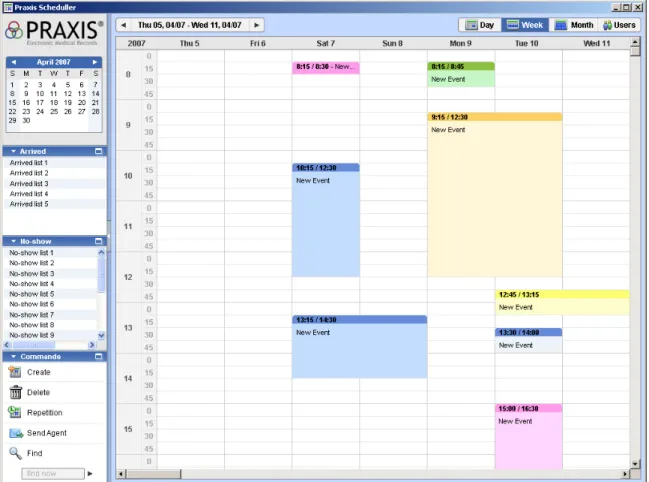
Figure . New Praxis Scheduler – It is a clinically oriented scheduler
The scheduling of patients is not a complex science, yet it has always been a problem that requires a significant time investment from assistants and often inconveniences the providers. The Concept Processor takes over this task with ease, so the doctor can instantly and effortlessly schedule his own patient during the visit by having the system do what was done with a similar case in the past.
“I’d like to see you again in a week” is simple enough to say, but it is entirely possible that the doctor has already been booked solid for 2 weeks, or the room is not available the day and time the patient is scheduled. The question is: why does the scheduling need to be done twice – once by the physician, and then again by the front office? With the built-in scheduler (based on the built-intelligent Encounter Note), the schedulbuilt-ing becomes almost automatic.
The first time a physician sees a patient with a particular problem, the doctor must decide when the patient should return, how much time he or she will need for the follow-up visit, and what equipment or precautions may be required (“make sure the labs are back or postpone this visit”).
With this system, the doctor could schedule the patient simply by asking, “Are you free on Monday the 7th at 3 pm?” and then clicking the mouse. The appointment will be made, and the front office will be prompted a few days before to confirm.
However, the next time this provider sees a different patient with the same problem, presto, the scheduler opens and recalls how many days later, for how long, and what other equipment and precautions are needed for the visit and the encounter is set up again.
The scheduler is also linked with the current visit, so it can prompt the provider when running late with a patient or when other patients are waiting late.
H
H
e
e
a
a
l
l
t
t
h
h
M
M
a
a
i
i
n
n
t
t
e
e
n
n
a
a
n
n
c
c
e
e
Any procedure or plan element may be instantly linked to the Health Maintenance section right in the Encounter Note. Then the system makes sure that this element will be
repeated at the right time and with the right frequency.
When the indicated time has elapsed, the doctor will see the selected plan or procedure element magically appear in the encounter note, ready to be activated and documented by a simple click of the mouse!
Again, the real power of the Health Maintenance feature lies with the Concept Processor. Let’s assume a doctor sees a new patient presenting with a previously seen condition. The next time another patient presents with the same condition, the doctor will see the same health maintenance instructions that will repeat the same procedures just mentioned. As usual, the Concept Processor learns on the fly!
Moreover, if the doctor learns about a change in a Health Maintenance procedure—a not too uncommon occurrence—then PRAXIS learns it as well. The system instantly and painlessly makes the corresponding changes for all future patients with the same condition.
Rigid templates cannot handle such complex, individualized, changing health maintenance reminders that are unique to a provider, a patient, and an illness. The Concept Processor does so effortlessly. The right patients will always be called for their routine blood work, endoscopies, or flu shots at the time they are due.
T
T
h
h
e
e
C
C
h
h
r
r
o
o
n
n
i
i
c
c
a
a
l
l
l
l
y
y
R
R
e
e
t
t
u
u
r
r
n
n
i
i
n
n
g
g
P
P
a
a
t
t
i
i
e
e
n
n
t
t
W
W
i
i
t
t
h
h
M
M
u
u
l
l
t
t
i
i
p
p
l
l
e
e
C
C
o
o
m
m
p
p
l
l
a
a
i
i
n
n
t
t
s
s
The all too common chronic recurrent patient presents with a “shopping list” of chronic complaints. This patient does not present a diagnostic problem in that the provider knows exactly what to do in these cases. This becomes a management issue: remembering exactly what to ask, what to do, and when to do it.appear inactive because the doctor may not wish to treat any of them during a particular visit, or may wish to treat only one, two, or all of them.
As soon as the doctor clicks on any inactive chronic assessment, its related chronic objective findings taken from the patient’s previous visit will instantly appear on the encounter note. In other words, if the patient was described as having a “3/6 holosystolic murmur at the apex” during the last visit, the patient will now show a “3/6 holosystolic murmur at the apex” for this visit as well. This only applies to chronic findings. Acute findings are not cloned (Yes, The Concept Processor understands the difference between chronic and acute physical findings).
Now, if the provider changes the reading of the murmur from “3/6” to “4/6”, then that value will appear the next time the patient returns. Of course, changing one number is far easier than remembering, and writing every chronic finding every single time for every patient who presents with chronic complaints in the practice.
Because most chronic findings do not change, the doctor can be assured that the physical exam portion of the note on a recurrent patient with chronic objective findings will be generated at amazing speed. Of course, the doctor must still perform the actual physical exam and modify whatever has changed since the patient’s last visit. But isn’t it easier and better medicine to accurately review what has been documented about the patient rather than recalling it from memory and then putting it on paper?
Bottom line: it's easier and safer to do what one has written, than to write what one has done!
The History of Present Illness (HPI), however, by definition, is not well suited to cloning. This would lead to practicing bad medicine, as it probably includes inappropriate data for a current visit. Additionally, it is clear that the history of a chronic patient presents two “personalities”: the first time one sees the patient, and all the subsequent visits. Using the same kind of history on the follow-up visits would simply not make sense.
Instead, the HPI shows, in an inactive form, the symptoms of all the patients who have visited for follow-up with this particular condition. The provider simply clicks on the appropriate symptom for the current patient to activate it for the current visit. The provider may use the chart to review the interim symptoms with the patient by simply reading from the chart: “Mary, any episodes of low blood sugar since you last came to see me?" "How are your feet doing?" "Any increase in thirst?” Indeed, nothing is likely to be missed or forgotten when conducting a history for a known condition in this manner. And when something needs to be added, a quick entry now ensures that it will be available for consideration with the current, and every future patient who presents with the same condition. Thus, the chances that a given symptom will be forgotten in the future decreases tremendously. It is obvious that as one uses this system, the quality of medicine one practices improves exponentially.
The Past Medical History, Social History, and Review of Systems—once taken for a given patient—do not vary too much from visit to visit. Thus, in the second and subsequent visits, the information is already in the chart and one need only review or change what is already there. In fact, an assistant can take over this task for the provider, if so desired.
Relevant questionnaires are also automatically generated for the nurse to give the patient prior to meeting with the physician. The physician handles exceptions, while the
computer handles the routine, and together, the best possible care in provided!
Perhaps the most exciting part of PRAXIS’ management of chronic recurrent patients is the link to the health maintenance engine described earlier. In fact, any new procedure or plan added to a chronic patient’s visit is automatically linked for future visits. For example, the first time a doctor orders a cholesterol check for a patient with chronic
Hypercholesterolemia, the health maintenance engine kicks in and asks the provider “how often do you wish to repeat this lab order.” If the doctor states every 6 months, then the order is automatically incorporated in the SOAP Note every 6 months. Indeed, the next time the physician sees a different patient with this kind of Hypercholesterolemia the system recommends repeating the test every 6 months as well.
The computer can do everything just described for the chronic patient almost instantly, and very intuitively.
The Concept Processor takes on the role of the smart assistant; one that knows how to write a follow-up Encounter Note with ease, and that reminds the doctor what to ask and what to do at any given moment. There is no disputing this electronic assistant because it would be like arguing with one’s self. The system is always in learning mode, ready to be modified to the doctor’s liking.
With the multitude of monotonous tasks automated, the provider can focus on the finer points of the art of medicine: focus on the patient, and on the exceptions. Any changes are learned for the future of this patient and every other patient with the same condition. The encounter note is finished in seconds.
S
S
e
e
p
p
a
a
r
r
a
a
t
t
i
i
n
n
g
g
I
I
n
n
f
f
o
o
r
r
m
m
a
a
t
t
i
i
o
o
n
n
F
F
r
r
o
o
m
m
N
N
o
o
i
i
s
s
e
e
One of primary tenets of the Electronic Medical Record is this critical equation: INFORMATION = DATA – NOISE
or
NOISE = DATA – INFORMATION
•
DATA is literally everything one sees on the computer screen at a given
moment.
•
INFORMATION is only those parts of the data that help a healthcare giver
reach a decision, or carry out an action at this very moment, not earlier or later.
In other words, everything that doesn’t assist in the decision at hand is simply NOISE, and it should not be there at that time, if ever!
In the real world, what is data for one person may be critical information for another, and it can be difficult to impossible for a software developer to know who wants what.. A common example of this is the way temperature can be represented. If we say the temperature in the room is “77”, we have communicated 100% information to most people living in the United States. We need not really add anything else to make ourselves understood.
If, on the other hand, we say the temperature in the room is “25 degrees Centigrade” we are likely to cause problems! Of course, in Europe, it would be exactly the other way around. There, saying “25” would be enough, but “77 degrees Fahrenheit” would not be as helpful!
And, saying “the temperature in the room is 25 degrees Celsius plus or minus 2 standard deviations in the summer or 77 degrees Fahrenheit plus or minus 3 standard deviations in the summer” creates even more noise. The US reader wants to see 77, and the European counterpart wants to see 25, but no one wants to see both, and no one needs additional explanation.
Indeed, this is one of the greatest problems implicit in most template-based software. The primary purpose of a good EMR is to minimize the noise in every way:
1. Positional: Misplaced data forces the eye to search, and sometimes searching for data can resemble finding a needle in a haystack.
2. Inappropriate: Data that will not help reach a decision distracts the user from data critical to the decision at hand.
3. Incorrect format: This is the example given above with the temperature. The data is correct, but it is represented in a format that is unsuitable for the user.
4. Incorrect timing: The data is correct and appropriate, but it requires the user to remember it for later use.
The Concept Processor learns from the provider when and how to present the information the way he or she wants to see it, and the noise is therefore markedly reduced.
I
I
n
n
t
t
e
e
l
l
l
l
i
i
g
g
e
e
n
n
t
t
F
F
l
l
o
o
w
w
C
C
h
h
a
a
r
r
t
t
i
i
n
n
g
g
Intelligent Flowcharting is one of the ways PRAXIS separates noise from information. A flowchart is a spreadsheet on which a diverse array of patient data may be tracked against time. This data can be comprised by any combination of specific vital signs, incoming clinical laboratory data, medication dosages, clinical parameters such as fetal heart rate, intraocular pressure readings, or any other specific numeric or textual
The Concept Processor will not only find the data as it becomes available and instantly place it on the spreadsheet under its corresponding date, but will also link the specific flowchart being used with the medical condition in question. This way, the next time a patient presents the same condition, the already populated flowchart is shown
automatically. In fact, one may take the closest flowchart to a given condition, edit it to fit the needs for the current assessment, and then create a new one in the moment. The system may also recall and display a value against the dates they were recorded, the patient’s age, or the gestational age of a pregnant female.
In the case of numeric data, the results may also be represented visually as a graph. For a case of Anemia, for example, the practitioner may wish to follow the patient’s pulse, hemoglobin level, MCV, total iron binding capacity, and Iron sulfate medication dosage all on one flowchart. The physician can then call this flow sheet “Anemia” and link it with a case of “Iron Deficiency Anemia.”
By doing so, this flow chart will be automatically created and populated with all the appropriate data every time a case of Iron Deficiency Anemia is presented.
If the doctor then comes across a case of Hemolytic Anemia, he or she may wish to add, for example, the reticulocyte count, remove the iron medication and Total Iron Binding Capacity, and then re-label the flow chart “Hemolytic Anemia.” This new flow chart would then be generated for those specific kinds of anemia in the future. In essence, an
unlimited number of flowcharts can be generated and used automatically by the system whenever the same assessment is presented. Each flowchart is easier to generate by editing from the most similar one.
Again, the Concept Processor makes sure that in the future, when the right patient is introduced, the correct flow chart will be created instantly and without further human interaction!
Clearly, the intelligent flowchart presents the provider the exact information that he or she requires in exactly the right moment and format that is needed. For instance, it can pull out of the multitude of labs only those that are relevant to following a particular condition, and related only with specific variables such as medications or vital signs – and all of this placed on the same page.
F
FlloowwCChhaarrttssiinnPPeeddiiaattrriiccssaannddOOBB::
In Pediatrics, the age of the patient is also a relative value. PRAXIS 3 is equipped to show the flowchart for any patient less than two years old in “months,” and less than two months old in “days.” In OB, these settings also include weeks, depending on the provider's preference. As explained earlier, the provider is not trapped with a standard OB flow chart, but can create several formats depending on different diagnoses presented by his or her pregnant patients.
There are really no limits to what a doctor is able to build in a flow chart with PRAXIS 3 and, thanks to the Concept Processor, all of these flow charts appear when they are needed for the appropriate patients and their particular conditions.
G
G
r
r
o
o
w
w
t
t
h
h
C
C
h
h
a
a
r
r
t
t
s
s
Growth Charts are a particular type of visual aid in which the overlay is an “electronic ruler” tied to the encounter note. In this way, a pediatrician can select from any number of growth charts, in addition to the standard ones, and link them automatically to the case at hand, depending on the assessment of the child. Thus, for a patient with Down’s
syndrome, the specialized growth chart would become available for automatic completion during each visit.
T
T
h
h
e
e
P
P
r
r
e
e
-
-
S
S
O
O
A
A
P
P
P
P
r
r
o
o
t
t
o
o
c
c
o
o
l
l
s
s
The Concept Processor is extended into the creation of assistant protocols to handle patients prior to their being seen by the provider. What things does the doctor need to be done given certain types of presenting complaints? What history should the nurse take. What questionnaires should be given, what laboratories should be drawn? What vital signs and clinical parameters taken?
These Pre-SOAP Protocols may include the reason for the visit and/or historical profile, Review of Systems, Social History, Allergies, Surgical History, initial screening laboratory results and clinical parameters (such as Vital Signs, Weight, Condition), and other specific measurements required by the provider. In short, everything that is usually performed by the nursing staff, prior to and in preparation for the visit, can be found in the profile. Then, when the provider opens a current Encounter Note, all the information will be right there in the incipient encounter note, waiting to be merged with today’s encounter text.
One may prepare a “Diabetes” profile, a “Well Child" profile, a “Three-Month Pregnant Female” profile, or any other protocol for the practice. Once the profile is selected, the assistant can follow the questions to ask the patient and make note of the answers.
D
D
i
i
c
c
t
t
a
a
t
t
i
i
o
o
n
n
/
/
T
T
r
r
a
a
n
n
s
s
c
c
r
r
i
i
p
p
t
t
i
i
o
o
n
n
It is no secret that most transcriptionists use templates taken from a physician’s own previous writing to speed up the transcription process. The Concept Processor takes this procedure to a new plateau by applying its methods to transcription as well. This allows the transcriptionist to work in partnership with the provider’s own knowledge base. In doing so, the Concept Processor multiplies the software’s learning speed for the provider and dramatically lowers the dictation time and costs involved.
To generate an encounter, the provider has the choice of directing data entry via the Concept Processor, or delegating part of or the entire task to his or her transcriptionist. As soon as the visit is done, the incomplete chart plus the attached sound dictation is instantly made available to the transcriptionist wherever he or she may be. In addition, because, the transcriptionist has the full knowledge base of this provider to work, the
The more the transcriptionist uses the Concept Processor in PRAXIS, the faster and better the transcriptions will become. Also, because the transcriptions are fed instantly into the knowledge base upon completion, the physician is taken out of the data entry process. The physician does not even need to touch the computer!
The doctor may choose to progressively take over more of the work since most of the future entries will already be there from previous patients.
In a clinic with more than one provider there are varying levels of comfort using a
computer. Human transcription is a great way to bridge the gap between the doctors who will take to the EMR instantly, and those who would (at least in the beginning) delegate all of the work to their friendly transcriptionist!
P
P
r
r
i
i
n
n
t
t
i
i
n
n
g
g
o
o
r
r
F
F
a
a
x
x
i
i
n
n
g
g
O
O
u
u
t
t
A
A
n
n
y
y
K
K
i
i
n
n
d
d
o
o
f
f
F
F
o
o
r
r
m
m
A
A
u
u
t
t
o
o
m
m
a
a
t
t
i
i
c
c
a
a
l
l
l
l
y
y
PRAXIS helps a clinic go paperless. However, printed documents are still part of the outside world. One cannot yet email a letter directly to a referring provider. It must be printed on stationery and “snail mailed” or faxed. One cannot email a prescription to a patient. It also must be printed or faxed to the patient’s pharmacy or to mail order pharmacies, often using the provider’s own prescription script or a form required by the state. Certainly, one cannot email an admitting order to the hospital. One must generate it on paper, using the hospital’s form and not the provider’s own. In fact, there are a myriad of forms that a provider must constantly “fill out” for third-party payers and government authorities.
This is precisely where Praxforms™ can be of immense help to the provider and the clinic. The form can be in any format: prescription forms, admitting orders, doctor’s letterhead, emergency department forms…anything at all.
Imagine scanning the form, any form, only once.
Then once inside PRAXIS, the form is linked via fields to the PRAXIS database Then, when the visit is finished, the system will:
i. Find all the forms needed.
ii. Populate the forms exactly where needed with the information coming form PRAXIS.
iii. Print or Fax the forms.
It will do this all at once. As soon as the visit has been completed, all the forms are generated as quickly as the laser printer can print them.
To the recipient of the forms, it will look as though the doctor had nothing better to do than to pull out an old-fashioned typewriter and manually fill out all the little boxes accordingly – the forms arrive following exactly their intended guidelines. By combining the database of patient information with the database of resources,