Microsoft Press
A Division of Microsoft Corporation One Microsoft Way
Redmond, Washington 98052-6399
Copyright © 2004 by Microsoft Corporation
All rights reserved. No part of the contents of this book may be reproduced or transmitted in any form or by any means without the written permission of the publisher.
Library of Congress Cataloging-in-Publication Data pending. Printed and bound in the United States of America.
1 2 3 4 5 6 7 8 9 QWT 8 7 6 5 4 3 Distributed in Canada by H.B. Fenn and Company Ltd.
A CIP catalogue record for this book is available from the British Library.
Microsoft Press books are available through booksellers and distributors worldwide. For further informa tion about international editions, contact your local Microsoft Corporation office or contact Microsoft Press International directly at fax (425) 936-7329. Visit our Web site at www.microsoft.com/mspress. Send comments to [email protected].
Active Directory, Microsoft, Microsoft Press, Windows, the Windows logo, Windows Server, and Windows NT are either registered trademarks or trademarks of Microsoft Corporation in the United States and/or other countries. Other product and company names mentioned herein may be the trademarks of their respective owners.
The example companies, organizations, products, domain names, e-mail addresses, logos, people, places, and events depicted herein are fictitious. No association with any real company, organiza tion, product, domain name, e-mail address, logo, person, place, or event is intended or should be inferred.
Acquisitions Editor: Kathy Harding Project Manager: Julie Pickering Technical Editor: Tony Northrup
1
2
3
4
5
6
7
8
9
10
Contents at a Glance
Introduction to Active Directory and Network Infrastructure . . . 1-1€
Analyzing an Existing Infrastructure . . . 2-1€
Planning an Active Directory Structure. . . 3-1€
Designing an Administrative Security Structure . . . 4-1€
Designing a Site Plan . . . 5-1€
Designing a DNS Structure . . . 6-1€
Designing a WINS Structure . . . 7-1€
Designing a Network and Routing Infrastructure . . . 8-1€
Designing Internet Connectivity . . . 9-1€
Designing a Remote Access Strategy . . . 10-1€
Glossary . . . G-1€
Practices
Analyze the Existing Directory Structure . . . 2-24 Creating a Forest and Domain Model . . . 3-12 Designing an Organizational Unit Structure . . . 4-18 Planning an Account Strategy. . . 4-30 Designing a Group Policy Implementation . . . 4-40 Planning Domain Controllers . . . 5-19 Creating a Site Design and Replication Strategy . . . 5-29 Designing a DNS Namespace for Forests and Domains. . . 6-21 Designing a DNS Infrastructure . . . 6-33 Designing a WINS Replication Strategy . . . 7-25 Creating an IP Addressing Scheme. . . 8-13 Creating a DHCP Strategy . . . 8-32 Designing a NAT Strategy . . . 9-23 Designing Wireless Network Access . . . 10-15 Designing a Remote Access Infrastructure. . . 10-22 Designing Security for Remote Access Users . . . 10-32
Tables
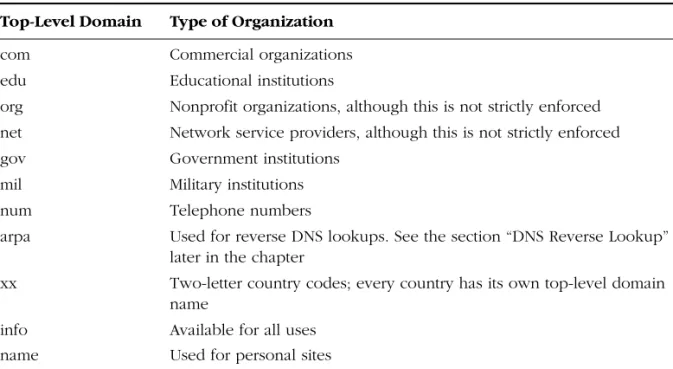
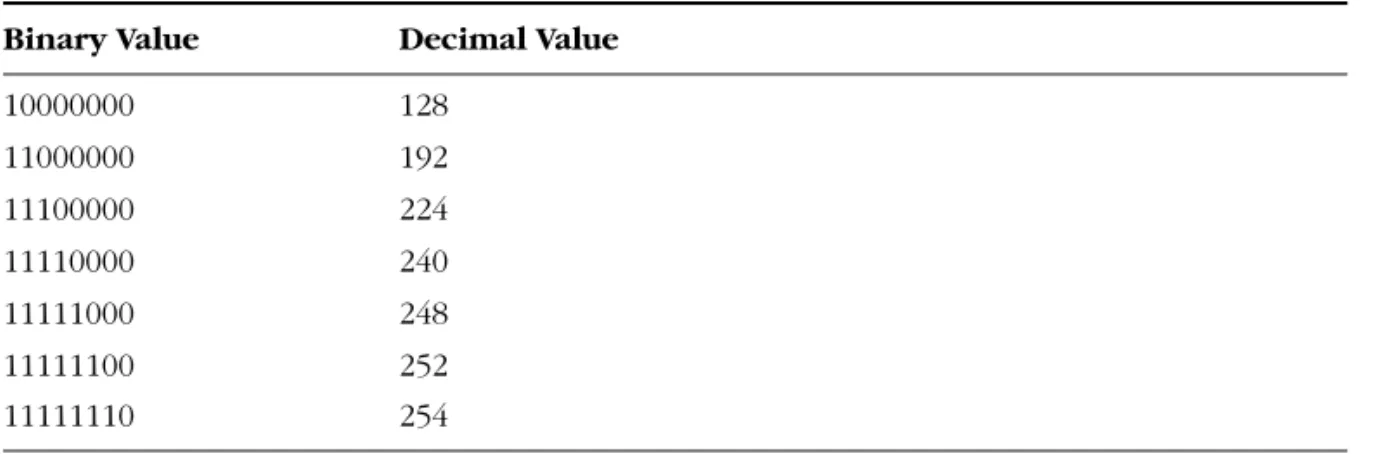
Table 1-1: Common Top-Level Domain Names . . . 1-22 Table 1-2: DNS Resource Records . . . 1-27 Table 1-3: IP Address Classes . . . 1-35 Table 1-4: Custom Subnet Mask Values . . . 1-37 Table 4-1: Group Scopes and Functionalities . . . 4-28 Table 4-2: Administrative Template Settings . . . 4-34 Table 5-1: Recommended Site-Link Costs by Available Bandwidth . . . 5-26 Table 6-1: DNS Resource Records . . . 6-4 Table 6-2: Top-Level Domains . . . 6-11 Table 7-1: Microsoft Component NetBIOS Unique Names . . . 7-3 Table 7-2: Microsoft Component NetBIOS Group Names . . . 7-3 Table 7-3: NetBIOS Node Types. . . 7-4 Table 7-4: WINS Server Functions. . . 7-7 Table 8-1: Address Classes . . . 8-5 Table 8-2: Private and Reserved IP Addresses . . . 8-7 Table 8-3: Default Subnet Masks . . . 8-8 Table 8-4: Class A Subnetted Network ID . . . 8-11 Table 8-5: Class B Subnetted Network ID . . . 8-12 Table 8-6: Class C Subnetted Network ID . . . 8-13 Table 8-7: Additional Configuration Options . . . 8-26
Table 8-8: DHCP Test Server Functions and Volume Handled . . . 8-30 Table 8-9: Client Support . . . 8-31 Table 9-1: Private Network Addressing . . . 9-12 Table 9-2: Network Address Translation Session Mapping Table . . . 9-13 Table 10-1: User Account Dial-In Permissions . . . 10-5 Table 10-2: Wireless Standards . . . 10-6 Table 10-3: Authentication Methods . . . 10-10 Table 10-4: Network Access Server Resource Usage. . . 10-20 Table 10-5: Remote Access Policy Conditions . . . 10-25
Case Scenario Exercises
Chapter 2 . . . 2-27 Chapter 3 . . . 3-24 Chapter 4 . . . 4-43 Chapter 5 . . . 5-36 Chapter 6 . . . 6-35 Chapter 7 . . . 7-27 Chapter 8 . . . 8-34 Chapter 9 . . . 9-26 Chapter 10 . . . 10-34
Contents
About This Book . . . xxi
Intended Audience . . . xxi
Prerequisites . . . xxi
About the CD-ROM. . . xxii
Features of This Book . . . xxii
Chapter and Appendix Overview . . . xxii
Reader Aids . . . xxiii
Notational Conventions . . . xxiv
Getting Started . . . xxiv
Hardware Requirements. . . xxiv
Software Requirements . . . xxiv
Setup Instructions. . . xxv
The Readiness Review Suite . . . xxv
The eBook . . . xxv
The Microsoft Certified Professional Program . . . xxvi
Microsoft Certification Benefits . . . xxvi
Requirements for Becoming a Microsoft Certified Professional . . . xxvii
Technical Support . . . xxviii
Evaluation Edition Software Support . . . xxviii
1
Introduction to Active Directory and Network Infrastructure
1-1
Why This Chapter Matters . . . 1-1 Before You Begin. . . 1-1 Lesson 1: Active Directory Overview. . . 1-2 What Is Active Directory? . . . 1-2 The Logical Active Directory Structure . . . 1-5 Trust Relationships . . . 1-9 Partitioning the Active Directory Database . . . 1-12 The Physical Network Structure . . . 1-12 Lesson Review . . . 1-17 Lesson Summary . . . 1-17 Lesson 2: Domain Name System Overview . . . 1-19 Name Resolution . . . 1-19 Understanding DNS . . . 1-20 How Active Directory Uses DNS . . . 1-28 Lesson Review . . . 1-28 Lesson Summary . . . 1-29
Lesson 3: TCP/IP Overview . . . 1-30 TCP/IP Architecture . . . 1-30 IP Addressing . . . 1-34 IP Routing. . . 1-38 Automatic IP Address Assignment Using DHCP . . . 1-39 Lesson Review . . . 1-40 Lesson Summary . . . 1-41 Lesson 4: Remote Access Overview . . . 1-42 What Remote Access Provides . . . 1-42 Remote Access Connection Methods . . . 1-42 Protocols Used by Routing And Remote Access . . . 1-43 Remote Access Security . . . 1-44 Lesson Review . . . 1-46 Lesson Summary . . . 1-47 Chapter Summary . . . 1-47 Exam Highlights . . . 1-49 Key Points . . . 1-49 Key Terms. . . 1-50 Questions and Answers . . . 1-51
2
Analyzing an Existing Infrastructure
2-1
Why This Chapter Matters . . . 2-2 Before You Begin. . . 2-2 Lesson 1: Analyzing the Company . . . 2-3 Geographical Considerations . . . 2-3 Information Flow . . . 2-8 Analyze the Current Administration Model . . . 2-10 Future Plans . . . 2-11 Lesson Review . . . 2-11 Lesson Summary . . . 2-11 Lesson 2: Analyzing the Existing Network Topology . . . 2-12 Network Environment. . . 2-12 Servers and Workstations . . . 2-13 Analyzing Performance Requirements . . . 2-15 Lesson Review . . . 2-16 Lesson Summary . . . 2-17 Lesson 3: Analyzing the Existing Directory Structure . . . 2-18 Analyze an Existing Windows 2000 Infrastructure . . . 2-18 Analyze an Existing Windows NT 4.0 Infrastructure . . . 2-21 Windows 2003 Functional Levels . . . 2-23 Practice: Analyze the Existing Directory Structure . . . 2-24
Lesson Review . . . 2-26 Lesson Summary . . . 2-27 Case Scenario Exercise . . . 2-27 Questions. . . 2-28 Chapter Summary . . . 2-29 Exam Highlights . . . 2-30 Key Points . . . 2-30 Key Terms. . . 2-30 Questions and Answers . . . 2-31
3
Planning an Active Directory Structure
3-1
Why This Chapter Matters . . . 3-1 Before You Begin. . . 3-1 Lesson 1: Designing a Forest and Domain Model . . . 3-2 Using a Single Domain . . . 3-2 Using Multiple Domains . . . 3-4 Using Multiple Trees Within a Forest . . . 3-8 Using Multiple Forests . . . 3-10 Practice: Creating a Forest and Domain Model. . . 3-12 Lesson Review . . . 3-14 Lesson Summary . . . 3-15 Lesson 2: Defining a Naming Strategy . . . 3-16 Active Directory Naming and LDAP . . . 3-16 Creating the Naming Strategy. . . 3-19 Supporting Registered DNS Names . . . 3-20 Choosing Domain Names. . . 3-21 Naming Security Principals . . . 3-22 Lesson Review . . . 3-23 Lesson Summary . . . 3-24 Case Scenario Exercise . . . 3-24 Questions. . . 3-26 Chapter Summary . . . 3-26 Exam Highlights . . . 3-27 Key Points . . . 3-27 Key Terms. . . 3-28 Questions and Answers . . . 3-29
4
Designing an Administrative Security Structure
4-1
Why This Chapter Matters . . . 4-2 Before You Begin. . . 4-2
Lesson 1: Designing an Organizational Unit Structure . . . 4-3 Understanding Organizational Units . . . 4-3 Using OUs to Delegate Administrative Control . . . 4-4 Using OUs to Limit Object Visibility . . . 4-9 Using OUs to Control Group Policy . . . 4-10 Default Containers and OUs. . . 4-11 Planning for Inheritance . . . 4-12 Standard Models for OU Structure . . . 4-12 Practice: Designing an Organizational Unit Structure . . . 4-18 Lesson Review . . . 4-20 Lesson Summary . . . 4-20 Lesson 2: Planning an Account Strategy . . . 4-21 Types of Accounts . . . 4-21 Planning Computer Accounts . . . 4-22 Planning User Accounts . . . 4-22 Planning Groups . . . 4-26 Putting Users and Groups Together. . . 4-29 Practice: Planning an Account Strategy . . . 4-30 Lesson Review . . . 4-31 Lesson Summary . . . 4-31 Lesson 3: Designing a Group Policy Implementation . . . 4-32 Understanding Group Policy . . . 4-32 Planning a GPO Structure. . . 4-37 Planning the Deployment of GPOs. . . 4-38 Practice: Designing a Group Policy Implementation . . . 4-40 Lesson Review . . . 4-42 Lesson Summary . . . 4-42 Case Scenario Exercise . . . 4-43 Questions. . . 4-44 Chapter Summary . . . 4-45 Exam Highlights . . . 4-46 Key Points . . . 4-46 Key Terms. . . 4-46 Questions and Answers . . . 4-47
5
Designing a Site Plan
5-1
Why This Chapter Matters . . . 5-1 Before You Begin. . . 5-2 Lesson 1: Designing a Site Topology . . . 5-3 Why Sites Are Used . . . 5-3 Choosing Site Boundaries . . . 5-6
Lesson Review . . . 5-9 Lesson Summary . . . 5-9 Lesson 2: Planning Domain Controllers . . . 5-10 Planning Domain Controller Placement . . . 5-10 Planning Operations Masters Servers . . . 5-13 Planning Global Catalog Servers. . . 5-15 Planning Domain Controller Capacity. . . 5-17 Practice: Planning Domain Controllers. . . 5-19 Lesson Review . . . 5-20 Lesson Summary . . . 5-21 Lesson 3: Planning a Replication Strategy . . . 5-22 The Replication Process . . . 5-22 Site Links . . . 5-24 Bridgehead Servers . . . 5-28 Practice: Creating a Site Design and Replication Strategy. . . 5-29 Lesson Review . . . 5-31 Lesson Summary . . . 5-32 Lesson 4: Designing a Migration Path . . . 5-33 Migrating from Windows NT 4 Domains . . . 5-33 Migrating from Windows 2000 Domains . . . 5-34 Lesson Review . . . 5-35 Lesson Summary . . . 5-35 Case Scenario Exercise . . . 5-36 Questions. . . 5-37 Chapter Summary . . . 5-38 Exam Highlights . . . 5-39 Key Points . . . 5-39 Key Terms. . . 5-40 Questions and Answers . . . 5-41
6
Designing a DNS Structure
6-1
Why This Chapter Matters . . . 6-1 Before You Begin. . . 6-2 Lesson 1: Analyzing the Existing DNS Implementation . . . 6-3 DNS Overview . . . 6-3 Components of DNS . . . 6-3 Lesson Review . . . 6-9 Lesson Summary . . . 6-9 Lesson 2: Designing a DNS Name Resolution Strategy . . . 6-10 Creating the Namespace Design . . . 6-10
Interoperability with Active Directory, DHCP, and WINS . . . 6-12 Active Directory Integration . . . 6-12 Zone Requirements . . . 6-15 DNS Security . . . 6-17 Securing Replication Data . . . 6-19 Interoperability with UNIX Berkeley Internet Name Domain (BIND) . . . 6-19 Practice: Designing a DNS Namespace for Forests and Domains . . . 6-21 Lesson Review . . . 6-23 Lesson Summary . . . 6-24 Lesson 3: Designing a DNS Implementation . . . 6-25 Zone Storage . . . 6-26 Lesson Review . . . 6-28 Lesson Summary . . . 6-28 Lesson 4: Designing a DNS Service Placement Strategy . . . 6-29 Designing DNS Service Placement . . . 6-29 Practice: Designing a DNS Infrastructure. . . 6-33 Lesson Review . . . 6-34 Lesson Summary . . . 6-35 Case Scenario Exercise . . . 6-35 Questions. . . 6-37 Chapter Summary . . . 6-38 Exam Highlights . . . 6-39 Key Points . . . 6-39 Key Terms. . . 6-39 Questions and Answers . . . 6-40
7
Designing a WINS Structure
7-1
Why This Chapter Matters . . . 7-1 Before You Begin. . . 7-1 Lesson 1: Understanding WINS . . . 7-2 WINS Overview . . . 7-2 WINS Components . . . 7-7 WINS Database. . . 7-11 WINS Database Files . . . 7-12 Database Size . . . 7-13 Lesson Review . . . 7-13 Lesson Summary . . . 7-14 Lesson 2: Designing a WINS Infrastructure . . . 7-15 Creating the Conceptual Design . . . 7-15 Designing a NetBIOS Name Resolution Strategy . . . 7-16 Lesson Review . . . 7-21 Lesson Summary . . . 7-21
Lesson 3: Designing a WINS Replication Strategy . . . 7-22 Creating a Replication Strategy . . . 7-22 Deleting and Tombstoning Records . . . 7-24 Securing Your WINS Infrastructure . . . 7-25 Practice: Designing a WINS Replication Strategy . . . 7-25 Lesson Review . . . 7-26 Lesson Summary . . . 7-27 Case Scenario Exercise . . . 7-27 Questions. . . 7-28 Chapter Summary . . . 7-29 Exam Highlights . . . 7-30 Key Points . . . 7-30 Key Terms. . . 7-31 Questions and Answers . . . 7-32
8
Designing a Network and Routing Infrastructure
8-1
Why This Chapter Matters . . . 8-1 Before You Begin. . . 8-2 Lesson 1: Creating an IP Addressing Scheme . . . 8-3 Overview of Binary Numbers . . . 8-3 IP Addressing . . . 8-5 Subnetting Your Network . . . 8-9 Practice: Creating an IP Addressing Scheme . . . 8-13 Lesson Review . . . 8-16 Lesson Summary . . . 8-17 Lesson 2: Designing a Perimeter Network . . . 8-18 Protecting Your Private Network . . . 8-18 Documenting Your Perimeter Network . . . 8-21 Lesson Review . . . 8-22 Lesson Summary . . . 8-23 Lesson 3: Understanding DHCP . . . 8-24 Overview of DHCP . . . 8-24 Securing your DHCP Infrastructure . . . 8-27 Lesson Review . . . 8-27 Lesson Summary . . . 8-28 Lesson 4: Creating a DHCP Strategy . . . 8-29 Designing a DHCP Addressing Scheme . . . 8-29 Supporting Various DHCP Clients . . . 8-31 Practice: Creating a DHCP Strategy. . . 8-32 Lesson Review . . . 8-33 Lesson Summary . . . 8-34
Case Scenario Exercise . . . 8-34 Questions. . . 8-35 Chapter Summary . . . 8-36 Exam Highlights . . . 8-37 Key Points . . . 8-37 Key Terms. . . 8-38 Questions and Answers . . . 8-39
9
Designing Internet Connectivity
9-1
Why This Chapter Matters . . . 9-1 Before You Begin. . . 9-1 Lesson 1: Identifying Redundancy Requirements. . . 9-2 Creating a Redundant Infrastructure . . . 9-2 Assessing Internet Service Providers . . . 9-4 Lesson Review . . . 9-6 Lesson Summary . . . 9-7 Lesson 2: Identifying Bandwidth Requirements . . . 9-8 Obtaining Bandwidth Requirements . . . 9-8 Lesson Review . . . 9-10 Lesson Summary . . . 9-11 Lesson 3: Understanding NAT . . . 9-12 NAT Overview . . . 9-12 Limitations of NAT . . . 9-15 Lesson Review . . . 9-16 Lesson Summary . . . 9-17 Lesson 4: Designing a NAT Strategy . . . 9-18 Creating the Conceptual Design . . . 9-18 NAT Servers . . . 9-20 Securing Your NAT Solution . . . 9-21 Practice: Designing a NAT Strategy . . . 9-23 Lesson Review . . . 9-25 Lesson Summary . . . 9-26 Case Scenario Exercise . . . 9-26 Questions. . . 9-27 Chapter Summary . . . 9-28 Exam Highlights . . . 9-29 Key Points . . . 9-29 Key Terms. . . 9-30 Questions and Answers . . . 9-31
10
Designing a Remote Access Strategy
10-1
Why This Chapter Matters . . . 10-1 Before You Begin. . . 10-2 Lesson 1: Designing a Remote Access Strategy . . . 10-3 Remote Access Overview . . . 10-3 Components of Dial-Up Remote Access . . . 10-3 Network Access Client . . . 10-3 Network Access Server . . . 10-8 Authentication Methods for Remote Access . . . 10-9 Virtual Private Networking Remote Access . . . 10-11 Creating the Conceptual Design . . . 10-14 Practice: Designing Wireless Network Access . . . 10-15 Lesson Review . . . 10-16 Lesson Summary . . . 10-17 Lesson 2: Designing the Remote Access Infrastructure . . . 10-18 Planning the Capacity of Your Remote Access Infrastructure . . . 10-18 Practice: Designing a Remote Access Infrastructure. . . 10-22 Lesson Review . . . 10-23 Lesson Summary . . . 10-24 Lesson 3: Designing Security for Remote Access Users . . . 10-25 Securing Your Remote Access Infrastructure . . . 10-25 Using an Internet Authentication Service Server . . . 10-27 Practice: Designing Security for Remote Access Users . . . 10-32 Lesson Review . . . 10-33 Lesson Summary . . . 10-33 Case Scenario Exercise . . . 10-34 Questions. . . 10-35 Chapter Summary . . . 10-36 Exam Highlights . . . 10-37 Key Points . . . 10-37 Key Terms. . . 10-38 Questions and Answers . . . 10-39 Glossary . . . G-1 Index . . . .I-1Acknowledgments
It always makes me feel a little strange to say that I have written a book because it takes the combined effort of a lot of people to put a book like this into your hands. Foremost, I’d like to thank my coauthor, Mike Simpson, for all his work. He signed on late in the project and did a great job. I’d also like to thank Tony Northrup for a won derful technical review.
I’d also like to thank the folks at Microsoft Press for guiding this book through its var ious stages. Kathy Harding, our acquisitions editor, showed her faith in the project and in me. Julie Pickering, our project manager, worked hard to make sure that this book is of the best quality and that it was published on schedule. I’d also like to thank Rajni Gulati, Karen Szall, and Lori Kane for their help at various stages.
Finally, as always, I’d like to thank Neil Salkind and everyone else at StudioB for help ing put this project together.
Walter Glenn
About This Book
Welcome to MCSE Self-Paced Training Kit (Exam 70-297): Designing a Microsoft Windows Server 2003 Active Directory and Network Infrastructure. This book teaches you how to gather the network requirements for a business, how to analyze an existing network, and how to design an Active Directory directory service and networking infrastructure.
The first chapter of thisbook provides an overview of the technologies that you work with on a Windows Server 2003 network. In subsequent chapters, you learn how to design an Active Directory structure, which includes creating a forest and domain plan, an organizational unit and administrative plan, and a site topology plan. The remaining chapters teach you how to design a network infrastructure and focus on Domain Name System, Windows Internet Naming System, routing, and remote access.
Note For more information about becoming a Microsoft Certified Professional, see the sec tion titled “The Microsoft Certified Professional Program” later in this introduction.
Intended Audience
This book was developed for information technology (IT) professionals who plan to take the related Microsoft Certified Professional exam 70-297, “Designing a Microsoft Windows Server 2003 Active Directory and Network Infrastructure,” as well as for IT professionals who design, develop, and implement software solutions for Microsoft Windows environments using Microsoft tools and technologies.
Note Exam skills tested are subject to change without prior notice and at the sole discre tion of Microsoft.
Prerequisites
This training kit requires that students have a solid understanding of the networking technologies in Windows Server 2003. Although Chapter 1 provides an overview of those technologies, you should have 12 to 18 months of experience administering Windows technologies in a network environment.
About the CD-ROM
For your use, this book includes a Supplemental Course Materials CD-ROM that con-tains a variety of informational aids to complement the book content, including:
■ The Microsoft Press Readiness Review Suite Powered by MeasureUp. This suite of practice tests and objective reviews contains questions of varying degrees of com-plexityand offers multiple testing modes. You can assess your understanding of the concepts presented in this book and usethe results to develop a learning plan that meets your needs.
■ An electronic version of this book (eBook). For information about using the eBook, see the section “The eBook” later in this introduction.
■ An eBook of the Microsoft Encyclopedia of Networking, Second Edition. This eBook provides complete and up-to-date reference material for networking. ■ Sample chapters from several Microsoft Press books. These chapters give you
additional information about Windows Server 2003 and introduce you to other resources that are available from Microsoft Press.
A second CD-ROM contains a 180-day evaluation edition of Microsoft Windows Server 2003, Enterprise Edition.
Caution The 180-day evaluation edition provided with this training kit is not the full retail product and is provided only for the purposes of training and evaluation. Microsoft Technical Support does not support this evaluation edition.
For additional support information regarding this book and the CD-ROM (including answers to commonly asked questions about installation and use), visit the Microsoft Press Technical Support Web site at http://www.microsoft.com/mspress/support/. You can also e-mail [email protected] or send a letter to Microsoft Press, Attention: Microsoft Press Technical Support, One Microsoft Way, Redmond, WA 98052-6399.
Features of This Book
Chapter and Appendix Overview
Each chapter identifies the exam objectives covered within the chapter, provides an overview of why the topics matter by identifying how the information applies in the real world, and lists any prerequisites that must be met to complete the lessons pre-sented in the chapter.
The chapters are divided into lessons. Lessons end with a summary of important con-cepts and a set of review questions to test your knowledge of the material presented in the lesson. Many lessons also include a practice exercise.
After the lessons, you are given an opportunity to apply what you’ve learned in a case scenario exercise. In this exercise, you work through amultistep solution for a realistic case scenario. Each chapter concludes with a summary of important concepts and a short section listing key topics and terms that you need to know before taking the exam. A glossary of key terms used in the book follows the chapters.
Real World
Helpful Information
You will find sidebars similar to this one that contain related information you might find helpful. “Real World” sidebars contain specific information gained through the experience of IT professionals just like you.
Reader Aids
Several types of reader aids appear throughout the training kit.
Tip contains methods of performing a task more quickly or in a less obvious way.
Note contains supplemental information.
Caution contains valuable information about possible loss of data; be sure to read this information carefully.
Warning contains critical information about possible physical injury; be sure to read this information carefully.
See Also contains references to other sources of information.
Security Alert highlights information you need to know to maximize security in your work environment.
Exam Tip flags information you should know before taking the certification exam.
!
Notational Conventions
The following conventions are used throughout this book.
■ Italic in syntax statements indicates placeholders for variable information. Italic is also used for book titles.
■ Names of files and folders appear in title caps, except when you are to type them directly. Unless otherwise indicated, you can use all lowercase letters when you type a file name in a dialog box or at a command prompt.
■ File name extensions appear in all lowercase. ■ Acronyms appear in ALL UPPERCASE.
■ Bold type represents entries that you might type at a command prompt or in ini-tialization files.
Getting Started
This training kit provides many chances for you to practice the design concepts it teaches. The practices throughout this book are guided design activities and do not require you to work on a computer. However, if you plan to use the evaluation soft-ware, you can use this section to prepare the computer environment.
Hardware Requirements
The test computer must have the following minimum configuration. All hardware should be on the Microsoft Server 2003 Hardware Compatibility List and should meet the requirements listed at http://www.microsoft.com/windowsserver2003/evaluation/ sysreqs/. The following requirements apply to Windows Server 2003 Enterprise Edition.
■ Minimum CPU: 133 MHz for x86-based computers (733 MHz recommended) and 733 MHz for Itanium-based computers
■ Minimum RAM: 128 MB (256 MB recommended)
■ Disk space for setup: 1.5 GB for x86-based computers and 2.0 GB for Itanium-based computers
Software Requirements
A 180-day evaluation edition of Windows Server 2003, Enterprise Edition, is included on the CD-ROM.
Caution The 180-day evaluation edition provided with this training kit is not the full retail product and is provided only for the purposes of training and evaluation. Microsoft Technical Support does not support these evaluation editions. For additional support information regarding this book and the CD-ROMs (including answers to commonly asked questions about installation and use), visit the Microsoft Press Technical Support Web site at http://
mspress.microsoft.com/mspress/support/. You can also e-mail [email protected] or send a letter to Microsoft Press, Attention: Microsoft Press Technical Support, One Microsoft Way, Redmond, WA 98502-6399.
Setup Instructions
Set up your computer according to the manufacturer’s instructions. The following items are included in the Windows Server 2003 Evaluation Kit:
■ Windows Server 2003, Enterprise Edition, CD-ROM ■ Windows Server 2003 Resource CD-ROM
■ A unique Product Key (required for installation) ■ Links to additional Web-based documentation
After you install Windows Server 2003 evaluation software, you have 14 days to acti-vate the product. If you do not actiacti-vate the product within 14 days of installation, you will not be able to continue your evaluation until you activateit. None of your data will be lost.
The Readiness Review Suite
The CD-ROM includes a practice test made up of 300 sample exam questions. Use these tools to reinforce your learning andto identify any areas in which you need to gain more experience before taking the exam.
To install the practice test
1. Insert the Supplemental CD-ROM into your CD-ROM drive.
Note If AutoRun is disabled on your machine, refer to the Readme.txt file on the CD-ROM.
2. Click Readiness Review Suite on the user interface menu.
The eBook
The CD-ROM includes an electronic version of the Training Kit. The eBook is in porta-ble document format (PDF) and can be viewed using Adobe Acrobat Reader.
To use the eBook
1. Insert the Supplemental CD-ROM into your CD-ROM drive.
Note If AutoRun is disabled on your machine, refer to the Readme.txt file on the CD-ROM.
2. Click Training Kit eBook on the user interface menu. You can alsoreview any of the other eBooks that are provided for your use.
The Microsoft Certified Professional Program
The Microsoft Certified Professional (MCP) program provides the best method to prove your command of current Microsoft products and technologies. The exams and corre-sponding certifications are developed to validate your mastery of critical competencies as you design and develop, or implement and support, solutions with Microsoft prod-ucts and technologies. Computer professionals who become Microsoft certified are rec-ognized as experts and are sought after industry-wide. Certification brings a variety of benefits to the individual and to employers and organizations.
See Also For a full list of MCP benefits, go to http://www.microsoft.com/traincert/start/ itpro.asp.
Microsoft Certification Benefits
The Microsoft Certified Professional program offers multiple certifications, based on specific areas of technical expertise:
■ Microsoft Certified Professional (MCP) Demonstrates in-depth knowledge of at least one Microsoft Windows operating system or architecturally significant plat-form. An MCP is qualified to implement a Microsoft product or technology as part of a business solution for an organization.
■ Microsoft Certified Solution Developer (MCSD) Professional developer qual-ified to analyze, design, and develop enterprise business solutions with Microsoft development tools and technologies including the Microsoft .NET Framework. ■ Microsoft Certified Application Developer (MCAD) Professional developer
qualified to develop, test, deploy, and maintain powerful applications using Microsoft tools and technologies including Microsoft Visual Studio .NET and XML Web services.
■ Microsoft Certified Systems Engineer (MCSE) Qualified to effectively ana-lyze the business requirements, and design and implement the infrastructure for business solutions based on the Microsoft Windows and Microsoft Server 2003 operating systems.
■ Microsoft Certified Systems Administrator (MCSA) Individual with the skills to manage and troubleshoot existing network and system environments based on the Microsoft Windows and Microsoft Server 2003 operating systems.
■ Microsoft Certified Database Administrator (MCDBA) Individual who designs, implements, and administers Microsoft SQL Server databases.
■ Microsoft Certified Trainer (MCT) Instructionally and technically qualified to deliver Microsoft Official Curriculum through a Microsoft CertifiedTechnical Edu-cation Center (CTEC).
Requirements for Becoming a Microsoft Certified Professional
The certification requirements differ for each certification and are specific to the prod-ucts and job functions addressed by the certification.
To become a Microsoft Certified Professional, you must pass rigorous certification exams that provide a valid and reliable measure of technical proficiency and expertise. These exams are designed to test your expertise and ability to perform a role or task with a product, and are developed with the input of professionals in the industry. Questions in the exams reflect how Microsoft products are used in actual organizations, giving them “real-world” relevance.
■ Microsoft Certified Professional (MCP) candidates are required to pass one current Microsoft certification exam. Candidates can pass additional Microsoft certification exams to further certify their skills with other Microsoft products, development tools, or desktop applications.
■ Microsoft Certified Solution Developers (MCSDs) are required to pass three core exams and one elective exam. (MCSD certification for Microsoft .NET requires can-didates to pass four core exams and one elective.)
■ Microsoft Certified Application Developers (MCADs) are required to pass two core exams and one elective exam in an area of specialization.
■ Microsoft Certified Systems Engineers (MCSEs) are required to pass five core exams and two elective exams.
■ Microsoft Certified Systems Administrators (MCSAs) are required to pass three core exams and one elective exam that provide a valid and reliable measure of techni-cal proficiency and expertise.
■ Microsoft Certified Database Administrators (MCDBAs) are required to pass three core exams and one elective exam that provide a validand reliable measure of technical proficiency and expertise.
■ Microsoft Certified Trainers (MCTs) are required to meet instructional and techni-cal requirements specific to each Microsoft Official Curriculum course they are certified to deliver. The MCT program requires ongoing training to meet the requirements for the annual renewal of certification. For more information about
becoming a Microsoft Certified Trainer, visit http://www.microsoft.com/traincert/ mcp/mct/ or contact a regional service center near you.
Technical Support
Every effort has been made to ensure the accuracy of this book and the contents of the companion disc. If you have comments, questions, or ideas regarding this book or the companion disc, please send them to Microsoft Press using either of the following methods:
E-mail: [email protected] Postal Mail: Microsoft Press
Attn: MCSE Self-Paced TrainingKit (Exam 70-297): Designing a Microsoft WindowsServer 2003 Active Directory and Network Infrastructure, Editor One Microsoft Way
Redmond, WA 98052-6399
For additional support information regarding this book and the CD-ROM (including answers to commonly asked questions about installation and use), visit the Microsoft Press Technical Support Web site at http://www.microsoft.com/mspress/support/. To connect directly to the Microsoft Press Knowledge Base and enter a query, visit http:// www.microsoft.com/mspress/support/search.asp. For support information regarding Microsoft software, please connect to http://support.microsoft.com/.
Evaluation Edition Software Support
The 180-day Evaluation Edition provided with this training is not the full retail product and is provided only for the purposes of training and evaluation. Microsoft and Microsoft Technical Support do not support this evaluation edition.
Caution The Evaluation Edition of Windows Server 2003, Enterprise Edition included with this book should not be used on a primary work computer. The evaluation edition is unsup ported. For online support information relating to the full version of Windows Server 2003, Enterprise Edition that might also apply to the Evaluation Edition, you can connect to http:// support.microsoft.com/.
Information about any issues relating to the use of this evaluation edition with this training kit is posted to the Support section of the Microsoft Press Web site (http:// www.microsoft.com/mspress/support/ ). For information about ordering the full version of any Microsoft software, please call Microsoft Sales at (800) 426-9400 or visit http:// www.microsoft.com.
1
Introduction to Active
Directory and Network
Infrastructure
Exam Objectives in this Chapter:
■ This first chapter serves as an overview of the technologies involved in designing a network infrastructure and does not specifically cover any exam objective.
Why This Chapter Matters
Designing a network is a challenge. Throughout this book, you will learn how to evaluate your networking needs, analyze the existing business and network con-figuration, and design an appropriate networking solution based on Microsoft Windows Server 2003 technologies. Much of this book deals with the practical aspects of designing a network.
This chapter introduces you to the theory behind it all. It starts with an overview of Microsoft Active Directory directory service and Domain Name System (DNS), which together dictate the basic design of your network. This chapter also pro vides overviews of designing a TCP/IP infrastructure and providing for remote access. Although no single chapter can make you an expert in these technologies, you should come away with a grounding that allows you to understand the design principles explored in the rest of this book. The knowledge provided in this chapter is essential for understanding both how a network works and how Microsoft Windows Server 2003 addresses the needs of a working network. Lessons in this Chapter:
■ Lesson 1: Active Directory Overview . . . 1-2 ■ Lesson 2: Domain Name System Overview . . . 1-19 ■ Lesson 3: TCP/IP Overview . . . 1-30 ■ Lesson 4: Remote Access Overview . . . 1-42
Before You Begin
To complete this chapter, you should be familiar with the basic administration of Microsoft Windows 2000 Server or Windows Server 2003.
Lesson 1: Active Directory Overview
Active Directory provides a means of coordinating the resources on a network and presenting them as a centralized source of information. This lesson introduces the principal functions and architecture of Active Directory.
After this lesson, you will be able to
■ Explain the purpose of Active Directory on a network.
■ Describe the logical and physical structure of Active Directory.
■ Describe the interactions of the different components of Active Directory. ■ Explain the importance of the Active Directory Schema.
Estimated lesson time: 45 minutes
What Is Active Directory?
A directory is really just an easy way to look things up. There are directories everywhere. When you look up a number in your phone book, you are using a directory. When you organize the files and folders on your computer, you are also using a directory. Like these, the Active Directory is a collection of information—in this case, a collection of information about the resources available on a Windows Server 2003 network.
The Need for Directory Services
The traditional method for keeping up with the enormous amount of information about network resources is to store it in separate directories that are typically managed from within the application or operating system component that uses the information. A perfect example of this lies just a few years back in versions of Windows prior to Windows 2000. On a typical Windows NT 4.0–based network, for example, you might find several directories of information scattered across servers on a network. Users and access-controls lists were kept within a directory called the Security Accounts Manager (SAM) database. Exchange Server mailboxes and their user associations were stored in the Exchange directory. Other services and applications maintained their own directo ries. Although there was some interaction between these directories, they were largely separate.
Directories were most often developed for a particular application. Developers of these directories had no real incentive to provide integration with other systems. However, administrators and users who were faced with ever-increasing amounts of work did have a real need for all these separate databases to be able to work together and be managed as a single unit.
What Directory Services Bring to the Table
Directory services go beyond the functionality of scattered, proprietary directories by providing a unified source of information. Active Directory is not the first directory ser vice. In fact, there are several directory services and standards used on networks today. These include (but are not limited to):
■ X.500 and the Directory Access Protocol (DAP) X.500 is an Internet Stan dards Organization (ISO) specification that defines how global directories should be structured. X.500 specifies the use of DAP to provide communication between clients and directory servers.
■ Lightweight Directory Access Protocol (LDAP) LDAP was developed in response to criticism that DAP was just too complicated for use on most directory service implementations. LDAP has quickly become the standard directory proto col used on the Internet.
■ Novell Directory Services (NDS) NDS is the directory service used for Novell Netware networks and complies with the X.500 standard.
■ Active Directory Active Directory is integral to Windows 2000– and Windows Server 2003–based networks. It was designed to comply with the LDAP standard.
See Also For more technical information on the X.500, DAP, and LDAP standards (and any other Internet standards), go to www.ietf.org, the official site of the Internet Engineering Task Force (IETF). Run a keyword search using the terms “X.500,” “DAP,” or “LDAP.”
For a complex network, a directory service should provide an efficient way to manage, find, and access all the resources on a network—resources such as computers, users, printers, shared folders, and many others. A good directory service implementation should provide a number of core benefits:
■ Centralization The idea behind centralization is to reduce the number of direc tories on a network. Bringing information about all network resources into a cen tralized directory provides a single point of management, easing the administration of resources and allowing you to more effectively delegate admin istrative tasks. It also provides a single point of entry for network users (or their computers or applications) when searching for resources.
■ Scalability A directory service should also be able to accommodate the growth of a network without incurring significant additional overhead. This means that there needs to be a way of breaking up (or partitioning) the directory database so that it does not grow too large to be usable, while still maintaining the benefits of centralization.
■ Standardization A directory service should also provide access to its informa tion through open standards. This ensures that other applications can make use of resources in Active Directory (and publish their own resources there) rather than having to maintain their own directories.
■ Extensible A directory service should also provide a way for administrators and applications to extend the information contained in the directory to meet an orga nization’s needs.
■ Separation of physical network A directory service should make the physical network topology transparent to users and administrators. A resource should be identified and accessed without any knowledge required of how or where it is connected to the network.
■ Security A directory service would be very useful to a malicious attacker because it would contain detailed information about the organization. Therefore, a directory service must provide a secure means to store, manage, retrieve, and publish information about network resources.
How Active Directory Addresses the Issue
Active Directory is designed to meet all of the needs of a directory service outlined in the previous section.
■ Active Directory is centralized, providing a single database of network resources that is easy to search and administer.
■ Active Directory is scalable because it allows the database to be partitioned and distributed across the domains that make up the network, yet still be managed as a single directory.
■ Active Directory is standardized because it is made accessible through LDAP, an open Internet standard overseen by the IETF.
■ Active Directory is extensible, allowing developers to use the directory to store information for their own applications.
■ Active Directory is secure, since it is tightly integrated with Windows Server 2003 security.
■ Active Directory abstracts the logical organization of the network and identifica tion of network resources from the physical structure of the network.
Exam Tip It is important to remember how Active Directory fits into Windows Server 2003. Active Directory is both a database of information about network resources and a service run by a domain controller that provides access to that database.
The Logical Active Directory Structure
What makes Active Directory so configurable, and so scalable, is that it separates the logical structure of the Windows Server 2003 domain hierarchy—which is made up of domains, trees, forests, organizational units, and objects—from the physical structure of the network itself. The logical structure of Active Directory does not rely on the physical location of servers or the network connectivity throughout the domain. This provides the powerful ability to structure domains according to your administrative and organizational needs.
Because Active Directory separates the logical structure of network resources from the physical structure of the network itself, it is useful to break the discussion of Active Directory along those same lines. The logical components of the Active Directory struc ture include the following:
■ Objects ■ Domains ■ Trees ■ Forests ■ Organizational Units Objects
Resources are stored in the Active Directory as objects. Since the object is the most eas ily understood component of the Active Directory (being that it usually represents a tangible resource), it is a good place to start.
Objects are stored in the Active Directory in a hierarchical structure of containers and subcontainers, making the objects easier to find, access, and manage—much like orga nizing files in a set of Windows folders. You can tailor a directory structure to meet the needs of your organization, and scale that structure to easily accommodate a network of any size.
■ Object Classes An object is really just a collection of attributes. A user object, for example, is made up of attributes such as name, password, phone number, group membership, and so on. The attributes that make up an object are defined by an object class. The user class, for example, specifies the attributes that make up the user object.
Object classes help organize objects by their similarities. All user objects fall under the object class Users. When you create a new object, it automatically inherits attributes from its class. Microsoft defines a default set of object classes (and the attributes they define) used by Active Directory in Windows Server 2003. Of course, because Active Directory is extensible, administrators and applications can modify the object classes available and the attributes that those classes define.
■ The Active Directory Schema The classes and the attributes that they define are collectively referred to as the Active Directory Schema—in database terms, a schema is the structure of the tables and fields and how they are related to one another. You can think of the Active Directory Schema as a collection of data (object classes) that defines how the real data of the directory (the attributes of an object) is organized and stored.
Just about everything in the Active Directory is an object and that includes the schema itself. As with all other objects, the schema is protected by access control lists (ACL) that are managed by the Windows Server 2003 security subsystem. Users and applications with the appropriate permissions can read, use, and even modify the schema.
Domains
The basic organizational structure of the Windows Server 2003 networking model is the domain. A domain represents an administrative boundary. The computers, users, and other objects within a domain share a common security database.
Using domains allows administrators to divide the network into security boundaries. In addition, administrators from different domains can establish their own security mod els; security from one domain can then be isolated so that other domains’ security models are not affected. Primarily, domains provide a way to logically partition a net-work along the same lines as an organization. Organizations large enough to have more than one domain usually have divisions that are responsible for maintaining and securing their own resources.
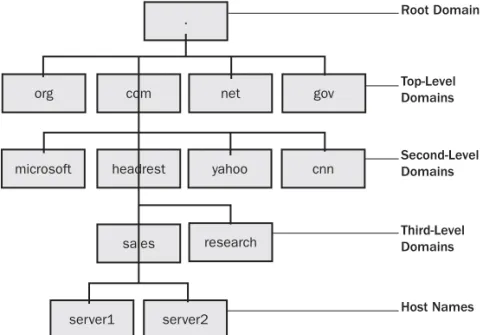
A Windows Server 2003 domain also represents a namespace that corresponds to a naming structure that most network administrators are already familiar with: the same DNS used on the Internet (and covered in detail in the next lesson). A domain, when created, is given a name that follows the DNS structure.
For example, a server named msnews in a domain named microsoft.com would have the fully qualified domain name (FQDN) msnews.microsoft.com.
Exam Tip The word namespace is used often. You will do well to remember that, at its sim plest, a namespace is a structure (often a database) in which all objects are named similarly, but are still uniquely identified.
Off the Record When all domain controllers in a domain are running Windows Server 2003, the full set of Active Directory features is available to the domain. In domains where previous versions of Windows Server coexist, not all features are available. The same is true of forests. Having all domain controllers in a forest running Windows Server 2003 provides access to additional forest-level Active Directory features when compared to forests that run previous versions. Pure Windows Server 2003 domains or forests are said to have a higher functional level than those with mixed versions. This chapter deals with pure Windows Server 2003 domains and forests. Coexistence with previous versions is examined more closely in Chapters 2 and 5.
Trees
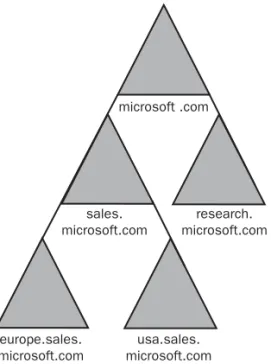
Multiple domains are organized into a hierarchical structure called a tree. Actually, even if you have only one domain in your organization, you still have a tree. The first domain you create in a tree is called the root domain. The next domain that you add becomes a child domain of that root. This expandability of domains makes it possible to have many domains in a tree. Figure 1-1 shows an example of a tree. Microsoft.com was the first domain created in Active Directory in this example and is therefore the root domain. microsoft .com sales. microsoft.com research. microsoft.com europe.sales. usa.sales. microsoft.com microsoft.com
Figure 1-1 A tree is a hierarchical organization of multiple domains.
All domains in a tree share a common schema and a contiguous namespace. In the example shown in Figure 1-1, all of the domains in the tree under the microsoft.com root domain share the namespace microsoft.com. Using a single tree is fine if your
organization is confined within a single DNS namespace. However, for organizations that use multiple DNS namespaces, your model must be able to expand outside the boundaries of a single tree. This is where the forest comes in.
Forests
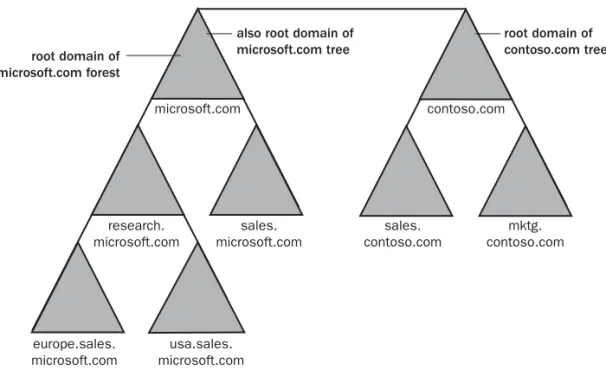
A forest is a group of one or more domain trees that do not form a contiguous namespace but may share a common schema and global catalog. There is always at least one forest on a network, and it is created when the first Active Directory–enabled computer (domain controller) on a network is installed. This first domain in a forest, called the forest root domain, is special because it holds the schema and controls domain naming for the entire forest. It cannot be removed from the forest without removing the entire forest itself. Also, no other domain can ever be created above the forest root domain in the forest domain hierarchy.
Figure 1-2 shows an example of a forest with two trees. Each tree in the forest has its own namespace. In the figure, microsoft.com is one tree and contoso.com is a second tree. Both are in a forest named microsoft.com (after the first domain created).
microsoft.com
research. microsoft.com
also root domain of microsoft.com tree contoso.com root domain of contoso.com tree sales. contoso.com mktg. contoso.com root domain of microsoft.com forest sales. microsoft.com europe.sales. microsoft.com usa.sales. microsoft.com
Figure 1-2 Trees in a forest share the same schema, but not the same namespace.
A forest is the outermost boundary of Active Directory; the directory cannot be larger than the forest. However, you can create multiple forests and then create trust relation-ships between specific domains in those forests; this would let you grant access to resources and accounts that are outside of a particular forest.
Organizational Units
Organizational Units (OUs) provide a way to create administrative boundaries within a domain. Primarily, this allows you to delegate administrative tasks within the domain. Prior to the introduction of the Active Directory, the domain was the smallest container to which you could assign administrative permissions. This meant that giving a group of administrators administrative control over particular resources was difficult or impossible to do without giving them sweeping permissions throughout the domain. OUs serve as containers into which the resources of a domain can be placed. You can then assign administrative permissions on the OU itself. Typically, the structure of OUs follows an organization’s business or functional structure. For example, a relatively small organization with a single domain might create separate OUs for departments within the organization.
You can even nest OUs (create OUs inside other OUs) for further control. However, an overly complicated OU structure within a domain has its drawbacks. For one thing, the simpler you keep your structure, the simpler the implementation and management of that structure. For another, once you go beyond about 12 OUs deep in a nesting struc ture, you start running into significant performance issues.
Trust Relationships
Since domains represent security boundaries, special mechanisms called trust relation-ships allow objects in one domain (called the trusted domain) to access resources in another domain (called the trusting domain).
Windows Server 2003 supports six types of trust relationships: ■ Parent and child trusts
■ Tree-root trusts ■ External trusts ■ Shortcut trusts ■ Realm trusts ■ Forest trusts
Parent and Child Trusts and Tree-Root Trusts
Active Directory automatically builds transitive, two-way trusts between parent and child domains in a domain tree. When a child domain is created, a trust relationship is automatically configured between that child domain and the parent domain. This trust is two-way, meaning that resource access requests can flow from either domain to the other. In other words, both domains trust one another.
The trust is also transitive, meaning that domain controllers in a trusted domain pass along authentication requests to domain controllers in trusting domains. The transitive nature of these trusts is illustrated in Figure 1-3. A transitive, two-way trust exists between Domain A and Domain B. Another exists between Domain B and Domain C. Since Domain A trusts Domain B and Domain B trusts Domain C, then Domain A auto matically trusts Domain C.
Two-way trust B
Two-way trust
A C
Implied transitive trust
Figure 1-3 Parent and Child trusts allow authentication requests throughout a domain tree. Two-way transitive trusts are also created automatically between the root domains of all domain trees you create in a single forest. Two-way transitive trusts simplify domain administration greatly over the method used in versions of Windows prior to Windows 2000. No longer must you configure separate one-way trusts between domains. For the most part, you can rely on the automatic trust relationships of Windows Server 2003 to do what you need them to. However, there are times when you will want to create other types of trust relationships.
External Trusts
An external trust is used when you need to create a relationship between a Windows Server 2003 domain and a Windows NT 4.0 domain. Since down-level domains (domains that do not use Active Directory) cannot participate in two-way transitive trusts, you must use external trusts. External trusts are not bidirectional. The trusting domain allows access to its objects by users in the trusted domain, but the trust does not flow the other way. You can, however, create two separate external trusts (going in opposite directions) between two domains to simulate a two-way trust.
External trusts are also not transitive, meaning that the relationship created by the trust exists only between the two domains involved and is not passed along to other domains.
Shortcut Trusts
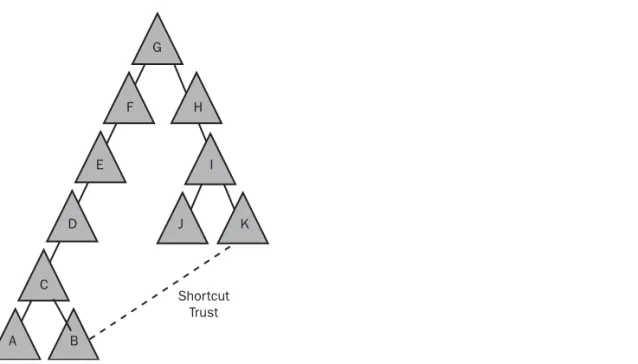
Shortcut trusts provide a way to create a direct trust relationship between two domains that may already be linked using a chain of transitive trusts, but which you need to respond more quickly to one another. Consider the domain tree shown in Figure 1-4. In a complex tree like this, all domains are connected via transitive trust relationships.
However, assume that a user in Domain B needed to access a resource in Domain K. Since the resource is not located in the user’s domain, the request is referred to the next domain and then to the next and then the next, and so on— each referral relying on the transitive trusts built up between the initial and final domain.
Shortcut Trust F G H I E D C A B J K
Figure 1-4 Although all domains are connected via transitive trusts, resolution can take time. If users in Domain B needed more than occasional access to resources in Domain K, the delays caused by the referral process would quickly become an annoyance. The solution is to create a shortcut trust directly between Domain B and Domain K. This allows authentication requests to pass directly between the two domains.
Realm Trusts
New to Windows Server 2003, the realm trust is used to connect a Windows Server 2003 domain with a non-Windows realm that uses the Kerberos V5 security protocol. Realm trusts can be transitive or non-transitive, one-way or two-way.
Forest Trusts
Also new to Windows Server 2003, the forest trust makes it easier to manage multiple forests and provide a better security relationship between them. This type of trust allows users to access resources in a different forest while still using the single user identification (ID) provided by the user’s own forest.
Partitioning the Active Directory Database
As you know by now, Active Directory is a collection of all the objects in a forest. As the forest grows, so does the directory. One challenge in designing the directory was in making sure that the directory database could grow along with an organization with-out being limited by the performance of a single server or location on the network. The answer to this problem is to partition the directory into distributed pieces.
Because domains represent the primary building block of a network, it makes sense that the partitioning of the directory occurs along domain boundaries. Each domain contains a partition of the directory that holds information about the objects in that domain. Each domain contains exactly one partition and the combination of partitions from domains across the forest results in the complete Active Directory.
The important advantage of partitioning the directory by domains is that new domains can be added to a forest without causing an undue burden on existing domains. This is because a new partition is created for the new domain and the new domain control lers in that domain will handle most work involved in managing the new partition.
Real World
Keeping it Simple
What with domains, trees, forests, and organizational units, you can see how enticing it could be to try to use all these components to organize your Active Directory implementation. However, you are best served by keeping your design as simple as your organizational needs allow. The details involved in designing and implementing an Active Directory setup are challenging
unnecessary complication. If you can work with a single domain, and a couple of OUs to help organize administrative tasks, then do it. The whole purpose of Active Directory is to ease the burden of administration. A simple, well-thought-out design goes a long way toward achieving this purpose.
enough without
The Physical Network Structure
The physical structure of an Active Directory network is fairly simple compared to its logical structure. The physical components are domain controllers and sites.
Domain Controller
A domain controller is a server running Windows Server 2003 that has Active Directory services installed and running. You can create any number of domain controllers in a domain. Each domain controller in a given domain has a complete replica of that domain’s directory partition. Domain controllers locally resolve queries for information about objects in their domain and refer queries regarding information they do not hold to domain controllers in other domains. Domain controllers also manage changes to directory information and are responsible for replicating those changes to other domain controllers.
Since each domain controller holds a full replica of the directory partition for their domain, domain controllers follow what is known as a multimaster model. This simply means that every domain controller holds a master copy of the partition and can be used to modify that information.
However, there are certain roles that can be taken on by domain controllers for which the chosen domain controller is the only one allowed to perform that task. These domain controllers fill what are called operations master roles.
Forest-Wide Roles There are two operations master roles that are taken on by only
one domain controller in a forest. These forest-wide roles include:
■ Schema Master The first domain controller in the forest holds the role of the Schema Master and is responsible for maintaining and distributing the schema to the rest of the forest. It maintains a list of all the possible object classes and attributes that define the objects found in Active Directory. If the schema needs to be updated or changed, the Schema Master must be available.
■ Domain Naming Master This domain controller records the additions and deletions of domains to the forest and is vital in maintaining the integrity of the domain. The Domain Naming Master is queried when new domains are added to the forest. Keep in mind that if the Domain Naming Master is not available, then new domains cannot be added; however, this role can be moved to another sys tem if necessary.
Domain-Wide Roles There are three operations master roles that can only be taken
on by one domain controller in each domain. These domain-wide roles include: ■ Relative Identifier (RID) Master This domain controller is responsible for
assigning blocks of RIDs to all domain controllers in a domain. A security identifier (SID) is a unique identifier for each object in a domain. SIDs in Windows Server 2003 are made up of two parts. The first part is common to all objects in the domain; a unique identifier (the RID) is then suffixed to create the unique SID for each object in a domain. They uniquely identify the object and specify where it was created.
■ Primary Domain Controller (PDC) Emulator This domain controller is responsible for emulating a Windows NT 4.0 PDC for clients who have not migrated to Windows 2000, Windows Server 2003, or Windows XP, and do not have the Directory Services Client installed. One of the PDC emulator’s primary responsibilities is to log on legacy clients. The PDC emulator will also be con sulted if a client fails to authenticate. This gives the PDC emulator a chance to check for any last-minute password changes for legacy clients in the domain before it rejects the logon request.
■ Infrastructure Master This domain controller records changes made concern ing objects in a domain. All changes are reported to the Infrastructure Master first, and then they are replicated out to the other domain controllers. The Infrastruc ture Master deals with groups and group memberships for all domain objects. It is also an Infrastructure Master's role to update other domains with changes that have been made to objects.
Global Catalog Server Another server function that can be assigned to a domain
con-troller is the Global Catalog server. The Global Catalog server maintains a subset of Active Directory object attributes that are most commonly searched for by users or cli ent computers, such as a user’s logon name. Global Catalog servers provide two impor tant functions. They allow users to log on to the network and they allow users to locate objects anywhere in a forest.
The Global Catalog contains a subset of information from each domain partition and is replicated among Global Catalog servers in the domain. When a user attempts to log on or to access a network resource from anywhere in the forest, the Global Catalog is consulted for the resolution to the request. Without the Global Catalog, that request for access would have to be fielded by each domain controller in the forest until a resolu tion could be found. If your network uses a single domain, this function of the Global Catalog isn’t really necessary because all domain controllers in the domain would have information on all users and objects on the network. With multiple domains, however, this function of the Global Catalog is essential.
The other function that the Global Catalog provides, which is useful whether you have one or many domains, is to assist in the authentication process when a user logs on to the network. When a user logs on, the name is checked against the Global Catalog before the user is resolved. This provides the ability for users to log on from computers in domains other than where their user accounts are located.
The first domain controller installed in a forest becomes the Global Catalog server by default. Unlike operations master roles, however, you can assign multiple domain con-trollers to serve as Global Catalog servers. You can create as many Global Catalog serv ers as you want to achieve load balancing and redundancy of services. Microsoft recommends placing at least one Global Catalog server in each site.
Although you can make any domain controller a Global Catalog server, you should be careful when deciding which servers should fill the role. To start with, you should not make the same domain controller an Infrastructure Master and a Global Catalog server if you have more than one domain controller. Also, being a Global Catalog server uses a significant amount of resources on the domain controller. For this reason, you would probably not want to make a Global Catalog server out of a domain controller that was fulfilling other demanding roles.
Site
A Windows Server 2003 site is a group of domain controllers that exist on one or more IP subnets (see Lesson 3 for more on this) and are connected by a fast, reliable network connection. Fast means connections of at least 1Mbps. In other words, a site usually fol lows the boundaries of a local area network (LAN). If different LANs on the network are connected by a wide area network (WAN), you’ll likely create one site for each LAN. Sites are primarily used to control replication traffic. Domain controllers within a site are pretty much free to replicate changes to the Active Directory database whenever changes are made. Domain controllers in different sites compress the replication traffic and operate based on a defined schedule, both of which are intended to cut down on network traffic.
Sites are not part of the Active Directory namespace. When a user browses the logical namespace, computers and users are grouped into Domains and OUs without reference to sites. Sites contain only two types of objects. The first type is the domain controllers contained in the site. The second type of object is the site links configured to connect the site to other sites.
Site Link Within a site, replication happens automatically. For replication to occur
between sites, you must establish a link between the sites. There are two components to this link: the actual physical connection between the sites (usually a WAN link) and a site link object. The site link object is created within Active Directory and determines the protocol used for transferring replication traffic (Internet Protocol [IP] or Simple Mail Transfer Protocol [SMTP]). The site link object also governs when replication is scheduled to occur.
Replication in Active Directory
The Active Directory replication process is fascinating. All objects and attributes need to be replicated to all the domain controllers in a domain to ensure that each domain controller has an up-to-date master copy of that domain’s directory partition. That is a tremendous amount of data moving around, and with it comes the huge task of keep ing track of that data.
Windows Server 2003 uses a replication model called multimaster replication, in which all replicas of the Active Directory database are considered equal masters. You can make changes to the database on any domain controller and the changes will be rep licated to other domain controllers in the domain.
Domain controllers in the same site replicate on the basis of notification. When changes are made on a domain controller, it notifies its replication partners (the other domain controllers in the site); the partners then request the changes and replication occurs. Because of the high-speed, low-cost connections assumed within a site, repli cation occurs as needed rather than according to a schedule.
Unless you configure your own sites in Active Directory, all domain controllers are automatically made a part of a single site—a default site named “Default-First-Site-Name” that is created when you create the first domain.
You should create additional sites when you need to control how replication traffic occurs over slower WAN links. For example, suppose you have a number of domain controllers on your main LAN and a few domain controllers on a LAN at a branch loca tion, as shown in Figure 1-5. Those two LANs are connected to one another with a slow (256K) WAN link. You would want replication traffic to occur as needed between the domain controllers on each LAN, but you would want to control traffic across the WAN link to prevent it from affecting higher priority network traffic. To address this situation, you would set up two sites— one site that contained all the domain control lers on the main LAN and one site that contained all the domain controllers on the remote LAN. Site 1 Site 2 256K WAN link LAN LAN
Figure 1-5 Sites allow you to control how replication traffic occurs over slower connections. To clarify this, look first at replication within a single site (called intrasite replication) and then compare that with replication between sites (intersite replication).
■ Intrasite Replication Intrasite replication sends replication traffic in an uncom pressed format. This is because of the assumption that all domain controllers within the site are connected by high-bandwidth links. Not only is the traffic uncompressed, but replication occurs according to a change notification mecha nism. This means that if changes are made in the domain, those changes are quickly replicated to the other domain controllers.
■ Intersite Replication Intersite replication sends all data compressed. This shows an appreciation for the fact that the traffic will probably be going across slower WAN links (as opposed to the LAN connectivity intrasite replication assumes), but it increases the server load because compression/decompression is