Development of Interactive CAD Teaching System
W Xu
Faculty of Engineering and Physical Sciences
University of Surrey, Guildford, United Kingdom
Abstract
Computer-aided design (CAD) uses computer based facility to assist engineers and design professionals in their day to day activities. As a fundamental engineering skill, CAD software is normally taught to the first year undergraduate student. Unlike the other undergraduate engineering courses, the CAD teaching mainly relies on one to one teaching and learning environment. This requires extensive teaching resource in a reiterative manner. In addition, the traditional learning practice has been changed significantly by advance of the computer technology. All of these form unique features of modern day’s CAD teaching and learning environment. In this paper, an interactive CAD teaching system was proposed to meet the above requirement and enhance the teaching process and software was developed to test the proposed system.
Key words: Computer-aided design; Interactive teaching; Multimedia; Network communication
1. Introduction
Computer-aided design (CAD) is a key engineering undergraduate course especially for the mechanical engineering student [1]. As a fundamental engineering skill, using of the CAD software is normally taught at the first year of their undergraduate study. Unlike the other undergraduate engineering courses, the CAD teaching requires a computer based teaching and learning environment and the delivery of the CAD skill involves one to one interactive instruction-learning exercises between tutor and student, hence extensive teaching resource is required [2]. This forms a unique feature of the currently CAD teaching and learning practice. In order to meet these requirements, various e-learning systems were developed to provide necessary teaching support of the skill learning. Such as a Web-based Virtual Environment was developed to improve spatial ability of the learner [3] and a Web-based CAD system for learning and laboratory purpose, and teamwork-based learning [4, 5]. A System that improves the human-computer interaction and a CAD education support system based on workflow were also developed [6,7]. However, the currently available systems are unable to provide class based “support on demand” interactive teaching environment. In order to provide an effective support at the time when student experiences difficulties in a CAD tutorial, a two way communication system was is required to establish a multi-user interactive teaching environment which enable the student submit query a the point they need help. The class tutor can take over the control of student’s exercise and answer the query in an interactive way. For a small class size, the class tutorial approaches the student and provides help on spot. However, with a large class size, this is not an effective way as class tutorial may have to walk from one end of class room to the other end. Further more the tutee’s exercise process needs to be monitored continually to make sure the correct instructions are followed. Again this is hard to achieve in a large class size without employing large number of tutors. The objective of this study is to design and develop an interactive teaching system which can carry out remote on screen tutoring and monitoring of the CAD learning exercise.
2. Methods
To establish an interactive teaching and learning environment, a network based duplex multimedia communication system was proposed by the author. In order to cover all possible network hardware configurations, four network connection scenarios were taken into account. To reduce the data traffic, image compression and motion detect techniques were used to develop the software. As a key step State diagram of the software was use to guide the software development.
2.1 Network connection scenarios
There were four connect scenarios were considered in this study.
Case 1: Unique IP Addresses
This is the when Instructor at server and trainee at client both have unique IP addresses over network. In this case either of server and client may wait for connection and other may initiate the connection request. The preferred case is Server to wait and client to connect.
Case 2: Server: Shared IP with Client: Unique IP Address
Proceedings of the 2010 International Conference on Industrial Engineering and Operations Management Dhaka, Bangladesh, January 9 – 10, 2010
This is the when Instructor at server is a part of a local network by sharing single internet IP with multiple other computers while trainee at client has a unique IP address over network. So in this case client has to wait for connection and server has to initiate the connection request.
Case 3: Server: Unique IP with Client: Shared IP Address
This is the when Trainee at client is a part of a local network by sharing single internet IP with multiple other computers while instructor at server has a unique IP address over the network. So in this case server has to wait for connection and client has to initiate the connection request.
Case 4: Shared IP Addresses
This is the when Instructor at server and trainee at client are a part of local area network and share single internet IP address with multiple other neighboring computers. Any LAN over Internet or VPN software may be used, such as Hamachi Server to be used for have a virtual but unique IP at both sides.
2.2 Data compression scheme
The proposed system enables class tutor to provide on screen help through network remote access. Given the maximal network speed of 100Mbps (M Bytes Per Second), to achieve real time remote access, the amount of data transfer via the network is very demanding. To overcome the bottleneck of this problem, image compression scheme was used first by the author. In addition, a motion detection approach was used to reduce the amount of still image date transmitted through the network. The image compression format used by the author was JPG [2]. The captured student’s screen image was divided in to a certain number of areas then compressed into JPEG files before they were transmitted and displayed on tutor’s computer screen.
2.3 Software Development 2.3.1 Functional Requirements
The proposed software was developed with following essential functions 1. Watch remote computer on local computer
2. Control remote computer via local mouse and keyboard 3. Use local mouse and Keyboard to control remote application 4. Firewalls to be considered during connection and development. 5. One server and multiple clients (Optional)
6. Installer should be provided
7. Remote user may also watch activities on local computer 8. Server may also initial connection
9. Audio chat (optional)
10. Direct Memory access to be used in Screen capturing 2.3.2 Implementation
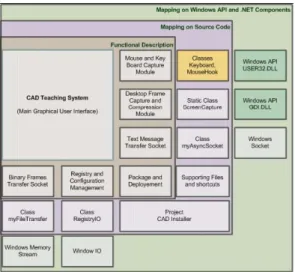
The functionality the system listed in the above section was divided in to multiple functional blocks with multiple logical layers according to visibility. Functional Blocks of the program is shown in Fig 1.
First layer the inner (top) most is GUI graphical user interface, a rapid prototype was developed to provide the required functionality, including the desired button on the user interface. The Class files were created to according to the required functionality including:
z Hooking class to capture keys,
z Screen Capture Class,
z Asynchronous Socket Class for Text transfer,
z Asynchronous Socket Class for Binary File Transfer
z Registry and Setting Saving class.
Following code shows the implemented classes of the Asynchronous Socket class for text transfer and Asynchronous Socket Class for Binary File Transfer
myBinAsyncSocket Class
public
CallBack : AsyncCallback Close() : bool
Connect(short portnum, string Ip) : void Connected() : bool
GetIP() : object Listen(short port) : void mainSocket : Socket myBinAsyncSocket() myBinAsyncSocket(short port) myBinAsyncSocket(short port, string IP) OnClientConnect(IAsyncResult asyn) : void onDataArrival : dataHandler
OnDataReceive(IAsyncResult asyn) : void onMessage : msgHandler
Result : IAsyncResult
SendBytes(byte[] DataBytes) : void SendData(string Message) : void WaitForData() : void private connectState : bool multiclient : bool status : bool Nested Types myFileTransfer Class public Close() : bool
Connect(short port, string ip) : void Listen(short port) : void
myFileTransfer()
onDataComplete : dataComplete onFileMessage : msgHandler rxBuffer : byte[]
sendFile(string filePath) : void sendStream(MemoryStream ms) : void private fileBusy : bool fileLength : int fileName : string filePath : string fileSaved : int fileSocket : myBinAsyncSocket
fileSocket_onDataArrival(byte[] rxData) : void fileSocket_onMessage(int i, string msg) : void fixPath : bool IP : string PORT : short recieving : bool rxLength : int sending : bool Nested Types
2.3.3 State Diagram of the software
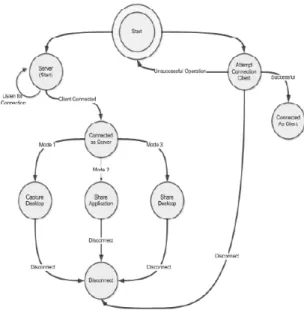
Fig 2 shows the State Diagram of the devolved software. It defines multiple states of software depending upon events and certain giving conditions. Once the functionalities finalized individually, main software state diagram was development to cater the entire requirement and define the sequence in which they will execute.
Figure 2 State diagram
3. Test Result and Discussion
3.1 Testing Plan
To evaluate the developed system, the program was run using different PC and under different operating system. Table 1 shows the computer system used for connection test.
Table 1 Computers used in the test
Table 2 shows the result of test. It indicate all connection are successful regardless the computer used or the network hardware.
3.2 Network Usage
The proposed system requires large volume data transmission between student and tutor’s computer. The network usage is an essential to maintain the graphical communication quality. In order to achieve this, the developed software provides multiple tweaking options to modify setting according to bandwidth or requirements. However on default i.e. 640x480 with 70% quality the network performances is about 5 frames per second with average bandwidth of about 100KBps. Network profile capture from network monitor software is shown in Fig 3.
Figure 3 Network Usage 3.3 Memory and CPU Usage
The proposed system is working under multi task condition therefore the memory and CPU usage is also crucial fact of program optimization. Fig 4 shows the memory usage of the system.
Figure 4 Memory usage of the system
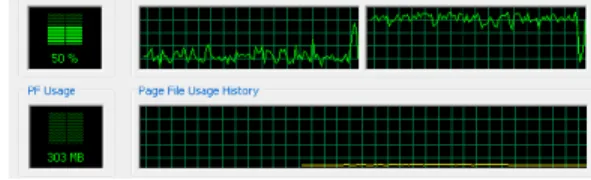
Fig 4 shows the comparison of the memory usage between Microsoft Word and the developed program. It indicated the memory usage of the program is less than the memory usage of a typical Windows application such as Microsoft Word. Fig 5 shows the CPU usage before and after the developed program running. It indicated that the developed program used nearly 50% of CPU time. This was when single connect was established. Multi connect test was not carried out due to the limitation of hardware access. Obviously with multi connects, more CPU time will be required. Improvement needs to be taken into account when the program is redeveloped.
Figure 5 CPU usage diagram 3.4 Weakness of the current system
3.4.1 Image distortion
The system is tested on various computers from difference manufacturers and specification as listed in the above section. On one system i.e. Dell GX620 it makes problem with screen reception, while the transfer runs without problem.
3.4.2 Connection lost and no responding
When the network is busy, it was found connections get disconnected due to too much network latency. The test also showed, in some cases if IP address of the target computer is entered incorrect. The system might go in Not Responding state for a while till it receives a time-out error. This issue needs to be addressed when the program is redeveloped.
3.4.3 Multithreading Issue
The system might get a multithreading warning, as there are multiple of asynchronous sockets and functions are operating at a time. It usually happens with text boxes/chat box, but occur very seldom.
These issues may be resolved but they need proper testing to make the error producing scenario the error generation.
3.5 Improvement proposals
To reach the level of the software can be put in real application, it is necessary to improve the screen reaction speed. This can be carried out by reducing amount data transmitted through the network. To achieve this, the author proposes targeting this issue through data compression of the screen image and intelligent image detections. The first one will further reduce the data transmission through transmitting highly compressed screen image to reduce the network usage. However, there is a limitation to this approach. The second approach is to detect the image change of the user’s screen. This includes the move of mouse and non-model related image changes. This will also significantly reduce the data transmission through the network.
4. Conclusion
An interactive CAD was developed for evaluation of the feasibility of using network based remote access to enhance the teaching and learning environment. The developed software underwent a systemic test in network usage, memory usage and connection reliability with different personal computers. The test result showed the memory usage was 36.792k and less than MS Word program. How every the CPU usage was nearly 50% which was higher than author expected. Necessary improvements in the software are improving performance through compression and intelligent image portion sending and including the enhancements multimedia features such as Audio Chat for better instructions, Multiple Clients connections, Webcam support, Multi language support and Customization of user interface.
5 Acknowledgment
The author would like to thank the financial support from the UK university Access fund. The author would also like to thank his PhD candidate Mr Syed Ashar Akhtar who helped to develop the program and provided technical contribution to this paper.
6 References
1. M Peruzzini, M Mengoni and M Germani, Evaluating the Impact of Virtual Reality on Mechanical Design Education, Proceedings of the ASME/AFM World Conference on Innovative Virtual Reality, Feb 25-26, 2009 Chalon-sur-Saone FRANCE.
2. R F Hamade and H A Artail, A study of the influence of technical attributes of beginner CAD users on their performance, COMPUTER-AIDED DESIGN, Vol 40, Issue: 2, pp. 262-272, 2008.
3. A Rafi, K Anuar, A Samad, M Hayati and M Mahadzir, Improving spatial ability using a Web-based Virtual Environment (WbVE), Automation in Construction, Vol. 14 Issue 6 pp 707-715, 2005. 4. Y S Tai and W Y Liu, A Web-based CAD system for learning and laboratory purpose, Conference
Information: 3rd International Conference on Web-Based Learning (ICWL 2004), AUG 08-11, 2004, Beijing P. R China.
5. T Ito, A Web-based approach to teamwork-based learning in 3D CAD exercise class, 3rd International Conference on Education and Information Systems, Technologies and Applications, Vol 2, Proceedings, 298-302, 2005.
6. F V C Ficarra and R A Rodriguez, CAD and Communicability: A System that Improves the Human-Computer Interaction, Human-computer Interaction, Pt IV, Vol. 5613, pp. 468-477, 2009
7. K Hiekata, H Yamato and P Rojanakamolsan, CAD Education Support System Based on Workflow, Conference Information,15th International Conference on Concurrent Engineering, Date: AUG 18-22, 2008 Belfast North Ireland.