Advanced evidence collection and analysis of web browser
activity
5
Junghoon Oh
a,*, Seungbong Lee
b, Sangjin Lee
aaKorea University CIST, Republic of Korea bFinancial Security Agency, Republic of Korea
Keywords:
Web browser forensics Integrated timeline analysis Search word analysis
Restoration of deleted web browser information
URL decoding
a b s t r a c t
A Web browser is an essential application program for accessing the Internet. If a suspect uses the Internet as a source of information, the evidence related to the crime would be saved in the log file of the Web browser. Therefore, investigating the Web browser’s log file can help to collect information relevant to the case. After considering existing research and tools, this paper suggests a new evidence collection and analysis methodology and tool to aid this process.
ª2011 Oh, Lee & Lee. Published by Elsevier Ltd. All rights reserved.
1.
Introduction
The Internet is used by almost everyone, including suspects under investigation. A suspect may use a Web browser to collect information, to hide his/her crime, or to search for a new crime method.
Searching for evidence left by Web browsing activity is typi-cally a crucial component of digital forensic investigations. Almost every movement a suspect performs while using a Web browser leaves a trace on the computer, even searching for information using a Web browser. Therefore, when an investigator analyzes the suspect’s computer, this evidence can provide useful infor-mation. After retrieving data such as cache, history, cookies, and download list from a suspect’s computer, it is possible to analyze this evidence for Web sites visited, time and frequency of access, and search engine keywords used by the suspect.
Research studies and tools related to analysis of Web browser log files exist, and a number of them share common characteristics.
First, these studies and tools are targeted to a specific Web browser or a specific log file from a certain Web browser. Many
kinds of Web browser provide Internet services today, so that a single user can use and compare different kinds of Web browser at the same time. For this reason, performing a different analysis for each Web browser is not an appro-priate way to detect evidence of a user’s criminal activity using the Internet. Moreover, it is not sufficient to investigate a single log file from a single browser because the evidence may be spread over several log files. This paper focuses on the most frequently used Web browsers, namely IE (Internet Explorer), Firefox, Chrome, Safari, and Opera. Fig. 1 shows the global Web browser market share on April 13, 2011, as released by NetMarketShare (Net Application, 2011a).
Second, existing research and tools remain at the level of simple parsing. In Web browser forensic investigation, it is necessary to extract more significant information related to digital forensics, such as search words and user activity.
Therefore, existing studies and tools are not powerful enough to use for Web browser forensics. In this situation, an advanced methodology to overcome the deficiencies of existing research and tools is needed. Specifically, the authors view the following requirements as essential:
5 This work was supported by the IT R&D program of MKE/KEIT [10035157, Development of Digital Forensic Technologies for Real-Time
Analysis].
*Corresponding author.
E-mail addresses: [email protected] (J. Oh), [email protected] (S. Lee), [email protected] (S. Lee).
a v a i l a b l e a t w w w . s c i e n c e d i r e c t . c o m
j o u r n a l h o m e p a g e : w w w . e l s e v i e r . c o m / l o c a t e / d i i n
1742-2876/$esee front matterª2011 Oh, Lee & Lee. Published by Elsevier Ltd. All rights reserved. doi:10.1016/j.diin.2011.05.008
It should be possible to perform
1. integrated analysis of multiple Web browsers;
2. timeline analysis. This helps the investigator to determine a suspect’s activity in the correct time zone;
3. extraction of significant information related to digital forensics, such as search words and user activity;
4. decoding encoded words at a particular URL. Because encoded words are not readable, they make investigation difficult;
5. recovery of deleted Web browser information, because a suspect can delete Web browser log information to destroy evidence.
This paper proposes a new evidence collection and anal-ysis methodology to overcome existing problems and intro-duces a tool based on this new methodology.
This paper contains six sections. Section 2 describes existing research and tools. Section 3 presents a new evidence collection and analysis methodology. The new tool based on the proposed methodology is described in Section 4, and a comparison with other tools is reported in Section 5. In Section 6, all the proposed procedures are summarized.
2.
Related research
2.1. Existing research
General research related to Web browser forensics has been targeted to specific Web browsers or to structural analysis of particular log files.
Jones (2003) explained the structure of theindex.datfile and how to extract deleted activity records from Internet Explorer. He also introduced the Pasco tool to analyze theindex.datfile. After simulating an actual crime, he described the IE and Firefox 2 Web browser forensics in two different publications (Jones and Rohyt, 2002a,b). In Section 1, he introduced the Pasco and Web Historian tools for IE forensics, which are available to the public, and the IE History and FTK tools, which are not. In Section 2, he described forensics in Firefox 2 using a cache file. The cache file in Firefox 2 is not saved in the same way as in IE, so he suggested an analysis method using the cache file structure.
Pereira (2009) explained in detail the changes in the history system that occurred when Firefox 2 was updated to Firefox 3 and proposed a new method of searching deleted history information using unallocated fields. During execution of Firefox 3, a rollback journal file is generated using a small section or the entire contents ofPlaces.sqlite.If processing is
stopped, thisrollback journalfile is erased (Pereira, 2009). For this reason, it is possible to extract history information of Firefox 3 in unallocated field. The author suggests a method of extracting history information from Firefox 3 by examining theSQLitedatabase structure.
2.2. Existing tools
The tools for analyzing Web browser log files that exist today are targeted to a specific web browser or to specific informa-tion. This approach can generate biased information which may lead to wrong conclusions in a digital forensics investigation.
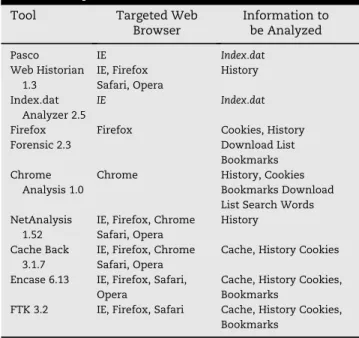
Cacheback and Encase are available tools to investigate various web browsers and to analyze a wide range of infor-mation. However, Encase does not provide an integrated analysis of several different Web browsers. This makes it difficult for an investigator to detect evidence of activity if the suspect uses different Web browsers during his crime. With another tool,Cacheback,it is possible to perform an integrated analysis of different Web browsers, but this tool uses a simple parsing process to analyze cache and history files.
Table 1 relates the target browsers and accessible infor-mation with existing tools.
3.
Advanced evidence analysis
Users perform various activities with a Web browser, such as information retrieval, e-mail, shopping, news, online banking, blogging, and SNS. Therefore, the forensic investigator should be able to analyze the user’s activities when performing the investigation. Search word information, which can be used to analyze information retrieval activity, is especially important. In addition, if a user uses multiple Web browsers, information generated from different Web browsers must be analyzed on the same timeline.
Table 1eRepresentative forensic tools for Web browsers.
Tool Targeted Web
Browser Information to be Analyzed Pasco IE Index.dat Web Historian 1.3 IE, Firefox Safari, Opera History Index.dat Analyzer 2.5 IE Index.dat
Firefox Firefox Cookies, History
Forensic 2.3 Download List
Bookmarks Chrome
Analysis 1.0
Chrome History, Cookies Bookmarks Download List Search Words NetAnalysis
1.52
IE, Firefox, Chrome Safari, Opera
History Cache Back
3.1.7
IE, Firefox, Chrome Safari, Opera
Cache, History Cookies Encase 6.13 IE, Firefox, Safari,
Opera
Cache, History Cookies, Bookmarks
FTK 3.2 IE, Firefox, Safari Cache, History Cookies, Bookmarks
However, previous Web browser forensics studies have targeted a specific Web browser or specific information files, and existing tools remain at the level of simple parsing of Web browser log files such as cache, history, and cookie files.
For these reasons, a new evidence collection and analysis methodology is needed. This methodology should perform integrated Web browser analysis and extract information that is useful from the viewpoint of digital forensic analysis on the basis of Web browser log files.
3.1. Integrated analysis
Web browsers are diverse, with each one having its own characteristics. This enables users to choose their own favorites or to try various Web browsers at the same time. In this situation, it is hard to trace the Web sites that a user has visited if the forensic investigator can analyze only log files from a specific Web browser.
Therefore, the investigator must be able to examine all existing Web browsers in one system and to perform inte-grated analysis of multiple Web browsers. For inteinte-grated analysis, the critical information, more than all other infor-mation, is time information. Every Web browser’s log file contains time information, and therefore it is possible to construct a timeline array using this time information.
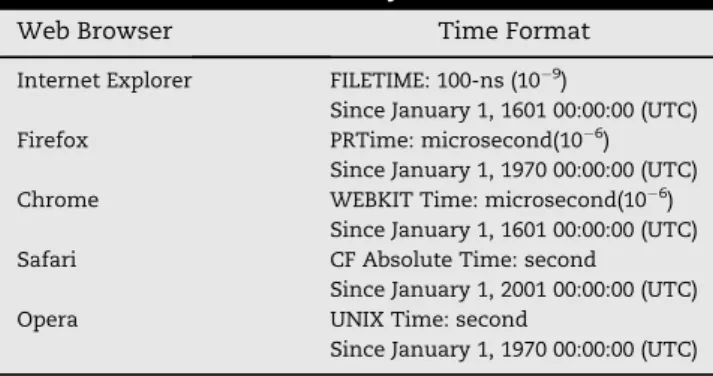
However, the five leading Web browsers have different time formats. Therefore, the investigator must convert these different time formats to a single format. With this single time format, the investigator can perform an integrated analysis of multiple Web browsers.
Table 2 describes the various time formats used by different Web browsers.
3.2. Timeline analysis
In a digital forensic investigation, it is critical to detect the movement of suspect along a timeline. By performing a time-line analysis, the investigator can trace the criminal activities of the suspect in their entirety. The analysis provides the path of motion from one Web site to another and what the suspect did on each specific Web site.
In addition, time zone information must be considered. As described in Section 3.1, all five leading Web browsers use UTC time. As a result, the time information extracted from the log file is not the suspect’s local time. For this reason, the
investigator must apply a time zone correction to the time information. Otherwise, the investigator cannot know the exact local time of the suspect’s Internet behavior. For instance, if the investigator is extracting log files for a suspect in New York (UTC/GMTe5 h), the investigator should apply a correction to New York’s time zone to the time information. 3.3. Analysis of search history
Beyond the investigation of which Web sites the suspect has visited, it is important to investigate the search words he used in the search engine. These search words may provide keywords for his crime, whether a single word or sometimes a sentence. In this case, search words are evidence of the suspect’s efforts to gather information for his crime and may specify the purpose, target, and methods of the crime.
After using a search engine, search words are saved as HTTP URL information. Fig. 2 shows the general HTTP URL structure (Berners-Lee and Masinter).
In this structure, thePathreveals that the relevant HTTP URL was used for search activity. In addition, the variable name provides the search words. For instance, in the Google search engine, if the search word forensic is entered, the following URL information is generated:
http://www.google.com/search?
hl¼en&source¼hp&q¼forensic&aq¼f&oq¼&aqi¼g10
From this HTTP URL, much information can be extracted, for example that the host isgoogle.comand the path is/search. This provides relevant HTTP URL information related to search activity. The search words that the suspect wants to find are clearly noticeable after the variableq.In other words, the value of the variableqis the search words.
Every search engine uses different terms for the host, path, and variable. Therefore, research into the HTTP URL structure of different search engines is needed. The authors examined the global top ten search engines: Google, Yahoo, Baidu, Bing, Ask, AOL, Excite, Lycos, Alta Vista, and MSN.
Fig. 3 shows the global search engine market share on April 13, 2011, as released by NetMarketShare (Net Application, 2011b).
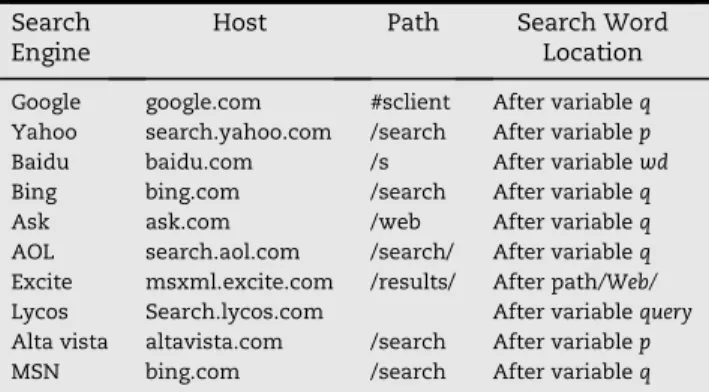
Table 3 shows the typical host, path, and search word locations in the HTTP URL of each search engine.
It is clear from Table 3 that every search engine has different host, path, and search word locations, and therefore
Fig. 2eGeneral HTTP URL information structure.
Fig. 3eGlobal market share of search engines. Table 2eTime formats used by five Web browsers.
Web Browser Time Format
Internet Explorer FILETIME: 100-ns (109)
Since January 1, 1601 00:00:00 (UTC) Firefox PRTime: microsecond(106)
Since January 1, 1970 00:00:00 (UTC) Chrome WEBKIT Time: microsecond(106)
Since January 1, 1601 00:00:00 (UTC) Safari CF Absolute Time: second
Since January 1, 2001 00:00:00 (UTC)
Opera UNIX Time: second
a single method cannot be used to extract the search words. Extracting search words is also not easy for an unknown HTTP URL. Therefore, a method for extracting search words from any browser is needed.
Upon closer inspection of the data in Table 3, it becomes apparent that several assumptions are made in HTTP URL addresses. First, most host and path names in different search engines contain the word search. Moreover, most search word variables are called q, p, or query. These assumptions enable an investigator to extract search words from an unknown HTTP URL whenever it is possible to find the wordsearch in the host and path name and qor pas a variable name.
These observations apply to the top ten search engines. They also apply to certain minor search engines which are not on the top list, such asnaver, daum,and nate from Korea, livedoorfrom Japan, andneteasefrom China. Search engines which are not adapted to this method need to construct an additional signature database to extract search words.
Using this methodology, an investigator can extract the search words that a suspect used and can deduce the purpose, target, and method of the crime.
3.4. Analysis on URL encoding
In an HTTP URL, characters other than ASCII are encoded for storage. In other words, when encoded characters appear, the words are not English. In a digital forensic investigation, encoded characters create confusion for the investigator. Therefore, decoding encoded characters is important for investigators in non-English-speaking countries.
In most cases, non-English search words are encoded. If you search for the wordforensicin Korean, the resulting HTTP URL address is as follows:
http://www.google.com/search?hl¼en&source¼hp&q¼% ED%8F%AC%EB%A0%8C%EC%8B%9D&aq¼f&oq¼&aqi¼g10.
As described in Section 3.3, search words can be located if the variableqcan be found, but this approach will not provide the meaning of encoded search words. Encoded characters in an HTTP URL are expressed by means of a hexadecimal code and the character%, which is added before every one-byte character.
The method of encoding is different from each sites. In global top ten search engines, most sites basically use UTF-8
encoding. Exclusively, ‘Baidu’ basically uses GB2312 encod-ing, but uses Unicode encoding when search words is not Chinese.
In East Asia, most search engines use an encoding belonging to the DBCS (Double Byte Character Set) encoding class. DBCS encoding does not have a standard format. In this paper, DBCS encoding means an encoding method for two-byte character sets such asKS X 1001, JIS X 0208,andGB 18030.For instance, South Korean search engines such asnaver, nate,anddaumuse EUC-KR encoding, while Chinese search engines such asnetease use GB2312 and BIG5 encoding. In addition, Japanese search engines such aslivedooruse EUC-JP and Shift-JIS encoding.
As described above, most search engines choose one of the encoding methods from the UTF-8, Unicode, or DBCS encod-ing classes for search words or any other characters, but in special cases, some search engines use multiple encoding methods for multiple words in a single HTTP URL. Therefore, the methodology to decide which encoding method has been used for a set of search words must be based on the signature, not on the search engine.
In the case of Unicode encoding, the encoding characters include %u w or %26%23 w %3B. If these signatures are present, the investigator can determine that the encoding is Unicode. In the case of UTF-8 encoding, the investigator can decide using a unique UTF-8 encoding bit signature specified in RFC 3629 (Yergeau). However, UTF-8 encoding also includes a two-byte encoding type. This means that DBCS encoding and two-byte UTF-8 encoding cannot be distinguished. In this case, the method of distinction based on search engine can be used, or all the words can be decoded by both decoding methods and printed.
Using this methodology, the investigator can distinguish between encoding methods and use the proper decoding method for encoded words. This will help to find the meaning of the encoded words.
3.5. Analysis of user activity
In a trace of Web browser activity for an investigation, a single piece of HTTP URL information is not enough to detect the online movements of a suspect. If a suspect’s movements could be classified using HTTP URL information, it would be easy to trace the sites visited and estimate the suspect’s movements on a timeline. However, the investigator must access each relevant Web site to estimate user activity. This operation forces the investigator to work with the Web browser directly, which may take too much time. To increase the speed of investigation for digital forensic analysis, a method of estimating user activity from HTTP URL infor-mation is necessary.
The contents of the HTTP URL information are decided by the person responsible for the Web site. Information such as domain and path in the HTTP URL includes operation pro-cessing and the context of the Web page. Generally, the activity that the Web page supports is shown in the HTTP URL as a specific word. With this fact, a specific keyword from the HTTP URL may classify the activity that the user has under-taken online.
Table 4 describes the activity and relevant keyword in the HTTP URL.
Table 3eHost, path, and search word locations for different search engines.
Search Engine
Host Path Search Word
Location Google google.com #sclient After variableq
Yahoo search.yahoo.com /search After variablep
Baidu baidu.com /s After variablewd
Bing bing.com /search After variableq
Ask ask.com /web After variableq
AOL search.aol.com /search/ After variableq
Excite msxml.excite.com /results/ After path/Web/
Lycos Search.lycos.com After variablequery
Alta vista altavista.com /search After variablep
Table 4 classifies specific activities that a user can under-take through a Web browser. This table does not fully describe the whole activity. For example, all blog sites do not have the wordblogas part of their HTTP URL information. In this case, an additional database construct is needed to manage the specific word to describe the other activities that the user performed.
3.6. Recovery of deleted information
Most Web browsers provide an erase function for log infor-mation such as the cache, history, cookies, and download list. If a user has run this function to erase log information, investigation will be difficult.
There are two different ways to erase log information. The first involves reinitializing or overwriting log data. In this case, the log file is not deleted. The second involves deleting the
relevant log file. If the Web user made the first choice, there is no way to recover the log information, but if the Web browser made the second choice, it is possible to recover the deleted file and extract the log information.
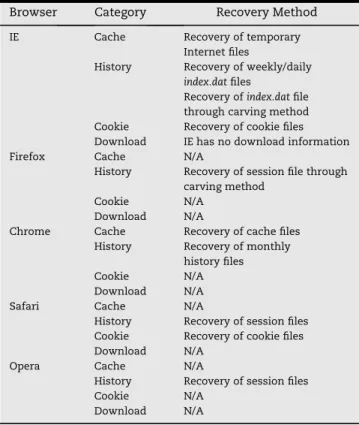
Table 5 shows the relationship between the erasing method and the type of log information for five Web browsers.
If log information has been reinitialized, it is not possible to recover the original data, but it is possible if an analogous information file exists. For instance, the history information and session information files are similar in a Web browser, so if you can recover the session information, you can partially recover deleted history information.
The recovery method for deleted log information is as follows:
In Internet Explorer, deleted temporary Internet files, deleted weekly/dailyindex.dat files, and deleted cookie files can be recovered. This means that the investigator can extract
Fig. 4eWEFA structure.
Table 6eRecovery method for deleted information in five Web browsers.
Browser Category Recovery Method
IE Cache Recovery of temporary Internet files
History Recovery of weekly/daily
index.datfiles
Recovery ofindex.datfile through carving method Cookie Recovery of cookie files Download IE has no download information
Firefox Cache N/A
History Recovery of session file through carving method
Cookie N/A
Download N/A
Chrome Cache Recovery of cache files History Recovery of monthly
history files
Cookie N/A
Download N/A
Safari Cache N/A
History Recovery of session files Cookie Recovery of cookie files Download N/A
Opera Cache N/A
History Recovery of session files
Cookie N/A
Download N/A
Table 5eMethods of erasing log information in five Web browsers.
Browser Category Erasing Method
IE Cache Initialization ofindex.datfile Deletion of Temporary Internet files History Initialization ofindex.datfile
Deleting daily and/or weekly
index.datfiles
Cookie Initialization ofindex.datfile Deletion of cookie files Download IE has no download information Firefox Cache Initialization
History Initialization Cookie Initialization Download Initialization Chrome Cache Deletion
History Initialization Cookie Initialization Download Initialization Safari Cache Initialization History Initialization Cookie Deletion Download Initialization Opera Cache Initialization History Initialization Cookie Initialization Download Initialization Table 4eUser activities in a Web browser.
User Activity Keyword in URL
Search Existence of Searched words
Mail Mail
Blogging Blog
SNS Facebook, Twitter.
News News
Weather Weather
Shopping Shopping, Amazon.
Game Game
Audio-Visual content Video
Music Music
Internet Explorer log information by recovering these files, but all index.datfiles except the weekly/daily index.dat files are reinitialized and impossible to recover.
In Firefox, the session log file is simply deleted. If the deleted session log file can be recovered, the investigator can extract a small part of the history information from this file. Other log files are reinitialized and impossible to recover.
In Chrome, the cache files are simply deleted, so it is possible to extract information from recovered cache files. The monthly history file is also simply deleted. Therefore, it is possible to recover deleted history information for the rele-vant month. Other log files are reinitialized and impossible to recover.
In Safari, the cookie file is simply deleted, so it is possible to extract information from a recovered cookie file. The session file is also simply deleted. Therefore, the investigator can extract a small part of the history information from a recov-ered session file. Other log files are reinitialized and impos-sible to recover.
In Opera, the session log file is simply deleted, so it is possible to recover a part of the history information from this file. Other log files are reinitialized and impossible to recover. Table 6 shows the recovery method for deleted log infor-mation in five Web browsers.
In addition, the time available for recovering deleted information should be considered. In general, a Web browser and its generated information are installed and saved into
a partition of the operating system. From the viewpoint of the file system, a deleted file can be recovered as long as its rele-vant file metadata have not been overwritten by a new file’s metadata. In fact, new files are generated endlessly in the system partition, and therefore it is impossible to recover a deleted file after a certain time. In particular, the Vista and Windows 7 OS automatically overwrite a deleted file’s meta-data for disk defragmentation. This means that little metameta-data from deleted files remains at any given time. Therefore, fast recovery action is recommended.
There is another way to recover deleted log information: the carving method. In the case of Internet Explorer, there are many deleted daily index.dat files in unallocated space because Internet Explorer automatically transfers history information from the dailyindex.datfiles to the weeklyindex.datfile at the end of the week and deletes the dailyindex.datfiles. There are also many Firefox session files in unallocated space because when Firefox is terminated, it automatically deletes the session file.
Because of these facts, an investigator can extract much deleted history information using the carving method.
Fig. 6eWEFA(Web Browser Forensic Analyzer). Fig. 5eIntegrated analysis.
4.
Tool development
The WEFA (Web Browser Forensic Analyzer) tool is introduced in this paper. Available tool environments include Windows 2000, XP, Vista, and 7, and the targeted Web browsers for anal-ysis are Internet Explorer, Firefox, Chrome, Safari, and opera. Fig. 6 shows the user interface of WEFA.
The basic structure of the tool is illustrated in Fig. 4. From the recovery module and the collection module, recovered or collected Web browser log files are parsed in the analysis module. Then information such as the cache, history, cookies, and the download list is extracted. This extracted information is used as input to each submodule.
All information extracted from the analysis module is output in a single window, shown in Fig. 5. This window provides an integrated single timeline based on time infor-mation from the different Web browsers. This makes it easier for an investigator to perform an integrated analysis in a multiple Web browser environment.
Using the timeline analysis function, the investigator can classify history information in detail according to date and time, as shown in Fig. 7. This function helps to analyze a suspect’s behavior according to date and time.
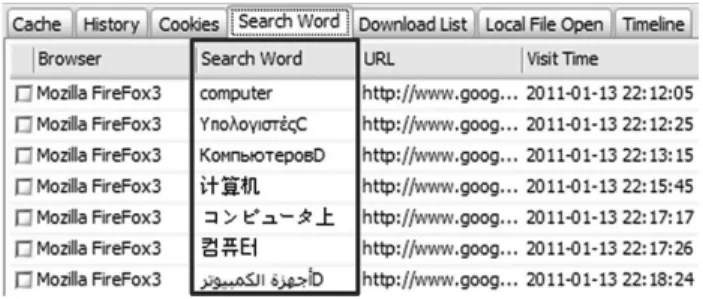
In addition, WEFA provides extraction of search words from HTTP URLs in the history information, as shown in Fig. 8. If search words are encoded, the decoding process is acti-vated, and the search words are decoded into readable words, as shown in Fig. 9. Moreover, if there are multiple encoded words with different encoding methods in a single HTTP URL, WEFA can separate the encoding methods and decode each encoded word.
From the history information, this tool provides a classifi-cation of user activity through specific keywords from HTTP URLs, as shown in Fig. 10.
For the convenience of the investigator, WEFA provides a cache/history preview function. With this function, the investigator does not need to run each Web browser to
confirm the contents of the cache and the Web sites related to the history information, as shown in Fig. 11.
WEFA also provides an arranging function for URL parameters, as shown in Fig. 12. Some URLs have a large number of parameters, which makes it difficult for the investigator to separate out each parameter. Using this func-tion, the investigator can easily confirm each parameter and find important information such as passwords.
Finally, WEFA provides keyword search, regular expression search, and search by time periodic to analyze content, fol-lowed by conversion of analyzed content to a CSV-format file. The tool also provides report generation based on infor-mation selected by the investigator.
5.
Functional comparison with existing tools
The authors performed a comparison between WEFA and existing tools that investigator use in the forensic field today. Results are shown in Table 7. The functions for comparison were selected based on the advanced requirements suggested in this paper.
Cacheback and NetAnalysis can investigate the five most used Web browsers. Functions include integrated analysis, timeline analysis, keyword search, regular expression search, log file extraction, and report writing. For the purposes of digital forensics, it is critically important to be able to extract search words and user activity information from log infor-mation. A multiple URL decoding function is also needed. However those functions are not available in these tools. Encase and FTKsupport various Web browsers. These tools also provide functions such as keyword search, log file gath-ering, and cache file preview, but all these functions are designed for file system analysis, not for Web browser anal-ysis. Therefore, these tools are not well suited to Web browser forensic investigation.
Fig. 11eCache/history preview. Fig. 10eAnalysis on user performance. Fig. 8eSearch word analysis.
The proposed WEFA tool provides improvements to the weak points of other tools and has the strength of providing efficient analysis of Web browsers compared to past tools. This tool provides an integrated analysis function for all five Web browsers in various time zones. In addition, online user activity, search words, and URL parameters, which are significant information for digital forensics, can be confirmed. In special cases, if the search word information is encoded in unfamiliar characters, this tool provides a decoding function. This function helps to extract search words in various languages. With these functions, an investigator can quickly uncover the objectives of a crime and the intent of the suspect.
If the suspect has erased log information, this tool can recover deleted log information by recovery of deleted log files or the carving method.
After analyzing information from the tool, it is possible to use the various search functions such as keyword search, regular expression search, and search by time period. The investigator can then generate a report based on information he selects.
In addition, the investigator can confirm the content of suspect visits to Web sites on a specific date through the timeline analysis and preview functions.
6.
Conclusions
Tracing evidence of Web browser use is an important process for digital forensic investigation. After analyzing a trace of Web browser use, it is possible to determine the objective, methods, and criminal activities of a suspect.
When an investigator is examining a suspect’s computer, the Web browser’s log file will be one of his top concerns. This paper has reviewed existing tools and research related to Web browser forensics and uncovered their problems. In response, an advanced methodology has been proposed to remove some of the limitations that exist in this field.
When investigating evidence of Web browser use, it is necessary to perform integrated analysis for various browsers at the same time and to use timeline analysis to detect the online movements of a suspect over time. In addition, the search words used by the suspect must be investigated because they can help to deduce the characteristics and objectives of the suspect.
If the search words are encoded, a decoding process is required. Investigation based on user activity is also necessary from the viewpoint of digital forensics. The proposed WEFA tool will be useful in forensic investigation to perform fast analysis and to evaluate the suspect’s criminal activity as quickly as possible.
In this paper, Web browsers running in a Windows envi-ronment have been investigated. Future research will involve researching Web browser forensics under various operating systems, not only for Windows, but also for Linux, Mac, and mobile operating systems.
r e f e r e n c e s
Berners-Lee T, Masinter L. RFC 1738:Uniform Resource Locator(URL), http://tools.ietf.org/html/rfc1738.
Jones Keith J. Forensic analysis of internet explorer activity files. Foundstone, http://www.foundstone.com/us/pdf/wp_index_ dat.pdf; 2003.
Jones Keith j, Rohyt Blani. Web browser forensic. Security focus, http://www.securityfocus.com/infocus/1827; 2005a.
Jones Keith j, Rohyt Blani. Web browser forensic. Security focus, http://www.securityfocus.com/infocus/1832; 2005b.
Net application. Browser market share, https://marketshare. hitslink.com/browser-market-share.aspx?qprid¼0; 2011a. Net application. Browser market share, http://marketshare.hitslink.
com/search-engine-market-share.aspx?qprid¼4; 2011b. Pereira Murilo Tito. Forensic analysis of the Firefox3 internet
history and recovery of deleted SQLite records. Digital Investigation; 2009:93e103. 5.
Fig. 12eURL parameter analysis.
Table 7eFunctional comparison with existing tools.
Function WEFA Cache
Back 3.17 Encase 6.13 FTK 3.2 NetAnalysis 1.52 Supports All Five
Web Browsers
O O O X O
Supports All Four Types of Log information O X X X X Integrated Analysis O O X O O Timeline Analysis O O X X O Time Zone Selection O O O O O Search Word Extraction O X X X X Multiple URL Decoding O X X X X Classification of User Activity O X X X X Recovery of Deleted Information O X O O O Preview Function O O O O O URL Parameter Analysis O X X X X Keyword Search O O O O O Regular Expression Search O O O O O Search by Period O O O O O
Log File Gathering O O O O O
Yergeau F. RFC 3629: UTF-8, a transformation format of ISO 10646, http://tools.ietf.org/html/rfc3629.
Junghoon Ohreceived his B.S. degree in Computer Science from Dongguk University, He is now studying master course in Grad-uate School of Information Management and Security, Korea University. He is currently working for Digital Forensic Research Center in Korea University. He has performed projects related to Web Browser Forensics and Android Forensics. His research interests are Web Browser Forensics, Android Forensics and digital forensics.
Seungbong Lee received his B.S. degree in mathematics from University of Seoul. Then, he received his Master’s degree in
Information Management and Security from Korea University. He is now working in Financial Security Agency. He has performed projects related to web browser forensics and file system. His research interests are digital forensics, web browser forensics, file system.
Sangjin LeeReceived his Ph.D. degree from Korea University. He is now a Professor in Graduate School of Information Management and Security at Korea University and the head of Digital Forensic Research Center in Korea University since 2008. He has published many research papers in international journals and conferences. He has been serving as chairs, program committee members, or organizing committee chair for many domestic conferences and workshops. His research interests include digital forensic, steg-anography, cryptography and cryptanalysis.