Spring Batch - Reference Documentation
Spring Batch 1.0
Copyright © 2005-2007 Dave Syer, Wayne Lund, Lucas Ward
Copies of this document may be made for your own use and for distribution to others, provided that you do not charge any fee for such copies and further provided that each copy contains this Copyright Notice, whether
1.1.1. Background ... 1 1.1.2. Usage Scenarios ... 2
1.1.3. Spring Batch Architecture ... 2 2. The Domain Language of Batch ... 4
2.1. Introduction ... 4
2.2. Batch Application Style Interactions and Services ... 4 2.3. Job Stereotypes ... 5 2.3.1. Job ... 6 2.3.2. JobInstance ... 6 2.3.3. JobParameters ... 7 2.3.4. JobExecution ... 7 2.4. Step Stereotypes ... 9 2.4.1. Step ... 9 2.4.2. StepExecution ... 10 2.4.3. ExecutionContext ... 11 2.5. JobRepository ... 11 2.6. JobLauncher ... 12 2.7. JobLocator ... 12 2.8. Item Reader ... 12 2.9. Item Writer ... 12 2.10. Tasklet ... 13
3. ItemReaders and ItemWriters ... 14 3.1. Introduction ... 14 3.2. ItemReader ... 14 3.3. ItemWriter ... 14 3.4. ItemStream ... 15 3.5. Flat Files ... 15 3.5.1. The FieldSet ... 16 3.5.2. FlatFileItemReader ... 16 3.5.3. FlatFileItemWriter ... 21 3.6. XML Item Readers and Writers ... 22
3.6.1. StaxEventItemReader ... 24 3.6.2. StaxEventItemWriter ... 26 3.7. Creating File Names at Runtime ... 27 3.8. Database ... 28
3.8.1. Cursor Based ItemReaders ... 28
3.8.2. Driving Query Based ItemReaders ... 31 3.8.3. Database ItemWriters ... 35
3.9. Reusing Existing Services ... 36 3.10. Item Transforming ... 36
3.10.1. The Delegate Pattern and Registering with the Step ... 38 3.10.2. Chaining ItemTransformers ... 38
3.11. Validating Input ... 39
3.11.1. The Delegate Pattern and Registering with the Step ... 40 3.12. Creating Custom ItemReaders and
ItemWriters ... 40
3.12.1. Custom ItemReader Example ... 40 3.12.2. Custom ItemWriter Example ... 43 4. Configuring and Executing A Job ... 45
4.2. Run Tier ... 45
4.2.1. Running Jobs from the Command Line ... 46 4.3. Job Tier ... 48
4.3.1. SimpleJobLauncher ... 48 4.3.2. SimpleJobRepository ... 50 4.3.3. SimpleJob ... 52
4.3.4. JobFactory and Stateful Components in Steps ... 54 4.4. Application Tier ... 54
4.4.1. ItemOrientedStep ... 55 4.4.2. TaskletStep ... 61
4.5. Examples of Customized Business Logic ... 62 4.5.1. .... 62
4.5.2. Logging Item Processing and Failures ... 62
4.5.3. Stopping a Job Manually for Business Reasons ... 63 4.5.4. Adding a Footer Record ... 64
5. Repeat ... 66 5.1. RepeatTemplate ... 66 5.1.1. RepeatContext ... 66 5.1.2. ExitStatus ... 67 5.2. Completion Policies ... 67 5.3. Exception Handling ... 68 5.4. Listeners ... 68 5.5. Parallel Processing ... 68 5.6. Declarative Iteration ... 69 6. Retry ... 70 6.1. RetryTemplate ... 70 6.1.1. RetryContext ... 70 6.2. Retry Policies ... 70 6.2.1. Stateless Retry ... 71 6.2.2. Stateful Retry ... 72 6.3. Backoff Policies ... 73 6.4. Listeners ... 73 6.5. Declarative Retry ... 73 7. Unit Testing ... 75
7.1. End To End Testing Batch Jobs ... 75 7.2. Extending Unit Test frameworks ... 76 A. List of ItemReaders ... 78
A.1. Item Readers ... 78 A.2. Item Writers ... 79 B. Meta-Data Schema ... 81 B.1. Overview ... 81 B.1.1. Version ... 81 B.1.2. Identity ... 81 B.2. BATCH_JOB_INSTANCE ... 82 B.3. BATCH_JOB_PARAMS ... 82 B.4. BATCH_JOB_EXECUTION ... 83 B.5. BATCH_STEP_EXECUTION ... 84 B.6. BATCH_STEP_EXECUTION_CONTEXT ... 85 B.7. Archiving ... 85 Glossary ... 87
1.1. Introduction
Many applications within the enterprise domain require bulk processing to perform business operations in mission critical environments. These business operations include automated, complex processing of large volumes of information that is most efficiently processed without user interaction. These operations typically include time based events (e.g. month-end calculations, notices or correspondence), periodic application of complex business rules processed repetitively across very large data sets (e.g. Insurance benefit determination or rate adjustments), or the integration of information that is received from internal and external systems that typically requires formatting, validation and processing in a transactional manner into the system of record. Batch processing is used to process billions of transactions every day for enterprises.
Spring Batch is a lightweight, comprehensive batch framework designed to enable the development of robust batch applications vital for the daily operations of enterprise systems. Spring Batch builds upon the productivity, POJO-based development approach, and general ease of use capabilities people have come to know from the Spring Framework, while making it easy for developers to access and leverage more advance enterprise services when necessary. Spring Batch is not a scheduling framework. There are many good enterprise schedulers available in both the commercial and open source spaces such as Quartz, Tivoli, Control-M, etc. It is intended to work in conjunction with a scheduler, not replace a scheduler.
Spring Batch provides reusable functions that are essential in processing large volumes of records, including logging/tracing, transaction management, job processing statistics, job restart, skip, and resource management. It also provides more advance technical services and features that will enable extremely high-volume and high performance batch jobs though optimization and partitioning techniques. Simple as well as complex, high-volume batch jobs can leverage the framework in a highly scalable manner to process significant volumes of information.
1.1.1. Background
While open source software projects and associated communities have focused greater attention on web-based and SOA messaging-based architecture frameworks, there has been a notable lack of focus on reusable architecture frameworks to accommodate Java-based batch processing needs, despite continued needs to handle such processing within enterprise IT environments. The lack of a standard, reusable batch architecture has resulted in the proliferation of many one-off, in-house solutions developed within client enterprise IT functions. SpringSource and Accenture have collaborated to change this. Accenture's hands-on industry and technical experience in implementing batch architectures, SpringSource's depth of technical experience, and Spring's proven programming model together mark a natural and powerful partnership to create high-quality, market relevant software aimed at filling an important gap in enterprise Java. Both companies are also currently working with a number of clients solving similar problems developing Spring-based batch architecture solutions. This has provided some useful additional detail and real-life constraints helping to ensure the solution can be applied to the real-world problems posed by clients. For these reasons and many more, SpringSource and Accenture have teamed to collaborate on the development of Spring Batch.
Accenture has contributed previously proprietary batch processing architecture frameworks, based upon decades worth of experience in building batch architectures with the last several generations of platforms, (i.e., COBOL/Mainframe, C++/Unix, and now Java/anywhere) to the Spring Batch project along with committer resources to drive support, enhancements, and the future roadmap.
The collaborative effort between Accenture and SpringSource aims to promote the standardization of software processing approaches, frameworks, and tools that can be consistently leveraged by enterprise users when creating batch applications. Companies and government agencies desiring to deliver standard, proven solutions to their enterprise IT environments will benefit from Spring Batch.
1.1.2. Usage Scenarios
A typical batch program generally reads a large number of records from a database, file, or queue, processes the data in some fashion, and then writes back data in a modified form. Spring Batch automates this basic batch iteration, providing the capability to process similar transactions as a set, typically in an offline environment without any user interaction. Batch jobs are part of most IT projects and Spring Batch is the only open source framework that provides a robust, enterprise-scale solution.
Business Scenarios
• Commit batch process periodically
• Concurrent batch processing: parallel processing of a job • Staged, enterprise message-driven processing
• Massively parallel batch processing • Manual or scheduled restart after failure
• Sequential processing of dependent steps (with extensions to workflow-driven batches) • Partial processing: skip records (e.g. on rollback)
• Whole-batch transaction: for cases with a small batch size or existing stored procedures/scripts Technical Objectives
• Batch developers use the Spring programming model: concentrate on business logic; let the framework take care of infrastructure.
• Clear separation of concerns between the infrastructure, the batch execution environment, and the batch application.
• Provide common, core execution services as interfaces that all projects can implement.
• Provide simple and default implementations of the core execution interfaces that can be used ‘out of the box’.
• Easy to configure, customize, and extend services, by leveraging the spring framework in all layers.
• All existing core services should be easy to replace or extend, without any impact to the infrastructure layer. • Provide a simple deployment model, with the architecture JARs completely separate from the application,
built using Maven.
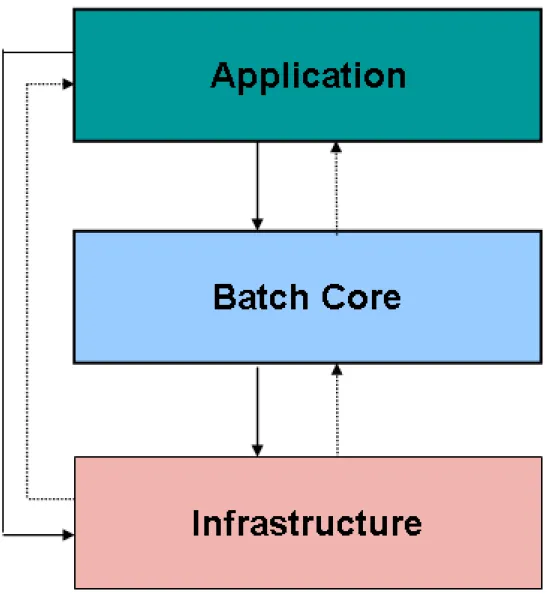
Spring Batch is designed with extensibility and a diverse group of end users in mind. The figure below shows a sketch of the layered architecture that supports the extensibility and ease of use for end-user developers.
Figure 1.1: Spring Batch Layered Architecture
This layered architecture highlights three major high level components: Application, Core, and Infrastructure. The application contains all batch jobs and custom code written by developers using Spring Batch. The Batch Core contains the core runtime classes necessary to launch and control a batch job. It includes things such as a
JobLauncher, Job, and Step implementations. Both Application and Core are built on top of a common
infrastructure. This infrastructure contains common readers and writers, and services such as the
RetryTemplate, which are used both by application developers(ItemReader and ItemWriter) and the core
2.1. Introduction
To any experienced batch architect, the overall concepts of batch processing used in Spring Batch should be familiar and comfortable. There are “Jobs” and “Steps” and developer supplied processing units called ItemReaders and ItemWriters. However, because of the Spring patterns, operations, templates, callbacks, and idioms, there are opportunities for the following:
• significant improvement in adherence to a clear separation of concerns • clearly delineated architectural layers and services provided as interfaces
• simple and default implementations that allowed for quick adoption and ease of use out-of-the-box • significantly enhanced extensibility
The diagram below is only a slight variation of the batch reference architecture that has been used for decades. It provides an overview of the high level components, technical services, and basic operations required by a batch architecture. This architecture framework is a blueprint that has been proven through decades of implementations on the last several generations of platforms (COBOL/Mainframe, C++/Unix, and now Java/anywhere). JCL and COBOL developers are likely to be as comfortable with the concepts as C++, C# and Java developers. Spring Batch provides a physical implementation of the layers, components and technical services commonly found in robust, maintainable systems used to address the creation of simple to complex batch applications, with the infrastructure and extensions to address very complex processing needs.
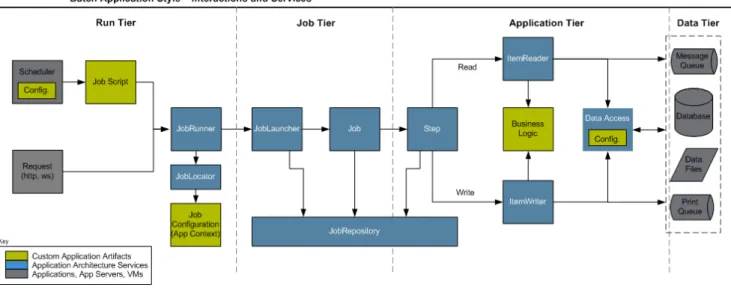
2.2. Batch Application Style Interactions and Services
Figure 2.1: Batch Stereotypes
The above diagram highlights the interactions and key services provided by the Spring Batch framework. The colors used are important to understanding the responsibilities of a developer in Spring Batch. Grey represents an external application such as an enterprise scheduler or a database. It's important to note that scheduling is grey, and should thus be considered separate from Spring Batch. Blue represents application architecture services. In most cases these are provided by Spring Batch with out of the box implementations, but an
architecture team may make specific implementations that better address their specific needs. Yellow represents the pieces that must be configured by a developer. For example, they need to configure their job schedule so that the job is kicked off at the appropriate time. They also need to create a job configuration that defines how their job will be run. It is also worth noting that theItemReaderandItemWriter used by an application may
just as easily be a custom one made by the developer for the specific batch job, rather than one provided by Spring Batch or even an architecture team.
The Batch Application Style is organized into four logical tiers, which include Run, Job, Application, and Data. The primary goal for organizing an application according to the tiers is to embed what is known as "separation of concerns" within the system. These tiers can be conceptual but may prove effective in mapping the deployment of the artifacts onto physical components like Java runtimes and integration with data sources and targets. Effective separation of concerns results in reducing the impact of change to the system. The four conceptual tiers containing batch artifacts are:
• Run Tier: The Run Tier is concerned with the scheduling and launching of the application. A vendor product is typically used in this tier to allow time-based and interdependent scheduling of batch jobs as well as providing parallel processing capabilities.
• Job Tier: The Job Tier is responsible for the overall execution of a batch job. It sequentially executes batch steps, ensuring that all steps are in the correct state and all appropriate policies are enforced.
• Application Tier: The Application Tier contains components required to execute the program. It contains specific tasklets that address the required batch functionality and enforces policies around a tasklet execution (e.g., commit intervals, capture of statistics, etc.)
• Data Tier: The Data Tier provides the integration with the physical data sources that might include databases, files, or queues.
2.3. Job Stereotypes
This section describes stereotypes relating to the concept of a batch job. A job is an entity that encapsulates an entire batch process. As is common with other Spring projects, a Job will be wired together via an XML
configuration file. This file may be referred to as the "job configuration". However, Jobis just the top of an
2.3.1. Job
A job is represented by a Spring bean that implements the Job interface and contains all of the information
necessary to define the operations performed by a job. A job configuration is typically contained within a Spring XML configuration file and the job's name is determined by the "id" attribute associated with the job configuration bean. The job configuration contains
• The simple name of the job • Definition and ordering of Steps • Whether or not the job is restartable
A default simple implementation of theJobinterface is provided by Spring Batch in the form of theSimpleJob
class which creates some standard functionality on top ofJob, namely a standard execution logic that all jobs
should utilize. In general, all jobs should be defined using a bean of typeSimpleJob:
<bean id="footballJob"
class="org.springframework.batch.core.job.SimpleJob"> <property name="steps">
<list>
<!-- Step Bean details ommitted for clarity --> <bean id="playerload" parent="simpleStep" /> <bean id="gameLoad" parent="simpleStep" />
<bean id="playerSummarization" parent="simpleStep" /> </list>
</property>
<property name="restartable" value="true" /> </bean>
2.3.2. JobInstance
AJobInstance refers to the concept of a logical job run. Let's consider a batch job that should be run once at
the end of the day, such as the 'EndOfDay' job from the diagram above. There is one 'EndOfDay'Job, but each
individual run of the Job must be tracked separately. In the case of this job, there will be one logical JobInstanceper day. For example, there will be a January 1st run, and a January 2nd run. If the January 1st
the data its processing as well, meaning the January 1st run processes data for January 1st, etc) That is to say,
each JobInstance can have multiple executions. (JobExecution is discussed in more detail below) and only
one JobInstance corresponding to a particular Job can be running at a given time. The definition of a
JobInstance has absolutely no bearing on the data the will be loaded. It is entirely up to the ItemReader
implementation used to determine how data will be loaded. For example, in the EndOfDay scenario, there may be a column on the data that indicates the 'effective date' or 'schedule date' to which the data belongs. So, the January 1st run would only load data from the 1st, and the January 2nd run would only use data from the 2nd. Because this determination will likely be a business decision, it is left up to theItemReader to decide. What
using the sameJobInstancewill determine, however, is whether or not the 'state' (i.e. the ExecutionContext,
which is discussed below) from previous executions will be used. Using a new JobInstancewill mean 'start
from the beginning' and using an existing instance will generally mean 'start from where you left off'.
2.3.3. JobParameters
Having discussed JobInstance and how it differs from Job, the natural question to ask is: "how is one
JobInstance distinguished from another?" The answer is: JobParameters. JobParameters are any set of
parameters used to start a batch job, which can be used for identification or even as reference data during the run. In the example above, where there are two instances, one for January 1st, and another for January 2nd, there is really only one Job, one that was started with a job parameter of 01-01-2008 and another that was started with a parameter of 01-02-2008. Thus, the contract can be defined as: JobInstance = Job +
JobParameters. This allows you to effectively control how you define a JobInstance, since you control what
parameters are passed in.
2.3.4. JobExecution
A JobExecution refers to the technical concept of a single attempt to run a Job. An execution may end in
failure or success, but theJobInstance corresponding to a given execution will not be marked as complete
unless the execution completes successfully. For instance, if we have aJobInstanceof the EndOfDay job for
01-01-2008, as described above, that fails to successfully complete its work the first time it is run, when we attempt to run it again (with the same job parameters of 01-01-2008), a new job execution will be created. A Job defines what a job is and defines how it is to be executed, andJobInstance is a purely organization
object to group executions together, primarily to enable correct restart. A JobExecution, however, is the
primary storage mechanism for what actually happened during a run, and as such contains many more properties that must be controlled and persisted:
Table 2.1. JobExecution properties
status A BatchStatusobject that indicates the status of the
execution. While it's running, it's BatchStatus.STARTED, if it fails it's BatchStatus.FAILED, and if it finishes successfully it's BatchStatus.COMPLETED
startTime A java.util.Date representing the current system
time when the execution was started.
endTime A java.util.Date representing the current system
time when the execution finished, regardless of whether or not it was successful.
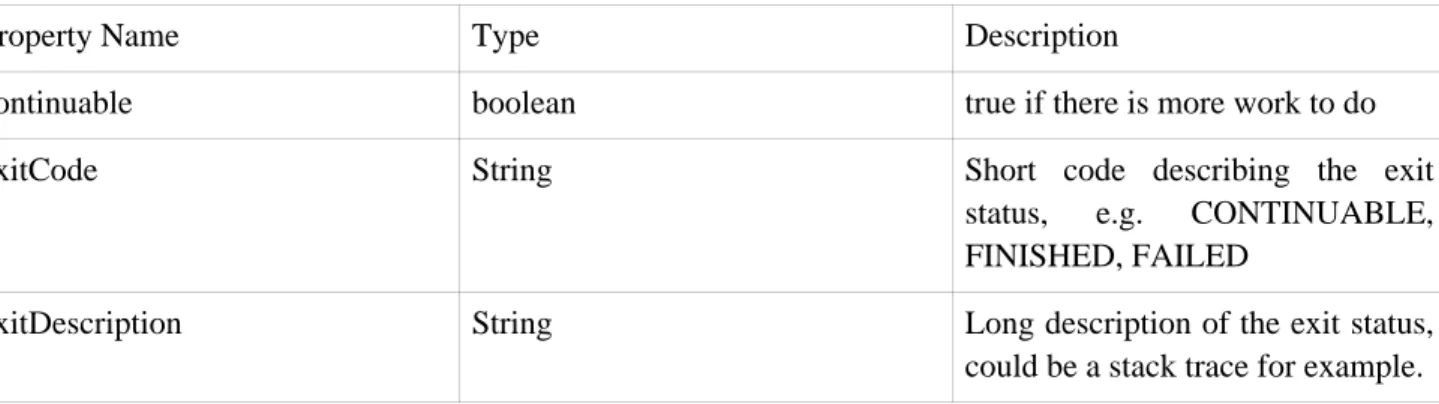
exitStatus The ExitStatusindicating the result of the run. It is
will be returned to the caller. See chapter 5 for more details.
These properties are important because they will be persisted and can be used to completely determine the status of an execution. For example, if the EndOfDay job for 01-01 is executed at 9:00 PM, and fails at 9:30, the following entries will be made in the batch meta data tables:
Table 2.2. BATCH_JOB_INSTANCE
JOB_INSTANCE_ID JOB_NAME
1 EndOfDayJob
Table 2.3. BATCH_JOB_PARAMS
JOB_INSTANCE_ID TYPE_CD KEY_NAME DATE_VAL
1 DATE schedule.Date 2008-01-01 00:00:00
Table 2.4. BATCH_JOB_EXECUTION
JOB_EXECUTION_IDJOB_INSTANCE_ID START_TIME END_TIME STATUS
1 1 2008-01-01 21:00:23.571 2008-01-01 21:30:17.132 FAILED
Note
extra columns in the table have been removed for added clarity.
Now that the job has failed, let's assume that it took the entire course of the night for the problem to be determined, so that the 'batch window' is now closed. Assuming the window starts at 9:00 PM, the job will be kicked off again for 01-01, starting where it left off and completing successfully at 9:30. Because it's now the next day, the 01-02 job must be run as well, which is kicked off just afterwards at 9:31, and completes in it's normal one hour time at 10:30. There is no requirement that one JobInstance be kicked off after another,
unless there is potential for the two jobs to attempt to access the same data, causing issues with locking at the database level. It is entirely up to the scheduler to determine when to run. Since they're separate JobInstances, Spring Batch will make no attempt to stop them from being run concurrently. (Attempting to run the same
JobInstancewhile another is already running will result in aJobExecutionAlreadyRunningException being
thrown) There should now be an extra entry in both theJobInstanceandJobParameterstables, and two extra
entries in theJobExecutiontable:
Table 2.5. BATCH_JOB_INSTANCE
JOB_INSTANCE_ID JOB_NAME
1 EndOfDayJob
Table 2.6. BATCH_JOB_PARAMS
JOB_INSTANCE_ID TYPE_CD KEY_NAME DATE_VAL
1 DATE schedule.Date 2008-01-01 00:00:00
2 DATE schedule.Date 2008-01-02 00:00:00
Table 2.7. BATCH_JOB_EXECUTION
JOB_EXECUTION_IDJOB_INSTANCE_ID START_TIME END_TIME STATUS
1 1 2008-01-01 21:00 2008-01-01 21:30 FAILED
2 1 2008-01-02 21:00 2008-01-02 21:30 COMPLETED
3 2 2008-01-02 21:31 2008-01-02 22:29 COMPLETED
2.4. Step Stereotypes
AStepis a domain object that encapsulates an independent, sequential phase of a batch job. Therefore, every
Job is composed entirely of one or more steps. AStepshould be thought of as a unique processing stream that
will be executed in sequence. For example, if you have one step that loads a file into a database, another that reads from the database, validates the data, preforms processing, and then writes to another table, and another that reads from that table and writes out to a file. Each of these steps will be performed completely before moving on to the next step. The file will be completely read into the database before step 2 can begin. As with
Job, aStephas an individualStepExecutionthat corresponds with a uniqueJobExecution:
AStep contains all of the information necessary to define and control the actual batch processing. This is a
necessarily vague description because the contents of any given Step are at the discretion of the developer
writing aJob. A Step can be as simple or complex as the developer desires. A simple Stepmight load data
from a file into the database, requiring little or no code. (depending upon the implementations used) A more complexStepmay have complicated business rules that are applied as part of the processing.
Steps are defined by instantiating implementations of theStepinterface. Two step implementation classes are
available in the Spring Batch framework, and they are each discussed in detail in Chatper 4 of this guide. For most situations, theItemOrientedStep implementation is sufficient, but for situations where only one call is
needed, such as a stored procedure call or a wrapper around existing script, a TaskletStep may be a better
option.
2.4.2. StepExecution
A StepExecution represents a single attempt to execute a Step. Using the example from JobExecution, if
there is aJobInstancefor the "EndOfDayJob", withJobParametersof "01-01-2008" that fails to successfully
complete its work the first time it is run, when it is executed again, a newStepExecutionwill be created. Each
of these step executions may represent a different invocation of the batch framework, but they will all correspond to the sameJobInstance, just as multipleJobExecutionsbelong to the sameJobInstance.
Step executions are represented by objects of theStepExecutionclass. Each execution contains a reference to
its corresponding step andJobExecution, and transaction related data such as commit and rollback count and
start and end times. Additionally, each step execution will contain anExecutionContext, which contains any
data a developer needs persisted across batch runs, such as statistics or state information needed to restart. The following is a listing of the properties forStepExecution:
Table 2.8. StepExecution properties
status A BatchStatusobject that indicates the status of the
execution. While it's running, the status is BatchStatus.STARTED, if it fails the status is BatchStatus.FAILED, and if it finishes successfully the status is BatchStatus.COMPLETED
startTime A java.util.Date representing the current system
time when the execution was started.
endTime A java.util.Date representing the current system
time when the execution finished, regardless of whether or not it was successful.
exitStatus The ExitStatus indicating the result of the
execution. It is most important because it contains an exit code that will be returned to the caller. See chapter 5 for more details.
executionContext The 'property bag' containing any user data that needs to be persisted between executions.
commitCount The number transactions that have been committed
for this execution
itemCount The number of items that have been processed for this execution.
2.4.3. ExecutionContext
An ExecutionContext represents a collection of key/value pairs that are persisted and controlled by the
framework in order to allow developers a place to store persistent state that is scoped to aStepExecution. For
those familiar with Quartz, it is very similar toJobDataMap. The best usage example is restart. Using flat file
input as an example, while processing individual lines, the framework periodically persists the
ExecutionContextat commit points. This allows theItemReader to store its state in case a fatal error occurs
during the run, or even if the power goes out. All that is needed is to put the current number of lines read into the context, and the framework will do the rest:
executionContext.putLong(getKey(LINES_READ_COUNT), reader.getPosition());
The call above will store the current number of lines read into the ExecutionContext. It should be made just before the framework commits. Being notified before a commit requires one of the various StepListeners, or an ItemStream, which are discussed in more detail later in this guide. When the ItemReader is opened, it can
check to see if it has any stored state in the context, and initialize itself from there:
if (executionContext.containsKey(getKey(LINES_READ_COUNT))) {
log.debug("Initializing for restart. Restart data is: " + executionContext); long lineCount = executionContext.getLong(getKey(LINES_READ_COUNT));
LineReader reader = getReader(); Object record = "";
while (reader.getPosition() < lineCount && record != null) { record = readLine();
} }
The ExecutionContext can also be used for startistics that need to be persisted about the run itself. For
example, if a flat file contains orders for processing that exist across multiple lines, it may be necessary to store how many orders have been processed (which is much different from than the number of lines read) so that an email can be sent at the end of theStepwith the total orders processed in the body. The framework handles
storing this for the developer, in order to correctly scope it with an individual JobInstance. It can be very
difficult to know whether an existing ExecutionContext should be used or not. For example, using the
'EndOfDay' example from above, when the 01-01 run starts again for the second time, the framework recognizes that it is the sameJobInstanceand on an individualStepbasis, pulls theExecutionContextout of
the database and hands it as part of theStepExecution to the Step itself. Conversely, for the 01-02 run the
framework recognizes that it is a different instance, so an empty context must be handed to theStep. There are
many of these types of determinations that the framework makes for the developer to ensure the state is given to them at the correct time. It is also important to note that exactly one ExecutionContext exists per
StepExecutionat any given time. Clients of the ExecutionContextshould be careful because this creates a
shared keyspace, so care should be taken when putting values in to ensure no data is overwritten, however, the
Stepstores absolutely no data in the context, so there is no way to adversely affect the framework.
2.5. JobRepository
JobRepositoryis the persistence mechanism for all of the Stereotypes mentioned above. When a job is first
launched, aJobExecutionis obtained by calling the repository'screateJobExecutionmethod, and during the
course of execution,StepExecutionandJobExecutionare persisted by passing them to the repository:
public interface JobRepository {
public JobExecution createJobExecution(Job job, JobParameters jobParameters) throws JobExecutionAlreadyRunningException, JobRestartException;
void saveOrUpdate(JobExecution jobExecution); void saveOrUpdate(StepExecution stepExecution);
void saveOrUpdateExecutionContext(StepExecution stepExecution);
StepExecution getLastStepExecution(JobInstance jobInstance, Step step); int getStepExecutionCount(JobInstance jobInstance, Step step);
}
2.6. JobLauncher
JobLauncher represents a simple interface for launching aJobwith a given set ofJobParameters:
public interface JobLauncher {
public JobExecution run(Job job, JobParameters jobParameters) throws JobExecutionAlreadyRunningException, JobRestartException;
}
It is expected that implementations will obtain a validJobExecutionfrom theJobRepositoryand execute the Job.
2.7. JobLocator
JobLocatorrepresents an interface for locating aJob:
public interface JobLocator {
Job getJob(String name) throws NoSuchJobException; }
This interface is very necessary due to the nature of Spring itself. Because we can't guarantee one
ApplicationContextequals one Job, an abstraction is needed to obtain a Job for a given name. It becomes
especially useful when launching jobs from within a Java EE application server.
2.8. Item Reader
ItemReader is an abstraction that represents the retrieval of input for a Step, one item at a time. When the ItemReaderhas exhausted the items it can provide, it will indicate this by returning null. More details about the ItemReaderinterface and it's various implementations can be found in Chapter 3.
2.9. Item Writer
ItemWriteris an abstraction that represents the output of aStep, one item at a time. Generally, an item writer
has no knowledge of the input it will receive next, only the item that was passed in its current invocation. More details about theItemWriterinterface and it's various implementations can be found in Chapter 3.
2.10. Tasklet
ATasklet represents the execution of a logical unit of work, as defined by its implementation of the Spring
Batch providedTasklet interface. ATaskletis useful for encapsulating processing logic that is not natural to
3.1. Introduction
All batch processing can be described in its most simple form as reading in large amounts of data, performing some type of calculation or transformation, and writing the result out. Spring Batch provides two key interfaces to help perform bulk reading and writing:ItemReaderandItemWriter.
3.2. ItemReader
Although a simple concept, anItemReaderis the means for providing data from many different types of input.
The most general examples include:
• Flat File- Flat File Item Readers read lines of data from a flat file that typically describe records with fields of data defined by fixed positions in the file or delimited by some special character (e.g. Comma).
• XML - XML ItemReaders process XML independently of technologies used for parsing, mapping and validating objects. Input data allows for the validation of and XML file against an XSD schema.
• Database - A database resource is accessed that returns resultsets which can be mapped to objects for processing. The default SQL Input Sources invoke aRowMapper to return objects, keep track of the current
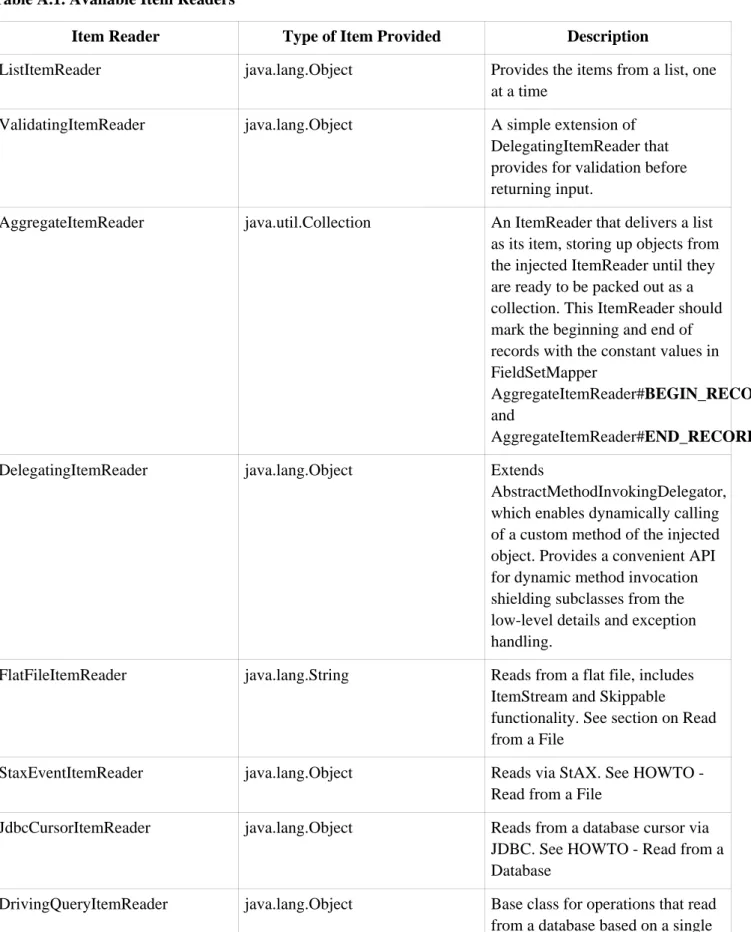
row if restart is required, basic statistics, and some transaction enhancements that will be explained later. There are many more possibilities, but we'll focus on the basic ones for this chapter. A complete list of all available ItemReaders can be found in Appendix A.
ItemReaderis a basic interface for generic input operations:
public interface ItemReader { Object read() throws Exception;
void mark() throws MarkFailedException; void reset() throws ResetFailedException; }
Thereadmethod defines the most essential contract of the ItemReader, calling it returns one Item, returning
null if no more items are left. An item might represent a line in a file, a row in a database, or an element in an XML file. It is generally expected that these will be mapped to a usable domain object (i.e. Trade, Foo, etc) but there is no requirement in the contract to do so.
Themarkandresetmethods are important due to the transactional nature of batch processing. Mark() will be
called before reading begins. Callingresetat anytime will position the ItemReaderto its position whenmark
was last called. The semantics are very similar tojava.io.Reader.
3.3. ItemWriter
ItemWriter is similar in functionality to an ItemReader with the exception that the operations are reversed.
Resources still need to be located, opened and closed but they differ in the case that anItemWriterwrites out,
the serialization of the output is specific for every batch job. As withItemReader,ItemWriteris a fairly generic interface:
public interface ItemWriter {
void write(Object item) throws Exception; void flush() throws FlushFailedException; void clear() throws ClearFailedException; }
As withreadonItemReader,writeprovides the basic contract ofItemWriter, it will attempt to write out the
item passed in as long as it is open. As with mark and reset, flush and clear are necessary due to the
transactional nature of batch processing. Because it is generally expected that items will be 'batched' together into a chunk, and then output, it is expected that anItemWriterwill perform some type of buffering.flushwill
empty the buffer by actually writing the items out, whereasclearwill simply throw the contents of the buffer
away. In most cases, a Step implementation will callflushbefore a commit andclearin case of rollback. It is
expected that implementations of theStepinterface will call these methods.
3.4. ItemStream
Both ItemReaders and ItemWriters serve their individual purposes well, but there is a common concern among both of them that necessitates another interface. In general, as part of the scope of a batch job, readers and writers need to be opened, closed, and require a mechanism for persisting state:
public interface ItemStream {
void open(ExecutionContext executionContext) throws StreamException; void update(ExecutionContext executionContext);
void close(ExecutionContext executionContext) throws StreamException; }
Before describing each method, it's worth briefly mentioning theExecutionContext. Clients of anItemReader
that also implementsItemStreamshould callopenbefore any calls toread, to open any resources such as files
or obtain connections. A similar restriction applies to an ItemWriter is also implements ItemStream. As
mentioned before, if expected data is found in theExecutionContext, it may be used to start theItemReaderor ItemWriterat a location other than its initial state. Conversely, closewill be called to ensure any resources
allocated duringopenwill be released safely.updateis called primarily to ensure that any state currently being
held is loaded into the providedExecutionContext. This method will be called before committing, to ensure
that the current state is persisted in the database before commit.
In the special case where the client of an ItemStream is a Step (from the Spring Batch Core), an ExecutionContextis created for eachStepExecutionto allow users to store the state of a particular execution,
with the expectation that it will be returned if the sameJobInstanceis started again. For those familiar with
Quartz, the semantics are very similar to a QuartzJobDataMap.
3.5. Flat Files
One of the most common mechanisms for interchanging bulk data has always been the flat file. Unlike XML, which has an agreed upon standard for defining how it is structured (XSD), anyone reading a flat file must understand ahead of time exactly how the file is structured. In general, all flat files fall into two general types:
Delimited and Fixed Length.
3.5.1. The FieldSet
When working with flat files in Spring Batch, regardless of whether it is for input or output, one of the most important classes is theFieldSet. Many architectures and libraries contain abstractions for helping you read in
from a file, but they usually return a String or an array of Strings. This really only gets you halfway there. A
FieldSet is Spring Batch’s abstraction for enabling the binding of fields from a file resource. It allows
developers to work with file input in much the same way as they would work with database input. AFieldSet
is conceptually very similar to a Jdbc ResultSet. FieldSets only require one argument, a String array of
tokens. Optionally, you can also configure in the names of the fields so that the fields may be accessed either by index or name as patterned afterResultSet. In code it means it's as simple as:
String[] tokens = new String[]{"foo", "1", "true"}; FieldSet fs = new DefaultFieldSet(tokens);
String name = fs.readString(0); int value = fs.readInt(1);
boolean booleanValue = fs.readBoolean(2);
There are many more options on the FieldSet interface, such as Date, long, BigDecimal, etc. The biggest
advantage of the FieldSet is that it provides consistent parsing of flat file input. Rather than each batch job
parsing differently in potentially unexpected ways, it can be consistent, both when erroring out due to a format exception, or when doing simple data conversions.
3.5.2. FlatFileItemReader
A flat file is any type of file that contains at most two-dimensional (tabular) data. Reading flat files in the Spring Batch framework is facilitated by the classFlatFileItemReader, which provides basic functionality for
reading and parsing flat files.FlatFileItemReaderclass has several properties. The three most important of
these properties are Resource, FieldSetMapper and LineTokenizer. The FieldSetMapper and LineTokenizerinterfaces will be explored more in the next sections. The resource property represents a Spring
CoreResource. Documentation explaining how to create beans of this type can be found inSpring Framework,
Chapter 4.Resources. Therefore, this guide will not go into the details of creatingResourceobjects. A resource
is used to locate, open, and close resources. It can be as simple as:
Resource resource = new FileSystemResource("resources/trades.csv");
In complex batch environments the directory structures are often managed by the EAI infrastructure where drop zones for external interfaces are established for moving files from ftp locations to batch processing locations and vice versa. File moving utilities are beyond the scope of the spring batch architecture but it is not unusual for batch job streams to include file moving utilities as steps in the job stream. It's sufficient to know that the batch architecture only needs to know how to locate the files to be processed. Spring Batch begins the process of feeding the data into the pipe from this starting point.
The other properties inFlatFileItemReaderallow you to further specify how your data will be interpreted:
Table 3.1. Flat File Item Reader Properties
Property Type Description
Property Type Description - default is "ISO-8859-1"
comments String[] Specifies line prefixes that indicate
comment rows
linesToSkip int Number of lines to ignore at the
top of the file
firstLineIsHeader boolean Indicates that the first line of the file is a header containing field names. If the column names have not been set yet and the tokenizer extends AbstractLineTokenizer, field names will be set
automatically from this line recordSeparatorPolicy RecordSeparatorPolicy Used to determine where the line
endings are and do things like continue over a line ending if inside a quoted string.
3.5.2.1. FieldSetMapper
TheFieldSetMapper interface defines a single method,mapLine, which takes a FieldSetobject and maps its
contents to an object. This object may be a custom DTO or domain object, or it could be as simple as an array, depending on your needs. TheFieldSetMapperis used in conjunction with the LineTokenizer to translate a
line of data from a resource into an object of the desired type:
public interface FieldSetMapper { public Object mapLine(FieldSet fs); }
As you can see, the pattern used is exactly the same asRowMapperused byJdbcTemplate.
3.5.2.2. LineTokenizer
Because there can be many formats of flat file data, which all need to be converted to aFieldSet so that a FieldSetMappercan create a useful domain object from them, an abstraction for turning a line of input into a FieldSetis necessary. In Spring Batch, this is called aLineTokenizer:
public interface LineTokenizer { FieldSet tokenize(String line); }
The contract of aLineTokenizeris such that, given a line of input (in theory theStringcould encompass more
than one line) aFieldSetrepresenting the line will be returned. This will then be passed to aFieldSetMapper.
Spring Batch contains the following LineTokenizers:
but pipes or semicolons are often used as well
• FixedLengthTokenizer - Used for tokenizing files where each record is separated by a 'fixed width' that
must be defined per record.
• PrefixMatchingCompositeLineTokenizer - Tokenizer that determines which among a list of Tokenizers
should be used on a particular line by checking against a prefix.
3.5.2.3. Simple Delimited File Reading Example
Now that the basic interfaces for reading in flat files have been defined, a simple example explaining how they work together is helpful. In it's most simple form, the flow when reading a line from a file is the following:
1. Read one line from the file.
2. Pass the string line into the LineTokenizer#tokenize() method, in order to retrieve aFieldSet
3. Pass the FieldSet returned from tokenizing to a FieldSetMapper, returning the result from the ItemReader#read() method
The following example will be used to illustrate this using an actual domain scenario. This particular batch job reads in football players from the following file:
ID,lastName,firstName,position,birthYear,debutYear "AbduKa00,Abdul-Jabbar,Karim,rb,1974,1996", "AbduRa00,Abdullah,Rabih,rb,1975,1999", "AberWa00,Abercrombie,Walter,rb,1959,1982", "AbraDa00,Abramowicz,Danny,wr,1945,1967", "AdamBo00,Adams,Bob,te,1946,1969", "AdamCh00,Adams,Charlie,wr,1979,2003"
We want to map this data to the following Player domain object:
public class Player implements Serializable { private String ID;
private String lastName; private String firstName; private String position; private int birthYear; private int debutYear;
public String toString() {
return "PLAYER:ID=" + ID + ",Last Name=" + lastName + ",First Name=" + firstName + ",Position=" + position + ",Birth Year=" + birthYear + ",DebutYear=" +
debutYear; }
// setters and getters... }
In order to map aFieldSetinto our Player object, we need to create aFieldSetMapperthat returns players:
protected static class PlayerFieldSetMapper implements FieldSetMapper { public Object mapLine(FieldSet fieldSet) {
player.setID(fieldSet.readString(0)); player.setLastName(fieldSet.readString(1)); player.setFirstName(fieldSet.readString(2)); player.setPosition(fieldSet.readString(3)); player.setBirthYear(fieldSet.readInt(4)); player.setDebutYear(fieldSet.readInt(5)); return player; } }
We can then read in from the file by correctly constructing our FlatFileItemReader and calling read():
FlatFileItemReader itemReader = new FlatFileItemReader();
itemReader.setResource = new FileSystemResource("resources/players.csv"); //DelimitedLineTokenizer defaults to comma as it's delimiter
itemReader.setLineTokenizer(new DelimitedLineTokenizer()); itemReader.setFieldSetMapper(new PlayerFieldSetMapper()); itemReader.read();
Each call toreadwill return a new Player object from each line in the file. When the end of the file is reached,
null will be returned.
3.5.2.4. Mapping fields by name
There is one additional functionality line tokenizers that is similar in function to a JDBCResultSet. The names
of the fields can be injected into theLineTokenizerto increase the readability of the mapping function. First,
we tell theLineTokenizerwhat the names of the fields in the fieldset are:
tokenizer.setNames(new String[] {"ID", "lastName","firstName","position","birthYear","debutYear"});
and provide aFieldSetMapperthat uses this information as follows:
public class PlayerMapper implements FieldSetMapper { public Object mapLine(FieldSet fs) {
if(fs == null){ return null; }
Player player = new Player(); player.setID(fs.readString("ID")); player.setLastName(fs.readString("lastName")); player.setFirstName(fs.readString("firstName")); player.setPosition(fs.readString("position")); player.setDebutYear(fs.readInt("debutYear")); player.setBirthYear(fs.readInt("birthYear")); return player; } }
3.5.2.5. Automapping FieldSets to Domain Objects
For many, having to write a specific FieldSetMapper is equally as cumbersome as writing a specific
automatically maps fields by matching a field name with a setter using the JavaBean spec. Again using the football example, theFieldSetMapperconfiguration looks like the following:
<bean id="fieldSetMapper"
class="org.springframework.batch.io.file.mapping.BeanWrapperFieldSetMapper"> <property name="prototypeBeanName" value="player" />
</bean>
<bean id="person"
class="org.springframework.batch.sample.domain.Player" scope="prototype" />
For each entry in theFieldSet, the mapper will look for a corresponding setter on a new instance of thePlayer
object (for this reason, prototype scope is required) in the same way the Spring container will look for setters matching a property name. Each available field in the FieldSet will be mapped, and the resultant Player
object will be returned, with no code required.
3.5.2.6. Fixed Length file formats
So far only delimited files have been discussed in much detail, however, they respresent only half of the file reading picture. Many organizations that use flat files use fixed length formats. An example fixed length file is below: UK21341EAH4121131.11customer1 UK21341EAH4221232.11customer2 UK21341EAH4321333.11customer3 UK21341EAH4421434.11customer4 UK21341EAH4521535.11customer5
While this looks like one large field, it actually represent 4 distinct fields:
1. ISIN: Unique identifier for the item being order - 12 characters long. 2. Quantity: Number of this item being ordered - 3 characters long. 3. Price: Price of the item - 4 characters long.
4. Customer: Id of the customer ordering the item - 8 characters long.
When configuring the FixedLengthLineTokenizer, each of these lengths must be provided in the form of
ranges:
<bean id="fixedLengthLineTokenizer"
class="org.springframework.batch.io.file.transform.FixedLengthTokenizer"> <property name="names" value="ISIN, Quantity, Price, Customer" />
<property name="columns" value="1-12, 13-15, 16-20, 21-29" /> </bean>
ThisLineTokenizerwill return the sameFieldSetas if a dlimiter had been used, allowing the same approachs
above to be used such as theBeanWrapperFieldSetMapper, in a way that is ignorant of how the actual line was
parsed.
3.5.2.7. Multiple record types within a single file
All of the file reading examples up to this point have all made a key assumption for simplicity's sake: one record equals one line. However, this may not always be the case. Its very common that a file might have records spanning multiple lines with multiple formats. The following excerpt from a file illustrates this:
HEA;0013100345;2007-02-15 NCU;Smith;Peter;;T;20014539;F
BAD;;Oak Street 31/A;;Small Town;00235;IL;US
SAD;Smith, Elizabeth;Elm Street 17;;Some City;30011;FL;United States BIN;VISA;VISA-12345678903
LIT;1044391041;37.49;0;0;4.99;2.99;1;45.47 LIT;2134776319;221.99;5;0;7.99;2.99;1;221.87 SIN;UPS;EXP;DELIVER ONLY ON WEEKDAYS
FOT;2;2;267.34
Everything between the line starting with 'HEA' and the line starting with 'FOT' is considered one record. The PrefixMatchingCompositeLineTokenizer makes this easier by matching the prefix in a line with a particular tokenizer:
<bean id="orderFileDescriptor"
class="org.springframework.batch.io.file.transform.PrefixMatchingCompositeLineTokenizer"> <property name="tokenizers">
<map>
<entry key="HEA" value-ref="headerRecordDescriptor" /> <entry key="FOT" value-ref="footerRecordDescriptor" />
<entry key="BCU" value-ref="businessCustomerLineDescriptor" /> <entry key="NCU" value-ref="customerLineDescriptor" />
<entry key="BAD" value-ref="billingAddressLineDescriptor" /> <entry key="SAD" value-ref="shippingAddressLineDescriptor" /> <entry key="BIN" value-ref="billingLineDescriptor" />
<entry key="SIN" value-ref="shippingLineDescriptor" /> <entry key="LIT" value-ref="itemLineDescriptor" /> <entry key="" value-ref="defaultLineDescriptor" /> </map>
</property> </bean>
This ensures that the line will be parsed correctly, which is especially important for fixed length input, with the correct field names. Any users of theFlatFileItemReaderin this scenario must continue callingreaduntil the
footer for the record is returned, allowing them to return a complete order as one 'item'.
3.5.3. FlatFileItemWriter
Writing out to flat files has the same problems and issues that reading in from a file must overcome. It must be able to write out in either delimited or fixed length formats in a transactional manner.
3.5.3.1. LineAggregator
Just as theLineTokenizerinterface is necessary to take a string and split it into tokens, file writing must have a
way to aggregate multiple fields into a single string for writing to a file. In Spring Batch this is the
LineAggregator:
public interface LineAggregator {
public String aggregate(FieldSet fieldSet); }
TheLineAggregatoris exactly the opposite of aLineTokenizer.LineTokenizertakes aStringand returns a
FieldSet, whereas LineAggregator takes a FieldSet and returns a String. As with reading there are two
types:DelimitedLineAggregatorandFixedLengthLineAggregator.
3.5.3.2. FieldSetCreator
to be an interface that describes how to convert from an object into aFieldSet:
public interface FieldSetCreator { FieldSet mapItem(Object data); }
As with LineTokenizer and LineAggregator, FieldSetCreator is the polar opposite of FieldSetMapper.
FieldSetMappertakes aFieldSet and returns a mapped object, whereas a FieldSetCreatortakes an Object
and returns aFieldSet.
3.5.3.3. Simple Delimited File Writing Example
Now that both the LineAggregator and FieldSetCreator interfaces have been defined, the basic flow of
writing can be explained:
1. The object to be written is passed to theFieldSetCreatorin order to obtain aFieldSet.
2. The returnedFieldSetis passed to theLineAggregator
3. The returnedStringis written to the configured file.
The following excerpt from theFlatFileItemWriterexpresses this in code:
public void write(Object data) throws Exception { FieldSet fieldSet = fieldSetCreator.mapItem(data);
getOutputState().write(lineAggregator.aggregate(fieldSet) + LINE_SEPARATOR); }
A simple configuration with the smallest ammount of setters would look like the following:
<bean id="itemWriter" class="org.springframework.batch.io.file.FlatFileItemWriter"> <property name="resource" value="file:target/test-outputs/20070122.testStream.multilineStep.txt" /> <property name="fieldSetCreator"> <bean class="org.springframework.batch.io.file.mapping.PassThroughFieldSetMapper"/> </property> </bean>
3.5.3.4. Handling file creation
FlatFileItemReaderhas a very simple relationship with file resources. When the reader is initialized, it opens
the file if it exists, and throws an exception if it does not. File writing isn't quite so simple. At first glance it seems like a similar straight forward contract should exist forFlatFileItemWriter, if the file already exists,
throw an exception, if it does not, create it and start writing. However, potentially restarting aJobcan cause
issues. In the normal restart scenario, the contract is reversed, if the file exists start writing to it from the last known good position, if it does not, throw an exception. However, what happens if the file name for this job is always the same? In this case, you would want to delete the file if it exists, unless it's a restart. Because of this possibility, the FlatFileItemWriter contains the property, shouldDeleteIfExists. Setting this property to
true will cause an existing file with the same name to be deleted when the writer is opened.
3.6. XML Item Readers and Writers
objects as well as writing Java objects as XML records.
Constraints on streaming XML
The StAX API is used for I/O as other standard XML parsing APIs do not fit batch processing requirements (DOM loads the whole input into memory at once and SAX controls the parsing process allowing the user only to provide callbacks).
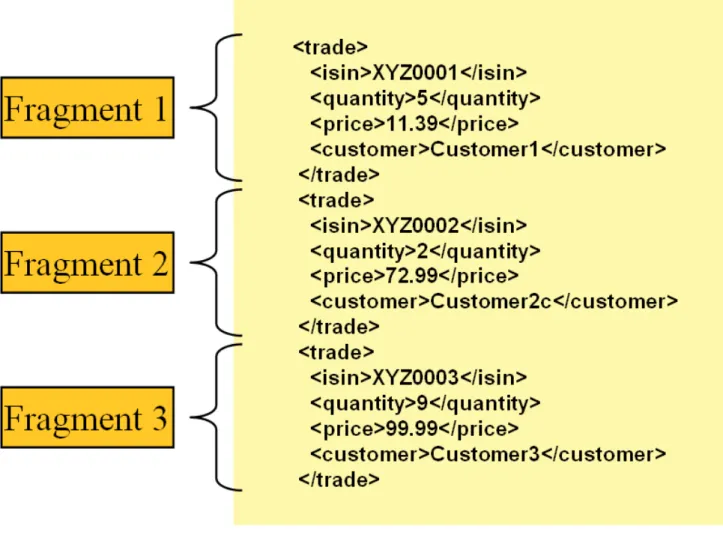
Lets take a closer look how XML input and output works in Spring Batch. First, there are a few concepts that vary from file reading and writing but are common across Spring Batch XML processing. With XML processing instead of lines of records (FieldSets) that need to be tokenized, it is assumed an XML resource is a collection of 'fragments' corresponding to individual records. Note that OXM tools are designed to work with standalone XML documents rather than XML fragments cut out of an XML document, therefore the Spring Batch infrastructure needs to work around this fact, as described below:
Figure 3.1: XML Input
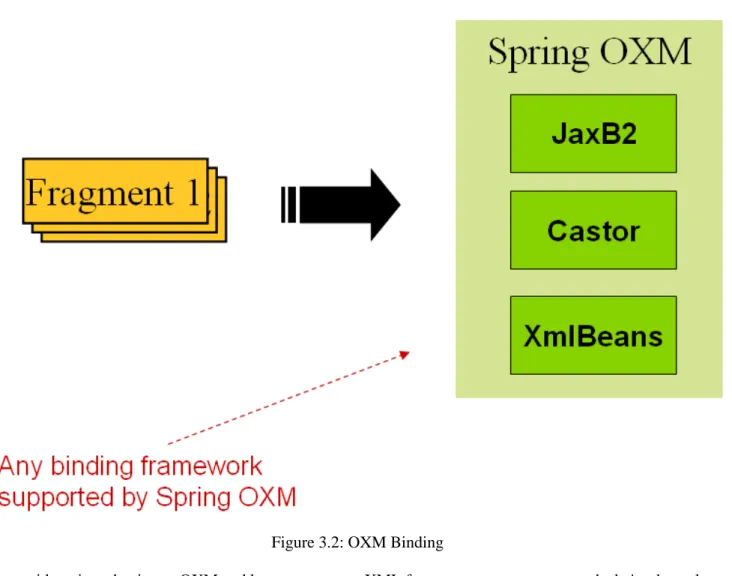
The 'trade' tag is defined as the 'root element' in the scenario above. Everything between '<trade>' and '</trade>' is considered one 'fragment'. Spring Batch uses Object/XML Mapping (OXM) to bind fragments to objects. However, Spring Batch is not tied to any particular xml binding technology. Typical use is to delegate toSpring OXM, which provides uniform abstraction for the most popular OXM technologies. The dependency on Spring OXM is optional and you can choose to implement Spring Batch specific interfaces if desired. The relationship to the technologies that OXM supports can be shown as the following:
Figure 3.2: OXM Binding
Now with an introduction to OXM and how one can use XML fragments to represent records, let's take a closer look at Item Readers and Item Writers.
3.6.1. StaxEventItemReader
TheStaxEventItemReader configuration provides a typical setup for the processing of records from an XML
input stream. First, lets examine a set of XML records that theStaxEventItemReadercan process.
<?xml version="1.0" encoding="UTF-8"?> <records> <trade xmlns="http://springframework.org/batch/sample/io/oxm/domain"> <isin>XYZ0001</isin> <quantity>5</quantity> <price>11.39</price> <customer>Customer1</customer> </trade> <trade xmlns="http://springframework.org/batch/sample/io/oxm/domain"> <isin>XYZ0002</isin> <quantity>2</quantity> <price>72.99</price> <customer>Customer2c</customer> </trade> <trade xmlns="http://springframework.org/batch/sample/io/oxm/domain"> <isin>XYZ0003</isin> <quantity>9</quantity> <price>99.99</price> <customer>Customer3</customer> </trade> </records>
To be able to process the XML records we need the following:
• Root Element Name - Name of the root element of the fragment that constitutes the object to be mapped. The example configuration demonstrates this with the value of trade.
• Resource - Spring Resource that represents the file to be read.
• FragmentDeserializer - UnMarshalling facility provided by Spring OXM for mapping the XML fragment
to an object.
<property name="itemReader">
<bean class="org.springframework.batch.io.xml.StaxEventItemReader"> <property name="fragmentRootElementName" value="trade" />
<property name="resource" value="data/staxJob/input/20070918.testStream.xmlFileStep.xml" /> <property name="fragmentDeserializer">
<bean class="org.springframework.batch.io.xml.oxm.UnmarshallingEventReaderDeserializer"> <constructor-arg>
<bean class="org.springframework.oxm.xstream.XStreamMarshaller"> <property name="aliases" ref="aliases" />
</bean> </constructor-arg> </bean> </property> </bean> </property>
Notice that in this example we have chosen to use anXStreamMarshallerthat requires an alias passed in as a
map with the first key and value being the name of the fragment (i.e. root element) and the object type to bind. Then, similar to a FieldSet, the names of the other elements that map to fields within the object type are
described as key/value pairs in the map. In the configuration file we can use a spring configuration utility to describe the required alias as follows:
<util:map id="aliases"> <entry key="trade"
value="org.springframework.batch.sample.domain.Trade" /> <entry key="isin" value="java.lang.String" />
<entry key="quantity" value="long" />
<entry key="price" value="java.math.BigDecimal" /> <entry key="customer" value="java.lang.String" /> </util:map>
On input the reader reads the XML resource until it recognizes a new fragment is about to start (by matching the tag name by default). The reader creates a standalone XML document from the fragment (or at least makes it appear so) and passes the document to a deserializer (typically a wrapper around a Spring OXM
Unmarshaller) to map the XML to a Java object.
In summary, if you were to see this in scripted code like Java the injection provided by the spring configuration would look something like the following:
StaxEventItemReader xmlStaxEventItemReader = new StaxEventItemReader() Resource resource = new ByteArrayResource(xmlResource.getBytes()) Map aliases = new HashMap();
aliases.put("trade","org.springframework.batch.sample.domain.Trade"); aliases.put("isin","java.lang.String");
aliases.put("quantity","long");
aliases.put("customer","java.lang.String"); Marshaller marshaller = new XStreamMarshaller(); marshaller.setAliases(aliases);
xmlStaxEventItemReader.setFragmentDeserializer(new UnmarshallingEventReaderDeserializer(marshaller)); xmlStaxEventItemReader.setResource(resource);
xmlStaxEventItemReader.setFragmentRootElementName("trade"); xmlStaxEventItemReader.open(new ExecutionContext());
boolean hasNext = true while (hasNext) { trade = xmlStaxEventItemReader.read(); if (trade == null) { hasNext = false; } else { println trade; } }
3.6.2. StaxEventItemWriter
Output works symmetrically to input. The StaxEventItemWriter needs a Resource, a serializer, and a
rootTagName. A Java object is passed to a serializer (typically a wrapper around Spring OXM Marshaller)
which writes to aResourceusing a custom event writer that filters theStartDocumentandEndDocumentevents
produced for each fragment by the OXM tools. We'll show this in an example using the
MarshallingEventWriterSerializer. The Spring configuration for this setup looks as follows:
<bean class="org.springframework.batch.item.xml.StaxEventItemWriter" id="tradeStaxWriter">
<property name="resource"value="file:target/test-outputs/20070918.testStream.xmlFileStep.output.xml" /> <property name="serializer" ref="tradeMarshallingSerializer" />
<property name="rootTagName" value="trades" /> <property name="overwriteOutput" value="true" /> </bean>
The configuration sets up the three required properties and optionally sets the overwriteOutput=true, mentioned earlier in the chapter for specifying whether an existing file can be overwritten. The
TradeMarshallingSerializeris configured as follows:
<bean class="org.springframework.batch.item.xml.oxm.MarshallingEventWriterSerializer" id="tradeMarshallingSerializer"> <constructor-arg>
<bean class="org.springframework.oxm.xstream.XStreamMarshaller"> <property name="aliases" ref="aliases" />
</bean>
</constructor-arg> </bean>
To summarize with a Java example, the following code illustrates all of the points discussed, demonstrating the programmatic setup of the required properties.
StaxEventItemWriter staxItemWriter = new StaxEventItemWriter()
FileSystemResource resource = new FileSystemResource(File.createTempFile("StaxEventWriterOutputSourceTests", "xml")) Map aliases = new HashMap();
aliases.put("trade","org.springframework.batch.sample.domain.Trade"); aliases.put("isin","java.lang.String");
aliases.put("quantity","long");
aliases.put("price","java.math.BigDecimal"); aliases.put("customer","java.lang.String");
XStreamMarshaller marshaller = new XStreamMarshaller() marshaller.setAliases(aliases)
MarshallingEventWriterSerializer tradeMarshallingSerializer = new MarshallingEventWriterSerializer(marshaller) staxItemWriter.setResource(resource)
staxItemWriter.setSerializer(tradeMarshallingSerializer) staxItemWriter.setRootTagName("trades")
staxItemWriter.setOverwriteOutput(true)
ExecutionContext executionContext = new ExecutionContext() staxItemWriter.open(executionContext)
Trade trade = new Trade() trade.isin = "XYZ0001" trade.quantity =5 trade.price = 11.39 trade.customer = "Customer1" println trade staxItemWriter.write(trade) staxItemWriter.flush()
For a complete example configuration of XML input and output and a corresponding Job see the sample xmlStaxJob.
3.7. Creating File Names at Runtime
Both the XML and Flat File examples above use the SpringResource abstraction to obtain the file to read or
write from. This works becauseResource has a getFile method, that returns ajava.io.File. Both XML and
Flat File resources can be configured using standard Spring constructs:
<bean id="flatFileItemReader"
class="org.springframework.batch.item.file.FlatFileItemReader"> <property name="resource"
value="file://outputs/20070122.testStream.CustomerReportStep.TEMP.txt" /> </bean>
The above Resource will load the file from the file system, at the location specificied. Note that absolute
locations have to start with a double slash ("//"). In most spring applications, this solution is good enough because the names of these are known at compile time. However, in batch scenarios, the file name may need to be determined at runtime as a parameter to the job. This could be solved using '-D' parameters, i.e. a system property:
<bean id="flatFileItemReader"
class="org.springframework.batch.item.file.FlatFileItemReader"> <property name="resource" value="${input.file.name}" />
</bean>
All that would be required for this solution to work would be a system argument (-Dinput.file.name="file://file.txt"). (Note that although aPropertyPlaceholderConfigurercan be used here,
it is not necessary if the system property is always set because theResourceEditorin Spring already filters and
does placeholder replacement on system properties.)
Often in a batch setting it is preferable to parameterize the file name in theJobParametersof the job, instead of
through system properties, and access them that way. To allow for this, Spring Batch provides the
StepExecutionResourceProxy. The proxy can use either job name, step name, or any values from the
JobParameters, by surrounding them with %:
<bean id="inputFile"
class="org.springframework.batch.core.resource.StepExecutionResourceProxy" /> <property name="filePattern" value="//%JOB_NAME%/%STEP_NAME%/%file.name%" /> </bean>
Assuming a job name of 'fooJob', and a step name of 'fooStep', and the key-value pair of 'file.name="fileName.txt"' is in theJobParametersthe job is started with, the following filename will be passed
as theResource: "//fooJob/fooStep/fileName.txt". It should be noted that in order for the proxy to have
access to theStepExecution, it must be registered as aStepListener:
<bean id="fooStep" parent="abstractStep" p:itemReader-ref="itemReader"
p:itemWriter-ref="itemWriter">
<property name="listeners" ref="inputFile" /> </bean>
TheStepListenerinterface will be discussed in more detail in Chapter 4. For now, it is sufficient to know that
the proxy must be registered.
3.8. Database
Like most enterprise application styles, a database is the central storage mechanism for batch. However, batch differs from other application styles due to the sheer size of the datasets that must be worked with. The Spring
CoreJdbcTemplate illustrates this problem well. If you use JdbcTemplate with a RowMapper, the RowMapper
will be called once for every result returned from the provided query. This causes few issues in scenarios where the dataset is small, but the large datasets often necessary for batch processing would cause any JVM to crash quickly. If the sql statement returns 1 million rows, theRowMapperwill be called 1 million times. Spring Batch
provides two types of solutions for this problem: Cursor and DrivingQuery ItemReaders.
3.8.1. Cursor Based ItemReaders
Using a database cursor is generally the default approach of most batch developers. This is because it is the database's solution to the problem of 'streaming' relational data. The Java ResultSet class is essentially an
object orientated mechanism for manipulating a cursor. AResultSet maintains a cursor to the current row of
data. Callingnexton aResultSet moves this cursor to the next row. Spring Batch cursor based ItemReaders
open the a cursor on initialization, and move the cursor forward one row for every call to read, returning a
mapped object that can be used for processing. Theclosemethod will then be called to ensure all resources are
freed up. The Spring coreJdbcTemplategets around this problem by using the callback pattern to completely
map all rows in aResultSetand close before returning control back to the method caller. However, in batch
this must wait until the step is complete. Below is a generic diagram of how a cursor basedItemReaderworks,
and while a SQL statement is used as an example since it is so widely known, any technology could implement the basic approach:
The example illustrates the basic pattern. Given a 'FOO' table, which has three columns: ID, NAME, and BAR, select all rows with an ID greater than one but less than 7. This puts the beginning of the cursor (row 1) on ID 2. The result of this row should be a completely mapped Foo object, calling read() again, moves the cursor to the next row, which is the Foo with an ID of 3.
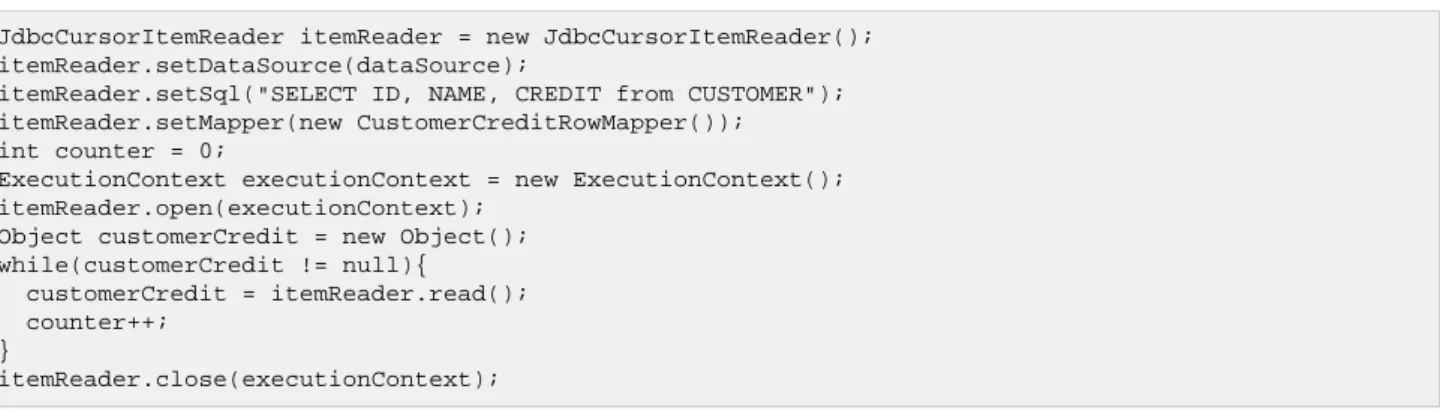
3.8.1.1. JdbcCursorItemReader
JdbcCursorItemReader is the JDBC implementation of the cursor based technique. It works directly with a
ResultSet and requires a SQL statement to run against a connection obtained from a DataSource. The
following database schema will be used as an example:
CREATE TABLE CUSTOMER (
ID BIGINT IDENTITY PRIMARY KEY, NAME VARCHAR(45),
CREDIT FLOAT );
Many people prefer to use a domain object for each row, so we'll use an implementation of the RowMapper
interface to map aCustomerCreditobject:
public class CustomerCreditRowMapper implements RowMapper { public static final String ID_COLUMN = "id";
public static final String NAME_COLUMN = "name"; public static final String CREDIT_COLUMN = "credit";
public Object mapRow(ResultSet rs, int rowNum) throws SQLException { CustomerCredit customerCredit = new CustomerCredit();
customerCredit.setId(rs.getInt(ID_COLUMN)); customerCredit.setName(rs.getString(NAME_COLUMN));
customerCredit.setCredit(rs.getBigDecimal(CREDIT_COLUMN)); return customerCredit;