May 09, 2018
Image enhancement suggestions based on machine
learning
Karolina Pyszkiewicz Vahid Kazemi Hao Xu Xuefeng Song Shinko ChengSee next page for additional authors
Follow this and additional works at:https://www.tdcommons.org/dpubs_series
Recommended Citation
Pyszkiewicz, Karolina; Kazemi, Vahid; Xu, Hao; Song, Xuefeng; Cheng, Shinko; Cui, Jingyu; Dai, Shengyang; Mao, Kechun; Kulkarni, Mugdha; Sah, Shalini; Cannon, Marc; Liu, Yun; Timofeev, Aleksei; Gebhard, Megan; Wang, Nan; and Pillai, Jaishanker, "Image enhancement suggestions based on machine learning", Technical Disclosure Commons, (May 09, 2018)
Image enhancement suggestions based on machine learning
ABSTRACT
Images in image libraries are sometimes oriented incorrectly. For example, a
photograph taken with a camera held vertically may be displayed horizontally, or vice-versa. Further, users often capture images of documents; however, the resultant image can include distortions due to camera angle, poor lighting, etc. The captured image of a document often also includes objects outside the document boundary, e.g., a surface on which the document is placed. For some photos, automatic enhancements can enhance the quality of the image.
This disclosure applies machine learning techniques to detect if an image is that of a document, if the image is mis-rotated, if the image can benefit from automatic enhancement, etc. When such images are detected, enhancements such correction of rotation, cropping, distortion-removal, etc., are automatically suggested to the user, e.g., when the image is displayed. With user permission, an acceptance or dismissal of the suggestion is used as a training signal for the machine learning model. Enhancement suggestions are surfaced, e.g., as tappable or clickable buttons, when an image is being viewed and are applied upon user selection of the suggestion.
KEYWORDS ● image orientation ● rotation ● document scan ● image enhancement ● machine learning BACKGROUND
Images in image libraries are sometimes oriented incorrectly. For example, a
photograph taken with a camera held vertically may be displayed horizontally, or vice-versa. Further, users often capture photographs of documents; however, the resultant image can include distortions due to camera angle, poor lighting, etc. The captured photograph of a document often also includes objects outside the document boundary, e.g., a surface on which the document is placed.
DESCRIPTION
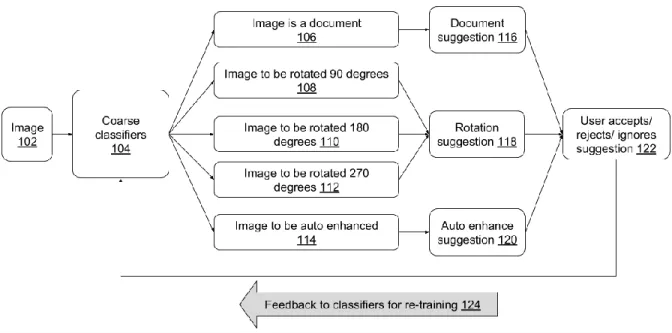
Fig.1: Automatic suggestion generation for image enhancements
Fig. 1 illustrates automatic suggestion generation for image enhancements, per techniques of this disclosure. An image (102) is presented to coarse classifiers (104), which determine one of several possibilities relating to the image, e.g.,
● the image is a document (106);
● the image is optimally viewed when rotated 90 degrees (108);
● the image is optimally viewed when rotated 180 degrees (110);
● the image may be advantageously subjected to automatic enhancement (114); etc. If the image is a document, appropriate suggestions (116) are provided to the user, e.g., that the document within the image be enhanced by cropping, contrast-enhancement, lighting-enhancement, etc. If the image is determined to be sideways or upside-down, rotation by the appropriate angle (e.g., 90, 180, or 270 degrees) is suggested to the user (118). Other automatic enhancements are suggested (120) if appropriate.
The suggestions may be presented to the user in the form of a user interface element, e.g. a clickable button that includes label and/or icon indicating the type of suggestion. The user can accept, reject, or ignore the suggestion (122). If the user accepts the suggestion, the
corresponding corrections are automatically made to the image. With user permission, the user action of accepting, rejecting, or ignoring the suggestion is provided as feedback (124) to the coarse classifier. The feedback is used for training the classifier and improve the classification ability. The feedback may be provided continuously or in batch fashion. With user permission, user actions on suggestions may be aggregated in order to effect global improvement to the coarse classifier.
The coarse classifiers include one or more machine learning models, e.g., deepnet statistical models, neural networks, etc. Example types of neural networks that can be used for the classifiers include long short-term memory (LSTM) neural networks, recurrent neural networks, convolutional neural networks, etc. Other machine learning models, e.g., support vector machines, random forests, boosted decision trees, etc., can also be used.
With user permission, the image enhancement suggestions are personalized based on the user’s past interactions. The coarse classifiers and image enhancement techniques are
of users. Further, these are implemented such that the suggestions are generated with low latency and can be provided in a mobile user interface. The user is provided a quick, simple, and obvious pathway to image correction, without significantly disrupting the photo-viewing experience.
Document detection and enhancement
If an image is detected as that of a document, a suggested action is displayed as a user-selectable user interface element. If the user selects the suggested action, the image is
automatically cropped to include just the document portion. Other enhancements such as adjusting contrast, lighting, shape, and other parameters are automatically applied.
The classifier is trained to detect documents in images based on training with positive examples of images that are documents and negative examples images that are not documents. In the context of document detection, a positive example means that the image is identified as that of a document and that the user may benefit from automatic corrections. If an image is a document, but it does not need any correction, e.g., a screenshot, it is not categorized as a positive example.
Positive document examples include, e.g., book pages, product labels, IDs, business cards, newspapers, whiteboards, post-its, receipts, restaurant menus, barcodes, media covers (book covers, album covers, etc.), pictures of presentation slides, pictures of a map/parking location/signs/license plates, brochures, flyers, manuals, etc.
Positive document examples have certain characteristics, e.g.,
● they include at least a threshold number of text pixels, e.g., 30% of the image size;
● the image is associated with labels (e.g., auto-generated using image recognition
techniques) that include one or more of: document, business card, menu, newspaper, post-it, driver’s license, identity card, passport, label, receipt, whiteboard, barcode, brochure, academic certificate, check, coupon, diary, invoice, letter, license, memo, motor vehicle registration, paycheck, payment card, recipe, shopping list, tax form, voucher, etc. ● the image label is not one of: screenshot, event, award ceremony, stage ceremony,
convention, social group, community, etc.
● a bounding box (boundary) for the document is within the image such that the image can be cropped to retain the document portion, e.g., the boundaries of the document don’t fall outside the image.
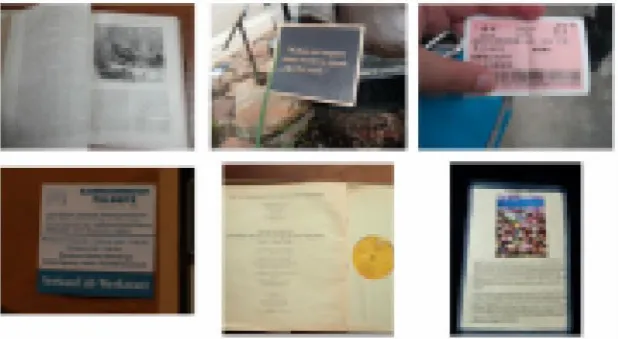
Fig. 2: Positive document examples
Fig. 2 illustrates positive examples of document images (blurred for use as illustration) used for training the classifier. As seen in Fig. 2, positive examples can include books, images of pages, signage, tickets, etc. A subset of positive training examples is used for testing the trained classifier. Note that the label “people” is not regarded as a negative example, as doing
so may incorrectly filter identification documents, book pages with people pictures in them, whiteboard photos with presenter in them, etc.
The following types of images are not considered as positive examples: images that do not include documents, comic-book pages, screenshots, etc. In the case of screenshots, even if the screenshot is of an online document, no further action is needed since it is usually already cropped and rectified.
Further, if a document is part of an image but not the primary purpose of the image, then such an image is not considered a positive example.
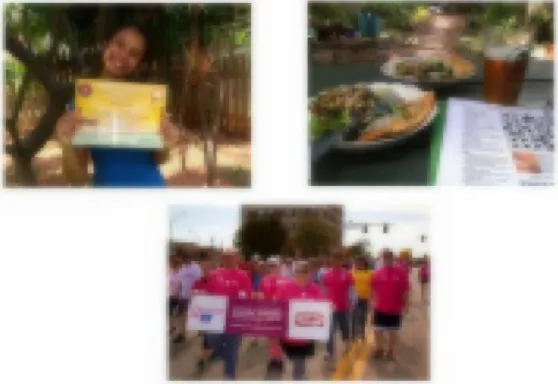
Fig. 3: Examples of false-positive document images
Fig. 3 illustrates examples of such false-positive document images (blurred for use as illustration). In the image in the top-left corner of Fig. 3, a person holds a certificate. The person and certificate are both integral to the image. In the image in the top-right corner of Fig. 3, the document is part of the multiple objects laid out on a dinner table. In the bottom image of Fig. 3, a group of people are seeing carrying a placard. In this case, separating the placard
would cause the context to be removed. In each of the images of Fig. 3, the document is not meaningfully separable from the other elements of the image.
For robust training of the machine learning model, the training data includes a number of good negative examples. A good negative example has certain characteristics, e.g.,
● the amount of text pixels is neither so low such that there is no document at all, nor is it so high that it qualifies as a positive example, e.g., between 5% and 20% of the image comprises text pixels;
● labels of the training examples exclude the labels used for positive examples;
● the label of the training example is additionally not one of: vehicle registration plate, picture frame, ring binder, traffic sign, poster, etc. This is done since these listed categories result in images close enough to positive examples and may cause the machine-learning model to misclassify these as documents. Excluding these image categories enables clear delineation between positive and negative training examples. Randomly sampled non-text images are also added to provide a good variety of negative examples.
Rotation correction
If an image is detected by the coarse classifier to be incorrectly oriented, e.g., sideways or upside-down, a rotation correction, e.g., 90, 180, or 270 degrees, is determined, along with an associated confidence. If the confidence exceeds a threshold, a UI element with the
suggestion to rotate is shown to the user. If user selects the UI element, the image is automatically rotated by the appropriate angle.
The classifier is trained on positive and negative examples of images. Positive examples include images with correct orientation. Negative examples include images of incorrect
orientation, where the angle of the incorrect orientation is known.
(a) (b)
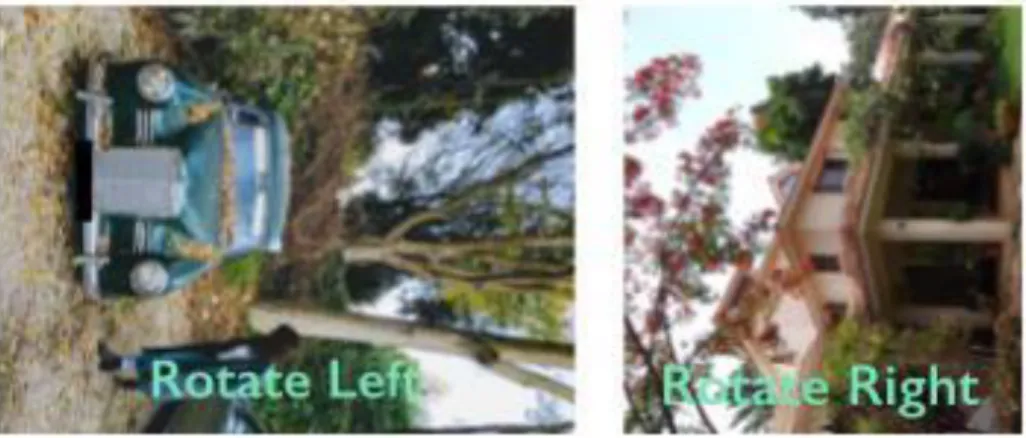
Fig. 4: Negative training examples for rotation correction with suggested action
Fig. 4 illustrates negative training examples (blurred for use as illustration). As can be seen, Fig. 4(a) is an image with an incorrect orientation of 90 degrees, while Fig. 4(b) has an incorrect orientation of 270 degrees. The trained classifier is able to determine that an image is oriented incorrectly along with a confidence for the determination. For example, the classifier may be trained to classify the image as: having correct orientation, having incorrect orientation of 90 degrees, having incorrect orientation of 180 degrees, and having incorrect orientation of 270 degrees, each with an associated confidence. When the confidence meets a threshold, the suggestion, e.g., “Rotate Left,” “Rotate Right” as shown in Fig. 4, is provided. If the user accepts the suggestion, the image is rotated to the correct orientation.
Automatic enhancement
The classifier can also be trained to recognize images that can benefit from automatic image enhancements. For example, images with poor lighting can be automatically corrected by application of a suitable image filter. In another example, images enhancements may include
contrast and brightness adjustments, application of image filters that emphasize certain image attributes, e.g., color or texture filters, depth-based filters, image filters that apply fun effects, etc. Positive and negative examples for different effects, e.g., images with poor lighting and images with good lighting, are used to train the machine learning model.
The classification of an image, e.g., as a document, as having an incorrect orientation, or as suitable for automatic enhancements, can be performed locally on a device, e.g., a
smartphone or other camera that captured the image or has the image in a local image library. Alternatively, or in addition, the classification can be performed on the server and the result be sent to the device. It is also possible to classify the image using different ML models on the device (e.g., a local, fast classifier suitable for execution on a mobile device with limited processing capacity) and the server (e.g., a more accurate classifier that requires more processing power). The determined image corrections, e.g., rotation correction, cropping to document, and image enhancements can also be performed locally on the device, on the server, or both. Server classification and enhancement is used only when the user has provided
permission to transmit the on-device image to the server.
Further to the descriptions above, a user may be provided with controls allowing the user to make an election as to both if and when systems, programs or features described herein may enable collection of user information (e.g., information about a user’s social network, social actions or activities, profession, a user’s preferences, or a user’s current location), and if the user is sent content or communications from a server. In addition, certain data may be treated in one or more ways before it is stored or used, so that personally identifiable information is removed. For example, a user’s identity may be treated so that no personally identifiable information can be determined for the user, or a user’s geographic location may be
generalized where location information is obtained (such as to a city, ZIP code, or state level), so that a particular location of a user cannot be determined. Thus, the user may have control over what information is collected about the user, how that information is used, and what information is provided to the user.
CONCLUSION
Images in image libraries are sometimes oriented incorrectly. For example, a
photograph taken with a camera held vertically may be displayed horizontally, or vice-versa. Further, users often capture images of documents; however, the resultant image can include distortions due to camera angle, poor lighting, etc. The captured image of a document often also includes objects outside the document boundary, e.g., a surface on which the document is placed. For some photos, automatic enhancements can enhance the quality of the image.
This disclosure applies machine learning techniques to detect if an image is that of a document, if the image is mis-rotated, if the image can benefit from automatic enhancement, etc. When such images are detected, enhancements such correction of rotation, cropping, distortion-removal, etc., are automatically suggested to the user, e.g., when the image is displayed. With user permission, an acceptance or dismissal of the suggestion is used as a training signal for the machine learning model. Enhancement suggestions are surfaced, e.g., as tappable or clickable buttons, when an image is being viewed and are applied upon user selection of the suggestion.