Lessons Learned from Designing a Programming System to Support
Middle School Girls Creating Animated Stories
Caitlin Kelleher and Randy Pausch
School of Computer Science, Carnegie Mellon University Pittsburgh, PA 15207
[email protected]
,
[email protected]
Abstract
Traditional approaches to teaching computer sci-ence are often unsuccessful in attracting girls into the discipline. Our hypothesis is that presenting computer programming as a means to the end of storytelling will help motivate girls to learn to program, a traditional gateway to computer science. In this paper, we present a case study in designing a version of the Alice pro-gramming system to support storytelling. We present lessons we learned about what supports are necessary to enable girls to program animated movies and de-scribe the kinds of programming tasks that arise in girls’ stories.
1. Introduction
Women are currently underrepresented in Computer Science [27]. Studies have shown that middle school is a critical age, during which many girls turn away from scientific and mathematical pursuits, including Com-puter Science [1]. By giving middle school girls a posi-tive first programming experience, we may be able to increase girls’ participation in Computer Science.
Our hypothesis is that presenting computer pro-gramming as a means to the end of creating Pixar-style animated 3D movies (i.e. storytelling) will help moti-vate girls to learn to program. Although other end-goals are possible, we feel that storytelling has attrib-utes that make it a promising approach to introducing programming to middle school girls: 1) Given time, most girls can come up with a story to tell; 2) Stories are naturally sequential and unlikely to require ad-vanced programming concepts immediately; 3) Stories are a form of self-expression and provide girls an op-portunity to experiment with different roles, a central activity during adolescence [25]; and 4) non-programming friends can readily understand and ap-preciate an animated story, which provides an opportu-nity for positive feedback from friends.
Ultimately, our goal is to create a programming sys-tem that is motivating for both girls and boys. How-ever, given the current under-representation of girls and women in Computer Science, we chose to initially
focus on developing a programming system which enables girls to create the kinds of stories they envi-sion. Despite our focus on girls, we have done informal testing with boys and believe that most of the storytel-ling supports we identified will help both boys and girls in creating animated stories.
In this paper, we present a case study in designing a version of the Alice programming system to support middle school girls in creating animated stories. We present lessons learned about user testing creative software, the system capabilities necessary to enable girls to program animated movies, and describe how we integrated these capabilities into Alice. We also discuss programming tasks that arise in girls’ stories.
2. Related Work
Our related work lies in two main areas: 1) pro-gramming systems that enable children to create an-imations and 2) technology designed for storytelling.
Although several programming systems support the creation of 2D or 3D animations, we are not aware of any programming system specifically designed for storytelling.
In the programming systems for 2D animation, children create animations that move or change the appearance of 2D sprites. In KidSim (now called Stagecast Creator)[23], My Make Believe Castle[16], and Magic Forest[17], users construct programs by specifying rules consisting of a condition and an action that should occur whenever the condition is met. In Scratch[18] and eToys[13], users assemble graphical tiles representing programming commands. Another 2D system, Play [26], allows pre-literate children to assemble a single sequence of icons that represent an-imations. My Make Believe Castle and Magic Forest both provide a static, pre-created library of sprite-animations. In KidSim, Scratch, Play, and users can edit the 2D images associated sprites. By changing a sprite’s 2D image, children can create any animation for which they can draw the necessary images.
Three systems attempt to enable children to create animated 3D graphical programs. In ToonTalk[12], users create programs by demonstrating the animations
they want their characters to perform. While ToonTalk can perform a wide variety of computations, the pro-gramming style is unlike any of the commonly used programming languages. In Alice 2.0 [3] and StarLogo TNG [24], users construct programs that control the motions of objects in a 3D world by dragging and dropping tiles that represent commands in a program-ming language. Alice’s programprogram-ming language pro-vides the same basic constructs as languages like Java and C++. Unfortunately, creating the kinds of anima-tions typically seen in Pixar movies is quite difficult in Alice; Alice is accurately described as a system for moving 3D objects in 3D space. Both StarLogo TNG and ToonTalk focus on the creation of video games.
As contrasted with the previous systems for teach-ing programmteach-ing, storytellteach-ing researchers have ex-plored creating software that encourages children to tell stories because the activity of storytelling can help children to master important skills.
Researchers at the MIT Media Lab and Northwest-ern have created a variety of technologies designed to help children gain literacy skills through telling stories. The StoryMat[5] and Rosebud[5] systems encourage children to tell stories, record the children’s stories and find appropriate contexts in which to replay them. TellTale[11] and Family Blocks[11] allow children to experiment with different ways of rearranging stories using physical props. The SAGE[5] system allows children to create their own virtual storytellers, a task which includes both storylistening and storytelling. By hearing their own or other children’s stories, children begin to create more complex stories. Sam[5] is a vir-tual peer who exchanges stories with young children. Sam’s stories help children gain language skills by modeling complex sentence structures that young chil-dren typically do not use.
Other researchers created technologies that encour-age children to collaboratively create stories through taking turns adding to a group story by contributing a frame for a comic-book style story [4] or recording a slice of time with a microphone for an oral story [11].
Researchers at the University of Maryland worked with inter-generational design teams to create several storytelling technologies including a robot to whom children can teach stories [8] and KidPad [9], a spatial storytelling system in which children create stories by drawing a series of pictures in a zoomable interface and using spatial hyperlinks to “zoom” the user to the next picture in the series. Inter-generational design teams have also worked to design story-rooms, interac-tive story spaces in which the actions of story-room visitors help to reveal a story[2]. Researchers have prototyped a simple rule-based programming system based on physical props that young children can use to create their own story-rooms [20]. Due to the
event-based nature of rule-event-based systems, writing stories (which typically contain sequences) can be complex.
There are also commercially available applications such as American Girl Premiere[15] and Barbie Story-Maker[19] that allow children to create short animated movies by combining pre-made animations. These applications do not teach programming.
While it is possible to create short animated movies in several of the programming systems, we are not aware of any that were designed specifically for story-telling (rather than for general animation).
2.1 Alice
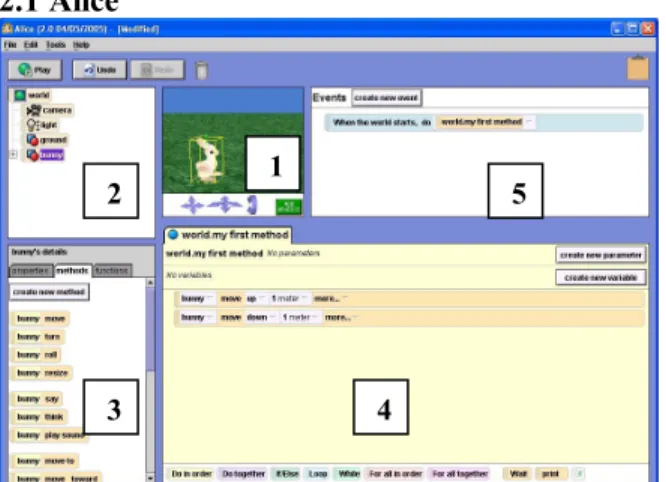
Figure 1: a screenshot of Alice 2.0 showing the 3D scene (1), the list of objects in the Alice world (2), the available methods for the selected object (3), the method editor (4), and the events area (5).
Researchers have done extensive work to design programming environments that support novices as they learn to program [14]. We chose to base our sys-tem on Alice, a programming environment that allows novice programmers to create programs that control the motions of objects in a 3D virtual world [6, 7]. Alice provides support for users learning to program in two main ways 1) Alice uses a drag and drop method of program construction which prevents users from mak-ing syntax errors and 2) in Alice, programs create an-imations so users can see their mistakes and more read-ily fix them. Of the novice programming environments that support animation, we felt that Alice provided the best starting point because it allows users to easily cre-ate sequences of program stcre-atements, a common need in creating stories. Further, creating new animations for characters in Alice requires programming skills rather than drawing skills. Finally, Alice is open source, al-lowing us to adapt it for storytelling.
To create a program in Alice, users select objects to use in their program from a gallery of 3D objects. All objects in Alice perform the same set of basic anima-tions including move (bunny move forward 1), turn (bunny turn left 1 revolution), and resize (bunny resize
5 1
2
½) that were inspired by common 3D graphics opera-tions. Alice animations (i.e. lines of code) are pre-sented as graphical tiles that users can drag and drop into their programs. In addition to simple sequences, Alice users can experiment with more complex pro-gramming concepts and constructs including methods, parameters, if-statements, loops, and parallelism.
3. Approach
We used storyboards in combination with our ob-servations of the girls using Alice, logs of the actions girls took within Alice, and the Alice worlds they cre-ated to identify problems. Between sessions, we modi-fied Alice to address the most serious problems we witnessed. Over the course of the study, we created and user tested 5 versions of Story Alice.
We chose to add the storyboarding activity to our user testing sessions after conducting early pilot tests in which we asked girls to create a story in Alice. In these pilot tests, we noticed that girls frequently started the sessions with ideas for animations but changed their goals if their original idea seemed too hard. As a result, only their early questions provided real insight into the kinds of animations they expected to be able to create. We asked users to create storyboards to capture their original story ideas.
Girls created storyboards using a 3-step process. In the first step, we asked users to write a short descrip-tion of their movie, similar to what one might find on the back of a DVD box. In the second step, we asked users to break their story down into scenes. For each scene, we asked users to describe the setting for the scene, the action that occurs in the scene, and the pur-pose for the scene (e.g. what the audience needed to learn from the scene). Finally, we asked users to story-board each scene by sketching 6-9 frames and writing a sentence per frame describing the action in that frame. We gave each user a storyboarding packet that in-cluded examples of each step and provided space for them to fill in the information for their own stories.
To identify animations needed for storytelling, we looked at three sources:
1. users’ descriptions of the action in a given frame
The text underneath a frame often contains descrip-tions of particular acdescrip-tions that characters take. For ex-ample, a frame might say “the guys leave the room” or “Julie sits down to watch TV.”
2. differences between drawings of sequential frames.
For example, in one frame a character might be standing in a room and in the next frame he is sitting on a sofa. In between these two frames that character had to walk over to the sofa and sit down on it.
3. users’ descriptions of the action in a scene
In some cases, we found that girls would write a particular action into the scene description which does not appear in the storyboard. We have included these animations in our analysis of necessary animations.
To improve the system, we initially focused on fix-ing problems that caused the most frustration durfix-ing our workshops. As it became more difficult to identify wide-spread problems, we studied the Alice logs and worlds created by users who seemed to have less posi-tive experiences than their peers.
4. Participants
We drew participants from 3 sources: a technology camp for girls who were entering the seventh and eighth grades (30 girls), a 3-day Alice workshop for girls held at a museum (20 girls), and local Girl Scout troops (21 girls). Participants ranged in age from 10-16. The girls in the technology and museum camps chose to participate in these camps and therefore probably had a stronger than average interest in science and technology. To get a more representative sample of girls, we recruited through the Girl Scouts. A $10 do-nation to the troop per participant helped to encourage a broad range of girls to participate, including girls who were not enthusiastic about computers.
5. Method
During our formative user testing sessions, we asked girls to perform three tasks:
1. Create a storyboard of the animated movie that they wanted to create
2. Complete the Alice tutorial to gain familiarity with the system.
3. Create an animated movie using a version of Story Alice.
We informed girls that we would study both what they created with Story Alice and their survey re-sponses to find ways to improve Story Alice. Our user testing sessions ranged in length from 4 – 9 hours. The girls were given as much time as they needed to com-plete the tutorial and storyboard. They spent the re-mainder of the time creating their animated movies using Alice. Typically, girls take about 60 minutes to complete their storyboards and 30 minutes to complete the tutorial. Girls in the technology and museum camps worked in pairs to create their stories. The Girl Scouts worked independently.
6. Lessons Learned: User Testing
During formative evaluation sessions, we learned several lessons that improved our process.
6.1 Two-person, talk-aloud protocol is poorly suited for this creative task.
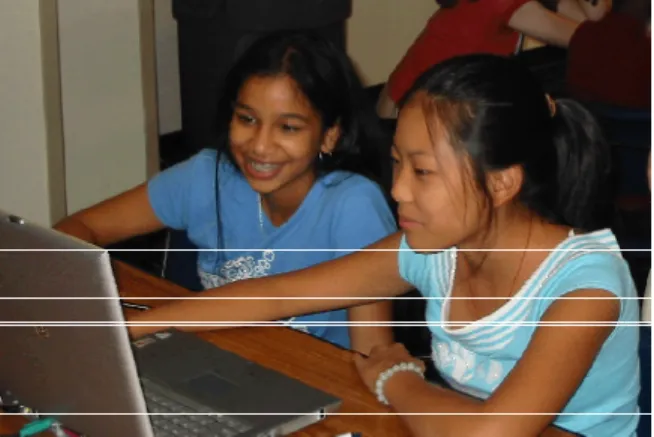
Based on the success of two-person talk aloud proto-cols in gathering usability data [21], we performed our initial users tests with girls working in pairs on their stories. However, we found the two-person, talk-aloud protocol is ill-suited for creative tasks like storytelling. The problem is that in this sort of task, users must ne-gotiate a creative vision, an often lengthy task that is unrelated to the software program being evaluated. Girls often had a difficult time agreeing on a story to create. In some pairs, one user dominated the story creation process while the other user contributed little. In other pairs, the both users were concerned about each other’s feelings and hesitant to state an opinion which often resulted in a story that neither one liked. Informal user testing with several pairs of boys re-vealed that boys also struggle with collaboratively de-veloping stories. For a creative process like storytel-ling, collaboration is difficult. Even among profes-sional writers, we see few jointly authored stories. Overall, we found that much of the discussion between pairs was about the story rather than the software.
Figure 2: We found that two-person talk aloud pro-tocol does not work well for user testing software designed to support creative tasks like storytelling.
In later sessions, users created stories individually but we configured their workspace such that they could easily interact with each other. Girls showed each other their animations, asked how to do things they saw in others’ worlds, and shared animation techniques. By having the girls work individually but arranging their workspace to encourage conversation, we were able to capture more of their specific animation goals and troubles because a greater proportion of the conversa-tion was related to Alice.
6.2 A 3-step, gradual refinement storyboarding process encouraged girls to make more easily interpretable storyboards.
When we began user testing, we gave children a handout that explained storyboarding through telling the story of two teenagers creating a short film for a school project [22]. We had our users read the story-boarding handout and then create their own storyboard. The resulting storyboards were hard to interpret be-cause they were too high a level; often users drew one picture to represent an entire scene. And, most did not include textual descriptions of the action taking place in each storyboard frame.
To encourage our users to plan their stories in more detail (and to communicate more of that detail to us) we moved to the 3-step storyboarding process de-scribed in section 5. By changing the storyboarding process, we were able to obtain more useful informa-tion from the storyboards. In part, this is because the 3-step process helped our users to refine their idea more thoroughly during the storyboarding stage. However, the 3-step process also provided some redundant in-formation. Consequently, when analyzing the story-boards later, we were more able to determine what actions girls expected the characters to perform.
A related point is that it was important for the girls to complete their storyboards before they were exposed to the software system; otherwise their knowledge of what was easy and hard with the system distorted their goals. Because our primary interest was in what anima-tions and technical supports we needed to add to Alice, we provided users with pictures of the characters and scenes available for their stories. This prevented users from planning stories that would be impossible be-cause of a lack of appropriate 3D assets.
7. Lessons Learned: Storytelling
Through analyzing the storyboards our users created, we identified the primitives necessary to enable girls to create the stories they envision. We developed a story-telling version of Alice that includes high-level anima-tion primitives and support for creating multiple scenes. We further refined these storytelling supports through observing users creating their stories in Story Alice and addressing problems our users encountered.
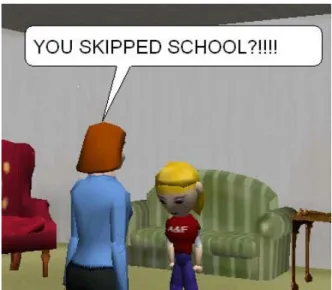
Figure 3: An example “say” animation in the story-telling version of Alice.
7.1 First and foremost, characters need to be able to express themselves
Simple animations that allow characters to speak and think simple text (in our case through cartoon-style speech and thought “bubbles”) can go a surprisingly long way towards enabling storytelling, both in terms of helping to communicate the story and allowing char-acters to express emotions. Speech and thought anima-tions seem like an obvious addition to any animation system. Yet, versions of the Alice system existed for more than five years without a way for characters to speak or think [6, 7].
7.2 People and characters are more important than other 3D objects.
The motions of people and characters account for an overwhelming majority of the animations in a story; users rarely want to animate objects like chairs and tables. Further, users have expectations for how 3D models should be animated based on their appearance. For example, when playing a move animation for a person, users expected the animated human figure to walk, not slide, forward. Our users expected people to be able to perform basic actions that most people can do including standing, sitting, and touching objects.
In Alice 2.0, all 3D objects can perform the same animations and, from a programming perspective, are of the same type. In the storytelling version of Alice, there are 3 types of objects: “things,” “humanoids”, and “characters”. Things are objects like chairs and tables that users would not ordinarily want to animate. Things perform simple animations like move and turn.
Humanoids are bipedal characters that can walk, talk, change body posture, and perform a variety of ges-tures. Characters are animals and monsters that do not have a bi-pedal body structure. Characters can slide around the scene, talk, and perform simple gestures like looking at objects in the 3D world.
7.3 Most stories require multiple scenes
For the purposes of this discussion, we use the term scene in the way that a play might: a scene takes place in one setting over a continuous block of time. In our first user testing session, 9 of 11 storyboards clearly revealed that users expected to be able to create multi-ple scenes. While it is technically possible to create the appearance of having multiple scenes within Alice 2.0, there is no explicit support for it and the process is too complex for most beginners. One pair of girls working on a multi-scene story in Alice 2.0 commented to the observer that whenever they needed to start a new scene, they went ahead and called for help because it was “just too confusing” to try themselves. The story-telling version of Alice enables users to easily create and manage multiple scenes.
7.4 Scenes can ground and motivate the use of programming subroutines.
We found that scenes provide a way to begin intro-ducing the concept of programming subroutines. Most girls found it natural to separate the action for scene one from the action for scene two and appreciated be-ing able to call each scene’s subroutine separately when needed. While scenes do not easily lend them-selves to introducing more sophisticated usages of sub-routines such as recursion, they provide a concrete introduction to and motivation for grouping a sequence of related commands and executing that sequence through a name assigned by the programmer.
7.5 Basic changes in posture go a long way
Despite the amazing number of positions the human body is capable of assuming, we found that there were only three that showed up regularly in stories: sitting, standing, and lying down. In the storytelling version of Alice, these animations are: person sit on (target), per-son stand up, and perper-son lie down on (target).
However, we did add animations for two additional body position animations: kneel and fall down. While kneel and fall down are not used as frequently as sit, stand up, and lie down, we found that both play sig-nificant roles in the stories that middle school aged girls tend to tell. Two user-testing groups created
sto-ries in which marriage proposals played a significant role. Kneel was not a common action, but it was an important one. Kneel also has other uses; characters kneel to pet dogs and pick up items on the ground. Fall down appears either as a humiliating moment for a character or an indication that someone has been hurt.
Figure 4: Although kneel is not as commonly used as sit on, stand up, and lie down, we added it to Story Alice because it played an important role in many of the love stories middle school girls envi-sioned creating.
7.6 For the most part, locomotion is targeted
When characters move, they frequently move to po-sitions relative to some other object or character in the world. For example, a person might walk over to a sofa and sit down, walk to another person to start a conver-sation or leave the scene. In our storytelling version of Alice, there are three kinds of locomotion animations: person walk to (target), person walk offscreen, and person walk (distance). Moving a specific distance, one of the most commonly used animations in Alice 2.0 [6, 7], is useful largely for situations in which users cannot easily describe where they want a character to go relative to some target.
7.7 Many gestures and special-purpose anima-tions are targeted touching
In analyzing the storyboards that girls created, we found that while there is a small number of frequently occurring animations (e.g. walk, and sit on), there is a large number of animations that occurred in only a single storyboard. One approach to providing infre-quently occurring animations is to provide large and rich library of animations for every character. How-ever, in user testing, we found that if we provided more
than 20-25 animations per character, users often found the process of searching for an appropriate animation frustrating. Instead, we tried to identify common mo-tions that users can combine to easily create the types of animations they envision their characters perform-ing.
We found that about half of the special-purpose anima-tions that girls wanted to create can be captured by a character touching a target with his or her hand (or foot) and potentially following that target as it moves through space. For example, a user could create a push animation by having one character touch a second and continue touching the second as he falls down. A user could animate dribbling a basketball by having a char-acter touch the top of the ball and continuing to touch it as it moves bounces.
Figure 4: An example of a push animation created with the touch and keep touching animations (above) and a series of images showing the push animation in action (below).
In Story Alice, we added two animations: person touch (target) and person keep touch-ing (target). Users can specify additional pa-rameters to control which limb (right arm, left arm, right leg or left leg) they would like to touch the target with and which side of the target they would like to touch.
7.8 Users need an easy way to get characters back to a normal position
In Alice 2.0, most animations that moved charac-ter’s body parts are created numerically. For example to animate a leg kick a user might start with “per-son.rightLeg turn backward 0.25 revolutions”. Using numerically-based animations users can easily create an inverse. It is harder for users to reverse animations like touch (target) or look at (target). In Story Alice, we added the “straighten up” animation which returns all body parts to their normal positions.
8. Changes to Alice
Based on the results of our formative user tests, we added two types of storytelling support to Alice:
1. We created a set of higher-level animations that more closely match the kinds of actions that users needed in their stories.
2. We added support that allows users to easily create multiple scenes.
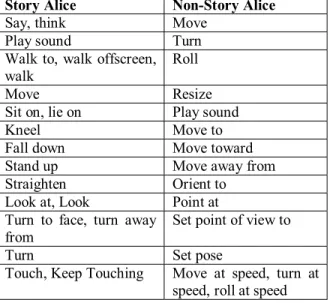
Table 1 lists animations that humanoid characters can perform in Story Alice and Non-Story Alice in the or-der in which they appear in the user interface. The animation sets in Story Alice and Non-Story Alice are largely non-overlapping but both systems have move, turn, and play sound animations. Move and turn are used frequently in Non-Story Alice and are sometimes needed in Story Alice to build character-specific an-imations. The ability to play sounds is a general capa-bility that provides benefit in both systems.
Table 1: This table shows some of the animations that a 3D humanoid character can do in Story Alice (column 1) and in Non-Story Alice (column 2).
Story Alice Non-Story Alice
Say, think Move
Play sound Turn
Walk to, walk offscreen, walk
Roll
Move Resize Sit on, lie on Play sound
Kneel Move to
Fall down Move toward Stand up Move away from
Straighten Orient to
Look at, Look Point at Turn to face, turn away
from
Set point of view to
Turn Set pose
Touch, Keep Touching Move at speed, turn at speed, roll at speed
9. Discussion and Conclusion
In conducting our user tests, we were surprised by girls’ enthusiasm for what is fundamentally an intro-duction to computer programming. Middle school girls who program computers for fun are a rare breed. Yet, in working with girls to design and test Story Alice, we found that presenting programming as a means to the end of storytelling has the potential to interest girls in learning to program.
All of the girls who participated in our user testing managed to create a program (story) in Alice. Moti-vated by needs in their stories, most girls started to use more complex programming constructs, including par-allelism and loops. Once we had support for scenes in
place, most girls created and used multiple methods to organize the animations for multiple scenes.
Nearly all of the girls were able to come up with a story they were excited about and most girls were en-thusiastic about working on their stories. In the camp settings we had several girls who came early on the last day of camp to have extra time to finish their stories. In the workshops, we saw users continue working on their stories during breaks. The fact that girls are engaged enough to continue working on a programming task by choice is both extremely encouraging and atypical. These are preliminary results, but we believe that they lend strong support for introducing girls to program-ming as a means to the end of storytelling.
The kinds of stories that girls want to create natu-rally motivate the usage of a wide variety of program-ming constructs. The need for multiple scenes in sto-ries creates an opportunity to introduce subroutines. Many of the actions that girls wanted their characters to be able to perform require multiple animations to occur simultaneously (parallelism) or several times in a row (count loops). Creating an animation in which a character bounces a basketball requires count loops. A dance animation involves having a character move multiple joints at the same time. Animations involving multiple characters help to motivate parameters. For example, a character might kiss, hug, slap, or push another character. The subject-verb-object pattern for these actions helps to make the concept of parameters accessible to middle school girls. It seemed natural that a character might want to hug multiple people and that one should be able to tell the character who to hug. The expectation that some actions require an object or character to act on was common and provides a natural lead-in to creating animations that take parameters.
While the stories girls want to create naturally pro-vide opportunities to introduce most of the program-ming concepts and constructs typically taught in intro-ductory programming classes, stories rarely motivate if-statements. In a classroom, a teacher could introduce if-statements with an assignment to create a story in which the audience can choose from multiple endings. Many educators are investigating incorporating com-puter gaming into introductory comcom-puter science. While gaming incorporates conditional logic, it may not be as broadly motivating for girls as storytelling.
Girls wrote stories about a wide variety of topics in-cluding whether or not you should abandon your friends if you are given a chance to hang out with the popular crowd, how to deal with a cheating boyfriend, the difficulties of moving to a new place, how to find a kidnapped dog, and a father with no sense of direction. Approximately half of the stories the girls created ad-dressed deep issues that middle school girls face. It
seems clear this approach can provide a vehicle for girls to think about issues they are facing.
It is notable that most of the storytelling needs that we identified in formative testing are fairly gender neu-tral. In boys’ stories, characters will almost certainly need to walk up to each other, sit, and stand, etc. We expect that most stories created by children of both genders will require multiple scenes. However, just as we added kneel and fall down animations to support stories that girls wanted to create, we expect that it will be necessary to expand the set of animations in Story Alice to include actions that occur commonly in boys’ stories. We suspect that storytelling support will help to create a more positive introduction to programming for boys as well as girls.
10. Future Work
In the formative user testing that guided develop-ment of the Story Alice, we observed that introducing girls to programming as a means to the end of storytel-ling in a system that adequately supports storytelstorytel-ling holds strong promise in helping to interest more girls in learning to program. As a next step, we plan to run a formal summative study comparing the attitudes, pro-gramming behaviors, and learning of propro-gramming concepts of girls who are introduced to programming through Story Alice and girls who are introduced to programming via Alice 2.0.
11. References
[1] AAUW. Girls in the Middle: Working to Succeed in School. American Association of University Women Educa-tional Foundation, Washington DC, 1996.
[2] Alborzi, H. et al. Designing StoryRooms: Interactive storytelling spaces for children. (Tech Rpt UMIACS-TR-2000-06). College Park: University of Maryland, Institute for Advanced Computer Studies.
[3] Alice 2.0. http://www.alice.org
[4] Antle, A. Case Study: the design of CBC4Kids’ Story-Builder. in Proceedings of IDC 2003. ACM Press, 59-68. [5] Cassell, J. Towards a model of technology and literacy development: Story listening systems. Applied Developmen-tal Psychology 25 (2004). Elsevier, 75-105.
[6] Conway, M. Alice: Easy-to-Learn 3D Scripting for Nov-ices. University of Virginia, 1997. http://www.alice.org/advancedtutorial/ConwayDissertation.P DF
[7] Conway, M. et al. Alice: Lessons Learning from Building a 3D System for Novices. in Proceedings of CHI (2000). ACM Press, 486-493.
[8] Druin, A. et al. Designing PETS: a personal electronic teller of stores. in Proceedings of CHI (Pittsburgh, PA 1999). ACM Press, 326-329.
[9] Druin, A. et al. KidPad: A design collaboration between children, technologists, and educators. in Proceedings of CHI (Los Angeles, CA 1997). ACM Press, 463-470.
[10] Druin, A. The Role of Children in the Design of New Technology. Behaviour and Information Technology, 21, 1 (2002), 1-25.
[11] Glos, J. and Umaschi, M. Once upon an object…: com-putationally-augmented toys for storytelling. in Proceedings of Computational Intelligence, 1997.
[12] Kahn, K. ToonTalk: An Animated Programming Envi-ronment for Children. Journal of Visual Languages and Computing. 7, 2 (June 1996). Academic Press, 197-217. [13] Kay, A. Etoys and Simstories in Squeak. Available at: http://www.squeakland.org/author/etoys.html
[14] Kelleher, C. and Pausch, R. Lowering the Barriers to Programming: A taxonomy of programming environments and languages for novice programmers. ACM Computing Surveys 37, 2 (June 2005). ACM Press, 83-137.
[15] Learning Company, The. The American Girls Premiere. [16] Logo Computer Systems, Inc. My Make Believe Castle, 1995.
[17] Logotron, Magic Forest.
[18] Maloney, J., Burd, L., Kafai, Y., Rusk, N., Silverman, B., and Resnick, M. Scratch: A Sneak Preview. in Proceed-ings of Creating, Connecting, and Collaborating through Computing (Kyoto, Japan 2004). 104-109.
[19] Mattel, Barbie StoryMaker.
[20] Montemayor, J. Physical Programming: software you can touch. in Extended Abstracts of CHI (Seattle, WA 2001). ACM Press, 81-82.
[21] Nielson, J. Usability Engineering. Academic Press, Bos-ton, MA. 1993.
[22] Shulman, Adam. Storyboarding Guide. http://pblmm.k12.ca.us/TechHelp/Storyboarding.html
[23] Smith, D.C., Cypher, A. and Spohrer, J. KidSim: pro-gramming agents without a propro-gramming language. Commu-nications of the ACM. 37, 7 (July 1994). ACM Press, 54-67. [24] StarLogo TNG. http://education.mit.edu/starlogo-tng/index.htm
[25] Stone, L.J. and J. Church. Childhood and Adolescence: A Psychology of the Growing Person, 5th Edition. Random House, New York. 1984.
[26] Tanimoto, S. and Runyan, M. Play: an iconic program-ming system for children. in Visual Languages. Plenum Pub-lishing Corporation, 1986.
[27] Vegso, Jay. CRA Taulbee Trends: Female Students & Faculty. http://www.cra.org/info/taulbee/women.html