An Architecture To Provide Cloud Based Security
Services For Smartphones
Lakshmi Subramanian
School of Information and Communication Technology KTH Royal Institute of TechnologyStockholm, Sweden Email: [email protected]
Gerald Q. Maguire Jr.
School of Information and Communication Technology KTH Royal Institute of TechnologyStockholm, Sweden Email: [email protected]
Philipp Stephanow
Secure Services and Quality Testing Fraunhofer Research Institution AISECGarching (near Munich), Germany Email: [email protected]
Abstract—Smartphones offer functionalities to end users which were formerly only provided by personal computers. However, the adaptation of technologies enabling these functionalities also inherited the vulnerabilities of these technologies. To enable smartphones to address these threats appropriate security mea-sures have to be identified and implemented. Another technology which has recently gained popularity is cloud computing. Due to the resource constraints of smartphones, realizing security services for smartphones in the form of cloud services seem to be a natural fit. This paper proposes a generic architecture for providing security services in the cloud for smartphones within a corporate environment. Preliminary results of experimental performance and battery measurements are presented supporting the core idea of the architecture to offload computationally expensive security functions from smartphones to resource rich cloud environments.
I. INTRODUCTION
Over the last decade, the popularity of handheld devices such as smartphones has increased tremendously. In 2010, Morgan Stanley forecasted that smartphones will be the dom-inant computing platform by 2012 [16]. With this tremendous growth in the number of devices, concerns about the security of smartphones are on the rise. Cisco’s annual Internet security threat report predicts that criminals are already targeting smartphones, rather than traditional Microsoft Windows PCs [6]. In order to enable smartphones to address these secu-rity challenges, extensive secusecu-rity measures are necessary. However, the resource constraints of these devices are a major limiting factor preventing them from directly adopting many of the current security mechanisms. Therefore, this paper proposes a generic architecture to move computationally intensive security functions from smartphones to a resource rich environment, specifically the cloud.
The remainder of this paper is organized as follows: The next section provides a general background regarding smartphones and cloud computing. Section III introduces aspects of smart-phone security and points out limitations of smartsmart-phones. Next section IV proposes an architecture to offload computationally expensive security functions from smartphones using cloud resources. In section V preliminary results of experimental performance and battery measurements are presented and sec-tion VI discusses central assumpsec-tions made for the proposed
architecture. Finally, section VII shows related work and section VIII concludes as well as suggests some future work.
II. GENERALBACKGROUND
A. Smartphones
Smartphones are a category of mobile phones which are
smart(i.e., more capable) when compared to traditional mobile phones. They offer many features such as the ability to run downloaded software applications or web browsing capabil-ities. Compared to traditional mobile phones, smartphones’ functions are no longer limited to simply browsing menus or dialling phone numbers. Three of the most obvious differences are a larger screen, increased storage and higher computational capacity. Smartphones support Internet connectivity via 3G or Wireless LAN technologies facilitating mobile web browsing covering all tasks known from traditional browsing on a desktop computer. Users can download and install a wide variety of third party applications on their smartphone calling services of the smartphone’s OS directly. These applications are distributed via vendor specific market places, for example, Apple’s Appstore, Android’s Market or Nokia’s Ovi Store. Security requirements and testing of applications vary, most smartphone platforms require the application to be signed or the user has to explicitly give her permission for the application to be installed and run.
B. Cloud Computing
The concept of cloud computing comprises three service models: Software-as-a-Service (SaaS), Platform-as-a-Service (PaaS), and Infrastructure-as-a-Service (IaaS). Within these three service models, consumers are provided with ready-to-use Software (in SaaS), development and runtime environ-ments (in PaaS), and resources such as CPU, memory, and data storage as a service (in IaaS).
These three services models can be delivered by three deploy-ment models: Private, public, and community clouds. Within private clouds, the cloud infrastructure is operated by only one organization. Services of a public cloud are made available to any organization. In a community cloud, certain organizations with similar requirements share a cloud infrastructure [17].
III. SMARTPHONESECURITY
A. Taxonomy
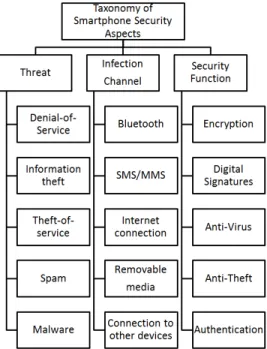
Figure 1 presents the most frequent types of threats and infection channels, as well as corresponding security functions suitable to protect smartphones.
Figure 1. Taxonomy of frequent threats, infections channels and security functions
1) Threats: Denial-of-Service attacks against smartphones are carried out by sending a large number of packets to the device to drain the battery or to consume other limited resources (such as memory, CPU cycles, port numbers, etc.). Due to their advanced networking capabilities, smartphones themselves may be used to launch Distributed Denial of Service Attacks [13].
Information theft occurs when hackers attack smartphones to obtain personal information: either transient (the phone’s location, its power usage, user movements etc.) or static information that smartphones store or send over the network (contact information, phone numbers, and stored programs). BlueSnarfing and Bluebugging attack are examples.
Theft-of-service occurs when malware uses smartphone resources, for instance, to send expensive SMS messages. Mosquitos virus is an example where illicit copies of a computer game were infected with a virus sending expensive SMS messages when the game was played by users.
Spam categorizes attacks where mobile users are targeted involuntarily with advertising, messaging, and other similar information. Spam over internet telephony (SPIT) is likely to increase as more users subscribe to voice-over-IP services. Bluejacking utilizes a Bluetooth device name to advertise a message which other users discover when searching for Bluetooth devices.
Malware exploits the fact that some smartphones are com-parable in some resources to fixed computers. Due to their
functional complexity, smartphones have become subject to malware targeting fixed computers. Examples of one specific type of malware on smartphones called trojans are Skulls, Metal Gear, and Gavno.
2) Infection Channels: Bluetoothviruses infect mobile de-vices based on physical proximity. The most well-known virus of this kind is Cabir [8].
TheShort Message Service (SMS) or Multimedia messaging service (MMS) can be used by smartphone viruses to spread within networks, e.g. by attaching a copy of itself on to a SMS or MMS message and sending it to another device. A good example of a worm which browses the smartphone’s contacts and then spreads via MMS is Commwarrior [25].
An Internet connection provides smartphones with the ability to acceess the Internet via WiFi, GPRS/EDGE, or 3G network access. Via this connection, there is a risk of contracting viruses through file downloading. For example, downloading files such as Skulls and Doomboot, disguised as games, smartphones can be infected by a virus [8].
Smartphones are frequently equipped to use removable mediato extend internal storage, such as Secure Digital (SD) Memory Cards. An example of malware is the Windows Trojan Delf propagated via SD card of a Samsung S8500 Wave smartphone [11].
Connection to other devicessuch as a desktop computer or pairing with another mobile device in order to synchronize (e.g. calendar events and contacts). During this synchroniza-tion, a virus can penetrate the smartphone as demonstrated by the Crossover virus [8].
3) Security Function: Within Encryption, users’ security requirements determine the strength of the algorithm and key length. Since valuable information is increasingly being stored in smartphones and/or transmitted over the network, this data should be encrypted to ensure that the confidentiality of the information is not compromised. Advanced Encryption Stan-dard (AES) and Triple Data Encryption StanStan-dard (3DES) are two of the widely used encryption algorithms in smartphones [5]. Today only few smartphones provide encryption for the data that is stored on the device, however this situation is changing with BlackBerry providing encryption for data stored on media cards, Microsofts’ introduction of its Encrypted File System (EFS), Nokia’s Wallet application, Apple’s hardware encryption for the iPhone 3GS, and LUKS for Android phones.
Digital Signaturesverify authenticity of messages sent and of the sender. Validating a signature gives a reason for the receiver to believe that the message was sent by the claimed sender. Digital signatures can also be used to verify message integrity, as any changes to the message after it has been digitally signed will invalidate the signature. Furthermore, digital signatures can be used to sign applications. Today many PCs designed for enterprise use contain a Trusted Platform Module (TPM) that can be used together with features in the processor and Basic Input/Output System (BIOS) to validate integrity of a software. Research aiming at the development of a Mobile Trusted Module (MTM) has already been carried out, e.g. in [12].
Anti-virussoftware for a smartphone can be used to detect, prevent, and remove malware such as viruses, worms, trojan horses, spyware, etc. from the smartphone. A common method for malware detection is signature scanning where known patterns of malware in executable code and files are searched for. To identify zero-day attacks, heuristics can be used that can detect slight variants of malicious code.
Anti-theftsecurity functions protect the data in a smartphone from misuse if the device is lost or stolen. One such method is remote wiping of data from a smartphone. This method has both legal risks and the risk of becoming an attack vector itself. Another method is to remotely lock access to the smartphone’s data.
Authentication decribes mechanisms to ensure that only authorized users are able to access functions and data of a smartphone. One factor authentication, such as using a single master password for the device, only provides limited security. For higher security requirements more advanced and stronger authentication mechanisms such as two factor authentication, behaviour based authentication, voice recognition, and key stroke based authentication can be used [15][19][5]. Smart-phones can also exploit speaker recognition as described in [23] to authenticate users.
B. Limitations of Smartphones
Although smartphones are facing similar threats as PCs, a comparison of the technical specification of today’s PCs (in-cluding laptops) and smartphones show significant differences in resources and thus in capabilities. For example, compared to a 1 GHz ARM processor, 512 MB RAM and a 32 GB storage capacity of a Samsung i9000 Galaxy S smartphone [3], a Samsung series 9 netbook has a Intel Core i5 processor with a maximal frequency of 2.3 GHz, 4 GB RAM and a 128 GB hard disk drive [4]. Moreover, the netbook has a battery capacity of 6300 mAH whereas the smartphone only possess a 1500 mAh battery. Due to these resource constraints, functions necessary to provide security on smartphones often need to be adapted or even replaced by alternative mechanisms.
Unfortunately, some of the security functions that are essen-tial to protect smartphones are highly resource intensive. Shin et al. [24] presented a study of the performance of the Secure Socket Layer (SSL) on a PDA to quantify resource use on a handheld device. In their study each step of the protocol was identified and compared to that of the same protocol running on a laptop. Their measurements show that the CPU clock speed is not the only factor that affects performance. In particular how the PDA accesses the network and the associated latency of this access also contribute to degraded performance. Cryptographic operations consume more energy on the PDA than on the laptop, even though the laptop is computing results much faster than the PDA (in fact, in their measurements the laptop takes only 31% of the overall execution time of the PDA).
Resource intensive security functions such as virus scanning through all of the data contained in a smartphone will deplete battery resources rapidly as shown in the preliminary results
of section V-B. As a result, implementing resource intensive security functions in smartphones is impractical and has to be limited in terms of scope and the security. Alternatively, some of these security functions must be offloaded to a resource rich computing environment and provided to smartphones as a services.
In the following section, an architecture is proposed which utilizes cloud resources to provide security services to smart-phones.
IV. SECURITY AS ASERVICEARCHITECTURE FOR SMARTPHONES
The proposed Security as a Service (SecaaS) architecture is a generic architecture for all smartphone platforms enabling cloud based security services for smartphones. The basic concept behind the architecture is shown in figure 2. The basic idea inspired by the clone cloud architecture [10] is to create a replica of the smartphone in the cloud. A replicaof a smartphone is a virtual copy maintained in a similar state as its physical counterpart. The similarity of a replica’sstate
comprises the synchronization of a smartphone’s operating system files and further files a user wants to be synchronized with the replica.
Figure 2. Basic concept of the SecaaS architecture
Section IV-A details the components of the architecture and section IV-B presents the security functions possible to be provided as cloud based services to smartphones. Lastly, section IV-C examines the potential for parallel processing in the case of a file download scenario.
A. Components of the SecaaS Architecture
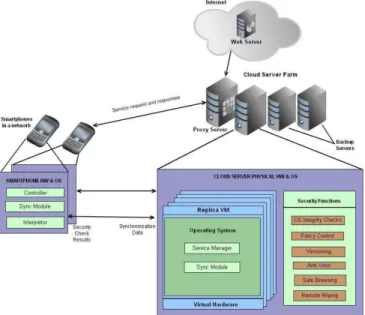
The architectural framework shown in figure 3 extends the basic concept depicted in figure 2. On its highest level, it comprises a smartphone representing a users’ end point, a server farm serving as the physical backbone of the cloud environment and a point of access to the internet. Within the cloud server farm resides a proxy server controlling the traffic in and out of the smartphone, and additional servers whose resources are utilized to provide security services to smartphones. Multiple virtual machines (VM) each with a smartphone replica, replica VM, run on the cloud servers, as and when needed. Hardware virtualisation on top of the physical hardware of the server farm enables deployment of replica VM. As shown in figure 3, the components of the pro-posed architecture comprise a sync module, an interpreter, and a controller in the smartphone; a sync module and a service manager in the replica and security functions provided by the cloud servers; the cloud based proxy server; and the backup servers. The Sync modules in the phone and the replica VM
Figure 3. SecaaS architecture for smartphones
are responsible for synchronizing the states of the smartphone and the replica. This synchronization can either occur at fixed time intervals or be an on-demand synchronization approved at the discretion of the controller in the smartphone. This controller can make its decision based on available bandwidth, estimation of possible energy consumption, and estimated energy consumption before the smartphone will be recharged. Furthermore, the controller can also be used to decide which security functions are most appropriate to offload depending on the network conditions in which the smartphone is most likely to operate and limitations of the specific smartphone based on its technical specifications. The service manager in the replica VM is responsible for the execution of the security functions and sending the results to the interpreter in the smartphone. A cloud based proxy is used to intercept the incoming and outgoing traffic to be acted upon by the security functions and implement a firewall service.
For the proposition of this architecture, the following assump-tions have been made:
• Battery resources are scarce in every smartphone. • Cloud infrastructure may be hosted on premises of the
deploying company to meet very high security require-ments when deployed in a corporate setting.
• Cloud servers are capable of hosting the required number of replicas.
• The cloud server farm is trusted by the smartphone users as their information is also stored in the cloud.
• Smartphones are connected to the cloud with a high throughput, low delay internet connection.
• The targeted infection channel is the internet.
• All the network connections involved are secure end-to-end.
• All components of the SecaaS architecture are trusted, i.e. considered resistant against manipulations by code
running on top of the smartphone OS and the cloud platform.
1) Sync Modules: The sync modules in the phone and the replica keep the states of the smartphone and replica synchronised. A smartphone user is allowed to choose the files which she wants to synchronise to the cloud server by the use of the sync folder in the smartphone. In addition to these files, the smartphone operating system files are also synchronised. Synchronisation of a replica and the smartphone is complete at timet, if at timetthe replica in the cloud has an identical copy of the smartphone’s operating system files and further files which the user wants to synchronise. In case of high security requirements, strict synchronisation, i.e frequent synchronisa-tion should be enabled. In other cases, loose synchronisasynchronisa-tion (less frequent) could be adopted. Achieving the desired syn-chronisation requires sufficient network connectivity so that the smartphone is able to update its state to the replica in the cloud within the desired period of time.
The Sync Module has two sub-components:
• Data Sync: Data Sync establishes similarity between smartphone’s and replica’s state when it is requested to do so.
• Time Sync: Time Sync determines the frequency of updates and notifies the data sync component to start the synchronisation process. This synchronization can be at regular intervals (i.e., periodically), on-demand, or both. The time sync controller can consider various factors such as available bandwidth, battery level, estimated energy consumption before the next time the phone is recharged, etc. If there is stable and sufficient bandwidth, then synchronisation at fixed time intervals can be adopted. In this case, the time intervals basically determine the level of synchronisation. Additionally, on-demand synchronisa-tion is also possible. For loose synchronisasynchronisa-tion, the ideal time to synchronise can be identified by the controller (as discussed in the next section). The sync module is instructed by the controller as to what data needs to be sent to the replica in the cloud. The sync module in the replica is responsible for placing the data in the virtual machine’s state and file system appropriately.
2) Controller: The controller component is present in the smartphone and is responsible for tracking what data needs to be sent to the replica to achieve synchronisation. Determining what kind of data needs to be sent depends on how synchronisation is achieved. For example, repli-cation can be achieved by using a record and replay tech-nique as put forth by the Paranoid Android architecture (described in section VII). Here, all the system calls from kernel to user space are tracked to enable replay at the emulator in the cloud. Alternatively, in the smartphone mirroring architecture (also presented in section VII), the user inputs to the smartphone are tracked to replay the actions at the smartphone mirror in the same order as it occurred at the smartphone. In the proposed SecaaS architecture, tracking user inputs to the smartphone could
be used since any change to the state of the smartphone is stimulated by some user action on it, or via the network, or via some Input/Output (I/O) device or sensor on the smartphone. The network inputs are readily available at the replica through the proxy server. To maintain the consistency in the file system of the smartphone and the replica, any new file that has been added to the file system of the smartphone (from sources other than the internet in the case of continuously connected operation) is also sent to the replica. For example, a user may receive a file via Bluetooth, memory card etc. The controller will have to keep track of these other sources of input and replicate the data appropriately to the replica in the cloud.
3) Service Manager: A service manager in the replica VM controls the execution of the various security func-tions that are present in the cloud servers. It is responsible for invoking the security functions and sends results to the interpreter in the smartphone.
4) Interpreter: The interpreter in the smartphone receives the results from the service manager in the cloud and interprets them. Based on the result, it acts according to an established policy and appropriately imitates the user or waits for a user action.
5) Cloud based Proxy: A cloud based proxy is appro-priate for the proposed architecture as it can scale well and can support an enterprise’s set of smartphones while offering them a pool of services. The proxy server is deployed in the cloud server farm. The cloud based proxy acts as a firewall for the enterprise’s network. Given that the network traffic in and out of the smartphone is routed through the proxy server, it is possible to apply security checks to the incoming traffic before forwarding this traffic to the smartphone, although at a cost of an additional delay. A secure browsing service can be offered to the smartphones by scanning the requested web pages for any malicious behaviour and notifying the user accordingly. Moreover, anti-virus scanning can be applied to the incoming traffic. Furthermore, the replica hosted in the cloud server can query the proxy server to obtain the required data during synchronisation.
6) Backup Server: Backup servers in the cloud can be used to host smartphone replicas in case of failure of the main server to continuously provide the services to the smartphones with minimal disruption beyond the delay to initialize the required processes.
B. Cloud based Security Functions
1) Anti-virus: Virus scanning is considered one of the most computationally intensive operations as it consumes a large amount of CPU and battery resources of a smart-phone. This is confirmed by the measurements described in section V-B. Cloud resources can be utilized to perform anti-virus scanning and provide results to the smartphone. Oberheide et al. [20] present the idea of providing a virus scanning service in the cloud for smartphones and show that detection coverage can be significantly improved by
using multiple anti-virus programs in the virtual environ-ment. In spite of these improvements, there are bandwidth constraints which need to be considered in order to decide whether offloading computationally expensive tasks is ac-tually beneficial. Within the SecaaS architecture, because the phone and the replica are kept synchronized, there is no need for transferring large amounts of data specifically for virus scanning. Additionally, the anti-virus scanning can be performed in the native OS of the cloud server underlying all of the replicas to improve performance and utilitize cloud resources more effectively.
2) Secure Browsing: The World Wide Web as part of the internet is one of the prominent infection channels for malware. Therefore, secure browsing is one security function that can be offered in the cloud. If the website accessed by the user is not secure, then the system can notify the user. This is inspired by the F-Secure Browsing protection for mobile devices which is already provided as a cloud service [14]. Due to the availability of scalable storage resources in the cloud, this feature is well suited for implementation in the cloud server, and thus can be provided to all smartphone replicas.
3) OS Integrity Checks: Integrity checks for the smart-phone OS can be performed every time the smartsmart-phone is connected to the cloud server. Because the operating system files are synchronized with the cloud server, the verification of the integrity of a smartphone’s OS can be performed by the replica (following synchronization).
4) Remote Wiping and Versioning : A versioning system can be set up in the cloud server which stores snapshots of a smartphone’s state and data at regular time intervals as specified by the user or the organization to which the user belongs. This allows the user of an organization to safely restore a specific state of a smartphone. For exam-ple, versioning can serve to recover a lost or corrupted smartphone to a clean state. If a smartphone is lost, the cloud server can be used to remotely wipe personal and corporate data from the phone. Under the assumption that suitable anti-theft or tracking software is installed on the smartphone lost, it can be located geographically. Then, as described above, versioning can be used to restore the state of the phone, once it has physically been recovered.
5) Policy Control: In a corporate network, a policy control service can be utilized to limit the actions of the smartphone users in the network. Any violation of specified policies can be monitored by logging services. Examples of policies could include upload and download limits for a month, restrictions on the set of applications that can be installed on the smartphone, etc.
6) Secure Storage: Secure storage can be provided as a cloud service to smartphones. In a corporate environment, confidential information and documents, if provided in a secure storage cloud, can be accessed by the employees when needed via their smartphones, instead of having these documents stored locally in the smartphones. This may mitigate corporate risk since the amount of valuable
data stored in a smartphone can be minimized.
C. Potential for Parallel Processing
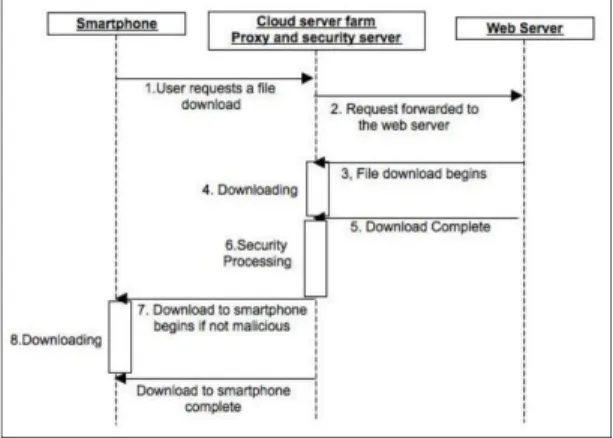
As explained in section IV-A5, the proxy server residing in the cloud intercepts incoming traffic from the web server and forwards it to the smartphone after complet-ing the security processcomplet-ing. This sequential approach is shown in figure 4 where a user wishes to download a file from a webserver. This sequential processing supports identification of known malware and thus prevents the transmission of this malware to the smartphone. However, it comes at the cost of increased delay in delivering content to the smartphone. For a system that cannot tolerate this delay, parallel processing is feasible where incoming traffic is sent to the smartphone and, in par-allel, security functions are applied to the corresponding replica. In this parallel approach displayed in figure 5, outgoing connections from the smartphone are blocked until the smartphone has received a positive security evaluation results from the cloud. If no malicious content has been detected, then outgoing connections are allowed, otherwise this output is blocked and immediate action is taken to revert the smartphone back to a secure state.
Figure 4. Sequential processing in the SecaaS architecture
Figure 5. Parallel processing in the SecaaS architecture
V. EXPERIMENTALRESULTS
This section describes preliminary measurements which focused on some aspects of the architecture proposed
in section IV. Section V-A examines the performance of smartphone specific anti-virus software running on a physical and a virtual smartphone. In section V-B briefly presents measurements of resource consumption, especially battery power consumption.
A. Performance Measurements of Anti-Virus Software
As expected and represented in table I, preliminary mea-surements of anti-virus scanning on a smartphone and an emulation of a smartphone show that the time required to perform a given anti-virus scan is significantly less on the emulated smartphone. Two different kinds of smartphone specific anti-virus programms, AVG anti-virus [1] and NetQin Mobile virus [2], were used to carry out anti-virus scanning. An Android handset, HTC Wildfire An-droid 2.1 (technical details of this smartphone are shown in table II), was chosen as a representative smartphone. Furthermore, Amazon’s Web Services were chosen as a cloud environment. The instance configuration used for the virtual machine in the cloud is shown in table III. The operating system running on this instance is Ubuntu Linux and an Android version 2.1 smartphone was emulated using Android SDK. The emulator and the smartphone were synchronized and thus contained the same data to facilitate comparison. More precisely, the smartphone and its replica were configured with 100 MB of content and media files, in addition to the default Android version 2.1 smartphone files.
Software Physical Smartphone (in seconds) Emulated Smartphone (in seconds) AVG 50 7 NetQin Mobile 19 3 Table I
SUMMARY OF PERFORMANCE MEASUREMENTS
CPU Processing Speed 528 MHz
Storage ROM: 512 MB
RAM: 384 MB Battery type Rechargeable Lithium-ion battery
with 1200 mAh capacity Table II
SPECIFICATION OF THE PHYSICAL SMARTPHONE
B. CPU and Battery Consumption of the Smartphone
The battery and CPU consumption in the smartphone for various security functions are two key factors mo-tivating offloading computation to a resource rich cloud environment. Therefore, experiments were performed to
1.7 GB of memory
5 EC2 Compute Units (2 virtual cores with 2.5 EC2 Units each) 350 GB of instance storage
32-bit platform
I/O performance: moderate API name: c1.medium
Table III
CONFIGURATION OF THEAMAZONWEBSERVICE INSTANCE
gain understanding of smartphone’s battery and CPU con-sumption when performing anti-virus scanning. Battery monitor widget (available in the Android app market) and system panel task manager were used for battery and CPU measurements respectively. The Kaspersky mobile anti-virus software was chosen as it is one of the most well known and widely used anti-virus programs available for smartphones. A HTC wildfire smartphone with Android version 2.1 containing 1028 MB of data was used in this experiment.
The Kaspersky anti-virus software was started and a full scan of the smartphone’s file system was carried out for a time period of 2 hours. CPU usage and battery consumption were monitored. Figure 6 shows that the CPU activity reached more than 80% during the scanning period. Also, the Kaspersky anti-virus process was on top of the list of applications with respect to CPU usage. This application consumed up to 56.6% of the CPU totalling 1h 7m 57s of CPU usage during 2 hours, out of which the active scan time was 1h 16m 37s (or 63.8% of the 2 hours).
Figure 6. Kaspersky CPU consumption for two hours
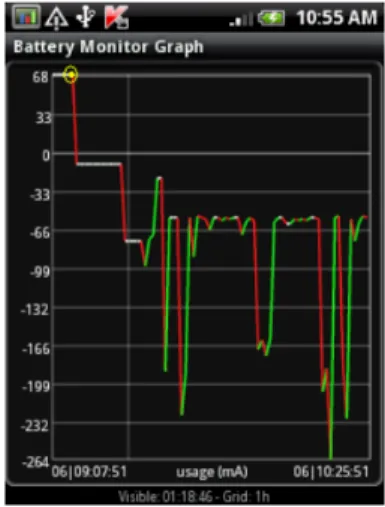
Figure 7 depicts the battery usage of the smartphone during the anti-virus scan versus time. The yellow mark in the graph represents the start of the anti-virus scan. When the anti-virus scan was started, the smartphone was 100% charged (as indicated by the battery monitor widget) and no fluctuations were noticed. Thereafter, the battery began to discharge at a median current of about 66 mA, but with wide fluctuations of upto 264mA drain. After completion of the scan the battery’s capacity was reduced by about 8% leaving 92% of its fully charged capacity.
VI. DISCUSSION
In this section, central assumptions made for the proposed architecture stated in IV-A are critically reflected. Replicating physical smartphones depicts a major tech-nical challenge in respect to actual implementation. On
Figure 7. Battery current in mA during anti-virus scanning
the one hand, similarity between physical and replicated smartphone should be as high as possible to ensure effectiveness of security functions applied. On the other hand, the higher the similiarity the more data needs to be transferred more frequently, at best, any change needs to be replicated continuously. The latter is very resource intensive and will presumably affect usability to an un-bearable extent. Therefore, actually implemented replica-tion has to provide added value in terms of smartphone’s security and, at the same time, has to be technically feasible as well as preserve usability.
The considered infection channel is the Internet connec-tion. But as already implied by the taxonomy introduced in section III-A, there are various other possible infection channels for smartphones. In order to apply security functions provided by the cloud, all data incurred, e.g. through removable media or connection to other devices needs to be send by the smartphone to the replica in the cloud. This will consume smartphone’s battery and computational resources as well as requires an available internet connection.
As already mentioned above, the higher the similarity between physical and replicated smartphone the more effective are security functions applied within the cloud. But even when deployed within a corporate setting, the trustworthiness of personnel responsible for administra-tion of replicas is an indispensable prerequisite. Pursu-ing a high degree of resemblance yet reveals another challenge resulting from a recent trend known as Bring-Your-Own-Device (BYOD). Here, employees also use their private smartphones for corporate purposes. As a result, these smartphones contain information protected by privacy laws which may conflict with replication as proposed within the SecaaS architecture.
VII. RELATED LITERATURE
Although research in this area is still in its infancy, the presented work builds on current approaches explained in
this section. Chun and Maniatis [10] present a concept for augmenting computation on a smartphone with a clone of the smartphone in the cloud. Further concepts presented in [22] and [7] focus on offloading computation from a mobile device to the cloud. Paranoid Android [21] and Security as Service reference architecture for SOA security [18] explicitly propose architectures focused on security of mobiles devices or endpoints. Examples of investigated security functions provided by the cloud to a mobile device are presented by Oberheide et al. [20] where anti-virus scanning for smartphones in cloud is performed. Moreover, authentication for smartphones in the cloud using behavioural authentication has been suggested by Chow et al. [9].
VIII. CONCLUSION AND FUTURE WORK As a next stage in the development of the proposed architecture, technical feasibility and practicability of smartphone’s replication will be examined. Furthermore, the presented components of the architecture need to be specified more precisely and thus pave the way for implementing a prototype. Initial performance tests inves-tigating anti-virus scanning showed promising results, but additional security functions need to be identified that are suitable for deployment within the SecaaS architecture.
REFERENCES
[1] AVG Mobilation for Android Smartphones & Tablets. http://www.avg.com/de-de/antivirus-for-android. Last access: 2011-08-28.
[2] NetQin Mobile Security. http://www.netqin.com/en/antivirus/. Last access: 2011-08-28.
[3] Technical Specification Samsung Galaxy S I9000. http://goo.gl/K8cZc. Last access: 2011-08-28.
[4] Technical Specification Samsung Series 9 Notebook. http://goo.gl/rYxhq. Last access: 2011-08-28.
[5] BlackBerry Enterprise Solution: Security Technical Overview. http://goo.gl/DfMzM, 2009. Last access: 2011-08-28.
[6] Annual Security Report 2010. Technical report, Cisco, 2010. [7] E. Chen and M. Itoh. Virtual Smartphone Over IP. In
Proceed-ings of the 2010 IEEE International Symposium on A World of Wireless, Mobile and Multimedia Networks (WoWMoM’10), 2010. [8] J. Cheng, S. H. Wong, H. Yang, and S. Lu. SmartSiren: virus detection and alert for smartphones. InProceedings of the 5th international conference on Mobile systems, applications and services (MobiSys ’07), pages 258–271, New York, NY, USA, 2007.
[9] R. Chow, M. Jakobsson, R. Masuoka, J. Molina, Y. Niu, E. Shi, and Z. Song. Authentication In The Clouds: A Framework And Its Application To Mobile Users. InProceedings of the 2010 ACM workshop on Cloud computing security workshop (CCSW’10), 2010.
[10] B.-G. Chun and P. Maniatis. Augmented Smartphone Applications Through Clone Cloud Execution. In Proceedings of the 12th conference on Hot topics in operating systems (HotOS’09), 2009. [11] H.-S. C. M.-H. S. Dong-Her Shih, Binshan Lin. Security aspects of mobile phone virus: a critical survey.Industrial Management & Data Systems, 108(4):478–494, 2008.
[12] J.-E. Ekberg and et al. Mobile trusted module (mtm) – an introduction, Nov 2007. Nokia Research Center.
[13] G. Hogben and M. Dekker. Smartphones: Information security risks, opportunities and recommendations for users. Techni-cal report, European Network and Information Security Agency (ENISA), Dec 2010.
[14] H. Huittinen. F-Secure boosts smartphone security with Browsing Protection and Locator -feature, Feb 2010.
[15] M. Jakobsson, E. Shi, P. Golle, and R. Chow. Implicit authen-tication for mobile devices. InProceedings of the 4th USENIX conference on Hot topics in security (HotSec’09), Berkeley, CA, USA, 2009.
[16] M. Meeker, S. Devitt, and L. Wu. Morgan Stanley Internet Trends Report, June 2010.
[17] P. Mell and T. Grance. The NIST Definition of Cloud Computing. Technical report, National Institute of Standards and Technology (NIST), 2009.
[18] M. Memon, M. Hafner, and R. Breu. Security As A Service: A Reference Architecture For SOA. In7th International Workshop on Security in Information Systems (WOSIS 2009), 2009. [19] M. Nauman and T. Ali. TOKEN: Trustable Keystroke-Based
Authentication for Web-Based Applications on Smartphones. In
Information Security and Assurance, volume 76 of Communi-cations in Computer and Information Science, pages 286–297. Springer Berlin Heidelberg, 2010.
[20] J. Oberheide, K. Veeraraghavan, E. Cooke, J. Flinn, and F. Jaha-nian. Virtualized In-cloud Security Services For Mobile Devices. InProceedings of the First Workshop on Virtualization in Mobile Computing(MobiVirt 2008), 2008.
[21] G. Portokalidis, P. Homburg, K. Anagnostakis, and H. Bos. Paranoid Android: Versatile Protection For Smartphones. In
Proceedings of the 26th Annual Computer Security Applications Conference (ACSAC 2010), 2010.
[22] T. K. Roelof Kemp, Nicholas Palmer and H. Bal. Cuckoo: A Computation Offloading Framework for Smartphones. In2nd In-ternational ICST Conference on Mobile Computing, Applications, and Services (MobiCASE), 2010.
[23] C. Sanchez. Speaker Recognition in a handheld Computer. Master’s thesis, Royal Institute of Technology (KTH), Stockholm, Sweden, 2010.
[24] Y. Shin, M. Gupta, and S. Myers. A study of the performance of SSL on PDAs. In Proceedings of the 28th IEEE inter-national conference on Computer Communications Workshops (INFOCOM’09), Piscataway, NJ, USA, 2009.
[25] H. Shlomo. Phone Infections. Science, 324(5930):1023–1024, May 2009.