DEPARTMENT OF COMPUTER SCIENCE AND ENGINEERING Page 1 of 157
CS0206 OPERATING SYSTEMS
Prerequisite CS0201, CS0203
PURPOSE
Every computer professional should have a basic understanding of how an operating system controls the computing resources and provide services to the users. This course provides an introduction to the operating system functions, design and implementation. It serves as strong foundation for other courses like networks, compiler design, data base systems.
INSTRUCTIONAL OBJECTIVES
The students learn about:
1. Structure and functions of OS 2. Process scheduling, Deadlocks 3. Device management
4. Memory management 5. File systems
UNIT 1 INTRODUCTION 9 Computer system overview-basic elements, Instruction execution, Interrupts, memory hierarchy, I/O communication techniques, operating system overview-objectives and functions, Evolution of OS Microsoft windows overview.
UNIT 2 PROCESSES 9 Process description and control - process states, process description, process control; Processes and Threads, Symmetric Multiprocessing and microkernel’s. Windows Thread and SMP management. Case studies-UNIX, SOLARIS thread management
UNIT 3 CONCURRENCY AND SCHEDULING 9
Principles of concurrency - mutual exclusion, semaphores, monitors, Readers/Writers problem; Deadlocks – prevention- avoidance – detection .Scheduling : Types of scheduling – scheduling algorithms. Case studies- UNIX scheduling.
UNIT 4 MEMORY 9
Memory management requirements, partitioning, paging, and segmentation; Virtual memory - Hardware and control structures, operating system software, Linux memory management, case studies- WINDOWS memory management, UNIX and SOLARIS Memory management
UNIT 5 INPUT/OUTPUT AND FILE SYSTEMS 9 I/O management and disk scheduling – I/O devices, organization of I/O functions; OS design issues, I/O buffering, disk scheduling, Disk cache, File management – organization, directories, file sharing, record blocking, secondary storage management; case studies-LINUX I/O, UNIX File management.
TOTAL 45
L T P C
DEPARTMENT OF COMPUTER SCIENCE AND ENGINEERING Page 2 of 157 Notes for all five units Prepared by Mrs. Antony Vigil A.P[O.G]/SRMU/RMP
UNIT 1
INTRODUCTION
Computer system overview-Basic elements, Instruction execution, Interrupts, Memory hierarchy, I/O communication techniques, Operating system overview-Objectives and functions, Evolution of OS Microsoft windows overview.
COMPUTER SYSTEM OVERVIEW
A program that acts as an intermediary between a user of a computer and the computer hardware is Operating System.
Operating system goals:
• Execute user programs and make solving user problems easier.
• Make the computer system convenient to use.
• Use the computer hardware in an efficient manner
Computer System Components:
1. Hardware – provides basic computing resources (CPU, memory, I/O devices). 2. Operating system – controls and coordinates the use of the hardware among the
various application programs for the various users.
3. Applications programs – define the ways in which the system resources are used to solve the computing problems of the users (compilers, database systems, video games, business programs).
DEPARTMENT OF COMPUTER SCIENCE AND ENGINEERING Page 3 of 157
Abstract View of System Components:
Operating System Definitions:
• Resource allocator – manages and allocates resources.
• Control program – controls the execution of user programs and operations of
I/O devices.
• Kernel – the one program running at all times (all else being application
programs). Simple Batch Systems:
• Hire an operator • User ≠ operator • Add a card reader
• Reduce setup time by batching similar jobs • Automatic job sequencing
• Automatically transfers control from one job to another. • Resident monitor
• Initial control in monitor
DEPARTMENT OF COMPUTER SCIENCE AND ENGINEERING Page 4 of 157
Memory Layout for a Simple Batch System:
Basic Elements
Computer =Processor + Memory + I/O modules
• Processor: Controls the operation of the computer and performs its data
processing functions. When there is only on processor, it is often referred to as CPU.
• Main Memory: Stores data and programs.
• I/O modules: Move data between the computer and its externalenvironments (e.g., disk drive, network, terminals).
• System interconnection: Some structures and mechanisms that provide for
DEPARTMENT OF COMPUTER SCIENCE AND ENGINEERING Page 6 of 157
Instruction Execution
Execute cycle involves data transfer between processor and memory (or an I/O module), data processing or changing control flow. Most processors use pipeline instruction execution and allow Direct Memory Access
• The processor fetches the instruction from memory
o Program counter (PC) holds address of the instruction to be fetched next o Fetched instruction is placed in the instruction register (IR)
o Program counter is incremented after each fetch
• Processor then executes instruction in the IR Categories of instructions:
• Processor-memory
o Transfer data between processor and memory • Processor-I/O
o Data transferred to or from a peripheral device • Data processing
o Arithmetic or logic operation on data • Control
DEPARTMENT OF COMPUTER SCIENCE AND ENGINEERING Page 7 of 157
Interrupts
Interrupt (or exception):
• Signal sent to processor e.g. attempt to divide by zero
e.g. illegal attempt to access address
e.g. execution of trap instruction (to make “system call”) e.g. I/O transfer has completed
• Source and priority of interrupt are recorded
All computers provide a mechanism by which other modules may interrupt the normal processing of the processor.
The Classes of Interrupts:
• Program: Generated by some condition that occurs as a result of an instruction.
• Timer: Generated by a timer within the processor.
• I/O: Generated by an I/O controller.
• Hardware failure: Generated by a failure such as power failure.
Interrupt is an interruption of the normal sequence of execution. After interrupt is completed, the normal program execution is resumed. Interrupts are provided primarily to improve processing efficiency.
E.g., Avoid CPU waiting for slow I/O devices.CPU can continue to execute other instructions
DEPARTMENT OF COMPUTER SCIENCE AND ENGINEERING Page 9 of 157
Interrupt Cycle:
During the interrupt cycle, the processor checks to see if any interrupts have occurred, indicated by the presence of an interrupt signal. If interrupt is pending, the processor suspends execution of the current program and executes an Interrupt Handling Routine. IHR determine the nature of interrupt and performs whatever actions are needed.
DEPARTMENT OF COMPUTER SCIENCE AND ENGINEERING Page 10 of 157
DEPARTMENT OF COMPUTER SCIENCE AND ENGINEERING Page 11 of 157
Interrupt Processing:
Multiple Interrupts:
• Multiple interrupts can occur close to one another.
• To disable interrupt when executing the interrupt handler routine.
o New interrupts will have to remain pending until the completion of
interrupt
o Handler routine.
o Does not consider priority of interrupts and time-critical needs.
• To define priorities for interrupts.
o High-priority interrupts can interrupt the execution of IHR of low-priority
DEPARTMENT OF COMPUTER SCIENCE AND ENGINEERING Page 13 of 157
Interrupt handling:
• Contents of PC and PSW are stored automatically.
• Interrupt service routine (ISR) is executed in supervisor mode.
• ISR may store contents of other registers.
• ISR may call other operating system routines.
• Eventually contents of registers may be restored and execution continued in user mode from point of interruption
Multiprogramming:
• More than one process is active on a single processor
• There is a ready queue of processes waiting for the processor
DEPARTMENT OF COMPUTER SCIENCE AND ENGINEERING Page 14 of 157
The Memory Hierarchy
Advantage:
• Faster access time
• Greater capacity
• Going down the hierarchy
o Decreasing cost per bit o Increasing capacity
o Increasing access time
o Decreasing frequency of access of the memory by the processor • Storage devices can be put in order of increasing capacity, namely,
o registers, cache memory, main memory, hard disk, tape
DEPARTMENT OF COMPUTER SCIENCE AND ENGINEERING Page 15 of 157 o cost per bit decreases
o first three are volatile caching
o copying information into faster device
Secondary memory:
• Managed by the operating system
• Nonvolatile
• Auxiliary memory
• Used to store program and data files Cache Memory:
• Processors can execute instructions faster than instructions (and data) can be fetched from main memory
• Cache memory provides a solution which relies on locality of reference and is invisible to OS
DEPARTMENT OF COMPUTER SCIENCE AND ENGINEERING Page 16 of 157
I/O module
• Is an interface between the bus and a device
• Hides the complexity of the device from the processor
• The processor issues commands to an I/O module
• The I/O module controls the device to perform the requested action
• It also buffers data and maintains a status register that the processor can read
Techniques for performing I/O:
(i) Programmed I/O (ii)Interrupt-driven I/O
(iii)Direct memory access (DMA)
(i) Programmed I/O
• I/O module performs the requested action
• No interrupts occur
• Module sets appropriate bits in the I/O status register
• Processor checks status until operation is complete
DEPARTMENT OF COMPUTER SCIENCE AND ENGINEERING Page 18 of 157
(ii)Interrupt-driven I/O
• Processor is interrupted when I/O module ready to exchange data
• Processor saves context of program executing and begins executing interrupt handler
• No needless waiting
• Involves much processor overhead because . . .
o Every character read or written passes through the processor
DEPARTMENT OF COMPUTER SCIENCE AND ENGINEERING Page 19 of 157
(iii)Direct memory access (DMA)
• Transfers an entire block of data directly to or from memory
• An interrupt is sent when the transfer of the entire block is complete
• One interrupt per block of data
• A DMA controller transfers data directly between a device (typically a disk) and memory.
o The data does not pass through the processor
• The I/O module has authority to read from or write to memory
o This relieves the processor responsibility for the exchange • The DMA competes with the processor for memory access
o This is known as cycle stealing
DEPARTMENT OF COMPUTER SCIENCE AND ENGINEERING Page 20 of 157
Operating System Overview: Objectives & Functions
An operating system (OS) is a program that controls the execution of application programs and acts as an interface between the user of a computer and the computer hardware.
• Convenience
o Makes the computer more convenient to use. • Efficiency
o Allows computer system resources to be used in an efficient manner • Ability to evolve
o Permit effective development, testing, and introduction of new system functions without interfering with service
DEPARTMENT OF COMPUTER SCIENCE AND ENGINEERING Page 21 of 157
Convenience:
Services provided by the operating system:
• Program development
o Editors and debuggers
• Program execution
• Access to I/O devices
• Controlled access to files
• System access
o Login and passwords • Error detection and response
o Internal and external hardware errors o Memory error
o Device failure o Software errors
o Arithmetic overflow
o Access forbidden memory locations
o Operating system cannot grant a request made by an application
• Accounting
o Collect usage statistics o Monitor performance
o This information can be used . . . o To anticipate future enhancements o For billing purposes
Efficiency:
• The OS promotes efficiency by managing resources
o Processor(s)
o Memory
o Devices
DEPARTMENT OF COMPUTER SCIENCE AND ENGINEERING Page 22 of 157 • The OS functions same way as ordinary computer software
o It is program that is executed
o The OS frequently relinquishes control of the processor and relies on the
processor to regain control Ability to evolve:
A major OS should be able to evolve over time in response to . . .
• Hardware upgrades and new types of hardware such as
o Paging hardware for virtual memory o Multiple processors
• New services such as
o Overlapping windows o Client / server computing
• Errors in the OS
The Operating System as Resource manager:
A computer is a set of resources for the movement, storage, and processing of data and for the control of these functions. The operating system is responsible for managing these resources. The operating system is nothing more than a computer program.
The operating system functions in the same way as ordinary computer software; that is, it is a program executed by the processor.
The operating system frequently relinquishes control and must depend on the processor to allow it to regain control
Key difference between OS and other programs:
OS can direct processor in the use of other system resources and in the timing of its execution of other program.
In order to do this, processor must cease executing OS and execute other programs, i.e., OS relinquishes control of processor.
DEPARTMENT OF COMPUTER SCIENCE AND ENGINEERING Page 24 of 157
Evolution of operating systems
(i)Serial processing (ii)Simple batch systems
(iii)Multiprogrammed batch systems (iv)Time-sharing systems
(i) Serial processing:
Use card reader. No operating system. 2 main problems:
1. Manual scheduling of use 2. Setup Time
• Loading the compiler
• Loading the source program
• Saving compiled program
• Loading and linking object files
(ii)Simple batch systems:
Use a piece of software known as the monitor. So users no longer have direct access to the machine
2 points of view:
Monitor point of view:
• Monitor software controlled a sequence of jobs
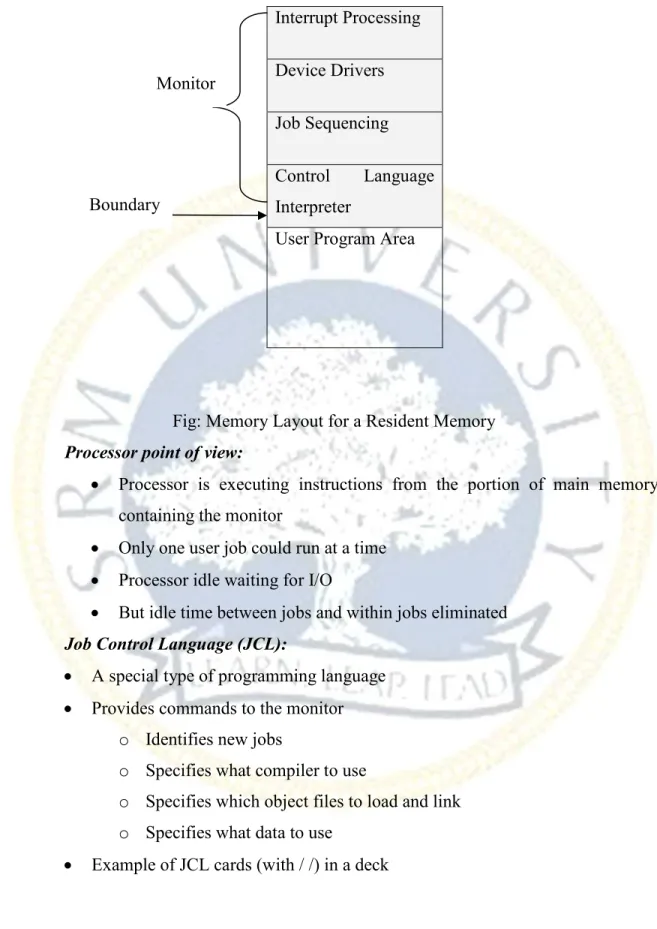
• Monitor must always in main memory and available for execution. That portion is referred as Resident Memory.
DEPARTMENT OF COMPUTER SCIENCE AND ENGINEERING Page 25 of 157 Interrupt Processing Device Drivers Job Sequencing Control Language Interpreter
User Program Area
Fig: Memory Layout for a Resident Memory
Processor point of view:
• Processor is executing instructions from the portion of main memory containing the monitor
• Only one user job could run at a time
• Processor idle waiting for I/O
• But idle time between jobs and within jobs eliminated
Job Control Language (JCL):
• A special type of programming language
• Provides commands to the monitor
o Identifies new jobs
o Specifies what compiler to use
o Specifies which object files to load and link o Specifies what data to use
• Example of JCL cards (with / /) in a deck Monitor
DEPARTMENT OF COMPUTER SCIENCE AND ENGINEERING Page 26 of 157
Hardware support for simple batch:
• Memory protection
o Does not allow the memory area containing the monitor to be altered by a job
• Timer
o Prevents a job from monopolizing the system • Privileged instructions
o Certain machine level instructions can only be executed by the monitor
l E.g. - I/O instructions (a program should not read cards of next job)
l Note: a program “requests” that the monitor perform the instruction
• Interrupts
o Allow processor to do something else while waiting for I/O o Early computer models did not have this capability
• The need for memory protection and privileged instructions led to the concept of processor modes
• A bit in the PSW register toggles the processor between user mode and kernel mode / / JOB / / FORT ⋅⋅⋅ < source program cards > ⋅⋅⋅ / / LOAD / / RUN ⋅⋅⋅ < data cards > ⋅⋅⋅ / / END
Protection
After an //END card
or an error, the
monitor flushes
cards until the next
//JOB card
DEPARTMENT OF COMPUTER SCIENCE AND ENGINEERING Page 27 of 157 • Each user program executes in user mode
o Certain privileged instructions may not be executed
o Only the program area may be referenced • The monitor executes in kernel mode
o Privileged instructions may be executed o Protected areas of memory may be accessed
(iii) Multiprogrammed batch systems:
• Several jobs resident in memory simultaneously
DEPARTMENT OF COMPUTER SCIENCE AND ENGINEERING Page 29 of 157
(iv)Time-sharing systems
• Adds an interactive computing capability to a multiprogrammed batch system
o Processor’s time is shared among multiple interactive users
o Multiple users simultaneously access the system through terminals
• Essential for transaction processing systems
• Example: Compatible Time-Sharing System (CTSS)
o First time-sharing system
o Developed at MIT in 1961 for the IBM 709
Problems:
• Multiprogramming and time sharing led to the identification of new problems
o Memory protection o File security
o Contention for resources
DEPARTMENT OF COMPUTER SCIENCE AND ENGINEERING Page 30 of 157
Microsoft Windows Overview
• Single-user multitasking OS that evolved out of MS-DOS
• Modular structure for flexibility
o Any module can be removed, upgraded, or replaced without rewriting the
entire system
• Executes on a variety of hardware platforms
o Pentium, Itanium, PowerPC, Alpha, etc.
o Provided by the Hardware Abstraction Layer (HAL)
o This isolates the operating system from platform-specific hardware
differences
• Supports applications written for other operating systems
DEPARTMENT OF COMPUTER SCIENCE AND ENGINEERING Page 31 of 157
Windows organization
• Kernel
• Consists of the most used components
o Thread scheduling o Process switching o Interrupt handling o SMP
• Does not run in threads and is not preemptible
• Executive
• Contains base operating system services
o Memory management
o Process and thread management o Security
o I/O
o Interprocess communication • Hardware abstraction layer(HAL)
Map between hardware commands and responses
• Device Drivers
• Windowing and Graphics system
User Mode Processes:
• Special system support processes
• Service Processes
• Environment subsystems
• User Applications
Windows client-server model: • Simplifies the Executive
o Possible to construct a variety of APIs • Improves reliability
o Each service runs on a separate process with its own partition of memory o Clients cannot not directly access hardware
DEPARTMENT OF COMPUTER SCIENCE AND ENGINEERING Page 32 of 157 • Provides a uniform means for applications to communicate via Local Procedure
Call (LPC)
• Provides base for distributed computing Windows threads and SMP:
• Operating system routines can run on any available processor or simultaneously on different processors
• Multiple threads of execution within a single process may execute on different processors simultaneously
• Server processes may use multiple threads to process requests from multiple processes simultaneously
• Mechanisms provided to share data and resources between processes
Windows Objects:
• Encapsulation
• Object Class and instance
• Inheritance
DEPARTMENT OF COMPUTER SCIENCE AND ENGINEERING Page 33 of 157
UNIT 2
PROCESSES
Process description and control - Process states, Process description, Process control, Processes and Threads, Symmetric Multiprocessing and Microkernels, Windows Thread and SMP Management. Case studies-UNIX, SOLARIS thread management
Process description and control
Processes:
• A program in execution
• An instance of a program running on a computer
• An entity that can be assigned to and executed on the computer
• A process is comprised of:
o Program code (possibly shared) o A set of data
o A number of attributes describing the state of the process
Process Control Block (PCB)
• While the process is running it has a number of elements including
o Identifier o State o Priority o Program counter o Memory pointers o Context data
o I/O status information o Accounting information
DEPARTMENT OF COMPUTER SCIENCE AND ENGINEERING Page 34 of 157
Process States
• The behavior of an individual process is shown by listing the sequence of instructions that are executed
• This list is called a Trace
• Dispatcher is a small program which switches the processor from one process to another
• Each process runs to completion
Program Counter
DEPARTMENT OF COMPUTER SCIENCE AND ENGINEERING Page 35 of 157
Two-State Process Model:
• Process may be in one of two states
o Running o Not-running
DEPARTMENT OF COMPUTER SCIENCE AND ENGINEERING Page 36 of 157 The creation and Termination of Processes:
Creation Termination
New batch job Normal Completion
Interactive Login Memory unavailable
Created by OS to provide a service Protection error
Spawned by existing process Operator or OS Intervention
Process Creation
• The OS builds a data structure to manage the process • Traditionally, the OS created all processes
o But it can be useful to let a running process create another
• This action is called process spawning
o Parent Process is the original, creating, process o Child Process is the new process
Reasons for Process Creation: • New Batch job
• Interactive Logon
• Created by OS to provide a service
• Spawned by existing process
Process Termination
• There must be some way that a process can indicate completion. • This indication may be:
o A HALT instruction generating an interrupt alert to the OS. o A user action (e.g. log off, quitting an application)
o A fault or error
DEPARTMENT OF COMPUTER SCIENCE AND ENGINEERING Page 38 of 157
DEPARTMENT OF COMPUTER SCIENCE AND ENGINEERING Page 39 of 157
Suspended Processes:
• Processor is faster than I/O so all processes could be waiting for I/O
o Swap these processes to disk to free up more memory and use processor
on more processes
• Blocked state becomes suspend state when swapped to disk • Two new states
o Blocked/Suspend o Ready/Suspend
DEPARTMENT OF COMPUTER SCIENCE AND ENGINEERING Page 41 of 157
Reason for Process Suspension
Reason Comment
Swapping The OS needs to release sufficient main memory to bring in a
process that is ready to execute.
Other OS Reason OS suspects process of causing a problem.
Interactive User Request e.g. debugging or in connection with the use of a resource.
Timing A process may be executed periodically (e.g., an accounting or
system monitoring process) and may be suspended while waiting for the next time.
Parent Process Request A parent process may wish to suspend execution of a descendent to examine or modify the suspended process, or to coordinate the activity of various descendants.
Process Description
DEPARTMENT OF COMPUTER SCIENCE AND ENGINEERING Page 42 of 157
Operating System Control Structures:
• For the OS is to manage processes and resources, it must have information about the current status of each process and resource.
• Tables are constructed for each entity the operating system manages
OS Control Tables
Memory Tables
• Memory tables are used to keep track of both main and secondary memory. • Must include this information:
o Allocation of main memory to processes o Allocation of secondary memory to processes
o Protection attributes for access to shared memory regions o Information needed to manage virtual memory
DEPARTMENT OF COMPUTER SCIENCE AND ENGINEERING Page 43 of 157 I/O Tables
• Used by the OS to manage the I/O devices and channels of the computer. • The OS needs to know
o Whether the I/O device is available or assigned o The status of I/O operation
o The location in main memory being used as the source or destination of
the I/O transfer
File Tables
• These tables provide information about:
o Existence of files
o Location on secondary memory
o Current Status
o Other attributes.
• Sometimes this information is maintained by a file management system
Process Tables
• To manage processes the OS needs to know details of the processes
o Current state o Process ID
o Location in memory
• Process control block
o Process image is the collection of program. Data, stack, and attributes Process Attributes
• We can group the process control block information into three general categories:
o Process identification o Processor state information o Process control information
DEPARTMENT OF COMPUTER SCIENCE AND ENGINEERING Page 44 of 157 Process Identification
• Each process is assigned a unique numeric identifier.
• Many of the other tables controlled by the OS may use process identifiers to cross-reference process tables
Processor State Information
• This consists of the contents of processor registers.
o User-visible registers o Control and status registers o Stack pointers
• Program status word (PSW)
o contains status information
o Example: the EFLAGS register on Pentium processors Pentium II EFLAGS Register:
DEPARTMENT OF COMPUTER SCIENCE AND ENGINEERING Page 45 of 157
Structure of Process Images in Virtual Memory:
DEPARTMENT OF COMPUTER SCIENCE AND ENGINEERING Page 46 of 157
Process Control
Modes of Execution:
Most processors support at least two modes of execution • User mode
o Less-privileged mode
o User programs typically execute in this mode • System mode
o More-privileged mode
o Kernel of the operating system Process Creation:
• Once the OS decides to create a new process it:
o Assigns a unique process identifier o Allocates space for the process o Initializes process control block o Sets up appropriate linkages
o Creates or expand other data structures
Process switch is switch the process state between the status like read, blocked, suspend. Mode switch is the switch the process privilege between the mode like use mode, kernel mode. Generally a mode switch is considered less expensive compared to a process switch.
Process Switching:
• Several design issues are raised regarding process switching
o What events trigger a process switch?
o We must distinguish between mode switching and process switching. o What must the OS do to the various data structures under its control to
DEPARTMENT OF COMPUTER SCIENCE AND ENGINEERING Page 47 of 157 When to switch processes?
A process switch may occur any time that the OS has gained control from the currently running process. Possible events giving OS control are:
Mechanism Cause Use
Interrupt External to the execution of the current instruction
Reaction to an asynchronous external event
Trap Associated with the execution
of the current instruction
Handling of an error or an exception condition
Supervisor call Explicit request Call to an operating system function
The steps in a process switch are:
1. Save context of processor including program counter and other registers 2. Update the process control block of the process that is currently in the
Running state
3. Move process control block to appropriate queue – ready; blocked; ready/suspend
4. Select another process for execution
5. Update the process control block of the process selected 6. Update memory-management data structure
DEPARTMENT OF COMPUTER SCIENCE AND ENGINEERING Page 48 of 157
DEPARTMENT OF COMPUTER SCIENCE AND ENGINEERING Page 49 of 157 Non-process Kernel (a)
• Execute kernel outside of any process
• The concept of process is considered to apply only to user programs
o Operating system code is executed as a separate entity that operates in privileged mode
Execution within User Processes (b)
o Operating system software within context of a user process o No need for Process Switch to run OS routine
Process-based Operating System(c)
• Process-based operating system
DEPARTMENT OF COMPUTER SCIENCE AND ENGINEERING Page 50 of 157
Processes and Threads
• Resource ownership - process includes a virtual address space to hold the process image
• Scheduling/execution- follows an execution path that may be interleaved with other processes
• These two characteristics are treated independently by the operating system
o Dispatching is referred to as a thread or lightweight process Multithreading:
• Operating system supports multiple threads of execution within a single process • MS-DOS supports a single thread
• UNIX supports multiple user processes but only supports one thread per process • Windows, Solaris, Linux, Mach, and OS/2 support multiple threads
Process:
• Have a virtual address space which holds the process image
• Protected access to processors, other processes, files, and I/O resources
Thread:
• An execution state (running, ready, etc.) • Saved thread context when not running • Has an execution stack
• Some per-thread static storage for local variables • Access to the memory and resources of its process
DEPARTMENT OF COMPUTER SCIENCE AND ENGINEERING Page 52 of 157 Benefits of Threads
• Takes less time to create a new thread than a process • Less time to terminate a thread than a process
• Less time to switch between two threads within the same process • Since threads within the same process share memory and files, they can
communicate with each other without invoking the kernel
Uses of Threads in a Single-User Multiprocessing System
• Foreground to background work • Asynchronous processing • Speed of execution
• Modular program structure
Threads
• Suspending a process involves suspending all threads of the process since all threads share the same address space
• Termination of a process, terminates all threads within the process Thread States:
• States associated with a change in thread state
o Spawn
• Spawn another thread
o Block o Unblock o Finish
DEPARTMENT OF COMPUTER SCIENCE AND ENGINEERING Page 54 of 157
Adobe PageMaker
User-Level Threads
• All thread management is done by the application • The kernel is not aware of the existence of threads
DEPARTMENT OF COMPUTER SCIENCE AND ENGINEERING Page 55 of 157
Kernel-Level Threads:
• Windows is an example of this approach
• Kernel maintains context information for the process and the threads • Scheduling is done on a thread basis
Combined Approaches • Example is Solaris
• Thread creation done in the user space
DEPARTMENT OF COMPUTER SCIENCE AND ENGINEERING Page 57 of 157
Symmetric Multiprocessing and Microkernels
• Kernel can execute on any processor
• Typically each processor does self-scheduling form the pool of available process or threads
SMP Architecture:
Categories of Computer Systems:
• Single Instruction Single Data (SISD) stream
o Single processor executes a single instruction stream to operate on data
stored in a single memory
• Single Instruction Multiple Data (SIMD) stream
o Each instruction is executed on a different set of data by the different
processors
• Multiple Instruction Single Data (MISD) stream
o A sequence of data is transmitted to a set of processors, each of which
executes a different instruction sequence. Never implemented • Multiple Instruction Multiple Data (MIMD)
o A set of processors simultaneously execute different instruction sequences
DEPARTMENT OF COMPUTER SCIENCE AND ENGINEERING Page 58 of 157
Multiprocessor Operating System Design Considerations:
• Simultaneous concurrent processes or threads • Scheduling
• Synchronization
• Memory management
• Reliability and fault tolerance Microkernels:
• Small operating system core
• Contains only essential core operating systems functions
• Many services traditionally included in the operating system are now external subsystems
o Device drivers o File systems
o Virtual memory manager
o Windowing system o Security services
DEPARTMENT OF COMPUTER SCIENCE AND ENGINEERING Page 59 of 157
Benefits of a Microkernel Organization:
• Uniform interface on request made by a process
oDon’t distinguish between kernel-level and user-level services oAll services are provided by means of message passing
• Extensibility
oAllows the addition of new services
• Flexibility
oNew features added
oExisting features can be subtracted
• Portability
oChanges needed to port the system to a new processor is changed in the
microkernel - not in the other services • Reliability
oModular design
DEPARTMENT OF COMPUTER SCIENCE AND ENGINEERING Page 60 of 157
• Distributed system support
oMessage are sent without knowing what the target machine is
• Object-oriented operating system
oComponents are objects with clearly defined interfaces that can be
interconnected to form software Microkernel Design:
• Low-level memory management
oMapping each virtual page to a physical page frame
• Interprocess Communication
DEPARTMENT OF COMPUTER SCIENCE AND ENGINEERING Page 61 of 157
Windows Thread and SMP Management
• Implemented as objects
• An executable process may contain one or more threads
• Both processes and thread objects have built-in synchronization capabilities
DEPARTMENT OF COMPUTER SCIENCE AND ENGINEERING Page 62 of 157
Windows Process Object Windows Thread Object
Windows 2000 Thread States
•
Ready
•
Standby
•
Running
•
Waiting
•
Transition
•
Terminated
DEPARTMENT OF COMPUTER SCIENCE AND ENGINEERING Page 63 of 157
CASE STUDIES: SOLARIS, UNIX, LINUX
• Process includes the user’s address space, stack, and process control block • User-level threads
• Lightweight processes (LWP) • Kernel threads
DEPARTMENT OF COMPUTER SCIENCE AND ENGINEERING Page 64 of 157
Solaris Lightweight Data Structure: • Identifier
• Priority • Signal mask
• Saved values of user-level registers • Kernel stack
• Resource usage and profiling data
• Pointer to the corresponding kernel thread • Pointer to the process structure
DEPARTMENT OF COMPUTER SCIENCE AND ENGINEERING Page 66 of 157
Linux Task Data Structure:
• State
• Scheduling information • Identifiers
• Interprocess communication • Links
• Times and timers • File system • Address space
• Processor-specific context
Linux States of a Process:
• Running • Interruptable • Uninterruptable • Stopped
DEPARTMENT OF COMPUTER SCIENCE AND ENGINEERING Page 68 of 157
UNIT 3
CONCURRENCY AND SCHEDULING
Principles of concurrency - Mutual exclusion, Semaphores, Monitors, Readers/Writers Problem; Deadlocks –Prevention- Avoidance – Detection; Scheduling: Types of scheduling – Scheduling Algorithms, Case studies-UNIX scheduling.
Concurrency
3 different contexts:
• Multiple applications: Allow processing time to be shared • Structured applications: set of concurrent processes
DEPARTMENT OF COMPUTER SCIENCE AND ENGINEERING Page 69 of 157
Principles of Concurrency
In single processor multiprogramming system, process is interleaved in time to yield the appearance of simultaneous execution.
Difficulties of Concurrency:
• Sharing of global resources
• Operating system managing the allocation of resources optimally • Difficult to locate programming errors
DEPARTMENT OF COMPUTER SCIENCE AND ENGINEERING Page 70 of 157
Competition among Processes:
• Mutual Exclusion o Critical sections
• Only one program at a time is allowed in its critical section
• Example only one process at a time is allowed to send command to the printer
• Deadlock • Starvation
Mutual Exclusion
Hardware Support:
• Interrupt Disabling
o A process runs until it invokes an operating system service or until it
is interrupted
o Disabling interrupts guarantees mutual exclusion o Processor is limited in its ability to interleave programs o Multiprocessing
• disabling interrupts on one processor will not guarantee mutual exclusion
• Test and Set Instruction
boolean testset (int i) { if (i == 0) { i = 1; return true; } else { return false; } }
DEPARTMENT OF COMPUTER SCIENCE AND ENGINEERING Page 71 of 157 • Exchange Instruction
void exchange(int register,int memory) { int temp; temp = memory; memory = register; register = temp; }
DEPARTMENT OF COMPUTER SCIENCE AND ENGINEERING Page 72 of 157
Semaphores
• Special variable called a semaphore is used for signaling
• If a process is waiting for a signal, it is suspended until that signal is sent
• Semaphore is a variable that has an integer value
o May be initialized to a nonnegative number
o Wait operation decrements the semaphore value
o Signal operation increments semaphore value
DEPARTMENT OF COMPUTER SCIENCE AND ENGINEERING Page 73 of 157
DEPARTMENT OF COMPUTER SCIENCE AND ENGINEERING Page 74 of 157
DEPARTMENT OF COMPUTER SCIENCE AND ENGINEERING Page 77 of 157
Producer/Consumer Problem:
• One or more producers are generating data and placing these in a buffer
• A single consumer is taking items out of the buffer one at time
DEPARTMENT OF COMPUTER SCIENCE AND ENGINEERING Page 78 of 157
Monitors
• Monitor is a software module
• Chief characteristics
o Local data variables are accessible only by the monitor
o Process enters monitor by invoking one of its procedures
DEPARTMENT OF COMPUTER SCIENCE AND ENGINEERING Page 79 of 157
Synchronization:
• Sender and receiver may or may not be blocking (waiting for message)
• Blocking send, blocking receive
o Both sender and receiver are blocked until message is delivered o Called a rendezvous
• Nonblocking send, blocking receive
o Sender continues on
o Receiver is blocked until the requested message arrives
• Nonblocking send, nonblocking receive
o Neither party is required to wait
Addressing:
• Direct addressing
o Send primitive includes a specific identifier of the destination process o Receive primitive could know ahead of time which process a message is
expected
o Receive primitive could use source parameter to return a value when the
receive operation has been performed
• Indirect addressing
o Messages are sent to a shared data structure consisting of queues o Queues are called mailboxes
o One process sends a message to the mailbox and the other process picks up the message from the mailbox
DEPARTMENT OF COMPUTER SCIENCE AND ENGINEERING Page 80 of 157
DEPARTMENT OF COMPUTER SCIENCE AND ENGINEERING Page 81 of 157
Readers/Writers Problem
• Any number of readers may simultaneously read the file
• Only one writer at a time may write to the file
• If a writer is writing to the file, no reader may read it
Deadlock
• Permanent blocking of a set of processes that either compete for system resources or communicate with each other
• No efficient solution
DEPARTMENT OF COMPUTER SCIENCE AND ENGINEERING Page 82 of 157
Reusable Resources:
• Used by only one process at a time and not depleted by that use
• Processes obtain resources that they later release for reuse by other processes
• Processors, I/O channels, main and secondary memory, devices, and data structures such as files, databases, and semaphores
• Deadlock occurs if each process holds one resource and requests the other
Example of Deadlock:
Resource Allocation Graphs:
DEPARTMENT OF COMPUTER SCIENCE AND ENGINEERING Page 83 of 157
Conditions for Deadlock:
• Mutual exclusion
o Only one process may use a resource at a time • Hold-and-wait
o A process may hold allocated resources while awaiting assignment of
others
• No preemption
o No resource can be forcibly removed from a process holding it
• Circular wait
A closed chain of processes exists, such that each process holds at least one resource needed by the next process in the chain
Deadlock Prevention
• Mutual Exclusiono Must be supported by the operating system • Hold and Wait
o Require a process request all of its required resources at one time • No Preemption
o Process must release resource and request again
o Operating system may preempt a process to require it releases its
resources
• Circular Wait
DEPARTMENT OF COMPUTER SCIENCE AND ENGINEERING Page 84 of 157
Deadlock Avoidance
• A decision is made dynamically whether the current resource allocation request will, if granted, potentially lead to a deadlock
• Requires knowledge of future process request
Two Approaches to Deadlock Avoidance:
• Do not start a process if its demands might lead to deadlock
• Do not grant an incremental resource request to a process if this allocation might lead to deadlock
Deadlock Avoidance:
• Maximum resource requirement must be stated in advance
• Processes under consideration must be independent; no synchronization requirements
• There must be a fixed number of resources to allocate
• No process may exit while holding resources
DEPARTMENT OF COMPUTER SCIENCE AND ENGINEERING Page 85 of 157 Strategies once Deadlock Detected:
• Abort all deadlocked processes
• Back up each deadlocked process to some previously defined checkpoint, and restart all process
o Original deadlock may occur
• Successively abort deadlocked processes until deadlock no longer exists • Successively preempt resources until deadlock no longer exists
Selection Criteria Deadlocked Processes:
• Least amount of processor time consumed so far • Least number of lines of output produced so far • Most estimated time remaining
• Least total resources allocated so far • Lowest priority
DEPARTMENT OF COMPUTER SCIENCE AND ENGINEERING Page 86 of 157
Scheduling
Aim of Scheduling:
• Assign processes to be executed by the processor(s)
• Response time
• Throughput
• Processor efficiency
Long-Term Scheduling
• Determines which programs are admitted to the system for processing
• Controls the degree of multiprogramming
• More processes, smaller percentage of time each process is executed
Medium-Term Scheduling
• Part of the swapping function
DEPARTMENT OF COMPUTER SCIENCE AND ENGINEERING Page 87 of 157 Short-Term Scheduling
• Known as the dispatcher
• Executes most frequently
• Invoked when an event occurs
o Clock interrupts o I/O interrupts
o Operating system calls o Signals
DEPARTMENT OF COMPUTER SCIENCE AND ENGINEERING Page 88 of 157
Scheduling Algorithms
• First-Come-First-Serve (FCFS)
• Round-Robin
• Shortest Process Next
• Shortest Remaining Time
DEPARTMENT OF COMPUTER SCIENCE AND ENGINEERING Page 89 of 157 First-Come-First-Serve (FCFS):
• Each process joins the Ready queue
• When the current process ceases to execute, the oldest process in the Ready queue is selected
• A short process may have to wait a very long time before it can execute • Favors CPU-bound processes
• I/O processes have to wait until CPU-bound process completes
Round-Robin (RR):
• Uses preemption based on a clock
• An amount of time is determined that allows each process to use the processor for that length of time
• Clock interrupt is generated at periodic intervals
• When an interrupt occurs, the currently running process is placed in the read queue
o Next ready job is selected
DEPARTMENT OF COMPUTER SCIENCE AND ENGINEERING Page 90 of 157 Shortest Process Next (SPN):
• Nonpreemptive policy
• Process with shortest expected processing time is selected next • Short process jumps ahead of longer processes
• Predictability of longer processes is reduced
• If estimated time for process not correct, the operating system may abort it • Possibility of starvation for longer processes
Shortest Remaining Time (SRT):
• Preemptive version of shortest process next policy • Must estimate processing time
DEPARTMENT OF COMPUTER SCIENCE AND ENGINEERING Page 91 of 157 Highest Response Ratio Next (HRRN):
• Choose next process with the greatest ratio
CASE STUDY-UNIX Scheduling
• Multilevel feedback using round robin within each of the priority queues
• If a running process does not block or complete within 1 second, it is preempted
• Priorities are recomputed once per second
• Base priority divides all processes into fixed bands of priority levels
Bands
• Decreasing order of priority
o Swapper
o Block I/O device control o File manipulation
o Character I/O device control o User processes
DEPARTMENT OF COMPUTER SCIENCE AND ENGINEERING Page 93 of 157
UNIT 4
MEMORY
Memory management requirements, Partitioning, Paging, and Segmentation; Virtual memory - Hardware and control structures, operating system software- Linux memory management, Case studies- WINDOWS memory management, UNIX and SOLARIS Memory management
Memory Management:
• Subdividing memory to accommodate multiple processes
• Memory needs to be allocated to ensure a reasonable supply of ready processes to consume available processor time
Memory Management Requirements
• Relocation
o Programmer does not know where the program will be placed in memory
when it is executed
o While the program is executing, it may be swapped to disk and returned to
main memory at a different location (relocated)
o Memory references must be translated in the code to actual physical
memory address • Protection
o Processes should not be able to reference memory locations in another process without permission
o Impossible to check absolute addresses at compile time
o Must be checked at rum time
o Memory protection requirement must be satisfied by the processor (hardware) rather than the operating system (software)
o Operating system cannot anticipate all of the memory references a
DEPARTMENT OF COMPUTER SCIENCE AND ENGINEERING Page 94 of 157
• Sharing
o Allow several processes to access the same portion of memory
o Better to allow each process access to the same copy of the program rather
than have their own separate copy • Logical Organization
o Programs are written in modules
o Modules can be written and compiled independently
o Different degrees of protection given to modules (read-only, execute-only) o Share modules among processes
• Physical Organization
o Memory available for a program plus its data may be insufficient
• Overlaying allows various modules to be assigned the same region of memory
DEPARTMENT OF COMPUTER SCIENCE AND ENGINEERING Page 95 of 157
Partitioning
Fixed Partitioning:
• Equal-size partitions
o Any process whose size is less than or equal to the partition size can be
loaded into an available partition
o If all partitions are full, the operating system can swap a process out of a
partition
o A program may not fit in a partition. The programmer must design the program with overlays
o Main memory use is inefficient. Any program, no matter how small, occupies an entire partition. This is called internal fragmentation.
DEPARTMENT OF COMPUTER SCIENCE AND ENGINEERING Page 96 of 157
Placement Algorithm with Partitions: • Equal-size partitions
o Because all partitions are of equal size, it does not matter which partition
is used
• Unequal-size partitions
o Can assign each process to the smallest partition within which it will fit o Queue for each partition
o Processes are assigned in such a way as to minimize wasted memory
DEPARTMENT OF COMPUTER SCIENCE AND ENGINEERING Page 97 of 157
Dynamic Partitioning
• Partitions are of variable length and number
• Process is allocated exactly as much memory as required
• Eventually get holes in the memory. This is called external fragmentation • Must use compaction to shift processes so they are contiguous and all free
DEPARTMENT OF COMPUTER SCIENCE AND ENGINEERING Page 98 of 157
Dynamic Partitioning Placement Algorithm:
Operating system must decide which free block to allocate to a process • Best-fit algorithm
o Chooses the block that is closest in size to the request o Worst performer overall
o Since smallest block is found for process, the smallest amount of
fragmentation is left
o Memory compaction must be done more often
• First-fit algorithm
o Scans memory form the beginning and chooses the first available block that is large enough
o Fastest
o May have many process loaded in the front end of memory that must be searched over when trying to find a free block
• Next-fit
o Scans memory from the location of the last placement
o More often allocate a block of memory at the end of memory where the
largest block is found
o The largest block of memory is broken up into smaller blocks o Compaction is required to obtain a large block at the end of memory
DEPARTMENT OF COMPUTER SCIENCE AND ENGINEERING Page 99 of 157
Buddy System:
• Entire space available is treated as a single block of 2U
• If a request of size s such that 2U-1 < s <= 2U, entire block is allocated
o Otherwise block is split into two equal buddies
o Process continues until smallest block greater than or equal to s is
DEPARTMENT OF COMPUTER SCIENCE AND ENGINEERING Page 101 of 157
Relocation
• When program loaded into memory the actual (absolute) memory locations are determined
• A process may occupy different partitions which means different absolute memory locations during execution (from swapping)
• Compaction will also cause a program to occupy a different partition which means different absolute memory locations
Addresses • Logical
o Reference to a memory location independent of the current assignment of
data to memory
o Translation must be made to the physical address • Relative
o Address expressed as a location relative to some known point • Physical
DEPARTMENT OF COMPUTER SCIENCE AND ENGINEERING Page 102 of 157
Paging
• Partition memory into small equal fixed-size chunks and divide each process into the same size chunks
• The chunks of a process are called pages and chunks of memory are called frames • Operating system maintains a page table for each process
o Contains the frame location for each page in the process
o Memory address consist of a page number and offset within the page
DEPARTMENT OF COMPUTER SCIENCE AND ENGINEERING Page 103 of 157
Segmentation
• All segments of all programs do not have to be of the same length • There is a maximum segment length
• Addressing consist of two parts - a segment number and an offset
DEPARTMENT OF COMPUTER SCIENCE AND ENGINEERING Page 105 of 157
Virtual Memory
Hardware and Control Structures:
• Memory references are dynamically translated into physical addresses at run time
o A process may be swapped in and out of main memory such that it
occupies different regions
• A process may be broken up into pieces that do not need to located contiguously in main memory
• All pieces of a process do not need to be loaded in main memory during execution Execution of a Program:
• Operating system brings into main memory a few pieces of the program • Resident set - portion of process that is in main memory
• An interrupt is generated when an address is needed that is not in main memory • Operating system places the process in a blocking state
• Piece of process that contains the logical address is brought into main memory
o Operating system issues a disk I/O Read request
o Another process is dispatched to run while the disk I/O takes place o An interrupt is issued when disk I/O complete which causes the operating
system to place the affected process in the Ready state Types of Memory:
• Real memory
o Main memory
• Virtual memory
o Memory on disk
o Allows for effective multiprogramming and relieves the user of tight
constraints of main memory Thrashing
• Swapping out a piece of a process just before that piece is needed
• The processor spends most of its time swapping pieces rather than executing user instructions
DEPARTMENT OF COMPUTER SCIENCE AND ENGINEERING Page 106 of 157
Principle of Locality
• Program and data references within a process tend to cluster
• Only a few pieces of a process will be needed over a short period of time • Possible to make intelligent guesses about which pieces will be needed in the
future
• This suggests that virtual memory may work efficiently
Paging
• Each process has its own page table
• Each page table entry contains the frame number of the corresponding page in main memory
• A bit is needed to indicate whether the page is in main memory or not
Modify Bit in Page Table:
• Modify bit is needed to indicate if the page has been altered since it was last loaded into main memory
• If no change has been made, the page does not have to be written to the disk when it needs to be swapped out
DEPARTMENT OF COMPUTER SCIENCE AND ENGINEERING Page 107 of 157
Inverted Page Table: • Page number • Process identifier • Control bits • Chain pointer
DEPARTMENT OF COMPUTER SCIENCE AND ENGINEERING Page 108 of 157
Translation Lookaside Buffer:
• Each virtual memory reference can cause two physical memory accesses
o One to fetch the page table o One to fetch the data
• To overcome this problem a high-speed cache is set up for page table entries
o Called a Translation Lookaside Buffer (TLB)
• Given a virtual address, processor examines the TLB
• If page table entry is present (TLB hit), the frame number is retrieved and the real address is formed
• If page table entry is not found in the TLB (TLB miss), the page number is used to index the process page table
• First checks if page is already in main memory
o If not in main memory a page fault is issued • The TLB is updated to include the new page entry
DEPARTMENT OF COMPUTER SCIENCE AND ENGINEERING Page 110 of 157
Page Size:
• Smaller page size, less amount of internal fragmentation • Smaller page size, more pages required per process • More pages per process means larger page tables
• Larger page tables means large portion of page tables in virtual memory • Secondary memory is designed to efficiently transfer large blocks of data so a
large page size is better
• Small page size, large number of pages will be found in main memory
• As time goes on during execution, the pages in memory will all contain portions of the process near recent references. Page faults low.
• Increased page size causes pages to contain locations further from any recent reference. Page faults rise.
Segmentation:
• May be unequal, dynamic size
• Simplifies handling of growing data structures
• Allows programs to be altered and recompiled independently • Lends itself to sharing data among processes
• Lends itself to protection
Segment Tables:
• Corresponding segment in main memory • Each entry contains the length of the segment
• A bit is needed to determine if segment is already in main memory
• Another bit is needed to determine if the segment has been modified since it was loaded in main memory
DEPARTMENT OF COMPUTER SCIENCE AND ENGINEERING Page