Technical Bulletin
726+,%$
Stratagy Hospitality Application Software
The Stratagy Voice Processing Hospitality Application software, available for use on all Stratagy systems, is designed to work in conjunction with any hotel/motel program. The software automatically programs mailboxes required for basic hotel/motel guest and administration (e.g., front desk, room service, etc.) messaging.
This bulletin provides you with information on installing the Hospitality Application on the Stratagy, integrating the Stratagy with the hotel/motel program, and examples of User ID mailboxes. This bulletin also gives information specific to the Toshiba Hospitality Management Information System (HMIS) product to assist you in installing and configuring the Stratagy Hospitality Application with the HMIS.
This bulletin covers the following subjects:
Subject See...
Hardware Page 2
Stratagy Hospitality Application Call Flow for HMIS Page 3 Installation
Step 1: Configure Stratagy for SMDI Page 3 Step 2: Configure the Integration Patterns Page 4 Custom SMDI Integration Packets Page 5 Step 3: Add Custom Integration Packets for:
PC-based Stratagy Systems Page 7
Stratagy DK and Stratagy Flash Systems Page 9 Step 4: Set up the Hospitality Application User ID Mailboxes
Stratagy Guest Messaging Page 12
Delete All Messages Page 16
Step 5: Record User ID Mailbox Greetings Page 17 Step 6: Set up Guest Room User ID Mailboxes Page 18 Step 7: Set up Hotel Administration Phones Page 18 TB40-0025
(Revised TB40-0022 Bulletin) March, 2000
Hardware
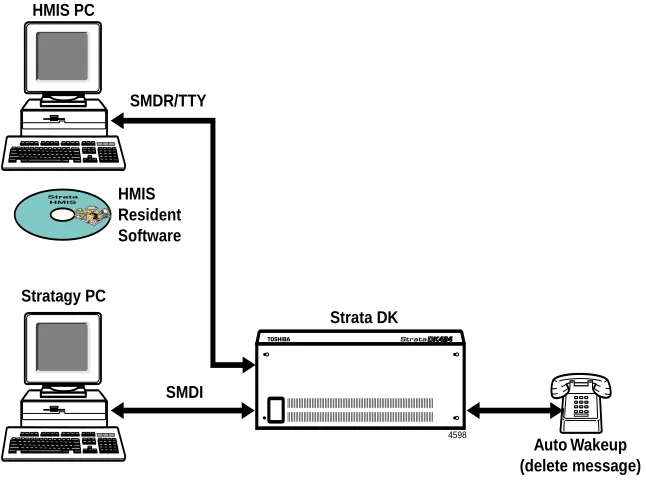
Basic hardware configurations consist of a Strata DK system, a dedicated telephone to perform Auto Wakeup (HMIS requirement), a PC with HMIS (or other hotel/motel program) software installed, and a Stratagy system with SMDI connection. See Figures 1~2 below.
Figure 1 Stratagy PC-based Systems
4598
Strata HMIS
Stratagy PC
Strata DK
Auto Wakeup (delete message) HMIS
Resident Software HMIS PC
SMDR/TTY
SMDI
4599
Stratagy Admin PC Stratagy DK
Auto Wakeup (delete message) HMIS
Resident Software HMIS PC
SMDR/TTY
SMDI Strata DK
Stratagy Hospitality Application Call Flow for HMIS
Calls route to the user mailbox via standard Strata DK call forwarding, using the standard Simplified Message Desk Interface (SMDI) Call Forward integration packet for the guest room telephone. Whenever a guest checks into the hotel, the Strata HMIS system resets the call forwarding on the guest room
telephone to Call Forward Busy/No Answer (CFBNA).
When the guest room telephone receives a call and the telephone is in CFBNA mode, the call forwards to the guest room mailbox, enabling the caller to leave a message.
If a guest chooses to not be disturbed, Call Forward-All Calls (CFAC) can be enabled on an individual room basis from the front desk terminal using the Strata HMIS system.
Installation
Installation of the Stratagy Hospitality Application software consists of the following steps:
♦ Step 1: Configure Stratagy for SMDI on Page 3. ♦ Step 2: Configure the Integration Packets on Page 4.
♦ Step 3: Add Custom Integration Packets to Stratagy on Page 7
♦ Step 4: Set up the Hospitality Application User ID Mailboxes on Page 11. ♦ Step 5: Record User ID Mailbox Greetings on Page 17.
♦ Step 6: Set up Guest Room User ID Mailboxes on Page 18. ♦ Step 7: Set up Hotel Administration Phones on Page 18
Step 1: Configure Stratagy for SMDI
Important! The Stratagy must be configured for SMDI integration when first setting up the Stratagy Voice Processing system. This sets all the proper message waiting notification for the user mailboxes.
SMDI is the most efficient way of integrating Stratagy with a telephone system. SMDI relies on data, not DTMF, to provide detailed call information that Stratagy can quickly use to direct callers to user’s mailboxes.
Data messages or packets are sent into the system to provide information concerning the type of call that is ringing into Stratagy.
For detailed instructions on connecting, enabling and configuring Stratagy for SMDI integration, see “SMDI Serial Integration” in Chapter 4 – Configuring Stratagy of the Stratagy R2 Installation and
Step 2: Configure the Integration Packets
To operate the Stratagy Hospitality Application properly, you must:
♦ Modify the default integration packets.
♦ Add several custom integration packets.
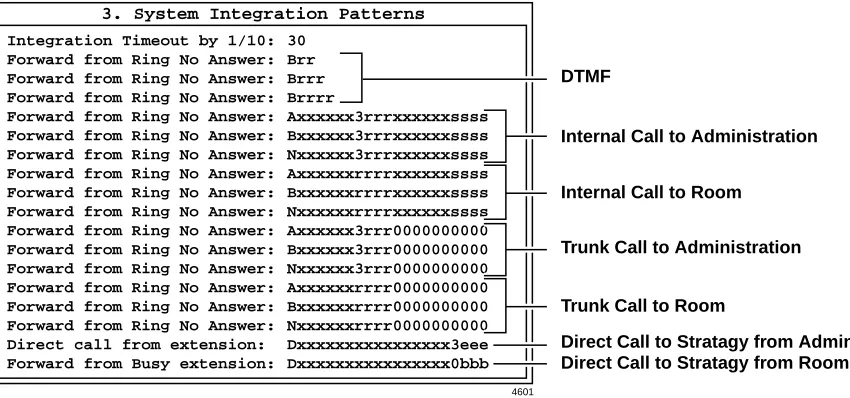
The integration packets should appear in the same order as shown in Figure 3. If they do not, the Hospitality Application still functions; however, some minor problems do arise.
For example, the Stratagy system may identify some messages as having come from the operator’s mailbox instead of from an outside party. This can be caused by having multiple integration packets that match the type of forwarding used. For instance, the first packet recognized by the Stratagy system had a “0,” where another integration packet didn’t.
Figure 3 Sample Integration Packets (4-digit room/4-digit administration)
4601
3. System Integration Patterns
Integration Timeout by 1/10: Forward from Ring No Answer: Forward from Ring No Answer: Forward from Ring No Answer: Forward from Ring No Answer: Forward from Ring No Answer: Forward from Ring No Answer: Forward from Ring No Answer: Forward from Ring No Answer: Forward from Ring No Answer: Forward from Ring No Answer: Forward from Ring No Answer: Forward from Ring No Answer: Forward from Ring No Answer: Forward from Ring No Answer: Forward from Ring No Answer: Direct call from extension: Forward from Busy extension:
30 Brr Brrr Brrrr Axxxxxx3rrrxxxxxxssss Bxxxxxx3rrrxxxxxxssss Nxxxxxx3rrrxxxxxxssss Axxxxxxrrrrxxxxxxssss Bxxxxxxrrrrxxxxxxssss Nxxxxxxrrrrxxxxxxssss Axxxxxx3rrr0000000000 Bxxxxxx3rrr0000000000 Nxxxxxx3rrr0000000000 Axxxxxxrrrr0000000000 Bxxxxxxrrrr0000000000 Nxxxxxxrrrr0000000000 Dxxxxxxxxxxxxxxxx3eee Dxxxxxxxxxxxxxxxx0bbb DTMF
Internal Call to Administration
Internal Call to Room
Trunk Call to Administration
Trunk Call to Room
Custom SMDI Integration Packets
Custom SMDI integration packets fall into three call types:
♦ Internal
♦ Trunk
♦ Direct
All call integration packets consist of 21 alpha-numeric digits broken down into 1 alpha digit for call type, 10 digits for the destination of the call and 10 digits for the source of the call.
Internal Calls
Internal calls are calls placed between the rooms and the hotel administration (e.g., room service, front desk, etc.). In the example below, a ring no answer call (N) is directed to a four-digit administration extension (3rrr) from a four-digit room extension (ssss).
Trunk Calls
Trunk calls are calls placed from the outside to either a room or the hotel administration. In the example below, an all calls forwarded call (A) is directed to a 3-digit room extension (rrr) from a 10-digit trunk call (0000000000).
Direct Calls
Direct calls are calls from a room or administration phone to the voice mail. In the example below, a direct call (D) is directed to voice mail (xxxxxxxxxx) from a four-digit administration extension (3eee).
Call Type
Destination (10-digits long)
Source (10-digits long)
N xxxxxx 3* rrr xxxxxx ssss
No Answer Fill-in 4-digit admin ext. Fill-in 4-digit room ext.
* Leading digit. Can be any digit between 1~4.
Call Type Destination
(10-digits long)
Source (10-digits long)
A xxxxxxx rrr 0000000000
All calls forwarded Fill-in 3-digit room ext. 10-digit trunk call
Call Type Destination (10-digits long)
Source (10-digits long)
D xxxxxxxxxx xxxxxx 3* eee
Direct call Fill-in Fill-in 4-digit admin ext.
Possible Configurations
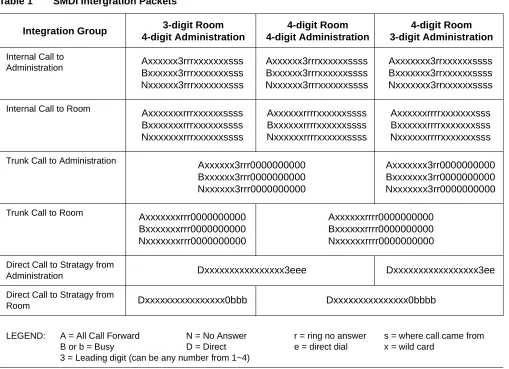
Table 1 shows the only possible room/administration configurations.
♦ 3-digit room, 4-digit administration
♦ 4-digit room, 4-digit administration
♦ 4-digit room, 3-digit administration
These packets can be used as shown in the table with one exception. The leading digit used in the
Administration extension (shown as 3 in these example packets) must be modified for your configuration (i.e., 1~4).
Table 1 SMDI Intergration Packets
Integration Group 3-digit Room 4-digit Administration
4-digit Room 4-digit Administration
4-digit Room 3-digit Administration
Internal Call to
Administration Axxxxxx3rrrxxxxxxxsss Bxxxxxx3rrrxxxxxxxsss Nxxxxxx3rrrxxxxxxxsss Axxxxxx3rrrxxxxxxssss Bxxxxxx3rrrxxxxxxssss Nxxxxxx3rrrxxxxxxssss Axxxxxxx3rrxxxxxxssss Bxxxxxxx3rrxxxxxxssss Nxxxxxxx3rrxxxxxxssss
Internal Call to Room
Axxxxxxxrrrxxxxxxssss Bxxxxxxxrrrxxxxxxssss Nxxxxxxxrrrxxxxxxssss Axxxxxxrrrrxxxxxxssss Bxxxxxxrrrrxxxxxxssss Nxxxxxxrrrrxxxxxxssss Axxxxxxrrrrxxxxxxxsss Bxxxxxxrrrrxxxxxxxsss Nxxxxxxrrrrxxxxxxxsss
Trunk Call to Administration
Axxxxxx3rrr0000000000 Bxxxxxx3rrr0000000000 Nxxxxxx3rrr0000000000 Axxxxxxx3rr0000000000 Bxxxxxxx3rr0000000000 Nxxxxxxx3rr0000000000
Trunk Call to Room
Axxxxxxxrrr0000000000 Bxxxxxxxrrr0000000000 Nxxxxxxxrrr0000000000 Axxxxxxrrrr0000000000 Bxxxxxxrrrr0000000000 Nxxxxxxrrrr0000000000
Direct Call to Stratagy from
Administration Dxxxxxxxxxxxxxxxx3eee Dxxxxxxxxxxxxxxxxx3ee
Direct Call to Stratagy from
Room Dxxxxxxxxxxxxxxxx0bbb Dxxxxxxxxxxxxxxx0bbbb
LEGEND: A = All Call Forward N = No Answer r = ring no answer s = where call came from B or b = Busy D = Direct e = direct dial x = wild card
Step 3: Add Custom Integration Packets to Stratagy
Once you have configured the integration packets, you must add them to the Stratagy system. This step covers:
♦ PC-Based Stratagy systems (see “Add Custom Integration Packets to PC-based Stratagy Systems” on Page 7)
♦ Stratagy DK and Stratagy Flash (see “Add Custom Integration Packets to Stratagy DK and Stratagy Flash Systems” on Page 9)
Add Custom Integration Packets to PC-based Stratagy Systems
1. From the Main Menu, select Shutdown by pressing Alt+S.
Stratagy prompts: Password?
2. Type the password and press
Enter. (The default password is
Stratagy, with the first letter
uppercase.)
Stratagy prompts:
Shutdown the entire system? [NY]
3. Type Y to continue
...or N to cancel shutdown and return to the Main Menu.
Stratagy reconfirms:
Really SHUTDOWN the entire system? [NY]
4. Type Y to continue
...or N to cancel shutdown and return to the Main Menu.
Stratagy starts shutdown. If any ports are in use, Stratagy delays shutting down the system for 60 seconds. At that time, Stratagy completes shutdown, cutting off any callers or users that are still active.
When shutdown is complete, the system displays the Stratagy Configuration Utility Menu.
5. From the Stratagy Configuration Utility Menu, press 6 (Other Switch Integrations).
407
5
6. From the Other Switch Integration Menu, press 3
(System Integration Patterns).
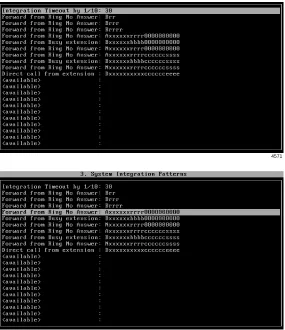
7. Using the arrow (↑↓) keys, highlight the first line that contains an SMDI integration packet.
8. Press Enter. The line is moved to the upper left corner of the screen.
9. Based on the number of digits in the room and administration extensions, change the integration line to the one shown for Internal Call to Administration in Table 1
on Page 6.
10. Press Enter again. The line is restored to its original location.
11. Highlight the next integration packet line on the screen and repeat Substeps 8~10 for all required integration packets until the System Integration Patterns table looks like Figure 3 on Page 4.
12. Press Esc twice. The changes are saved and the Stratagy Configuration Utility screen displays.
13. Press Esc again. Stratagy reboots and the Main Menu displays.
4571
Add Custom Integration Packets to Stratagy DK and Stratagy Flash Systems
1. From the Main Menu, select Tools by pressing Alt+t.
You are prompted to enter your password.
2. Type the password (the default password is Stratagy) and press Enter.
3. Select option 4 (Telephone System Configuration).
4. Select option 2 (Edit System Integration Patterns).
5. Using the arrow (↑↓) keys, highlight the first line that contains an SMDI integration packet.
6. Press Enter. The line is moved to the upper left corner of the screen. 3233
3243
4571
7. Based on the number of digits in the room and administration extensions, change the integration line to the one shown for Internal Call to Administration in Table 1
on Page 6.
8. Press Enter again. The line is restored to its original location.
9. Highlight the next integration packet line on the screen and repeat Substeps 6~8 for all required integration packets until the System Integration Patterns table looks like Figure 3 on Page 4.
10. Press Esc.
11. Select option 1 (Transmit file to Stratagy and restart Stratagy).
The changes are transmitted to Stratagy DK/Stratagy Flash and Stratagy DK/Stratagy Flash is shutdown and restarted. By shutting down and restarting Stratagy, the changes take effect.
12. Press any key to reboot.
Step 4: Set up the Hospitality Application User ID Mailboxes
The Stratagy Hospitality Application limits user access to features (i.e., listen, save, delete) by using Stratagy’s Token Programming language. The hotel guest never actually logs onto the guest room mailbox. Instead, to pick up messages, the guest dials the Master Distributed Hunt Directory Number of the Stratagy Voice Processing system.
There are two features to the basic Stratagy Hospitality Application program—Stratagy Guest Messaging and Delete All Messages.
Using one of several customized SMDI integration packets added to Stratagy (“Step 3: Add Custom Integration Packets to Stratagy” on Page 7) and busy chain of the guest room mailbox, the hotel guest’s call is sent to the “Mailbox Log On” User ID (default mailbox 1100) of the Stratagy Hospitality Application.
This section lists the Hospitality Application software User ID mailboxes in numerical order (starting with 1100) along with, as a reference, the description in the Comment field. Each User ID mailbox includes the tokens being used and an explanation of each token’s operation.
All of the User ID mailboxes for the Stratagy Hospitality Application should have the following options set, unless otherwise noted:
Do Not Disturb: OFF
Group 1: 99 (ensures User ID Mailboxes start at mailbox 1100)
Group 2: 0 (except for User ID Mailbox 1100)
User ID Mailboxes 1107, 1109, 1112, and 1114
The token string for the SMDI integration packet (to turn off the message waiting light on the guest room telephone) in these sample User ID mailboxes uses COM port 2 as the RS-232 connection to the Strata DK telephone system and a three-digit guest room extension.
Important! If your installation uses a different COM port or a four-digit room extension, you must modify this token string.
For example: @=(%S9,1)S(2,’RMV:MWI 0000000%S0!\D’)G(1110)
Stratagy Guest Messaging
Enables callers to leave messages for hotel guests. When the guest checks for messages, he/she can only listen to, save or delete the messages. The guests do not have access to any of the normal features available to the Stratagy business user.
User ID Mailbox 1100: Mailbox Log On
User ID Mailbox 1101: Initial Menu
User ID Mailbox 1102: Message Menu
Comment MailboxLogOn
Group 2 1 (Allows access to this mailbox from other mailboxes.)
Extension @=(%S0,%P)=(%S9,1)
@ Suppress normal process.
=(%S0,%P) Create %S0 as the number of the previously accessed User ID Mailbox.
=(%S9,1) Create %S9 with a value of 1. %S9 is the message number played.
Done Chain 1111
RNA Chain 1101
Comment InitialMenu
Extension @P(M,%S0)M(G1,2,40)
@ Suppress normal process.
P(M,%S0) Play the number of messages in User ID Mailbox %S0.
M(G1,2,40) Play greeting 1 and wait for menu choice.
Done Chain 1107
RNA Chain 999
Menu 1 1105
Menu 9 999
Greeting 1 “To play your messages press 1. To quit press 9.”
Comment MessageMenu
Extension @M(G1,2,40)
@ Suppress normal process.
M(G1,2,40) Play greeting 1 and wait for menu choice.
RNA Chain 999
Menu 1 1106
Menu 2 1105
Menu 3 1104
Menu 9 999
User ID Mailbox 1103: Decrement Message Number
User ID Mailbox 1104: Increment Message Number
User ID Mailbox 1105: Play Message
User ID Mailbox 1106: Delete Message
Comment DecrementMsgNmbr
Extension @I(%S9,=,1,1108)+(%S9,-1)
@ Suppress normal process.
I(%S9,=,1,1108) If the value of %S9 is 1, go to User ID Mailbox 1109.
+(%S9,-1) Decrease the value of %S9 by 1.
RNA Chain 1108
Comment IncrementMsgNumbr
Extension @+(%S9,1)
@ Suppress normal process.
+(%S9,1) Increase the value of %S9 by 1.
RNA Chain 1105
Comment PlayMessage
Extension @P(MN%S9,%S0)
@ Suppress normal process.
P(MN%S9,%S0) Play message number %S9 out of User ID Mailbox %S0.
Done Chain 1107
RNA Chain 1102
Comment DeleteMessage
Extension @KD(%S9,N,%S0)P(G1)M(G2,2,40)
@ Suppress normal process.
KD(%S9,N,%S0) Delete message number %S9 from User ID Mailbox %S0.
P(G1) Play greeting 1.
M(G2,2,40) Play greeting 2 and wait for menu choice.
RNA Chain 999
Menu 1 1105
Menu 9 1112
Greeting 1 “Message deleted.”
User ID Mailbox 1107: End of Messages
Note This mailbox may need to be modified. See “User ID Mailboxes 1107, 1109, 1112, and 1114” on Page 11 for additional information on this mailbox.
User ID Mailbox 1108: Start Of Messages
User ID Mailbox 1109: Replay Messages
Note This mailbox may need to be modified. See “User ID Mailboxes 1107, 1109, 1112, and 1114” on Page 11 for additional information on this mailbox.
Comment EndOfMessages
Extension @S(2,’RMV:MWI 0000000%S0!\D’)+(%S9,-1)M(G1,2,40)
@ Suppress normal process.
S(2,’RMV:MWI 0000000%S0!\D’) Turn off message waiting for User ID Mailbox %S0.
+(%S9,-1) Decrease the value %S9 by 1.
M(G1,2,40) Play greeting 1 and wait for menu choice.
RNA Chain 999
Menu 1 1109
Menu 9 1112
Greeting 1 “Press 1 to hear saved messages or press 9 to quit.”
Comment StartOfMessages
Extension @M(G1,2,40)
@ Suppress normal process.
M(G1,2,40) Play greeting 1 and wait for menu choice.
RNA Chain 999
Menu 1 1109
Menu 9 999
Greeting 1 “End of messages. Press 1 to hear your saved messages or press 9 to quit.”
Comment ReplayMessages
Extension @=(%S9,1)S(2,’RMV:MWI 0000000%S0!\D’)G(1110)
Change to appropriate COM port number. @ Suppress normal process.=(%S9,1) Reset value %S9 to 1.
S(2,’RMV:MWI 0000000%S0!\D’) Turn off message waiting for User ID Mailbox %S0.
G(1110) Go to User ID Mailbox 1110.
User ID Mailbox 1110: Verify There Are Saved Messages
User ID Mailbox 1111: No Saved Messages
User ID Mailbox 1112: Turn Off Message Waiting
Note See “User ID Mailboxes 1107, 1109, 1112, and 1114” on Page 11 for additional information on this mailbox.
Comment VerifyMessages
Extension @I(%M(%S0),=,0,1111)
@ Suppress normal process.
I(%M(%S0),=,0,1111) If the number of messages in User ID Mailbox %S0 equal 0, go to User ID Mailbox 1111.
RNA Chain 1105
Comment NoMessages
Extension @P(G1)G(999)
@ Suppress normal process.
P(G1) Play greeting 1.
G(999) Go to User ID Mailbox 999 for hang up.
Greeting 1 “You have no messages to listen to.”
Comment TurnOffMWI
Extension @S(2,’RMV:MWI 0000000%S0!\D’)
@ Suppress normal process.
S(2,’RMV:MWI 0000000%S0!\D’) Turn off message waiting for User ID Mailbox %S0.
Done Chain 999
RNA Chain 999
Delete All Messages
When a guest checks out of the room, this application enables the Strata HMIS system to automatically delete all messages in the guest room mailbox. This application can also be run manually by the hotel staff without the Strata HMIS system.
The following group of User ID Mailboxes deletes all messages from the guest room User ID Mailboxes when the guest checks out. To protect against accidental access to this application, group 1 for all of these mailboxes is 98. All other groups for these mailboxes are 0 except for User ID Mailbox 1113. User ID Mailbox 1113 has group 1 as 98 and group 2 is 1. This ensures the user accesses this application only from the beginning User ID Mailbox of 1113.
User ID Mailbox 1113: Delete Messages Main
Note For HMIS, create a mailbox on Stratagy with the same User ID as the Auto Wakeup telephone extension. Set the mailbox’s busy chain to 1113.
User ID Mailbox 1114: Initialize Values
Note See “User ID Mailboxes 1107, 1109, 1112, and 1114” on Page 11 for additional information on this mailbox.
Comment DeleteMsgsMain
Extension @R(G1,%S0,70)P(G2)P(%S0)M(G3,2,40)
@ Suppress normal process.
R(G1,%S0,70) Play greeting 1. Store DTMF response from the caller as value %S0.
P(G2) Play greeting 2.
P(%S0) Play value %S0.
M(G3,2,40) Play greeting 3 and wait for menu choice.
RNA Chain 999
Menu 1 1114
Menu 2 1113
Menu 9 999
Greeting 1 “Please enter the room number to delete all messages from.”
Greeting 2 “You entered ...”
Greeting 3 “Press 1 to clear all messages from this mailbox. Press 2 to enter another mailbox or press 9 to quit.”
Comment InitializeValues
Extension @=(%S5,1)=(%S6,%M(%S0))I(%S6,=,0,1116)S(2,’RMV:MWI 0000000%S0!\D’)
@ Suppress normal process.
=(%S5,1) Create %S5 with a value of 1.
=(%S6,%M(%S0) Add the number of messages in User ID Mailbox %S0 to value %S6.
User ID Mailbox 1115: Delete Messages
User ID Mailbox 1116: All Messages Deleted
Step 5: Record User ID Mailbox Greetings
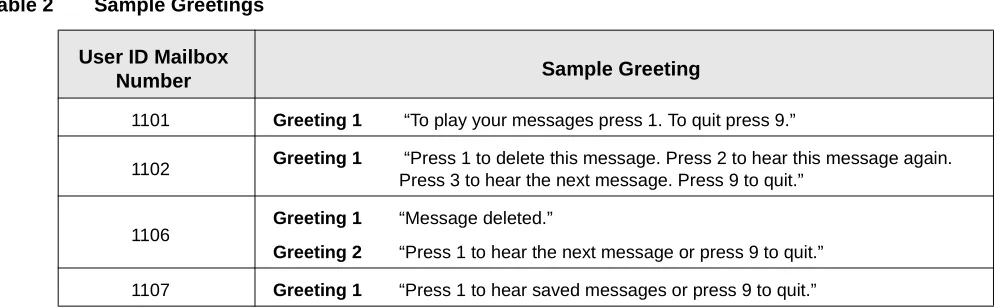
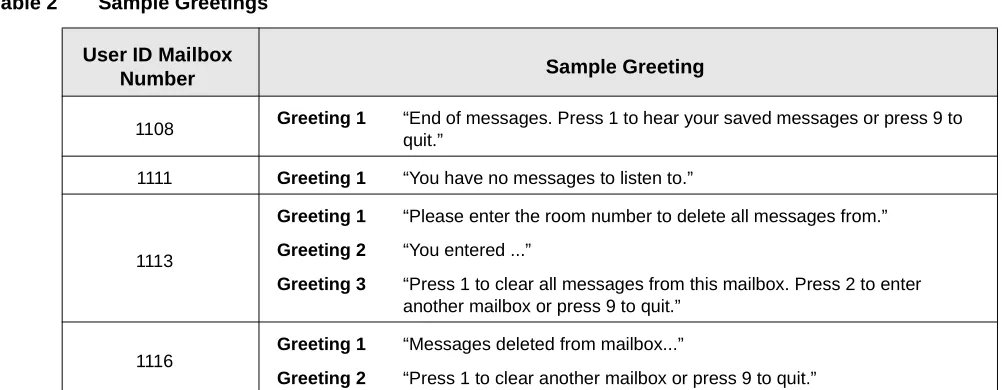
Sample greetings are included for User ID mailboxes that require recorded greetings (see Table 2) . You may want to word the greeting differently; however, we recommend that you retain the substance of the sample greetings.
Comment DeleteMessages
Extension @KD(1,N,%S0)+(%S5,1)I(%S5,>,%S6,1116)
@ Suppress normal process.
KD(1,N,%S0) Delete message 1 from User ID Mailbox %S0.
+(%S5,1) Increase the value of %S5 by 1.
I(%S5,>,%S6,1116) If the value of %S5 is greater than the value of %S6, go to User ID Mailbox 1116.
RNA Chain 1115
Comment AllMsgsDeleted
Extension @P(%S6)P(G1)P(%S0)M(G2,1,70)
@ Suppress normal process.
P(%S6) Play value %S6.
P(G1) Play greeting 1.
P(%S0) Play value %S0.
M(G2,1,70) Play greeting 2 and wait for menu choice.
Done Chain 999
RNA Chain 999
Menu 1 1113
Menu 9 999
Greeting 1 “Messages deleted from mailbox...”
Greeting 2 “Press 1 to clear another mailbox or press 9 to quit.”
Table 2 Sample Greetings
User ID Mailbox
Number Sample Greeting
1101 Greeting 1 “To play your messages press 1. To quit press 9.”
1102 Greeting 1 “Press 1 to delete this message. Press 2 to hear this message again. Press 3 to hear the next message. Press 9 to quit.”
1106
Greeting 1 “Message deleted.”
Greeting 2 “Press 1 to hear the next message or press 9 to quit.”
Step 6: Set up Guest Room User ID Mailboxes
Note It is recommended that the guest room’s mailbox number match the guest room number.
All of the User ID mailboxes for the corresponding guest rooms should have the Saved Message Queue set to NO.
User ID Mailbox XXX: Guest Room XXX (where XXX = guest room number)
Step 7: Set up Hotel Administration Phones
User ID Mailbox XXX: Hotel Administration Phones
1108 Greeting 1 “End of messages. Press 1 to hear your saved messages or press 9 to quit.”
1111 Greeting 1 “You have no messages to listen to.”
1113
Greeting 1 “Please enter the room number to delete all messages from.”
Greeting 2 “You entered ...”
Greeting 3 “Press 1 to clear all messages from this mailbox. Press 2 to enter another mailbox or press 9 to quit.”
1116
Greeting 1 “Messages deleted from mailbox...”
Greeting 2 “Press 1 to clear another mailbox or press 9 to quit.”
Comment GuestRoomXXX
Extension XXX (where XXX = guest room extension number) Busy Chain 1100
Comment AdminRoomXXX
Extension 3XXX (where XXX = admin extension number) Notify Method
MSG ON @S(2,’OP:MWI 0000003%U!\D’)
MSG OFF @S(2,’RMV:MWI 0000003%U!\D’) Table 2 Sample Greetings
User ID Mailbox