IJEDR1502012
International Journal of Engineering Development and Research (www.ijedr.org)58
Android System Power and Performance Analyzer
1
Diraj H S, 2Sneha.N.Shanbhag, 3Rajashekar Murthy S
1Student, 2Student, 3Associate Professor
Department of information science Engineering, Rashtreeya Vidhyalaya College of engineering Bangalore, India.
________________________________________________________________________________________________________
Abstract - Energy consumption is a first-order concern for battery-driven smart phones. They are devices with limited number of resources such as memory, CPU etc. Power Management policy is employed in android to maximize battery life. The WakeLock mechanism in android allows developers to explicitly prevent the resources such as CPU, display from entering sleep mode. This mechanism is required in some applications where the resources have to be held for long durations without entering sleep state which drains the battery at very fast rate. To solve this, we have developed system level application, which detect applications holding these WakeLock bugs and provide enough information about the application along with the option to kill those processes. We install this application along with other applications to detect WakeLock bugs in them and analyze the battery performance.
Index Terms - Android, Battery, WakeLock
________________________________________________________________________________________________________
I. INTRODUCTION
Smart phones have become pervasive over the last few years with rapid development in mobile technology. However, power consumption in these devices has become an important issue in the past few years. This is due to the fact that, these devices have limited battery capacity, memory and CPU. Battery drains at a faster rate for some applications compared to others. Many power saving mechanisms have been developed, but their efficiency is hardly noticeable. WakeLock is a key concept in Android Power Management. For example, if a file is being downloaded from the Internet, a WakeLock can prevent the CPU from going to sleep when the device is turned off.
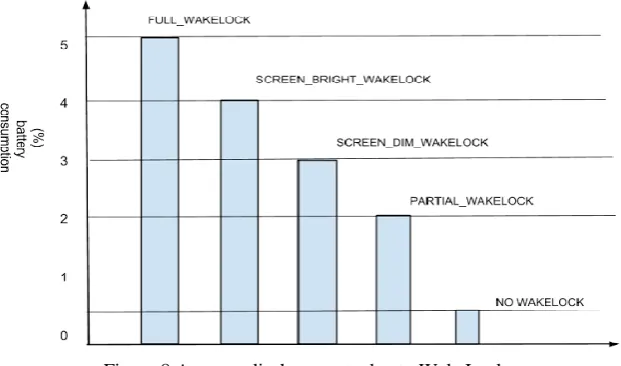
WakeLock is a mechanism that guarantees a mobile device stays awake without entering the sleep mode even when the screen is turned off. This mechanism is provided in Android as APIs. These APIs help the developers to acquire and release the appropriate WakeLock for their application. It is up to the developer to release the WakeLock appropriately; otherwise energy will be drained unnecessarily. Approximately 5% - 25% of battery is drained per hour when WakeLock is not released after its intended purpose.
In this paper, we propose a dynamic approach to detect WakeLock bugs and reduce energy wastage. We provide information about the WakeLock such as CPU usage, memory, and whether the WakeLock can cause unnecessary battery drain. Depending on these parameters, the user the option to kill the application explicitly, this releases the acquired WakeLock. The user cannot kill the kernel level processes, which are holding WakeLock, as they are necessary for proper functioning of the Android operating system. The application also detects the WakeLock bugs when the device screen is off and automatically kills them if they are not performing any useful task. Once they are killed, the killed processes list is notified to the user. The application is tested against other applications to detect WakeLock bugs and the performance of battery is noted.
The rest of the paper is organized as follows. The background is presented in Section II. Section III provides the system architecture and its implementation as a user-level tool. Section IV describes its evaluation with real-life applications. Related work and Conclusion is presented in Section V and Section VI, respectively.
II. BACKGROUND
This section gives a brief description about the hardware platform of Android smart phones and the power management in Android.
A. Hardware Platform
An Android Smartphone typically contains two processors: an application processor (APU) and a baseband processor (BP). An APU is a system-on-chip (SoC) that can run an operating system and applications software. This processor is often used to manage all the software on the device. The current generation APU’s have high performance CPU cores, powerful hardware accelerators, and many interfaces. A BP is a hardware device that manages all the radio functions (functions requiring an antenna). Radio control functions have strict requirements on timing, and a real-time operating system is often required for a high performance BP. A BP doesn’t go into sleep mode, but it consumes less power when idle compared to APU. Android Power management puts the APU in sleep mode to reduce energy wastage. The reason that WakeLock bugs waste power is because they prevent the APU from entering the sleep mode when it should be the case.
B. Power Management
IJEDR1502012
International Journal of Engineering Development and Research (www.ijedr.org)59
when there is some interaction with the user such as power key pressed, and the system changes to resume state, upon which all the device components then work properly.Table I shows the different types of WakeLock’s available and the components that are controlled by each WakeLock type. It can be implemented in user level and kernel level.
TABLE I: WAKELOCK TYPES IN ANDROID
WakeLock Type CPU Screen Keyboard
PARTIAL_WAKE_ LOCK On Off Off
SCREEN_DIM_WAKE_LOCK On Dim Off
SCREEN_BRIGHT_ WAKE_LOCK On Bright Off
FULL_WAKE_LOCK On Bright Bright
All the WakeLocks keep the CPU always on, and the WakeLocks except for PARTIAL_WAKE_LOCK, keep the screen light and keyboard backlight always on. When PARTIAL_WAKE_LOCK is acquired, it prevents the device from going into sleep mode and is not affected by screen state (on / off). Thus, for all other WakeLocks except PARTIAL_WAKE_LOCK, if the user turns off the screen by pressing the power button, the device can enter the sleep state.
The kernel WakeLocks are low-level WakeLocks that can be acquired/released only from the Linux kernel. Developers cannot take direct control of kernel WakeLocks. However, applications can trigger these WakeLocks indirectly and drain the battery.
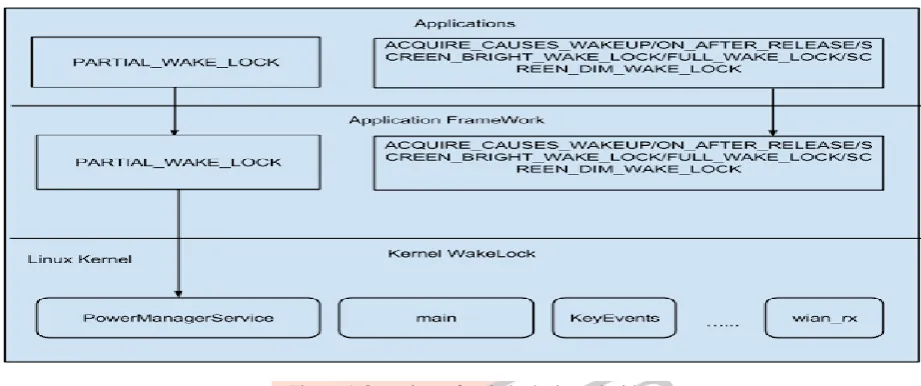
Figure 1 show how each type of WakeLock acquired by developers at the Applications layer is mapped into a
Figure 1 Overview of wakelocks in android
corresponding type of WakeLock in the Applications Frame work layer. Only PARTIAL_WAKE_LOCK type at the user level is mapped to a kernel WakeLock called “PowerManagerService”. “PowerManager” and “PowerManager.WakeLock” are the two classes provided by Android framework to support power management and WakeLock functionality. Figure 2 illustrates the basic WakeLock usage. During runtime, the control flow can take any path in the code that can skip the WakeLock release statement, leading to WakeLock bug and causing energy waste.
IJEDR1502012
International Journal of Engineering Development and Research (www.ijedr.org)60
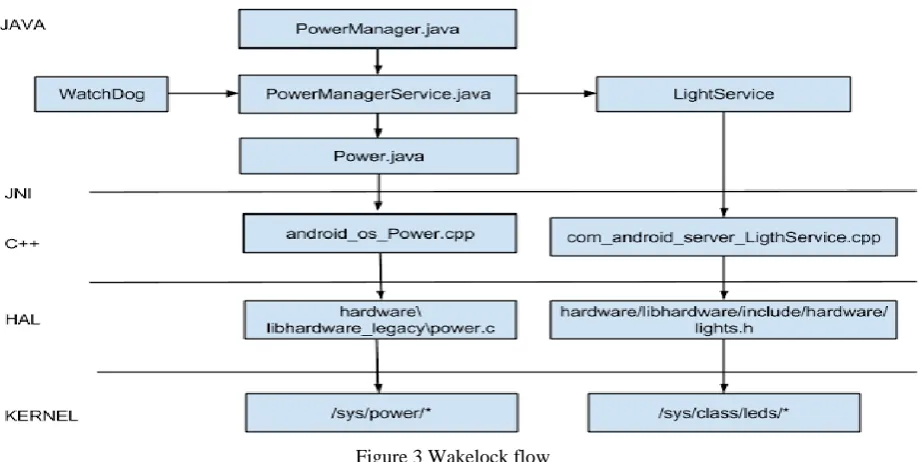
Figure 3 Wakelock flowFigure 3 shows the complete WakeLock flow from Android framework down to Linux kernel. System service “PowerManagerService” takes the requests, when a WakeLock is created and acquired via PowerManager’s API via the binder IPC mechanism. For PARTIAL_WAKE_LOCK requests, PowerManagerService will call the method in Android_os_power.cpp to deal with the request via JNI, which will read/write Linux kernel Sysfs. PowerManagerService keeps the count of PARTIAL_WAKE_LOCK. It is incremented/decremented for every acquire/release of PARTIAL_WAKE_LOCK respectively. If the count reaches to zero, PowerManagerService will inform the Linux power management that the device is ready to enter the sleep mode.
III. SYSTEM DESIGN OF WLMAS A. Architecture of WLMaster
WLMaster is a system application that needs to be installed along with the Android code that is being installed on the device, since this application requires “root” access. WLMaster is designed a runtime application that detects WakeLock bugs when the device screen is turned on/off. The WakeLock data can be obtained through the Android Debug Bridge (adb) shell command “dumpsys”. This command has a large number of arguments. Here we pass “power” as the argument to obtain the current WakeLock data. This data contains both system and user level WakeLocks. Figure 4 shows the architecture of WLMaster. WLMaster’s main feature consisting of three modules named DumpWakeLock, screenOffProcessing and screenOnProcessing respectively.
DumpWakeLock module dumps the currently held WakeLocks in the device by the adb shell command “dumpsys power” and processes the raw data to a format recognizable by other two modules. This format includes information such as: uid, pid and type of WakeLock. screenOffProcessing gets the WakeLock data when the device screen turns off. This is implemented as a service, which is started when the Android system broadcasts to all applications that the screen is turned off. screenOnProcessing processes the WakeLocks when the device screen is on and it processes all kind of WakeLocks, while screenOffProcessing module process PARTIAL_WAKE_LOCK.
Figure 4 Architecture of WLmaster
IJEDR1502012
International Journal of Engineering Development and Research (www.ijedr.org)61
Overhead: The overhead of WLMaster mainly comes from the screenOffProcessing module. To evaluate the overhead, we run the “top” command for 25 times when the screen goes off, and calculate the average CPU used by our application during this time. Around 1% battery is used during this time as per the average result analysis. Thus, the total overhead of WLMaster is small and can be neglected.B. Key techniques and implementation
Now we explain the key techniques and implementation of WLMaster here.In Figure 5, there are two independent processing flows that start to handle WakeLock bugs.
Figure 5 Processing flow
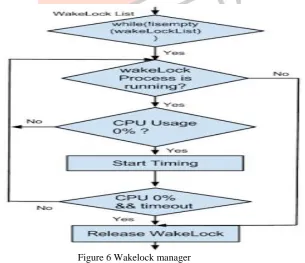
The flow on the left is the screenOnProcessing module, and the right one is the screenOffProcessing module. Both modules get the WakeLock list from the DumpWakeLock module. From this data, both the modules filter only those WakeLock processes with UID greater than 10000, since processes with UID less than 10000 are system level applications and it is not recommended to alter such processes. From this filtered list, the WakeLock manager will decide whether a bug exists or not and then handles it accordingly as described in Figure 6.
Once the WakeLock list is obtained, it has to be decided whether that WakeLock is a bug or not. An application in sleep mode should not be deprived of its WakeLock, if it’s performing some useful task. Since, in sleep mode, no application can perform any task without acquiring suitable WakeLock. With this reasoning we take the average CPU usage over a period of time to determine if the application is performing some task. Thus, WakeLock manager decides to release this WakeLock.
Figure 6 Wakelock manager
IJEDR1502012
International Journal of Engineering Development and Research (www.ijedr.org)62
useful task, and is currently interrupted for some I/O to complete. In that case, releasing the WakeLock would be highly inappropriate. Hence, we keep a waiting time, and check the CPU usage for those processes in that duration and compute the average. Statistical data from show that 70% applications always utilize CPU until releasing WakeLock, and the rest take a pause for an average of 5 seconds or less. We set 60 seconds as timeout to confirm that an application is holding WakeLock but not performing any useful task. If its CPU usage continues to be zero until the timeout, WakeLockManager predicts that the respective WakeLock is a bug and releases it. In summary, WakeLockManager releases the acquired WakeLock under either of two conditions: the corresponding process is in stopped state explicitly, or its CPU usage is at zero for prescribed period of time. Once the bug is identified, the best way to handle it is to release the WakeLock. However, in Android we cannot release the WakeLock acquired by one process from another process because Android OS is designed to protect each individual application from being attacked by other applications for security issues. However, we can release the WakeLock explicitly, which is to stop the application that contains a WakeLock bug. To stop an application, we need to set appropriate permissions in AndroidManifest.xml file and then we use ActivityManager class API’s to force stop the application.IV.REAL APPLICATION EVALUATION
In this section, we first show how the WakeLock bug affects the battery performance and then we show our application in action along with other applications to detect WakeLock bugs at runtime and analyze the data traces collected. All the testing is carried out on two devices: Motorola Moto G 2nd Generation. The two devices are chosen to be same so that, data traces shouldn't be affected by other parameters. Also, during analysis we kept it in airplane mode, so that extra parameters do not come into picture which can lead to wrong conclusions (wi-fi, bluetooth and more). All the installed applications for testing are listed in Table II.
Application Type Application
Instant Messaging FB Messenger/yixin/hike/telegram
player mx/kuwo hd/vlc
game pvz2/angry birds/temple run/fruit ninja/chess free
browser dolphin/opera/chrome/UC/firefox
Table II: Installed and tested applications A. Wasted Power
To get an estimate of wasted power due to WakeLock bugs, we collected data from two sets. One set contained battery data with the WakeLock bug and the other set contained the same data without the bug. The battery consumption details of both the sets are summarized in Table III.
Phone Type Motorola Moto G 2nd Gen.
Data Type Bug-free With-Bug
Duration 2h 2h
Battery Discharge 10% 19%
Average 5% 9.5%
Table III Battery discharge statistics
Both the phones were kept idle for a period of time (30 minutes) and then raw-data was collected. This process was repeated for a certain time period of time (2-3 hours) and the average battery drain on both devices was computed, which is shown in Table III. From the Table, on can clearly state that, there is a significant battery drain rate with the WakeLock bug. This significant energy wastage proves that the WakeLock bug is indeed a battery hog.
B. Field Test
IJEDR1502012
International Journal of Engineering Development and Research (www.ijedr.org)63
7(a) Trace before handling bugHaving understood the WakeLock mechanism, it can be deduced that applications such as Instant messaging, audio and video players, Download managers are some of the common applications which uses the WakeLock mechanism. We downloaded 20 popular applications and we found out two applications having the WakeLock bug.
Figures 7(a), 7(b) are the WakeLock bug trace collected from Motorola Moto G 2nd Gen that lasts for an hour. Figure 7(a) represents original trace, and the trace in Figure 7(b) is collected with WLMaster installed. It can be seen from that most WakeLock’s acquired by an application are for a very short duration of time.
7(b) Handling after tracing bug
The two dotted lines in Figure 7(a) are of particular interest. They are the WakeLock’s that are acquired but not released for a very long duration and also their CPU usage was 0% (average) for the specified duration. Hence, these are the WakeLock bugs that are to be released. Figure 7(b) shows the trace after these two bugs are handled appropriately by WLMaster. In the worst case, the bug drains the battery about 10-15% per hour. By removing these bugs, the device goes into sleep mode and hence energy is saved by keeping battery drain at low rates.
IJEDR1502012
International Journal of Engineering Development and Research (www.ijedr.org)64
Figure 8 Average discharge rate due to WakeLock
V.RELATED WORK
Smartphone are limited resource devices. Hence, they must be utilized efficiently for prolong use. Many efforts have been made to manage and reduce the power consumption for smart phones, which mainly focuses on three aspects: power estimation, energy debugging, and power reduction. An online approach was proposed by Zhang et al. [8] to estimate power consumption accurately without using a power meter. Linear regression approach is the most common methodology adopted to construct their power model [8, 9, 11-14]. Works in [16-18] concentrate on diagnosing and debugging energy bugs in applications.
Pathak et al. [3] made the first advances towards understanding and automatically detecting software energy bugs on smart phones. It was a static approach, in which the code flow paths were analyzed to detect a path such that WakeLock is acquired, but not released. Sharing the same goal, our work makes an effort to detect WakeLock bugs at runtime and handle them to reduce energy wastage. Different from previous work, WLMaster detects the bugs at runtime and cleans them automatically if the screen is off, or else the user can also launch the application and manually see the bug details and kill them. Hence, the user is notified about the bug in both ways, which can help the battery performance without having to recompile the kernel.
VI. CONCLUSION
Abnormal battery drain in smart phones comes from the misuse of OS power management facility. Since, the code for many applications will not be available; the only way to handle these energy bugs is to perform a runtime check and correction against buggy applications.
In this work, we focus on WakeLock bugs in Android environment. WakeLock is the cornerstone for Android Power Management framework. The main contribution of this paper is a runtime WakeLock bug detection and also to provide information about it to the user. This is implemented as a tool known WLMaster developed by us. The detection is done automatically at runtime, and it runs irrespective of the screen state. In a field test using popular apps from the Internet, WLMaster successfully identified few WakeLock bugs caused by those apps. By debugging them, the device is safe from unexpected battery drain.
VII.REFERENCES
[1] Android WakeLock Mechanism, http://developer.android.com/reference/android/os/PowerManager.WakeLock.html. [2]Android sdk, http://developer.android.com/sdk/index.html.
[3] A. Pathak, Y. C. Hu, and M. Zhang, ”What is Keeping my Phone Awake? Characterizing and Detecting No-sleep Energy Bugs in Smartphone Apps”. In MobiSys, 2012.
[4] P. Vekris, R. Jhala, S. Lerner, Y. Agarwal, ”Towards Verifying Android Apps for the Absence of No-Sleep Energy Bugs”. In HotPower, 2012.
[5] K. Kim, H. Cha, ”WakeScope: Runtime WakeLock Anomaly Management Scheme for Android Platform”. In EMSOFT 2013. [6] Android PowerManagerService,
https://github.com/android/platformframeworks/base/blob/master/services/java/com/android/server/power/PowerManagerService.java. [7] Android AlarmManager, http://developer.android.com/reference/android/app/AlarmManager.html.
[8] L. Zhang, B. Tiwana, Z. Qian, Z. Wang, R. Dick, Z. Mao, and L. Yang, ”Accurate Online Power Estimation and Automatic Battery Behavior based Power Model Generation for Smartphones”. In CODES+ISSS, 2010.
[9] C. Yoon, D. Kim, W. Jung, and C. Kang, ” Appscope: Application energy metering framework for android smartphone using kernel activity monitoring,” in Proc. of USENIX ATC 12, 2012.
[10] A. Pathak, Y. C. Hu, and M. Zhang. ”Where is the energy spent inside my app? Fine grained energy accounting on smartphones with eprof”. In EuroSys, 2012.
IJEDR1502012
International Journal of Engineering Development and Research (www.ijedr.org)65
[12] W. Jung, C. Kang, C. Yoon, D. Kim, and H. Cha. ”DevScope: A Nonintrusive and Online Power Analysis Tool for Smartphone Hardware Components”. In CODES+ISSS 2012[13] F. Xu, Y. Liu, Q. Li, and Y. Zhang. V-edge: ”Fast self-constructive power modeling of smartphones based on battery voltage dynamics”. In NSDI’13, 2013.
[14] A. Shye, B. Scholbrock, and G. Memik, ”Into the wild: studing real user activity patterns to guide power optimizations for mobile architectures”. In MICRO, 2009.
[15] A. Pathak, Y. C. Hu, M. Zhang, P. Bahl, and Y.M. Wang, ”Fine-grained powermodeling for smartphones using system- call tracing”. In EuroSys, 2011.
[16] A. J. Oliner, et al., ”Carat: Collaborative energy diagnosis for mobile devices”. In SenSys, 2013.
[17] A. Pathak, Y. C. Hu, and M. Zhang, ”Bootstrapping energy debugging for smartphones: A first look at energy bugs in mobile devices,” in Proc. of Hotnets, 2011.
[18] L. Zhang, M. Gordon, R. Dick, Z. Mao, P. Dinda and L. Yang, ”ADEL: An Automatic Detector of Energy Leaks for Smartphone Applications”. In CODES+ISSS, 2012.